Most Windows Server overspending comes from three mistakes: licensing too few or too many cores, choosing the wrong edition for the number of virtual machines, and forgetting that every user or device also needs a CAL. This Windows Server Licensing Guide explains core-based licensing, CALs, Standard vs. Datacenter, virtual machine rights, and practical ways to cut cost for Windows Server 2025 and 2022 without breaking compliance. It also shows how Windows Dedicated Server Hosting, Windows VPS Hosting in India, and VPS Server Hosting in India change the picture, because a Web Hosting Company in India often carries the Windows license for you, and why Affordable Windows Dedicated Server Plans deserve a place on your shortlist.
Windows Server licensing has a reputation for being confusing, and the reputation is fair. Microsoft moved from per processor licensing to per core licensing with Windows Server 2016, and the change still surprises buyers. A server with one small processor needs a minimum number of core licenses, the number of virtual machines decides which edition makes sense, and access rights are sold as a separate layer on top. This Windows Server Licensing Guide breaks every piece into simple steps so that you can plan a purchase with confidence.
Cost pressure makes the topic more urgent in 2026. The Flexera 2026 State of the Cloud report estimates that 29 percent of cloud infrastructure and platform spend is wasted, the first increase in five years. Licensing mistakes feed that waste directly, because teams pay for rights they never use or stack extra licenses on hosts that should have used a different edition. Treat this Windows Server Licensing Guide as a checklist before your next purchase, renewal, or hosting decision.
The calendar adds pressure as well. Extended support for Windows Server 2016 ends on January 12, 2027, and reporting from The Register shows that 20.3 percent of the servers monitored by Lansweeper still run Windows Server 2016. Many of those servers will move to Windows Server 2022 or Windows Server 2025, and every move is a new licensing decision. This Windows Server Licensing Guide is written for IT managers, founders, and system administrators who want accurate numbers instead of sales language, and it also explains how Windows Dedicated Server Hosting, Windows VPS Hosting in India, and VPS Server Hosting in India change what you need to buy.
1. What a Windows Server License Actually Covers
Every Windows Server purchase has two parts that people often mix up. The first part is the server license, which gives you the right to run the operating system on a machine. The second part is access, which gives people or devices the right to connect to it. Any Windows Server Licensing Guide worth reading keeps these two parts separate from the first page, because most budget surprises come from forgetting the second part. The rest of this Windows Server Licensing Guide builds on that split.
- Windows Server 2025 and Windows Server 2022 Standard and Datacenter editions are licensed per core, not per processor socket.
- Every physical core in the host must be licensed, even if you plan to use only a few of them.
- Client Access Licenses, called CALs, cover the users or devices that connect to the server. Core licenses alone do not grant access.
- Remote Desktop Services needs its own RDS CALs in addition to standard Windows Server CALs.
- Windows Server Essentials is a separate product for small businesses, sold through hardware makers, with a limit of 25 users and no CALs.
- Licensing follows the physical host. Running workloads in virtual machines does not remove the need to license the host.
- Software Assurance and subscription programs add rights such as Azure Hybrid Benefit, but they also add annual cost.
- Servers rented from a Web Hosting Company in India are normally licensed through the provider’s own Microsoft hosting agreement, so the buying rules for you are different.
Before you open any price list, write down three facts in one line: the edition, the number of physical cores, and the number of users or devices. Those three facts decide almost every Windows Server quote. This Windows Server Licensing Guide treats that line as step zero.
2. Core-Based Licensing Explained
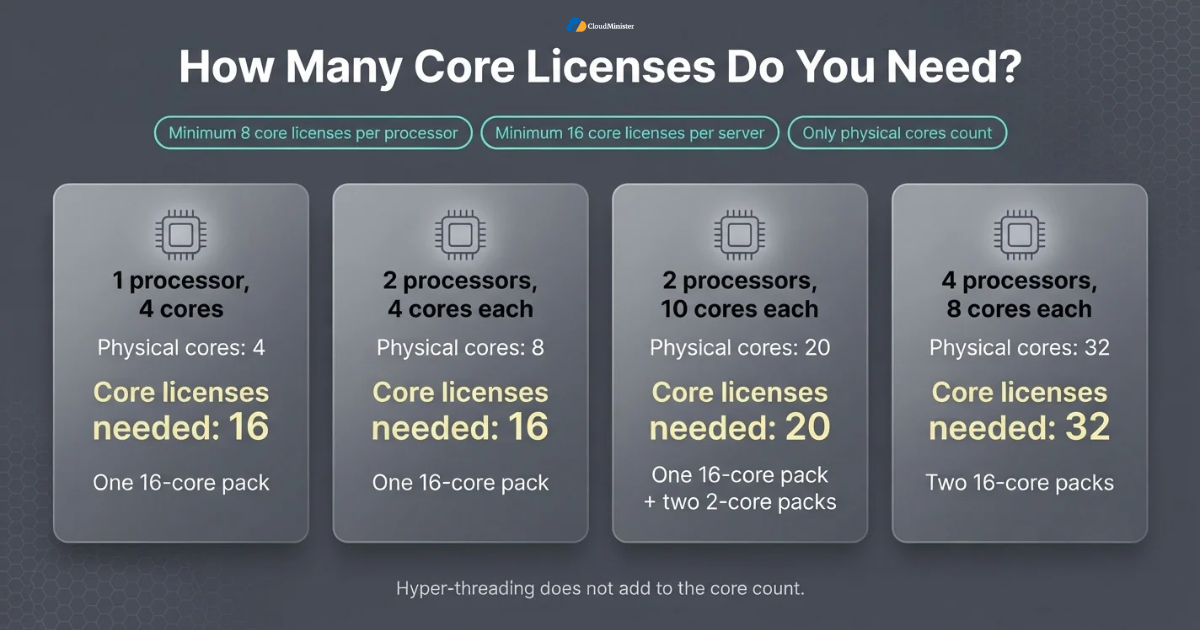
Core-based licensing replaced the old per processor model starting with Windows Server 2016. You count the physical cores in the server and buy enough core licenses to cover every one of them. The rule that every Windows Server Licensing Guide repeats is simple: license all physical cores, with a minimum of eight core licenses per processor and a minimum of sixteen core licenses per server. Hyper-threading does not add to the count, because only physical cores are counted. Keep this Windows Server Licensing Guide rule in mind for every server you buy.
- Core licenses are sold in two-core packs and sixteen-core packs.
- The minimum is 8 core licenses per physical processor.
- The minimum is 16 core licenses per physical server, even when the server has fewer than 16 cores.
- A server with one processor and 4 cores still needs 16 core licenses.
- A server with two processors of 10 cores each has 20 cores and needs 20 core licenses, for example one 16-core pack plus two 2-core packs.
- A server with four processors of 8 cores each has 32 cores and needs 32 core licenses, which is two 16-core packs.
- Only physical cores are counted. Logical processors created by hyper-threading are not added.
- Some subscription programs also allow licensing by virtual machine, counting virtual cores with a minimum of 8 per virtual machine. Check your agreement before you plan around it.
Core license examples
| Server configuration | Physical cores | Core licenses needed | Typical packs |
| 1 processor, 4 cores | 4 | 16 | One 16-core pack |
| 2 processors, 4 cores each | 8 | 16 | One 16-core pack |
| 2 processors, 10 cores each | 20 | 20 | One 16-core pack plus two 2-core packs |
| 4 processors, 8 cores each | 32 | 32 | Two 16-core packs |
3. Windows Server Standard vs. Datacenter Edition
The main difference between the two editions is virtualization rights. Standard allows two operating system environments, or two Hyper-V containers, on a fully licensed server. Datacenter allows unlimited ones. The editions also differ in a few advanced features, so a useful Windows Server Licensing Guide looks at feature needs as well as the virtual machine count. Teams that rent Windows Dedicated Server Hosting should also ask which edition the provider includes. That edition question is the first filter in this Windows Server Licensing Guide.
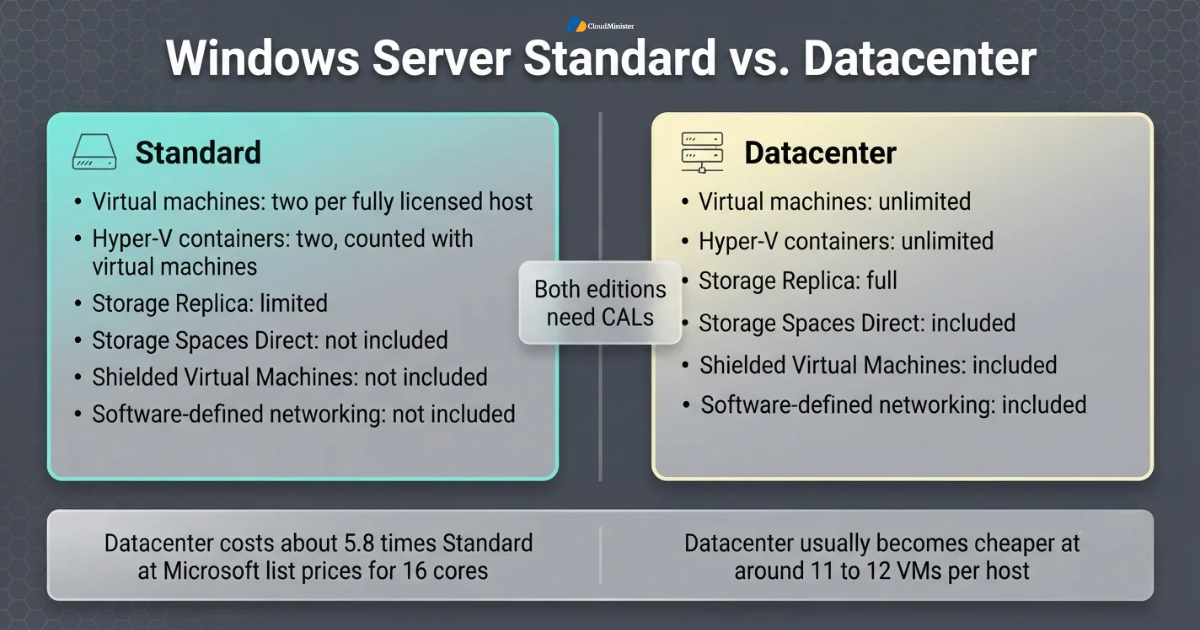
- Standard: up to two virtual machines per fully licensed host. The physical host can be used only to run and manage those virtual machines.
- Datacenter: unlimited virtual machines and Hyper-V containers on a fully licensed host.
- Windows containers that run without Hyper-V isolation are not limited on either edition.
- Datacenter alone includes Storage Spaces Direct, Shielded Virtual Machines, and software-defined networking.
- Storage Replica is limited in Standard and available without those limits in Datacenter.
- Both editions need CALs, so the edition choice does not remove the access cost.
- At Microsoft list prices, Datacenter costs about 5.8 times as much as Standard for the same 16 cores. Keep this ratio in mind when you compare Affordable Windows Dedicated Server Plans.
- Because each extra pair of virtual machines on Standard needs another full set of core licenses, Datacenter usually becomes cheaper at around 11 to 12 virtual machines per host.
Standard vs. Datacenter at a glance
| Feature | Standard | Datacenter |
| Virtual machines per licensed host | Two | Unlimited |
| Hyper-V containers | Two, counted with virtual machines | Unlimited |
| Windows containers without Hyper-V isolation | Unlimited | Unlimited |
| Storage Spaces Direct | Not included | Included |
| Shielded Virtual Machines | Not included | Included |
| Software-defined networking | Not included | Included |
| Storage Replica | Limited | Full |
| CALs required | Yes | Yes |
Run the numbers per host, not per company. Datacenter pays off on a host that runs many Windows Server virtual machines, and it rarely pays off on a host that runs three or four. That per host habit is the core of this Windows Server Licensing Guide.
4. Client Access Licenses (CALs): User, Device, and RDS
A CAL is the permission for a person or a device to access a Windows Server. It is not software that you install. It is a right that you hold, and an auditor will ask you to prove you have enough of them. A practical Windows Server Licensing Guide treats CAL planning as its own budget line, because CAL needs grow with headcount while core license needs grow with hardware. Use this Windows Server Licensing Guide section to keep that budget line honest.
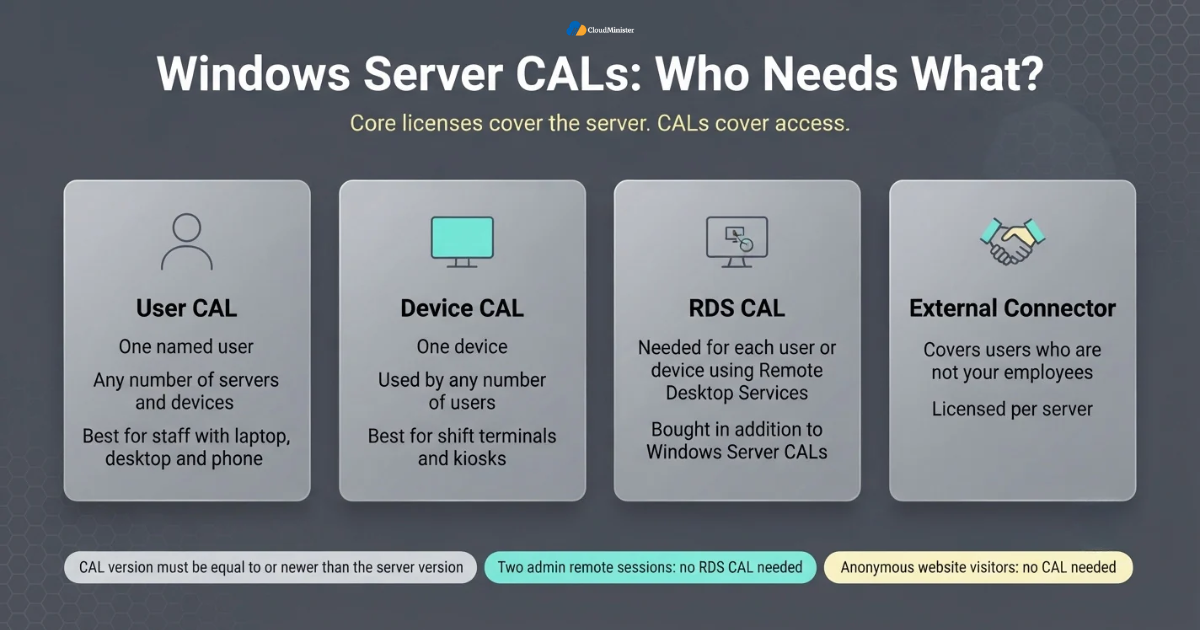
- User CAL: one named user can access any number of servers from any number of devices. It suits staff who use a laptop, a desktop, and a phone.
- Device CAL: one device can be used by any number of users. It suits shared devices such as shift terminals and kiosks.
- The CAL version must be equal to or newer than the server version. A Windows Server 2022 CAL does not give access to a Windows Server 2025 server.
- RDS CALs are required for each user or device that uses Remote Desktop Services, and they are bought in addition to Windows Server CALs.
- Two simultaneous remote desktop sessions for server administration do not need RDS CALs.
- Anonymous visitors to a public website hosted on the server do not need CALs. Authenticated users still do.
- An External Connector license can cover users who are not your employees, such as customers or partners, on a per-server basis.
- Some Microsoft 365 enterprise plans include Windows Server CAL rights, so check what you already own before buying more.
Remote desktop access is a favourite target for attackers. Keep Remote Desktop Services behind a VPN or a gateway, enforce multi-factor authentication, and never expose the default remote desktop port directly to the internet. The same rules apply to VPS Server Hosting in India servers.
5. Licensing Virtual Machines, Hyper-V, and Containers
The most expensive licensing mistakes happen on virtualized hosts. Windows Server rights follow the physical host and not the number of virtual machines, so the first rule in any Windows Server Licensing Guide is to license the host and only then count the virtual machines. When that rule is skipped, companies either run unlicensed virtual machines or pay for far more licenses than they need. This Windows Server Licensing Guide section shows the safe order of steps.
- Standard covers two virtual machines per fully licensed host. Each extra pair needs another full set of core licenses on that same host, which is called stacking.
- Example: a 16-core host that runs 6 Windows Server virtual machines on Standard needs 3 sets of 16 core licenses, which is 48 core licenses in total.
- Datacenter covers every virtual machine on the host once all physical cores are licensed. Look for it in Affordable Windows Dedicated Server Plans if you plan to run many virtual machines.
- In a cluster, every host that can run a virtual machine must be fully licensed to cover it. Microsoft limits how often a license can be reassigned to another server, generally once every 90 days, so size cluster licensing for the busiest hosts.
- Hyper-V containers count toward the virtual machine limit on Standard.
- Linux virtual machines do not use up Windows Server virtual machine rights, but a Windows host that runs them still needs its own license. VPS Server Hosting in India is a handy place to run such workloads.
- Azure Hybrid Benefit lets customers with Software Assurance or qualifying subscriptions apply existing Windows Server core licenses to Azure virtual machines.
- Windows Server 2025 can also be licensed pay-as-you-go through Azure Arc, billed monthly, which suits short-lived or unpredictable workloads.
Related Reading: VPS vs dedicated servers for AI inference in 2026
6. Licensing on Dedicated Servers vs VPS Plans
Buying your own licenses is only one route. Most hosted plans include Windows Server in the monthly price, and that changes the math completely. With Windows Dedicated Server Hosting, the provider licenses every physical core of the machine you rent. With Windows VPS Hosting in India, you rent a virtual slice and the license is built into the plan. This section of the Windows Server Licensing Guide shows what stays with you and what moves to the provider. Keep this Windows Server Licensing Guide section nearby when you read hosting quotes.
- A hosted Windows Dedicated Server Hosting plan is normally licensed by the provider through Microsoft’s service provider program, billed per core each month, so you do not buy core licenses yourself.
- You still carry responsibility for application licenses such as SQL Server, unless the plan states that they are included.
- Remote Desktop Services access for more than two administrative sessions is normally an add-on, so confirm how RDS access is priced before you invite a team to log in.
- If you plan to run your own virtual machines on a rented dedicated server, ask which edition is included, because Standard allows two virtual machines and Datacenter allows unlimited ones. Good Affordable Windows Dedicated Server Plans state the included edition clearly.
- Affordable Windows Dedicated Server Plans suit businesses that want full physical cores, predictable performance, and no noisy neighbours, while the license cost stays inside one monthly bill.
- Windows VPS Hosting in India fits smaller applications, test servers, and line of business tools that do not need a whole machine, and it removes the need to count cores at all.
- VPS Server Hosting in India works well when you need a Windows or Linux guest with moderate load, and it is often the cheapest way to avoid a Windows license on workloads that run fine on Linux.
- Do not assume you can bring your own Windows Server license to a shared hosting platform. Ask your Web Hosting Company in India in writing, because rules differ by provider and by license type.
- Ask for the Windows Server version and edition in writing, since a plan that quietly ships an older version can leave you facing upgrade costs sooner.
Related Reading: Dedicated trading servers for HFT and forex
7. Hidden Costs and Support Dates That Raise the Bill
The license price on the quote is rarely the full cost. Support dates, add-on licenses, and upgrade work all change what a server costs over its life. A good Windows Server Licensing Guide treats lifecycle dates as part of the budget, because running an unsupported version either costs extra for security updates or creates risk that no budget line can cover. Dates matter in any Windows Server Licensing Guide because they set your upgrade deadline.
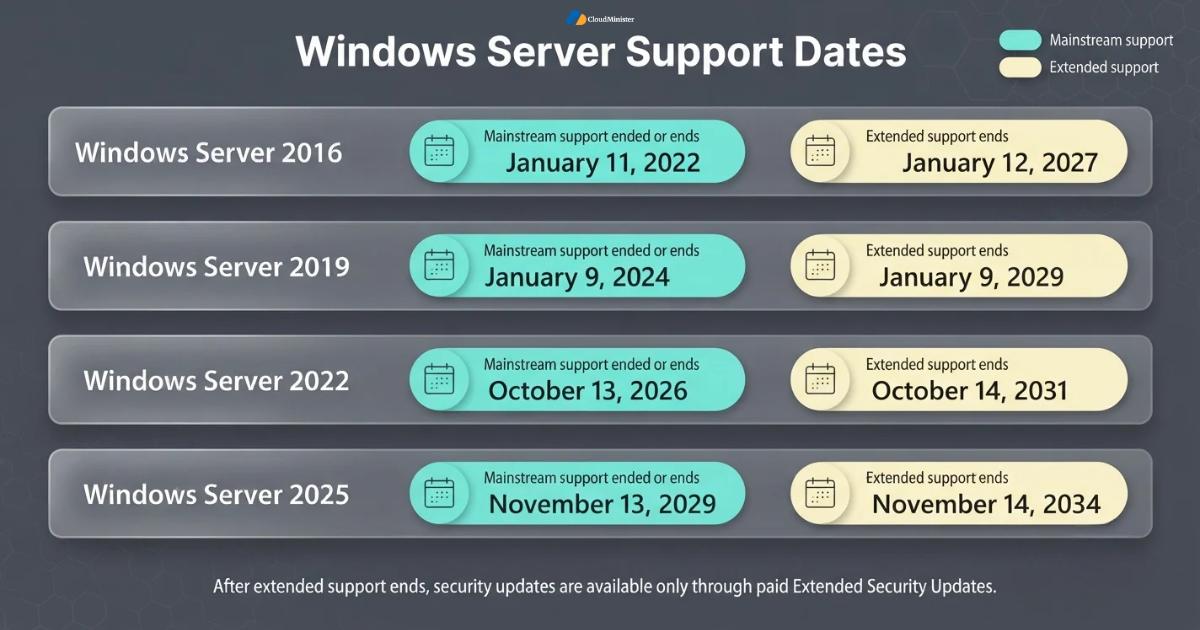
- Windows Server 2016 extended support ends on January 12, 2027. After that, security updates are available only through the paid Extended Security Updates program, which Microsoft offers for a limited period.
- Windows Server 2022 left mainstream support on October 13, 2026 and stays in extended support until October 14, 2031.
- Windows Server 2025 stays in mainstream support until November 13, 2029, with extended support to November 14, 2034.
- Software Assurance is an annual add-on, and it only pays off if you use its benefits, such as upgrade rights and Azure Hybrid Benefit.
- SQL Server and other server applications have their own license rules. SQL Server core licensing, for example, has a minimum of 4 core licenses per processor or virtual machine.
- CAL and RDS CAL costs grow with headcount, so a business that doubles its staff doubles that part of the bill.
- Migration work, testing, downtime, and staff time are real costs when you move from an old version. Moving to Affordable Windows Dedicated Server Plans can shift part of that work to the provider.
- Backup, monitoring, and security tools often carry their own per-server fees, which add to the total. A Web Hosting Company in India that bundles them can lower that cost.
Windows Server support dates
| Version | Mainstream support ended or ends | Extended support ends |
| Windows Server 2016 | January 11, 2022 | January 12, 2027 |
| Windows Server 2019 | January 9, 2024 | January 9, 2029 |
| Windows Server 2022 | October 13, 2026 | October 14, 2031 |
| Windows Server 2025 | November 13, 2029 | November 14, 2034 |
Servers that cannot move before support ends should be isolated from the internet, restricted to the minimum network access they need, and given a written retirement date. Unpatched servers become easy targets for ransomware.
Need Dedicated Power Beyond AWS?
Run your Windows workloads on a high-performance dedicated server with full root access, predictable pricing, and 24/7 expert support from CloudMinister.
8. Practical Ways to Avoid Overpaying
Most savings come from decisions made before purchase, not from negotiation after it. A short review of cores, virtual machines, and users usually removes waste that nobody noticed. This part of the Windows Server Licensing Guide lists the changes that save the most money for the least risk.
- Right-size the host. Every extra core adds license cost, so avoid buying a 32-core host for a workload that needs 12 cores.
- Prefer fewer, faster cores when your workload allows it, because core licenses are counted per core and not per gigahertz.
- Count virtual machines per host before choosing an edition. Use Standard for hosts with a few virtual machines and Datacenter for dense hosts. On Windows Dedicated Server Hosting, ask which edition is included.
- Consolidate Windows workloads on fewer licensed hosts when your availability goals allow it.
- Use User CALs for staff who work from several devices and Device CALs for shared terminals.
- Check Microsoft 365 plans for included CAL rights before buying separate CALs.
- Move workloads that do not need Windows, such as reverse proxies and many web applications, to Linux, for example on VPS Server Hosting in India. Where Windows is needed for light loads, Windows VPS Hosting in India keeps the license inside a small monthly fee.
- Consider Affordable Windows Dedicated Server Plans, where the license is bundled into one monthly price and you avoid buying hardware and licenses separately.
- Review license counts every year, and keep a record of which license is assigned to which server so you never pay twice.
Related Reading: How to choose the right Forex VPS specs
Ask your vendor or Web Hosting Company in India to quote Standard and Datacenter side by side for each host, and compare hosted plans at the same time. The comparison takes only minutes, and this Windows Server Licensing Guide method shows exactly where the crossover point sits for your hardware.
9. Choosing a Hosting Partner for Windows Workloads
For many businesses the cheapest and safest route is to rent the server with the license included. The right Web Hosting Company in India will explain the Windows edition, the version, and the access rules in plain language before you sign. This Windows Server Licensing Guide suggests questions that separate a capable provider from one that only sells hardware.
- Ask which Windows Server version and edition each plan includes, and whether that matches your virtual machine needs. This applies to Affordable Windows Dedicated Server Plans as much as to virtual plans.
- Ask whether RDS access licensing is included, billed per user, or not available.
- Compare Windows Dedicated Server Hosting against Windows VPS Hosting in India on total monthly cost, not only on the headline price.
- VPS Server Hosting in India can be a good fit for lightweight workloads, so ask whether the provider offers both Windows and Linux options on the same platform.
- Check where the data centre is located. A Web Hosting Company in India with local facilities can reduce latency for Indian users and simplify data residency questions.
- Ask your Web Hosting Company in India about backups, restore testing, and monitoring, also on VPS Server Hosting in India plans, since the license is only one part of a safe server.
- Ask how upgrades work when your version reaches the end of support, and what the provider charges for the move. Confirm this for Windows Dedicated Server Hosting plans too.
- Request all licensing terms in writing, including who is responsible for CALs and application licenses.
Related Reading: Model Context Protocol on VPS hosting in India
A Web Hosting Company in India that is clear about what it does not cover is usually more trustworthy than one that promises everything. Written scope protects both sides during an audit, and it keeps this Windows Server Licensing Guide usable as a contract checklist
10. Matching Common Workloads to the Right Hosted Plan
Different workloads need different kinds of Windows hosting, and the licensing side follows the plan you choose. Sorting workloads first prevents you from paying dedicated server prices for a small application or crowding a heavy database onto a small virtual server. Use this section of the Windows Server Licensing Guide as a quick mapping before you shortlist any Web Hosting Company in India.
- Small business websites and internal tools usually run well on Windows VPS Hosting in India, because the license is bundled and the monthly cost stays low.
- Heavy databases and high-traffic applications usually belong on Windows Dedicated Server Hosting, where the whole machine and all of its cores are yours. Compare Affordable Windows Dedicated Server Plans for this kind of load.
- Development and test servers fit VPS Server Hosting in India, since you can create and delete them quickly without a long licensing commitment.
- Line of business applications with a few dozen users often fit a mid-range Windows VPS Hosting in India plan, provided RDS access is priced clearly. Lighter internal tools may also run on VPS Server Hosting in India.
- Remote desktop environments for larger teams need careful RDS CAL planning and often fit Windows Dedicated Server Hosting better than a small virtual server.
- Teams searching for Affordable Windows Dedicated Server Plans should compare core count, memory, storage type, and the included Windows edition, not only the price.
- Linux friendly workloads can move to VPS Server Hosting in India to avoid the Windows license entirely, which is one of the simplest savings available.
- A growing startup can begin on Windows VPS Hosting in India and move to Windows Dedicated Server Hosting when traffic and resource needs rise.
- Any Web Hosting Company in India you shortlist should be able to show a clear upgrade path from a virtual plan to a dedicated plan.
11. Common Windows Server Licensing Mistakes
Most Windows Server licensing problems repeat across companies, which means they are also avoidable. Reviewing the list below once a quarter is one of the cheapest improvements an IT team can make. Keep this Windows Server Licensing Guide open when you audit your own estate.
- Buying fewer than 16 core licenses for a small server. A small virtual server on VPS Server Hosting in India avoids that minimum because the provider handles the license.
- Licensing only the cores assigned to a virtual machine instead of all physical cores on the host.
- Forgetting CALs, or forgetting RDS CALs for remote desktop users.
- Buying CALs for an older version and then upgrading the server, which leaves the CALs too old.
- Stacking Standard licenses on a dense host where Datacenter would cost less. Compare Affordable Windows Dedicated Server Plans before buying more licenses.
- Choosing Datacenter for a host that runs only two or three virtual machines. Windows VPS Hosting in India may be cheaper for loads that small.
- Moving virtual machines between hosts without checking that each host is fully licensed.
- Using unlicensed or pirated keys, which adds legal risk and often brings malware.
- Leaving Windows Server 2016 servers in production after January 12, 2027 with no security plan. A move to Windows Dedicated Server Hosting can be a clean exit.
12. Compliance, Audits, and Security
Licensing is also a compliance topic. Microsoft and its partners can run software asset management reviews, and an unprepared team can lose days answering questions that good records would answer in minutes. Good records turn an audit into a routine task, which is why this Windows Server Licensing Guide treats documentation as part of the purchase.
- Keep a central inventory of servers with edition, version, physical cores, and the number of virtual machines on each host.
- Store proof of purchase, agreement numbers, and license keys in a secure, access-controlled location.
- Record which CALs are User CALs and which are Device CALs, and who or what each one covers.
- Match the inventory to purchases at least once a year and after every hardware change.
- Patch servers on a regular schedule and remove roles and features that you do not use. This applies equally on VPS Server Hosting in India plans.
- Restrict administrator accounts, use multi-factor authentication, and log every administrative sign-in. Windows Dedicated Server Hosting customers should confirm admin access rules with the provider.
- Test backups by restoring them, since an untested backup is only an assumption. This applies to Windows VPS Hosting in India plans too.
- Ask your Web Hosting Company in India, including the team behind your Affordable Windows Dedicated Server Plans, for a written statement of what it licenses and what remains your responsibility.
License keys and agreement details are sensitive. Store them in a password manager or secure vault, limit who can view them, and remove access when a staff member leaves.
13. A Practical 30 Day Plan to Get Started
Reading a licensing guide is easy, and acting on it is harder. This plan splits the work into four weeks that a small team can follow. By the end of the month you will know what you own, what you need, and where you can save, and you will have used this Windows Server Licensing Guide as a working document and not just as reading material.
- Week one: list every physical and virtual server with its Windows Server version, edition, core count, and role.
- Week one: list the users and devices that connect to those servers, and mark who needs RDS access.
- Week two: compare your inventory with purchase records and note every gap or surplus.
- Week two: run a Standard versus Datacenter comparison for every virtualization host.
- Week three: review hosted options, including Affordable Windows Dedicated Server Plans, Windows VPS Hosting in India, and VPS Server Hosting in India, and compare their monthly cost with owning licenses.
- Week three: decide what to do with Windows Server 2016 systems before January 12, 2027, and ask a Web Hosting Company in India for upgrade quotes, including Windows Dedicated Server Hosting options.
- Week four: buy or renew only what the review shows you need, and record every purchase, or switch to Affordable Windows Dedicated Server Plans if hosting wins on cost.
- Week four: set a yearly reminder to repeat the review and to compare Windows VPS Hosting in India again.
Windows Server Licensing Guide Readiness Checklist
- Edition, version, and physical core count recorded for every server.
- Core licenses cover every physical core, with at least 8 per processor and 16 per server.
- Virtual machine counts per host reviewed against Standard and Datacenter rights.
- User CALs, Device CALs, and RDS CALs counted and matched to the server version.
- Cluster hosts licensed for every virtual machine that can run on them.
- Windows Server 2016 plan agreed before January 12, 2027.
- Terms confirmed in writing by your Web Hosting Company in India for Windows Dedicated Server Hosting, Windows VPS Hosting in India, VPS Server Hosting in India, or Affordable Windows Dedicated Server Plans options.
- License keys and purchase records stored securely.
- A yearly review date set in the calendar.
Key Takeaways
- This Windows Server Licensing Guide comes down to one idea: license every physical core, then count virtual machines and users separately.
- In this Windows Server Licensing Guide, core licenses have a minimum of 8 per processor and 16 per server, and they are sold in two-core and sixteen-core packs.
- The Windows Server Licensing Guide rule for editions is simple: Standard covers two virtual machines per licensed host, Datacenter covers unlimited ones, and the crossover usually sits near 11 to 12 virtual machines.
- In this Windows Server Licensing Guide, every user or device needs a CAL, and Remote Desktop Services needs RDS CALs on top.
- Windows Dedicated Server Hosting and Windows VPS Hosting in India bundle the Windows license, which removes core counting from your own work.
- VPS Server Hosting in India and Linux workloads can cut Windows cost where Windows is not required.
- Affordable Windows Dedicated Server Plans give predictable monthly cost for heavy workloads that need whole machines.
- A trusted Web Hosting Company in India should confirm edition, version, and RDS terms in writing.
- Windows Server 2016 reaches the end of extended support on January 12, 2027, so plan the move now with your Web Hosting Company in India.
Get Expert AWS Guidance, Free for New Clients
Planning an AWS setup or migration? We offer a free consultation to all new clients. Talk to our cloud engineers and get a clear, practical plan for your infrastructure.
Conclusion
Windows Server licensing is not hard once it is split into its parts: core licenses for the host, edition rights for virtual machines, and CALs for access. The Windows Server Licensing Guide approach is to count carefully, compare editions per host, and keep records that prove what you own. Teams that follow this Windows Server Licensing Guide avoid both unlicensed servers and wasted spend, and they stay ready for audits. The Windows Server Licensing Guide habits are easy to keep: review, compare, and record.
If owning licenses does not suit your business, hosted options are worth a serious look. Windows Dedicated Server Hosting, including Affordable Windows Dedicated Server Plans, suits heavy workloads, Windows VPS Hosting in India suits smaller applications, and VPS Server Hosting in India suits flexible or Linux friendly deployments. Whichever route you choose, ask for terms in writing, and ask a Web Hosting Company in India to walk you through the license model before you commit. Use this Windows Server Licensing Guide again at every renewal.
Frequently Asked Questions
What is the minimum number of core licenses for Windows Server?
The minimum is 8 core licenses per physical processor and 16 core licenses per physical server. This rule is the starting point of every Windows Server Licensing Guide.
Do I need CALs if I buy core licenses?
Yes. In this Windows Server Licensing Guide, core licenses cover the server software, and CALs cover access. Every user or device that connects to a Standard or Datacenter server needs a CAL of the same version or newer.
How many virtual machines does Standard edition allow?
Standard allows two virtual machines, or two Hyper-V containers, per fully licensed host. You can license the same host again to add two more, as the Windows Server Licensing Guide examples show.
When is Datacenter cheaper than Standard?
At Microsoft list prices, Datacenter usually becomes cheaper at around 11 to 12 Windows Server virtual machines on one host. Always compare current prices for your own hardware. The Windows Server Licensing Guide method is to compare per host.
Do hosted servers include the Windows license?
Usually yes. A hosted Windows Dedicated Server Hosting plan or a Windows VPS Hosting in India plan normally includes Windows Server in the monthly price, though CALs, RDS access, and application licenses may be separate.
Is Windows Server 2016 still supported?
It is in extended support until January 12, 2027. After that date, security updates are available only through the paid Extended Security Updates program for a limited period. Plan the move with the Windows Server Licensing Guide dates in mind.
Can I use a Windows CAL from an older version?
No. The CAL version must be equal to or newer than the server version, so a Windows Server 2022 CAL does not cover a Windows Server 2025 server. This is a common gap in any Windows Server Licensing Guide review.
Which hosting option should a small business choose?
Many small businesses start with VPS Server Hosting in India or a Windows virtual plan, then move to Affordable Windows Dedicated Server Plans when workloads grow. The Windows Server Licensing Guide logic stays the same: match the plan to the workload.
Where can I get help comparing plans?
Ask a Web Hosting Company in India for a written comparison of edition, version, CAL terms, and monthly cost before you sign. A clear answer is a good sign of a reliable provider.
Does this Windows Server Licensing Guide apply to both Windows Server 2022 and 2025?
Yes. Both versions use the same core-based model with the same minimums, so the Windows Server Licensing Guide rules apply to either one. They differ mainly in features and support dates.
How do I choose a Web Hosting Company in India for Windows workloads?
Look for a Web Hosting Company in India that states the Windows edition, the version, RDS terms, backup policy, and support hours in writing. Compare its plans with Affordable Windows Dedicated Server Plans and Windows VPS Hosting in India on total monthly cost, not only on price.
Are Affordable Windows Dedicated Server Plans better than buying my own licenses?
For many teams they are, because the license, the hardware, and the support sit in one monthly cost. Owning licenses can still win for very large, long-lived estates, so compare both using the steps in this Windows Server Licensing Guide.
What is the difference between Windows Dedicated Server Hosting and Windows VPS Hosting in India?
Windows Dedicated Server Hosting gives you a whole physical machine, so you get every core and predictable performance. Windows VPS Hosting in India gives you a virtual share of a machine, which costs less and suits lighter workloads. In both cases the provider usually carries the Windows license.
When does VPS Server Hosting in India make more sense than a Windows plan?
VPS Server Hosting in India makes sense when the workload runs on Linux or does not need Windows features, because avoiding the Windows license lowers cost. Move to Windows only for applications that require it.
What is the quickest way to apply this Windows Server Licensing Guide?
Start with an inventory of servers, cores, virtual machines, and users, then follow the 30 day plan in this Windows Server Licensing Guide. The inventory alone often reveals missing or unused licenses.