An agent that reads untrusted text while holding live credentials can be tricked into leaking them. This guide explains AWS AgentCore Prompt Injection in plain language, then shows how to keep secrets away from the model, shrink permissions, enforce rules outside the model and watch for abuse on Amazon Bedrock AgentCore. It also covers the cost side, including a clear look at AWS Savings Plans vs Reserved Instances, because stolen credentials turn into surprise bills very quickly. You will also see where AWS managed services, a Web Hosting Company in India and Microsoft Azure Cloud Hosting Services fit into a safe rollout, along with simple Azure cost optimization and AWS Management Console habits you can start this week.
A few years ago a software bug meant a broken page. Today an AI agent can read an email, open a ticket, call an internal API and send a reply without a human clicking anything. That power is the reason AWS AgentCore Prompt Injection has become one of the most discussed risks in cloud security. When an agent holds a token and also reads text written by strangers, a stranger can try to talk the agent into using that token.
The good news is that most credential leaks come from design choices, and design choices can be changed. Amazon Bedrock AgentCore gives builders isolated sessions, managed identity, a tool gateway and policy checks. None of these helps if a secret sits inside the prompt or if the agent role can touch every bucket in the account. Understanding AWS AgentCore Prompt Injection really means understanding where your secrets live and who can reach them.
This guide walks through the problem step by step in simple language. You will see how credentials leak, how to design around it, how to monitor it and how to control the bill if something still goes wrong, including a practical comparison of AWS Savings Plans vs Reserved Instances. Whether you are running your first agent or your fifteenth, the steps below will help you ship with more confidence and fewer surprises.
Table of Contents
- 1. What Prompt Injection Means for Agents on Bedrock AgentCore
- 2. How Credential Exposure Actually Happens in Agentic AI
- 3. How Amazon Bedrock AgentCore Is Built and What You Still Own
- 4. Keep Secrets Out of the Model Context
- 5. Apply Least Privilege and Short Lived Credentials
- 6. Enforce Rules Outside the Model with Gateway, Policy and Guardrails
- 7. Limit the Network Paths a Leaked Secret Can Travel
- 8. Monitor, Log and Detect Abuse Early
- 9. Why Credential Exposure Quickly Becomes a Cost Problem
- 10. AWS Savings Plans vs Reserved Instances: Choosing Commitments for Agent Workloads
- 11. Azure Cost Optimization and Identity Habits for Multi Cloud Teams
- 12. Prepare an Incident Response and Recovery Plan
- 13. Common Mistakes That Lead to Credential Exposure
- 14. Who Owns What and How to Choose the Right Partner
- 15. A Practical 30 Day Plan to Get Started
- Key Takeaways
- Conclusion
- Frequently Asked Questions
1. What AWS AgentCore Prompt Injection Means for Agents on Amazon Bedrock AgentCore
Prompt injection happens when text that the model reads is treated as an instruction instead of plain data. In a simple chatbot the damage is usually a wrong or rude answer. In an agent that owns tools, tokens and memory, the damage is an action taken in your name. That is why AWS AgentCore Prompt Injection deserves its own place in your threat model. OWASP ranks prompt injection first in its Top 10 for LLM Applications 2025, and teams building on AgentCore should read that as a design warning and not as a rare edge case. If your agents run on Microsoft Azure Cloud Hosting Services instead, the same idea applies, because the model still cannot separate instructions from data. A team that compares AWS Savings Plans vs Reserved Instances for next year should also understand these basics, since a hijacked agent can distort every cost forecast, and good Azure cost optimization starts with knowing what each agent can spend. A partner that offers AWS managed services can help you map these risks if your team is new to agents.
- Direct injection is when a user types instructions meant to override your rules, such as a request to print the hidden system prompt or configuration.
- Indirect injection hides instructions inside content the agent fetches, such as a web page, a PDF, an email, a support ticket or a tool description. The user never sees it.
- A language model receives trusted instructions and untrusted data as one stream of tokens, so it cannot reliably tell the two apart.
- The OWASP Top 10 for Agentic Applications 2026 places agent goal hijack first, and indirect injection is one of the ways an agent goal gets hijacked.
- The most damaging result is credential exposure, where the model is persuaded to read a secret and send it out through a reply, a link or a tool call. That exposure can also change your cost baseline, which affects AWS Savings Plans vs Reserved Instances.
- Memory adds another path, because an injected sentence saved to long term memory can shape behavior in later sessions and for later users.
- No filter removes this risk fully, so every serious AWS AgentCore Prompt Injection defense places hard controls outside the model.
- Treat every external input as untrusted, even when it comes from a partner system, a shared drive or an internal wiki.
- Open the AWS Management Console and list which agents have tools that can send data outside, because that list is your first map of AWS AgentCore Prompt Injection exposure.
Draw one simple diagram of your agent that marks three things: what untrusted text it reads, what secrets it can reach and what it can send outside. If one session touches all three, you have found your first priority for AWS AgentCore Prompt Injection work.
2. How Credential Exposure Actually Happens in Agentic AI
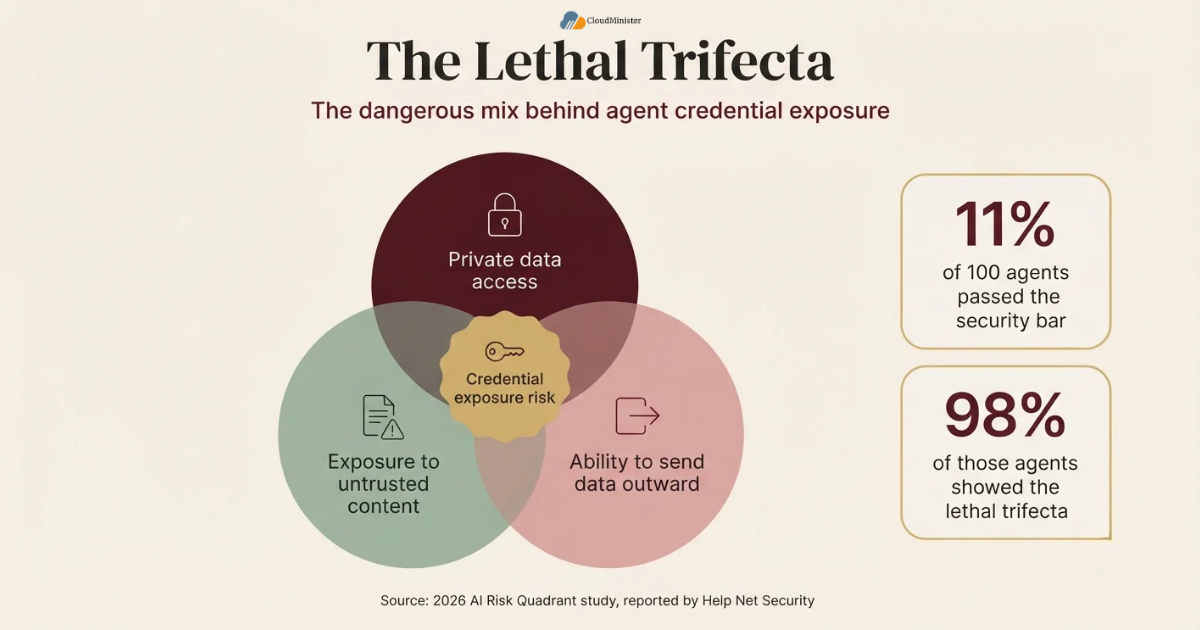
Credential exposure rarely looks like a dramatic hack. It usually looks like a normal feature used in a slightly wrong way. A developer pastes an API key into a system prompt to get a demo working, or an agent is given a broad role because it was faster. Later a hidden instruction asks the agent to repeat what it knows, and the agent complies. Researchers call the dangerous mix the lethal trifecta: private data access, exposure to untrusted content and the ability to send data outward. A 2026 AI Risk Quadrant study reported by Help Net Security scored 100 commercial and publicly available agents and found that only 11 percent passed its security bar, while the lethal trifecta appeared in 98 percent of them. This is the situation every AWS AgentCore Prompt Injection plan has to assume. Teams on Microsoft Azure Cloud Hosting Services face the same trifecta, because the risk comes from agent design and not from the cloud brand, and an AWS managed services review often finds the same weak spots within a few days. Leaked access also inflates usage, which hides the real baseline you need when you evaluate AWS Savings Plans vs Reserved Instances.
- Secrets pasted into system prompts or tool descriptions, where the model can quote them back on request.
- API keys stored in environment variables that a code execution tool can print.
- Tokens passed as tool arguments, which places them in the model context and in every trace.
- Verbose logs and traces that store full prompts, including any secret the agent saw during a session.
- An over-broad execution role, so one stolen action reaches far more than the agent ever needed.
- Outbound channels such as image links in replies, web requests, emails and webhooks that can carry data out.
- Shared memory or shared sessions that let one user secret appear in another user conversation.
- Unreviewed spending after a leak, which makes any later decision on AWS Savings Plans vs Reserved Instances based on numbers that were never normal.
- Weak review habits, where nobody checks the IAM pages in the AWS Management Console for roles the agent never needed, which leaves AWS AgentCore Prompt Injection damage larger than it should be.
Assume that anything the model can read, the model can repeat. If a secret is visible in the prompt, in a tool result or in a log that feeds back to the model, treat it as already exposed and rotate it. This rule is the base of every AWS AgentCore Prompt Injection review.
3. How Amazon Bedrock AgentCore Is Built and What You Still Own
Amazon Bedrock AgentCore is a set of managed services for running agents in production. Knowing which piece does what makes AWS AgentCore Prompt Injection planning much easier, because each piece blocks a different part of the attack path. AWS documents security as a shared responsibility, which means AWS secures the platform while you secure what you build on it, including agent code, permissions and input handling. You can open the AWS Management Console to see how these services appear next to your other resources. A Web Hosting Company in India or an AWS managed services partner can explain these services in plain terms during design reviews. Teams on Microsoft Azure Cloud Hosting Services map the same ideas to Entra ID, Key Vault and Azure Monitor, which is a useful habit for Azure cost optimization too. Each piece changes your AWS AgentCore Prompt Injection risk in a different way.
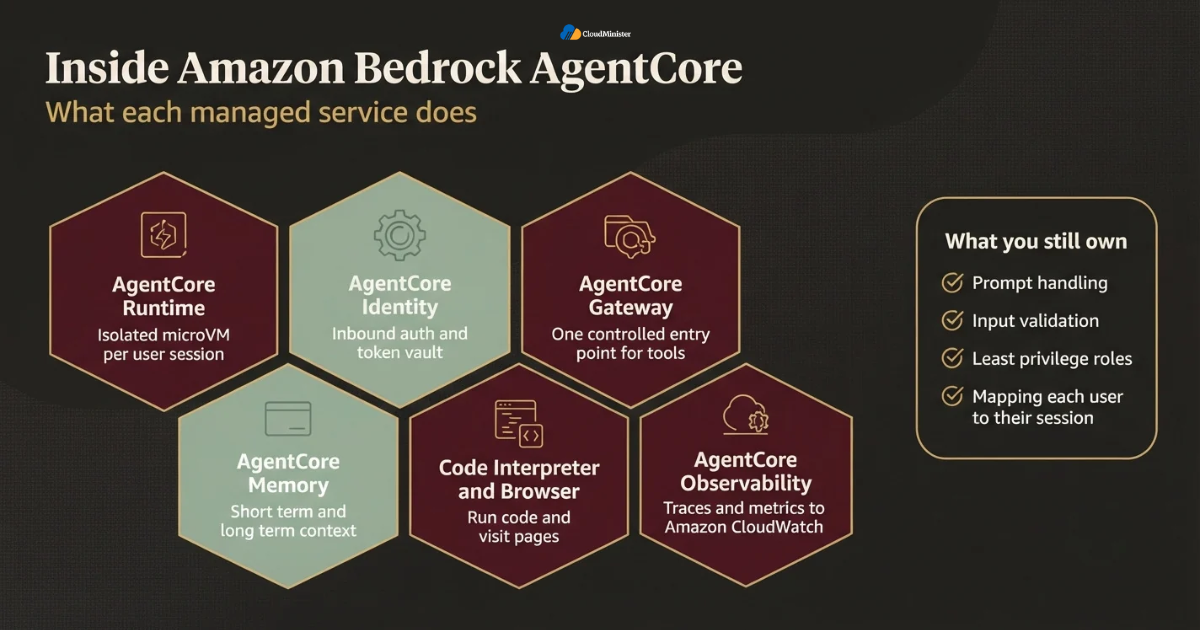
- AgentCore Runtime hosts your agent and runs each user session in its own isolated microVM, which limits what one session can reach.
- AgentCore Identity handles inbound authentication with IAM or JWT based providers, and outbound access to other services through managed credentials and a token vault.
- AgentCore Gateway turns APIs and Lambda functions into tools that agents call through one controlled entry point with authentication.
- AgentCore Policy evaluates tool calls against rules that live outside the agent, so a hijacked model cannot rewrite the rules.
- AgentCore Memory stores short term and long term context, which means it also needs protection from poisoned content.
- Code Interpreter and Browser tools let agents run code and visit pages, which widens the attack surface and needs tight network settings.
- AgentCore Observability sends traces and metrics to Amazon CloudWatch so you can see what the agent actually did.
- You still own prompt handling, input validation, least privilege roles and the mapping between each user and their session.
- Cost follows design, so decide early which parts of the stack use steady compute that may suit AWS Savings Plans vs Reserved Instances and which parts are billed by consumption.
Features and limits in managed services change often. Before you finalise a design, confirm current behavior in the Amazon Bedrock AgentCore Developer Guide. It is the fastest way to keep your AWS AgentCore Prompt Injection plan accurate.
4. Keep Secrets Out of the Model Context
The simplest rule in AWS AgentCore Prompt Injection defense is also the strongest: the model should never see a secret. If the model cannot read a token, no injected sentence can make it repeat that token. Instead, let ordinary code fetch the secret at the moment of the call, use it and discard it. Teams that rely on AWS managed services often add this rule to their release checklist, so every new tool is reviewed for it before launch. Think of it as the same habit that Azure cost optimization teams use on Azure, where managed identities remove stored keys, and a Web Hosting Company in India can also check that your build pipeline never prints secrets. This is a core part of AWS AgentCore Prompt Injection defense on Microsoft Azure Cloud Hosting Services and on AWS alike.
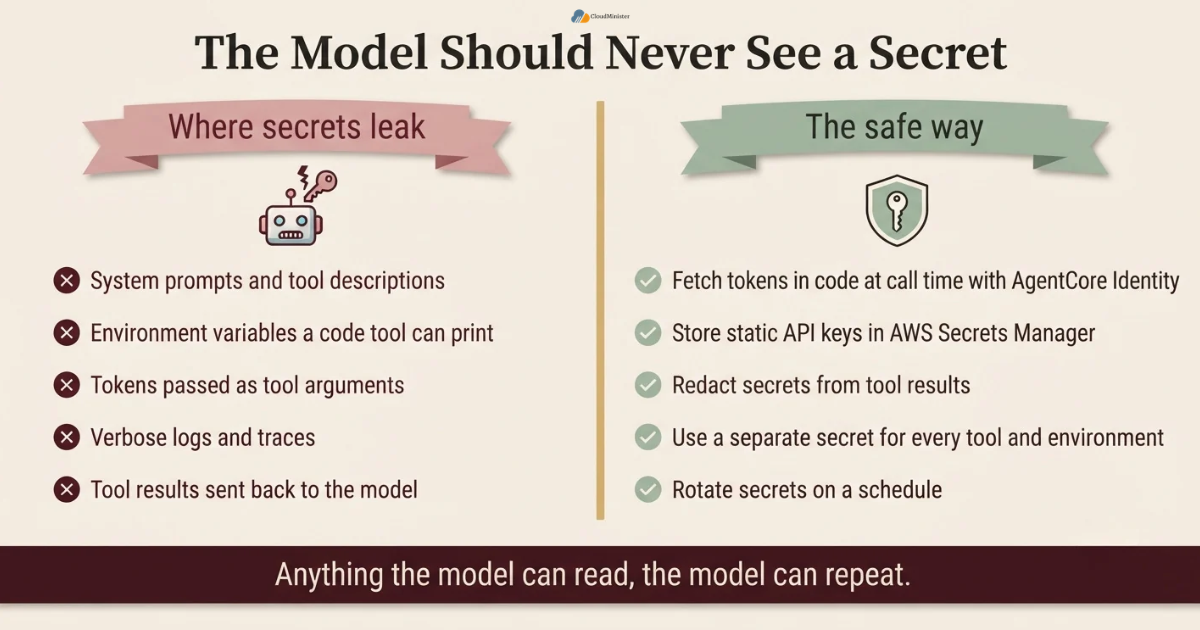
- Use AgentCore Identity so tokens are obtained by your code at call time and are never written into the prompt.
- Add the access token inside an inner function and keep it out of the tool signature that the model sees. The AgentCore SDK provides a decorator for this pattern.
- Store static API keys in AWS Secrets Manager and read them inside the tool code, not when the agent starts.
- Never place keys in system prompts, tool descriptions, sample conversations or knowledge base documents.
- Remove secrets from tool results before they go back to the model, for example by redacting headers and configuration values.
- Turn on sensitive information filters in Amazon Bedrock Guardrails as an extra layer to mask known secret patterns, and remember that filters are never perfect.
- Use a separate secret for every tool and every environment, so one leak never opens everything.
- Rotate secrets on a schedule, and automatically where AWS Secrets Manager supports rotation for that secret type.
- Check the secret inventory in the AWS Management Console every month, because forgotten secrets keep risk alive, add small costs and make usage harder to predict when you plan AWS Savings Plans vs Reserved Instances.
Scan your repository and prompt files for words such as key, token, secret and password before every release. A simple automated check catches the mistakes that tired teams make on Friday evenings and keeps AWS AgentCore Prompt Injection risk low.
5. Apply Least Privilege and Short Lived Credentials
Even with clean prompts, assume that one day an agent will be tricked. The question then becomes how much damage that single agent can do. Least privilege answers it. Give each agent its own role, limit the actions and resources, and prefer credentials that expire in minutes. You can review roles and unused permissions in the AWS Management Console under IAM, which makes this a task any engineer can begin today. It also keeps AWS AgentCore Prompt Injection incidents small. Teams on Microsoft Azure Cloud Hosting Services follow the same rule with Entra roles and managed identities, and an AWS managed services partner or a Web Hosting Company in India can run the quarterly review when engineers are busy. A tidy permission model also supports Azure cost optimization, because unused roles often sit next to unused resources.
- Create one IAM role per agent and per environment instead of sharing a general purpose role across projects, which also gives cleaner usage data for AWS Savings Plans vs Reserved Instances.
- Allow only the exact actions and resource ARNs the agent needs, and avoid wildcard permissions, since broad access is what makes AWS AgentCore Prompt Injection dangerous.
- Use temporary credentials issued by AWS Security Token Service, and avoid long term access keys for agents.
- Use IAM Access Analyzer unused access findings to locate permissions the agent holds but never uses, then remove them.
- Add permission boundaries or service control policies in AWS Organizations to set a ceiling that developers cannot exceed.
- For user facing agents, use on behalf of access so the agent can do only what the signed in user is allowed to do.
- Keep development, testing and production in separate AWS accounts so a test agent can never reach live data.
- Review roles every quarter in the AWS Management Console, and delete roles for agents that no longer exist.
- Tag every role and agent with an owner and a cost center so unusual spending links back to an agent quickly and AWS Savings Plans vs Reserved Instances reviews rely on trustworthy usage data.
Never give an agent role permission to change IAM, to read every secret in Secrets Manager or to disable logging. These three permissions turn a small AWS AgentCore Prompt Injection problem into a full account problem.
6. Enforce Rules Outside the Model with Gateway, Policy and Guardrails
A model can be persuaded, but a policy engine cannot be argued with. This is the key idea behind strong AWS AgentCore Prompt Injection protection. Put every tool call through AgentCore Gateway, check it with AgentCore Policy and use Amazon Bedrock Guardrails as a helpful extra signal. Hard rules decide what is allowed, and probabilistic filters help catch what the rules did not foresee. Many teams that use AWS managed services ask their provider to review these rules before go live. On Azure, projects on Microsoft Azure Cloud Hosting Services often use Prompt Shields for a similar purpose. A Web Hosting Company in India that offers security reviews can act as a neutral second pair of eyes, and the AWS Management Console shows you which roles and endpoints each tool call touches. Controls like these also support Azure cost optimization, and capped sessions make usage easier to predict when you study AWS Savings Plans vs Reserved Instances.
- Route all tool calls through AgentCore Gateway so there is one place to authenticate, authorize and log them.
- Write AgentCore Policy rules that allow only named tools and approved parameter ranges, and deny everything else by default.
- Use Gateway interceptors to inspect or modify requests and responses, for example to strip a secret from a tool response.
- Enable the prompt attack filter in Amazon Bedrock Guardrails to detect jailbreak and prompt injection attempts, and tag untrusted input so the filter inspects the right text.
- Remember that Guardrails detection is probabilistic, so never treat it as the only barrier against AWS AgentCore Prompt Injection.
- Require human approval for high impact actions such as sending external email, moving money, deleting data or changing permissions.
- Give each agent a small tool set, since every extra tool is another path an attacker can try.
- Validate tool inputs with strict schemas, and reject unexpected fields before they reach the tool.
- Cap tool calls and token budgets per session, because loops caused by injection also raise cost and make AWS Savings Plans vs Reserved Instances forecasts less reliable.
A good test for any rule is simple. If the model were fully controlled by an attacker, would this control still hold? If the answer is yes, the control is in the right place for AWS AgentCore Prompt Injection defense
7. Limit the Network Paths a Leaked Secret Can Travel
Exposure has two steps. The secret is read, and then it has to leave. You can break the second step with network design. If the agent can only talk to a short list of approved destinations, a stolen token has nowhere to go. This is classic cloud security thinking applied to a new kind of workload, and it fits the work that a AWS managed services partner already does for storage, networking and backups. It also supports any AWS AgentCore Prompt Injection program. Teams using Microsoft Azure Cloud Hosting Services apply the same ideas with network security groups and private endpoints. A Web Hosting Company in India with local data centres can also reduce network delay and simplify data residency questions for Indian users. Network design changes compute needs too, so revisit AWS Savings Plans vs Reserved Instances when you add proxies or inspection layers, and review the AWS Management Console network pages each quarter.
- Run agent runtimes and tools in VPC mode where possible, instead of open public network access.
- Use VPC endpoints through AWS PrivateLink so calls to AWS services stay off the public internet.
- Apply security groups as stateful, resource level firewalls, and NACLs as stateless subnet level rules for an extra boundary.
- Allow outbound traffic only to named destinations, and send everything else through an inspected egress path.
- Use Amazon Route 53 Resolver DNS Firewall to block lookups to domains that are not on your approved list, since DNS can be used to move data out.
- Disable or tightly restrict code execution and browser tools for agents that do not need them.
- Enforce TLS for all traffic, and prefer TLS 1.3 where the service supports it.
- Do not let agents render untrusted links or images in replies without checks, because a link address can carry data, which is a common AWS AgentCore Prompt Injection trick.
- Track endpoint and data transfer charges, which are part of Azure cost optimization on Azure and of normal cost review on AWS.
Related Reading: AWS security groups vs NACLs
8. Monitor, Log and Detect Abuse Early
You cannot defend what you cannot see. Logs tell you which tool the agent called, with which identity and at what time. Good monitoring turns a silent leak into an alert within minutes, and it gives you evidence when you must explain an incident to customers and auditors. Many teams line this work up with the security, reliability and cost pillars of the AWS Well-Architected Framework. A clear log trail is also the base for any AWS AgentCore Prompt Injection investigation. A partner for AWS managed services can run this monitoring around the clock, which helps small teams that cannot staff a night shift. The same habit is part of Azure cost optimization on Azure, where Azure Monitor and the Activity Log play a similar role on Microsoft Azure Cloud Hosting Services. Usage data from these logs also feeds the commitment analysis for AWS Savings Plans vs Reserved Instances.
- Turn on AWS CloudTrail so every API call made by agent roles is recorded in a trail you control.
- Send AgentCore traces and logs to Amazon CloudWatch, and set retention that matches your audit needs.
- Be careful what you log. Prompts and tool results can contain personal data, so mask sensitive fields before storage.
- Alarm on unusual behavior such as a sudden jump in tool calls, new destinations or repeated failed authorization, which are early signs of AWS AgentCore Prompt Injection.
- Enable Amazon GuardDuty, which can flag temporary credentials being used from an unexpected location.
- Track token usage per agent and per user so abnormal use stands out quickly and your AWS Savings Plans vs Reserved Instances planning uses real numbers.
- Use AWS Security Hub to bring findings from several services into one view.
- Name an on call owner for alerts so an alarm never waits for someone to notice it. A Web Hosting Company in India that offers round the clock support can fill this role for smaller teams.
- Open CloudTrail Event history from the AWS Management Console during a drill so every responder knows where to look.
Related Reading: AWS Well-Architected Framework guide
9. Why Credential Exposure Quickly Becomes a Cost Problem
A leaked credential is also a billing event. Attackers who obtain cloud credentials often use them to start large compute fleets or to call paid model APIs, and researchers use the term LLMjacking for this kind of theft. The bill arrives weeks later, long after the technical incident, so cost control belongs inside AWS AgentCore Prompt Injection planning and not only in finance meetings. Waste is a wider problem too. Flexera 2026 State of the Cloud findings put estimated cloud waste at 29 percent of spend and report that fewer than half of organizations use any single commitment discount per provider. Good Azure cost optimization habits are the same on every platform. On Azure, budgets and anomaly alerts exist for exactly this reason, and teams on Microsoft Azure Cloud Hosting Services should enable the same alerts there. A Web Hosting Company in India or a partner for AWS managed services that includes cost reviews in its plan can spot these spikes sooner.
- Enable AWS Cost Anomaly Detection so unusual spending patterns trigger an alert, ideally by service and by account. This protects the baseline you use in AWS Savings Plans vs Reserved Instances.
- Create AWS Budgets with alerts at several thresholds, and use budget actions where you want automatic restrictions.
- Set service quotas on purpose, because a low quota on large instances limits what an attacker can start.
- Use cost allocation tags for every agent so a spike can be traced to an owner in minutes.
- Open the Billing and Cost Management pages in the AWS Management Console every week during the first months of an agent launch.
- Remember that commitments do not protect you from abuse, because usage above your committed amount is billed at On Demand rates, which is a key point in any AWS Savings Plans vs Reserved Instances discussion.
- Keep a clear cost per task number for each agent, since a rising figure can reveal both waste and misuse, including AWS AgentCore Prompt Injection abuse.
- Share the cost dashboard with engineering and not only with finance, so the people who can fix the cause can see the effect of AWS AgentCore Prompt Injection gaps.
- Review Savings Plans coverage and utilization reports in the AWS Management Console each month, because low utilization means you pay for a commitment you do not use, a risk that exists in both options in AWS Savings Plans vs Reserved Instances.
Related Reading: S3 storage class pricing
Run Your AWS Workloads Securely with CloudMinister
From least privilege IAM design to monitoring, backups and cost control, our AWS experts help you build and manage a secure, cost-efficient cloud setup. New clients get a free consultation to review their AWS environment and plan the right next steps.
10. AWS Savings Plans vs Reserved Instances: Choosing Commitments for Agent Workloads
Once your agent is secure and observable, you can safely talk about discounts. The honest comparison of AWS Savings Plans vs Reserved Instances starts with one question: how predictable is your usage? Both options trade a long commitment for a lower price, but they differ in flexibility. Compute Savings Plans suit teams whose tools change instance types, move to containers or use Lambda, while Reserved Instances suit very stable setups. Read AWS Savings Plans vs Reserved Instances as a decision about flexibility and not only about the discount percentage. This section applies AWS Savings Plans vs Reserved Instances to the compute behind agent tools, such as EC2, Fargate and Lambda. A partner for AWS managed services can model AWS Savings Plans vs Reserved Instances against your real usage before you buy, and a Web Hosting Company in India can often help to explain the options in simple terms. Any AWS AgentCore Prompt Injection incident should be cleaned out of that usage data first. If part of your estate runs on Microsoft Azure Cloud Hosting Services, repeat the same review there, since Azure cost optimization follows the same logic.
- In AWS Savings Plans vs Reserved Instances, the first difference is that Savings Plans commit you to a dollar amount of usage per hour for one or three years, while Reserved Instances commit you to a specific instance configuration.
- Compute Savings Plans offer discounts of up to 66 percent and apply across EC2 instance families, sizes, Regions, operating systems and tenancies, and also to AWS Fargate and AWS Lambda usage.
- EC2 Instance Savings Plans offer up to 72 percent but are limited to one instance family in one Region.
- Standard Reserved Instances offer up to 72 percent off On Demand, while Convertible Reserved Instances offer up to 66 percent and allow exchanges for other configurations.
- Zonal Reserved Instances can reserve capacity in an Availability Zone, whereas Savings Plans give a discount without reserving capacity, which is a key trade off in AWS Savings Plans vs Reserved Instances.
- Standard Reserved Instances can be listed on the Reserved Instance Marketplace, while Savings Plans cannot be sold there.
- Payment options are All Upfront, Partial Upfront and No Upfront, and a larger upfront payment gives a deeper discount, and this applies to both sides of AWS Savings Plans vs Reserved Instances.
- Reserved Instances also exist for some managed services such as Amazon RDS and Amazon ElastiCache, so check the pricing page of each service for the commitment type it supports.
- Charges for model inference are billed separately, so do not count them inside an EC2 commitment plan when you compare AWS Savings Plans vs Reserved Instances.
AWS Savings Plans vs Reserved Instances: quick comparison of commitment options
| Option | Maximum discount | Flexibility | Capacity reservation |
| Compute Savings Plans | Up to 66 percent | Any EC2 family, size, Region, OS and tenancy, plus Fargate and Lambda | No |
| EC2 Instance Savings Plans | Up to 72 percent | One instance family in one Region, flexible on size and OS | No |
| Standard Reserved Instances | Up to 72 percent | Fixed configuration, can be sold on the Marketplace | Yes, when zonal |
| Convertible Reserved Instances | Up to 66 percent | Exchangeable for other configurations | Yes, when zonal |
Rightsize first and commit second. Buying a commitment before cleaning up idle resources locks the waste into a one or three year contract. When you weigh AWS Savings Plans vs Reserved Instances, open Cost Explorer in the AWS Management Console and read the recommendations that are based on your own usage, then start with a conservative commitment. Keep notes on why you chose a side in AWS Savings Plans vs Reserved Instances, so the next review is faster.
11. Azure Cost Optimization and Identity Habits for Multi Cloud Teams
Many companies run agents on more than one cloud, and the same lessons apply on Microsoft Azure. Managed identities replace stored secrets, and cost tools help to find waste. Teams that use Microsoft Azure Cloud Hosting Services can apply the same pattern of no secrets in prompts, tight roles and early cost alerts. Good Azure cost optimization also follows the order described earlier: clean up first and commit second. This keeps your AWS AgentCore Prompt Injection controls and your budget aligned. When you shop for Microsoft Azure Cloud Hosting Services, ask which identity, logging and cost features come built in. Some teams use AWS managed services for AWS and a separate partner for Azure, which works well if the rules match, and a Web Hosting Company in India that supports both clouds can keep those rules consistent.
- Use managed identities with Microsoft Entra ID so applications reach Azure resources without stored passwords or keys.
- Store remaining secrets in Azure Key Vault, use role based access control and enable logging for secret access.
- Use Azure AI Content Safety Prompt Shields to detect prompt injection attempts in model input, and treat the result as one signal among several.
- For Azure cost optimization, start with Azure Advisor recommendations and Microsoft Cost Management reports to find idle and oversized resources.
- Set budgets and anomaly alerts in Microsoft Cost Management so unusual spending is flagged early.
- Compare Azure Reservations with the Azure savings plan for compute, and compare both with the Savings Plans pages in the AWS Management Console, using the same flexibility versus discount thinking that applies to AWS Savings Plans vs Reserved Instances.
- Use Azure Hybrid Benefit where you hold eligible Windows Server or SQL Server licenses with Software Assurance.
- Tag resources by agent and owner so Azure cost optimization reports show who is spending what.
- A provider of Microsoft Azure Cloud Hosting Services can also help to set up Azure Policy so insecure settings are blocked before they reach production.
Pricing programs and discount percentages differ between clouds and change over time. Always confirm current terms on the provider pricing pages before you sign any commitment, whether you are reading about AWS Savings Plans vs Reserved Instances or about Azure Reservations.
12. Prepare an Incident Response and Recovery Plan
Even strong defenses can fail, so prepare for the day after. A written runbook for credential compromise turns panic into a checklist. The first goal is to stop the abuse, the second is to understand it and the third is to recover cleanly. Practice the runbook with a small drill, because the first real attempt should not be the first attempt. Add AWS AgentCore Prompt Injection scenarios to the drill so people see what an injected instruction looks like in the logs. Cost spikes are part of the story, so keep AWS Savings Plans vs Reserved Instances reports ready to show what normal usage looked like before the incident. A partner for AWS managed services can keep this runbook current and join the drill, and your Web Hosting Company in India should confirm the restore time of the latest backup so you can write that number in the runbook. If you also run on Microsoft Azure Cloud Hosting Services, include its recovery steps in the same runbook.
- Disable or rotate the exposed secret first, and revoke active sessions for the affected role.
- Use the Revoke active sessions option for the role in the AWS Management Console to invalidate temporary credentials that were issued before the incident.
- Use CloudTrail to find every action the stolen credential took, including actions in other Regions.
- Check long term memory stores for injected text and remove poisoned entries before restarting the agent.
- Review the bill, using Cost Explorer on AWS and Azure cost optimization reports on Azure, for new resources and model usage, and shut down anything you did not create.
- Keep infrastructure as code, prompts and tool definitions in version control so a clean environment can be rebuilt quickly.
- Keep copies of critical configuration and data in a second Region, and test restores on a schedule.
- Write a short review after every incident that records the cause, the fix and the control that would have stopped it.
Related Reading: Cross region backup on AWS
Rotating a secret is not enough if the attacker already created new users, roles or access keys. Search for new identities and remove them, or the AWS AgentCore Prompt Injection incident will return in a new form.
13. Common Mistakes That Lead to Credential Exposure
Most incidents trace back to a short list of repeatable mistakes. Avoiding them is one of the cheapest improvements you can make to your AWS AgentCore Prompt Injection posture. None of them needs advanced tooling to fix, only attention and a review habit. Teams that use AWS managed services or an internal platform group usually catch these items during the first review cycle. Do not assume a Web Hosting Company in India will catch these problems automatically, and confirm in writing what it monitors. Skipping Azure cost optimization reviews on a second cloud is another common gap.
- Trusting the system prompt to protect secrets, as if a line such as do not reveal this were a security control. This is a frequent AWS AgentCore Prompt Injection mistake.
- Giving one broad role to every agent because it is faster during development, and never reviewing it in the AWS Management Console again.
- Passing tokens as tool arguments, which puts them in model context and in logs.
- Leaving code execution and browsing tools on with open outbound internet access.
- Testing only with friendly input and never with hidden instructions inside documents and web pages.
- Buying commitments before rightsizing, and then discovering that the agent design changed. This is a classic trap in AWS Savings Plans vs Reserved Instances.
- Treating the AWS Savings Plans vs Reserved Instances choice as a one time decision instead of reviewing coverage every quarter.
- Running agents with no cost alerts, so a stolen key is found only when the invoice arrives.
- Treating the choice of cloud as a security answer, when Microsoft Azure Cloud Hosting Services and AWS both need the same secret and access discipline.
14. Who Owns What and How to Choose the Right Partner
AWS AgentCore Prompt Injection defense fails when everyone assumes someone else owns it. Name an owner for each layer: application, identity, network, monitoring and cost. If your team is small, a partner can cover the operational layers while engineers focus on agent logic. AWS managed services can take over monitoring, backups, patching and cost reviews, and a good Web Hosting Company in India will explain clearly what it watches and what stays with you. The partner you pick should also help with AWS Savings Plans vs Reserved Instances, since commitments need steady ownership. For a Microsoft heavy estate, a provider of Azure services can carry the same duties on that side, and you should ask any provider to show where each control appears in the AWS Management Console so you can verify it yourself.
- The application team owns prompts, tool design, input validation and retry logic for every AWS AgentCore Prompt Injection test.
- The platform or cloud team owns IAM roles, VPC design, Secrets Manager and Gateway settings.
- The security team owns policies, guardrail tuning, threat reviews and incident response.
- The finance or FinOps owner owns budgets, anomaly alerts and commitment reviews, including the AWS Savings Plans vs Reserved Instances decision.
- Ask any Web Hosting Company in India how it verifies backups, how it monitors logs and who can approve an emergency change.
- Ask a provider of AWS managed services to state in writing which security tasks it performs and which stay with your team.
- If you also run workloads on Azure, confirm that a provider of Microsoft Azure Cloud Hosting Services can apply the same identity and cost controls there.
- Ask for a real example of a past incident and how it was handled, because candid answers show more skill than long tool lists.
- Ask whether the provider reviews Azure cost optimization and AWS costs together, so savings on one cloud are not paid for with risk on the other.
15. A Practical 30 Day Plan to Get Started
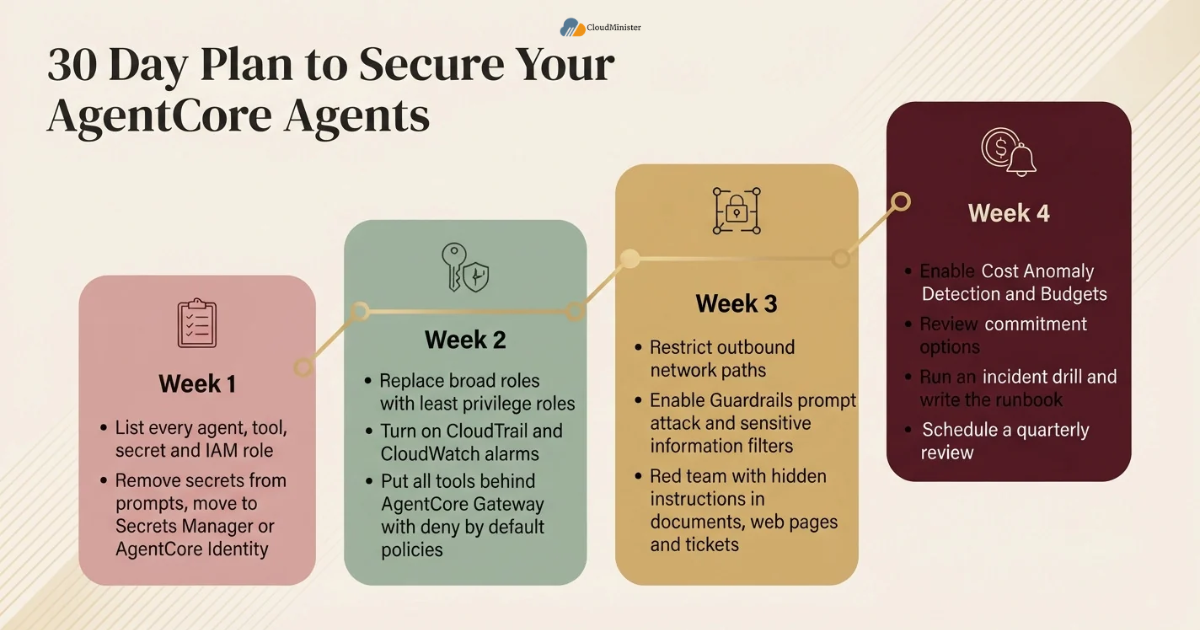
Reading about AWS AgentCore Prompt Injection is easy and acting on it is harder, so this plan splits the work into four weeks that most teams can follow. Start with inventory, move to controls, then test, and finish with a cost review. A Web Hosting Company in India or an internal platform team can help to schedule each week, and a short written plan keeps everyone on the same page. If you also use Microsoft Azure Cloud Hosting Services, add a column for that cloud to the plan. This AWS AgentCore Prompt Injection roadmap works with AWS managed services as well as with an internal team.
- Week one: list every agent, its tools, its secrets and its IAM role, and mark which ones read untrusted content and which ones run on steady compute that may fit AWS Savings Plans vs Reserved Instances.
- Week one: remove secrets from prompts and move them into Secrets Manager or AgentCore Identity.
- Week two: replace broad roles with least privilege roles and turn on CloudTrail and CloudWatch alarms. Ask your Web Hosting Company in India for current capacity and backup details at the same time.
- Week two: put all tools behind AgentCore Gateway and write deny by default policies.
- Week three: restrict outbound network paths and enable Guardrails prompt attack and sensitive information filters.
- Week three: red team the agent with hidden instructions placed in documents, web pages and tickets.
- Week four: enable Cost Anomaly Detection and Budgets, then review commitment options for AWS Savings Plans vs Reserved Instances.
- Week four: run an incident drill, write the runbook and schedule a quarterly review of AWS AgentCore Prompt Injection controls.
Checklist: Agent Credential Safety Review
- Secrets removed from every prompt, tool description and knowledge document.
- Tokens fetched by code at call time through AgentCore Identity or Secrets Manager.
- One least privilege IAM role for each agent and each environment.
- All tool calls routed through AgentCore Gateway with deny by default Policy rules.
- Guardrails prompt attack and sensitive information filters enabled and tested.
- Outbound network access limited to approved destinations.
- CloudTrail, CloudWatch alarms and GuardDuty active, with a named on call owner, as agreed with your Web Hosting Company in India if you use one.
- Cost Anomaly Detection and Budgets active before any commitment purchase, and AWS Savings Plans vs Reserved Instances reviewed with real usage data.
- Incident runbook written and tested with a drill that includes AWS AgentCore Prompt Injection scenarios.
Key Takeaways
- Prompt injection is a design risk, so strong AWS AgentCore Prompt Injection defense places hard controls outside the model.
- The model should never see a secret. Fetch tokens in code at call time and keep them out of prompts, logs and tool arguments.
- Least privilege roles and short lived credentials keep a successful attack small and keep usage data clean for AWS Savings Plans vs Reserved Instances.
- AgentCore Gateway, Policy and Guardrails work best together for AWS AgentCore Prompt Injection defense, with Policy as the deterministic layer.
- Network limits and monitoring stop a leaked secret from leaving unnoticed.
- Credential exposure becomes a billing event, so Budgets and anomaly alerts matter as much as logs.
- Choose between AWS Savings Plans vs Reserved Instances by usage predictability and flexibility, and rightsize before you commit.
- Good Azure cost optimization and good AWS Management Console habits make the same security and cost lessons work across clouds.
- A partner for AWS managed services, a Web Hosting Company in India or a provider of Microsoft Azure Cloud Hosting Services can cover monitoring and backups, as long as responsibilities are written down.
Get a Free Consultation for Your Cloud Security
Not sure where your agents, secrets or AWS costs stand today? Talk to the CloudMinister team about permissions, monitoring and incident readiness. We offer a free consultation to all new clients, so you can start with expert guidance at no cost.
Conclusion
Throughout this guide one pattern holds, whatever the cloud or company size. AWS AgentCore Prompt Injection is not defeated by one clever filter. It is managed by keeping secrets away from the model, limiting permissions, enforcing rules outside the model and watching the logs and the bill. When you add a clear view of AWS Savings Plans vs Reserved Instances, you protect both the security of the platform and the budget that pays for it. For teams that want help with the operational side, AWS managed services and a trusted Web Hosting Company in India can carry monitoring and backups, while Microsoft Azure Cloud Hosting Services supports multi cloud plans with the same controls.
A final lesson is that an agent launch is never really finished. New tools, new documents and new models change the attack surface every month. Review AWS AgentCore Prompt Injection controls each quarter, revisit AWS Savings Plans vs Reserved Instances when usage changes and keep notes on what worked. Over time these notes turn into a library that makes every future agent safer, cheaper and easier to defend.
Frequently Asked Questions
What is AWS AgentCore Prompt Injection?
AWS AgentCore Prompt Injection is an attack where hidden or direct text convinces an AI agent to ignore its rules and perform an action chosen by the attacker. On AgentCore the most serious outcome is credential exposure, where the agent reveals or misuses a token or key.
Can prompt injection steal credentials from an AgentCore agent?
Yes, if a secret is visible to the model or if the agent role is too broad. Keeping tokens in AgentCore Identity or Secrets Manager, using least privilege roles and limiting outbound access greatly reduces that risk.
Does Amazon Bedrock Guardrails stop prompt injection completely?
No. The prompt attack filter helps detect many attempts, but detection is probabilistic. Treat it as one layer of AWS AgentCore Prompt Injection defense, next to AgentCore Policy, least privilege and network controls.
Where should I store API keys for an agent?
Store them in AWS Secrets Manager or use AgentCore Identity for managed tokens, and read them inside tool code at call time. Never place them in prompts, tool descriptions or knowledge documents.
AWS Savings Plans vs Reserved Instances: which is better for agent workloads?
For most changing workloads, Compute Savings Plans are the more flexible choice. Reserved Instances can make sense for very stable setups or when you need a zonal capacity reservation. The AWS Savings Plans vs Reserved Instances decision should follow your real usage data.
Do commitments protect me from a surprise bill after stolen credentials?
No. Usage above your committed amount is billed at On Demand rates, so Budgets, Cost Anomaly Detection and fast incident response are still needed, whichever side of AWS Savings Plans vs Reserved Instances you choose.
How does Azure cost optimization relate to this topic?
It follows the same logic on Azure. Use managed identities, Key Vault, budgets and Azure Advisor, then compare Azure Reservations with the Azure savings plan for compute. Good Azure cost optimization starts with cleanup before commitment.
Where do I find cost recommendations in the AWS Management Console?
Open Billing and Cost Management in the AWS Management Console, then use Cost Explorer and the Savings Plans pages to see recommendations based on your usage, which helps you decide AWS Savings Plans vs Reserved Instances.
Do I need outside help to secure agents?
Not always, but a partner offering AWS managed services or a Web Hosting Company in India can add monitoring, backups and a second review of your rollback and incident plans. They can also guide your AWS Savings Plans vs Reserved Instances decision with real usage data. Confirm in writing what the provider covers.

He is the CEO and Founder with over a decade of experience in cloud infrastructure, DevOps, and server optimization. With a strong vision and hands-on leadership approach, he has built scalable, secure, and high-performance cloud solutions trusted by businesses across industries.