Most engineering teams do not overspend on S3 on purpose. They leave data sitting in Standard because moving it feels risky, or they shift cold data straight into Glacier without checking retrieval fees, and the bill goes up instead of down. S3 storage class pricing in 2026 is not one number on a page, it is a layered structure of storage rate, request charges, retrieval fees, and minimum duration penalties. This guide breaks down how Standard, Standard-IA, Intelligent-Tiering, and the Glacier family are actually priced this year, and when each one is the right, defensible choice. A layered lifecycle policy almost always beats defaulting every bucket to a single class for the life of an account, and getting S3 storage class pricing right is one part of running a genuinely disciplined AWS account.
Every team that has ever opened an AWS bill and felt a small jolt of surprise has run into S3 storage class pricing in some form, even if they did not call it that at the time. Storage looks simple on the surface, you upload a file and you pay to keep it there, but the reality is a lot more layered once an account grows past a handful of buckets. A gigabyte sitting in Standard costs a very different amount than the same gigabyte sitting in Glacier Deep Archive, and the gap between them is often wide enough to change how a whole department plans its yearly cloud budget. Most engineers only discover this the hard way, usually while trying to explain a spike in the monthly invoice to someone in finance who wants a straight answer.
What makes S3 storage class pricing genuinely tricky is that the sticker price per gigabyte is only the first of several charges layered on top of each other. Request pricing, retrieval fees, minimum storage duration, and even a minimum billable object size all sit quietly underneath that headline number, and none of them show up unless you go looking. A team can pick what looks like the cheapest class on paper and still end up paying more overall, simply because their access pattern does not match what that class was actually priced for. This is exactly why a class comparison needs to go beyond the per gigabyte rate and look at how the data will genuinely be used.
This guide walks through each major storage class one at a time, starting with Standard and moving through Standard-IA, One Zone-IA, Intelligent-Tiering, and the full Glacier family, before pulling everything into a side by side comparison. Along the way it covers the lifecycle strategies that let a properly managed account combine several classes at once instead of forcing every object into one tier for its entire life. By the end, the goal is a practical decision framework anyone can apply to a real bucket, not just a list of prices copied from a pricing page. Getting comfortable with how S3 storage class pricing actually works is what turns a confusing invoice into a predictable, explainable one.
Table of Contents
- 1. What Is S3 Storage Class Pricing and Why It Confuses So Many Teams
- 2. Why This Topic Matters More in 2026
- 3. S3 Standard: The Default Tier and Its Real Cost
- 4. S3 Standard-IA and One Zone-IA: The Middle Ground Most Teams Underuse
- 5. S3 Intelligent-Tiering: Automation Instead of Manual Lifecycle Rules
- 6. The Glacier Family: Where Costs Drop Sharply
- 7. Comparing Every S3 Tier Side by Side
- 8. How to Decide Which S3 Storage Class Fits Your Data
- 9. Building a Layered Lifecycle Strategy
- 10. Common Mistakes Teams Make With This Pricing Model
- 11. Governance Around Storage Costs at Scale
- 12. Measuring Whether Your Strategy Is Actually Working
- 13. Choosing the Right Partner for Storage Cost Strategy
- 14. Fitting This Into a Full Cloud Strategy
- 15. Putting a Recurring Review Into Practice
- 16. A Short Checklist for Multi Cloud Storage Cost Discipline
- 17. Final Notes on Keeping Costs Predictable
- Key Takeaways
- Conclusion
- Frequently Asked Questions
1. What Is S3 Storage Class Pricing and Why It Confuses So Many Teams
For developers and finance teams alike, this conversation usually starts the same way, often while a Web Hosting Company in India is already being asked to review a client’s monthly AWS invoice line by line. Someone opens the AWS Management Console, clicks into an S3 bucket, and finds objects sitting in S3 Standard that have not been touched in eight months. Understanding S3 Storage Class Pricing properly is the difference between a bucket that costs a predictable amount every month and one that quietly drifts upward for no operational reason.
Amazon S3 does not charge one flat rate. It prices storage by class, and each class trades a lower per gigabyte rate for a longer retrieval time, a higher request cost, or a minimum storage duration. Getting comfortable with this tradeoff is the real starting point for anyone trying to control S3 Storage Class Pricing at scale, whether that account is managed in house or through a partner offering AWS managed services.
Key Pricing Levers That Make Up S3 Storage Class Pricing
- Storage rate per gigabyte per month, which is the number most teams look at first and the only number many teams ever check, even though it is rarely the full picture of S3 Storage Class Pricing on a real bucket.
- Request pricing, billed per 1,000 or per 10,000 depending on the operation, where PUT, COPY, POST and LIST requests generally cost more than GET requests, and colder classes charge noticeably more per request than S3 Standard.
- Retrieval fees, which apply to Standard-IA, One Zone-IA, and every Glacier tier, and which do not exist at all on S3 Standard, making retrieval the single most misunderstood line item in S3 Storage Class Pricing discussions.
- Minimum storage duration charges, meaning an object deleted early from Standard-IA, One Zone-IA, Glacier Flexible Retrieval, or Glacier Deep Archive is still billed as though it stayed for the full minimum period.
- Minimum billable object size, since small objects placed in an Infrequent Access or Glacier class under 128 KB are still billed as 128 KB, which quietly inflates costs for buckets full of tiny files.
- Data transfer out charges, which sit outside the storage class rate entirely but still show up on the same invoice line most teams associate with storage costs.
Storage class selection changes how data is billed, not how it is protected. An object placed in Glacier Deep Archive for cost reasons still needs the same bucket policy discipline, encryption at rest, and access logging as an object sitting in S3 Standard. Teams that treat a cheaper storage class as a substitute for proper access control are solving a billing problem while quietly reopening a security one, which is exactly the kind of gap a serious review of AWS managed services is meant to catch before an audit does.
A large part of why S3 Storage Class Pricing feels confusing is that AWS genuinely does layer multiple independent charges on top of the headline storage rate, and a team that only compares the per gigabyte number across classes will consistently misjudge which class is actually cheaper for their real access pattern.
2. Why Understanding S3 Storage Class Pricing Matters More in 2026
Many engineering teams first encounter this decision while already talking to a Web Hosting Company in India about broader infrastructure costs, and a capable partner will usually raise storage class strategy early in that conversation, since object storage is one of the fastest growing line items on almost every cloud invoice today.
- Cloud infrastructure spend has been climbing sharply through 2026, with global quarterly cloud infrastructure spend crossing the one hundred billion dollar mark for six consecutive quarters, according to CloudZero’s 2026 market analysis, a trend that pulls storage spend upward right alongside compute.
- Storage costs commonly represent a meaningful share of the total AWS bill for data heavy organizations, which is exactly why S3 Storage Class Pricing deserves the same scrutiny that compute right sizing already gets in most FinOps reviews.
- Without a structured lifecycle strategy, different teams inside the same company commonly default every bucket to S3 Standard, producing duplicated storage spend across services that could easily share a tiered lifecycle policy.
- A disciplined approach centralizes storage class decisions at the platform or DevOps team level, sometimes in partnership with a provider offering AWS managed services, rather than leaving lifecycle rules to whichever engineer created the bucket first.
Related Reading: AWS Well-Architected Framework
- Teams that already work with a Web Hosting Company in India for their broader Cloud Hosting Plan tend to catch storage class mistakes earlier, since routine monitoring surfaces objects sitting in the wrong tier before the mismatch becomes a year long habit.
Before standardizing a lifecycle policy across an entire account, test it against one non critical bucket first, ideally one where object access patterns are already well understood. Teams that validate real retrieval frequency and request volume before rolling out a lifecycle rule fleet wide consistently avoid the most common mistake in S3 Storage Class Pricing, which is assuming every bucket in an account shares the same access pattern.
3. S3 Standard: The Default Tier and Its Real Cost
S3 Standard remains the default storage class for any newly created object, and it is priced for frequent access rather than for long term retention. Understanding its role is the natural starting point before comparing it against every cheaper alternative in this guide.
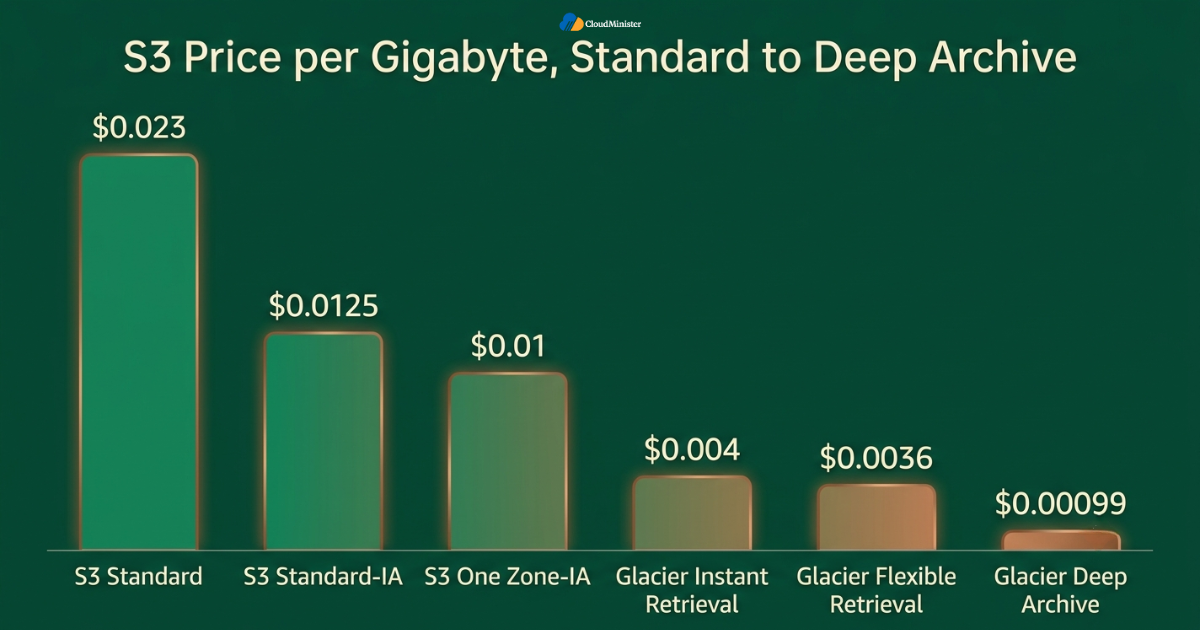
- S3 Standard is priced at roughly 0.023 dollars per gigabyte per month in the US East N. Virginia region, making it the highest per gigabyte storage rate across the entire S3 family, a baseline figure worth confirming directly inside the AWS Management Console before budgeting a new workload.
- There is no retrieval fee and no minimum storage duration on S3 Standard, which is exactly why it remains the correct choice for data accessed multiple times a month or data whose access pattern is not yet well understood.
- S3 Standard storage pricing is tiered by total volume stored, meaning the effective rate per gigabyte can shift slightly as total usage crosses certain volume thresholds within the same account.
- Request pricing on S3 Standard sits at the lower end of the S3 family, which matters for workloads with millions of small reads and writes, since colder classes multiply request costs by a wide margin.
- For a typical hundred terabyte dataset stored for a full year, S3 Standard pricing lands well above what the same dataset would cost in Standard-IA or Glacier Instant Retrieval, which is the exact comparison most teams researching S3 Storage Class Pricing are trying to work through.
The core mistake teams make with S3 Standard is not choosing it. It is leaving data there indefinitely after the access pattern has clearly cooled off, which is precisely the scenario a lifecycle policy is built to catch automatically.
4. S3 Standard-IA and One Zone-IA: The Middle Ground Most Teams Underuse
Standard-IA, short for Standard Infrequent Access, is consistently the most underused storage class across real AWS accounts, largely because teams assume any class outside S3 Standard must come with a meaningful retrieval delay. It does not.
4.1 Standard-IA Pricing and Behavior
- Standard-IA is priced at roughly 0.0125 dollars per gigabyte per month, which represents close to a forty five percent discount against S3 Standard for data that genuinely is not accessed every day.
- Retrieval time from Standard-IA is identical to S3 Standard, meaning there is no latency penalty at all, only a per gigabyte retrieval fee applied whenever the object is actually read back.
- A 128 KB minimum billable object size applies to Standard-IA and One Zone-IA, so a bucket full of small log files or thumbnails can see its effective cost inflated well beyond the headline rate if this detail is ignored. This same 128 KB minimum also applies to Glacier Instant Retrieval, but Glacier Flexible Retrieval and Glacier Deep Archive follow different minimum capacity and metadata billing rules rather than the flat 128 KB threshold.
- A thirty day minimum storage duration applies, so objects that cycle in and out of a bucket faster than that window will cost more under Standard-IA than they would have under S3 Standard.
4.2 One Zone-IA Pricing and Behavior
- One Zone-IA is priced lower still, at roughly 0.01 dollars per gigabyte per month, because it stores data in a single availability zone rather than replicating across multiple zones.
- This class suits easily reproducible data such as secondary backups or transcoded media copies, where losing the single zone would be inconvenient but not catastrophic.
- It should never hold the only copy of data that cannot be regenerated, since a single availability zone failure can mean permanent data loss regardless of how attractive the storage rate looks on paper.
Both Infrequent Access classes sit at the center of most well designed S3 Storage Class Pricing strategies, since they deliver a meaningful discount without asking a team to accept the hours long retrieval delay that comes with the Glacier family.
5. S3 Intelligent-Tiering: Automation Instead of Manual Lifecycle Rules
S3 Intelligent-Tiering exists specifically for datasets where access patterns are unpredictable, and it works by monitoring object access and moving data automatically between a frequent access tier and an infrequent access tier without any application level change.
- The frequent access tier inside Intelligent-Tiering is priced the same as S3 Standard, while the automatic infrequent access tier is priced around 0.0125 dollars per gigabyte per month, matching Standard-IA.
- There is no retrieval fee at all within Intelligent-Tiering, which is one of its biggest advantages over manually managed Standard-IA or Glacier lifecycle rules.
- A small monitoring fee is charged per object per month, which makes Intelligent-Tiering a poor fit for buckets holding millions of very small objects, since the monitoring charge can outweigh the storage savings entirely.
- Optional archive tiers within Intelligent-Tiering can move rarely accessed objects into Glacier level pricing automatically, extending the same hands off approach into long term archival without a separate lifecycle configuration.
- For datasets with genuinely unpredictable access, this class often produces better real world outcomes than a manually tuned lifecycle policy, since it reacts to actual behavior instead of a fixed thirty or ninety day assumption, a pattern well suited to teams already relying on AWS managed services for the rest of their infrastructure.
Related Reading: cloud migration using AWS Application Migration Service
The pattern that separates a genuinely well optimized S3 account from a fragile one is layering rather than picking one storage class exclusively. A team that runs Intelligent-Tiering for unpredictable datasets, Standard-IA for known infrequent access data, and Glacier for long term archival typically ends up with a bill that is both lower and easier to explain during a finance review than a team that forces every bucket into a single class regardless of what that data actually needs.
Get Your AWS Storage Strategy Right From Day One
Choosing the correct S3 storage class is only part of running a cost efficient AWS account. CloudMinister’s Amazon Cloud Hosting plans are built around the same lifecycle discipline covered in this guide, so your storage, compute, and networking costs stay predictable together.
6. The Glacier Family: Where S3 Storage Class Pricing Drops Sharply
The Glacier family is where S3 Storage Class Pricing drops most dramatically, sometimes by more than ninety percent against S3 Standard, but the retrieval behavior and minimum storage duration attached to each Glacier tier need to be understood before any migration decision is made.
6.1 Glacier Instant Retrieval
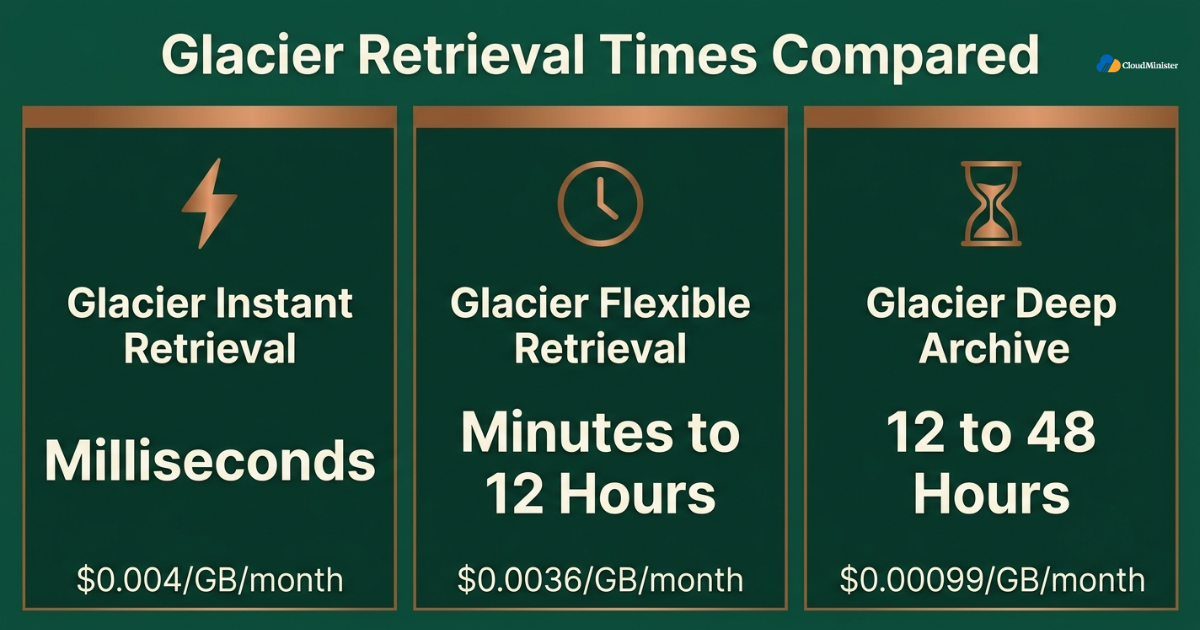
- Priced at roughly 0.004 dollars per gigabyte per month, Glacier Instant Retrieval targets archive data that still needs millisecond level access on the rare occasion it is requested.
- Retrieval carries a per gigabyte fee of roughly 0.03 dollars, which is higher than the retrieval fee on Standard-IA, so this class only makes financial sense when the data is genuinely accessed a few times a year at most.
- A ninety day minimum storage duration applies, meaning data cycled out earlier than that window is still billed for the full ninety days.
6.2 Glacier Flexible Retrieval
- Priced at roughly 0.0036 dollars per gigabyte per month, Flexible Retrieval sits just below Instant Retrieval and suits archives where a retrieval delay of minutes to hours is acceptable.
- Bulk restores can take up to twelve hours to complete, while expedited restores are available at a higher per request and per gigabyte cost for time sensitive recovery needs.
- The same ninety day minimum storage duration applies here as well, reinforcing that Flexible Retrieval is built for genuinely long term archival rather than short lived cold storage.
6.3 Glacier Deep Archive
- Priced at roughly 0.00099 dollars per gigabyte per month, Deep Archive is the least expensive storage class in the entire S3 family and is typically used for compliance data with retention periods measured in years or decades.
- Standard restore requests from Deep Archive can take up to twelve hours, and a bulk restore can extend up to forty eight hours, so this class is unsuitable for anything resembling an operational recovery timeline.
- A one hundred and eighty day minimum storage duration applies, the longest of any S3 storage class, making early deletion from Deep Archive the single most expensive mistake possible under S3 Storage Class Pricing rules.
A useful illustration is a fifty terabyte compliance dataset retained for seven years. Under S3 Standard pricing that dataset costs roughly ninety six thousand dollars over the retention period, while the same dataset under Glacier Flexible Retrieval costs roughly fifteen thousand dollars, and under Glacier Deep Archive it drops to roughly four thousand dollars, a difference of over ninety thousand dollars that exists purely because of storage class selection rather than any change in the underlying data.
Before moving a large existing dataset into any Glacier tier, calculate the retrieval cost for a worst case bulk restore, not just the ongoing monthly storage rate. A dataset that looks like it will save tens of thousands of dollars a year in storage can still produce an unexpectedly large bill the one time a full restore is genuinely needed, which is exactly the kind of scenario a Web Hosting Company in India should model out before a migration is approved.
7. Comparing S3 Storage Class Pricing Side by Side
Laid out together, the differences across every S3 storage class become much easier to reason about, and this is usually the point where a team can start mapping real buckets to the correct tier with confidence.
- S3 Standard: roughly 0.023 dollars per gigabyte per month, no retrieval fee, no minimum duration, instant access, correct for data accessed multiple times a month.
- Standard-IA: roughly 0.0125 dollars per gigabyte per month, per gigabyte retrieval fee applies, thirty day minimum duration, instant access, correct for monthly access patterns.
- One Zone-IA: roughly 0.01 dollars per gigabyte per month, per gigabyte retrieval fee applies, thirty day minimum duration, single availability zone, correct for reproducible secondary copies.
- Intelligent-Tiering: matches S3 Standard or Standard-IA rates depending on the tier an object lands in automatically, no retrieval fee, small per object monitoring charge, correct for unpredictable access patterns.
- Glacier Instant Retrieval: roughly 0.004 dollars per gigabyte per month, higher retrieval fee, ninety day minimum duration, correct for rarely accessed archives that still need fast access when requested.
- Glacier Flexible Retrieval: roughly 0.0036 dollars per gigabyte per month, retrieval measured in minutes to hours, ninety day minimum duration, correct for archival where delay is acceptable.
- Glacier Deep Archive: roughly 0.00099 dollars per gigabyte per month, retrieval measured in hours, one hundred and eighty day minimum duration, correct for long term compliance retention.
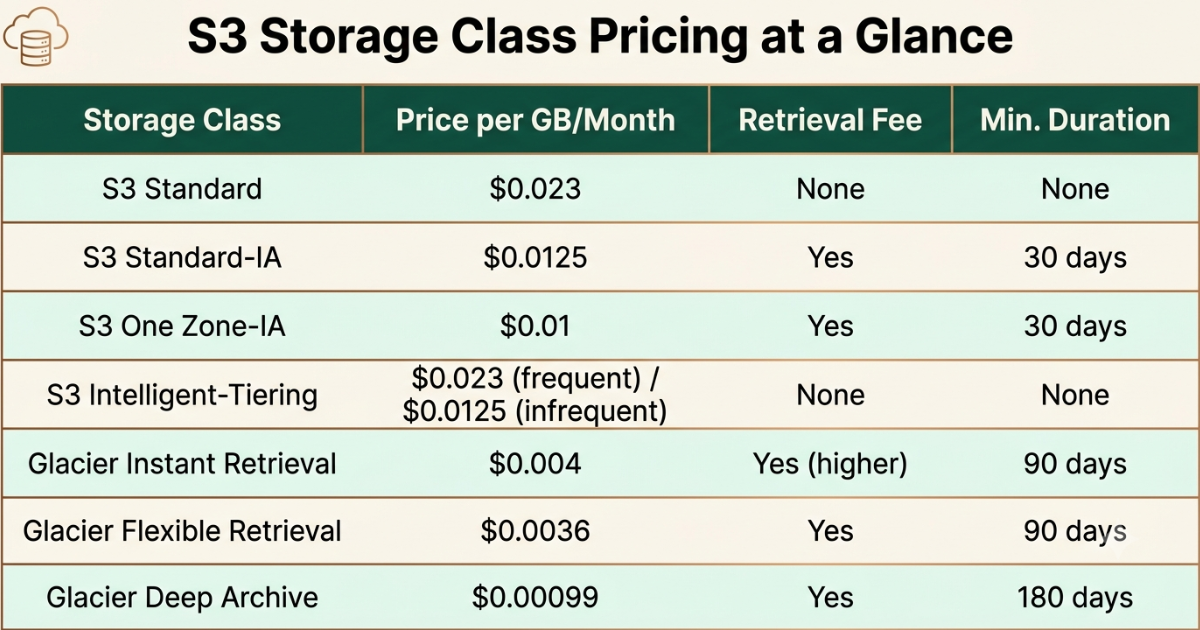
A structured comparison like this is exactly what turns S3 Storage Class Pricing from a confusing pricing page into a straightforward decision matrix any engineering or finance team can apply consistently across an account.
8. How to Decide Which S3 Storage Class Actually Fits Your Data
Choosing the right tier is not a matter of picking whichever class sounds the cheapest. It depends entirely on how often the data is genuinely accessed and how tolerant the workload is of retrieval delay.
- Start by asking how often the data is actually read, not how often it theoretically might be read, since overestimating access frequency is the single most common reason teams overpay under S3 Storage Class Pricing rules.
- If access happens daily or weekly, S3 Standard remains the correct and defensible choice, and moving that data to a cheaper class would introduce retrieval fees that outweigh the storage savings.
- If access happens monthly or less, Standard-IA or One Zone-IA typically produce real savings without meaningfully changing how the application experiences retrieval latency.
- If access patterns are genuinely unknown or highly variable, Intelligent-Tiering removes the guesswork entirely and lets actual usage decide the tier automatically.
- If data is accessed a handful of times a year or less, and retrieval delay of minutes to hours is acceptable, Glacier Flexible Retrieval or Glacier Instant Retrieval delivers the deepest discount without an unreasonable restore wait.
- If data exists purely for regulatory retention and will likely never be read again outside an audit, Glacier Deep Archive is almost always the correct final destination.
Related Reading: Rackspace to AWS migration
Document the assumptions behind every storage class decision, including expected access frequency, any known changes on the roadmap, and how the choice fits a broader cost strategy alongside Azure cost optimization for teams running a parallel Azure footprint, so the decision can be revisited with real context later rather than guessed at again from scratch.
9. Building a Layered Lifecycle Strategy Around S3 Storage Class Pricing
Even a well chosen initial storage class can underperform if nothing ever moves the data forward as it ages. Building a layered lifecycle strategy matters as much as picking the right starting class for any single bucket.
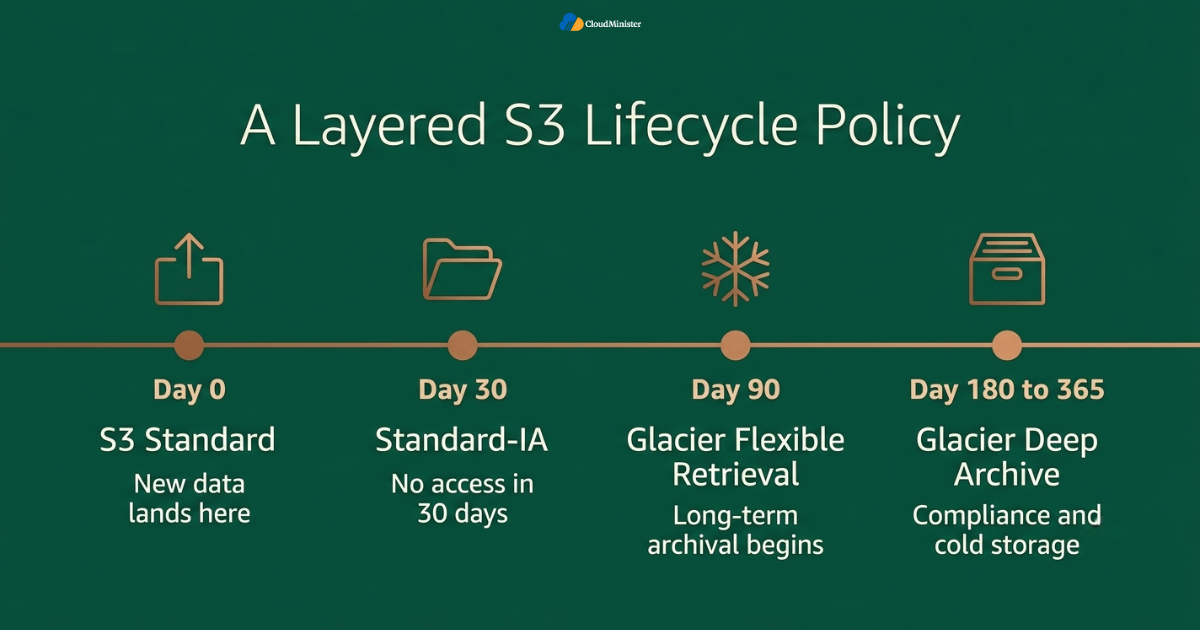
- Use S3 Standard as the default landing zone for newly written data, since access patterns are rarely obvious the moment an object is first created.
- Transition data to Standard-IA after thirty days of no access, a threshold that can be automated entirely through a lifecycle rule configured once inside the AWS Management Console and left to run indefinitely.
- Transition data to Glacier Flexible Retrieval or Glacier Deep Archive after ninety to three hundred and sixty five days depending on regulatory retention requirements and how tolerant the workload is of a longer restore window.
- Reserve Intelligent-Tiering for buckets where access patterns genuinely cannot be predicted in advance, rather than applying it universally, since the per object monitoring fee adds up quickly on buckets full of small files.
- Reassess the lifecycle mix on a recurring schedule, ideally as part of routine infrastructure reviews, since a dataset that was accessed weekly a year ago may have gone completely cold and now belongs in a much cheaper tier.
Related Reading: AWS vs Azure vs Google Cloud
For teams running any workloads on Microsoft Azure Cloud Hosting Services alongside AWS, the same layered thinking applies to Azure Blob Storage tiers, and a mature multi cloud team typically applies the identical discipline to both environments rather than optimizing one cloud carefully while leaving the other on default settings.
10. Common Mistakes Teams Make With S3 Storage Class Pricing
Even teams that understand the mechanics correctly, including teams already working with an established Web Hosting Company in India, can still fall into avoidable mistakes if storage class selection is treated as a one time setup task rather than an ongoing practice.
- Moving data into Glacier purely to chase the lowest per gigabyte rate without checking whether the workload actually retrieves that data often enough for retrieval fees to erase the savings entirely.
- Storing millions of small objects in an Infrequent Access class or Glacier Instant Retrieval without accounting for the 128 KB minimum billable size, which can quietly double or triple the effective cost, note that Glacier Flexible Retrieval and Glacier Deep Archive use separate minimum capacity/metadata rules rather than this same 128 KB threshold.
- Deleting objects early from Standard-IA, One Zone-IA, or any Glacier tier without realizing the minimum storage duration charge still applies, effectively paying for storage that was never used.
- Applying Intelligent-Tiering to every bucket by default, including ones with millions of tiny objects, where the per object monitoring fee outweighs any tiering benefit.
- Not revisiting lifecycle policies after a significant application change, leaving data transitioning on a schedule that no longer matches how the application actually accesses it.
- Treating every storage class as interchangeable, or assuming a lifecycle pattern that worked for one workload will transfer unchanged to a workload with a completely different access frequency, rather than reassessing S3 Storage Class Pricing deliberately as requirements change.
Across real production accounts, the gap between a team that gets consistent, predictable storage costs and one that quietly accumulates lifecycle debt is rarely about which storage class was chosen first. It is a difference in ongoing review discipline. Teams that assign clear ownership over lifecycle policy and revisit it on a fixed schedule, often with support from a partner offering AWS managed services, report far fewer instances of the kind of retrieval fee surprise that an unmanaged bucket eventually produces.
11. Governance Around S3 Storage Class Pricing at Scale
Standardizing storage class strategy across a large account introduces a specific governance layer on top of the standard technical considerations that come with running object storage at scale.
- Storage class decisions should route through the same review process as any other production infrastructure change, ideally with input from teams experienced in both AWS managed services and Microsoft Azure Cloud Hosting Services where a multi cloud footprint exists.
- Centralized lifecycle standards, coordinated with a single operations partner rather than allowing individual teams to define their own transition rules independently, prevent the kind of overlapping and conflicting lifecycle configurations that are difficult to untangle later.
- Storage class usage should be tracked explicitly inside cost allocation tags, since knowing exactly which buckets sit on which class is far more useful during a budget review than discovering it while responding to an unexpected invoice.
- A documented storage inventory, tracking which buckets sit on which class and why, gives a platform team, and any supporting Web Hosting Company in India, the audit trail needed to justify the setup during a cost or security review.
- Retrieval patterns should be reviewed on a recurring basis using AWS Cost Explorer alongside the AWS Management Console, so that any unexpected retrieval fee spike gets flagged before it becomes a genuine budget incident.
Checklist: Readiness Before Standardizing S3 Storage Class Pricing Decisions at Scale
- Current storage inventory mapped across every bucket and prefix in the account
- Access frequency confirmed for major datasets rather than assumed
- Storage class matched to actual access pattern, not to whichever class was fastest to configure
- Lifecycle rules automated rather than left as a manual, one time migration
- Ownership assigned for ongoing lifecycle policy review, ideally shared with a Web Hosting Company in India
- Minimum storage duration and minimum object size documented for every class in active use
12. Measuring Whether Your S3 Storage Class Pricing Strategy Is Actually Working
Standardizing a good lifecycle pattern is not the finish line of a storage cost effort. Long term value depends entirely on how the setup is monitored and adjusted afterward, whether the account is self managed or supported by an experienced operations partner.
- Track total spend by storage class over time, since a rising Glacier retrieval line combined with falling Standard storage spend can indicate data was moved too aggressively into a colder tier than its access pattern supports.
- Compare actual retrieval frequency against lifecycle assumptions, a discipline that matters just as much for teams weighing Azure cost optimization on a parallel Azure footprint, since real world access often turns out different from what the original lifecycle rule assumed.
- Review minimum storage duration violations quarterly, flagging any workflow that repeatedly deletes objects from Standard-IA or Glacier before the minimum window, since that pattern indicates the wrong storage class was chosen in the first place.
- Cross reference storage class allocation against a team’s broader Cloud Hosting Plan and against any secondary environment running on Microsoft Azure Cloud Hosting Services, to confirm the setup still matches how the application is actually deployed.
- Maintain a change log for every lifecycle rule created, modified, or removed, shared with the broader operations team where relevant, so a team can trace exactly why a given transition schedule was chosen and whether the assumptions behind it still hold.
Enterprises managing meaningful data volumes are not working through this challenge in isolation. Enterprises that implement structured cost governance programs report meaningfully lower monthly cloud spend on average,
and idle or underutilized cloud resources still account for a large share of total cloud waste industry wide, according to 2026 FinOps benchmark data from DataStackHub, underscoring why structured storage review matters just as much as the initial class selection, and why a dependable Web Hosting Company in India earns its keep long after a lifecycle policy is first deployed.
13. Choosing the Right Partner for Storage Cost Strategy
Not every hosting relationship is built to support disciplined storage cost management, so matching a provider’s capability to actual team needs matters more than brand recognition alone, whether that provider delivers AWS managed services, Microsoft Azure Cloud Hosting Services, or both.
- A dependable Web Hosting Company in India that already manages a team’s broader infrastructure is well positioned to advise on how S3 Storage Class Pricing decisions should fit into an existing environment without introducing unnecessary complexity.
- Teams evaluating providers should specifically ask whether the provider has direct experience structuring lifecycle policies across S3 Standard, Standard-IA, Intelligent-Tiering, and Glacier at meaningful scale, not just provisioning storage under a generic Cloud Hosting Plan.
- Teams that want to move quickly without designing every lifecycle rule themselves often gravitate toward a Web Hosting Company in India that comes with clear documentation on how AWS managed services interact with existing infrastructure from day one, including experience across Microsoft Azure Cloud Hosting Services for teams running a multi cloud footprint.
- Engineering leaders who have not yet reviewed their hosting partner relationship specifically in the context of storage cost strategy, minimum duration exposure, or lifecycle rule readiness should treat this guide as a natural trigger point to do so.
- A capable partner offering both deep expertise in AWS managed services and broader cloud hosting experience gives growing teams a coherent roadmap for scaling their storage footprint instead of stitching together advice from multiple vendors.
When comparing quotes or advice from different partners on storage strategy, whether they specialize in AWS managed services, Microsoft Azure Cloud Hosting Services, or a general Cloud Hosting Plan built around a specific stack, ask each one to walk through a real bucket inventory from your own account rather than a generic case study, since the right lifecycle recommendation depends entirely on how the data is actually accessed. A provider offering genuine expertise across both platforms will consistently give more actionable guidance than a purely theoretical comparison.
14. S3 Storage Class Pricing in the Context of a Full Cloud Strategy
No storage class decision happens in isolation, and treating S3 Storage Class Pricing as a standalone exercise separate from the rest of an AWS account tends to produce inconsistent results. The most reliable outcomes come from teams that fold storage class strategy into the same review cadence as compute, networking, and security.
- Teams running production workloads on AWS, including those whose broader footprint also spans Microsoft Azure Cloud Hosting Services, increasingly rely on a trusted operations partner to keep S3 Storage Class Pricing decisions consistent across dozens or hundreds of buckets, rather than leaving each application team to configure lifecycle rules independently.
- A provider delivering AWS managed services typically brings a documented lifecycle template that new buckets inherit automatically, which removes the guesswork that otherwise leads to inconsistent S3 Storage Class Pricing outcomes across an organization.
- When storage decisions are reviewed alongside AWS managed services engagements, the same visibility that catches an idle EC2 instance also catches a bucket sitting in the wrong storage class, which is exactly the kind of cross cutting review a Web Hosting Company in India is well positioned to run.
- A Web Hosting Company in India that already manages compute and networking for a client is naturally positioned to extend that same discipline into S3 Storage Class Pricing, since storage, compute, and networking costs are rarely reviewed as separate line items by a mature FinOps function.
- Choosing a Web Hosting Company in India that understands both the mechanics of S3 Storage Class Pricing and the operational realities of a growing application gives a team one place to go for both architecture and cost questions, rather than splitting that conversation across multiple vendors.
Teams that run a hybrid footprint, with some workloads on AWS and others on Microsoft Azure Cloud Hosting Services, tend to apply the same lifecycle thinking on both sides once the discipline is established for S3 Storage Class Pricing. Azure Blob Storage offers a comparable set of hot, cool, and archive tiers, and the same questions about access frequency, retrieval delay, and minimum storage duration apply almost directly.
- A team already comfortable navigating Microsoft Azure Cloud Hosting Services storage tiers usually finds the transition to disciplined S3 Storage Class Pricing decisions straightforward, since the underlying logic of matching access frequency to storage rate is nearly identical across both platforms.
- Providers offering both AWS managed services and Microsoft Azure Cloud Hosting Services under one relationship can apply a single governance model across a multi cloud storage footprint instead of maintaining two disconnected sets of lifecycle rules.
- For finance teams tracking spend across both platforms, aligning S3 Storage Class Pricing reviews with Azure cost optimization reviews on the same calendar cadence avoids the situation where one cloud gets careful quarterly attention while the other quietly accumulates waste.
- A team pursuing Azure cost optimization on one side of its environment should expect the equivalent effort on the AWS side to focus heavily on S3 Storage Class Pricing, since object storage is typically one of the largest controllable line items on either platform.
- The discipline behind Azure cost optimization, matching workload behavior to the right pricing tier rather than defaulting to the most expensive option, is the exact same discipline that makes S3 Storage Class Pricing effective, which is why mature FinOps teams treat the two as one connected practice rather than two separate projects.
Whether a team manages its own lifecycle policies or relies on AWS managed services to handle them, every storage class transition should be logged and auditable inside the AWS Management Console. A lifecycle rule that silently moves regulated data into a class with a longer restore time can create a compliance gap if nobody documented that the transition was intentional, and this is a detail worth confirming directly through the AWS Management Console rather than assuming the default configuration already covers it.
Ultimately, a mature approach to S3 Storage Class Pricing treats the AWS Management Console as the source of truth for what is actually deployed, cross references that against documented lifecycle intent, and revisits the mix on a fixed schedule. Teams that build this habit early, often with support from a Web Hosting Company in India or a broader AWS managed services engagement, consistently avoid the slow cost creep that catches unmanaged accounts off guard, regardless of whether their broader footprint also includes Microsoft Azure Cloud Hosting Services or a dedicated Azure cost optimization program running in parallel.
15. Putting a Recurring S3 Storage Class Pricing Review Into Practice
A one time cleanup of storage classes will save money for a while, but S3 Storage Class Pricing only stays optimized when someone owns it as an ongoing task rather than a project that gets closed out after the first pass. The practical steps below are what separates teams that keep their S3 bill flat year over year from teams that see it creep upward every quarter.
- Open the AWS Management Console at least once a month specifically to review storage class distribution, since the AWS Management Console surfaces per bucket storage class breakdowns that are easy to miss inside a generic billing dashboard.
- Use S3 Storage Lens, accessible directly through the AWS Management Console, to spot buckets where the majority of data sits in S3 Standard despite low access frequency, since S3 Storage Class Pricing optimization starts with knowing exactly where the mismatch is happening.
- Set a calendar reminder tied to the same cadence used for Azure cost optimization reviews, so that S3 Storage Class Pricing does not get quietly deprioritized while attention shifts to the Azure side of a multi cloud environment.
- Assign a named owner for S3 Storage Class Pricing decisions the same way a named owner typically exists for Azure cost optimization, since diffuse ownership is one of the most common reasons lifecycle policies go stale.
- Loop in a Web Hosting Company in India during the review if the account is large enough that manual auditing inside the AWS Management Console is no longer practical, since a Web Hosting Company in India that already handles broader account management can usually spot storage anomalies faster than an internal team reviewing it quarterly.
- Where AWS managed services already covers compute and networking, extend that same relationship to include S3 Storage Class Pricing so the account has one consistent point of ownership rather than a gap between what the contract explicitly covers and what falls through the cracks.
- For organizations also running Microsoft Azure Cloud Hosting Services, request that the same partner managing Microsoft Azure Cloud Hosting Services produce a joint report comparing S3 Storage Class Pricing outcomes against Azure Blob Storage tiering, so leadership sees one unified cost picture instead of two disconnected reports.
Pair every AWS Management Console review of S3 Storage Class Pricing with a five minute check of Azure cost optimization dashboards if a parallel Azure environment exists. Teams that review both clouds side by side on the same day, rather than on separate schedules set months apart, tend to catch cross cloud inconsistencies, like one platform aggressively tiering cold data while the other leaves everything on its most expensive default, far sooner than teams that treat AWS Management Console reviews and Azure cost optimization reviews as entirely separate workstreams.
In practice, the accounts that keep S3 Storage Class Pricing under control long term are rarely the ones with the most sophisticated tooling. They are the ones with a named owner, a fixed review date, and either an internal habit or an external Web Hosting Company in India holding them accountable to it, backed by an AWS managed services relationship that treats storage the same way it treats compute, and coordinated against Microsoft Azure Cloud Hosting Services deployments and any parallel Azure cost optimization effort wherever a second cloud is in play. The AWS Management Console makes the data available. What actually saves money is someone checking it on a schedule and acting on what they find, whether that discipline lives with an in house engineer, a dedicated Web Hosting Company in India, or a shared team responsible for both Microsoft Azure Cloud Hosting Services and the broader Azure cost optimization roadmap.
16. A Short Checklist for Multi Cloud Storage Cost Discipline
For teams running both AWS and Azure, keeping S3 Storage Class Pricing and Azure storage tiering aligned is less about tooling and more about habit. The checklist below is what a Web Hosting Company in India would typically walk a client through during an onboarding review.
- Confirm who owns S3 Storage Class Pricing decisions and who owns Azure cost optimization decisions, and confirm whether that is the same person or team, since split ownership is where inconsistency usually starts.
- Confirm the AWS Management Console is checked on a fixed schedule rather than only when a bill looks unusually high, since reactive reviews of the AWS Management Console tend to happen too late to catch the cheapest fix, and pair that check with a look at Azure cost optimization dashboards on the same day.
- Confirm Microsoft Azure Cloud Hosting Services storage tiers are reviewed with the same rigor as S3 Storage Class Pricing, rather than assuming Azure cost optimization for storage will simply take care of itself without deliberate review.
- Confirm the Web Hosting Company in India or internal team responsible for AWS managed services also has visibility into Microsoft Azure Cloud Hosting Services and any active Azure cost optimization program, so nothing falls into a gap between two disconnected support relationships.
- Confirm that Azure cost optimization findings and S3 Storage Class Pricing findings are reported together to leadership through a single dashboard that references both the AWS Management Console and Microsoft Azure Cloud Hosting Services, since separate reports tend to get separate, uneven levels of attention.
A Web Hosting Company in India that treats S3 Storage Class Pricing, AWS managed services, Microsoft Azure Cloud Hosting Services, and Azure cost optimization as one connected conversation, checked consistently through both the AWS Management Console and the Azure equivalent console, tends to deliver measurably better cost outcomes than a setup where each of these gets attention on its own separate, uncoordinated timeline. That same partner should be comfortable defending both an Azure cost optimization roadmap and an S3 Storage Class Pricing roadmap in the same meeting, using the AWS Management Console and Microsoft Azure Cloud Hosting Services dashboards as shared reference points rather than two disconnected sources of truth.
17. Final Notes on Keeping S3 Storage Class Pricing Predictable
- Revisit S3 Storage Class Pricing assumptions every time a new application is deployed, since a fresh workload is the easiest moment to set the right lifecycle rule from day one rather than retrofitting one later.
- Treat the AWS Management Console as the single source of truth for what storage class every object actually sits in, rather than relying on documentation that may have drifted from what the AWS Management Console currently shows.
- Keep Microsoft Azure Cloud Hosting Services storage decisions visible to the same reviewers who track S3 Storage Class Pricing, since a reviewer blind to Microsoft Azure Cloud Hosting Services will miss the bigger multi cloud cost picture entirely.
- Ask any prospective partner directly how they approach S3 Storage Class Pricing during onboarding, since the answer usually reveals how seriously a Web Hosting Company in India takes ongoing cost governance versus one time setup work, and whether their Microsoft Azure Cloud Hosting Services team follows the same standard.
- Where Azure cost optimization is already a formal program covering Microsoft Azure Cloud Hosting Services, extend the same rigor to S3 Storage Class Pricing rather than letting Azure cost optimization absorb all the attention simply because it started first.
- Confirm that AWS Management Console access granted to any partner supporting AWS managed services is scoped appropriately, since broad AWS Management Console access without clear boundaries is its own governance risk separate from storage cost decisions, and the same scoping discipline should apply to whoever manages Microsoft Azure Cloud Hosting Services and its equivalent console.
- Track Azure cost optimization outcomes and S3 Storage Class Pricing outcomes in the same spreadsheet or dashboard month over month, since side by side numbers make it obvious quickly if one cloud is being optimized while the Microsoft Azure Cloud Hosting Services side, or the Azure cost optimization program behind it, is being neglected.
- Make Azure cost optimization and S3 Storage Class Pricing part of the standard onboarding questionnaire for any new Web Hosting Company in India, alongside direct questions about how they use the AWS Management Console and how their team supporting Microsoft Azure Cloud Hosting Services operates day to day, since a partner strong in Microsoft Azure Cloud Hosting Services but weak on AWS storage discipline only solves half the problem.
None of this requires exotic tooling. It requires a habit of checking the AWS Management Console regularly, treating Microsoft Azure Cloud Hosting Services with the same seriousness as the AWS side, running Azure cost optimization and S3 Storage Class Pricing reviews on a shared calendar, and staying in touch with a capable partner that will flag drift before it becomes an expensive surprise on next month’s invoice. A partner fluent in both Azure cost optimization and S3 Storage Class Pricing, comfortable in both the AWS Management Console and the tools behind Microsoft Azure Cloud Hosting Services, is worth more over a multi year relationship than one that only speaks one cloud’s language, and that is ultimately what separates a transactional vendor from a genuine Web Hosting Company in India that a growing team can rely on for both AWS managed services and Azure cost optimization guidance for years to come.
Key Takeaways
- S3 Standard has no retrieval fee and no minimum duration, making it correct only for data accessed multiple times a month despite carrying the highest storage rate in the S3 family.
- Standard-IA and One Zone-IA cut storage cost by roughly forty to fifty percent while keeping retrieval instant, making them the most underused classes for monthly access patterns.
- Intelligent-Tiering removes manual lifecycle management entirely for unpredictable datasets, at the cost of a small per object monitoring fee that makes it a poor fit for buckets full of tiny files.
- The Glacier family delivers the deepest discounts under S3 Storage Class Pricing, but minimum storage durations and retrieval fees mean it only pays off for data that is genuinely rarely accessed.
- Governance, lifecycle rule ownership, and a documented storage inventory matter just as much as the initial class decision, and this holds whether the account is run internally, through a Web Hosting Company in India, or through broader AWS managed services.
- Partnering with a capable provider experienced in structured storage cost strategy, and comfortable discussing both AWS managed services and Microsoft Azure Cloud Hosting Services in the same conversation, meaningfully reduces the risk of an unmanaged, overpriced storage footprint.
Not Sure Which Storage Class Fits Your Data
Every account has a different access pattern, and the wrong lifecycle rule can quietly cost more than it saves. Talk to the CloudMinister team and we will walk through your actual bucket usage before recommending a storage class strategy.
Conclusion
Throughout this comparison, one pattern holds regardless of company size, dataset type, or whether the surrounding environment runs purely on AWS or spans both AWS managed services and Microsoft Azure Cloud Hosting Services. S3 Standard keeps frequently accessed data instantly available, Standard-IA and One Zone-IA cut costs meaningfully for data accessed monthly or less, Intelligent-Tiering removes the guesswork for unpredictable access patterns, and the Glacier family delivers the deepest discounts for data that genuinely does not need to be touched often. Choosing between them is not really a question of which class is better in the abstract. It is a question of how often the data is actually accessed and how much retrieval delay a workload can genuinely tolerate.
By 2026, treating S3 Standard, Standard-IA, Intelligent-Tiering, and Glacier as a combined, layered lifecycle strategy rather than a single either or decision has become close to standard practice for any team managing meaningful data volumes, often guided by a trusted Web Hosting Company in India along the way. The teams that get the most value from this approach share a consistent pattern. They automate transitions rather than manage them manually, they revisit lifecycle assumptions on a fixed schedule, and they treat storage class selection as one part of a broader AWS managed services practice rather than a one time configuration step. For teams weighing this decision alongside a broader look at their Cloud Hosting Plan, or comparing it against Azure cost optimization on a parallel Azure footprint, the same underlying principle applies. Match the storage class to how the data is actually used, layer lifecycle decisions deliberately, revisit the strategy as access patterns change, and S3 Storage Class Pricing becomes a genuine, dependable foundation rather than another default nobody fully understands.
Frequently Asked Questions
Does Glacier always cost less than S3 Standard for the same dataset?
Generally yes on the storage rate alone, since every Glacier tier is priced well below S3 Standard per gigabyte. The total cost comparison changes once retrieval fees and minimum storage duration are added, so a dataset accessed more often than the Glacier tier’s assumptions were built for can end up costing more overall than if it had simply stayed on Standard-IA.
Can a team use Intelligent-Tiering and manual lifecycle rules together?
Yes, and this is actually a common production pattern. It is typical for a team to run Intelligent-Tiering on buckets with unpredictable access while using manually configured lifecycle rules to move well understood, predictable datasets directly to Standard-IA or Glacier, with both approaches existing side by side across a broader AWS managed services footprint.
What happens if an object is deleted early from Glacier Deep Archive?
The account is still billed for the full one hundred and eighty day minimum storage duration, regardless of how many days the object actually sat in the bucket. This is one of the most common gaps a Web Hosting Company in India catches during a routine cost review, particularly for teams that migrated data into Deep Archive without fully understanding the minimum duration commitment.
Does Intelligent-Tiering provide the same reliability as S3 Standard?
Yes. The underlying durability and availability guarantees for the frequent access tier inside Intelligent-Tiering match S3 Standard directly. The only difference is that objects can move automatically into a lower cost tier once access frequency drops, which does not change the durability of the data itself.
How should a team decide between Standard-IA and Glacier Instant Retrieval for a new dataset?
The decision should be based on realistic access frequency, not on how attractive the lower Glacier rate looks on paper. A dataset accessed even a few times a month usually costs less overall on Standard-IA once retrieval fees are factored in, which is exactly the kind of tradeoff a Web Hosting Company in India or any established provider of AWS managed services is well placed to model out before a migration is approved.
Does moving data to a cheaper storage class affect its durability or availability?
No. Storage class only changes how an object is billed and how quickly it can be retrieved, not how durably it is stored. Standard, Standard-IA, and every Glacier tier are all built on the same eleven nines durability design, so an object in Deep Archive is just as safe against data loss as one sitting in Standard.
Can a single S3 bucket use more than one storage class at the same time?
Yes, this is actually the normal setup for any well managed bucket. Different objects inside the same bucket can sit in different classes based on a lifecycle rule, so recent uploads might stay in Standard while older objects automatically transition to Standard-IA or Glacier as they age, all without the application needing to know which class a given object is currently in.

Ajay Singh Raghav is a Senior Linux System Administrator at CloudMinister Technologies, where he has spent over 4 years installing, configuring, maintaining, and troubleshooting Linux servers for hosting and cloud environments. He specializes in AWS cloud computing alongside core Linux server administration, with hands-on expertise across server management, backup and restore systems, and cPanel-based hosting environments. His day-to-day experience keeping production servers stable and secure gives him a practical, ground-level understanding of the infrastructure he writes about.