Migrating from Rackspace to AWS is one of the most strategic infrastructure decisions a business can make in 2026. This complete guide covers everything you need to execute a successful Rackspace to AWS migration — from pre-migration planning and workload assessment, to live cutover and post-migration optimisation. Whether you are moving a single application or an entire multi-server environment, this Rackspace to AWS migration roadmap gives you technically accurate, step-by-step instructions for a zero-surprise transition.
The decision to execute a Rackspace to AWS migration is driven by a straightforward business reality: AWS offers broader service depth, superior global infrastructure, pay-as-you-go economics, and a managed toolchain that Rackspace’s legacy dedicated-server model cannot match in 2026. Businesses across every vertical — e-commerce, SaaS, healthcare, fintech — are completing a Rackspace to AWS move to unlock elastic scaling, modern security controls, and access to AWS-native services including Lambda, RDS, CloudFront, and Application Load Balancer.
This guide is structured for technical teams executing the Rackspace to AWS migration directly, and for business owners making the infrastructure decision. Every phase in this guide is sequenced correctly — skipping phases, particularly pre-migration assessment and security hardening, is the primary cause of failed cloud migrations.
According to cloud computing industry statistics for 2026, AWS leads the global cloud infrastructure market with 30% share in Q1 2026, with the global cloud computing market valued at $917.9 billion and growing at 21.3% year over year. The scale of that market signals one thing for businesses still on Rackspace: the Rackspace to AWS migration window is now — delay compounds both technical debt and competitive disadvantage.
1. Why Businesses Are Moving from Rackspace to AWS in 2026
Understanding why businesses execute a Rackspace to AWS migration is as important as understanding how. The architectural differences between Rackspace and AWS are structural, not cosmetic.
1.1 Rackspace vs AWS — Core Architecture Differences
| Capability | Rackspace | AWS |
| Compute model | Dedicated / managed VMs | EC2 with auto-scaling groups |
| Pricing model | Fixed monthly billing | Pay-per-second consumption |
| Global regions | Limited data centre locations | 33 regions, 105 Availability Zones |
| Managed database | Limited managed DB options | RDS, Aurora, DynamoDB, ElastiCache |
| Serverless compute | Not available | AWS Lambda, Fargate |
| CDN | Rackspace CDN (Akamai-backed) | CloudFront — 600+ PoPs globally |
| Disaster recovery | Manual snapshots | AWS Backup, cross-region replication |
| Compliance certifications | SOC 2, ISO 27001 | PCI DSS, HIPAA, SOC 1/2/3, FedRAMP, ISO |
1.2 Key Business Drivers for Rackspace to AWS Migration
- Cost optimisation: AWS Reserved Instances and Savings Plans typically reduce infrastructure spend 30–60% versus Rackspace managed dedicated server pricing on equivalent workloads
- Elastic scaling: AWS Auto Scaling adjusts compute capacity in response to real traffic — Rackspace servers require manual provisioning for peak load events
- Service breadth: AWS delivers 200+ cloud services; completing a Rackspace to AWS migration gives teams immediate access to managed AI/ML, IoT, analytics, and developer tooling
- Rackspace Server Management limitations: As Rackspace repositions as a managed services layer, direct infrastructure control increasingly requires an underlying public cloud — AWS delivers the infrastructure beneath
- Operational agility: AWS Console Management provides a unified control plane for compute, networking, storage, security, and cost — replacing the fragmented Rackspace portal experience
- Support model: AWS Enterprise Support with 15-minute response SLAs, plus access to AWS Solutions Architects, exceeds Rackspace support tiers at comparable cost
RELATED READING — How E-Commerce Businesses Can Thrive with AWS Cloud Hosting
2. Pre-Migration Planning — The Phase Most Teams Get Wrong
Rackspace to AWS migrations that fail almost always fail in this phase — or because this phase was skipped entirely. Pre-migration planning is not optional infrastructure overhead; it is the technical foundation that determines whether your cutover takes 4 hours or 4 days.
2.1 Inventory Your Rackspace Environment
Before a single file is transferred, document every component in your Rackspace environment:
- Server inventory: Operating system, version, CPU allocation, RAM, storage volumes, IOPS requirements for every Rackspace server in scope
- Application mapping: Every application running on Rackspace — web servers, application servers, queue workers, cron jobs, background processes
- Database inventory: Database engine, version, size, replication configuration, backup schedule, and connection dependencies for every database instance
- Network topology: Private networks, firewall rules, load balancer configuration, CDN configuration, SSL/TLS certificates, domain mapping
- Third-party dependencies: APIs, payment gateways, email delivery services, monitoring agents — anything your Rackspace application depends on externally
- Traffic patterns: Peak concurrent users, daily traffic distribution, seasonal spikes — this data drives EC2 instance type selection and Auto Scaling configuration on AWS
Complete this inventory before any AWS account provisioning. Businesses that provision AWS resources before inventorying their Rackspace environment consistently over-provision compute, mis-size databases, and discover missing dependencies after cutover. Rackspace Server Management logs and monitoring dashboards are your most accurate source of truth for right-sizing — pull 90 days of CPU, RAM, and disk I/O data before making any AWS instance selection decision.
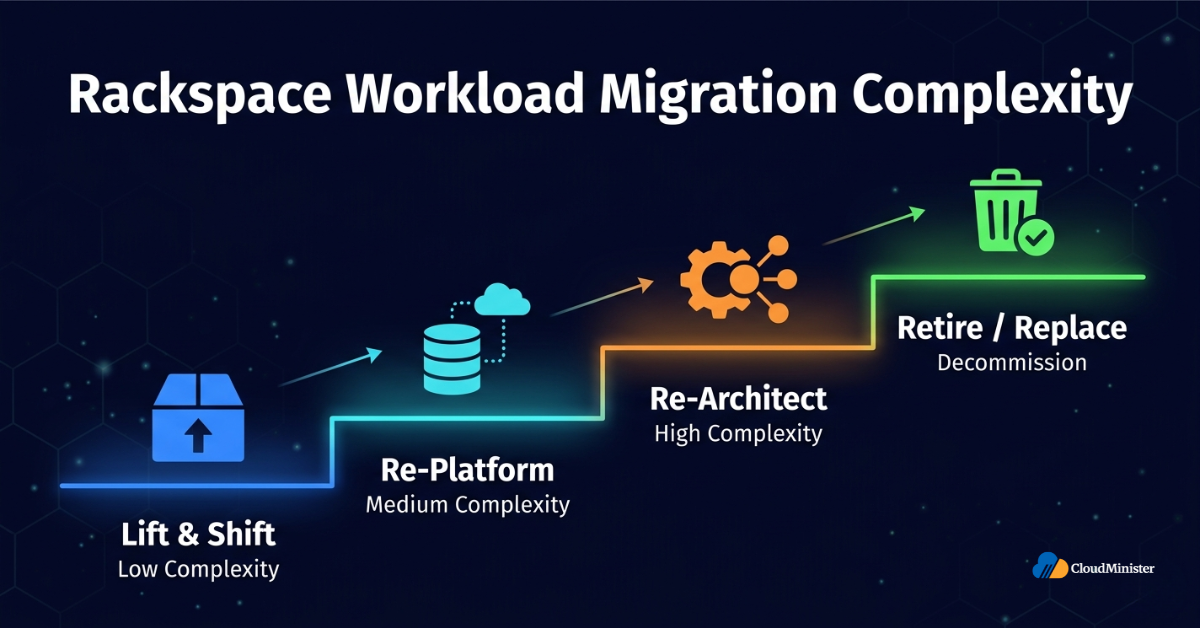
2.2 Classify Workloads by Migration Complexity
| Migration Complexity | Workload Characteristics |
| Lift-and-shift (low complexity) | Stateless web apps, static file servers, scheduled batch jobs — direct rehost to EC2 with minimal changes |
| Re-platform (medium complexity) | Databases moving to RDS, application servers adopting Elastic Beanstalk, file storage moving to S3 |
| Re-architect (high complexity) | Monolithic applications being decomposed to microservices, jobs moving to Lambda, stateful apps adopting DynamoDB |
| Retire / replace | Legacy applications with SaaS replacements available — migrate data, decommission the Rackspace server |
2.3 Define Your Migration Success Criteria
Before starting the Rackspace to AWS migration, define measurable success criteria for each workload:
- Maximum allowable downtime during cutover — expressed in minutes, not hours
- Performance benchmarks — page load time, API response time, database query latency — measured on Rackspace and required to match or improve on AWS
- Security requirements — encryption at rest, encryption in transit, IAM role scope, VPC isolation requirements
- Compliance requirements — any regulatory obligations (PCI DSS, HIPAA, GDPR, DPDPA 2023) that constrain how the Rackspace to AWS migration is executed and how AWS is configured post-migration
Start Your AWS Cloud Hosting Journey
CloudMinister offers fully managed AWS Cloud Hosting for Indian businesses — elastic scaling, 24×7 support, and cost optimisation built in.
3. AWS Account Setup and Landing Zone Configuration
A correctly structured AWS account is the prerequisite for a successful Rackspace to AWS migration. AWS account architecture decisions made at this stage are expensive to reverse post-migration.
3.1 AWS Account Structure
- Single account (smallest teams): One AWS account, all resources in one account — acceptable for small businesses migrating a single application from Rackspace
- Multi-account (recommended): Separate AWS accounts for Production, Staging, and Development — enforces environment isolation, simplifies cost attribution, and reduces blast radius of misconfiguration
- AWS Organizations: For businesses with multiple products or business units, AWS Organizations provides centralised billing, SCPs (Service Control Policies), and cross-account visibility post Rackspace to AWS migration
When setting up your AWS account for the Rackspace to AWS migration, immediately enable AWS Cost Explorer and set billing alerts before provisioning any compute. The most common post-migration shock is an unexpected AWS bill driven by unoptimised resource usage in the first 30 days. Set a billing alarm at 110% of your expected monthly AWS spend from day one.
3.2 VPC Network Design
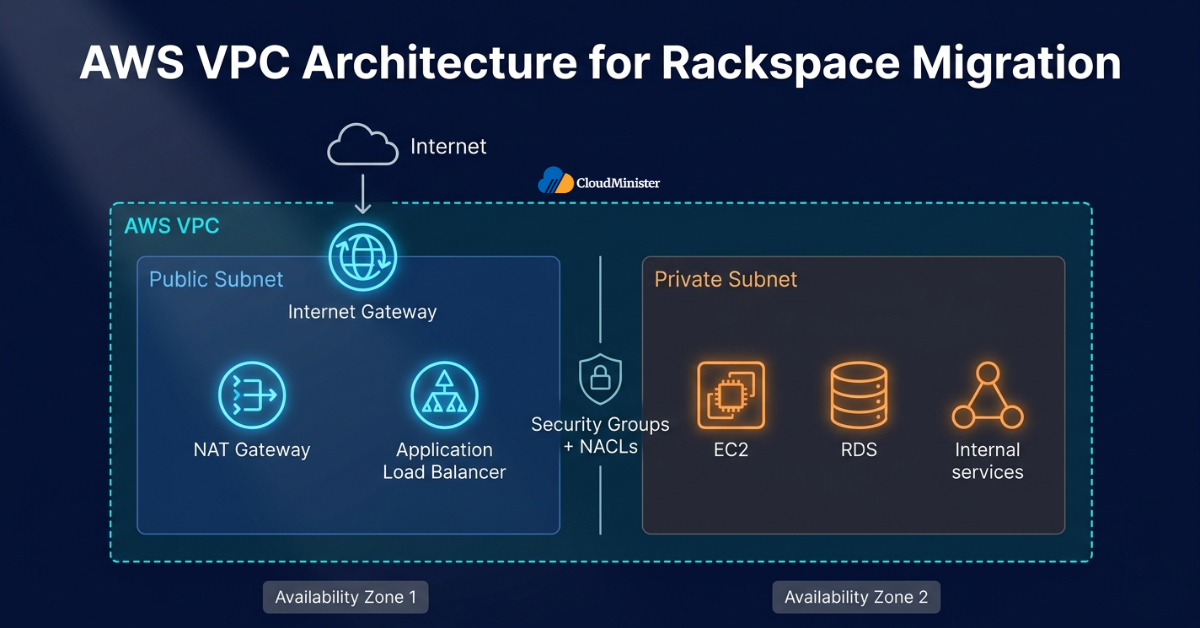
Your AWS VPC (Virtual Private Cloud) must replicate and improve upon your Rackspace private network topology. This is a critical step in the Rackspace to AWS migration — a misconfigured VPC causes security failures and application connectivity issues post-cutover.
- CIDR block planning: Assign non-overlapping CIDR ranges to your VPC and subnets — plan for future expansion, not current needs
- Public subnets: For resources that require internet access — Application Load Balancers, NAT Gateways, bastion hosts
- Private subnets: For application servers, database instances, and internal services — no direct internet routing; matches Rackspace private network isolation
- Availability Zone distribution: Deploy critical resources across a minimum of 2 Availability Zones for high availability — this is a structural improvement over single-server Rackspace deployments
- Security Groups: Replace Rackspace firewall rules with AWS Security Groups — granular, stateful, instance-level firewall rules replacing coarse Rackspace cloud network policies
- Network ACLs: Subnet-level stateless packet filtering — second layer of network defence post Rackspace to AWS migration
RELATED READING — Unlocking the Power of AWS Managed Hosting
3.3 IAM Foundation
AWS Console Management access must be governed by IAM (Identity and Access Management) from the moment your AWS account is created. Never operate your Rackspace to AWS migration or post-migration environment with root account credentials.
- Root account: Enable MFA immediately; use exclusively for account-level tasks (billing, account deletion); create no access keys
- IAM users: Create individual IAM users for each engineer involved in the Rackspace to AWS migration — no shared credentials
- IAM roles: Assign least-privilege roles to EC2 instances, Lambda functions, and services — replaces the Rackspace admin password anti-pattern
- AWS SSO / IAM Identity Center: For teams with 5+ engineers, configure AWS SSO for centralised credential management and session-based access
Still on Rackspace? We Manage It While You Migrate
CloudMinister’s Rackspace management team keeps your existing environment stable, patched, and monitored throughout your migration window.
4. Rackspace to AWS Migration — Phase-by-Phase Execution
This section contains the execution steps for the Rackspace to AWS migration. Each phase must be executed in sequence. Do not advance to the next phase until the current phase is validated.
Phase 1: Data Assessment and Migration Planning (Week 1–2)
- Export Rackspace server configurations: Document OS images, installed packages, service configurations, environment variables, and cron jobs for every server in scope
- Capture Rackspace network configuration: Export firewall rules, load balancer rules, CDN configuration, and DNS records — these will be recreated in AWS Security Groups, ALB, CloudFront, and Route 53
- Database baseline: Record database size, transaction rate, peak query load, backup window, and retention requirements — inputs for RDS instance type selection
- Dependency graph: Map every service-to-service dependency in your Rackspace environment — this graph drives migration order in later phases
- AWS service mapping: For every Rackspace component, identify the target AWS service — EC2, RDS, ElastiCache, S3, Lambda, ECS, ALB, Route 53, CloudFront
Phase 2: AWS Infrastructure Provisioning (Week 2–4)
- Provision VPC: Deploy VPC with public and private subnets across 2+ Availability Zones; configure Internet Gateway, NAT Gateway, Route Tables
- Configure Security Groups: Translate Rackspace firewall rules to AWS Security Groups — review each rule, eliminate unnecessary open ports, apply least-privilege network access
- EC2 instance provisioning: Launch EC2 instances matching or improving your Rackspace server specifications — use current-generation instance families (m7i, c7g, r7g) for better price-performance than Rackspace equivalents
- Storage provisioning: Configure EBS volumes (gp3 for general workloads, io2 for high-IOPS database workloads) — gp3 delivers 3,000 IOPS baseline at no additional cost versus the IOPS limitations of Rackspace block storage
- Database provisioning: Launch RDS instances with Multi-AZ enabled for production workloads — this replaces Rackspace manual database replication with automated failover
- Load balancer configuration: Deploy Application Load Balancer with HTTPS listeners, SSL/TLS certificate via AWS Certificate Manager, and health check configuration
Use AWS Infrastructure as Code (IaC) — specifically AWS CloudFormation or Terraform — to provision all Rackspace to AWS migration infrastructure. IaC eliminates configuration drift between your Rackspace documentation and actual AWS state, and gives you a reproducible environment definition for disaster recovery from day one. Never provision production AWS infrastructure by clicking through the AWS Console Management interface manually.
Phase 3: Application Migration — Data Transfer (Week 3–7)
The data transfer phase of the Rackspace to AWS migration requires selecting the correct transfer method for each data type:
3a. File and Object Data Migration
- AWS S3 Transfer: For static assets, media files, and backups — use AWS CLI s3 sync command or AWS DataSync for automated, continuous synchronisation from Rackspace storage to S3
- rsync over SSH: For file system data on Rackspace Linux servers — rsync provides incremental sync, allowing multiple pre-migration sync passes to minimise final cutover data transfer time
- AWS DataSync: Managed service for large-volume Rackspace to AWS data transfer — encrypts data in transit, validates file integrity, and provides transfer progress visibility
3b. Database Migration
- AWS Database Migration Service (DMS): AWS’s managed database migration tool for Rackspace to AWS database moves — supports homogeneous (MySQL to MySQL) and heterogeneous (MySQL to PostgreSQL) migrations with continuous replication
- mysqldump / pg_dump: For databases under 20GB — export from Rackspace, transfer to AWS via encrypted channel, restore to RDS; validates successfully before cutover
- Logical replication: For zero-downtime Rackspace to AWS database migration — configure logical replication from your Rackspace database to RDS, run both in parallel until cutover, then flip DNS
All Rackspace to AWS data transfer must use encrypted channels. Never transfer database dumps or application data over unencrypted HTTP connections. Use AWS Direct Connect or VPN for production database replication. Configure RDS with encryption at rest (AWS KMS) before importing any production data from Rackspace. Unencrypted data transfers during migration represent the highest breach risk in the entire Rackspace to AWS migration process.
Phase 4: Application Deployment and Testing (Week 5–9)
- Deploy application code: Deploy your application stack to AWS EC2 instances using your CI/CD pipeline — AWS CodeDeploy, GitHub Actions, or Jenkins are all compatible with AWS-hosted targets
- Configuration management: Replace Rackspace-specific environment variables and configuration files with AWS equivalents — AWS Systems Manager Parameter Store or Secrets Manager for credential management
- Integration testing: Execute complete integration test suite against your AWS environment — all application functions, all API endpoints, all database operations, all third-party integrations
- Performance benchmarking: Run load tests against your AWS environment matching peak Rackspace traffic volumes — validate that response times meet the performance benchmarks defined in Section 2.3
- Security validation: Execute AWS Security Hub findings review, run AWS Inspector vulnerability assessment, validate all Security Group rules against least-privilege requirements
RELATED READING — Top 10 Benefits of Outsourcing Server Management
Phase 5: DNS Cutover and Go-Live (Week 8–10)
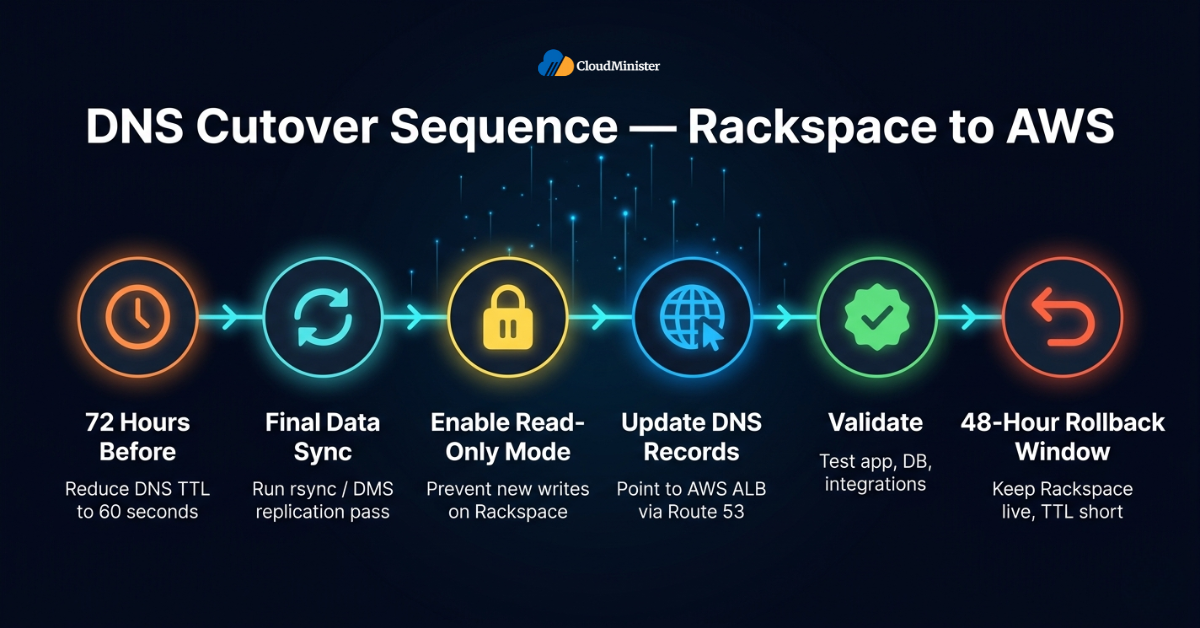
The DNS cutover is the final and highest-risk step of the Rackspace to AWS migration. Execute it in a defined maintenance window with rollback capability pre-staged.
- Reduce DNS TTL: 72 hours before cutover, reduce all DNS record TTLs to 60 seconds — this minimises propagation delay when you update records during the cutover window
- Final data sync: Run final rsync / DMS replication pass immediately before the cutover window to minimise data delta between Rackspace and AWS
- Enable read-only mode: If your application supports it, enable a maintenance / read-only mode on Rackspace before the final data sync to prevent new writes during cutover
- Update DNS records: Update DNS to point to AWS Application Load Balancer or EC2 Elastic IP — if using Route 53 (recommended), weighted routing allows traffic to be shifted gradually rather than instantly
- Validate post-cutover: Verify application functionality, database connectivity, and third-party integrations within the first 10 minutes of DNS propagation
- Rollback readiness: Keep Rackspace servers running and DNS TTL short for 48 hours post-cutover — rollback is updating DNS records back to Rackspace IPs if critical issues are found
Schedule the Rackspace to AWS cutover during your lowest-traffic window — for most businesses, this is 2:00 AM–4:00 AM on a Tuesday or Wednesday. Weekend cutovers seem logical but cause problems: on-call engineering teams are harder to assemble, SaaS vendor support (payment gateways, CRMs) is reduced-staffing, and any issues discovered Sunday night compound into Monday morning incidents.
5. AWS Services That Replace Rackspace Components
After completing your Rackspace to AWS migration, each legacy Rackspace component has a direct AWS equivalent or an improved AWS-native replacement. Understanding this mapping prevents teams from trying to replicate Rackspace architecture patterns on AWS — which negates the primary benefits of the Rackspace to AWS migration.
| Rackspace Component | AWS Equivalent | Improvement | Notes |
| Dedicated servers | EC2 instances | Pay-per-second vs monthly fixed | Use m7i or c7g for general workloads |
| Cloud Servers (VM) | EC2 with Auto Scaling | Elastic capacity vs manual provisioning | Configure Auto Scaling groups from day one |
| Rackspace CDN | CloudFront | 600+ PoPs vs limited locations | Free SSL, Lambda@Edge, WAF integration |
| Cloud Files | Amazon S3 | 99.999999999% durability vs Rackspace SLA | Lifecycle rules, Intelligent Tiering, versioning |
| Cloud Load Balancer | Application Load Balancer | Layer 7 routing, WebSocket, gRPC support | Integrate AWS WAF directly on ALB |
| Managed databases | Amazon RDS / Aurora | Multi-AZ, automated failover, read replicas | Aurora delivers 5x MySQL throughput |
| Rackspace DNS | Amazon Route 53 | 100% uptime SLA vs Rackspace DNS | Health checks, latency routing, failover routing |
| Cloud monitoring | CloudWatch + AWS Health | 1-second granularity, 80+ metric types | Set alarms, dashboards, anomaly detection |
| Firewall / ACLs | Security Groups + NACLs | Stateful + stateless, instance-level precision | Replace all Rackspace firewall rules in Phase 2 |
6. Post-Migration Optimisation — Maximising AWS Value After Rackspace to AWS Migration
Completing the Rackspace to AWS migration is the beginning, not the end. The first 90 days post-migration determine whether your AWS environment delivers the cost and performance improvements that motivated the Rackspace to AWS move. Without deliberate post-migration optimisation, AWS environments drift toward over-provisioning and unexpected cost — a pattern that reverses the financial case for the Rackspace to AWS migration.
6.1 Cost Optimisation
- Right-sizing: Use AWS Cost Explorer and AWS Compute Optimizer to identify EC2 instances running below 40% CPU utilisation — downsize to smaller instance types without performance impact
- Reserved Instances / Savings Plans: After 30 days of AWS production operation, purchase 1-year Reserved Instances or Compute Savings Plans for your baseline compute — delivers 30–60% cost reduction versus On-Demand pricing
- S3 Intelligent Tiering: Enable Intelligent Tiering on S3 buckets containing infrequently accessed data — automatically moves objects to lower-cost storage tiers without retrieval latency penalties
- RDS Reserved Instances: Purchase 1-year RDS Reserved Instances for production database instances — 30–40% savings versus On-Demand RDS pricing after the Rackspace to AWS migration
- Delete unattached EBS volumes: After the Rackspace to AWS migration, audit for unattached EBS volumes and unused Elastic IPs — these accrue charges without delivering value
6.2 Performance Optimisation
- ElastiCache layer: Deploy Amazon ElastiCache (Redis) between your application servers and RDS database — reduces database query load and latency for repeat queries; directly improves post-migration application response times
- CloudFront distribution: Serve all static assets (images, CSS, JS) via CloudFront — offloads EC2 bandwidth, reduces page load times for global users
- RDS query optimisation: Run EXPLAIN on your top 10 slowest queries post-migration to your RDS instance — create missing indexes before concurrent user load reveals performance gaps
- EC2 placement groups: For latency-sensitive application tiers requiring low-latency inter-node communication, deploy EC2 instances in cluster placement groups
RELATED READING — Cloud Migration with AWS Transform MGN
7. Security and Compliance After Rackspace to AWS Migration
Security configuration is the area where Rackspace to AWS migrations most frequently leave gaps. AWS provides security tools that far exceed Rackspace’s managed security capabilities — but they require explicit configuration; they are not enabled by default.
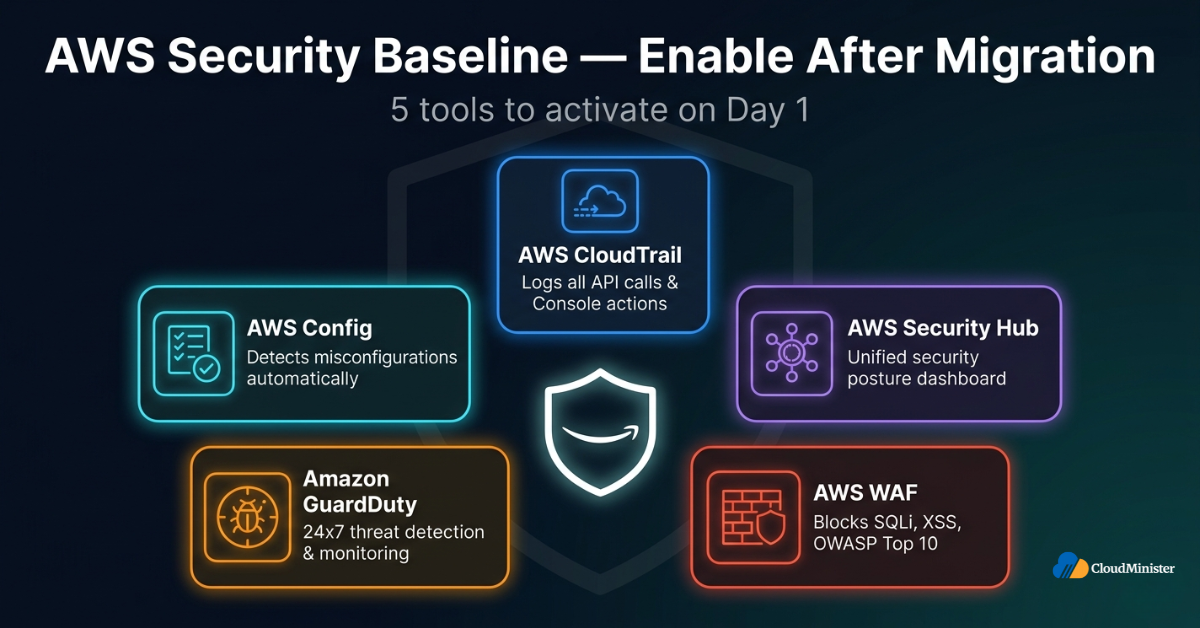
7.1 AWS Security Baseline — Enable Immediately Post-Migration
- AWS CloudTrail: Enable CloudTrail in every AWS region — logs all API calls, AWS Console Management actions, and IAM activity; mandatory for compliance and forensic investigation
- AWS Config: Enable Config rules to detect security misconfigurations automatically — identifies public S3 buckets, open Security Groups, and unencrypted EBS volumes
- AWS Security Hub: Aggregates findings from GuardDuty, Inspector, Macie, and Config into a unified security posture dashboard
- Amazon GuardDuty: Threat detection service analysing CloudTrail, VPC Flow Logs, and DNS logs for malicious activity — enables 24×7 server management level security monitoring at cloud scale
- AWS WAF on CloudFront / ALB: Deploy WAF rules to block common web exploits (SQLi, XSS, OWASP Top 10) — a capability Rackspace requires additional managed security services to match
The most common post-migration security failure after a Rackspace to AWS migration is an S3 bucket configured with public access that should be private. Run AWS Config’s s3-bucket-public-read-prohibited and s3-bucket-public-write-prohibited rules on day one. A publicly accessible S3 bucket containing application data or database backups represents an immediate data breach risk. 24×7 server management via AWS GuardDuty and Config detects this automatically — enable both before loading production data.
7.2 Compliance Mapping Post Rackspace to AWS Migration
| Compliance Requirement | AWS Configuration Required |
| PCI DSS (payments) | VPC with private subnets, WAF, GuardDuty, CloudTrail, encryption at rest and in transit, no direct internet access to card data |
| HIPAA (healthcare) | BAA with AWS, encryption at rest (KMS), CloudTrail audit logs, dedicated account isolation |
| DPDPA 2023 (India) | AWS ap-south-1 (Mumbai) region for India user data, data residency confirmation, audit logging via CloudTrail |
| SOC 2 | CloudTrail, Config, IAM least-privilege, MFA on all accounts, documented incident response procedure |
24×7 Server Management After Migration
Don’t leave your AWS environment unmonitored. CloudMinister’s server management team handles security, patching, and performance around the clock.
8. Common Rackspace to AWS Migration Mistakes — And How to Avoid Them
The following failures appear in a significant proportion of Rackspace to AWS migrations. Each is preventable with the planning disciplines described in this guide.
Mistake 1: Skipping the Performance Baselin
Teams that migrate from Rackspace to AWS without capturing performance baselines have no way to validate that AWS is performing correctly post-cutover. If page load time was 1.2 seconds on Rackspace and is now 2.1 seconds on AWS, the root cause is unidentifiable without a Rackspace performance baseline. Capture Rackspace response time, database query time, and error rates before starting the Rackspace to AWS migration.
Mistake 2: Migrating Without Testing in AWS First
Never migrate Rackspace production workloads directly to an untested AWS environment. Deploy to AWS first, run complete integration and load tests, validate performance benchmarks, and only then execute the production Rackspace to AWS cutover. AWS Staging environments cost less than a production incident on cutover day.
Mistake 3: Lifting Rackspace Architecture Directly to AWS
A direct lift of your Rackspace architecture to AWS typically costs more than your Rackspace bill, because Rackspace’s fixed-server model is replicated as always-on EC2 without Auto Scaling, Reserved Instances, or managed services. Use the Rackspace to AWS migration as the opportunity to re-platform — at minimum, move databases to RDS and static assets to S3.
Mistake 4: Inadequate DNS TTL Reduction Before Cutover
Failing to reduce DNS TTLs 72 hours before the Rackspace to AWS cutover means DNS changes propagate over 24–48 hours globally. During this propagation window, some users hit Rackspace and some hit AWS — split-brain state that causes data inconsistencies if any writes occur on both environments simultaneously.
Mistake 5: No Rollback Plan
Every Rackspace to AWS migration requires a documented rollback procedure tested before cutover day. Rollback is a DNS revert — keep Rackspace servers running for 48 hours post-cutover, DNS TTL at 60 seconds, and your rollback execution time is under 5 minutes.
According to cloud industry data, AWS now commands approximately 32% of the global cloud infrastructure market in 2026 — the highest concentration of enterprise workloads of any single provider. Businesses completing a Rackspace to AWS migration in 2026 are joining an ecosystem with the deepest third-party tool support, the largest managed services partner network, and the most extensive compliance certification coverage of any cloud provider globally.
9. Rackspace to AWS Migration — Tool Reference
The following AWS and third-party tools accelerate and de-risk every stage of the Rackspace to AWS migration:
9.1 AWS-Native Migration Tools
- AWS Transform MGN (formerly AWS Application Migration Service): Block-level server replication from Rackspace to AWS — continuously replicates data, enabling non-disruptive testing before cutover; the recommended primary tool for Rackspace to AWS lift-and-shift migrations
- AWS Database Migration Service (DMS): Managed database migration with schema conversion — supports ongoing replication from Rackspace database to RDS during the Rackspace to AWS migration window
- AWS Server Migration Service (SMS): VM migration for Rackspace virtual machines — creates AMIs from Rackspace VMs for deployment on EC2
- AWS DataSync: Automated file transfer from Rackspace NFS/SMB storage to S3, EFS, or FSx — encrypts in transit, validates integrity, handles large-scale data movement
- AWS Schema Conversion Tool (SCT): Converts Rackspace database schemas for heterogeneous migrations (e.g. MSSQL on Rackspace to Aurora PostgreSQL on AWS)
Note: Windows Server 2003 (support ended February 2026) and RHEL 5.x / CentOS 5.x (support ended December 2025) are no longer supported source operating systems. Minimum supported versions are Windows Server 2008 and RHEL 6 / CentOS 6.
9.2 AWS Console Management Tools Post-Migration
- AWS Cost Explorer: Visualises post-migration spend by service, resource, and tag — primary tool for cost optimisation in the first 90 days after Rackspace to AWS migration
- AWS Trusted Advisor: Automated infrastructure review covering cost optimisation, security, reliability, performance, and service limits — run immediately post-migration
- AWS Systems Manager: Centralised operations management for EC2 instances post-migration — patch management, run command, session manager, parameter store; replaces Rackspace server management CLI access with audited, role-based access
- Amazon CloudWatch: Metrics, logs, and alarms for all AWS services — configure dashboards replicating your Rackspace monitoring setup within 24 hours of cutover
10. When to Engage a Managed Services Partner for Rackspace to AWS Migration
Not all Rackspace to AWS migrations should be executed by an internal team alone. The complexity of the migration, the criticality of the workloads being moved, and internal engineering capacity all determine whether a managed services partner is the correct choice.
As a Web Hosting Company in India with deep AWS expertise, CloudMinister provides end-to-end Rackspace to AWS migration support — from pre-migration assessment and AWS architecture design, through data migration and application testing, to post-cutover 24×7 server management and ongoing cost optimisation.
10.1 Signs You Need a Migration Partner
- Your Rackspace environment has 10+ servers with complex inter-service dependencies
- Your application requires near-zero downtime — any maintenance window under 30 minutes requires advanced migration tooling and experience
- You have compliance requirements (PCI DSS, HIPAA, DPDPA 2023) that must be validated before go-live on AWS Cloud Hosting
- Your engineering team has strong application development expertise but limited AWS infrastructure experience
- You are migrating production databases over 50GB where DMS configuration requires expert tuning
CloudMinister’s Rackspace Server Management Services team handles existing Rackspace environments while the AWS migration is being planned and executed — ensuring your Rackspace infrastructure remains stable, patched, and monitored throughout the Rackspace to AWS migration process, regardless of how long the transition period lasts.
If you are migrating from Rackspace to AWS, the parallel operation period — when both Rackspace and AWS environments are running — is the highest-cost phase of the migration. Minimise it: execute migration phases on an accelerated timeline, and decommission Rackspace servers within 30 days of successful cutover validation. Every day of parallel operation is double infrastructure spend. CloudMinister’s Server Management Services team manages Rackspace decommissioning as a structured, documented process — preventing accidental early server deletion and costly data recovery events.
10.2 What CloudMinister Delivers for Rackspace to AWS Migrations
| Migration Phase | CloudMinister Service |
| Pre-migration assessment | Full Rackspace environment inventory, AWS architecture design, cost modelling, risk assessment |
| AWS account setup | Multi-account Landing Zone, VPC design, IAM configuration, security baseline |
| Data migration | AWS MGN / DMS configuration, DataSync setup, encrypted transfer execution, integrity validation |
| Application testing | Integration testing, load testing, security scanning, performance benchmarking |
| DNS cutover management | Cutover window planning, DNS TTL preparation, live cutover execution, rollback readiness |
| Post-migration management | 24×7 server management, CloudWatch monitoring, cost optimisation, security compliance |
Whether you need complete Server Management Services for your post-migration AWS environment, or a partner to manage your Rackspace infrastructure during the transition, CloudMinister provides the expertise and 24×7 server management coverage to keep your infrastructure stable throughout the Rackspace to AWS migration process.
Get a Free Rackspace to AWS Migration Assessment
Tell us about your Rackspace environment and our certified AWS engineers will map out your migration plan, timeline, and cost estimate — at no charge.
Key Takeaways
- Rackspace to AWS migration delivers elastic scaling, 200+ AWS services, and significant cost savings through Reserved Instances and Savings Plans
- Pre-migration inventory and workload classification are non-negotiable — skipping them is the primary cause of failed migrations
- AWS Console Management provides unified control of compute, networking, storage, security, and cost — replacing Rackspace’s fragmented portal
- VPC design, IAM configuration, and security baseline must be completed before data migration begins
- Rackspace Server Management of your existing environment should continue through a qualified partner during the parallel operation period
- DNS cutover — with 72-hour TTL reduction and 48-hour rollback window — is the lowest-risk execution approach for production traffic migration
- Post-migration, enable CloudTrail, GuardDuty, Config, and Security Hub immediately — 24×7 server management security monitoring at cloud scale
- CloudMinister provides Rackspace Server Management Services, AWS Cloud Hosting, and post-migration Server Management Services for Indian businesses executing Rackspace to AWS migrations in 2026
Conclusion
A successful Rackspace to AWS migration is achievable for businesses of any size — from a 3-server Rackspace environment running a single application, to a multi-datacenter Rackspace estate supporting hundreds of concurrent users. The technical framework in this guide — inventory, architecture design, infrastructure provisioning, data migration, application testing, DNS cutover, and post-migration optimisation — is the complete operational playbook for a Rackspace to AWS migration that arrives on time and within budget.
The Rackspace to AWS migration is not a one-time project — it is the foundation of a modern cloud operating model. Businesses that complete the Rackspace to AWS transition with correct security configuration, IaC-managed infrastructure, and 24×7 server management coverage gain a compounding infrastructure advantage over competitors still operating on legacy managed hosting. Rackspace Server Management of legacy environments and AWS Console Management of the new cloud environment are two very different disciplines — engage expertise in both for a Rackspace to AWS migration that delivers on its promise.
As a trusted Web Hosting Company in India, CloudMinister brings hands-on Rackspace to AWS migration experience, certified AWS engineers, and a 24×7 server management operations model to every migration engagement. Contact CloudMinister to begin your Rackspace to AWS migration assessment today.
Frequently Asked Questions
How long does a Rackspace to AWS migration take?
A Rackspace to AWS migration timeline depends on environment complexity. A single-application Rackspace environment typically migrates in 4–6 weeks. A multi-server Rackspace estate with complex database dependencies and compliance requirements typically requires 10–16 weeks for a fully validated Rackspace to AWS migration.
Can I migrate from Rackspace to AWS without downtime?
Yes — a zero-downtime Rackspace to AWS migration is achievable using AWS Transform MGN for continuous server replication, AWS DMS for database replication, and Route 53 weighted routing for gradual traffic shifting. The technical complexity of zero-downtime Rackspace to AWS migration is high — most businesses accept a 15–60 minute maintenance window during the DNS cutover instead.
What happens to my Rackspace data during the migration?
During the Rackspace to AWS migration, all data is transferred using encrypted channels. AWS DataSync and DMS validate file integrity and data consistency during transfer. Your Rackspace data remains intact and accessible on Rackspace until you confirm successful validation on AWS and explicitly decommission your Rackspace servers.
Do I need Rackspace Server Management during the AWS migration?
Yes. Rackspace Server Management of your existing environment must continue throughout the Rackspace to AWS migration process. During the parallel operation period, both environments are live. CloudMinister’s Rackspace Server Management Services maintain your Rackspace environment with 24×7 server management monitoring and incident response while your AWS environment is being built and validated.
How much does a Rackspace to AWS migration cost?
The cost of a Rackspace to AWS migration has three components: AWS infrastructure cost during parallel operation (typically 1–2 months), AWS data transfer charges (free inbound, charged outbound from Rackspace), and professional services fees if engaging a partner. For most Indian businesses, the total Rackspace to AWS migration cost is recovered within 6–12 months through AWS Reserved Instance savings versus Rackspace fixed pricing. Contact CloudMinister as your Web Hosting Company in India for a detailed Rackspace to AWS migration cost estimate for your specific environment.
What is AWS Console Management and how does it differ from Rackspace’s portal?
AWS Console Management is the unified web-based interface for all AWS services — compute, storage, networking, security, cost management, and developer tools. Unlike Rackspace’s portal, which is primarily a server management interface, AWS Console Management provides access to 200+ services, real-time cost visibility, CloudTrail audit logs, and IAM policy management from a single interface. Post-migration AWS Console Management proficiency is a core competency for any team operating on AWS after a Rackspace to AWS migration.
Is AWS suitable for Indian businesses migrating from Rackspace?
AWS ap-south-1 (Mumbai) and ap-south-2 (Hyderabad) regions provide India-based AWS Cloud Hosting with low-latency connectivity for Indian users, DPDPA 2023 compliant data residency, and rupee-based billing. Indian businesses completing a Rackspace to AWS migration gain access to the same global AWS infrastructure capabilities as enterprise multinationals, with India-specific Rackspace to AWS migration support from partners like CloudMinister — a Web Hosting Company in India with certified AWS engineers and 24×7 server management operations tailored for Indian SMEs and enterprises.

He is the CEO and Founder with over a decade of experience in cloud infrastructure, DevOps, and server optimization. With a strong vision and hands-on leadership approach, he has built scalable, secure, and high-performance cloud solutions trusted by businesses across industries.