Anyone building on AWS eventually runs into the same question: should this traffic rule live on AWS Security Groups or on a Network ACL. AWS Security Groups and Network ACLs both control traffic inside a VPC, but they operate at different layers, use different rule logic, and fail differently when misconfigured. This blog breaks down exactly how AWS Security Groups differ from NACLs, when to use each one, and how the two can work together when a layered VPC access control strategy is needed. Whether the workload is a simple two tier web application or a multi account enterprise setup, getting this distinction right is one of the more foundational decisions in cloud network security, and it is exactly the kind of thing a genuine hosting partner should be able to explain clearly rather than leaving as an assumption.
Every application running on AWS needs a clear answer to one basic question, which is who is allowed to talk to what. AWS Security Groups are the first place most teams look for that answer, and for good reason. They act as a virtual firewall around your instances and other resources inside a VPC, and they decide which traffic gets in and which traffic gets out. A small mistake in these rules can leave a database exposed or block a perfectly healthy application, so understanding how they work is worth the time.
In many real projects, AWS Security Groups are all a team needs to control traffic between application tiers. They are stateful, they only use allow rules, and they can be changed without restarting anything. Network ACLs also exist in every VPC, and they work at the subnet level instead. Some teams add a custom NACL for extra control, while others are perfectly well served by security groups alone. Knowing the difference helps you choose what your own setup actually requires rather than copying a design from somewhere else.
This guide walks through how AWS Security Groups and Network ACLs differ, where each one fits, and which mistakes cause the most trouble in production. You will also find practical advice on auditing rules, writing least privilege policies, and handling multi cloud environments. Whether you manage a single web application or a larger setup across several accounts, the goal is the same. By the end, you should feel confident reviewing your own AWS Security Groups and deciding what changes, if any, are needed.
Table of Contents
- Why Security Groups and NACLs Get Mixed Up So Often
- What Security Groups Actually Do
- What Network ACLs Actually Do
- Security Groups vs NACLs Direct Comparison
- Common Mistakes When Configuring Security Groups and NACLs
- Best Practices for Using Security Groups and NACLs Together
- Security Groups, NACLs and Multi Cloud Considerations
- Auditing and Verifying Your Security Group Setup
- Key Takeaways
- Conclusion
- Frequently Asked Questions
1. Why AWS Security Groups and NACLs Get Confused So Often
Most engineers learning AWS network security run into AWS Security Groups and NACLs at almost the same time, which is part of why the two get mixed up so easily during real project work.
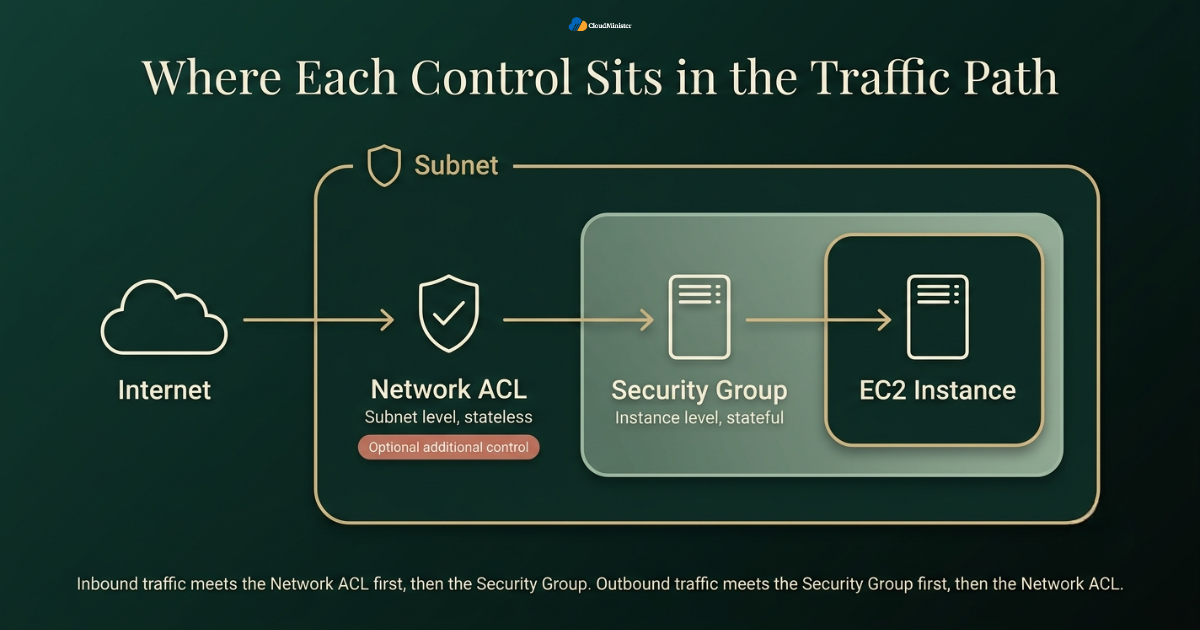
- AWS Security Groups act as a virtual firewall attached directly to an instance’s network interface, controlling traffic at the resource level rather than at the subnet level.
- A Network ACL, by contrast, sits at the subnet boundary and evaluates every packet crossing into or out of that subnet, regardless of which specific instance it is headed toward.
- Teams new to AWS Security Groups are often unsure whether NACLs are needed at all. Security groups can serve as the primary traffic control layer in many valid architectures, while a custom NACL is an optional additional control that sits at a different point in the traffic path, the subnet boundary.
- Recent industry analysis of 2026 cloud misconfiguration data found that permissive firewall rules remain one of the most common issues across every major cloud provider, which is exactly the category a clear understanding of AWS Security Groups versus NACLs is meant to prevent.
- A capable Web Hosting Company in India will typically explain both layers during onboarding rather than defaulting to a single flat security group with broad inbound rules.
- Businesses evaluating AWS managed services for the first time should ask directly whether sizing and security recommendations are backed by real workload analysis or a generic template.
- The equivalent question applies when evaluating Microsoft Azure Cloud Hosting Services, since a generic template recommendation is just as risky on that platform.
- Engineers coming from a Microsoft Azure Cloud Hosting Services background sometimes carry over assumptions from Azure Network Security Groups, which behave differently enough from AWS Security Groups that a direct mental mapping causes real mistakes.
Related Reading: S3 storage class pricing
- Anyone comparing providers for this kind of work should look at Web Hosting Company in India options that document their sizing and security methodology clearly rather than relying on a generic sales pitch.
- The same due diligence applies when evaluating a provider of Microsoft Azure Cloud Hosting Services, since sizing and security methodology matter just as much on that platform.
- Teams that rely on AWS managed services for day to day operations still need to understand the underlying logic of AWS Security Groups, since a managed provider configuring the wrong rule is still the customer’s production risk under the AWS shared responsibility model.
- A hosting provider migrating a client onto AWS should walk through both AWS Security Groups and NACL behavior explicitly, rather than assuming default settings are adequate for a production workload.
- Teams evaluating AWS managed services for the first time should ask specifically how the provider handles security group configuration as part of the standard engagement, not as a paid add on.
- This is precisely the kind of walkthrough a genuine Web Hosting Company in India should offer proactively during onboarding, not only when a client specifically asks for it.
Before assuming your current security group setup is correct, pull the full list of inbound and outbound rules across every group attached to production instances and check each one against actual application requirements. It is common to find rules opened months ago for a testing purpose that were never removed.
2. What AWS Security Groups Actually Do
AWS Security Groups are the piece most engineers touch first, and understanding exactly how they evaluate traffic prevents a large share of common access control mistakes.
- Security groups operate at the instance or elastic network interface level, meaning each EC2 instance, RDS database, or Lambda function running inside a VPC can have its own set of security groups attached.
- AWS Security Groups are stateful, which means that if inbound traffic is allowed on a specific port, the matching outbound return traffic is automatically permitted without needing a separate rule.
- Every rule inside a security group is an “allow” rule only, since there is no explicit deny mechanism, and any traffic that does not match an allow rule is dropped by default.
- A single elastic network interface can have multiple security groups attached simultaneously, and AWS evaluates the combined set of rules together rather than picking just one group.
- Security groups support references to other groups as a source or destination, which allows traffic rules to follow application tiers dynamically rather than hardcoding IP ranges that change over time.
- Because security groups are stateful, they generally require fewer rules than a NACL to achieve the same practical outcome, which is part of why most day to day access control work happens at this layer.
- Changes made to security group rules take effect immediately across all attached instances, which makes them a fast tool for both fixing and accidentally introducing a security gap.
- A properly scoped set of security group rules should follow least privilege by default, meaning only the specific ports and sources an application genuinely needs should be permitted, rather than broad ranges left open out of convenience. Interestingly, this same discipline of only provisioning what is genuinely needed mirrors how Azure cost optimization treats unused compute and idle resources on the Azure side. A provider delivering AWS managed services should apply this exact discipline by default across every client environment it manages.
- Teams managing infrastructure through the AWS Management Console can view, edit, and audit every security group rule directly, though larger environments typically manage this through infrastructure as code instead of manual console changes. Larger organizations relying on AWS managed services often standardize on infrastructure as code specifically to avoid inconsistent manual changes across a growing fleet.
- Security group rules can be modified without any downtime to the running instance, since a rule change is applied at the hypervisor networking layer rather than requiring a restart. Engineers can confirm this instantly inside the AWS Management Console by watching a rule change apply without any instance interruption.
A security group rule that allows inbound traffic from 0.0.0.0/0 on a sensitive port such as twenty two or three thousand three hundred and eighty nine should be treated as a serious finding, not a minor cleanup item. Overly permissive rules are one of the most frequently cited misconfigurations in cloud breach investigations, and tightening source ranges to known IP blocks or a bastion host is one of the highest value changes a team can make. Anyone auditing rules directly inside the AWS Management Console should treat a wide open inbound rule the same way, regardless of how the rule was originally created.
3. What Network ACLs Actually Do
Network ACLs work at a different layer than security groups, and this difference is the core of why the two are not interchangeable.
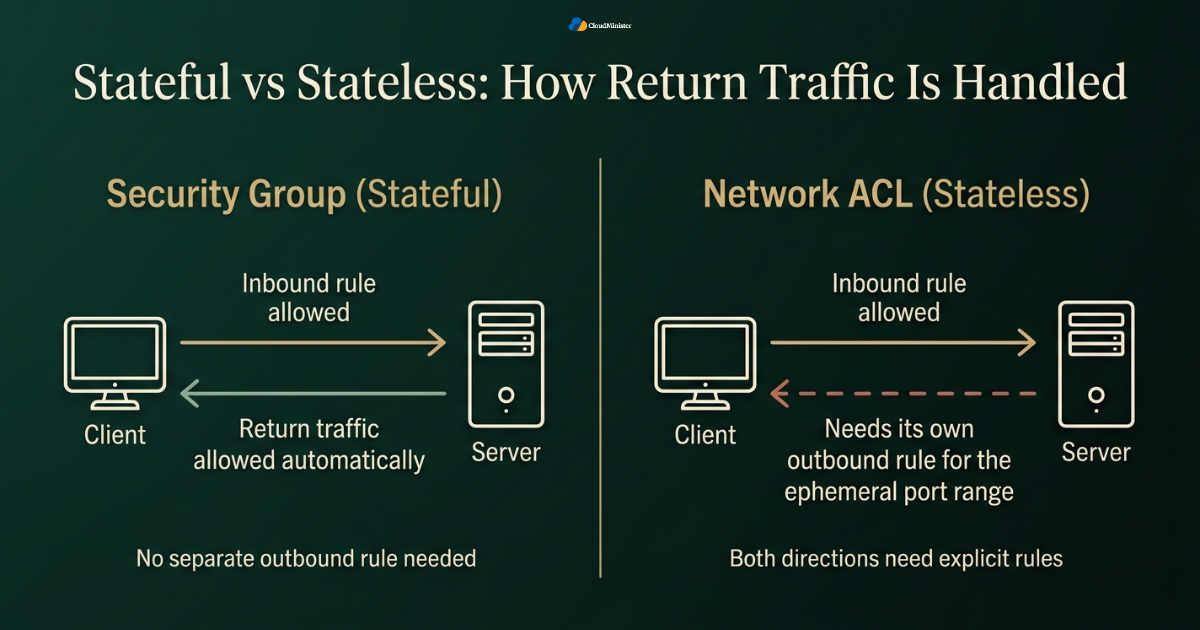
- A Network ACL is attached to a subnet, not to an individual instance, which means every resource inside that subnet is subject to the same NACL rules regardless of what security groups are attached to it individually.
- Network ACLs are stateless, meaning an allowed inbound rule does not automatically permit the corresponding outbound return traffic, so both directions need explicit rules.
- Network ACLs evaluate rules in numbered order, starting from the lowest rule number, and stop processing as soon as a match is found, which is different from the combined evaluation approach used by security groups.
- Unlike security groups, a Network ACL supports both explicit allow rules and explicit deny rules, which makes it a genuinely useful tool for blocking a specific known bad IP range at the subnet boundary.
- The default Network ACL that comes with a new VPC allows all inbound and outbound traffic, while a custom Network ACL created afterward denies all traffic until rules are explicitly added.
- Because Network ACLs are stateless, a common mistake among teams new to security groups and NACLs together is forgetting to open the ephemeral port range needed for return traffic, which causes connections to fail in ways that are confusing to troubleshoot.
- A Network ACL applies to every instance in the subnet automatically, so it is a useful mechanism for enforcing a baseline rule across an entire tier without depending on individual security groups being configured correctly. This behavior is visible directly inside the AWS Management Console, where a subnet’s associated NACL is listed alongside every instance inside it.
- Teams running a multi tenant environment often use Network ACLs as a coarse subnet level boundary and rely on security groups for the finer grained, instance level rules within that boundary.
- A Web Hosting Company in India managing infrastructure for multiple clients on shared VPC design often leans on Network ACLs specifically to prevent cross subnet traffic that security groups alone would not stop.
- Businesses vetting a Web Hosting Company in India for the first time should ask specifically how security group and NACL recommendations are made, rather than assuming every quote reflects real workload analysis.
- Teams pursuing Azure cost optimization alongside AWS network hardening often find the two exercises happen on the same quarterly cadence, since both are periodic hygiene tasks rather than one time projects.
Related Reading: AWS Well-Architected Framework
When troubleshooting a connection that security groups appear to allow but that still fails, check the Network ACL attached to the subnet next, specifically the outbound rules and the ephemeral port range, since a stateless NACL blocking return traffic is one of the more common causes of a connectivity issue that looks like a security group problem but is not.
4. AWS Security Groups vs NACLs: A Direct Comparison
Putting security groups and Network ACLs side by side makes the practical differences much easier to apply during actual VPC design work.
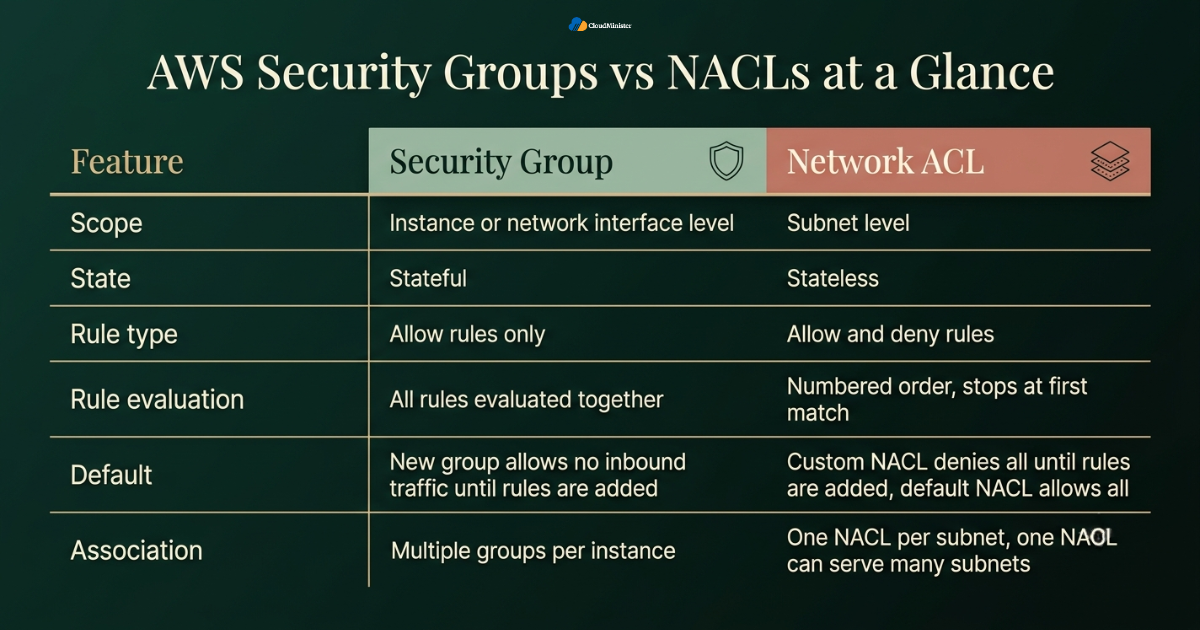
- Scope: security groups apply at the instance or network interface level, while a Network ACL applies at the subnet level to every resource inside it.
- State behavior: security groups are stateful and automatically allow return traffic, while Network ACLs are stateless and require explicit rules in both directions.
- Rule type: security groups only support allow rules, while Network ACLs support both allow and deny rules.
- Rule evaluation: security groups evaluate all attached rules together as a combined set, while Network ACLs evaluate rules in numbered order and stop at the first match.
- Default behavior: a newly created security group denies all inbound traffic by default until rules are added, and a custom Network ACL behaves the same way, while the default Network ACL that ships with a VPC allows everything until it is changed.
- Association: security groups attach directly to elastic network interfaces, and a single instance can have multiple groups, while a subnet can only be associated with one Network ACL at a time, though one NACL can be associated with multiple subnets. The AWS Management Console displays both associations side by side, which makes a quick manual check possible even without automation tooling.
- Practical use: security groups are generally the primary day to day tool for controlling access between application tiers, while Network ACLs function best as a coarse, subnet wide safety net and for explicitly blocking known bad traffic.
- Businesses running infrastructure through AWS managed services should confirm with their provider how security groups are configured and whether NACLs are used as an additional control, and why, rather than assuming either approach is in place by default.
- A provider delivering AWS managed services without a clear security group review process is skipping a step that should be standard, not optional.
- The same is true of a provider delivering Microsoft Azure Cloud Hosting Services without an equivalent network security group review process.
- Teams comparing this model against Microsoft Azure Cloud Hosting Services should note that Azure’s Network Security Groups combine some of the behavior split between the two AWS constructs, which is a common source of confusion during a multi cloud migration.
- A provider that also manages AWS environments should be able to explain this comparison in plain terms during a client architecture review, not just in a generic slide deck.
- A dependable Web Hosting Company in India will typically walk a client through both the AWS Security Groups model and the Network ACL model together, rather than only covering one.
- This same walkthrough should be a standard part of onboarding for any provider delivering AWS managed services, rather than something a client has to specifically request.
- A client running any portion of their footprint on Microsoft Azure Cloud Hosting Services should expect the same standard of onboarding walkthrough there as well.
- Ask any Web Hosting Company in India under consideration for a reference client that has gone through a similar security group and NACL cleanup exercise.
- The same question applies directly to any provider of AWS managed services being evaluated for a security focused engagement.
- Ask the same question of any provider of Microsoft Azure Cloud Hosting Services being evaluated for a comparable engagement.
- A hybrid client running both platforms should expect this same standard of transparency from whichever team manages Microsoft Azure Cloud Hosting Services on their behalf.
- A provider fluent in both AWS network design and Azure cost optimization strategy is generally better equipped to advise on a workload that could reasonably run on either platform.
- A live walkthrough inside the AWS Management Console during an architecture review demonstrates far more genuine expertise than a static diagram ever could.
- A Web Hosting Company in India willing to do exactly this kind of live walkthrough is signaling real operational readiness rather than a rehearsed sales pitch.
Secure Your AWS Environment With Expert Help
Set up AWS Security Groups, network controls and a reliable cloud hosting environment with a team that plans around your real workload. Explore our Amazon cloud hosting services and find the right fit for your business.
5. Common Mistakes When Configuring AWS Security Groups and NACLs
A technically sound understanding of AWS Security Groups still breaks down in practice if a handful of recurring mistakes go unaddressed during actual implementation.
- Leaving security group rules open to 0.0.0.0/0 on administrative ports such as SSH or RDP is one of the most frequently cited findings in cloud misconfiguration research, and one recent 2026 cloud misconfiguration study found that a majority of organizations report at least one misconfiguration related incident every year, a pattern that applies directly to overly broad AWS Security Groups rules.
- Forgetting that Network ACLs are stateless and only configuring one direction of traffic, which causes intermittent and confusing connectivity failures that often get misattributed to security groups instead. Checking both directions directly inside the AWS Management Console is the fastest way to rule this out during troubleshooting.
- Not evaluating whether an additional subnet level control is needed. Security groups can be the primary traffic control layer on their own in many valid architectures, but where a team needs to explicitly deny a known bad IP range or enforce a baseline across an entire subnet, a custom Network ACL is an optional additional control worth considering.
- Using overly broad security group rules that reference an entire VPC CIDR range rather than referencing specific groups by ID, which makes future audits considerably harder to reason about.
- Not documenting the purpose of each rule inside AWS Security Groups, which leads to a slow accumulation of stale rules that nobody feels confident removing later.
- Working with an experienced Web Hosting Company in India removes much of the guesswork here, since a mature partner already has a documented review checklist for exactly this scenario.
- Assuming that AWS managed services automatically handles security group hygiene without any customer side review, when the shared responsibility model still places configuration accuracy on the customer.
- Copying security group configurations directly from a tutorial or a different project without adjusting them to the actual application’s real traffic requirements. A quick manual review inside the AWS Management Console before deployment catches most of these copied over mistakes early.
- Not reviewing AWS Security Groups on a recurring schedule, since an application’s actual network requirements shift as new services, integrations, and team members are added over time.
- Treating security and cost as separate conversations entirely, when a mature Azure cost optimization program often surfaces orphaned resources that also carry unnecessary access control exposure.
Related Reading: Cloud migration and AWS Application Migration Service
- Failing to restrict outbound rules inside AWS Security Groups, since a compromised instance with unrestricted outbound access can exfiltrate data far more easily than one with tightly scoped outbound rules.
- Skipping a periodic manual pass through the AWS Management Console in favor of automation alone, which can miss a rule added outside the normal deployment pipeline.
- Assuming Azure cost optimization tooling alone will flag a stale security group equivalent on the Azure side without a dedicated access control review.
Every security group rule that stays open longer than necessary is a small amount of accumulated risk, and audits that only check inbound rules while ignoring outbound rules routinely miss exactly the kind of gap an attacker would use after an initial compromise, which is why a complete review always needs to include both directions.
6. Best Practices for Layering AWS Security Groups and NACLs Together
Getting genuine long term value out of AWS Security Groups and NACLs means understanding what each one does best, and adding NACLs as an optional extra layer only where the design calls for it.
- Use AWS Security Groups as the primary, fine grained control for traffic between specific application tiers, referencing other groups by ID wherever the source or destination is another internal resource.
- Consider Network ACLs as an optional, subnet wide additional control, particularly for explicitly denying traffic from a known malicious IP range that should never reach any resource in that subnet regardless of individual security groups.
- Apply the principle of least privilege consistently across AWS Security Groups, only opening the specific ports an application genuinely needs rather than a broad range for convenience.
- Name and tag every security group entry clearly, including its intended purpose, so a future audit does not require guessing why a specific rule exists. Tags applied through the AWS Management Console or through infrastructure as code should follow the same naming convention either way.
- Review AWS Security Groups on a recurring schedule, ideally quarterly at minimum, rather than treating the initial configuration as permanent.
- Use the AWS Management Console to periodically review flow logs alongside security group rules, since flow logs show whether a rule is actually being used or has become stale over time.
- Businesses running a hybrid setup that spans both AWS and Microsoft Azure Cloud Hosting Services should maintain a single documented mapping of how security groups concepts translate to the equivalent Azure controls, so the two environments are not managed with inconsistent assumptions.
- A team relying on AWS managed services for infrastructure operations should still request a documented security group and NACL review as part of any onboarding or ongoing account review.
- Confirm with any AWS managed services provider whether flow log analysis is included as part of the standard engagement or billed separately as an extra.
- A provider offering Microsoft Azure Cloud Hosting Services should be asked the equivalent question about Azure’s own network traffic logging.
- Reference security groups by ID in rules wherever possible instead of hardcoded IP addresses, since IP based rules break silently whenever the referenced resource’s address changes.
- A genuinely capable Web Hosting Company in India will recommend referencing groups by ID as a standard practice, not as an advanced or optional technique.
- Pair a security group review with an Azure cost optimization pass on the Azure side of a hybrid environment, since both exercises benefit from the same discipline of removing what is no longer needed.
- Bookmark a saved filtered view inside the AWS Management Console for production security groups specifically, so a routine check does not require re-filtering every time.
Related Reading: Rackspace to AWS migration
- A migration plan that accounts for Azure cost optimization on any parallel Azure workloads tends to surface a more complete total cost picture than reviewing AWS alone.
Teams that get the most long term value from AWS Security Groups rarely treat the initial configuration as final. They review rules against actual flow log data on a recurring basis, tag every rule with a clear purpose, and add NACLs as an optional subnet wide control where the architecture calls for one, such as for explicit deny rules against known bad IP ranges. Teams running mature Azure cost optimization programs apply that exact same discipline on the Azure side of a hybrid deployment. Some of that ongoing review still happens manually inside the AWS Management Console even in teams that automate most of their infrastructure. A Web Hosting Company in India managing this on a client’s behalf typically documents exactly which checks are manual and which are automated. Clients evaluating AWS managed services should ask for this same documentation before signing a contract. Clients running any workload on Microsoft Azure Cloud Hosting Services should ask for equivalent documentation before signing there too.
7. AWS Security Groups, NACLs, and Multi Cloud Considerations
Many organizations today are not running AWS in isolation, and understanding how AWS Security Groups compare to controls on other platforms matters for any team managing a genuinely multi cloud footprint.
- Microsoft Azure Cloud Hosting Services uses Network Security Groups as its primary access control mechanism, which behave in a way that blends some characteristics of both security groups and NACLs into a single construct. Azure cost optimization efforts frequently intersect with this layer, since an idle network security group attached to an unused resource is both a cost signal and a security signal at the same time.
- Teams migrating workloads between AWS and Microsoft Azure Cloud Hosting Services should map out access control rules explicitly rather than assuming a like for like translation between AWS Security Groups and Azure’s equivalent controls.
- A well managed hosting partner offering both AWS and Microsoft Azure Cloud Hosting Services should be able to explain these differences clearly during any migration planning conversation.
- The same Web Hosting Company in India that manages both platforms well should be transparent about which parts of a sizing or security decision it owns directly and which parts depend on the customer’s own application choices.
- Cost considerations differ across platforms as well, and Azure cost optimization decisions sometimes interact with network security design in ways that are easy to overlook, since certain routing and inspection choices affect both cost and traffic control simultaneously. A team that treats Azure cost optimization purely as a billing exercise, separate from architecture decisions, tends to miss these interactions entirely.
- Teams running dedicated infrastructure that also maintain a secondary environment on Microsoft Azure Cloud Hosting Services need a documented access control strategy covering both AWS Security Groups and Azure Network Security Groups, ideally reviewed together during the same audit cycle.
- Server management teams supporting multi cloud clients should maintain parallel documentation for security group configuration and Azure Network Security Group configuration, since a client asking about one is often also implicitly asking about the other.
- A documented Azure cost optimization report, refreshed on the same schedule as a security group audit, gives stakeholders a single combined view of both platforms.
- Azure cost optimization reviews frequently uncover orphaned network security groups still attached to nothing, which is the direct Azure equivalent of an orphaned AWS security group found during a similar audit.
- Screenshots or exports taken directly from the AWS Management Console and the Azure portal side by side make a multi cloud audit far easier for a client to follow.
- A provider genuinely experienced across AWS managed services and Microsoft Azure Cloud Hosting Services is generally better positioned to advise on a consistent access control policy than one specializing in only one platform.
- A Web Hosting Company in India that treats every client’s security needs as identical is usually applying a template rather than genuinely reviewing actual workload data.
- Businesses evaluating Azure cost optimization alongside a broader multi cloud security review should confirm that neither platform’s access control decisions are being made purely for cost reasons at the expense of an adequate security configuration. A genuinely balanced Azure cost optimization strategy never trades away a necessary security control purely to hit a lower monthly bill.
- Teams that manage both platforms through a single hosting relationship generally find it easier to keep AWS Security Groups and the Azure equivalent aligned, since one team maintains context across both environments rather than switching between two disconnected vendors.
- Familiarity with both the AWS Management Console and the Azure portal is a genuine prerequisite for anyone advising confidently across both platforms. A team offering both AWS managed services and Azure operations support should be equally comfortable in both interfaces.
- A genuinely capable partner treats Azure cost optimization and AWS access control review as two parts of the same ongoing infrastructure hygiene conversation rather than entirely separate engagements.
- A Web Hosting Company in India offering genuine expertise across both platforms removes much of the friction from comparing AWS Security Groups against Azure Network Security Groups during a migration planning cycle.
- Choosing a Web Hosting Company in India with hands on experience across both platforms is generally a safer long term bet than picking one that only specializes in a single cloud.
8. Auditing and Verifying Your AWS Security Groups Setup
Configuring AWS Security Groups correctly once is not the end of the process, since ongoing verification is what actually confirms a setup is working as intended under real conditions.
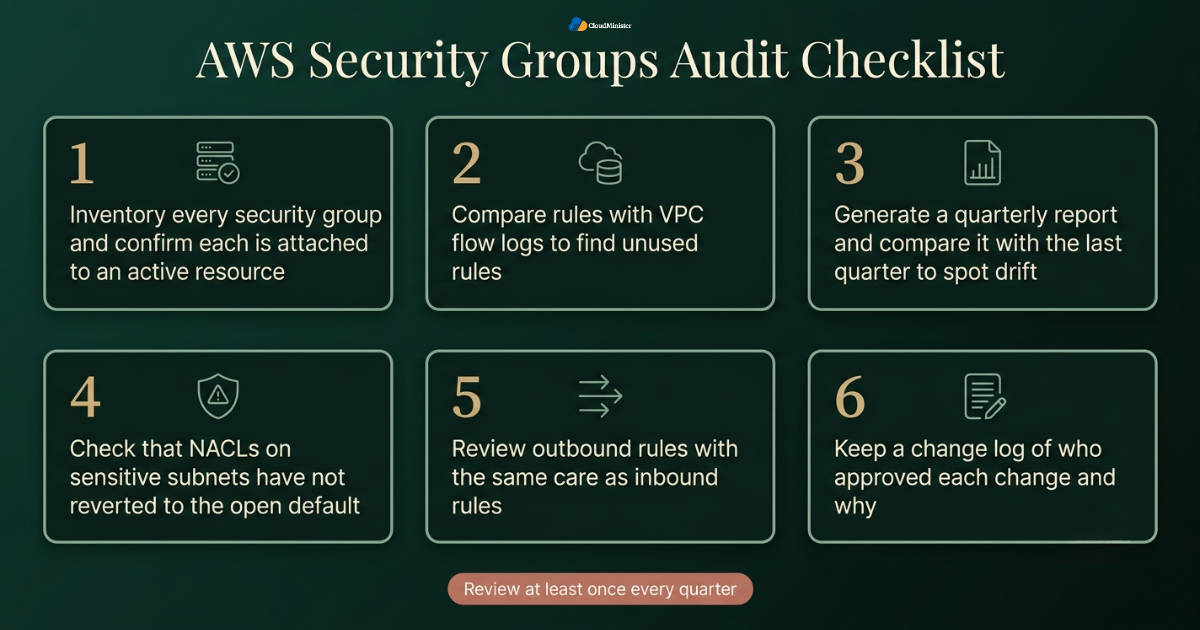
- Pull a full inventory of every security group entry across all VPCs and confirm each one is still attached to an active resource, since orphaned groups referencing deleted instances often go unnoticed for months.
- Start this inventory directly inside the AWS Management Console for a smaller environment, or export it programmatically for a larger fleet spanning many accounts.
- Cross reference AWS Security Groups rules against VPC flow logs to confirm which rules are actually being used, since an unused but still open rule is unnecessary risk with no operational benefit.
- Use the AWS Management Console or an infrastructure as code tool to generate a full report of security group rules quarterly, and compare that report against the previous quarter’s findings to spot drift.
- Confirm that Network ACLs attached to sensitive subnets have not silently reverted to a fully open default configuration after an infrastructure change. A quick check inside the AWS Management Console after any infrastructure change confirms this did not happen silently.
- Ask any provider offering AWS managed services to share a recent example of a security group audit they performed for a client, since a concrete example demonstrates real operational maturity far better than a general assurance. The same standard applies to Azure cost optimization work, where a real before and after example is far more convincing than a general claim of expertise.
- Teams working with a Web Hosting Company in India on ongoing infrastructure management should request a documented AWS Security Groups review at least once a quarter, not only after an incident prompts one.
- Reviews and references matter more than a homepage promise when choosing a Web Hosting Company in India for a decision this consequential to long term security posture.
- This standard applies equally whether the engagement covers AWS infrastructure, Microsoft Azure Cloud Hosting Services, or both together under one relationship.
- Confirm that outbound security group rules receive the same scrutiny as inbound rules during every audit cycle, since outbound gaps are frequently overlooked despite being just as exploitable. The AWS Management Console makes outbound rules just as visible as inbound ones, so there is no technical reason for this gap to persist.
- Compare current AWS Security Groups configuration against documented baseline standards for the organization, flagging any deviation for review rather than assuming a deviation is intentional.
- Run this same baseline comparison exercise for Azure cost optimization on the Azure side of a hybrid deployment, since drift happens on both platforms at a similar pace.
- Maintain a change log for every significant security group modification, including who approved it and why, so nothing gets altered without a deliberate, traceable decision. A Web Hosting Company in India managing this on a client’s behalf should share that change log on request rather than only offering a general assurance. The same expectation should extend to any parallel change log kept for a Microsoft Azure Cloud Hosting Services environment. A similar change log discipline applied to Azure cost optimization decisions makes both sides of a hybrid environment easier to audit together. CloudTrail logs paired with AWS Management Console activity give a reliable audit trail for exactly this purpose.
Key Takeaways
- Security groups operate at the instance level and are stateful, while Network ACLs operate at the subnet level and are stateless.
- Security groups only support allow rules, while Network ACLs support both allow and deny rules, making NACLs useful for explicitly blocking known bad traffic.
- Security groups are typically the primary layer for fine grained, day to day access control, and Network ACLs are an optional additional subnet level control where explicit deny rules or a baseline boundary are needed.
- Common mistakes, including overly broad inbound rules and neglected outbound rules, remain among the most frequently cited findings in cloud misconfiguration research.
- Teams managing a multi cloud footprint that includes Microsoft Azure Cloud Hosting Services should map security group concepts to the Azure equivalent explicitly rather than assuming a direct translation.
- Recurring audits, clear documentation, and a defined review schedule matter just as much as the initial configuration, whether managed internally, through AWS managed services, or through a capable Web Hosting Company in India.
- The same recurring discipline applies directly to Azure cost optimization, and organizations that treat both as connected rather than separate programs tend to catch drift faster on either platform.
Need a Review of Your AWS Security Groups?
Not sure whether your current rules match what your application needs? Talk to our cloud team about auditing your AWS Security Groups, cleaning up old rules and building a setup that fits your workload.
Conclusion
Throughout this comparison, one pattern holds regardless of workload size or industry. Security groups and Network ACLs serve different purposes, and understanding how each one behaves makes it easier to decide which controls a given VPC actually needs. Security groups handle the fine grained, stateful, instance level rules that make up the bulk of day to day access control work, while Network ACLs, where used, add an optional stateless, subnet wide control. Teams that choose their controls deliberately, document their reasoning, and review configurations on a recurring schedule consistently end up with a more resilient VPC than teams that leave the initial configuration unchecked. For organizations weighing this decision alongside a broader infrastructure strategy, whether that includes AWS managed services, a parallel footprint on Microsoft Azure Cloud Hosting Services, or a full migration supported by an experienced Web Hosting Company in India, the underlying principle stays the same: understand exactly how each layer behaves, document every decision, and verify the result on a recurring basis rather than assuming an initial configuration remains correct indefinitely.
In day to day work, the most valuable habit around AWS Security Groups is regular review. Rules that made sense six months ago may no longer match what the application needs, and old testing rules are easy to forget. Set a fixed schedule, check both inbound and outbound rules, and write down why each rule exists. If your design also uses a custom NACL, include it in the same review so nothing drifts quietly. Small and steady checks like these keep your VPC safe without adding unnecessary complexity for your team.
Frequently Asked Questions
Can AWS Security Groups block a specific IP address the way a Network ACL can?
Not directly. Security groups only support allow rules, so blocking a specific bad actor IP address requires a Network ACL deny rule instead, since AWS Security Groups have no explicit deny mechanism.
Do I need both AWS Security Groups and Network ACLs, or is one enough?
Security groups are the primary traffic control layer in most architectures, and many valid designs rely on them alone. Network ACLs are an optional additional control. Teams typically add a custom NACL when they need explicit deny rules or a coarse, subnet wide baseline. Which approach fits depends on the workload and its security or compliance requirements.
Why does my application fail intermittently even though security groups allow the traffic?
This is very often a Network ACL issue, specifically a missing rule for the ephemeral port range needed for stateless return traffic, since AWS Security Groups being correctly configured does not guarantee the subnet level NACL is configured the same way.
How often should security group rules be reviewed?
At minimum once per quarter, though any significant infrastructure change, new integration, or team change should also trigger a fresh review rather than waiting for the next scheduled cycle.
Does using AWS managed services remove the need to review security groups internally?
No. The AWS shared responsibility model still places configuration accuracy on the customer even when AWS managed services handles day to day operations, so a periodic internal or third party review remains necessary.

Ajay Singh Raghav is a Senior Linux System Administrator at CloudMinister Technologies, where he has spent over 4 years installing, configuring, maintaining, and troubleshooting Linux servers for hosting and cloud environments. He specializes in AWS cloud computing alongside core Linux server administration, with hands-on expertise across server management, backup and restore systems, and cPanel-based hosting environments. His day-to-day experience keeping production servers stable and secure gives him a practical, ground-level understanding of the infrastructure he writes about.