Most cloud bills grow because of size, not price. Teams pick a large instance to be safe, the workload never grows into it, and the unused capacity is billed every hour for years. Cloud Rightsizing fixes that by matching CPU, memory, storage, and network capacity to what a workload really demands. This guide shows how to measure demand, sort workloads by pattern, choose a new size, resize without drama, and keep the savings from slipping back. It also explains where cloud hosting services in India, a Web Hosting Company in India, and Dedicated Server Hosting in India fit into a sizing plan, so you can decide which workloads belong on elastic capacity and which ones belong on fixed hardware.
Every cloud bill tells a story, and for many teams that story is about habit rather than need. Someone picks a large instance on launch day to be safe, the workload never grows into it, and the unused capacity gets billed every single hour for years. Nobody complains, because a server that is too big never causes an outage. This quiet pattern is the reason Cloud Rightsizing has become one of the most practical skills in modern infrastructure planning.
At its core, Cloud Rightsizing is about matching what you pay for with what your workloads really use. That means looking at CPU, memory, storage, and network demand over a real period of time, and then choosing a size that fits with some room for normal peaks. It works in both directions. Some servers are far too large and waste money, while others are too small and cause slow pages, timeouts, and unhappy users. Fixing both is part of good Cloud Rightsizing, and it is never only about cutting costs.
This guide walks you through the whole journey in plain steps. You will learn which metrics matter, how to sort workloads by their demand pattern, how to resize safely, and how to keep the savings from slipping away after the first review. We also look at where elastic cloud and fixed dedicated hardware each make sense, especially for teams hosting in India. Whether you manage one small website or a large mixed environment, a steady Cloud Rightsizing habit will help you keep performance strong and your invoice fair.
Table of Content:
- What Matching Resources to Workload Demand Really Means
- Why Oversized Instances Are So Common and So Expensive
- The Metrics That Actually Describe Workload Demand
- Sorting Workloads by Demand Pattern
- A Step by Step Process to Fit Instance Size to Demand
- Choosing the Right Instance Family and Size
- Matching Resources for Containers and Kubernetes
- Databases and Storage Need Extra Care When Resizing
- Rightsize First, Then Commit: Pricing Models
- When Dedicated Servers Are the Better Answer
- Sizing Cloud and Dedicated Environments for Indian Workloads
- Common Instance Sizing Mistakes to Avoid
- Automation, Governance, and Keeping the Savings
- Choosing a Hosting Partner That Supports Smart Resizing
- A Practical 30 Day Plan to Fit Resources to Demand
- Key Takeaways
- Conclusion
- Frequently Asked Questions
1. What Cloud Rightsizing Actually Means for Your Workloads
Picture a monthly cloud invoice landing on a finance lead’s desk. Nothing crashed, nothing was attacked, and traffic grew only a little. Yet the number is higher again. Very often the reason is simple. The instances are bigger than the work they do.
Cloud rightsizing is the practice of matching the resources you pay for to the resources a workload really uses. Those resources are vCPUs, memory, disk capacity, disk throughput, network bandwidth, and sometimes GPUs. When the match is close, you pay for what you need and still keep room for normal peaks. When the match is loose, you pay for idle capacity around the clock.
In day to day work, Cloud Rightsizing covers several different actions:
- Downsizing instances that never use more than a small share of their CPU and memory.
- Upsizing instances that are starved for resources, because an undersized server causes slow pages, timeouts, and failed jobs. This is still cloud rightsizing, even though the bill goes up.
- Changing the instance family, for example moving a memory heavy service from a general purpose type to a memory optimized type.
- Adjusting storage type, size, and provisioned performance to match real disk activity.
- Removing idle resources such as unattached volumes, forgotten snapshots, and unused IP addresses.
- Scheduling non production environments so they run only when people actually use them.
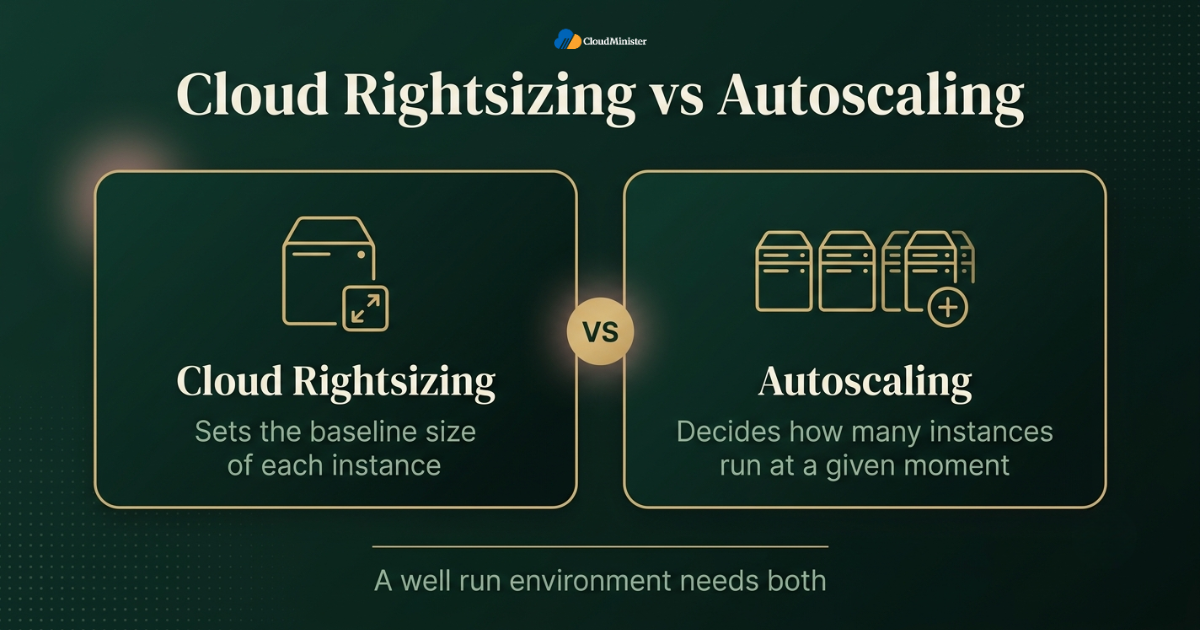
It helps to be clear about what the practice is not. It is not a one time cleanup, and it is not the same thing as autoscaling. Cloud Rightsizing sets the baseline size of each instance. Autoscaling decides how many instances run at a given moment. A well run environment needs both, and this guide focuses on the baseline part. The same idea applies wherever the workload runs. It works on a hyperscale platform, on cloud hosting services in India, on Dedicated Server Hosting in India, and on a fixed server rented from a Web Hosting Company in India. Only the tools and the speed of change differ.
Before you resize anything, write down the performance you must protect, such as a page response target or a batch job deadline. A change that saves money but breaks a service level is not a saving. Every Cloud Rightsizing decision should be judged against that written target.
2. Why Oversized Instances Are So Common and So Expensive
The scale of the problem is now well measured. The Flexera 2026 State of the Cloud Report estimates that 29 percent of infrastructure and platform cloud spend is wasted. That is the first increase in five years, after a long stretch of improvement. The survey covered 753 cloud decision makers, and 85 percent of them still named managing cloud spend as a top challenge.
Infrastructure spending is climbing too. Gartner expects worldwide IT spending to reach 6.15 trillion dollars in 2026, up 10.8 percent from 2025, with server spending growing 36.9 percent as demand for servers built for AI workloads rises. When the total keeps growing, even a small percentage of waste turns into a very large amount of money.
Both numbers lead to the same conclusion. Cloud footprints are growing, and a meaningful part of the spend is not doing useful work. That is why cloud rightsizing has moved from an occasional cleanup task to a routine part of operations. Here is where oversizing usually comes from:
- Launch day fear. The team sizes for the biggest traffic day it can imagine, and that day never comes.
- Copying production everywhere. Staging, testing, and development environments get the same instance size as production, even though they serve a handful of users.
- Lift and shift habits. On premises servers were bought to last three to five years of growth, and the same specifications get copied into the cloud one to one.
- Missing memory data. Consoles show CPU by default, so teams see half the picture and play safe on the other half.
- No clear owner. If nobody owns an instance, nobody dares to shrink it.
- Old generation instances. Newer generations often offer better price and performance, yet older types keep running because nobody revisits them.
- Fixed plan habits. Many businesses buy the next plan up from a Web Hosting Company in India, or on Cloud Hosting Solutions in India, because upgrading feels risky, then never return to review it.
- Blame asymmetry. Nobody is blamed for a server that is too big. Everybody is blamed for one that is too slow.
The pattern is the same whether a team runs on a global hyperscaler or on local cloud hosting services in India. Oversizing is a planning habit, not a provider problem, and it follows a workload wherever it runs.
3. The Metrics That Actually Describe Workload Demand
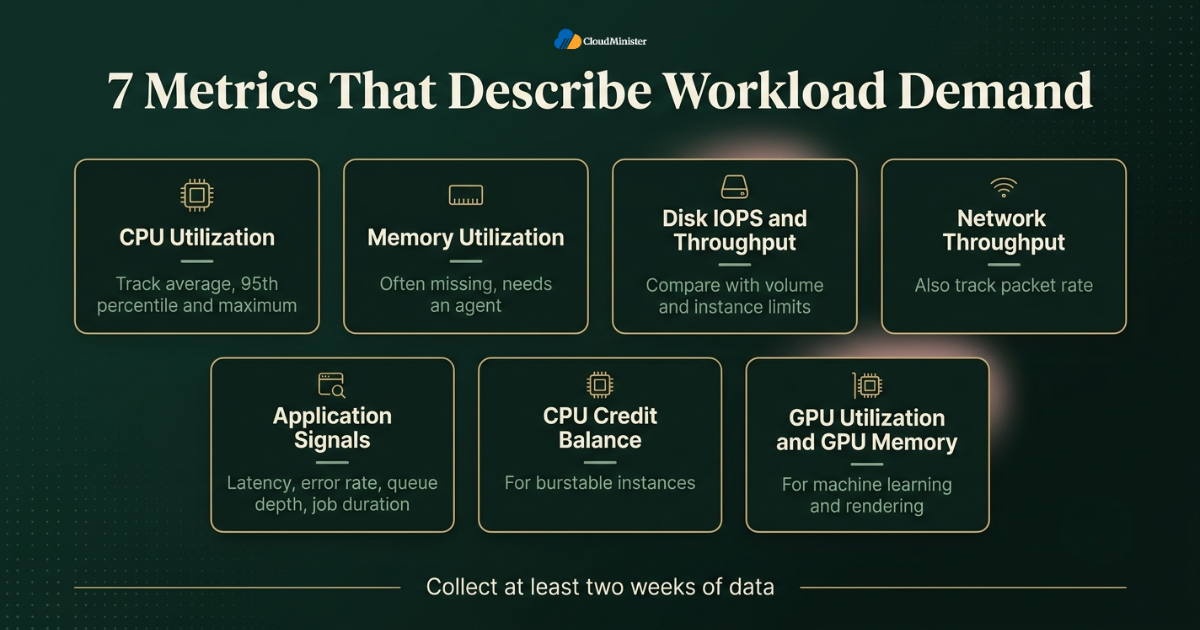
You cannot size what you cannot see. The first job in any Cloud Rightsizing project is collecting the right measurements over a long enough window. Looking only at average CPU is the most common shortcut, and it is also the most misleading one. These are the measurements that matter:
- CPU utilization. Track the average, the 95th percentile, and the maximum. An instance with 10 percent average CPU but regular spikes to 90 percent is a very different case from one that never passes 20 percent.
- Memory utilization. This is the metric that is most often missing. On AWS, for example, EC2 does not report memory or disk space usage by default, and you need the CloudWatch agent to collect it. In general, guest level memory data on most platforms needs an agent.
- Disk IOPS and throughput. Compare real activity with the limits of both the volume and the instance. A small instance may cap disk throughput below what the volume could deliver.
- Network throughput and packet rate. Network limits usually grow with instance size, so a downsizing can quietly lower the ceiling.
- Application signals. Request latency, error rate, queue depth, and job duration show whether users are really affected. They are the final judge of any change.
- CPU credit balance. For burstable instances, a falling credit balance shows that the workload asks for more than its baseline.
- GPU utilization and GPU memory. These matter for machine learning and rendering, where the GPU is usually the most expensive part of the bill.
The collection window matters as much as the metric. Use at least two weeks of data and, wherever possible, a full business cycle. A billing system that runs a heavy job on the last day of the month looks idle for the other 29 days. Native recommendation tools from the major providers often look at a limited history by default, commonly somewhere between one and two weeks, which is one reason their suggestions need a human review before anyone acts on them. If you host on cloud hosting services in India, check that the control panel or monitoring tool shows memory and disk, not only CPU. A platform that hides them makes Cloud Rightsizing guesswork.
Percentiles beat averages. Size to the 95th or 99th percentile of demand plus a sensible margin, and never to the mean. Averages hide the bursts that users actually notice and monitoring agents run inside your servers and send data out, so treat them like any other production software. Give the agent an identity with only the permissions it needs to publish metrics, keep it patched, and do not give recommendation tools write access unless you have decided that on purpose. Read only access is enough for analysis.
4. Sorting Workloads by Demand Pattern
Not every workload deserves the same treatment. A database that hums along at a steady load and a campaign site that gets hammered twice a year need different answers. Sort each workload into a demand pattern first, then choose the method. The table below is a practical starting point for Cloud Rightsizing decisions.
| Demand pattern | Typical example | Sizing approach | Main risk |
| Steady and predictable | Internal tools, flat load databases | Size to the 95th percentile plus 20 to 30 percent headroom, then consider a commitment | Growth outruns the headroom |
| Cyclical | Business hours applications | Size to the peak of the cycle, schedule non production, add autoscaling | Sizing to the average |
| Spiky or bursty | Sale events, promotional traffic | Smaller baseline plus autoscaling, burstable only if the average is low | Credits run out, slow scale up |
| Batch and periodic | Reports, ETL, month end jobs | Short lived larger instances that shut down after the run | Judging by idle days |
| Unpredictable or growing | New products, AI inference | Start conservative, review weekly, load test | Both waste and outages |
Burstable instances deserve a short note here. Families such as the T series on AWS and the B series on Azure earn CPU credits while they run below a baseline and spend those credits during bursts. They fit workloads with a low average and occasional spikes. They are a poor fit for a service that sits at 50 percent CPU all day, because once the credits are gone the instance is held to its baseline, or, in AWS unlimited mode, you pay for the surplus credits.
Hosting type matters here too. Bursty workloads suit elastic Cloud Hosting Solutions in India, while flat and always busy workloads may be better placed on Dedicated Servers in India. A Web Hosting Company in India that offers both makes it simpler to move a workload between them later. The next sections show how to decide.
These are the signs that a workload is a good candidate for downsizing:
- Peak CPU stays well below capacity for the whole observation window, not just on average.
- Memory at the 95th percentile stays comfortably below what the instance offers.
- Disk and network use sit far below both instance and volume limits.
- Latency and error rates stay flat even during the busiest hours.
- Nothing in the release calendar points to a demand jump soon.
Related Reading: IoT cloud integration
5. A Step by Step Cloud Rightsizing Process
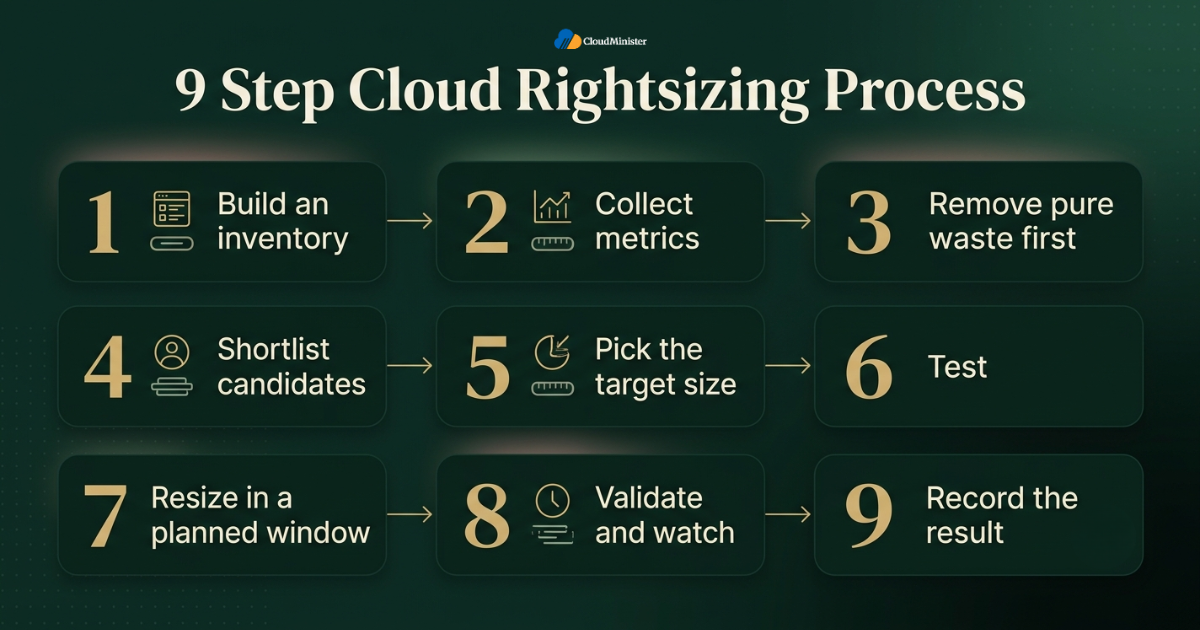
A repeatable cloud rightsizing process protects you from the two classic failures, resizing on a hunch and never resizing at all. This is the sequence that works for most teams:
- Step 1, build an inventory. List every instance with its size, region, environment, and owner, including servers held with a Web Hosting Company in India or any other provider. Tag anything that lacks a tag. Cloud Rightsizing without ownership turns into arguments.
- Step 2, collect metrics. Gather at least two weeks of CPU, memory, disk, and network data, and install agents where memory data is missing.
- Step 3, remove pure waste first. Idle instances, unattached volumes, orphaned snapshots, unused IP addresses, and idle load balancers cost money and carry almost no performance risk. Confirm with the owner before deleting anything.
- Step 4, shortlist candidates. Many teams start with a filter such as 95th percentile CPU under 40 percent and 95th percentile memory under 50 percent. Treat it as a starting filter, not a rule.
- Step 5, pick the target size. Choose the smallest size that covers 95th to 99th percentile demand plus headroom. Within most instance families each size step roughly doubles the resources, so move one step at a time.
- Step 6, test. Run a load test in staging, or move a canary node into production and compare latency and errors against the old size.
- Step 7, resize in a planned window. On most platforms, and on many Cloud Hosting Solutions in India as well, changing the instance type of a virtual machine needs a stop and start or a reboot. Roll through load balanced groups one node at a time so users never notice.
- Step 8, validate and watch. Monitor for at least a week, and for a full business cycle when periodic jobs exist. Keep the old size noted so a rollback is one change away.
- Step 9, record the result. Write down what changed, what it saved, and what you learned. The log makes the next round quicker.
Two practical details cause surprises. First, local instance store disks lose their data when an instance stops, so anything kept there must be moved or backed up beforehand. Second, a public IP address that is not a reserved static address may change after a stop and start, which can break allow lists and DNS records. Both are easy to handle when they are on the checklist and painful when they are not.
Related Reading: Cloud cost governance policy guide
Start with non production environments and idle resources. They carry the least risk, they often hold a good share of the total waste, and early wins build trust in the process across teams. Save the customer facing database for the second round of Cloud Rightsizing.
6. Choosing the Right Instance Family and Size
Picking a size is only half of Cloud Rightsizing. Picking the right family matters just as much, because families differ in how much memory, compute, and I/O they give per unit of price. The main groups look like this:
| Instance Category | Key Characteristics | Best Used For |
| General Purpose | Balanced CPU and memory ratio; safe default choice | Web servers, small databases, and application tiers |
| Compute Optimized | Higher vCPU-to-memory ratio | CPU-bound workloads like video encoding, busy API gateways, and batch processing |
| Memory Optimized | Higher memory-to-vCPU ratio | In-memory caches, large databases, and analytics engines |
| Storage Optimized | High IOPS and fast local storage | Search indexes, data warehouses, and NoSQL databases |
| Accelerated | Integrated GPUs or specialized hardware accelerators | Machine learning training, AI inference, and graphics processing |
Find the resource that runs out first. If a service uses 15 percent of its CPU but 85 percent of its memory, shrinking to a smaller general purpose instance will hurt it. It needs a memory optimized type instead, possibly with fewer vCPUs than it has today. These extra checks belong in every Cloud Rightsizing review before you commit to a size:
| Factor | Key Consideration | Impact / Action Required |
| Generation | Newer generations often deliver better price-to-performance for the same workload. | Upgrading to a newer generation can automatically reduce costs while improving performance. |
| Processor Architecture | Arm-based instances (e.g., AWS Graviton) can offer superior price-performance for many workloads. | Software, dependencies, and container images must be compiled/built for Arm architecture. |
| Network & Storage Caps | Bandwidth and disk throughput limits generally scale alongside the instance size. | Verify that smaller instance sizes still provide enough throughput to handle peak traffic. |
| Licensing | Costs for software licensed per core (certain databases, OSs) fluctuate based on vCPU count. | Ensure total licensing costs are factored in when scaling vCPU counts up or down. |
| Regional Availability | Not all instance shapes or types are available across every geographic region. | Confirm regional availability when compliance or data residency mandates keeping data in specific regions (e.g., India). |
Each major provider ships a recommendation tool, such as AWS Compute Optimizer and Azure Advisor. Use them as a source of leads, not as orders. They see resource numbers, but they do not know your release calendar or your monthly batch job. Smaller Cloud Hosting Solutions in India may offer simpler usage reports instead, so ask what data is available.
Teams that choose cloud hosting services in India for latency or data residency reasons should also ask how flexible the sizing options are. A platform with only a few fixed shapes forces you to buy extra memory when you only needed extra CPU. One that allows custom combinations of vCPU and memory makes cloud rightsizing far more precise, and the difference shows up on the invoice.
Right Sized Cloud Hosting Starts Here
Looking for cloud hosting services in India that let you match CPU, memory, and storage to what your workload really needs? Explore flexible cloud plans from Cloudminister and pay only for the capacity you use.
7. Cloud Rightsizing for Containers and Kubernetes
Containers add a second layer to Cloud Rightsizing. You have to size the pods, and you also have to size the nodes that run them. Getting one right and ignoring the other leaves money on the table. These are the concepts that decide the outcome:
- Requests and limits. A request is the amount of CPU or memory the scheduler reserves for a pod. A limit is the ceiling a container may use. Capacity is reserved by requests, so a pod that asks for 2 CPUs and uses 0.2 still blocks 2 CPUs on the node.
- Throttling and out of memory kills. A container that hits its CPU limit is throttled, which shows up as latency. A container that goes past its memory limit is killed. Set limits from real usage data, not from guesses.
- Vertical Pod Autoscaler. It watches usage and recommends, or applies, better requests. Start in recommendation mode so you can review its advice.
- Horizontal Pod Autoscaler. It changes the replica count based on load. Do not let it and the Vertical Pod Autoscaler act on the same CPU or memory metric for the same workload, because they will work against each other.
- Node sizing. Very large nodes increase the impact of a single node failure. Very small nodes waste capacity on system daemons and leftover fragments. A sensible mix of node sizes with a cluster autoscaler works well.
Kubernetes clusters run on any infrastructure, including cloud hosting services in India and Dedicated Servers in India, and the sizing logic stays the same. On Dedicated Servers in India the unit is a whole physical machine, so node sizing deserves even more thought.
Compare 95th percentile usage with the request for every workload over two weeks. The gap between the two is the cost of caution. Closing part of that gap is a sensible first round of Cloud Rightsizing for any cluster, and it improves scheduling density at the same time.
8. Databases and Storage: Where Cloud Rightsizing Needs Extra Care
Databases are where careless Cloud Rightsizing hurts the most. A stateless web node can be replaced in minutes. A database holds state, warms its cache slowly, and is often the one component every request depends on. Handle it with more patience than the rest of the estate:
| Practice / Concept | Operational Insight | Key Action / Metric |
| Memory Usage Principles | Databases intentionally use spare RAM (e.g., InnoDB buffer pool, shared buffers, OS cache); low free RAM is normal. | Evaluate cache hit ratio, disk reads, query latency, and connection counts rather than free RAM. |
| Maintenance Strategy | Resizing in a primary-replica setup can be done with minimal disruption by upgrading a replica first and failing over. | Execute failover to the resized replica, then upgrade the original primary to avoid long outages. |
| Post-Restart Performance | A restarted database runs on a cold cache, causing temporary latency spikes while warming up. | Schedule restarts during off-peak hours and closely monitor query latency during the warm-up period. |
| Storage Scaling Limits | Block volumes can usually grow live, but shrinking requires creating a new volume and migrating data. | Plan storage capacity carefully to avoid over-allocating non-shrinkable storage volumes. |
| I/O Cost Control | Provisioned IOPS represent a significant recurring expense if over-provisioned. | Audit actual peak disk performance regularly and adjust provisioned throughput to eliminate waste. |
| Hosting Environment Impact | Database behavior varies significantly between shared hosting environments and dedicated server hardware. | Measure identical baseline metrics before and after moving databases between shared and dedicated hosts. |
| Data Lifecycle Management | Keeping cold data, logs, and historical archives on high-performance block storage inflates costs. | Set up automated lifecycle rules to offload old backups, logs, and archives to low-cost object storage. |
Resizing creates copies. Snapshots, temporary large instances, and restored test databases can hold real customer data. Encrypt every snapshot, apply the same access rules as production, and delete temporary copies once the change is confirmed. Before removing an old volume, check its data retention and disposal requirements.
9. Rightsize First, Then Commit: Pricing Models
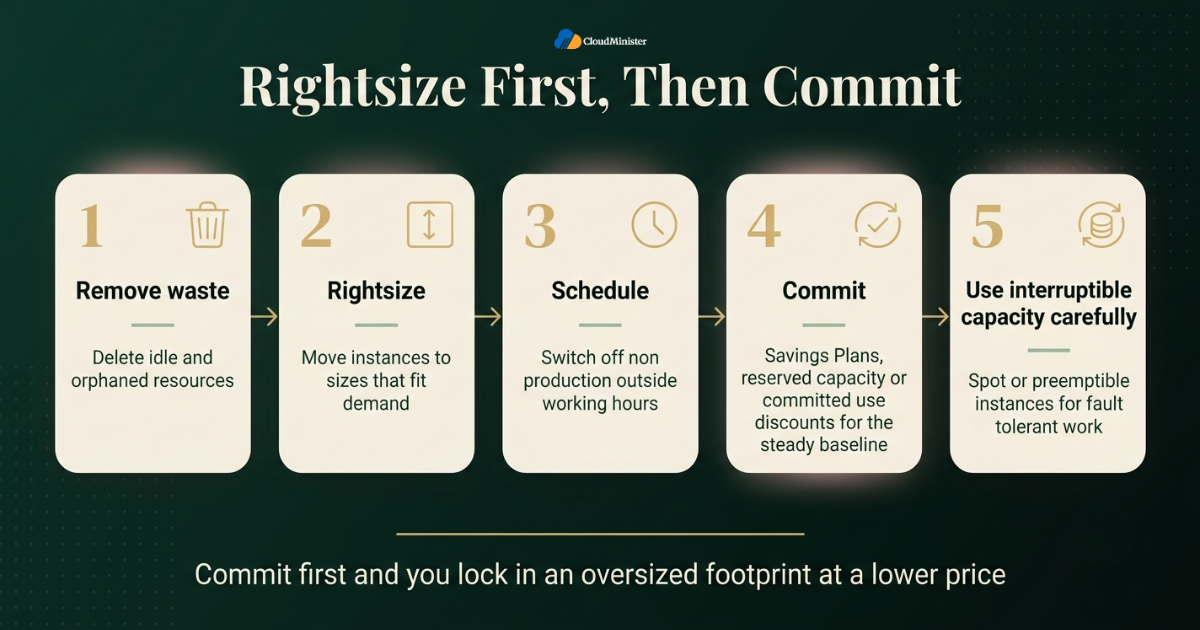
Discounts and cloud rightsizing solve different problems. Commitments lower the unit price of capacity. Cloud Rightsizing reduces how much capacity you need. The order matters. If you commit first, you lock in the oversized footprint at a lower price. If you rightsize afterward, you may end up holding commitments you cannot fully use.
A sensible order looks like this:
- Remove waste. Delete idle and orphaned resources.
- Rightsize. Move instances to sizes that fit their demand.
- Schedule. Switch off non production environments outside working hours, especially on hourly billed cloud hosting services in India.
- Commit the steady baseline. Use Savings Plans, reserved capacity, or committed use discounts for the part of the load that runs all the time, or move that part to Dedicated Servers in India. Flexible commitment types that apply across sizes and families reduce the risk of a later change.
- Use interruptible capacity carefully. Spot or preemptible instances give deep discounts for fault tolerant work such as batch jobs, but the provider can take them back at short notice.
Billing style also changes the sizing conversation. Some providers of Cloud Hosting Solutions in India sell fixed monthly plans instead of hourly billing. Fixed plans are easy to budget, but they raise the stakes of a wrong size, since a plan that is too large is a cost you pay every month whether the capacity is used or not. In that case, careful Cloud Rightsizing before you sign is worth more than any later discount. Hourly billed Cloud Hosting Solutions in India, in contrast, let you correct a wrong size within days.
If part of your estate sits with a Web Hosting Company in India that bills monthly, treat that spend like any other commitment. Size it before each renewal, and compare it with the hourly cost of the same capacity on Cloud Hosting Solutions in India. The same advice applies to a monthly contract for Dedicated Server Hosting in India.
Related Reading: Cloud pricing model types explained
10. When Dedicated Servers Are the Better Answer
Elastic cloud capacity is not the right home for every workload. Some workloads run hot and steady all day, every day, and gain little from the ability to scale up and down. For those, a fixed server can be a better fit, and this is where Dedicated Server Hosting in India enters the picture. A dedicated server gives one customer the whole machine, so the sizing question changes from which instance type to which hardware configuration. A Web Hosting Company in India can usually supply both models, which helps when you are not sure yet which one fits.
Teams usually choose dedicated hardware for these reasons:
- Steady high utilization. For a workload that runs at high load around the clock, Dedicated Servers in India billed monthly can cost less than paying hourly for equal cloud capacity. The result depends on the exact configuration and the provider, so compare real quotes against cloud hosting services in India.
- Predictable performance. A single tenant server from Dedicated Server Hosting in India gives you the full CPU, memory, and disk. There are no neighbors sharing the host.
- Licensing and compliance. Some software licenses and audit requirements are easier to meet with Dedicated Server Hosting in India, because the hardware is used only by your organization.
- Large in memory or storage heavy jobs. Big databases and analytics engines can use every gigabyte and every disk channel.
The trade off is flexibility. You cannot resize Dedicated Servers in India with a single API call. A hardware change usually means planned downtime or a migration, so Cloud Rightsizing habits have to move earlier in the process. You size the hardware from measured demand before you commit to it. This is how to do it using data from your current cloud hosting services in India or another platform:
- Run the workload on a cloud instance for a few weeks and record 95th and 99th percentile CPU, memory, disk IOPS, and network throughput.
- Add headroom for the growth you expect during the period you plan to keep the server.
- Match the hardware to the measurements, using the component guide below.
- Keep a burst path. Send rare peaks to cloud instances instead of buying hardware for the busiest hour of the year.
These are the components to decide when sizing Dedicated Servers in India:
| Component | Technical Role & Selection Guidance | Recommended Action / Selection Criteria |
| CPU | Core count handles parallel workloads; clock speed drives single-threaded task execution. | Choose high core counts for web servers and concurrent DB connections; prioritize clock speed for single-threaded tasks. |
| Memory | Server-grade ECC memory detects and corrects single-bit memory errors to prevent crashes. | Provision capacity to cover the 99th percentile working set size, plus allocated RAM for the OS file cache. |
| Storage | Drives vary by I/O throughput: NVMe (high I/O), SATA SSD (balanced), HDD (cold storage/bulk data). | Match drive tech to I/O demands. Use RAID for hardware fault tolerance, but maintain separate offsite backups. |
| Network | Network interfaces and monthly data transfer caps dictate available throughput and transfer costs. | Provision port speeds and bandwidth quotas using measured baseline throughput metrics rather than estimations. |
Servers from Dedicated Server Hosting in India usually include an out of band management interface, such as IPMI or a vendor console. Keep it off the public internet, reach it only through a VPN or an allow list, change default credentials, and keep firmware patched. Single tenant hardware still needs the same patching and firewall discipline as any other server.
The hybrid pattern works well in practice. The steady baseline runs on dedicated hardware, and short bursts, test environments, and new experiments run on elastic cloud hosting services in India. Each part is sized for what it actually does. When you compare Dedicated Server Hosting in India, ask about hardware refresh options, remote management access, network port speeds, and how quickly the provider can replace failed parts.
11. Sizing Cloud and Dedicated Environments for Indian Workloads
Where a workload runs changes how you size it. For teams serving Indian users, four practical factors come first, and each one shapes Cloud Rightsizing choices in a different way:
- Latency. Hosting close to your users reduces network delay and improves response time without adding compute. Test distance first, so you do not buy larger instances or Dedicated Servers in India to fix what is really a location problem.
- Data residency. Some sectors and contracts require data to stay inside the country. That narrows the list of regions and providers, so confirm which cloud hosting services in India and which data centres meet the requirement before you finalize a sizing plan.
- Support hours. A resize needs someone on call in your time zone. Ask the Web Hosting Company in India when engineers are available and how quickly they respond during a change window.
- Billing currency. Providers of Cloud Hosting Solutions in India that bill in Indian rupees remove exchange rate swings from the budget, which makes it easier to compare costs from one month to the next.
Hosting models also differ in how much control you get over size. This is how sizing works in each one:
- Fixed plan cloud. Many Cloud Hosting Solutions in India are sold as bundles of vCPU, memory, and storage. Sizing is coarse, so you pick the nearest plan and then check whether you are paying for memory you never touch.
- Flexible cloud servers. Some cloud hosting services in India let you choose vCPU, memory, and storage separately. This is the easiest model for precise cloud rightsizing, because you can change the one resource that is actually short.
- Hyperscale cloud. The large global platforms offer many instance families, native recommendation tools, and on some platforms custom shapes, at the cost of more complex pricing.
- Dedicated hardware. Dedicated Server Hosting in India gives fixed hardware with predictable performance. Sizing must be right at purchase, because changes take planning.
- Hybrid. Cloud Hosting Solutions in India for bursts and test work, combined with Dedicated Servers in India for the steady core, often gives a good balance of cost and control.
There is no universal winner. The right model is the one whose sizing options match how your demand behaves. A workload with sharp peaks needs flexible cloud capacity. A workload that never dips needs fixed hardware sized well. Whichever you choose, compare Dedicated Servers in India and cloud hosting services in India on the same measured numbers, and not on brochure specifications.
Related Reading: AWS vs Azure vs Google Cloud
12. Common Cloud Rightsizing Mistakes to Avoid
Most failed cloud rightsizing efforts trace back to a short list of repeatable mistakes. Avoiding them is one of the cheapest improvements you can make:
- Sizing on average CPU alone and ignoring peaks.
- Ignoring memory because the console does not show it.
- Using a window that is too short and missing month end, quarter end, or seasonal peaks.
- Changing several dimensions at once, so nobody knows which change caused the problem. Change one thing at a time.
- Skipping the rollback plan. Note the previous instance type and test the reverse path.
- Running a burstable instance on a workload that needs sustained CPU.
- Buying commitments before the sizing work is finished.
- Trusting tool recommendations blindly instead of asking the application owner.
- Treating cloud rightsizing as a one time project. Demand changes after every release and every campaign.
- Choosing Dedicated Servers in India from a price list alone, without measured CPU, memory, and disk numbers.
- Signing with a Web Hosting Company in India before checking how resizing, backups, and support work in practice.
- Assuming every plan on cloud hosting services in India can be resized in minutes, when some need a restart or a migration.
- Renewing Dedicated Server Hosting in India contracts without checking whether the hardware still matches demand.
- Picking a fixed plan from Cloud Hosting Solutions in India without checking whether the next size up is a big jump in price.
- Never measuring the outcome, so nobody can prove the savings and the program loses support.
Many of these mistakes come from missing visibility rather than missing skill. A Web Hosting Company in India that provides monitoring and regular resource reviews can flag oversized or starved servers long before the invoice does. Confirm in writing what the provider monitors and what remains your responsibility.
13. Automation, Governance, and Keeping the Savings
A cloud rightsizing project that ends after one review always drifts back. New instances get launched, traffic changes, and last quarter’s careful sizing goes out of date. The fix is a small amount of process that keeps running on its own:
| Practice / Strategy | Core Objective | Key Action / Metric |
| Comprehensive Tagging | Ensure full accountability and visibility into cloud infrastructure spend. | Apply tags for owner, environment, application, and cost center to every resource; audit and review untagged assets. |
| Infrastructure as Code (IaC) | Version-control instance configurations and track hardware sizing modifications. | Define instance specifications in code to require pull request reviews and maintain an audit history for changes. |
| Non-Production Scheduling | Maximize cost savings by eliminating idle runtime outside working hours. | Automatically shut down dev/test environments during off-hours to reduce compute hours by ~70% (note: storage costs persist). |
| Budgets & Real-Time Alerts | Detect cost anomalies and unexpected spend spikes early. | Configure threshold-based budget alerts per service to flag oversized deployments within days instead of at month-end. |
| Cadenced Infrastructure Reviews | Continuously evaluate workload resource allocations against performance needs. | Perform monthly resource reviews for fast-changing environments, quarterly reviews for stable stacks, and post-release audits. |
| Unit Cost Tracking | Measure real resource efficiency independent of top-line revenue or business growth. | Track operational metrics like cost per thousand requests, per active customer, or per job across cloud and dedicated servers. |
| Standardized Default Sizes | Prevent over-provisioning at the initial deployment phase. | Establish baseline instance size templates for engineering teams and require justification for non-standard sizing. |
Governance sounds heavy, but in practice it is a handful of rules that people can follow without a meeting. The goal is simple. Every instance has an owner, every size has a reason, and every reason gets checked on a schedule. The same rules should cover every environment, from cloud hosting services in India to Dedicated Server Hosting in India and every server held with a Web Hosting Company in India, so that no server sits outside the review. That habit is what keeps cloud rightsizing results in place after the first round.
14. Choosing a Hosting Partner That Supports Cloud Rightsizing
Good cloud rightsizing needs good visibility, and visibility depends on what your platform shows you. When you compare a Web Hosting Company in India, look beyond the monthly price and ask how easily you can see and change what you are paying for. These questions are worth asking:
- Can you see memory, disk, and network usage per server, and how far back does the history go?
- Can you resize a server without rebuilding it, and how long is the interruption?
- Is billing hourly, monthly, or both, and do you pay for stopped servers?
- Do the Cloud Hosting Solutions in India you are considering offer custom vCPU and memory combinations, or only fixed plans?
- Does the provider offer both cloud hosting services in India and Dedicated Server Hosting in India, so a workload can move between them without changing vendor?
- Can the same Web Hosting Company in India supply Dedicated Servers in India for steady workloads and elastic cloud for bursts?
- How are backups verified, and what is the tested restore time?
- What are the support hours, and who is on call during a change window?
- Where are the data centres, and does that meet your latency and residency needs?
A partner that offers Cloud Hosting Solutions in India and Dedicated Servers in India under one roof makes the hybrid model from section 10 far easier to run. Moving a workload between them, sharing monitoring, and having a single support contact all cut the coordination effort. Whichever provider you pick for Dedicated Server Hosting in India or cloud capacity, get the resize process and rollback support in writing before you sign.
Ask for evidence, not promises. A Web Hosting Company in India that shares example resize procedures, restore test results, and incident reports before you sign is more likely to stay calm during a real change. Cloud Rightsizing is easier to sustain when your provider treats resource reviews as part of normal service, not as a paid extra.
15. A Practical 30 Day Cloud Rightsizing Plan
Reading about cloud rightsizing is easy. Acting on it is harder, so this plan splits the work into four weeks that most teams can actually follow:
- Week one. Build the inventory across every provider, whether cloud hosting services in India, a hyperscaler, or a Web Hosting Company in India. Assign owners, install memory agents, and write the performance targets that must not be broken.
- Week two. Collect data, remove idle and orphaned resources after owner approval, and sort the remaining workloads by demand pattern, marking steady candidates for Dedicated Server Hosting in India.
- Week three. Choose target sizes for the safest candidates, run load tests or canary changes, and prepare rollback notes.
- Week four. Resize in planned windows, including any Cloud Hosting Solutions in India that need a restart. Validate against the performance targets and record the savings.
- After day 30. Set the review calendar, decide which steady workloads deserve commitments, and check whether any always busy workload should move to Dedicated Servers in India.
Treat the first cycle as a pattern for the next ones. Each round should take less time than the last, because the tags, dashboards, and runbooks already exist. Review your approach every quarter, since traffic, software versions, and instance generations all keep changing.
Checklist: Cloud Rightsizing Readiness Review
- Performance targets written down for each workload.
- Inventory complete with owners and tags.
- At least two weeks of CPU, memory, disk, and network data collected.
- Idle and orphaned resources removed after owner confirmation.
- Every candidate matched to a demand pattern.
- Target size and family chosen from 95th percentile demand plus headroom.
- Load test or canary run completed.
- Rollback path noted and tested.
- Snapshots taken, encrypted, and restore tested.
- Commitments bought only after sizing has settled.
- Review dates set on the calendar.
Key Takeaway
- Cloud Rightsizing matches CPU, memory, storage, and network capacity to measured demand, and it includes upsizing starved servers as well as shrinking oversized ones.
- Use the 95th and 99th percentile over at least two weeks, never the average alone, and always collect memory data.
- Sort workloads by demand pattern before choosing a method, and treat burstable instances with care.
- Resize in small steps, test first, keep a rollback ready, and take extra care with databases and storage.
- Do cloud rightsizing first, then commit, so discounts apply to a footprint you actually need.
- Steady high load workloads may cost less and perform more predictably on Dedicated Servers in India, with cloud used for bursts.
- Flexible Cloud Hosting Solutions in India make precise sizing easier, while fixed plans call for more careful choices at purchase.
- Cloud hosting services in India and Dedicated Server Hosting in India can work together in a hybrid setup, each sized for its own job.
- A Web Hosting Company in India that shows you real usage data and supports resizing makes every later review easier.
- Tags, budgets, code reviewed sizing, and a review calendar keep the savings from disappearing.
Not Sure What Size Your Workload Needs?
Our team can help you review your current usage, pick the right plan, and plan a safe resize without downtime surprises. Share your requirements and get clear, honest guidance.
Conclusion
Across every section of this guide, one idea repeats. Size follows demand, and demand has to be measured before it is trusted. Averages mislead, memory data is easy to miss, and a single review goes stale within months. Teams that get lasting results collect real metrics, sort workloads by pattern, move in small reversible steps, and keep an owner on every resource.The same logic decides where a workload should live. Bursty and unpredictable work suits elastic Cloud Hosting Solutions in India, while steady high load work may suit Dedicated Servers in India. If you are weighing that decision, start with the measurements, then talk to a Web Hosting Company in India that offers both cloud and Dedicated Server Hosting in India and is open about how resizing works. Done this way, Cloud Rightsizing becomes a quiet routine that keeps performance steady and the invoice honest.
If there is one thing to take away, it is that Cloud Rightsizing works best as a calm routine and not as a rushed emergency project. Teams that treat it as a one time cleanup usually find their costs creeping back within a few months, because new releases, new campaigns, and new servers keep changing the picture. A simple monthly or quarterly review, backed by clear ownership and honest data, is enough to hold the gains in place. Small and regular Cloud Rightsizing reviews beat one big overhaul almost every time.
It also helps to remember that every good sizing decision begins with a question and not an assumption. Ask what the workload truly needs, check the numbers over a full business cycle, and let application performance have the final say. Start with the safe wins such as idle resources and test environments, then move toward the more sensitive systems with care and a rollback plan ready. Following this approach, Cloud Rightsizing becomes a trusted part of your daily operations and gives your team the confidence to grow without paying for capacity it never uses.
Frequently Asked Questions
What is Cloud Rightsizing in simple words?
It means giving each workload the amount of CPU, memory, storage, and network it really needs, no more and no less. It covers shrinking oversized servers, growing starved ones, and moving to a better instance family when the workload calls for it.
How often should we review instance sizes?
Monthly for fast changing workloads and quarterly for stable ones. Also review after any major release, campaign, or migration, since each of those can change demand overnight.
Is it safe to downsize production servers?
Yes, when it is done in small steps with testing, a canary or rolling change, and a rollback plan. Stateless services are the easiest. Databases need more care, so resize replicas first and fail over during a quiet period.
What CPU level means an instance is oversized?
There is no single number. Many teams shortlist instances whose 95th percentile CPU stays under about 40 percent and whose memory is also low across at least two weeks. The shortlist is only a starting point, and the application latency and error rate make the final call.
What is the difference between cloud rightsizing and autoscaling?
Cloud rightsizing sets the size of each instance, while autoscaling changes how many instances run as load rises and falls. Good cloud rightsizing gives autoscaling a sensible unit to multiply, and autoscaling handles the swings that a fixed size cannot.
Can cloud rightsizing hurt performance?
It can if the sizing uses averages, ignores memory, or skips testing. When you size to percentiles with headroom, validate with application metrics, and keep a rollback ready, performance should hold or improve.
Which is better for a steady workload, cloud hosting services in India or Dedicated Server Hosting in India?
It depends on the numbers. Cloud hosting services in India give flexibility and quick changes, while Dedicated Server Hosting in India gives predictable performance and a fixed monthly cost. Compare real quotes for the same measured configuration, and remember that a hybrid setup is also an option.
Do Cloud Hosting Solutions in India allow resizing without downtime?
It depends on the platform and the resource. Some platforms allow certain changes, such as adding storage, while the server runs, but most CPU and memory changes need a restart. Ask the provider for its documented resize procedure and the expected interruption.
How do I pick a plan size on Cloud Hosting Solutions in India?
Start from measured 95th percentile CPU and memory, add headroom, and choose the smallest plan that covers it. If the next plan up is a big jump in size and price, ask whether custom sizing is available before paying for unused capacity.
Are Dedicated Servers in India suitable for a growing startup?
They can be, when part of the workload is steady. Startups with unpredictable growth often begin on Cloud Hosting Solutions in India, collect demand data, and then move the steady components to Dedicated Servers in India once the numbers are clear. Compare Dedicated Server Hosting in India plans on hardware, port speed, and support before you commit.
Can a Web Hosting Company in India help with sizing?
A capable Web Hosting Company in India can share usage data, suggest suitable plans, and support resizing or migration between cloud plans and Dedicated Servers in India. Ask what monitoring is included, how resizing works, and who is on call during changes.
How much money can we save?
There is no honest universal figure. The 29 percent waste estimate in the Flexera survey gives useful context, but the saving on your account depends on how oversized your instances are, how much idle capacity exists, and how much risk you accept. Measure a first batch of workloads and extrapolate carefully from that result.

Ajay Singh Raghav is a Senior Linux System Administrator at CloudMinister Technologies, where he has spent over 4 years installing, configuring, maintaining, and troubleshooting Linux servers for hosting and cloud environments. He specializes in AWS cloud computing alongside core Linux server administration, with hands-on expertise across server management, backup and restore systems, and cPanel-based hosting environments. His day-to-day experience keeping production servers stable and secure gives him a practical, ground-level understanding of the infrastructure he writes about.