Microsoft 365 Copilot has moved from an experimental add-on to a core part of how enterprises and small businesses get work done inside Word, Excel, Outlook, PowerPoint, and Teams. As of the FY2026 Q3 earnings disclosure, Microsoft reported that Copilot for Microsoft 365 had crossed 20 million paid enterprise seats, up from 15 million just one quarter earlier, the fastest single-quarter seat growth the product has recorded since launch. This guide breaks down exactly what Microsoft 365 Copilot is, how it works across each Microsoft Office 365 application, what real productivity gains businesses are reporting, and how Indian companies can plan a rollout that delivers ROI instead of sitting unused after purchase.
For businesses evaluating whether to invest in the tool in 2026, the question is no longer “does AI belong in the workplace.” That debate is over. The real question is how to deploy Microsoft 365 Copilot correctly, with the right Microsoft 365 plans, the right licensing, the right infrastructure behind it, and the right change management, so that the investment shows up as measurable time saved rather than an underused line item on the software budget.
1. What Is Copilot for Microsoft 365? Understanding the Core Technology
Microsoft 365 Copilot is an AI-powered productivity assistant built directly into the Microsoft Office 365 application suite. Unlike a standalone chatbot that lives in a browser tab, it works from inside the documents, spreadsheets, emails, and meetings your team is already using.
- It combines a large language model with the Microsoft Graph, the system that understands your calendar, your emails, your documents, and your Teams chats.
- Because Microsoft 365 Copilot reads this organizational context, its answers are grounded in your company’s actual data rather than generic public information.
- Copilot is embedded in Word, Excel, PowerPoint, Outlook, Teams, and OneNote, so employees do not need to learn a new interface to start using it.
- Every response it generates respects the existing permission structure of your organization, it will not surface a file to a user who does not already have access to that file.
- Microsoft 365 Copilot is offered as a paid add-on on top of qualifying Microsoft 365 plans, rather than a separate standalone product for most enterprise customers.
Microsoft 365 Copilot operates within your organization’s existing Microsoft Purview compliance boundary and Entra ID permission model. It does not use your prompts or your company data to train the underlying foundation models, and any data it processes inherits the same data residency and compliance commitments as the rest of your Microsoft Office 365 environment. This matters directly for Indian businesses that need to demonstrate technical safeguards under the Digital Personal Data Protection Act (DPDPA) 2023.
2. Why This AI Assistant Matters for Business Productivity in 2026
The scale at which Microsoft 365 Copilot is being adopted is itself a signal of the productivity gap it is closing. Enterprise AI market coverage of Microsoft’s FY2026 Q3 earnings commentary reports that the platform reached 20 million paid seats in April 2026, and weekly engagement with the tool is now reported to be at the same level as weekly engagement with Outlook, meaning it has crossed from a novelty feature into a daily-use application for a large share of licensed users.
- Knowledge workers spend a disproportionate share of their day on repetitive tasks: summarizing long email threads, reformatting spreadsheets, drafting first versions of documents, and searching for information buried in old files.
- Microsoft 365 Copilot is designed specifically to compress this category of work, not to replace strategic thinking or decision-making.
- Independent research commissioned around real deployments has found measurable time savings per user per day, translating into meaningful hours reclaimed per employee per month at scale.
- A Forrester Total Economic Impact study on Copilot for Microsoft 365 projected that a composite enterprise organization could realize a 116% return on investment with a $19.7 million net present value over three years, driven largely by faster document creation, faster meeting follow-up, and reduced time spent searching for information.
- For businesses still deciding between different Microsoft 365 plans, this ROI data is a useful reference point for building an internal business case.
Before rolling out Microsoft 365 Copilot organization-wide, pilot it with two or three specific, high-volume workflows, such as Teams meeting recaps, Outlook email drafting, or Excel data summarization, rather than issuing licenses broadly and hoping adoption happens organically. Deployments with focused pilots consistently show far higher monthly active usage than open-ended rollouts.
3. Copilot Across Each Application: What It Actually Does
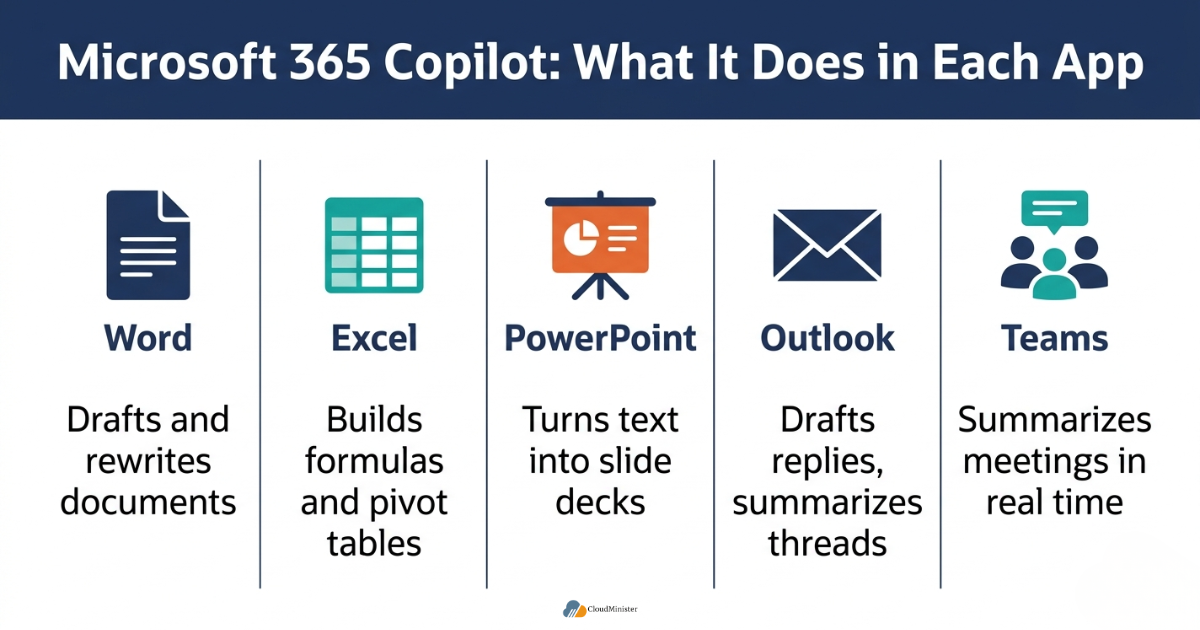
Microsoft 365 Copilot does not behave the same way in every app — it is tuned to the specific task each Microsoft Office 365 application is built for. Here is a breakdown of what it delivers inside each core tool.
3.1 In Word
- Generates a full first draft of a document from a short prompt describing the goal, audience, and tone
- Rewrites selected paragraphs for clarity, brevity, or a different tone without disturbing the rest of the document
- Summarizes a long document into key points for a reader who does not have time to read the whole file
- Pulls in facts and figures from other files already stored in the organization’s Microsoft Office 365 environment when referenced directly in a prompt
3.2 In Excel
- Analyzes datasets and suggests trends, outliers, and relationships the user might have missed
- Generates formulas based on a plain-language description of what the user wants to calculate
- Creates pivot tables, charts, and conditional formatting from natural language instructions
- Reduces the time spent on financial modeling and reporting tasks that previously required advanced spreadsheet expertise
3.3 In PowerPoint
- Converts a Word document or a set of bullet points directly into a structured slide deck
- Condenses a long presentation into an executive summary version for a shorter meeting slot
- Suggests design and layout improvements aligned with brand templates already in use
- Adds speaker notes automatically based on the content already present on each slide
3.4 In Outlook
- Drafts email replies based on the context of the full thread, not just the most recent message
- Summarizes long email chains so a returning employee can catch up in seconds
- Suggests calendar scheduling based on stated availability and meeting priority
- Flags action items buried inside long email threads that might otherwise be missed
3.5 In Teams
- Generates real-time meeting summaries and action items as a call is happening
- Answers questions about what was discussed earlier in a meeting the user joined late
- Recaps an entire meeting for someone who could not attend at all
- Surfaces relevant files and previous conversations tied to the topic being discussed live
The consistent theme across every Microsoft Office 365 application is that Microsoft 365 Copilot removes the blank-page problem. Whether that blank page is an empty document, an empty spreadsheet, or an unread inbox, it gives the user a structured starting point in seconds rather than minutes, which compounds into significant time savings across a full working day.
Related Reading: AI in Cloud Computing: How Intelligent Infrastructure Is Reshaping Business
4. Real Productivity Gains: What the Data Actually Shows
Businesses considering Microsoft 365 Copilot understandably want evidence, not marketing language. The publicly available adoption and productivity data in 2026 gives a reasonably clear picture.
- Early-user surveys found that a majority of respondents reported completing tasks faster, reaching a usable first draft faster, and did not want to give up the tool once they had adopted it into their daily workflow.
- Enterprise deployments of Microsoft 365 Copilot in large services organizations have reported employees completing routine work multiple times faster on specific repetitive task categories.
- Meeting-related productivity in Teams has shown measurable double-digit percentage improvements after the assistant was introduced into the meeting workflow.
- Adoption of Microsoft 365 Copilot is not evenly distributed, large enterprises with structured rollout plans report significantly higher monthly active usage than organizations that simply purchased licenses and left adoption to chance.
- The productivity gains attributed to Copilot are concentrated in specific task types: drafting, summarizing, searching, and reformatting, not in tasks requiring deep human judgment, which remains squarely a human responsibility.
COPILOT PRODUCTIVITY CHECKLIST – WHAT TO MEASURE BEFORE AND AFTER ROLLOUT
- Average time to first draft for common document types before and after adopting Microsoft 365 Copilot
- Average time spent per employee reading and responding to email threads
- Time spent preparing meeting recaps and action item lists manually
- Time spent building routine spreadsheets, reports, and pivot tables
- Employee-reported confidence and satisfaction with daily workload
- Monthly active usage rate of licensed seats, not just seats purchased
- Specific department-level adoption gaps that may need targeted training
Related Reading: Multi-Cloud Strategy for Indian SMBs: A Practical Framework
5. Subscription Licensing: What Businesses Need to Know
Understanding the correct Microsoft 365 plans to license before adding Microsoft 365 Copilot is one of the most common points of confusion for IT decision-makers, particularly for small and mid-sized businesses evaluating cost against expected return.
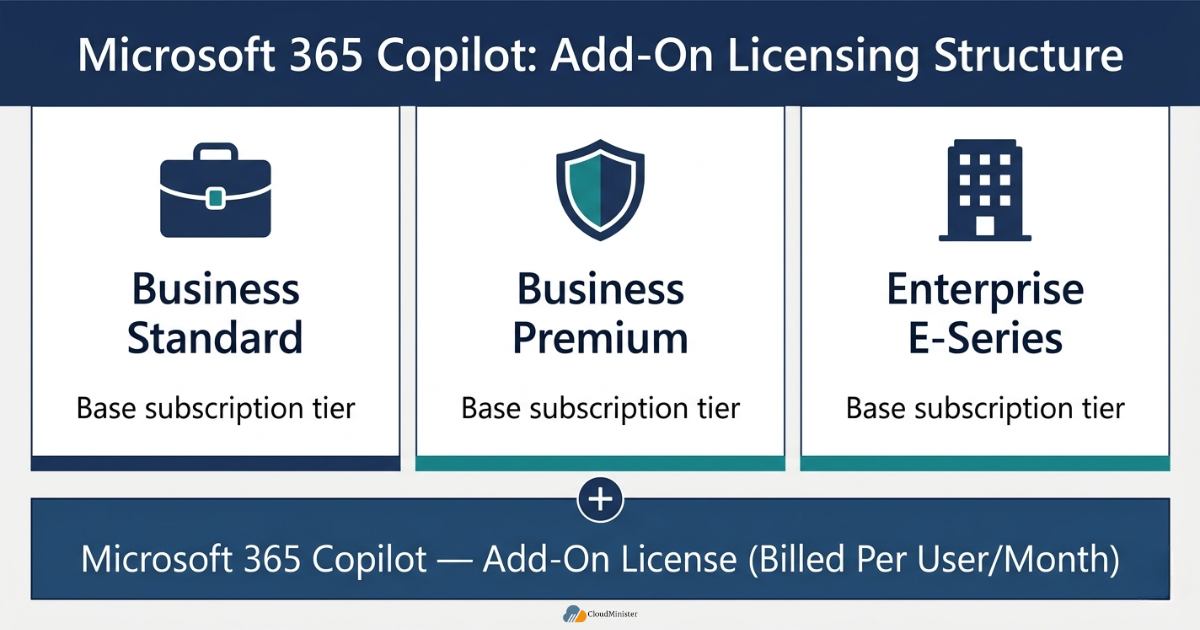
- Microsoft 365 Copilot is generally offered as an add-on license layered on top of a qualifying base subscription rather than sold entirely standalone for most business tiers.
- Businesses need to confirm that their existing Microsoft 365 plans, whether Business Standard, Business Premium, or an enterprise E-series plan, are eligible for the Copilot add-on before budgeting for a rollout.
- Pricing for the assistant is billed per user per month on an annual commitment in most enterprise agreements, with monthly billing typically available at a modest premium.
- Smaller organizations evaluating different Microsoft 365 plans should specifically check for promotional or SMB-tier pricing windows on the add-on, since eligibility and pricing structures are periodically updated.
- IT teams should map out exactly how many employees genuinely need access to Microsoft 365 Copilot in the first phase, rather than licensing every seat in the organization simultaneously — a phased approach against the right Microsoft 365 plans consistently produces better usage data and a cleaner ROI case.
Before committing budget to licenses across your organization, request a limited pilot batch tied to your current Microsoft 365 plans and measure actual usage for 60 to 90 days. Comparing pilot-phase usage data against your renewal cycle gives finance teams a much stronger basis for scaling the Microsoft 365 Copilot investment than a blanket rollout decision made up front.
Get Microsoft 365 Set Up Right, Not Just Licensed
From choosing the correct Microsoft 365 plan to keeping your tenant Copilot-ready, CloudMinister helps you deploy Microsoft 365 the right way — with expert support, 24/7 monitoring, and pricing that fits your business size.
6. Infrastructure Readiness: Why the Backend Matters as Much as the Frontend
Microsoft 365 Copilot is a cloud-delivered AI layer, but because it is a Microsoft-managed service running on Microsoft’s own infrastructure, its performance and reliability for end users depend primarily on how well your Microsoft 365 tenant itself is configured, not on any external hosting stack. This is where many organizations underestimate the preparation required before a rollout.
- A stable, well-configured Microsoft Office 365 tenant with clean identity governance in Microsoft Entra ID is a prerequisite for Copilot to return accurate, permission-safe results.
- Businesses running hybrid environments, part on-premises, part cloud — need to verify that file shares and legacy systems are properly indexed by Microsoft Graph connectors before Microsoft 365 Copilot can search across them effectively.
- Network connectivity to Microsoft’s service endpoints matters once Copilot is active across an organization, since AI-assisted document generation, real-time meeting transcription, and Excel data analysis all add incremental load to daily traffic patterns.
- IT teams should confirm that firewall rules, proxy configurations, and endpoint access align with Microsoft’s published connectivity requirements for Microsoft 365 Copilot, since blocked or throttled endpoints are a common cause of degraded performance.
- A well-managed underlying IT environment, including reliable infrastructure for the rest of the business’s applications, supports overall operational stability, but it is Microsoft’s own service availability and your tenant configuration, not external hosting, that most directly determines how Copilot performs.
Any organization layering Microsoft 365 Copilot on top of an existing IT environment should run a permissions audit first. Because it surfaces information based on existing file and folder permissions, any pre-existing over-permissioned files or shared drives will now be more easily discoverable through natural-language search, making a clean-up of legacy access rights a mandatory step before broad rollout, not an optional one.
Related Reading: IoT and Cloud Integration: Connecting Devices to Business Intelligence
7. Copilot for Small and Mid-Sized Businesses in India
Large enterprises were the first adopters of Microsoft 365 Copilot, but small and mid-sized businesses in India are increasingly evaluating the tool as pricing tiers and Microsoft 365 plans expand to serve smaller teams. The calculation for an SMB looks different from that of a Fortune 500 company, and it should.
- SMBs typically cannot absorb a large upfront AI training budget, so the phased pilot approach described in Section 5 matters even more for smaller teams evaluating Microsoft 365 Copilot.
- A Forrester study focused specifically on SMB deployments projected a return on investment ranging from roughly 132% to 353% over a three-year period, depending on how effectively the organization integrated Copilot into daily workflows.
- Indian SMBs often run lean IT teams without a dedicated AI change-management function, which makes structured onboarding and department-specific training especially important when adopting Microsoft 365 Copilot.
- Choosing the right Microsoft 365 plans upfront avoids the common SMB mistake of over-licensing seats that then sit unused, quietly eroding the projected ROI.
- Partnering with a Web Hosting Company in India that understands both cloud infrastructure and Microsoft Office 365 environments can help SMBs avoid the technical friction points that often derail early Microsoft 365 Copilot pilots. Many growing agencies that resell hosting to their own clients also look for Affordable Reseller Hosting options so that infrastructure costs do not eat into the budget they have set aside for AI tooling.
Related Reading: Google Cloud Hosting in India for Startups: What Founders Need to Know
8. Common Deployment Mistakes That Undermine Copilot ROI
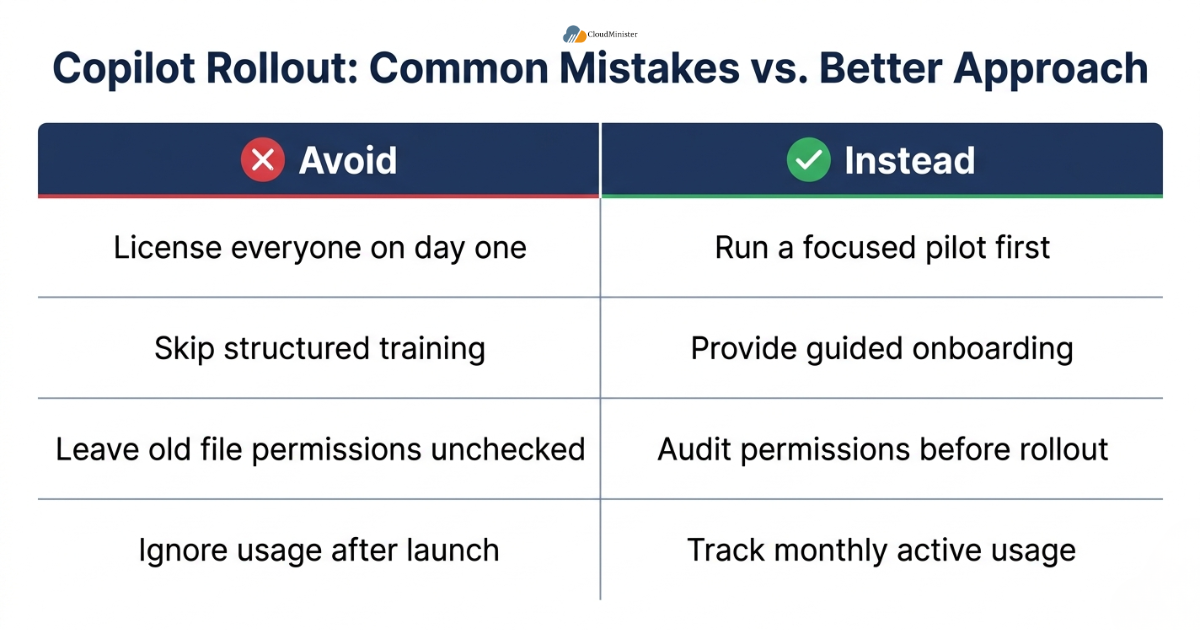
Even with strong underlying technology, many Microsoft 365 Copilot rollouts underdeliver, not because the tool fails, but because of avoidable deployment mistakes. Recognizing these patterns early can save a business significant wasted licensing spend.
- Licensing every employee in the organization on day one instead of running a focused pilot against clearly chosen Microsoft 365 plans first.
- Skipping structured training, leaving employees to discover Copilot features on their own with no guided workflows.
- Failing to clean up file and folder permissions before rollout, which can surface outdated or sensitive information through the tool’s natural-language search.
- Treating Microsoft 365 Copilot purely as a cost-cutting headcount tool rather than a productivity multiplier for existing staff, which damages internal buy-in and adoption.
- Not tracking monthly active usage after the initial launch period, so declining engagement goes unnoticed until renewal time.
- Ignoring underlying infrastructure and hosting stability, which can degrade the real-time responsiveness that makes Microsoft 365 Copilot genuinely useful in live meetings and fast-moving document work.
Consulting-sector research on large-scale deployments of Microsoft 365 Copilot has repeatedly found that the adoption gap between top-performing and underperforming organizations is not a product limitation, it is an implementation gap. Businesses that pair the tool with workflow integration, clear use-case targeting, and ongoing measurement consistently report monthly active usage rates far above organizations that simply distribute licenses and expect adoption to happen on its own.
9. Security, Compliance, and DPDPA 2023 Considerations for Indian Businesses
Rolling out Microsoft 365 Copilot involves feeding an AI system access to a meaningful share of an organization’s internal documents, emails, and meeting data. For Indian businesses, this raises specific compliance questions under the Digital Personal Data Protection Act (DPDPA) 2023 that should be addressed before licenses are activated.
- Data fiduciaries remain responsible for how personal data is processed even when that processing happens through a third-party AI tool layered onto Microsoft Office 365.
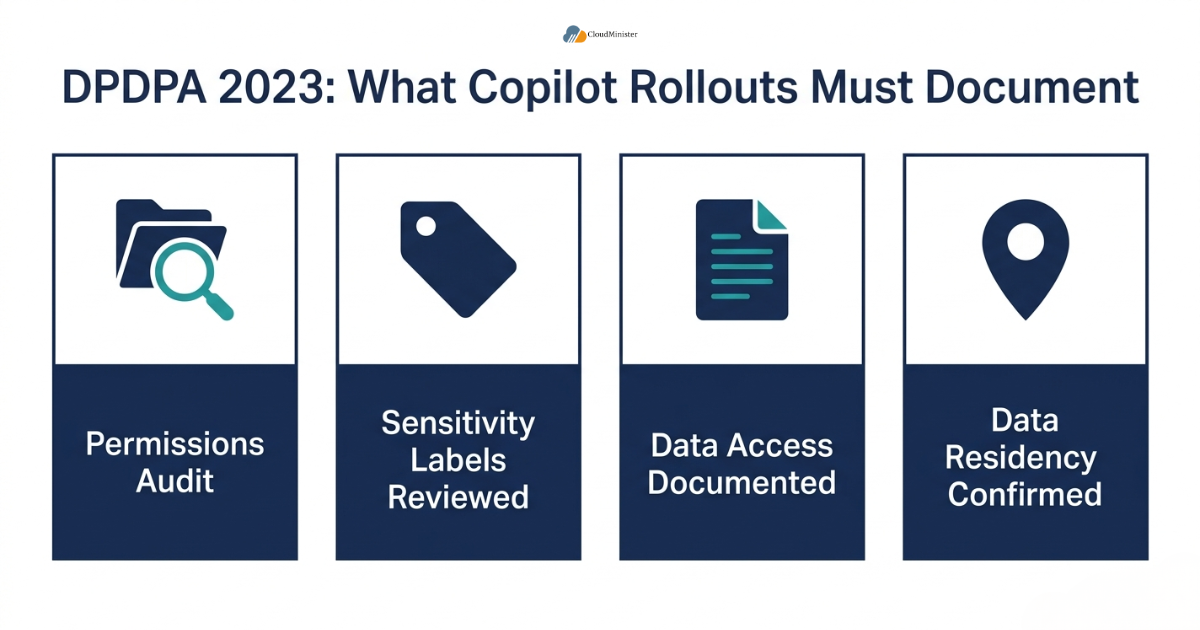
- Businesses should document exactly what categories of data Microsoft 365 Copilot can access for each department, as part of demonstrating reasonable technical safeguards under DPDPA 2023.
- Access logs and permission audits become more important once Copilot is active, since the tool can technically surface any content a user already has permission to view — correct or incorrect.
- Sensitivity labels and information protection policies within Microsoft Purview should be reviewed and, where necessary, tightened before a wide Microsoft 365 Copilot rollout to hosted environments containing customer or employee personal data.
- Businesses using a Reseller Hosting In India setup to manage client environments should apply the same permission-hygiene discipline before extending Copilot access to any shared or multi-tenant systems.
PRE-ROLLOUT COMPLIANCE CHECKLIST FOR COPILOT DEPLOYMENT
- Map which departments and roles will receive access to Microsoft 365 Copilot first
- Run a permissions audit across SharePoint, OneDrive, and Teams before activation
- Review and update sensitivity labels for documents containing personal data
- Document data-access boundaries for DPDPA 2023 audit trail purposes
- Confirm data residency commitments align with your Microsoft 365 plans
- Brief employees on acceptable use of the assistant for sensitive information
10. Customized Rollout Plans: Matching Copilot to Business Size
Not every organization should roll out Copilot the same way. A 15-person creative agency has fundamentally different needs than a 500-person financial services firm, and treating both the same way with identical Microsoft 365 plans and training approaches is a common cause of underwhelming results.
- Small teams often see the fastest, most visible wins from Microsoft 365 Copilot in Outlook and Word, where daily writing and email volume is high relative to team size.
- Mid-sized businesses tend to benefit most from Copilot in Excel and Teams, where reporting workflows and meeting volume scale faster than headcount.
- Large enterprises typically need a phased, department-by-department rollout of Microsoft 365 Copilot with dedicated champions in each business unit driving adoption and collecting feedback.
- Every rollout plan should include a feedback loop back to IT and department heads so that underused features can be retired from training material and high-value features can be reinforced.
- Businesses that also manage client-facing infrastructure, such as agencies offering Reseller Hosting In India to their own customers, should consider how Microsoft 365 Copilot fits into their own internal operations separately from any AI tools they may offer downstream to clients. Agencies operating on tight margins often look specifically for Affordable Reseller Hosting plans that free up budget for internal productivity tooling like Copilot.
Assign a small internal group of “Copilot champions”; one or two enthusiastic early adopters per department, before the full rollout of Microsoft 365 Copilot. Champions who can answer day-to-day questions informally reduce dependency on IT support tickets and consistently accelerate adoption speed compared to a pure top-down licensing rollout.
11. Measuring Long-Term Success: Beyond the First 90 Days
Initial excitement around Microsoft 365 Copilot tends to fade if usage is not actively reinforced and measured. Long-term success requires treating the tool as an ongoing operational capability rather than a one-time software purchase.
- Set a recurring quarterly review of usage data against the original productivity goals defined before rollout.
- Revisit training materials for Microsoft 365 Copilot every two to three months, since Microsoft regularly ships new features and capabilities into the product.
- Compare renewal-time licensing costs against actual measured time savings, not against anecdotal employee sentiment alone.
- Reassess whether current Microsoft 365 plans still match organizational needs as headcount and department priorities shift over time.
- Maintain close coordination between IT, HR, and department leads so that new employees are onboarded onto Microsoft 365 Copilot as part of standard onboarding, not as an afterthought.
As usage of Microsoft 365 Copilot scales across an organization, periodically re-run the permissions and sensitivity-label audit described in Section 9. Organizational structures change, teams are restructured, employees change roles, and file ownership shifts, and outdated permissions are one of the most common sources of unintended data exposure through any AI tool with broad internal search capability, including Copilot.
12. Choosing the Right Infrastructure Partner Alongside Microsoft 365 Copilot
Licensing decisions get most of the attention during a rollout, but the hosting and infrastructure partner behind a business’s broader technology stack plays a quieter, equally important role in how well Microsoft 365 Copilot performs day to day.
- A dependable Web Hosting Company in India that already manages a business’s websites, applications, and email infrastructure is well positioned to advise on how the surrounding network should be configured to support heavier traffic once this AI assistant is active.
- Businesses that outsource their hosting to a Web Hosting Company in India benefit from having a single point of accountability for uptime, latency, and security, three factors that directly influence how responsive Copilot feels to end users during live meetings and document editing sessions.
- IT leaders who have not yet evaluated their Web Hosting Company in India relationship in light of AI-driven workloads should treat a Copilot rollout as a natural trigger point to do so.
- Agencies and IT consultancies that operate their own Web Hosting Company in India offering, reselling infrastructure to smaller clients, are often the first to notice how AI tools increase baseline bandwidth and storage demands across a managed client base.
- For agencies specifically built around Reseller Hosting In India, bundling infrastructure guidance with Copilot advisory services has become a natural extension of the existing client relationship.
- Reseller Hosting In India providers that already manage multiple client environments are in a strong position to standardize permission-hygiene and DPDPA 2023 documentation practices across every client rolling out Copilot, rather than solving the same problem client by client.
- Businesses evaluating Reseller Hosting In India options for their own downstream customers should factor in whether the underlying infrastructure can comfortably absorb the traffic patterns that come with widespread Microsoft Office 365 and Copilot adoption among end clients.
- Cost is always part of this conversation. Many growing resellers specifically search for Affordable Reseller Hosting so that margins remain healthy even as they extend AI-related advisory services, including Copilot guidance, to their client base.
- Affordable Reseller Hosting does not have to mean a compromise on reliability, providers who combine competitive Affordable Reseller Hosting pricing with genuine 24×7 support give resellers room to invest in the training and change-management work that determines whether a client’s Copilot rollout actually succeeds.
- When comparing Affordable Reseller Hosting plans, resellers should specifically ask whether the provider can support the identity and network requirements that a Microsoft Office 365 environment layered with Copilot will eventually demand, rather than evaluating price in isolation.
- A reseller that builds its business around Affordable Reseller Hosting while also understanding Copilot licensing nuances offers a genuinely differentiated service compared to a pure infrastructure-only provider.
The most effective IT partners in 2026 are no longer positioning hosting and AI productivity tooling as separate conversations. A Web Hosting Company in India that can speak fluently about both server infrastructure and Microsoft Office 365 licensing, including how Copilot fits into that picture, gives clients a single, coherent technology roadmap instead of two disconnected vendor relationships.
13. Infrastructure Economics: Balancing AI Investment with Hosting Costs
Every rupee spent on infrastructure is a rupee that could otherwise go toward Copilot training, change management, or additional seats. This makes the choice of hosting partner a direct lever on how much a business can afford to invest in productivity tooling.
- Businesses that overpay for hosting often end up trimming their Copilot rollout budget instead, which is a false economy given the ROI data discussed earlier in this guide.
- A well-priced Web Hosting Company in India relationship frees up budget that can instead fund proper onboarding and training around Copilot.
- For resellers and agencies, offering Affordable Reseller Hosting to clients while still maintaining healthy margins requires choosing an upstream Web Hosting Company in India partner with transparent, predictable pricing.
- Affordable Reseller Hosting plans vary widely in what is actually included — bandwidth caps, support response times, and backup frequency all affect whether a plan is genuinely affordable once hidden costs are factored in.
- Resellers evaluating Affordable Reseller Hosting providers should specifically ask about scalability, since client environments that adopt Microsoft Office 365 and Copilot together tend to grow their storage and bandwidth needs faster than a typical shared-hosting client.
- A Reseller Hosting In India business model only remains sustainable if the underlying Affordable Reseller Hosting supply can flex with client growth without triggering unexpected overage charges.
- Reseller Hosting In India providers with white-label support desks, and any comparable Reseller Hosting In India competitor worth considering, give downstream clients a smoother experience when troubleshooting issues that touch both hosting and Microsoft Office 365 configuration.
- When a Reseller Hosting In India partner also offers guidance on Microsoft Office 365 tenant setup, clients avoid the friction of coordinating between two unrelated vendors during a Copilot rollout.
- Ultimately, the businesses that get the most value from Copilot tend to be the same ones that have already optimized their underlying costs through a dependable Web Hosting Company in India relationship, a sensibly priced Reseller Hosting In India arrangement, or a genuinely Affordable Reseller Hosting plan — freeing up both budget and attention for the productivity gains this guide has described.
If your organization currently reviews hosting costs and AI software costs in separate budget conversations, consider merging them into a single annual technology review. A Web Hosting Company in India that understands your Copilot roadmap, combined with a Reseller Hosting In India or Affordable Reseller Hosting arrangement sized correctly for your growth, consistently produces a cleaner overall technology budget than treating the two as unrelated line items.
Businesses weighing all of this together should treat the hosting conversation as seriously as the licensing conversation. A Web Hosting Company in India gives a business the operational backbone for everything from email deliverability to server uptime, while a Reseller Hosting In India arrangement lets agencies extend that same reliability to their own client base under their own brand. A Web Hosting Company in India that also offers Reseller Hosting In India packages, alongside a genuinely Affordable Reseller Hosting tier for smaller resellers, gives growing IT businesses in India a single vendor relationship that scales with them instead of forcing a vendor switch every time they outgrow their current plan. Whether a business is buying its first Web Hosting Company in India contract, negotiating a fresh Reseller Hosting In India deal, or simply comparing Affordable Reseller Hosting quotes side by side, the underlying question is the same: does this infrastructure partner understand where the business is headed, including its plans around AI-driven productivity tools. A Reseller Hosting In India provider that also markets itself around Affordable Reseller Hosting should be able to answer that question directly, not with a generic pricing sheet.
For businesses still narrowing down options, it helps to shortlist a Web Hosting Company in India first, then a second Web Hosting Company in India for comparison, and confirm whether either also runs a Reseller Hosting In India program suited to your growth plans, and only then compare specific Affordable Reseller Hosting packages against your budget. A Web Hosting Company in India with a strong support track record, paired with a fairly priced Reseller Hosting In India arrangement or an Affordable Reseller Hosting tier, removes one more variable from an already complex Copilot rollout — and a second Reseller Hosting In India quote is always worth getting before signing.
Planning a Copilot Rollout? Let’s Talk Infrastructure First
A successful Microsoft 365 Copilot rollout starts with a healthy, well-managed tenant. Talk to CloudMinister’s team about readiness checks, permissions hygiene, and support that keeps your Microsoft 365 environment running smoothly.
Conclusion
Microsoft 365 Copilot has clearly moved past the experimental phase. With tens of millions of paid enterprise seats now active globally and measurable ROI data from independent research, the tool has established itself as a legitimate productivity layer inside the Microsoft Office 365 ecosystem rather than a passing AI trend.
The businesses seeing the strongest results from Microsoft 365 Copilot share a common pattern: they treat it as a structured rollout requiring the right Microsoft 365 plans, clean permissions, focused pilots, ongoing training, and stable underlying infrastructure — not a license they purchase once and forget about. For Indian businesses in particular, pairing a well-planned rollout of Microsoft 365 Copilot with DPDPA 2023 compliance discipline and a dependable Web Hosting Company in India for the surrounding infrastructure gives the best chance of turning the investment into measurable, sustained productivity gains rather than an underused add-on line item on next year’s renewal.
Key Takeaways
- Microsoft 365 Copilot crossed 20 million paid enterprise seats in April 2026, its fastest quarter of seat growth since launch, reflecting genuine mainstream enterprise adoption.
- It works differently inside each Microsoft Office 365 application, Word, Excel, PowerPoint, Outlook, and Teams each get tailored AI capabilities rather than one generic chatbot experience.
- Forrester research projected a 116% ROI and $19.7 million NPV for a composite enterprise organization, and a separate SMB-focused study projected ROI as high as 353% over three years.
- Choosing the correct Microsoft 365 plans before licensing avoids the common mistake of over-purchasing seats that go unused.
- A clean permissions audit and DPDPA 2023 compliance review are essential steps before any wide rollout of Microsoft 365 Copilot in an Indian business context.
- Underlying infrastructure quality, from a dependable Web Hosting Company in India to a well-managed Microsoft Office 365 tenant, directly affects how reliably the assistant performs for end users.
- Phased pilots consistently outperform blanket rollouts, and organizations offering services like Reseller Hosting In India should apply the same disciplined rollout approach internally before scaling Copilot company-wide. Even providers marketing Affordable Reseller Hosting to clients should treat their own internal AI adoption with the same planning rigor.
Frequently Asked Questions
Is Copilot included in standard subscription tiers?
No. It is generally offered as a paid add-on on top of qualifying Microsoft 365 plans rather than included by default in standard subscriptions. Businesses should confirm eligibility of their specific plans before budgeting for the add-on.
Does the assistant use company data to train its AI models?
No. It processes organizational data to generate responses within the boundaries of your existing Microsoft Office 365 tenant, but this data is not used to train the underlying foundation models shared across other customers.
How long does it take to see productivity results?
Most organizations running a focused pilot report measurable time savings within the first 60 to 90 days, particularly in drafting, summarizing, and meeting-related tasks. Broader organizational productivity gains typically become clearer after three to six months of sustained, trained usage.
Is Microsoft 365 Copilot suitable for small businesses, or only large enterprises?
It is increasingly viable for small and mid-sized businesses as pricing tiers and Microsoft 365 plans expand to serve smaller teams. SMB-focused research has projected strong ROI ranges, though smaller organizations should still start with a limited pilot rather than a company-wide rollout.
What should Indian businesses check before rolling out Microsoft 365 Copilot?
Indian businesses should run a permissions audit, review sensitivity labels under Microsoft Purview, confirm DPDPA 2023 compliance documentation, verify their Microsoft 365 plans support the add-on, and ensure their underlying hosting and network infrastructure, ideally supported by an experienced Web Hosting Company in India, can reliably support day-to-day usage. Businesses running their own reseller operations, including Reseller Hosting In India, should extend this same diligence to any client environments where Copilot may eventually be deployed, especially those built on Affordable Reseller Hosting plans with shared underlying infrastructure. As a final note, teams evaluating Microsoft 365 plans should treat licensing decisions and infrastructure readiness as a single combined project rather than two separate purchases.

He is the CEO and Founder with over a decade of experience in cloud infrastructure, DevOps, and server optimization. With a strong vision and hands-on leadership approach, he has built scalable, secure, and high-performance cloud solutions trusted by businesses across industries.