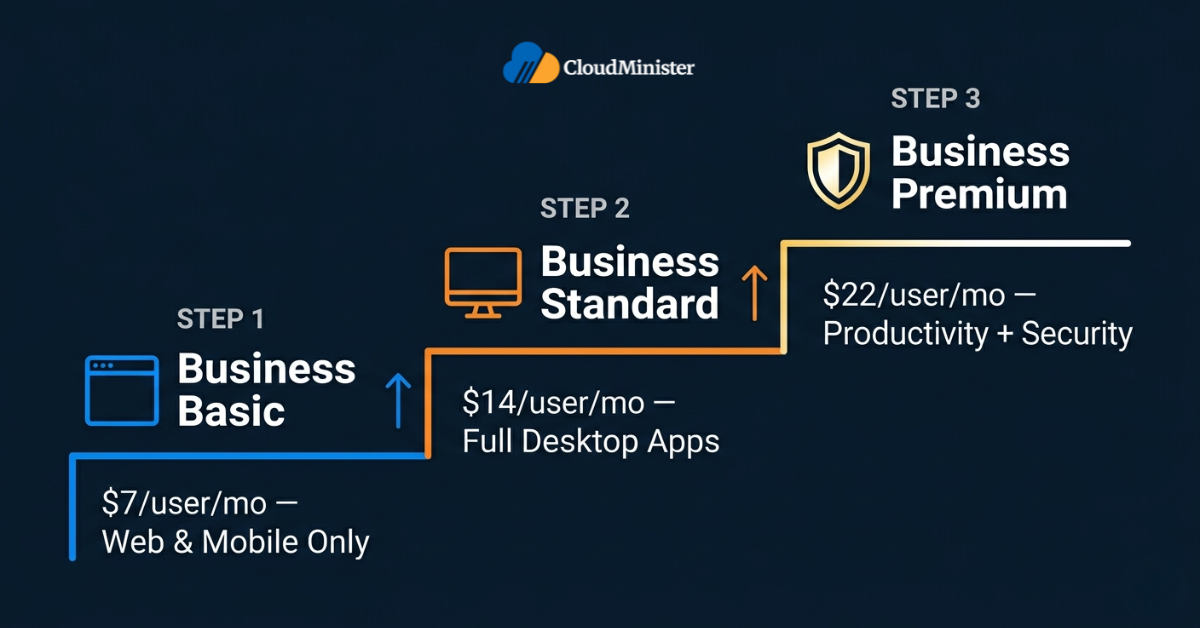
Choosing the right Microsoft 365 Business tier is one of the most consequential productivity and security decisions an SMB will make in 2026 — and it cannot be made by comparing per-user prices alone. Microsoft 365 Business Basic, Standard, and Premium are structurally different products: Basic is a web-and-mobile productivity layer, Standard adds full installable desktop apps, and Premium layers in enterprise-grade security, identity, and device management.
With Microsoft confirming a global price update effective 1 July 2026, the correct tier choice is now also a procurement-timing decision. This guide breaks down every tier — features, security posture, India-relevant pricing, and the specific business profile each plan fits — so your team can make the right call the first time.
1. Why the Microsoft 365 Business Decision Matters in 2026
Most SMBs treat productivity-suite licensing as a routine line item. That is precisely how organisations end up over-paying for capability they never use, or — far more dangerously — under-licensing the security controls that would have prevented a breach. A correct decision here is both a productivity decision and a security decision.
Why the choice has become harder in 2026:
- Microsoft confirmed a pricing update effective 1 July 2026: Business Basic moves from $6 to $7 per user/month and Business Standard moves from $12.50 to $14 per user/month, while Business Premium holds at $22 per user/month — a deliberate narrowing of the gap that changes the value equation.
- Microsoft is bundling new capabilities — URL safety checks in Outlook for Basic and Standard users, Copilot Chat enhancements across Word/Excel/PowerPoint, expanded mailbox storage, and Defender/Intune improvements for Premium — into the suites rather than as separate add-ons.
- Each tier in the family is capped at 300 users; once your team crosses that line, the licensing path forces a move to Microsoft 365 Enterprise (E3/E5) — and that transition has real migration cost.
- The right Microsoft 365 Business Plan is not just about apps: it determines whether you have endpoint protection, conditional access, mobile device management, and data loss prevention out of the box — or whether you will be patching those gaps with third-party tools later.
To put the scale of this decision in context, Microsoft 365 surpassed 400 million paid seats globally as of Microsoft’s FY2024 earnings — making it the dominant productivity platform for SMBs and enterprises worldwide. For Indian SMBs, that means almost every collaboration partner, vendor, and customer they work with is already inside the Microsoft 365 ecosystem — making the right tier choice a competitive operating decision, not a back-office one. For Indian SMBs specifically, that means almost every collaboration partner, vendor, and customer they work with is already inside the Microsoft 365 ecosystem — making the right tier choice a competitive operating decision, not a back-office one.
Before you compare these tiers, list every business workflow that touches sensitive data — payroll, customer PII, contracts, source code. If any of these flow through email, mobile devices, or BYOD laptops, your shortlist effectively narrows to Business Standard plus add-ons or Business Premium. Comparing Basic against Premium for these workloads is comparing two different categories of product.
2. Microsoft 365 Business Basic — The Web-First Productivity Layer
Microsoft 365 Business Basic is the entry tier in the family. It is a web-and-mobile productivity plan — not a desktop-apps plan. That single distinction drives every fit/no-fit decision around this tier.
What Business Basic includes:
- Web and mobile versions of Word, Excel, PowerPoint, and OneNote — no installable desktop apps.
- Business-class email via Exchange Online with a 50 GB mailbox per user (expanding to 100 GB as part of the July 2026 packaging update).
- Microsoft Teams for chat, meetings, and calls.
- OneDrive for Business with 1 TB of cloud storage per user.
- SharePoint Online for intranet, document libraries, and team sites.
- Exchange Online Protection — baseline anti-spam and anti-malware filtering for email.
- Standard identity and access controls via Microsoft Entra ID (free tier).
- As of July 2026, URL safety checks in Outlook and Office apps to flag malicious links.
Who Business Basic actually fits:
- Frontline-heavy teams where most users live in a browser — retail back-office staff, field workers using shared devices, simple support desks.
- Very early-stage Indian startups (1–10 users) running a tight burn rate where full Office desktop apps are not yet required.
- Organisations where every user already has a separately licensed copy of Microsoft 365 Apps for Enterprise or Office Standard, and only needs cloud services.
Where Business Basic falls short:
- No installable desktop Word, Excel, PowerPoint, or Outlook — finance teams, analysts, and designers will hit feature ceilings quickly in browser versions.
- No advanced threat protection, no device management, no DLP, no conditional access — security is essentially perimeter-grade only.
- Not appropriate as a default plan for any team that handles regulated data or operates under DPDPA 2023 obligations without supplementary controls.
For a deeper look at how the broader stack is restructuring the way Indian SMBs work, see our companion guide on:
3. Microsoft 365 Business Standard — The Default Productivity Plan
Microsoft 365 Business Standard is, for most SMBs that have crossed the “we just need email” stage, the genuine default. It includes everything in Basic and adds the full installable desktop application suite — the workloads where Office actually earns its name.
What Business Standard adds over Basic:
- Full desktop versions of Word, Excel, PowerPoint, Outlook, and OneNote — installable on up to 5 PCs/Macs, 5 tablets, and 5 phones per user. Access is also included but is available on Windows only and does not install on Mac.
- Microsoft Bookings for customer scheduling, plus Microsoft Loop for collaborative components.
- Webinar and registration capabilities in Teams, including attendee reporting.
- Clipchamp for in-suite video editing — useful for marketing teams without a dedicated video function.
- All Basic features: 50 GB mailbox (100 GB after July 2026), 1 TB OneDrive, Teams, Exchange, SharePoint.
Who Business Standard fits:
- The classic “knowledge worker” SMB — agencies, consultancies, professional services firms, accounting practices, and most B2B startups under 300 users.
- Teams that produce heavy documents, spreadsheets, financial models, or pitch decks where browser-only Office is a productivity ceiling.
- Organisations whose security posture is genuinely simple — small footprint, low data sensitivity, and no compliance regime requiring advanced controls.
Where Business Standard reaches its limit:
- No Microsoft Defender for Business, no Intune, no Entra ID P1 — meaning no managed endpoint protection, no centralised mobile device management, and no conditional access policies.
- No Microsoft Purview DLP — sensitive-data policies must be implemented through third-party tooling or manual processes.
- If your team supports remote/hybrid work on personal devices, the security gap left by Standard is exactly the gap an attacker exploits — usually months after the licensing decision is made.
Choosing Microsoft 365 Business Standard for a remote-first or BYOD team and adding standalone endpoint security tools later almost always costs more than just choosing Business Premium up front. Microsoft Defender for Business and Intune purchased as standalone SKUs cost roughly the same as the entire Standard-to-Premium price gap — and you lose the integrated identity controls Premium ships with.
4. Microsoft 365 Business Premium — Productivity + Enterprise-Grade Security
Microsoft 365 Business Premium is the most complete tier available to SMBs under 300 users. It includes everything in Standard and layers on a security, identity, and device management stack that — purchased as standalone components — would cost meaningfully more than the Premium licence itself.
What Business Premium adds over Standard:
- Microsoft Defender for Business — endpoint detection and response (EDR) for Windows, macOS, iOS, and Android devices, with threat and vulnerability management.
- Microsoft Defender for Office 365 Plan 1 — Safe Attachments, Safe Links, anti-phishing policies, and impersonation protection on top of Exchange Online Protection.
- Microsoft Intune — mobile device management (MDM) and mobile application management (MAM), enabling enrolled-device control, app protection policies, and remote wipe.
- Microsoft Entra ID P1 — conditional access, self-service password reset, dynamic groups, and Microsoft Entra Application Proxy.
- Azure Information Protection P1 / Purview Information Protection — sensitivity labels and basic data classification.
- Basic Microsoft Purview Data Loss Prevention (DLP) for email and OneDrive/SharePoint.
- Windows 11 Pro upgrade rights for users on qualifying Windows 10/11 Home devices (where applicable).
- As of the July 2026 packaging update: expanded mailbox storage (100 GB), additional Defender and Intune capability improvements, and enhanced Copilot Chat admin analytics for Premium tenants. Note: Copilot Chat (free tier) is available across all Microsoft 365 Business plans — the Premium update specifically adds deeper admin-level usage analytics.
Who Business Premium fits:
- Any SMB with remote, hybrid, or distributed staff — the conditional access and Intune capabilities are the actual reason this tier exists.
- Indian SMBs subject to DPDPA 2023 obligations, where DLP, encryption, and access logging materially de-risk the compliance posture.
- Regulated verticals — finance, healthcare, legal, education — even at small scale.
- Organisations with a “bring your own device” reality — Intune MAM is the difference between governed BYOD and ungoverned data leakage.
- Any team that has already started buying standalone EDR, MDM, or DLP tools — Premium typically replaces those line items with one bundled SKU.
For SMB leaders evaluating the broader operational case beyond licensing alone, our deep dive on the benefits of Microsoft 365 for businesses walks through the productivity, security, and collaboration outcomes a correctly-deployed tenant typically delivers in the first 12 months.
5. Microsoft 365 Business Basic vs Standard vs Premium — Feature-by-Feature Comparison
The cleanest way to size the gap between the three tiers is a direct, capability-by-capability table:

| Capability | Business Basic | Business Standard | Business Premium |
| List price (current) | $6 / user / mo | $12.50 / user / mo | $22 / user / mo |
| List price (from 1 Jul 2026) | $7 / user / mo | $14 / user / mo | $22 / user / mo |
| Web + mobile Office apps | Yes | Yes | Yes |
| Desktop Office apps (Word, Excel, PPT, Outlook) | No | Yes | Yes |
| Exchange email mailbox | 50 GB (100 GB from 1 Jul 2026) | 50 GB (100 GB from 1 Jul 2026) | 50 GB (100 GB from 1 Jul 2026) |
| OneDrive cloud storage | 1 TB / user | 1 TB / user | 1 TB / user |
| Microsoft Teams | Yes | Yes | Yes |
| SharePoint Online | Yes | Yes | Yes |
| Webinars & attendee reporting | Limited | Yes | Yes |
| Clipchamp / Bookings / Loop | No | Yes | Yes |
| Microsoft Defender for Business (EDR) | No | No | Yes |
| Defender for Office 365 Plan 1 | No | No | Yes |
| Intune (MDM + MAM) | No | No | Yes |
| Entra ID P1 / Conditional Access | No | No | Yes |
| Purview DLP (basic) | No | No | Yes |
| Sensitivity labels / AIP P1 | No | No | Yes |
| Windows 11 Pro upgrade rights | No | No | Yes* |
| Max users per tenant | 300 | 300 | 300 |
*Applies only to devices running Windows 10/11 Home on qualifying hardware. Devices already running Windows Pro or Enterprise are unaffected.
When you compare these tiers, ignore the per-user difference and look at the per-capability difference. The $8 gap between Standard and Premium ($14 vs $22 from July 2026) buys you EDR, MDM, conditional access, and DLP. Procuring those four capabilities individually from third-party vendors typically lands at $11–$18 per user per month. The economics of Premium are not a luxury upgrade — they are a procurement consolidation.
6. Microsoft 365 Business Cost in India — What You Actually Pay
List prices are published in USD globally, but the Microsoft 365 business cost an Indian buyer actually pays is shaped by INR price-list rates, GST, the channel through which the licence is procured (direct, CSP, reseller), and the billing cadence chosen.
Key drivers of the Microsoft 365 business cost in India:
- Annual commitment vs monthly billing: monthly billing typically carries a 20–25% premium over annual-commitment pricing for the same SKU, though the exact differential varies by plan and CSP partner — confirm the current rate with your reseller at time of purchase.
- 18% GST is added on top of the licence rate for B2B purchases in India and is reclaimable as input tax credit for GST-registered buyers.
- CSP partners (Cloud Solution Providers) often bundle deployment, migration, and L1/L2 support into the Microsoft 365 business cost — meaning the headline rate may be slightly higher but the operational cost is lower.
- From 1 July 2026, the underlying USD list prices for Basic and Standard rise — Indian INR price lists track these changes within the following billing cycle.
- Volume discounts under the New Commerce Experience (NCE) annual term and renewal-window timing can materially shift the effective Microsoft 365 business cost on a 12-month horizon.
A simplified pricing snapshot for Indian buyers (annual commitment, before GST):
| Plan | Global list (USD/user/mo) | Effective from 1 Jul 2026 |
| Microsoft 365 Business Basic | $6.00 | $7.00 (+16.7%) |
| Microsoft 365 Business Standard | $12.50 | $14.00 (+12%) |
| Microsoft 365 Business Premium | $22.00 | $22.00 (unchanged) |
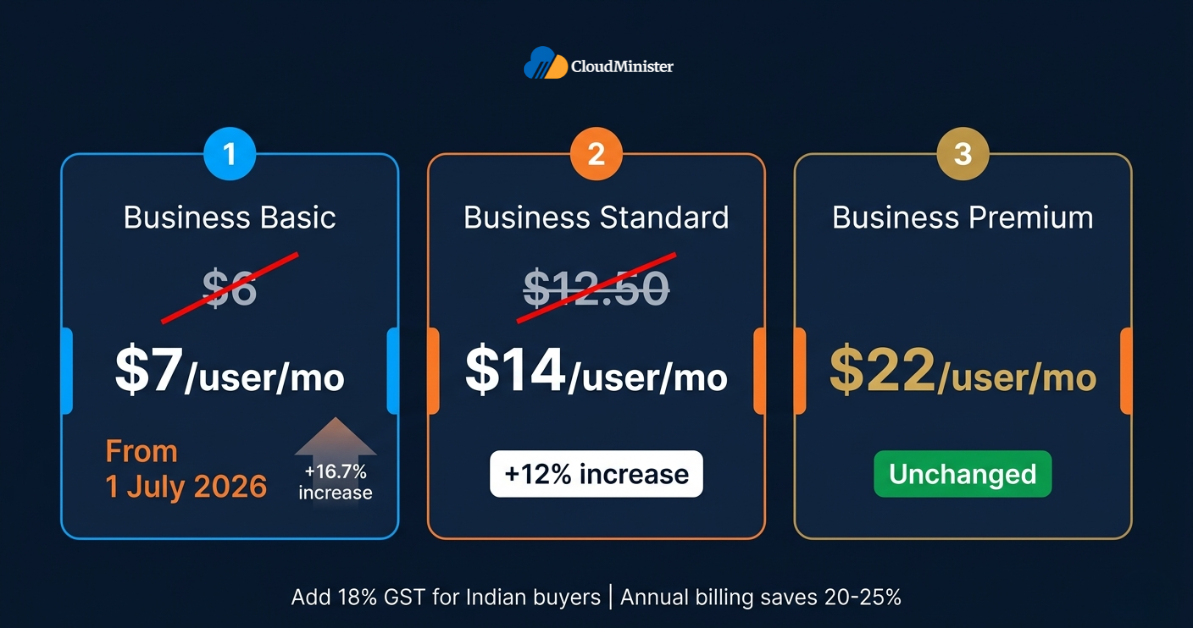
These changes are confirmed and not speculation: Business Basic moves from $6 to $7 per user/month (a 16.7% increase) and Business Standard rises from $12.50 to $14 per user/month (a 12% increase) effective 1 July 2026, as documented in Universal Cloud’s 2026 Microsoft 365 price-change analysis. For Indian buyers on monthly billing in particular, the compounding effect — monthly premium plus the new list rate — makes annual-term renewal before the cutover a meaningful procurement lever.
If your renewal lands between February and June 2026, locking an annual NCE term before 1 July 2026 keeps you on the pre-increase Microsoft 365 business cost for the full term. That is roughly a 12–17% saving on Basic and Standard for the next 12 months — which on a 100-seat tenant compounds quickly.
Once licensing is locked in, the next operational lever is making sure the team actually uses what has been paid for. Our guide on boosting your productivity with Office 365 covers the practical adoption playbook — Outlook focused inbox, Teams channel hygiene, OneDrive sync patterns, and Copilot Chat workflows.
Explore Microsoft 365 Plans for Your Business
See all Microsoft 365 Business plans with India-localised pricing, GST-inclusive quotes, and CSP-tier procurement options.
7. Which Microsoft 365 Business Tier Fits Your Team? — A Decision Framework
There is no universal answer; there is a defensible answer for each operating profile. Use the following framework to short-circuit the decision.
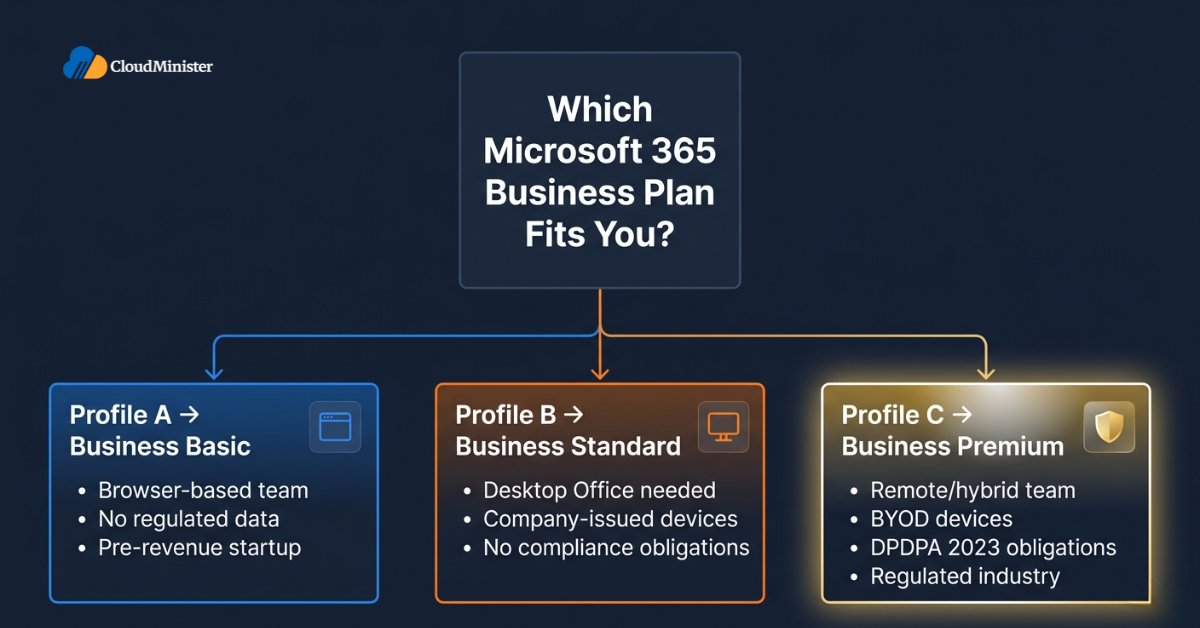
Profile A — Pick Business Basic if:
- Your team works almost entirely in browsers, on shared kiosks, or on managed virtual desktops where desktop Office is licensed elsewhere.
- Your security obligations are limited to email hygiene and basic anti-spam.
- You are pre-revenue or pre-seed and cost optimisation outweighs feature breadth — but plan a re-evaluation within 12 months.
Profile B — Pick Business Standard if:
- Your team needs full desktop Office apps for sustained, document-heavy work — finance, consulting, sales operations, content creation.
- Devices are largely company-issued, on-network, and centrally patched.
- You handle no regulated data and have no contractual security obligations to customers — and you can credibly defend that posture.
- You already have a separately licensed EDR/MDM stack you trust and do not want to consolidate.
Profile C — Pick Business Premium if:
- Any portion of your team works remotely, on personal devices, or across mixed-platform endpoints (Windows + macOS + mobile).
- You handle customer PII, payroll data, financial records, source code, or anything covered by DPDPA 2023.
- You currently buy — or are about to buy — separate licences for endpoint protection, MDM, identity governance, or DLP.
- You operate in a regulated vertical (BFSI, healthcare, legal, education) even at small scale.
- You want a single consolidated security operating model rather than a stitched-together vendor stack.
For a guided walkthrough of the right Microsoft 365 Business Plan for your team — including India-localised pricing, GST-inclusive quotes, and deployment support — see the Cloudminister Microsoft 365 page for current plan options and pricing.
Not Sure Which Plan Is Right for You?
Talk to our Microsoft 365 specialists for a free consultation tailored to your team size, workload, and compliance needs.
8. The Security Gap Between Standard and Premium — Why It Decides the Tier
If there is one section of this guide that should drive the final decision for most Indian SMBs, it is this one. The largest functional gap inside the Microsoft 365 Business family is between Standard and Premium — and that gap is almost entirely on the security side.
What Premium gives you that Standard does not:
- Microsoft Defender for Business — full EDR with automated investigation and response (AIR), threat and vulnerability management (TVM), and ransomware mitigation across Windows, macOS, iOS, and Android.
- Defender for Office 365 Plan 1 — Safe Links rewrites every URL in inbound email and Office documents through Microsoft’s reputation engine; Safe Attachments detonates attachments in a sandbox before delivery; anti-phishing policies use mailbox intelligence to detect impersonation.
- Intune MDM + MAM — enrolled-device compliance policies, OS-level configuration, and per-app protection (selective wipe of corporate data without touching personal data on BYOD).
- Entra ID P1 — conditional access policies (e.g., “block sign-ins from outside India unless MFA is satisfied and device is compliant”), self-service password reset, and dynamic security groups.
- Microsoft Purview DLP — policy templates for PII, financial data, and source code that block or warn on risky sharing in email, Teams, OneDrive, and SharePoint.
Why this matters in India specifically:
- DPDPA 2023 imposes notification, purpose-limitation, and security obligations on Data Fiduciaries — Premium’s DLP, sensitivity labelling, and audit logging materially reduce both incident likelihood and breach-response cost.
- Indian SMBs are a disproportionate target for business email compromise (BEC) and credential phishing — Defender for Office 365 P1 specifically addresses these vectors at the gateway.
- Hybrid and remote work patterns are now the norm in Indian metros — without conditional access, every personal device with cached corporate credentials is an open door.
Run this two-question test for every team currently on Standard: (1) Do any users access company email or files from personal phones or laptops? (2) Have you ever had a phishing email reach a user’s inbox? If both answers are yes, the gap between Standard and Premium has already cost you something — you just may not have measured it yet.
9. Deployment & Migration Considerations for Indian SMBs
Buying the right tier is half the work; deploying it correctly is the other half. The most common mistake is to assume that the licence rolls out the security posture automatically — it does not.
What “correct deployment” actually means:
- Tenant-wide MFA enforcement (Entra ID Security Defaults at minimum, Conditional Access policies preferred on Premium).
- Mailbox migration from existing IMAP/Exchange/Google Workspace with cutover or staged migration depending on size.
- Intune enrolment of corporate Windows, macOS, iOS, and Android devices, with compliance policies aligned to your data classification.
- DLP policies aligned to actual sensitive data flows — generic templates are a starting point, not a finish line.
- OneDrive Known Folder Move (KFM) so user Desktop, Documents, and Pictures back up to OneDrive automatically.
- Teams governance — channel naming, guest access, retention, sensitivity labelling for sites.
- Backup of tenant data via a third-party backup tool — Microsoft’s native retention is not a backup product.
Why this often goes wrong inside SMBs:
- In-house IT teams are typically generalists; deep expertise in Microsoft Defender, Intune, and Entra ID Conditional Access design is rare and expensive.
- CSP and managed-service partners — and the same firms that provide DevOps Consulting Services In India for cloud workloads — deliver this expertise as a service. The cost of doing so is consistently lower than building it in-house for an SMB.
- This is structurally the same pattern as DevOps: orchestration, automation, and security expertise are best consumed as a managed capability rather than rebuilt internally.
How to choose a deployment partner:
- Look for a partner with verified Microsoft credentials and certifications — not a generic licence reseller.
- Ask for a sample Conditional Access policy design and a sample Intune compliance policy; this quickly separates deployment-capable partners from those who only handle licence sales.
- Confirm where tenant data is geo-pinned (India data residency for OneDrive/SharePoint/Exchange) and how the partner aligns this to DPDPA obligations.
- If your underlying website, ERP, or LOB applications are hosted with the same provider — many Indian SMBs prefer a single web hosting provider in India that also handles licensing — get the integration scope agreed in writing.
10. Common Mistakes Teams Make When Choosing a Tier
These are the patterns that show up repeatedly in licence reviews:
- Buying Business Basic for cost reasons, then licensing standalone Office Professional separately — the combined cost is higher than just buying Business Standard.
- Buying Business Standard tenant-wide and then separately licensing a third-party EDR, MDM, and email security gateway — in many cases this can represent a 25–40% over-spend compared to Premium, depending on the tools chosen and the organisation’s specific security requirements.
- Buying Business Premium tenant-wide and never enabling Defender, Intune, or Entra ID P1 features — the licence is paid for, the protection is not deployed.
- Mixing tiers without a clear policy — power users on Basic and frontline staff on Premium is the wrong way round, but it does happen.
- Treating the Microsoft 365 Business Plan choice as a one-time decision — workload profile, headcount, and threat exposure all change; an annual review is the minimum.
- Forgetting to budget for deployment, change management, and admin training — a tenant without an admin who knows the security centre is a tenant operating below its paid capability.
The single highest-leverage action an Indian SMB can take this year is a 30-day Microsoft 365 licence health check: identify inactive accounts, right-size over-licensed users, mix tiers where appropriate, and time renewals to the pre-July 2026 window. Most tenants surface 10–20% in immediate savings — frequently enough to fund a Premium upgrade for the users who genuinely need it.
11. Frequently Asked Questions
Q1. What is the difference between Microsoft 365 Business Basic, Standard, and Premium?
Business Basic is web-and-mobile productivity only. Business Standard adds installable desktop Office apps. Business Premium adds enterprise-grade security, identity, and device management — Defender for Business, Defender for Office 365 P1, Intune, Entra ID P1, and basic Purview DLP — on top of everything in Standard.
Q2. Is Microsoft 365 Business Premium worth it for a small team?
For most SMBs with remote/hybrid work, BYOD devices, or any sensitive data, yes. The security stack inside Premium would cost roughly the same as the price gap to Standard if purchased as standalone licences — and it is more tightly integrated. Premium is the best choice for SMBs that take security seriously.
Q3. What is the typical cost for a 50-user Indian team in 2026?
At Standard, roughly $625/month list (≈ $750 including the July 2026 increase) plus 18% GST. At Premium, $1,100/month list plus 18% GST. Actual Indian price-list rates and CSP discounts can shift this 5–15% either way depending on partner and renewal timing.
Q4. Can I mix tiers within the same tenant?
Yes. You can assign Basic, Standard, and Premium licences to different users in the same tenant up to a combined cap of 300 users. This is the cleanest way to right-size cost — for example, knowledge workers on Premium and frontline staff on Basic.
Q5. What happens at 300 users?
All three tiers in the family are capped at 300 users per tenant. Beyond that, the licensing path is Microsoft 365 Enterprise (E3 or E5). Plan the migration well in advance if your headcount is approaching that ceiling.
Q6. Does Premium replace third-party antivirus and MDM?
For most SMBs, yes — Defender for Business is a full EDR product (not just antivirus) and Intune is a full MDM/MAM platform, which can replace common third-party tools in straightforward environments. However, organisations with advanced security requirements, complex compliance mandates, or multi-vendor environments may still need to layer additional specialised tools on top of Premium. This should be assessed case by case rather than assumed universally.
Q7. How often should I review my licensing?
Annually at minimum, and additionally at any of: significant headcount change, a new compliance obligation, a security incident, a renewal date, or a Microsoft pricing/packaging update — such as the July 2026 changes.
12. Conclusion — The Right Tier Is the One That Matches Your Risk
The Basic vs Standard vs Premium decision is, ultimately, a risk-and-fit decision dressed up as a pricing decision. Three things are true for almost every Indian SMB heading into 2026:
- If your team primarily works in browsers and on shared devices with no sensitive workloads, Business Basic is rationally sufficient — but plan to revisit within 12 months.
- If your team is a classic knowledge-worker SMB with central IT, low data sensitivity, and a clean device fleet, Business Standard is the defensible default.
- If your team is hybrid, BYOD, regulated, or holds any meaningful customer data, Business Premium is not a luxury — it is the lowest-friction way to meet a modern security baseline.
The operational takeaways:
- Match each user’s Microsoft 365 Business Plan to their actual workload and risk profile, not to the company-wide default.
- Re-cost your Microsoft 365 Business Plan ahead of every renewal — the July 2026 packaging change makes this cycle particularly worth modelling.
- Treat your Microsoft 365 Business Plan as a security artefact, not just a productivity artefact — the licence determines what controls you can switch on.
- Choose a partner that can integrate everything end-to-end — a well-aligned web hosting provider in India that also delivers CSP-tier Microsoft 365 licensing reduces vendor sprawl and tightens your security boundary.
- If your business already uses DevOps Consulting Services In India to manage your cloud workloads, extend that same operating model — automation, governance, observability — to your tenant deployment, identity, and endpoint posture.
- Audit which licences are unused at every renewal — average tenants surface 10–20% reclaimable spend.
- Document the reasoning behind your tier choice in writing — at the next renewal, the team that decides will not be the same team that decided last time.
Key Takeaways
• Business Basic = web/mobile-only productivity at $6 → $7/user/mo; Business Standard = full desktop apps at $12.50 → $14/user/mo; Business Premium = productivity + enterprise-grade security at $22/user/mo (unchanged through 2026).
• The largest capability gap inside the family is between Standard and Premium — Defender, Intune, Entra ID P1, and Purview DLP — and that gap is what decides the tier for most SMBs.
• The pricing equation in India also depends on annual vs monthly billing, GST, and CSP-tier procurement; locking an annual term before 1 July 2026 protects against the global price increase.
• Mixing tiers within the same tenant — Basic for frontline, Premium for knowledge workers — is the single most under-used optimisation lever for SMBs.
• A correctly deployed Premium tenant typically replaces 3–5 third-party security/MDM line items, consolidating both cost and operational surface area.
• Re-evaluate your tier choice every 12 months — workload profile, headcount, and threat landscape all evolve faster than most SMBs assume.
About This Guide
This guide was written for Indian SMB founders, IT leads, and procurement owners who are evaluating their licensing options ahead of the July 2026 packaging update. It is intended as a working reference — bookmark it, share it with your finance team, and bring it to your next renewal conversation.
How Cloudminister supports Indian SMBs on Microsoft 365:
- As an established web hosting provider in India, Cloudminister handles the underlying cloud, domain, and email infrastructure that sits alongside Microsoft 365.
- Working with one web hosting provider in India for both your website hosting and your licensing keeps billing, support escalation, and DPDPA-aligned data residency on a single accountability line.
- For specific migration scope — including mailbox migration from IMAP, Google Workspace, or on-premises Exchange — confirm the services included with Cloudminister directly before purchase.
- A capable web hosting provider in India will offer CSP-tier procurement, not just licence resale — meaning you get deployment, migration, and ongoing support bundled with the licence.
- Choosing a web hosting provider in India that can also deploy Conditional Access, Intune, and Defender policies is the most direct way to actually realise the Premium investment.
How DevOps and tenant deployment intersect:
- Our DevOps Consulting Services In India already deliver automation, observability, and governance for application workloads — the same disciplines apply to a well-run Microsoft 365 tenant.
- Teams that combine DevOps Consulting Services In India with their tenant deployment typically see faster onboarding, cleaner Conditional Access policy design, and tighter audit posture.
- Our DevOps Consulting Services In India treat identity, endpoint, and SaaS configuration as code — the same way infrastructure-as-code transformed cloud operations a decade ago.
- DevOps Consulting Services In India delivered by an experienced partner remove the single biggest reason Premium investments under-deliver: features that are paid for but never enabled.

He is the CEO and Founder with over a decade of experience in cloud infrastructure, DevOps, and server optimization. With a strong vision and hands-on leadership approach, he has built scalable, secure, and high-performance cloud solutions trusted by businesses across industries.