Small teams rarely struggle with GitOps because of the tools. They struggle because the repository layout is messy, secrets are handled carelessly, and nobody owns the cluster once the demo is over. This guide explains Argo CD vs Flux in plain language, shows a step by step setup for both, and helps you choose based on team size, skills, and budget. It also covers secrets, Helm, Kustomize, access control, rollbacks, CI/CD cost optimization, and where a Web Hosting Company in India, a Server Management Company, and DevOps Services & Solutions fit into a small team plan.
Every small team reaches the same point. The application runs on Kubernetes, deployments happen through a mix of kubectl commands, shell scripts, and pipeline jobs, and nobody can say for sure what is running in production today. That is usually when teams start searching for an Argo CD vs Flux comparison that actually helps them decide, instead of a feature list written for large platform teams.
GitOps keeps the desired state of your cluster in a Git repository and uses a controller inside the cluster to pull that state and apply it. Both tools follow this idea, but they feel very different in daily use. The Argo CD vs Flux question is not about which tool is better in general. It is about which one fits your team’s size, skills, and patience for extra moving parts. A good choice also supports CI/CD cost optimization, because deployments stop depending on long and expensive pipeline jobs.
This guide walks through the practical side in simple language. You will see how each tool works, how to install it, how to structure the repository, how to handle secrets, and how to run your first thirty days. Whether you are a three person startup or a growing product team, the Argo CD vs Flux decision becomes much easier once you see both setups side by side. By the end, the Argo CD vs Flux choice should feel like a practical engineering decision and not a guess. A reliable Server Management Company can also help you run the cluster after the first deployment goes live. Server Management Services in India are a common way to cover monitoring and backups at a fair cost.
Table of Content
- 1. What GitOps Really Means for a Small Team
- 2. Why Small Teams Are Moving to GitOps Right Now
- 3. GitOps Tools Compared: Architecture and Core Differences
- 4. Preparing Your Cluster and Git Repository
- 5. Setting Up Argo CD Step by Step
- 6. Setting Up Flux Step by Step
- 7. Managing Secrets Safely in GitOps
- 8. Helm, Kustomize, and Environment Promotion
- 9. Access Control and Multi-Tenancy for Small Teams
- 10. Resource Usage, Hosting Cost, and CI/CD Cost Optimization
- 11. Monitoring, Notifications, and Rollbacks
- 12. Common Mistakes That Cause GitOps Pain
- 13. How to Choose Your GitOps Tool: A Simple Decision Framework
- 14. Choosing the Right Infrastructure and DevOps Partner
- 15. A Practical 30 Day Plan to Get Started
- Key Takeaways
- Conclusion
- Frequently Asked Questions
1. What GitOps Really Means for a Small Team
GitOps is an operating model, not a product you buy. The OpenGitOps principles say that the desired state must be declarative, versioned and immutable, pulled automatically, and continuously reconciled. Every Argo CD vs Flux conversation is really a conversation about two different implementations of those same four principles, so it helps to understand the principles before you touch any tool. A Server Management Company that supports Kubernetes will usually ask about these principles before it takes on a cluster.
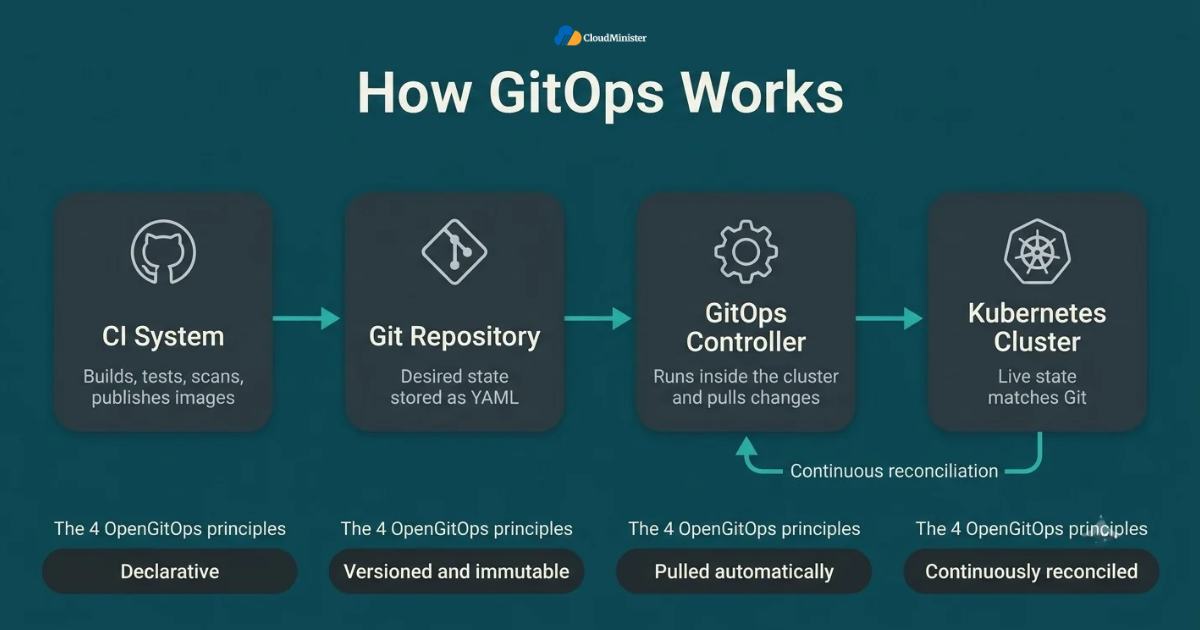
- Declarative: the full desired state of your applications lives as YAML, or is rendered from Helm or Kustomize, instead of being a list of commands someone typed.
- Versioned and immutable: Git records who changed what and when, so your commit history becomes a free audit log.
- Pulled automatically: an agent inside the cluster fetches approved changes, so your CI pipeline does not need direct access to the cluster API.
- Continuously reconciled: the agent compares live resources with Git and either corrects drift or reports it.
- Rollback becomes a simple git revert followed by a normal reconciliation, rather than a late night debugging session.
- GitOps does not replace CI. Your CI system still builds, tests, scans, and publishes images, while the GitOps controller handles delivery. This is true on both sides of the Argo CD vs Flux choice.
- A pull model is also good for security, because you can keep the cluster API closed to outside runners.
- Small teams gain the most because the repository replaces tribal knowledge about how production was set up, and a partner offering DevOps Services & Solutions can help you structure it correctly from day one.
Before comparing tools, write down how many clusters, environments, and engineers you actually have. Most small teams run one to three clusters with fewer than ten engineers, and that single answer settles half of the Argo CD vs Flux debate before you read a single comparison table.
2. Why Small Teams Are Moving to GitOps Right Now
The CNCF Annual Cloud Native Survey released in January 2026 found that 82 percent of container users now run Kubernetes in production, up from 66 percent in 2023, and that 98 percent of surveyed organizations have adopted cloud native techniques. Production Kubernetes is no longer an experiment, which means delivery has to be repeatable even for a team of four. This is the real reason Argo CD vs Flux articles are everywhere in 2026.
- More production clusters mean more chances for configuration drift between environments, and catching drift is a core job of both tools in the Argo CD vs Flux comparison.
- Small teams cannot afford a dedicated release engineer, so delivery has to be automated and boring, which is also good for CI/CD cost optimization.
- Manual kubectl apply leaves no review trail, which makes incidents harder to explain afterward.
- Pull request review in Git gives every change a second pair of eyes at no extra cost.
- New engineers learn the system by reading the repository, which shortens onboarding.
- A new cluster can be rebuilt by pointing a fresh controller at the same repository, although persistent data and encryption keys must be restored separately. A Web Hosting Company in India that keeps regular snapshots makes this recovery easier.
- Both tools are CNCF graduated projects, so long term project health is not the deciding factor in the Argo CD vs Flux choice.
- Moving deployment logic out of pipelines is also the first practical step toward CI/CD cost optimization.
- Teams with nobody on call at night can use Server Management Services in India to cover monitoring and patching while engineers focus on features.
3. Argo CD vs Flux: Architecture and Core Differences
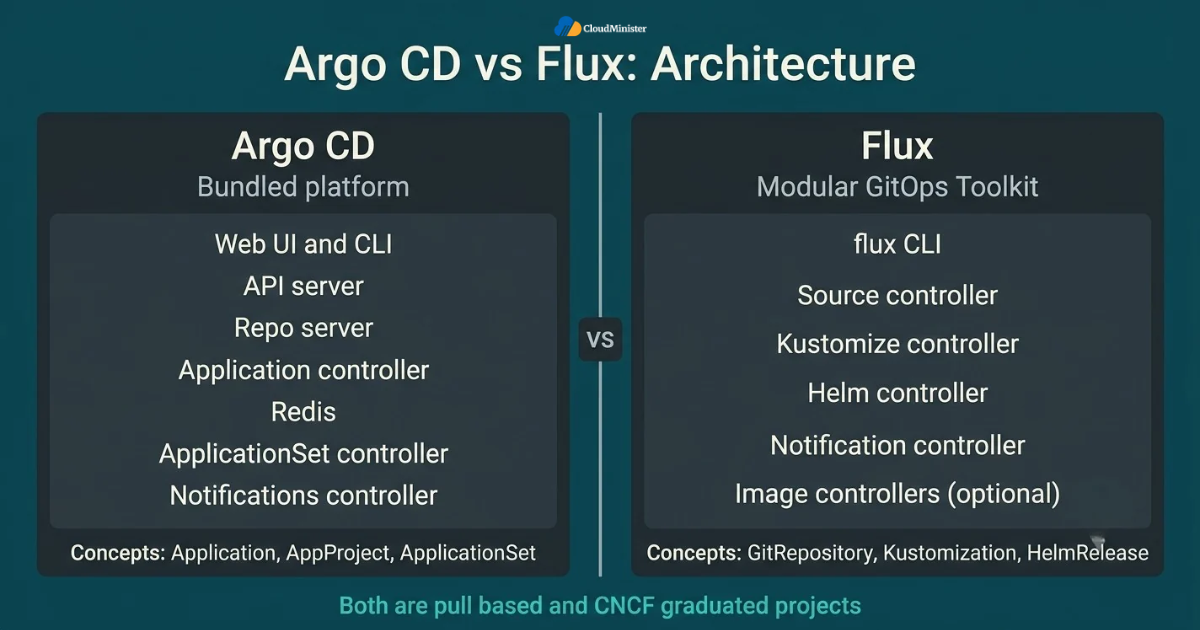
Argo CD ships as a complete application with an API server, a web interface, a command line tool, and its own concepts such as Application, AppProject, and ApplicationSet. Flux is a set of focused controllers called the GitOps Toolkit, driven by Kubernetes custom resources and the flux command line tool. Understanding this design gap is the fastest way to understand every other Argo CD vs Flux difference. Keep it in mind as you read the table, because every row of the Argo CD vs Flux comparison traces back to it. Teams that already use DevOps Services & Solutions for pipeline work often choose the tool that fits their release process.
| Area | Argo CD | Flux |
| Interface | Built in web UI and CLI | CLI and Kubernetes resources, with optional community dashboards |
| Architecture | Bundled platform with API server, repo server, and application controller | Modular controllers for source, kustomize, helm, and notifications |
| Helm handling | Renders chart templates and applies the manifests | Runs real Helm releases through helm-controller |
| Multi-tenancy | AppProjects and its own RBAC | Kubernetes RBAC and service account impersonation |
| Image updates | Separate Argo CD Image Updater project | Optional built in image controllers |
| Secrets | Plugins or external operators | Native SOPS decryption |
| Footprint | Typically higher | Typically lower |
| Best for | Teams that want visibility and a dashboard | Teams that want a lean, Kubernetes native toolkit |
- Both tools are pull based and continuously compare the cluster with Git, which is why the Argo CD vs Flux decision is about daily experience and not about the basic model.
- Both support plain YAML, Kustomize, and Helm as sources of manifests.
- Argo CD gives you a visual resource tree, which many teams find helpful when debugging a failed sync.
- Flux keeps everything in Kubernetes objects, which suits teams that prefer to work entirely with kubectl and Git.
- Argo CD installs as one bundle, while Flux lets you install only the controllers you need.
- Neither tool is a CI system, and neither one builds container images. Keep that in mind when you read any Argo CD vs Flux comparison that mentions pipelines.
- The right pick in the Argo CD vs Flux comparison usually depends on whether your team values a dashboard or a lighter footprint more.
- A Server Management Company can run either tool for you while your team is still learning the Kubernetes basics. Many teams pair this with Server Management Services in India for patching and backups.
4. Preparing Your Cluster and Git Repository
Before installing anything, get the foundation right. The repository layout is the same whichever side of the Argo CD vs Flux decision you land on, so time spent here is never wasted. A clean layout also makes it easy to switch tools later, because plain Kubernetes manifests and Kustomize overlays are portable between the two.
- Use a running Kubernetes cluster on a currently supported version, with kubectl access and cluster-admin rights for the initial install. If a provider handles the nodes, confirm that Server Management Services in India include node patching and kernel updates.
- Check that the nodes have enough CPU, memory, and disk for the controllers, and ask your Web Hosting Company in India for current capacity details before you begin.
- Create a dedicated Git repository for configuration, separate from application source code, so image updates and code commits do not trigger each other. Many teams ask a provider of DevOps Services & Solutions to review this layout before the first commit.
- Create a base folder for each app and an overlay folder per environment using Kustomize, and keep infrastructure add-ons such as the ingress controller in their own folder.
- Protect the main branch with required pull request reviews and status checks.
- Use a read only deploy key or a fine grained token for the controller, never a personal admin account, and give a Server Management Company its own named account instead of a shared login.
- Pin Helm chart versions and container image tags, and never deploy the latest tag.
- Test on a throwaway cluster first. Tools such as kind or k3d work well on a laptop.
- Treat the first install as a trial, because the Argo CD vs Flux decision should be confirmed with your own workload and not with a blog post.
gitops-repo/
  apps/
    demo-app/
      base/
      overlays/
        staging/
        production/
  infrastructure/
  clusters/
    production/
Related Reading: Docker Compose production hardening
5. Setting Up Argo CD Step by Step
Argo CD installs into its own namespace and is usually ready within a few minutes. Try the steps below on a throwaway local cluster first, since tools such as kind run each Kubernetes node as a container on a Docker bridge network. Once the flow feels familiar, repeat it on your real cluster so the Argo CD vs Flux trial stays fair. Teams that prefer a hand off can ask a provider of DevOps Services & Solutions to run the installation and document it.
- Create the namespace with kubectl create namespace argocd.
- Apply the official manifest with kubectl apply -n argocd –server-side –force-conflicts -f https://raw.githubusercontent.com/argoproj/argo-cd/stable/manifests/install.yaml. For production, replace stable with a specific release tag so upgrades are deliberate.
- Check that all pods reach the Running state with kubectl get pods -n argocd.
- Reach the interface for the first time with kubectl port-forward svc/argocd-server -n argocd 8080:443 and open https://localhost:8080. Later, place it behind an ingress with TLS, and ask your Web Hosting Company in India about load balancers and certificates.
- Read the initial admin password with argocd admin initial-password -n argocd, log in, change it, and plan to disable the admin account once single sign on works.
- Install the argocd CLI and log in with argocd login localhost:8080.
- Register your private repository with argocd repo add, using a read only deploy key or token.
- Create your first Application using the manifest below, and sync it manually once to confirm that everything renders correctly.
- Turn on automated sync with prune and self heal only after the manual sync has worked cleanly. Tell your Server Management Company when you make this switch, so alerts match the new behavior.
apiVersion: argoproj.io/v1alpha1
kind: Application
metadata:
  name: demo-app
  namespace: argocd
spec:
  project: default
  source:
    repoURL: https://github.com/your-org/gitops-repo.git
    targetRevision: main
    path: apps/demo-app/overlays/production
  destination:
    server: https://kubernetes.default.svc
    namespace: demo
  syncPolicy:
    automated:
      prune: true
      selfHeal: true
    syncOptions:
      - CreateNamespace=true
Related Reading: Docker bridge network
6. Setting Up Flux Step by Step
Flux takes a different route. Instead of applying a large manifest by hand, you run a bootstrap command that installs the controllers and commits their own configuration to your Git repository, so Flux manages itself from the first minute. A team offering DevOps Services & Solutions can script this bootstrap so it is repeatable across clusters. The setup is shorter than the Argo CD route, but it asks you to be comfortable with the command line and with Kubernetes custom resources. This is a big part of the Argo CD vs Flux experience for new users.
- Install the flux CLI using the official install script or your package manager.
- Run flux check –pre to confirm that the cluster and your kubectl context meet the requirements.
- Export a GitHub personal access token as GITHUB_TOKEN, with enough permission to write to the repository and manage its deploy keys.
- Run flux bootstrap github –owner=YOUR_ORG –repository=fleet-infra –branch=main –path=clusters/production –personal, and drop –personal if the owner is an organization.
- Bootstrap installs the source, kustomize, helm, and notification controllers, then creates a GitRepository and a Kustomization named flux-system that keep Flux itself in sync.
- Verify the result with flux get all and kubectl get pods -n flux-system. If the nodes are hosted, a Web Hosting Company in India can confirm that disk and network health are normal.
- Add your first application by committing a Kustomization file, shown below, into the clusters/production folder.
- Trigger an immediate sync with flux reconcile kustomization demo-app –with-source instead of waiting for the next interval. Argo CD has a similar manual sync button, so the Argo CD vs Flux gap here is small.
- Ask your Server Management Company to watch the flux-system namespace, so a failed reconciliation raises an alert instead of waiting for someone to notice. Server Management Services in India often include this kind of namespace level monitoring.
apiVersion: kustomize.toolkit.fluxcd.io/v1
kind: Kustomization
metadata:
  name: demo-app
  namespace: flux-system
spec:
  interval: 5m
  path: ./apps/demo-app/overlays/production
  prune: true
  wait: true
  sourceRef:
    kind: GitRepository
    name: flux-system
7. Managing Secrets Safely in GitOps
Git is not a safe place for plain secrets, and this is true whichever side you pick in the Argo CD vs Flux debate. Secrets must either be encrypted before they are committed or kept outside Git and pulled in by an operator. This is the area where the two tools differ most in built in support, so it deserves careful planning before your first production deployment.
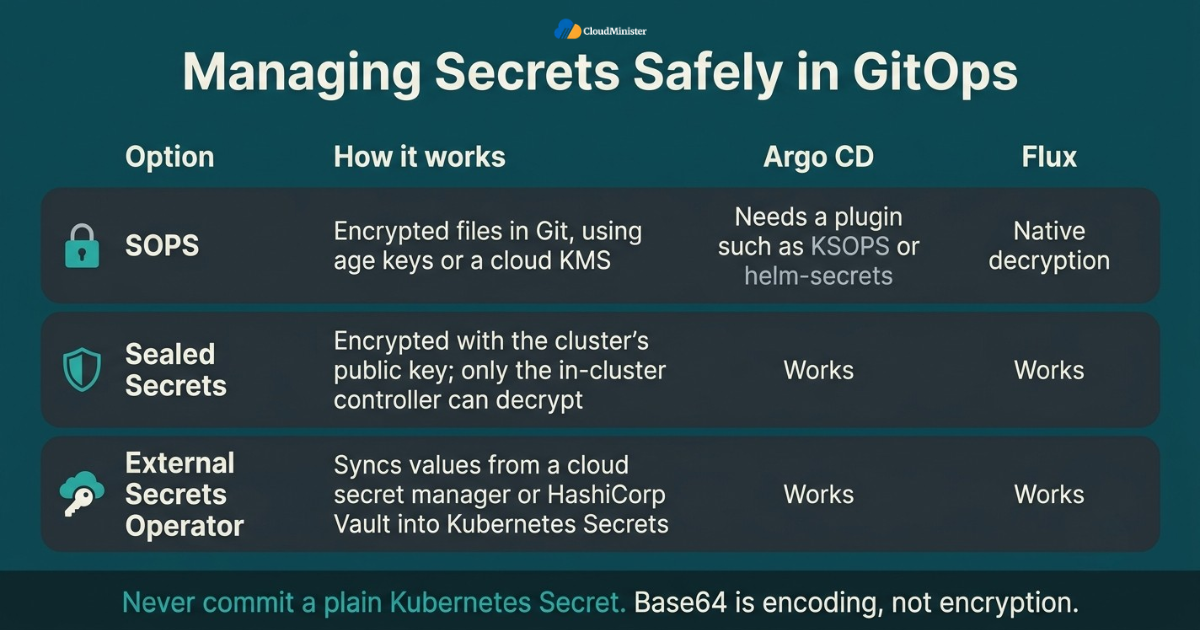
- Never commit a plain Kubernetes Secret, because base64 is an encoding and not encryption.
- Flux can decrypt SOPS encrypted files natively through its kustomize-controller, using age keys or a cloud key management service.
- Argo CD does not decrypt SOPS files by itself, so teams use plugins such as KSOPS or helm-secrets, or avoid the problem with an operator. This is one of the clearest Argo CD vs Flux gaps for small teams.
- Sealed Secrets encrypts a secret with the cluster’s public key, and only the controller inside the cluster can decrypt it. It works with both tools.
- External Secrets Operator syncs values from a cloud secret manager or HashiCorp Vault into Kubernetes Secrets, and it also works with both tools.
- Back up the private key, whether it is an age key or a Sealed Secrets key, in a safe place outside the cluster, because losing it means losing the ability to decrypt. A Web Hosting Company in India can offer off cluster storage for these backups.
- Rotate secrets on a schedule and immediately when a team member leaves. A Server Management Company can keep the rotation calendar for you.
- Use Kubernetes RBAC to limit who can read Secret objects in each namespace. DevOps Services & Solutions teams usually include this in a first security review.
- Backups of encryption keys should be owned by someone, and Server Management Services in India can include scheduled key backups and restore tests.
Treat the Git repository as a production system. Enable branch protection, require reviewed commits, rotate any token that has ever been pasted into a terminal or chat, and use read only deploy keys for controllers wherever possible. A leaked repository token is often more damaging than a leaked password, because it can change what runs in your cluster.
Related Reading: DevSecOps best practices for CI/CD
8. Helm, Kustomize, and Environment Promotion
Most small teams mix third party Helm charts with their own Kustomize overlays. This is where the Argo CD vs Flux difference becomes visible in daily work. Argo CD renders Helm charts into plain manifests and applies them, so its resource tree shows every object. Flux runs real Helm releases through helm-controller, so helm list shows them on the cluster. Keeping this split clear also supports CI/CD cost optimization, because a values or overlay change then needs a Git review and not a full pipeline run.
- Use Helm for third party software such as the ingress controller, certificate manager, and monitoring stack, and use Kustomize for your own applications.
- Pin chart versions exactly, so an upstream release never changes production by surprise. Server Management Services in India can also track chart and image updates for you.
- In Argo CD, set chart values in the Application source. In Flux, set them in the HelmRelease with spec.values or valuesFrom. Both are easy to review, so this part of the Argo CD vs Flux decision is mostly a matter of taste.
- Promote changes through pull requests that update an image tag or an overlay, so staging and production share one reviewed history. Share this process with your Server Management Company, so it knows which changes are planned.
- Use one main branch with a folder per environment instead of long lived environment branches, which are harder to keep in sync.
- Argo CD can use an ApplicationSet to generate one Application per folder or cluster, while Flux uses one Kustomization per folder.
- Order your installs so infrastructure comes first. Argo CD offers sync waves, and Flux offers dependsOn between Kustomizations.
- Keep the CI pipeline short: build, test, push, and update one tag. This is basic CI/CD cost optimization, because paid runner minutes are spent only on work Git cannot do.
- Providers of DevOps Services & Solutions often build the CI side that updates image tags, so pipeline and delivery are designed together.
Never let automation and humans edit the same field without a rule. If image automation writes tags to Git, agree that humans change replicas and resource limits only through pull requests. Without that rule, a controller and an engineer can undo each other for hours before anyone notices.
9. Access Control and Multi-Tenancy for Small Teams
Even a five person team needs some separation between who can deploy to staging and who can touch production. Here the Argo CD vs Flux difference is clear. Argo CD adds its own project and RBAC layer on top of Kubernetes, while Flux reuses Kubernetes RBAC and service accounts directly. Neither approach is wrong, but each one needs different habits.
- In Argo CD, an AppProject restricts which repositories, clusters, namespaces, and resource kinds an Application can use.
- Argo CD permissions are defined in the argocd-rbac-cm config map, and single sign on can use OIDC or the bundled Dex component.
- Disable the local admin account after single sign on works, and keep a documented break glass procedure, which providers of DevOps Services & Solutions can help you write.
- In Flux, set spec.serviceAccountName on a Kustomization so the controller impersonates a limited account instead of cluster-admin.
- Start the Flux controllers with –no-cross-namespace-refs=true to stop one team from referencing sources in another team’s namespace.
- Use read only Git credentials for controllers, since they only need to read.
- Apply network policies to the argocd or flux-system namespace, and expose the Argo CD interface only behind TLS and single sign on. Server Management Services in India often include firewall and network reviews.
- Rely on Git history and Kubernetes audit logs to answer who changed what and when.
- Ask your Server Management Company to review these permissions every quarter, and confirm with your Web Hosting Company in India how private networking and firewalls are handled for the cluster.
Related Reading: Podman vs Docker rootless containers
10. Resource Usage, Hosting Cost, and CI/CD cost optimization
Cost is where small teams feel pain first. Flexera’s 2026 State of the Cloud report estimates that 29 percent of infrastructure and platform cloud spend is wasted, up from 27 percent a year earlier and the first rise in five years. A GitOps controller is a small part of any bill, but your delivery habits shape the rest, so CI/CD cost optimization should be planned together with the Argo CD vs Flux choice.
- Argo CD runs an API server, repo server, application controller, Redis, an ApplicationSet controller, and a notifications controller, while Flux runs fewer and smaller controllers. On a tiny cluster this footprint can matter, so measure it with kubectl top pods.
- Set resource requests and limits for controllers only after watching real usage for at least a week. Teams that use Server Management Services in India can ask for a monthly utilization report.
- CI/CD cost optimization starts by removing deploy steps from the pipeline. CI builds, tests, and pushes an image, and the controller handles the rest, which shortens paid runner time.
- Another CI/CD cost optimization step is to keep the configuration repository separate, so manifest only changes never trigger a full image build.
- Cache container layers and dependencies in CI, because rebuilding unchanged layers is one of the most common hidden pipeline costs. A first pipeline review by DevOps Services & Solutions engineers often finds this quickly.
- The Argo CD ApplicationSet pull request generator can create temporary preview environments and remove them when the pull request closes, which prevents idle test environments from running for weeks.
- Scale down or switch off non production environments outside working hours. A Server Management Company can schedule this for you.
- Prefer Git webhooks over very short polling intervals, because webhooks give faster updates with less load on both the Git provider and the controllers.
- A Web Hosting Company in India that offers right sized servers and clear pricing lets you grow node by node instead of overbuying on day one.
Measure before you optimize. Record average pipeline minutes, node utilization, and idle environment hours for one month, then apply one CI/CD cost optimization change at a time so you can see which one actually saved money.
11. Monitoring, Notifications, and Rollbacks
A GitOps setup is only trustworthy if you know when it stops reconciling. Both tools expose Prometheus metrics and send notifications, so the Argo CD vs Flux choice rarely changes your monitoring plan. What matters more is deciding in advance which events wake someone up and who that person is.
- Scrape the controller metrics with Prometheus, and alert on failed syncs, stalled reconciliations, degraded health, and expired Git credentials. A Server Management Company can route these alerts to the right on call person.
- Argo CD includes a notifications controller with triggers and templates for Slack, email, and webhooks.
- Flux uses its notification-controller with Provider and Alert resources, plus a Receiver resource to accept webhooks from Git providers.
- The cleanest rollback is a git revert of the bad commit, which keeps Git as the single source of truth.
- In Argo CD, the built in rollback command works only when automated sync is disabled, so prefer the revert approach.
- During an incident, pause reconciliation with flux suspend kustomization demo-app, or disable automated sync in Argo CD, and resume it afterward.
- Use Flux wait: true and health checks, or Argo CD’s built in health assessment, so a deployment that never becomes healthy is reported as failed.
- Rebuild a fresh staging cluster from Git every quarter to prove that your recovery process really works. A Web Hosting Company in India with quick server provisioning makes this cheaper, and DevOps Services & Solutions teams can automate it.
- A provider of Server Management Services in India can take over alert monitoring outside office hours, so a small team is not paged for every warning.
12. Common Mistakes That Cause GitOps Pain
Most GitOps problems come from a short list of repeatable mistakes, and almost none of them depend on which side of the Argo CD vs Flux decision you chose. Knowing them in advance is one of the cheapest improvements a small team can make. A candid Server Management Company will usually be able to name several of these from past projects.
- Treating the Argo CD vs Flux choice as permanent. Plain YAML and Kustomize are portable, so switching later is possible, though not free.
- Keeping application source and cluster configuration in one repository, which can create commit loops when automation writes image tags. Those loops also waste pipeline minutes, which works against CI/CD cost optimization.
- Enabling automatic pruning on day one without reviewing the diff, which can delete resources you forgot were managed.
- Committing secrets in plain text, even in a private repository.
- Letting people run kubectl edit on managed resources, so the controller and humans fight over the same fields.
- Skipping controller upgrades, since both projects release often and old versions miss security fixes. Server Management Services in India can schedule upgrade reminders and test windows.
- Forgetting that databases and persistent volumes need their own backups outside Git. A Server Management Company can schedule and test those backups, and a Web Hosting Company in India can provide the storage.
- Bringing in DevOps Services & Solutions only after the first outage, when a design review would have prevented it.
- Building multi cluster ApplicationSets or fleet repositories before you have a second cluster.
13. Choosing Between Argo CD vs Flux: A Simple Decision Framework
There is no universal winner, and honest advice depends on your situation. Use the lists below as a starting point, then confirm with a short trial on your own workload. The Argo CD vs Flux choice is easiest when you score each tool against what your team actually values. Include CI/CD cost optimization in that score, since a lighter controller can save node cost and a dashboard can save debugging time. Also consider who will operate the tool, because Server Management Services in India can reduce the operating load for either choice.
- Choose Argo CD when your team wants a visual dashboard, a resource tree, and easy diffs, especially if some members are not comfortable with the command line.
- Choose Argo CD when you manage many applications and want ApplicationSets to generate them from folders, clusters, or pull requests.
- Choose Argo CD when single sign on and project based access control matter from the start.
- Choose Flux when you want a lean, Kubernetes native toolkit with a smaller footprint and nothing but custom resources to learn.
- Choose Flux when you need native SOPS decryption, built in image automation, or real Helm releases.
- If the team is split, run a one day trial of each on a staging cluster with the same repository, then decide with evidence rather than opinion. That is the most honest way to settle Argo CD vs Flux, and a provider of DevOps Services & Solutions can run the trial for you.
- Avoid running both tools against the same resources, because two controllers will fight over the same objects.
- Remember that both are CNCF graduated, so either result of the Argo CD vs Flux trial is a safe and supported choice.
The most expensive mistake is not technical. It is leaving the platform without a named owner. Pick one person who approves changes to the GitOps repository and one person who decides on rollback, and write both names in the runbook.
14. Choosing the Right Infrastructure and DevOps Partner
Not every team wants to run clusters alone. If your engineers are busy building features, outside help for the platform layer can be a sensible choice, as long as the provider is clear about what it owns. Whether you choose a Web Hosting Company in India or build in house, ask the same questions. The Argo CD vs Flux decision is a good test, because a capable partner will explain trade-offs instead of pushing one tool.
- Ask a Web Hosting Company in India how it handles node capacity, backups, restore times, and support hours, and get the answers in writing.
- Confirm that Server Management Services in India cover monitoring, patching, backup checks, and tested restores for the cluster and its nodes.
- Look for DevOps Services & Solutions that include pipeline design, CI/CD cost optimization, repository structure, and GitOps setup, not just infrastructure builds.
- A Server Management Company that runs its own automation practice usually gives consistent advice across servers, pipelines, and clusters.
- Ask for a real example of a past cluster migration or GitOps rollout, including what went wrong and how it was fixed. Also ask whether the team has run both tools, so its Argo CD vs Flux advice comes from experience.
- Confirm who is on call during the first weeks after go live, since hidden problems appear early. Ask whether Server Management Services in India from the same provider cover that rota.
- Check how each provider handles escalation at night and on weekends.
- Make sure runbooks, dashboards, and the repository stay with your team after the engagement ends.
- Be cautious of any provider that promises zero risk or insists on one tool without asking about your workload.
15. A Practical 30 Day Plan to Get Started
Reading about GitOps is easy, and acting on it is harder. This plan breaks the work into four weeks that a small team can follow without stopping product work, and it keeps the Argo CD vs Flux decision time boxed so it does not drag on. Server Management Services in India can handle routine checks while the team learns.
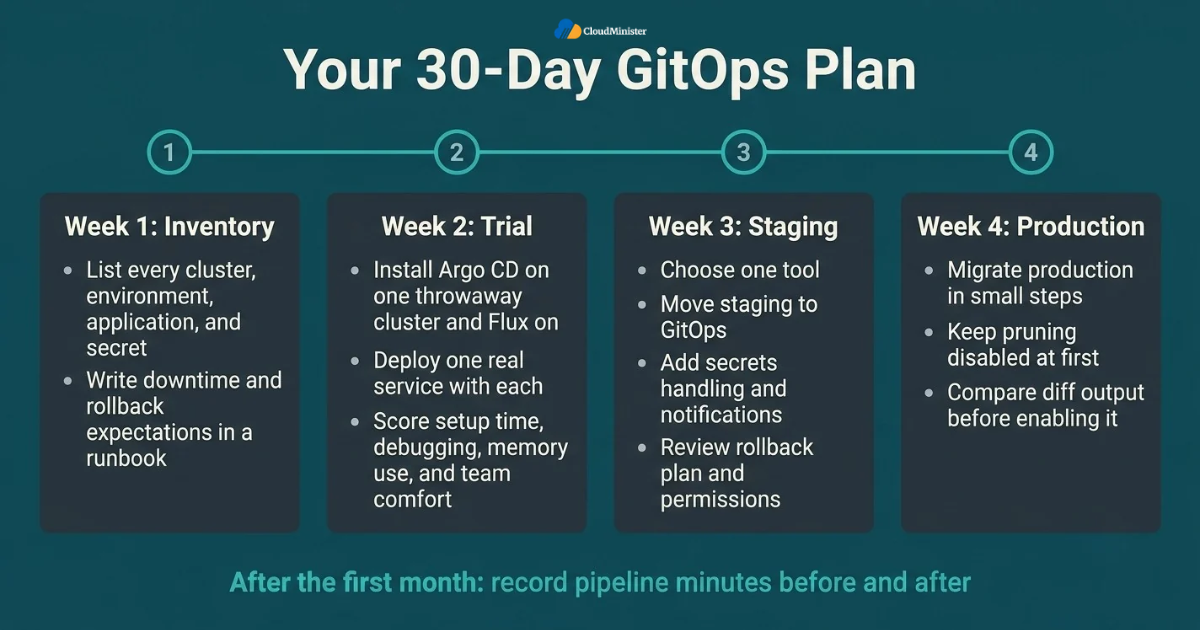
- Week one: list every cluster, environment, application, and secret, and write your downtime and rollback expectations at the top of a runbook.
- Week one: ask your Web Hosting Company in India and your Server Management Company for current capacity, backup, and restore details.
- Week two: install Argo CD on one throwaway cluster and Flux on another, using the same repository layout, and deploy one real service with each. Use servers from your Web Hosting Company in India or a local cluster.
- Week two: score the Argo CD vs Flux trial on setup time, debugging experience, memory use, and how comfortable the team felt.
- Week three: choose one tool using your Argo CD vs Flux scores, move staging to GitOps, add secrets handling, and connect notifications.
- Week three: ask a provider of DevOps Services & Solutions or a senior colleague to review the rollback plan and repository permissions.
- Week four: migrate production in small steps with pruning disabled at first, and compare the diff output before enabling it.
- Week four: confirm that Server Management Services in India or your internal team covers the cutover window and the first two weeks afterward.
- After the first month: record pipeline minutes before and after, because CI/CD cost optimization should be proven with numbers.
Want Expert Help Setting Up GitOps?
Choosing between Argo CD and Flux is only the first step. Our DevOps team can handle your repository structure, secrets management, CI/CD pipeline, and rollback process, so your deployments stay reliable and cost-efficient. New clients get a free consultation.
Checklist: GitOps Readiness Review
- Argo CD vs Flux trial scored and the final decision recorded in the runbook.
- Repository layout agreed, with base and overlay folders for every application.
- Main branch protected, with required reviews.
- Controller credentials are read only and stored safely.
- Image tags and chart versions are pinned, with no use of the latest tag.
- Secrets are encrypted or pulled from an external manager, and the key backup is tested.
- Hosting capacity and restore times are confirmed with your Web Hosting Company in India.
- Backups and monitoring are covered by the team or by Server Management Services in India.
- Notifications reach a channel that someone actually reads, and a Server Management Company or an internal owner responds to them.
- Rollback by git revert has been tested in staging and reviewed by a second person or a DevOps Services & Solutions partner.
- Automated pruning is enabled only after a diff review.
- Controller upgrade schedule is written down, with a named owner.
- Pipeline minutes and idle environment hours are measured for CI/CD cost optimization.
Talk to Our Team, Free for New Clients
Not sure which GitOps setup fits your workload? Share your current environment with us and get a free consultation for new clients. We will review your cluster, pipeline, and team size, then suggest the right next step.
Key Takeaways
- GitOps stores desired state in Git and lets a controller in the cluster pull and reconcile it, which gives small teams an audit trail and a simple rollback.
- The Argo CD vs Flux decision depends on team skills, footprint, and the need for a dashboard, not on which project is more popular.
- In the Argo CD vs Flux comparison, Argo CD suits teams that want a web interface, ApplicationSets, and project based access control.
- On the other side of the Argo CD vs Flux comparison, Flux suits teams that want a lean toolkit with native SOPS decryption, image automation, and real Helm releases.
- Secrets must never be committed in plain text. Use SOPS, Sealed Secrets, or External Secrets Operator.
- CI/CD cost optimization comes from shorter pipelines, a separate configuration repository, cached builds, and temporary preview environments.
- A Web Hosting Company in India that offers Server Management Services in India gives a small team monitoring, backups, and on call cover without extra hiring.
- Providers of DevOps Services & Solutions help turn repositories, pipelines, and rollbacks into reviewed and repeatable practice, with CI/CD cost optimization built in.
- A trusted Server Management Company is most valuable for the first months after go live, when hidden problems tend to appear.
Conclusion
Throughout this guide one pattern holds, regardless of team size. Good GitOps is the result of a clean repository, careful secrets handling, tested rollbacks, and a named owner, not of one clever tool. The Argo CD vs Flux choice matters, but it matters less than the habits around it. Run a short trial, pick the tool that fits your team, and keep the setup small until the workload demands more. A Web Hosting Company in India can supply the servers, and a provider of DevOps Services & Solutions can review the plan if you want a second opinion.
Another lesson is that GitOps is never finished on the day of the first sync, whatever your Argo CD vs Flux trial showed. Watch your alerts, review costs, and keep improving the runbook as the product grows. If you want a partner for the infrastructure side, look for a Web Hosting Company in India that offers both managed servers and automation support, so that hosting, monitoring, and delivery are planned by the same team.
Frequently Asked Questions
Is Argo CD better than Flux for a small team?
Neither is better in every case. Argo CD is easier to adopt when the team wants a dashboard and visual diffs, while Flux is lighter and fits teams that are happy working with Git and the command line. A short trial on staging is the most reliable way to settle the Argo CD vs Flux question.
Can I run Argo CD vs Flux side by side in the same cluster?
Technically yes, but you should never let both manage the same resources. For a trial, point each tool at a separate namespace or, better, a separate throwaway cluster. A Web Hosting Company in India can provision one quickly.
In the Argo CD vs Flux comparison, which tool uses fewer resources?
Flux usually has a smaller footprint because it runs a few focused controllers, while Argo CD runs a fuller platform with a web interface. The exact difference depends on your version and settings, so measure both with kubectl top pods before you decide.
Do these tools replace Jenkins or GitHub Actions?
No. Both tools handle delivery, not building. Your CI system still compiles code, runs tests, and pushes images. Keeping the pipeline focused on those jobs is also the simplest form of CI/CD cost optimization. A team offering DevOps Services & Solutions can help simplify pipelines further.
How should a small team handle secrets in GitOps?
Encrypt secrets before committing them, or keep them in an external manager. SOPS with age keys, Sealed Secrets, and External Secrets Operator are the common choices, and the right one depends on your cloud setup and the tool you pick.
Can I switch from one tool to the other later?
Yes. Plain YAML, Helm charts, and Kustomize overlays work with both tools, so the repository mostly stays the same. You will need to recreate the tool specific objects, such as Applications or Kustomizations, and test carefully.
When should a small team hire a Server Management Company?
When nobody on the team can watch the cluster outside office hours, or when backups, patching, and restore tests keep slipping. A Server Management Company that answers with specific examples is usually better prepared, so ask how it verifies backups and who can approve a rollback.
What can a Web Hosting Company in India add to a GitOps setup?
It can provide the servers, network, storage, and backup layer that the cluster runs on. Confirm in writing which parts it manages and which parts remain your responsibility. Pairing it with Server Management Services in India covers monitoring and patching.
What do Server Management Services in India usually include?
Many providers include monitoring, patching, backups, and incident response. Check that restore tests and out of hours support are covered, especially for the weeks after go live.
Where do DevOps Services & Solutions fit into GitOps?
They help design the repository layout, the CI pipeline, the secrets approach, and the rollback process, so delivery is reviewed and repeatable, with CI/CD cost optimization as a side benefit. This is most valuable during design, before the first production cutover.

Pritam Kumar is a DevOps Engineer at CloudMinister Technologies, where he manages a multi-datacenter fleet of 100+ servers and architects end-to-end CI/CD pipelines and infrastructure automation using Kubernetes, Terraform, and Ansible. He holds an AWS Certified DevOps Engineer Professional certification and has served as a Google Cloud Mentor, reflecting both hands-on cloud expertise and a track record of mentoring others in the field. His work spans disaster recovery architecture, security incident response, and hosting infrastructure across Proxmox, cPanel/WHM, and Linux systems. Notably, Pritam led the design of Cloud Kavach, a self-hosted DC/DR SaaS portal, and directed remediation efforts for large-scale hosting security incidents involving webshells and command-and-control malware. He brings this depth of real-world infrastructure and security experience to the technical content he writes.