Chrome has deprecated XSLT, and Chrome XSLT removal is the term most teams now search for. From Chrome 158 onward, planned for November 17, 2026, XSLT stops working on Stable for most users. This guide covers Chrome XSLT removal for website owners, developers and server admins: what changes, who is affected, how to check your own site, three ways to fix it and how to choose between them. Only pages that depend on browser-side XSLT are affected. XML itself is not being removed. The polyfill is something to test, not a guaranteed fix. A Web Hosting Company in India, a Server Management Company or DevOps Consulting Services can help with the checking and the server work, but the decisions stay with you.
Chrome XSLT removal is the kind of change that is easy to miss. Many websites quietly depend on a browser feature that most people have never heard of. XSLT turns raw XML into a readable page inside the browser, and Chrome is removing it. If your site serves a styled RSS feed, a styled sitemap, an XML status page or JavaScript that calls XSLTProcessor, Chrome XSLT removal may reach you.
This guide is written for website owners, developers and server admins. It explains Chrome XSLT removal in practical terms and skips the history lesson. It also avoids panic, because Chrome XSLT removal does not break websites in general. Only pages that depend on browser-side XSLT are affected, and many sites will check and find nothing to fix.
Server admins and site owners can handle Chrome XSLT removal with a simple audit. You list your XML URLs, search your files, confirm in Chrome and pick a fix for each page. A Server Management Company or your own admin team can run most of those steps in an afternoon. Some teams also bring in DevOps Consulting Services for a second opinion, and a Web Hosting Company in India that manages your servers can confirm what your plan allows. The sections below show you how.
Table of Content
- 1. What Is Changing and When
- 2. Who Is Affected by This Change
- 3. How to Check Your Site for XSLT
- 4. Fix One: Use the Polyfill
- 5. Fix Two: Move XSLT Processing to the Server
- 6. Fix Three: Move XML Endpoints to JSON
- 7. How to Choose the Right Fix
- 8. Pre-Deadline Checklist
- Key Takeaways
- Conclusion
- Frequently Asked Questions
1. What Is Changing and When
The timeline for Chrome XSLT removal is published by Chrome itself. Chromium has deprecated XSLT, which covers the XSLTProcessor JavaScript API and the XSLT processing instruction. The language itself is old: the World Wide Web Consortium published XSLT 1.0 as a W3C Recommendation on November 16, 1999. Chrome intends to stop XSLT working on Stable from Chrome 158 onward, and the date given for that milestone is November 17, 2026. If you are reading this after that date, check whether Chrome 158 or a later version has reached your visitors.
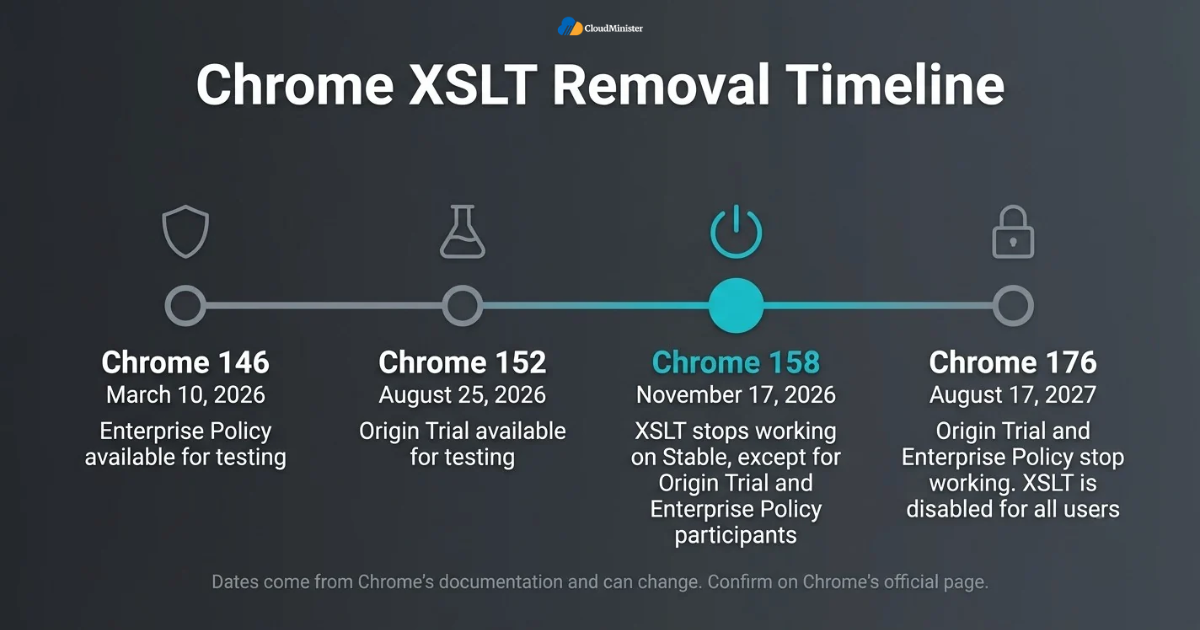
- Chrome 146, March 10, 2026: the Enterprise Policy went live for testing, so organizations could test with XSLT disabled early or keep using it past the removal date.
- Chrome 152, August 25, 2026: the Origin Trial went live for testing, which lets sites keep using XSLT past the removal date for a limited time.
- Chrome 158, November 17, 2026: XSLT stops working on Stable for all users except Origin Trial and Enterprise Policy participants.
- Chrome 176, August 17, 2027: the Origin Trial and Enterprise Policy stop working, and XSLT is disabled for all users.
- XML itself is not being removed. The xml-stylesheet processing instruction still works when it is used with CSS. Only XSLT is removed.
- Chrome says the Firefox and WebKit projects have also indicated plans to remove XSLT, and that WebKit and Gecko support the removal. Do not assume either browser has already done it.
- Chrome’s stated reason is security. libxslt is an aging C and C++ library, and client-side XSLT is rarely used.
- These dates come from Chrome’s documentation and can change, so confirm them before you plan around them. Your Web Hosting Company in India or Server Management Company will plan better when you share the dates with them.
2. Who Is Affected by Chrome XSLT Removal
Chrome XSLT removal happens inside the browser, so it only touches pages that ask the browser to run XSLT. A normal HTML website with no XSLT is not affected, and neither is XML that is styled with CSS. A page that depends on browser-side XSLT will stop giving visitors the transformed view in Chrome from Chrome 158 onward. According to Chrome’s documentation, about 0.02 percent of page loads use XSLT at all, and fewer than 0.001 percent use XSLT processing instructions. That figure was published in October 2025, so treat it as a sense of scale and not as a 2026 measurement.
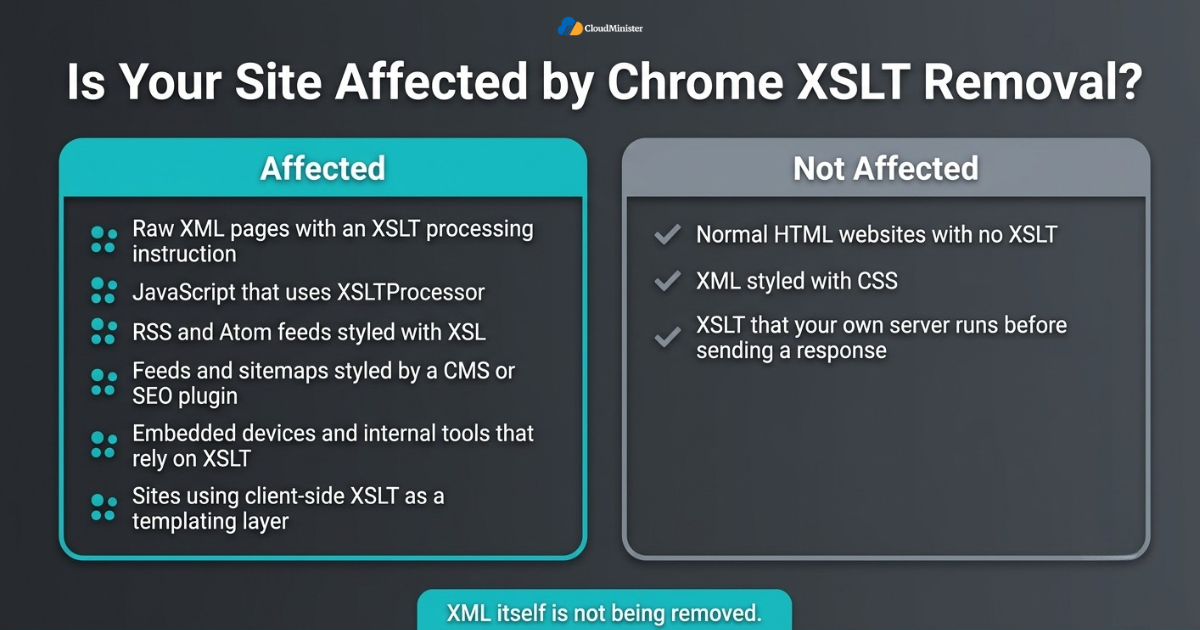
- Raw XML files that use an XSLT processing instruction and are opened directly in Chrome.
- JavaScript on your pages that creates an XSLTProcessor to transform XML in the browser.
- RSS and Atom feeds styled with XSL so that a person who opens the feed link sees a readable page. The XML data underneath does not change. Only the readable view in Chrome is affected.
- Feeds and sitemaps styled by a CMS or SEO plugin. Some CMS and SEO plugins style feeds and sitemaps with XSL, so check yours.
- Pages published by embedded devices and internal tools that output XML and rely on XSLT to show it in a browser.
- Sites that use client-side XSLT as a simple templating layer between data and markup.
- Not affected: XSLT that your own server runs before it sends a response, because this change is inside the browser.
- Teams with a Server Management Company often learn about this change from their admin first. Enterprise setups can use the Enterprise Policy to keep XSLT working until the August 17, 2027 date in the schedule. That buys time. It is not a fix.
3. How to Check Your Site for XSLT
Checking for Chrome XSLT removal takes less time than most people expect. The goal is to find every place where XML reaches a browser and decide whether that XML relies on XSLT. Start with a list of URLs, then search your files, then confirm in Chrome. A Server Management Company or your own admin team can run the file searches in minutes if they have access to the web root and the application code.
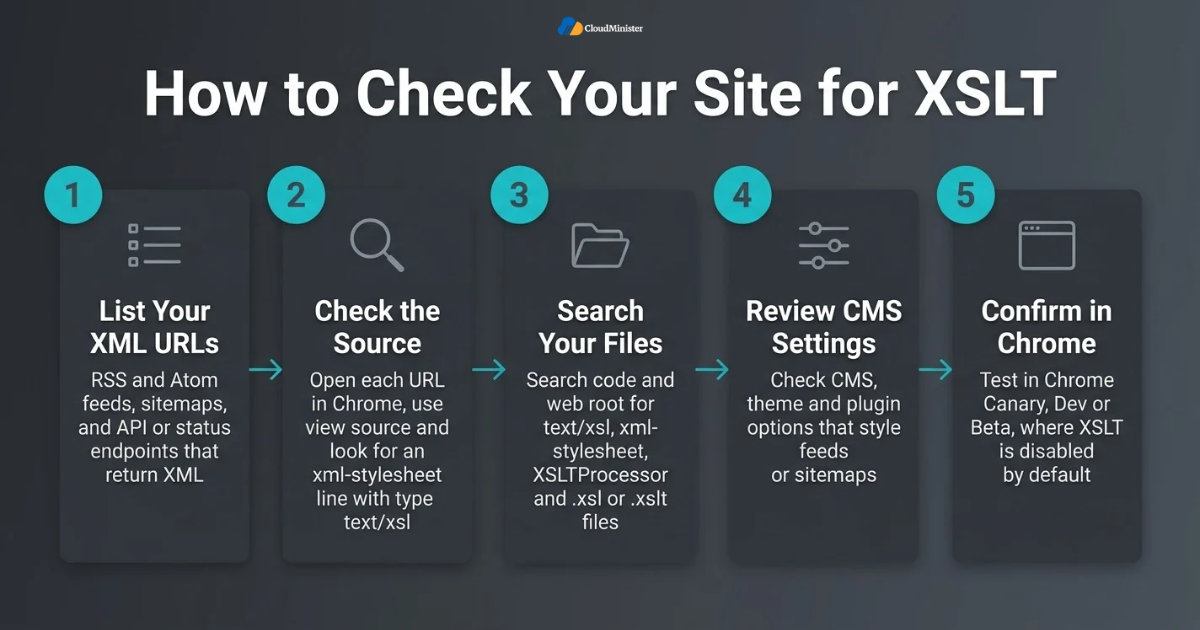
- List every XML-style URL you publish: RSS and Atom feeds, sitemaps, and any API or status endpoint that returns XML.
- Open each one in Chrome and use view source. Look near the top of the file for an xml-stylesheet line with the type text/xsl.
- Search your application code and web root for the text text/xsl, xml-stylesheet and XSLTProcessor, and for files ending in .xsl or .xslt.
- Review your CMS, theme and plugin settings for options that style feeds or sitemaps, and read what each setting actually outputs.
- Ask your provider of Server Management Services in India to run the file searches on the server if you do not have shell access.
- Watch the browser console and Lighthouse. Chrome’s documentation says deprecation warnings appear in both.
- For field data, use the Reporting API. Chrome’s documentation shows a ReportingObserver that listens for deprecation reports with the id XSLT.
- Enterprise admins can use Chrome’s Legacy Technology Report to collect deprecated feature usage from managed browsers.
- Test in Chrome Canary, Dev or Beta, where Chrome says XSLT is disabled by default as an early warning.
Keep a simple inventory with five columns: URL, what it serves, whether it uses XSLT, who owns it and which fix you chose. It keeps Chrome XSLT removal work organized and shows that every XML endpoint was reviewed. DevOps Consulting Services teams often start with exactly this kind of inventory.
Related Reading: Server management best practices for uptime and security
4. Fix One: Use the Polyfill
In Chrome XSLT removal planning, the polyfill is the fastest option. Chrome describes it as something that attempts to keep existing XSLT code working without using the browser’s native XSLT. It includes a WASM-based replacement for the XSLTProcessor class, so existing JavaScript can keep its current shape. The key word is attempts. It is not a guaranteed fix, and Chrome XSLT removal means you must test it on your own pages before and after the deadline.
- For JavaScript that uses XSLTProcessor, load the polyfill script before your own code runs. The form on Chrome’s page is shown below.
- For XML pages that use an XSLT processing instruction, Chrome’s documentation shows adding one script element to the XML file. The polyfill detects the processing instruction and replaces the document.
- For RSS and Atom feeds, Chrome says the script sits as a direct child of the root element, which should not stop feed readers from parsing the XML. Test with the readers your audience uses.
- Test on your own pages in current Chrome Stable, and test again once Chrome 158 or later reaches your visitors.
- Keep your existing XSL files in place, because the polyfill reads them. Check the output against what visitors saw before.
- Expect extra weight. Every XML page that loads the polyfill adds a script and a WASM download.
- If you cannot change the XML or XSLT source, such as on an embedded device, Chrome points to a browser extension that applies the same polyfill. Visitors install it, not you.
- A Server Management Company can host the script file for you and keep it pinned to one version.
- Use this fix when only a few pages are involved and you need a quick stopgap while you plan something longer lasting.
<script src="xslt-polyfill.min.js"></script>
<script src="xslt-polyfill.min.js" xmlns="http://www.w3.org/1999/xhtml"></script> If you load a polyfill script, self-host it or pin an exact version, review the source, and use Subresource Integrity and a Content Security Policy where possible. Remember that the polyfill adds a script and a WASM download to each XML page, so treat it like any other third-party code on your site.
5. Fix Two: Move XSLT Processing to the Server
The second option takes Chrome XSLT removal out of the picture for those pages by taking the work out of the browser. Your server runs the transformation and sends finished HTML to the visitor. Chrome lists this as one of its migration paths, and it removes the browser dependency entirely. It does ask more of your hosting, so it helps to know what your plan allows. If you are on shared hosting, ask your Web Hosting Company in India whether you can run transformation code on the server at all.
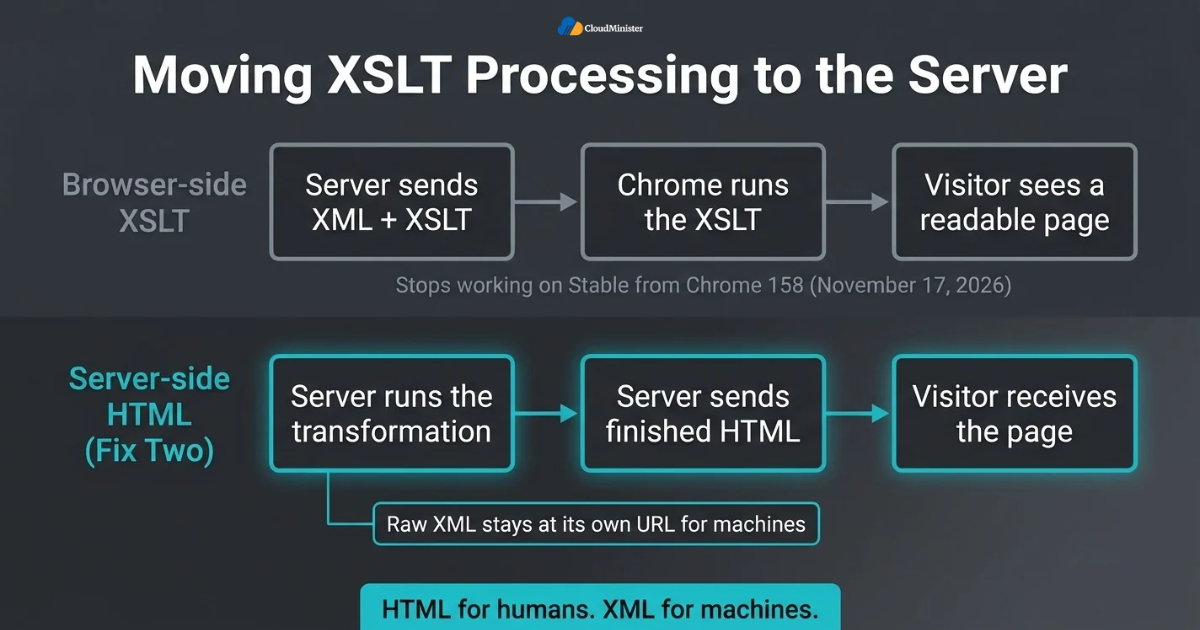
- Choose a Web Hosting Company in India that lets you run server-side code, or move to a VPS where you control the stack.
- Run the same transformation in your back end and return HTML, or rewrite the templates in your framework’s own templating system.
- Keep the raw XML available at its own URL for machines, and serve HTML to people. Chrome’s guidance follows the usual idea that HTML is for humans and XML is for machines.
- For feeds, add a link element with rel alternate and type application/rss+xml to your HTML pages, and avoid showing visitors a plain link to the raw XML file.
- Cache the rendered output where the data does not change often, so the server does not repeat the same transformation on every request.
- Ask your Server Management Services in India provider to watch CPU and memory after launch.
- Plan server resources. A transformation uses CPU and memory, and a VPS gives you room to run processors and tune them.
- Compare the new HTML with what Chrome used to display, and test with unusual input such as empty feeds and special characters in titles.
Related Reading: Automated failover health checks
Need Full Control for Server-Side XSLT Processing?
Moving XSLT work to the server takes dependable CPU, memory and root-level control. CloudMinister’s Windows Dedicated Servers give you a high-performance environment for transformation code, caching and your full stack. New clients also get a free consultation to help choose the right configuration.
6. Fix Three: Move XML Endpoints to JSON
The third answer to Chrome XSLT removal changes the data format. Server-side XML endpoints return JSON instead, and JavaScript in the page turns that JSON into HTML. Chrome lists this alongside server-side rendering as a migration route, and it fits sites that already render pages with JavaScript. It takes the most work of the three fixes, so plan it in stages. Teams that already use DevOps Services & Solutions can add the new endpoints and their tests to the normal release pipeline.
- DevOps Services & Solutions work such as automated tests and staged releases suits this kind of migration.
- Build the JSON endpoint next to the XML one, and let both run at the same time while you migrate.
- Fetch the JSON in the browser and build the page with JavaScript. Chrome points to the Fetch API for data and the DOMParser API when you still need to parse XML or HTML strings.
- Keep the XML endpoint for any machine client that needs it. Feed readers and partner systems should not be broken by a change meant for human visitors.
- A team offering DevOps Consulting Services can review the API design before launch.
- Version the new API and document the fields, so other teams know what to expect.
- Write contract tests that compare the JSON output with the XML it replaces.
- Remove the old XSL files only after the new path has run cleanly for a full business cycle.
- Use this fix when your front end is already moving toward JavaScript rendering and you want a long-term solution.
Related Reading: Database migration strategies for zero downtime
7. How to Choose the Right Fix
There is no single best answer to Chrome XSLT removal, because the right fix depends on how many pages you have, who controls the source and how much change your team can take on. Decide for each URL, not for the whole site, since a status page and a public feed may need different answers. The table gives a starting point.
| Fix | Best for | Effort | Main limit |
| Polyfill | A few pages and a quick stopgap | Low | Must be tested; adds a script and a WASM download |
| Server-side HTML | Many pages or important output | Medium | Needs server resources, deployment and caching |
| JSON with client-side rendering | Sites already using JavaScript rendering | Higher | Needs front-end work and API versioning |
- A few pages and little time: start with the polyfill and test it carefully.
- Many pages, or output the business depends on: choose server-side rendering so no browser feature is involved.
- An application already moving to JavaScript: JSON with client-side rendering is the cleanest long-term path.
- XML you cannot edit, such as an embedded device: the extension Chrome describes may be the practical answer for your own users.
- Machine consumers keep their XML. Human visitors get HTML. Do not mix the two jobs in one URL.
- Treat the polyfill as a bridge, and plan a lasting fix while it carries the load.
- Your Server Management Company can record these decisions in the runbook for each server.
- Write down the fix, the owner and the test date for each URL.
- Test again after Chrome 158 or later reaches your visitors, because behavior on your own pages is what counts.
Think of the XML data and the human page as two separate products. The data keeps its URL and format for machines. The human view can change freely. Keeping them apart makes the next browser change much cheaper to handle.
Related Reading: True cost of downtime
8. Pre-Deadline Checklist
Use this short Chrome XSLT removal list in the final weeks before November 17, 2026, or after it if you are catching up. If your team is stretched, Server Management Services in India can take on routine server work such as monitoring, patching and backups while your developers focus on the fix. Whoever does the work, keep the list in one shared place.
- Every XML URL is listed, including feeds, sitemaps and device or tool pages.
- Each URL is marked as using XSLT or not, and the answer is confirmed in Chrome.
- A fix is chosen for each affected URL, with a named owner.
- Any polyfill is self-hosted or pinned to an exact version, with Subresource Integrity and a Content Security Policy where possible.
- Server-rendered or JSON output is compared with the old display.
- Your Web Hosting Company in India has confirmed what server-side processing your plan allows.
- Feeds still parse correctly in the feed readers your audience uses.
- The timeline is rechecked on Chrome’s official page and the Chrome Platform Status entry.
- Any DevOps Services & Solutions pipeline that deploys the fix includes a test for the old URLs.
Key Takeaways
- Chrome XSLT removal affects only pages that depend on browser-side XSLT, mainly raw XML pages styled with XSLT and JavaScript that uses XSLTProcessor.
- From Chrome 158 onward, planned for November 17, 2026, XSLT stops working on Stable for users outside the Origin Trial and Enterprise Policy.
- XML is not being removed, and xml-stylesheet with CSS still works.
- Check feeds, sitemaps, XML endpoints and any XSLTProcessor use before you decide anything.
- There are three fixes: the polyfill, server-side rendering and JSON with client-side rendering.
- The polyfill must be tested on your own pages, and it adds a script and a WASM download.
- A Web Hosting Company in India, a Server Management Company or DevOps Consulting Services partner can support the checking and server work.
- Server Management Services in India and DevOps Services & Solutions can cover the server work, but the choice of fix stays with you.
- Confirm the schedule on Chrome’s official page before you plan around any date.
Get Free Expert Help Before the Chrome 158 Deadline
Not sure whether your feeds, sitemaps or XML endpoints are affected? Share your list of XML URLs with our team and we’ll help you choose the right fix. We offer a free consultation to all new clients.
Conclusion
Chrome XSLT removal is a narrow change with a clear deadline, and Chrome XSLT removal planning is mostly about checking, not rebuilding. Most sites will find nothing to fix, and the ones that do have three workable routes: the polyfill, server-side rendering or JSON with client-side rendering. The work is mostly checking, choosing and testing. Whether you work alone, with a Server Management Company or with DevOps Consulting Services, it is easier to do calmly now than in a hurry later.
If you want help with the server side of this work, Cloudminister offers server management and consultation, and VPS hosting if you plan to move XSLT processing onto your own server. Share your list of XML URLs and the fix you are leaning toward, and a team can review it with you before the deadline.
Frequently Asked Questions
Is Chrome removing XML support?
No. XML is not being removed. The xml-stylesheet processing instruction still works when it is used with CSS. Only XSLT, meaning the XSLTProcessor API and the XSLT processing instruction, is being removed.
When does Chrome XSLT removal happen?
Chrome’s documentation lists Chrome 158, dated November 17, 2026, as the point where XSLT stops working on Stable for all users except Origin Trial and Enterprise Policy participants. Those two exceptions end with Chrome 176, dated August 17, 2027. Confirm both dates on Chrome’s official page, because schedules can change.
Will my website break?
Probably not. Chrome XSLT removal only affects pages that depend on browser-side XSLT are affected. A normal HTML site with no XSLT is not. The check in section 3 shows quickly whether any of your pages are in scope.
Do Firefox and Safari still support XSLT?
Chrome says the Firefox and WebKit projects have indicated plans to remove XSLT and that WebKit and Gecko support the removal. Check each browser’s own announcements for its current status instead of assuming.
Is the polyfill a guaranteed fix?
No. Chrome describes it as something that attempts to keep existing XSLT code working. Test it on your own pages before and after the deadline, and follow the security steps in section 4.
Do I need a server management team for this?
Not always. Chrome XSLT removal is a small job for a small site. A small site with one styled feed may need one script tag and some testing. DevOps Services & Solutions teams handle the pipeline side, and Server Management Services in India providers handle monitoring and patching. Server-side rendering or a JSON migration touches deployment, caching and monitoring, and that is where a Server Management Company or a DevOps Consulting Services partner can save time.
Should I check my sitemaps and feeds?
Yes. Some CMS and SEO plugins style feeds and sitemaps with XSL, so check yours. The XML data stays the same. What changes is how Chrome shows it to a person.
What if I am reading this after November 17, 2026?
Check which Chrome version your visitors use. From Chrome 158 onward, XSLT no longer works on Stable except for Origin Trial and Enterprise Policy participants. Test your pages in current Chrome and apply one of the three fixes.

Ajay Singh Raghav is a Senior Linux System Administrator at CloudMinister Technologies, where he has spent over 4 years installing, configuring, maintaining, and troubleshooting Linux servers for hosting and cloud environments. He specializes in AWS cloud computing alongside core Linux server administration, with hands-on expertise across server management, backup and restore systems, and cPanel-based hosting environments. His day-to-day experience keeping production servers stable and secure gives him a practical, ground-level understanding of the infrastructure he writes about.