The Gmail Bulk Sender Guidelines require every sender to authenticate mail with SPF or DKIM. Anyone sending close to 5,000 or more messages a day to personal Gmail accounts must use SPF, DKIM and DMARC together, offer one-click unsubscribe, and keep spam complaints low. Yahoo follows a very similar rulebook. This guide explains the Gmail Bulk Sender Guidelines in plain language, shows how to set up each record, and explains where Google Workspace solutions, Zoho Email Solutions in India and a dependable Web Hosting Company in India fit into a clean, compliant email setup.
Open the inbox of any busy professional and you will find useful newsletters, invoices and order updates mixed with a lot of noise. Mailbox providers have grown tired of that noise. This is the reason the Gmail Bulk Sender Guidelines exist, and it is why every business that sends marketing or notification email at scale must take them seriously in 2026. The rules are not a tool you install. They are a set of DNS records and sending habits that prove your mail is genuine, wanted and safe.
Many senders still treat authentication as a one time technical chore. In reality, the Gmail Bulk Sender Guidelines are checked on every single message, and a weak setup quietly pushes mail into spam folders or gets it rejected. Yahoo follows nearly the same approach, so one clean setup protects delivery at both providers. When each record is small, tested and documented, a mistake stays small too.
This guide covers who counts as a bulk sender, what Gmail and Yahoo expect, and how to set up SPF, DKIM and DMARC step by step. It also covers unsubscribe rules, spam rate limits, testing, common mistakes, and a simple way to choose between Affordable Google Workspace solutions and Zoho Email Solutions for Business. Whether you send ten thousand emails a month or ten thousand a day, the Gmail Bulk Sender Guidelines give you a clear target.
Table of Contents
- 1. What Gmail’s Bulk Sending Rules Mean and Who Must Follow Them
- 2. Why Gmail’s Bulk Sending Rules Matter for Deliverability in 2026
- 3. Gmail Bulk Sending Requirements and Yahoo Rules Compared
- 4. SPF Setup: Authorising the Servers That Can Send for You
- 5. DKIM Setup: Signing Every Message So It Cannot Be Altered
- 6. DMARC Setup: Telling Receivers What to Do When Checks Fail
- 7. Setting Up Authentication on Google Workspace and Zoho Mail
- 8. One-Click Unsubscribe, Spam Rate and Sender Reputation
- 9. Infrastructure Rules: TLS, Reverse DNS and Message Format
- 10. Testing, Monitoring and Common Mistakes to Avoid
- 11. Choosing the Right Hosting and Email Partner
- 12. Comparing Google Workspace and Zoho Mail for Compliant Sending
- 13. A Practical 30 Day Plan to Meet Gmail’s Bulk Sending Requirements
- Key Takeaways
- Conclusion
- Frequently Asked Questions
1. What the Gmail Bulk Sender Guidelines Mean and Who Must Follow Them
Google began enforcing its sender requirements for personal Gmail accounts in February 2024. The rules work in two layers. Every sender must meet a basic layer, and anyone who sends close to 5,000 messages or more in a single day to Gmail addresses must meet a stricter one. Knowing which layer applies to you is the first step in reading the Gmail Bulk Sender Guidelines correctly. Many small businesses assume they are too small to be affected, but the basic layer applies to everyone who emails Gmail users, whether the mailboxes sit with Affordable Google Workspace solutions, a hosting provider or an in-house server.
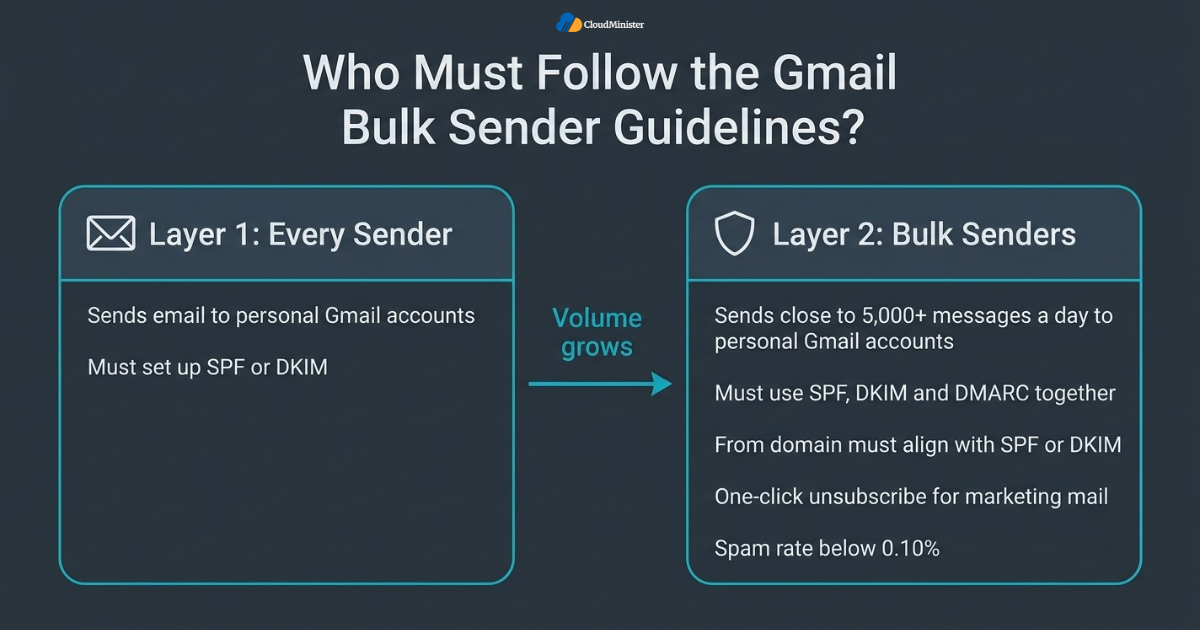
- A bulk sender is a sender that sends close to 5,000 messages or more to personal Gmail accounts within a 24 hour period.
- Messages from every subdomain of the same primary domain count together toward that daily total.
- Once Google treats a domain as a bulk sender, it stays in that category permanently, even if volume drops later.
- Under the Gmail Bulk Sender Guidelines, every sender, large or small, must set up SPF or DKIM for the sending domain.
- Bulk senders must set up SPF, DKIM and DMARC together, and the From domain must align with the SPF or DKIM domain.
- The Gmail Bulk Sender Guidelines apply to mail sent to personal Gmail accounts, such as addresses ending in gmail.com.
- Yahoo does not publish a fixed volume number and decides who is a bulk sender from signals such as content, IP address and DKIM domain.
- Companies using Google Workspace solutions or Zoho Email Solutions in India still publish their own DNS records, because no platform can guess every tool that sends mail for you.
- Ask your Web Hosting Company in India for a report of daily mail volume if you send through its servers.
Count your daily volume by primary domain across every tool you use, including your newsletter platform, CRM, billing system and support desk. This tells you whether the Gmail Bulk Sender Guidelines for bulk senders apply to you. Many teams discover they are much closer to the bulk threshold than they believed.
2. Why the Gmail Bulk Sender Guidelines Matter for Deliverability in 2026
Email authentication has moved from a best practice to a basic requirement. EasyDMARC’s 2026 adoption report found that 52.1 percent of the domains it studied now publish DMARC, up from 47.7 percent in 2025, yet only about 9 percent combine an enforcement policy with reporting. A separate 2026 report from Valimail shows that 78 percent of domains have a DMARC record while only 42 percent enforce it. These figures explain why the Gmail Bulk Sender Guidelines matter. Publishing a record is easy, but protecting your brand needs a real policy and regular monitoring. This is true on Google Workspace solutions, on Zoho Email Solutions in India and on any other platform.
- Under the Gmail Bulk Sender Guidelines, Gmail uses authentication results as one of the first signals when it decides between the inbox, the spam folder or rejection.
- Mail that fails checks can be delayed, filtered to spam or refused with an SMTP error.
- Spoofed mail that uses your domain damages your brand, and DMARC enforcement is the main defence against it.
- A clean setup based on the Gmail Bulk Sender Guidelines protects invoices, password resets and order updates, not only marketing campaigns.
- Microsoft has introduced similar requirements for high volume senders to Outlook.com, so strong authentication helps across providers.
- Following the Gmail Bulk Sender Guidelines early gives you time to fix problems before they affect revenue.
- Clear records make vendor reviews and customer security questionnaires much easier to answer, and a Web Hosting Company in India can keep them documented.
- Businesses on Affordable Google Workspace solutions or Zoho Email Solutions in India get a head start, because both platforms provide guided steps for DKIM and SPF.
Never publish a DMARC policy of p=reject before you have reviewed your aggregate reports. A strict policy applied too early can block your own invoices, password resets and partner mail that were sent through a forgotten tool.
3. Gmail Bulk Sender Guidelines and Yahoo Rules Compared
Gmail and Yahoo started from the same idea, but their wording differs in small ways. Google defines bulk senders by volume, while Yahoo decides by overall sending behaviour. Both want authentication, an easy way to leave a mailing list, and low complaint rates. The table below places the Gmail Bulk Sender Guidelines next to Yahoo’s rules so you can see the overlap at a glance. If you run mail through a Web Hosting Company in India, share this table with the support team so everyone works from the same list. Teams on Affordable Google Workspace solutions or Zoho Email Solutions for Business can also use it as a quick self check.
| Requirement | Gmail | Yahoo |
| Who is a bulk sender | Close to 5,000 or more messages a day to personal Gmail accounts | No published number, decided from sending behaviour |
| Authentication for all senders | SPF or DKIM | SPF or DKIM |
| Authentication for bulk senders | SPF, DKIM and DMARC | SPF, DKIM and DMARC |
| Minimum DMARC policy | p=none, with alignment | p=none, with DMARC passing |
| Spam rate | Below 0.10 percent, never 0.30 percent or higher | Below 0.3 percent |
| One-click unsubscribe | Required for marketing and subscribed mail | Required for marketing and subscribed mail |
| Unsubscribe processing time | Within 2 days | Within 2 days |
- Both providers want DMARC to pass, which means SPF or DKIM must pass and align with the visible From domain.
- Both accept p=none as the starting point, though quarantine and reject give stronger protection.
- Both prefer the List-Unsubscribe header for one-click unsubscribe, along with a visible link in the message body.
- Both expect very low complaint rates, and the Gmail Bulk Sender Guidelines point to the figure in Postmaster Tools as the one to track.
- Transactional mail such as password resets is exempt from the unsubscribe rule but still needs authentication.
- Yahoo’s bulk rules cover its consumer mail domains, and Yahoo Japan is a separate service that is not covered.
- Building to the stricter of the two rulebooks keeps one setup valid at both providers and keeps the Gmail Bulk Sender Guidelines in view.
- Teams that follow the Gmail Bulk Sender Guidelines closely usually meet Yahoo’s requirements with very little extra work.
- Whether you use Zoho Email Solutions for Business or Zoho Email Solutions in India, check your data centre region, since sender values differ.
Related Reading: Our guide to five secure email hosting providers for business
4. SPF Setup: Authorising the Servers That Can Send for You
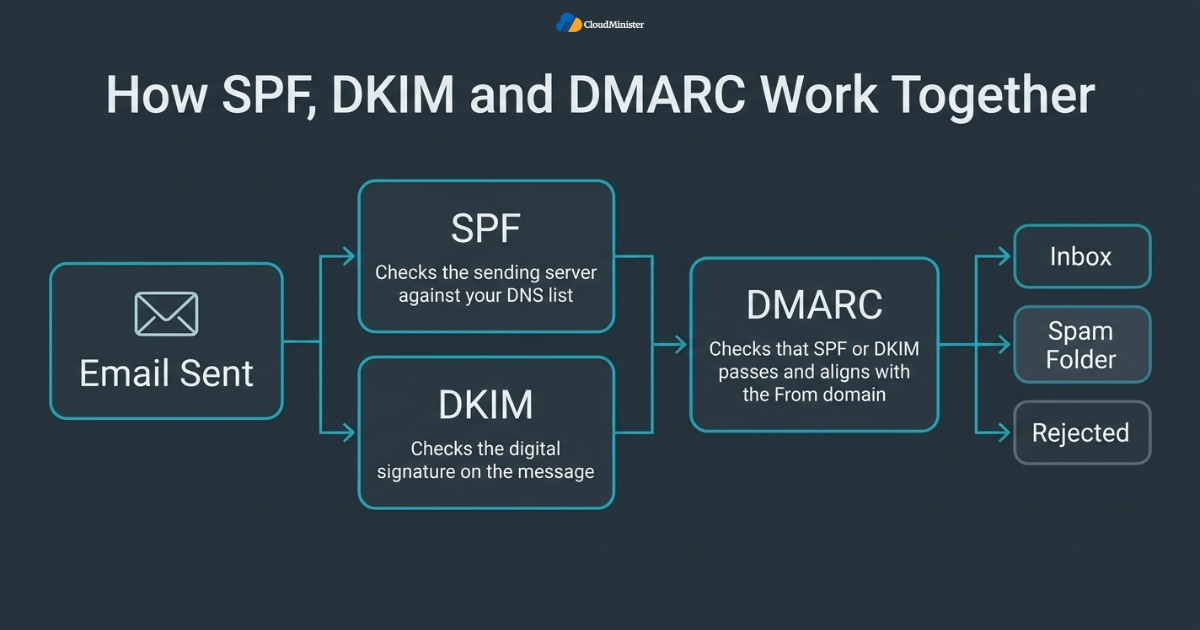
SPF, or Sender Policy Framework, is a DNS record that lists the servers and services allowed to send mail for your domain. When a message arrives, the receiving server compares the sending IP address with that list. SPF is the simplest of the three records, yet it is where many senders make mistakes, because every new tool that sends email on your behalf must be added. Done correctly, SPF is the first building block of a setup that follows the Gmail Bulk Sender Guidelines.
- Publish SPF as a TXT record on the root of your domain, starting with v=spf1.
- Keep only one SPF record per domain, because two records cause a permanent error.
- For Google Workspace solutions, a typical example is v=spf1 include:_spf.google.com ~all.
- For Zoho Email Solutions in India, the record for the India data centre is v=spf1 include:zoho.in ~all, while accounts on the US data centre use zoho.com instead.
- Add every other sender, such as your newsletter tool or billing system, using the include value that vendor provides.
- SPF allows a maximum of 10 DNS lookups, and going above that limit makes the record fail.
- Use ~all while testing and move to -all only when you are sure every genuine sender is listed.
- Remember that SPF checks the envelope sender, not the visible From address, so alignment still matters for DMARC.
- Providers of Affordable Google Workspace solutions and Zoho Email Solutions for Business publish current SPF values in their help pages, so always copy the latest value.
Keep a single SPF record and remove vendors you no longer use. Deleting old entries is a cleaner fix for the lookup limit than any flattening tool.
Related Reading: Our walkthrough on how to migrate Gmail to Zoho Mail
5. DKIM Setup: Signing Every Message So It Cannot Be Altered
DKIM, or DomainKeys Identified Mail, adds a digital signature to each outgoing message. The sending server signs the message with a private key, and the receiving server checks the signature against a public key published in your DNS. If the message was changed on the way, the check fails. Google expects bulk senders to use DKIM along with SPF, so the Gmail Bulk Sender Guidelines are not satisfied by SPF alone when you send at scale.
- Generate the DKIM key inside your mail platform, then publish the public key as a TXT record in DNS.
- In Google Workspace solutions, open the Admin console, go to the Gmail settings and use the Authenticate email section to generate the record.
- Google’s default selector is google, so the record name looks like google._domainkey.yourdomain.com.
- Use a 2048 bit key where your DNS provider allows it, since 1024 bit is the minimum Google accepts.
- Some DNS panels limit long TXT strings, so split the value into quoted chunks if your provider asks for it.
- In Zoho Email Solutions for Business, add a DKIM selector in the domain settings, publish the TXT record it gives you, and then verify it.
- Start signing only after the DNS record is live, otherwise messages may be signed with a key nobody can check.
- Make every third party sender sign with your own domain, so DKIM aligns with your From domain.
- Both Google Workspace solutions and Zoho Email Solutions in India let you verify DKIM from the admin panel, so confirm the status shows as active.
EXPERT NOTE
Rotate DKIM keys on a schedule, for example once or twice a year. Publish a new selector first, switch signing to it, and retire the old selector only after mail has been signed with the new one for several days.
Related Reading: Our Zoho Mail for business setup guide
6. DMARC Setup: Telling Receivers What to Do When Checks Fail
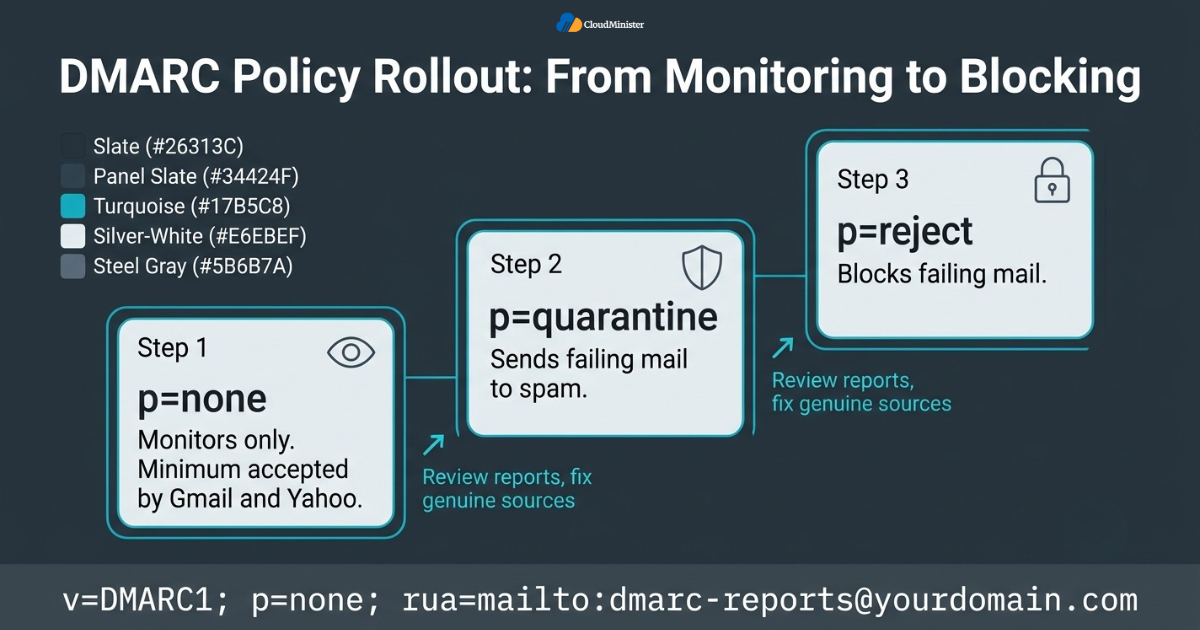
DMARC, or Domain-based Message Authentication, Reporting and Conformance, ties SPF and DKIM to the domain your recipients actually see in the From line. It tells receiving servers what to do with mail that fails, and it sends you reports about who is using your domain. Under the Gmail Bulk Sender Guidelines, bulk senders must publish a DMARC record, and the lowest accepted policy is p=none. Treat that minimum as a starting point and not as the finish line.
- Publish DMARC as a TXT record at _dmarc.yourdomain.com.
- A safe starting record is v=DMARC1; p=none; rua=mailto:[email protected].
- The p tag sets the policy: none only monitors, quarantine sends failures to spam, and reject blocks them.
- The rua tag sets where aggregate reports go. These XML reports show every source that sends mail as your domain.
- DMARC passes when SPF or DKIM passes and the passing domain aligns with the From domain.
- Move from none to quarantine, and then to reject, only after reports show that all genuine sources pass.
- The pct tag lets you apply a policy to a share of failing mail while you build confidence.
- Use the sp tag if subdomains need a different policy from the main domain.
- Read reports weekly at first with a DMARC reporting tool, because raw XML files are hard to read, and regular review keeps you aligned with the Gmail Bulk Sender Guidelines.
Stay at p=none for two to four weeks, fix every legitimate source, and then step up to quarantine. A rushed move to reject is the quickest way to block your own mail.
7. Setting Up Authentication on Google Workspace and Zoho Mail
Most small and mid-size businesses do not run their own mail servers. They use a hosted service, which makes authentication easier because the provider tells you exactly which records to add. Affordable Google Workspace solutions suit teams that want Gmail style mailboxes on their own domain, while Zoho Email Solutions for Business suit teams that want lower costs and strong admin controls. Both can meet the Gmail Bulk Sender Guidelines when SPF, DKIM and DMARC are set correctly.
- Google Workspace solutions give you a guided DKIM generator and the SPF value inside the Admin console.
- Zoho Email Solutions in India let you choose the India data centre and use the zoho.in values for SPF.
- Both Affordable Google Workspace solutions and Zoho Email Solutions in India need MX records pointed to their own mail servers before you start sending.
- Check which data centre your Zoho account uses, because the SPF include value and the MX hosts change with the region.
- DMARC is published in your own DNS zone, so you add it yourself on Google Workspace solutions and on Zoho Email Solutions for Business alike.
- If you send newsletters from a separate tool, add that tool to SPF and set up DKIM for it as well.
- Use a separate subdomain for campaigns, for example news.yourdomain.com, so bulk reputation stays apart from daily business mail.
- A trusted Web Hosting Company in India can manage the DNS side so records are added correctly and kept current.
- Affordable Google Workspace solutions and Zoho Email Solutions for Business both support aliases and groups, so list every alias that sends mail before you finalise SPF.
Related Reading: Our comparison of Zoho Workplace and Google Workspace
Set Up Zoho Mail with SPF, DKIM & DMARC Done Right
Get professional business email on Zoho with every authentication record configured correctly by our experts. New clients get a free consultation to plan a setup that meets Gmail and Yahoo sender requirements.
8. One-Click Unsubscribe, Spam Rate and Sender Reputation
Authentication proves who you are, but your recipients decide whether you stay in the inbox. The Gmail Bulk Sender Guidelines ask bulk senders to make leaving a list easy and to keep complaints very low. Google asks senders to keep the reported spam rate in Postmaster Tools below 0.10 percent and to avoid ever reaching 0.30 percent. Yahoo asks bulk senders to stay below 0.3 percent. A sender who respects the unsubscribe request and mails only interested people rarely has a problem here.
- Add the List-Unsubscribe header and the List-Unsubscribe-Post: List-Unsubscribe=One-Click header, as described in RFC 8058.
- Make sure your DKIM signature covers both unsubscribe headers, because one-click unsubscribe requires a valid signature.
- Keep a clear, visible unsubscribe link in the body of every marketing message as well.
- Process unsubscribe requests within 2 days, since the Gmail Bulk Sender Guidelines expect quick handling, and never email that address again.
- The one-click rule applies to marketing and subscribed mail, not to transactional messages.
- Send only to people who opted in, and remove inactive addresses on a regular schedule.
- Check Postmaster Tools every week for spam rate, domain reputation and authentication results.
- Keep sender names and subject lines honest, because misleading subjects are a common cause of complaints.
- Teams on Google Workspace solutions can usually add the unsubscribe header inside their campaign tool rather than the mailbox itself.
A sudden rise in spam rate usually points to one campaign, one list or one new tool. Pause that source first and investigate, instead of changing authentication records that were working.
9. Infrastructure Rules: TLS, Reverse DNS and Message Format
Records in DNS are only one part of the Gmail Bulk Sender Guidelines. Google also expects sound mail infrastructure from the sending servers themselves. A dependable Web Hosting Company in India can supply clean IP addresses, correct reverse DNS and round the clock monitoring, which removes a whole group of delivery problems before they start. If you run your own mail server, these checks are your responsibility, so go through each one before your next campaign.
- Sending IP addresses need valid forward and reverse DNS, so the IP resolves to a hostname and that hostname resolves back to the same IP.
- The Gmail Bulk Sender Guidelines also ask you to use a TLS connection when transmitting email between servers.
- Format messages according to the Internet Message Format standard, RFC 5322, which the Gmail Bulk Sender Guidelines list among the basic technical rules.
- Do not use gmail.com addresses in the From header when you send bulk mail from your own servers.
- If you forward mail or run mailing lists, add ARC headers so authentication results survive the forwarding step.
- Warm up new IP addresses gradually, because a sudden jump in volume from a new IP can hurt reputation.
- Avoid public URL shorteners and keep links pointing to your own domain.
- Keep servers patched and monitored, a task a managed Web Hosting Company in India can handle around the clock, so a compromised account cannot send spam in your name.
- Ask your Web Hosting Company in India to confirm IP reputation and reverse DNS before you launch a campaign.
Protect every sending account with a strong password and two step verification. A single compromised mailbox can send thousands of spam messages, push your spam rate up within hours and damage your domain reputation for weeks.
10. Testing, Monitoring and Common Mistakes to Avoid
Setup is not finished when the records are published. Test every record, send sample messages to a Gmail address, and read the original message headers to confirm that SPF, DKIM and DMARC all show a pass. Then keep watching, because new tools, new staff and DNS edits can quietly break a good setup. Most failures against the Gmail Bulk Sender Guidelines come from a short list of repeat mistakes, and a regular monthly check catches nearly all of them.
- In Gmail, open a test message, choose Show original, and look for a pass result for SPF, DKIM and DMARC.
- Use Google Postmaster Tools to watch spam rate, reputation and authentication over time, as Google itself recommends.
- Read DMARC aggregate reports weekly and fix any legitimate source that fails.
- Mistake: two SPF records on the same domain instead of one combined record.
- Mistake: going over 10 DNS lookups after adding many vendors.
- Mistake: DKIM signed with the vendor’s domain, so alignment fails.
- Mistake: moving to p=reject without reading reports first.
- Mistake: forgetting subdomains, parked domains and old marketing domains that can still be spoofed.
- Mistake: changing DNS provider or mail platform without copying every record across, which a Web Hosting Company in India can help you avoid by exporting the full zone first.
11. Choosing the Right Hosting and Email Partner
Not every provider makes compliance easy. A good partner explains each record, helps you test it and stays available when something breaks. When you compare options, look at how the provider handles DNS, mail platforms, monitoring and support, and not only at price. Affordable Google Workspace solutions look attractive on cost, but support and DNS help matter just as much. A Web Hosting Company in India that also manages email can place DNS, mailboxes and monitoring under one roof, which lowers the chance that a record is missed. That is useful for any team trying to follow the Gmail Bulk Sender Guidelines without hiring a full time mail administrator.
- Ask whether SPF, DKIM and DMARC changes are handled by the provider or left to you.
- Check that the plan includes Zoho Email Solutions for Business or Affordable Google Workspace solutions with real admin support.
- A Web Hosting Company in India with local data centres suits teams whose customers or regulations need data to stay in the country.
- Ask for written support hours, escalation paths and response times.
- Confirm that mailboxes are backed up and that restores are tested.
- Prefer a Web Hosting Company in India that publishes clear documentation on authentication setup.
- Ask about migration help if you are moving mailboxes from another service to Zoho Email Solutions for Business or Google Workspace solutions.
- Compare Zoho Email Solutions in India and Google Workspace solutions on cost, storage, admin tools and support, not on brand name alone.
12. Comparing Google Workspace and Zoho Mail for Compliant Sending
Choosing a platform is easier when you compare real needs. Google Workspace solutions are popular with teams that already live inside Gmail, Drive and Meet, and Affordable Google Workspace solutions can keep costs under control for growing teams. Zoho Email Solutions in India attract businesses that want a lower price, strong privacy controls and a local data centre, while Zoho Email Solutions for Business bundle mail with collaboration apps. Whichever you pick, the Gmail Bulk Sender Guidelines are met by the records you publish, not by the logo on the login page.
- Google Workspace solutions include a clean admin console where SPF, DKIM and MX records are explained step by step.
- Zoho Email Solutions in India show the exact SPF include value for the India data centre inside the domain settings.
- Affordable Google Workspace solutions work well for teams that need familiar Gmail features and shared calendars.
- Zoho Email Solutions for Business include mail, calendar, chat and document tools in one subscription.
- Both options let you add a campaign tool to SPF and sign its mail with your own DKIM selector, which keeps the Gmail Bulk Sender Guidelines satisfied.
- Compare mailbox storage, sending limits per user and admin controls before you choose, because Google Workspace solutions and Zoho Email Solutions in India differ here.
- Check how each plan handles shared mailboxes, aliases and group addresses, since those are common sources of forgotten senders, and ask a Web Hosting Company in India to audit them.
- Ask each vendor for its current sending limits in writing, because limits can change and a campaign that breaks a limit can raise your spam rate.
- Review support hours and escalation paths for Affordable Google Workspace solutions and Zoho Email Solutions for Business before you sign a plan.
Run a small test campaign of a few hundred messages to engaged subscribers before a full send. Check the headers, the unsubscribe link and the spam rate in Postmaster Tools, and only then scale up.
13. A Practical 30 Day Plan to Follow the Gmail Bulk Sender Guidelines
Reading about authentication is easy, and acting on it is harder. This plan breaks the work into four weeks that most small teams can follow without outside help. Treat it as a living checklist for the Gmail Bulk Sender Guidelines, and repeat it each quarter, because tools, vendors and volumes change over time. A Web Hosting Company in India that offers managed DNS can take over several of these tasks if your team is short on time.
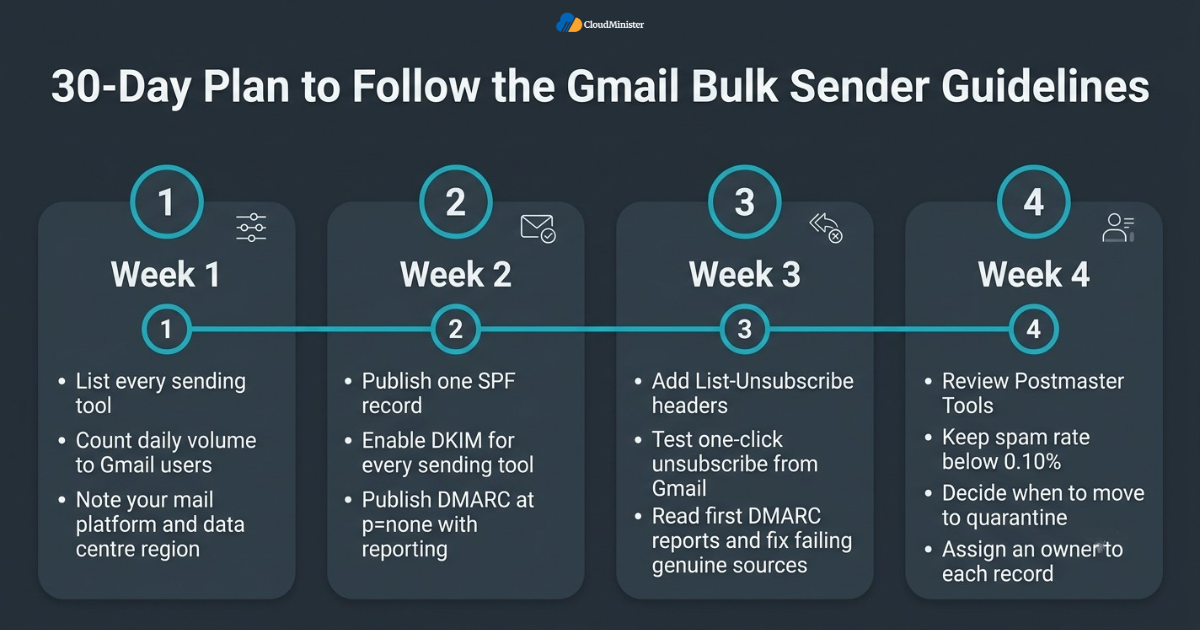
- Week one: list every tool that sends mail from your domain and count the daily volume sent to Gmail users, as the Gmail Bulk Sender Guidelines require.
- Week one: confirm which mailbox platform you use, whether Google Workspace solutions or Zoho Email Solutions in India, and note its data centre region.
- Week two: publish one clean SPF record and enable DKIM for every sending tool, or ask your Web Hosting Company in India to publish them.
- Week two: publish DMARC at p=none with a reporting address and connect a report reader.
- Week three: add the List-Unsubscribe headers and test one-click unsubscribe from a Gmail account.
- Week three: read the first DMARC reports and fix every genuine source that fails.
- Week four: review Postmaster Tools, check that the spam rate stays below 0.10 percent and decide when to move to quarantine.
- Week four: write down the owner for each record, so one named person approves every future DNS change.
- Repeat the plan every quarter and compare Affordable Google Workspace solutions and Zoho Email Solutions for Business again when your needs change.
Checklist: Gmail Bulk Sender Guidelines Readiness Review
- Daily volume counted by primary domain across every sending tool, as the Gmail Bulk Sender Guidelines require for bulk status.
- SPF published as one record, with fewer than 10 DNS lookups.
- DKIM enabled with a 2048 bit key where possible, and aligned with your From domain.
- DMARC record published with reporting turned on, starting at p=none.
- One-click unsubscribe added with the List-Unsubscribe and List-Unsubscribe-Post headers.
- Visible unsubscribe link in every marketing message, with requests honoured within 2 days.
- Spam rate in Postmaster Tools kept below 0.10 percent.
- Forward and reverse DNS, TLS and RFC 5322 formatting confirmed for sending servers.
- Test message checked in Gmail and the headers show SPF, DKIM and DMARC pass.
- Monthly review booked, and the Gmail Bulk Sender Guidelines page checked for updates.
Key Takeaways
- The Gmail Bulk Sender Guidelines apply to every sender, and the stricter layer applies to anyone sending close to 5,000 or more messages a day to personal Gmail accounts.
- Bulk senders need SPF, DKIM and DMARC, and the From domain must align with SPF or DKIM.
- Yahoo follows a very similar rulebook, so one clean setup works at both providers.
- One-click unsubscribe, a visible unsubscribe link and a spam rate below 0.10 percent are part of the rules.
- Start DMARC at p=none, read the reports, and move to quarantine and reject only when genuine mail passes.
- Google Workspace solutions and Zoho Email Solutions in India both give clear steps for SPF and DKIM.
- Affordable Google Workspace solutions and Zoho Email Solutions for Business can both support compliant sending when DNS is set up properly.
- A reliable Web Hosting Company in India with email and DNS support makes ongoing compliance easier to maintain.
- Compare Affordable Google Workspace solutions, Zoho Email Solutions for Business and Zoho Email Solutions in India on support and DNS help, not only on price.
Need Help Getting Your Email Compliant?
Talk to the CloudMinister team about SPF, DKIM, DMARC and one-click unsubscribe setup. We offer a free consultation to all new clients, so you can get expert guidance before you commit.
Conclusion
Throughout this guide one pattern holds, whatever the size of your business. Compliance with the Gmail Bulk Sender Guidelines comes from preparation, not from a single clever tool. Publish accurate SPF, sign with DKIM, start DMARC at p=none, add one-click unsubscribe, and keep your spam rate low. Then test, watch the reports, and tighten your policy step by step. Teams that follow the Gmail Bulk Sender Guidelines this way protect both their inbox placement and their brand. Platforms such as Affordable Google Workspace solutions and Zoho Email Solutions for Business make the records easier to publish, but they cannot replace regular checks.
A migration or a new tool can change your records overnight, so review them every month. If you want a partner to handle domains, mailboxes and DNS together, look for a Web Hosting Company in India that supports Affordable Google Workspace solutions and Zoho Email Solutions for Business with clear documentation and fast support. Keep the Gmail Bulk Sender Guidelines bookmarked, because providers update their rules from time to time.
Frequently Asked Questions
Who has to follow the Gmail Bulk Sender Guidelines?
Everyone who sends email to personal Gmail accounts must follow the basic rules, including SPF or DKIM authentication and a low spam rate. Senders who reach close to 5,000 messages a day to Gmail users must also use DMARC, one-click unsubscribe and aligned authentication under the Gmail Bulk Sender Guidelines.
Do I need SPF, DKIM and DMARC all together?
Bulk senders do. Google asks for SPF, DKIM and DMARC, and DMARC passes only when SPF or DKIM passes and aligns with the From domain. Smaller senders must at least use SPF or DKIM, but setting up all three is the safer choice.
Is p=none enough for DMARC?
It meets the minimum for both Gmail and Yahoo, but it only monitors and does not block spoofed mail. Move to quarantine and then reject once your reports show that all genuine senders pass.
What spam rate does Gmail expect?
Google asks senders to keep the spam rate shown in Postmaster Tools below 0.10 percent and to avoid ever reaching 0.30 percent. Yahoo asks bulk senders to stay below 0.3 percent.
Does one-click unsubscribe apply to every email?
No. It applies to marketing and subscribed messages. Transactional messages such as password resets and order confirmations are exempt, although they still need proper authentication.
Can Google Workspace solutions help me comply?
Yes. Google Workspace solutions provide a DKIM generator and a ready SPF value in the Admin console. You still publish DMARC in your own DNS and add every outside sending tool to your records.
Are Zoho Email Solutions in India suitable for bulk sending rules?
Yes, when configured correctly. Zoho Email Solutions in India let you pick the India data centre and use the matching SPF and DKIM values. Add DMARC and one-click unsubscribe headers for any campaign tool you connect.
Why should I pick a Web Hosting Company in India for email setup?
A Web Hosting Company in India that manages DNS and mail can add records correctly, monitor deliverability and offer local support in your time zone. Always confirm in writing which tasks belong to the provider and which stay with your team.
Where can I find Affordable Google Workspace solutions with proper email setup?
Affordable Google Workspace solutions are available through authorised partners that also handle domain and DNS setup. Ask the partner to publish SPF, DKIM and DMARC and to explain how each record supports the Gmail Bulk Sender Guidelines.
Which is better for compliance, Google Workspace solutions or Zoho Email Solutions for Business?
Neither platform is compliant on its own. Google Workspace solutions and Zoho Email Solutions for Business both support SPF, DKIM and DMARC, so the result depends on how carefully you publish each record and configure every tool you add.
Do Zoho Email Solutions in India deliver well to Gmail and Yahoo users?
Yes, when authentication and unsubscribe rules are followed. Zoho Email Solutions in India deliver to Gmail and Yahoo like any other mail service, so keep your DNS records accurate and stay within the Gmail Bulk Sender Guidelines.
How often should I review my email authentication records?
Review them every month, and also when you add a sending tool, change your mail platform or move servers. A Web Hosting Company in India that offers managed DNS can set reminders, and a short monthly check keeps you aligned with the Gmail Bulk Sender Guidelines.

Ajay Singh Raghav is a Senior Linux System Administrator at CloudMinister Technologies, where he has spent over 4 years installing, configuring, maintaining, and troubleshooting Linux servers for hosting and cloud environments. He specializes in AWS cloud computing alongside core Linux server administration, with hands-on expertise across server management, backup and restore systems, and cPanel-based hosting environments. His day-to-day experience keeping production servers stable and secure gives him a practical, ground-level understanding of the infrastructure he writes about.