Most outages don’t start with a dramatic crash. They start quietly, with one node responding a bit slower than usual, and nobody catching the signal in time. High availability infrastructure exists to close that gap before a customer ever notices. Automated Failover is the mechanism that closes it, and health checks are the sensors that tell it when to act. This guide walks through how Automated Failover works in 2026, how health checks detect failure in the first place, and why a layered detection strategy consistently beats a single monitoring script running alone.
Every infrastructure team eventually runs into the same uncomfortable moment. A service goes down, the incident timeline gets pulled up, and someone notices a gap of several minutes between when the failure actually happened and when a human first noticed it. That gap is where downtime quietly turns expensive. It is also exactly the problem Automated Failover was built to solve, since it removes the dependency on a person being awake, alert, and available to react the moment something breaks.
At its core, Automated Failover is a system design pattern where a standby resource takes over the moment a health check confirms the primary resource has stopped working properly. This could be a secondary server, a replica database, or a duplicate application instance sitting ready in the background. The switch happens without anyone needing to run a manual runbook, which is what makes Automated Failover such a valuable piece of any high availability setup, especially for teams that cannot afford to have someone monitoring dashboards around the clock.
That said, Automated Failover only works as well as the health checks feeding it. A shallow check that simply confirms a server is powered on can miss real failures happening one layer deeper, while a well tuned check gives the system an accurate signal to act on. This guide breaks down how that detection process actually works, the different layers where Automated Failover gets applied, and the common mistakes teams should watch out for when relying on it in production.
Table of Contents
- What This Mechanism Is and Why It Matters
- Why Teams Need This in Their High Availability Strategy
- How Health Checks Actually Detect a Failure Before the Switch Happens
- Mechanisms Every Team Should Understand
- How to Calculate Whether Your Setup Actually Works
- Building a Layered Detection Strategy Around This Mechanism
- Common Mistakes Teams Make When Configuring It
- Governance and Operational Considerations
- Measuring Whether It Is Actually Reducing Downtime
- Choosing the Right Infrastructure Partner for This Strategy
- Key Takeaways
- Conclusion
- Frequently Asked Questions
1. What Is Automated Failover and Why Does It Matter
For Indian founders and IT managers, this conversation usually starts the same way, often after comparing notes with a provider of Server Management Services in India. Someone opens the incident timeline, sees a five minute gap between when a service actually failed and when a human first noticed, and asks whether Automated Failover would have closed that gap.
Automated Failover is a system design pattern where a standby resource, a secondary node, a replica database, or a duplicate application instance, takes over automatically the moment a health check confirms the primary resource is no longer healthy. Unlike a manual failover process, which depends on a human being awake, paying attention, and available to run a runbook, this automated mechanism removes human reaction time from the equation entirely.
- The mechanism applies the moment a predefined health check condition is met, so no manual intervention is required for it to start working, which makes it one of the simplest levers inside any high availability architecture.
- Automated Failover covers application and infrastructure layer failures. Data consistency across the failover event still needs separate engineering attention, which is why a broader, properly designed strategy still matters alongside the raw switching mechanism.
- Detection speed scales with health check frequency, so a check running every five seconds triggers a switch meaningfully faster than one running every sixty seconds.
- The mechanism can be configured for active passive setups or active active setups, which matters for teams managing budget and redundancy carefully.
- Teams designing infrastructure correctly from day one tend to get more value out of Automated Failover than teams that bolt it onto an architecture that was never built with redundancy in mind, which is one more reason a properly scoped DevOps Services & Solutions engagement matters before any high availability commitment is made.
- Small teams without an in house platform engineer often lean on a Server Management Company to design the initial failover topology, since getting the standby architecture right the first time avoids a costly redesign later.
- A well structured DevOps Services & Solutions engagement typically documents the failover architecture alongside the deployment pipeline, so the two are never treated as separate concerns during an incident.
This failover mechanism changes which server or node receives production traffic as part of your broader high availability setup, not your access controls, but a poorly planned failover path can quietly route traffic to a standby node that never received the latest security patches. Failover targets should go through the same patching and hardening workflow as any other production server, because a compromised standby that gets activated during an incident is far more expensive to clean up than approving its configuration carefully the first time.
2. Why Teams Need Automated Failover in Their High Availability Strategy
Many IT teams first weigh this decision while already researching a Web Hosting Company in India for their broader production needs, and a good Web Hosting Company in India will usually raise the topic early in that conversation, since a capable Web Hosting Company in India rarely separates uptime advice from architecture advice. For teams without a dedicated site reliability function, Automated Failover is often the single fastest way to cut a meaningful percentage off yearly downtime without rewriting application code.
- Industry research shows that median enterprise outage costs have climbed sharply, with one 2026 industry survey citing a median cost near nine thousand dollars per minute for enterprises with more than a thousand employees, a figure that makes the case for automated recovery on its own, according to a widely cited analysis of ITIC’s 2025 downtime survey data.
- Without a structured approach to failure detection, different teams inside the same company commonly build inconsistent monitoring, producing blind spots where the switch never triggers because no health check was watching that particular service.
- A disciplined Automated Failover strategy centralizes health check ownership at the platform or infrastructure team level, sometimes in partnership with a Server Management Company, rather than leaving detection logic to whichever engineer happened to deploy a given service.
- For teams comparing this against manual, human driven failover processes, evaluating how DevOps Consulting Services structure incident response helps clarify how an automated switch differs from a documented but manually executed runbook.
- Teams that already run on a well matched Server Management Services in India engagement tend to see Automated Failover pay off faster, since the mechanism only saves uptime when health checks genuinely reflect real service health, and a mismatched monitoring setup tends to undercut the entire strategy before it starts.
Before enabling this mechanism across an entire fleet, test it against one service first, ideally the least business critical service already running in production, and involve a Server Management Company early if one already manages part of the environment. Teams that validate real failover behavior before relying on it in production consistently avoid the most common mistake, which is trusting a path that has never actually been triggered end to end.
- A growing number of Indian startups now bring in DevOps Consulting Services specifically to design the health check and failover layer before launch, rather than retrofitting it after the first outage teaches an expensive lesson.
- Founders comparing an internal build against outside help often find that a Web Hosting Company in India already has the failover tooling and monitoring stack in place, which shortens the timeline considerably compared with building the same capability from scratch.
- Teams that delay engaging DevOps Consulting Services until after a major outage tend to pay for the same lessons twice, once in lost revenue and once in the rushed engineering work that follows.
- A Server Management Company that already services several similar workloads can often point to real failure data instead of generic best practice advice, which makes the initial design conversation considerably more useful.
- Comparing notes with peers who already use Server Management Services in India for a similar stack is one of the fastest ways to shortlist a provider worth a deeper conversation.
- DevOps Consulting Services engagements that begin with a joint architecture review, rather than jumping straight into tooling recommendations, tend to produce failover designs that actually match how the business operates.
Related Reading: Linux log files
3. How Health Checks Actually Detect a Failure Before the Switch Happens
Before working through the detailed mechanics in this guide, it helps to understand that this switching mechanism never acts on its own. It acts because a health check told it to. Health checks are the sensing layer, and Automated Failover is the response layer, and the entire discipline of high availability infrastructure depends on both layers being tuned correctly together.
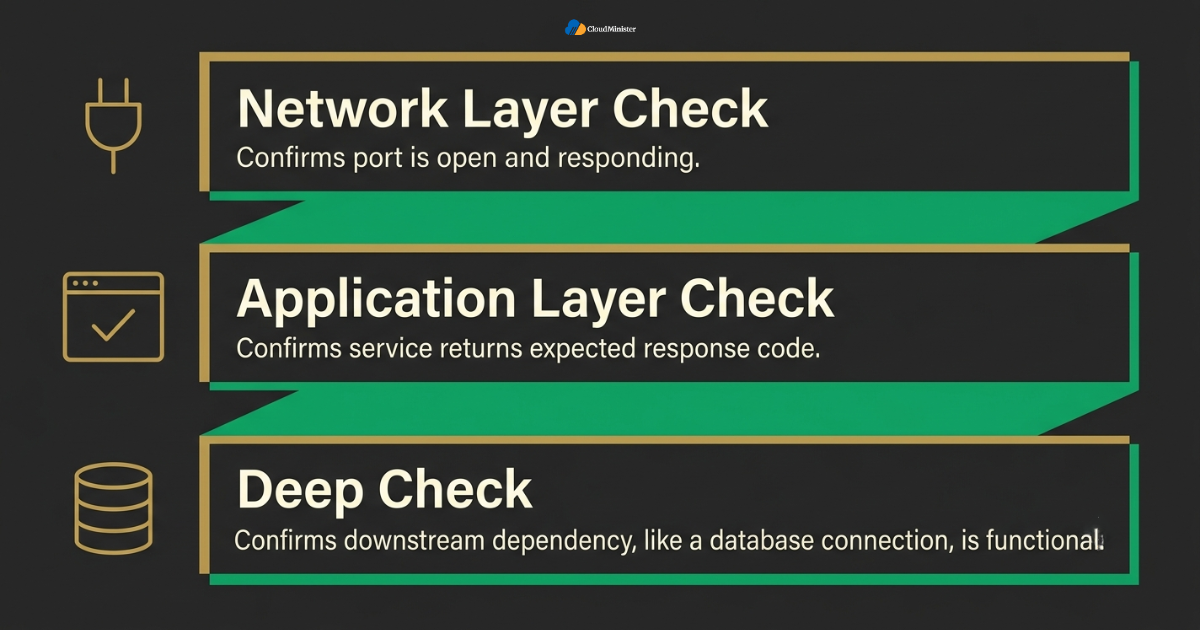
- Health checks typically run at one of three layers, network layer checks that confirm a port is open and responding, application layer checks that confirm a service returns the expected response code, and deep checks that confirm a downstream dependency like a database connection is actually functional.
- A shallow health check, one that only confirms a server is powered on and listening on a port, can report healthy status even while the application behind that port is completely unable to serve real requests, which means the failover never triggers when it actually should.
- A deep health check, one that exercises the real code path a customer would hit, gives the response mechanism a genuinely accurate signal, though it also carries more risk of false positives if a downstream dependency is briefly slow rather than actually failed.
- Health check frequency and failure threshold both matter together. A check that fires every two seconds but requires five consecutive failures before declaring a node unhealthy behaves very differently from one that fires every thirty seconds and requires only one failure, and the failover mechanism inherits whichever timing profile the health check layer is configured with.
- Running a false positive audit before relying on this mechanism in production, a step most established Server Management Services in India providers will help set up, confirms exactly which health checks are tuned correctly and which ones will trigger unnecessary events under normal load spikes.
- Teams building out their high availability footprint for the first time often benefit from running health checks in observation only mode for two to four weeks before wiring them to the failover system, simply to gather enough signal data to set thresholds correctly, since an immature monitoring environment rarely has stable enough baselines yet.
- Providers offering Server Management Services in India typically maintain historical baseline data across many similar workloads, which shortens this observation period considerably compared with a team starting from zero signal.
- Teams that outsource this tuning work to DevOps Consulting Services often see fewer false positive incidents in the first quarter after go live, simply because threshold selection benefits from pattern recognition across many prior deployments.
- A Web Hosting Company in India managing several accounts on the same underlying platform can often reuse tuned health check templates across clients, which is a meaningful head start compared with tuning every threshold from scratch.
4. Automated Failover Mechanisms Every Team Should Understand
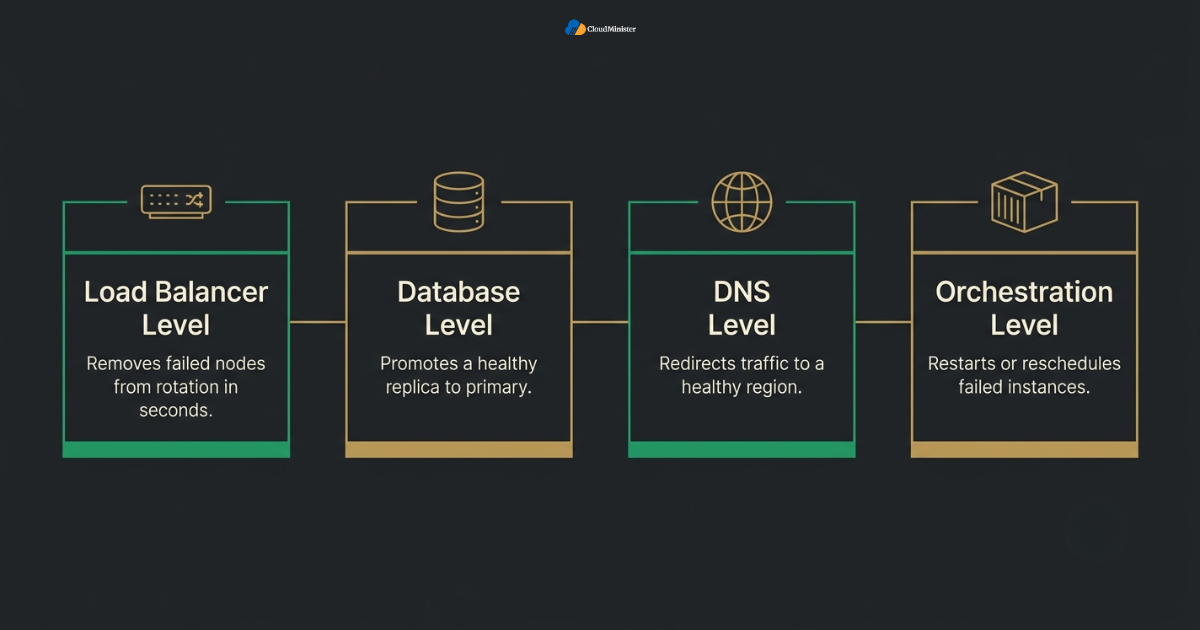
Below is a breakdown of how Automated Failover actually gets implemented across the layers that matter for a real production environment, and how each layer connects back to the health checks feeding it. Teams working with DevOps Services & Solutions often see all four layers documented together in a single architecture diagram, which makes the interaction between layers far easier to reason about during an actual incident.
4.1 Load Balancer Level Failover
- A load balancer sitting in front of multiple application servers continuously runs health checks against each backend node and automatically removes any node that fails its check from the active rotation, which is Automated Failover operating at the traffic distribution layer.
- This form of automated recovery typically responds within seconds of a failed health check, since the load balancer itself is already in the traffic path and does not need to wait for a separate orchestration system to notice the failure.
- The load balancer approach works best for stateless application tiers, since traffic can shift to a healthy node without needing to carry session state along with it, and the switch at this layer adds essentially no complexity to a well designed stateless architecture.
- Sticky sessions complicate this layer, since a user tied to a specific backend node through a session cookie may still experience a dropped connection even after the load balancer correctly detects and routes around the failed node.
- Health check paths configured on the load balancer should hit a real application endpoint rather than a static file, since a static file check can report healthy long after the actual application logic behind it has stopped functioning correctly.
4.2 Database Level Failover
- Database replication combined with a monitoring agent forms the backbone of database level Automated Failover, where a replica gets promoted to primary the moment health checks confirm the original primary is unreachable or unresponsive.
- This layer carries more risk than the load balancer layer, since a poorly coordinated promotion can create a split brain scenario where two nodes both believe they are the primary and accept conflicting writes.
- Quorum based consensus, where a majority of monitoring nodes must agree a primary has failed before a replica gets promoted, meaningfully reduces the split brain risk compared with a single monitoring node making the call alone.
- Replication lag matters enormously here, since promoting a replica that was several seconds behind the original primary means genuine, measurable data loss at the exact moment the automated switch activates.
- Teams running managed database services often get this layer of Automated Failover configured by default, while teams running self hosted databases need to build and continuously test the promotion logic themselves, a task many teams hand to a Server Management Company rather than maintaining in house.
- A Server Management Company that already understands a specific database engine’s replication quirks can usually shorten the promotion window considerably compared with a generic runbook applied blindly across engines.
4.3 DNS Level Failover
- DNS based failover works by health checking an endpoint and updating DNS records to point traffic toward a healthy region or data center when the primary location fails its check.
- This layer of Automated Failover is inherently slower than load balancer level failover, since DNS changes depend on time to live settings and client side caching, meaning some users continue hitting the failed endpoint until their local cache expires.
- Lowering the time to live value on health check dependent DNS records before an incident happens, rather than during one, is the single most effective way to make this layer meaningfully faster when it actually gets used.
- Multi region failover through DNS suits disaster recovery scenarios, where an entire data center or cloud region becomes unavailable, more than it suits routine single server failures within one region.
- Combining DNS level failover with a lower layer mechanism, rather than relying on DNS alone, gives a team a genuinely layered high availability posture instead of a single point of detection.
4.4 Orchestration Level Failover
- Container orchestration platforms run their own health check loops against every running instance of a service and automatically restart or reschedule any instance that fails, which counts as Automated Failover operating at the workload scheduling layer.
- This layer handles the common case where a single process crashes or hangs without an entire server going down, and it typically recovers faster than infrastructure level failover because it does not need to wait for external monitoring to notice.
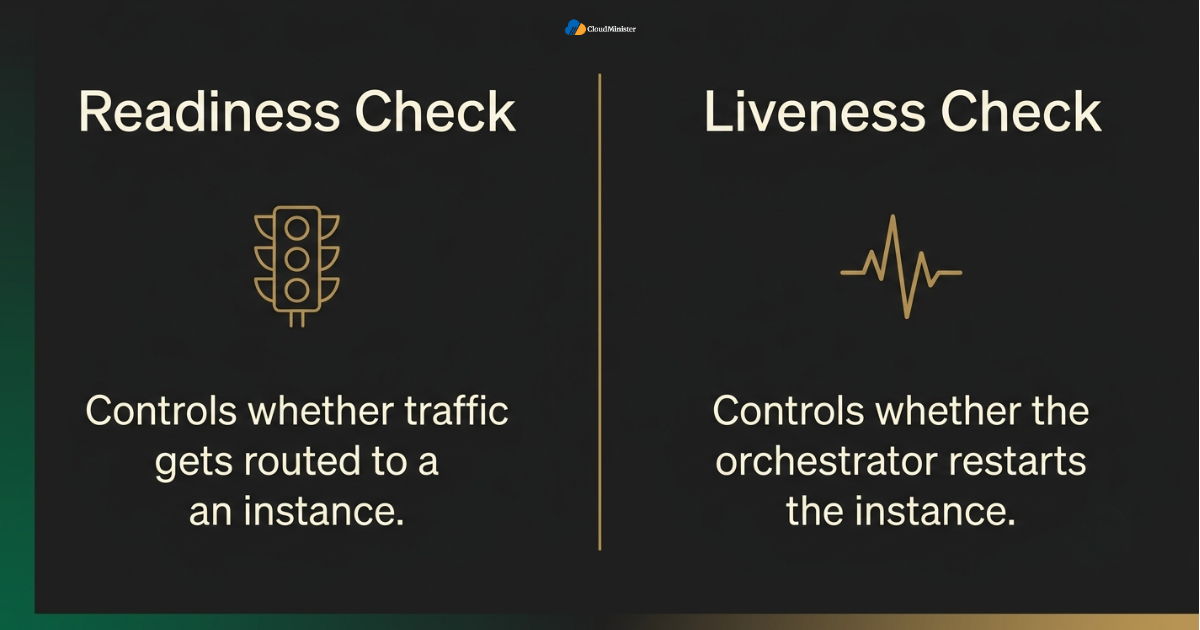
- Readiness checks and liveness checks serve different purposes here, a readiness check controls whether traffic gets routed to an instance at all, while a liveness check controls whether the orchestrator restarts that instance.
- Misconfigured liveness checks are a common source of unnecessary automated restarts, where a slow but otherwise healthy instance gets recycled repeatedly because the check threshold was set too aggressively for the workload’s actual response time profile.
- Teams running containerized workloads under a broader DevOps Services & Solutions engagement typically find that orchestration level recovery handles the majority of everyday failures long before load balancer or DNS level Automated Failover ever needs to engage.
- Reviewing readiness and liveness probe definitions during a DevOps Services & Solutions engagement is one of the highest leverage changes a team can make, since a single misconfigured probe can quietly undermine every other layer of the failover stack.
Related Reading: fully managed hosting guide
Let Experts Handle Your Failover Configuration
Getting health checks and Automated Failover tuned correctly across every layer takes ongoing effort most teams do not have time for. Our Server Management Services take care of the setup, testing, and monitoring so your infrastructure stays reliable without adding to your team’s workload.
5. How to Calculate Whether Your Automated Failover Setup Actually Works
Configuring Automated Failover is not a matter of enabling a checkbox and assuming the mechanism will behave correctly during a real incident. It depends entirely on whether the underlying health checks are tuned to match how a given service actually fails.
- Start by pulling several months of incident history for the service in question, since this kind of automation only earns its place when a team can show how often a real health check failure would have triggered a genuinely correct response.
- Calculate the detection window for the current health check configuration, meaning the time between when a service actually stops functioning and when the health check would report it unhealthy, then compare that window against the acceptable downtime target for that service.
- Factor in the blast radius of a false positive, a question worth raising with a provider of Server Management Services in India who already sees this pattern across many accounts. If the switch triggers too aggressively on a service with normal, brief latency spikes, the mechanism can cause more disruption than the failure it was meant to prevent.
- Multiply the detection delay difference by the frequency of real incidents and by the average cost of a minute of downtime for that specific workload, since small differences in health check timing compound significantly at scale across a production environment, and a well documented incident history makes this math far easier to trust.
- Document the assumptions behind the failover design, including expected traffic patterns, known dependency behavior, and how the setup fits the team’s current infrastructure strategy, so Automated Failover can be revisited with context later.
- Teams working with Server Management Services in India often get this documentation produced as a standard deliverable, which saves considerable internal effort compared with building the same audit trail from a blank document.
- Organizations running a formal DevOps Services & Solutions program typically fold this calculation into their existing sprint cadence, rather than treating it as a separate, easily postponed project.
The pattern that separates a genuinely effective high availability strategy from a partially tested one is rehearsal rather than configuration alone. A team that regularly runs failure injection drills against its failover paths, confirms replicas promote cleanly, confirms load balancers route around failed nodes correctly, and confirms DNS updates propagate as expected, typically ends up with a far more reliable system than a team that configured Automated Failover once and never tested it under real conditions.
6. Building a Layered Detection Strategy Around Automated Failover
Even a well configured switching mechanism can underperform if it sits inside a monitoring strategy with no supporting structure around it. Building a layered approach across the whole of a team’s infrastructure matters as much as picking the right failover mechanism in the first place.
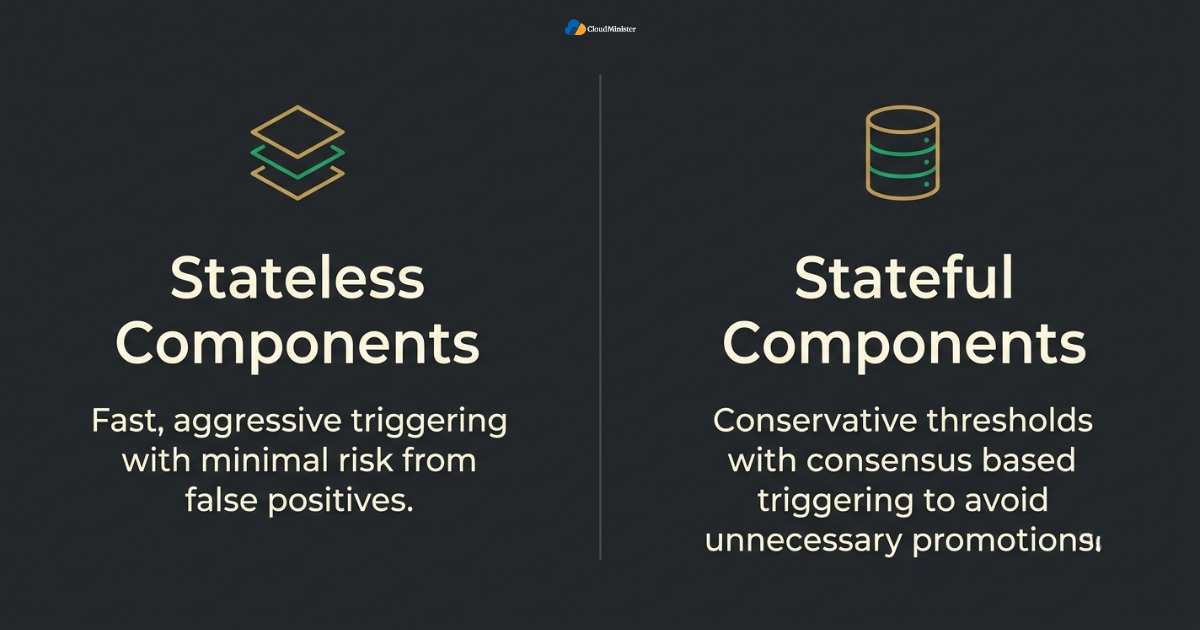
- Reserve aggressive, fast triggering recovery specifically for stateless, easily replaceable components, since that category carries the least risk if a health check occasionally produces a false positive.
- Apply more conservative thresholds and consensus based triggering to failover paths covering stateful components like databases, capturing genuine protection without risking unnecessary promotions during brief network blips.
- Leave genuinely ambiguous failure conditions, the kind where automated systems cannot confidently distinguish a real outage from a temporary slowdown, flagged for human review rather than forcing the mechanism to make a judgment call it is not equipped to make.
- Reassess health check thresholds on a recurring schedule, ideally quarterly, since a service that justified aggressive Automated Failover a year ago may have since changed its normal latency profile enough to need different thresholds.
- Teams managing this mix across multiple environments benefit from centralized observability, which our server management providers guide covers in detail, including how a Server Management Company standardizes health check configuration across teams that would otherwise build monitoring independently.
A well run Web Hosting Company in India typically already has this layering worked out across hundreds of similar deployments, which is often faster and less risky than a small internal team designing the same structure from first principles under production pressure. This is frequently where DevOps Services & Solutions adds the most measurable value, since the layering pattern rarely needs to be invented from scratch for a workload that resembles hundreds of others the provider has already supported.
For teams also weighing how much of this layered detection work to build internally versus hand off entirely, understanding how DevOps Consulting Services typically structure health check ownership, on call escalation, and failover testing schedules can clarify which parts of the stack are genuinely worth keeping in house. A monitoring setup that justifies aggressive Automated Failover for one workload does not automatically translate into an equivalent configuration for a different workload, since traffic patterns, dependency chains, and acceptable downtime vary considerably between services. Teams building a genuinely reliable infrastructure strategy alongside their existing environment should treat each service’s failover configuration as a separate decision rather than assuming one threshold fits every workload.
7. Common Mistakes Teams Make When Configuring Automated Failover
Even teams that understand the mechanics of Automated Failover correctly, including teams already using established Server Management Services in India, can still fall into avoidable mistakes if the configuration is treated as a one time setup exercise rather than an ongoing practice.
- Configuring the switching mechanism based on default health check settings without accounting for a specific service’s actual response time profile, traffic patterns, or dependency chain.
- Setting failure thresholds to trigger a promotion after a single failed health check, without first confirming the service has enough baseline history to justify that level of sensitivity.
- Failing to test failover paths after the initial setup, which means a broken promotion script or an unreachable standby node can sit unnoticed for months while still appearing correctly configured on paper.
- Treating shallow port level health checks and deep application level health checks as interchangeable, rather than combining them deliberately so the recovery mechanism receives an accurate signal at every layer of the stack.
- Not revisiting Automated Failover coverage after a major architecture change, leaving failover paths configured against services a team has since replaced or redesigned entirely, a gap a responsive Web Hosting Company in India would normally catch during a routine review.
- Skipping a review of network topology and dependency mapping before relying on this mechanism at scale, even though a properly mapped dependency graph significantly affects how failover cascades across an organization using Server Management Services in India, a topic worth covering with any experienced Server Management Company.
- Assuming Server Management Services in India only covers patching and basic uptime monitoring, when in reality most established providers also own the entire failover validation cycle described throughout this guide.
- Assuming that engaging DevOps Consulting Services once, at launch, covers a workload permanently, rather than treating failover tuning as an ongoing relationship that needs revisiting as traffic and architecture evolve.
Across real production deployments, the gap between a team that gets consistent value from Automated Failover and one that quietly accumulates untested failover paths is rarely about which specific health check interval was chosen. It is a difference in ongoing testing discipline. Teams that assign clear ownership over failover validation and revisit it on a fixed schedule report far fewer instances of the kind of configuration drift that an unmanaged setup eventually produces.
8. Governance and Operational Considerations Around Automated Failover
Deploying this mechanism at scale introduces a specific governance layer on top of the standard technical considerations that come with running high availability infrastructure at that size.
- Failover configuration changes should route through the same change management process as any other production infrastructure change, ideally with input from a Server Management Company, since Automated Failover represents a mechanism that can shift production traffic without a human clicking approve in the moment.
- Centralized ownership, coordinated with a single Server Management Company rather than allowing individual teams to configure health checks independently, prevents the kind of overlapping or conflicting failover logic that is difficult to untangle later.
- Failover event logs should be reviewed on a recurring basis, ideally with support from a Web Hosting Company in India that already monitors the account, so that any recovery event, expected or unexpected, gets investigated before it repeats.
- On call escalation paths should be understood in advance, since knowing exactly who gets paged when the automated switch cannot resolve an incident on its own is far more useful than discovering the gap during a live outage, and a good DevOps Consulting Services partner will usually walk a team through this before go live.
- A documented failover runbook, tracking which services have Automated Failover enabled, what triggers it, and what happens after it activates, gives an engineering team, and any supporting Server Management Company, the operational clarity needed during a real incident.
- A reputable Web Hosting Company in India will typically share this runbook directly with a client’s internal team, rather than treating failover logic as a black box the client has no visibility into.
- Providers of Server Management Services in India that build this runbook collaboratively with the client’s own engineers tend to produce documentation that actually gets used during a real incident, rather than one that sits unopened in a shared drive.
- Teams that engage DevOps Consulting Services for this governance layer often gain a clearer separation between who owns detection and who owns response, which reduces confusion during a live incident considerably.
- A Server Management Company that already maintains this documentation as part of its standard service offering saves a growing team from having to build governance tooling purely for the sake of governance.
Related Reading: cPanel and WHM CVE-2026-41940 authentication bypass
Checklist: Readiness Before Relying on Automated Failover at Scale
- Several months of incident and latency history confirmed for the target service
- Health check depth matched to how the service actually fails, not just whether a port responds
- Failure threshold and consecutive check count tuned to the service’s real response time profile
- Failover paths tested end to end through deliberate failure injection before go live
- Ownership assigned for ongoing failover validation and threshold reassessment
- Escalation and rollback procedure understood by whoever is on call when the switch activates
9. Measuring Whether Your Automated Failover Is Actually Reducing Downtime
Configuring this mechanism is not the finish line of a high availability effort, whether the workload sits on a self managed environment or with an outside partner offering Server Management Services in India. Long term value depends entirely on how it is tracked and adjusted afterward.
- Track failover trigger frequency monthly, whether that tracking happens in house or through a Web Hosting Company in India delivering Server Management Services in India, since a mechanism triggering far more often than real incidents occur is quietly generating unnecessary risk even while technically working as designed.
- Compare actual detection time against the health check interval configured for each service, a discipline that matters equally for teams tracking DevOps Consulting Services engagements, since real world detection windows for Automated Failover often land higher than the theoretical number once network latency and check propagation delays are accounted for.
- Review failover coverage against current infrastructure quarterly, flagging any paths that no longer match an active service or dependency, a review many teams now delegate to their Server Management Company.
- Cross reference failover events against a team’s broader downtime budget, and against any secondary environment running on another provider, to confirm that the mechanism is actually reducing measurable customer impact rather than simply shifting when an incident gets noticed.
- Maintain a change log for every configuration change, exchange, or threshold adjustment tied to Automated Failover, shared with the DevOps Services & Solutions team where relevant, so an organization can trace exactly why a given failover path was configured and whether the assumptions behind it still hold.
- A Server Management Company that already tracks this change log across a client’s environment can usually spot drift months before it becomes a real incident, simply because the historical record is already centralized in one place.
- Teams evaluating whether DevOps Services & Solutions is delivering measurable value should ask specifically for this kind of trend data, rather than accepting a general assurance that everything is being monitored correctly.
Enterprises running high availability infrastructure at scale are not managing this challenge in isolation. According to a widely cited 2026 industry analysis of ITIC’s downtime survey data, a significant share of large enterprises report that a single hour of downtime now costs between one million and more than five million dollars, underscoring why structured failover tracking matters as much as the initial configuration decision. Teams that already work with Server Management Services in India frequently receive this kind of trend reporting as a standard part of the engagement, rather than needing to build the dashboard internally. A well structured DevOps Services & Solutions relationship typically surfaces these numbers proactively, before a client even has to ask, which is often the clearest signal that a partnership is actually delivering value rather than simply keeping the lights on.
10. Choosing the Right Infrastructure Partner for Automated Failover Strategy
Not every hosting relationship is built to support disciplined use of Automated Failover, so matching a provider’s capability to actual team needs matters more than brand recognition alone, whether that provider delivers Server Management Services in India, DevOps Services & Solutions, or both.
- A dependable Web Hosting Company in India that already manages a team’s broader infrastructure is well positioned to advise on how this mechanism should fit into an existing environment without introducing unnecessary complexity.
- Teams evaluating providers should specifically ask whether the provider has direct experience helping customers configure and test failover at meaningful scale, across load balancers, databases, and orchestration platforms, not just provisioning individual virtual machines.
- Teams that want to move quickly without assembling every layer of a failover strategy themselves often gravitate toward a Server Management Company that comes with clear documentation on how health checks interact with existing infrastructure from day one.
- IT leaders who have not yet reviewed their infrastructure partner relationship specifically in the context of Automated Failover and health check tuning, or who are still comparing an in house DevOps Consulting Services model against a fully managed one, should treat this guide as a natural trigger point to do so.
- A Web Hosting Company in India that combines high availability expertise with broader DevOps Services & Solutions experience gives growing teams a coherent roadmap for reliability instead of stitching together advice from multiple vendors.
- Teams researching Server Management Services in India specifically for high availability workloads should confirm that a prospective partner understands both failover mechanics and the surrounding monitoring structure, since the two decisions are closely linked.
- Asking a prospective Web Hosting Company in India for references from clients running comparable workloads is a simple, underused way to confirm that their DevOps Services & Solutions claims hold up under real production conditions.
- A genuinely capable Server Management Company will also be transparent about the limits of automated recovery, rather than presenting Automated Failover as a guarantee that removes all operational risk.
- Comparing pricing across providers of DevOps Consulting Services without also comparing their actual incident response track record is one of the more common mistakes growing teams make during vendor selection.
- A team that has already standardized on a particular Web Hosting Company in India for hosting often finds it more efficient to extend that same relationship into DevOps Services & Solutions, rather than managing two separate vendor relationships for closely related work.
- Providers offering genuine DevOps Consulting Services should be able to explain, in specific technical terms, how their health check and Automated Failover configuration differs across a stateless web tier versus a stateful database tier.
- A Web Hosting Company in India that treats DevOps Services & Solutions as a genuine specialization, rather than a marketing label attached to standard hosting, is usually easier to identify simply by asking for a walkthrough of a past incident and how it was handled.
- DevOps Consulting Services engagements that include a written service level target for detection and recovery time give a growing team something concrete to hold the relationship accountable to, rather than a vague promise of reliability.
- A Server Management Company willing to put its detection and recovery targets in writing, rather than describing them only in general terms, is signaling genuine confidence in its own DevOps Services & Solutions delivery.
- Teams that have outgrown a generalist Web Hosting Company in India often transition toward a provider whose DevOps Consulting Services are a core specialization rather than an add on, since the depth of failover expertise tends to differ considerably between the two.
When comparing quotes or advice from different partners on failover strategy, whether they specialize in Server Management Services in India, DevOps Services & Solutions, or general infrastructure consulting, ask each one to walk through a real incident timeline from your own environment rather than a generic case study, since the right recommendation depends entirely on the specific services and dependencies already in use. A provider offering DevOps Consulting Services that understands both the detection mechanics and a team’s actual failure pattern will consistently give more actionable guidance than a purely theoretical comparison. This is also a fair moment to ask a Server Management Company directly how they measure their own failover success rate, since a provider unwilling to share that number is rarely one worth trusting with production traffic.
Ultimately, whether a team chooses to build this capability internally, lean on a Web Hosting Company in India for the underlying infrastructure, or bring in dedicated DevOps Consulting Services for the tuning work, the same discipline of measurement and review applies regardless of who holds the pager. A Server Management Company worth the relationship will always be able to show, with real numbers, whether its DevOps Services & Solutions are actually reducing incident duration over time.
Key Takeaways
- This failover mechanism only works as well as the health checks feeding it, and shallow checks that merely confirm a port is open routinely miss failures that a deep, application aware check would catch immediately.
- Automated Failover operates across several distinct layers, load balancers, databases, DNS, and orchestration platforms, and each layer detects and responds to failure on a different timescale.
- The strongest high availability strategies layer multiple recovery mechanisms together, using fast triggering failover for stateless components and more conservative, consensus based triggering for stateful ones like databases.
- Neither health checks nor Automated Failover eliminate the need for regular testing, so a complete reliability strategy still needs deliberate failure injection drills on a recurring schedule.
- Governance, event logging, and a documented ownership structure matter just as much as the initial configuration of this mechanism, and this holds whether the environment is run internally or through Server Management Services in India.
- Partnering with a capable Web Hosting Company in India experienced in structured high availability strategy meaningfully reduces the risk of an untested or misconfigured failover setup, and this is worth raising directly in the next planning call with that Web Hosting Company in India.
Ready to Strengthen Your High Availability Setup
Whether you are setting up Automated Failover for the first time or reviewing an existing configuration, our team can walk through your infrastructure and help you close the gaps before they turn into downtime.
Conclusion
Throughout this guide, one pattern holds regardless of company size, workload type, or whether the surrounding environment runs on a self managed setup, a partner delivering Server Management Services in India, or a mix of both. Automated Failover protects uptime only as well as the health checks feeding it, and health checks only protect uptime when they are tuned to reflect how a given service genuinely fails. Getting this right is not really a question of enabling a single feature and moving on. It is a question of how confidently a team can detect, and then correctly react to, its own real failure patterns over time.
By 2026, treating this failover mechanism and layered health checks as a combined, continuously tested strategy rather than a one time configuration has become close to standard practice for any team managing meaningful production infrastructure. The teams that get the most value from this approach share a consistent pattern. They review incident data before tuning thresholds, they rehearse failover paths on a fixed schedule, and they treat Automated Failover as one part of a broader infrastructure strategy rather than a one time setup decision. For teams weighing this decision alongside a broader look at Server Management Services in India, or comparing an in house build against dedicated DevOps Services & Solutions, the same underlying principle applies. Match the health check depth to how the service actually fails, layer detection mechanisms deliberately, revisit the configuration as the environment changes, and Automated Failover becomes a genuine, compounding source of reliability rather than another setting nobody fully understands. Whether that work happens through an internal platform team, a trusted Web Hosting Company in India, or a dedicated engagement with DevOps Consulting Services, the discipline behind it matters more than which logo appears on the invoice, and a capable Server Management Company can help a growing team get there faster than building the entire practice alone.
Frequently Asked Questions
Is Automated Failover something a team should build with internal DevOps Consulting Services or through a managed DevOps Services & Solutions provider?
Either path can work, and the right choice depends mainly on whether a team has the ongoing bandwidth to test and maintain the failover configuration over time. Teams without a dedicated platform function generally get more consistent results from established DevOps Consulting Services, simply because the tuning and rehearsal work happens on a schedule rather than whenever time allows.
Does Automated Failover always prevent downtime completely?
Not always. It reduces downtime by removing human reaction time from the equation, but it cannot eliminate the detection window built into the health check configuration, and it cannot fix a standby resource that was never properly maintained. If a workload’s failure mode is likely to be ambiguous, some brief disruption during the handoff is still realistic even with a well tuned setup.
Can Automated Failover work across multiple layers at the same time?
Yes. Most mature high availability architectures combine load balancer level, database level, and orchestration level recovery at the same time, with each layer handling the type of failure it is best suited to catch. This layered approach is exactly how most mature reliability strategies are structured in 2026.
What happens if a health check produces a false positive?
If the switching mechanism triggers on a false positive, traffic or database writes can shift to a standby resource unnecessarily, which is why threshold tuning and consecutive failure counts matter as much as the failover mechanism itself. This is one of the main reasons teams run failure injection testing before trusting a configuration in production.
Does Automated Failover cover data loss during a database promotion?
Not automatically. It can promote a replica quickly, but if that replica was behind the original primary due to replication lag, some recent writes may not exist on the newly promoted node. This is one of the main reasons quorum based consensus and replication lag monitoring matter alongside the failover mechanism itself.
How should a team decide which services need aggressive Automated Failover?
The decision should be based on confirmed incident history, acceptable downtime targets, and the real cost of a false positive for that specific service, not simply on enabling the most aggressive setting available. A service with strict downtime tolerance but a stable, well understood failure pattern usually justifies faster triggering than a highly variable service still being actively developed.
Does Automated Failover require rewriting existing application code?
No, in most cases it does not. Automated Failover typically sits at the infrastructure, load balancer, database, or orchestration layer, so it works around the existing application rather than requiring changes to the application itself. Some services may need minor adjustments to support health check endpoints correctly, but a full code rewrite is rarely necessary.
How long does it usually take to set up Automated Failover for a new service?
The timeline depends heavily on how much baseline monitoring data already exists for that service. Teams with historical incident and latency data can often configure and validate a failover setup within a few weeks, while teams starting from zero signal may need a longer observation period first to set accurate thresholds before relying on it in production.

Ajay Singh Raghav is a Senior Linux System Administrator at CloudMinister Technologies, where he has spent over 4 years installing, configuring, maintaining, and troubleshooting Linux servers for hosting and cloud environments. He specializes in AWS cloud computing alongside core Linux server administration, with hands-on expertise across server management, backup and restore systems, and cPanel-based hosting environments. His day-to-day experience keeping production servers stable and secure gives him a practical, ground-level understanding of the infrastructure he writes about.