This guide covers everything technology decision-makers and IT managers at Indian businesses need to know about 24×7 server monitoring in 2026. From the precise definition of what genuine around-the-clock monitoring includes, to the specific monitoring layers that most vendors quietly omit, to DPDPA 2023 compliance implications, cost benchmarks, and the five warning signs that your current monitoring is already failing — this is the technically accurate, vendor-neutral breakdown you need before you sign any managed services agreement.
When Indian businesses evaluate managed infrastructure services, one capability appears on virtually every vendor proposal: 24×7 server monitoring. The phrase is used so consistently across provider marketing that it has started to lose its meaning — and that ambiguity creates real operational risk for businesses that assume they are covered when they are not.
The distinction between a vendor that monitors a dashboard during business hours and a provider that operates genuine 24×7 server monitoring — with defined escalation procedures, multi-layer alerting, and DPDPA 2023-aligned incident response — is architectural, not cosmetic. In 2026, with India’s digital infrastructure under growing compliance scrutiny and uptime directly tied to revenue, understanding exactly what 24×7 server monitoring includes is a business-critical requirement, not a technical detail.
This guide is written for IT managers, technology decision-makers, and business owners who need a technically grounded, commercially relevant answer to what real 24×7 server monitoring actually delivers — and why the gap between genuine and nominal monitoring can make or break your infrastructure operations.
1. Defining 24×7 Server Monitoring: What It Actually Means
Before evaluating providers, the term requires a precise definition. 24×7 server monitoring is the continuous, automated, and human-supervised process of tracking the health, performance, availability, security posture, and compliance status of server infrastructure — across all environments and all time zones — without gaps, scheduled downtime windows, or business-hours-only coverage.
The emphasis here is on the word continuous. Genuine 24×7 server monitoring does not mean checking a server dashboard once every hour. It means:
- Automated alerting systems that trigger on anomalies within seconds or minutes of detection
- On-call human engineers available to respond to critical alerts at any hour — including weekends, Indian public holidays, and night shifts
- Multi-layer coverage across hardware, OS, application, network, and security layers simultaneously
- Defined escalation paths that route alerts to the right engineer within documented SLA timeframes
- Incident response that does not begin at 9 AM the following morning
Before signing any managed services agreement, ask the vendor one specific question: “What is your median response time to a P1 (critical) alert at 2 AM on a Sunday?” If the answer is vague, references a “best effort” SLA, or cannot be supported by a documented escalation matrix, the monitoring on offer is not genuine 24×7 server monitoring — it is daytime monitoring with after-hours coverage as an asterisk.
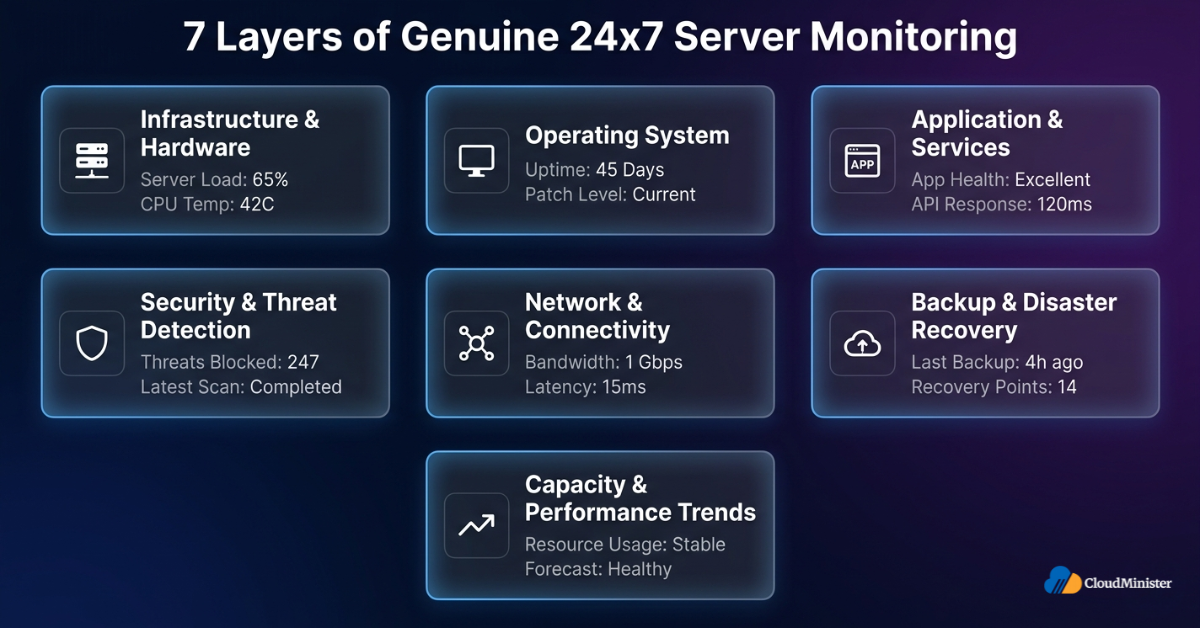
2. The Seven Layers of Genuine 24×7 Server Monitoring
Real 24×7 server monitoring is not a single monitoring feed — it is a multi-layer operational system. Understanding each layer is essential for evaluating whether your current or prospective monitoring arrangement is comprehensive or dangerously partial.
2.1 Infrastructure-Level Hardware Monitoring
The foundation of any 24×7 server monitoring setup covers physical and virtualised infrastructure health:
- CPU utilisation — sustained high CPU usage often signals runaway processes, misconfigured workloads, or resource-intensive application bugs; it is an infrastructure baseline metric essential for capacity and fault detection
- Memory (RAM) usage and swap activity — memory pressure patterns provide early warning of application memory leaks and capacity constraints
- Disk I/O and storage utilisation — disk saturation is one of the leading causes of silent application degradation; monitoring at the block device level catches issues that application-level monitoring misses entirely
- Network throughput, packet loss, and latency — abnormal spikes in inbound packet rates or bandwidth consumption are the primary infrastructure-level indicators of DDoS activity and network hardware issues; distinct from CPU-level signals
- Hardware component health via IPMI, SNMP, or vendor-specific agents — temperature, fan speed, and power supply status for physical servers; hypervisor health metrics for virtual environments
2.2 Operating System Monitoring
Above the hardware layer, 24×7 server monitoring must track operating system behaviour:
- Process monitoring — tracking critical system and application processes to detect unexpected terminations, zombie processes, or resource consumption anomalies
- System log analysis — continuous parsing of /var/log/ entries (Linux) or Windows Event Log streams for error patterns, authentication failures, and privilege escalation attempts
- Patch and vulnerability status — tracking the patching state of OS components against current CVE databases to identify unpatched vulnerabilities before they are exploited
- OS-level resource contention — monitoring kernel parameters such as open file descriptor limits, inode exhaustion, and TCP connection states, which are leading causes of subtle service degradation that application-level monitoring does not surface
2.3 Application and Service Layer Monitoring
The most operationally relevant monitoring for most businesses covers application behaviour:
- Web server health — Apache, Nginx, or IIS response times, 5xx server error rates (which indicate server-side failures), and request throughput; 4xx client error rate spikes are tracked separately as a distinct signal for detecting crawling, scraping, or broken link patterns
- Database monitoring — query execution times, connection pool saturation, replication lag, and lock contention for MySQL, PostgreSQL, MSSQL, and MongoDB
- Application response time monitoring — synthetic transaction testing (active probing) that verifies end-to-end application functionality from the user’s perspective at defined intervals, going beyond passive availability checks
- API endpoint synthetic probing — actively calling critical API routes at scheduled intervals to detect functional failures and latency degradation before users report them; distinct from passive traffic monitoring
- SSL/TLS certificate expiry monitoring — certificate expiry is a leading cause of unexpected application downtime; monitoring must track expiry dates and trigger alerts at least 30 days before expiry to allow for renewal
- Queue and background job monitoring — tracking message queue depths and background processing pipelines for e-commerce, fintech, and SaaS applications
Related: Server Management Best Practices: Top 10 for High-Growth Businesses
2.4 Security Monitoring and Threat Detection
Security monitoring is the most frequently under-delivered component of nominal 24×7 server monitoring packages. A legitimate 24×7 server monitoring implementation must include:
- File integrity monitoring (FIM) — FIM operates at the OS layer, continuously tracking changes to system binaries, configuration files, and application files at the filesystem level. It serves as a security detection control — its alerts are routed through the security monitoring pipeline — but it must be configured and deployed as an OS-layer agent (tools such as OSSEC, Wazuh, or Tripwire). Classifying FIM purely as a security tool rather than an OS-layer control is a common monitoring architecture error that leads to deployment gaps; it belongs in both the OS monitoring layer and the security alerting layer simultaneously.
- Intrusion detection system (IDS) alerting — Network IDS (NIDS) detects port scans, volumetric attack patterns, and unencrypted malicious traffic at the network layer. However, NIDS cannot inspect TLS-encrypted traffic without dedicated SSL/TLS decryption infrastructure in place — and in 2026, the overwhelming majority of attack traffic is encrypted. This means Host-based IDS (HIDS) carries the heavier detection burden in modern environments: it inspects behaviour at the server level after decryption has already occurred, detecting brute-force attempts, privilege escalation, suspicious process execution, and lateral movement patterns that NIDS will never see inside encrypted sessions. Both NIDS and HIDS are required, but any 24×7 server monitoring architecture that relies primarily on NIDS for intrusion detection has a fundamental blind spot against modern encrypted attack vectors.
- Failed authentication monitoring — tracking failed login attempts against SSH, RDP, control panels, and application authentication endpoints, with automatic alert escalation on threshold breach
- WAF log correlation — a Web Application Firewall (WAF) is an application-layer control deployed in front of servers, not on the server itself; 24×7 server monitoring integrates WAF block and allow logs from this upstream layer to correlate with server-side behaviour and detect multi-vector attacks that bypass WAF rules
- Outbound traffic anomaly detection — monitoring abnormal outbound connection volumes and destinations to detect data exfiltration attempts, which are commonly missed by inbound-only security monitoring setups
- Vulnerability scan integration — correlating real-time server state with vulnerability scan results to identify active exploitation risk
Under the DPDPA 2023, businesses processing personal data of Indian citizens are required to implement appropriate technical safeguards — and security monitoring is explicitly within scope. A 24×7 server monitoring setup that lacks real-time intrusion detection, log analysis, and incident alerting does not meet the technical safeguard standard established by the Act. Your legal counsel should confirm the specific technical requirements as enforcement guidance is progressively issued, but the directional requirement for continuous security monitoring is unambiguous in the Act’s framework.
2.5 Network and Connectivity Monitoring
Network layer monitoring within a 24×7 server monitoring framework covers:
- Uptime and availability checks — HTTP/HTTPS response checks, TCP port checks against specific service ports (port 3306 for MySQL, port 80/443 for Nginx/Apache, port 5432 for PostgreSQL), and DNS resolution checks from multiple geographic probe locations to detect regional connectivity failures. Note: ICMP ping confirms only that a server is network-reachable — a server can respond to ping while MySQL, Nginx, or any application service is completely down. TCP port checks against each specific service port are mandatory alongside network-level checks to confirm actual service availability
- Bandwidth utilisation and packet rate monitoring — sudden spikes in inbound packets per second (pps) or bandwidth consumption are the primary network-layer indicators of DDoS attacks and should trigger immediate alerts, separate from CPU utilisation monitoring
- DNS resolution monitoring — verifying that your domain resolves correctly from multiple DNS resolvers and geographic locations; DNS failures are a frequent cause of total service unavailability that server-level checks alone will not detect
- Network latency and packet loss trending — tracking latency and packet loss between your servers and key external endpoints to detect upstream ISP or CDN degradation before it affects end users
2.6 Backup and Disaster Recovery Monitoring
Backup status monitoring is the most commonly omitted component in partial 24×7 server monitoring implementations:
- Backup job completion verification — confirming that scheduled backups completed successfully, not just that they were initiated
- Backup integrity verification — monitoring tools can confirm that a backup job completed and that a backup file exists on disk. Monitoring tools cannot verify that a backup can actually be restored — these are two entirely different things. Restore validity requires a separate, human-executed recovery drill to a non-production environment, scheduled on a defined cadence (weekly for mission-critical data, monthly for business-important data). This restore drill must be explicitly contracted and calendared as a separate operational activity. Never assume that backup job completion monitoring confirms recoverability — the difference only becomes visible during an actual disaster recovery event.
- Replication lag monitoring — for businesses using database or filesystem replication, monitoring replication lag in real time ensures the secondary is actually in sync and usable for failover
- DR readiness tracking — monitoring the inputs that determine RTO and RPO achievability, including replication lag, backup recency, and last successful restore test timestamp; actual RTO and RPO validation requires periodic recovery drills, not just monitoring dashboards
2.7 Capacity and Performance Trend Monitoring
The predictive dimension of 24×7 server monitoring separates reactive alerting from proactive operations management:
- Trend analysis and capacity forecasting — identifying trajectory-based issues such as gradual disk fill and steady memory growth before they cross alert thresholds; disk fill trends typically allow 48–72 hours of advance warning, while memory and CPU trajectories may close much faster and require shorter alert windows
- Performance baseline deviation detection — alerting when metrics deviate from established baselines, even if they have not yet crossed absolute thresholds
- Right-sizing recommendations — using monitored utilisation data to identify over-provisioned and under-provisioned resources for cost optimisation
3. Why 24×7 Server Monitoring Matters: The Business Case
The operational justification for genuine 24×7 server monitoring is not theoretical — it is directly quantifiable in downtime cost, compliance exposure, and security incident frequency.
3.1 The Real Cost of Unmonitored Downtime
The financial impact of server downtime is substantial and well-documented. According to Gartner’s research on IT downtime costs, the average cost of IT infrastructure failure runs into thousands of dollars per minute for medium-to-large enterprises. For Indian SMBs, the figure is proportionally lower but operationally just as destructive when expressed as a percentage of daily revenue.
- E-commerce platforms: Lost transactions, abandoned carts, and customer churn during outages that go undetected for 30 minutes or more
- Fintech and payment applications: Compliance violations triggered by transaction processing failures, plus direct revenue loss per transaction minute
- SaaS products: SLA breach penalties, customer churn, and reputational damage — particularly severe for Indian SaaS companies serving international clients with contractual uptime guarantees
- Healthcare systems: Patient safety risks and regulatory exposure when clinical applications fail without detection
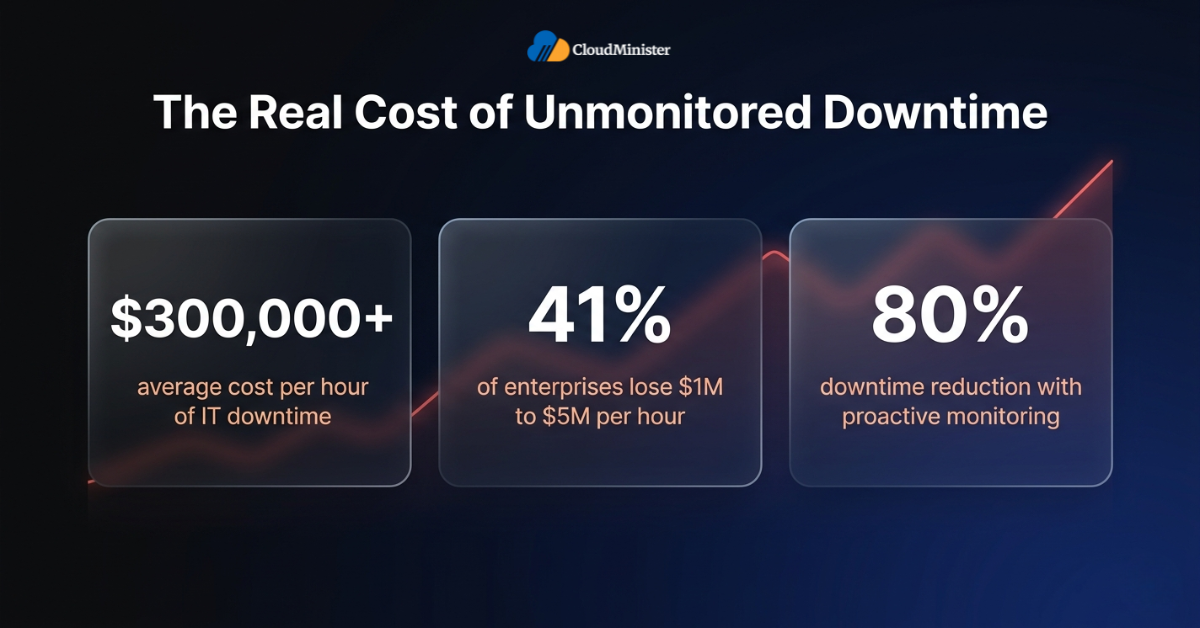
The two most important operational metrics in any downtime scenario are Mean Time To Detect (MTTD) and Mean Time To Resolve (MTTR). 24×7 server monitoring directly reduces MTTD — the time from failure to detection — from hours to minutes. But minimising total business impact requires reducing both: MTTD determines how quickly an incident is found, while MTTR determines how quickly it is fixed. Both must be actively managed through 24×7 server monitoring and a well-practised incident response process.
3.2 DPDPA 2023 Compliance Implications
For Indian businesses, the compliance dimension of 24×7 server monitoring has taken on new significance since the Digital Personal Data Protection Act (DPDPA) 2023 entered its enforcement phase. The Act establishes that data fiduciaries must implement appropriate technical safeguards to protect personal data — and the two most directly relevant technical safeguards are continuous security monitoring and incident detection capability.
- Breach detection timelines: The DPDPA 2023 establishes defined breach notification obligations. Businesses without 24×7 server monitoring face a material compliance risk: a breach originating in a poorly monitored environment may not be detected until after the notification window has closed, converting a manageable incident into a regulatory enforcement event
- Access control monitoring: The Act’s requirements around data fiduciary accountability create an implicit obligation to monitor access to systems processing personal data — an obligation that manual, periodic reviews cannot satisfy
- Audit trail generation: Compliance documentation for the Data Protection Board of India requires access logs, incident records, and security monitoring evidence — outputs that only systematic 24×7 server monitoring can generate continuously
DPDPA 2023 compliance is the legal responsibility of the data fiduciary — your business — not your infrastructure provider. Cloud providers and Server Management Company partners can support compliance through contractual guarantees, monitoring tooling, and audit trail generation. But the compliance obligation itself cannot be delegated. Ensure your 24×7 server monitoring arrangement generates the specific documentation outputs required for DPDPA breach notification and audit trail requirements, and verify this explicitly in your managed services agreement.
Related: Server Management Best Practices: Uptime and Security
3.3 Security Incident Prevention and Containment
According to the IBM Cost of a Data Breach Report 2025, the global average cost of a data breach reached USD 4.88 million in 2024. Organisations that had deployed security AI and automation in their operations identified and contained breaches significantly faster — saving an average of USD 2.2 million per breach compared to those without these capabilities. For Indian businesses processing personal data, the financial exposure is further amplified by DPDPA 2023 regulatory penalties on top of direct remediation costs.
The three security scenarios where 24×7 server monitoring delivers the most measurable prevention value are:
- Brute-force and credential stuffing attacks: Real-time failed authentication monitoring allows immediate IP blocking before a successful compromise occurs. Without 24×7 server monitoring, these attacks often succeed undetected, particularly during overnight hours
- Ransomware deployment: Ransomware typically encrypts files over several hours before demanding payment. Continuous file integrity monitoring (FIM) and anomalous disk I/O detection can identify the encryption process in progress — enabling containment before full data loss
- Data exfiltration: Outbound traffic anomaly detection, a component of genuine 24×7 server monitoring, is a primary technical control for detecting active data theft in progress — a signal that inbound-only security monitoring will never surface
Take the Guesswork Out of Server Monitoring
CloudMinister’s managed 24×7 server monitoring covers all 7 layers, hardware, OS, application, security, network, backup, and capacity, so your team focuses on building product, not firefighting infrastructure.
4. What Most 24×7 Server Monitoring Vendors Don’t Actually Cover
The gap between marketed and delivered monitoring capability is one of the most consequential information asymmetries in IT managed services procurement. These are the components most commonly absent in nominally “24×7” monitoring packages:
| Monitoring Component | Typically Included in Basic Packages | Reality |
| Hardware IPMI/SNMP monitoring | No — rarely included by default | Requires out-of-band access or agent; must be explicitly scoped |
| File integrity monitoring (FIM) | No — security add-on | Often excluded; requires dedicated HIDS agent (OSSEC, Wazuh, etc.) |
| Application-level synthetic testing | Partial — basic ping/HTTP only | Full synthetic transaction testing usually requires APM add-on |
| IDS (Host + Network) | No — separate tooling required | WAF and IDS are different controls; WAF alone is not an IDS substitute |
| Backup integrity verification | No — completion alerts only | Restore testing excluded; must be explicitly contracted |
| Outbound traffic anomaly detection | No — inbound-focused by default | Requires SIEM or NDR integration to monitor egress |
| Night/weekend human escalation | Partial — on-call only | Response SLAs often extend to 30–60 min off-hours vs 5–15 min business hours |
| DPDPA audit trail generation | No — not default | Requires explicit configuration and contractual commitment |
When evaluating a 24×7 server monitoring provider, request a sample incident report from a real P1 event — with timestamps from initial alert to engineer engagement to resolution. This single document tells you more about the operational quality of their monitoring than any feature list. A Server Management Company with genuine 24×7 server monitoring capability will have this documentation readily available. A vendor with nominal coverage will not.
5. Five Warning Signs Your Current Server Monitoring Is Already Failing
Whether you currently operate in-house monitoring or rely on a managed provider, these operational signals indicate that your existing arrangement does not constitute genuine 24×7 server monitoring:
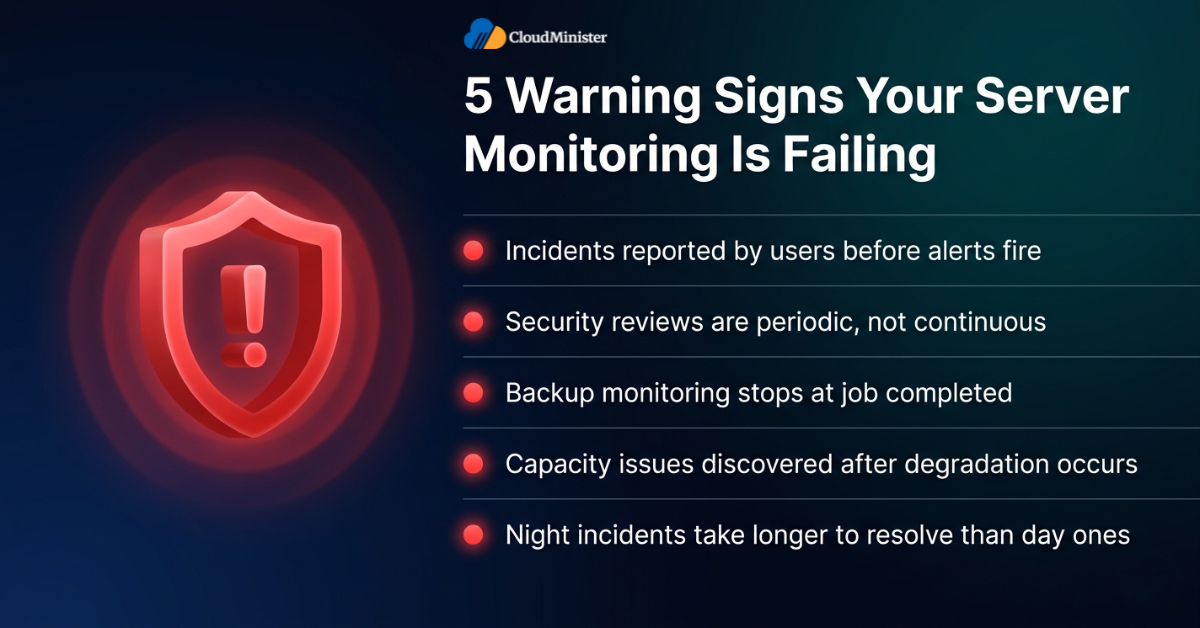
Warning Sign 1: You Learn About Incidents from Users, Not Alerts
If your team regularly receives user complaints or support tickets about application slowdowns or outages before an internal alert is triggered, your monitoring detection latency is operationally unacceptable. For hard failures (server crash, service down), a properly configured 24×7 server monitoring stack should detect the event within 1–3 minutes via TCP port health checks and HTTP/HTTPS response checks — not ICMP ping alone, which confirms only network reachability, not service availability. For soft performance degradation (latency creep, memory pressure), detection should follow within 5–15 minutes through threshold and baseline-deviation alerting. Users should never be the detection mechanism.
Warning Sign 2: Security Reviews Are Periodic Rather Than Continuous
Monthly or quarterly security log reviews are not a substitute for 24×7 server monitoring. They are compliance theatre. The threat landscape in 2026 moves faster than any periodic review cycle — automated attacks probe for vulnerabilities continuously, and a vulnerability window of even 24 hours is sufficient for a sophisticated attacker to achieve persistence. Continuous monitoring is the only operationally valid security posture.
Warning Sign 3: Backup Monitoring Stops at “Job Completed”
Backup job completion notifications are not the same as backup integrity verification. A backup file that exists on disk and a backup file that can actually be restored are two different things — and the difference only matters at the worst possible moment. 24×7 server monitoring must track backup completion, recency, and the timestamp of the last successful restore test. Without all three, your backup monitoring is incomplete.
Warning Sign 4: Capacity Issues Surprise Your Team
If your team regularly discovers disk saturation, memory exhaustion, or CPU bottlenecks reactively — after application degradation has already occurred — your monitoring is not performing predictive capacity tracking. Genuine 24×7 server monitoring uses trend analysis to give advance warning: disk fill trends typically allow 48–72 hours of lead time, but memory pressure and CPU trajectory can deteriorate in hours or less, requiring tighter alert windows and shorter review cycles for those metrics.
Warning Sign 5: Night and Weekend Incidents Have Longer Resolution Times
If your incident resolution time is consistently longer for events that occur outside business hours, your monitoring is staffed, not continuous. 24×7 server monitoring requires equivalent engineering response capability at 3 AM on a Sunday as it does at 2 PM on a Tuesday. Any disparity in resolution time between business hours and off-hours events is a direct indicator of staffed-hours monitoring, not genuine round-the-clock coverage.
6. 24×7 Server Monitoring for Indian SMBs: Vertical-Specific Requirements
The correct 24×7 server monitoring configuration is not universal — it depends on the regulatory environment, performance requirements, and security profile of your specific industry vertical.
E-Commerce Businesses
- Priority monitoring layers: Application response time, payment gateway connectivity, database query performance, CDN availability, and SSL certificate status
- Critical alert thresholds: Page load time exceeding 3 seconds (aligned with Google Core Web Vitals LCP threshold), and 5xx server error rate > 0.5% for general web endpoints. For payment API endpoints specifically, the error rate alert threshold must be set to 0% — meaning any single payment processing error triggers an immediate alert. At 10,000 requests per minute, a 0.1% threshold permits 600 payment errors per hour before an alert fires, which is commercially and regulatory unacceptable. Payment endpoint monitoring requires zero-tolerance alerting, not percentage-based thresholds.
- DPDPA 2023 relevance: Customer PII, payment data, and order history require continuous access monitoring and audit trail generation
- Recommended partner capability: A Server Management Company with PCI-DSS-aware monitoring configuration and documented e-commerce incident response playbooks
For e-commerce SMBs scaling on cloud web hosting India infrastructure, 24×7 server monitoring must extend across CDN edge nodes, origin servers, and database clusters simultaneously — not just the primary web server.
Fintech and NBFC Businesses
- Priority monitoring layers: Transaction processing latency, database replication lag, API endpoint availability, authentication system health, and outbound financial data flows
- Regulatory overlay: RBI IT Framework obligations require continuous monitoring of core banking and payment infrastructure, with documented incident response procedures that align with RBI reporting timelines
- DPDPA 2023 relevance: Customer financial records and KYC data require the highest-tier monitoring and access control logging
- Critical requirement: Real-time outbound traffic anomaly detection — a non-negotiable component for fintech 24×7 server monitoring given the sensitivity and regulatory exposure of financial data
Fintech SMBs that rely on cloud web hosting India providers for their core transaction stack must ensure their 24×7 server monitoring covers both primary and failover environments under a unified alerting plane — not just the active production instance.
SaaS Businesses Targeting Global Markets
- Priority monitoring layers: Multi-region availability, API response time across geographic locations, database performance for multi-tenant architectures, and CI/CD pipeline health
- SLA implications: International clients typically require contractual uptime guarantees of 99.9% or higher — guarantees that cannot be reliably met without genuine 24×7 server monitoring with documented incident response
- Monitoring complexity: Global SaaS architectures require 24×7 server monitoring that spans multiple cloud regions, often requiring a managed operations partner with multi-cloud monitoring capability
SaaS SMBs operating on cloud web hosting India for domestic deployments alongside AWS or Azure for international users need unified 24×7 server monitoring that covers both environments through a single management plane — not siloed monitoring per provider.
Healthcare and Pharma SMBs
- Priority monitoring layers: Patient-facing application availability, clinical data system integrity, EMR/EHR database health, and access control monitoring for systems processing sensitive personal health data
- Regulatory requirements: Indian healthcare SMBs are governed by DPDPA 2023 for personal health data and the National Digital Health Mission (NDHM) framework guidelines — not HIPAA, which is US legislation and does not apply in India. Monitoring must align with DPDPA data fiduciary obligations and sector-specific health data governance requirements
- Critical requirement: File integrity monitoring on systems containing patient records — unauthorised file modifications in clinical environments carry patient safety implications beyond the typical security scope
Healthcare SMBs using cloud web hosting India providers must verify that their monitoring partner’s 24×7 server monitoring configuration includes DPDPA-compliant audit trail generation for all systems processing patient records.
7. What 24×7 Server Monitoring Actually Costs: Indian Market Benchmarks
Cost is the most frequently misunderstood dimension of 24×7 server monitoring evaluation. The instinct to compare per-server monthly pricing leads businesses to underestimate the total operational value — and to underestimate the cost of inadequate monitoring when an incident materialises.
Indicative Monthly Cost Benchmarks (Indian Market, 2026)
Note: All figures below represent managed service pricing (where a provider operates the monitoring stack on your behalf). Open-source tools such as Prometheus, Grafana, and Zabbix are available at no software licensing cost for self-hosted deployments, but require dedicated engineering time for setup, maintenance, and 24×7 coverage.
| Coverage Tier | What Is Included | Monthly Range (INR) | Best For |
| Basic | Uptime + CPU/memory alerts, email notifications, business hours response | ₹2,000–₹5,000/server | Dev/test environments only |
| Standard | Multi-layer monitoring, 24×7 alerting, on-call engineer response, basic security | ₹5,000–₹12,000/server | Business-important workloads |
| Advanced | Full 7-layer monitoring, DPDPA-aligned security, IDS, FIM, backup integrity, SIEM | ₹12,000–₹25,000/server | Mission-critical production |
| Enterprise | Custom SLAs, dedicated NOC, multi-cloud unified monitoring, compliance reporting | ₹25,000+/server | Large-scale or regulated infra |
For Indian SMBs evaluating total cost of ownership, the most important variable in 24×7 server monitoring is the cost of not having it — not the monthly managed service fee. Benchmark the true hourly cost of your infrastructure engineers, including employment overhead and lost product development time, against the managed service pricing of the best web hosting company in India offering full-stack 24×7 server monitoring. For most businesses in the 20 to 200 employee range, the engineering cost comparison alone justifies a managed operations model before any incident prevention or compliance considerations are factored in.
The Hidden Cost: Incident Response Without Monitoring
The total cost of ownership comparison for 24×7 server monitoring must include the cost of incidents that monitoring would have prevented or detected earlier. A single undetected overnight outage for an e-commerce business processing ₹5 lakh in daily revenue costs more than six months of professional 24×7 server monitoring. Model this calculation explicitly before treating monitoring as an optional line item.
Not Sure If Your Current Monitoring Is Enough?
Tell us your infrastructure size, cloud provider, and compliance requirements. Our team will review your current monitoring setup and recommend exactly what your business needs — no sales pitch, just a straight technical answer.
8. How to Evaluate a 24×7 Server Monitoring Provider: The Right Questions
Selecting the right 24×7 server monitoring partner is as important as selecting the right monitoring architecture. These criteria should guide any provider evaluation:
Technical Evaluation Criteria
- Monitoring stack transparency: Which specific tools are used for each function? There are important distinctions: Prometheus and Grafana are metrics collection and visualisation tools; Nagios and Zabbix are full monitoring platforms; Datadog is a SaaS observability platform; PagerDuty is an incident management and alerting platform, not a monitoring tool. A Server Management Company should be able to explain what each tool does in their stack — not just list names
- Alert-to-engineer time SLA: What is the contractual maximum time from alert trigger to engineer engagement for P1 (critical) incidents? Anything above 15 minutes for a P1 alert during off-hours indicates staffed-hours monitoring, not genuine 24×7 server monitoring
- Escalation matrix documentation: Can they provide a documented escalation path that shows exactly which engineer is contacted at what time, through which channel, for which alert severity? The absence of this document is a red flag
- DPDPA 2023 compliance capability: Can they generate the specific audit trail documentation required for DPDPA breach notification? Do they have Indian data residency guarantees for monitoring data itself? When evaluating the best web hosting company in India for monitored managed services, DPDPA alignment should be a contractual requirement, not a verbal assurance
- Multi-cloud or multi-environment capability: For businesses operating across AWS, Azure, GCP, or Indian cloud providers, 24×7 server monitoring must span all environments through a unified management plane. Ask for a demonstration of cross-environment alert correlation, not just single-environment monitoring
- Reference outcomes: Request two or three client references in your industry vertical with comparable infrastructure. Ask specifically about overnight and weekend incident response performance — the scenarios where monitoring quality is most clearly revealed
When the IT Server Management Service provider presents their monitoring dashboard during a demo, ask to see a live P1 alert from the past 30 days — with full timeline from detection to resolution. The quality of that single incident record tells you more about their 24×7 server monitoring operational maturity than any prepared presentation. Professional IT Server Management Service providers document every incident with timestamps, root cause analysis, and remediation steps as standard practice.
9. Building In-House vs. Managed 24×7 Server Monitoring: The Real Comparison
Many Indian businesses initially consider building 24×7 server monitoring capabilities in-house before evaluating managed IT Server Management Service alternatives. The comparison is worth making explicitly, because the engineering cost and operational complexity of genuine in-house 24×7 server monitoring are typically underestimated significantly.
| Dimension | In-House 24×7 Monitoring | Managed Service (Professional) |
| Setup cost | OSS tools (Prometheus, Zabbix) are free but require 2–4 months of dedicated engineering time; commercial tools (Datadog, Dynatrace) add ₹3–10L/year in licensing | Immediate activation; no upfront capital or licensing overhead |
| Monthly cost | ₹2.4–4.5L+ (3 engineers on rotation at ₹80K–₹1.5L/month CTC each, before benefits and overhead) | ₹12K–₹25K per server, all-inclusive |
| Expertise depth | Limited to in-house knowledge; skill gaps in multi-cloud or niche tools | Accumulated cross-client operational experience |
| Tool stack | Self-selected and self-maintained; upgrades and patches require internal effort | Professional stack, continuously updated by the provider |
| DPDPA alignment | Requires dedicated internal legal and technical mapping effort | Partner handles compliance tooling and audit trail configuration |
| Scalability | Requires hiring ahead of growth; headcount planning adds lead time | Scales immediately with workload changes |
| Engineer focus | Infrastructure operations consume product development capacity | Engineering team remains focused on product |
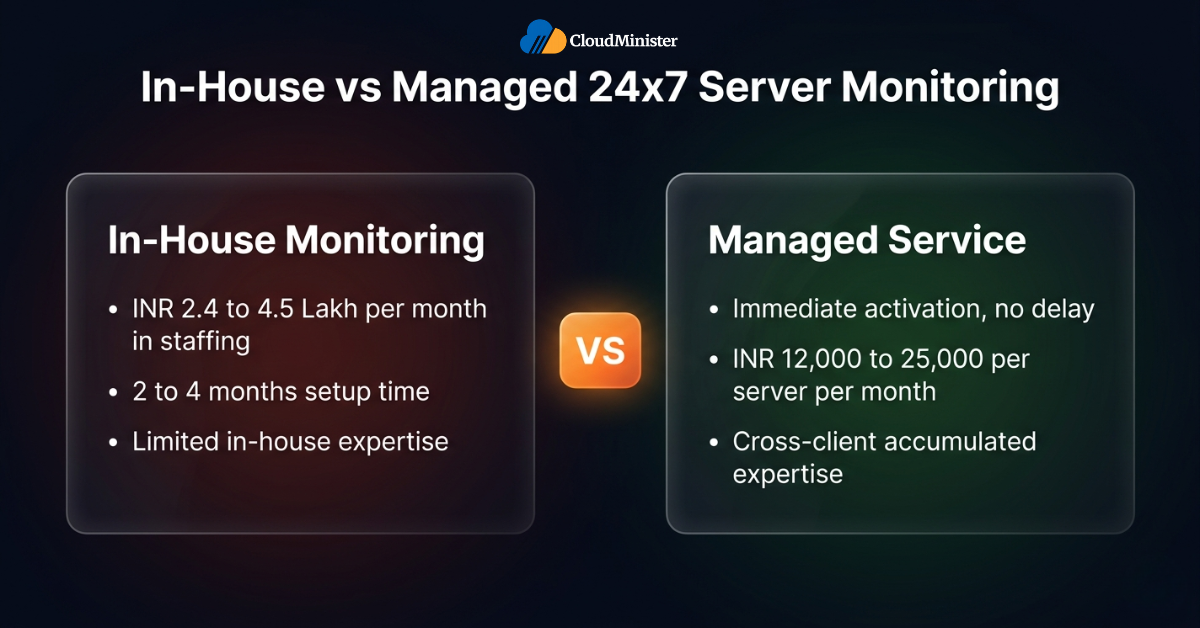
The total cost comparison becomes most stark when the true cost of staffing genuine 24×7 server monitoring is calculated. Three competent cloud/infrastructure engineers on rotation — the minimum viable staffing for in-house around-the-clock coverage — costs between ₹2.4 lakh and ₹4.5 lakh per month in compensation alone at 2026 Indian market rates, before tooling, training, and management overhead. For most Indian SMBs, the managed IT Server Management Service model delivers better 24×7 server monitoring quality at a lower total cost than the in-house alternative. When comparing options, always evaluate the best web hosting company in India that offers fully managed monitoring, as this returns engineering capacity to product development while keeping infrastructure costs predictable.
10. The 24×7 Server Monitoring Checklist for Indian Businesses
Before you consider your 24×7 server monitoring arrangement complete, verify these operational requirements are in place:
CHECKLIST – 24×7 SERVER MONITORING READINESS
- Infrastructure layer: CPU, memory, disk I/O, network throughput (pps and bandwidth), and hardware health (IPMI/SNMP) monitored with defined alert thresholds
- OS layer: Process monitoring, system log analysis, OS resource contention (file descriptors, inodes, TCP states), and patch status tracking active
- Application layer: Synthetic transaction testing, database performance monitoring, API endpoint synthetic probing, SSL/TLS cert expiry tracking, and queue depth monitoring configured
- Security layer: FIM (HIDS), NIDS/HIDS alerting, failed authentication monitoring, WAF log correlation, and outbound traffic anomaly detection active — WAF and IDS configured as separate, complementary controls
- Backup layer: Backup job completion, backup recency, and last successful restore test timestamp monitored; periodic restore drills scheduled separately
- Capacity layer: Trend analysis active with alert windows calibrated per metric type — 48–72 hours for disk fill, shorter windows for memory and CPU trajectory
- Escalation matrix: Documented P1/P2/P3 escalation paths with named on-call engineers and contractual response SLAs
- DPDPA 2023 alignment: Audit trail generation active; access logs and incident records generated continuously
- Multi-environment coverage: All cloud environments (cloud web hosting India, AWS, Azure) covered through unified monitoring plane
- Weekly review process: Structured review of monitoring alerts, capacity trends, and security events scheduled, with a responsible team member identified and accountable for follow-up
Conclusion: Choosing the Right 24×7 Server Monitoring Approach
The decision to implement genuine 24×7 server monitoring does not have a single correct answer — it has a correct answer for each specific business context.
24×7 server monitoring is the right investment when your infrastructure directly supports revenue-generating applications, when DPDPA 2023 obligations apply to personal data you process, when your current monitoring arrangement shows any of the five warning signs identified in Section 5, or when your engineering team’s capacity is being consumed by reactive infrastructure management rather than product development.
For Indian businesses at the growth stage — particularly those scaling from startup to mid-market — a managed 24×7 server monitoring arrangement through a professional Server Management Company is the operationally correct and economically rational path. The total cost of ownership advantage — when engineering time, incident response, compliance overhead, and the business impact of undetected failures are properly accounted for — is substantial.
Nominal monitoring is not 24×7 server monitoring. The seven-layer framework, escalation matrix requirements, DPDPA 2023 alignment criteria, and provider evaluation checklist in this guide provide the technical and commercial foundation for making a properly informed infrastructure decision.
To explore how CloudMinister structures 24×7 server monitoring for specific infrastructure requirements, visit the best web hosting company in India that combines managed hosting with full-stack monitoring — covering service scope, managed monitoring capabilities, and engagement models for startups, enterprises, and growth-stage businesses across India.
Key Takeaways
- Genuine 24×7 server monitoring covers seven distinct layers — most vendors deliver three to four as standard; always validate coverage at each layer explicitly before signing
- Both MTTD (detection time) and MTTR (resolution time) determine total downtime cost — 24×7 server monitoring directly reduces MTTD, but incident response processes must also be in place to reduce MTTR
- FIM operates at the OS layer and serves as a security detection control — it belongs in both layers simultaneously; vendors that deploy it in only one may have architectural gaps in their monitoring coverage
- WAF and IDS are separate, complementary security controls — WAF filters application-layer traffic upstream of the server; IDS detects intrusion events at network and host layers; neither substitutes for the other
- HIPAA does not apply to Indian businesses; healthcare SMBs in India are governed by DPDPA 2023 and NDHM framework guidelines
- In-house 24×7 server monitoring costs ₹2.4–4.5L/month in engineering staff alone at 2026 Indian market rates — managed services deliver better coverage at lower total cost for most SMBs
- DPDPA 2023 requires continuous security monitoring and audit trail generation; periodic reviews do not satisfy this requirement
- For e-commerce, fintech, SaaS, and healthcare verticals, 24×7 server monitoring requirements differ significantly; configure monitoring depth and alert thresholds to match your specific compliance and performance obligations.
11. Frequently Asked Questions
What is the difference between 24×7 server monitoring and standard server management?
24×7 server monitoring is the continuous observation and alerting layer — detecting anomalies, failures, and security events and routing them to engineers for response. Server management is the broader operational function that includes monitoring plus incident response, patching, configuration management, performance optimisation, and capacity planning. Genuine 24×7 server monitoring is a component of comprehensive server management, not a substitute for it.
How quickly should a 24×7 server monitoring system detect a server failure?
Detection speed depends on failure type. For hard failures (server down, service crash), a well-configured 24×7 server monitoring stack should detect the event within 1–3 minutes through TCP port health checks and HTTP/HTTPS response checks running at 60-second poll intervals — ICMP ping alone is insufficient as it confirms network reachability only, not actual service health. For soft failures (gradual performance degradation, memory pressure), detection typically follows within 5–15 minutes through threshold-based and baseline-deviation alerting. The subsequent alert-to-engineer engagement time should be under 15 minutes for P1 incidents under any properly structured managed services agreement.
Does 24×7 server monitoring satisfy DPDPA 2023 technical safeguard requirements?
24×7 server monitoring with security event detection, access logging, and incident documentation satisfies the core technical safeguard requirements under DPDPA 2023 for continuous monitoring of systems processing personal data. However, DPDPA compliance is multi-dimensional — monitoring is necessary but not sufficient on its own. Data residency, access controls, encryption, and breach notification procedures must also be in place. Verify specific compliance requirements with qualified legal counsel as enforcement guidance develops.
Can a small Indian startup benefit from 24×7 server monitoring?
Yes — and the entry cost is lower than most startups assume. A managed 24×7 server monitoring arrangement for a two-to-three-server production environment starts at approximately ₹15,000 to ₹25,000 per month through a professional Server Management Company. For a startup processing customer data or handling payments, the DPDPA 2023 compliance value alone justifies this investment. In-house 24×7 server monitoring is not viable at startup scale due to staffing cost — managed services are the economically rational path.
What is the best hosting arrangement for businesses needing robust 24×7 server monitoring?
For most Indian SMBs, the highest-value arrangement combines managed cloud web hosting India infrastructure with professional IT Server Management Service that includes built-in 24×7 server monitoring. When searching for the best web hosting company in India, prioritise providers that deliver both hosting and monitoring as an integrated managed service — this delivers infrastructure optimised for Indian user latency and DPDPA 2023 compliance, with monitoring and response capability provided by engineers who understand the full stack.

He is the CEO and Founder with over a decade of experience in cloud infrastructure, DevOps, and server optimization. With a strong vision and hands-on leadership approach, he has built scalable, secure, and high-performance cloud solutions trusted by businesses across industries.