


Most container outages on a single server are not caused by Docker itself. They come from passwords stored in plain environment variables, containers that report running while the application inside is broken, and one hungry service that eats all the memory on the VPS. This guide explains Docker Compose Production hardening in plain steps, covering file based secrets, healthchecks, dependency order, CPU and memory limits, safer networking, logging, backups, and a calm deployment routine. It also shows where Server Management Services in India, a reliable Server Management Company, DevOps Services & Solutions, and a trusted Web Hosting Company in India fit into the plan, and how CI/CD cost optimization keeps pipelines lean, because a good Docker Compose Production setup depends on the server underneath it.
Every team that runs an application on a single VPS eventually asks the same question: is our Docker Compose file ready for real customers? A file that works on a laptop usually is not. It has no secrets handling, no health signals, no limits, and no plan for the night something fails. Docker Compose Production work is the process of closing those gaps one small step at a time, so the stack stays calm under load and easy to recover when something breaks.
The good news is that Compose already has the features you need. You do not need Kubernetes to run a small or medium product safely. You need a clear file layout, secrets stored outside the image, healthchecks that tell the truth, limits that protect the host, and a repeatable way to deploy. A well planned Docker Compose Production stack on one VPS can serve a surprising amount of traffic when it is set up with care.
This guide is written for developers, founders, and operations staff who want clear steps and not theory. Each section has a short explanation followed by points you can apply today, and every command and setting has been kept accurate for current Docker Engine and Compose v2. Whether this is your first deployment or your fiftieth, these Docker Compose Production practices will help you plan with fewer surprises and less midnight debugging. Along the way you will see where Server Management Services in India fit into the plan, and why a Docker Compose Production file is only one part of a healthy hosting setup, since the Web Hosting Company in India you choose shapes the rest.
Table of Contents
- 1. What Hardening Really Means on a VPS
- 2. Why Weak Container Setups Are So Expensive
- 3. A Clean Baseline for Your Compose Project
- 4. Secrets Management for Live Compose Stacks
- 5. Healthchecks That Tell the Truth
- 6. Resource Limits and Reservations on a Small VPS
- 7. Networks, Ports and Firewall Rules
- 8. Container Hardening: Users, Capabilities and Read Only Filesystems
- 9. Logging, Monitoring and Alerts
- 10. A Safe Deployment Pipeline
- 11. Cost Control Without Cutting Safety
- 12. Backups, Updates and Rollback
- 13. Choosing the Right Partner and Defining Ownership
- 14. A Practical 30 Day Plan to Get Started
- Key Takeaways
- Conclusion
- Frequently Asked Questions
1. What Docker Compose Production Hardening Really Means on a VPS
Hardening does not mean adding every security feature you can find. It means reducing the ways your stack can fail or be abused, while keeping it simple enough that your team understands it. On a VPS you share one kernel, one disk, and one network card across every container, so a single weak service can affect all the others. Good Docker Compose Production design treats the whole server as one budget of memory, CPU, disk, and trust, and spends that budget on purpose. Teams that talk to a Web Hosting Company in India or a Server Management Company early usually set these limits sooner and with fewer arguments. Think of the VPS as a small building with shared walls. If one tenant leaves a tap running, every neighbour feels it. That is why the first hardening step is not a setting at all. It is a habit of asking what happens to everything else when one container misbehaves. The answers decide which limits, checks, and secrets you add, and in which order. Teams that write these answers down before they edit the file usually finish faster and make fewer changes they later regret.
- A development file favours speed, while a Docker Compose Production file favours safety, repeatability, and clear failure behaviour.
- Docker Compose Production hardening covers three jobs: protecting data with secrets, detecting failure with healthchecks, and limiting damage with resource limits.
- Use the Compose v2 command, docker compose, and a file named compose.yaml. The old top level version field is obsolete and only produces a warning.
- Keep one base file for shared settings and one override file for live settings, so a Docker Compose Production release differs from staging only where it must.
- Pin every image to a specific version tag, and use a digest for the most critical images, so a pull never changes the stack by surprise.
- Run services as a non root user wherever the image allows it, and never treat a container as a complete security boundary.
- Write down who deploys, who approves, who rolls back, and who reads the alerts. A Server Management Company or an internal platform team usually owns the last two.
- A stack that cannot be rebuilt from the repository and a secrets folder is not ready for production, however well it runs today. Many teams ask a provider of DevOps Services & Solutions to review this point before launch.
Before editing any file, write down your real recovery goals: how many minutes of downtime the business can accept and how much data it can afford to lose. A shop that can accept a ten minute restore needs a simpler Docker Compose Production plan than one that can accept none. Simple plans also help CI/CD cost optimization, because fewer moving parts mean fewer pipeline runs.
2. Why Weak Container Setups Are So Expensive
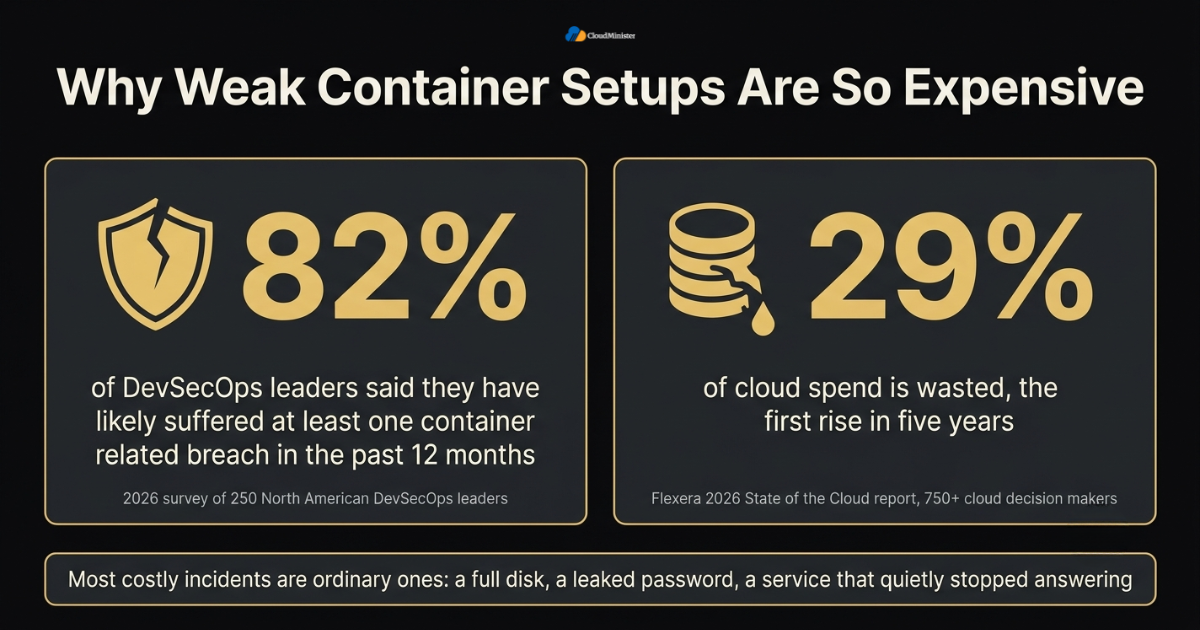
Container use is now nearly universal, but security and operations habits have not kept pace. In a 2026 survey of 250 North American DevSecOps leaders, 82 percent said they have likely suffered at least one container related breach in the past 12 months, even though every respondent called containers critical to production. On the cost side, the Flexera 2026 State of the Cloud report, based on more than 750 cloud decision makers, puts wasted cloud spend at 29 percent, the first rise in five years. A careless Docker Compose Production setup feeds both problems at once, and a careful Docker Compose Production review reduces both. None of this means containers are unsafe. It means the default settings are tuned for convenience, and convenience is rarely what you want at three in the morning. Most costly incidents are ordinary ones: a full disk, a leaked password, a service that quietly stopped answering. Each one has a cheap prevention, and each prevention appears later in this guide. Read the numbers above as a list of risks to plan for, not as a reason to worry, and the planning stays calm and practical.
- Breaches usually start with small habits, such as a password in an environment file, an exposed database port, or an image that was never updated.
- A container that is marked running but returns errors still sends customers to a broken page, and nobody is alerted.
- One service without a memory limit can trigger the host out of memory killer, which may stop the database instead of the guilty container.
- An oversized VPS bought to hide missing limits is also waste. Right sized limits let you choose a smaller plan from a Web Hosting Company in India with confidence.
- Outages cost more than hosting. Lost orders, support tickets, and lost trust take far longer to recover than the server does. This is why a Server Management Company is often hired after the first serious incident and not before.
- A Docker Compose Production review before launch is far cheaper than an emergency fix after launch, and it supports CI/CD cost optimization by cutting repeat failures.
- Teams that use Server Management Services in India often find missing backups and open ports in the very first review, before any new feature work begins.
- Good CI/CD cost optimization starts here as well, because fewer failed deployments mean fewer wasted pipeline minutes. Providers of DevOps Services & Solutions often track the failed deployment rate for this reason.
- Treat the numbers above as direction and not destiny. They show where the industry struggles, and your own audit shows where you do.
3. A Clean Baseline for Your Compose Project
Before adding any hardening, give the project a layout that is easy to read and easy to rebuild. Keep the Compose file, the secrets folder, and the environment specific files in one repository, with the secrets folder excluded from version control. Your hosting choice matters here too. A reliable Web Hosting Company in India gives you predictable disk speed, network links, and snapshot options, which are the foundation every Docker Compose Production stack stands on. A clean layout is also the first thing that Server Management Services in India or a team offering DevOps Services & Solutions will ask to see. The layout you choose now decides how painful every later change will be. A repository where the Compose files, the helper scripts, and the sample environment file sit together can be cloned and rebuilt by a new team member in minutes. A server that was assembled by hand over two years cannot. Aim for the first situation, even if the project is small, because the cost of tidy habits is tiny compared with the cost of a rebuild that nobody remembers how to do.
- Use compose.yaml for shared service definitions and compose.prod.yaml for live only settings, then start with docker compose -f compose.yaml -f compose.prod.yaml up -d.
- Keep a secrets folder next to the file, set its mode to 700, and add it to .gitignore so it never reaches the repository.
- Store non secret settings in a .env file for variable interpolation, and commit a sample file such as .env.example.
- Set the top level name field, so containers, networks, and volumes get predictable names.
- Use named volumes for databases and uploads, and bind mounts only for read only configuration files.
- Run docker compose config -q in every pipeline to catch syntax and interpolation errors before a deployment. This simple check is an easy CI/CD cost optimization win, because a bad file fails in seconds and not after a long build.
- Plan networks early, with one network for traffic from the proxy and one internal network for databases and caches.
- Choose the VPS size from measured use, and leave about 20 percent of memory free for the operating system and Docker itself.
| File or folder | Purpose | Commit to Git? |
| compose.yaml | Shared service definitions | Yes |
| compose.prod.yaml | Live only overrides such as limits and ports | Yes |
| .env | Non secret variables used for interpolation | No, commit .env.example instead |
| secrets/ | Password and key files | Never |
| scripts/ | Backup, restore, and deploy helpers | Yes |
4. Secrets Management in Docker Compose Production
Secrets are the most common weak point in a Docker Compose Production file. Environment variables are easy to write, but they are also easy to leak. They show up in docker inspect, in crash reports, in child processes, and in the output of docker compose config. File based secrets are safer, because Compose mounts each secret as a read only file under /run/secrets inside the container, and the application reads it only when needed. Secret files also live on the VPS disk, so it is worth asking your Web Hosting Company in India how disks are encrypted and who can reach snapshots. A useful way to judge your secrets setup is to ask who could read a value today. With environment variables, the answer often includes anyone who can run docker inspect, every child process, and every tool that prints the environment during a crash. With files, the list is shorter and easier to audit. File based secrets will not stop a determined attacker who already controls the host, but they remove the most common accidental leaks, and that is where most real incidents begin.
- In a Docker Compose Production file, declare secrets in the top level secrets element, then give each service only the secrets it needs in its own secrets list.
- Point the source at a file, such as file: ./secrets/db_password.txt, and read it inside the container at /run/secrets/db_password.
- Use the _FILE convention that official images support, such as POSTGRES_PASSWORD_FILE and MYSQL_ROOT_PASSWORD_FILE, instead of passing the password itself.
- In your own application, read the file at startup, trim the trailing newline, and never print the value to logs.
- Compose bind mounts the host file, so the container user sees the host owner and mode. Make the file readable by that user, for example by setting the owner to that numeric ID with mode 0400, and keep the parent folder at mode 700 so other host users cannot browse it.
- Never place secrets in a Dockerfile ENV, ARG, or image layer. For build time needs, use BuildKit secrets, which are not stored in the final image.
- Rotate secrets on a schedule and after any staff change, then restart only the affected services with docker compose up -d. Many teams hand this routine to a Server Management Company so it never gets forgotten.
- Remember that plain Compose is not a vault. File secrets are enough for many teams on a VPS, and larger teams can add a manager such as HashiCorp Vault. Providers of DevOps Services & Solutions can help set one up when the team outgrows plain files.
- A Docker Compose Production repository should hold examples of secrets, never real values.
Anything that has ever been committed to Git must be treated as leaked, even if a later commit deletes it. Rotate the secret first and clean the history second. Add a secret scanner such as gitleaks to your pipeline so a Docker Compose Production repository never accepts a leaked key again.
5. Healthchecks That Tell the Truth
By default, Docker only knows whether the main process is alive. It does not know whether your application can actually serve a request. A healthcheck fixes that by running a small command inside the container at a regular interval and marking the container healthy or unhealthy from the exit code. In Docker Compose Production this signal matters twice, because it guides startup order and it gives your monitoring something honest to read. A good Server Management Company will ask to see these checks before it accepts alerts for your stack. It helps to picture what a user sees when a healthcheck is missing. The container shows as running, the proxy keeps sending traffic, and customers see errors until someone notices. A good healthcheck shortens that gap from hours to a single interval. It does not repair anything by itself, which is why it must feed an alert or a startup condition. Treat the check as a thermometer and not a doctor: it tells you something is wrong and leaves the decision to the system around it.
- A healthcheck has five main fields: test, interval, timeout, retries, and start_period. Docker defaults are 30 seconds, 30 seconds, 3 retries, and no start period.
- Use the CMD form for a direct command and CMD-SHELL when you need shell features. An exit code of 0 means healthy and 1 means unhealthy.
- Set start_period for slow starting services. Failures during that window do not count toward the retry limit.
- Pick a tool that exists inside the image. Slim and distroless images often have no curl, so use wget, a built in binary, or a tiny health command inside your app.
- Use pg_isready for PostgreSQL, redis-cli ping for Redis, and a light /healthz route for web apps. Keep checks fast, cheap, and free of side effects. Cheap checks also support CI/CD cost optimization, because they do not slow down deployments that wait for healthy services.
- Do not make a healthcheck depend on every outside service. If a third party API is down, restarting your container will not fix it.
- Use depends_on with condition: service_healthy so the application starts only after the database is truly ready, and service_completed_successfully for one time migration jobs.
- Know the limit: plain Docker Engine does not restart a container only because it is unhealthy. A restart policy reacts to process exit, so pair healthchecks with alerts, a task many teams include in Server Management Services in India. Watcher tools need Docker socket access, which is a serious privilege.
- Run docker compose up -d –wait during deployments, so the command returns only when services are running or healthy.
Test every healthcheck by breaking the application on purpose in staging. If the container never turns unhealthy, the check is too shallow to protect your Docker Compose Production stack.
6. Resource Limits and Reservations on a Small VPS
A VPS has a fixed amount of memory and CPU, and containers will happily use all of it if you let them. Resource limits turn an unpredictable crowd of processes into a fair plan. In Compose you set them under deploy.resources, and Compose v2 applies them on a normal single host. A memory limit that is too high protects nothing, and one that is too low causes restarts, so measure first and set second. This is a core part of any Docker Compose Production plan. A Web Hosting Company in India that shows real memory and CPU graphs for your plan makes this measurement much easier. Teams that use DevOps Services & Solutions usually keep these numbers in the repository so they are reviewed like code. Limits also change how your team thinks about capacity. Without them, the whole server is one shared pool and nobody knows which service is growing. With them, each service has a visible budget, and a service that keeps touching its ceiling becomes an obvious conversation. That conversation is healthy. It leads to profiling, caching, or a deliberate upgrade, instead of a surprise outage that forces a rushed one. Start with generous numbers, tighten them as you learn, and review them whenever traffic changes.
- limits.memory is a hard ceiling. A container that exceeds it is killed by the kernel, and docker inspect shows OOMKilled as true, usually with exit code 137.
- reservations.memory is a soft guarantee. It matters mainly when the host is short of memory and the kernel must decide whom to squeeze.
- limits.cpus caps CPU time. A container that reaches it is slowed down and not killed, so watch latency after setting it.
- Measure first with docker stats during a realistic load test, then set limits about 20 to 30 percent above normal peak use.
- Add pids_limit to stop runaway process creation, and set memswap_limit equal to the memory limit when you want to block container swap.
- Tell the runtime about the limit. Set -XX:MaxRAMPercentage for Java and –max-old-space-size for Node.js so heap size stays under the container ceiling.
- Leave room for the host. Keep about 15 to 20 percent of VPS memory free for the operating system, Docker, SSH, and monitoring agents. Ask your provider of Server Management Services in India what headroom they monitor by default.
- Give the database the largest reservation, because killing it risks lost work in progress and slows every other service. This rule alone prevents many Docker Compose Production incidents.
- On a 4 GB VPS, 1 GB for the database, 1.5 GB for the application, and the rest for a proxy and cache is a sensible starting point to adjust after measurement. Avoid running a CI runner on the production VPS. If you must, give it strict limits, because a heavy build can starve live services and undo your CI/CD cost optimization savings.
Limits are not a cure for memory leaks. If a service keeps hitting its ceiling, profile the application first and raise the limit only when you have proof it needs more. A Docker Compose Production stack with no headroom simply fails more quietly. A Server Management Company will usually ask for this memory profile before it sets any alert thresholds.
7. Networks, Ports and Firewall Rules
Networking is where many Docker Compose Production stacks quietly fail. By default, Compose puts all services on one network, and any published port is reachable from the internet. Docker also writes its own firewall rules, so a port you publish can bypass the UFW rules you thought were protecting it. The fix is to publish as little as possible, bind to localhost, and let a reverse proxy handle public traffic. A Web Hosting Company in India that offers a network firewall in front of the VPS adds a second layer in case a Compose file is misconfigured. Many people assume that a firewall on the host covers everything, so the Docker behaviour surprises them. Docker manages its own rules for published ports, and that traffic is forwarded to the container instead of passing through the host rules that tools like UFW normally manage. The practical lesson is simple: decide on purpose which ports are public, and make everything else unreachable by design instead of relying on a rule you might forget. A short list of published ports, reviewed on every release, catches most mistakes before scanners do.
- Publish only the proxy ports 80 and 443. Databases, caches, and queues should have no ports entry at all.
- Bind internal tools to the loopback address, for example 127.0.0.1:8080:8080, so only the host can reach them.
- Use expose to document a port inside the network, but remember that it publishes nothing to the host.
- Create separate networks for frontend and backend traffic, and set internal: true on the backend network so it has no outside route.
- Understand that UFW rules do not filter published container ports. Use localhost binding, or add rules to the DOCKER-USER chain. Teams that use DevOps Services & Solutions usually keep those rules in version control.
- Run a reverse proxy such as Caddy, Nginx, or Traefik, and enable TLS certificates with automatic renewal.
- Use service names for container to container traffic, because Compose provides DNS names on user defined networks. Run a port scan against staging in the pipeline. It is cheap and a good CI/CD cost optimization habit, because it blocks bad releases early.
- Disable SSH password login, allow only key based access, and add rate limiting through fail2ban or a similar tool. Server Management Services in India often cover this access hardening, so check whether yours does.
Related Reading: Docker bridge network explained
Never publish a database port to the internet, even with a strong password. Automated scanners probe new public addresses all day. If you need database access from your laptop, use an SSH tunnel to the VPS instead. A Server Management Company can run an external port scan after every release to confirm this.
8. Container Hardening: Users, Capabilities and Read Only Filesystems
Once secrets, health, limits, and networks are in place, tighten what each container is allowed to do. The aim is simple: if one service is compromised, the attacker should find very little to use. Compose supports most of the useful Docker security options directly in the file, so a Docker Compose Production service can drop privileges without any extra tooling. Each setting in this section removes one thing an attacker could use after getting into a single container. A non root user limits which files can be changed. A read only filesystem stops an attacker from dropping tools onto disk. Dropped capabilities remove powerful kernel features that web applications never needed. No single setting is magic, but together they turn a successful break in from a serious incident into a contained and boring one. Apply them one at a time and test after each change, so you know which setting caused any failure.
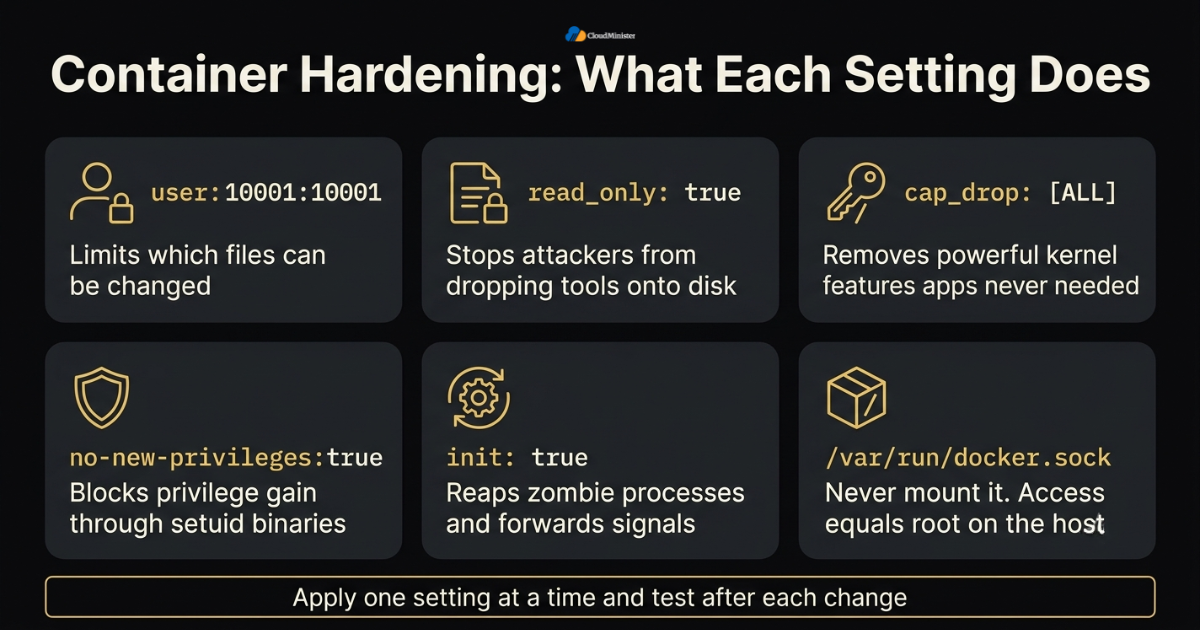
- Set user to a numeric non root ID, for example 10001:10001, and build images that work with that user.
- Use read_only: true for the root filesystem, and give the application writable space only through tmpfs or named volumes.
- Use cap_drop: [ALL] and add back only what is needed. Most web apps need no extra Linux capability when listening on a port above 1024.
- Add security_opt with no-new-privileges:true to block privilege gain through setuid binaries.
- Avoid privileged: true, host networking, and host PID mode on a shared VPS unless you can explain exactly why they are needed.
- Never mount /var/run/docker.sock into an application container. Access to that socket is the same as root access on the host. A review by Server Management Services in India should always check for it.
- Add init: true so a tiny init process reaps zombie processes and forwards signals correctly.
- Keep images small and current, and scan them with a tool such as Trivy to find known vulnerabilities. Smaller images also support CI/CD cost optimization through faster builds and pulls. Teams that use DevOps Services & Solutions usually run the scan inside the pipeline so a failing image never reaches the VPS.
- Consider rootless Docker where your workload allows it, remembering that it has its own limits around ports and storage. A Server Management Company can advise whether rootless mode fits your workload and support plan.
The compact Docker Compose Production example below combines the ideas from sections 4 to 8. Adjust names, versions, and limits to match your own stack.
name: shop
services:
  web:
    image: registry.example.com/shop-web:1.4.2
    restart: unless-stopped
    init: true
    user: "10001:10001"
    read_only: true
     tmpfs:
      - /tmp
    cap_drop:
      - ALL
    security_opt:
      - no-new-privileges:true
    ports:
      - "127.0.0.1:8080:8080"
    environment:
     DB_HOST: db
      DB_PASSWORD_FILE: /run/secrets/db_password
    secrets:
     - db_password
    depends_on:
      db:
        condition: service_healthy
    healthcheck:
      test: ["CMD", "wget", "-q", "--spider", "http://127.0.0.1:8080/healthz"]
      interval: 30s
      timeout: 5s
      retries: 3
      start_period: 40s
    deploy:
      resources:
        limits:
          cpus: "1.0"
          memory: 512M
        reservations:
          memory: 256M
     logging:
      driver: json-file
      options:
       max-size: "10m"
        max-file: "3"
     networks:
      - frontend
      - backend
  db:
    image: postgres:16-alpine
    restart: unless-stopped
    environment:
      POSTGRES_USER: shop
      POSTGRES_DB: shop
      POSTGRES_PASSWORD_FILE: /run/secrets/db_password
    secrets:
       - db_password
    volumes:
      - db_data:/var/lib/postgresql/data
    healthcheck:
      test: ["CMD-SHELL", "pg_isready -U shop -d shop"]
      interval: 10s
      timeout: 5s
      retries: 5
      start_period: 20s
    deploy:
     resources:
        limits:
          cpus: "1.0"
          memory: 1G
    logging:
      driver: json-file
      options:
        max-size: "10m"
        max-file: "3"
    networks:
      - backend
secrets:
   db_password:
   file: ./secrets/db_password.txt
volumes:
  db_data:
networks:
  frontend:
  backend:
    internal: true
Need Help Building a Safe Deployment Pipeline?
Our DevOps engineers set up secure CI/CD pipelines, automated rollbacks, and production-ready container workflows, so your releases stay fast, repeatable, and boring in the best way.
9. Logging, Monitoring and Alerts
A hardened stack still needs eyes on it. The default json-file logging driver keeps logs on disk without any limit, and a full disk is one of the most common reasons a small server stops. Every Docker Compose Production stack needs a log limit and an alert path before launch. This is also where an outside Server Management Company adds real value, because someone is watching the dashboards when your team is asleep. Round the clock monitoring is a common part of Server Management Services in India. Logs and metrics are the memory of your stack. Without them, every incident starts with guessing, and guessing is slow. With a modest setup, you can answer the first three questions of any outage in minutes: what changed, which service failed first, and how many users were affected. You do not need an expensive platform to start. A few dashboards, a handful of alerts, and one page of notes are enough to make a small team feel in control of a busy server.
- In every Docker Compose Production service, set max-size and max-file on the json-file driver, for example 10m and 3, or set the same defaults in /etc/docker/daemon.json.
- Write logs to standard output and standard error, so docker compose logs and any log shipper can read them.
- Watch container state with docker ps and docker stats, and use cAdvisor with Prometheus and Grafana when you need history. Track pipeline minutes and failed jobs on the same board, since that data drives CI/CD cost optimization.
- Alert on unhealthy status, high restart counts, memory near the limit, disk above 80 percent, and failed backups.
- Use an outside uptime check against your public URL, because internal monitoring goes silent when the whole VPS goes down. Some plans from a Web Hosting Company in India include basic monitoring, so check what yours offers.
- Keep alerts few and meaningful. A channel that sends fifty messages a day is soon ignored.
- Write a one page runbook for the top five failures, such as a full disk, an out of memory kill, an expired certificate, and a failed migration. A Server Management Company can review that runbook and test it during a planned drill.
- Teams that rely on Server Management Services in India can hand off patching, log review, and night time alerts, while developers stay focused on features.
- Track simple service goals such as availability and response time, a habit that comes from site reliability engineering. Teams that use DevOps Services & Solutions often turn these goals into dashboards.
Related Reading: SRE vs DevOps
10. A Safe Deployment Pipeline
Hardening fails if deployments are manual and rushed. A simple pipeline builds the image once, scans it, pushes it to a registry, and then tells the VPS to pull and restart the stack. This keeps build tools off the live server and makes every release repeatable. It is also the base of any CI/CD cost optimization plan, since a lean pipeline wastes fewer minutes. Teams that use DevOps Services & Solutions often turn this into a standard template, so each new Docker Compose Production project starts safely. A release should feel boring. When the steps are the same every time, nobody needs to remember special commands, and a new teammate can ship safely in their first week. Boring also means reversible: every release has a known previous version that can be restored with one change. If your current process depends on one person who knows the right order of commands, that is the first thing to automate, because that person will eventually be on holiday when something breaks.
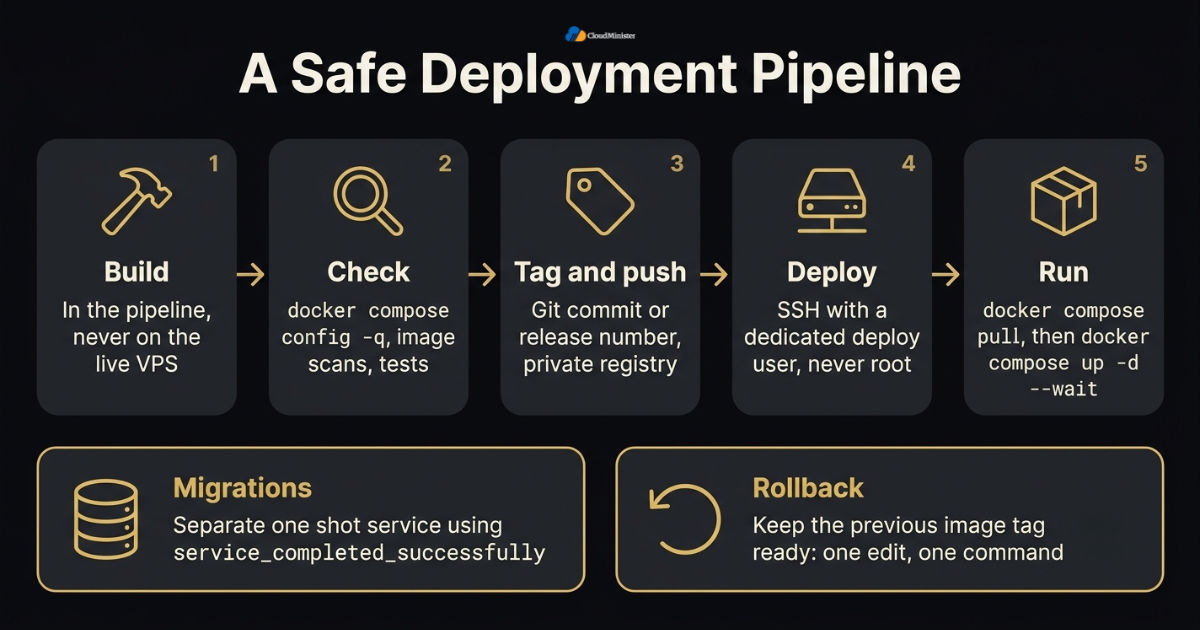
- Build in the pipeline, tag with the Git commit or release number, and push to a private registry. Never build on the live VPS.
- Run docker compose config -q, image scans, and tests before any deployment step starts. Teams that use DevOps Services & Solutions treat these as mandatory gates.
- Deploy over SSH with a dedicated deploy user and key, never with the root account. Every Docker Compose Production deploy should be traceable to one commit and one person.
- On the VPS, run docker compose pull and then docker compose up -d –wait, so only changed services restart and the command waits for healthy services. Pull speed also depends on the network of your Web Hosting Company in India, so test it during a trial.
- Run database migrations as a separate one shot service that uses service_completed_successfully, and not inside the web container start script.
- Keep the previous image tag ready, so a rollback is one edit and one command.
- Use pipeline caching, path filters, and cancellation of older runs to support CI/CD cost optimization without lowering quality.
- Store pipeline secrets in the CI platform secret store, and keep them separate from production secrets wherever possible. Server Management Services in India providers can audit who has access to which secret.
- Remove old images with docker image prune on a schedule, so the disk does not fill silently.
Related Reading: CI/CD pipeline for small teams
Treat the pipeline file like application code. Review changes to it, keep it in the same repository, and test deploy steps in staging first. This habit is the base of any reliable Docker Compose Production workflow.
11. Cost Control Without Cutting Safety
Hardening should not make hosting more expensive, and in many cases it does the opposite. Honest limits and measurements let you choose a plan that fits the real workload instead of buying a bigger server out of fear. As the Flexera figures earlier show, wasted spend is a growing problem across the industry. A careful Web Hosting Company in India will help you compare plans on real numbers, while steady CI/CD cost optimization trims the pipeline side of the bill. Every Docker Compose Production decision here should be tied to a measured number. Cost control and safety are not opposites. Most savings come from removing guesswork: knowing the real memory use, the real traffic pattern, and the real size of your images. When those numbers are visible, you can pick a smaller plan with confidence, avoid paying for idle capacity, and still keep the safety features described earlier. The mistake to avoid is cutting a limit or a backup to save a small amount, because the first incident will cost far more than the saving ever did.
- Measure for two weeks before resizing, covering peak hours and month end jobs. Providers of Server Management Services in India often supply usage reports that make this easier.
- Right size by service. Reduce limits where use is low, and raise them only for services that prove they need it.
- Use multi stage builds and slim base images, which shrink pull times and disk use and support CI/CD cost optimization at the same time.
- Cache dependency layers in the pipeline and reuse them across builds. Good caching is one of the most direct CI/CD cost optimization steps for most teams.
- Skip builds for documentation only changes and cancel superseded runs, a simple CI/CD cost optimization win.
- Schedule non urgent jobs such as reports and backups outside peak hours, so the VPS does not need extra headroom. Teams that use DevOps Services & Solutions usually run these jobs through the same pipeline.
- Compare the full cost of a plan, including storage, bandwidth, backups, snapshots, and support, and not only the monthly headline price. Ask a Web Hosting Company in India to quote support and backups separately so nothing is hidden.
- Review costs each quarter, because traffic and image sizes change. A Server Management Company can prepare that review with real usage data.
Related Reading: Cutting pipeline spend for AI training jobs
12. Backups, Updates and Rollback
A backup you have never restored is only a hope. On a VPS, volumes live on one disk, so a disk failure, a bad migration, or a mistaken command can remove everything at once. Plan backups, updates, and rollbacks together so each one supports the others. Providers of DevOps Services & Solutions usually script all three, which is a big step toward a dependable Docker Compose Production routine. Treat recovery as a feature you build and test, not as a promise. A backup proves nothing until a restore has worked, and a rollback plan proves nothing until someone has followed it under time pressure. Schedule a rehearsal, measure how long it takes, and fix whatever slows it down. After two or three rehearsals the process becomes routine, and routine is exactly what you want when a real failure arrives and people are tired and worried.
- Back up databases with logical dumps, for example docker compose exec -T db pg_dump -U shop shop, and store copies off the server.
- Use snapshots from your Web Hosting Company in India as a second layer, but do not rely on them alone, because a snapshot may capture a database in the middle of a write.
- Follow the 3-2-1 idea: three copies, on two kinds of storage, with one copy stored off site.
- Restore into a test environment every month and record how long it takes. That number is your real recovery time. A Server Management Company can run this drill for you and send the timing report.
- Be careful with docker compose down -v. The -v flag deletes named volumes, including your data.
- Update base images on a schedule, read release notes, and test in staging before changing the live stack. Scheduled rebuilds in the pipeline are a CI/CD cost optimization choice too, because one planned weekly build costs less than many urgent ones.
- Apply operating system security patches through unattended upgrades or a managed process, and reboot in a planned window. Server Management Services in India typically cover patching windows, so confirm that yours does.
- Keep a written rollback rule, for example rolling back when the error rate or failed healthchecks cross an agreed limit. Teams that use DevOps Services & Solutions usually script the rollback itself.
The step teams skip most often is the restore test. Put it in the calendar like any other meeting. A Docker Compose Production stack is only as safe as its last successful restore.
13. Choosing the Right Partner and Defining Ownership
Not every team has time to run all of this alone. Some prefer to hand part of the work to a partner, and that choice deserves care. A capable Web Hosting Company in India should be able to show clear documentation on backups, restore times, and support hours. A reliable Server Management Company should be able to explain how it handles patching, monitoring, and rollbacks before you sign anything. When you compare partners, look past the sales page and ask for specifics. Strong providers can describe their last incident, what they changed afterwards, and how long recovery really took. Weak ones speak in general terms and promise that nothing will ever go wrong. Also be clear about what you keep in house. Even with outside help, your team should own the decision to ship, the final say on rollback, and a copy of every runbook, so you are never locked out of your own system.
- Ask how many Docker Compose Production stacks the provider runs and how it handles failed deployments.
- Confirm that Server Management Services in India cover monitoring, backups, tested restores, and night time response, and not only server setup.
- Ask a Server Management Company for a written escalation path that says who is called first and who can approve a rollback.
- Look for a provider that also offers DevOps Services & Solutions, so infrastructure and pipelines are planned together.
- Ask for inclusions in writing. Monitoring, backup storage, and after hours support are often priced separately.
- A local data centre from a Web Hosting Company in India can lower latency for Indian users and simplify data residency questions.
- Be careful with promises of zero risk. Honest partners talk about rollback plans and recovery times.
- Name one owner for go or no go decisions, even when several teams share the work.
- Choosing a Server Management Company or a Docker Compose Production consultant on price alone often costs more later.
14. A Practical 30 Day Plan to Get Started
Reading about hardening is easy, and applying it is harder. This plan splits the work into four weeks, so a small team can follow it without stopping feature work. Each week ends with something you can test. By the end, your Docker Compose Production stack will have safer secrets, honest healthchecks, sensible limits, and a rehearsed rollback. If the team is small, Server Management Services in India or DevOps Services & Solutions can take on weeks three and four while developers handle weeks one and two. Do not try to finish everything in one weekend. Small, tested changes made over a month are safer than a large rewrite made in one night, and they let the team learn as they go. Pick the items that reduce the most risk first, which for most teams means secrets, backups, and published ports. Celebrate each finished week, and keep the notes, because they become the runbook your future colleagues will be grateful to find.
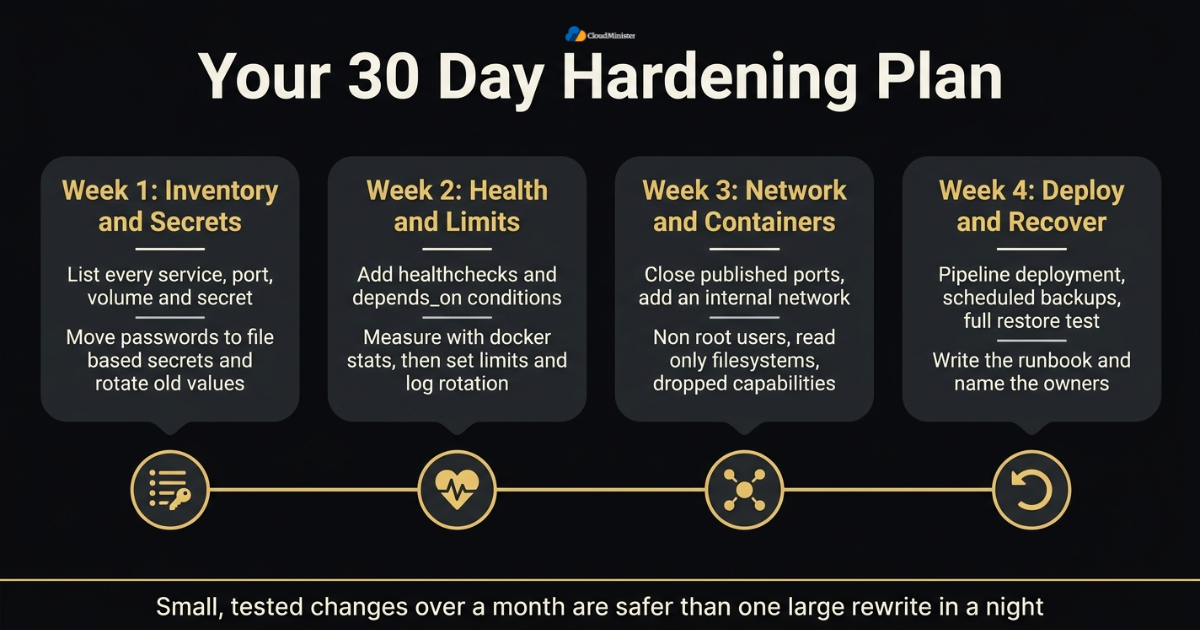
- Week one: list every service, port, volume, and secret, and note which ones are exposed to the internet.
- Week one: move passwords from environment variables to file based secrets, and rotate the old values.
- Week two: add healthchecks and depends_on conditions, and test them by breaking each service in staging.
- Week two: measure with docker stats, then set memory and CPU limits and log rotation.
- Week three: close published ports, add the internal network, and bind admin tools to localhost.
- Week three: apply non root users, read only filesystems, dropped capabilities, and no-new-privileges.
- Week four: set up pipeline deployment, scheduled backups, and a full restore test, and review pipeline settings for CI/CD cost optimization.
- Week four: write the runbook, name the owners, decide whether a Server Management Company will watch the alerts, and schedule a quarterly review of the whole setup.
Checklist: Docker Compose Production Readiness Review
- Recovery goals written in minutes and agreed with the business
- All secrets moved to files and old values rotated
- Every image pinned to a specific version
- Healthchecks added and tested by breaking the service in staging
- depends_on conditions set for databases and migration jobs
- Memory, CPU, and process limits set from measured use
- Log rotation enabled for every service
- Only proxy ports published, with internal tools bound to 127.0.0.1
- Non root users, dropped capabilities, and no-new-privileges applied
- Backup restored successfully within the last 30 days
- Rollback tag and owner named before every release
- Hosting plan, backup policy, and restore options confirmed with your Web Hosting Company in India
Key Takaways
- Docker Compose Production hardening rests on three pillars: secrets, healthchecks, and resource limits.
- File based secrets keep passwords out of environment variables, image layers, and inspect output.
- A healthcheck must test real application behaviour, and depends_on conditions use it to order startup.
- Memory limits protect the host, and CPU limits protect your neighbours inside the same VPS.
- Published ports can bypass UFW, so bind to localhost and let one reverse proxy face the internet.
- A tested restore matters more than any backup schedule in a Docker Compose Production setup.
- Steady CI/CD cost optimization lowers pipeline waste without lowering quality.
- A Server Management Company with clear escalation and rollback rules reduces risk on busy nights.
- A partner offering both Server Management Services in India and DevOps Services & Solutions keeps infrastructure and pipeline changes in step.
- A reliable Web Hosting Company in India supplies the disk, network, and snapshot base that every Compose stack depends on.
Want a Expert Review of Your Docker Compose Setup?
Share your stack with our team and get practical advice on secrets, healthchecks, resource limits, backups, and server management for your VPS.
Conclusion
One pattern holds across every stack, whatever the size of the company. Safe operation is the result of small, boring, repeatable steps. A strong Docker Compose Production setup keeps secrets in files, asks every service to prove it is healthy, gives each container a fair share of the VPS, and closes every port that does not need to be open. None of these steps is difficult on its own, and together they remove most of the surprises that cause night time incidents. Server Management Services in India can also cover night time alerts, so developers can rest between releases.
A launch is also not the end of the work. Review limits when traffic grows, rotate secrets when people change roles, and rehearse restores on a schedule. Keep notes on what worked and what failed, so the next Docker Compose Production project starts from a stronger base. If your team would like a second pair of eyes, a trusted Web Hosting Company in India that also offers Server Management Services in India and DevOps Services & Solutions can review the whole stack with you.
Frequently Asked Questions
Is Docker Compose good enough for production on a single VPS?
Yes, for many small and medium workloads. Compose gives you declarative services, secrets, healthchecks, and limits on one host. It does not give you automatic failover across several servers, so plan backups and recovery carefully in any Docker Compose Production design.
Are Docker Compose Production secrets really secure?
They are safer than environment variables, because the value is mounted as a read only file and stays out of docker inspect. They are still files on the host, so protect the folder with tight permissions, keep it out of Git, and rotate values regularly.
Does Docker restart a container when its healthcheck fails?
No. On a plain Docker Engine host, an unhealthy status does not trigger a restart by itself. A restart policy reacts only to process exit, so connect healthchecks to alerts through a Server Management Services in India plan, or use a carefully secured watcher.
Should I use deploy.resources or mem_limit in Compose?
Compose v2 applies deploy.resources limits on a single host, and the older service level keys such as mem_limit and cpus still work. Pick one style per service and keep it consistent across your Docker Compose Production files.
Why is my published port open even though UFW blocks it?
Docker adds its own firewall rules, and traffic to published ports does not pass through the UFW rules you wrote. Bind the port to 127.0.0.1 or filter traffic through the DOCKER-USER chain.
How can I reduce pipeline cost without weakening quality?
Cache dependency layers, use slim images, skip builds for documentation changes, and cancel superseded runs. These habits are the practical core of CI/CD cost optimization.
What should I ask a Server Management Company before signing?
Ask how it verifies backups, how it monitors containers, who approves a rollback, and what it has learned from a past incident. A Server Management Company that answers with specific examples is usually better prepared.
When are DevOps Services & Solutions worth paying for?
They help most when you want repeatable pipelines, reviewed deployments, and a tested rollback process, or when your team lacks time to build them. Ask what is automated and what documents you keep at the end. A good provider of DevOps Services & Solutions leaves you with scripts and notes you own.
Can Server Management Services in India include container support?
Many providers include monitoring, backups, patching, and incident response, and some also support container stacks. Confirm in writing what is covered, including after hours response and rollback help.
How do I choose a Web Hosting Company in India for Docker workloads?
Look for fast disks, a clear backup and snapshot policy, helpful support hours, and plans that can be resized without a rebuild. A Web Hosting Company in India that also offers management and DevOps help can simplify your Docker Compose Production setup.

Pritam Kumar is a DevOps Engineer at CloudMinister Technologies, where he manages a multi-datacenter fleet of 100+ servers and architects end-to-end CI/CD pipelines and infrastructure automation using Kubernetes, Terraform, and Ansible. He holds an AWS Certified DevOps Engineer Professional certification and has served as a Google Cloud Mentor, reflecting both hands-on cloud expertise and a track record of mentoring others in the field. His work spans disaster recovery architecture, security incident response, and hosting infrastructure across Proxmox, cPanel/WHM, and Linux systems. Notably, Pritam led the design of Cloud Kavach, a self-hosted DC/DR SaaS portal, and directed remediation efforts for large-scale hosting security incidents involving webshells and command-and-control malware. He brings this depth of real-world infrastructure and security experience to the technical content he writes.
Related posts:
 Docker Bridge Network Explained: When to Use Bridge, Host, and Overlay Networks
 How Much Does DevOps Consulting Cost in India? 2026 Breakdown
 CI/CD Pipeline for Small Teams: The Minimal Setup Guide
 Podman vs Docker in 2026: Why Rootless Containers Are Becoming the Default in Security-Conscious Environments
