Container networking problems rarely come from one bad decision. They usually come from a docker bridge network being left on default settings long after an application outgrows a single host. Bridge, host, and overlay networking all solve the same core problem of connecting containers to each other and to the outside world, but each does it differently. A docker bridge network isolates containers on one machine, host networking removes that isolation for direct access to the machine’s own network stack, and overlay networking extends bridge style isolation across multiple machines for clustered deployments. This guide breaks down how each option works and when a layered approach beats defaulting to just one.
Every team running containers eventually has to make a choice about how those containers talk to each other and to the world outside. That choice usually starts with a docker bridge network, since it is the default option the moment Docker gets installed on a machine. Most engineers do not think twice about it in the early days of a project, because two or three containers on one host rarely cause visible problems. The trouble shows up later, once an application grows past a single server or starts handling real production traffic. At that point, the same default settings that felt harmless in development can quietly turn into the source of confusing bugs, unreachable services, or unexpected exposure.
Understanding a docker bridge network properly means understanding what it does and where its limits sit. It creates a private network segment on a single host, gives every container its own IP address, and keeps that container separated from the host machine’s own network interface. This is different from host networking, which removes isolation entirely, and from overlay networking, which stretches that same bridge style isolation across many machines working together in a cluster. Each of these three approaches was built to solve a different kind of problem, and knowing which one fits a given workload is often the difference between a stable deployment and one that keeps producing strange, hard to trace issues.
This guide walks through all three options in detail, starting with how a docker bridge network behaves by default and moving into the situations where host or overlay networking genuinely makes more sense. Rather than treating any one driver as universally correct, the goal here is to help teams recognize which pattern fits their actual traffic, their actual scale, and their actual security requirements. A layered approach, where most services stay on a bridge network while only a few moves to host or overlay networking, tends to outperform any single default applied blindly across an entire fleet of containers. The sections ahead break down exactly how to make that call with confidence.
Table of Contents
- What is a docker bridge network and why does it matter
- Why teams need to understand its behavior in their stack
- Choosing between bridge, host, and overlay networks before you deploy
- Bridge vs host vs overlay: the core differences every team should know
- How to decide which networking driver actually fits your workload
- Building a layered networking strategy around it
- Common mistakes teams make when working with it
- Governance and operational considerations around it
- Measuring whether your container networking setup is actually working
- Choosing the right partner for container networking strategy
- Key Takeaways
- Conclusion
- Frequently Asked Questions
What is a docker bridge network and why does it matter
For developers and platform engineers, this conversation usually starts the same way, often while comparing notes with a Web Hosting Company in India about why two containers cannot reach each other by name. Someone runs docker network ls, sees the bridge network sitting there by default, and asks whether that default is the right choice for a production workload.
A Docker Bridge Network is a private, isolated network created on a single Docker host that lets containers communicate with each other while staying separated from the host machine’s own network interface. Unlike host networking, which shares the machine network to stack directly, a Docker Bridge Network sits behind a virtual switch inside the Docker engine, meaning every container attached to it gets its own IP address and its own layer of isolation.
- The default bridge network is created automatically at the moment Docker is installed, so containers can talk to each other without extra configuration, which makes this one of the simplest starting points inside any DevOps Services & Solutions setup.
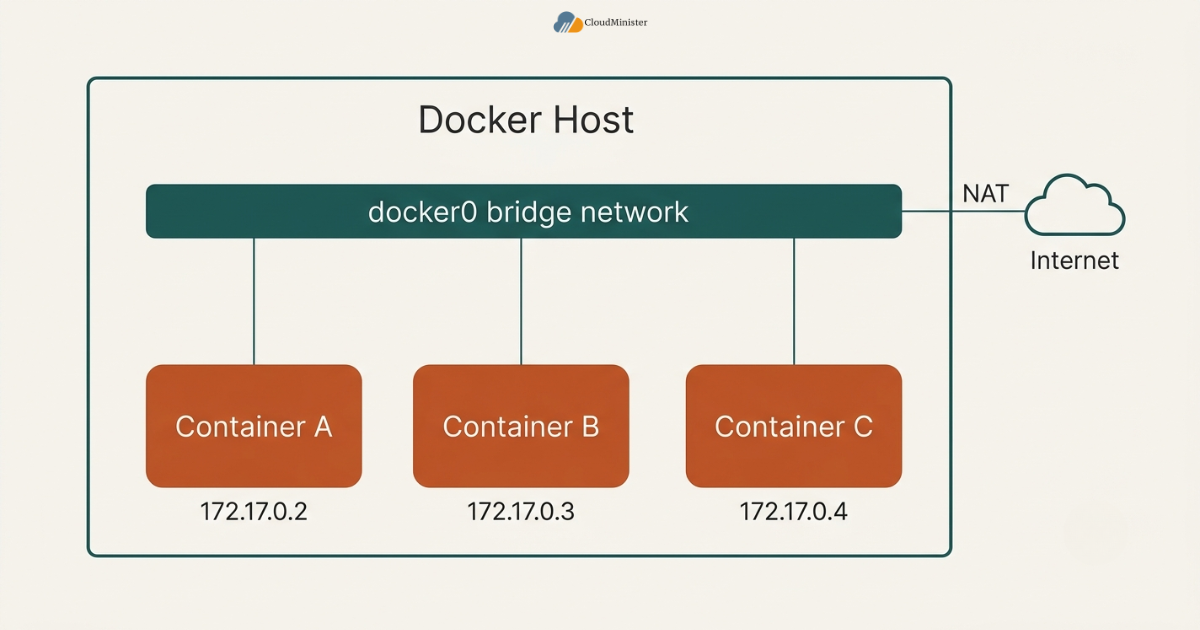
- It handles container to container communication and outbound access to the internet through network address translation but does not automatically expose a container to anything outside the host unless a port is explicitly published.
- User defined networks add automatic DNS resolution between containers, so containers can reach each other by service name instead of by IP address, which the default network does not support and which most DevOps Services & Solutions teams standardize on early.
- A custom subnet, gateway, and IP address range can be assigned at creation time, which matters for teams managing several isolated applications on the same physical or virtual machine, especially when a Web Hosting Company in India is also managing shared infrastructure nearby.
- Teams sizing their container topology correctly from day one tend to get more predictable behavior than teams that pile every unrelated container onto the same network, which is one more reason a properly scoped Server Management Company matters before an application reaches production.
This kind of network changes how containers see each other, not how they authenticate to each other, so two containers sharing the same network can typically reach every open port on one another unless firewall rules or application level authentication are added separately, which is exactly the kind of gap a Server Management Company is trained to catch. A misconfigured setup that mixes unrelated services together is one of the more common ways an internal service gets exposed to something it should never have been reachable from, so this design deserves the same review discipline as any other production access control decision.
2. Why teams need to understand docker bridge network behavior in their stack
Many engineering teams first encounter this decision while already researching a Web Hosting Company in India for their broader production needs, and a capable Web Hosting Company in India will usually raise container networking early in that conversation, since a good partner rarely separates hosting advice from architecture advice. For teams without a dedicated platform engineering function, understanding a Docker Bridge Network correctly is often the fastest way to avoid a category of bug that looks like a mystery but is actually a predictable networking limitation.
- Container adoption has reached a point where the underlying networking choices behind every deployment genuinely matter at scale, with the Docker container market itself valued at USD 7.41 billion in 2026 and projected to keep growing sharply through the rest of the decade, according to a 2026 industry analysis from Mordor Intelligence.
- Without a structured approach to network driver selection, different teams inside the same company commonly default every container to the same network, producing naming collisions and unintended reachability between services that were never meant to talk to each other.
- A disciplined approach centralizes network design decisions at the platform or DevOps team level, sometimes in partnership with a Web Hosting Company in India, rather than leaving driver selection to whichever engineer ran docker run first.
Related Reading: SRE vs DevOps
- Teams that already run on a well structured Server Management Services in India setup tend to catch misconfigurations faster, since routine monitoring surfaces unexpected container to container traffic before it becomes a production incident. Choosing the right operational partner from the outset is, in practice, the first real step toward catching these issues early.
Before standardizing a bridge network pattern across an entire fleet of services, test the pattern against one application first, ideally the simplest multi container service already running, and involve a Web Hosting Company in India early if one already manages part of the environment. Teams that validate real container communication patterns before standardizing consistently avoid the most common mistake, which is assuming the default network behaves the same way as a user defined one.
3. Choosing between bridge, host, and overlay networks before you deploy
Before working through the detailed comparison in this guide, it helps to understand that Docker offers three fundamentally different networking drivers for three fundamentally different situations. A Docker Bridge Network isolates containers on a single host behind a virtual switch. Host networking removes that isolation and shares the host’s network stack directly with the container. Overlay networking extends bridge style isolation across multiple hosts joined together in a cluster.
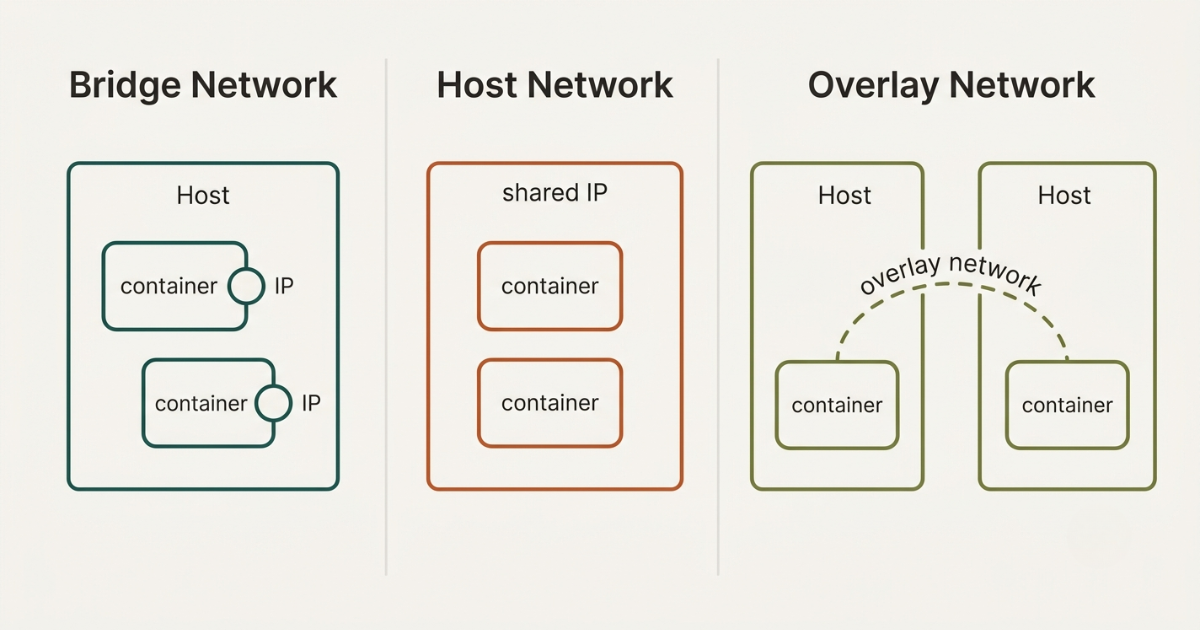
- This driver suits single host applications where containers need to talk to each other and to the outside world, but do not need to be reachable from other physical or virtual machines directly, which is the starting point most Web Hosting Company in India teams recommend by default.
- Host networking suits latency sensitive workloads where the small overhead of network address translation genuinely matters, or where a container needs privileged access to the host’s own network interfaces for monitoring or packet capture, a scenario DevOps Services & Solutions teams typically flag during onboarding.
- Overlay networking suits clustered deployments, typically running under Docker Swarm or a comparable orchestrator, where containers on entirely different machines need to discover and reach each other as if they shared one local network.
- Where an application sits between these patterns, many teams run the bulk of their services on a Docker Bridge Network while reserving host networking specifically for a small number of performance critical components, whether that split sits entirely on a single Server Management Services in India managed host or spans a larger cluster.
- Running a real traffic pattern review before committing to any single driver, a step most established Server Management Services in India providers will help set up, confirms exactly which services genuinely need cross host reachability and which can stay comfortably on a single Docker Bridge Network.
- Teams building out their container footprint for the first time often benefit from starting everything on the bridge driver and only introducing host or overlay networking once a specific, measured need appears, since an immature deployment rarely has the traffic patterns yet to justify the added complexity.
4. Docker bridge network vs host vs overlay: the core differences every team should know
Below is a breakdown of how these three networking drivers differ across the factors that actually matter for a real production environment and for the surrounding DevOps Services & Solutions a team has already put in place.
4.1 Isolation: Docker Bridge Network Usually Wins on Security by Default
- This driver gives every container its own network namespace, meaning processes inside the container cannot see the host’s network interfaces, routing table, or other processes listening on the host directly.
- Host networking removes this isolation entirely, so a container running under host networking shares the exact same network stack as the host machine, which means a port bound inside the container is a port bound on the host itself.
- Overlay networking preserves the same isolation model as a Docker Bridge Network but extends it across hosts, so containers on different machines still cannot see each other’s underlying host network unless they are explicitly connected through the overlay.
- The isolation gap widens the more services a single machine runs, since host networking increases the chance of a port conflict or an unintended exposure with every additional container added.
- For a team running several unrelated applications on the same infrastructure, even a single container placed on host networking by mistake can meaningfully change that machine’s attack surface, which is exactly the kind of gap a Server Management Company flags during a routine security review, often as part of a wider DevOps Services & Solutions engagement.
4.2 Performance: Host Networking Wins When Every Millisecond Counts
- A Docker Bridge Network routes traffic through a virtual bridge and applies network address translation, which adds a small but measurable amount of overhead compared with traffic that never leaves the host’s own network stack.
- Host networking eliminates that overhead completely, since traffic reaches the container’s process directly without passing through Docker’s virtual networking layer.
- For most typical web applications and internal services, the performance difference is small enough to be irrelevant, and teams focused on CI/CD cost optimization often find the added operational simplicity of the bridge driver outweighs a marginal latency gain.
- Applications processing extremely high packet volumes, including certain monitoring agents, packet capture tools, and specialized network appliances, are the cases where host networking’s raw performance genuinely changes the outcome rather than simply looking better on paper.
- Teams unsure whether their workload falls into this category should benchmark it directly as part of routine CI/CD cost optimization work rather than assuming host networking is faster by default, since a Docker Bridge Network is close enough in practice for the overwhelming majority of production services.
4.3 Reachability Across Machines: Overlay Networking Is the Only Real Option
- A Docker Bridge Network is scoped to a single Docker host by design, so containers on that network simply cannot reach containers running on a different machine without some additional layer sitting on top.
- Overlay networking solves exactly this problem, creating a virtual network that spans multiple Docker hosts joined into a Swarm cluster, so containers on different physical or virtual machines can communicate as if they shared a local network.
- Host networking does not solve this problem either, since sharing the host’s network stack only helps within that single machine and does nothing to connect containers running elsewhere.
- Teams running a clustered deployment across several nodes, often as part of a broader DevOps Services & Solutions strategy, generally need overlay networking specifically because a Docker Bridge Network was never designed to cross host boundaries.
- This is also the point where many teams first bring in outside expertise, since correctly configuring overlay networking alongside a broader Server Management Services in India setup takes more specialized knowledge than standing up a single bridge network on one machine.
4.4 Operational Complexity: Docker Bridge Network Stays the Simplest Default
- This driver requires essentially no additional infrastructure to use, since it works out of the box on a single Docker host with no cluster, no orchestrator, and no extra configuration beyond the network definition itself.
- Host networking is mechanically simple to enable but operationally riskier, since the burden of avoiding port conflicts and managing exposure shifts entirely onto whoever configured the container.
- Overlay networking is the most operationally involved of the three, requiring Swarm mode, a properly configured cluster, and an understanding of how service discovery and load balancing work across nodes rather than within one, which is often where teams first budget for CI/CD cost optimization alongside networking changes.
- For teams just getting started, standardizing on the bridge driver first and only introducing overlay networking once genuine multi host requirements appear tends to keep the learning curve manageable, a sequencing a Server Management Company will often recommend by default.
Related Reading: CI CD pipeline for small teams
5. How to decide which networking driver actually fits your workload
Choosing between a Docker Bridge Network, host networking, and overlay networking is not a matter of picking whichever option sounds the most advanced. It depends entirely on how the application is actually deployed and how far its containers genuinely need to reach.
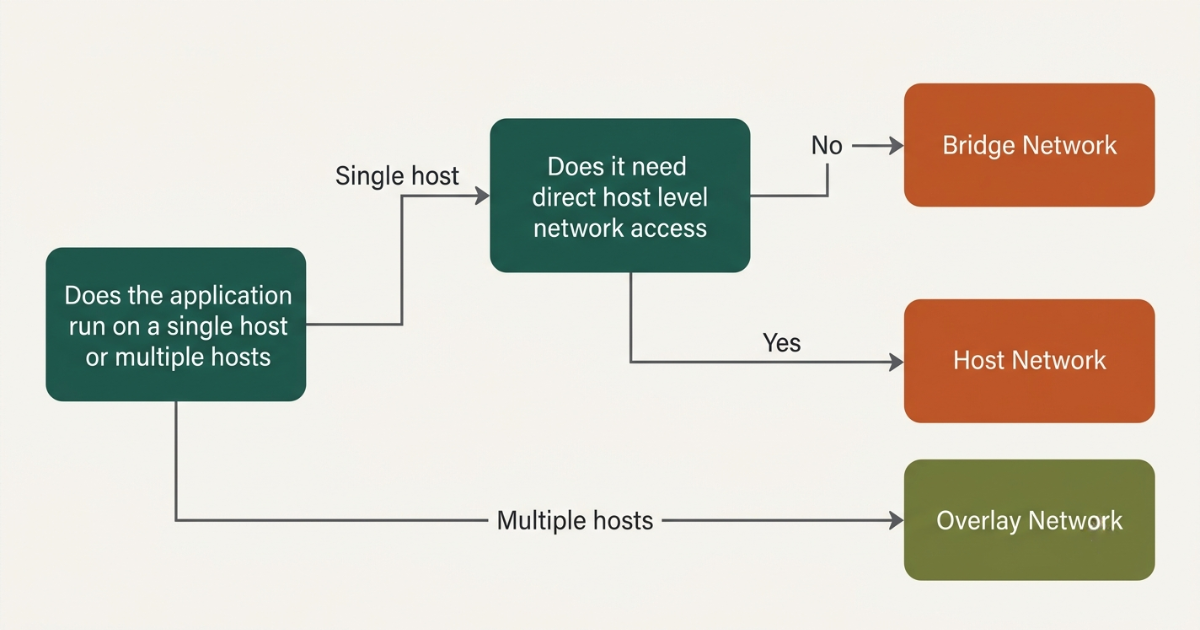
- Start by confirming whether the application runs on a single host or across multiple machines, since that single fact eliminates two of the three options immediately in most cases.
- If the application is single host and does not need privileged access to the host’s own network interfaces, this driver is almost always the right starting point, and moving away from it should require a specific, documented reason.
- If a specific component genuinely needs raw network performance or direct access to host level network tooling, isolate that one component onto host networking rather than moving the entire application, since applying host networking broadly increases risk without a corresponding benefit, a distinction a careful Web Hosting Company in India will always draw out explicitly.
- If the deployment spans multiple machines and containers on different hosts need to discover and reach each other directly, overlay networking becomes necessary, and this decision usually arrives alongside a broader move toward orchestration as part of a wider DevOps Services & Solutions rollout, which is also a natural point to revisit CI/CD cost optimization across the pipeline.
- Document the assumptions behind the decision, including expected growth, any known architecture changes on the roadmap, and how the choice fits the team’s current Server Management Services in India arrangement, so it can be revisited with context later.
The pattern that separates a genuinely well designed container networking setup from a fragile one is layering rather than picking one driver exclusively. A team that runs the bulk of its services on a Docker Bridge Network, isolates a small number of performance sensitive components onto host networking, and reaches for overlay networking specifically when a workload spans multiple machines typically ends up with a setup that is both secure and easy to reason about, rather than a team that forces every container into a single networking model regardless of what that container actually needs.
6. Building a layered networking strategy around docker bridge network
Even a well chosen Docker Bridge Network can underperform if it sits inside a deployment with no supporting structure around it. Building a layered approach across a team’s entire container footprint matters as much as picking the right driver for any single service.
- Use this driver as the default for the overwhelming majority of containerized services, since it covers container to container communication and outbound internet access without introducing unnecessary exposure.
- Reserve host networking specifically for the small number of components where raw performance or direct host access has been measured and confirmed to matter, rather than applied broadly out of convenience, a distinction worth documenting as part of any CI/CD cost optimization review.
- Introduce overlay networking only once a deployment genuinely spans multiple hosts, since applying it to a single host setup adds operational overhead without any corresponding benefit for a Docker Bridge Network to begin with.
- Reassess the mix on a recurring schedule, ideally as part of routine Server Management Services in India reviews, since an application that ran comfortably on a single bridge network a year ago may have since grown into a multi host deployment that now needs overlay networking instead, which is often when CI/CD cost optimization conversations naturally resurface.
Related Reading: CI CD cost optimization for AI training
Struggling to Manage Container Networking at Scale
A wrong driver choice can quietly expose services or slow deployments across your fleet. Our DevOps experts help you design a layered networking strategy that actually fits your workload.
For teams also weighing how networking decisions interact with deployment pipelines more broadly, understanding how a Docker Bridge Network fits inside a real workflow can clarify which parts of the stack are genuinely worth optimizing first as part of ongoing CI/CD cost optimization. A service that runs comfortably on the bridge driver in a small team’s pipeline does not automatically need overlay networking the moment that team scales, since operational overhead and genuine multi host requirements vary considerably between one deployment and the next. Teams building a genuinely reliable container strategy alongside their broader DevOps Services & Solutions practice should treat driver selection as an ongoing decision rather than a one time setup step, with CI/CD cost optimization reviewed alongside it.
7. Common mistakes teams make when working with docker bridge network
Even teams that understand the mechanics of a Docker Bridge Network correctly, including teams already working with an established Web Hosting Company in India, can still fall into avoidable mistakes if network design is treated as a one time setup task rather than an ongoing practice.
- Leaving every container on the default bridge network instead of creating user defined networks, which means containers lose automatic DNS based service discovery and often end up relying on hardcoded IP addresses that break the moment a container restarts.
- Reaching for host networking to solve a performance problem that was never actually measured, whether inside a Docker Bridge Network setup or under a broader DevOps Services & Solutions review, without first confirming that network overhead was genuinely the bottleneck rather than something CI/CD cost optimization would have caught.
- Mixing unrelated applications onto the same Docker Bridge Network for convenience, which increases the number of services that can reach each other directly and expands the blast radius if any single container is compromised, a pattern a Server Management Company typically flags early.
- Treating a Docker Bridge Network, host networking, and overlay networking as interchangeable choices, or assuming a pattern that works under a small single host setup will transfer unchanged once a deployment moves to a clustered environment, rather than reassessing the driver deliberately as requirements change.
- Not revisiting network topology after a significant architecture change, leaving services attached to a Docker Bridge Network that no longer reflects how the application actually communicates, a gap a responsive Web Hosting Company in India would normally catch during a routine review.
Across real production deployments, the gap between a team that gets consistent, predictable behavior from a Docker Bridge Network and one that quietly accumulates networking debt is rarely about which specific driver was chosen first. It is a difference in ongoing review discipline. Teams that assign clear ownership over network topology and revisit it on a fixed schedule, often with a Server Management Company handling the recurring checks, report far fewer instances of the kind of unexpected container reachability that an unmanaged setup eventually produces.
Related Reading: Running a CI CD pipeline on AWS
8. Governance and operational considerations around docker bridge network
Standardizing a bridge network pattern at scale introduces a specific governance layer on top of the standard technical considerations that come with running containerized workloads at that size.
- Network design decisions should route through the same review process as any other production infrastructure change, ideally with input from DevOps Services & Solutions specialists, since a misconfigured Docker Bridge Network can quietly expose a service that was never meant to be reachable.
- Centralized network standards, coordinated with a single Server Management Company rather than allowing individual teams to define their own conventions independently, prevent the kind of naming collisions and overlapping subnets that are difficult to untangle later.
- Container to container traffic patterns should be reviewed on a recurring basis, ideally with support from a Web Hosting Company in India that already monitors the account, so that any unexpected reachability across a Docker Bridge Network gets flagged before it turns into a genuine incident.
- Host networking usage should be tracked explicitly, since knowing exactly which containers run outside the isolation of the bridge driver is far more useful during an incident than discovering it while responding to one, and a good Server Management Company will usually maintain this inventory as a matter of course, alongside routine CI/CD cost optimization reviews.
- A documented network inventory, tracking which services sit on which Docker Bridge Network and which ones have been deliberately placed on host or overlay networking instead, gives a platform team, and any supporting Server Management Services in India partner, the audit trail needed to justify the setup during a security review.
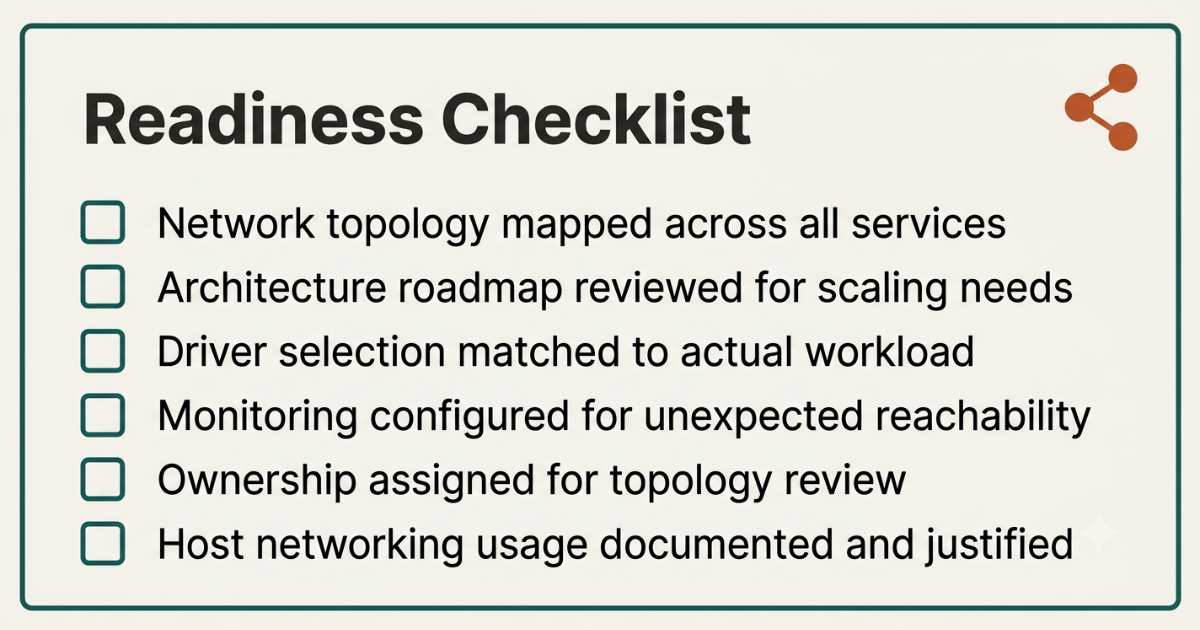
Checklist: Readiness Before Standardizing Docker Bridge Network Patterns at Scale
- Current network topology mapped across every running service
- Architecture roadmap reviewed for upcoming multi host or clustering requirements
- Driver selection matched to actual workload needs, and to the surrounding DevOps Services & Solutions setup, rather than whichever option was fastest to configure
- Monitoring configured to flag unexpected container to container reachability before the first incident
- Ownership assigned for ongoing network topology review and reassessment, ideally shared with a Server Management Company
- Host networking usage documented and justified wherever it appears, with CI/CD cost optimization considered alongside any performance claim
9. Measuring whether your container networking setup is actually working
Standardizing a good networking pattern is not the finish line of a container effort, whether the workload sits on a self managed environment or with an outside partner offering Server Management Services in India. Long term value depends entirely on how the setup is monitored and adjusted afterward.
- Track which containers sit on the default network versus a user defined one, since a service still relying on the default is quietly missing automatic DNS resolution even while otherwise functioning correctly, a gap a Server Management Company usually catches quickly.
- Compare actual container to container traffic against what the application’s architecture diagram assumes, a discipline that matters equally for teams focused on CI/CD cost optimization, since real world reachability often turns out broader than the diagram suggests once unused connections are audited.
- Review host networking usage quarterly, flagging any container running under host networking that no longer has a clearly documented performance justification, a review many teams now delegate to their Web Hosting Company in India or a dedicated Server Management Company.
- Cross reference network topology against a team’s broader DevOps Services & Solutions roadmap, and against any secondary environment running on another provider, to confirm that the setup still matches how the application is actually deployed, with CI/CD cost optimization tracked alongside it.
- Maintain a change log for every network created, modified, or removed, shared with the Server Management Company where relevant, so a team can trace exactly why a given configuration was chosen and whether the assumptions behind it still hold, a practice most Server Management Services in India providers already build into their reporting.
Enterprises managing containerized workloads at meaningful scale are not managing this challenge in isolation. Kubernetes misconfiguration alone accounts for roughly forty five percent of reported incidents in containerized environments, according to Red Hat data cited in a 2026 cloud security statistics report, underscoring why structured network review matters just as much as the initial driver selection, and why a dependable Server Management Company earns its keep long after the first deployment.
10. Choosing the right partner for container networking strategy
Not every hosting relationship is built to support disciplined container networking, so matching a provider’s capability to actual team needs matters more than brand recognition alone, whether that provider delivers Server Management Services in India, broader DevOps Services & Solutions, or both.
- A dependable Web Hosting Company in India that already manages a team’s broader infrastructure is well positioned to advise on how container networking should fit into an existing environment without introducing unnecessary reachability risk.
- Teams evaluating providers should specifically ask whether the provider has direct experience helping customers structure container networking at meaningful scale, across DevOps Services & Solutions, Server Management Services in India, or both, not just provisioning individual virtual machines.
- Teams that want to move quickly without designing every layer of their networking strategy themselves often gravitate toward a Server Management Company that comes with clear documentation on how a Docker Bridge Network interacts with existing infrastructure from day one, including a clear view of CI/CD cost optimization.
- Engineering leaders who have not yet reviewed their hosting partner relationship specifically in the context of network design, host networking exposure, or overlay networking readiness should treat this guide as a natural trigger point to do so, and to ask their Web Hosting Company in India directly.
- A Web Hosting Company in India that combines container networking expertise with broader Server Management Services in India experience gives growing teams a coherent roadmap for scaling their container footprint instead of stitching together advice from multiple vendors.
- Teams researching Server Management Services in India specifically for containerized workloads should confirm that a prospective partner understands both networking mechanics and the surrounding DevOps Services & Solutions structure, since the two decisions are closely linked, and CI/CD cost optimization tends to follow naturally once both are aligned.
When comparing quotes or advice from different partners on container networking strategy, whether they specialize in DevOps Services & Solutions, Server Management Services in India, or a Server Management Company built around a specific stack, ask each one to walk through a real network topology from your own environment rather than a generic case study, since the right recommendation depends entirely on how many hosts are involved and how those services actually need to reach each other. A provider offering Server Management Services in India that understands both the driver mechanics and a team’s actual traffic pattern will consistently give more actionable guidance than a purely theoretical comparison, and will usually flag CI/CD cost optimization opportunities along the way.
Key Takeaways
- A Docker Bridge Network is the default, single host networking driver that isolates containers behind a virtual switch while still allowing container to container communication and outbound internet access, a baseline any competent Server Management Company should already be enforcing.
- Host networking trades that isolation for raw performance by sharing the host’s own network stack directly, a trade off that matters for a small number of latency sensitive or privileged workloads rather than for most applications, and one worth checking against CI/CD cost optimization goals first.
- Overlay networking extends the same isolation model as a Docker Bridge Network across multiple hosts, making it the correct choice specifically for clustered deployments running under Docker Swarm or a comparable orchestrator.
- Neither host nor overlay networking should replace this driver as the default, so a complete container strategy still needs it as the foundation for the overwhelming majority of services, a point a good Server Management Company will reinforce during any architecture review.
- Governance, traffic pattern monitoring, and a documented ownership structure matter just as much as the initial driver decision, and this holds whether the environment is run internally, through a Server Management Company, or through broader Server Management Services in India.
- Partnering with a capable Web Hosting Company in India experienced in structured container networking strategy, and comfortable discussing DevOps Services & Solutions and CI/CD cost optimization in the same conversation, meaningfully reduces the risk of an unmanaged, sprawling setup, and this is worth raising directly in the next planning call with that Web Hosting Company in India.
Not Sure Which Networking Driver Fits Your Setup
Every deployment is different, and the right choice depends on your actual traffic and infrastructure. Talk to our team and get a recommendation built around your environment.
Conclusion
Throughout this comparison, one pattern holds regardless of company size, application type, or whether the surrounding environment runs on a single managed host, a larger cluster, or a mix of both. A Docker Bridge Network keeps containers isolated and predictable on a single machine, host networking trades that isolation for raw performance when a specific workload genuinely needs it, and overlay networking extends the same isolation model across multiple hosts once a deployment genuinely requires it. Choosing between them is not really a question of which driver is better in the abstract. It is a question of how the application is actually deployed and how far its containers genuinely need to reach.
By 2026, treating a Docker Bridge Network, host networking, and overlay networking as a combined, layered strategy rather than a single either or decision has become close to standard practice for any team managing meaningful containerized infrastructure, often guided by a trusted Server Management Company along the way. The teams that get the most value from this approach share a consistent pattern. They default to the bridge driver unless there is a specific, documented reason not to, they revisit network topology on a fixed schedule, and they treat driver selection as one part of a broader DevOps Services & Solutions practice rather than a one time configuration step, with CI/CD cost optimization reviewed alongside it. For teams weighing this decision alongside a broader look at Server Management Services in India, or comparing it against how networking works under other orchestration platforms, the same underlying principle applies. Match the driver to how the application actually communicates, layer networking choices deliberately, revisit the decision as the environment changes, and a Docker Bridge Network becomes a genuine, dependable foundation rather than another default nobody fully understands, ideally with a capable Web Hosting Company in India involved throughout.
Frequently asked questions
Does a Docker Bridge Network always perform worse than host networking?
Not meaningfully for most applications. This driver adds a small amount of network address translation overhead compared with host networking, but for typical web applications and internal services this difference is small enough to be irrelevant in practice. Host networking only produces a genuinely noticeable improvement for extremely high throughput or latency sensitive workloads, which should be confirmed through benchmarking, ideally as part of routine CI/CD cost optimization, rather than assumed.
Can a team use a Docker Bridge Network and overlay networking together?
Yes, though not on the exact same service at the exact same time. It is common for a team to run the bulk of their single host services on the bridge driver while running clustered components on an overlay network, with both patterns existing side by side across a broader infrastructure, sometimes coordinated with support from DevOps Services & Solutions specialists who track both layers as part of their standard DevOps Services & Solutions engagement. This layered approach is exactly how most mature container networking strategies are structured in 2026.
What happens if a container on a Docker Bridge Network needs to be reached from another machine?
A bridge network alone cannot expose a container to another host. A port must be explicitly published from the container to the host machine, and from there the host’s own networking and firewall rules determine what is reachable externally. If containers on genuinely different machines need to reach each other directly rather than through the host, overlay networking becomes the correct solution instead, a decision many teams make alongside their Server Management Services in India partner.
Does a Docker Bridge Network provide service discovery between containers?
Only on a user defined network. The default Docker Bridge Network that gets created automatically does not support automatic DNS based service discovery between containers, which is one of the most common reasons teams migrate away from the default and create a custom one instead, often with guidance from a Web Hosting Company in India.
How should a team decide between host networking and a Docker Bridge Network for a new service?
The decision should be based on a confirmed, measured performance requirement or a specific need for privileged host level network access, not simply on the assumption that host networking is faster by default. A bridge network handling a workload that never actually needed host networking usually costs a team more in expanded attack surface than it would have saved in marginal latency, which is exactly the kind of trade off a Server Management Company is well placed to evaluate.
Is a docker bridge network suitable for production environments, or only for local development?
A docker bridge network is fully suitable for production and is in fact the recommended default for most single host workloads, not just local development. It handles container to container communication and controlled outbound access cleanly, and when paired with user defined networks it also gives reliable DNS based service discovery between containers. The key is making sure the network is properly scoped and monitored rather than left on default settings, since that is usually where production issues start rather than the driver itself being unfit for the job.
Does switching from a docker bridge network to overlay networking require rebuilding the application?
No, switching networking drivers does not require rebuilding the application itself, since the change happens at the infrastructure and orchestration layer rather than inside the application code. What it does require is moving the deployment into a clustered setup, typically under Docker Swarm or a similar orchestrator, and reconfiguring how services discover and reach each other across hosts. Teams usually plan this transition alongside a broader move to multi host infrastructure rather than as an isolated networking change on its own.

Pritam Kumar is a DevOps Engineer at CloudMinister Technologies, where he manages a multi-datacenter fleet of 100+ servers and architects end-to-end CI/CD pipelines and infrastructure automation using Kubernetes, Terraform, and Ansible. He holds an AWS Certified DevOps Engineer Professional certification and has served as a Google Cloud Mentor, reflecting both hands-on cloud expertise and a track record of mentoring others in the field. His work spans disaster recovery architecture, security incident response, and hosting infrastructure across Proxmox, cPanel/WHM, and Linux systems. Notably, Pritam led the design of Cloud Kavach, a self-hosted DC/DR SaaS portal, and directed remediation efforts for large-scale hosting security incidents involving webshells and command-and-control malware. He brings this depth of real-world infrastructure and security experience to the technical content he writes.