Most container security incidents do not start with a clever exploit. They start with a default setting that nobody questioned, usually a background process running with far more power than it needs. This guide explains Podman vs Docker in 2026 with a clear focus on rootless containers, daemonless design, and what these choices mean for security, compliance, and cost. It covers how each engine works, where rootless mode genuinely reduces risk, where it has limits, and how to migrate in safe phases. It also shows where a Web Hosting Company in India, a Server Management Company, and DevOps Services & Solutions fit into a container security plan.
Choosing a container engine used to be a quick decision. Most teams picked Docker because every tutorial, course, and sample project used it, and nobody thought much about what happened underneath. That habit is now being questioned. Security reviews, audit requests, and shared build servers have made Podman vs Docker a topic that platform teams discuss, document, and defend in writing before they commit to anything.
The container itself is rarely the issue. Both engines run standard OCI images, so an image built with one tool works in the other without changes. What actually differs is the process that starts the container and the level of privilege that process holds on the host. Docker relies on a background service that runs as root by default, while Podman starts each container as a normal process owned by the person who ran the command. That one design difference shapes almost everything else in the Podman vs Docker conversation.
This matters most on machines that many people share, such as CI runners, build hosts, and production servers. If an attacker breaks out of a container, the account they land in decides how much damage they can do. A root level service gives them far more to work with than an ordinary user account does. This is why rootless containers are slowly becoming the expected default in security conscious teams, and why Podman vs Docker keeps coming up in reviews at banks, hospitals, and government groups.
Security is not the only factor, though. Licensing costs, Kubernetes alignment, developer habits, and the effort needed to migrate all influence the final choice. Docker still leads in daily developer use, and Podman has real limits that deserve an honest look. In this guide, we explain how each engine works, where rootless mode truly helps, where it falls short, and how to move in safe phases. By the end, you will be able to settle the Podman vs Docker question using evidence from your own environment instead of habit or hype.
1. Why Podman vs Docker Is a Security Question in 2026
A few years ago, choosing a container engine was a matter of taste. Most teams picked Docker because every tutorial used it, and that was the end of the discussion. In 2026 the conversation has changed. Security reviews, audit requirements, and shared build servers have turned Podman vs Docker into a real architectural decision that platform teams now defend in writing.
- A container engine is the tool that builds, pulls, and runs containers on a host. Both engines run standard OCI containers, so the images you build work in either one. In short, Podman vs Docker compares two ways of running the same container standard.
- The real difference between them is not the container itself. It is the process that starts the container and the privileges that process holds on the host.
- Docker Engine uses a long-running background service called dockerd. By default this service runs as root and every docker command talks to it through a socket. A Web Hosting Company in India can check that this service is locked down on each host.
- Podman has no central service. Each command starts the container as a normal child process of the user who ran it, which changes what an attacker can reach after a break-in. Server Management Services in India often cover this kind of baseline review.
- This is why Podman vs Docker keeps appearing in security reviews at banks, hospitals, and government teams that follow the least privilege principle. Good DevOps Services & Solutions turn that review into a repeatable habit.
- The discussion is also not only about security. Licensing, cost, Kubernetes alignment, and team skills all shape the final Podman vs Docker choice. Even CI/CD cost optimization is affected by this choice, because build hosts are shared and busy.
- A capable Web Hosting Company in India will often bring up container privilege settings during an infrastructure review, because the host, the network, and the engine must be designed together. Every serious Podman vs Docker review should include the hosting layer.
- Teams that already work with a Server Management Company usually document their container security baseline earlier, since an outside team keeps the review cadence going.
Before you compare features, write down the one question that matters most for your team. Is it audit compliance, shared build servers, licence cost, or developer comfort? The answer to that single question usually settles the Podman vs Docker debate faster than any benchmark.
2. What the 2026 Data Says About Container Adoption
Before looking at architecture, it helps to see how widely containers are used today. Container adoption has moved from experiment to standard practice, and that growth is exactly why security defaults now matter so much. The larger the estate, the more expensive a weak default becomes.
- The CNCF Annual Cloud Native Survey, published in January 2026, reports that the share of organizations using containers for most or all production applications rose from 41 percent in 2023 to 56 percent in 2025, and that 82 percent of container users now run Kubernetes in production.
- The same CNCF report, based on 628 respondents with a margin of error of plus or minus 3.3 percent, lists security as a top challenge for 36 percent of organizations using containers.
- On the developer side, the Stack Overflow Developer Survey 2025 found Docker at 71.1 percent and Podman at 11.1 percent among the 24,473 people who answered the cloud development question. Server Management Services in India can supply this kind of audit data during a review.
- That gap shows that Docker still leads in everyday usage, while Podman more than doubled its share, from about 5 percent in the 2024 survey to 11.1 percent in 2025. Growth like this makes CI/CD cost optimization a board level topic in many companies.
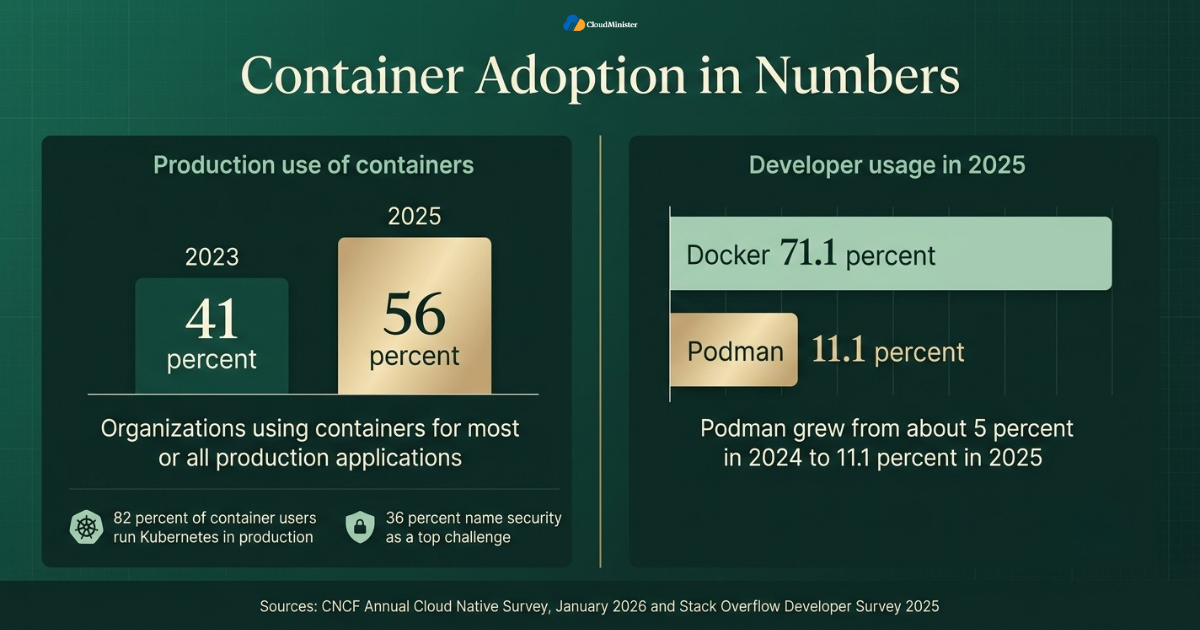
- The honest reading of these numbers is that Docker remains the default on laptops, while Podman is winning ground where security teams set the rules. That is the context every Podman vs Docker discussion should start from.
- This split explains why many companies now run a mixed setup, and why Podman vs Docker is often answered with both tools rather than one. Teams using DevOps Services & Solutions can automate this check across every server.
- Businesses that rely on Server Management Services in India often see this mixed setup first, because the provider audits servers where the security defaults actually matter. Efforts around CI/CD cost optimization usually start once the container estate grows this large. A Server Management Company can share what it sees across many client estates.
- A well informed Web Hosting Company in India can also tell you which of your servers are shared by many users, since those are the places where rootless design pays off the most.
Popularity is not the same as safety. A tool used by most developers is not automatically the right default for a shared production server. Judge Podman vs Docker by how each one handles privileges on your own hosts, not by survey rankings alone.
3. How Docker and Podman Actually Work
To understand why Podman vs Docker matters for security, you need a clear picture of what happens when you type a run command. The two engines take very different paths from your keyboard to a running container, and each path has its own consequences. The table below gives a quick side by side view before each point is explained in detail.
| Area | Docker Engine | Podman |
| Architecture | Client and server, with a central dockerd service | Daemonless, each command starts the container directly |
| Default privilege | Daemon runs as root, rootless mode is optional | Runs as your own user, rootless is the normal path |
| Container restarts | Restart policies handled by the daemon | systemd units, often written as Quadlet files |
| Image builds | BuildKit built in | Buildah based builds without a root service |
| Compose support | Native docker compose | podman compose or a compatible provider |
| Desktop licensing | Paid for larger companies | Podman Desktop is free |
| Windows containers | Supported | Not a strength |
| Best fit | Developer laptops and small deployments | Shared servers, CI runners, regulated hosts |
- Docker uses a client and server design. The docker command is only a client that sends a request to the dockerd service through a Unix socket, usually at /var/run/docker.sock. A Server Management Company will usually document this flow in its runbooks.
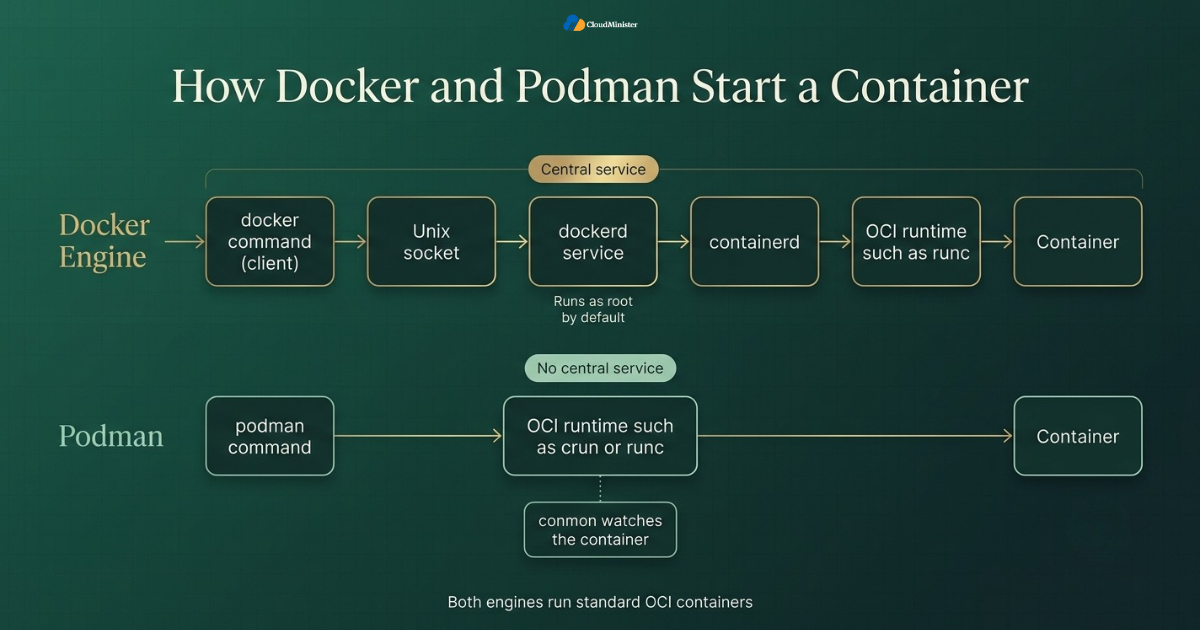
- The dockerd service then asks containerd to manage the container, and containerd uses an OCI runtime such as runc to actually start it.
- Because dockerd is a central service, it is a single place where all containers are managed. This is convenient, but it is also a single place that holds elevated privileges. Understanding this flow makes the Podman vs Docker security argument much easier to follow.
- Podman skips the central service. The podman command itself prepares the container and hands it to an OCI runtime such as crun or runc, and a small monitor process called conmon watches it.
- There is no permanent Podman service required for normal use, so nothing sits idle waiting for commands and nothing listens on a privileged socket. Your Web Hosting Company in India can confirm that no privileged socket is exposed on shared servers.
- For automatic restarts, Podman works with systemd. Quadlet files let systemd manage containers as ordinary services, which fits how Linux administrators already work.
- Both engines follow the OCI image and runtime standards, so a container image built with one tool can be pulled and run by the other. Good DevOps Services & Solutions place these commands inside reviewed pipelines.
- In any Podman vs Docker comparison, remember that the container workload itself performs almost the same, because both use the same Linux kernel features underneath. Server Management Services in India can watch these processes after go live.
- A Server Management Company that supports both engines can explain which architecture suits a given server, since it sees the operational side of each model every day. Smaller moving parts also help CI/CD cost optimization, since fewer background services means fewer wasted resources.
Related Reading: Docker bridge network explained
4. What Rootless Really Means
The word rootless is used loosely, and that creates confusion. Rootless does not mean the container has no root user inside it. It means the whole engine, not just the container process, runs without real root privileges on the host. This detail is the heart of the Podman vs Docker security argument.
- Rootless containers rely on Linux user namespaces. Inside the namespace a process can appear as UID 0, but on the host it maps to an ordinary unprivileged user ID such as 1000.
- If an attacker breaks out of a rootless container, they land on the host as that ordinary user, not as root. This sharply limits what they can read, change, or install.
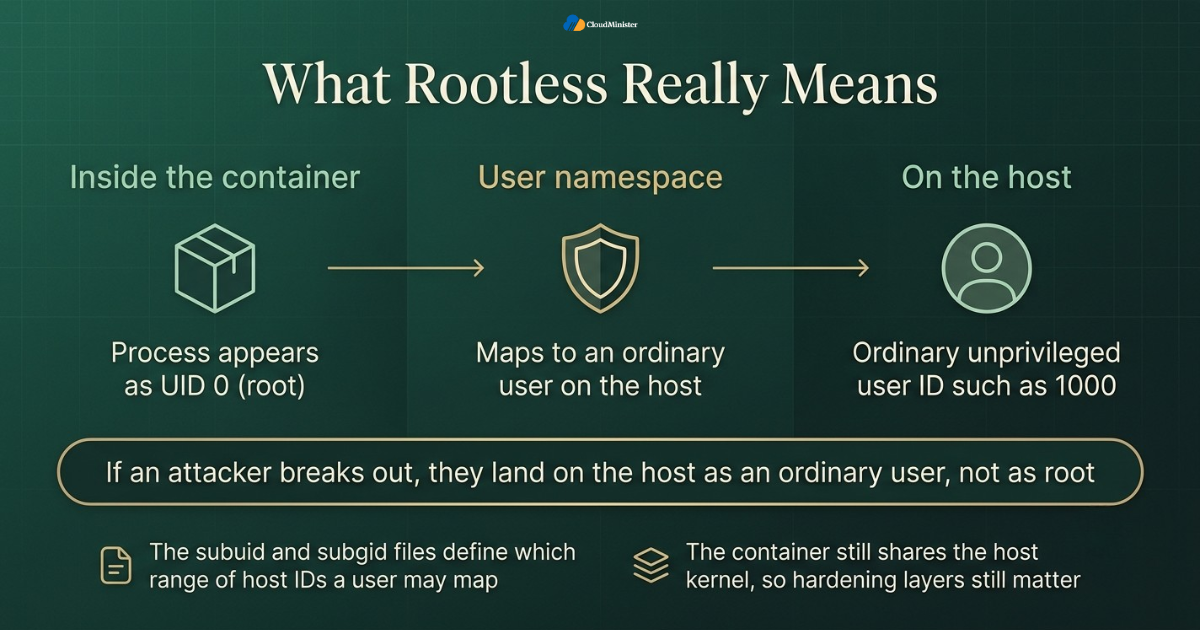
- The files /etc/subuid and /etc/subgid define which range of host IDs a user may map into a namespace. A misconfigured range is a common reason rootless setups fail. This detail comes up in almost every Podman vs Docker rootless setup guide.
- Rootless networking cannot use the same privileged tools as rootful mode. Podman 5.0 and later use pasta by default, and earlier releases used slirp4netns, to give containers network access from user space. A Server Management Company can verify these ranges during a routine audit.
- Rootless containers cannot bind to ports below 1024 by default. You can lower the limit with the net.ipv4.ip_unprivileged_port_start sysctl, or place a reverse proxy in front.
- Cgroup limits for CPU and memory in rootless mode need cgroup v2 with delegation enabled, which most current Linux distributions provide out of the box. DevOps Services & Solutions can verify this delegation in an automated test.
- Rootless is not a magic shield. The container still shares the host kernel, so a kernel vulnerability can still be dangerous, and hardening layers remain important. Server Management Services in India can run this check on every server.
- When teams weigh Podman vs Docker, the fair question is not whether rootless exists in both, but which one makes it the normal, easy path. This is also relevant to CI/CD cost optimization, since rootless runners can be packed safely onto shared machines.
- A Web Hosting Company in India that manages your servers can confirm that user namespaces and cgroup v2 are enabled correctly before you roll out rootless containers. Keep this in mind whenever someone summarises Podman vs Docker in one line.
Docker also supports rootless mode, and it is built on the same RootlessKit project that Podman relies on. So the honest difference is not capability but defaults. Podman treats rootless as the everyday path, while Docker treats it as an extra installation step.
5. Podman vs Docker: Rootless by Default vs Rootless by Choice
This is where the two tools truly separate. Docker can run rootless, and that deserves credit. But the standard Docker install still starts a root daemon, and adding a user to the docker group gives that user powers close to root. Podman starts from the opposite assumption, and that shapes how teams behave day to day.
- In a standard Docker install, any member of the docker group can start a container that mounts the host filesystem. That is effectively root access on the host, even though the user is not root.
- Docker rootless mode fixes this, but you install it with a separate setup tool and it has limits, such as extra steps for low ports and some storage options. For that reason, the Podman vs Docker gap is widest on shared hosts.
- Podman runs as your own user from the first command. There is nothing extra to switch on, so security teams get the safer behaviour without needing everyone to remember a special procedure.
- This is the core reason Podman vs Docker is decided in favour of Podman on shared servers and build hosts. Safe behaviour is the default, so it does not depend on human discipline. A Web Hosting Company in India with strong isolation controls reduces this risk further.
- The exposed Docker socket is another risk. Mounting /var/run/docker.sock into a container hands that container control over the daemon, which is a well known way to gain host access. A Server Management Company can review this exposure across the entire fleet.
- Podman can expose a Docker compatible API socket when you need it, and in rootless mode that socket runs in the user session, so its reach stops at that user’s permissions. DevOps Services & Solutions can codify this rule as a policy check.
- Recent Podman releases also improve isolation for rootless networking and storage, and the project continues to ship regular updates, so keep your version current. Server Management Services in India can keep the docker group list up to date.
- Neither engine removes the need for image scanning, secret handling, and network policy. Rootless reduces the blast radius, and good hygiene reduces the chance of an incident. Tighter control of users on build hosts supports CI/CD cost optimization by avoiding rework after incidents.
- A Server Management Company can audit which users belong to the docker group across your fleet, which is often the quickest security win in any Podman vs Docker review.
- Related Reading: CI/CD pipeline for small teams
6. Daemonless Design and the Attack Surface
The absence of a daemon is often described as a convenience, but it is really a security feature. Every long running privileged process is something an attacker can target, and something an administrator must patch, monitor, and restart. Removing that process removes a whole category of concern, which is why the daemon question sits at the centre of Podman vs Docker.
- A daemon that runs as root is a high value target. If someone compromises it, they can start, stop, or modify every container it manages. Any honest Podman vs Docker review should weigh this risk first.
- Podman has no such service, so there is no single privileged process whose compromise gives control over all containers on the host.
- Each Podman container is a child of the user session that started it, so one user’s containers are separated from another user’s containers by normal Linux permissions.
- There is also less to keep running. A daemon consumes memory even when idle, while Podman uses resources only when a container actually runs. Lower idle usage helps CI/CD cost optimization on busy build servers.
- Restart behaviour is handled by systemd, so logs go to the system journal and you get one familiar audit trail for every container start and stop. Pipelines built with DevOps Services & Solutions can alert on unexpected root processes.
- The trade off is monitoring style. With Docker you watch one daemon, and with Podman you watch systemd units and individual processes, which suits teams already fluent in systemd. Server Management Services in India can wire these units into existing dashboards.
- Some benchmark articles report startup and memory differences between the two, but results vary widely by workload and hardware, so test on your own systems. A Server Management Company can set the alert rules for these units.
- For the fairest Podman vs Docker view, treat the daemon as a design choice with security and operational consequences on both sides, not as a flaw or a virtue.
- A Web Hosting Company in India that offers Server Management Services in India can set up systemd based monitoring so daemonless containers are watched just as closely as daemon managed ones.
Never mount the container engine socket into an application container unless there is no alternative. Whoever controls that socket can usually start a privileged container and reach the host. Treat the socket like a root password.
7. Podman vs Docker for CI/CD Pipelines and Cost
Build servers are where the Podman vs Docker choice becomes most practical. Shared runners handle code from many developers, run automated tests, and often build images, which makes them attractive targets. They are also a place where cost and security meet, since a wasteful pipeline burns money every day.
- Many teams build images inside CI jobs using Docker in Docker. This usually needs privileged mode, which weakens isolation between jobs on the same runner. Ask your Web Hosting Company in India whether shared runners are isolated per job.
- Podman can build images without a shared daemon, and Buildah, the build tool behind Podman, can create images without needing a root service. This is a practical Podman vs Docker difference for busy pipelines.
- Rootless builds mean a compromised job stays inside its own user namespace, so one pipeline cannot easily tamper with another pipeline’s containers.
- For Kubernetes based pipelines, kaniko is another daemonless option that builds images without privileged access, and it pairs well with a Podman based developer workflow. Server Management Services in India can watch runner health during the pilot.
- Good CI/CD cost optimization starts with removing waste, such as idle daemons, oversized runners, repeated image pulls, and cold caches that force a full rebuild every time. A Server Management Company can size runners so that they match the real load.
- Layer caching, smaller base images, and shared registries are the main levers for CI/CD cost optimization, and they work the same way in both engines. Treat CI/CD cost optimization as a continuous habit and not a one time clean up.
- Licensing is part of the cost picture too. Docker Desktop needs a paid subscription for companies with more than 250 employees or more than 10 million dollars in annual revenue, while Podman Desktop is free, and that difference can matter across hundreds of laptops.
- Teams that measure build minutes and cache hit rates make better CI/CD cost optimization decisions than teams that only look at the monthly cloud bill.
- Providers of DevOps Services & Solutions can move these build steps into version controlled pipelines, which makes both the security posture and the spending easier to review.
Related Reading: Cutting pipeline spend for AI training
8. Compliance and Regulated Environments
Regulated industries rarely ask which tool is popular. They ask which tool satisfies a written control. Least privilege, separation of duties, and traceable activity are common requirements in finance, healthcare, and public sector work, and container engines are now part of those audits. This is where Podman vs Docker discussions often end with a documented decision.
- Least privilege means a process should hold only the permissions it needs. A rootless engine meets this far more naturally than a root daemon does.
- Auditors like traceability. Podman can write container events to journald, and containers run as systemd services log to the journal too, which gives a familiar, centralised record of what started and stopped. Auditors often ask for this evidence during a Podman vs Docker review.
- SELinux support is strong on Red Hat family systems, and Podman works with it directly, adding a mandatory access control layer around each container. Server Management Services in India can keep these logs available for review.
- Seccomp profiles and dropped Linux capabilities apply in both engines, and both should be part of every container security baseline. DevOps Services & Solutions can enforce these profiles automatically in the pipeline.
- Data location rules can also apply. If your data must stay inside the country, host choice and backup location matter as much as the engine you run. This is another reason to choose a Web Hosting Company in India with local infrastructure.
- Documenting the reasoning behind Podman vs Docker in your security policy helps during audits, because reviewers want to see a decision and not just a default. Written notes on Podman vs Docker also help future audits move faster.
- Running containers as a non root user inside the image is still good practice, even when the engine itself is rootless, since it adds a second layer of protection. Clear evidence also reduces audit rework, which is a quiet but real part of CI/CD cost optimization.
- A Web Hosting Company in India with local data centres can simplify residency questions, and pairing it with Server Management Services in India keeps patching and logging consistent. A Server Management Company can also check that this data location rule is respected.
- An experienced Server Management Company can prepare the evidence auditors ask for, such as user lists, patch records, and container start logs.
Do not treat rootless mode as a replacement for a full container security programme. It limits the damage from an escape, but image scanning, patching, secrets management, and network policy still decide how likely an incident is in the first place.
9. Where Podman Still Has Limits
A fair Podman vs Docker guide must also say where Podman is less comfortable. Docker has a decade of head start, and the surrounding ecosystem still assumes Docker in many places. Knowing these limits early prevents surprises during a rollout and helps you set honest expectations with your developers.
- Compose support is good but not identical. Podman can run Compose files through its own compose command or a compatible provider, but complex files should be tested before production use. This is the most common Podman vs Docker surprise during pilots.
- On macOS and Windows, Podman runs containers inside a lightweight virtual machine. Docker Desktop is still smoother for many developers on those systems. Server Management Services in India can help test these tools on staging hosts first.
- Some tools assume the Docker socket, including certain testing libraries, IDE plugins, and scanners. Most work with Podman after pointing them to its compatible API socket.
- Rootless networking has limits, such as low port binding and slower performance in some user space networking modes compared with rootful setups. A Web Hosting Company in India can advise which hosts suit rootless networking.
- Windows containers are not a Podman strength, so teams that depend on them will likely stay on Docker for that part of their estate. Track any extra time this costs, because CI/CD cost optimization depends on honest numbers.
- Team habits matter too. Developers who know Docker well need a short learning period to understand pods, systemd integration, and rootless storage behaviour. A Server Management Company can run this training session for the operations team.
- Because of these points, the smartest answer to Podman vs Docker is often a split setup, with Docker on laptops for convenience and Podman on servers and CI for security. DevOps Services & Solutions teams can schedule this test in every release cycle.
- Any partner giving advice on this move should be honest about these trade offs instead of promising a painless switch.
- A provider of DevOps Services & Solutions can build a compatibility test suite that runs your real Compose files and pipelines against Podman before anyone commits.
Run a two week pilot on a single non critical pipeline before you commit. Use the pilot to record build times, failed jobs, and developer complaints. Real numbers from your own environment will settle Podman vs Docker arguments better than any article, including this one.
10. How to Migrate from Docker to Podman Safely
A migration should feel boring. The safest projects move in small phases, keep a way back at every step, and measure the result. Treat the switch like any other production change, with an inventory, a pilot, a rollout, and a review. That discipline matters more than the tool itself in any Podman vs Docker move.
- Start with an inventory. List every place that calls docker, including scripts, Makefiles, CI files, Compose files, and any job that mounts the Docker socket.
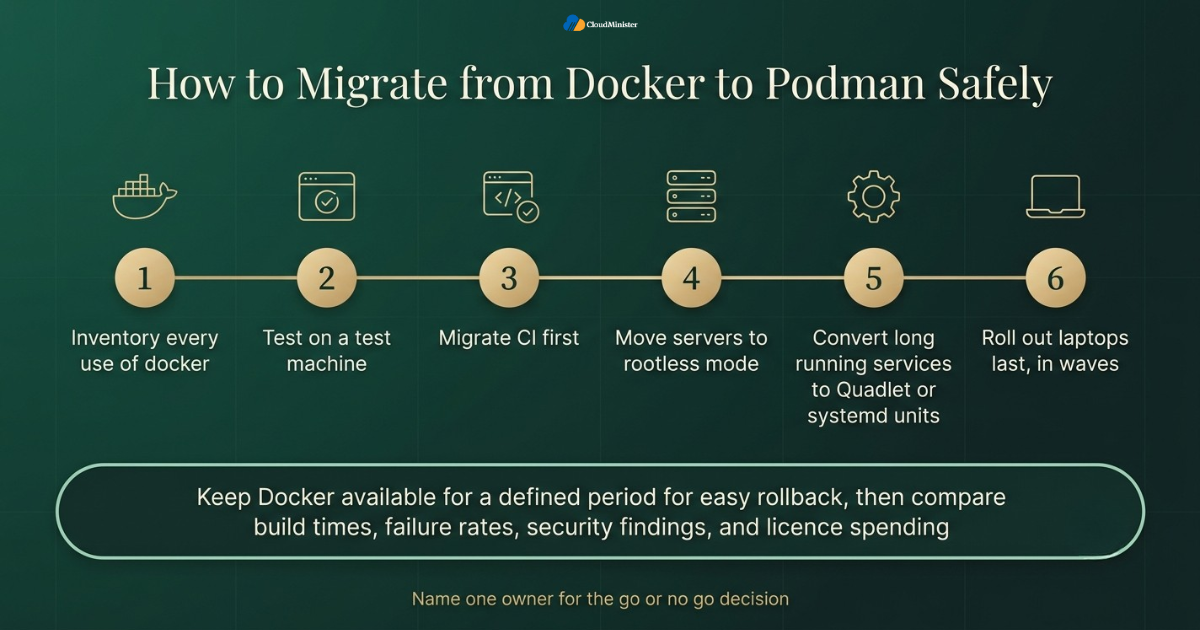
- Install Podman on a test machine and run your real build and test workflow. Many simple commands work the same, and the podman-docker package can provide a docker command alias. Repeat this test for every Podman vs Docker migration wave.
- Migrate CI first. It carries the highest security benefit, and removing Docker in Docker from pipelines is an immediate improvement. Skilled DevOps Services & Solutions teams treat this as the first pull request of the project.
- Move to rootless mode on servers next. Check subuid and subgid ranges, cgroup v2, and storage location before you start, and test low port needs. Faster, safer pipelines are the reward, and they support long term CI/CD cost optimization as well.
- Convert long running services to Quadlet or systemd units so containers restart on boot and failures are logged in the journal. Your Web Hosting Company in India can provision the test hosts for this stage.
- Roll out developer laptops last, in waves, starting with experienced early adopters who can help refine the internal guide. Server Management Services in India can support each wave with monitoring.
- Keep Docker available for a defined period so any team can roll back quickly if a blocking issue appears. A Server Management Company can hold the rollback plan and keep it tested.
- After the move, review the numbers. Compare build times, failure rates, security findings, and licence spending against the figures you recorded before the pilot.
- For the whole Podman vs Docker migration, name one owner for the go or no go decision, so progress never stalls in a debate.
Related Reading: SRE vs DevOps
Move to Rootless Containers Without the Guesswork
Planning a switch from Docker to Podman can feel risky when pipelines, servers, and deadlines are all on the line. The CloudMinister DevOps team builds secure, version controlled pipelines, removes risky privileged builds, and keeps a tested rollback path ready at every step. Let our engineers handle the heavy lifting while your team stays focused on shipping products.
11. Choosing the Right Partner for a Container Security Move
Container security touches the operating system, the network, the pipeline, and the application, so it rarely belongs to one person. Many teams do not have spare capacity to redesign all four while keeping products running. This is where an experienced partner adds the most value, provided you ask the right questions before signing.
- Ask any prospective Web Hosting Company in India how it configures user namespaces, cgroup v2, and SELinux or AppArmor on the servers it manages. This question belongs in every Podman vs Docker vendor discussion.
- Confirm that Server Management Services in India include patching of the container engine, the OCI runtime, and the kernel, since old versions carry known vulnerabilities. Whichever Server Management Company you pick, ask to see a real incident report.
- Look for a provider of DevOps Services & Solutions that can show a real pipeline with image scanning, signing, and automatic rollback triggers. DevOps Services & Solutions should include scanning and signing as standard steps.
- A trustworthy Server Management Company will explain its monitoring and escalation process in writing, including who acts first during an incident. Ask each vendor to explain its Podman vs Docker recommendation for your workload.
- Ask how the partner documents decisions such as Podman vs Docker, because a decision nobody wrote down is hard to audit or repeat.
- Check that Server Management Services in India cover nights and weekends, since risky changes are often scheduled outside office hours.
- Be careful with any provider that promises zero risk. Honest partners state their limits and describe what stays your responsibility. These tasks belong under Server Management Services in India when you outsource operations.
- Compare how each provider prices CI/CD cost optimization work, and ask what you will keep at the end, such as runbooks, dashboards, and pipeline code. Ask whether the partner reports on CI/CD cost optimization as part of its monthly review.
- A Web Hosting Company in India that also offers DevOps Services & Solutions can align infrastructure and pipeline changes, which shortens handovers.
Give a migration partner only the access the job requires, and remove that access when the work ends. Temporary credentials, shared keys, and forgotten accounts are a common source of incidents after a project finishes.
12. A Practical 30 Day Plan for Rootless Containers
Knowing the theory is easy, and acting on it is harder. This four week plan breaks the work into steps that most teams can follow without pausing normal delivery. It keeps the Podman vs Docker decision grounded in your own measurements, and it leaves room to stop if the pilot shows a real blocker.
- Week one: inventory every host, pipeline, and laptop that runs containers, and list who belongs to the docker group. Record the current build times and licence costs. These records keep the Podman vs Docker decision honest.
- Week one: agree on your main goal, whether that is audit compliance, shared runner isolation, or cost, and write it at the top of the plan. Server Management Services in India can confirm these points before the pilot begins.
- Week two: pilot Podman on one non critical pipeline, remove Docker in Docker from that job, and compare results against your baseline. Record build minutes now so CI/CD cost optimization results can be proven later.
- Week two: ask your Server Management Company to confirm kernel version, cgroup v2, user namespaces, and monitoring on the pilot host. Ask your Web Hosting Company in India to confirm the pilot host is ready before the pilot starts.
- Week three: enable rootless mode on a test server, convert one service to a Quadlet unit, and check restart behaviour and log output. Reviews by DevOps Services & Solutions specialists add a neutral second opinion here.
- Week three: review the pilot with a senior engineer or a DevOps Services & Solutions partner, because a fresh reader spots gaps that the author misses. Your Server Management Company should sign off on the pilot host before week three ends.
- Week four: decide by service. Use Podman for CI and servers where it fits, keep Docker where it is clearly better, and document why for each case.
- After week four, revisit the plan every quarter, because engine versions, kernels, and team skills keep changing.
- Measure every step against the same numbers, such as build time, failed jobs, and security findings, so that Podman vs Docker choices improve with evidence.
Checklist: Rootless Container Readiness Review
- Main goal defined and written down, such as compliance, isolation, or cost
- Inventory complete, including scripts, Compose files, and CI jobs that call Docker
- Members of the docker group reviewed and reduced to those who truly need access
- Kernel, cgroup v2, and user namespace support confirmed on every target host
- subuid and subgid ranges configured for each rootless user
- Low port and reverse proxy plan agreed for services that need ports below 1024
- Docker in Docker removed from pilot pipelines and replaced with rootless builds
- Long running services converted to Quadlet or systemd units with logging checked
- Image scanning, signing, and secret handling active in the pipeline
- Rollback path kept for the agreed period after migration
Key Takeaways
- Podman vs Docker is mainly about privilege defaults. Podman runs rootless and daemonless from the first command, while Docker offers rootless as an optional setup.
- Rootless containers use user namespaces, so a container escape lands the attacker as an ordinary user and not as root on the host.
- Docker still leads developer usage, with 71.1 percent against 11.1 percent for Podman in the Stack Overflow 2025 survey, so a mixed setup is common.
- Shared CI runners gain the most from Podman, because rootless builds remove the need for privileged Docker in Docker jobs.
- Careful CI/CD cost optimization, through caching, smaller images, and right sized runners, saves money with either engine.
- Rootless mode limits damage but does not replace scanning, patching, secrets management, and network policy.
- A phased migration with a pilot, a rollback path, and one named owner is the safest way to move from Docker to Podman.
- A Web Hosting Company in India that provides Server Management Services in India gives your team monitoring, patching, and support during the move.
- Providers of DevOps Services & Solutions help turn container changes into versioned, reviewed, and repeatable pipelines.
- A trusted Server Management Company adds a second pair of eyes on privileges, logs, and rollback plans before you commit.
Ready to Start Your 30 Day Rootless Container Plan?
Whether you need a quick security review of your current setup or full support from pilot to rollout, our team is happy to talk it through. Share your goals with us and we will suggest a practical, low risk path that fits your servers, your budget, and your timeline.
Conclusion
Across every section, one pattern holds. Rootless containers are becoming the default in security conscious environments because they cut the damage of a break-in, and Podman makes that safer behaviour the normal path. Docker is still an excellent tool, particularly for developer laptops and small deployments, and its rootless mode narrows the gap. The best teams stop asking which engine is better and start asking which engine fits each job, then prove it with pilots and numbers. For teams weighing this alongside a wider infrastructure decision, work with a capable Web Hosting Company in India that also offers Server Management Services in India and DevOps Services & Solutions.
Once the technical details are clear, the practical side of Podman vs Docker comes down to how your team actually works. A good starting point is a small pilot on one non critical pipeline, measured against the build times, failure rates, and licence costs you recorded beforehand. Real numbers from your own servers carry more weight than any survey or benchmark. They also give you something concrete to show auditors, managers, and developers who may be unsure about the change.
It also helps to accept that the answer does not have to be one tool for everything. Many teams keep Docker on developer laptops for comfort and use Podman on servers and CI runners where least privilege matters most. Whatever you decide, write down the reasoning and name one owner for the final call, so progress does not stall in a long debate. A documented Podman vs Docker decision is easier to audit, easier to repeat, and far easier to improve as engine versions and team skills change over time.
Frequently Asked Question
Is Podman really more secure than Docker?
In default behaviour, yes. Podman runs without a root daemon and starts containers as your own user. Docker can be run rootless too, but it requires an extra setup step. With careful configuration, both can be hardened, so the practical gap comes from defaults and how consistently teams follow them. This is the fairest way to think about Podman vs Docker.
Can Podman replace Docker without changing my Dockerfiles?
Usually yes. Podman builds and runs standard OCI images and accepts the same Dockerfile syntax. Complex Compose files, tools that expect the Docker socket, and some networking setups may need small changes, so test your real workflows first.
What does rootless mean in a container context?
It means the container engine itself runs without root privileges on the host. Inside the container a process may appear as root, but the kernel maps it to an ordinary user outside the namespace, which limits the damage of an escape.
Does rootless mode remove the need for other security controls?
No. A rootless engine reduces the blast radius, but the container still shares the host kernel. You should keep scanning images, patching hosts, managing secrets carefully, and applying network policy and seccomp profiles.
Which is better for CI/CD pipelines, Podman or Docker?
For shared runners, Podman is usually the safer choice because rootless builds avoid privileged Docker in Docker jobs. For dedicated single purpose runners, both work well. In any case, CI/CD cost optimization depends more on caching and runner sizing than on the engine.
Is Docker Desktop free for companies?
Docker Desktop is free for small businesses (fewer than 250 employees and under 10 million dollars in annual revenue), personal use, education, and open source projects. Larger companies need a paid subscription. Docker Engine on Linux is a separate product, and Podman Desktop is free. Always check the current terms on the vendor site before you decide.
Do I need outside help to move from Docker to Podman?
Not always, but a Server Management Company or a partner offering DevOps Services & Solutions adds rehearsal experience, monitoring, and an independent review of your rollback plan. That support is especially useful for regulated teams or large estates.
How should I choose between a Web Hosting Company in India and running servers myself?
Run servers yourself only if you have engineers who can handle monitoring, patching, and on call support. Otherwise, a Web Hosting Company in India that includes Server Management Services in India can provide that coverage while your team focuses on the applications.
Can I use Podman vs Docker together in the same company?
Yes, and many organizations do. A common pattern is Docker on developer laptops for convenience and Podman on servers and CI for security. Because both use OCI images, they can share the same registries.

Pritam Kumar is a DevOps Engineer at CloudMinister Technologies, where he manages a multi-datacenter fleet of 100+ servers and architects end-to-end CI/CD pipelines and infrastructure automation using Kubernetes, Terraform, and Ansible. He holds an AWS Certified DevOps Engineer Professional certification and has served as a Google Cloud Mentor, reflecting both hands-on cloud expertise and a track record of mentoring others in the field. His work spans disaster recovery architecture, security incident response, and hosting infrastructure across Proxmox, cPanel/WHM, and Linux systems. Notably, Pritam led the design of Cloud Kavach, a self-hosted DC/DR SaaS portal, and directed remediation efforts for large-scale hosting security incidents involving webshells and command-and-control malware. He brings this depth of real-world infrastructure and security experience to the technical content he writes.