Ransomware crews now go after backups before they encrypt production data, because a victim with no recovery path is far more likely to pay. Immutable Backups close that gap by making backup data impossible to change or delete until a retention timer expires, even for an administrator whose account has been stolen. This guide explains how Immutable Backups work, the difference between governance and compliance locks, where to store locked copies, and how to test recovery. It also shows where Windows Dedicated Server Hosting, Windows VPS Hosting in India, VPS Server Hosting in India, and a Web Hosting Company in India fit into a ransomware ready backup design, and how to judge Affordable Windows Dedicated Server Plans for a backup server, since backups are only as safe as the servers and network around them.
Every business that runs a database, a file server, or a customer portal has a backup plan, and most believe it will save them on the worst day. Ransomware crews know this too. Modern attackers do not simply encrypt your live servers and wait. They first hunt for your backup console, your backup repositories, and your cloud storage keys, and they delete or encrypt those before they trigger the main attack. That is why Immutable Backups have moved from a nice extra to a core part of every serious recovery plan.
The idea behind Immutable Backups is simple. Once a backup is written, it is locked for a fixed period. During that period nobody can edit it, overwrite it, shorten its retention, or delete it, not an intruder, not a malicious insider, and not even your own administrator. Because the lock is enforced by the storage layer and not by a login screen, a stolen password does not break it. Strong Immutable Backups give you the one thing attackers cannot easily take away, a clean copy to restore from.
This guide explains how Immutable Backups work in practice, in plain language. You will learn the technical building blocks, such as WORM storage, object lock, and hardened repositories, how to choose a retention period, how to protect the backup system itself, and how to test recovery. We also cover how the servers behind your backups, whether that is Windows Dedicated Server Hosting, VPS Server Hosting in India, or a larger setup from a Web Hosting Company in India, affect how safe the whole design is.
Table of Contents
- 1. What Backup Immutability Actually Means
- 2. Why Attackers Target Your Backups First
- 3. How Locked Backups Work Technically
- 4. Governance Mode vs Compliance Mode
- 5. Where to Store Locked Backup Copies: Main Options
- 6. The 3-2-1-1-0 Rule for Ransomware Resilience
- 7. Protecting the Backup Control Plane
- 8. Building a Hardened Linux Repository
- 9. Windows Dedicated Server Hosting for Backup Servers
- 10. VPS Server Hosting in India for Smaller Teams
- 11. Designing Retention Periods and Controlling Cost
- 12. Testing Restores and Running Recovery Drills
- 13. Limits of Immutability and Common Mistakes
- 14. A Practical 30 Day Plan to Get Started
- Key Takeaways
- Conclusion
- Frequently Asked Questions
1. What Immutable Backups Actually Mean
Immutable means unchangeable. In backup terms, Immutable Backups are copies of data stored with a write once read many lock, usually called WORM, so the data can be read and restored but not modified or deleted until the retention period ends. This is very different from a normal backup, which sits on a disk or network share that a privileged account can wipe in seconds. Understanding that difference is the first step toward building Immutable Backups that hold up during a real attack.
- Immutability is enforced by the storage system or file system, not by the backup software login alone.
- A locked backup can be read and restored, but it cannot be edited, overwritten, or deleted before its retention date.
- Immutable Backups protect against encryption, deletion, and quiet tampering with restore points.
- Immutability is not encryption. Encryption hides data, while a lock stops changes, and you need both.
- It is also not the same as an air gap. An air gap separates a copy from the network, while a lock limits what the network can do to it.
- Retention length matters, because a lock that expires early leaves the copy exposed again.
- Immutable Backups work best as one layer in a wider plan, not as your only copy of the data.
- Teams on Windows VPS Hosting in India or VPS Server Hosting in India can use the same lock based approach, because the lock lives in the storage layer and not in the server.
- Ask your Web Hosting Company in India whether it can place Immutable Backups on storage that is separate from your production servers.
2. Why Attackers Target Your Backups First
Attackers understand recovery economics. If you can restore in hours, you will not pay, so ransomware operators try to remove that option first. A 2026 ransomware statistics roundup reports that Verizon found ransomware in 48 percent of the breaches it analyzed, and that 66 percent of organizations with encrypted data recovered it from backups in the Sophos 2026 survey, up from 54 percent a year earlier. Those numbers show two sides of one story. Ransomware is common, and working backups are what let victims recover, which is exactly why attackers aim at them and why Immutable Backups matter.
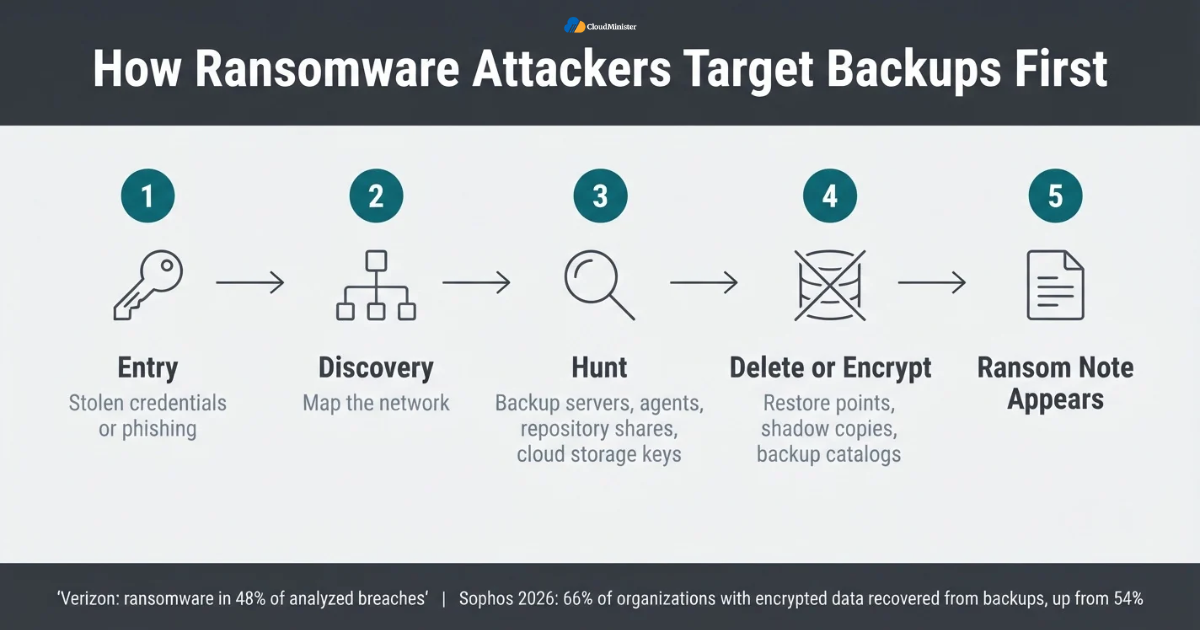
- Attackers usually enter first through stolen credentials or phishing, then spend time mapping the network.
- During discovery they look for backup servers, backup agents, repository shares, and cloud storage keys.
- Backup consoles that share a login with the main domain are easy targets once an attacker has domain admin rights.
- Mounted network shares and attached drives are encrypted just like any other files.
- A cloud bucket without a lock can be emptied with one stolen access key.
- Deleting restore points, shadow copies, and backup catalogs cuts off recovery before the ransom note appears.
- CyberMaxx recorded 2,282 ransomware attacks in the first quarter of 2026, and Fortinet reported 7,831 confirmed victims in its 2026 threat landscape report, so the volume of attempts keeps rising.
- Without Immutable Backups, one compromised admin account can erase every restore point you own.
- Small businesses on Windows VPS Hosting in India or Affordable Windows Dedicated Server Plans are targeted too, because attackers often favor smaller firms with fewer defenses.
Assume your backup system will be probed during an attack. Keep backup credentials separate from your everyday admin accounts, enable multi factor authentication everywhere, and never let a single login control both production servers and the place where your restore points live. This applies to every server, including those on Windows VPS Hosting in India.
3. How Immutable Backups Work Technically
Under the hood, Immutable Backups rely on a lock applied to each stored object or file. The lock holds a retain until date, and the storage platform refuses any delete or overwrite request before that date, no matter who sends it. On object storage the lock is applied to each object version, so a new upload creates a new version and never replaces a locked one. Because enforcement lives inside the storage platform, a compromised backup server cannot simply undo it.
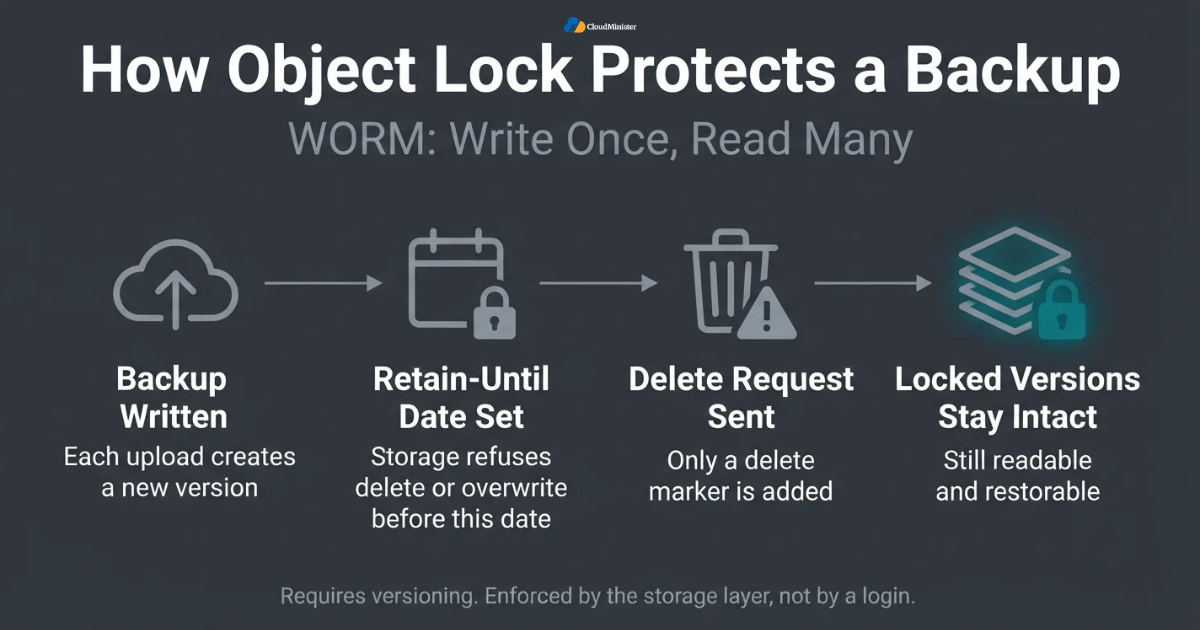
- WORM means write once read many. Data is written one time and afterwards only read.
- Object lock needs versioning, because every change creates a new version instead of replacing the old one.
- A delete request on a versioned bucket only adds a delete marker, and the locked versions underneath stay intact.
- A retention period sets the date before which a version cannot be deleted, and it can be extended but not shortened in strict modes.
- A legal hold is a separate lock with no end date that stays until an authorized user removes it.
- Amazon S3, Azure Blob Storage, and many S3 compatible services support these controls.
- On Linux, a hardened repository sets the immutable file attribute on backup files to get the same effect.
- Immutable Backups on tape use WORM cartridges or offline media removed from the drive after writing.
- The same lock concepts apply whether your data comes from a dedicated server, Windows VPS Hosting in India, or VPS Server Hosting in India, because the backup target decides immutability.
4. Governance Mode vs Compliance Mode
Most object lock systems offer two retention modes, and choosing the wrong one is a common mistake. Governance mode blocks accidental or casual deletion but lets users with a special bypass permission change the lock. Compliance mode allows no bypass at all until the retention date passes. For ransomware defense, the strictest mode your business can live with is usually the safest choice for Immutable Backups, because attackers aim for exactly those special permissions. Whether your servers sit with a Web Hosting Company in India or in your own office, the same two modes apply.
| Mode | Who can remove the lock | Best use | Main risk |
| Governance | Users with a bypass permission | Testing and early rollout | A stolen identity with that permission can delete data |
| Compliance | Nobody, including the root user, until retention ends | Production Immutable Backups against ransomware | A wrong retention value cannot be undone |
| Legal hold | Authorized users, no expiry date | Investigations and audits | Forgotten holds keep data and cost |
- Governance mode stops normal users, but anyone holding the bypass permission can shorten or remove retention.
- Compliance mode cannot be bypassed by any user, including the account root user, before the date passes.
- Start in governance mode on a test bucket so your team learns how locks, versions, and lifecycle rules behave.
- Move production Immutable Backups to compliance mode only after you confirm the retention period you can afford.
- A mistake in compliance mode, such as five years instead of five days, cannot be reversed.
- Restrict who can change bucket policies, and require MFA for those identities.
- Review legal holds regularly so old holds do not quietly inflate storage cost.
- Choose compliance mode for Immutable Backups that protect customer data, billing records, and databases.
- Before comparing Affordable Windows Dedicated Server Plans, confirm which retention modes your chosen storage supports.
Run a short pilot first. Create a test bucket in governance mode, upload a sample backup, then try to delete it with a normal account and with an admin account. Watching the lock work with your own eyes gives your team confidence before you switch real backups to a strict mode. If you are comparing Affordable Windows Dedicated Server Plans, also ask whether the provider lets you attach separate storage for locked copies.
5. Where to Store Immutable Backups: Main Options
There is no single place for Immutable Backups. The right choice depends on data size, restore speed, budget, and where your servers live. Cloud object storage with object lock is the most common choice because it scales easily and sits outside your production network. On premises hardened repositories give faster restores, and tape provides a true offline copy. Many teams combine two of these options so that no single failure removes every safe copy. Your Windows Dedicated Server Hosting provider may offer local backup storage, but treat it as one copy and add an offsite locked copy.
| Option | Best for | Protection | Main risk |
| Cloud object storage with object lock | Offsite copy and growing data | Lock enforced by the provider | Slow large restores and egress cost |
| Hardened Linux repository | Fast local restores | Immutable file attribute, no remote root | Misconfiguration or clock tampering |
| WORM tape or offline media | Long term archives | Physically offline | Slow restores and handling errors |
| Immutable storage appliance | Large environments | Built in lock and policies | Higher cost and vendor dependence |
- Cloud object lock is a strong default for an offsite copy, because attackers cannot reach it through your internal network.
- Hardened repositories keep a fast local copy for quick restores of recent data.
- WORM tape or rotated offline disks add a physical gap that no network attack can cross.
- Confirm that your backup software supports the lock features of the storage before you buy.
- Keep at least one copy of Immutable Backups in a different location or provider from production.
- Estimate restore time from each location, since a full cloud restore depends on your internet bandwidth.
- If your backup server runs on rented infrastructure, ask your Web Hosting Company in India about private network links and storage close to your workloads.
- Check data residency rules, because some sectors require data to stay inside India.
- Compare Affordable Windows Dedicated Server Plans that include enough local disk for a fast recovery copy, then pair that copy with an offsite locked copy.
6. The 3-2-1-1-0 Rule for Ransomware Resilience
The classic 3-2-1 rule says keep three copies of data on two different media types with one copy offsite. Ransomware pushed the rule further into 3-2-1-1-0, which adds one copy that is offline or immutable and zero errors after backup verification. Immutable Backups are the practical way to satisfy that extra copy, and they work best when other copies exist as well, because layered protection survives failures that no single control can. This rule applies equally to a single VPS Server Hosting in India plan and to a large Windows Dedicated Server Hosting environment.
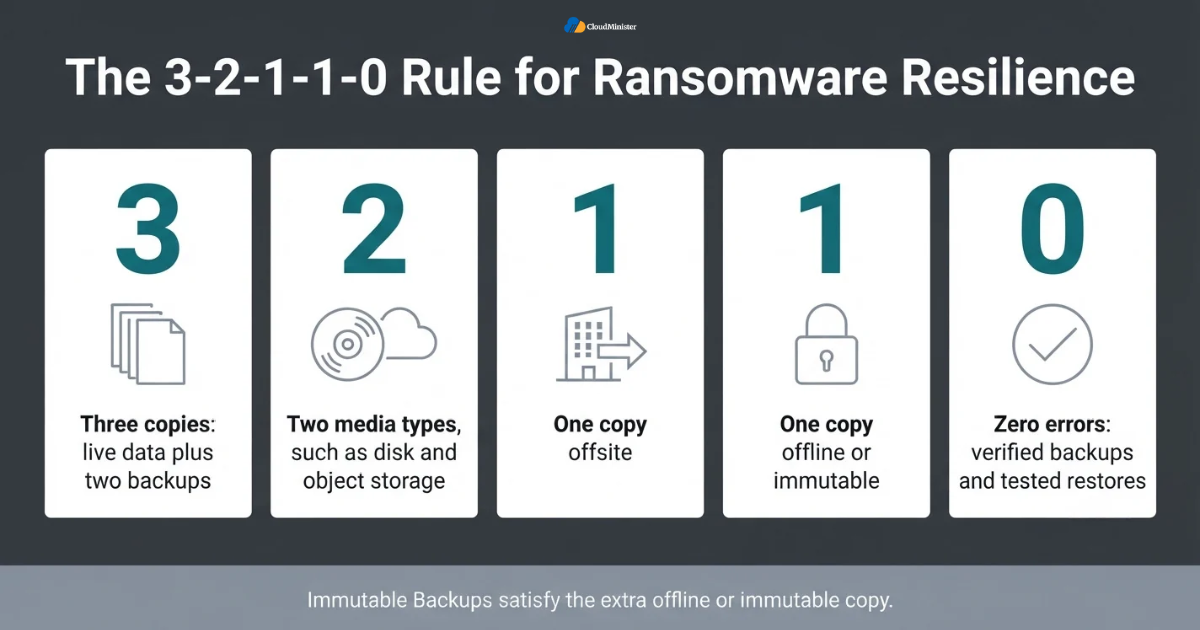
- Three copies means the live data plus two backups, so a single failure never removes everything.
- Two media types, such as disk and object storage, reduce the chance of one flaw affecting both.
- One copy offsite protects against fire, theft, and a site wide compromise.
- One copy must be offline or immutable so that it survives a stolen admin account.
- Zero errors means every backup is verified and restore tests prove the data is usable.
- Use different credentials for each location, so one stolen password cannot reach every copy.
- Not every dataset needs every layer, but critical databases and customer records should have all of them.
- Document which copy is which, so staff know the restore order during an incident.
- Count the locked copy as your fourth layer, and keep them away from the servers that run your applications, including Windows VPS Hosting in India workloads.
7. Protecting the Backup Control Plane
A locked repository is only half the story. Attackers who cannot delete your data can still ruin recovery by wiping backup configuration, disabling jobs, or locking you out of the console. The backup system needs the same care as a domain controller. Immutable Backups protect the stored data, while identity and network controls protect your ability to manage and restore it. This applies to a backup server on one of the Affordable Windows Dedicated Server Plans just as much as one on VPS Server Hosting in India.
- Enable multi factor authentication on the backup console, the storage account, and every admin identity.
- Keep the backup server out of the production domain, or use a separate management domain, so a domain admin compromise does not hand over the backups.
- Use separate accounts for backup administration, storage administration, and daily operations.
- Apply least privilege. Backup jobs need permission to write data, not to delete it or change retention.
- Require a second approval, often called four eyes, for destructive actions such as removing a repository.
- Store storage access keys in a secrets vault and rotate them on a schedule.
- Allow only the backup server to reach the repository, and never expose remote desktop to the open internet.
- Alert on mass delete requests, failed logins, and disabled or edited backup jobs.
- Keep an offline copy of backup configuration and encryption keys, because backups cannot be restored without them.
Teams often lock the data and forget the keys. If your backups are encrypted and the only copy of the key sits on the server an attacker just wiped, your locked data becomes unreadable. Store keys and configuration exports in a separate offline location and test that you can use them. A Web Hosting Company in India can help by supplying offsite storage, but you should always hold the keys yourself.
8. Building a Hardened Linux Repository
If you keep backups on your own hardware, a hardened Linux repository is a well known way to create Immutable Backups without cloud storage. The repository uses a suitable file system such as XFS, marks backup files with the immutable attribute, and accepts data through a non root account with single use credentials. As a result, even a stolen backup server credential cannot delete locked files through the backup software.
- Use a dedicated physical or virtual Linux host that does nothing except hold backup data.
- Format the volume with a file system your backup software supports, such as XFS with reflink for fast clone.
- Run the repository service under a non root account and disable direct root login over SSH.
- Turn SSH off after setup where possible and manage the host through a locked down console.
- Use a trusted time source and protect it, because attackers who change the system clock may try to expire retention early.
- Secure the out of band management port, such as iDRAC or iLO, since console access can bypass software controls.
- Patch the repository operating system, but test patches first so updates do not break your backup chain.
- Place the repository in a separate network segment with strict firewall rules.
- Some teams rent a dedicated Linux host from a Web Hosting Company in India and harden it for Immutable Backups, while others build it in their own rack.
Related Reading: Our comparison of VPS vs dedicated servers for AI inference in 2026
9. Windows Dedicated Server Hosting for Backup Servers
Many backup platforms run their management server on Windows, so the Windows host matters. Running that server on Windows Dedicated Server Hosting gives you full control of the hardware, steady disk and network performance, and no noisy neighbors during a heavy backup or restore. Teams comparing Affordable Windows Dedicated Server Plans should look beyond price and check storage options, network speed, remote access security, and support response, because these decide how quickly you can recover. Good Windows Dedicated Server Hosting is not about the cheapest quote, so weigh Affordable Windows Dedicated Server Plans by what they include.
- A dedicated backup server avoids resource sharing, so large backup windows finish on a predictable schedule.
- Windows Dedicated Server Hosting suits backup software that needs a Windows management server, plus agents for Windows file servers and SQL Server.
- Check that the plan offers enough disk throughput and bandwidth to meet your full restore time target.
- Ask about private networking so backup traffic does not travel over the public internet.
- Restrict Remote Desktop and use a VPN or jump host with MFA to reach the server.
- Compare Affordable Windows Dedicated Server Plans on RAM, storage type, and bandwidth, not only on monthly cost.
- Keep the Windows backup server out of your production domain where practical, and patch it on a fixed schedule.
- Never store the only copy of your backups on the same dedicated server that runs the management software.
- Shortlist Affordable Windows Dedicated Server Plans from a Web Hosting Company in India that publishes clear uptime, support, and network details.
Related Reading: Our guide to dedicated trading servers for HFT and forex
Need a Dedicated Windows Server for Your Backup Platform?
Run your backup management server on hardware that is fully yours, with steady disk and network performance during heavy backup and restore windows. Explore CloudMinister’s Windows Dedicated Server Hosting and choose a plan built for fast, reliable recovery.
10. VPS Server Hosting in India for Smaller Teams
Not every business needs a dedicated machine. Smaller teams often run backup agents, a lightweight backup server, or a jump host on a virtual server. VPS Server Hosting in India can be a practical and budget friendly choice here, and Windows VPS Hosting in India works well when your tools and applications are Windows based. The key is to size the server for your backup window and to keep the locked copy outside the VPS itself. A smaller team can start with Windows VPS Hosting in India and move later if needed.
- A VPS can run backup agents and small backup servers for a handful of servers and databases.
- Windows VPS Hosting in India fits teams running Windows applications, file shares, or SQL Server that need agent based backups.
- Size CPU, RAM, and disk for compression, deduplication, and encryption, which are heavy during backups.
- Never rely on VPS snapshots alone, because they live on the same platform that an attacker or failure can reach.
- Send backups from the VPS to separate storage with object lock so the locked copy lives outside the server.
- Choose VPS Server Hosting in India with local data centres if you need low latency and Indian data residency.
- Use the same MFA, patching, and firewall rules you would apply to any production machine, even on Windows VPS Hosting in India.
- Monitor disk space, because a full disk quietly stops backup jobs.
- Move to Windows Dedicated Server Hosting or one of the Affordable Windows Dedicated Server Plans when backup windows or restore times outgrow the VPS.
Related Reading: Our guide on how to choose the right Forex VPS specs
11. Designing Retention Periods and Controlling Cost
Retention is where Immutable Backups succeed or fail. If your lock lasts seven days but an attacker sits quietly in your network for three weeks, every restore point may already be compromised when you need it. Set retention based on how fast you detect incidents and how far back you may need to go, then balance it against storage cost, since locked data cannot be removed early to save money. Whether you use VPS Server Hosting in India or Windows Dedicated Server Hosting, plan storage for locked data separately from server cost.
- Estimate your detection time, meaning how long an intrusion could go unnoticed, and set retention longer than that.
- Many teams choose at least 14 to 30 days of immutability for daily backups, and longer periods for monthly copies.
- Use a grandfather father son scheme, with daily, weekly, and monthly restore points kept for different periods.
- Calculate cost from data change rate and deduplication, because every locked version takes space until it expires.
- Set retention per workload. Critical databases need longer protection than temporary test servers.
- Review storage growth monthly so locked data does not surprise your budget.
- Avoid very long retention in compliance mode until you are sure, because it cannot be reduced.
- Remember that a Web Hosting Company in India or cloud provider bills for locked data until the lock ends.
- Ask your hosting provider how locked data is billed, because storage for Immutable Backups continues until each version expires.
12. Testing Restores and Running Recovery Drills
A backup that has never been restored is an assumption. Testing proves that Immutable Backups are complete, uncorrupted, and free of malware, and it shows how long recovery really takes. Run drills in an isolated environment so a restored infected system cannot reach production. Record your actual restore times and compare them with your recovery time objective, which is how long the business can afford to be offline. Ask your Web Hosting Company in India to confirm how fast a large restore can run on its network.
- Run automated verification after each backup where supported, such as boot tests and checksum checks.
- Restore at least one critical system fully every quarter, in an isolated network.
- Scan restored data with updated malware tools before connecting it to production.
- Compare your recovery point objective, the amount of data you can afford to lose, with the age of your newest clean restore point.
- Practise restoring onto new hardware, such as a fresh Windows Dedicated Server Hosting plan or a new VPS, in case your original site is unavailable.
- Write a runbook with named owners, contact numbers, and the order in which systems come back.
- Test recovery when the backup console is unavailable, using your offline copy of configuration and keys.
- Update the plan after every drill with what you learned.
- Test restores onto Windows VPS Hosting in India or VPS Server Hosting in India plans to learn whether a smaller server can carry you through a first recovery day.
Related Reading: Our article on how often to test a disaster recovery plan
13. Limits of Immutability and Common Mistakes
Immutability is powerful but it is not magic. It protects stored backup data from change, and nothing more. It does not clean data that was already infected when backed up, it does not stop attackers from stealing a copy of your data, and it does not fix weak access controls. Knowing these limits helps you avoid false confidence and build a plan where Immutable Backups are one strong layer among several. These mistakes appear on every platform, from Windows Dedicated Server Hosting to VPS Server Hosting in India.
- A backup taken after data was already encrypted or poisoned will faithfully store the bad data, so keep older restore points.
- Immutability does not stop data theft, so double extortion still needs encryption and network monitoring.
- A lock on storage does not protect the backup software server, so harden and monitor it too.
- Leaving governance mode on in production lets a stolen privileged identity remove the lock.
- Using the same credentials for production and backup storage defeats the separation you built.
- Forgetting to protect the cloud account itself, including root access, billing, and payment status, can put data at risk.
- Skipping restore tests leaves you with untested assumptions about your Immutable Backups.
- Losing encryption keys makes even perfect Immutable Backups unreadable.
- Assuming your Web Hosting Company in India monitors backups for you, instead of confirming responsibilities in writing.
Immutability stops changes, not copying. An attacker who reads your data can still leak it. Encrypt backups at rest and in transit, limit read access to the repository, and monitor for unusual large downloads from backup storage. Apply the same rule to every server, including VPS Server Hosting in India plans.
14. A Practical 30 Day Plan to Get Started
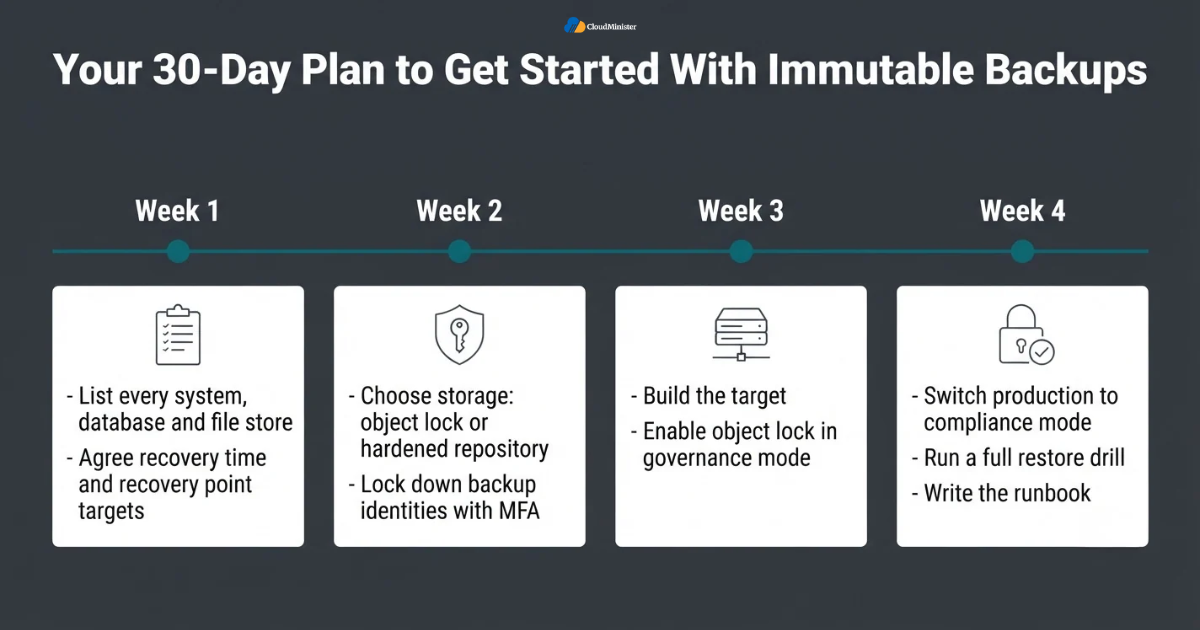
Moving from a standard backup setup to Immutable Backups does not need a giant project. Follow four weeks of focused work, starting with an inventory and ending with a recovery drill. Teams that already host systems with a Web Hosting Company in India can ask the provider for capacity, network, and storage details in week one, which saves time later.
- Week one: list every system, database, and file store with its size, change rate, and recovery priority.
- Week one: agree recovery time and recovery point targets with the business.
- Week two: choose the storage option, such as object lock or a hardened repository, and confirm your software supports it.
- Week two: lock down backup identities with MFA, separate accounts, and least privilege.
- Week two: compare Affordable Windows Dedicated Server Plans if your backup management server needs a dedicated Windows host.
- Week three: build the target, enable object lock in governance mode, and size servers on Windows Dedicated Server Hosting, Windows VPS Hosting in India, or VPS Server Hosting in India for backup and restore speed.
- Week four: switch production to compliance mode with your chosen retention, and run a full restore drill.
- Week four: write the runbook and schedule quarterly reviews.
- Ask a Web Hosting Company in India for a written list of what is monitored and what remains your job.
Checklist: Immutable Backups Readiness Review
- Recovery time and recovery point targets are agreed by the business.
- At least one copy of Immutable Backups sits outside the production network.
- Object lock or a hardened repository is enabled and tested with a real delete attempt.
- Production backups use compliance mode with a retention longer than your detection time.
- MFA is active on the backup console, storage account, and cloud root account.
- Backup admin accounts are separate from daily admin accounts and the production domain.
- Encryption keys and configuration exports are stored in a separate offline location.
- Restore tests run at least every quarter in an isolated network.
- Alerts exist for mass deletes, disabled jobs, and failed logins on backup systems.
- Hosting for the backup server, such as Windows Dedicated Server Hosting, Windows VPS Hosting in India, or VPS Server Hosting in India, has been reviewed for speed, security, and support.
- Written responsibilities are agreed with your Web Hosting Company in India.
Key Takeaways
- Attackers now target backups first, so unprotected restore points are often gone before the ransom note appears.
- Immutable Backups lock data with WORM controls so it cannot be changed or deleted until retention ends.
- Compliance mode gives the strongest protection, while governance mode suits testing and early rollout.
- Follow the 3-2-1-1-0 rule and keep at least one immutable or offline copy in a separate location.
- Protect the backup console, credentials, and encryption keys as carefully as the data itself.
- Set retention longer than your detection time, and plan storage cost around locked data.
- Immutability does not clean infected data or stop data theft, so test restores and scan before reconnecting systems.
- Windows Dedicated Server Hosting, including Affordable Windows Dedicated Server Plans, suits full backup management servers, while VPS Server Hosting in India suits smaller teams with lighter needs.
- A capable Web Hosting Company in India can supply the network, storage, and support that make recovery faster.
- Affordable Windows Dedicated Server Plans should be judged on storage, bandwidth, and support, not only on price.
- Windows VPS Hosting in India is a practical starting point for smaller Windows based environments.
- Keep locked copies outside the servers they protect.
Build Your Ransomware-Ready Backup Plan With Us
Not sure which hosting setup fits your Immutable Backups design? Talk to our team about storage, retention, and server sizing. We offer a free consultation to all new clients, so you can plan your recovery strategy before an attack happens.
Conclusion
Ransomware protection comes down to one question: on the worst day, do you still have a clean copy that nobody can touch? Immutable Backups answer that question with a lock enforced by the storage layer, not by a password that can be stolen. Combined with the 3-2-1-1-0 rule, strong identity controls, sensible retention, and regular restore drills, Immutable Backups turn a possible business ending event into a difficult but recoverable one. A trusted Web Hosting Company in India, clear plans such as Affordable Windows Dedicated Server Plans or Windows VPS Hosting in India, and locked Immutable Backups together form a strong foundation.
Remember that the servers around your backups matter too. Choose hosting that fits your size, whether that is Windows Dedicated Server Hosting for a full backup platform or VPS Server Hosting in India for a smaller team, and keep reviewing the design as your data grows. Treat every drill as a chance to improve, because the teams that recover fastest are the ones that practised before the attack.
Frequently Asked Questions
What are Immutable Backups?
Immutable Backups are backup copies stored with a WORM lock, so they cannot be modified, overwritten, or deleted until a set retention period ends. They can still be read and restored, which makes them a reliable recovery point after a ransomware attack. Many teams store Immutable Backups on object storage or a hardened repository.
Can ransomware delete Immutable Backups?
Not while a correctly configured lock is active. In compliance mode, even an administrator or the root user cannot delete a locked version before its retention date. Weak setups, such as governance mode with broad bypass permissions, can still be attacked, which is why configuration matters.
Are Immutable Backups the same as air gapped backups?
No. An air gap physically or logically separates a copy from the network, while immutability lets the copy stay online but blocks changes. Both are useful, and the 3-2-1-1-0 rule accepts either an offline or an immutable copy. The distinction is the same on Windows Dedicated Server Hosting, Affordable Windows Dedicated Server Plans, and Windows VPS Hosting in India.
How long should the retention period be?
Set it longer than the time you would need to detect an intrusion. Many teams use at least 14 to 30 days for daily restore points and longer periods for weekly and monthly copies, then adjust based on risk and storage cost.
Do Immutable Backups stop double extortion?
No. They protect your ability to restore, but they do not stop attackers from stealing data before encryption. You still need encryption, access controls, and network monitoring to reduce the risk of leaks.
Do I need Windows Dedicated Server Hosting for my backup server?
Only if your backup platform needs a Windows management server and you want predictable performance. Compare Affordable Windows Dedicated Server Plans on storage, bandwidth, security features, and support, and keep your locked copy on separate storage. Windows Dedicated Server Hosting gives steady performance for the management server.
Is VPS Server Hosting in India enough for backups?
For small environments, yes. A VPS can run agents or a lightweight backup server, but you should send data to separate storage with object lock and never depend on VPS snapshots alone. Move to a dedicated server when workloads grow. Both Windows VPS Hosting in India and VPS Server Hosting in India can work for this role.
How do I choose a Web Hosting Company in India for backup infrastructure?
Ask about network speed, private networking, storage options, backup and restore support, data residency, and written responsibilities. A Web Hosting Company in India that explains these clearly is easier to trust during a real incident.
Where should I keep Immutable Backups if my servers are on a VPS?
Keep them on storage separate from the VPS, such as object storage with object lock. Whether you use Windows VPS Hosting in India or VPS Server Hosting in India, the locked copy must not share the same failure point as the server.
Are Affordable Windows Dedicated Server Plans good enough for backup servers?
They can be, if the plan gives enough disk throughput, bandwidth, and secure remote access. Check support hours and who manages patches. Windows Dedicated Server Hosting gives steady performance, but Immutable Backups should still live on separate locked storage.
How often should I test restores?
Run automated checks after every backup and perform a full restore of a critical system at least every quarter. Test more often after major changes to your servers, software, or backup settings, and ask your Web Hosting Company in India to take part in drills when it manages your servers.

Ajay Singh Raghav is a Senior Linux System Administrator at CloudMinister Technologies, where he has spent over 4 years installing, configuring, maintaining, and troubleshooting Linux servers for hosting and cloud environments. He specializes in AWS cloud computing alongside core Linux server administration, with hands-on expertise across server management, backup and restore systems, and cPanel-based hosting environments. His day-to-day experience keeping production servers stable and secure gives him a practical, ground-level understanding of the infrastructure he writes about.