A Disaster Recovery Plan that sits in a folder and is never tested is not really a plan, it is a guess. Most businesses write a Disaster Recovery Plan once, feel reassured, and never open it again until the day a server goes down, a ransomware note appears, or a data centre loses power. This guide breaks down exactly how often a Disaster Recovery Plan should be tested depending on business size, what each test type actually proves, and how a Web Hosting Company in India, Windows Dedicated Server Hosting, and VPS Server Hosting in India fit into a realistic testing calendar. It also explains why a Disaster Recovery Plan that has never been tested tends to fail at the worst possible moment, and what a sensible 2026 starting point looks like for a small business, a mid sized business, and a large enterprise, along with the factors, such as workload criticality, RTO and RPO, regulatory requirements, and architecture changes, that should ultimately set your real testing cadence.
Every business depends on its systems far more than it likes to admit. The website, the billing tool, the email inbox, and the customer records all need to be available when people expect them. When something breaks, the first question is always how quickly things can return to normal. A Disaster Recovery Plan is meant to answer that question, but it can only do so if it has been proven to work. Many teams write one, feel safe, and never open it again.
The real trouble is that writing a Disaster Recovery Plan and testing it are two very different jobs. Applications change, staff move on, vendors get replaced, and the plan slowly drifts away from reality. A backup may exist, yet nobody has checked whether it restores cleanly. A contact list may exist, yet half the phone numbers may be out of date. These small gaps stay hidden until a real outage brings them into the open.
This guide explains how often a Disaster Recovery Plan should be tested and why business size is only a starting point. It shares practical example schedules for small, mid sized, and large organisations so you have a clear place to begin. The right cadence also depends on how critical each workload is, your recovery objectives, regulatory needs, and changes in your architecture. By the end, you will know how to build a testing rhythm that fits your business and keeps your recovery ready.
Table of Content
- Why a Recovery Strategy Is Only as Good as Its Last Test
- What Counts as Real Recovery Testing
- Typical Testing Frequency for Small Businesses
- Typical Testing Frequency for Mid Sized Businesses
- Typical Testing Frequency for Large Enterprises
- How to Choose Test Types and Frequency by Risk
- Common Mistakes That Make Recovery Tests Fail
- Building a Realistic Recovery Testing Calendar
- Choosing Infrastructure That Makes Recovery Testing Easier
- A Practical First 90 Days Plan to Improve Recovery Testing
- Key Takeaways
- Conclusion
- Frequently Asked Questions
Why a Disaster Recovery Plan Is Only as Good as Its Last Test
A Disaster Recovery Plan is a document until it is tested, and only becomes a real capability once it has been proven under conditions that resemble a genuine outage. Teams often confuse having a Disaster Recovery Plan with being prepared, and that gap is where most real damage happens.
- A written Disaster Recovery Plan describes what should happen during an outage. It does not confirm that backups actually restore, that failover actually works, or that the people involved know their roles.
- Testing it is the only way to move from theory to evidence. A plan that has never been rehearsed is closer to a wish list than an operational document.
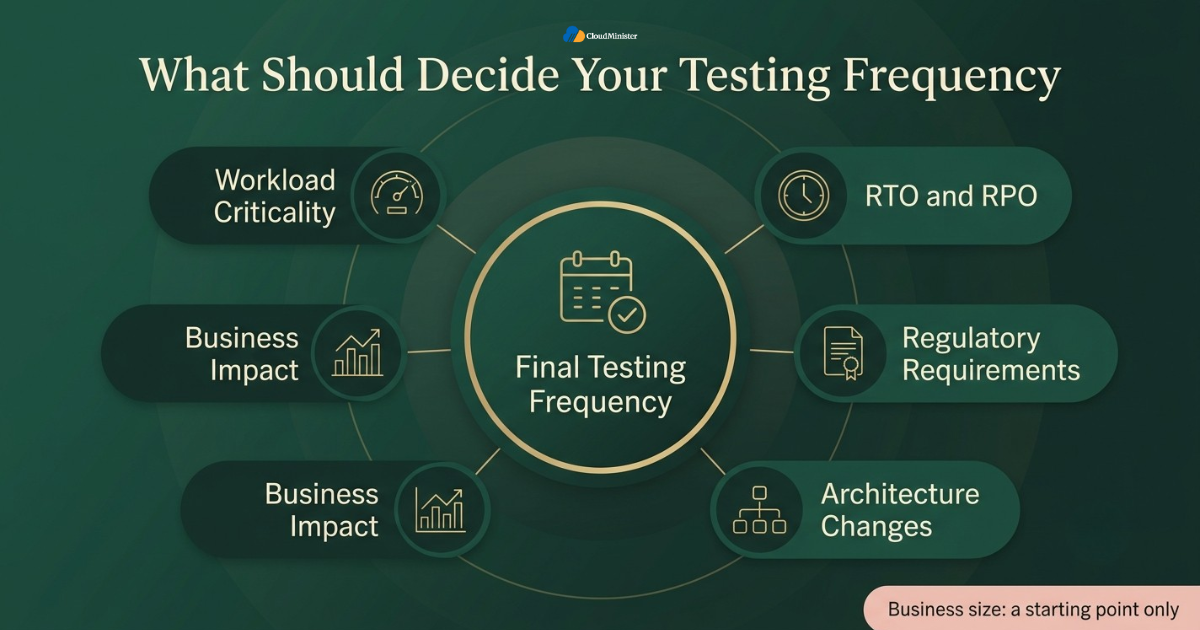
- Business size influences this planning process, but it should not be the only factor. A five person shop and a five hundred person company face different risks and budgets, yet the right testing cadence depends primarily on workload criticality, RTO and RPO, regulatory requirements, architecture changes, and business impact. The size based schedules in this guide are practical starting points, not fixed rules.
- A plan that was accurate on the day it was written can quietly go stale within months, since new applications, new vendors, and new staff all change what actually needs to be recovered.
- Independent research backs this up directly. According to a 2026 compilation of disaster recovery statistics from Secureframe, global disaster costs now exceed 2.3 trillion dollars annually, and the same research found that organizations experienced an average of 86 outages in the past year alone, which means the question is rarely if a recovery plan will be needed, only when.
- Many businesses assume disaster recovery planning is purely an IT responsibility. In reality, finance, customer support, and leadership all need defined roles inside the plan, and testing is what reveals whether those roles are understood.
- A capable Web Hosting Company in India will usually ask about your testing cadence during an infrastructure review, because backup frequency and failover design are only useful if they have actually been rehearsed.
- Businesses evaluating a new Web Hosting Company in India for the first time should ask directly how the provider’s own infrastructure choices affect the recovery time objective written into the Disaster Recovery Plan.
- Businesses that already run on Windows Dedicated Server Hosting or VPS Server Hosting in India tend to test more consistently, since a managed infrastructure partner brings a review rhythm that an internal team rarely maintains on its own.
- The most reliable version of this plan is treated as a living document, reviewed and rehearsed on a schedule instead of being written once and forgotten in a shared drive.
Before scheduling any test, write down your real recovery time objective and recovery point objective in hours, not in vague terms like soon or quickly. A business that can tolerate two hours of downtime needs a very different testing cadence than one that cannot tolerate more than fifteen minutes, and guessing these numbers is the most common reason a Disaster Recovery Plan is tested too rarely or too often.
What Counts as Actually Testing a Disaster Recovery Plan
Not every review counts as a real test. It can be tested in several different ways, and each one proves a different level of readiness.
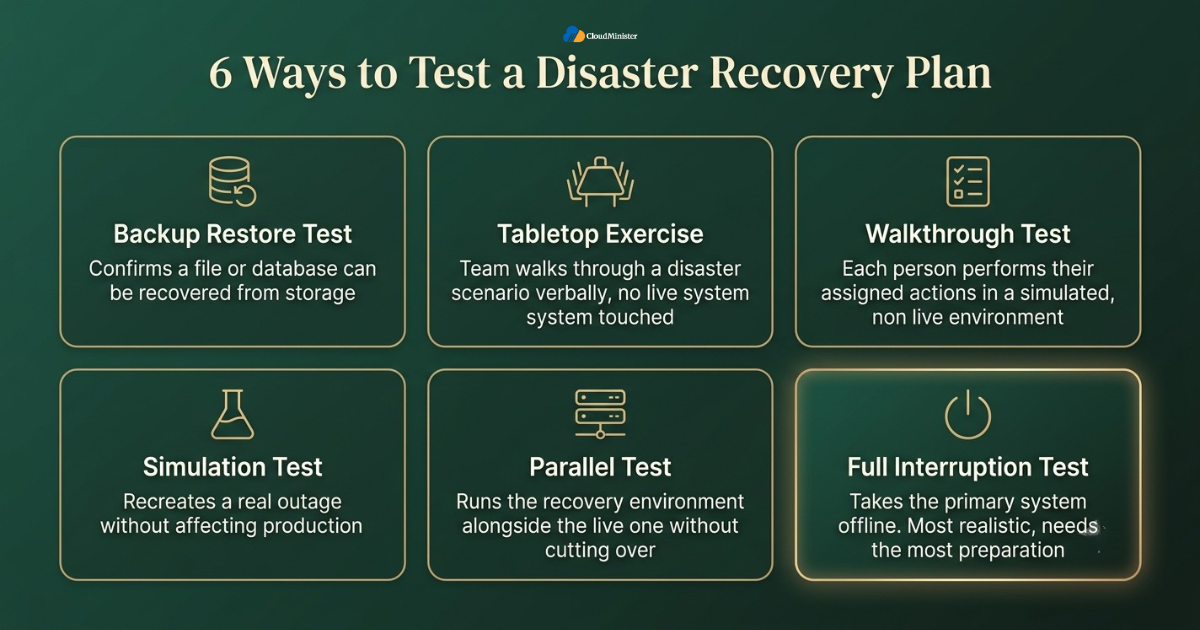
- A tabletop exercise walks the team through a disaster scenario verbally, without touching any live system. It is useful for checking that everyone understands their role in the plan and that contact information is current.
- A walkthrough test goes one step further, having each team member perform their assigned actions from the plan in a simulated but non live environment, which exposes gaps a tabletop discussion would miss.
- A simulation test recreates a real outage as closely as possible without affecting production, often by failing over to a secondary environment such as a standby VPS Server Hosting in India instance and confirming that applications actually come back online.
- A full interruption test intentionally takes the primary system offline and confirms recovery on the backup environment. This is the most realistic test the plan can undergo, but it carries real risk and needs the most preparation.
- A parallel test runs the recovery environment alongside the live one without cutting over, which lets a team validate that Windows Dedicated Server Hosting or another target environment can genuinely handle production load before anyone commits to a real switch.
- According to a 2026 report from Harness on disaster recovery testing, effective programs test more than technology, since they also exercise people, processes, communications, and third party dependencies end to end, which is a useful reminder that recovery planning is not only about servers.
- A backup restore test confirms that a file or database can actually be recovered from storage, which is the most basic form of testing and should never be skipped, no matter how small the business.
- Testing only the backup and never the full recovery path is one of the most common mistakes in this kind of planning, because a backup that exists is not the same as a business that can actually run again.
- Choosing the right test type depends on business size, risk tolerance, and how much disruption the organisation can absorb, which is exactly why the rest of this guide breaks testing frequency down by size.
Every Disaster Recovery Plan test that touches real data creates a temporary window where credentials, network paths, and backups exist in more than one place. Treat the recovery environment as production from the first minute of the test. Use restricted test accounts, rotate any temporary credentials the moment the exercise ends, and never leave a test failover connected to live customer traffic longer than the exercise requires.
Typical Testing Frequency for Small Businesses
Small businesses often assume a Disaster Recovery Plan is something only large companies need, but a small business usually has less room to absorb an outage financially, which makes testing just as important, only lighter in scope.
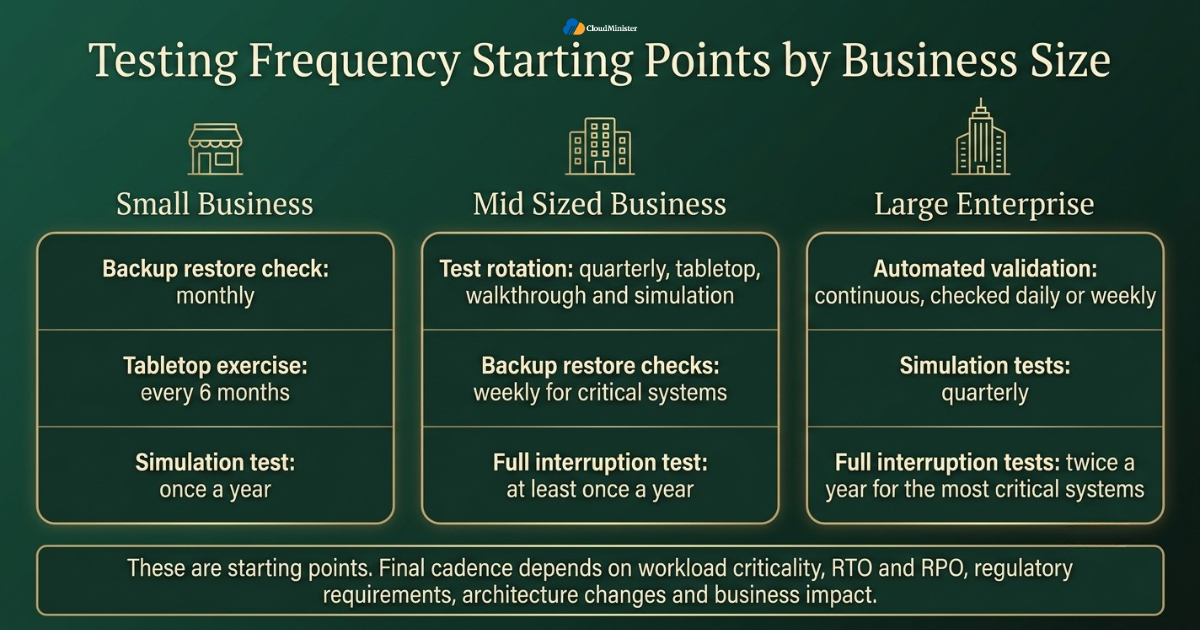
- For a small business with a handful of applications, a reasonable starting point is to test this plan about twice a year, with a light backup restore check performed monthly. If a small business runs a revenue critical or regulated workload, it should test more often than this baseline.
- A small team rarely has the staff to run a full interruption test often, so a tabletop exercise every six months combined with one simulation test a year is a realistic example baseline that can be adjusted to workload criticality and RTO and RPO.
- Small businesses running on shared infrastructure or a single Windows VPS Hosting in India instance should confirm as part of every recovery test that a snapshot or backup can actually be restored to a working state, not just that a backup file exists somewhere. A second, lower cost Windows VPS Hosting in India instance kept purely for testing is often enough for a small business to rehearse its Disaster Recovery Plan without touching production.
- A small business that moves to Affordable Windows Dedicated Server Plans often gains more predictable performance for its recovery testing, since dedicated resources remove the noisy neighbour effect that can distort a simulation test on shared hosting. Choosing among Affordable Windows Dedicated Server Plans early also means the Disaster Recovery Plan can be built around known, stable hardware from day one rather than shifting shared capacity. Comparing a few Affordable Windows Dedicated Server Plans side by side before committing helps a small business avoid outgrowing its recovery environment within the first year.
- Owner led businesses should assign at least one backup person to every role described in the plan, since a plan that depends on a single person being available during a disaster is fragile by design.
- Budget conscious teams can pair Affordable Windows Dedicated Server Plans with a documented monthly restore check, which keeps recovery testing realistic without requiring a large recurring budget. Even the most Affordable Windows Dedicated Server Plans on the market usually include enough headroom to run a full simulation test without affecting the live application, provided the plan is sized correctly against actual traffic. Businesses that start on Affordable Windows Dedicated Server Plans and later scale up should carry their testing history forward, since a new Disaster Recovery Plan built from scratch loses the lessons learned from earlier tests.
- A small business should treat any change in software vendor, payment processor, or core application as a trigger to re-test the plan early, rather than waiting for the next scheduled date. This includes upgrading between different Affordable Windows Dedicated Server Plans, since even a same provider upgrade can change disk layout, snapshot behaviour, or network configuration in ways that affect recovery.
- Even a small business benefits from asking its Web Hosting Company in India what recovery time it can realistically deliver, since that number should directly shape how the plan defines its own recovery time objective.
Related Reading: VPS vs dedicated servers for AI inference
Typical Testing Frequency for Mid Sized Businesses
A mid sized business typically runs more applications, more integrations, and more customer facing systems than a small business, which means its Disaster Recovery Plan needs a tighter and more structured testing calendar.
- A mid sized business will often benefit from testing its recovery plan roughly every quarter, adjusted to workload criticality and regulatory needs, alternating between tabletop exercises, walkthrough tests, and at least one simulation test each year. Many mid sized businesses reach a point where Windows Dedicated Server Hosting makes more sense than shared plans, and that transition is a natural moment to rebuild the testing calendar around dedicated capacity. A business that delays this move purely to save cost should factor the extra recovery testing complexity of shared infrastructure into that decision, since Windows Dedicated Server Hosting tends to simplify the Disaster Recovery Plan considerably.
- Backup restore checks often move from monthly to weekly for critical systems, since a mid sized business usually has enough transaction volume that a week of undetected backup failure can already be costly.
- According to the same 2026 Secureframe research, ninety percent of IT leaders reported that outages or disruptions have reduced customer trust, which is a strong argument for testing recovery more often wherever customer impact is high, as it often is for mid sized businesses with more customers to lose.
- Mid sized businesses running production workloads on Windows Dedicated Server Hosting should consider a full interruption test at least once a year, or more often where RTO, RPO, or compliance requirements demand it, ideally during a planned low traffic window, so the plan is proven under conditions close to a real event.
- A mid sized business that depends on VPS Server Hosting in India for staging or failover environments should confirm during every recovery test that the failover environment can handle full production load, not just a fraction of it. Sizing Windows VPS Hosting in India correctly for this purpose, rather than reusing whatever instance is cheapest, is what actually makes the failover test meaningful.
- Cross department coordination becomes more important at this size. This kind of plan, for a mid sized business, should involve customer support, finance, and operations in at least one test per year, not only the technical team.
- A mid sized business considering a move to Windows VPS Hosting in India for better failover flexibility should test the new environment as part of the migration itself, so it is validated before it is ever relied upon in a real incident. Comparing Windows VPS Hosting in India against a dedicated alternative before committing is a sensible step, since the right choice changes how the Disaster Recovery Plan defines its own failover path. Businesses that already run Windows VPS Hosting in India for staging environments often find it natural to extend the same setup into a dedicated recovery target for the Disaster Recovery Plan.
- Mid sized businesses should track test results over time, and share meaningful trends with their Web Hosting Company in India where relevant. A Disaster Recovery Plan that improves its recovery time with each quarterly test is a strong sign the testing programme is actually working, not just going through the motions.
Related Reading: dedicated trading servers for HFT and forex
Typical Testing Frequency for Large Enterprises
Large enterprises carry the most complexity and usually the most regulatory exposure, so a Disaster Recovery Plan at this size needs to be tested far more often and far more rigorously than at any smaller scale.
- A large enterprise will typically test its recovery plan continuously in some form, with formal simulation tests commonly held quarterly and full interruption tests commonly held twice a year for the most critical systems, depending on criticality, RTO and RPO, and regulatory requirements.
- Continuous validation tools that automatically check backup integrity and failover readiness commonly run daily or weekly for a large enterprise, so gaps in the plan are caught long before the next scheduled formal test.
- According to the 2026 Harness report on disaster recovery testing, in 2026 hybrid and multi cloud estates mean disaster recovery is not a once a year fire drill but a continuous discipline that validates plans and uncovers weak links before they cause outages, which is especially true for large, distributed enterprises running a Disaster Recovery Plan across regions.
- Large enterprises operating across multiple regions should test their recovery plan separately for each region, since a single national test can hide gaps that only appear when a specific data centre or a specific Web Hosting Company in India partner is affected.
- Enterprises with dedicated infrastructure such as Windows Dedicated Server Hosting fleets should rotate which servers are included in each recovery test, so no single machine or cluster goes untested for more than a defined period under the Disaster Recovery Plan. Some enterprises deliberately keep a mix of Windows Dedicated Server Hosting and Windows VPS Hosting in India across regions specifically so a single provider outage cannot take down every recovery path at once.
- A large enterprise should maintain a formal audit trail for every recovery test, including who approved it, what failed, and what was fixed afterward, since regulators and auditors increasingly expect documented evidence rather than a verbal assurance.
- Enterprises that rely on VPS Server Hosting in India for burst capacity or regional failover should specifically test that this capacity can actually be provisioned quickly under real demand, not only confirmed as available on paper. Large enterprises that mix VPS Server Hosting in India with dedicated capacity should test both paths independently, since the Disaster Recovery Plan should never assume both will be available at the exact same moment. Reserving a standing allocation of VPS Server Hosting in India purely for recovery testing, rather than relying on best effort provisioning, removes one of the most common surprises during a real incident.
- A recovery plan at enterprise scale should include third party and vendor dependencies in testing, since a single unavailable vendor can stall recovery even when every internal system performs exactly as expected.
- Large enterprises should treat every merger, acquisition, or major platform migration as a mandatory trigger to fully re-test the Disaster Recovery Plan, rather than assuming the existing Disaster Recovery Plan still applies unchanged.
Related Reading: how to choose the right forex VPS specs
How to Choose Test Types and Frequency by Risk
Matching the right test type to the right frequency is what actually turns a Disaster Recovery Plan into a working safety net instead of a document that only looks reassuring on paper.
- Start every recovery plan review by ranking systems into tiers, since a customer facing payment system and an internal reporting tool never need the same testing frequency or the same recovery time objective.
- Let workload criticality, RTO and RPO, regulatory requirements, architecture changes, and business impact set the final testing frequency. Business size is a useful starting point, but it should never override these factors.
- The highest tier, covering systems that generate revenue directly, should sit inside this plan with the shortest recovery time objective and the most frequent testing, regardless of overall business size.
- Lower tier systems can be tested less often, but should never be excluded from the plan entirely, since even a rarely used reporting tool can become a hidden single point of failure during a real incident.
- Businesses should never run a full interruption test on a system they have not already validated with a tabletop exercise and a simulation test, since skipping steps in the testing sequence increases real operational risk.
- A recovery plan should define exit criteria for every test in advance, meaning a clear pass or fail definition, so success is measured against real numbers instead of a general feeling that the test went fine.
- Businesses moving workloads toward VPS Server Hosting in India or Windows Dedicated Server Hosting as part of a growth plan should re-test the plan immediately after the migration, since infrastructure changes are one of the most common causes of an outdated recovery plan. Upgrading from a basic package to one of the Affordable Windows Dedicated Server Plans on offer is exactly this kind of change, and it should trigger a fresh Disaster Recovery Plan review rather than a silent carryover of old assumptions.
- A well designed recovery test always includes a communication check, confirming that the tools used to notify staff and customers during a real outage are themselves available during the test. Businesses running customer facing portals on Windows VPS Hosting in India should confirm the notification tooling itself does not depend on the same instance being tested, or the communication channel can fail alongside the system it is meant to report on. Hosting the notification layer separately from the main Windows VPS Hosting in India instance is a small change that meaningfully strengthens the overall Disaster Recovery Plan.
- Testing frequency should also account for industry risk. A financial services firm or healthcare provider generally needs a far more frequent testing cycle for its Disaster Recovery Plan than a low regulation business of similar size, purely because the cost of downtime and non compliance is higher.
Related Reading: Model Context Protocol and VPS hosting in India
Common Mistakes That Make a Disaster Recovery Plan Fail Its Test
Most failed recovery tests trace back to a short, repeatable list of mistakes, and avoiding them is one of the cheapest improvements a business can make to its overall readiness.
- Writing this plan once and never updating it as staff, vendors, and applications change, which leaves a plan that is technically complete and operationally useless.
- Testing only the backup and assuming that proves the entire plan works, when in reality a successful backup job says nothing about whether the business can actually run on the recovered systems.
- Skipping communication testing, so the plan looks solid on paper but nobody actually knows how staff and customers will be notified during a real event.
- Relying on a single person who understands the recovery plan, so it effectively fails the moment that person is unavailable, on leave, or has left the company.
- Assuming a Web Hosting Company in India or infrastructure provider automatically tests recovery on the business’s behalf, when in most cases the provider secures the infrastructure while the business itself must still validate its own recovery plan.
- Ignoring recovery time creep, where each test quietly takes longer than the last without anyone noticing, until the actual recovery time objective has drifted far from what the business can really tolerate.
- Running every recovery test at the exact same time of day or under the exact same conditions, which hides problems that only appear during peak load, month end processing, or unusual traffic patterns.
- Forgetting to test failback, meaning the return to the original environment after a recovery test or a real event, which can leave a business permanently running on a temporary recovery environment such as an emergency VPS Server Hosting in India instance. Businesses that never rehearse the return trip from VPS Server Hosting in India back to their primary environment often discover the failback step is harder than the original failover. Treating the return leg from VPS Server Hosting in India as its own test case, separate from the initial failover, closes one of the most common gaps in this kind of plan.
- According to the Consilien review of why disaster recovery plans fail, referencing the Unitrends State of Backup and Recovery Report, only sixty one percent of restore attempts actually meet the desired outcome, meaning four in ten fail at the exact moment they are needed, which is precisely why testing the full recovery path matters more than testing the backup alone.
- Treating recovery testing as a one time compliance exercise rather than an ongoing discipline is another common mistake, since testing frequency should evolve as the business grows and its infrastructure changes.
The most dangerous mistake is assuming that because last year’s test passed, this year’s test will pass too. Infrastructure, staff, and dependencies change continuously, and a Disaster Recovery Plan that passed twelve months ago can already be dangerously out of date. Treat every test as if it is the first time the plan has ever been tried.
Building a Realistic Disaster Recovery Plan Testing Calendar
This kind of plan is only sustainable if the testing calendar fits how the business actually operates, rather than an idealised schedule nobody has the time or budget to follow.
- Small businesses can start with a realistic testing calendar built around a monthly backup restore check, a twice yearly tabletop exercise, and one annual simulation test as an example baseline, then increase the frequency for critical or regulated workloads.
- Mid sized businesses can often work from a quarterly test rotation, moving between tabletop, walkthrough, and simulation formats, with a full interruption test scheduled during a planned maintenance window at least once a year where workload criticality justifies it.
- Large enterprises commonly combine continuous automated validation with quarterly simulation tests and typically two full interruption tests per year for the most critical systems, adjusted to RTO, RPO, and regulatory requirements, alongside a fully documented audit trail for the Disaster Recovery Plan.
- Every business, regardless of size, should re-test its recovery plan immediately after any major infrastructure change, including a move to new Windows Dedicated Server Hosting, a migration to Windows VPS Hosting in India, or a switch to a new Web Hosting Company in India. Any business that recently switched its Web Hosting Company in India should treat the first ninety days on the new platform as a mandatory retest window rather than assuming old results still apply.
- A realistic testing calendar assigns clear ownership. One named person should be accountable for scheduling every recovery test, and one named person should be accountable for signing off on the results.
- Businesses should budget testing time the same way they budget for security patching or software licensing, since a plan with no allocated time or budget for testing will quietly stop being tested within a year.
- A strong testing calendar leaves room for unscheduled tests triggered by real world events, such as a competitor’s outage or a new vulnerability disclosure, rather than treating the calendar as fixed and unchangeable.
- Growing businesses that scale from shared hosting toward Affordable Windows Dedicated Server Plans should treat that transition as a natural checkpoint to formally review and re-test their entire recovery plan from the ground up.
- Pairing a documented recovery plan with a provider that understands Windows VPS Hosting in India and Windows Dedicated Server Hosting environments tends to produce a more realistic and better tested calendar, since the provider can advise on realistic recovery time objectives for the actual infrastructure in use. A provider that also offers VPS Server Hosting in India for temporary failover gives a business more flexibility to test without committing to permanent duplicate capacity.
Moving Your Database to a Windows Dedicated Server
Get dedicated resources and full control for your Windows based databases and applications, so your new environment is ready before the cutover begins.
Choosing Infrastructure That Supports Easier Disaster Recovery Plan Testing
The infrastructure underneath this kind of plan has a direct effect on how easy, how frequent, and how realistic testing can actually be.
- A business hosted with a responsive Web Hosting Company in India can usually spin up isolated test environments faster, which makes frequent recovery testing far less disruptive to live customers. This is one of the clearest practical reasons a Web Hosting Company in India should be evaluated on testing support, not only on price or raw specifications.
- Windows Dedicated Server Hosting gives a business predictable, isolated resources for recovery testing, which removes the shared tenancy variables that can make a simulation behave differently from a real event.
- VPS Server Hosting in India offers a flexible, lower cost way to spin up temporary failover environments for testing, which is especially useful for mid sized businesses that cannot justify permanent duplicate infrastructure. For businesses that need slightly more headroom than a shared plan allows, VPS Server Hosting in India sits between basic shared hosting and a full dedicated server, which is often the right fit for regular Disaster Recovery Plan rehearsals.
- Businesses evaluating Affordable Windows Dedicated Server Plans should specifically ask whether snapshot and restore features are included, since these features make routine recovery testing dramatically faster and less risky. Because Affordable Windows Dedicated Server Plans vary widely in what they include, it is worth confirming testing related features before signing a contract rather than discovering the gap during an actual Disaster Recovery Plan exercise. Businesses that outgrow entry level Affordable Windows Dedicated Server Plans should revisit their recovery testing budget at the same time, since higher traffic usually means a shorter tolerable recovery time objective, which in turn means more frequent testing under the Disaster Recovery Plan. Agencies and growing teams comparing Affordable Windows Dedicated Server Plans across providers should weigh testing support as heavily as raw specifications, since the cheapest Affordable Windows Dedicated Server Plans on paper sometimes exclude the snapshot tools a serious recovery programme depends on.
- A Windows VPS Hosting in India environment configured with automated snapshots allows a business to test recovery scenarios on demand, rather than waiting for a scheduled maintenance window every time the plan needs validation. Businesses new to Windows VPS Hosting in India should ask specifically how snapshots are billed, since frequent testing can affect storage costs if this is not clarified in advance. This detail matters more than it first appears, since a business that avoids frequent snapshots to save money on Windows VPS Hosting in India often ends up testing its Disaster Recovery Plan less often than it should. Providers that make Windows VPS Hosting in India easy to snapshot on demand tend to see their customers test more consistently overall.
- Enterprises with high compliance requirements should confirm that their Web Hosting Company in India can support isolated, audit ready test environments, whether that means dedicated servers, Affordable Windows Dedicated Server Plans scaled up for the occasion, or temporary cloud capacity, since regulators increasingly expect proof that recovery capability was tested under realistic conditions. Any serious Web Hosting Company in India should be able to describe exactly how it isolates a test environment from production traffic during a live rehearsal.
- A provider offering both Windows Dedicated Server Hosting and VPS Server Hosting in India under one roof can make hybrid recovery testing simpler, since staging and failover environments can be provisioned from the same trusted infrastructure. Businesses that split workloads between Windows Dedicated Server Hosting and VPS Server Hosting in India tend to have more testing options available at short notice.
- When comparing providers, ask directly how each one supports recovery testing, since a provider that only sells capacity is very different from one that actively helps a business validate its recovery readiness.
- A Web Hosting Company in India that documents its own uptime, backup, and recovery practices in detail is generally a stronger long term partner for recovery testing than one that only advertises price.
A Practical First 90 Days Plan to Improve Disaster Recovery Plan Testing
Businesses that have never tested their recovery plan, or have not tested it recently, do not need to build a perfect programme overnight. A focused ninety day plan is usually enough to establish a sustainable testing rhythm.
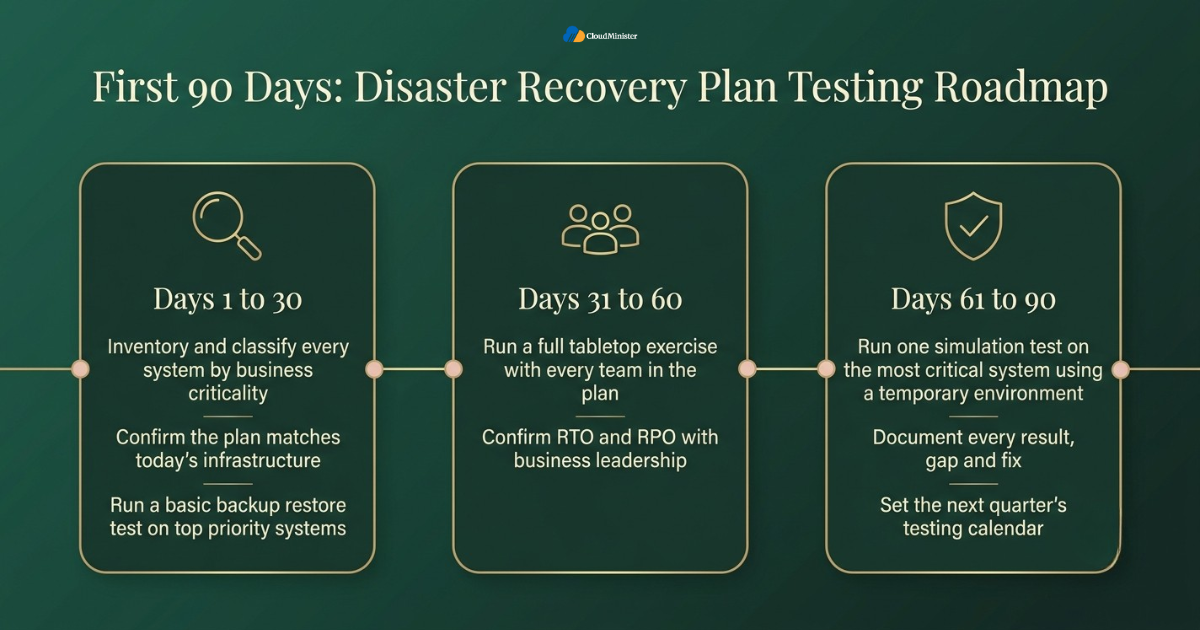
- Days one to thirty: inventory every system, classify it by business criticality, and confirm the current plan actually reflects the infrastructure in use today, including any recent move to Windows VPS Hosting in India or a new Web Hosting Company in India. This step alone often reveals that the Disaster Recovery Plan on file still describes an old Web Hosting Company in India relationship the business no longer uses.
- Days one to thirty: run a basic backup restore test on the highest priority systems, since this is the fastest way to discover whether the plan has any immediate, urgent gaps.
- Days thirty one to sixty: schedule and run a full tabletop exercise involving every team referenced in the plan, not only the technical staff, so communication gaps surface early.
- Days thirty one to sixty: confirm recovery time objectives and recovery point objectives with business leadership, and adjust the plan if the documented targets no longer match what the business can realistically tolerate.
- Days sixty one to ninety: run one simulation test on the most critical system, ideally using a temporary Windows Dedicated Server Hosting or VPS Server Hosting in India environment, so the exercise does not touch live production traffic. This is usually the moment a business discovers whether its Disaster Recovery Plan documentation matches reality. Smaller teams on a tight budget can run this same exercise on one of the more Affordable Windows Dedicated Server Plans without materially increasing cost.
- Days sixty one to ninety: document every result, every gap, and every fix, then set the next quarter’s testing calendar based on what this first cycle actually revealed.
- After the first ninety days, businesses generally find that their recovery plan needs far less rewriting and far more consistent testing, which is a healthier problem to have than discovering the whole plan was outdated.
Checklist: Disaster Recovery Plan Testing Readiness Review
- Business criticality tiers defined for every application and system
- Recovery time objective and recovery point objective documented in hours for each tier
- Backup restore tests scheduled at a frequency matched to business size
- At least one tabletop exercise completed in the last twelve months
- At least one simulation or full interruption test completed in the last twelve months
- Communication plan tested alongside the technical recovery steps
- Infrastructure changes, including any move to Windows Dedicated Server Hosting or Windows VPS Hosting in India, triggering an automatic re-test
- Clear ownership assigned for scheduling and for sign off on every recovery test
- Documented audit trail of past tests, failures, and fixes
Key Takeaways
- A Disaster Recovery Plan is only proven through testing, and testing frequency should be driven by workload criticality, RTO and RPO, regulatory requirements, and business impact, with business size as a starting reference.
- As a starting point, small businesses can aim for monthly backup checks, biannual tabletop exercises, and one annual simulation test, increasing frequency for critical workloads.
- Mid sized businesses commonly test quarterly, rotating between tabletop, walkthrough, and simulation formats, adjusted to risk.
- Large enterprises typically combine continuous automated validation with formal quarterly and biannual full tests, adjusted to criticality and compliance needs.
- Infrastructure changes, mergers, and new vendors, including any switch in Web Hosting Company in India, should always trigger an unscheduled Disaster Recovery Plan re-test.
- The right infrastructure partner, offering Windows Dedicated Server Hosting, Windows VPS Hosting in India, and Affordable Windows Dedicated Server Plans, makes frequent testing realistic instead of disruptive.
Not Sure Which Setup Fits Your Migration
Share your database size, write rate, and downtime budget with our team. We will help you pick the right environment and plan a safe, well tested cutover.
Conclusion
A Disaster Recovery Plan earns its value only through testing, and that value compounds every time the plan is exercised rather than filed away. Writing it down is the easy part. Proving it works under realistic conditions, on a schedule that actually matches business size and risk, is what separates a business that survives a real disaster from one that discovers its plan too late. Small businesses can often succeed with a light, consistent cadence built around monthly checks, biannual exercises, and one of the more Affordable Windows Dedicated Server Plans sized to their actual traffic. Mid sized businesses often need a tighter quarterly rhythm with real cross department involvement. Large enterprises typically need near continuous validation alongside formal, audited testing. In every case, the final cadence should be set by workload criticality, RTO and RPO, regulatory requirements, and architecture changes rather than company size alone. In every case, the underlying infrastructure matters. A dependable Web Hosting Company in India, paired with the right mix of Windows Dedicated Server Hosting, Affordable Windows Dedicated Server Plans, and VPS Server Hosting in India, gives a business the flexibility to test often without disrupting the customers it is trying to protect.
The most useful thing any business can do is turn testing into a regular habit instead of a yearly scramble. A Disaster Recovery Plan improves every time it is tested, because each exercise shows what works, what does not, and what needs fixing. Start with a schedule that feels manageable, assign a clear owner, and record every result honestly. Over time, recovery gets faster, roles become clearer, and surprises become rare. That steady progress is what protects your customers, your revenue, and your reputation on the day a real incident arrives.
Frequently Asked Questions
How often should a small business test its Disaster Recovery Plan?
As a general starting point, a small business can aim for a monthly backup restore check, a tabletop exercise roughly every six months, and at least one simulation test each year. This baseline avoids a large dedicated budget, but the final cadence should be adjusted to workload criticality, RTO and RPO, and any regulatory requirements.
How often should a large enterprise test its Disaster Recovery Plan?
Large enterprises commonly combine continuous automated validation with quarterly simulation tests and typically two full interruption tests per year for the most critical systems, adjusted to criticality, RTO and RPO, and regulatory requirements, alongside a documented audit trail for compliance purposes.
What is the difference between testing a backup and testing the full plan?
Testing a backup only confirms that a file or database can be restored. Testing the full plan confirms that the business can actually operate again, including applications, communication, and staff roles, not just the underlying data.
Does moving to Windows Dedicated Server Hosting change how often we should test the Disaster Recovery Plan?
It does not reduce testing frequency, but it does make testing easier, since dedicated resources behave more predictably during a simulation than shared infrastructure, which typically leads businesses to test more consistently rather than less.
Can VPS Server Hosting in India be used purely for recovery testing?
Yes. A temporary VPS Server Hosting in India environment is a cost effective way to run simulation or full interruption tests without committing to permanent duplicate infrastructure, which is especially useful for small and mid sized businesses.
Should every infrastructure change trigger a new recovery test?
Any significant change, including a move to a new Web Hosting Company in India, a switch to Windows VPS Hosting in India, or the addition of Affordable Windows Dedicated Server Plans, should trigger a re-test, since infrastructure drift is one of the most common causes of a failed recovery. This applies equally whether the change involves Windows Dedicated Server Hosting, Windows VPS Hosting in India, or a mix of both.
What should we ask a Web Hosting Company in India about disaster recovery support?
Ask how the provider supports isolated test environments, whether snapshot and restore features are included, and what realistic recovery time it can deliver, since that number should directly shape the recovery time objective inside your own Disaster Recovery Plan.

Ajay Singh Raghav is a Senior Linux System Administrator at CloudMinister Technologies, where he has spent over 4 years installing, configuring, maintaining, and troubleshooting Linux servers for hosting and cloud environments. He specializes in AWS cloud computing alongside core Linux server administration, with hands-on expertise across server management, backup and restore systems, and cPanel-based hosting environments. His day-to-day experience keeping production servers stable and secure gives him a practical, ground-level understanding of the infrastructure he writes about.