Most administrators do not lose critical data because they skipped Windows Server Backup entirely. They lose it because they assumed the tool could handle a job it was never designed for, or because they bought an expensive third-party platform for a workload Windows Server Backup would have handled just fine on its own. Windows Server Backup ships free inside every edition of Windows Server and covers full server, volume, and system state recovery reasonably well for a single machine. Third-party solutions add application-aware protection, granular recovery, offsite replication, and centralized management across many servers at once. This guide walks through how Windows Server Backup actually works, when it is the right choice on its own, and when a layered strategy across both approaches makes more sense./p>
Every Windows Server deployment eventually forces the same question onto whoever is managing it. Is the built-in backup feature enough, or does the environment need a dedicated third-party platform on top of it. Windows Server Backup has been part of the operating system for years, and most administrators have configured it at least once without giving it much thought beyond getting a green checkmark after the first scheduled job. That casual relationship with the tool is exactly where trouble tends to start, because Windows Server Backup was built to solve a specific set of problems well, and it was never meant to solve every backup problem a growing infrastructure eventually runs into.
The confusion usually is not about whether Windows Server Backup works. It generally does exactly what it claims to do. The real confusion is about scope, and about which workloads genuinely need something more. A single server running a handful of file shares has very different recovery requirements than a domain controller managing Active Directory, DNS, and file services together, and both look very different again from a multi-server environment running SQL Server or Exchange. Windows Server Backup handles the first case comfortably. It starts to show its limits the moment recovery requirements move toward granular application level restores or offsite replication across a distributed environment.
This guide exists to remove the guesswork from that decision. It walks through what Windows Server Backup actually does well, where its ransomware resilience and recovery granularity fall short of a dedicated platform, and how the two approaches are increasingly used together rather than as a strict either or choice. By the end, the goal is not to convince every team to buy a third-party license, nor to convince every team that Windows Server Backup alone is sufficient forever. It is to give administrators a clear framework for matching the tool to the workload, so the decision is made deliberately instead of by default.
Table of Contents
- 1. What Is the Built-In Backup Tool and Why Does It Matter
- 2. Why Teams Need to Understand Where This Tool Fits In Their Stack
- 3. Choosing Between Native and Third-Party Before You Deploy
- 4. Native Tool vs Third-Party Solutions: The Core Differences Every Team Should Know
- 5. How to Decide Which Approach Actually Fits Your Workload
- 6. Building a Layered Backup Strategy Around the Built-In Tool
- 7. Common Mistakes Teams Make When Working With This Tool
- 8. Governance and Operational Considerations Around Backup Strategy
- 9. Measuring Whether Your Backup Setup Is Actually Working
- 10. Choosing the Right Partner for Backup Strategy
- Conclusion
- Key Takeaways
- Frequently Asked Questions
1. What Is Windows Server Backup and Why Does It Matter
For system administrators and IT managers, this conversation usually starts the same way, often while comparing notes with a Web Hosting Company in India about why a scheduled backup job alone cannot protect a multi-server Active Directory environment with consistent recovery point objectives. Someone opens Server Manager, adds the Windows Server Backup feature, and asks whether this tool is actually enough for a server running Windows VPS Hosting in India or whether the organization needs to budget for a separate backup product.
Windows Server Backup is a built-in feature included with Windows Server that lets administrators create full server backups, volume-level backups, system state backups, and individual file and folder backups without installing any additional software. Unlike a dedicated third-party platform, which typically runs as a centralized console managing many servers from one place, it operates locally on each server, meaning every job is scheduled, stored, and restored from the same machine it protects unless the storage target is deliberately moved to a network location.
- The feature is built directly into the operating system, so a fresh deployment running on Affordable Windows Dedicated Server Plans or on Windows VPS Hosting in India can have Windows Server Backup configured within minutes of the server going live, without procuring or licensing anything additional, a convenience that applies equally to a single machine or a small fleet under Windows Dedicated Server Hosting.
- Volume Shadow Copy Service integration lets it capture a consistent snapshot of open files and active applications, something a simple file-copy script was never designed to do reliably on a live production system.
- Bare metal recovery captured through the built-in tool means an administrator can restore an entire failed server, operating system included, onto replacement hardware or a fresh virtual machine, which most teams evaluating Affordable Windows Dedicated Server Plans discover only after their first serious hardware failure.
- A schedule, storage destination, and retention policy can all be configured at setup time, which matters for teams running several critical roles on one machine, especially when shared infrastructure is also being managed nearby by a provider of VPS Server Hosting in India, or by a partner running a mixed fleet of Windows Dedicated Server Hosting and Windows VPS Hosting in India.
- Teams sizing their backup storage correctly from day one tend to get more predictable recovery windows than teams that discover storage limits only after a failed restore attempt, which is one more reason a properly scoped Windows Server Backup plan matters before an application reaches production.
Windows Server Backup protects data sitting on a server, not the credentials used to reach that server from the outside world, so an account with weak authentication can still let an attacker delete or encrypt both the live data and the local backup files stored on the same disk if backups are not isolated from the production volume. A misconfigured setup that stores every backup job on the same drive it is protecting is one of the more common ways a ransomware incident turns into total data loss instead of a routine restore, so backup isolation deserves the same review discipline as any other production access control decision.
2. Why Teams Need to Understand Where This Tool Fits In Their Stack
Many IT teams first encounter this decision while already researching a Web Hosting Company in India for their broader production needs, and a capable partner will usually raise the question of Windows Server Backup versus a dedicated platform early in that conversation, since a good partner rarely separates backup advice from architecture advice. For teams without a dedicated backup administrator, understanding where this tool fits correctly is often the fastest way to avoid a category of data loss that looks like bad luck but is actually a predictable coverage gap.
- Backup and recovery has reached a point where the underlying choice between the built-in tool and third-party platforms genuinely matters at scale for teams running Windows Dedicated Server Hosting, Affordable Windows Dedicated Server Plans, and VPS Server Hosting in India alike, with the global data backup and recovery market valued at roughly 18.86 billion dollars in 2026 and projected to keep growing at a compound annual rate above 14 percent through the rest of the decade, according to a 2026 report from Research and Markets.
- Without a structured approach to choosing between Windows Server Backup and a dedicated platform, different teams inside the same company commonly default every server to whichever method they configured first, producing inconsistent recovery point objectives and duplicated retention rules across servers that should share one strategy.
- A disciplined approach centralizes backup decisions at the platform or infrastructure team level, sometimes in partnership with a provider of Windows VPS Hosting in India, rather than leaving adoption of the built-in tool to whichever administrator hit a storage alert first.
- Teams that already run on a well structured Affordable Windows Dedicated Server Plans arrangement tend to catch gaps in their backup schedule faster, since routine monitoring surfaces a failed job or an undersized storage target before it becomes a production incident. Choosing the right operational partner from the outset is, in practice, the first real step toward catching these issues early, whether that partner is delivering Affordable Windows Dedicated Server Plans or VPS Server Hosting in India.
Related Reading: VPS vs dedicated servers for AI inference
Before standardizing a backup pattern across an entire fleet of servers, test it against one machine first, ideally the least critical server already running production traffic, and involve a Web Hosting Company in India early if one already manages part of the environment. Teams that validate a real restore, not just a completed backup job, before standardizing consistently avoid the most common mistake, which is assuming a green checkmark means the data is actually recoverable.
3. Choosing Between Native and Third-Party Before You Deploy
Before working through the detailed comparison in this guide, it helps to understand that the built-in tool and third-party backup solutions solve two overlapping but genuinely different problems. Windows Server Backup handles local, single-server protection with full server, volume, and system state recovery built directly into the operating system. Third-party solutions typically add centralized management, application-aware backup for platforms like SQL Server and Exchange, offsite and cloud replication, and long-term retention policies that go well beyond what the built-in tool alone was designed to do.
- Windows Server Backup suits smaller deployments, single-server workloads, and situations where the primary requirement is a reliable full server or system state backup without needing centralized management across many machines, which is the starting point most teams recommend for a single Windows VPS Hosting in India instance.
- Third-party solutions suit environments running multiple servers, mixed workloads such as databases and mail platforms, or organizations with compliance requirements around offsite retention and audit trails, a distinction infrastructure teams typically flag during onboarding.
- Windows Server Backup becomes limiting once a team needs granular item-level recovery from an application like Exchange or SQL Server without restoring the entire volume first, since its recovery granularity stops at the file and folder level for most workloads.
- Where a deployment sits between these patterns, many teams run Windows Server Backup as the local, fast-recovery layer while still using a third-party platform for offsite replication and centralized reporting, whether that split sits entirely on a single Affordable Windows Dedicated Server Plans arrangement or spans a larger multi-server footprint typical of VPS Server Hosting in India.
- Running a real restore test before committing to any single approach, a step most established hosting partners will help set up, confirms exactly which servers genuinely need a third-party platform and which can stay comfortably on the built-in tool alone.
- Teams building out their server fleet for the first time often benefit from starting with Windows Server Backup for anything single-server and only introducing a dedicated third-party platform once a specific, measured need for centralized management or application-aware recovery appears, since an immature deployment rarely has the server count yet to justify a full backup platform license.
Related Reading: guide on dedicated trading servers for HFT and forex
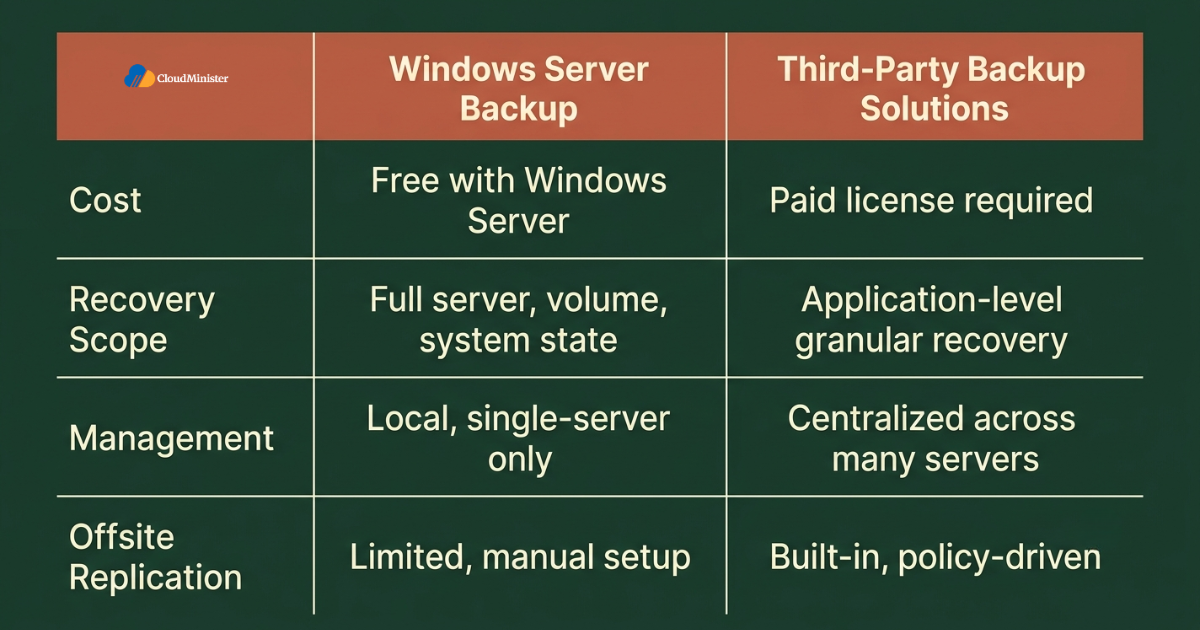
4. Windows Server Backup vs Third-Party Solutions: The Core Differences Every Team Should Know
Below is a breakdown of how Windows Server Backup and third-party backup platforms differ across the factors that actually matter for a real production environment and for the surrounding infrastructure a team has already put in place.
4.1 Recovery Granularity: Third-Party Tools Usually Win on Application Awareness
- Windows Server Backup can restore an entire volume, the full system state, or individual files and folders, but it generally cannot reach inside an application database to pull out one mailbox or one table without restoring a much larger chunk of data first.
- Third-party backup solutions built for Windows Server routinely include application-aware processing for platforms like SQL Server, Exchange, and Active Directory, letting an administrator recover a single object without touching anything else on the volume.
- The built-in tool does understand Volume Shadow Copy Service well enough to produce a consistent snapshot of an open application, but consistency during the backup is not the same as granular recovery afterward, and that gap is where most third-party tools earn their license cost.
- The recovery gap widens the more complex a server’s role becomes, since a domain controller running Active Directory, DNS, and file shares together needs different recovery paths for each role, while the built-in tool alone would restore all three as one bundled system state, a limitation any team offering serious Windows Dedicated Server Hosting runs into quickly with a growing environment, particularly one that also sells Affordable Windows Dedicated Server Plans to smaller customers.
- For a team running several application roles behind one server, a mature third-party platform often replaces what used to require several manual backup jobs and export scripts stitched together, which is exactly the kind of consolidation a Web Hosting Company in India will usually recommend during an architecture review.
4.2 Storage and Offsite Reach: Third-Party Platforms Extend Where the Built-In Tool Alone Cannot
- Windows Server Backup can target local disks, network shares, and to a limited extent cloud storage through additional configuration, but it was not built as a policy-driven offsite replication engine.
- Third-party backup solutions typically ship with built-in replication to secondary sites, cloud object storage, or tape, giving administrators a documented, testable recovery path if the primary server and its local storage are both destroyed together.
- The built-in tool, by contrast, stores most jobs close to the server it protects by default, so a single site-wide incident affecting both the server and its attached storage can take out the production data and its backup copy at the same time unless an administrator has deliberately configured an offsite target.
- Teams focused purely on VPS Server Hosting in India for a domestic customer base sometimes assume offsite reach does not matter to them, but even a single-region deployment benefits from a backup copy stored outside the blast radius of the primary server.
- Applications that genuinely accept the risk of same-site recovery, such as a disposable test environment, are the cases where the built-in tool alone remains the right and sufficient choice rather than adding a third-party replication license on top for no real benefit, a judgment call any solid Affordable Windows Dedicated Server Plans review should already account for.
4.3 Ransomware Resilience: Immutable and Air-Gapped Copies Favor Third-Party Tools
- The built-in tool can write to a dedicated backup disk that Windows manages exclusively, which offers some protection against a live ransomware process casually browsing and encrypting that volume, but it does not natively provide immutable, write-once storage the way many third-party platforms do.
- Third-party backup solutions increasingly include immutable backup repositories, air-gapped replication, and anomaly detection that flags an unusual spike in changed data before an entire backup set gets overwritten with encrypted files.
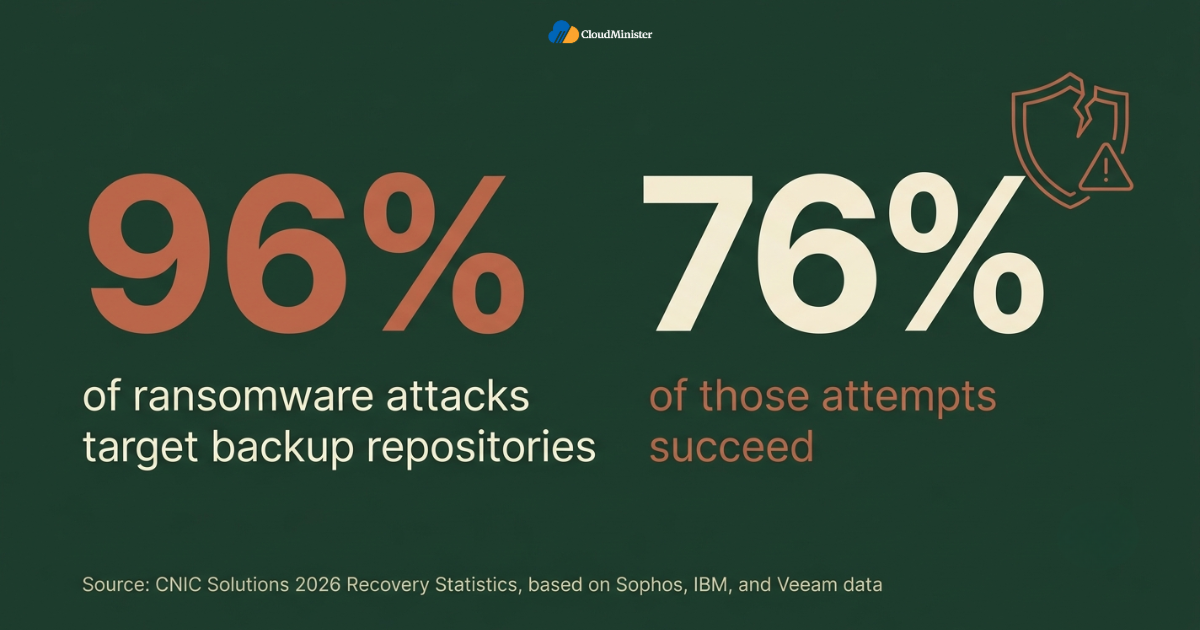
- Windows Server Backup, run without a deliberate isolation strategy, is still vulnerable to the same category of attack that targets backups broadly, and industry research shows that 96 percent of ransomware attacks target backup repositories, with 76 percent of those attempts succeeding, based on 2026 recovery statistics compiled by CNIC Solutions from Sophos, IBM, and Veeam data.
- Recovery outcomes tied to backup quality have become one of the clearest predictors of how quickly an organization gets back online, since organizations whose backup repositories are compromised alongside their production data face dramatically higher recovery costs than organizations whose backups remain intact and isolated.
- Teams running anything customer facing on Windows Dedicated Server Hosting without an isolated or immutable backup strategy, whether the underlying environment sits on Windows VPS Hosting in India or dedicated hardware, are carrying a measurable and avoidable amount of risk that a properly configured third-party solution specifically addresses.
4.4 Operational Complexity: The Built-In Tool Stays the Simplest, Third-Party Platforms the Most Capable
- The built-in tool requires essentially no additional infrastructure to use, since it installs as a Windows feature with a small configuration surface covering schedule, storage destination, and item selection, which is why it remains a common starting point across Windows VPS Hosting in India and VPS Server Hosting in India alike for smaller workloads.
- Some third-party platforms sit in the middle operationally, requiring an agent installation and policy configuration but not the multi-server console complexity that comes with a full enterprise backup deployment.
- A full third-party backup platform is the most operationally involved of the two broad categories, requiring a proper understanding of retention policies, replication jobs, licensing tiers, and centralized reporting, which is often where teams first budget for a broader engagement with a provider of Affordable Windows Dedicated Server Plans alongside the software change itself.
- For teams just getting started, standardizing on the built-in tool for single-server workloads and a third-party platform for anything spanning multiple servers tends to keep the learning curve manageable, a sequencing a Web Hosting Company in India will often recommend by default.
Related Reading: forex VPS specs
5. How to Decide Which Approach Actually Fits Your Workload
Choosing between Windows Server Backup and a third-party solution is not a matter of picking whichever option sounds the most advanced. It depends entirely on how the server is actually deployed and how far its recovery requirements genuinely reach.
- Start by confirming how many servers actually need centralized backup management, since that single fact eliminates the built-in tool as the sole answer in most multi-server environments, a starting question any team evaluating Affordable Windows Dedicated Server Plans should ask before touching the console.
- If the environment runs a single server, needs full server or system state recovery, and does not require granular application-level restores, the built-in tool is almost always the right starting point, and moving away from it should require a specific, documented reason.
- If the only real requirement is protecting a handful of file shares and configuration data close to one machine without needing offsite replication or immutable storage, the built-in tool alone may be sufficient, though many teams still choose a fuller third-party platform for the consolidated management experience it provides across an entire fleet.
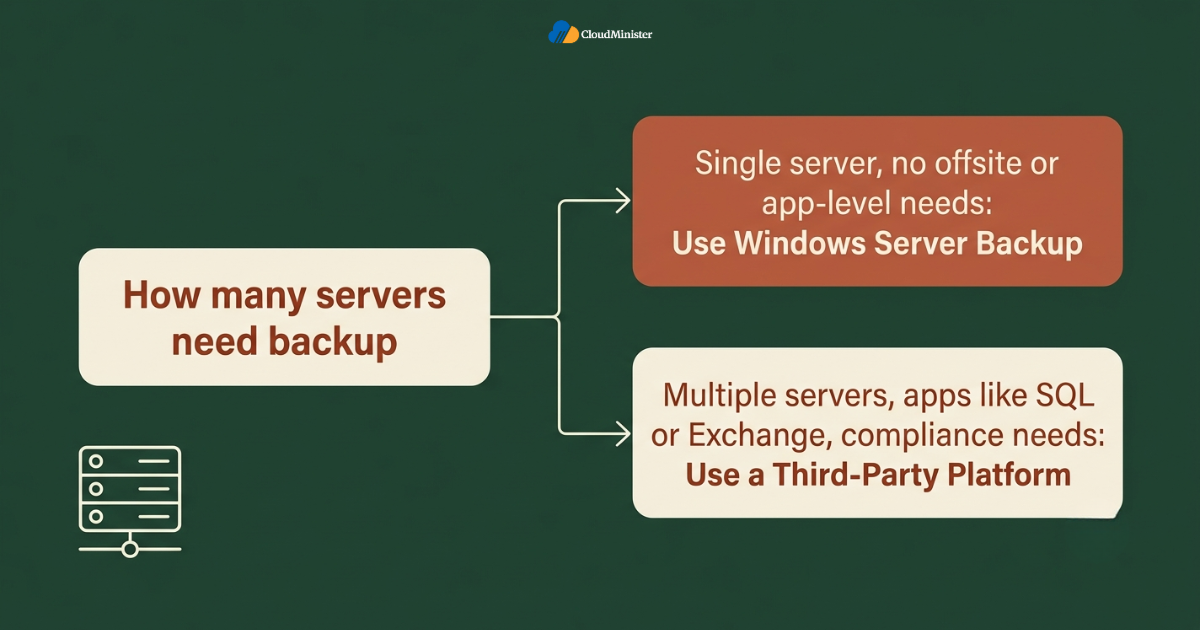
- If the deployment spans multiple servers, runs application workloads like SQL Server or Exchange, or needs documented offsite and immutable recovery for compliance reasons, a third-party solution becomes the simplest and most appropriate choice, and relying on the built-in tool alone would introduce operational risk without a corresponding benefit.
- Document the assumptions behind the decision, including expected server growth, any known architecture changes on the roadmap, and how the choice fits the team’s current plan, so it can be revisited with context later, alongside how it compares against a fully managed VPS Server Hosting in India or Windows VPS Hosting in India arrangement for teams keeping their options open.
The pattern that separates a genuinely well designed backup strategy from a fragile one is layering rather than picking one method exclusively. A team that runs Windows Server Backup as the fast, local recovery layer, uses a third-party platform for offsite replication and application-aware restores, and reserves standalone backup configuration for edge cases where the fuller platform genuinely is not needed typically ends up with a setup that is both resilient and easy to reason about, rather than a team that forces every server into a single approach regardless of what that server actually needs.
Need More Control Than Built-In Backup Can Offer
A properly sized Windows Dedicated Server gives you the storage, isolation, and performance to run Windows Server Backup the right way, with room to add a third-party platform when your environment grows.
6. Building a Layered Backup Strategy Around Windows Server Backup
Even a well chosen backup deployment can underperform if it sits inside an environment with no supporting structure around it. Building a layered approach across a team’s entire backup footprint matters as much as picking the right tool for any single server.
- Use the built-in tool as the default local recovery layer for the overwhelming majority of single-server workloads, since it covers full server, volume, and system state recovery without requiring a separate license for basic protection.
- Reserve a dedicated third-party platform for environments that genuinely need centralized management, application-aware recovery, or offsite replication, rather than applying it broadly out of habit, a distinction worth documenting as part of any Affordable Windows Dedicated Server Plans review.
- Introduce immutable or air-gapped storage targets for the built-in tool only when a workload’s exposure justifies the added cost, since applying the most expensive protection tier everywhere without exception can outgrow what a smaller internal server actually needs.
- Reassess the mix on a recurring schedule, ideally as part of routine infrastructure reviews, since a server that ran comfortably on the built-in tool alone a year ago may have since grown into a multi-role production system that now needs a third-party platform instead, a shift equally worth tracking for teams sourcing VPS Server Hosting in India.
Related Reading: Model Context Protocol VPS hosting
For teams also weighing how these decisions interact with broader deployment strategy, understanding how Windows Server Backup fits inside a real production workflow can clarify which parts of the stack are genuinely worth upgrading first. A server that runs comfortably behind the built-in tool alone in a small team’s environment does not automatically need a third-party platform the moment that team adds a second server, since operational overhead and genuine recovery requirements vary considerably between one deployment and the next. Teams building a genuinely reliable backup strategy alongside their broader Windows Dedicated Server Hosting practice, and any parallel VPS Server Hosting in India footprint, should treat tool selection as an ongoing decision rather than a one time setup step, a discipline just as relevant to teams sourcing infrastructure from a Web Hosting Company in India as to global enterprises.
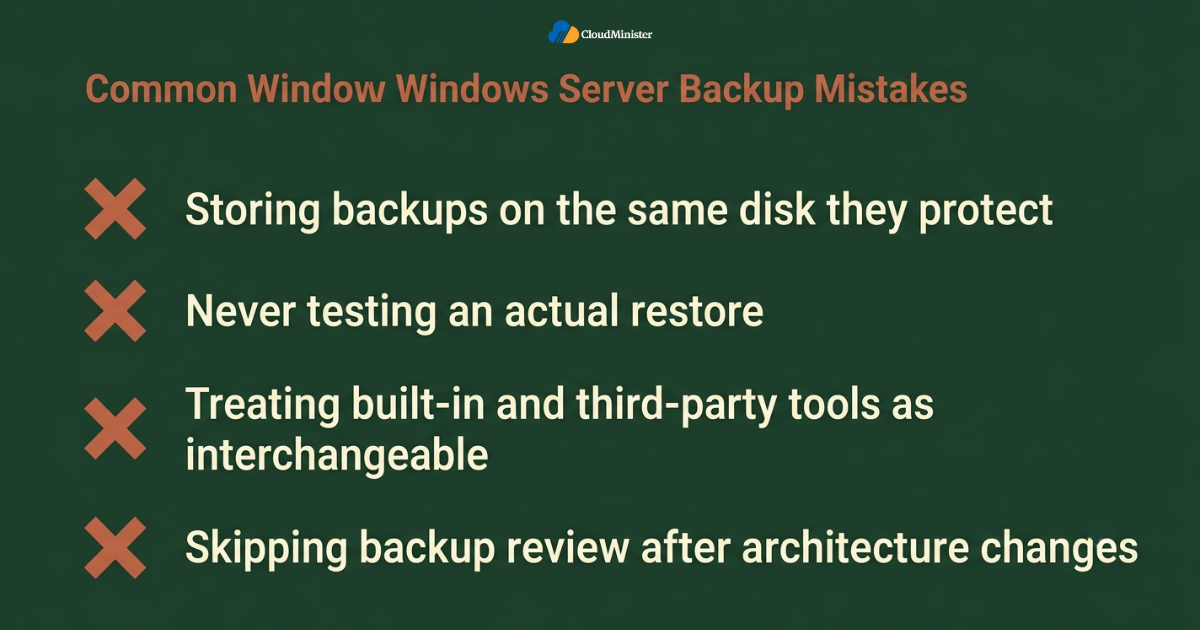
7. Common Mistakes Teams Make When Working With Windows Server Backup
Even teams that understand the mechanics here correctly, including teams already working with an established provider of Affordable Windows Dedicated Server Plans, can still fall into avoidable mistakes if Windows Server Backup is treated as a one time setup task rather than an ongoing practice.
- Storing every backup job on the same physical disk or volume it is protecting, which means a single drive failure or a ransomware event can destroy the production data and the backup copy in the same incident.
- Reaching for an expensive third-party platform to solve a single-server recovery problem that the built-in tool was already designed to solve, without first confirming that native full server recovery was genuinely the missing piece rather than a scheduling configuration already available.
- Scheduling a backup job and never actually testing a restore, which leaves administrators discovering corrupted or incomplete backups only during a real outage rather than during a routine drill, a pattern a responsive hosting partner typically flags early.
- Treating the built-in tool and third-party solutions as interchangeable choices, or assuming a pattern that works under a single server setup will transfer unchanged once a deployment moves to a genuinely multi-server footprint, rather than reassessing the tool deliberately as requirements change.
- Not revisiting backup coverage after a significant architecture change, leaving newly added application roles relying on a plain system state capture that no longer reflects how granular the recovery actually needs to be, a gap a responsive Web Hosting Company in India would normally catch during a routine review.
- Skipping a review of overall backup strategy before scaling a customer facing application significantly, even though a properly structured mix of Windows Server Backup and third-party tooling meaningfully affects how quickly services get restored across an organization using Windows Dedicated Server Hosting, a review that applies equally to teams running VPS Server Hosting in India in parallel.
Across real production environments, the gap between a team that gets consistent, predictable recovery from its backups and one that quietly accumulates backup debt is rarely about which specific tool was chosen first. It is a difference in ongoing review discipline. Teams that assign clear ownership over backup topology and revisit it on a fixed schedule, often with a Web Hosting Company in India handling the recurring checks, report far fewer instances of the kind of unexpected restore failure that an unmanaged backup setup eventually produces.
8. Governance and Operational Considerations Around Windows Server Backup
Standardizing this kind of pattern at scale introduces a specific governance layer on top of the standard technical considerations that come with running production workloads at that size.
- Backup strategy decisions should route through the same review process as any other production infrastructure change, ideally with input from teams experienced in both Windows Dedicated Server Hosting and VPS Server Hosting in India where a mixed footprint exists, since a misconfigured schedule can quietly leave a server unprotected for weeks.
- Centralized backup standards, coordinated with a single operations partner rather than allowing individual administrators to define their own retention conventions independently, prevent the kind of overlapping schedules and inconsistent recovery point objectives that are difficult to untangle later.
- Restore testing should be performed on a recurring basis, ideally with support from a partner that already monitors the account, so that any unexpected corruption or gap in a backup job gets flagged before it turns into a genuine incident.
- Usage of the built-in tool should be tracked explicitly, since knowing exactly which servers rely on it alone versus which sit behind a third-party platform is far more useful during an incident than discovering it while responding to one, and a good partner will usually maintain this inventory as a matter of course under any serious Affordable Windows Dedicated Server Plans arrangement.
- A documented backup inventory, tracking which servers rely on the built-in tool and which ones have been deliberately placed on a third-party platform instead, gives an infrastructure team, and any supporting provider of VPS Server Hosting in India, the audit trail needed to justify the setup during a security review.
- Teams running a mixed fleet spanning VPS Server Hosting in India and dedicated hardware benefit from the same audit trail, since a single inventory that spans both environments makes a security review considerably faster to complete.
Checklist: Readiness Before Standardizing Windows Server Backup Patterns at Scale
- Current backup topology mapped across every production server
- Architecture roadmap reviewed for upcoming multi-server or application-aware recovery requirements
- Tool selection matched to actual workload needs, and to the surrounding backup plan, rather than whichever option was fastest to configure
- Monitoring configured to flag failed or incomplete backup jobs before the first incident
- Ownership assigned for ongoing restore testing and reassessment, ideally shared with a Web Hosting Company in India
- Third-party platform usage documented and justified wherever it appears, alongside a clear view of how it complements the built-in tool rather than duplicating it
9. Measuring Whether Your Windows Server Backup Setup Is Actually Working
Standardizing a good backup pattern here is not the finish line of a backup effort, whether the workload sits on a self managed environment, on Affordable Windows Dedicated Server Plans, or with an outside partner offering broader Windows VPS Hosting in India services. Long term value depends entirely on how the setup is monitored and adjusted afterward.
- Track which servers sit behind the built-in tool alone versus a full third-party platform, since a server still relying on native scheduling as its only protection is quietly missing offsite coverage even while otherwise functioning correctly, a gap a good operations partner usually catches quickly.
- Compare actual restore times against what the recovery plan assumes, a discipline that matters equally for teams focused on overall Windows VPS Hosting in India uptime, since real world recovery often takes longer than the documentation suggests once an untested backup job is actually exercised.
- Review storage consumption quarterly, flagging any server whose retention policy has quietly filled its target disk without a corresponding alert, a review many teams now delegate to their Web Hosting Company in India.
- Cross reference backup topology against a team’s broader VPS Server Hosting in India plan, and against any secondary environment running a different backup tool, to confirm that the setup still matches how the application is actually deployed.
- Maintain a change log for every schedule created, modified, or removed within the backup schedule, shared with the broader operations team where relevant, so a team can trace exactly why a given configuration was chosen and whether the assumptions behind it still hold.
Enterprises managing production workloads at meaningful scale, whether the underlying infrastructure runs on Windows Dedicated Server Hosting, VPS Server Hosting in India, or a mix of both, are not managing this challenge in isolation. Ransomware incidents that successfully compromise backup repositories carry roughly eight times higher recovery costs than incidents where backups remain intact, with a median cost of 3 million dollars compared to 375,000 dollars for organizations with intact backups, according to Sophos backup impact research cited in CNIC Solutions’ 2026 recovery statistics report, underscoring why structured backup review matters just as much as the initial tool selection, and why a dependable Web Hosting Company in India earns its keep long after the first job is scheduled.
10. Choosing the Right Partner for Backup Strategy
Not every hosting relationship is built to support disciplined backup practice, so matching a provider’s capability to actual team needs matters more than brand recognition alone, whether that provider delivers Affordable Windows Dedicated Server Plans, broader infrastructure services, or both.
- A dependable Web Hosting Company in India that already manages a team’s broader infrastructure is well positioned to advise on how the built-in tool should fit into an existing environment without introducing unnecessary complexity.
- Teams evaluating providers should specifically ask whether the provider has direct experience helping customers structure backups and third-party platforms together at meaningful scale, not just provisioning individual virtual machines under a generic VPS Server Hosting in India or Windows VPS Hosting in India plan.
- Teams that want to move quickly without designing every layer of their strategy themselves often gravitate toward a Web Hosting Company in India that comes with clear documentation on how Windows Server Backup interacts with existing infrastructure from day one, including experience across both Windows Dedicated Server Hosting and Windows VPS Hosting in India for teams running a mixed footprint.
- Engineering leaders who have not yet reviewed their hosting partner relationship specifically in the context of backup coverage, offsite replication, or ransomware resilience should treat this guide as a natural trigger point to do so, and to ask their Web Hosting Company in India directly.
- A capable partner offering both deep expertise in this area and Affordable Windows Dedicated Server Plans gives growing teams a coherent roadmap for scaling their backup footprint instead of stitching together advice from multiple vendors, whether the fleet leans toward Affordable Windows Dedicated Server Plans or a lighter Windows VPS Hosting in India setup.
- Teams researching Affordable Windows Dedicated Server Plans specifically for backup-heavy workloads should confirm that a prospective partner understands both Windows Server Backup mechanics and the surrounding Windows Dedicated Server Hosting structure, since the two decisions are closely linked, and that the same partner can speak credibly to Windows VPS Hosting in India and VPS Server Hosting in India where a mixed strategy is already in play.
When comparing quotes or advice from different partners on backup strategy, whether they specialize in Windows Dedicated Server Hosting, VPS Server Hosting in India, Windows VPS Hosting in India, or Affordable Windows Dedicated Server Plans built around a specific stack, ask each one to walk through a real restore from your own environment rather than a generic case study, since the right recommendation depends entirely on how many servers are involved and how far the recovery requirements actually reach. A provider that understands both Windows Server Backup mechanics and a team’s actual recovery needs will consistently give more actionable guidance than a purely theoretical comparison.
Conclusion
Throughout this comparison, one pattern holds regardless of company size, application type, or whether the surrounding environment runs on a single managed server, a larger multi-server footprint, or a mix of Windows Dedicated Server Hosting and Windows VPS Hosting in India. Windows Server Backup keeps a single server recoverable, straightforward, and free of additional licensing, and a dedicated third-party platform handles the broader job of centralized management, application-aware recovery, and offsite resilience when that is genuinely what the environment needs. Choosing between the two is not really a question of which tool is better in the abstract. It is a question of how the server is actually deployed and how far its recovery requirements genuinely reach.
By 2026, treating Windows Server Backup and third-party backup platforms as a combined, layered strategy rather than a single either-or decision has become close to standard practice for any team managing meaningful production infrastructure, often guided by a trusted Web Hosting Company in India along the way. The teams that get the most value from this approach share a consistent pattern. They default to the built-in tool for anything single-server unless there is a specific, documented reason not to, they revisit backup topology on a fixed schedule, and they treat tool selection as one part of a broader Windows Dedicated Server Hosting practice rather than a one time configuration step. For teams weighing this decision alongside a broader look at their infrastructure plan, or comparing it against how backup works under Windows VPS Hosting in India and native tooling side by side, the same underlying principle applies. Match the tool to how the server actually needs to recover, layer backup decisions deliberately, revisit the decision as the environment changes, and Windows Server Backup becomes a genuine, dependable foundation rather than another default nobody fully understands, ideally with a capable Web Hosting Company in India involved throughout, including one experienced across the broader landscape of Windows Dedicated Server Hosting.
Not Sure Which Backup Approach Fits Your Environment
Talk to our team about your current setup and we will help you decide whether Windows Server Backup alone is enough or if a layered strategy makes more sense for your servers.
Key Takeaways
- Windows Server Backup is a built-in Windows Server feature that handles full server, volume, and system state recovery for a single machine, a baseline any competent partner supporting Affordable Windows Dedicated Server Plans should already be recommending for smaller deployments.
- Third-party backup solutions handle the broader job of centralized management, application-aware recovery, and offsite replication, which remains the right choice specifically for multi-server environments that do not fit inside what the built-in tool alone was built to do.
- Windows Server Backup operates locally on each server by default, making it the correct choice specifically for single-server, non-compliance-driven workloads that never need centralized management in the first place.
- Neither Windows Server Backup nor a third-party platform alone should automatically become the default for every workload, so a complete backup strategy still needs a deliberate mix as the foundation for the overwhelming majority of production servers, whether hosted through Windows Dedicated Server Hosting or Windows VPS Hosting in India.
- Governance, restore testing, and a documented ownership structure matter just as much as the initial tool decision, and this holds whether the environment is run internally, through a Web Hosting Company in India, or through broader VPS Server Hosting in India services.
- Partnering with a capable Web Hosting Company in India experienced in structured backup strategy, and comfortable discussing both Windows Dedicated Server Hosting and Windows VPS Hosting in India in the same conversation, meaningfully reduces the risk of an unmanaged, unrecoverable setup, and this is worth raising directly in the next planning call with that partner.
Frequently Asked Questions
Does Windows Server Backup always cost less than a third-party backup platform?
Generally yes for a comparable single server, since Windows Server Backup ships free with Windows Server and includes full server, volume, and system state recovery without additional licensing. For a multi-server environment needing centralized management, a third-party platform is usually the more cost-effective and appropriate choice once administrative overhead is factored in, which is exactly the kind of tradeoff worth confirming as part of a broader Windows Dedicated Server Hosting review rather than assumed by default.
Can a team use Windows Server Backup and a third-party platform together?
Yes, and this is actually the most common production pattern. It is typical for a team to run Windows Server Backup as the fast, local recovery layer while still using a third-party platform for offsite replication and centralized reporting once data leaves the individual server, with both tools existing side by side across a broader Windows Dedicated Server Hosting footprint. This layered approach is exactly how most mature backup strategies are structured in 2026, and it mirrors patterns common under Windows VPS Hosting in India as well, including deployments that also lean on VPS Server Hosting in India for secondary or staging servers.
What happens if a Windows Server Backup job is stored on the same volume it protects?
It does not automatically isolate backup data from a ransomware event or drive failure affecting the same volume. Unless the backup target is deliberately moved to a separate disk, network share, or offsite location, an incident that destroys the production volume can destroy the backup copy at the same time. Isolating backup storage is one of the most common gaps a Web Hosting Company in India catches during a routine security review.
Does Windows Server Backup provide the same application-aware recovery as a third-party platform?
No. Windows Server Backup captures a consistent snapshot of open applications through Volume Shadow Copy Service, but it does not include the granular, item-level recovery for platforms like SQL Server or Exchange that most third-party tools provide natively. Teams that need meaningful application-level recovery should choose a fuller platform rather than assuming the built-in tool alone covers the same ground.
How should a team decide between Windows Server Backup and a third-party platform for a new server?
The decision should be based on whether the server genuinely needs centralized management, application-aware recovery, or offsite replication, not simply on the assumption that the paid option is always the safer default. A single server that only ever needs full server or system state recovery usually costs a team more in unnecessary licensing by adding a third-party platform than it would have saved in the recovery benefit, which is exactly the kind of tradeoff a Web Hosting Company in India or any established provider of Windows Dedicated Server Hosting is well placed to evaluate.
Does Windows Server Backup support cloud storage as a backup destination?
To a limited extent. Windows Server Backup can target local disks and network shares natively, and cloud storage is possible through additional configuration, but it was not designed as a policy driven cloud replication engine the way many third-party platforms are. Teams that need automated, ongoing cloud replication as a core part of their strategy generally find a dedicated platform easier to manage for that specific purpose.
Is Windows Server Backup a good fit for a domain controller running multiple roles?
It can work, but with a meaningful limitation worth understanding upfront. Windows Server Backup restores a system state as one bundled unit, so a domain controller running Active Directory, DNS, and file shares together gets recovered as a single combined restore rather than allowing an administrator to recover just one role independently. For a simple single-role server this is rarely an issue, but as a server takes on more roles, that bundled recovery approach becomes a real consideration when deciding whether the built-in tool alone is still the right fit.

Ajay Singh Raghav is a Senior Linux System Administrator at CloudMinister Technologies, where he has spent over 4 years installing, configuring, maintaining, and troubleshooting Linux servers for hosting and cloud environments. He specializes in AWS cloud computing alongside core Linux server administration, with hands-on expertise across server management, backup and restore systems, and cPanel-based hosting environments. His day-to-day experience keeping production servers stable and secure gives him a practical, ground-level understanding of the infrastructure he writes about.