Forex VPS Latency to Broker is the round trip time between your VPS and the server your broker uses to process MT5 orders. A low and steady figure helps you avoid slippage, rejected orders, and missed entries during a prop firm challenge. This guide shows how to read the MT5 ping value, run ping and traceroute from your VPS, measure packet loss and jitter, and decide whether your setup is good enough. It also explains how a Forex VPS Hosting service and a VPS For Forex Trading compare with Dedicated Servers in India, and where a Web Hosting Company in India fits when you want local support. Follow the steps in order, record your numbers, and test again after every change.
Every prop trader eventually asks the same question after a bad fill: was it the market, the broker, or my connection? Measuring Forex VPS Latency to Broker is the only way to answer that with facts instead of guesses. A VPS removes your home’s internet from the picture, but it does not automatically place your terminal close to the broker. Distance, routing, and server load still decide how fast an order travels.
Prop trading raises stakes because the rules are strict. A daily loss limit or a trailing drawdown can be hit by a few pips of unexpected slippage. Traders who run scalping or news strategies feel this first, yet even swing traders benefit from a stable connection that keeps their EA alive and their stop orders in place. A well-chosen VPS For Forex Trading setup gives you a quiet, always on machine, and measured Forex VPS Latency to Broker tells you whether that machine is really in the right place.
This guide walks through the full process in plain steps. You will learn how to find the MT5 server address, read the built-in ping, run ping, tracert, pathping, and MTR, and interpret the results. We also cover what numbers are realistic, how to choose a data centre, and when Dedicated Servers in India make more sense than a shared VPS. Use it as a repeatable routine, not a one time check.
Table of Contents
- 1. What VPS-to-Broker Latency Actually Means
- 2. Why VPS-to-Broker Delay Matters So Much in Prop Trading
- 3. Factors That Decide Your VPS-to-Broker Latency
- 4. How to Find the Broker MT5 Server Address
- 5. Read the Built In MT5 Ping Value
- 6. Test VPS-to-Broker Latency With the Ping Command
- 7. Run a Traceroute to See the Path
- 8. Measure Packet Loss and Jitter With PathPing and MTR
- 9. What VPS-to-Broker Latency Numbers Are Good Enough
- 10. Choose the Right VPS Location and Provider
- 11. What a Hosting Partner Should Offer for Low Latency
- 12. When a Dedicated Server Makes More Sense
- 13. Notes for Prop Traders Based in India
- 14. A Simple Way to Monitor Latency Over Time
- 15. Common Mistakes That Hide or Distort Latency
- 16. A Practical 7 Day Testing Plan
- Key Takeaways
- Conclusion
- Frequently Asked Questions
1. What Forex VPS Latency to Broker Actually Means
Before testing anything, it helps to separate the terms that traders often mix up. Each one tells you something different about your connection.
- Latency is the time a packet needs to travel from your VPS to the broker server and for the reply to come back. It is measured in milliseconds (ms) and is also called round trip time, or RTT. This is what people mean when they talk about Forex VPS Latency to Broker.
- Ping is the most common tool for measuring RTT. It sends ICMP echo requests to a target address and reports how long each reply takes.
- Jitter is the variation between one reading and the next. A link that swings between 5 ms and 60 ms is harder to trade on than one that stays near 25 ms all day.
- Packet loss is the share of packets that never return. Even 1 percent loss can delay or repeat order messages.
- Execution speed is wider than network delay. It also includes the broker server processing time, the liquidity provider response, and your order type. Low Forex VPS Latency to Broker improves only the network part of that chain.
- Bandwidth is not latency. MT5 sends small messages, so a 100 Mbps link and a 1 Gbps link behave the same when the real problem is distance.
- A good VPS For Forex Trading plan should be judged on latency, jitter, and packet loss together, not on the advertised port speed alone.
Measure Forex VPS Latency to Broker at three different times, such as the London open, the New York open, and the quiet Asian session. A single reading taken at a calm hour can hide the spikes that cause bad fills.
2. Why Forex VPS Latency to Broker Matters So Much in Prop Trading
Prop firms judge you on strict numbers, so a small execution error can have a large effect on your result.
- Slippage eats into tight stops. A scalper who risks 4 pips to make 5 pips can lose a large part of the edge if fills arrive late during fast markets.
- Daily loss limits and trailing drawdown rules leave very little room. One bad fill during a news release can end a challenge attempt.
- Pass rates are low, so avoidable technical errors matter. A 2026 pass rate review from Fortunly reports that around 14 percent of evaluation participants reach funded status, which means most traders cannot afford an easy mistake.
- Money is moving in this industry. The same publisher lists more than 907 million dollars in blockchain verifiable payouts in its prop trading industry statistics for 2026, so a clean execution record has real value.
- Scalping, news trading, and grid EAs react most strongly to Forex VPS Latency to Broker, while slower swing systems can tolerate more delay.
- Your firm may use a specific broker server, so Forex VPS Latency to Broker must be measured to that exact server and not to a random website.
- Rules differ between firms. Some restrict latency arbitrage, high frequency tactics, or certain copy trading setups, so read the rules before you optimise for speed.
- A Forex VPS Hosting service keeps MT5 running 24 hours a day, but the location and the route decide the final latency.
3. Factors That Decide Forex VPS Latency to Broker
Several factors work together, and distance is the biggest one. Light travels through optical fibre at roughly two thirds of its speed in a vacuum, which is about 200,000 km per second. That works out to about 1 ms of round trip time for every 100 km of fibre between two points.

| Factor | How it affects latency | What you can control |
| Physical distance | Every 100 km of fibre adds about 1 ms of round trip time | Pick a VPS location near the broker server |
| Network route | An indirect path can double the distance travelled | Compare providers with traceroute |
| Server load | A busy host adds queuing delay and jitter | Choose dedicated resources and watch CPU use |
| Broker access server | Different access points give different ping values | Record the access server shown in the Journal |
| Time of day | Congestion rises at market opens | Test at several sessions |
| Local setup | Antivirus and background tasks slow the terminal | Keep the VPS clean and minimal |
- Example: London to New York is about 5,570 km in a straight line, so the physical floor is near 56 ms round trip. Real routes usually show 65 to 80 ms because cables do not run in straight lines.
- This is why a VPS in the same city as the broker server beats a stronger machine that sits far away.
- A VPS For Forex Trading plan in the wrong country can never reach low Forex VPS Latency to Broker, no matter how powerful the CPU is.
- Routing matters as much as distance. Two providers in the same city can reach the same broker through different networks with different results.
4. How to Find the Broker MT5 Server Address
Every test depends on the right target. Testing a broker website or a random IP tells you nothing about order execution, so find the real trade server first.
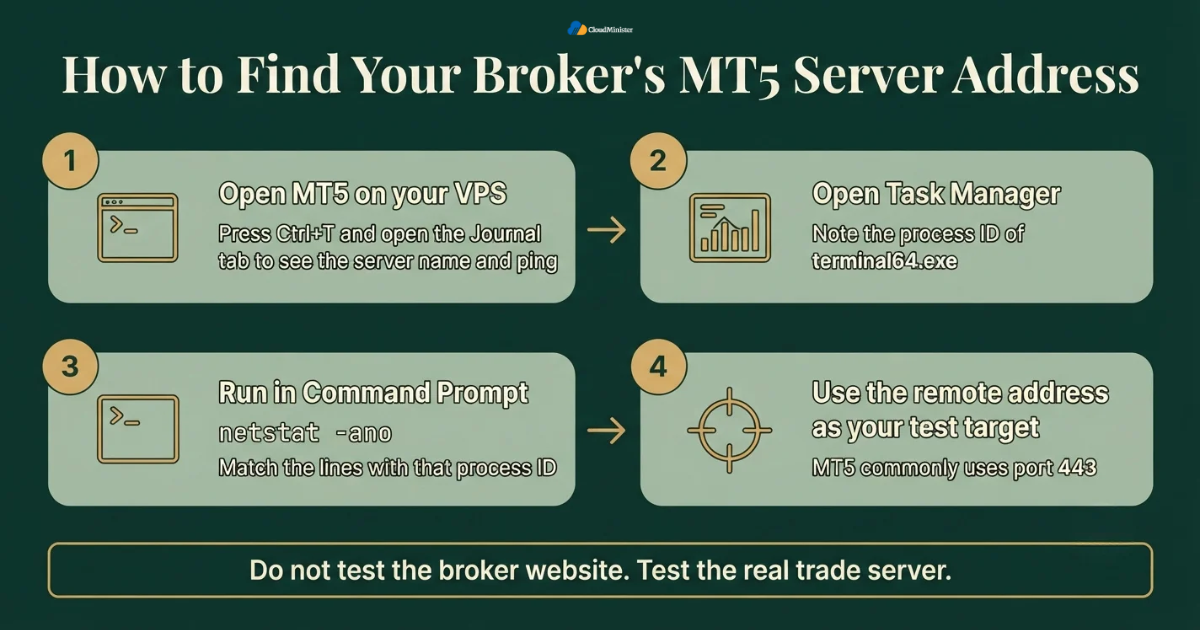
- Log in to MT5 on the VPS with your prop firm account, using a demo or challenge account as the firm allows.
- Open the Toolbox with Ctrl+T and select the Journal tab. Look for the line that says the account was authorized on a server through an access server. It shows the server name and the ping value.
- To see the remote address, open Task Manager and note the process ID of terminal64.exe. Then run netstat -ano in Command Prompt and look for lines that match that ID. The remote address is your target. MT5 commonly uses port 443, but some brokers use other ports.
- You can also ask your prop firm or broker support for the trade server address and the data centre where it is hosted. Many firms share this when you ask for latency details.
- Some brokers use several access servers or a gateway in front of the trade server. Record every address you see and test each one.
- Use the IP address if a server name does not resolve from the VPS. Write down the address, the time, and the access server number for each test.
- Without the correct address, any Forex VPS Latency to Broker test is misleading, so confirm it before you move on.
Related Reading: How to choose the right Forex VPS specs
5. Read the Built In MT5 Ping Value
MT5 gives you a first reading without any extra tools, so start there.
- Look at the bottom right corner of the terminal. The connection indicator shows signal bars and a ping value in milliseconds. Hover over it to see the connection details.
- Check the Journal tab after every login. The authorization line shows which access server was used and the ping measured at that moment.
- MT5 measures its own connection to the access server over TCP, so this number can differ from an ICMP ping result. Both are useful, and neither replaces the other.
- Terminals can connect through different access servers over time, so record the server shown in the Journal along with the ping.
- Many MT5 builds also log how long a trade request took to complete. If your build shows it, compare these times over several trades to see real execution time and not just network time.
- Never judge Forex VPS Latency to Broker from one reading. Collect at least 20 readings across different sessions and note the lowest, the average, and the highest.
- If you are still comparing providers, a Forex VPS Hosting service that offers a trial or a short billing period lets you run all these checks before you commit.
The MT5 ping shows the path to the broker access server, not the whole order journey. Use it as a quick health check, then combine ping, traceroute, and trade timing to build the full picture of Forex VPS Latency to Broker.
6. Test Forex VPS Latency to Broker With the Ping Command
Run every test from the VPS itself. A test from your laptop measures your home network, not the machine that will trade.
- Open Command Prompt on the Windows VPS.
- Run the command below to send 100 echo requests to the broker address.
ping -n 100 BROKER_IP - Read the summary at the end. It shows packets sent, received, and lost, followed by the minimum, maximum, and average round trip time.
- Run ping -t BROKER_IP for a continuous test. Press Ctrl+C to stop it and view the same summary. Leave it running for 15 to 30 minutes to catch spikes.
- On a Linux VPS, use ping -c 100 BROKER_IP. The summary shows minimum, average, maximum, and deviation.
- If replies show Request timed out but MT5 connects normally, the server probably blocks ICMP. In that case test the real port with the PowerShell command below.
Test-NetConnection -ComputerName BROKER_IP -Port 443 - The result shows TcpTestSucceeded as True when the port accepts connections. This confirms reachability, and the MT5 ping stays your latency reference.
- Compare the maximum with the average. A maximum that is several times higher than the average points to jitter or congestion.
- Save every result with the date, time, and target in a simple sheet. Trends matter more than a single number when you track Forex VPS Latency to Broker.
Run the same test against every VPS location you are considering. Pick the one with the lowest average and the lowest worst case, because that gives the steadiest Forex VPS Latency to Broker.
7. Run a Traceroute to See the Path
Ping gives you the total time. Traceroute shows where that time is spent, hop by hop.
tracert -d BROKER_IP
traceroute -n BROKER_IP
sudo traceroute -T -p 443 BROKER_IP - On Windows, run tracert -d BROKER_IP. The -d option skips name lookups, so the output is faster and cleaner.
- On Linux, traceroute -n works the same way. Add -T -p 443 with root rights to send TCP probes to port 443, which many firewalls allow when ICMP and UDP probes are blocked.
- Each line is a hop, meaning one router on the path. Windows sends three probes per hop and shows three times, with a default limit of 30 hops.
- Look at the last line first. The final hop time should be close to your ping average.
- Then scan the middle. You want a gradual climb, not a sharp jump that stays high.
- Check where the route goes. A path that leaves the country and comes back is a clear sign of poor peering.
- Run the traceroute more than once. Routes can change between sessions, and that change often explains a sudden rise in Forex VPS Latency to Broker.
| What you see | What it usually means | What to do |
| Stars on one middle hop while later hops reply | The router ignores or limits ICMP replies, which is normal | No action needed |
| Stars on the last hops | The destination or its firewall blocks the probes | Use a TCP test on the trade port |
| Time jumps and stays high after one hop | A long link such as an ocean cable, or a detour | Check if it matches the real distance, and ask the provider if it does not |
| One hop shows a high time but the next hop is low | The router gives low priority to its own replies | Ignore it |
| Route goes to a far country and returns | Poor peering between networks | Ask for a better route or choose another location |
8. Measure Packet Loss and Jitter With PathPing and MTR
Ping and traceroute give snapshots. For a prop account you also need a longer view of loss and stability.
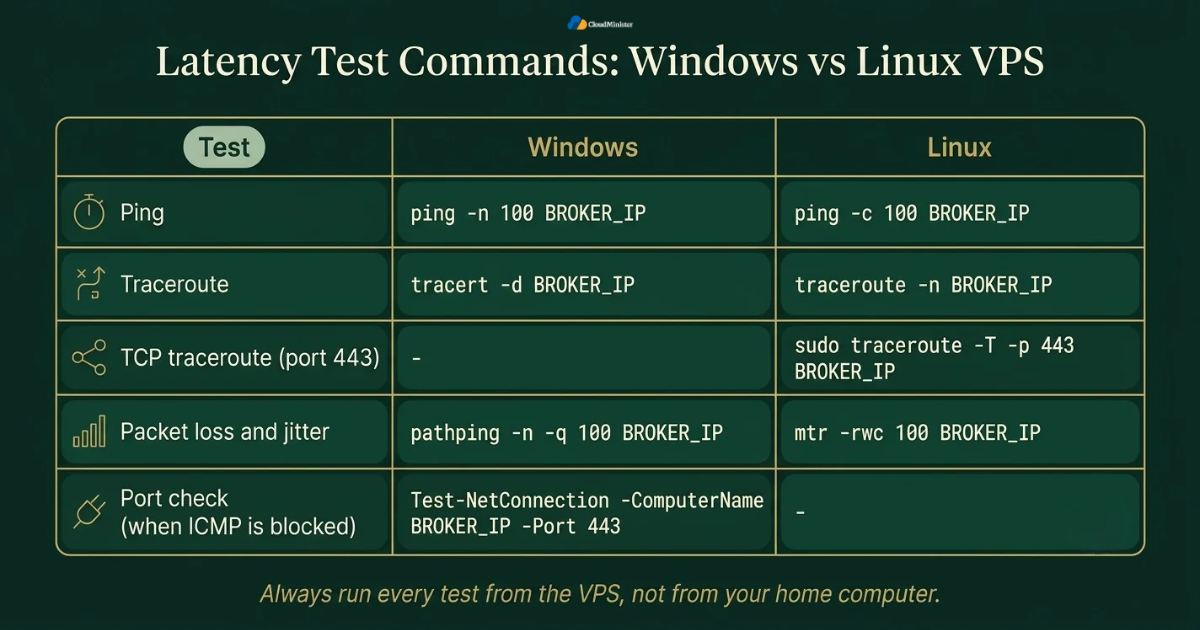
- On Windows, run pathping -n -q 100 BROKER_IP. It traces the route first and then spends several minutes measuring loss and delay at each hop.
- On Linux, run mtr -rwc 100 BROKER_IP. It sends 100 probes per hop and prints a report. WinMTR gives a similar view on Windows.
- In the MTR report, check Loss%, Avg, Best, Wrst, and StDev. The standard deviation is a handy measure of jitter.
- Loss that appears on a middle hop but disappears on the last hop is usually ICMP rate limiting, not real loss.
- Loss that starts on a hop and continues through every later hop, including the last, is real and needs attention.
- A stable route keeps the worst reading within a small multiple of the average. Large and frequent spikes mean congestion or a busy host.
- Repeat at peak times. A route that looks clean at 3 AM may behave differently at the London and New York overlap, and that is when Forex VPS Latency to Broker matters most.
- Share the results with your provider if the loss is real. Clear data helps support teams find the problem quickly.
Related Reading: Reasons to choose your dedicated gaming server
9. What Forex VPS Latency to Broker Numbers Are Good Enough
There is no official standard, so use these bands as practical guidelines and let your own slippage records make the final call.
| Round trip time | What it usually means | Best suited for |
| Under 5 ms | The VPS is in the same city or data centre area as the broker server | Scalping, news trading, fast EAs |
| 5 to 20 ms | Same region with a clean route | Most prop strategies, including scalping |
| 20 to 50 ms | Nearby region, acceptable for slower styles | Intraday and swing trading |
| 50 to 100 ms | Different continent or a weak route | Slow swing and position trading |
| Over 100 ms | Distant or poorly routed server | Review the location before trading live |
- Home connections often show 30 to 150 ms or more to broker servers in another region, which is one reason traders move to a VPS.
- A higher number is not always a failure. A steady 40 ms can beat an average of 10 ms with frequent spikes to 200 ms.
- Compare MT5 ping and ICMP ping. Large differences can point to filtering or to different paths.
- Track slippage on real trades next to your Forex VPS Latency to Broker data. If slippage stays low at your current numbers, further tuning may add little.
10. Choose the Right VPS Location and Provider
Test results are only useful if you act on them. This is how to turn them into a hosting decision.
- Match the VPS location to the broker server city. Major FX hubs include London, New York, Tokyo, Singapore, and Frankfurt, and data centres such as Equinix LD4 in Slough, NY4 in Secaucus, and TY3 in Tokyo are well known for trading infrastructure.
- Ask the provider for a test IP or a trial, then run the same ping, traceroute, and MTR tests before you buy.
- Pick a VPS For Forex Trading plan with dedicated vCPU and RAM, fast NVMe storage, and a Windows licence, since shared and oversold resources add delay and jitter.
- Check uptime commitments, backup options, and DDoS protection. A fast connection is useless if the VPS goes offline during an open trade.
- A reliable Forex VPS Hosting service should publish its data centre locations and let you test them, because location is the main driver of Forex VPS Latency to Broker.
- Support matters during a challenge. A Web Hosting Company in India that offers support in your time zone can fix issues faster when you trade from India.
- Do not assume that a VPS in India suits every broker. If the broker server sits in London or New York, a VPS closer to that city usually gives lower latency, and you can still reach it by remote desktop from anywhere.
- A VPS For Forex Trading plan chosen only on price often costs more later through missed trades, so weigh quality against cost.
- Use a simple Forex VPS Hosting service comparison sheet that covers location, resources, uptime terms, and support, and score each provider with your own test results.
- A Web Hosting Company in India that bills monthly makes it easy to test one location and then switch if the numbers disappoint.
- Ask the Web Hosting Company in India how it handles maintenance windows, since a reboot during the London or New York session can interrupt open trades.
- If your needs grow later, Dedicated Server Hosting in India can be added without changing your test routine, so keep your notes and scripts ready.
Related Reading: Cloud repatriation in 2026
Test Low Latency Forex VPS Hosting With CloudMinister
Looking for a stable, always-on VPS for MT5 and prop trading? Explore our Forex VPS Hosting plans with dedicated resources, reliable uptime, and round-the-clock support, so you can run your own latency tests and trade with confidence.
11. What a Hosting Partner Should Offer for Low Latency
The right partner makes testing easier and fixes problems faster. Use this list when you compare options.
- A Forex VPS Hosting service should let you choose the data centre closest to your broker server, because Forex VPS Latency to Broker depends first on location.
- A trading focused Web Hosting Company in India will usually offer round the clock support, which matters when a spike appears during the London and New York overlap.
- Ask any Web Hosting Company in India whether it publishes network details such as uplink capacity, peering partners, and uptime terms, since these facts explain the Forex VPS Latency to Broker you will see.
- A Forex VPS Hosting service with Windows Server images that are ready for MT5 saves setup time and reduces the chance of a configuration error.
- Look for a VPS For Forex Trading package with guaranteed CPU and RAM instead of burstable resources, because a starved CPU delays your terminal even when the network is clean.
- A good Forex VPS Hosting service also offers snapshots or backups, so you can restore your MT5 profile, EAs, and templates quickly after a mistake.
- Ask whether your VPS For Forex Trading plan can be moved to another data centre if your tests show a better location elsewhere.
- A provider that also sells Dedicated Servers in India lets you grow without changing vendors, which keeps your tools and support contacts in one place.
- Choose a Web Hosting Company in India that answers technical questions with specifics, such as route details and test IPs, and not with general sales language.
- Be careful with providers that promise a fixed ping number. Honest providers explain that Forex VPS Latency to Broker depends on the broker server location and the route.
- A Forex VPS Hosting service partner that offers a trial or a refund window is the easiest to evaluate, because you can run the full ping, traceroute, and MTR routine with little risk.
Ask any Web Hosting Company in India for a short trial, and test a Forex VPS Hosting service in two different locations before you commit. Compare the results side by side using the same ping, traceroute, and MTR routine.
12. When a Dedicated Server Makes More Sense
A shared VPS fits most single account setups. Larger setups outgrow it. The table below shows how the main options compare for traders.
| Option | Best for | Main point on latency |
| VPS For Forex Trading | One or two terminals and a single prop account | Choose the location by broker server city and test before buying |
| Forex VPS Hosting service | Traders who want MT5 ready on Windows with remote access | Compare data centre options and run your own tests |
| Dedicated Servers in India | Many terminals, heavy EAs, and several prop accounts | Hardware helps with load, but distance still sets the floor for Forex VPS Latency to Broker |
| Dedicated Server Hosting in India | Teams that need full control and steady resources | Test the route before moving live accounts |
| Web Hosting Company in India | Traders who value local support and one partner for growth | Ask which locations and network details are published |
- Running many MT5 terminals, heavy EAs, or several prop accounts can use all the CPU of a small VPS, which then delays your terminals.
- A dedicated machine gives you all the hardware, so there are no noisy neighbours. Dedicated Server Hosting in India suits traders and teams who need steady performance and plenty of resources.
- Dedicated Servers in India are also useful when you want full control over the operating system, storage, and network settings.
- Remember that hardware does not change distance. A dedicated server far from the broker still shows high Forex VPS Latency to Broker, so test the location first.
- Compare Dedicated Servers in India on network quality and support, not only on CPU and RAM numbers.
- Dedicated Servers in India are physical machines reserved for one customer, so CPU, RAM, and storage are not shared with other users.
- Traders who run trade copiers, many EAs, and data collection tools on the same machine often prefer Dedicated Server Hosting in India for the extra headroom.
- A VPS For Forex Trading plan remains the cheaper route when you run one or two terminals, so upgrade only when the numbers justify it.
- When you review Dedicated Server Hosting in India, ask about network port speed, included bandwidth, DDoS protection, and hardware replacement time.
- Plan a migration test. Copy your MT5 profile to the new server and run the full Forex VPS Latency to Broker routine before you switch live accounts.
- Dedicated Server Hosting in India is also a good home for monitoring scripts that log ping results every few minutes and build a useful history.
- Apply the same ping, traceroute, and MTR tests to any of the Dedicated Servers in India you consider before moving a funded account.
Choose Dedicated Server Hosting in India only after the route tests pass. A powerful Dedicated Servers in India plan in the wrong location solves a load problem, not a distance problem.
Related Reading: Bare metal vs dedicated server
13. Notes for Prop Traders Based in India
Many prop traders work from India, so a few extra points apply.
- Your own distance to the VPS affects only how smooth the remote desktop screen feels. It does not change how fast orders reach the broker, so Forex VPS Latency to Broker is decided between the VPS and the broker.
- A Web Hosting Company in India can offer support in Indian business hours, which helps when you need quick answers before the London open.
- If your broker server is in Singapore, a VPS in Asia can give low Forex VPS Latency to Broker. If it is in London, a VPS in Europe will usually do better than a machine in India, where the sea route often adds well over 100 ms.
- A Web Hosting Company in India with India based support and global data centre options can combine both benefits, so ask which locations are available for your VPS For Forex Trading plan.
- For several accounts, Dedicated Server Hosting in India lets you run many terminals in one place with predictable performance.
- Dedicated Servers in India also give teams in India a single machine they can manage, with full control over security settings and installed software.
- Check whether a Forex VPS Hosting service supports payment methods that suit you and gives clear invoices, since billing problems can interrupt service.
- Always test with your own broker server, because averages published by any Web Hosting Company in India cannot predict your own Forex VPS Latency to Broker.
- Review Dedicated Servers in India and VPS plans side by side, with the same test routine applied to both.
14. A Simple Way to Monitor Latency Over Time
One test shows a moment. Logging shows a pattern, and patterns reveal the real picture.
- One test shows a moment, while a log over days and weeks shows the true Forex VPS Latency to Broker you can expect.
- Use Windows Task Scheduler to run a short ping test every few minutes and save the output with a timestamp to a text or CSV file.
- Review the log weekly. Look for repeated spikes at the same hour, because they often match network congestion or scheduled tasks on the host.
- Set an alert level based on your own baseline, such as twice your normal average, so you notice a change before it hurts a trade.
- A VPS For Forex Trading setup with a small monitoring script costs almost nothing in resources, so it is worth running from the first day.
- Share clear log extracts with the support team of your Web Hosting Company in India when you report an issue. Specific times and values speed up the fix.
- A Forex VPS Hosting service with remote console access makes it easier to check the logs from any device, even when you are away from your desk.
- Teams on Dedicated Server Hosting in India can run longer and more detailed logs, since there is no shared resource limit to worry about.
- Keep the monitor light. Heavy scripts can add their own delay, which would harm the same Forex VPS Latency to Broker you are trying to protect.
15. Common Mistakes That Hide or Distort Latency
- Testing from a home computer instead of the VPS, which measures the wrong network.
- Pinging the broker website instead of the MT5 trade server, since websites often sit behind content delivery networks in other places.
- Judging Forex VPS Latency to Broker from a single reading at a quiet hour.
- Treating stars in a traceroute as a failure when later hops reply.
- Ignoring jitter and packet loss and looking only at the average.
- Choosing a VPS by CPU and RAM alone and never checking the route to the broker.
- Running antivirus scans, Windows updates, or heavy backtests during trading hours, which slows the terminal even when the network is fine.
- Not repeating tests after the broker changes servers or the provider changes network routes.
- Breaking prop firm rules by using tactics the firm bans, even when the technical setup is perfect.
A trading VPS holds access to your account, so treat it as production. Use a strong unique password, enable Network Level Authentication for Remote Desktop, and limit RDP access to your own IP address in the firewall. Keep Windows updated outside trading hours, install EAs and indicators only from trusted sources, and share the investor password, never the master password, when someone needs read only access.
16. A Practical 7 Day Testing Plan
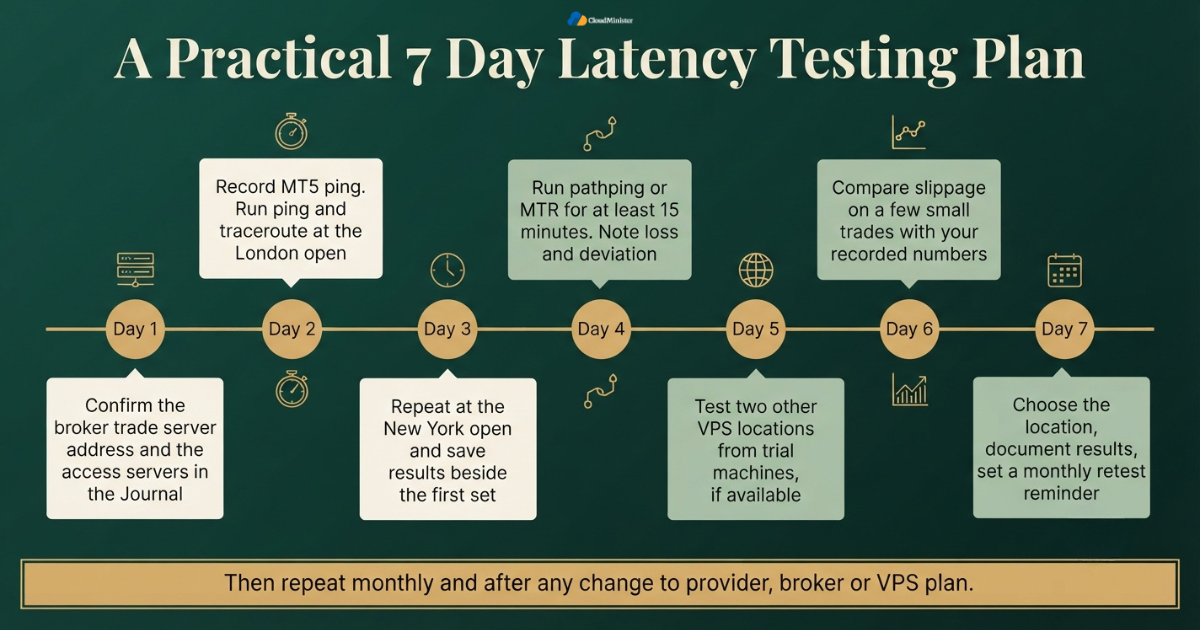
- Day 1: confirm the broker trade server address and the access servers shown in the Journal.
- Day 2: record the MT5 ping and run ping and traceroute from the VPS at the London open.
- Day 3: repeat at the New York open and save the results beside the first set.
- Day 4: run pathping or MTR for at least 15 minutes and note the loss and deviation.
- Day 5: test two other VPS locations from trial machines, if available, and compare Forex VPS Latency to Broker between them.
- Day 6: compare slippage on a few small trades with the numbers you recorded.
- Day 7: choose the location, document the final results, and set a reminder to test again every month. If CPU load is your real limit, review Dedicated Server Hosting in India as a next step.
- After that, repeat the routine monthly and after any change to the provider, broker, or VPS plan, so your VPS For Forex Trading setup stays tuned.
Checklist: Forex VPS Latency to Broker Readiness Review
- Broker trade server address confirmed and recorded
- MT5 ping recorded at three different sessions
- Ping test of 100 packets completed with 0 percent loss
- Traceroute saved and reviewed for detours
- PathPing or MTR run for at least 15 minutes
- Jitter noted and compared with the average
- Prop firm rules on EAs, VPS use, and copy trading checked
- Remote Desktop secured and Windows updates scheduled outside trading hours
- Data centre location, uptime terms, and support hours confirmed in writing with the Web Hosting Company in India
- Two locations compared on a Forex VPS Hosting service trial before the final choice
- Resources of the VPS For Forex Trading plan checked for dedicated CPU and RAM
- Dedicated plan reviewed with the same tests before any move to Dedicated Server Hosting in India
- Retest date set for next month
Key Takeaways
- Forex VPS Latency to Broker is the round trip time from your VPS to the broker MT5 trade server, and it is only one part of total execution speed.
- Test from the VPS, to the real trade server address, at several sessions.
- Use the MT5 ping, the ping command, traceroute, and MTR together, since each shows a different part of the picture.
- Stars in a traceroute and loss on a middle hop are often harmless. Loss that continues to the last hop is real.
- Distance sets the floor, with about 1 ms of round trip time for every 100 km of fibre.
- Choose a VPS For Forex Trading location based on test results, and ask providers for a trial before you commit.
- A Forex VPS Hosting service and a Web Hosting Company in India give you managed support and easier changes when results show a problem.
- Move to Dedicated Server Hosting in India or Dedicated Servers in India only when resource needs, not distance, are the problem.
- A Web Hosting Company in India that shares route details and test IPs makes your testing faster and your decisions safer.
- A Forex VPS Hosting service should be judged by location, resources, and support, and not by price alone.
- Dedicated Server Hosting in India gives full hardware control and Dedicated Servers in India suit heavier setups, but both need the same route tests.
- A VPS For Forex Trading plan stays the simplest option for one or two terminals.
- Check prop firm rules, secure the VPS, and repeat tests every month.
Get a Free Consultation for Your Trading Setup
Not sure which VPS location or plan suits your broker server? Talk to our experts. We offer free consultancy to all new clients, helping you choose the right configuration for low, steady latency.
Conclusion
Good results come from measurement, not guesswork. When you test Forex VPS Latency to Broker with the MT5 ping, the ping command, traceroute, and MTR, you replace opinions with numbers that you can compare across providers and locations. Start with the right broker address, test at several sessions, and act on the data. A steady 20 ms route is usually better than a fast average that spikes.
A faster connection will not fix a weak strategy or excuse a broken rule, but it removes a cost that you can control. Whether you choose a Forex VPS Hosting service or move to Dedicated Server Hosting in India, pick the location that the tests support, keep the VPS secure, and retest every month. Done consistently, this routine keeps Forex VPS Latency to Broker low, steady, and under your control during every challenge.
If you are ready to put these steps into practice, start with a Forex VPS Hosting service that lets you test locations, and work with a Web Hosting Company in India that explains its network openly. For heavier setups, Dedicated Server Hosting in India gives you room to grow, while a VPS For Forex Trading plan suits lighter needs. Whichever route you choose, Dedicated Servers in India and shared plans should pass the same latency tests before they hold a live prop account.
Frequently Asked Questions
What is a good Forex VPS Latency to Broker for prop trading?
There is no official limit, but under 20 ms suits most strategies and under 5 ms suits scalping when the VPS sits in the same city as the broker server. A steady 40 ms can work for swing trading. Judge Forex VPS Latency to Broker together with jitter, packet loss, and your own slippage records.
How do I check Forex VPS Latency to Broker inside MT5?
Look at the ping value in the bottom right corner and in the Journal authorization line. Then confirm it with the ping command and a traceroute from the VPS.
Why does the ping command time out when MT5 connects normally?
The broker server may block ICMP. Use Test-NetConnection with the trade port, and rely on the MT5 ping for Forex VPS Latency to Broker.
Does a VPS always give lower latency than my home internet?
Not always. A VPS in the right location usually gives lower and steadier latency, but a VPS in a distant country can be slower than a good home line. Test before you commit.
Is a VPS For Forex Trading plan enough for prop trading, or do I need a dedicated server?
A VPS For Forex Trading plan is enough for most single account setups. Dedicated Server Hosting in India becomes useful when you run many terminals or heavy EAs that need all the hardware.
Can Dedicated Servers in India reduce Forex VPS Latency to Broker?
Only if the server is closer to the broker or on a better route. Hardware alone does not shorten the distance, so test the route first.
When should I move from a VPS to Dedicated Server Hosting in India?
Move when CPU, RAM, or the number of terminals limits you, not because of latency alone. Dedicated Server Hosting in India adds resources but does not shorten the route, so run the tests first.
What is the difference between a VPS and Dedicated Servers in India?
A VPS shares one physical host with other customers, while Dedicated Servers in India give you the whole machine. The choice depends on load, budget, and control, and neither one changes the distance to the broker.
How often should I retest?
Test monthly, and again after any change of provider, broker, or VPS plan.
Do prop firms allow VPS use?
Many do, but rules differ. Some limit latency arbitrage or copy trading, so read the terms of your firm before you start.
Which is better for MT5, a Forex VPS Hosting service or Dedicated Server Hosting in India?
A Forex VPS Hosting service is better for most single accounts because it costs less and is easy to move. Dedicated Server Hosting in India is better when you need all the resources of a machine. In both cases, Forex VPS Latency to Broker depends on the location and the route.
Are Dedicated Servers in India suitable for prop trading?
Yes, when the location and the route to the broker are good. Dedicated Servers in India add power and control, but they do not reduce Forex VPS Latency to Broker by themselves.
How can a Web Hosting Company in India help with latency problems?
A good Web Hosting Company in India can check routes, move your plan to another data centre, and share test results with upstream networks. This support shortens the time you spend with high Forex VPS Latency to Broker.
Can I run several MT5 accounts on one VPS For Forex Trading plan?
Yes, if the CPU and RAM allow it. Watch resource use and test again after adding each terminal. If the load grows, consider Dedicated Servers in India.
What should I ask a Web Hosting Company in India before buying a trading VPS?
Ask for data centre locations, a test IP, uptime terms, support hours, and whether the resources are dedicated. Then run your own Forex VPS Latency to Broker tests during the trial.

Pritam Kumar is a DevOps Engineer at CloudMinister Technologies, where he manages a multi-datacenter fleet of 100+ servers and architects end-to-end CI/CD pipelines and infrastructure automation using Kubernetes, Terraform, and Ansible. He holds an AWS Certified DevOps Engineer Professional certification and has served as a Google Cloud Mentor, reflecting both hands-on cloud expertise and a track record of mentoring others in the field. His work spans disaster recovery architecture, security incident response, and hosting infrastructure across Proxmox, cPanel/WHM, and Linux systems. Notably, Pritam led the design of Cloud Kavach, a self-hosted DC/DR SaaS portal, and directed remediation efforts for large-scale hosting security incidents involving webshells and command-and-control malware. He brings this depth of real-world infrastructure and security experience to the technical content he writes.