Fine-Tuning LLMs no longer needs a rack of expensive accelerators. With LoRA you train a small set of adapter weights while the base model stays frozen, and with QLoRA you also store that frozen model in 4-bit form, so one GPU server can handle models that once needed a cluster. This guide explains how both methods work, how much memory each model size needs, how to set up a clean run, and how to control spending with proper GPU monitoring. It also answers the NVIDIA Rubin vs Blackwell question that many buyers are asking in 2026, shows where best GPU cloud hosting fits into your plan, how to shortlist the best GPU cloud hosting in India, and explains how a Web Hosting Company in India and the right GPU servers for AI keep your LLM inference cost per token under control after training.
Every AI team reaches the same point sooner or later. The base model is good, but it does not know your product, your tone, or your customers. Full training is out of reach, and long prompts keep getting slower and costlier. This is where fine-tuning LLMs with parameter efficient methods becomes the practical answer, because you adapt a strong open model to your own data without renting a cluster for weeks.
The good news is that the barrier has dropped a lot. LoRA and QLoRA let a single GPU server do work that needed several machines a few years back. The hard part is no longer the code. The hard part is planning memory, picking hardware, avoiding wasted runs, and keeping the bill under control. Teams that rent from a Web Hosting Company in India with real GPU support often finish a first run in a weekend, while teams that guess their way through setup burn money on out of memory errors.
This guide walks through the whole path in plain language. You will learn how LoRA and QLoRA work, how much VRAM each model size needs, what the NVIDIA Rubin vs Blackwell debate means for a small team, how to set up a training run, how to watch it with GPU monitoring, and how to serve the result at a sensible LLM inference cost per token. Whether you are tuning your first 7B model or your tenth 70B adapter, these steps on GPU Servers for AI will save you time and money. Many readers also ask how to pick a hosting plan, so we cover that too.
Table of Content
- 1. Why Tuning Open Models on a Budget Is Now Realistic
- 2. The Real Cost of Training: Why Budget Planning Comes First
- 3. LoRA Explained in Plain Language for Model Tuning
- 4. QLoRA and 4-Bit Quantization: Fitting Big Models on One GPU
- 5. How Much GPU Memory Do You Really Need?
- 6. NVIDIA Rubin vs Blackwell: What Changes for Model Tuning
- 7. NVIDIA Rubin vs Blackwell: Cost per Finished Job
- 8. NVIDIA Rubin vs Blackwell: A Decision Guide by Model Size
- 9. Choosing a Single GPU Server for LoRA and QLoRA
- 10. Step-by-Step QLoRA Setup with Hugging Face
- 11. GPU Monitoring and Cost Control During Training
- 12. Hyperparameters and Data Preparation for Model Tuning
- 13. Evaluation, Merging, and Serving at a Low Cost per Token
- 14. Common Tuning Mistakes That Waste GPU Hours
- 15. Choosing the Right Partner for a Single GPU Server
- 16. A Practical 30 Day Plan to Get Started
- Key Takeaways
- Conclusion
- Frequently Asked Questions
1. Why Fine-Tuning LLMs on a Budget Is Now Realistic
Open models have become strong enough to be worth adapting. The Stanford AI Index 2026 reports that the top closed-weight model led the top open-weight model by only 3.3 percent in March 2026, up from 0.5 percent in August 2024. A gap that small means a model tuned on your own data can often beat a larger general model on your narrow task, and that is exactly why fine-tuning LLMs has moved from research labs into ordinary product teams. Teams searching for a suitable hosting plan usually start from exactly this need.
- Full fine-tuning updates every weight, so a 7B model can need well over 100 GB of GPU memory once gradients and optimizer states are counted.
- LoRA freezes the base model and trains small adapter matrices, which cuts the number of trainable parameters by orders of magnitude.
- QLoRA keeps the frozen base in 4-bit form, which brings weight memory down to roughly one quarter of 16-bit storage.
- Entry level GPU servers for AI are enough for most 7B to 13B jobs, and a 48 GB or 80 GB card can reach 70B class models with careful settings.
- Adapter files are small, usually from tens to a few hundred megabytes, so you can keep one adapter per customer or per task.
- Fine-Tuning LLMs on your own data keeps domain terms, tone, and output format consistent, which prompts alone rarely achieve.
- A tuned small model often answers faster and cheaper than a large general model, which lowers LLM inference cost per token at scale and shortens your best GPU cloud hosting shortlist.
- Fine-Tuning LLMs does not add broad new knowledge well, so use retrieval for fast changing facts and tuning for style and task behavior.
2. The Real Cost of Training: Why Budget Planning Comes First
Money is flowing into AI at a record pace. Gartner forecast in May 2026 that worldwide AI spending would reach 2.59 trillion dollars in 2026, a rise of 47 percent over 2025, with more than 45 percent of it going to infrastructure. That demand keeps GPU prices firm, even for best GPU cloud hosting plans, so a small team must plan every hour of compute for fine-tuning LLMs. For most teams, the best GPU cloud hosting in India is not the one with the lowest hourly rate. It is the one where your runs finish without waste.
- Compute cost is hourly price multiplied by hours used, and hours lost to crashes and bad settings hurt more than a slightly higher hourly rate.
- A first QLoRA run for fine-tuning LLMs on a 7B model with a few thousand examples usually finishes in a few hours on a modern 24 GB to 80 GB GPU.
- Storage and transfer add up, since base models range from about 15 GB for 7B to well over 100 GB for 70B in 16-bit form.
- Idle GPU time is the silent cost, so stop or release the server the moment a run ends. Basic GPU monitoring shows idle hours quickly, and a Web Hosting Company in India with hourly billing makes stopping easy.
- Run a 50 to 100 step smoke test before every full run, so a broken config costs minutes and not hours.
- Compare providers on cost per finished experiment, and include best GPU cloud hosting plans with monthly commitments in that comparison.
- Budget for evaluation and serving too, because training happens once while LLM inference cost per token repeats every day.
- Set a hard budget cap per experiment, write it at the top of your experiment sheet, and review it after any NVIDIA Rubin vs Blackwell upgrade.
3. LoRA Explained in Plain Language for Fine-Tuning LLMs
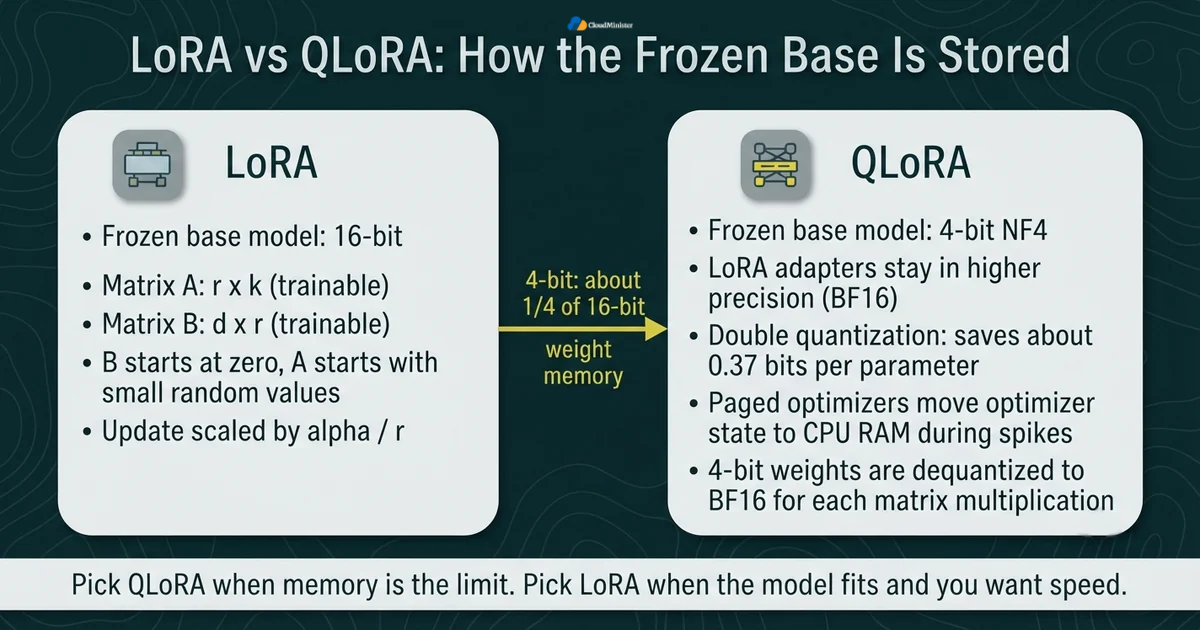
LoRA stands for Low-Rank Adaptation. Instead of changing a large weight matrix directly, LoRA freezes it and learns a small update built from two thin matrices, called A and B. Their product forms the change to the original weight, and because the rank r is small, the number of trainable values drops sharply. The original LoRA paper reported roughly 10,000 times fewer trainable parameters and about 3 times lower GPU memory than full fine-tuning of GPT-3 175B. That saving is what makes fine-tuning LLMs practical on one machine.
- Matrix A has shape r by k and matrix B has shape d by r, so their product has the same shape as the original weight matrix.
- B starts at zero and A starts with small random values, so the adapter begins as a no-op and training starts from the base model’s behavior.
- The update is scaled by alpha divided by r, so alpha and r should be tuned together and not in isolation.
- Common rank values are 8, 16, 32, and 64, and a higher rank adds capacity along with memory use.
- Many fine-tuning LLMs guides attach adapters only to the query and value projections, while many newer recipes target all linear layers for better quality.
- Only adapter weights need gradients and optimizer states, which is where the memory saving comes from and why a smaller plan from any best GPU cloud hosting provider can handle it.
- LoRA dropout of 0.05 to 0.1 gives light regularization and helps on small datasets.
- After training, the adapter can be merged into the base weights, so a merged model adds no extra inference latency.
- Several adapters can share one base model, which suits teams that run shared GPU servers for AI for many customers or tasks.
4. QLoRA for Fine-Tuning LLMs: How 4-Bit Quantization Fits Big Models on One GPU
QLoRA, introduced by Tim Dettmers and colleagues in 2023, combines LoRA with a 4-bit quantized base model. The frozen base weights are stored in 4-bit NormalFloat, called NF4, and gradients flow through them into LoRA adapters that stay in higher precision such as BF16. The authors showed that a 65B model could be tuned on a single 48 GB GPU while keeping 16-bit fine-tuning quality, and their Guanaco models reached 99.3 percent of ChatGPT’s score on the Vicuna benchmark after 24 hours of training on one GPU. This is the method behind most budget fine-tuning LLMs projects today.
- NF4 is a 4-bit data type designed for normally distributed weights, and the paper found it works better than plain 4-bit float or integer types.
- Double quantization compresses the quantization constants as well, saving roughly 0.37 bits per parameter.
- Paged optimizers use unified memory to move optimizer state to CPU RAM during memory spikes, which helps avoid crashes on long sequences.
- Computation still happens in 16-bit, because 4-bit weights are dequantized on the fly to BF16 for each matrix multiplication.
- Because of that dequantization step, QLoRA is usually somewhat slower than plain LoRA on a model that already fits in memory.
- The standard tool for fine-tuning LLMs with QLoRA is the bitsandbytes library, used together with Hugging Face Transformers and PEFT.
- BF16 compute needs an Ampere class or newer GPU, so check the card inside your GPU servers for AI before you start, since older cards fall back to FP16.
- Pick QLoRA for fine-tuning LLMs when memory is the limit, and pick plain LoRA on a 16-bit base when the model fits and you want speed. This choice matters when you compare best GPU cloud hosting plans.
- QLoRA matches 16-bit LoRA on many benchmarks, but you should still test it on your own task, and a small quality gap is fine if LLM inference cost per token drops.
5. How Much GPU Memory Do You Really Need?
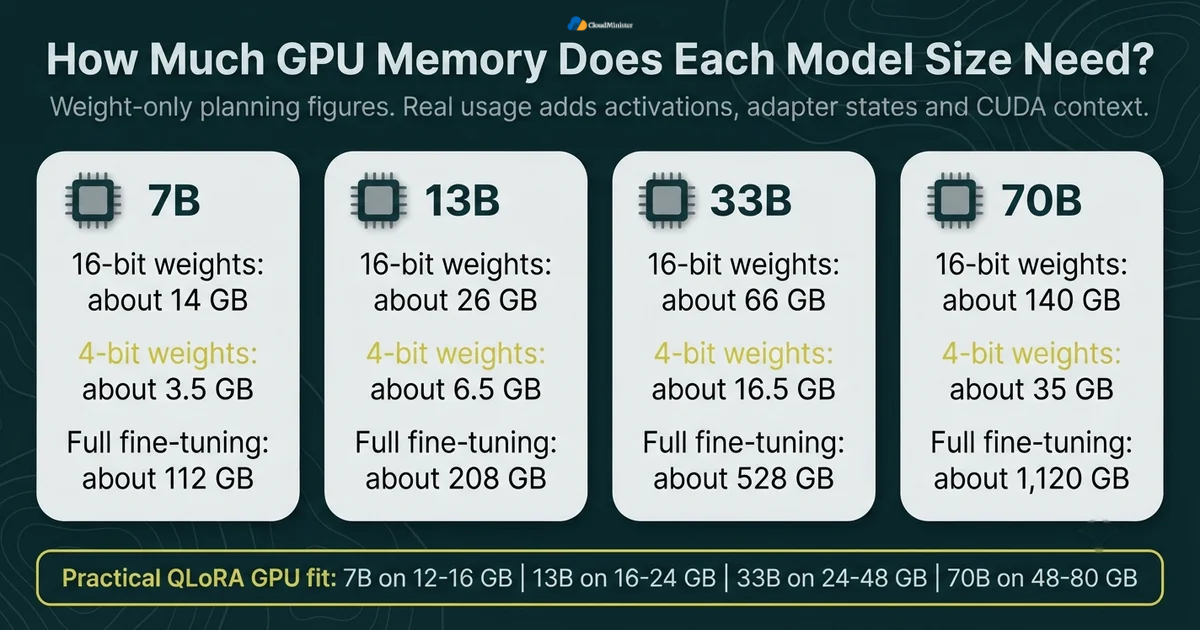
Memory is the number that decides everything. For a model with N billion parameters, 16-bit weights take about 2N gigabytes, and 4-bit weights take about 0.5N gigabytes plus a small overhead. Full fine-tuning with mixed precision and the Adam optimizer needs roughly 16 bytes per parameter for weights, gradients, and optimizer states, which is why a 7B model needs over 100 GB. On top of this come activations, which grow with sequence length and batch size. The table below gives weight-only planning figures for fine-tuning LLMs. The same figures also shape your LLM inference cost per token later.
| Model size | 16-bit weights | 4-bit weights | Full fine-tuning, rough total |
| 7B | about 14 GB | about 3.5 GB | about 112 GB |
| 13B | about 26 GB | about 6.5 GB | about 208 GB |
| 33B | about 66 GB | about 16.5 GB | about 528 GB |
| 70B | about 140 GB | about 35 GB | about 1,120 GB |
- Treat the table as a floor, because real usage adds activations, adapter states, the CUDA context, and memory fragmentation. Ask your Web Hosting Company in India for the exact VRAM of each plan.
- Gradient checkpointing trades roughly 20 to 30 percent extra compute for a large cut in activation memory.
- For fine-tuning LLMs, reduce sequence length first, since activation memory grows with both length and batch size.
- Use a micro batch of 1 to 4 and gradient accumulation to reach an effective batch size of 16 or 32. Pick the best GPU cloud hosting plan only after this math is done.
- As a practical guide, 7B fits on 12 to 16 GB, 13B on 16 to 24 GB, 33B on 24 to 48 GB, and 70B on 48 to 80 GB with QLoRA. Use these ranges when comparing plans from the best GPU cloud hosting in India.
- Flash Attention 2 lowers attention memory and raises speed on supported GPUs. This matters in any NVIDIA Rubin vs Blackwell comparison, since software efficiency often beats hardware upgrades.
- Use GPU monitoring to watch peak memory during the first 20 steps, and raise sequence length only after you see the headroom.
- Keep about 10 percent of VRAM free to avoid crashes from unusually long batches on GPU servers for AI.
Related Reading: Cost per million tokens on a GPU server
Before you rent anything, write down the model size, the longest training example in tokens, and your target batch size. These three numbers decide the GPU you need, and guessing them is the most common reason people pay for a card that is too small or too large.
6. NVIDIA Rubin vs Blackwell: What Changes for Fine-Tuning LLMs
The NVIDIA Rubin vs Blackwell question is one of the most searched hardware topics of 2026, so it deserves a clear answer. Blackwell B200 offers roughly 180 to 192 GB of HBM3e memory with about 8 TB per second of bandwidth. Rubin raises that to 288 GB of HBM4 with up to 22 TB per second, about 2.8 times the bandwidth, according to NVIDIA’s published figures. For a small team, though, the NVIDIA Rubin vs Blackwell choice is mostly about availability and price, because Rubin arrived first as a rack-scale NVL72 platform and not as a cheap single card for budget servers.
| Per GPU, NVIDIA figures | Blackwell B200 | Rubin |
| Memory | About 180 to 192 GB HBM3e | 288 GB HBM4 |
| Memory bandwidth | About 8 TB/s | Up to 22 TB/s |
| NVLink bandwidth | 1.8 TB/s | 3.6 TB/s |
| NVFP4 inference | About 10 PFLOPS | Up to 50 PFLOPS |
| NVFP4 training | About 10 PFLOPS | About 35 PFLOPS |
| Transistors | About 208 billion | About 336 billion |
- Capacity is not the whole story, because Blackwell Ultra B300 also carries 288 GB, so the real NVIDIA Rubin vs Blackwell jump for LoRA work is bandwidth.
- Bandwidth matters because small batch fine-tuning LLMs and 4-bit dequantization are often limited by memory movement as much as by raw compute.
- Rubin’s headline 50 PFLOPS NVFP4 figure is an inference number, while the training figure is about 35 PFLOPS.
- Today’s common QLoRA stack for fine-tuning LLMs stores weights in NF4 and computes in BF16, so it does not automatically use NVFP4 tensor paths, and software support must mature first.
- NVIDIA claims up to 10 times lower LLM inference cost per token than Blackwell for large mixture of experts inference, which is a vendor claim for rack-scale deployments and not a promise for a 7B adapter job.
- As of November 2026, only a few large cloud providers have announced general availability of Rubin NVL72, so confirm current stock with your Web Hosting Company in India before planning around it.
- For 7B to 13B fine-tuning LLMs with QLoRA, a single Blackwell, Hopper, or Ada GPU is plenty, and Rubin starts to make sense for 100B plus models, very long context, or high volume serving. Check the best GPU cloud hosting in India lineup for cards in this range.
- Check CUDA, PyTorch, and bitsandbytes support before renting new silicon, since Blackwell needs CUDA 12.8 or newer. Confirm that your GPU monitoring tools support the new cards too.
- A sensible plan for most budget teams is to tune on Blackwell or Hopper now and revisit the NVIDIA Rubin vs Blackwell decision when Rubin pricing settles. That keeps your best GPU cloud hosting spending flexible.
Related Reading: Google TPU vs NVIDIA GPU in 2026
When someone quotes you a NVIDIA Rubin vs Blackwell speedup, ask for the model size, precision, batch size, and sequence length behind the number. A figure measured on a trillion parameter model at rack scale tells you very little about your own fine-tuning LLMs job.
7. NVIDIA Rubin vs Blackwell: Cost per Finished Job
Price is where the NVIDIA Rubin vs Blackwell debate becomes real for a small team. Rubin hardware is built for large racks, so its hourly cost per GPU is expected to be higher than Blackwell or Hopper rental, and early supply is limited. The right way to compare is cost per finished job and not cost per hour. If a faster GPU finishes a run in half the time at less than twice the hourly price, it wins, and that logic applies to every NVIDIA Rubin vs Blackwell comparison you will see.
- Measure your own baseline first, because every NVIDIA Rubin vs Blackwell estimate depends on tokens per second for your model, sequence length, and batch size.
- Write the formula as hourly price multiplied by run hours, and compare the result across GPUs and not only across prices.
- A NVIDIA Rubin vs Blackwell speedup of 2 times only saves money if the hourly price rises by less than 2 times.
- Memory bandwidth drives much of the NVIDIA Rubin vs Blackwell gain, but a 7B QLoRA job may not fill a larger GPU, so the extra capacity can sit idle.
- Short jobs of one to three hours change little in a NVIDIA Rubin vs Blackwell comparison, because setup and model loading time dominate.
- Long jobs on 70B models are where a NVIDIA Rubin vs Blackwell upgrade can pay back, since those runs last many hours.
- Multi-adapter serving is another place where the NVIDIA Rubin vs Blackwell difference shows, because more memory can hold more adapters at once.
- Ask for a short trial run before committing, and record the NVIDIA Rubin vs Blackwell result in your experiment sheet.
8. NVIDIA Rubin vs Blackwell: A Decision Guide by Model Size
A simple guide removes most of the confusion. Match the model size and workload to a hardware tier, then ask where the NVIDIA Rubin vs Blackwell choice actually changes the outcome. For most readers of this guide, Blackwell, Hopper, or Ada class GPUs are enough, and the NVIDIA Rubin vs Blackwell upgrade is a later step.
- Up to 13B with QLoRA: any 24 GB to 48 GB card works, and the NVIDIA Rubin vs Blackwell question does not apply yet.
- 33B with QLoRA: a 48 GB or 80 GB card works well, and the NVIDIA Rubin vs Blackwell gap matters little at this size.
- 70B with QLoRA: an 80 GB card is comfortable, and in the NVIDIA Rubin vs Blackwell comparison Blackwell is already enough for most runs.
- 100B plus models: this is the first tier where the NVIDIA Rubin vs Blackwell decision can change what fits on one GPU.
- Long context tuning above 32,000 tokens: activation memory grows fast, so the capacity and bandwidth gains in the NVIDIA Rubin vs Blackwell comparison start to matter.
- High volume serving: rack-scale gains in the NVIDIA Rubin vs Blackwell comparison pay off when many requests share the same hardware.
- Teams that tune weekly: stay on the cheaper tier, and review the NVIDIA Rubin vs Blackwell decision every quarter as prices move.
- Teams that tune once a quarter: rent by the hour and avoid long commitments while the NVIDIA Rubin vs Blackwell market settles.
- Always keep the software check in your plan, because CUDA, PyTorch, and bitsandbytes versions must support the card.
9. Choosing a Single GPU Server for LoRA and QLoRA
Picking the server for fine-tuning LLMs is mostly a matching exercise between model size, memory, and budget. Start with VRAM, then compare bandwidth and price across the GPU servers for AI on offer. A Web Hosting Company in India with local data centres also gives Indian teams lower latency and an easier answer to data residency questions under the Digital Personal Data Protection Act, 2023. Many buyers search for the best GPU cloud hosting in India and then compare a handful of plans, so use the table below as a first filter. Think about LLM inference cost per token before you choose, since serving needs differ from training.
| GPU class | Memory | Good fit for QLoRA |
| RTX 4090 | 24 GB GDDR6X | 7B and 13B models with moderate sequence length |
| L40S | 48 GB GDDR6 | 13B to 33B models, and 70B only with short sequences |
| A100 80 GB | 80 GB HBM2e | 70B models and longer sequences |
| H100 80 GB | 80 GB HBM3 | Faster 70B runs and heavier batch sizes |
| H200 | 141 GB HBM3e | Long context tuning with comfortable headroom |
- Match VRAM to model size first, then compare memory bandwidth, and only then compare hourly price, even in a NVIDIA Rubin vs Blackwell comparison. This keeps the best GPU cloud hosting in India shortlist short.
- Choose at least 64 GB of system RAM, since model loading and paged optimizer states use CPU memory.
- Pick 500 GB to 1 TB of fast NVMe storage for datasets, base models, and checkpoints.
- Make sure your GPU servers for AI come with 8 or more CPU cores so data loading does not starve the GPU.
- Look for root or SSH access, recent NVIDIA drivers, and ready CUDA images, so you do not lose a day on setup. Good best GPU cloud hosting providers publish these details.
- Prefer hourly or short term billing for experiments, and move to monthly plans only after your workload is steady. Compare both billing styles across the best GPU cloud hosting in India plans you shortlist.
- Ask the Web Hosting Company in India what support and GPU monitoring come with the plan, and get the answer in writing.
- Confirm snapshot and backup options, because losing a checkpoint is more expensive than the backup itself.
Ready to Fine-Tune Your LLM on a Dedicated GPU Server?
Run LoRA and QLoRA jobs on GPU servers built for AI workloads, with the VRAM, NVMe storage and support you need for a clean first run. New clients also get a free consultation to match the right GPU to their model size and budget.
10. Step-by-Step QLoRA Setup for Fine-Tuning LLMs with Hugging Face
A clean setup for fine-tuning LLMs avoids half of all failed runs. The standard open stack uses Hugging Face Transformers for models, PEFT for adapters, bitsandbytes for 4-bit loading, TRL for the supervised fine-tuning trainer, and Accelerate for device handling. Install pinned versions in a fresh virtual environment and record them, so you can repeat the run later on any of your GPU Servers for AI. Most of these steps work the same on any plan from the best GPU cloud hosting in India.
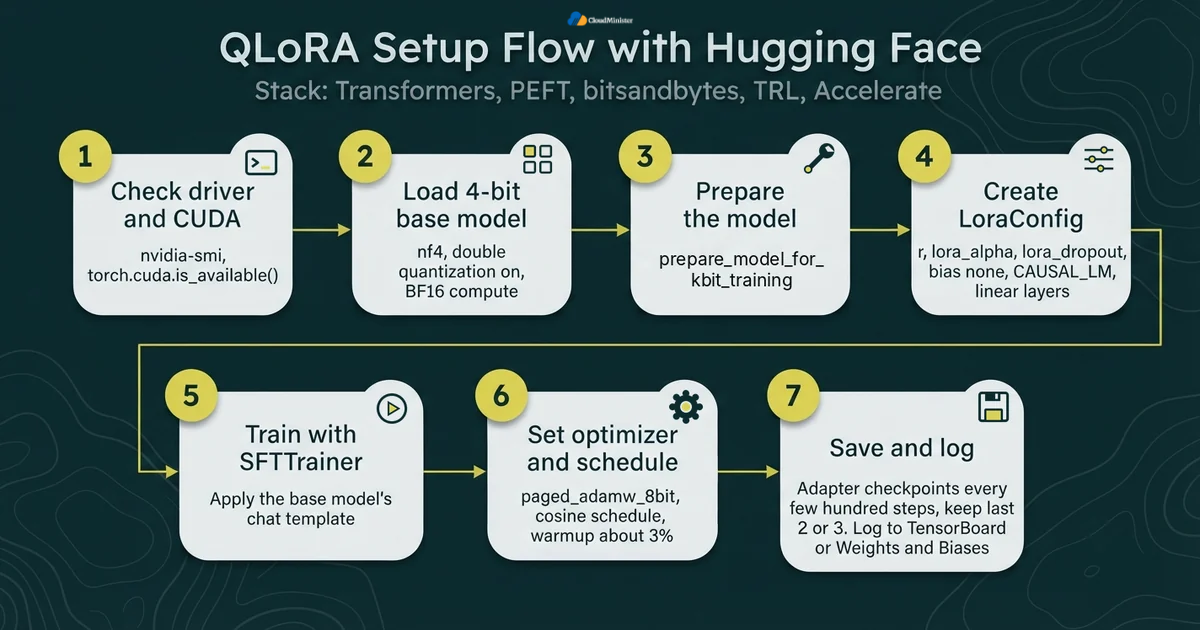
- Check the driver and CUDA first with nvidia-smi and torch.cuda.is_available() on your GPU servers for AI, before downloading any model, which matters most when the NVIDIA Rubin vs Blackwell choice puts you on new hardware.
- Load the base model with a 4-bit config that sets the quantization type to nf4, turns double quantization on, and uses BF16 as the compute dtype.
- Call prepare_model_for_kbit_training from PEFT, which enables gradient checkpointing and prepares the quantized layers for training.
- Create a LoraConfig with r, lora_alpha, lora_dropout, bias set to none, the causal language model task type, and target modules that cover the linear layers.
- Use SFTTrainer from TRL for fine-tuning LLMs and apply the chat template of your base model, because a wrong template is a top cause of poor outputs.
- Choose a paged AdamW optimizer, such as paged_adamw_8bit, to survive memory spikes.
- Use a cosine learning rate schedule with warmup of about 3 percent of total steps.
- Save adapter checkpoints every few hundred steps and keep only the last two or three to protect disk space. A Web Hosting Company in India that offers snapshots can protect them further.
- Log loss and learning rate to TensorBoard or Weights and Biases, so you can compare runs later. Pair these logs with GPU monitoring output.
Treat the training server like production. Keep Hugging Face tokens out of notebooks and shell history, use environment variables or a secrets manager, prefer safetensors files over pickle based checkpoints, and leave trust_remote_code switched off unless you have read the code. Allow SSH by key only, close unused ports, and delete datasets and checkpoints when the project ends.
11. GPU Monitoring and Cost Control During Training
GPU Monitoring is how you catch trouble before it costs money. A run for fine-tuning LLMs that quietly stalls on data loading, overheats, or creeps toward an out of memory crash can waste hours before anyone notices. Good GPU monitoring shows utilization, memory use, temperature, power draw, and clock speed in one view, so you can act within minutes. On Linux, nvidia-smi is the quickest check, and NVIDIA DCGM with Prometheus and Grafana gives long term dashboards for any best GPU cloud hosting setup.
- Watch GPU utilization, since steady readings of 80 to 100 percent are healthy and low readings with a busy CPU point to a data loader bottleneck. Low utilization raises LLM inference cost per token directly.
- Watch memory used against memory total, and investigate if usage keeps climbing from step to step.
- Watch temperature and clock speed, because thermal throttling shows up as clocks dropping during the run.
- Watch power draw, since a card sitting at its power limit inside GPU servers for AI may be capped and slower than expected.
- Log nvidia-smi query output to a CSV file every few seconds, so you can review a run after it finishes. This works on any best GPU cloud hosting server with NVIDIA drivers.
- Use the DCGM exporter with Prometheus to alert on ECC and XID errors, which signal hardware trouble.
- Alert on loss turning NaN or on no step progress for ten minutes.
- Add an idle alert for utilization below 5 percent for 15 minutes, and stop the server when it fires, or ask your Web Hosting Company in India to set the rule.
- Compare tokens per second across runs in your GPU monitoring dashboard, because a sudden drop is an early sign of a problem. Use the same check when comparing best GPU cloud hosting in India plans.
Related Reading: Monitoring guide for developers
Set an automatic shutdown rule on your GPU monitoring dashboard. A single forgotten server left running over a weekend can cost more than the entire tuning job, and a simple idle alert prevents it.
12. Hyperparameters and Data Preparation for Fine-Tuning LLMs
Good data beats clever settings in fine-tuning LLMs. The LIMA study showed that about 1,000 carefully chosen examples could give a strong chat model, which proves that quality matters more than volume. For settings, start from the QLoRA paper: rank 64, alpha 16, dropout 0.05 for models up to 13B, and a learning rate of 2e-4 for 7B and 13B, dropping to 1e-4 for larger models. Treat these as starting points and not as laws, and adjust using your validation results. These settings behave the same in a NVIDIA Rubin vs Blackwell test, so keep them fixed when you compare hardware. Finish most of the data work before you start paying hourly rates at your chosen host.
- For fine-tuning LLMs, start with 1,000 to 10,000 clean examples, and remove duplicates, empty answers, and wrong labels.
- Use one consistent chat template, and include a system prompt only if you will use it in production.
- Train for 1 to 3 epochs, because more passes over a small dataset invite overfitting. Fewer epochs also cut the hourly bill on best GPU cloud hosting plans.
- Hold out 5 to 10 percent of data for validation and watch validation loss during the run. Use GPU monitoring to confirm the GPU stays busy during validation.
- Reach an effective batch size of 16 to 32 with gradient accumulation, and use a max gradient norm of 0.3 as in the QLoRA paper.
- Compute loss on response tokens only when your task is answer generation, so the model does not learn to repeat prompts.
- Mix in a small share of general instruction data to reduce forgetting of base abilities.
- Remove personal data such as names, phone numbers, and ID numbers before training, since models can memorize rare strings.
Change one setting at a time. Most teams change rank, learning rate, and data in the same run and then cannot tell which change helped. Keep a simple experiment sheet with run name, data version, settings, evaluation score, and GPU hours, and your fine-tuning LLMs work will improve with every run.
13. Evaluation, Merging, and Serving at a Low LLM Inference Cost per Token
Training ends when your evaluation says so, not when the loss curve looks smooth. Compare the tuned model with the base model on a fixed test set, then decide how to serve it. Serving is where the long term bill lives, so LLM inference cost per token deserves the same attention as training cost. A simple formula is hourly GPU price divided by tokens generated per hour. At 2 dollars per hour and 1,500 tokens per second, which is 5.4 million tokens per hour, the cost comes to about 0.37 dollars per million tokens. Compare the numbers you measure with the pricing pages of the best GPU cloud hosting in India. When you compare hardware, keep the NVIDIA Rubin vs Blackwell test on the same adapter and prompts. A best GPU cloud hosting plan with fast storage also helps model loading.
- Test on real held-out examples with task metrics such as exact match, F1, or rubric scoring, and not on loss alone.
- Check general tasks too, so you can spot forgetting that came from fine-tuning LLMs.
- Merge the adapter with merge_and_unload on a 16-bit copy of the base model for best accuracy, since merging into quantized weights adds rounding error.
- Serve the base model plus adapters with vLLM multi-LoRA support when many adapters should share one of your GPU servers for AI.
- Quantize for serving with AWQ, GPTQ, or FP8 on supported GPUs to cut memory and raise throughput, and re-test quality afterward.
- Use continuous batching, which is usually the biggest single lever on LLM inference cost per token.
- Measure tokens per second under realistic concurrency and prompt length, and not on a single request. Keep GPU monitoring on during these tests, and ask your Web Hosting Company in India for benchmark figures on the hardware you plan to rent.
- Turn on prefix caching when many requests share the same long system prompt.
Related Reading: Inference cost optimization
14. Common Mistakes in Fine-Tuning LLMs That Waste GPU Hours
Most failed tuning projects trace back to a short list of repeatable mistakes. Avoiding them is the cheapest way to improve your results, and the habit of checking small things early is worth more than any new GPU. Even a strong fine-tuning LLMs plan fails when basic details such as templates, padding, and stop tokens are wrong. Weak GPU monitoring also hides problems until the bill arrives. A Web Hosting Company in India with clear documentation helps you check these details early, and teams renting from the best GPU cloud hosting in India should catch them before the meter starts running.
- Using the wrong chat template or end of sequence token, which makes the model ramble or never stop.
- Starting a full run without a short smoke test on a few dozen steps, which costs little even on a premium best GPU cloud hosting plan.
- Setting the learning rate too high, which shows up as loss spikes in the first hundred steps.
- Training for too many epochs on a small dataset and then trusting a low training loss.
- Forgetting to set a pad token, which many causal models do not define by default.
- Saving only adapter weights and losing the tokenizer and config needed to reload them.
- Judging success by loss alone, skipping evaluation on real task examples, and never measuring LLM inference cost per token before launch.
- Leaving one of your GPU servers for AI running after the job ends.
- Chasing the NVIDIA Rubin vs Blackwell headline without checking whether your CUDA, PyTorch, and bitsandbytes versions support the new hardware.
15. Choosing the Right Partner for Fine-Tuning LLMs on a Single GPU Server
Not every hosting relationship suits fine-tuning LLMs work. A provider that understands GPU workloads will talk about memory, drivers, storage speed, and support hours before it talks about price. Look at documentation, real incident handling, and how clearly the plan explains what is included. A team comparing the best GPU cloud hosting in India should ask the same practical questions of every vendor, and one that offers GPU Servers for AI should be able to answer them in specific terms.
- Ask which GPU models are available today, where the NVIDIA Rubin vs Blackwell options stand, and which are only on a waiting list.
- Confirm that drivers, CUDA, and common frameworks are preinstalled or easy to install.
- Check that storage is fast NVMe and ask what happens to your data when you release the server.
- Ask how the provider handles GPU monitoring, alerts, and hardware failures during a long run.
- Look for a Web Hosting Company in India that publishes clear documentation, backup details, and support hours.
- Prefer providers with local data centres if your data must stay in the country.
- Ask for billing in hourly, weekly, or monthly options, and check how quickly you can scale up or down. Ask for sample throughput figures to estimate LLM inference cost per token.
- Be cautious about any vendor that promises the lowest cost with no detail on what is included, even when it markets itself as the best GPU cloud hosting choice.
- Compare at least three plans from the best GPU cloud hosting in India on memory, storage, billing, and support.
16. A Practical 30 Day Plan to Get Started
Reading about fine-tuning LLMs is easy and acting on it is harder, so this plan breaks the work into four weeks that most small teams can follow. It keeps spending low in the early weeks and raises it only when evidence supports the next step. Write the plan down, share it with your team, and review it at the end of every week. Pick a Web Hosting Company in India before week one ends so hardware is ready, and shortlist the best GPU cloud hosting in India using your memory table in week two.
- Week one: define one narrow task for fine-tuning LLMs, collect 1,000 to 3,000 examples, and clean them carefully.
- Week one: write a fixed test set of at least 100 real examples that you will never train on.
- Week two: rent one of the GPU servers for AI as a single GPU server, run the smoke test, and start fine-tuning LLMs on a 7B model with QLoRA.
- Week two: set up GPU monitoring with an idle alert and a loss alert before the first full run.
- Week three: compare the tuned model to the base model, change one setting per run, and keep the experiment sheet updated.
- Week three: try a 13B model only if the 7B result shows a clear quality gap.
- Week four: merge or serve the best adapter, and measure tokens per second and LLM inference cost per token under realistic traffic.
- Week four: review the NVIDIA Rubin vs Blackwell question again with real numbers from your own runs before any hardware upgrade.
Checklist: Budget Fine-Tuning LLMs Readiness Review
- Task is narrow, and a fixed test set of real examples exists
- Training data is cleaned, deduplicated, and free of personal data
- Model size, sequence length, and batch size are written down
- GPU memory is checked against the weight table with 10 percent headroom
- Chat template and end of sequence token are verified
- Smoke test of 50 to 100 steps passed
- GPU Monitoring and an idle shutdown alert are active
- Adapter, tokenizer, and config are saved together
- Quality is compared with the base model on the test set
- LLM Inference Cost per Token is measured under realistic load
- Plan chosen from best GPU cloud hosting options after the memory check
- Shortlist of the best GPU cloud hosting in India compared on memory, storage, billing, and support
- Provider chosen after comparing at least two options, including a Web Hosting Company in India
- NVIDIA Rubin vs Blackwell decision reviewed with real run numbers
- Server choice checked against the GPU Servers for AI options and your memory table
Key Takeaways
- Fine-Tuning LLMs on a single GPU server is practical because LoRA trains small adapters and QLoRA stores the frozen base in 4-bit NF4.
- Memory planning decides the GPU you need, and a 7B model needs about 3.5 GB for 4-bit weights against about 112 GB for full fine-tuning.
- The NVIDIA Rubin vs Blackwell gap is largest in memory bandwidth, at about 8 TB/s against up to 22 TB/s, but most budget jobs run fine on Blackwell or Hopper.
- Treat vendor speedup claims as ceilings measured on large models, and test your own workload.
- Good GPU monitoring with idle alerts protects your budget more than a cheaper hourly rate.
- Clean data, one change per run, and a fixed test set matter more than clever settings in fine-tuning LLMs.
- LLM inference cost per token should be measured from the first day, since serving costs repeat every day.
- A Web Hosting Company in India with proper GPU support and clear documentation reduces setup risk for GPU servers for AI.
- Shortlisting the best GPU cloud hosting option for your team means matching memory, support, and billing to your real workload.
- The best GPU cloud hosting in India for your team is the plan that fits your memory table, not the one with the lowest hourly price.
- Revisit the NVIDIA Rubin vs Blackwell choice every quarter, because pricing and availability keep changing.
- Budget fine-tuning LLMs projects succeed when memory planning comes before hardware shopping.
- Compare GPU servers for AI on memory, bandwidth, storage, and support, and not on hourly price alone.
Not Sure Which GPU Plan Fits Your Fine-Tuning Project?
Talk to our team about your model size, sequence length and budget. We offer a free consultation to all new clients, so you can plan memory, hardware and costs before you spend a single GPU hour.
Conclusion
The pattern is clear. Fine-Tuning LLMs is no longer a luxury reserved for large labs. A careful team can take an open model, attach a LoRA adapter, quantize the base with QLoRA, and finish a useful run on one server within a few days. The work that matters most is planning memory, preparing clean data, watching the run, and measuring quality against a fixed test set. Whenever you review the NVIDIA Rubin vs Blackwell debate, keep your own workload at the centre, since the right choice depends on model size, budget, and availability, not on headlines. A reliable Web Hosting Company in India that offers GPU hosting and clear support makes each of these steps easier. The best GPU cloud hosting choice always comes back to memory, support, and billing.
A tuning project is never finished on the day training ends. Keep watching quality, cost, and latency after launch, and keep a short record of what worked and what failed. Over time, that record becomes your own playbook for faster and cheaper runs. When you are ready to compare plans, start your search for the best GPU cloud hosting in India with your memory table, your test results, and your target LLM inference cost per token in hand, and the NVIDIA Rubin vs Blackwell answer for your workload.
Frequently Asked Questions
Can I do fine-tuning LLMs on a single GPU?
Yes. With QLoRA, a 7B model fits on a 12 to 16 GB GPU, a 13B model on 16 to 24 GB, and a 70B model on a 48 to 80 GB GPU with short sequences. Memory, not compute, is usually the limit, so check the weight table before you rent. Many GPU servers for AI start with cards in this range.
What is the difference between LoRA and QLoRA?
LoRA trains small adapter matrices on top of a frozen base model held in 16-bit. QLoRA does the same but stores the frozen base in 4-bit NF4, which cuts memory by about three quarters and allows bigger models on the same GPU, at the cost of slightly slower training.
Does QLoRA reduce model quality?
In the original paper, QLoRA matched 16-bit tuning on the benchmarks tested. Results can differ on your own task, so always compare against the base model on a held-out test set.
What does the NVIDIA Rubin vs Blackwell comparison mean for a small team?
Rubin offers 288 GB of HBM4 and up to 22 TB per second of bandwidth, against roughly 8 TB per second on Blackwell B200. The NVIDIA Rubin vs Blackwell difference matters most for very large models and high volume serving, while 7B to 13B adapters run well on Blackwell, Hopper, or Ada class GPUs.
Is Rubin available for single GPU rental today?
As of November 2026, Rubin NVL72 has begun reaching general availability at a few large cloud providers, but broad single GPU rental is limited. Confirm stock, pricing, and software support with your provider before you plan around the NVIDIA Rubin vs Blackwell upgrade.
How do I keep the cost of a run low?
Run a short smoke test, keep sequence lengths sensible, use gradient checkpointing, and stop the server as soon as the run ends. Strong GPU monitoring with an idle alert prevents most surprise bills. A Web Hosting Company in India with hourly billing helps, and tracking LLM inference cost per token early helps too. Pick best GPU cloud hosting plans that bill hourly.
How many examples do I need for fine-tuning LLMs?
For a narrow task, 1,000 to 10,000 clean examples is a good range. Quality matters more than volume, and a small curated set often beats a large noisy one.
How do I estimate LLM inference cost per token?
Divide the hourly GPU price by the number of tokens generated per hour. For example, 2 dollars per hour at 1,500 tokens per second gives about 0.37 dollars per million tokens. Measure throughput under realistic traffic, since batching changes the result a lot.
Should I merge the adapter or keep it separate?
Merge it for the simplest deployment and no extra latency, ideally into a 16-bit copy of the base model. Keep it separate if you serve many adapters from one base model, for example with vLLM multi-LoRA support.
What should I look for in a best GPU cloud hosting provider?
Check available GPU models, memory size, NVMe storage, preinstalled drivers, billing flexibility, and support hours. A provider that explains these details clearly usually handles long training runs better than one that only advertises a low price. Compare at least three options from the best GPU cloud hosting in India.

Shivlendra Singh Jadoun is a Cloud & DevOps Engineer at CloudMinister Technologies, specializing in AWS, Azure, and GCP infrastructure. He began his career in Linux system administration, managing shared, VPS, and dedicated servers before moving into cloud and automation. He is AWS Certified and works extensively with Docker, Kubernetes, Terraform, Ansible, and Jenkins to build CI/CD pipelines and scalable, secure cloud environments. With hands-on experience across hosting, server security, and DevOps automation, he brings real-world engineering insight to every article he writes.