Extended support for Windows Server 2016 ends on January 12, 2027, and after that date Microsoft stops releasing security updates for it. Windows Server 2016 End of Life leaves you with four realistic paths: buy Extended Security Updates as a short bridge, upgrade to Windows Server 2025 on your own hardware, move to a hosted Windows VPS, or move to a dedicated Windows server through Affordable Windows Dedicated Server Plans. This guide compares the four paths in plain language, explains cost, licensing, and security, and gives you an 80 day plan. It also shows when Windows VPS Hosting in India, VPS Server Hosting in India, or Windows Dedicated Server Hosting is the better home for the workload, and where a Web Hosting Company in India fits into the project.
Every IT team has at least one server that nobody wants to touch. It runs the accounting software, the file shares, or the licensing service that the whole company quietly depends on. For many businesses that server still runs Windows Server 2016, and the calendar is now working against it. Windows Server 2016 End of Life is a fixed date, not a suggestion, and the decision you make in the next few weeks will decide how safe, how fast, and how expensive your infrastructure is for years.
The good news is that you have real choices. You can pay for a short bridge with Extended Security Updates, upgrade to Windows Server 2025, or move the workload to a hosted environment. A trusted Web Hosting Company in India can run the new server for you, and options such as Windows VPS Hosting in India, VPS Server Hosting in India, or Windows Dedicated Server Hosting remove the need to buy and maintain your own hardware. Each path has a different cost, a different level of effort, and a different risk if something goes wrong. Many businesses also look at Affordable Windows Dedicated Server Plans when they need physical hardware at a fixed monthly cost.
This guide walks through the practical side of Windows Server 2016 End of Life in simple language. You will learn what actually changes on January 12, 2027, how the four options compare, how to size and license a new server, and how to finish the move before the deadline. Whether you manage one server or fifty, the steps below will help you plan with more confidence and fewer surprises.
Table of Content
- 1. What the Server 2016 Support Deadline Means for Your Business
- 2. The Numbers Behind the Server 2016 Support Cutoff in 2026
- 3. Your Four Options After the Server 2016 Deadline
- 4. Extended Security Updates After Server 2016 Support Ends: A Bridge, Not a Destination
- 5. Upgrading to Windows Server 2025 on Your Own Hardware
- 6. Moving to a Windows VPS in the Cloud
- 7. Moving to a Dedicated Windows Server
- 8. Sizing Your New Windows Server Correctly
- 9. Upgrade or Cloud: How to Decide
- 10. Licensing and Cost Planning for Your Server 2016 Replacement
- 11. Modernize While You Migrate
- 12. Security Steps Before and After the Move
- 13. Common Mistakes to Avoid
- 14. A Practical 80 Day Plan for Replacing Server 2016
- 15. Choosing the Right Hosting Partner
- Key Takeaways
- Conclusion
- Frequently Asked Questions
1. What Windows Server 2016 End of Life Means for Your Business
Windows Server 2016 was released in October 2016. Mainstream support ended on January 11, 2022, and since then the operating system has received only security fixes. On January 12, 2027, extended support ends as well. The servers will not switch off on that day, but they will stop receiving patches, and that is what makes Windows Server 2016 End of Life a serious security and business topic.
- Security updates stop. Any new vulnerability found after the deadline stays open on your server unless it is covered by a paid Extended Security Updates subscription.
- Microsoft technical support for the operating system stops, so you cannot raise a support case for a product that is out of support.
- Bug fixes and reliability updates stop, which means small faults can stay unresolved for years.
- The server keeps running. Windows Server 2016 End of Life removes the patch stream, not the power switch, and that is why the risk is easy to ignore.
- Software vendors may drop Windows Server 2016 from their supported lists, which can block upgrades to your business applications.
- Auditors and cyber insurance reviewers commonly expect supported and patched systems, so an unsupported server can create audit findings.
- Attackers pay close attention to end of support dates, because unpatched systems are easier to target.
- The date applies to the Standard, Datacenter, Essentials, and MultiPoint Premium editions alike.
- Teams that plan for Windows Server 2016 End of Life early have more choices, from a simple upgrade to Windows VPS Hosting in India or Windows Dedicated Server Hosting. A Web Hosting Company in India can help you compare them.
Run the winver command on every server, or use the PowerShell command Get-ComputerInfo, to confirm the exact version. Windows Server 2016 reports build 14393. Many teams find forgotten test servers and old virtual machines that still run this version, and each one is part of your Windows Server 2016 End of Life workload.
2. The Numbers Behind Windows Server 2016 End of Life in 2026
Numbers turn a vague worry into a clear priority. According to Lansweeper data reported by The Register in March 2026, Windows Server 2016 made up 20.3 percent of the servers that Lansweeper monitors, so roughly one in five servers in those environments was still on this version. That is a share of monitored servers and not a count of companies, but it shows that Windows Server 2016 End of Life affects a very large number of organizations at the same time.
- As of October 24, 2026, there are 80 days left before extended support ends, so the planning window is shorter than most teams expect.
- When many organizations move in the same weeks, hardware, vendor help, and maintenance windows get harder to book, including time from your Web Hosting Company in India.
- Windows Server 2012 R2 paid security updates ended on October 13, 2026, so many administrators are already handling one end of support wave.
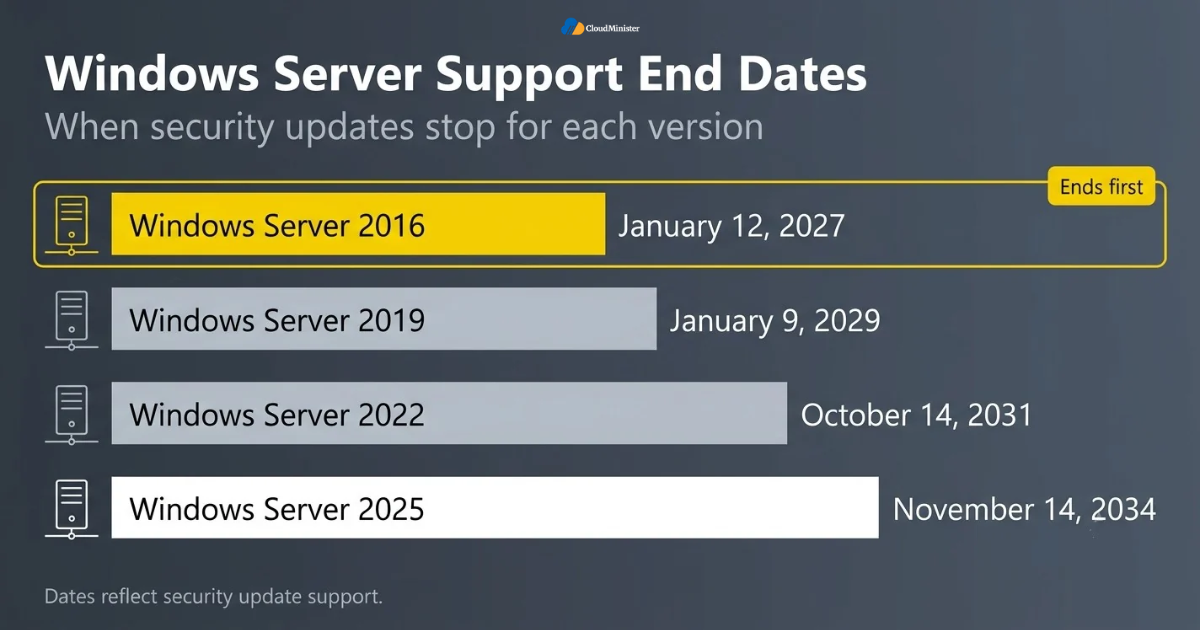
- Windows Server 2022 left mainstream support on October 13, 2026, but it still receives security updates until October 14, 2031.
- Windows Server 2019 receives security updates until January 9, 2029, which is only two years after the 2016 deadline.
- Windows Server 2025 is supported until November 14, 2034, which is the longest runway of any current release.
- Migration barriers are often not about the operating system at all. They come from vendor certification, driver support, and limited change windows.
- Windows Server 2016 End of Life is therefore a planning problem first and a technology problem second. Some teams solve it with Windows Dedicated Server Hosting, while others pick a smaller virtual server.
3. Your Four Options After Windows Server 2016 End of Life
Once you accept that Windows Server 2016 End of Life is coming, the next step is to understand your options. There are four realistic paths, and most organizations use more than one of them for different servers. The table below gives the short version, and the next sections explain each path in detail.
| Option | Best for | Effort | Main risk |
| Extended Security Updates | Servers that cannot move yet | Low | Recurring cost and the same migration later |
| Upgrade to Windows Server 2025 | Compatible apps on hardware you own | Medium | Application and hardware compatibility |
| Windows VPS Hosting in India | Light to medium workloads and fast setup | Medium | Sizing and network planning |
| Windows Dedicated Server Hosting | Heavy, steady, or sensitive workloads | Medium to high | Higher fixed monthly cost |
- Extended Security Updates buy time but add no new features and no new support.
- A Windows Server 2025 upgrade gives the longest support life, until November 2034.
- A hosted virtual server suits web applications, small databases, remote desktop hosts, and trading tools, and Windows VPS Hosting in India or VPS Server Hosting in India is the usual way to get one.
- A dedicated server suits heavy databases, file servers, and workloads that need full control of the hardware, and Windows Dedicated Server Hosting delivers exactly that. Look at Affordable Windows Dedicated Server Plans to keep the monthly cost in check.
- Affordable Windows Dedicated Server Plans give predictable monthly pricing and remove the need to manage physical hardware yourself.
- A mixed approach is common: move the easy servers to the cloud, upgrade the complex ones, and use Extended Security Updates only for what cannot move in time.
- Whichever path you choose, Windows Server 2016 End of Life should be written into the project plan as a hard deadline.
- A Web Hosting Company in India can compare these paths using your real workload data instead of guesses.
4. Extended Security Updates After Windows Server 2016 End of Life: A Bridge, Not a Destination
Microsoft announced Extended Security Updates for Windows Server 2016 on February 25, 2026. The program is delivered through Azure Arc, which means your servers connect to Azure for licensing and update delivery, and billing follows a subscription model. It is a fair option when an application cannot move before the deadline, but it should be treated as a temporary bridge. Microsoft itself describes this period as a chance to upgrade to Windows Server 2025 or migrate to Azure.
- Extended Security Updates cover security fixes only. There are no new features and no general bug fixes.
- The program is reported to run for up to three years after the deadline, which means it ends around January 2030.
- Enrollment is handled through Azure Arc, so each server needs the Azure Connected Machine agent and a working connection to Azure.
- Pricing and terms can change, so confirm the current figures on Microsoft’s Extended Security Updates page before you budget.
- Every year on Extended Security Updates is a year you still carry the old operating system, the old hardware, and the unfinished migration.
- You will face the same migration later, only with less time and older systems.
- Buying updates does not cancel Windows Server 2016 End of Life. It only delays the end of the patch stream for that server.
- Use it for the few servers that truly cannot move, such as a legacy application that is waiting for a vendor release. Servers that can move may be better placed on Affordable Windows Dedicated Server Plans.
Treat Extended Security Updates like a loan, not a gift. Put a written exit date on every server that you enroll and review that date every quarter, so a temporary bridge does not quietly become a permanent habit. Teams that plan around Windows Server 2016 End of Life with exit dates usually finish migrations sooner.
5. Upgrading to Windows Server 2025 on Your Own Hardware
Windows Server 2025 reached general availability in November 2024 and is supported until November 14, 2034. For many organizations, upgrading is the cleanest answer to Windows Server 2016 End of Life, because it resets the support clock for about eight years. Microsoft supports an in-place upgrade directly from Windows Server 2016, but whether you should use it depends on the age of the hardware and the role of the server.
- An in-place upgrade keeps your roles, settings, and data on the same machine. It is quick, but it carries the history of the old installation with it.
- A fresh install on new hardware or a new virtual machine, followed by a migration, gives a cleaner result and an easy rollback because the old server stays untouched.
- Domain controllers are best replaced and not upgraded. Promote new Windows Server 2025 domain controllers, move the FSMO roles, and then retire the old ones.
- Make sure SYSVOL replicates with DFSR, because Windows Server 2025 domain controllers do not support the older FRS method.
- Do not raise the domain or forest functional level until every domain controller runs the new version and testing is complete, since that step is difficult to reverse.
- Check processor support. Windows Server 2025 needs a 64-bit processor with SSE4.2 and POPCNT instructions, so very old hardware may not qualify.
- Test applications first. Windows Server 2025 removes some old components, such as WordPad, the IIS 6 management console, and the PowerShell 2.0 engine.
- Hotpatching is available for Windows Server 2025 Standard and Datacenter once the server is connected to Azure Arc, and it reduces the number of restarts needed for security updates.
- If your hardware is old, compare the cost of new equipment with the monthly cost of Windows Dedicated Server Hosting and Affordable Windows Dedicated Server Plans before you decide. A Web Hosting Company in India can quote both options side by side.
Take a full backup and prove that it restores before any upgrade starts. An in-place upgrade is hard to undo, and a backup that has never been restored is only an assumption. Keep one copy offline or immutable, so that a failed upgrade or a security incident cannot damage it. This rule applies to every Windows Server 2016 End of Life path, from a local upgrade to Windows VPS Hosting in India.
6. Moving to a Windows VPS in the Cloud
For many small and mid-sized workloads, a cloud-hosted Windows virtual server is the fastest way out of Windows Server 2016 End of Life. You do not buy hardware, you do not manage the hypervisor, and you can create a new Windows Server 2025 machine quickly. A provider that offers Windows VPS Hosting in India gives you a full administrator-level Windows environment on shared physical infrastructure, usually with the license included in the plan.
- Setup is fast. A new server can usually be created within minutes to hours, which helps when Windows Server 2016 End of Life is close.
- You pay a predictable monthly or yearly fee, and the Windows license is normally part of the price, though you should confirm this in writing. Plans for VPS Server Hosting in India usually list this clearly.
- Resources can be increased later, so you can start small and grow CPU, RAM, and storage as the workload grows, which is a key benefit of VPS Server Hosting in India.
- Good fits include web applications, small and medium databases, remote desktop hosts, accounting tools, and trading platforms.
- Shared physical hardware means performance depends on the plan design, so ask whether CPU and RAM are reserved for your virtual server.
- For users in India, a provider that offers VPS Server Hosting in India keeps network delay low and helps with data residency questions.
- Ask about snapshots and backups, because they make your migration rehearsal and rollback much easier. Any good Web Hosting Company in India will explain its snapshot policy clearly.
- Moving to Windows VPS Hosting in India is also a clean way to replace old Windows Server 2016 virtual machines with fresh Windows Server 2025 images, which turns Windows Server 2016 End of Life into a fresh start.
Related Reading: VPS vs dedicated servers for AI inference in 2026
7. Moving to a Dedicated Windows Server
When a workload is heavy, steady, or sensitive, a physical server that belongs only to you is often the better answer to Windows Server 2016 End of Life. Windows Dedicated Server Hosting gives you the whole machine, with all the CPU cores, all the RAM, and all the disk performance, and no neighbors on the same hardware. Affordable Windows Dedicated Server Plans make this option affordable for businesses that want that control without buying and housing their own equipment.
- Performance is consistent because no other customer shares your CPU, memory, or storage.
- You can choose the hardware, including the number of cores, the amount of RAM, and fast NVMe or RAID-protected storage.
- It suits large databases, file servers, virtualization hosts, trading servers, and applications with strict licensing or compliance rules.
- Windows Server 2025 Standard or Datacenter can be installed with Hyper-V, so one physical server can host several virtual machines.
- Remote management through an out-of-band console is useful when the server needs a repair or a reinstall.
- The monthly cost is higher than a virtual server, so compare it with the cost of buying, powering, cooling, and maintaining your own hardware. That is why many buyers shortlist Affordable Windows Dedicated Server Plans first.
- Ask your chosen Web Hosting Company in India about hardware replacement time, network capacity, and backup options before you sign.
- Teams that run latency-sensitive workloads often compare Windows Dedicated Server Hosting with Windows VPS Hosting in India before deciding, and the right answer depends on how much performance variation they can accept.
Related Reading: Dedicated trading servers for HFT and forex
Need Full Hardware Control Before Windows Server 2016 End of Life?
Move your heavy, steady, or sensitive workloads to a physical server with consistent performance and a fixed monthly cost. Explore our Affordable Windows Dedicated Server Plans with Windows Server 2025 ready to deploy.
8. Sizing Your New Windows Server Correctly
Wrong sizing is the quiet reason many migrations disappoint. A server that is too small feels slow on the first Monday, and a server that is too large wastes money every month. Before choosing between Windows VPS Hosting in India or VPS Server Hosting in India and Windows Dedicated Server Hosting, or comparing Affordable Windows Dedicated Server Plans, measure what your current server really uses, because Windows Server 2016 End of Life is also the best moment to right-size the workload.
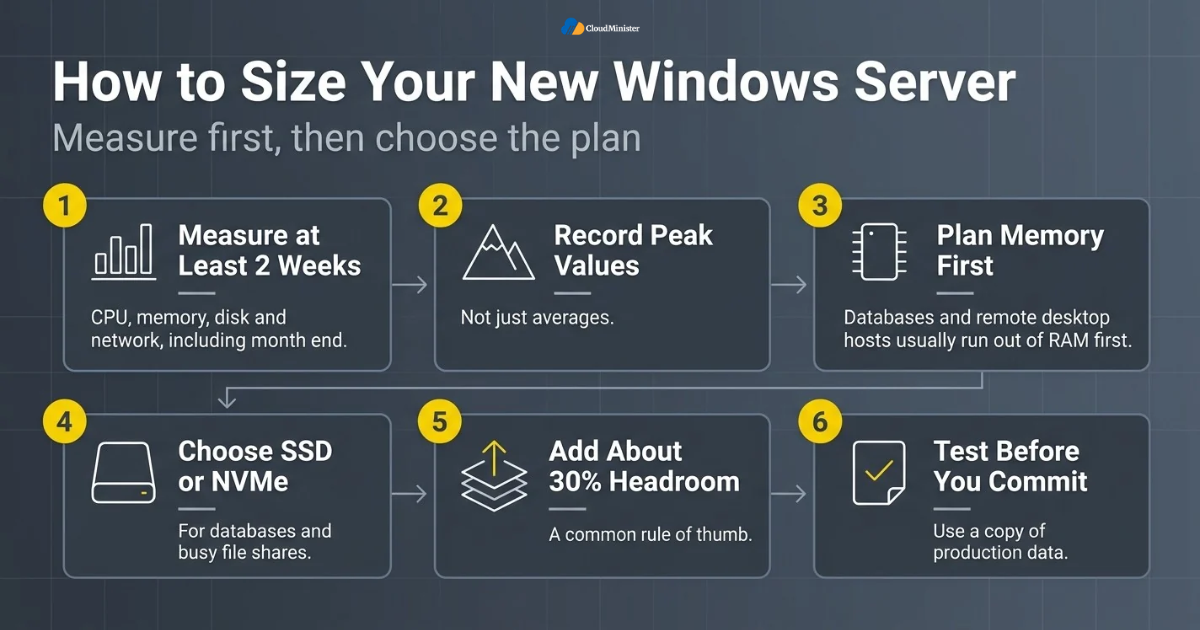
- Collect CPU, memory, disk, and network numbers for at least two weeks, and include month end and any heavy reporting days.
- Use Performance Monitor or your monitoring tool to record peak values, not just averages.
- Plan memory first. Databases and remote desktop hosts usually run out of RAM before they run out of CPU.
- Choose SSD or NVMe storage for databases and busy file shares, since disk latency often limits performance more than CPU does.
- Leave about 30 percent headroom for growth and for the extra load during the cutover. This is a common rule of thumb.
- Count licensing too. More cores can mean more Windows Server and per-core software license cost.
- For trading platforms that run MetaTrader or similar tools, check single-core speed and latency to the broker, not just the core count.
- Test with a copy of production data before you commit to a plan size or a contract term, whether you pick VPS Server Hosting in India or a physical server. Ask your Web Hosting Company in India whether a short trial is possible.
Start slightly smaller on a virtual plan and scale up after one month of real data. Resizing a virtual server is usually easier than shrinking a dedicated one, so use that flexibility to avoid paying for capacity you do not use. Right-sizing is one of the easiest savings in any Windows Server 2016 End of Life project.
Related Reading: Choosing the right Forex VPS specs.
9. Upgrade or Cloud: How to Decide
There is no single correct answer to Windows Server 2016 End of Life, but there is a simple way to decide. Look at the application, the hardware, and the skills of your team, and then choose the path that removes the most risk for the least effort. Cloud demand is also growing fast in India, where Gartner forecasts end-user public cloud spending to grow 28.1 percent to 17.5 billion dollars in 2026, up from 13.7 billion dollars in 2025, which shows how many organizations are already moving workloads off their own servers.
| If this is true for your server | Lean toward |
| Hardware is recent, under warranty, and apps are compatible | Upgrade to Windows Server 2025 |
| Hardware is old or out of warranty | A hosted server instead of new hardware |
| Workload is light, variable, or fast growing | Windows VPS Hosting in India or VPS Server Hosting in India |
| Workload is heavy, constant, or sensitive | Windows Dedicated Server Hosting or Affordable Windows Dedicated Server Plans |
| An application cannot run on Windows Server 2025 yet | Extended Security Updates with an exit date |
- Choose an upgrade on your own hardware when the equipment is modern, under warranty, and your team already runs it well.
- Choose Windows VPS Hosting in India when you want speed, low upfront cost, and easy scaling.
- Choose Windows Dedicated Server Hosting when you need maximum performance and full control of the hardware. Compare Affordable Windows Dedicated Server Plans before you decide.
- Choose Extended Security Updates only as a temporary measure with a written exit date, because Windows Server 2016 End of Life still applies to that server.
- Consider data location rules. If data must stay in India, confirm that the provider’s servers and backups are in India.
- Consider your team. A small team often gains more from a provider that handles hardware, networking, and backups than from running everything alone.
- A trusted Web Hosting Company in India can review your inventory and recommend a path for each server, instead of forcing every server into one plan.
- Cloud does not mean public cloud only. VPS Server Hosting in India and dedicated servers are cloud-style services too, often with simpler pricing.
10. Licensing and Cost Planning for Windows Server 2016 End of Life
Licensing is where many budgets go wrong, so it deserves its own section. Windows Server is licensed per physical core, with a minimum of 8 core licenses per processor and 16 per server, and the users or devices that connect still need Client Access Licenses. When you compare the real cost of each Windows Server 2016 End of Life option, include licensing, hardware, power, backup, support time, and the cost of downtime, not only the monthly price.
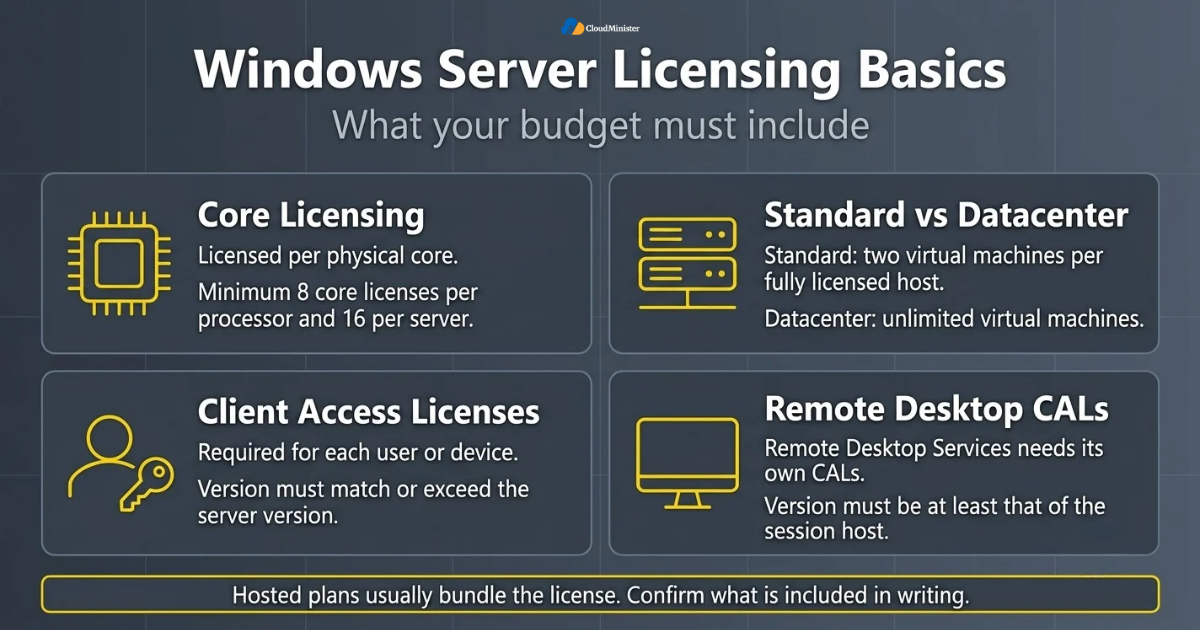
- Windows Server Standard allows two virtual machines per fully licensed host, while Datacenter allows unlimited virtual machines.
- Client Access Licenses are required for each user or device that accesses the server, and their version should match or exceed the server version.
- Remote Desktop Services needs its own Remote Desktop CALs, and their version must be at least that of the session host.
- With a hosted plan, the Windows Server license is usually bundled by the provider, so you pay one bill instead of buying licenses separately. Confirm what is included, especially Remote Desktop and SQL Server.
- Software with per-core pricing, such as SQL Server, can change in cost when you change the core count of your server.
- Compare three years of total cost, not three months, because the true cost of Windows Server 2016 End of Life spreads across hardware, licenses, and updates.
- Ask a Web Hosting Company in India for a written quote that lists license, support, backup, and bandwidth items separately.
- Look for Affordable Windows Dedicated Server Plans that include a Windows license, a fixed monthly fee, and clear renewal terms.
- Compare Windows VPS Hosting in India, VPS Server Hosting in India, Windows Dedicated Server Hosting, and Affordable Windows Dedicated Server Plans on the same three year basis so the difference is easy to see.
Licensing rules change between versions and between agreement types, so confirm the details with Microsoft or an authorized reseller before you buy. A written answer from the seller is better than a verbal one, and it protects you during a software audit. Do this early in any Windows Server 2016 End of Life project, because license surprises are the most common reason budgets are reopened.
11. Modernize While You Migrate
A migration is rarely only a version change. Because every server needs attention anyway, Windows Server 2016 End of Life is a good reason to clean up old roles, move web applications to simpler hosting, and prepare for newer workloads such as AI tools. The goal is to leave the new environment easier to run than the old one.
- Retire servers that no longer serve a purpose. Every old server you remove is one less system to patch and one less cost to carry. Ask your Web Hosting Company in India to help identify unused machines.
- Consolidate small servers into one well-sized machine where licensing allows, but avoid mixing unrelated critical roles on one host. A single well-sized server from Affordable Windows Dedicated Server Plans can replace several old ones.
- Move static websites and simple applications to lighter hosting instead of carrying them to a new Windows Server by default.
- Keep saved build scripts or templates so you can rebuild the server quickly if it fails.
- Use Windows Admin Center for central management of servers, and use Azure Arc only if you want its update and hotpatch features.
- Newer AI tooling, such as Model Context Protocol servers, often runs well on a small always-on virtual server, and VPS Server Hosting in India suits that kind of lightweight workload.
- Set up monitoring and alerting during the move, so you gain visibility and not only a new version number.
- Document everything as you go. Notes written during the migration become the runbook for the next one.
- Treat Windows Server 2016 End of Life as the trigger for a wider infrastructure review, not as a one-time chore.
Related Reading: Model Context Protocol hosting on a VPS in India.
12. Security Steps Before and After the Move
A migration creates a short period in which old and new systems both hold your data, and that is a risky time. Good security habits reduce the risk during the move and after it. Treat the new server as production from day one, because Windows Server 2016 End of Life is ultimately about security, and a rushed move that leaves weak settings defeats the purpose.
- Apply all available updates to the new Windows Server 2025 machine before it takes any traffic.
- Use Windows Firewall and open only the ports that the application needs. Your Web Hosting Company in India can often add a network firewall in front of the server too.
- Protect Remote Desktop with a VPN or gateway, multi-factor authentication, and account lockout rules.
- Remove local administrator rights from daily-use accounts and use separate administrator accounts.
- Turn on audit logging and send logs to a separate system, so an attacker cannot erase the evidence.
- Encrypt data in transit with current TLS versions, and disable old protocols such as SSL 3.0 and TLS 1.0 where applications allow it.
- Encrypt backups and keep one copy offline or immutable.
- Remove temporary migration accounts, test firewall openings, and clean up old DNS records after cutover.
- Keep the old server isolated and read-only until the observation period ends, then wipe its disks before disposal.
Never leave Remote Desktop Protocol open to the whole internet. Exposed RDP is one of the most common entry points for ransomware attacks. Put it behind a VPN or a gateway, require multi-factor authentication, and restrict access by IP address. This applies equally to a self-hosted server, Windows VPS Hosting in India, VPS Server Hosting in India, and Windows Dedicated Server Hosting, and it matters even more once Windows Server 2016 End of Life has passed.
13. Common Mistakes to Avoid
Most migration problems repeat from one company to the next. They come from rushing, from skipping tests, and from treating the project as a simple version swap. Learning from these patterns is one of the cheapest ways to make Windows Server 2016 End of Life planning succeed.
- Waiting until December to start work on Windows Server 2016 End of Life. Hardware orders, vendor approvals, and maintenance windows all take time, and the holiday period shrinks the available days.
- Skipping the application inventory and discovering a forgotten service only after cutover.
- Upgrading in place without a tested backup and rollback plan.
- Raising the Active Directory functional level too early.
- Forgetting license versions, especially Client Access Licenses and Remote Desktop CALs.
- Choosing a plan size by guesswork instead of measured usage, which wastes money or hurts performance. Plans such as Affordable Windows Dedicated Server Plans become costly if oversized.
- Treating Extended Security Updates as a permanent answer instead of a short bridge.
- Ignoring data location and backup location rules when moving to a hosted platform, which a Web Hosting Company in India should be able to explain.
- Picking a provider on price alone. Not every Web Hosting Company in India offers the same support hours, backup policy, and migration help.
14. A Practical 80 Day Plan for Windows Server 2016 End of Life
As of October 24, 2026, there are 80 days left before extended support ends on January 12, 2027. That is enough time for a careful migration if you start now and keep the scope small. The plan below splits the work into stages, and it works for a single server or a small estate facing Windows Server 2016 End of Life.
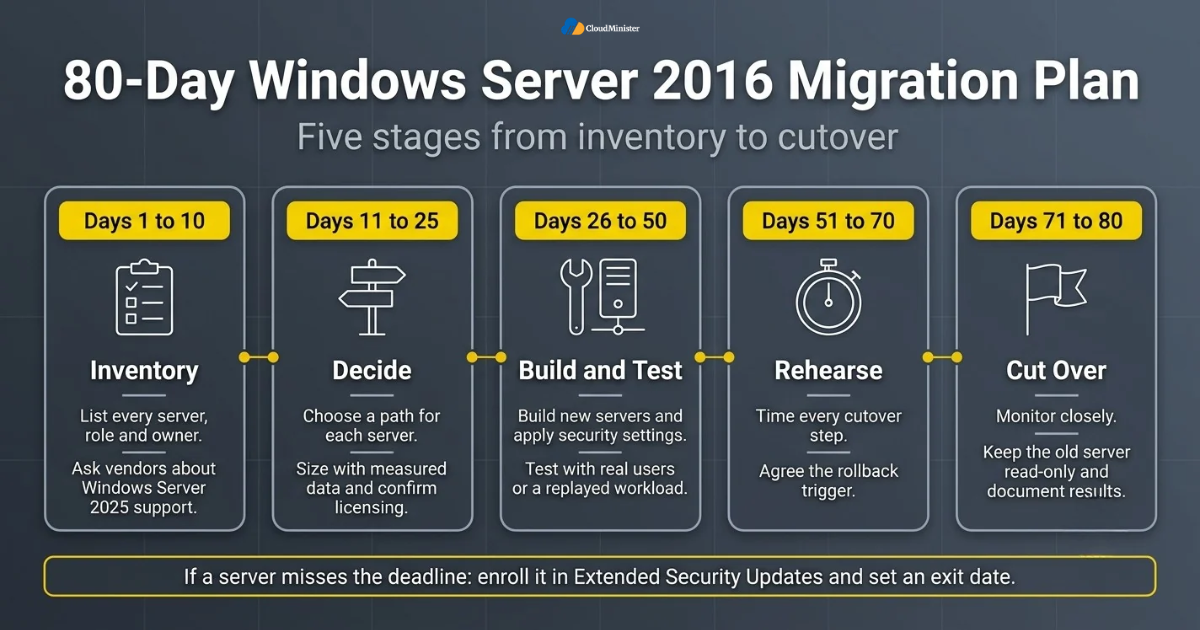
- Days 1 to 10: inventory every Windows Server 2016 machine, its roles, its applications, and its owner. Confirm which servers are virtual and which are physical.
- Days 1 to 10: ask application vendors in writing whether their software supports Windows Server 2025, and ask your Web Hosting Company in India which images it offers.
- Days 11 to 25: choose a path for each server and record the reason. Order hardware, request hosted plans such as Windows VPS Hosting in India or VPS Server Hosting in India, or reserve Affordable Windows Dedicated Server Plans early, because lead times can slip.
- Days 11 to 25: size the new servers using measured data and confirm licensing.
- Days 26 to 50: build the new servers, apply updates and security settings, and copy data using a tested method.
- Days 26 to 50: run the applications on the new server with real users or a replayed workload.
- Days 51 to 70: rehearse the cutover, time every step, and agree the rollback trigger. Lower DNS time to live values a few days before the real move.
- Days 71 to 80: cut over, monitor closely, keep the old server read-only, and document the results.
- If any server will not make the deadline, enroll it in Extended Security Updates and set an exit date, so Windows Server 2016 End of Life does not catch you unprepared.
Schedule the cutover for a quiet weekend in early December or earlier, not the first week of January. That leaves a buffer for fixes if something unexpected appears, and it keeps your team away from deadline week.
15. Choosing the Right Hosting Partner
Not every provider is built to support a careful migration. If you choose a hosted route, the partner you pick becomes part of your security and uptime story. A capable Web Hosting Company in India will explain clearly what it manages, what you manage, and how it handles problems at night or on weekends.
- Ask how many Windows Server migrations the provider has completed, and ask for a real example including what went wrong.
- Confirm that backups, monitoring, and restore tests are included, and ask for the typical restore time in writing.
- Check that the provider offers current Windows Server 2025 images and can explain how it supports Windows Server 2016 End of Life projects.
- Compare Windows VPS Hosting in India, VPS Server Hosting in India, Windows Dedicated Server Hosting, and Affordable Windows Dedicated Server Plans options from the same provider, so you can start small and move up without changing vendors.
- Look for Indian data centers, local support hours, and clear billing if your business operates in India. Ask whether Windows Dedicated Server Hosting is available in the same location.
- Ask about security basics such as firewall options, DDoS protection, and how remote access is protected. Remote access rules matter even more after Windows Server 2016 End of Life.
- Read the service level agreement for uptime and compensation terms, not only the headline percentage.
- Prefer a provider that gives written answers and a named contact during the cutover window.
- Include VPS Server Hosting in India in your comparison if you also run Linux workloads, so one provider can serve both sides of your estate.
Checklist: Windows Server 2016 End of Life Readiness Review
- Count every Windows Server 2016 machine and record its role, owner, and application list.
- Confirm vendor support for Windows Server 2025 in writing.
- Choose a path for each server: upgrade, Windows VPS Hosting in India, Windows Dedicated Server Hosting, or temporary Extended Security Updates.
- Size the target using two weeks of measured CPU, RAM, disk, and network data.
- Confirm Windows Server and Client Access License needs.
- Take a full backup and complete a successful test restore.
- Review Active Directory health, the SYSVOL replication method, and functional levels.
- Rehearse the cutover and agree the rollback trigger.
- Secure Remote Desktop, firewall rules, and administrator accounts on the new server.
- Keep the old server read-only until the observation period ends.
Key Takeawys
- Windows Server 2016 extended support ends on January 12, 2027, and Windows Server 2016 End of Life means no more security patches from Microsoft unless you buy Extended Security Updates.
- Extended Security Updates are a paid bridge delivered through Azure Arc, not a long-term answer.
- Upgrading to Windows Server 2025 gives you support until November 14, 2034.
- Windows VPS Hosting in India and VPS Server Hosting in India are fast and flexible landing places for light and medium workloads.
- Windows Dedicated Server Hosting suits heavy, steady, and sensitive workloads.
- Affordable Windows Dedicated Server Plans give a fixed monthly cost and full hardware control without buying equipment.
- Measured sizing, tested backups, and a rehearsed cutover matter more than the tool you pick.
- A reliable Web Hosting Company in India can reduce risk by handling backups, monitoring, and migration support.
- Start now. With 80 days left, the safest plan is a small first step this week.
Not Sure Which Migration Path Fits Your Servers?
Talk to our team for a free consultation, available to all new clients. We will review your Windows Server 2016 inventory and recommend the right option for each server, whether that is a Windows VPS, a dedicated server, or an upgrade plan.
Conclusion
Windows Server 2016 End of Life is a deadline you can plan for, and the businesses that handle it well will start early and move in small steps. Upgrade to Windows Server 2025 when your hardware and applications are ready, move to Windows VPS Hosting in India or VPS Server Hosting in India when you want speed and flexibility, choose Windows Dedicated Server Hosting when performance and control matter most, and use Extended Security Updates only as a short bridge. Whatever you decide, measure first, back up and test, and rehearse the cutover.
If you want a second opinion on your plan, speak with a Web Hosting Company in India that offers Affordable Windows Dedicated Server Plans and managed support. A short review of your server inventory today can save weeks of stress in January, and it can turn Windows Server 2016 End of Life from a threat into a clean upgrade of your whole environment.
Frequently Asked Questions
When does Windows Server 2016 End of Life happen?
Extended support ends on January 12, 2027. Mainstream support already ended on January 11, 2022. After the extended support date, Microsoft stops releasing security updates for Windows Server 2016 unless the server is covered by Extended Security Updates.
Will my server stop working after January 12, 2027?
No. The server keeps running, but it no longer receives security patches, so the risk grows over time. Windows Server 2016 End of Life removes the patch stream, not the power switch.
Can I upgrade directly from Windows Server 2016 to Windows Server 2025?
Yes, Microsoft supports an in-place upgrade from Windows Server 2016 to Windows Server 2025. Even so, check hardware support and application compatibility first, and consider a fresh install with a migration for a cleaner result and an easy rollback.
Are Extended Security Updates a good idea?
They are a useful short bridge for servers that cannot move in time. Microsoft delivers them through Azure Arc with subscription billing. They include security fixes only, so plan the real migration at the same time.
Is a Windows VPS enough to replace an old server?
For light and medium workloads, yes. Windows VPS Hosting in India or VPS Server Hosting in India works well for web applications, small databases, and remote desktop hosts. Heavy databases and busy file servers are usually better on Windows Dedicated Server Hosting.
How is a dedicated Windows server different from a VPS?
A VPS shares physical hardware with other customers, while a dedicated server is a whole physical machine with consistent performance and a higher monthly cost. Affordable Windows Dedicated Server Plans are designed to keep that higher cost manageable.
How much does it cost to move away from Windows Server 2016?
The cost depends on licensing, the hardware or hosting plan, migration effort, and the risk of downtime. Compare three years of total cost for each path, and ask a Web Hosting Company in India for an itemized written quote.
Is VPS Server Hosting in India suitable for Windows workloads?
Yes, if the plan offers a Windows Server image and includes the Windows license. Confirm the license, Remote Desktop access, and backup terms before you order.
Is it safe to keep Windows Server 2016 if the server is isolated from the internet?
An isolated server has lower exposure, but it is not risk free. Removable media, internal threats, and compliance rules still apply. Treat it as a temporary state and plan the replacement before Windows Server 2016 End of Life turns into an audit problem.