Most startups do not need a data engineering team to answer basic business questions. A Serverless Data Warehouse handles servers, scaling, and maintenance for you, so your team writes SQL and pays only for what it runs. Google BigQuery is a popular choice because it offers a monthly free tier and pay-per-query pricing. This guide explains how BigQuery works, what it costs, how to write efficient SQL, and how to secure it. Prices are US list prices, so confirm them on Google’s official pricing page before budgeting..
Choosing data infrastructure early shapes how fast a startup can answer real business questions. Sales sit in a payment gateway, customers in a CRM, and behavior in product events, so even a simple question can take a day of spreadsheet work. A Serverless Data Warehouse fixes this by giving you one central place to store, join, and query all of it. There are no clusters to provision and no capacity to plan, so a small team can start writing SQL on day one.
The market is moving in this direction. Mordor Intelligence values the global cloud data warehouse market at about USD 14.94 billion in 2026 and forecasts serverless compute to grow at a 29.94 percent compound annual rate through 2031. In India, Gartner expects public cloud spending to grow 28.1 percent to USD 17.5 billion in 2026. For founders, this means a Serverless Data Warehouse is no longer an enterprise-only tool. It is becoming a normal starting point for teams of every size.
Serverless does not mean automatically cheap or automatically secure. BigQuery bills for the data your queries read, so careless SQL and poor table design can quietly inflate the bill, and loose access rules can expose every table in a project. This guide shows how a Serverless Data Warehouse works, how on-demand pricing compares with Editions, and which SQL habits keep costs low. It also covers security and how your hosting layer, including a Web Hosting Company in India, feeds data into the warehouse.
Table of Contents
- What a Serverless Analytics Database Actually Is and Why the Model Matters
- Why Startups Need to Understand BigQuery Before They Build on It
- How BigQuery Works: Architecture in Plain Language
- On-Demand vs Editions: The Core Differences Every Startup Should Know
- BigQuery SQL Guide: Queries Every Startup Should Learn
- Fitting BigQuery Into Your Hosting and Cloud Plan in India
- Cost Control: Keeping Your BigQuery Bill Predictable
- Common Mistakes Startups Make With BigQuery
- Security and Governance for Your Data Stack
- Measuring Whether Your BigQuery Setup Is Working
- Choosing the Right Partner Around Your Data Stack
- Conclusion
- Key Takeaways
- Frequently Asked Questions
1. What a Serverless Data Warehouse Actually Is and Why the Model Matters
Founders often hear that BigQuery is serverless and assume it is a magic box. It is not magic, but it is a very practical design. Knowing what the word serverless really covers helps you avoid the two biggest early mistakes, which are overbuilding infrastructure and underestimating query costs.
- A Serverless Data Warehouse is an analytics database where the provider handles servers, storage, scaling, patching, and performance tuning, so your team only loads data and writes SQL.
- Serverless does not mean there are no servers. It means you never provision, size, or maintain them. BigQuery assigns units of compute called slots to each query behind the scenes.
- BigQuery separates storage from compute. Your data can grow without paying for idle processing power, and queries can scale up without copying data anywhere.
- Data is stored by column, not by row. A query that reads three columns does not read the other columns in the table, and that one design choice explains most of BigQuery speed and pricing behavior.
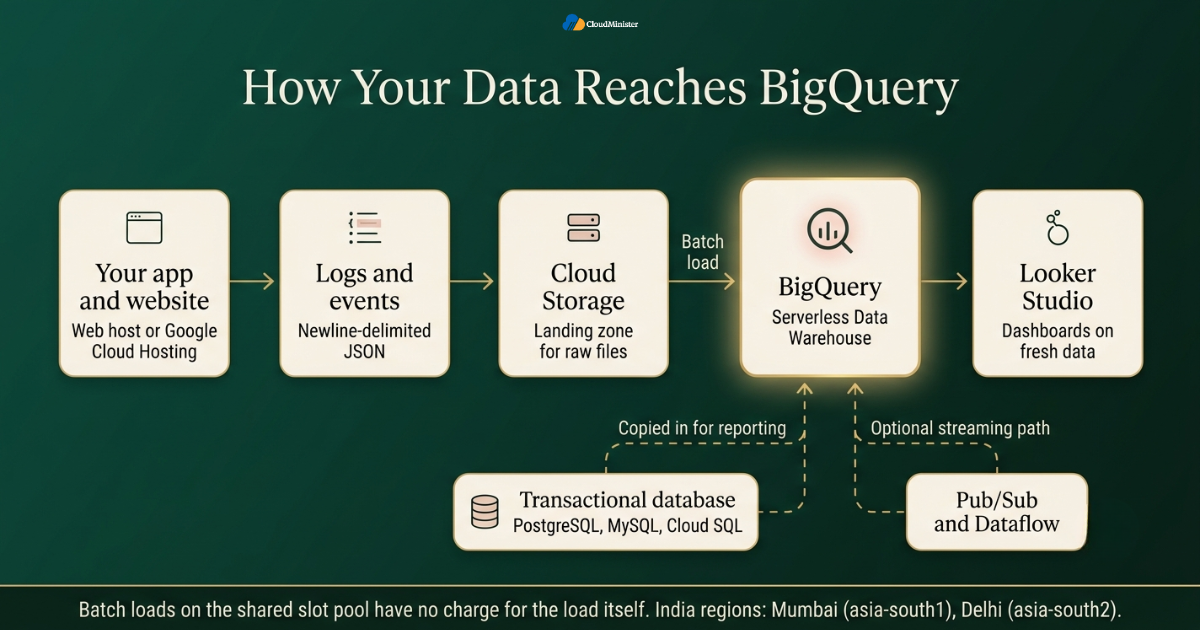
- It is built for analytics, meaning large scans, joins, and aggregations. It does not replace the transactional database that serves your app, so keep customer facing reads and writes in PostgreSQL, MySQL, or Cloud SQL and copy data into BigQuery for reporting.
- BigQuery runs inside Google Cloud Platform, so it connects natively with Cloud Storage, Pub/Sub, Dataflow, Looker Studio, and IAM without extra glue code.
- Teams already running workloads on Google Cloud get the smoothest start, because BigQuery shares identity, billing, and networking with the rest of the platform.
- For a startup the practical result is simple: a Serverless Data Warehouse means no upfront hardware, no cluster to resize at midnight, and a bill that follows actual usage.
- Startups comparing Google Cloud Hosting in India for their application should decide early how that hosting layer will pass data to analytics, because retrofitting event tracking later is slow.
- When you review cloud hosting services in India, remember that analytics is a separate layer from hosting. The application creates data, and a Serverless Data Warehouse is where that data becomes useful.
A Serverless Data Warehouse removes server management, not access management. Give analysts the BigQuery Data Viewer and BigQuery Job User roles instead of Owner or Admin, grant roles at the dataset level where possible, and never store service account keys inside code repositories. One over permissioned account can expose every table in a project, so treat access design with the same care as the SQL itself.
2. Why Startups Need to Understand BigQuery Before They Build on It
The market is moving in this direction quickly. The global cloud data warehouse market is valued at about USD 14.94 billion in 2026, according to Mordor Intelligence, and serverless compute is forecast to grow at a 29.94 percent compound annual rate through 2031. For a founder, that signals a Serverless Data Warehouse is no longer an enterprise only tool. It is becoming a normal starting point for teams of every size.
- Company data usually starts scattered across a payment gateway, a CRM, product events, ad platforms, and support tools. A warehouse gives you one place to join all of it.
- Running heavy reports on your production database slows the app for customers. Moving analytics into a Serverless Data Warehouse keeps reporting away from live traffic.
- BigQuery includes a free tier of 1 TiB of query processing and 10 GiB of storage every month. The BigQuery sandbox lets you start without a credit card or billing account, though sandbox tables expire after 60 days by default, so it suits learning and not production.
- Google Cloud Platform attributes cost to the project that generated it, so every dataset cost can be traced to a project and a team, which makes budgeting simpler than a single shared invoice line.
- Budget conscious founders often search for Affordable Cloud Hosting India and stop at server prices. Add the analytics layer to the calculation early, since a Serverless Data Warehouse that stays inside the free tier costs almost nothing while your data is small.
- Without a plan, teams fall into habits like selecting every column from every table, which quietly multiplies the bytes scanned and the bill.
- Decisions about datasets, naming, and access work best when one person owns them, instead of every engineer creating tables in their own style.
- If a Web Hosting Company in India already runs your website, ask which logs and events can be exported, because that data becomes the raw material for your warehouse.
- Evaluating cloud hosting services in India gets easier once you know your data plan, since storage, bandwidth, and export needs all follow from it.
- Choose the data location early. A dataset location cannot be changed after the dataset is created, and India has BigQuery regions in Mumbai (asia-south1) and Delhi (asia-south2).
- Startups reviewing Google Cloud Hosting in India should note that BigQuery is a separate Google Cloud service with its own meters, so plan for it as its own line item.
Before you standardize on any warehouse design, load one real dataset, such as a month of orders or product events, and run your five most common business questions against it. A Serverless Data Warehouse rewards teams that measure bytes scanned on real queries early, and it also gives whoever hosts your application, such as a Web Hosting Company in India, a clear picture of the traffic your product will send into the analytics layer.
3. How BigQuery Works: Architecture in Plain Language
You do not need to memorize internals to use BigQuery, but a basic mental model makes every cost and performance decision easier.
| Component / Concept | Technical Function & Description | Cost & Architectural Impact |
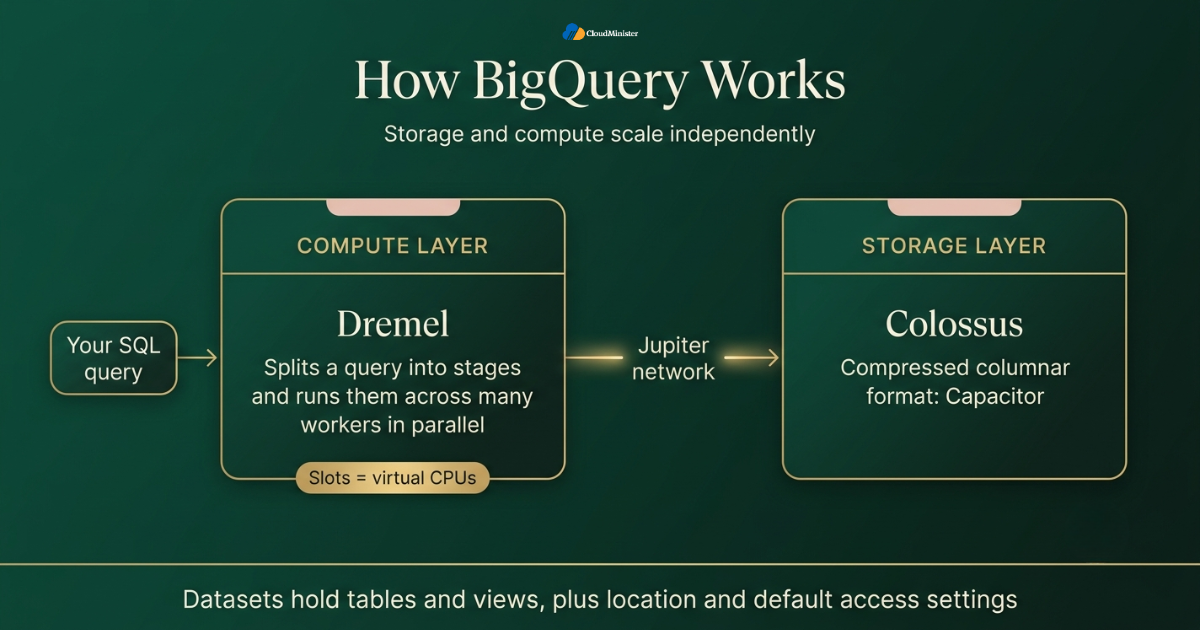
| Storage Layer (Colossus & Capacitor) | Tables are stored in Colossus, Google’s distributed file system, using Capacitor (a compressed columnar format). | decouples storage from compute, allowing data volume to scale independently from query processing. |
| Compute Layer (Dremel) | Distributed execution engine that breaks SQL queries into stages and executes them in parallel across workers. | Enables fast execution over massive datasets without managing physical servers or infrastructure. |
| Network Layer (Jupiter) | High-bandwidth network fabric connecting the storage layer (Colossus) and compute layer (Dremel). | Sustains high-throughput data transfer between storage and compute, enabling independent scaling of both layers. |
| Execution Units (Slots) | Virtual CPUs used to run SQL statements. | On-demand: Draws from a shared worker pool (billed per bytes scanned). Capacity: Requires reserving dedicated slot capacity. |
| Datasets & Tables | Logical containers for tables and views that enforce geographical location and default access controls. | Provides security boundaries and determines regional data residence for regulatory compliance. |
| Project Billing Structure | The GCP project context in which every BigQuery job runs. | The executing project pays for compute; a well-structured project hierarchy acts as a direct cost attribution report. |
| Data Recovery (Time Travel & Fail-Safe) | Time Travel: Query/restore historical table states within a configurable window (2–7 days, default 7). Fail-Safe: An extra 7-day retention period for emergency recovery via Google Cloud support. | Protects against accidental data loss or corruption without requiring manual snapshot backups. |
| Serverless Operational Model | Fully managed data warehouse architecture requiring no manual index tuning, vacuuming, or cluster maintenance. | Eliminates database administration overhead; cost control is managed via efficient table design and query optimization. |
| Architectural Model for Teams | Decoupling storage resources from execution compute. | Allows small teams and growing deployments to evaluate, scale, and price storage and compute independently. |
Related Reading: EKS vs GKE vs AKS
The gap between a healthy Serverless Data Warehouse setup and a costly one is rarely the SQL dialect or the dashboard tool. It is whether the team understands that BigQuery bills for data read, not for rows returned. Teams that design tables around partition and cluster columns from day one, and review their most expensive queries every week, keep bills predictable even when data grows tenfold.
4. On-Demand vs Editions: The Core Differences Every Startup Should Know
BigQuery gives you two ways to pay for compute. Choosing the wrong one is the most common early budgeting mistake in a Serverless Data Warehouse, so this section compares them side by side. All prices are US region list prices at the time of writing and can differ in other regions.
4.1 Pricing Model: Pay Per Byte or Pay Per Slot
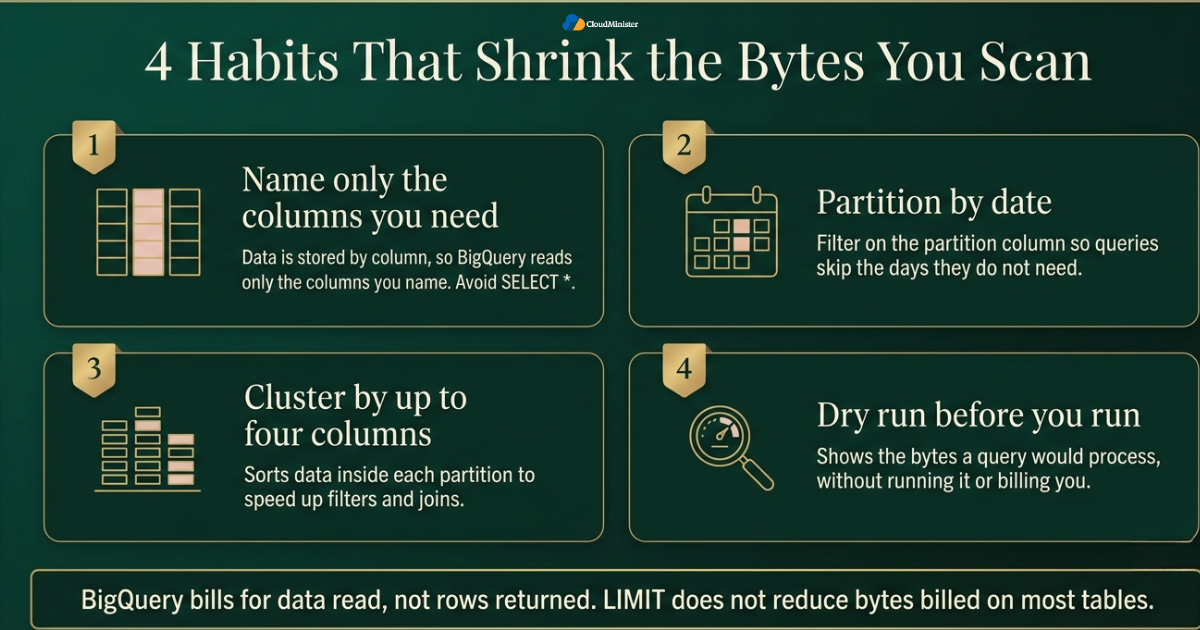
- On-demand pricing charges about USD 6.25 per TiB of data scanned, and the first 1 TiB each month is free.
- Capacity pricing uses BigQuery Editions, which are Standard, Enterprise, and Enterprise Plus. You pay per slot-hour, with pay as you go list prices of about USD 0.04 for Standard and USD 0.06 for Enterprise, and optional commitments for lower rates.
- Storage costs roughly USD 0.02 per GiB per month for active logical storage. Tables not modified for 90 days move to long-term storage automatically at about half that price.
- Google Cloud Platform publishes region specific prices, so a dataset in Mumbai can cost slightly differently from one in the United States. Always price the exact region you plan to use.
- Teams weighing Affordable Cloud Hosting India should treat the free tier as a budget cushion and not a permanent plan, and should forecast the point where usage will exceed it.
- Streaming inserts, BI Engine, and BigQuery ML are billed separately from query cost, so check each one in your billing report.
- When you compare cloud hosting services in India against a full Google Cloud Hosting in India setup, list warehouse charges separately, so a low server price does not hide a large analytics bill.
Related Reading: Cloud pricing model types
| Factor | On-demand | Editions (capacity) |
| Billing unit | TiB of data scanned | Slot-hours used or reserved |
| Best for | Early stage and unpredictable workloads | Steady, high volume workloads |
| Cost control | Maximum bytes billed and quotas | Maximum slots and reservations |
| Setup effort | None | Reservations and assignments |
4.2 Cost Predictability: Which Model Fits Which Stage
- Early stage teams usually do better on on-demand pricing, because nothing is billed when nobody runs a query.
- Capacity pricing becomes attractive when scanning is heavy and steady. As a rough illustration at list prices, a 100 slot Enterprise reservation held for a full month costs about USD 4,380, which equals roughly 700 TiB of on-demand scanning. Below that volume, on-demand is usually cheaper.
- With Editions, set a maximum slot limit so a runaway query cannot consume unlimited capacity.
- With on-demand pricing, set maximum bytes billed so any query that would scan too much fails instead of billing you.
- Review the choice every quarter. A workload that fit on-demand pricing in year one may cross the break-even point in year two.
- A Serverless Data Warehouse priced per byte behaves like a taxi meter, and one priced per slot behaves like a monthly car rental. Both are fair, and the right one depends on how often you drive.
- Affordable Cloud Hosting India planning works the same way. Start with the flexible option, then commit only after your usage pattern is clear.
- Many plans for cloud hosting services in India also offer flexible or committed terms, so the same break-even logic applies to your servers.
4.3 Performance and Scaling
- BigQuery scales compute automatically, so there is no cluster to resize before a busy campaign or a month end report.
- Partition pruning and clustering reduce the data each query reads, which makes queries both cheaper and faster.
- Materialized views precompute repeated aggregations, and BI Engine speeds up dashboard queries with in-memory caching.
- On-demand queries share a large slot pool with fair scheduling, while capacity pricing gives you dedicated slots for predictable performance.
- A Serverless Data Warehouse does not remove the need for good design. Partitioning and clustering still decide whether a query takes two seconds or two minutes.
- Pairing BigQuery with other Google Cloud Platform tools such as Looker Studio gives dashboards a direct connection to fresh data.
- Hosting speed matters too. If your dashboards are embedded in a web app, choose Google Cloud Hosting in India or another host that sits close to your users.
4.4 Operational Effort: Where the Serverless Model Saves Time
- There is nothing to provision, patch, or vacuum, which matters when your whole data team is one person.
- Batch load jobs from Cloud Storage do not incur a charge for the load itself when they use the shared slot pool. You pay only for the storage the data then occupies.
- Supported load formats include CSV, JSON, Avro, Parquet, and ORC. Columnar formats such as Parquet and Avro keep types intact and usually load more cleanly than CSV.
- For near real time data, the Storage Write API streams rows into a table, and it is billed by the volume ingested.
- The BigQuery Data Transfer Service and scheduled queries automate recurring imports and reports without a separate scheduler.
- Google Cloud also offers Dataflow and Pub/Sub for streaming pipelines, though many startups begin with plain batch loads and add streaming later.
- Because a Serverless Data Warehouse has no servers to maintain, one analyst can run a complete reporting stack. That saved labor is a real part of the budget for teams that need Affordable Cloud Hosting India and cannot afford a full time database administrator.
- A provider of cloud hosting services in India usually manages the application side, so agree early on who sets up log exports and who owns the load jobs.
Related Reading: IoT cloud integration
4.5 Cost and Provisioning: What Changes When You Also Rent Hosting
- A Serverless Data Warehouse is only one line on your infrastructure bill. Your website, APIs, and event collectors still need hosting, so compare the total, not one service in isolation.
- When you compare cloud hosting services in India, ask whether the plan can send data to Google Cloud services, or whether it only offers isolated virtual servers.
- Teams searching for Affordable Cloud Hosting India should count hosting and warehouse costs together, because a cheap server that produces messy data creates expensive analysis later.
- Ask any Google Cloud Hosting in India provider which Google Cloud regions and services it supports, and whether it can help you connect application data to BigQuery.
- Keep the application and the dataset in nearby regions. Moving large exports across regions or out of Google Cloud can add network egress charges and delay.
- A Web Hosting Company in India that also supports Google Cloud can host your website and connect it to BigQuery, which keeps ownership of the whole data path in one place.
- Ask each provider of cloud hosting services in India for a written list of what is included, such as bandwidth, backups, and support hours, so you can compare plans fairly.
- Whichever route you take, keep Google Cloud project billing and hosting invoices in one spreadsheet, so total data stack cost is visible every month.
- Founders on a tight budget can pair a small hosting plan with the BigQuery free tier, which is a practical form of Affordable Cloud Hosting India for a product still finding its market.
5. BigQuery SQL Guide: Queries Every Startup Should Learn
Every Serverless Data Warehouse speaks SQL, and BigQuery uses GoogleSQL, so it feels familiar to anyone who has written SQL for PostgreSQL or MySQL. The examples below run on Google Cloud Platform and use a small online store dataset called shop. Replace the names with your own tables, and run each statement in the BigQuery console or with the bq command line tool.
5.1 Create a Dataset in an Indian Region
- A dataset groups related tables, and its location is fixed at creation.
- Choosing asia-south1 keeps data in Mumbai, which suits teams and customers based in India.
- If your application servers also sit in Mumbai, for example through Google Cloud Hosting in India, keeping the app and the data in one city reduces latency.
CREATE SCHEMA IF NOT EXISTS shop OPTIONS (location = 'asia-south1'); 5.2 Create a Partitioned and Clustered Table
- Partitioning splits a table by date so queries can skip days they do not need.
- Clustering sorts data inside each partition by up to four columns, which helps filters and joins on those columns.
- A partition expiration deletes old partitions automatically, which controls storage cost.
- A well partitioned table is the single best cost habit for any Serverless Data Warehouse.
CREATE TABLE shop.orders ( order_id STRING, customer_id STRING, order_ts TIMESTAMP, city STRING, amount NUMERIC ) PARTITION BY DATE(order_ts) CLUSTER BY customer_id, city OPTIONS (partition_expiration_days = 730); - Once the table holds real history, you can force every query to include a date filter with a single setting.
ALTER TABLE shop.orders SET OPTIONS (require_partition_filter = TRUE); 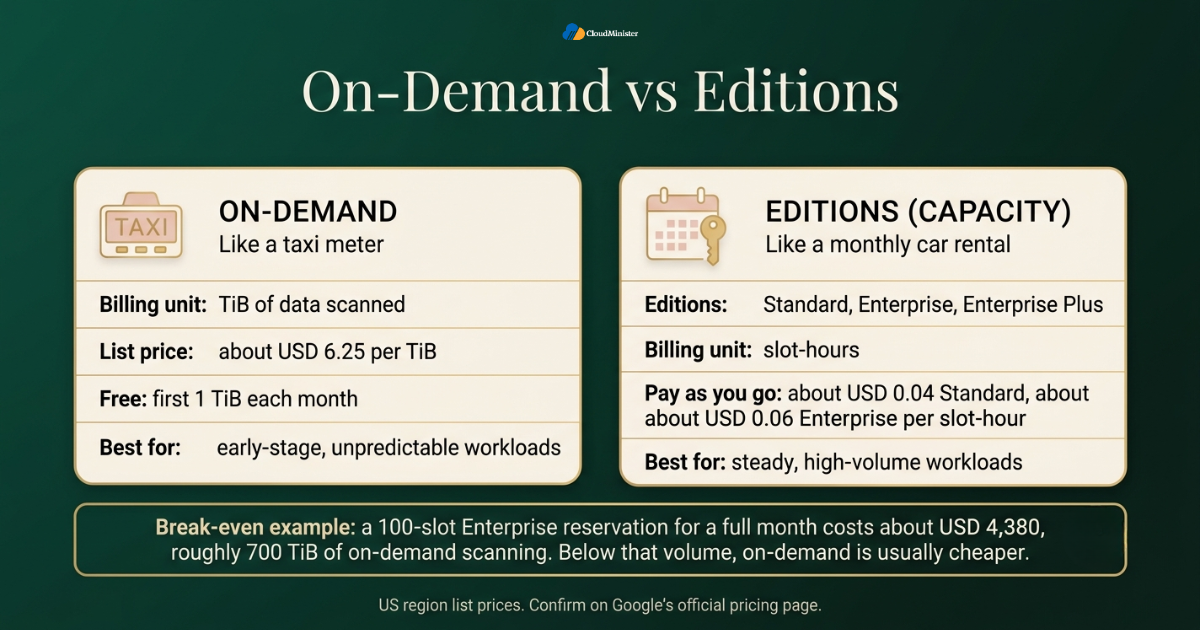
5.3 Write a Cost Aware Query
- Name only the columns you need, and filter on the partition column so BigQuery reads a single month instead of the whole table.
- The query below reads only three columns and only the August 2026 partitions.
SELECT city, SUM(amount) AS revenue FROM shop.orders WHERE DATE(order_ts) BETWEEN '2026-08-01' AND '2026-08-31' GROUP BY city ORDER BY revenue DESC; Use the Preview tab in the BigQuery console to look at table rows. It does not run a query, so it is free. Adding LIMIT to a query does not reduce the bytes billed on most tables, which surprises many new users of a Serverless Data Warehouse.
5.4 Remove Duplicates With QUALIFY
- Event pipelines often deliver the same record twice. QUALIFY filters on a window function without a subquery.
- This query keeps the latest row for each order.
- Deduplication at query time is a good stopgap, but a Serverless Data Warehouse pipeline should also fix duplicates at the source over time.
SELECT order_id, customer_id, order_ts, amount FROM shop.orders WHERE DATE(order_ts) >= '2026-08-01' QUALIFY ROW_NUMBER() OVER ( PARTITION BY order_id ORDER BY order_ts DESC ) = 1; 5.5 Query Nested Data With UNNEST
- BigQuery supports nested and repeated fields, so an order can hold a list of items inside one row.
- Assume a table called shop.orders_nested with order_id and order_ts columns, plus an items column that is an ARRAY of STRUCT values with sku and qty fields. UNNEST turns that list into rows.
SELECT o.order_id, item.sku, item.qty FROM shop.orders_nested AS o, UNNEST(o.items) AS item WHERE DATE(o.order_ts) = '2026-08-15'; 5.6 Load a File From Cloud Storage
- Load raw files into Cloud Storage first, then into BigQuery, so the original data stays available if you need to reload a table.
- The bq tool can detect the schema automatically for quick experiments, though production tables should use a defined schema.
- Cloud Storage is a Google Cloud Platform service with several storage classes, so raw files can stay there cheaply while cleaned data lives in BigQuery.
bq load --source_format=CSV --autodetect --skip_leading_rows=1 \ shop.customers gs://your-bucket/customers.csv 5.7 Estimate Cost Before You Run a Query
- A dry run validates the query and reports how many bytes it would process, without running it or billing you.
- The BigQuery console shows the same estimate in the top right corner of the query editor.
- Make dry runs a team habit, because they let you practice Affordable Cloud Hosting India discipline on the analytics side at no cost.
bq query --use_legacy_sql=false --dry_run \ 'SELECT city, SUM(amount) FROM shop.orders WHERE DATE(order_ts) = "2026-08-15" GROUP BY city' 6. Fitting BigQuery Into Your Hosting and Cloud Plan in India
India is a strong market to build in. Gartner forecasts that end user spending on public cloud services in India will grow 28.1 percent to USD 17.5 billion in 2026, up from USD 13.7 billion in 2025. That growth is pulling more local teams toward managed data tools, and a Serverless Data Warehouse is often the first one they adopt.
- Pick the dataset location deliberately. Mumbai (asia-south1) and Delhi (asia-south2) keep analytics data inside India, which helps with latency for Indian teams and with internal data residency preferences.
- Data location is a design choice, not a legal guarantee. Review your duties under India’s Digital Personal Data Protection Act, 2023 with a qualified advisor before loading personal data.
- Your product still needs somewhere to run. Web servers, APIs, and event collectors usually sit on separate hosting, and a Web Hosting Company in India that already manages your site can advise on how that layer should send data to BigQuery.
- If your team is comparing Google Cloud Hosting in India, ask how that hosting layer connects to Cloud Storage, Pub/Sub, and BigQuery, and where the data travels between them.
- Founders reviewing cloud hosting services in India should judge the full picture, meaning hosting cost plus warehouse cost, instead of a single plan price.
- Affordable Cloud Hosting India does not have to mean weak infrastructure. It means right sizing: start small, measure real usage, and scale each layer only when the numbers justify it.
- Use Google Cloud Platform tools such as Cloud Storage as the landing zone for raw files, and load from there into BigQuery on a schedule.
- Keep a simple diagram that shows how data moves from your application to the Serverless Data Warehouse, so new team members can follow the path in minutes.
- Ask your Web Hosting Company in India to export access logs and application events in a structured format such as newline delimited JSON, so loading them into BigQuery stays simple.
- Compare Google Cloud Hosting in India plans by region coverage, support hours, and how clearly the provider explains billing for Google Cloud services.
- Providers of cloud hosting services in India differ widely, so ask each one to explain backups, bandwidth, and scaling in writing.
- A Serverless Data Warehouse pairs well with a modest hosting plan, because the heavy analytical work happens in the warehouse and not on your application server.
- Google Cloud services such as Cloud Run and Compute Engine can also host application code, so some teams keep app and analytics on one platform.
- For founders who care about Affordable Cloud Hosting India, the cheapest path is usually a small plan, a free tier warehouse, and a monthly review of real usage.
Build Your Data Stack on Google Cloud Hosting
Planning to run your application close to your analytics layer? Explore CloudMinister’s Google Cloud Hosting solutions and get a setup that connects smoothly with services like BigQuery, Cloud Storage, and Pub/Sub.
7. Cost Control: Keeping a Serverless Data Warehouse Bill Predictable
Cost surprises in BigQuery almost never come from storage. They come from queries that read far more data than the person running them expected. Every control below is built into the platform.
- Set maximum bytes billed on queries. A query that would exceed the limit fails without charge instead of running up a bill.
- Apply custom query quotas per project or per user to cap daily scanning.
- Create budget alerts in Cloud Billing so finance and engineering are both warned at set thresholds.
- Separate development and production into different projects, and set a default table expiration in development datasets so test data cleans itself up.
- Require a partition filter on large partitioned tables so nobody scans the full history by accident.
- Name the columns you need. Avoid SELECT *, because BigQuery bills for every column it reads.
- Use approximate functions such as APPROX_COUNT_DISTINCT when an exact count is not required. They use less compute, which helps most under capacity pricing.
- Cached results are free. BigQuery reuses the result of an identical query for about 24 hours when the underlying data has not changed.
- A Serverless Data Warehouse bills quickly and silently, so alerts matter more than dashboards. Set them before the first heavy query.
- Google Cloud Platform lets you export detailed billing data into BigQuery itself, so you can analyze cost with the same SQL skills you use for business data.
- Review warehouse spend next to the invoice for cloud hosting services in India every month, so total infrastructure cost stays visible.
- This discipline is the core of Affordable Cloud Hosting India: cost control comes from habits and limits, not from cutting features.
- Teams working with a Web Hosting Company in India should also ask for bandwidth and storage reports, so hosting spend is tracked with the same care.
- Include Google Cloud Hosting in India charges, if any, in the same review so nothing sits outside the budget.
- Set the rules once and let a Serverless Data Warehouse enforce them through quotas, limits, and expirations instead of relying on memory.
- Review the INFORMATION_SCHEMA job views every week to find the users and queries that scan the most data. The query below lists billed usage by user over the last seven days.
SELECT user_email, SUM(total_bytes_billed) / POW(1024, 4) AS tib_billed FROM `region-asia-south1`.INFORMATION_SCHEMA.JOBS_BY_PROJECT WHERE creation_time >= TIMESTAMP_SUB(CURRENT_TIMESTAMP(), INTERVAL 7 DAY) AND job_type = 'QUERY' GROUP BY user_email ORDER BY tib_billed DESC; Related Reading: Cloud cost governance policy guide.
Cost governance works best as a weekly habit and not as a rescue project after a large bill. A team running a Serverless Data Warehouse on Google Cloud Platform should name an owner for the billing report, agree on a maximum bytes billed default, and review the top ten most expensive queries in a fifteen minute meeting. That small routine catches most problems within days.
8. Common Mistakes Startups Make With BigQuery
Even careful teams repeat the same handful of errors. Most are easy to prevent once you know them.
- Treating BigQuery like a transactional database and sending single row updates from the application all day.
- Loading everything into one giant unpartitioned table, then paying to scan the full history on every query.
- Running SELECT * in dashboards that refresh every few minutes, so each refresh reads every column again.
- Ignoring dataset location until data is already loaded, then discovering it must be copied into a new dataset.
- Handing Owner or Admin roles to everyone because it is faster than designing access.
- Forgetting table expiration in test datasets, which leaves old experiments in storage indefinitely.
- Reserving slots too early. Paying for capacity before usage is steady means paying for idle compute.
- Never revisiting the pricing model after the business grows, even though the break-even point moves.
- Assuming a Serverless Data Warehouse is automatically cheap. It is cheap when used well, and expensive when queries are careless.
- Leaving application logs in different formats on different servers, which makes consistent loading hard, even for a capable Web Hosting Company in India.
- Choosing hosting on price alone. Comparing cloud hosting services in India without checking backups, support, and export options can cost more later.
- Skipping a budget for the data layer while shopping for Affordable Cloud Hosting India. The cheapest server plan does not help if analytics costs are unplanned.
- Creating Google Cloud Platform projects without naming rules, which makes it hard to know which project owns which spend.
- Forgetting to document how Google Cloud Hosting in India servers send data to BigQuery, so only one engineer understands the pipeline.
- Copying production data into a Serverless Data Warehouse without checking which columns hold personal data first.
Prefer attached service accounts or workload identity federation over downloaded key files, require multi-factor authentication for human users, and review who holds project level roles every quarter. A fast, well tuned Serverless Data Warehouse is still exposed if one credential leaks.
9. Security and Governance for Your Data Stack
Governance sounds heavy for a small team, but a few habits set early save painful cleanups later.
- Use column level security with policy tags for sensitive fields such as phone numbers or government identifiers.
- Use row level access policies when different teams should see different rows in the same table.
- Share aggregated results through authorized views so people can query summaries without access to raw tables.
- Data is encrypted at rest and in transit by default, and customer managed encryption keys are available if your policy requires them.
- Cloud Audit Logs record BigQuery activity, and data access logs for BigQuery are on by default, which helps with investigations and reviews.
- Keep a short register of which tables hold personal data, who owns them, and how long they are retained.
- A Web Hosting Company in India that hosts your application should be part of this review, because the application layer is where much of your personal data first appears.
- Give each dataset one named owner, and record which Google Cloud project it belongs to.
- Security duties are shared. For Google Cloud Hosting in India setups, confirm which tasks the provider handles and which stay with your team, such as access reviews.
- When reviewing cloud hosting services in India, check backup, patching, and firewall responsibilities in writing.
- Governance also protects budget, which is why Affordable Cloud Hosting India and good access control belong in the same conversation.
- A Serverless Data Warehouse should hold only the data you need. Drop columns you never analyze, because unused personal data is a risk without a benefit.
- Test recovery once by restoring a table with time travel, so the first attempt is not during a real incident in your Serverless Data Warehouse.
Checklist: Readiness Before Trusting a Serverless Data Warehouse With Production Data
- Dataset location chosen and documented
- Separate projects for development and production
- Roles granted at dataset level with no shared admin accounts
- Maximum bytes billed and budget alerts configured
- Large tables partitioned, with partition filters required
- Sensitive columns protected with policy tags or authorized views
- Ownership assigned for weekly cost and access review
10. Measuring Whether Your BigQuery Setup Is Working
A working setup is one you can measure. These indicators tell you whether the design still fits the business.
- Track bytes billed per user and per project each week, and watch for sudden jumps.
- List the ten most expensive queries every month and fix the worst two.
- Measure the share of large tables that are partitioned. Anything above a few gigabytes without partitioning deserves a review.
- Watch dashboard load times. Slow dashboards often point to missing materialized views or unfiltered queries.
- Check data freshness in your Serverless Data Warehouse, meaning the delay between an event happening and appearing in a table.
- If you use Editions, review slot utilization to see whether reservations are too large or too small.
- Count unused tables, and delete or expire them so storage stays lean.
- Compare the monthly Serverless Data Warehouse bill with your hosting invoice, and see which one is growing faster.
- Confirm with your Web Hosting Company in India that tracking scripts and server logs still send the events your reports depend on.
- Track cost per report or per active customer, since that ratio shows whether Affordable Cloud Hosting India goals are being met.
- Review cloud hosting services in India usage quarterly, including bandwidth and storage, to see whether the plan still fits.
- Check that servers under Google Cloud Hosting in India still send events to BigQuery after each release.
- A healthy Serverless Data Warehouse shows cost growing more slowly than data and usage.
- Keep a change log for datasets, roles, and pricing model decisions on Google Cloud Platform, so you can explain later why a choice was made.
11. Choosing the Right Partner Around Your Data Stack
BigQuery is only one part of the picture. The hosting layer, the network, and the people who support them all affect how smoothly your data flows.
- A dependable Web Hosting Company in India that already understands your application can advise on how your servers, databases, and event collectors should feed a Serverless Data Warehouse without adding needless complexity.
- Look for a partner that can discuss Google Cloud Platform services and your existing hosting in the same conversation, instead of treating them as separate topics.
- Ask for real examples of how they have connected application data to a cloud warehouse, not just a list of server plans.
- Compare quotes for cloud hosting services in India using your own workload, including traffic, storage, and expected data growth, instead of a generic benchmark.
- A partner offering Google Cloud Hosting in India should be able to explain regions, networking, and billing in plain language.
- A second Web Hosting Company in India is useful as a price and architecture sanity check, though splitting one workload across two providers usually adds cost and support friction.
- Teams hunting for Affordable Cloud Hosting India should ask how the plan scales, because a low entry price means little if upgrades are expensive.
- Ask a Web Hosting Company in India how it handles incident response and support hours, since data pipelines break at inconvenient times.
- A Web Hosting Company in India with clear documentation is easier to work with than one that relies on verbal answers.
- Providers offering Google Cloud Hosting in India should also explain billing separation between hosting and Google Cloud services such as BigQuery.
- Prefer partners who treat Affordable Cloud Hosting India as a design goal, meaning they explain how to scale gradually instead of pushing the largest plan.
- A partner familiar with a Serverless Data Warehouse can point out when logs, events, or exports need a better structure before loading.
- Confirm that cloud hosting services in India plans include backups and monitoring, since those protect the data that later reaches your warehouse.
When you compare partners, bring one real question from your own data, such as how your daily order events should reach BigQuery. The quality of the answer tells you more about a Web Hosting Company in India than any brochure, and it shows quickly whether the team understands Google Cloud Platform and analytics or only sells servers.
11.1 What to Ask Before You Sign
- Which regions and services does the provider support for Google Cloud Hosting in India, and can they document the setup for your team?
- Is the plan a fit for growing workloads, and how does pricing change when you scale?
- What monitoring, backup, and support hours are included by default?
- Can the provider show a reference architecture for sending application data to a Serverless Data Warehouse?
- How does the provider explain cloud hosting services in India to non technical founders, and is that explanation consistent with the quote?
- Does the Web Hosting Company in India give clear answers on data location and security responsibilities?
- Does the plan support Affordable Cloud Hosting India goals through flexible upgrades and no forced long contracts?
- Can the provider explain how its setup works with Google Cloud Platform identity and billing?
Conclusion
A Serverless Data Warehouse gives startups something rare: enterprise grade analytics without an enterprise sized team. BigQuery fits that role well because it removes infrastructure work, offers a real free tier, and rewards good SQL habits with lower bills. The teams that get the most from it treat table design, cost controls, and access rules as part of the first week of work, not as cleanup for later. Hosting through Google Cloud Hosting in India or through cloud hosting services in India is a separate decision from choosing a warehouse, but the two must be planned together.
Around the warehouse, the same discipline applies. Choose a region on purpose, match your pricing model to your real usage, and count hosting and analytics costs together. Whether you lean on Google Cloud Platform alone or pair it with a trusted Web Hosting Company in India, a Serverless Data Warehouse should stay simple, and the goal is the same: a data stack that answers business questions quickly and follows Affordable Cloud Hosting India principles as you grow.
Need Help Planning Your Cloud and Data Setup?
Not sure how your hosting should feed data into BigQuery, or which plan fits your workload and budget? Talk to the CloudMinister team and get clear, practical answers for your project.
Key Takeaways
- A Serverless Data Warehouse such as BigQuery removes server management, so startups can focus on SQL and decisions.
- BigQuery bills for data read, so partitioning, clustering, and naming columns matter more than almost any other tuning step.
- Start with on-demand pricing, and move to Editions only when scanning becomes heavy and steady.
- Set maximum bytes billed, budget alerts, and partition filters before the first large query is run.
- Choose the dataset location deliberately, and remember that it cannot be changed after creation.
- Compare cloud hosting services in India, Google Cloud Hosting in India, and Affordable Cloud Hosting India using your full workload, and count hosting and warehouse spend together.
- Involve a capable Web Hosting Company in India early, so the application layer and the Serverless Data Warehouse are designed as one system.
- Google Cloud Platform projects give you a natural unit for billing, access, and ownership, so organize them early.
Frequently Asked Questions
What is a Serverless Data Warehouse, and is BigQuery one?
A Serverless Data Warehouse is an analytics database where the provider manages all servers, scaling, and maintenance, so you only load data and run SQL. BigQuery is a well known example, and it belongs to the wider Google Cloud Platform product family.
Is BigQuery free for startups?
BigQuery has a permanent free tier of 1 TiB of query processing and 10 GiB of storage each month. Small teams can stay inside it for a long time, and the sandbox lets you begin without a credit card, though sandbox tables expire after 60 days by default. If your product runs on servers from a Web Hosting Company in India, the warehouse bill stays separate from that hosting bill.
How much does a BigQuery query cost?
Under on-demand pricing you pay about USD 6.25 per TiB scanned in US regions, after the first free TiB each month. Cost depends on the columns and partitions your query reads, so a query that reads 10 GiB costs a small fraction of one that reads 1 TiB. Server hosting, including Google Cloud Hosting in India, is usually billed separately from these query charges. A Serverless Data Warehouse priced this way rewards careful SQL.
Should a startup choose on-demand pricing or Editions?
Most early stage startups should begin with on-demand pricing, because it costs nothing when unused and needs no setup. Editions make sense once scanning is heavy and steady, and comparing your monthly TiB scanned against slot-hour cost tells you when to switch.
Can BigQuery replace my application database?
No. BigQuery is built for analytics, meaning large scans and aggregations. Keep your live application data in a transactional database, and copy it into your Serverless Data Warehouse for reporting.
How does hosting choice affect a BigQuery project?
Your application, APIs, and event collectors run on separate hosting and send data into BigQuery, so latency, region choice, and network cost all matter. A Web Hosting Company in India or a provider of cloud hosting services in India can help design that path, and providers of Google Cloud Hosting in India can also explain how their setup connects to Google Cloud Platform services. Teams watching budgets often start with Affordable Cloud Hosting India and scale as data grows.
Where should a startup in India store BigQuery data?
Mumbai (asia-south1) and Delhi (asia-south2) are the BigQuery regions in India. Choose one when you create the dataset, since the location cannot be changed later, and confirm data handling duties with a qualified advisor. A Serverless Data Warehouse in an Indian region works well alongside application hosting through Google Cloud Hosting in India.