


Picking an inference engine is one of the first real decisions after you rent or buy a GPU server, and it shapes speed, cost, and stability for months. This vLLM vs Ollama vs TGI guide explains how each engine schedules requests, manages the KV cache, and handles Multi-GPU deployments in 2026. vLLM suits busy production APIs, Ollama suits simple local and small team serving, and TGI is still usable but is now in maintenance mode. You will also learn how to size memory, read interconnect limits, set up GPU Monitoring, and judge the best GPU cloud hosting for your workload, including where a Web Hosting Company in India that offers GPU Servers for AI fits into the plan.
Every team that moves a language model from a notebook to a real server hits the same wall. The model loads, a single prompt works, and then ten users arrive at once and everything slows to a crawl. The model did not change. The serving layer did, and that is exactly why the vLLM vs Ollama vs TGI question matters so much. The engine decides how requests are batched, how GPU memory is spent, and whether a second or fourth card actually helps. A rushed choice usually shows up later as a Multi-GPU setup that costs a lot and runs no faster than one card. Teams hunting for the best GPU cloud hosting in India often compare card specs first, yet the engine decides how much of that hardware they can actually use.
Most disappointing results do not come from the GPU itself. They come from mismatched expectations. Some teams pick an engine built for laptops and expect it to serve hundreds of users. Others deploy a heavy serving stack for a model that one card could have handled alone. A clear vLLM vs Ollama vs TGI comparison removes most of that guesswork, because each engine was designed for a different job, and each handles Multi-GPU work in a different way. Teams also forget that the engine is only part of the picture. The hosting layer, such as the Web Hosting Company in India you pick, the links between cards, and the quality of GPU Monitoring all decide whether the setup stays healthy under real traffic.
This guide stays practical and uses plain language. You will see how each engine works, where it fits, how Multi-GPU parallelism really behaves, how much memory a model truly needs, and which numbers to watch once traffic arrives. We also cover cost, security, common mistakes, and a simple thirty day plan. Whether you are testing your first model or running a busy API on GPU Servers for AI, this vLLM vs Ollama vs TGI walkthrough will help you pick with confidence and fewer surprises, and it will help you judge the best GPU cloud hosting for your project.
Table of Content
- 1. What an LLM Inference Engine Actually Does on a GPU Server
- 2. Why the Engine Choice Matters More on Multi-GPU Servers
- 3. vLLM Explained: PagedAttention, Continuous Batching and Multi-GPU Parallelism
- 4. Ollama Explained: Simple Local Serving and Its Multi-GPU Behavior
- 5. TGI Explained: Hugging Face Serving and What Maintenance Mode Means
- 6. The Three Inference Engines Side by Side
- 7. Multi-GPU Parallelism Basics: Tensor, Pipeline, Data and Expert
- 8. Sizing GPU Memory for Weights and KV Cache
- 9. Interconnects and Hardware Choices for Multi-GPU Serving
- 10. Throughput, Latency and Concurrency: What to Measure
- 11. GPU Monitoring for Inference Servers
- 12. Cost and Capacity Planning for Multi-GPU Inference
- 13. Security and Reliability for Inference Servers
- 14. Common Mistakes in Multi-GPU Inference Deployments
- 15. Choosing a Web Hosting Company in India for GPU Inference
- 16. A Practical 30 Day Plan to Get Started
- Key Takeaways
- Conclusion
- Frequently Asked Questions
1. What an LLM Inference Engine Actually Does on a GPU Server
An inference engine is the software layer between your model weights and your users, whether it runs on a laptop or on GPU Servers for AI. It loads the model into GPU memory, accepts requests over an API, decides which requests run together, and manages the memory that grows as each conversation gets longer. In any vLLM vs Ollama vs TGI discussion, this scheduling and memory work matters more than raw model quality, because two engines serving the same model can show very different speed and cost. The work also splits into two phases. During prefill, the engine reads the whole prompt in one pass, which keeps the GPU busy with math. During decode, it produces one token at a time, which is limited mostly by how fast the GPU can read memory. Once a model spans several cards, Multi-GPU communication adds a third factor on top of both.
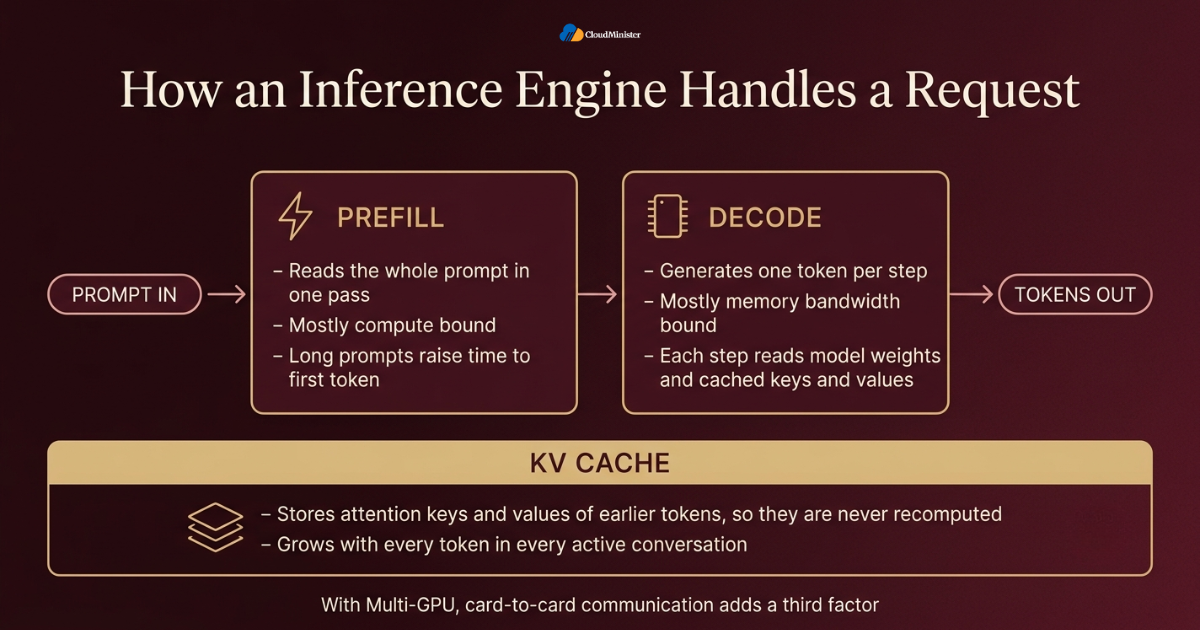
- Prefill processes every prompt token in parallel and is mostly compute bound, so long prompts raise the time to first token.
- Decode generates one token per step and is mostly memory bandwidth bound, because each step reads the model weights and the cached keys and values.
- The KV cache stores the attention keys and values of earlier tokens so the engine never recomputes them, and it grows with every token in every active conversation.
- Continuous batching lets new requests join a running batch at every step instead of waiting for the whole batch to finish, which keeps the GPU busy and makes each hour on the best GPU cloud hosting plan you rent more productive.
- Static batching wastes capacity, because short requests sit idle until the longest request in the batch completes.
- The engine also owns the API layer, tokenization, token streaming, and the logic that splits a model across cards in a Multi-GPU setup.
- Quantization, speculative decoding, and prefix caching are optional features that change speed and memory use, and support differs between engines, which is a recurring theme in every vLLM vs Ollama vs TGI comparison.
Before comparing engines, write down your real workload: the number of concurrent users, the typical prompt length, the typical answer length, and the latency your product can tolerate. These four numbers settle most of the vLLM vs Ollama vs TGI debate before any benchmark is run, and they also help you shortlist the best GPU cloud hosting in India.
2. Why the Engine Choice Matters More on Multi-GPU Servers
The business case for choosing well is growing fast. A Mordor Intelligence market analysis updated with January 2026 data estimates that the LLM infrastructure GPU market will rise from 62.84 billion US dollars in 2025 to 73.41 billion in 2026 and reach 161.88 billion by 2031. The same analysis expects inference GPUs to be the fastest growing workload segment, at a 17.88 percent compound annual rate through 2031. More money is flowing into serving, not only training, which makes an efficient engine a direct cost lever. This is why a vLLM vs Ollama vs TGI decision deserves real testing, especially on Multi-GPU servers where one wrong setting can leave very expensive cards waiting on each other. Even the best GPU cloud hosting cannot rescue a poorly tuned engine.
- Adding a second GPU does not double speed. Tensor parallel Multi-GPU serving adds communication in every layer, so the gain depends on the link between the cards.
- A model that fits on one GPU is usually faster and cheaper on that single GPU, with extra cards used as replicas for more users.
- A model that does not fit on one GPU must be split, and the splitting method differs sharply across the three engines.
- In the vLLM vs Ollama vs TGI lineup, vLLM offers tensor, pipeline, data, and expert parallelism, Ollama splits layers across cards, and TGI shards tensors across cards.
- A wrong engine choice shows up as idle GPUs, out of memory crashes, or slow answers under load, not as a clear error message, although GPU Monitoring usually reveals the pattern quickly.
- Hardware and engine choices are linked, because an engine that leans on fast card to card links performs poorly on a server without them, so the best GPU cloud hosting in India for your project depends partly on the engine you pick.
- Rented GPU Servers for AI make mistakes expensive, because every idle hour on a multi card server is paid for in full, so a careful vLLM vs Ollama vs TGI test pays for itself.
3. vLLM Explained: PagedAttention, Continuous Batching and Multi-GPU Parallelism
vLLM is an open source inference engine released under the Apache 2.0 license. It began at the Sky Computing Lab at UC Berkeley and became popular because of PagedAttention, a method that stores the KV cache in small fixed size blocks instead of one large continuous slab. This reduces wasted memory and lets the engine fit more concurrent requests on the same card. In most production focused vLLM vs Ollama vs TGI comparisons, vLLM leads on concurrency and on Multi-GPU flexibility. It starts with a single command and exposes an OpenAI compatible API, so existing client code usually works after a simple change of the base URL. Teams that run it on GPU Servers for AI get the most value when the hardware matches the model size. Pairing it with the best GPU cloud hosting plan you can afford gives it the memory and links it needs.
- PagedAttention maps each sequence to KV cache blocks through a block table, so memory is allocated on demand instead of being reserved for the longest possible answer.
- Continuous batching with chunked prefill mixes new prompts and ongoing decoding in the same step, which keeps latency steady under mixed traffic and is one reason it often tops throughput charts in a vLLM vs Ollama vs TGI test.
- Prefix caching reuses KV cache blocks for shared prompt beginnings, such as a long system prompt repeated across many requests.
- For Multi-GPU work, the flags –tensor-parallel-size, –pipeline-parallel-size, and –data-parallel-size control how the model and its replicas are laid out, and expert parallelism exists for mixture of experts models.
- On one node vLLM can run its workers through its own multiprocessing, and for several nodes it commonly uses Ray.
- It supports popular quantized formats such as AWQ, GPTQ, and FP8, which cut weight memory and can raise throughput.
- It serves Prometheus metrics on the /metrics path of its API server, which feeds directly into GPU Monitoring dashboards.
- It runs mainly on NVIDIA GPUs and also supports AMD and other accelerators, so check the support list for your exact card and driver, and ask each best GPU cloud hosting in India provider which driver versions it supports.
Example Multi-GPU launch for a four card server:
vllm serve meta-llama/Llama-3.1-70B-Instruct --tensor-parallel-size 4 --max-model-len 16384 --gpu-memory-utilization 0.90 4. Ollama Explained: Simple Local Serving and Its Multi-GPU Behavior
Ollama is a free, MIT licensed tool built to make running models almost effortless. It grew out of the llama.cpp ecosystem, uses GGUF model files, and gives you simple commands such as ollama pull and ollama run. For developers, students, and small teams, it is often the fastest path from nothing to a working local model. In a vLLM vs Ollama vs TGI decision, Ollama wins on simplicity and loses on large scale concurrency. Its Multi-GPU behavior also differs from what many people expect, which is why this section spends extra time on it. Small teams often try it first on a rented server from a Web Hosting Company in India before they invest in bigger hardware, and a single card instance from the best GPU cloud hosting in India is usually enough for that first test.
- Ollama exposes a REST API on port 11434 by default, with OpenAI compatible endpoints under the /v1 path.
- A Modelfile lets you set parameters, system prompts, and templates, which makes model variants easy to share inside a team and explains why many people begin their vLLM vs Ollama vs TGI testing here.
- When a model fits on a single GPU, Ollama loads it there. When it does not fit, Ollama spreads the model across the available GPUs.
- That spread is a layer split, so the cards work in sequence like a relay. It lets a big model load, but it does not behave like tensor parallel Multi-GPU scaling.
- Setting OLLAMA_SCHED_SPREAD=1 asks the scheduler to spread a model across all GPUs, which helps with memory but is not a guaranteed speed gain.
- For more throughput, many teams run one Ollama instance per GPU using CUDA_VISIBLE_DEVICES, then place a load balancer such as Nginx in front. That pattern works on any best GPU cloud hosting plan that offers two or more cards.
- Variables such as OLLAMA_NUM_PARALLEL, OLLAMA_MAX_LOADED_MODELS, and OLLAMA_MAX_QUEUE tune parallel requests, loaded models, and queue size.
- The command ollama ps shows which loaded models sit on the GPU and how much sits on the CPU, a quick check that a model is not running on the wrong device.
One Ollama instance per GPU, with Nginx balancing the two ports:
CUDA_VISIBLE_DEVICES=0 OLLAMA_HOST=127.0.0.1:11434 ollama serve CUDA_VISIBLE_DEVICES=1 OLLAMA_HOST=127.0.0.1:11435 ollama serve Ollama has no built in authentication. It listens on 127.0.0.1 by default, and exposing it with OLLAMA_HOST=0.0.0.0 on a public address lets anyone use your GPU and your models. Keep it on a private network or behind a reverse proxy that adds TLS and authentication, especially on a shared Multi-GPU machine.
5. TGI Explained: Hugging Face Serving and What Maintenance Mode Means
Text Generation Inference, or TGI, is the serving toolkit built by Hugging Face. It uses a Rust based router for HTTP handling and batching, and Python model servers that talk to it over gRPC. TGI supports continuous batching, Flash Attention, Paged Attention, quantization, and tensor parallelism. The most important fact for any 2026 vLLM vs Ollama vs TGI decision is its lifecycle. The Hugging Face documentation states that TGI is now in maintenance mode, which means only minor bug fixes and lightweight maintenance are accepted, and it recommends engines such as vLLM and SGLang going forward.
- Tensor parallelism in TGI is set with the –num-shard flag, and the shards communicate through NCCL, so Multi-GPU serving works across cards in one machine.
- Docker runs normally need –gpus all and a larger shared memory setting such as –shm-size 1g, because sharded workers exchange data through shared memory.
- TGI offers a Messages API that follows the OpenAI chat format, plus token streaming for chat style applications.
- It ships Prometheus metrics and OpenTelemetry tracing, which many teams still value for GPU Monitoring and request tracing.
- Quantization options include bitsandbytes, GPTQ, AWQ, and FP8 on supported hardware, so check the documentation for your exact model.
- A working TGI deployment does not need to be torn out in a hurry, because maintenance mode is not a shutdown, but expect slower support for new model architectures, so a Web Hosting Company in India with managed support can help you keep container tags and drivers aligned.
- For a new project, include TGI in your vLLM vs Ollama vs TGI test and compare vLLM and SGLang against it on your own model before you commit.
- Gated models such as Llama need a Hugging Face access token, passed through the HF_TOKEN environment variable.
Example sharded TGI launch for a four card server:
docker run --gpus all --shm-size 1g -p 8080:80 -v $PWD/data:/data -e HF_TOKEN=your_token ghcr.io/huggingface/text-generation-inference:3.3.5 --model-id meta-llama/Llama-3.1-70B-Instruct --num-shard 4 Maintenance mode describes the pace of development, not a defect in your running service. Pin the exact container tag you tested, keep a rollback image, and run a vLLM vs Ollama vs TGI migration test on a staging copy of your GPU Servers for AI while the current deployment keeps serving users.
6. vLLM vs Ollama vs TGI Side by Side
The table below puts the three engines next to each other. It is the heart of any vLLM vs Ollama vs TGI decision, so read it with your own workload in mind instead of looking for a single winner. Each engine is a good answer to a different question, and the Multi-GPU row shows the sharpest difference. Whichever engine wins, the best GPU cloud hosting plan for your team must support its drivers and container tools, and your GPU Servers for AI should offer enough memory for the model you plan to run.
| Factor | vLLM | Ollama | TGI |
| Best for | High concurrency production APIs | Local, development, and small team use | Existing Hugging Face based stacks |
| Multi-GPU method | Tensor, pipeline, data, and expert parallelism | Layer split when needed, replicas for throughput | Tensor parallelism through sharding |
| Batching | Continuous batching with PagedAttention | Request queue with parallel slots | Continuous batching |
| Model format | Hugging Face checkpoints and AWQ, GPTQ, FP8 | GGUF files | Hugging Face checkpoints with several quantization options |
| Metrics | Prometheus metrics endpoint | Logs and ollama ps, so external tools are needed | Prometheus and OpenTelemetry tracing |
| Project status | Actively developed | Actively developed | Maintenance mode |
- Choose vLLM when you expect many simultaneous users, long contexts, or a model that must be split across several GPUs.
- Choose Ollama when you want the quickest setup, a friendly model library, and modest concurrency for a team or a prototype.
- Choose TGI mainly when you already run it in production and it meets your needs, or when your tooling depends on it.
- Do not choose an engine from a single vLLM vs Ollama vs TGI benchmark chart, because prompt length, output length, and batch size change the ranking.
- Mixed setups are common in vLLM vs Ollama vs TGI projects, with Ollama on developer machines and vLLM on the shared production server.
- OpenAI style API compatibility makes switching between engines cheaper than most teams fear.
- Always test the exact model and quantization you plan to ship, since support differs by engine and by version.
- Before you decide, ask each best GPU cloud hosting in India provider which engine versions and drivers it has already validated.
7. Multi-GPU Parallelism Basics: Tensor, Pipeline, Data and Expert
Multi-GPU serving is not one technique but a family of them, and the names matter because each engine supports a different subset. Tensor parallelism cuts the weight matrices inside every layer across cards, so all cards work on the same token together. Pipeline parallelism places different groups of layers on different cards, so a request moves through them like stations on a line. Data parallelism simply runs full copies of the model and shares requests among them. Understanding these three ideas makes every vLLM vs Ollama vs TGI Multi-GPU claim easier to judge, because you can ask which method is really being used. That question also helps you pick the best GPU cloud hosting plan, since each method needs a different card layout.
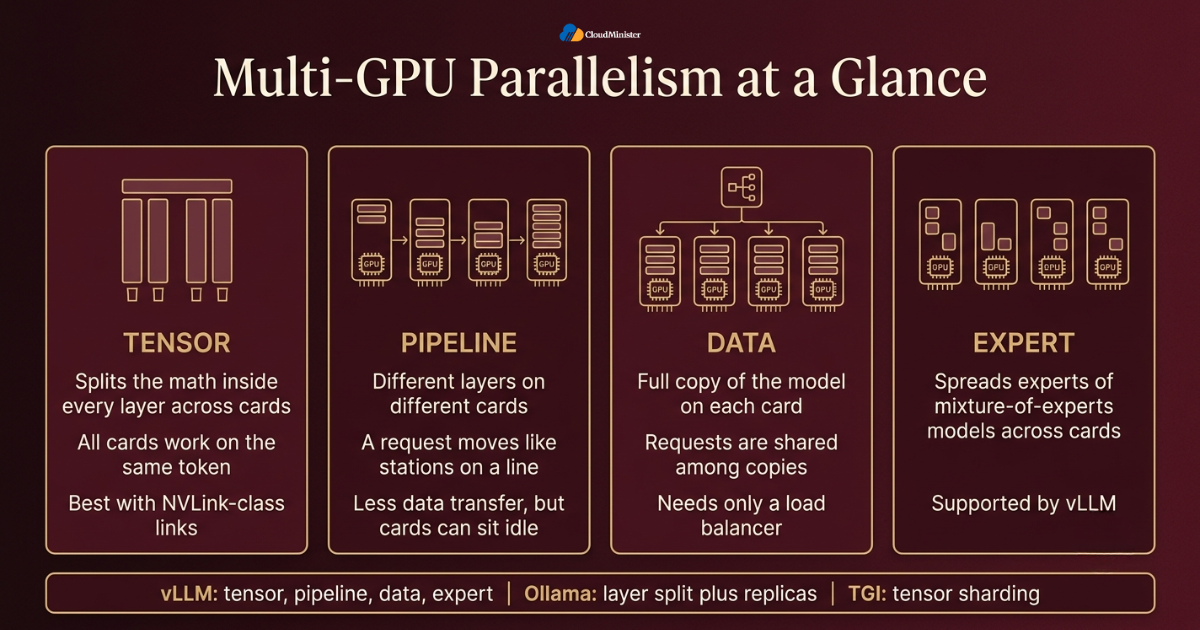
- Tensor parallelism needs communication inside every layer, using an all reduce operation across cards, so it works best with NVLink class links.
- The tensor parallel size usually has to divide the number of attention heads evenly. A model with 64 attention heads works with 2, 4, or 8 cards, but not with 3.
- Pipeline parallelism sends less data between cards, so it tolerates slower links and is the usual way to cross server boundaries, though cards can sit idle while they wait for work.
- Data parallelism needs enough memory on each card for a full model copy, yet it scales request throughput most cleanly and only needs a load balancer.
- Expert parallelism spreads the experts of mixture of experts models across cards, and vLLM supports it for those architectures.
- The vLLM documentation suggests setting the tensor parallel size to the number of GPUs in a node, and adding pipeline parallelism across nodes when one node is not enough.
- The smallest number of cards that holds the model with healthy KV cache space is usually the best Multi-GPU starting point. Scale out with replicas after that, and choose a plan from the best GPU cloud hosting in India that lets you add cards later.
- In the vLLM vs Ollama vs TGI field, Ollama uses layer splitting, which resembles pipeline parallelism, while TGI sharding is tensor parallelism.
Many people expect Multi-GPU to mean faster answers for a single user. In reality, extra cards mainly buy two things: the ability to load a larger model and higher total throughput. Single request latency improves only with tensor parallelism on fast links, and even then the gain is smaller than the card count suggests.
8. Sizing GPU Memory for Weights and KV Cache
Memory planning prevents most out of memory crashes. Start with the weights, which equal the parameter count multiplied by the bytes per parameter: 2 bytes for FP16 or BF16, 1 byte for FP8 or INT8, and about half a byte for 4 bit formats, plus a little overhead for scales. A 70 billion parameter model therefore needs roughly 140 GB at FP16. Then add the KV cache, which grows with context length and with the number of active requests. For Llama 3.1 70B, with 80 layers, 8 key value heads, and a head size of 128, each token costs roughly 330 KB at FP16, so one 8,192 token conversation holds about 2.7 GB. This arithmetic applies to every vLLM vs Ollama vs TGI setup, and it explains why Multi-GPU configurations on GPU Servers for AI exist.
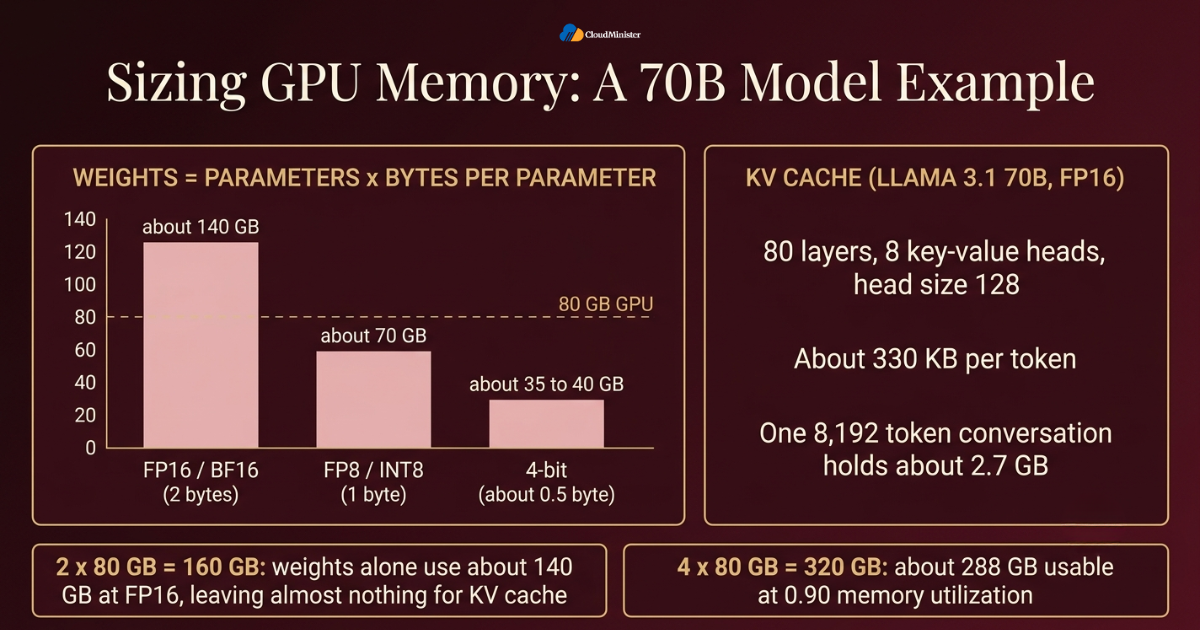
- Two 80 GB cards total 160 GB, and the weights alone use about 140 GB at FP16, which leaves almost nothing for the KV cache once runtime overhead is counted.
- Four 80 GB cards total 320 GB. With the vLLM default memory fraction of 0.90, about 288 GB is usable, which leaves well over 100 GB for the KV cache after the weights.
- FP8 quantization halves the weight memory to roughly 70 GB for the same model, which can let two 80 GB cards run it with a reasonable cache, subject to quality testing and hardware support.
- A 4 bit format such as AWQ or GPTQ brings the same model to roughly 35 to 40 GB, which can fit one 80 GB card, though quality and speed must be validated.
- The –max-model-len flag is a strong lever, because a smaller maximum context shrinks the worst case KV cache demand.
- The –gpu-memory-utilization flag sets the share of each card that vLLM claims. Pushing it close to 1.0 leaves no room for spikes and invites crashes.
- Activations, CUDA graphs, and NCCL buffers also use memory, so keep a safety buffer instead of planning to the last gigabyte.
- Ollama and TGI have equivalent controls, such as context length settings, and the same arithmetic applies to every vLLM vs Ollama vs TGI option.
- Match the memory result to a server plan, and ask the best GPU cloud hosting in India providers whether four card nodes are available.
Write a small script that prints weights plus KV cache for your target context length and concurrency before you rent hardware from any Web Hosting Company in India or elsewhere. Ten minutes of arithmetic can save you from renting the wrong server size or the wrong number of cards.
Related Reading: NVIDIA GPU architectures in 2026
9. Interconnects and Hardware Choices for Multi-GPU Serving
In Multi-GPU serving, the link between the cards can matter as much as the cards. Tensor parallelism exchanges data in every layer, so a slow link turns into idle compute. Data center SXM GPUs such as the H100 use NVLink with up to 900 GB/s of total bandwidth per GPU, while a PCIe Gen 5 x16 slot offers roughly 64 GB/s in each direction. Cards like the L40S and RTX 4090 have no NVLink at all, so they rely on PCIe. This single detail often decides which parallelism method suits a given server, which is why a vLLM vs Ollama vs TGI comparison must be read together with the hardware sheet of the best GPU cloud hosting in India options you shortlist.
- Run nvidia-smi topo -m to see how GPUs connect, whether through NVLink, a PCIe switch, or across CPU sockets.
- Cards linked by NVLink suit tensor parallelism. Cards linked only by PCIe often do better with pipeline parallelism or with data parallel replicas.
- Memory bandwidth drives decode speed. An H100 SXM offers about 3.35 TB/s, an H200 about 4.8 TB/s with 141 GB of memory, and an L40S about 864 GB/s. When you rank best GPU cloud hosting plans, compare these figures and not only memory size.
- Do not mix different GPU models in one tensor parallel group, because the smallest memory and the slowest card set the pace for all of them.
- Fast NVMe storage shortens model load times, which matters because model files run from tens to hundreds of gigabytes.
- Enough CPU cores and system memory keep the tokenizer and API server from becoming the bottleneck.
- Cooling and power headroom matter on dense GPU Servers for AI, because throttled GPUs quietly lose speed during long runs, and monitoring shows the clock drops.
- Check driver, CUDA version, and container runtime compatibility with the engine release before you buy or rent, since every vLLM vs Ollama vs TGI candidate has its own requirements, and a Web Hosting Company in India that publishes its hardware sheet makes this check easy.
- Ask each best GPU cloud hosting in India provider to confirm in writing whether the plan uses NVLink or PCIe between cards.
Related Reading: Google TPU vs NVIDIA GPU in 2026
Need a GPU Server Built for LLM Inference?
Run vLLM, Ollama, or TGI on dedicated GPU servers with the memory, storage, and root access your Multi-GPU workload needs. Explore CloudMinister GPU server plans and choose the configuration that fits your model.
10. Throughput, Latency and Concurrency: What to Measure
A fair vLLM vs Ollama vs TGI test measures the experience of users, not only peak tokens per second. Time to first token tells you how long people wait before text starts to appear. Inter token latency tells you how smooth the stream feels. Throughput tells you how many tokens the whole server produces each second across all users. These numbers pull against each other, because larger batches raise throughput while stretching latency. Multi-GPU layouts shift the balance again, so every layout you consider should face the same workload, and your GPU Monitoring should record each run. Run the same test on each best GPU cloud hosting plan you shortlist, and ask your Web Hosting Company in India for a short trial of the exact server.
- Time to first token mostly reflects queue wait plus prefill time, so long prompts and busy servers raise it.
- Inter token latency, also called time per output token, reflects decode speed and batch size.
- Throughput in output tokens per second shows total capacity, while goodput counts only the requests that met your latency targets.
- Always report p50, p95, and p99 values, because averages hide the slow requests that users remember.
- Test with your real distribution of prompt and answer lengths, not a single short prompt repeated many times.
- Raise concurrency step by step on each Multi-GPU layout until latency targets break, and note the point where throughput stops growing.
- Use the same model, quantization, context limit, and hardware when comparing engines in a vLLM vs Ollama vs TGI test, and change only one variable at a time.
- Warm up the server first, since early requests include cache warm up and compilation costs.
11. GPU Monitoring for Inference Servers
Good GPU Monitoring turns a mysterious slowdown into a five minute diagnosis. For inference servers on GPU Servers for AI you need two layers of data: hardware signals from the GPUs and request signals from the engine. The NVIDIA DCGM exporter publishes GPU metrics in Prometheus format, and vLLM and TGI expose request level metrics on their own endpoints. Together they answer the questions that matter in a vLLM vs Ollama vs TGI rollout: are the cards busy, is memory about to run out, and are users waiting in a queue. On a Multi-GPU server, GPU Monitoring must also show every card separately, because one weak card can hold back the whole group.
- The nvidia-smi tool gives a quick view of utilization, memory, temperature, and power. The command nvidia-smi –query-gpu=utilization.gpu,memory.used –format=csv -l 5 prints values every five seconds.
- The dcgm-exporter tool exposes fields such as DCGM_FI_DEV_GPU_UTIL and DCGM_FI_DEV_FB_USED for Prometheus, and Grafana turns them into dashboards.
- Utilization only shows that something ran during the sample window, not how efficient the work was, so read it next to throughput.
- Track memory used, temperature, power draw, clock speeds, and ECC errors per card, and watch the kernel log for Xid errors that signal GPU faults.
- Engine metrics such as running requests, waiting requests, and KV cache usage show saturation before users complain, though metric names differ between engines, so map each one to the same dashboard panel in your vLLM vs Ollama vs TGI setup.
- Alert on rising queue time, memory near its limit, sustained high temperature, and any card whose throughput drops below its peers.
- Keep a dashboard for each Multi-GPU group, including NVLink or PCIe traffic where the tooling exposes it, and ask the best GPU cloud hosting in India provider whether those counters are available to you.
- Store metrics for several weeks so you can compare today with last month and spot slow drift, and ask your Web Hosting Company in India whether it keeps hardware logs you can request after an incident.
Metrics endpoints can reveal model names, request volumes, and internal addresses. Keep the Prometheus and dcgm-exporter ports on a private network, and never publish dashboards without authentication. Whatever best GPU cloud hosting you choose, your monitoring stack should not widen the attack surface of your server.
Related Reading: Tracking GPU health as a developer.
12. Cost and Capacity Planning for Multi-GPU Inference
Cost is where engine choice turns into a budget line. A Spherical Insights report on the AI inference market values the global market at 102.53 billion US dollars in 2025 and expects it to reach 354.15 billion by 2035, a compound annual growth rate of 13.2 percent over 2026 to 2035. Research firms define these segments differently, so the figures cited earlier and this one are not directly comparable, yet both point the same way: inference spending keeps rising. For a team renting capacity, the practical question is cost per million tokens, and a smart vLLM vs Ollama vs TGI choice combined with a sensible Multi-GPU layout is the main way to lower it.
- Cost per million output tokens equals the hourly server cost divided by the tokens produced in that hour, multiplied by one million.
- Larger batches and better KV cache use raise tokens per hour on the same hardware, which is why the memory design of vLLM matters for cost.
- Quantization lowers memory and can allow fewer GPUs on your GPU Servers for AI, but test quality on your own tasks before you trust the saving.
- Replicas beat bigger tensor parallel Multi-GPU groups when the model already fits, since they add capacity without extra communication.
- Prefix caching saves prefill work when many requests share a long system prompt or document.
- Idle time is the silent cost, since idle cards cost the same on the best GPU cloud hosting as anywhere else, so share one of your GPU Servers for AI across several internal tools or scale down at night when traffic is predictable.
- Leave headroom for peaks, because running at 95 percent of capacity makes latency spike.
- Compare monthly dedicated pricing with hourly pricing using your real usage hours from GPU Monitoring instead of the list price, and ask a Web Hosting Company in India for both quotes.
- Run a short vLLM vs Ollama vs TGI cost test with your own traffic before you sign a long contract, and compare total plan cost from the best GPU cloud hosting in India, including bandwidth and storage.
Related Reading: Inference cost optimization.
13. Security and Reliability for Inference Servers
An inference server is an API that spends expensive GPU time on every call, so it attracts abuse quickly if it is exposed. Security here is mostly about limiting who can reach the engine and what the engine is allowed to load. Reliability is about surviving restarts, crashes, and updates without losing service. Both matter in every vLLM vs Ollama vs TGI deployment, and a Multi-GPU server adds extra risk because a single failing card can take down a whole tensor parallel group. Application level security stays your job even on the best GPU cloud hosting.
- Place the engine behind a reverse proxy that adds TLS, authentication, and rate limits, and keep the engine port itself on a private network, then ask the best GPU cloud hosting in India provider about private networking and firewall options.
- vLLM supports an –api-key option, but a proxy with proper identity controls is stronger for shared environments.
- Treat the –trust-remote-code option as a risk, because it executes code shipped with a model repository. Review that code first.
- Prefer safetensors weight files over pickle based formats, since pickle files can run code when loaded.
- Store tokens such as HF_TOKEN in a secrets manager, not inside images or shell history.
- Run containers on your GPU Servers for AI without extra privileges and pin image tags so updates are deliberate.
- Use systemd or an orchestrator for automatic restarts, plus health checks that confirm a real test completion and not only an open port, with GPU Monitoring alerts on top.
- Keep engines patched, since inference servers have had security advisories like any other web service, and ask your Web Hosting Company in India who handles driver updates.
- Log requests carefully, because prompts may contain personal data, and apply the same rule to every engine in your vLLM vs Ollama vs TGI shortlist.
A health check that only tests an open port will pass while the model is stuck on a dead GPU. Send a tiny real completion request every minute and alert when it fails or exceeds your latency limit. A provider of GPU Servers for AI that supports this kind of check usually has a mature operations team.
14. Common Mistakes in Multi-GPU Inference Deployments
Most failed deployments repeat the same handful of mistakes, and nearly all of them are avoidable. People tend to blame the engine when the real cause is a setting or an assumption. Reading this list before your first launch is the cheapest way to improve any vLLM vs Ollama vs TGI project, and it is especially useful for Multi-GPU builds where mistakes are costly. A support team at the best GPU cloud hosting in India can confirm hardware causes quickly, but the checks below should come first.
- Using tensor parallelism for a model that already fits on one card, which adds communication cost and gives nothing back.
- Picking a GPU count that does not divide the attention heads, then meeting start up errors.
- Ignoring topology, so tensor parallel groups span cards that connect only through slow PCIe paths or different CPU sockets.
- Setting an enormous maximum context length just in case, which reserves memory the workload never uses.
- Pushing GPU memory utilization too high and crashing on the first traffic spike.
- Forgetting shared memory settings in Docker, which causes NCCL errors or hangs on sharded runs.
- Mixing different GPU models inside one parallel group.
- Benchmarking a vLLM vs Ollama vs TGI shortlist with one short prompt and then promising that number to the business.
- Not pinning engine and driver versions, so an upgrade silently changes behavior.
When a Multi-GPU launch hangs, set NCCL_DEBUG=INFO before starting the engine. The log usually shows which cards or network interfaces are failing to connect, and it gives your GPU Monitoring a clear event to alert on.
15. Choosing a Web Hosting Company in India for GPU Inference
Software choice only pays off on suitable hardware. Teams building in India often prefer local infrastructure for lower latency to Indian users, simpler billing, and easier handling of data residency questions under the Digital Personal Data Protection Act, 2023. A capable Web Hosting Company in India that offers GPU Servers for AI can provide the cards, storage, and network you need without a long import and data center project. When you compare best GPU cloud hosting in India options, look past the headline GPU name and ask how the server is actually built for Multi-GPU work. The same vLLM vs Ollama vs TGI engine can perform very differently on two servers that carry the same card model.
- Ask which exact GPU model and memory size each plan includes, since plans from the best GPU cloud hosting in India differ in card type, and check whether the cards are SXM with NVLink or PCIe.
- Ask how many GPUs each of the GPU Servers for AI holds, since keeping a model inside one machine keeps Multi-GPU traffic on fast local links instead of the network.
- Check NVMe storage capacity and speed for model weights, and network bandwidth for pulling large model files.
- Ask for root access, control over drivers and CUDA versions, and support for containers.
- Confirm that GPU Monitoring access, such as DCGM metrics or at least nvidia-smi, is available to you.
- Ask the Web Hosting Company in India for written details on support hours, hardware replacement time, and what happens when a GPU fails.
- Compare hourly, monthly, and committed pricing, and ask about extra charges for bandwidth and storage.
- Verify data center location and compliance information if your data is regulated.
- Be wary of any provider that promises guaranteed token speeds without knowing your model, because the best GPU cloud hosting teams ask about your workload first and can share results from a vLLM vs Ollama vs TGI style test on similar hardware.
16. A Practical 30 Day Plan to Get Started
Reading about engines is easy, and testing them is where learning happens. This four week plan keeps the vLLM vs Ollama vs TGI evaluation small, measurable, and safe, so you finish with a decision backed by your own numbers instead of someone else’s chart, and with the facts you need to pick the best GPU cloud hosting plan without guessing. It also treats Multi-GPU scaling as a step to earn through measurement, not a default.
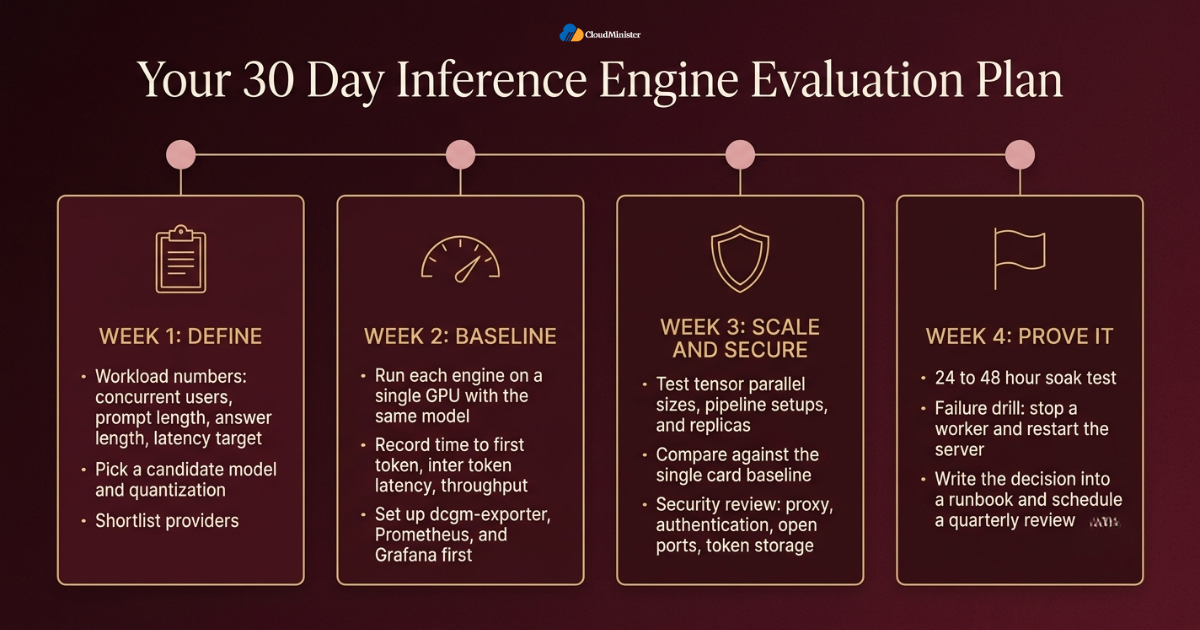
- Week one: define your workload numbers, which are concurrent users, prompt length, answer length, and latency target, and pick a candidate model and quantization.
- Week one: shortlist providers and ask each best GPU cloud hosting in India candidate and each Web Hosting Company in India for exact card, interconnect, and storage details.
- Week two: run each engine from your vLLM vs Ollama vs TGI shortlist on a single GPU with the same model, and record time to first token, inter token latency, and throughput.
- Week two: set up dcgm-exporter, Prometheus, and Grafana so GPU Monitoring is live before any load test begins.
- Week three: test Multi-GPU layouts, including different tensor parallel sizes, pipeline setups, and replicas, and compare them against the single card baseline on your GPU Servers for AI.
- Week three: complete a security review covering the proxy, authentication, open ports, and token storage.
- Week four: run a 24 to 48 hour soak test and a failure drill where you stop a worker and restart the server.
- Week four: write the decision and its numbers into a runbook and schedule a review every quarter, because models and engines change quickly, and compare the best GPU cloud hosting in India options again each time your needs change.
Checklist: Inference Engine Readiness Review
- Workload numbers written down: concurrency, prompt length, answer length, and latency target.
- Model weights and KV cache memory calculated for the target context length.
- Engine chosen after a test on your own model, with the vLLM vs Ollama vs TGI results recorded.
- Tensor parallel size and Multi-GPU layout checked against attention head count and GPU topology.
- GPU Monitoring live, with alerts for queue time, memory, temperature, and errors.
- Engine ports kept private, with TLS and authentication on the public endpoint.
- Engine, driver, and container versions pinned and documented.
- Rollback image and runbook stored where the whole team can reach them, with support contacts for your Web Hosting Company in India.
- Written hardware details received from the best GPU cloud hosting provider you selected, including GPU model and interconnect.
- Quarterly review date placed in the team calendar.
Key Takeaways
- The vLLM vs Ollama vs TGI choice depends on workload: vLLM for busy production serving, Ollama for simple local use, and TGI mainly for existing deployments.
- TGI is in maintenance mode according to Hugging Face, so new projects should test vLLM or SGLang as well.
- Multi-GPU serving mainly buys the ability to load larger models and higher total throughput, not guaranteed faster answers for one user.
- If a model fits on one GPU, run replicas for scale instead of splitting it with tensor parallelism.
- Memory planning needs weights plus KV cache, and the maximum context length is one of the strongest levers.
- Interconnects matter, because NVLink suits tensor parallelism while PCIe only cards often prefer pipeline or replica layouts, so compare the best GPU cloud hosting in India plans on interconnect.
- GPU Monitoring should combine hardware metrics with engine metrics so slowdowns are diagnosed in minutes.
- Never expose engine ports directly, and keep metrics endpoints private.
- A Web Hosting Company in India that offers GPU Servers for AI and clear written specifications reduces the risk of a mismatched server.
Not Sure Which GPU Configuration Fits Your Workload?
Share your model size, expected concurrency, and latency target with the CloudMinister team. We will help you match the right GPU server, interconnect, and storage to your inference setup.
Conclusion
One pattern holds regardless of model size or company size. Good inference serving is the result of measurement, not of a single clever flag. The best vLLM vs Ollama vs TGI decision starts from your real workload, checks memory arithmetic, tests Multi-GPU layouts against a single card baseline, and keeps GPU Monitoring running from the first day. Teams that follow this order avoid the two most common failures, which are buying more GPUs than they need and running the wrong engine on the right hardware. They also pick the best GPU cloud hosting for the job, and a Web Hosting Company in India that shares clear specifications makes that choice easier.
Another lesson is that the work never truly ends. Models grow, engines release new versions, and traffic changes shape. Review your setup every quarter, keep notes on what worked, and compare the best GPU cloud hosting options again when your needs change. With a reliable Web Hosting Company in India that offers GPU Servers for AI, a tested engine, and a clear runbook, your team can serve language models with confidence and keep costs under control.
Frequently Asked Questions
Which is best for production in the vLLM vs Ollama vs TGI comparison?
For most new production APIs with many simultaneous users, vLLM is the strongest default because of continuous batching, PagedAttention, and flexible Multi-GPU options, especially on the best GPU cloud hosting plan sized for your model. Ollama is better for local and small team use, and TGI is still workable for existing deployments but is in maintenance mode, so test it carefully for new projects.
Can Ollama use multiple GPUs to run faster in a vLLM vs Ollama vs TGI setup?
Ollama can spread a model across several GPUs when the model does not fit on one, using a layer split. That helps a large model load, but it does not give the speed gain of tensor parallel Multi-GPU serving. For more throughput, run one Ollama instance per GPU behind a load balancer.
Does vLLM need NVLink for Multi-GPU serving?
No, vLLM can run tensor parallelism over PCIe, but performance depends on the link speed because cards exchange data in every layer. NVLink gives much better results for tensor parallel groups, and PCIe only servers often do better with pipeline parallelism or replicas.
Is TGI deprecated, and what does that mean for vLLM vs Ollama vs TGI?
TGI is not shut down, but Hugging Face documentation says it is in maintenance mode, with only minor bug fixes and lightweight maintenance accepted. Existing deployments can keep running, while new projects should evaluate vLLM or SGLang against their own models.
How many GPUs do I need to run a 70 billion parameter model?
At FP16 the weights alone need roughly 140 GB, so two 80 GB cards leave almost no room for KV cache and four 80 GB cards are far more comfortable on a Multi-GPU server. With FP8 or 4 bit quantization, fewer cards may work, but you should test quality and speed on your own tasks. Ask each best GPU cloud hosting in India provider whether four card nodes are available.
What is the difference between tensor parallelism and pipeline parallelism?
Tensor parallelism splits the math inside each layer across cards, which needs fast communication in every layer. Pipeline parallelism places different layers on different cards and passes results along, which needs less communication but can leave cards idle.
Is it safe to expose Ollama or vLLM to the internet?
Not directly. Ollama has no built in authentication, and vLLM offers only a simple API key option. Place either engine behind a reverse proxy with TLS, authentication, and rate limits, and keep the engine port on a private network.
What should I track for GPU Monitoring on an inference server?
Track GPU utilization, memory used, temperature, power, and ECC or Xid errors for each card, and combine them with engine metrics such as running requests, waiting requests, and KV cache usage. This pairing shows whether slowness comes from hardware or from queueing. Good GPU Monitoring on GPU Servers for AI also shows when a single card is dragging the whole group down.
What should I ask a Web Hosting Company in India before renting a GPU server?
Ask for the exact GPU model, memory size, interconnect type, storage speed, driver control, support hours, and pricing terms in writing. A Web Hosting Company in India that answers with specific details is usually better prepared, and the best GPU cloud hosting providers will also tell you which parts of the setup remain your responsibility.
How should I run a fair vLLM vs Ollama vs TGI benchmark?
Use the same model, quantization, context limit, and hardware for every engine, replay a realistic mix of prompt and answer lengths, raise concurrency in steps, and record time to first token, inter token latency, throughput, and p95 latency. Repeat the test on each Multi-GPU layout you plan to use, keep the results next to your GPU Monitoring graphs, and the vLLM vs Ollama vs TGI numbers will stay comparable.

Shivlendra Singh Jadoun is a Cloud & DevOps Engineer at CloudMinister Technologies, specializing in AWS, Azure, and GCP infrastructure. He began his career in Linux system administration, managing shared, VPS, and dedicated servers before moving into cloud and automation. He is AWS Certified and works extensively with Docker, Kubernetes, Terraform, Ansible, and Jenkins to build CI/CD pipelines and scalable, secure cloud environments. With hands-on experience across hosting, server security, and DevOps automation, he brings real-world engineering insight to every article he writes.
Related posts:
 GPU Server for Deep Learning: From Provisioning to First Model Training
 Types of NVIDIA GPU Architectures in 2026: From Ampere to Blackwell and Vera Rubin
 GPU Monitoring 101: Tools, Metrics and Best Practices
 Google TPU vs NVIDIA GPU in 2026: Which Is Better for Your AI Training and Inference Workloads?
