Switching business email is one of those projects that sounds simple until you actually try to do it. The moment real deadlines, client threads, and years of attachments are involved, the question stops being “can I switch” and becomes “how do I migrate Gmail to Zoho Mail without losing a single message.” This guide walks through exactly what it takes to migrate Gmail to Zoho Mail cleanly, why businesses are making this move in growing numbers, and how to plan a migration that protects every email, contact, and calendar entry along the way. Whether you already run infrastructure through a Web Hosting Company in India, you are exploring Server Management Services in India for the first time, or you simply want a Zoho Email Consultation before touching a single setting, a structured approach is what separates a smooth transition from a support ticket nightmare.
Switching your business email is rarely as simple as flipping a switch, especially when years of client conversations, project attachments, and institutional knowledge are sitting inside a single Gmail inbox. When a growing team decides to migrate Gmail to Zoho Mail, the stakes go well beyond changing a login screen, every thread, calendar invite, and shared contact needs to survive the move intact. That reality is exactly why so many businesses now approach this transition as a planned project rather than a weekend experiment, treating email continuity with the same seriousness as any other core infrastructure decision.
The shift toward platforms built specifically for business use, rather than personal accounts stretched to fit a growing team, is accelerating across industries. Organizations that migrate Gmail to Zoho Mail are typically looking for tighter admin control, predictable pricing, and features designed around how teams collaborate, not just how individuals check email. Email migration tools have become a serious enterprise category, with the global market valued at close to five billion dollars in 2026 as organizations move away from legacy setups toward cloud-first mail platforms.
That scale of investment is a strong signal that businesses everywhere are treating email portability as a real operational priority, not an afterthought. Yet the technical side of a migration is only half the story, the other half is preparation, sequencing, and verification, which is where most well-intentioned attempts to migrate Gmail to Zoho Mail either succeed cleanly or quietly lose data along the way. This guide walks through exactly what that complete process looks like, from pre-migration checks through DNS cutover and post-migration monitoring, so nothing gets left behind.
Table of Contents
- 1. Why Businesses Choose This Switch
- 2. What “Without Losing Emails” Actually Means
- 3. Pre-Migration Checklist Before You Begin
- 4. Step-by-Step Guide Using the Official Tool
- 5. Migrating Contacts and Calendar Data Separately
- 6. Updating DNS Records Without Breaking Deliverability
- 7. Common Mistakes That Cause Lost Emails
- 8. How Long Does the Process Take
- 9. Testing and Verifying Before Going Live
- 10. Cost Considerations for the Switch
- 11. Why Infrastructure and Hosting Choices Matter
- 12. Choosing a Support Partner
- 13. Post-Migration Best Practices
- Key Takeaways
- Conclusion
- Frequently Asked Questions
1. Why Businesses Choose to Migrate Gmail to Zoho Mail
Gmail is familiar, reliable, and easy to use, but it was never built specifically for growing businesses that need tighter admin control, predictable pricing, and dedicated business-grade features without a heavy enterprise price tag. This is exactly why so many teams now migrate Gmail to Zoho Mail once their organization outgrows a personal or lightly managed Google account, often after a first Zoho Email Consultation clarifies what the switch actually involves.
There are a few recurring reasons a team decides to migrate Gmail to Zoho Mail rather than stay put:
- Zoho Mail offers ad-free, privacy-focused business email without scanning inboxes for advertising data
- Admin controls in Zoho Mail are built specifically for business email management, not personal use
- Pricing tiers are considerably more predictable for small and mid-sized teams compared to bundled enterprise suites
- Zoho Mail integrates natively with the wider Zoho ecosystem, including CRM, Projects, and Zoho Workplace, all part of the broader family of Zoho Email Solutions available to growing teams
- Storage and mailbox policies can be tailored per user or department instead of a one-size-fits-all model
Related Reading: setting up Zoho Mail for business
Many teams comparing Zoho Email Solutions against their current Gmail setup also want a second opinion before committing, which is where a short Zoho Email Consultation tends to save the most time by flagging domain or DNS issues early.
Do not rush into the technical migration before your Zoho Mail account is fully configured. Every domain, user, and alias should exist in Zoho Mail before you migrate Gmail to Zoho Mail, since importing data into an incomplete environment is one of the most common causes of missing mail later. A Server Management Services in India team can usually confirm domain readiness within minutes if there is any doubt about DNS propagation status.
2. What “Without Losing Emails” Actually Means
Before walking through the process, it helps to define what a truly complete migration covers, since teams that migrate Gmail to Zoho Mail casually often discover gaps only after the old account is already deactivated.
| Component | What It Covers | Why It Matters |
| Mailbox content | Every email across every folder, including Sent, Drafts, and Trash | Missing folders are the single biggest source of “lost” emails |
| Attachments | Files embedded in historical messages | Attachments can silently fail to transfer on unstable connections |
| Contacts | Saved contacts and address book groups | Without this, teams lose institutional relationship data |
| Calendar entries | Upcoming and recurring events | Calendars do not transfer through standard IMAP-based tools |
| Labels and folders | Gmail labels mapped to Zoho Mail folders | Poor mapping leaves an organized inbox looking like a dumped archive |
| Authentication records | SPF, DKIM, and DMARC records for the domain | Skipping this step breaks deliverability immediately after cutover |
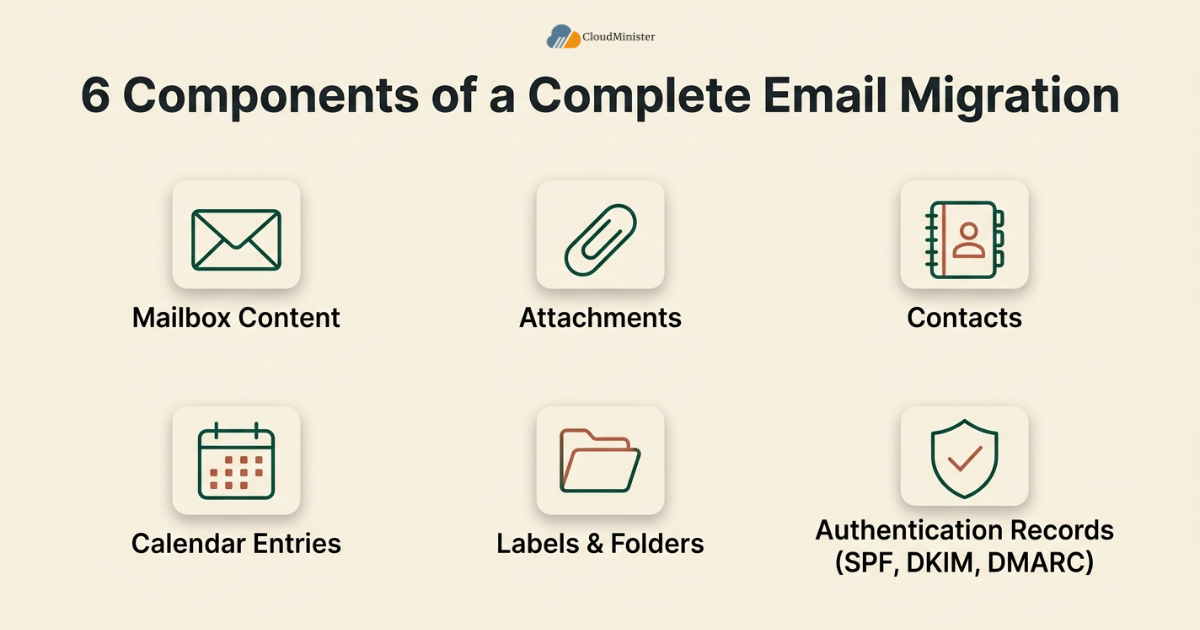
Most people assume the mailbox content is the hard part of a Gmail to Zoho Mail migration, but in practice, authentication records and calendar data are where migrations quietly fall short. A team that intends to migrate Gmail to Zoho Mail without losing emails needs a plan that accounts for all six of these components together, not mailbox content in isolation. This is also where a quick Zoho Email Consultation earns its keep, since an experienced reviewer can usually spot which of these six areas is likely to cause trouble for your specific setup before the migration even starts.
Teams that work with a responsive Web Hosting Company in India for their domain often find these six components easier to track, since domain-level visibility and mailbox visibility live closer together operationally than most people expect.
Never begin a domain-level migration without first confirming who holds administrative access to both the old Gmail environment and the new Zoho Mail console. A migration run with only partial admin rights can leave some mailboxes half-migrated with no clean way to finish the job later. This is another area where 24×7 server management support proves useful, since access issues discovered outside business hours can otherwise stall a migration for a full day.
3. Pre-Migration Checklist Before You Begin
3.1 What to Confirm Before Any Technical Step
A successful attempt to migrate Gmail to Zoho Mail depends heavily on preparation completed before the actual data transfer begins.
- Confirm domain ownership is verified inside Zoho Mail through a TXT or CNAME record
- Book a short Zoho Email Consultation early if the domain’s DNS history is unclear or undocumented
- Create every user mailbox in Zoho Mail that currently exists in Gmail, using matching email addresses
- Enable IMAP access inside Gmail settings under Forwarding and POP/IMAP
- Generate an app-specific password in Google Account security settings if two-factor authentication is active
- Note current mailbox storage size for each user, since larger mailboxes take proportionally longer to migrate
- Confirm whether the organization already has 24×7 server management in place, since this affects how migration timing and overnight monitoring get scheduled
- Decide whether the migration will run mailbox by mailbox or through a bulk admin-level transfer
- Confirm the domain’s nameservers and DNS panel access with your Web Hosting Company in India before the migration window opens
- Verify that whichever Web Hosting Company in India manages your domain today can support the DNS record types Zoho Mail requires
- Book a short Zoho Email Consultation if the team has never handled a domain-level email cutover before
3.2 Choosing the Right Migration Method
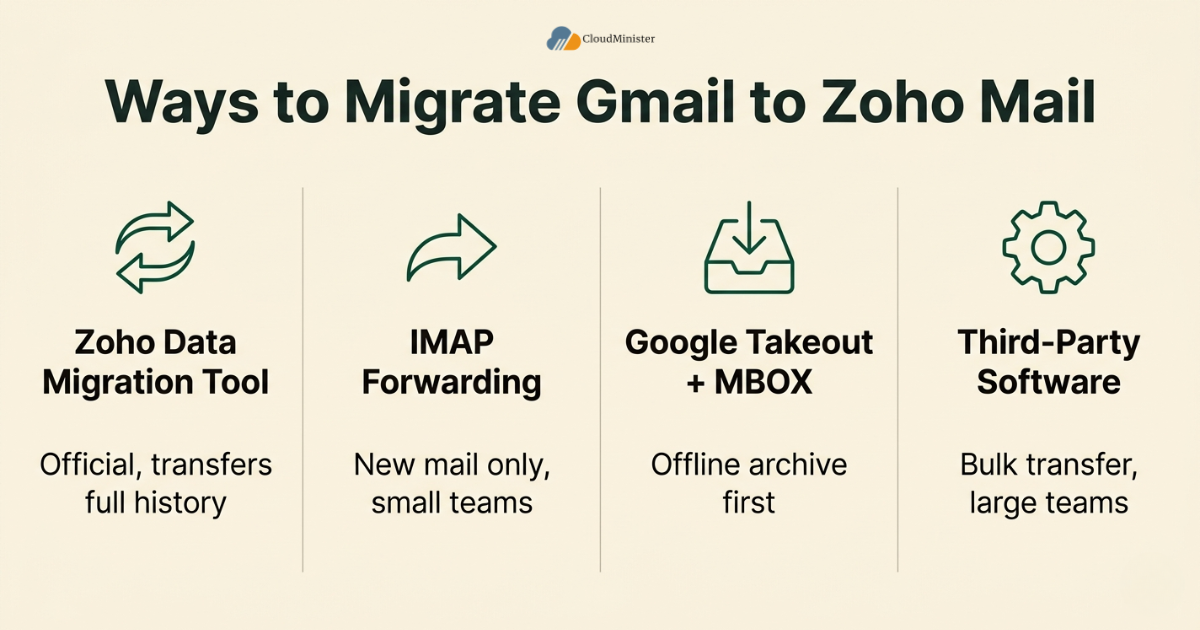
There is more than one way to migrate Gmail to Zoho Mail, and the right choice depends on team size, technical comfort, and how much downtime is acceptable.
- Zoho Mail’s built-in Data Migration tool is the official and most reliable method to migrate Gmail to Zoho Mail for most businesses, since it runs directly through the Zoho Mail Control Panel and pairs well with a provider offering 24×7 server management for monitoring
- IMAP-based manual forwarding works for very small teams but only transfers new incoming mail, not historical folders, making it a poor fit if the goal is to migrate Gmail to Zoho Mail completely
- Google Takeout combined with MBOX import suits teams that want an offline archive before importing, though it adds extra steps compared to the built-in tool
- Third-party migration software can help larger organizations that need to migrate Gmail to Zoho Mail across dozens of mailboxes simultaneously with scheduling and filtering options, though it rarely replaces the value of a dedicated Zoho Email Consultation for anything beyond a routine transfer
Related Reading: Zoho Workplace versus Google Workspace
Run a test migration with one non-critical mailbox before you migrate Gmail to Zoho Mail for the entire organization. This single step surfaces authentication issues, folder mapping quirks, or app password problems while the stakes are still low.
Businesses without a dedicated IT team often approach a Zoho Email Consultation at exactly this stage, since a short review of the chosen Zoho Email Solutions and migration method before the transfer begins tends to prevent the most common configuration mistakes.
4. Step-by-Step: How to Migrate Gmail to Zoho Mail Using the Official Tool
This is the core workflow most businesses should follow to migrate Gmail to Zoho Mail using Zoho’s own Data Migration tool, which is purpose-built for exactly this transition.
4.1 Preparing Gmail for Export
- Log in to the Gmail account you plan to migrate
- Go to Settings, then Forwarding and POP/IMAP, and enable IMAP access
- If two-factor authentication is enabled on the Google account, generate a 16-character app password specifically for mail migration
- Save this app password securely, since it will be required inside the Zoho Mail migration console
- Confirm the Gmail storage quota and note approximate mailbox size before you migrate Gmail to Zoho Mail, since this affects how long the transfer takes
- Notify your Web Hosting Company in India ahead of time if DNS changes will be needed the same week, so 24×7 server management resources are available when cutover happens
4.2 Setting Up the Migration Inside Zoho Mail
- Log in to the Zoho Mail Control Panel with an administrator account
- Navigate to Data Migration, then select Email as the migration type
- Choose Gmail or Google Workspace as the source platform
- Enter the Gmail address and the app password generated earlier
- Select whether to migrate the entire mailbox or specific folders only
4.3 Mapping Folders and Running the Transfer
- Review the folder mapping screen, since Gmail labels need to align correctly with Zoho Mail folders
- Adjust any mismatched folder names manually before starting the transfer
- Apply a date filter if you only need recent mail rather than a full historical migrate Gmail to Zoho Mail transfer
- Start the migration and monitor progress from the Data Migration dashboard
- Zoho Mail typically processes migration jobs in the background, so large mailboxes can continue transferring over several hours without requiring active supervision, though teams with 24×7 server management often keep a light watch on the dashboard regardless
A migration job that appears to finish quickly does not necessarily mean it is complete. Always cross-check the total email count in Zoho Mail against the original Gmail mailbox count before declaring the migration finished, since partial folder syncs can sometimes report as done prematurely.
Larger organizations running this step across many mailboxes at once often lean on 24×7 server management support to monitor the migration dashboard overnight, so any stalled job gets flagged and restarted before business hours resume.
5. Migrating Contacts and Calendar Data Separately
One detail that catches teams off guard when they migrate Gmail to Zoho Mail is that contacts and calendar entries do not travel through the standard email migration tool. These require their own export and import steps.
- Export Google Contacts to a CSV file from the Google Contacts dashboard
- Import that CSV file into Zoho Mail’s Contacts module under the import option
- Export Google Calendar data in ICS format from Calendar settings
- Import the ICS file into Zoho Calendar through the import function inside Zoho Mail’s calendar module
- Verify recurring events transferred correctly, since recurrence rules occasionally require manual adjustment after import
Teams that treat contacts and calendars as an afterthought often discover the gap only after the old Gmail account is already deactivated, which makes recovery considerably harder. Building this step into the plan to migrate Gmail to Zoho Mail from day one avoids that entirely.
Do not delete or deactivate the source Gmail account immediately after the migration finishes. Keep it active in read-only mode for at least two to four weeks so any missed contact, calendar entry, or email can still be recovered without needing to restore from a backup.
Teams unsure how their chosen Zoho Email Solutions handle recurring events or shared contact groups should confirm this detail through a Zoho Email Consultation rather than assuming default behavior matches Gmail exactly.
6. Updating DNS Records Without Breaking Deliverability
This is the stage where a technically sound plan to migrate Gmail to Zoho Mail can still fail if DNS changes are rushed or incomplete, which is exactly why many teams prefer to have a Web Hosting Company in India handle this part directly rather than attempting it without prior DNS experience.
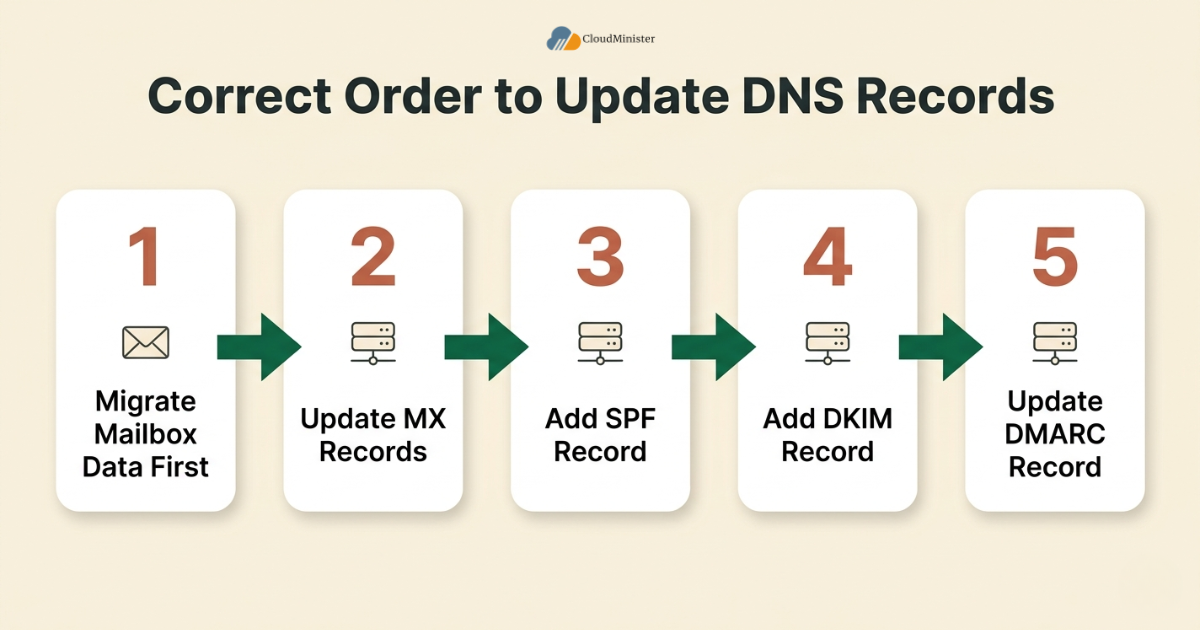
- Update MX records to point to Zoho Mail’s mail servers only after mailbox data has fully migrated
- Add or update the SPF record to authorize Zoho Mail’s servers to send on behalf of your domain
- Generate and add the DKIM record provided inside the Zoho Mail Control Panel
- Update or create a DMARC record that reflects the new sending infrastructure
- Keep the old Gmail MX records documented in case a rollback becomes necessary during the transition window
- Loop in Server Management Services in India before the change window opens so someone with 24×7 server management access is watching for propagation errors in real time
According to recent global data, email traffic itself continues climbing steadily, with daily message volume projected to grow year over year even as usage patterns evolve. Industry benchmarking places global daily email volume in the hundreds of billions, underscoring why deliverability accuracy during a migration matters more than ever; a broken DNS record does not just delay a few messages, it can quietly block business-critical mail for days before anyone notices.
Teams that have historically relied on in-house staff for DNS changes and server-side troubleshooting often find this stage easier with dedicated Server Management Services in India handling the record updates, since a single misconfigured entry can silently break inbound mail delivery for the whole domain. A Web Hosting Company in India that offers 24×7 server management as part of its support package can typically apply and verify these DNS changes within the same business day, which shortens the anxious waiting period most teams feel right after cutover.
Wait at least 24 to 48 hours after updating MX records before assuming deliverability is fully stable. DNS propagation is not instantaneous, and some regions or mail servers may still route messages using cached records during that window. Server Management Services in India that include propagation monitoring can flag unusual bounce patterns during this window before a client even notices a missing reply.
7. Common Mistakes That Cause Lost Emails During Migration
- Deactivating the Gmail account before confirming every mailbox migrated completely
- Skipping the contacts and calendar export because the main migration tool appeared to finish
- Updating MX records before verifying folder counts match between Gmail and Zoho Mail
- Running the migration during business hours without warning the team about temporary sync delays
- Ignoring bounce-back notifications in the days immediately following DNS changes
- Assuming a single migration attempt covers shared mailboxes and group aliases automatically
Any team that wants to migrate Gmail to Zoho Mail successfully on the first attempt should treat this list as a final gate check, not a set of optional suggestions. Skipping even one of these steps is how a routine plan to migrate Gmail to Zoho Mail turns into a support escalation involving missing client threads. Teams backed by 24×7 server management tend to catch these issues faster simply because someone is actively watching mail queues during the transition window rather than checking in once a day.
Shared mailboxes and distribution groups often need to be migrated as a separate job from individual user mailboxes. Confirm with your Zoho Email Consultation contact whether group mailboxes were included in the migration scope before considering the project finished. Businesses that skip this check sometimes discover months later that a shared support inbox running on older Zoho Email Solutions never received its historical mail at all.
8. How Long Does It Take to Migrate Gmail to Zoho Mail
Migration timelines vary considerably depending on mailbox size, number of users, and network conditions, but a rough framework helps set expectations, and a Zoho Email Consultation can usually tighten this estimate once your actual mailbox sizes are known.
- A single mailbox under 5 GB typically completes within a few hours using the built-in Data Migration tool
- Mailboxes between 5 GB and 20 GB can take anywhere from several hours to a full day depending on attachment volume
- Organizations migrating dozens of mailboxes simultaneously should expect the process to run across a full weekend for zero business disruption
- Contacts and calendar imports are comparatively fast, usually finishing within minutes once the CSV and ICS files are ready
- DNS propagation after cutover typically stabilizes within 24 to 48 hours globally, and 24×7 server management can confirm stability faster through active monitoring rather than waiting out the full window blind
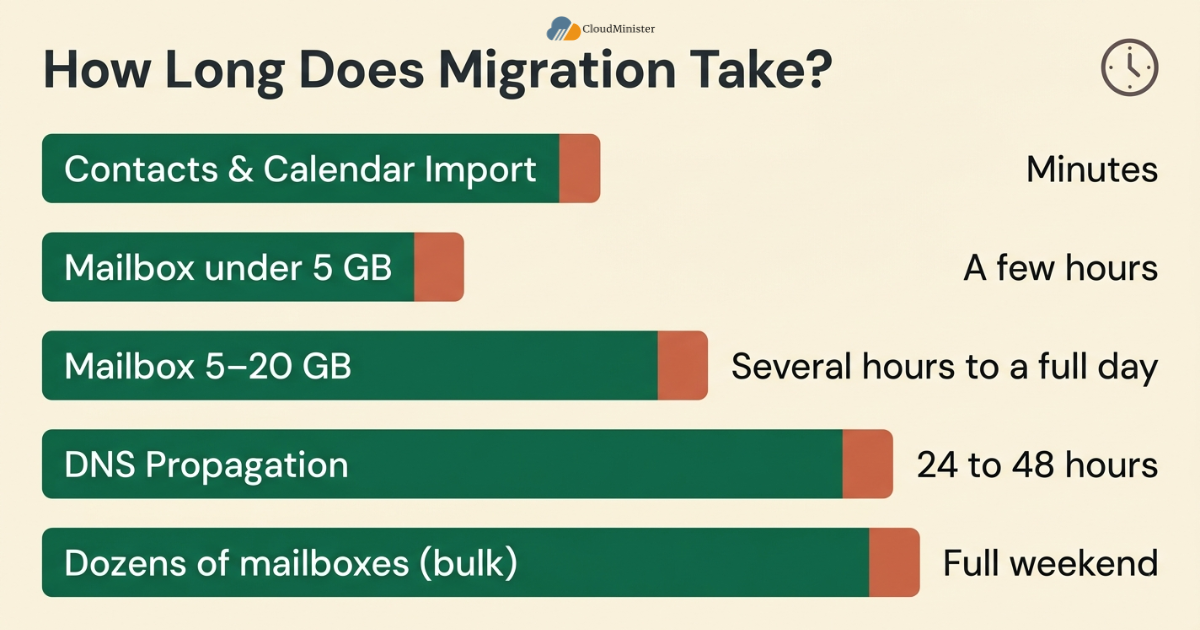
Planning around these realistic timeframes, rather than assuming an instant switch, is what allows a team to migrate Gmail to Zoho Mail without disrupting day-to-day communication. Organizations with 24×7 server management already in place tend to schedule the heaviest transfer jobs overnight, since off-peak bandwidth availability noticeably shortens total migration time for larger mailboxes.
9. Testing and Verifying the Migration Before Going Live
- Send test emails from an external address to confirm inbound delivery through Zoho Mail
- Send test emails from Zoho Mail to an external address to confirm outbound delivery and SPF alignment
- Spot-check a sample of older emails across multiple folders to confirm attachments opened correctly
- Confirm contacts appear correctly grouped and are not duplicated
- Confirm calendar events, especially recurring ones, display with the correct time zone
- Ask whether 24×7 server management flagged any delivery anomalies during the verification window before signing off on the project
Only after every one of these checks passes cleanly should a team consider the process to migrate Gmail to Zoho Mail fully complete. Rushing this verification stage is where many otherwise well-planned migrations quietly lose a handful of messages that surface weeks later.
Keep a written log of every test performed during verification, including timestamps and results. If a client or team member reports a missing email months later, this log makes it far easier to pinpoint whether the gap originated during migration or from an unrelated cause. A quick follow-up Zoho Email Consultation at this stage can also confirm that every Zoho Email Solutions feature the team plans to rely on, such as shared folders or group aliases, is fully active and correctly permissioned.
10. Cost Considerations When You Migrate Gmail to Zoho Mail
- Zoho Mail’s own Data Migration tool is included at no extra cost within most business plans, which keeps the direct cost of migration low across most Zoho Email Solutions tiers
- Third-party migration software may carry a per-mailbox or per-GB fee for larger organizations
- Engineering or IT time required to plan, execute, and verify the migration should be factored into the overall budget, including any Server Management Services in India hours billed separately
- Any professional support engaged through a Zoho Email Consultation should be weighed against the time saved compared to a fully in-house attempt
- Ongoing Zoho Mail subscription costs replace whatever the team was previously paying for Gmail or Google Workspace licensing
- Some Web Hosting Company in India providers bundle Zoho Email Solutions setup and Server Management Services in India into a single support package, which can reduce total project cost compared to sourcing each service separately
Related Reading: Zoho Mail pricing plans and features
Recent industry findings also show that the total cost of email infrastructure ownership extends well beyond the sticker price of a subscription plan. Analysis of enterprise email costs finds that direct licensing represents only a fraction of the total ownership expense once productivity, training, and support are factored in, which is exactly why a clean migration plan protects more than just inbox continuity.
Need Rock-Solid Infrastructure Behind Your Migration?
A smooth email migration depends on stable, high-performance hosting underneath it. Explore Azure Cloud Hosting from CloudMinister for enterprise-grade reliability, security, and 24×7 support during your transition.
11. Why Infrastructure and Hosting Choices Matter During Migration
The technical steps to migrate Gmail to Zoho Mail do not happen in isolation from the rest of a business’s infrastructure. Domain hosting, DNS management, and server reliability all influence how smoothly the transition goes, and a capable Web Hosting Company in India often ends up as important to the outcome as the mail platform itself.
- A domain hosted with a dependable Web Hosting Company in India makes DNS record changes faster and more transparent during the migration window
- Reliable uptime on the hosting side reduces the chance of DNS propagation issues compounding with unrelated server outages
- Teams juggling multiple domains benefit from centralizing DNS management with one trusted Web Hosting Company in India before attempting to migrate Gmail to Zoho Mail across several properties at once
- 24×7 server management support gives teams a safety net if something unexpected happens during the cutover window, particularly outside standard business hours
- Consistent server monitoring through professional Server Management Services in India after the migration helps catch deliverability issues early rather than discovering them through customer complaints
- A provider offering both Server Management Services in India and hands-on Zoho Email Solutions guidance reduces the number of vendors a team needs to coordinate during a single migration project
Related Reading: how SMEs are reducing email costs using Zoho Mail
Never hand DNS credentials to a third-party migration vendor without restricting access scope and setting an expiration on their permissions. Broad, unrestricted DNS access left active after a migration is a common and avoidable security gap. A reputable Web Hosting Company in India will typically offer scoped, time-limited access specifically for this kind of project rather than handing over full account credentials.
12. Choosing a Support Partner for the Migration
Not every business wants to run this project entirely in-house, and that is a reasonable call given how much can go wrong with DNS and mailbox provisioning in an unfamiliar system, particularly when evaluating unfamiliar Zoho Email Solutions for the first time.
- A combined package covering Zoho Email Solutions setup, ongoing Server Management Services in India, and domain hosting through one Web Hosting Company in India reduces the number of support tickets a business has to juggle during migration week
- Ask any prospective partner whether their Server Management Services in India includes proactive DNS monitoring, not just reactive troubleshooting after something breaks
- Confirm whether 24×7 server management is included in the base support plan or billed as an add-on, since migration weekends often fall outside standard office hours
- A genuine Zoho Email Consultation should walk through your specific mailbox count, storage needs, and domain structure rather than offering a generic script
- Ask whether the same Web Hosting Company in India handling your domain can also manage the Zoho Mail migration directly, since coordinating fewer vendors usually means fewer handoff errors, and confirm that same Web Hosting Company in India also offers ongoing support after go-live
- Request references or case studies showing the provider has handled a comparable migrate Gmail to Zoho Mail project before, ideally at a similar mailbox count and business size, and backed by consistent Zoho Email Solutions delivery
Ask any potential partner offering Zoho Email Solutions and Server Management Services in India how they handle a failed migration job specifically, not just a successful one. Their answer reveals more about actual operational maturity than any marketing page ever will.
13. Post-Migration Best Practices
- Monitor bounce-back reports closely for the first two weeks after cutover, ideally with 24×7 server management keeping an eye on mail queue errors overnight
- Train the team on Zoho Mail’s interface differences compared to Gmail, particularly around filters and labels
- Set up backup and archival policies inside Zoho Mail going forward, using whichever Zoho Email Solutions tier the organization has subscribed to
- Review admin console settings to confirm mailbox quotas and security policies match organizational requirements
- Document the entire migration process, including any issues encountered, for future reference if additional domains need to migrate Gmail to Zoho Mail later
- Schedule a brief follow-up Zoho Email Consultation thirty days after cutover to catch anything that slipped through initial verification
- Confirm the domain’s Server Management Services in India provider has closed out any temporary access granted during the migration window
Treating the migration as complete only after this post-migration phase, rather than the moment DNS records update, is what protects a business from the slow discovery of missing data weeks or months down the line. This is another reason 24×7 server management earns its keep well past the migration weekend itself.
Key Takeaways
- A complete plan to migrate Gmail to Zoho Mail covers six areas: preparation, the actual data transfer, contacts and calendar migration, DNS updates, verification, and post-migration monitoring
- Contacts and calendar entries require separate export and import steps and do not transfer through the standard email migration tool, regardless of which Zoho Email Solutions tier is in use
- Keeping the old Gmail account active in read-only mode for several weeks after migration provides an essential safety net
- DNS record accuracy, particularly SPF, DKIM, and DMARC, is what protects deliverability once the domain fully points to Zoho Mail
- Reliable hosting infrastructure from a solid Web Hosting Company in India and responsive 24×7 server management reduce the risk of complications during the cutover window
- A written verification log makes it far easier to resolve any missing-email questions that surface after the project is considered finished
- A short Zoho Email Consultation before and after the migration catches configuration gaps that a purely DIY approach often misses
- Pairing modern Zoho Email Solutions with dependable Server Management Services in India keeps the entire mail environment stable long after the migration itself is finished
Ready to Migrate Gmail to Zoho Mail the Right Way?
Get a dedicated Zoho Email Consultation and expert-led support for your entire migration, from domain setup to DNS cutover. Talk to the CloudMinister team today.
Conclusion
Choosing to migrate Gmail to Zoho Mail does not have to be a stressful or risky undertaking, and the businesses that get it right treat it as a structured project rather than a rushed weekend task. A clear plan that covers preparation, the actual transfer, contacts and calendar data, DNS updates, and thorough verification is what allows a team to migrate Gmail to Zoho Mail with zero meaningful data loss and minimal disruption to daily operations.
The path forward is straightforward even though it demands attention to detail. Prepare both environments fully before touching any settings, use Zoho’s official Data Migration tool as the primary method, handle contacts and calendars as their own workstream, update DNS records carefully with a rollback plan in place, and verify everything before considering the old Gmail account retired. Teams that follow this sequence consistently migrate Gmail to Zoho Mail successfully on the first attempt, without the scramble of chasing down a missing client thread weeks later.
Cloudminister supports this entire journey with a dedicated Zoho Email Consultation for businesses planning to migrate Gmail to Zoho Mail, domain and DNS management backed by a trusted Web Hosting Company in India, and responsive Server Management Services in India for teams that want expert hands managing the cutover window. From configuring the right Zoho Email Solutions for your team size to keeping the domain protected with 24×7 server management long after go-live, the right partner turns a migration that could otherwise stretch into weeks of back-and-forth into a single well-documented project. Whether the goal is migrating a five-person team for the first time or coordinating a multi-domain migrate Gmail to Zoho Mail rollout across a larger organization, working with the right infrastructure partner keeps the entire process predictable, secure, and fully documented from start to finish.
Businesses that have not yet booked a Zoho Email Consultation but are actively planning to migrate Gmail to Zoho Mail this quarter are encouraged to reach out early, since a short planning call up front consistently saves more time than it costs, particularly when Server Management Services in India are already handling the domain’s DNS and hosting on the same team.
Frequently Asked Questions
What is the safest way to migrate Gmail to Zoho Mail without losing emails?
Using Zoho Mail’s official Data Migration tool, combined with a documented pre-migration checklist and a post-migration verification phase, is the safest way to migrate Gmail to Zoho Mail. Keeping the old Gmail account active in read-only mode for several weeks adds an additional safety net, and pairing that with 24×7 server management on the hosting side closes most remaining gaps.
Do contacts and calendar events transfer automatically when I migrate Gmail to Zoho Mail?
No. Contacts need to be exported as a CSV file and imported separately, and calendar events need to be exported in ICS format and imported into Zoho Calendar. These do not move through the standard email migration tool, and no current Server Management Services in India workflow can automate around this limitation.
How long does it take to migrate Gmail to Zoho Mail for a small team?
A small team with mailboxes under 5 GB each can typically complete the migration within a single day, including DNS updates and initial verification, though full DNS propagation can take up to 48 hours to stabilize globally. A responsive Web Hosting Company in India can often shorten the practical waiting period by applying record changes the moment migration completes rather than on a delayed batch schedule.
Will my domain’s email stop working during the migration?
Not if the sequence is followed correctly. Since mailbox data transfers before MX records are updated, the Gmail account continues receiving mail normally until the moment DNS is switched, which minimizes downtime when you migrate Gmail to Zoho Mail properly. Server Management Services in India can further reduce risk by validating every DNS record before the actual cutover moment rather than after.
Should a small business handle this migration in-house or get professional help?
Small teams with straightforward setups can often manage a DIY migration using the built-in tool, while businesses with multiple domains, shared mailboxes, or limited internal IT resources typically benefit from a Zoho Email Consultation to migrate Gmail to Zoho Mail without the trial-and-error learning curve.
Does my hosting provider need to be involved in the migration?
Not always, but a domain hosted with a responsive Web Hosting Company in India makes DNS changes considerably smoother during cutover. Teams already using Server Management Services in India for their domain can typically have MX, SPF, DKIM, and DMARC records updated the same day, with 24×7 server management catching any propagation issues before they affect real inboxes.
What ongoing support is available after switching to Zoho Email Solutions?
Most providers, including Cloudminister, offer continued Server Management Services in India alongside a standing Zoho Email Consultation option, so teams have a place to turn if quotas, aliases, or security policies need adjustment as the organization grows.

Ajay Singh Raghav is a Senior Linux System Administrator at CloudMinister Technologies, where he has spent over 4 years installing, configuring, maintaining, and troubleshooting Linux servers for hosting and cloud environments. He specializes in AWS cloud computing alongside core Linux server administration, with hands-on expertise across server management, backup and restore systems, and cPanel-based hosting environments. His day-to-day experience keeping production servers stable and secure gives him a practical, ground-level understanding of the infrastructure he writes about.