Most website outages during a move do not come from the move itself. They come from missing preparation, such as long DNS cache times, unsynced databases, and untested SSL certificates. This guide explains Hosting Migration in clear steps, from audit and planning to DNS cutover, rollback, and post move checks. It covers how to choose a new Cloud Hosting Plan, when Azure Cloud Hosting or Optimized AWS Cloud Hosting makes sense, how to protect search rankings, and where a Web Hosting Company in India offering cloud hosting services in India fits into the plan. Follow it in phases and every Hosting Migration can stay close to zero downtime.
Every website owner reaches a point where the current host stops being enough. Pages load slowly, support goes quiet during an outage, or the renewal bill arrives with a price nobody expected. At that moment, Hosting Migration moves from a vague idea to a real decision that needs a clear plan. The good news is that moving a site is far less scary when you understand what actually goes wrong and why.
Most people assume the move itself is the risky part, but the real trouble usually starts much earlier. A DNS record cached for a full day, a database that kept changing after the copy, or an SSL certificate nobody tested can take a site offline for hours. None of these problems are hard to fix. They only become painful when nobody planned for them. A careful Hosting Migration deals with each of these risks well before the switch happens, so the day itself feels routine.
This guide walks you through the whole journey in simple phases. You will learn how to audit your current setup, pick the right destination, and choose a method that keeps visitors on the live site while the move happens. We also cover DNS and SSL handling, protecting your search rankings, testing, and a rollback plan in case something slips. Whether you are going to a flexible cloud plan, Azure, AWS, or a trusted provider in India, the same steps apply. Follow them in order, and your Hosting Migration can stay very close to zero downtime.
Table of Content
- Why Moving to a New Host Is a Business Decision in 2026
- What the 2026 Data Says About Downtime and Cloud Growth
- Signs It Is Time to Change Your Hosting Provider
- Pre-Migration Audit: Know Exactly What You Are Moving
- Choosing the Destination: Plans, Location, and Provider Fit
- Budgeting for a Website Move Before You Start
- Choosing a Move Method That Avoids Downtime
- Moving Files, Databases, and Email Without Losing Data
- Moving to Azure Cloud Hosting or Optimized AWS Cloud Hosting
- DNS, TTL, and SSL: Getting the Cutover Right
- Protecting SEO and Rankings During the Move
- Testing, Monitoring, and Rollback
- A Practical 14 Day Website Move Plan
- Key Takeaways
- Conclusion
- Frequently Asked Questions
1. Why Hosting Migration Is a Business Decision in 2026
Moving a website or application from one provider to another used to be seen as a weekend chore for the technical team. In 2026 it is a business decision, because every minute a site is offline affects sales, support load, and search visibility. A well planned Hosting Migration treats the move like a software release, with owners, checkpoints, and a way back. This section explains why the topic deserves that level of care. Choosing between a shared server, a Cloud Hosting Plan, or a cloud platform such as Azure Cloud Hosting comes later, once the risks are clear.
- Hosting Migration means moving website files, databases, email, DNS records, and SSL certificates from one hosting provider to another, ideally while visitors keep using the live site.
- Downtime during a move is not random. It usually comes from a short list of causes such as DNS caching, database changes made after the copy, and missing server settings.
- A Web Hosting Company in India that handles migrations regularly will ask for an inventory first, because the inventory shows what can break before it does.
- Near zero downtime is realistic for most sites. True zero downtime is harder for busy databases, because a brief read only window is often needed for the final sync.
- Search engine crawlers slow down when a site returns server errors, and long outages can cause pages to drop from results, so a failed Hosting Migration can hurt visibility as well as revenue.
- The best time to think about Hosting Migration is before you are forced to, for example when a provider announces a price rise or ends support for a plan.
- Modern cloud options make the move easier, because snapshots, staging environments, and scalable resources reduce pressure on the cutover day. A flexible Cloud Hosting Plan is a good example.
- Teams that plan the move in phases usually finish faster than teams that try to move everything in one night.
- Providers of cloud hosting services in India and global cloud platforms publish support terms and data centre locations, so compare them before you decide.
Before you compare providers, write down the one outcome that matters most for this Hosting Migration. It could be lower cost, better speed, stronger support, or data location. That single sentence settles most arguments later.
2. What the 2026 Data Says About Downtime and Cloud Growth
Numbers help justify the time a careful move needs. The figures below come from 2026 research and show both the cost of being offline and how quickly cloud spending is growing. Use them in internal discussions when someone asks why a move needs a proper plan and not a rushed weekend. If you are comparing options such as Optimized AWS Cloud Hosting or cloud hosting services in India, these numbers show why reliability should sit next to price on your shortlist.
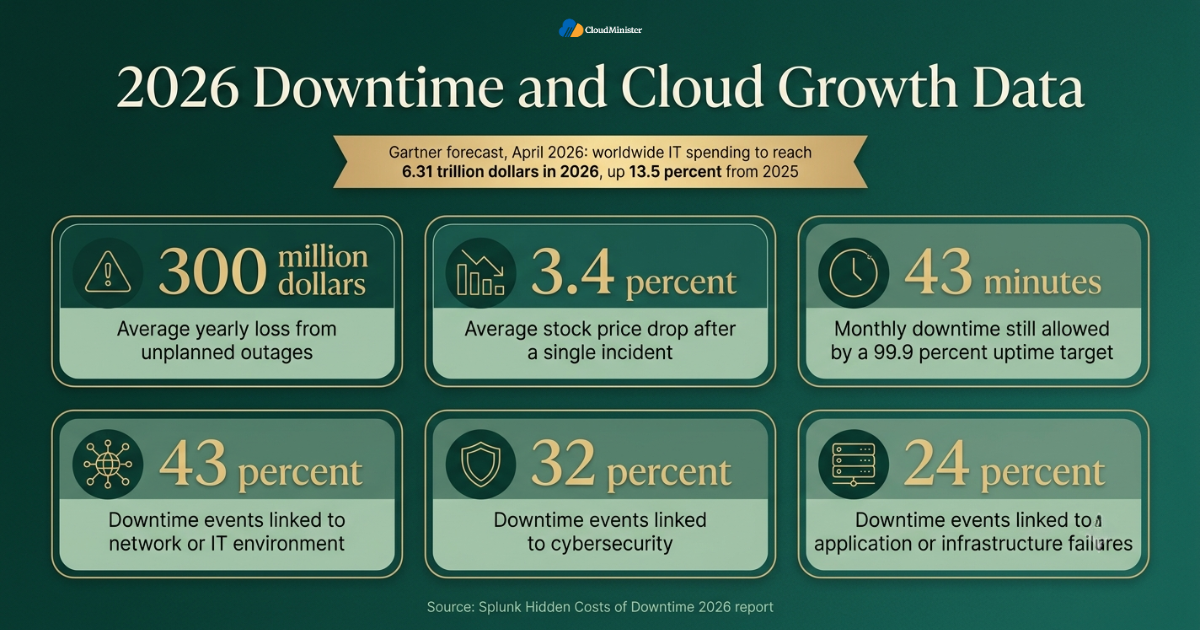
- The Splunk Hidden Costs of Downtime 2026 report surveyed 2,000 executives across the Global 2000 and found that companies lose an average of 300 million dollars a year to unplanned outages.
- The same research reports an average 3.4 percent stock price drop after a single incident, which shows that downtime is a boardroom topic and not only an IT problem.
- It also found that 43 percent of downtime events are linked to the network or IT environment, 32 percent to cybersecurity, and 24 percent to application or infrastructure failures. A server move touches the network and infrastructure layers directly.
- On the growth side, the Gartner forecast published in April 2026 expects worldwide IT spending to reach 6.31 trillion dollars in 2026, up 13.5 percent from 2025, with IT services, which includes infrastructure as a service, passing 1.87 trillion dollars.
- Uptime targets need context too. A 99.9 percent uptime target still allows about 43 minutes of downtime each month, which is longer than a careful Hosting Migration should ever need.
- Your own cost depends on revenue per minute, support load, and contract penalties, so calculate it for your site before the Hosting Migration starts.
- As more workloads move to shared cloud platforms, a Web Hosting Company in India that offers cloud hosting services in India can be a practical middle path between a basic shared plan and a full hyperscale account.
- Public cloud platforms compete on price and reliability, so Azure Cloud Hosting and Optimized AWS Cloud Hosting are worth comparing with local cloud hosting services in India before you decide.
- A capable Web Hosting Company in India can explain uptime terms, backup rules, and migration help in plain words, which saves time later.
3. Signs It Is Time to Change Your Hosting Provider
Not every problem justifies a move, and a rushed switch can create new problems. Still, some signals are hard to ignore. Look at your own numbers first, then decide whether Hosting Migration solves the real issue or whether a plan upgrade with the current provider would be enough. A Web Hosting Company in India can review your current plan and tell you honestly whether a move or an upgrade is the better answer.
- Pages stay slow after caching, image compression, and database tuning. This often points to resource limits on the current plan.
- Outages are frequent, or the uptime record keeps missing the promised level. Read the service level agreement, because planned maintenance is often excluded from uptime figures.
- Support replies take hours during a critical incident. A slow provider is a risk on its own, and it is a strong reason to plan a move.
- Traffic has grown and the current plan cannot scale without a full package change. A flexible Cloud Hosting Plan can add CPU, memory, and storage without a rebuild.
- Most visitors are in India but the server is far away. Latency drops when the origin server is closer, so a Web Hosting Company in India with local infrastructure can improve load time.
- Compliance or data location rules now apply, for example handling personal data under the Digital Personal Data Protection Act 2023 of India. Moving to cloud hosting services in India with clear data location terms can simplify audits.
- Renewal prices have jumped, or fees for backups, SSL, or support have crept in. Compare the full yearly cost and not the first year offer.
- The provider is ending support for an old PHP version, operating system, or control panel that your application still depends on.
- Your team spends more time fixing the server than improving the product. A managed Cloud Hosting Plan or cloud hosting services in India can return that time to development.
4. Pre-Migration Audit: Know Exactly What You Are Moving
Most failed moves trace back to something nobody wrote down. An audit turns the hidden parts of your hosting setup into a list you can test on the new server. Spend real time here, because every hour saved on the audit tends to cost several hours during the Hosting Migration itself. If your site already runs on Optimized AWS Cloud Hosting or Azure Cloud Hosting, the same audit applies, with extra attention to security groups and network rules.
- List every domain, subdomain, and parked domain, along with where each one is registered and which name servers it uses.
- Record the full software stack: operating system, web server such as Apache or Nginx, PHP or Node version, database engine and version, and required extensions.
- Export all DNS records, including A, AAAA, CNAME, MX, TXT, and SRV records. Missing TXT records for SPF, DKIM, or domain verification are a common cause of broken email after a move.
- Note cron jobs, scheduled tasks, and background workers. These are easy to forget and do not show up in a simple website test.
- Check the size of files and databases. Size decides how long the copy takes and whether you need an incremental method such as rsync for the final sync.
- List third party services that allow only your current server IP address, such as payment gateways, APIs, and email relays. These must be updated with the new IP before cutover.
- Take a full backup of files and databases, store a copy outside both the old and new provider, and test that the backup restores.
- Write down current performance numbers, such as page load time, time to first byte, and uptime, so you can compare results after the move.
- Find the quietest hours in your analytics, because the cutover should happen in a low traffic window.
5. Choosing the Destination: Plans, Location, and Provider Fit
The new environment decides how smooth the rest of the move feels. Choose it on technical fit and support quality, not only on price. If you are leaving shared hosting, a scalable Cloud Hosting Plan is often the natural next step, because resources can grow with traffic instead of forcing another Hosting Migration within a year. Compare at least three options, including cloud hosting services in India and Azure Cloud Hosting, before you decide.
- Match the new Cloud Hosting Plan to real usage. Check peak CPU, memory, disk activity, and bandwidth from the old server, then add room for growth instead of copying the old plan size blindly.
- Confirm the software stack is available. If your application needs a specific PHP version, database engine, or Node runtime, the new host must support it or the Hosting Migration will stall.
- Ask where the servers are located. A Web Hosting Company in India with data centres in India gives lower latency for Indian visitors and simpler answers to data residency questions.
- Check backup and snapshot policy. Daily backups, easy restore, and the option to take a snapshot before cutover are valuable during any Hosting Migration.
- Look for staging or free test access. You need to run the full site on the new server before DNS points to it, so ask how the provider supports testing before cutover.
- Read the uptime commitment and what it excludes. Compare support channels, response times, and whether migration help is included.
- Compare cloud hosting services in India on total cost, including bandwidth, backups, SSL, and support, so the yearly bill holds no surprises.
- For containers or virtual machines, check that the provider supports the image formats and network features you use.
- Ask for a trial or proof of concept on Optimized AWS Cloud Hosting or Azure Cloud Hosting if your workload is large, so you can test speed and cost before committing.
Related Reading: Azure cost optimization
Ready for a Cloud Hosting Plan That Grows With Your Site
Pick a setup built for speed, daily backups, easy snapshots, and room to scale. CloudMinister cloud hosting gives your next Hosting Migration a stable and flexible home with local support from a team that knows the process.
6. Budgeting for a Hosting Migration Before You Start
A move has costs beyond the new monthly bill. You may pay two providers for a short time, spend hours of engineering effort, and face data transfer charges. Planning these costs early keeps Hosting Migration from turning into a budget argument halfway through the project. Whether you pick Optimized AWS Cloud Hosting or a fixed price Cloud Hosting Plan, the same planning habits apply.
- Plan for an overlap period. Keep the old plan active for at least 7 to 14 days after cutover so you can roll back, and budget for both bills during that time.
- Check data transfer fees. Some cloud platforms charge for data leaving their network, often called egress, so ask your current provider what it charges to export large files or databases.
- Estimate staff time for the audit, testing, cutover, and monitoring. Internal hours are a real cost even when no invoice arrives.
- Ask whether the new provider offers free migration help. A Web Hosting Company in India that includes assisted migration can lower both cost and risk.
- Compare a fixed price Cloud Hosting Plan with pay as you go pricing. Fixed pricing is easier to forecast, while usage based pricing suits spiky workloads.
- For Azure Cloud Hosting or Optimized AWS Cloud Hosting, use the official pricing calculators before you commit, and set budget alerts on day one so surprises appear early.
- Tag cloud resources by project and owner from the first day. Tags show which team spends what, and they support later cost reviews.
- Name one owner for the money side of the Hosting Migration, so approvals do not slow the schedule.
- Include support costs in the comparison. Some cloud hosting services in India bundle monitoring and backups, while other platforms bill them separately.
Related Reading: cloud cost governance policy guide
7. Choosing a Hosting Migration Method That Avoids Downtime
There is more than one safe way to move a site. The right method depends on how often your data changes, how much traffic you receive, and how much risk you can accept. The table below compares the four methods most teams use, and the points after it explain when each one fits Hosting Migration. Each method works with any destination, from a Cloud Hosting Plan to Optimized AWS Cloud Hosting.
| Method | How it works | Downtime risk | Best fit |
| Maintenance window copy | Site goes into maintenance mode, data is copied, then DNS is switched | Low to medium, planned outage | Small sites with low traffic |
| Parallel run with DNS cutover | Full copy is built on the new host, data is synced, then DNS changes with a low TTL | Very low | Most business websites |
| Weighted DNS shift | A small share of visitors goes to the new server first, then the share grows in steps | Very low | Large sites and applications |
| Reverse proxy cutover | Old server forwards requests to the new server while DNS changes spread | Very low | Sites worried about DNS caching |
- A maintenance window copy is the simplest method. It is acceptable for a small site, as long as visitors see a proper 503 message with a Retry-After header and not an error page.
- A parallel run is the most common choice for business sites. Both servers hold the site, you test the new one privately, and you change DNS only when everything passes.
- Weighted DNS routing lets you send a small share of traffic to the new environment first. Managed DNS services from major cloud platforms support weighted records, which makes a phased Hosting Migration possible.
- A reverse proxy on the old server can forward all requests to the new one. This hides DNS delay, because both paths end at the same application.
- For databases that change constantly, set up replication from the old database to the new one, then promote the new database at cutover. This shortens the final write freeze to seconds or minutes.
- Blue green deployment follows the same idea for applications. The old stack is blue, the new stack is green, and traffic moves only after green passes health checks.
- Whatever method you choose, agree on a rollback trigger in advance, such as an error rate or a count of failed checkouts, so the decision is not made in a panic during Hosting Migration.
- A Web Hosting Company in India with migration experience can help you pick a method after reviewing your traffic pattern and database size.
- Managed cloud platforms such as Azure Cloud Hosting and Optimized AWS Cloud Hosting offer traffic routing features that make weighted shifts easier, while a simpler plan may offer easier tools for smaller sites.
Related Reading: EKS vs GKE vs AKS comparison
8. Moving Files, Databases, and Email Without Losing Data
This is the part most people picture when they hear the word migration. It is also where small mistakes create the most visible damage, such as missing images, broken logins, or lost emails. Move data in two passes, a full copy first and a short final sync just before cutover, and keep every step of Hosting Migration repeatable. This advice applies equally to a Web Hosting Company in India and to cloud platforms such as Azure Cloud Hosting and Optimized AWS Cloud Hosting.
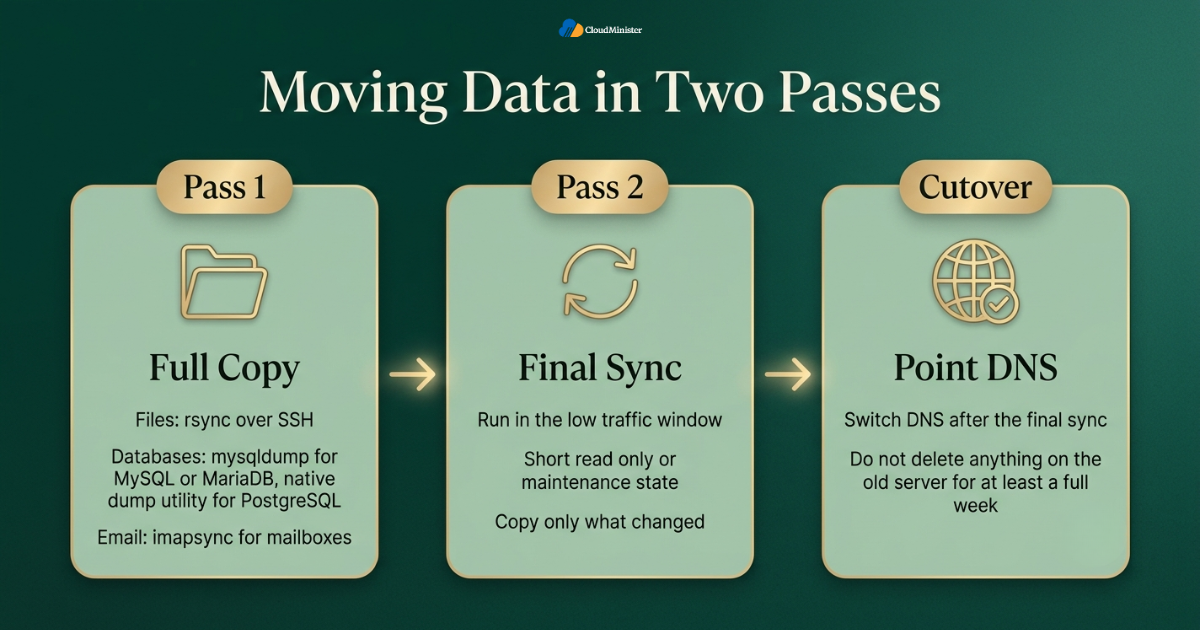
- Copy files with a tool that supports resume and verification, such as rsync over SSH. The first pass moves everything and the final pass moves only what changed.
- Export databases with the proper tool for your engine, for example mysqldump for MySQL or MariaDB and the native dump utility for PostgreSQL. Import on the new server and compare row counts on key tables.
- Match character sets and collations between old and new databases. A mismatch can turn special characters into garbled text after Hosting Migration.
- Update configuration files such as database host, credentials, file paths, and environment variables. For WordPress, check wp-config.php and any hard coded absolute paths.
- Run the final sync in the low traffic window. Put the site into a short read only or maintenance state, copy the last changes, and then point DNS.
- Move email carefully. If mailboxes sit with the old provider, copy them with an IMAP sync tool such as imapsync, and lower the MX record TTL before the switch so mail keeps arriving.
- Keep MX, SPF, DKIM, and DMARC records intact. If the outgoing mail server IP changes, update the SPF record before cutover so messages are not marked as spam.
- Verify file permissions and ownership on the new server. Wrong permissions are a common cause of upload failures and blank pages after a move.
- Do not delete anything on the old server until the new one has run cleanly for at least a full week.
Treat every backup and database dump made for Hosting Migration as sensitive data. Never leave copies in a public web folder, because automated scanners find exposed backup files quickly. Use private storage, encrypt the files, and delete temporary copies once the move is complete. Rotate database passwords and API keys after cutover.
9. Moving to Azure Cloud Hosting or Optimized AWS Cloud Hosting
Some teams move from a basic host to a hyperscale platform, and the tools change with the destination. Both major platforms provide services designed for migration, and using them reduces manual work. The points below explain how Azure Cloud Hosting and Optimized AWS Cloud Hosting fit into a Hosting Migration. A Web Hosting Company in India can also act as the bridge between old servers and cloud accounts.
- On Azure Cloud Hosting, Azure Migrate helps discover servers, assess readiness, and plan the move, and it can replicate virtual machines and manage the cutover.
- Azure Database Migration Service supports online migration for many database engines, which keeps the source database usable while data is copied.
- Azure Traffic Manager supports weighted routing, so a phased Hosting Migration can shift users to the new endpoint in steps.
- For Optimized AWS Cloud Hosting, AWS Application Migration Service replicates source servers continuously into your account, and AWS Database Migration Service can keep a target database in sync using change data capture.
- Amazon Route 53 supports weighted routing, so a move to AWS can send a small share of traffic to the new stack first.
- In practice, Optimized AWS Cloud Hosting means right sizing instances, choosing the correct storage class, using auto scaling, and reviewing usage often, not simply copying the old server size onto a bigger cloud instance.
- Before large workloads land on Azure Cloud Hosting, build a proper landing zone with networking, identity, policy, and monitoring in place. It is much harder to add these controls after production traffic arrives.
- If a full hyperscale account is more than you need, a Web Hosting Company in India that offers cloud hosting services in India can provide managed cloud servers with local support and simpler billing.
- Test the new environment with production like data, because cloud security groups and firewall rules often block traffic that worked on the old host.
Moving to a hyperscale platform does not automatically make a site faster or more reliable. Reliability comes from architecture, monitoring, and tested recovery. A well configured Cloud Hosting Plan from a capable provider can outperform a poorly designed cloud setup for many websites.
Related Reading: Azure landing zone enterprise scale guide
10. DNS, TTL, and SSL: Getting the Cutover Right
DNS is the switch that decides which server visitors reach, so it is the most sensitive step of any Hosting Migration. Good DNS handling removes most of the fear around cutover. The main tools are a low TTL, careful record checks, and SSL certificates that are ready before traffic arrives. The steps are the same for a Cloud Hosting Plan, Azure Cloud Hosting, and Optimized AWS Cloud Hosting.
- TTL means time to live, the number of seconds resolvers may cache a DNS answer. Lower it to 300 seconds at least as long before cutover as the old TTL, so caches expire in time. If the old TTL is 24 hours, lower it at least 24 hours ahead.
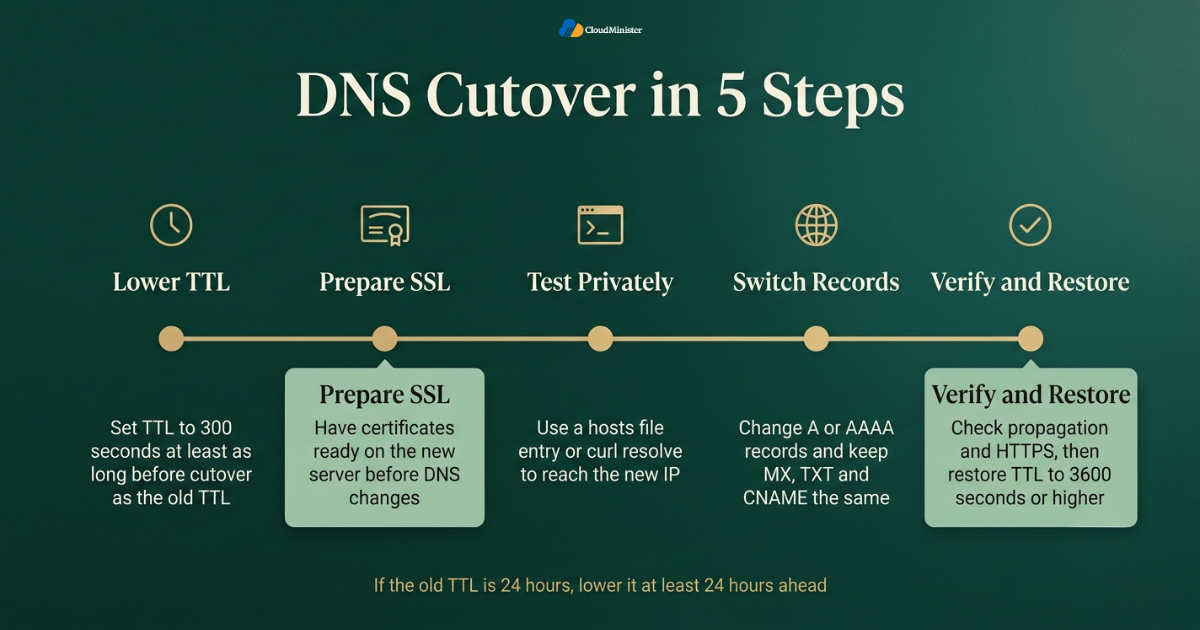
- Test the new server before DNS changes. Use a local hosts file entry or the resolve option in curl to send requests to the new IP while the world still sees the old server.
- Get SSL certificates ready in advance. You can copy the existing certificate and key, or request a new one using DNS validation, which works before the domain points to the new server.
- Change the A or AAAA records, and keep MX, TXT, and CNAME records the same unless the move requires a change. Compare old and new zones line by line before saving.
- Avoid changing the domain registrar or name servers at the same time as the server move. One change at a time makes problems easier to trace during the switch.
- Expect a short tail of visitors on the old server, because some resolvers hold answers longer than the TTL. The old server must stay online and, ideally, keep syncing or forwarding traffic.
- After the switch, check propagation from several locations with public DNS lookup tools, and confirm that HTTPS works without warnings on all key pages.
- Enable HSTS only after HTTPS is stable on the new server, because a mistake can lock visitors out of the site for a long period.
- Restore the TTL to a normal value, such as 3600 seconds or higher, once the Hosting Migration is stable, to reduce DNS query load.
Some resolvers and devices ignore very low TTL values. Never assume a five minute TTL means every visitor moves in five minutes. Plan for a longer tail, and keep the old server alive until traffic to it has dropped to almost nothing.
11. Protecting SEO and Rankings During Hosting Migration
Search rankings do not depend on which host you use, but they do depend on the site staying available, fast, and consistent. When URLs, content, and technical signals stay the same, a server move rarely harms rankings. The risk comes from mistakes, so this section lists the checks that protect visibility during Hosting Migration. This holds whether the new home is a Cloud Hosting Plan, Azure Cloud Hosting, or one of many cloud hosting services in India.
- Keep URLs identical. Do not change slugs, folder structure, or page titles during the move, because that turns a server change into a site restructure.
- Check the robots.txt file on the new server. Staging copies often block search engines, and if that file is copied to production, pages can drop out of results.
- Remove noindex tags and password protection used during testing before you go live, and then crawl the live site to confirm.
- Keep the XML sitemap current, confirm it loads over HTTPS on the new server, and resubmit it in Google Search Console after Hosting Migration.
- Keep all 301 redirects. Copy the .htaccess rules or Nginx rewrite rules carefully, because the new web server may handle them differently.
- Watch the Crawl Stats and Page Indexing reports in Search Console for spikes in server errors, DNS errors, or not found pages during the first weeks.
- If the site must be unavailable for a short time, return a 503 status code with a Retry-After header. This tells crawlers the outage is temporary, unlike a 404 or 500 response.
- Compare page speed before and after. A faster server can improve time to first byte, and a Web Hosting Company in India with servers in India, or other cloud hosting services in India with local data centres, may help local visitors, but measure the result and do not assume it.
- Keep the old server available until search engines and users have fully moved, to avoid crawl errors from cached DNS.
After Hosting Migration, review firewall rules, open ports, admin accounts, and SSH keys on the new server. Remove default accounts, use key based login for SSH where possible, and keep the operating system patched.
12. Testing, Monitoring, and Rollback
A migration is not finished when DNS changes. It is finished when the new environment has run cleanly under real traffic and the old one can be retired safely. Testing before cutover, monitoring after it, and a written rollback plan turn a stressful Hosting Migration into a controlled release. Good monitoring is equally important on Azure Cloud Hosting, Optimized AWS Cloud Hosting, and a Cloud Hosting Plan.
- Build a test list before the move: home page, login, search, forms, checkout, uploads, email sending, and admin functions. Run it on the new server before DNS changes and again after.
- Set up uptime monitoring from more than one location, and alert on HTTP status, response time, and SSL expiry. Start monitoring before cutover so you have a baseline.
- Watch server logs for errors in the first 48 hours, including application errors, database connection failures, and permission errors.
- Keep the rollback plan short and written. With a low TTL, rollback usually means pointing the A record back to the old IP, which is why the old server stays synced until Hosting Migration is signed off.
- Define rollback triggers in numbers, such as an error rate above a set level or failed payments, so the decision is objective.
- Watch database writes on both servers during the overlap. If writes reached the old database after cutover, decide how to merge them before you retire it.
- Check scheduled jobs, backups, and email delivery on the new server after the move. These background tasks are the most common silent failures.
- Keep a Web Hosting Company in India contact or your own operations team on call during the cutover window, with clear escalation steps.
- Hold a short review after Hosting Migration, and record what worked, what failed, and what should change next time.
Run one rehearsal on a copy of the site first. A rehearsal that takes two hours and finds three problems is far cheaper than finding those problems in production during the real Hosting Migration.
13. A Practical 14 Day Hosting Migration Plan
A calendar keeps the work honest. This plan fits most business websites and can be stretched for larger applications. It assumes you have already chosen a target Cloud Hosting Plan or cloud environment, and it keeps each stage small enough to review before the next Hosting Migration step begins. Many teams find that a Web Hosting Company in India offering cloud hosting services in India can supply the test server and support hours for this schedule.
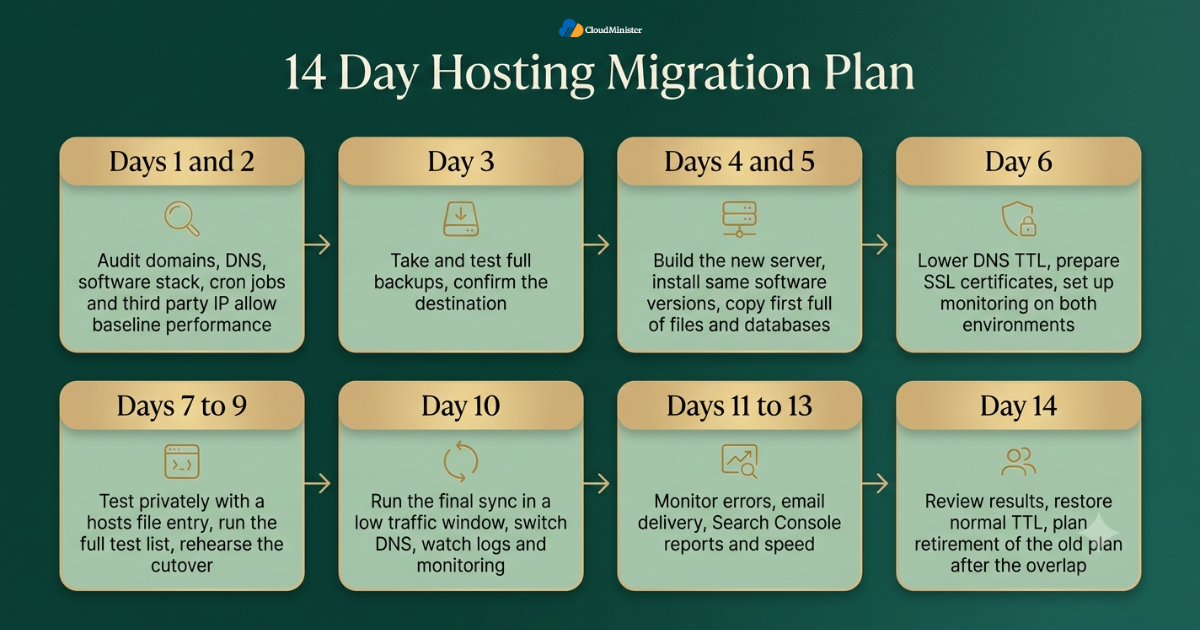
- Days 1 and 2: audit domains, DNS, software stack, cron jobs, and third party IP allow lists, and record baseline performance numbers.
- Day 3: take and test full backups, and confirm the destination, whether a Cloud Hosting Plan, Azure Cloud Hosting, or Optimized AWS Cloud Hosting.
- Days 4 and 5: build the new server, install the same software versions, and copy the first full set of files and databases.
- Day 6: lower the DNS TTL, prepare SSL certificates, and set up monitoring on both environments.
- Days 7 to 9: test the new site privately through a hosts file entry, fix issues, run the full test list, and rehearse the cutover.
- Day 10: run the final sync in a low traffic window, switch DNS, and watch logs and monitoring closely.
- Days 11 to 13: monitor errors, email delivery, Search Console reports, and speed, and fix issues quickly.
- Day 14: review the results, restore the normal TTL, and plan retirement of the old plan after the agreed overlap. A Web Hosting Company in India can support this last review.
- Keep a short list of contacts at your Web Hosting Company in India, your registrar, and your DNS host, so no one searches for logins during the cutover.
Checklist: Hosting Migration Readiness Review
- Main goal for the move is written down, such as cost, speed, support, or data location
- Inventory is complete, including domains, DNS records, cron jobs, and third party IP allow lists
- Software versions on the new server match the old server
- Full backups are taken, stored outside both providers, and restore tested
- DNS TTL is lowered at least as long as the old TTL before cutover
- SSL certificates are ready on the new server before DNS changes
- Email records, including MX, SPF, DKIM, and DMARC, are verified
- Rehearsal is complete and the test list passes on the new server
- Rollback plan and rollback triggers are written and shared
- Old plan stays active for the agreed overlap period after cutover
- Destination is chosen after comparing cloud hosting services in India and cloud platforms on cost and support
Key Takeawys
- Hosting Migration succeeds when planning is done before the first file is copied.
- Near zero downtime is realistic for most sites, but a short final sync window is often needed for busy databases.
- Lower the DNS TTL early, at least as long before cutover as the old TTL.
- Test the new server privately, with a hosts file entry or curl resolve, before DNS changes.
- Prepare SSL certificates and email records before cutover so nothing breaks on the day.
- Keep URLs, redirects, robots.txt, and sitemaps correct to protect rankings during Hosting Migration.
- Keep the old plan active for 7 to 14 days and budget for the overlap.
- Choose Azure Cloud Hosting, Optimized AWS Cloud Hosting, or a managed Cloud Hosting Plan based on workload fit and not on trend.
- A Web Hosting Company in India offering cloud hosting services in India can add monitoring, support, and local data centres to the plan.
Need Expert Help With Your Hosting Migration
Share your website details with our team and get a clear plan for audit, testing, cutover, and rollback. We will help you move with near zero downtime and without risking your search rankings.
Conclusion
Across every section, one pattern holds. Downtime during a move is rarely bad luck. It is the result of skipped steps, and each of those steps is easy to fix when it is planned in advance. A calm Hosting Migration starts with an audit, uses a parallel run with a low TTL, syncs data twice, tests privately, and keeps a rollback path open. Choose the destination on fit and support, whether that is a scalable Cloud Hosting Plan, Azure Cloud Hosting, or Optimized AWS Cloud Hosting, and measure results against the numbers you recorded before the move. For teams that want experienced help with the whole project, work with a Web Hosting Company in India that also provides cloud hosting services in India and can support every stage of Hosting Migration.
Once the move is done, the work is not quite over. The first week after cutover is when small issues show themselves, such as a missed cron job, a slow email queue, or a redirect that did not carry over. Keep your monitoring active, check your logs every day, and leave the old server running until you are fully confident. This patience is what separates a smooth Hosting Migration from one that causes late night surprises.
It also helps to treat every move as a learning exercise for your team. Write down what went well, what took longer than planned, and what you would change next time. These notes make the next Hosting Migration faster and calmer, and they give your team a record to rely on when questions come up later. A move done with care today saves real time, money, and stress down the road.
Frequently Asked Question
Can I do a Hosting Migration with zero downtime?
Near zero downtime is realistic for most websites. You build the new environment in parallel, sync data, test privately, and switch DNS with a low TTL. A brief read only period may still be needed for the final database sync on busy sites, so plan for seconds or minutes and not hours.
How long does Hosting Migration usually take?
A small site can move in a day, while a business site with email, several databases, and integrations often needs one to two weeks including testing. Size, complexity, and how well the site is documented decide the timeline. Providers of cloud hosting services in India often offer assisted moves that shorten this time.
Will Hosting Migration affect my SEO rankings?
Not if URLs, content, redirects, and technical signals stay the same and the site remains reachable. Rankings suffer when robots.txt blocks crawlers, redirects are lost, or the site returns server errors for long periods. Choosing cloud hosting services in India with local servers can even help speed for Indian visitors.
What should I lower before changing DNS?
Lower the TTL on the records you plan to change, usually to 300 seconds, at least as long before cutover as the old TTL. That way resolvers refresh their cache quickly when you switch.
What happens to my email during Hosting Migration?
Email keeps working if MX, SPF, DKIM, and DMARC records stay correct and mailboxes are copied before the switch. If mail is hosted with a separate service, the website move does not need to change it at all.
Is a Cloud Hosting Plan better than shared hosting for a move?
For growing sites, usually yes. A Cloud Hosting Plan offers dedicated resources, snapshots, and room to scale, which makes future moves less likely. Shared hosting can still suit very small sites with steady traffic.
When should I choose Azure Cloud Hosting or Optimized AWS Cloud Hosting?
Choose them when you need global reach, managed databases, auto scaling, or deep integration with other cloud services. For simpler websites, a Web Hosting Company in India that offers cloud hosting services in India can be easier to run and cheaper to manage.
Should I ask for help with Hosting Migration?
Not always, but outside help adds rehearsal experience, monitoring, and an independent review of your rollback plan. It is most useful for e-commerce sites, regulated data, and large applications.

Ajay Singh Raghav is a Senior Linux System Administrator at CloudMinister Technologies, where he has spent over 4 years installing, configuring, maintaining, and troubleshooting Linux servers for hosting and cloud environments. He specializes in AWS cloud computing alongside core Linux server administration, with hands-on expertise across server management, backup and restore systems, and cPanel-based hosting environments. His day-to-day experience keeping production servers stable and secure gives him a practical, ground-level understanding of the infrastructure he writes about.