Most ranking drops after a hosting move are caused by avoidable gaps, such as slow DNS changes, blocked crawlers, missing redirects, broken SSL and server errors that Googlebot meets before anyone notices. A host change that keeps URLs, content and internal links the same is usually far safer than a domain change, but only when the plan includes a full pre-move crawl, a lowered DNS TTL, testing on the new server and close monitoring after launch. This guide explains how to migrate website without losing SEO in a clear order: audit, build, test, lower TTL, cut over, redirect where URLs change, and monitor. It also shows how choosing between a Web Hosting Company in India, cloud hosting services in India, Dedicated Server Hosting in India, Affordable Cloud Hosting India or Dedicated Servers in India option affects speed, crawl health and long term stability.
Moving a website to a new host looks simple. You copy the files, restore the database, change the DNS and wait. Yet this is the point where many sites quietly lose rankings. A page that returns an error to Googlebot, a robots.txt file copied from staging, or one missing redirect rule can undo months of work within days. That is why every team that wants to migrate website without losing SEO needs a written plan, not a lucky weekend.
The good news is that Google has no penalty for changing hosts. Search engines care about whether your URLs still work, whether your content is the same, whether the server answers quickly and whether crawlers can reach it. If all of that stays stable, rankings usually hold. If you change the domain or the URL structure at the same time, you need redirects and extra care. A reliable Web Hosting Company in India can help with the infrastructure side, and even Affordable Cloud Hosting India plans can perform well, but the SEO checks remain your job.
This guide explains each step in plain language: audit, host selection, copying data, testing, DNS TTL, redirects, SSL, monitoring and a 30 day plan. Whether you plan to migrate website without losing SEO on a small blog or on a busy store, the same order of work applies, and a good Dedicated Server Hosting in India plan, one of the Dedicated Servers in India options or a cloud plan only helps when the steps around it are done properly.
Table of Contents
- 1. What a Hosting Move Really Means for Your Rankings
- 2. Why SEO Drops After a Host Change: Risks and Real Numbers
- 3. Pre-Migration Audit: Benchmarks and a Full Site Crawl
- 4. Choosing the New Host: Speed, Location and Infrastructure
- 5. Preparing the New Server and Copying Files and Database
- 6. Testing on the New Server Before You Switch DNS
- 7. DNS TTL Strategy and the Cutover Timeline
- 8. Redirects: When You Need Them and How to Write Them
- 9. SSL, Robots.txt, Sitemaps and CDN Settings After Launch
- 10. Post-Migration Monitoring in Search Console, Logs and Analytics
- 11. Common Mistakes That Cause Ranking Loss
- 12. Choosing the Right Partner and Assigning Ownership
- 13. A Practical 30 Day Plan to Get Started
- Key Takeaways
- Conclusion
- Frequently Asked Questions
1. What It Really Means to Migrate Website Without Losing SEO
A hosting migration moves your website from one server environment to another while the public address of the site stays the same. When you migrate website without losing SEO, the goal is that Google and every visitor see the same URLs, content and signals before and after the move, only delivered from a different server. This is different from a domain change, a platform change or a redesign, which alter URLs or templates and carry more risk. Many teams mix these together in one weekend, which makes it impossible to find the cause of a drop. A Web Hosting Company in India can move your files, but your SEO team must confirm that nothing Google depends on has changed.
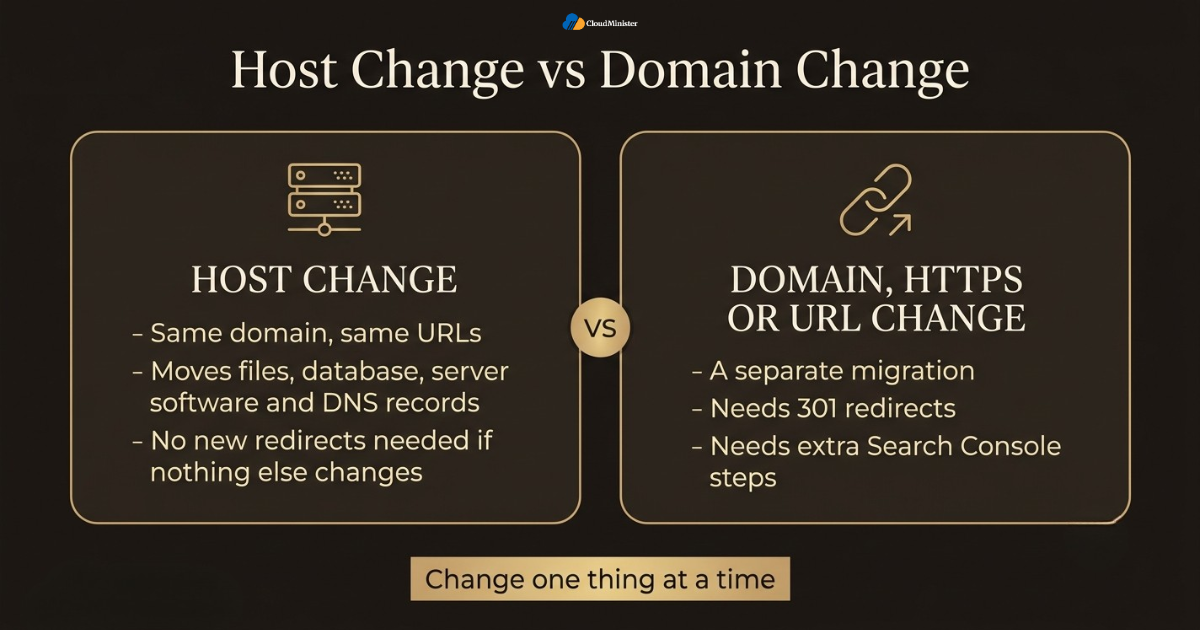
- A host change moves files, database, server software and DNS records. The URLs stay the same, so no new redirects are needed if nothing else changes.
- A domain change, an HTTP to HTTPS change or a new URL structure is a separate migration. It needs 301 redirects and extra Search Console steps.
- A new IP address or server location is not a ranking penalty on its own. Problems appear when the new server is slower, unstable or blocks crawlers.
- To migrate website without losing SEO, keep titles, headings, canonical tags, structured data, internal links and robots rules identical on the new server.
- Response codes matter. Googlebot should see 200 for live pages, 301 for moved pages, and 404 or 410 only for pages that are truly gone.
- Speed and uptime matter because slow or failing servers reduce how much Googlebot crawls, and users leave slow pages.
- Change one thing at a time. If you move host and redesign together, you cannot tell which change caused a traffic drop. This is the simplest rule to migrate website without losing SEO.
- Expect small ranking movement for a few days even when everything is done right, and judge the result against your own benchmark.
- Hosting type is not what harms rankings. Moving from shared hosting to cloud hosting services in India, from a VPS to Dedicated Server Hosting in India, or toward Affordable Cloud Hosting India and Dedicated Servers in India plans keeps ranking signals intact when the site itself is unchanged.
Write down the exact list of things that must not change: URLs, titles, canonicals, robots rules, sitemap location, structured data and tracking codes. Check this list before and after the switch. Teams that migrate website without losing SEO most reliably treat it as a pass or fail test rather than a general feeling.
2. Why SEO Drops After a Host Change: Risks and Real Numbers
SEO losses after a move are rarely caused by the new server itself. They come from small gaps that nobody tested. A 2026 report on Search Engine Watch explains that Maggie Beer Holdings reported a 9.53 million dollar FY26 statutory loss after organic search traffic fell following a website migration at its Hampers and Gifts Australia business, with the traffic drop reaching as much as 38 percent ahead of Christmas. That case involved a platform change, which is a bigger step than a host switch, but the lesson is the same: an untested migration can cost far more than the planning would have. Anyone who wants to migrate website without losing SEO should treat the risks below as a working checklist and ask their Web Hosting Company in India to help with the infrastructure items.
- DNS delays: some visitors and crawlers reach the old server while others reach the new one, so content or errors can differ for a while. This is the first risk to control if you migrate website without losing SEO.
- Server errors: 5xx responses and timeouts make Googlebot slow its crawling, and long lasting errors can push pages out of results.
- Blocked crawlers: a staging noindex tag or a Disallow rule left in place can remove pages from search.
- Lost server rules: redirects and rewrites written for Apache do not automatically work on Nginx, which is common when moving to a fresh Dedicated Server Hosting in India build.
- Broken HTTPS: an expired, missing or mismatched certificate triggers browser warnings and failed fetches.
- Slower pages: an undersized server, missing caching or a distant data centre raises load time and hurts user experience. This can happen on any plan, including Affordable Cloud Hosting India tiers that are sized too small.
- Firewall or bot rules on the new host can block or rate limit Googlebot by mistake, including firewalls on Dedicated Servers in India setups.
- Missing files: images, PDFs, CSS or JavaScript that were not copied change how pages render and how Google reads them.
- Missed tracking: dropped analytics tags leave you unable to measure the result.
| Risk | What Google or users see | How to prevent it |
| DNS split | Different content or errors from two servers | Lower TTL early and keep the old server online |
| Server errors | 5xx responses and timeouts | Load test, set alerts, use a short 503 only if needed |
| Blocked crawl | Noindex or Disallow carried over from staging | Compare robots.txt and meta robots on both servers |
| Missing redirects | 404 errors on old URLs | Port rewrite rules and test a saved URL list |
| SSL problem | Browser security warnings | Install the certificate before the DNS change |
3. Pre-Migration Audit: Benchmarks and a Full Site Crawl
Before touching the server, capture the current state of the site. A benchmark lets you prove whether the move changed anything. Crawl the live site with a crawler such as Screaming Frog or Sitebulb, export your Search Console data and save your analytics numbers. Search Console keeps only about 16 months of performance data, so export it now. This audit is the base of any plan to migrate website without losing SEO, because every later test is a comparison against it. A Web Hosting Company in India that offers migration help will still need this list from you, whether the target is Affordable Cloud Hosting India or Dedicated Servers in India.
- Crawl all URLs and export status codes, titles, meta descriptions, canonicals, headings, noindex tags and internal link counts.
- Save copies of robots.txt, XML sitemaps, the .htaccess or Nginx configuration, and every redirect list you use.
- Export Search Console performance data for queries and pages, plus the totals from the Page indexing report.
- Record organic sessions, conversions and top landing pages from analytics for at least the last 12 months to see seasonality.
- Note your top 50 to 100 landing pages and the rankings of your main keywords from a rank tracker.
- Record server baselines: average response time, uptime, PHP or runtime version and peak traffic hours. Compare them later with the new environment, whether it is cloud hosting services in India or Dedicated Server Hosting in India.
- List every integration: payment gateways, APIs, cron jobs, email sending, CDN, firewall and third party scripts.
- Document the full DNS zone: A, AAAA, CNAME, MX, TXT, SPF, DKIM, DMARC and any verification records.
- Freeze content, plugin and theme updates from the audit date until the migration is finished. This keeps the comparison clean when you migrate website without losing SEO.
4. Choosing the New Host: Speed, Location and Infrastructure
The destination matters for SEO because speed and stability influence both crawling and user experience. The Chrome UX Report release notes show that about 56.5 percent of origins had good Core Web Vitals in the March 2026 dataset, which means a large share of the web still fails at least one of the three checks. A move is a chance to land on better infrastructure instead of repeating old limits. When you compare cloud hosting services in India with shared plans or Affordable Cloud Hosting India offers, look at resources, location and support, not just the monthly price. Teams that want to migrate website without losing SEO should also test the plan before committing.
- Match the plan to traffic. Shared hosting suits small sites, a VPS or cloud hosting services in India suits growing sites, and Dedicated Server Hosting in India suits busy stores or applications that need full control of CPU, RAM and disk.
- Pick a data centre near your main audience. Server location is a weak ranking signal for Google, but a closer server lowers latency for users. This matters for cloud hosting services in India as much as for Dedicated Servers in India that serve a single region.
- If you are looking at Affordable Cloud Hosting India plans, check that a low price does not mean overloaded nodes, small RAM limits or no staging option.
- Confirm support for current PHP, Node or Python versions, your database version, HTTP/2 or HTTP/3, gzip or Brotli, and TLS 1.2 or 1.3.
- Check backup frequency, snapshot options and restore time before the move, not after a failure, because a plan to migrate website without losing SEO needs a safe way back.
- Ask whether you can test the new server with a hosts file entry or a temporary URL before the DNS change. That test is how you migrate website without losing SEO safely.
- Compare Dedicated Servers in India with cloud servers when you need predictable performance, hardware isolation or data residency inside the country. Also ask how quickly failed hardware is replaced on Dedicated Server Hosting in India plans.
- Confirm the firewall and DDoS tools allow verified Googlebot traffic, and that you can adjust rate limits.
- Check the support model: response times, migration help, and who handles problems at night and on weekends. A Web Hosting Company in India with a clear migration process makes this step easier.
Related Reading: Our application migration strategy guide
Move to Cloud Hosting Built for Speed and Stability
A new host should never put your rankings at risk. Cloudminister’s cloud hosting services in India give you scalable resources, fast storage, SSL support and expert help, so your site stays quick and crawlable before and after the move.
5. Preparing the New Server and Copying Files and Database
Once the host is chosen, build the new environment so that it behaves like the old one. The aim is a server that returns the same pages, headers and redirects, which is the core of any effort to migrate website without losing SEO. Build first, copy data second, and keep the old server running the whole time. Copy the site as it stands on a fixed day, and plan a final sync of changed files and database rows just before cutover so that recent orders, comments and posts are not lost. A Web Hosting Company in India with managed support can build the server, but you should still verify the result yourself.
- Match server software where possible: PHP or runtime version, database engine and version, extensions and memory limits. On cloud hosting services in India plans, check these in the control panel or image settings.
- Copy files with rsync or SFTP, keeping permissions and ownership. Compare file counts and total size afterwards. Even on Affordable Cloud Hosting India plans, ask for SSH access so rsync is possible.
- Export the database with mysqldump (use the single transaction option for InnoDB tables) or a snapshot, then import it and check table counts and the utf8mb4 character set.
- Do not change site URLs in the database unless the domain is changing. When you must replace URLs in WordPress, use a serialization safe tool such as WP-CLI search-replace.
- Port server rules by hand. Apache .htaccess rewrites do not run on Nginx and must be rewritten as Nginx location and return rules.
- Recreate cron jobs, scheduled tasks, mail settings, environment variables and caching or object cache services. On Dedicated Servers in India, also recreate monitoring agents and backup jobs.
- Set cache headers, compression and image delivery to match the old server or improve on it. This is easy to tune on Dedicated Server Hosting in India servers where you have full root access.
- Run a final delta sync during the cutover window. If the site takes orders or form entries, use a short maintenance mode so no data is lost. This step matters most if you want to migrate website without losing SEO on a store.
- For maintenance pages, return a 503 status with a Retry-After header. Never serve a maintenance page with a 200 status, and keep it to minutes.
Related Reading: Our guide on data migration risks and avoiding data loss
A migration creates a second copy of your data on a new server. Use SFTP or SSH instead of plain FTP, give database users only the privileges they need, and close temporary access once the move is confirmed. Never leave a database export in a folder that the web server can serve. If you test on a temporary address, protect it with a password so that nobody can read it and search engines cannot index it.
6. Testing on the New Server Before You Switch DNS
Testing before the DNS change is the biggest safeguard when you migrate website without losing SEO. The simplest method is to edit the hosts file on your computer so that your domain points to the new server IP, while the rest of the world still reaches the old server. This lets you browse the real domain on the new host, with the real SSL setup, and crawl it with the same tool you used for the baseline. Avoid a public staging address that search engines can find. If you must use one, protect it with HTTP authentication. Whether you chose cloud hosting services in India or Dedicated Server Hosting in India, the testing steps are the same.
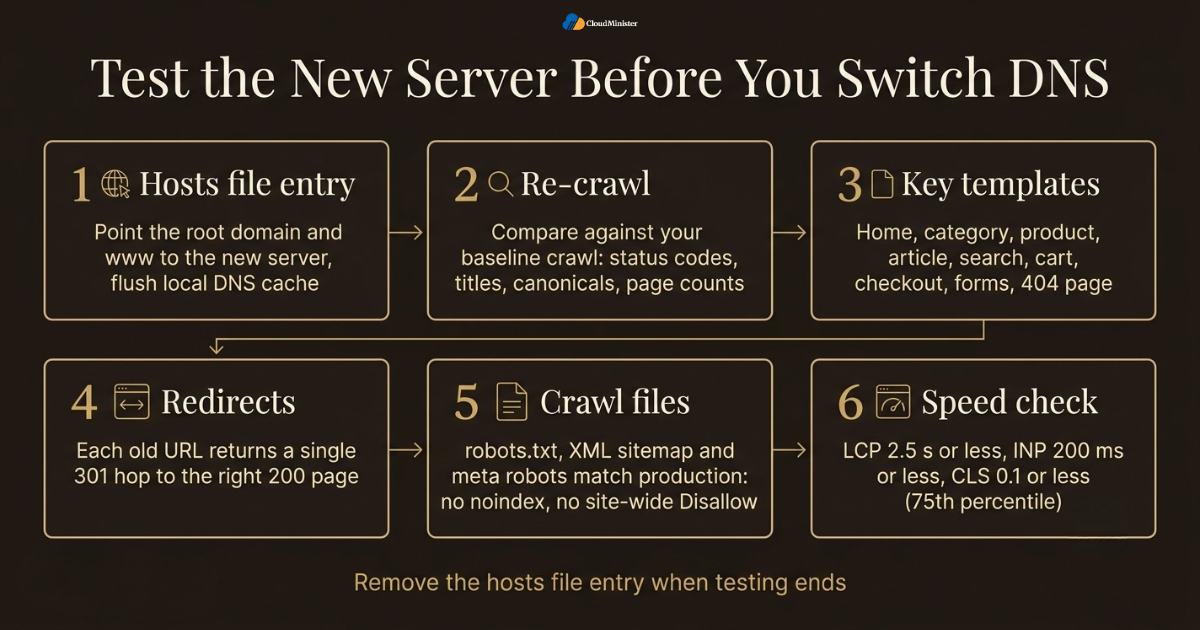
- Add a hosts file entry for the root domain and the www version, flush your local DNS cache and confirm you reach the new server. Remove the entry when testing ends.
- Re-crawl the new server with the same crawler settings and compare it to your baseline crawl: status codes, titles, canonicals and page counts. This comparison is the heart of any effort to migrate website without losing SEO.
- Check the key templates: home, category, product, article, search, cart, checkout, contact forms and the 404 page.
- Test your saved redirect list and confirm each old URL returns a single 301 hop to the right 200 page.
- Verify that robots.txt, the XML sitemap and meta robots tags match production, with no noindex tag and no site wide Disallow. Ask your Web Hosting Company in India to confirm that hosts file testing is allowed, including on Dedicated Servers in India with custom firewall rules.
- Run Lighthouse or PageSpeed Insights and compare response time to your baseline. Aim for LCP of 2.5 seconds or less, INP of 200 milliseconds or less and CLS of 0.1 or less at the 75th percentile. Lab tests are only a guide, and field data appears later.
- Load test with realistic traffic, especially on smaller plans such as Affordable Cloud Hosting India, to see how the server behaves at your peak hour.
- Test forms, payments, email delivery and logins, and confirm that analytics and tag manager scripts fire. Working tags let you prove that you managed to migrate website without losing SEO.
- Never rely on robots.txt alone to hide staging. A Disallow rule does not stop a URL from being indexed and it stops Google from seeing a noindex tag.
Related Reading: Our cloud migration checklist for 2026
Keep a one page test sheet with ten important URLs and the expected result for each, such as status code, final URL, title and canonical. Run it three times: on the new server before DNS, right after the switch and again 24 hours later. Differences between the runs usually point straight to the problem, and this habit makes it easier to migrate website without losing SEO on every future move.
7. DNS TTL Strategy and the Cutover Timeline
DNS TTL stands for time to live. It is the number of seconds a resolver may cache a DNS answer before asking again. If your A record has a TTL of 86400 seconds, a resolver that cached it just before your change may keep the old IP for up to 24 hours. To migrate website without losing SEO, lower the TTL well before the switch so that the change spreads quickly, then raise it again once the new server is stable. The TTL must be lowered at least one full old TTL period before the cutover, otherwise resolvers still hold the old long value. Good planning here matters for every Web Hosting Company in India migration, whatever the plan size.
- Check the current TTL on the A, AAAA and CNAME records for the root domain and www. Common values are 3600, 14400 and 86400 seconds.
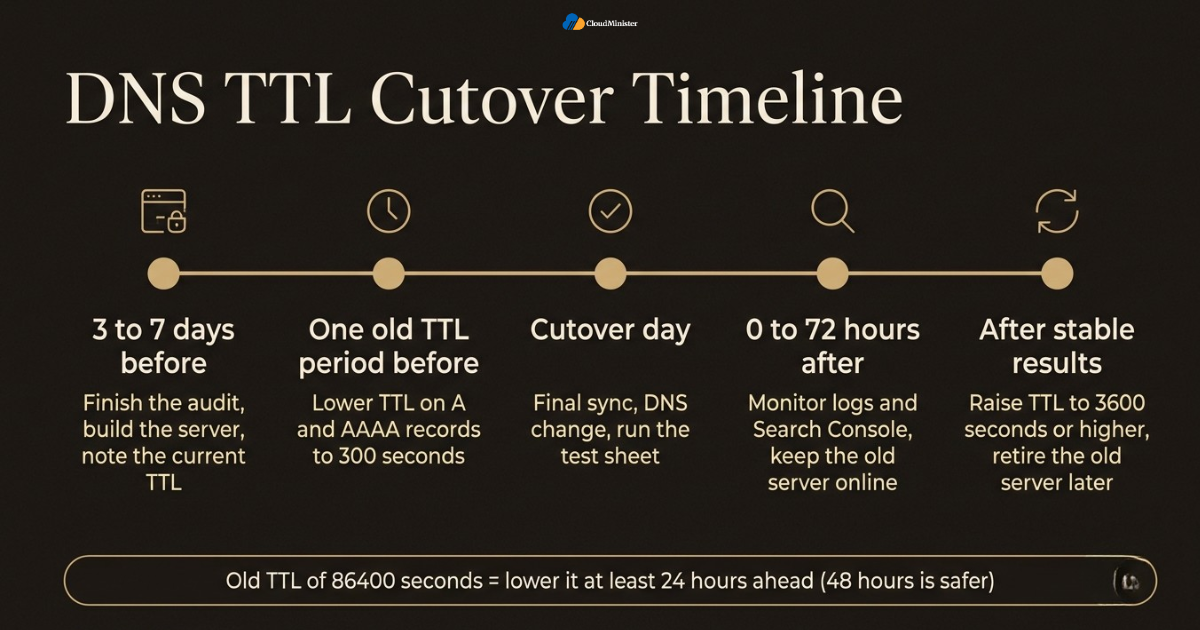
- Lower the TTL to 300 seconds at least one full old TTL period before the cutover. For an 86400 second value, that means at least 24 hours, and 48 hours is safer.
- If only the hosting IP changes, update the A record and keep the same nameservers. This is the usual case when moving to cloud hosting services in India or Dedicated Server Hosting in India, and it avoids extra delay.
- If you change nameservers, copy the full DNS zone to the new DNS provider first and compare it record by record. The nameserver change itself can take up to 24 to 48 hours at registry level.
- Copy every record: MX, TXT, SPF, DKIM, DMARC, Search Console verification, CNAME and SRV. A missing MX record stops email delivery.
- After the change, check propagation with dig or nslookup against several public resolvers. Some ISP resolvers ignore low TTL values, so allow extra time.
- Keep the old server online for at least 72 hours, ideally a week, and keep it read only or pointed at the new database so late visitors do not create lost orders. Ask your Web Hosting Company in India to keep the old plan active until then.
- Choose a low traffic window and avoid sales events, campaigns and public holidays. A calm window is a core habit when you migrate website without losing SEO. If your Affordable Cloud Hosting India plan includes a DNS panel, check that it allows custom TTL values.
- After 48 to 72 hours of stable results, raise the TTL back to 3600 seconds or higher to reduce DNS lookups. For Dedicated Servers in India, ask for the new static IP address early, since you need it to prepare the A record.
| Stage | What to do | Why it matters |
| 3 to 7 days before | Finish the audit, build the server and note the current TTL | Gives you a baseline and time to fix problems |
| One old TTL period before | Lower TTL on A and AAAA records to 300 seconds | Lets the change spread fast on cutover day |
| Cutover day | Final sync, DNS change, run the test sheet | Moves traffic with a very short gap |
| 0 to 72 hours after | Monitor logs and Search Console, keep the old server online | Catches visitors and bots still on the old IP |
| After stable results | Raise TTL and retire the old server later | Restores normal DNS caching |
Related Reading: Our guide to the 6Rs of cloud migration strategy for 2026
Many teams lower the TTL on the day of the move, which has no effect on resolvers that already cached the old value. The change must be made early enough for the old long TTL to expire. This one detail often decides whether you migrate website without losing SEO on the first attempt. A second common miss is an AAAA record that still points to the old IPv6 address, which can send some visitors and crawlers to the old server after the A record has changed.
8. Redirects: When You Need Them and How to Write Them
If the URLs stay the same, a host change needs no new redirects. The redirects that already exist on the old server must simply keep working. Redirects become essential when the domain, protocol, folder structure or URLs change at the same time. In that case, use permanent redirects from each old URL to the single most relevant new URL. This is where teams that want to migrate website without losing SEO spend most of their effort, because a weak redirect map is one of the most common causes of traffic loss. Do not send everything to the home page, since Google can treat that as a soft 404. Plans with server access, such as cloud hosting services in India or Dedicated Servers in India, make these rules easy to manage, while Affordable Cloud Hosting India plans may limit configuration access, so check first.
- Use 301 or 308 for permanent moves. These tell Google that the new URL replaces the old one. A 302 or 307 signals a temporary move.
- Map old URLs to new URLs one to one, using your baseline crawl, Search Console, analytics and backlink data as sources. A careful map is the heart of any plan to migrate website without losing SEO.
- Avoid redirect chains. Use one hop only. Googlebot follows a limited number of hops, and every hop adds delay for users.
- Keep redirects live for at least one year, and longer if the old URLs still earn links or traffic. That patience is how you migrate website without losing SEO in the long run.
- Pick one canonical version of the site (www or non-www, HTTPS only) and redirect everything else to it with a single rule. Ask your Web Hosting Company in India whether this rule belongs in the server configuration, the CMS or the CDN.
- Update internal links, canonical tags, sitemap entries and hreflang tags to the final URLs so that you do not depend on redirects inside your own site.
- Use a 410 or 404 status only for pages that are really removed with no close replacement.
- Write the rules in the right syntax for the new server, such as Apache or Nginx on Dedicated Server Hosting in India where you control the configuration, and test each one with curl -I or a header checker.
- If the domain itself changes, also use the Change of Address tool in Search Console. It is not needed for a host change on the same domain.
9. SSL, Robots.txt, Sitemaps and CDN Settings After Launch
After the content is live on the new server, the technical files that guide crawlers must be correct. One wrong line in robots.txt can block your whole site, and a missing certificate can stop browsers and bots from connecting securely. To migrate website without losing SEO, treat these files as part of the release, not as an afterthought. Many teams copy a staging robots.txt to production by accident, so verify these files as soon as the cutover is complete. Checking them is just as important on Dedicated Server Hosting in India setups as it is on shared or cloud plans.
- Install a valid TLS certificate on the new server before the DNS change. HTTP-01 validation for free certificates may fail because the request still reaches the old server, so use DNS validation or import the existing certificate.
- Confirm the certificate covers both the root domain and www, and that the full chain is installed. Ask your Web Hosting Company in India to install and renew it automatically.
- Redirect HTTP to HTTPS with a 301 and remove mixed content such as old HTTP images or scripts.
- Make sure robots.txt returns a 200 status and does not contain a site wide Disallow or block CSS and JavaScript. A robots.txt that returns server errors can make Google pause crawling, which would defeat any effort to migrate website without losing SEO.
- Check meta robots tags and X-Robots-Tag headers for stray noindex values on live pages.
- Keep the XML sitemap URL the same, list only final canonical 200 URLs and resubmit it in Search Console. It is a small step that helps you migrate website without losing SEO.
- If you use a CDN or firewall, update the origin IP and confirm that Googlebot is not challenged, rate limited or blocked. Verify Googlebot with a reverse DNS lookup or Google’s published IP ranges, not by user agent alone. Dedicated firewalls on Dedicated Servers in India need the same check.
- Turn caching, compression, image optimisation and HTTP/2 or HTTP/3 back on, since defaults on a new server are often different, whether you run cloud hosting services in India or Affordable Cloud Hosting India tiers.
- Do not set a long HSTS max-age until HTTPS is confirmed stable on the new host, because a later certificate fault would lock visitors out.
10. Post-Migration Monitoring in Search Console, Logs and Analytics
The first weeks after the switch decide whether the move looks calm or costly. Monitor daily at first. Search Console shows how Google sees the new host, while server logs show exactly what Googlebot requested and how your server answered. Small ranking movement is normal after any technical change, but sudden drops in impressions, rising server errors or growing crawl failures need action the same day. Teams that migrate website without losing SEO well set alerts instead of checking by hand, and they watch the numbers for at least four to six weeks.
- Open the Crawl Stats report in Search Console settings and watch host status, average response time, total crawl requests and response codes. A steady line after moving to Dedicated Server Hosting in India or cloud shows the server is coping.
- Check the Page indexing report for growth in not found (404), server error (5xx), blocked by robots.txt and excluded by noindex pages.
- Use URL Inspection and its live test on key pages to see what Googlebot actually receives.
- Compare clicks and impressions in the Performance report with your baseline by page group, not only in total.
- Re-crawl the live site and compare it with the old crawl to find missing pages, changed titles or broken links. This is the final proof that you managed to migrate website without losing SEO.
- Review server logs for Googlebot status codes, slow responses and spikes in 5xx errors. On Dedicated Servers in India, logs and resource graphs are fully under your control.
- Set uptime and response time alerts, ask your Web Hosting Company in India what monitoring is included, especially on Affordable Cloud Hosting India plans, and keep the old server online until results are stable.
- Give Google time to recrawl. Compare week on week instead of hour by hour. A calm review rhythm is how teams migrate website without losing SEO without panic.
- Watch Core Web Vitals field data, which uses a rolling 28 day window, so changes in speed show up gradually. If you moved to cloud hosting services in India, speed gains appear in the same gradual way.
11. Common Mistakes That Cause Ranking Loss
Most ranking losses after a host move trace back to a short list of repeating mistakes. They are cheap to prevent and expensive to fix after Google has already crawled the broken version. Teams that successfully migrate website without losing SEO usually have a named owner for each risk and a test for each item. Use the list below as a final review before you press the button, and remember that a Web Hosting Company in India cannot see these problems unless you tell it what to check.
- Lowering the DNS TTL on the day of the migration instead of at least one old TTL period earlier.
- Leaving a noindex tag or Disallow rule from staging on the live site.
- Forgetting to rebuild rewrite rules when moving from Apache to Nginx.
- Cancelling the old hosting account right after the switch, before DNS caches expire and before backups are tested, which is a classic way to fail to migrate website without losing SEO.
- Losing the Search Console verification record or the analytics tag, which removes your view of the results.
- Moving during a peak season, sale or major campaign, even when the target is a strong Dedicated Server Hosting in India server.
- Changing URLs, themes, plugins and the host in one release, which makes it hard to migrate website without losing SEO with confidence.
- Letting a firewall or rate limit block Googlebot on the new server, a risk on Dedicated Servers in India and cloud setups alike.
- Not recreating email DNS records, which breaks delivery and can harm sender reputation, a common slip after a move to cloud hosting services in India plans.
12. Choosing the Right Partner and Assigning Ownership
A migration touches hosting, DNS, development and SEO, so unclear ownership is a risk of its own. Agree who owns each part, in writing, before the date is set. Many businesses choose a Web Hosting Company in India that also offers migration help and managed support, because they get monitoring, backups and emergency cover during the move. Even then, the SEO checks should stay with your marketing or SEO team, since a host cannot know which URLs drive your revenue. A clear owner for each task is the quickest way to migrate website without losing SEO.
- SEO owner: baseline crawl, redirect map, robots and canonical checks, and Search Console monitoring, the role that decides whether you migrate website without losing SEO.
- Developer owner: application settings, database, code compatibility and scheduled jobs, including image and scaling settings on cloud hosting services in India.
- Infrastructure owner: server build, resources, firewall, SSL, backups and server monitoring, including hardware checks on Dedicated Server Hosting in India.
- DNS owner: TTL changes, record copy, cutover timing and rollback.
- Name one person with authority for the go or no go decision and one for rollback, so there is no debate during the window.
- Ask the provider for a written migration plan with a rollback path and a tested backup restore time, which supports any plan to migrate website without losing SEO.
- Compare cloud hosting services in India and Dedicated Servers in India on guaranteed resources, not just headline price, and read Affordable Cloud Hosting India offers with the same care.
- Ask whether the provider supports hosts file testing, a temporary URL or a staging copy on the new server, including on Dedicated Servers in India.
- Confirm in writing what your Web Hosting Company in India monitors after the move and what stays your responsibility.
13. A Practical 30 Day Plan to Get Started
Plans are easier to follow when they are split into weeks. This 30 day schedule gives a small or mid sized site enough time to audit, build, test and cut over without rushing. Large sites with many thousands of URLs may need longer. The principle to migrate website without losing SEO is the same at any size: prepare early, test on the new server, switch quickly and monitor closely. If you are comparing cloud hosting services in India with Dedicated Server Hosting in India or other options, finish that choice in week one so the rest of the schedule is not delayed.
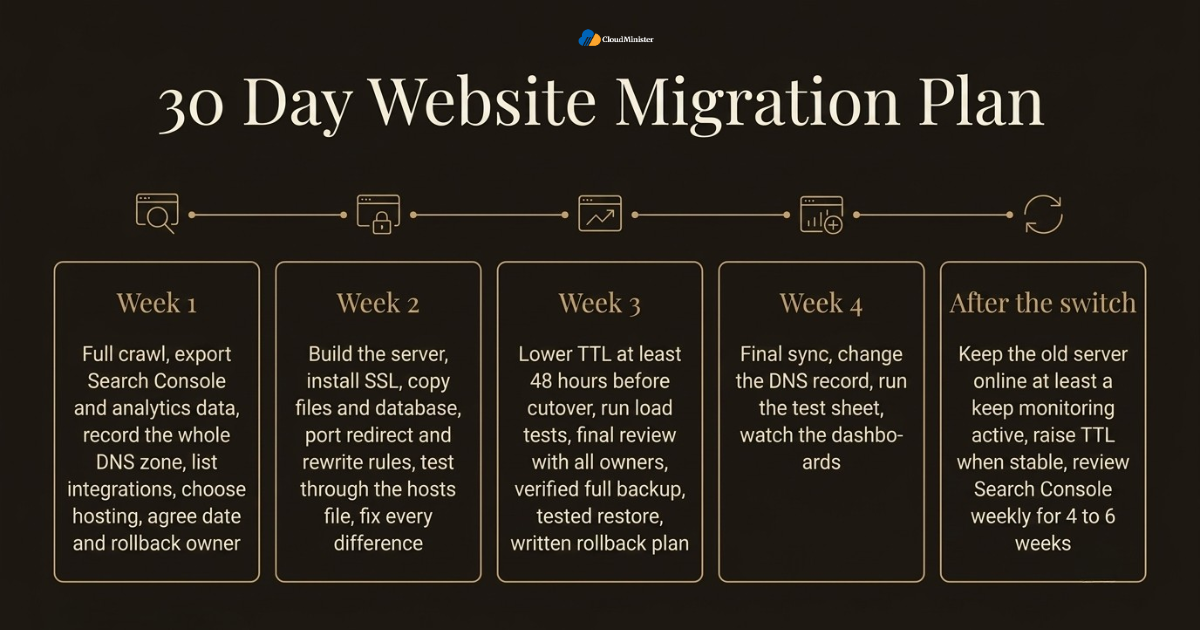
- Week one: run the full crawl, export Search Console and analytics data, record the whole DNS zone and list every integration.
- Week one: compare hosting options such as cloud hosting services in India, Dedicated Server Hosting in India, Dedicated Servers in India and Affordable Cloud Hosting India, confirm resources and location, and agree the migration date and rollback owner.
- Week two: build the new server, install SSL, copy files and database, and port the redirect and rewrite rules.
- Week two: test through the hosts file, compare crawls and fix every difference you find.
- Week three: lower the DNS TTL at least 48 hours before the cutover, run load tests and hold a final review with all owners.
- Week three: take a verified full backup, test a restore and write the rollback plan down.
- Week four: run the final sync, change the DNS record, run the test sheet and watch the dashboards, which completes the plan to migrate website without losing SEO.
- After the switch: keep the old server online for at least a week, ask your Web Hosting Company in India to keep monitoring active, raise the TTL when stable and review Search Console weekly for four to six weeks.
Checklist: Readiness Review to Migrate Website Without Losing SEO
- Baseline crawl, Search Console export and analytics numbers saved
- Full DNS zone documented, including MX, TXT and verification records
- New server built with matching software, rules and a valid SSL certificate
- Hosts file test completed and crawl compared with the baseline
- No staging noindex tag or Disallow rule on the production server
- Redirects tested if any URL, domain or protocol changes
- TTL lowered at least one full old TTL period before the cutover
- Verified backup, tested restore and written rollback plan in place
- Old server kept online until results are stable
- Search Console, server logs and uptime alerts watched for four to six weeks
Key Takeaways
- A host change with the same URLs is a low risk move, and the best way to migrate website without losing SEO is a plan with testing before the DNS change.
- Capture a full baseline before you start: crawl, Search Console data, analytics, DNS records and server rules.
- Lower the DNS TTL at least one full old TTL period before cutover and raise it again once results are stable.
- Test on the new server with a hosts file entry, and never leave staging noindex or Disallow rules on production.
- Use 301 redirects only where URLs change, map them one to one and avoid chains.
- Choose the plan by workload: cloud hosting services in India for flexible growth, Dedicated Server Hosting in India or Dedicated Servers in India for heavy workloads, and compare Affordable Cloud Hosting India offers on real resources.
- Steady monitoring for four to six weeks is the last step to migrate website without losing SEO with proof.
- Keep the old server online after the switch and monitor Search Console, logs and uptime for four to six weeks.
- A trusted Web Hosting Company in India supports the infrastructure side, but a named SEO owner must run the SEO checks.
Need Help Planning Your Website Migration?
From the pre-move audit and DNS TTL planning to testing, cutover and rollback, our team can support the infrastructure side of your move. Tell us about your site and we will help you plan a safe, SEO-friendly migration.
Conclusion
Throughout this guide one pattern holds, whatever the size of the site. Search rankings survive a hosting move when the new server returns the same pages quickly and reliably, and when the team checks every signal Google depends on. The way to migrate website without losing SEO is not a clever trick. It is a series of small, tested steps: audit, build, test, lower the TTL, switch, redirect where needed and monitor. A thoughtful choice such as Dedicated Server Hosting in India for heavy workloads, cloud hosting services in India for growth, Dedicated Servers in India for isolation or Affordable Cloud Hosting India for lean projects helps only when this order is followed.
A migration is also never finished on the day of the switch. Keep watching crawl errors, response times and organic traffic until the observation period ends, and write down what you learned. Over time these notes become a trusted playbook, so each future move is calmer than the last. If you want a team to share the infrastructure work, look for a Web Hosting Company in India that explains its migration, backup and support process in writing. Teams that migrate website without losing SEO on every project treat the plan as a habit, not a one time effort.
Frequently Asked Questions
What Questions is the safest way to migrate website without losing SEO?
Build the new server first, test it with a hosts file entry, lower the DNS TTL well ahead of time, switch during a quiet period and monitor closely afterwards. Keep the old server online until the results are stable. This order lets you migrate website without losing SEO with very little risk.
Can Affordable Cloud Hosting India plans protect my rankings?
Yes, if the plan has enough CPU, RAM and fast storage for your traffic and allows the settings you need, such as SSL, redirects and caching. Price alone does not decide SEO results. Test the Affordable Cloud Hosting India plan with a load test and the hosts file method before you move.
Will changing my web host hurt my SEO?
Not by itself. Google has no penalty for a new host or a new IP address. Rankings drop when the move causes errors, slow pages, blocked crawling or lost redirects. If you migrate website without losing SEO with a tested plan, any change is usually small and short.
How long does DNS propagation take?
It depends on the TTL that resolvers cached. With a TTL of 300 seconds set early, most users reach the new server within minutes to a few hours. Some ISP resolvers ignore low values, so allow 24 to 48 hours before you retire the old server.
Do I need 301 redirects when I only change hosting?
No new redirects are needed if every URL stays the same. You only need to make sure that existing redirect rules are copied and work on the new server. Redirects are required when the domain, protocol or URL paths change.
What TTL should I set before a migration?
A value of 300 seconds is common. Set it at least one full old TTL period before the cutover. For an old value of 86400 seconds, change it at least 24 hours ahead, and 48 hours is safer.
How long should I keep the old hosting account?
Keep it for at least one to two weeks after the switch, and longer if logs still show visitors or bots reaching it. Cancel it only after you have a tested backup and stable monitoring results.
Is it safe to migrate during a busy season?
It is better to avoid peak sales periods and big campaigns. A quiet period gives you room to fix small issues without losing important traffic.
How long until rankings settle after a host change?
For a move with unchanged URLs, movement often settles within days to a few weeks. Larger changes such as a domain move take longer. Compare results against your baseline, not against yesterday.
Does server location affect rankings?
It is a weak signal. The bigger benefit of a nearby data centre is lower latency, which helps real users. A Web Hosting Company in India with data centres close to your audience can improve speed without changing your SEO setup.
Do I need the Change of Address tool for a host change?
No. That Search Console tool is for moving from one domain to another. A host change on the same domain needs good DNS, testing and monitoring instead.
Should I choose cloud or a dedicated machine for the new host?
Choose by workload. Cloud hosting services in India suit sites that need flexible resources, while Dedicated Server Hosting in India or Dedicated Servers in India suit steady, heavy workloads or strict isolation needs. Compare Affordable Cloud Hosting India options on real CPU, RAM and support terms, then test before you commit.

Ajay Singh Raghav is a Senior Linux System Administrator at CloudMinister Technologies, where he has spent over 4 years installing, configuring, maintaining, and troubleshooting Linux servers for hosting and cloud environments. He specializes in AWS cloud computing alongside core Linux server administration, with hands-on expertise across server management, backup and restore systems, and cPanel-based hosting environments. His day-to-day experience keeping production servers stable and secure gives him a practical, ground-level understanding of the infrastructure he writes about.