A private chatbot that answers from your own documents does not need a huge budget or a third party API. Self-Hosted RAG on a VPS combines an embedding model, a vector database, and a local language model, so your files never leave a server you control. This guide explains the architecture, hardware sizing, embedding and vector database choices, chunking, retrieval tuning, security controls, and the real monthly costs. It also shows where Web Hosting Company in India, AI Lab on Cloud, and AI Lab as a Service fit when a CPU only server is no longer enough, and how best GPU cloud hosting in India can speed up the answer generation step.
Almost every company has the same problem. Useful knowledge sits inside PDFs, wikis, tickets, contracts, and shared drives, and nobody can search it properly. Staff ask the same questions again and again, and public chat tools cannot be trusted with confidential files. A private chatbot built on Self-Hosted RAG solves this by letting an AI model read your own documents at question time and answer only from them. The data stays on your VPS, the answers can show their sources, and the monthly bill stays predictable.
Most failures in these projects are not caused by the language model. They come from poor chunking, an embedding model that does not match the language of the documents, a vector database exposed to the internet, and a server sized by guessing. A good Self-Hosted RAG plan treats each part as a separate decision with its own test. When every part is small and measurable, the whole system is easy to explain to managers, security teams, and the people who will actually use the chatbot.
This guide follows a practical order. You will learn how retrieval augmented generation works, how to size a VPS, how to choose embeddings and a vector database, how to ingest documents, how to tune retrieval, how to secure the stack, and what the costs really look like. Whether you are building your first Self-Hosted RAG system or replacing a cloud API with a private one, these steps will help you plan with fewer surprises. Teams that also want a managed place for servers, backups, and support can look at a trusted Web Hosting Company in India for the infrastructure around the build.
Table of Content
- 1. What Hosting Your Own RAG Really Means
- 2. Why Teams Prefer Running RAG on Their Own Server in 2026
- 3. The Core Architecture of a Private RAG Chatbot
- 4. Sizing the VPS: CPU, RAM, Storage, and When a GPU Helps
- 5. Choosing and Running an Embedding Model
- 6. Vector Databases Compared for a Single Server
- 7. Document Ingestion and Chunking That Works
- 8. Retrieval Quality: Hybrid Search, Reranking, and Prompting
- 9. Choosing and Running the Local Language Model
- 10. The Real Costs of Running RAG on Your Own Server
- 11. Picking the Right Hosting Partner for Your Own RAG Setup
- 12. When to Move Generation to a GPU Server
- 13. Security, Privacy, and Compliance
- 14. Testing, Monitoring, and Maintenance
- 15. Common Mistakes That Hurt Private RAG Projects
- 16. A Practical 30 Day Plan to Get Started
- Key Takeaways
- Conclusion
- Frequently Asked Questions
1. What Self-Hosted RAG Actually Means
Retrieval augmented generation, usually called RAG, is a pattern where a language model receives relevant passages from your own documents before it writes an answer. The model is not retrained. Instead, a search step finds the most relevant text, and that text is placed in the prompt as context. Self-Hosted RAG means every part of this loop runs on infrastructure you control, which in this guide is a single virtual private server. That includes the embedding model, the vector database, the language model, and the application code. Many learners first try this loop in a sandbox from providers of AI Lab as a Service, and a hosted AI Lab on Cloud setup removes the need to install drivers on day one. When the first prototype works, a reliable Web Hosting Company in India can move it to production.
- Retrieval step: your question is converted into a vector and compared with stored vectors of document chunks to find the closest matches.
- Augmentation step: the best chunks are added to the prompt together with clear instructions to answer only from that context.
- Generation step: the language model writes the answer from the supplied passages and can name the source files it used.
- No retraining is needed, so updating knowledge means adding, editing, or deleting documents and re-indexing them.
- RAG reduces made up answers but does not remove them completely, so the prompt and the testing process still matter.
- A fully private setup avoids sending document text to an outside API, which simplifies data handling reviews.
- Fine tuning teaches style and behaviour, while RAG supplies fresh facts, so the two solve different problems.
- Platforms that offer AI Lab as a Service let beginners practise this loop without buying hardware first.
- Self-Hosted RAG suits teams with steady document volumes, privacy rules, or a need for predictable monthly costs.
2. Why Teams Choose Self-Hosted RAG in 2026
Demand for grounded AI is growing quickly. According to a 2026 statistics roundup from Ciela AI, the RAG market is valued at about 2.33 billion dollars in 2025 and is projected to reach about 3.33 billion dollars in 2026 and 9.86 billion dollars by 2030, a compound annual growth rate of 38.4 percent. Privacy is still the biggest worry. A survey of 200 senior IT and procurement professionals, reported by CMS Critic ahead of 2026, found that 61 percent named data privacy and regulatory concerns as the biggest challenge in adopting or scaling AI. These two numbers explain why Self-Hosted RAG is attractive: it delivers grounded answers while keeping data in your own hands. Choosing a provider that lists best GPU cloud hosting plans next to ordinary VPS plans keeps your Self-Hosted RAG project flexible as demand grows. Many Indian teams compare best GPU cloud hosting in India before finalising a design.
- Data control: documents, embeddings, and chat logs stay on one server, which makes access reviews and audits simpler.
- Predictable cost: a fixed monthly server price replaces per token charges that rise with every new user.
- Compliance support: keeping personal data on a server in a location you choose makes data handling easier to document.
- Freshness: new documents can be searchable within minutes of ingestion, without waiting for a model update.
- Customisation: you choose the embedding model, chunk size, retrieval method, and prompt rules instead of accepting a fixed vendor pipeline.
- Vendor independence: open weight models and open source databases can be swapped without rewriting the whole system.
- Local presence: a reliable Web Hosting Company in India can host the stack close to your users, which lowers latency for Indian teams.
- Scalability: when load grows, only the generation step needs to move to a GPU server, and best GPU cloud hosting options make that move easy.
- A well planned Self-Hosted RAG project also gives teams a reusable base for later search tools and agents.
Before choosing any tool, collect 30 to 50 real questions that your users ask, along with the document that answers each one. This small list becomes your test set for every later decision, from chunk size to model choice. Teams that skip it usually end up judging Self-Hosted RAG quality by feel instead of by evidence.
3. The Core Architecture of a Private RAG Chatbot
A working Self-Hosted RAG system has two flows. The ingestion flow reads files, splits them into chunks, converts each chunk to a vector with an embedding model, and stores the vector with its text and metadata in a vector database. The query flow converts the user question to a vector, fetches the closest chunks, builds a prompt, and sends it to a local language model. Keeping the two flows separate makes the system easier to debug and scale. A hands on environment such as AI Lab on Cloud is a handy place to test the full flow before you move it to production. Teams that want a ready made workspace can start in AI Lab on Cloud, which saves time during the first tests of Self-Hosted RAG.
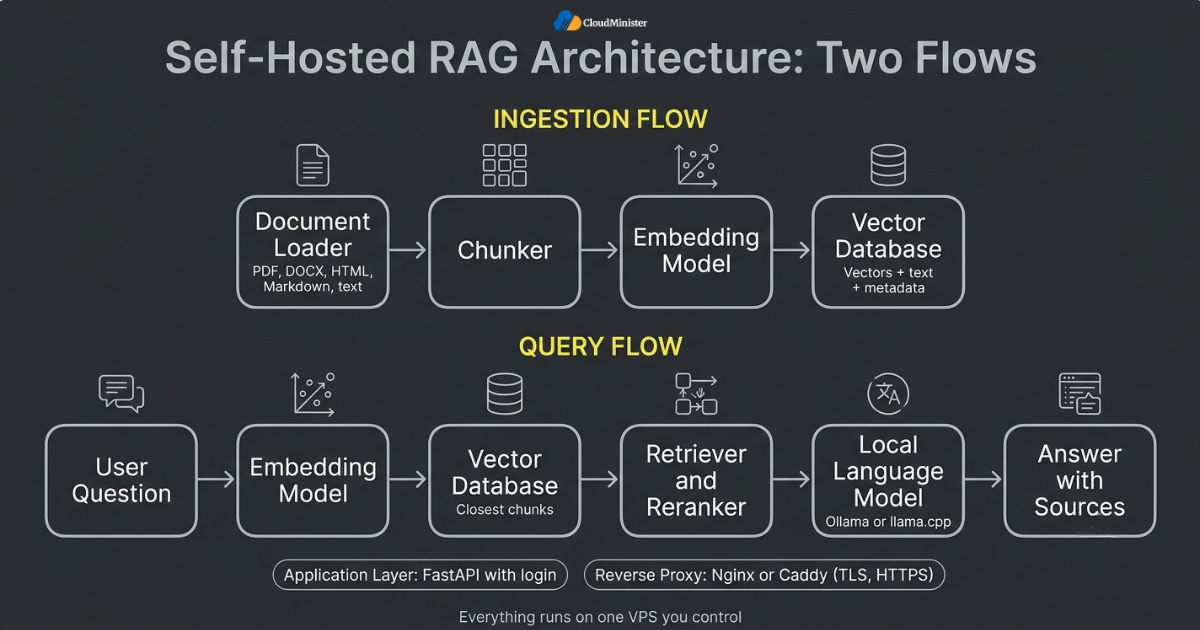
- Document loader: reads PDF, DOCX, HTML, Markdown, and plain text files and extracts clean text with page numbers.
- Chunker: splits text into passages of a controlled size so each vector represents one focused idea.
- Embedding model: turns each chunk and each question into a fixed length vector so meaning can be compared with simple math.
- Vector database: stores vectors and metadata and returns the nearest neighbours quickly using an index such as HNSW.
- Retriever and reranker: fetch a wider set of candidates and then reorder them so the best passages reach the model first.
- Language model runtime: a local server such as Ollama or llama.cpp that exposes an HTTP API on the same machine.
- Application layer: a small API service, often written in Python with FastAPI, that connects every part and enforces login.
- Reverse proxy: Nginx or Caddy terminates TLS so the chat interface is served over HTTPS.
- Platforms that provide AI Lab as a Service often preinstall these components, which shortens the first Self-Hosted RAG prototype.
Related Reading: AI lab setup guide
4. Sizing the VPS: CPU, RAM, Storage, and When a GPU Helps
The VPS is where most cost decisions are made, so size it with numbers rather than guesses. The embedding model and the vector database are light enough for a modest server, but the language model is the heavy part. A 7 to 8 billion parameter model in 4 bit form needs roughly 5 to 6 GB of memory once the context window is included, and it will produce only a few tokens per second on CPU cores. Many teams therefore start on CPU and move generation to a GPU later. Choosing a Web Hosting Company in India that offers both options keeps that move simple for Self-Hosted RAG projects. Right sizing is the first big decision in any Self-Hosted RAG build. Always ask whether best GPU cloud hosting servers are available from the same provider, since the best GPU cloud hosting plans let you scale later without moving your data.
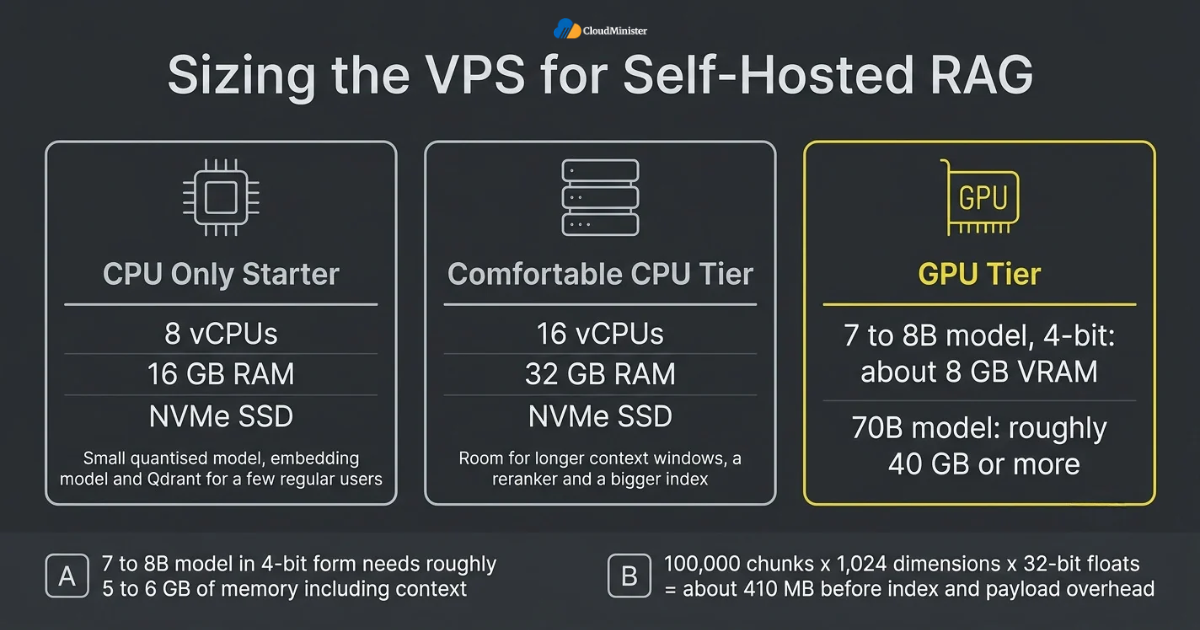
- CPU only starter: 8 vCPUs and 16 GB RAM can run a small quantised model, an embedding model, and Qdrant for a few regular users.
- Comfortable CPU tier: 16 vCPUs and 32 GB RAM leaves room for longer context windows, a reranker, and a bigger index.
- Storage: choose NVMe SSD, because model files and vector indexes are read often, and budget for models, raw documents, indexes, and local backups.
- Memory math for vectors: 100,000 chunks with 1,024 dimensions stored as 32 bit floats take about 410 MB before index and payload overhead.
- GPU tier: a 7 to 8 billion parameter model in 4 bit form fits in about 8 GB of VRAM, while a 70 billion parameter model needs roughly 40 GB or more.
- Network: 1 Gbps is plenty because only text moves between components, but allow for the first model downloads.
- Operating system: a current Ubuntu LTS or Debian release with Docker and Docker Compose keeps upgrades and rollbacks tidy.
- When response time matters more than budget, best GPU cloud hosting in India gives a clear upgrade path without rebuilding the rest of the stack.
- Testing sizes inside AI Lab on Cloud before you buy a server helps you avoid paying for capacity you never use.
5. Choosing and Running an Embedding Model
Embeddings decide whether the right passage is found at all, which makes this the most underrated choice in Self-Hosted RAG. An embedding model maps text to a vector so that similar meanings sit close together. The same model must be used for documents and for questions, and changing it later means re-embedding everything. Pick the model by language support, vector size, and input length, then confirm it on your own test questions instead of trusting a public leaderboard alone. A short test inside an AI Lab on Cloud workspace is a cheap way to compare embedding models before you commit a production server to Self-Hosted RAG. Embeddings run well on CPU, so best GPU cloud hosting is not needed at this stage.
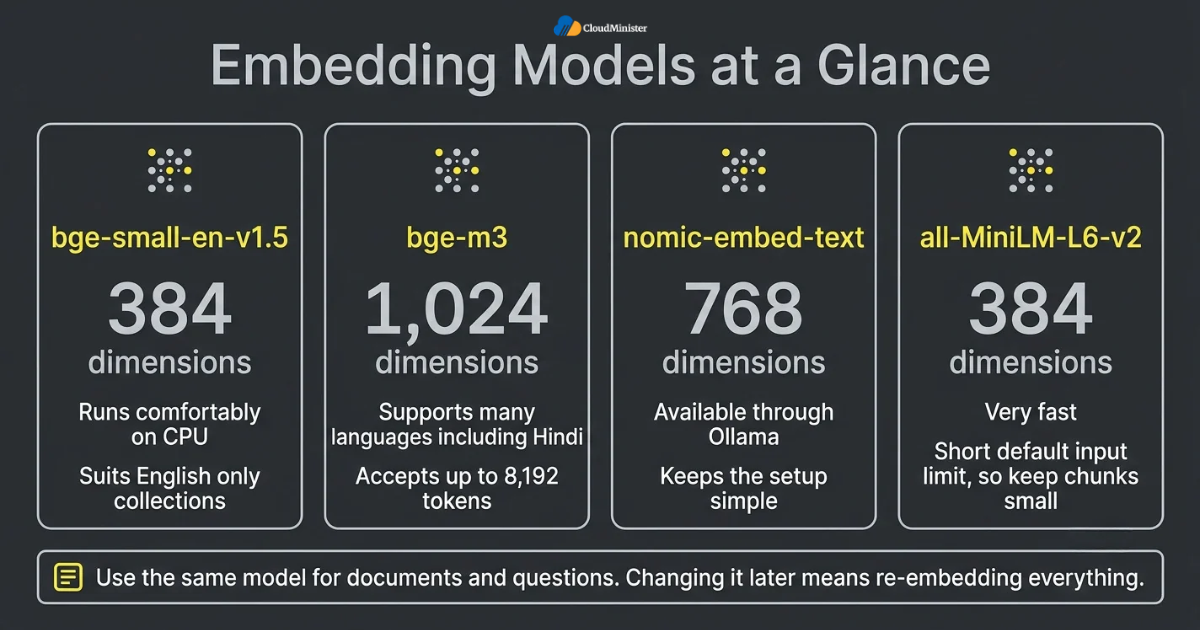
- bge-small-en-v1.5 creates 384 dimension vectors, runs comfortably on CPU, and suits English only collections.
- bge-m3 creates 1,024 dimension vectors, supports many languages including Hindi, and accepts long inputs of up to 8,192 tokens.
- nomic-embed-text creates 768 dimension vectors and is available through Ollama, which keeps the setup simple.
- all-MiniLM-L6-v2 creates 384 dimension vectors and is very fast, but its short default input limit means chunks must stay small.
- Larger vectors can capture more detail but cost more memory and search time, so test whether 384 dimensions already meet your target.
- Some models expect instruction prefixes such as a query or document label, and skipping them quietly lowers retrieval quality.
- Use cosine distance if the model was trained for cosine similarity, and normalise vectors if your database relies on dot product.
- Store the model name and version with every vector, so a future model change can be handled safely.
- An AI Lab on Cloud workspace is a convenient place to run embedding benchmarks without disturbing a live server.
Related Reading: How AI agents are evolving beyond chatbots
6. Vector Databases Compared for a Single Server
A vector database stores embeddings and finds the nearest ones fast. For most single server projects the decision is between a dedicated engine such as Qdrant and the pgvector extension for PostgreSQL. Dedicated engines usually offer stronger filtering and tuning options, while pgvector keeps vectors beside the rest of your business data. FAISS is a library rather than a database, so it lacks built in persistence, access control, and a server API. Self-Hosted RAG works well with either choice when the index is sized correctly. This choice shapes how Self-Hosted RAG behaves under load. The same vector database design works on a small VPS today and on a larger machine from best GPU cloud hosting in India tomorrow, so nothing needs to be rebuilt. Vector search is light, so best GPU cloud hosting is needed only for the language model.
| Option | Best for | Main strength | Watch out for |
| Qdrant | Dedicated single server or small cluster | HNSW index, payload filtering, sparse and dense vectors, scalar quantization | Runs as its own service and needs its own backups |
| pgvector | Teams already using PostgreSQL | SQL joins, transactions, HNSW and IVFFlat indexes | Large indexes use a lot of RAM and need manual tuning |
| Chroma | Prototypes and small applications | Very simple Python API | Test carefully before heavy production use |
| Milvus | Very large collections | Distributed design for scale | Many components to run on a small VPS |
- Qdrant runs as one Docker container, stores data on a mounted volume, and exposes REST on port 6333 and gRPC on port 6334.
- HNSW is the most common index. Higher m and ef construct values improve recall but raise memory use and indexing time.
- Metadata filters, such as department, document type, or access level, restrict search to what each user may see.
- Scalar quantization in Qdrant can store vectors as 8 bit integers, cutting vector memory to about a quarter with a small recall trade off.
- pgvector supports HNSW and IVFFlat indexes, and HNSW usually gives better speed and recall but builds slower and uses more memory.
- Pick the distance metric first and match it to the embedding model, because changing it later means rebuilding the index.
- Snapshots and regular backups matter, since a rebuild means re-embedding every document.
- Never expose a vector database port to the public internet. Bind it to localhost or a private network.
- Plan for growth, because moving to a larger server from best GPU cloud hosting in India is easier when the vector data sits on a separate volume.
7. Document Ingestion and Chunking That Works
Chunking is where many projects quietly lose quality. A chunk that is too large mixes topics and wastes model context, while a chunk that is too small loses the surrounding meaning. A practical starting point is 300 to 500 tokens with an overlap of 10 to 15 percent, split along headings and paragraphs rather than at fixed character counts. Then test the result against your question list and adjust. Careful ingestion is the quiet foundation of every strong Self-Hosted RAG system. Good ingestion is what makes Self-Hosted RAG answers trustworthy. Teams offering AI Lab as a Service often include sample ingestion pipelines, which makes this stage easier to practise before real files are used. Later, when answers need more speed, best GPU cloud hosting in India is a natural place to move the generation step.
- Clean the text first by removing headers, footers, page numbers, and repeated navigation text that pollute chunks.
- Split on structure, such as headings, lists, and paragraphs, so each chunk reads as a complete thought.
- Keep tables and code blocks intact, because splitting them in the middle makes them meaningless.
- Add metadata to every chunk, including file name, title, page number, section heading, date, and access group.
- Prepend the section heading to the chunk text so the embedding carries context that the paragraph alone lacks.
- Use OCR for scanned PDFs and check the output, because poor scans create poor embeddings.
- Remove near identical files, so one outdated policy does not outrank the current one.
- Run ingestion as a queued background job with retries, so one failed file does not stop the whole batch.
- Store a content hash for each source document and re-index only the files that changed.
8. Retrieval Quality: Hybrid Search, Reranking, and Prompting
Good retrieval separates a useful chatbot from a frustrating one. Dense vector search is strong at meaning but can miss exact terms such as product codes, names, and error numbers. Keyword search with BM25 has the opposite strength. Combining both, then reranking the merged results with a cross encoder, is a common recipe for a stronger Self-Hosted RAG pipeline. Keep the final context small, usually the best 3 to 6 chunks, so the model can focus on what matters. Because reranking is light on compute, even a modest Self-Hosted RAG server can run it, and best GPU cloud hosting becomes important only when many users search at once.
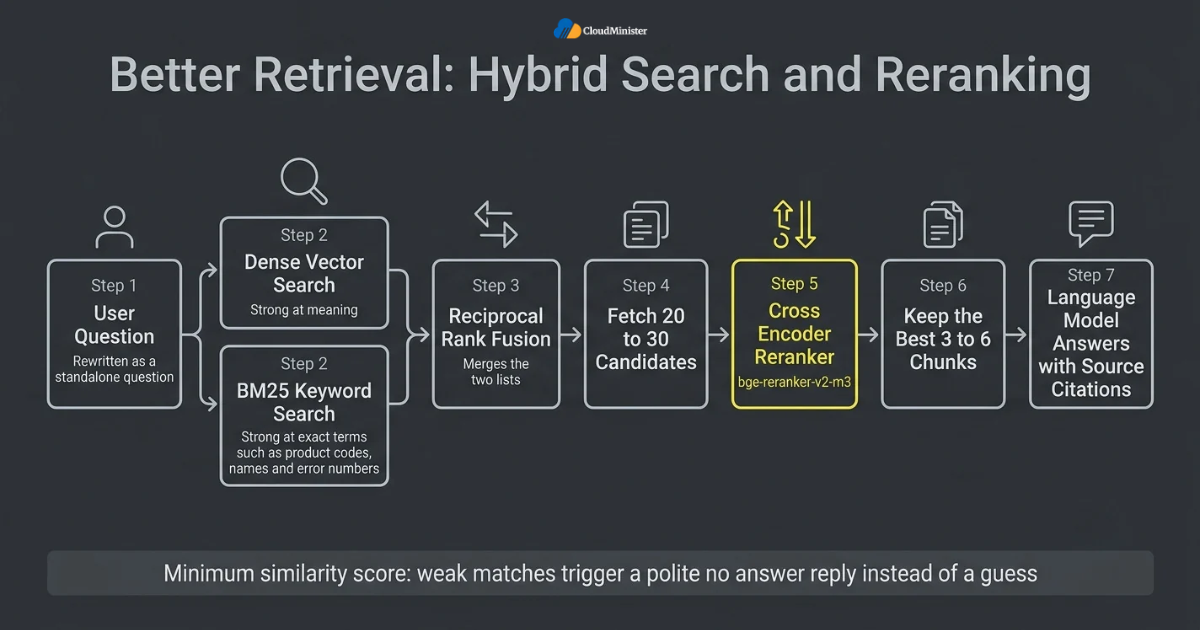
- Hybrid search combines dense vectors with sparse or BM25 scores, and reciprocal rank fusion is a simple way to merge the two lists.
- Fetch more candidates than you need, for example 20 to 30, then rerank them and keep only the top few.
- A cross encoder reranker such as bge-reranker-v2-m3 reads the question and each passage together and scores relevance more precisely.
- Tell the model to answer only from the provided context and to say it does not know when the context lacks the answer.
- Ask for source citations in every answer, using the file name and page number stored in the chunk metadata.
- Set a minimum similarity score, so weak matches trigger a polite no answer reply instead of a guess.
- Rewrite follow up questions into standalone questions before searching, because raw chat history makes a poor query.
- Log the retrieved chunks for each answer, which makes bad answers easy to diagnose.
- Reranking uses little memory, so it rarely needs best GPU cloud hosting unless thousands of searches arrive each minute.
Related Reading: Types of AI agents for businesses
9. Choosing and Running the Local Language Model
The language model reads the retrieved context and writes the answer. For document question answering, a good instruction tuned model of 7 to 9 billion parameters is often enough, because the facts come from retrieval rather than from the model memory. Ollama is a simple way to download and serve models on a VPS, and it listens on port 11434 of localhost by default. Quantised GGUF files cut memory use sharply, which is how Self-Hosted RAG fits on affordable servers. When throughput matters, a GPU changes the experience completely. The model choice is one of the easiest parts of Self-Hosted RAG to change later. If your users need quick replies, ask a Web Hosting Company in India about best GPU cloud hosting in India options, because best GPU cloud hosting lowers the time to the first token noticeably.
- Model families such as Llama 3.1 8B, Mistral 7B, Qwen 2.5 7B, and Gemma 2 9B are common choices, and each has its own licence terms to read.
- Q4_K_M is a popular 4 bit quantisation level that balances file size and answer quality for local use.
- Context length costs memory, so set the window to what your prompts really need instead of the maximum.
- Streaming responses make slow CPU generation feel faster because users see words as they are produced.
- Keep the runtime bound to localhost and let only the application service call it.
- Use a smaller model for routine questions and a larger one for hard cases if your hardware allows it.
- On a GPU server the generation step speeds up sharply, which is why teams look for best GPU cloud hosting once usage grows.
- Inference engines such as vLLM suit multi user GPU serving, while Ollama and llama.cpp suit simpler setups.
- Experimenting through AI Lab as a Service lets you compare several models on real hardware before you commit to one.
Related Reading: Dedicated NVIDIA GPU server for AI training
10. The Real Costs of Self-Hosted RAG
Costs fall into a few clear buckets, and most of them are monthly and predictable. The server is the largest line, followed by backup storage, bandwidth, and the time of the person who maintains the system. Instead of quoting a single price that would soon go out of date, this section shows how to build your own estimate. Ask a Web Hosting Company in India for a quote based on the tiers below, because prices change by plan and region. Your Self-Hosted RAG budget should also include one test environment, and an AI Lab on Cloud workspace often costs less than keeping an idle server running. Compare quotes from best GPU cloud hosting in India providers on GPU model, memory, and storage.
| Tier | Typical workload | Hardware idea | Main cost driver |
| Starter CPU | Fewer than 10 regular users, up to about 100,000 chunks | 8 vCPU, 16 GB RAM, NVMe SSD | Monthly server rental |
| Standard CPU | Larger index, reranker, light concurrent use | 16 vCPU, 32 GB RAM, NVMe SSD | RAM and storage size |
| GPU assisted | Fast answers and many concurrent users | CPU server plus a GPU with 16 to 24 GB VRAM | GPU rental per month |
- Server: the monthly VPS or GPU server rental is usually the biggest cost and depends on CPU, RAM, disk, and GPU choice.
- Backups: snapshot storage for the vector database plus a copy of the raw documents, priced by gigabytes stored.
- Bandwidth: usually small because only text moves, but check the transfer allowance and any extra charges.
- Software licences: Ollama, Qdrant, PostgreSQL, and FastAPI are open source, though each language model has its own licence.
- Setup time: the first build often takes a few weeks of engineering effort including ingestion, testing, and security work.
- Maintenance: plan monthly time for updates, re-indexing, monitoring, and answer quality checks.
- API comparison: multiply monthly queries by average prompt and answer tokens, then by the provider price per token.
- Break even: a fixed server tends to win when query volume is steady and high, while an API can be cheaper for low or very uneven usage.
- If a quote looks very low, confirm that it includes backups, monitoring, and support, and compare it with best GPU cloud hosting in India offers for GPU work.
11. Choosing the Right Hosting Partner for Self-Hosted RAG
Not every provider is ready for AI workloads, and the difference becomes clear when something goes wrong at night. A capable Web Hosting Company in India should publish clear details about NVMe storage, backup and restore times, support hours, and GPU availability. Ask whether the same company also offers an AI Lab on Cloud environment for testing, because one team can then guide you from a test to production. A partner that provides AI Lab as a Service gives engineers a safe place to compare models before any money is committed to a long contract.
- Ask any Web Hosting Company in India how many AI or database projects it has supported and how it verified backups for each one.
- Confirm that monitoring, backups, and tested restores are included, since they are the safety net under every Self-Hosted RAG build.
- Check that the provider offers best GPU cloud hosting servers so your project can grow without a risky migration.
- Look for an AI Lab on Cloud workspace where your team can test models and embeddings before touching production.
- Ask whether AI Lab as a Service includes pre installed drivers, container tools, and sample pipelines for retrieval projects.
- Compare how each provider documents rollback and escalation, including who is called first at night.
- Prefer a team that explains clearly which parts it manages and which parts stay with your own engineers.
- A Web Hosting Company in India with local data centres can also reduce latency for Indian users and simplify data location questions.
- Be cautious of any quote that promises unlimited resources, and compare it with best GPU cloud hosting in India offers on real specifications.
Build, Train and Deploy AI Models in the Cloud
Skip the hardware setup and start experimenting right away. CloudMinister’s AI Lab on Cloud gives you scalable, high-performance infrastructure for your AI and machine learning workloads.
12. When to Move Generation to a GPU Server
A CPU only server is a fine place to start, but there is a clear point where a GPU becomes the better choice. The usual signs are slow first tokens, queued requests during busy hours, and users who stop trusting the chatbot because it feels slow. At that point you can keep the vector database and the application on the VPS and move only the language model to a GPU server. Many teams compare best GPU cloud hosting plans at this stage and choose the one with clear pricing and current NVIDIA cards. A thoughtful plan for Self-Hosted RAG treats this move as a planned upgrade and not as an emergency.
- Measure time to first token and tokens per second on the CPU server before deciding anything.
- A GPU with 16 to 24 GB of VRAM comfortably serves a quantised 7 to 9 billion parameter model for several users.
- Larger models need more VRAM, so match the card to the model and the context length, not to a brand name.
- Keep the vector database and the API on the VPS and call the GPU server over a private network.
- Test the best GPU cloud hosting in India option for a short period first, and measure real latency from your users location.
- The best GPU cloud hosting plans show monthly pricing, the exact GPU model, and the storage that comes with it.
- Compare dedicated and shared GPU plans, because shared plans can be cheaper but may give less predictable speed.
- Use an inference engine such as vLLM on the GPU server when many users call the model at the same time.
- Ask your Web Hosting Company in India whether best GPU cloud hosting servers can be placed in the same data centre as your VPS to keep network delay low.
13. Security, Privacy, and Compliance
A private chatbot is only private if the server is hardened. The riskiest mistake is leaving the vector database, the model runtime, or an admin panel reachable from the internet. Treat the VPS like any production system that holds confidential data, and add controls that match the sensitivity of your documents. This is a core part of any serious Self-Hosted RAG build, and it is much cheaper to design in at the start than to add after an incident. Even a hardened server from a Web Hosting Company in India still needs your own access rules, so write down who manages what. The same rules apply if you later add best GPU cloud hosting servers, so repeat the port scan.
- Use SSH keys only, disable password login, and restrict SSH to known addresses where possible.
- Docker published ports can bypass UFW rules, so bind internal services to 127.0.0.1 in the compose file.
- Place Nginx or Caddy in front with TLS certificates and expose only ports 80 and 443.
- Set an API key on Qdrant and use separate database users with minimum privileges for ingestion and querying.
- Enforce document level access through metadata filters, so a user can never retrieve chunks they are not allowed to read.
- Treat retrieved text as untrusted, because a document can hide instructions that try to hijack the model, known as indirect prompt injection.
- Encrypt backups, rotate secrets, and keep chat logs only as long as you need them.
- Keep the operating system, Docker images, and runtime updated, and follow security advisories for each component.
- Review obligations under the Digital Personal Data Protection Act, 2023 with a qualified adviser when documents contain personal data.
Docker can publish container ports in a way that bypasses common firewall rules. After deployment, scan your own server from outside and confirm that only ports 80 and 443 respond. Bind Qdrant, Ollama, and the database to localhost, and repeat the check after every change to the compose file. A single open port can undo the privacy benefit of Self-Hosted RAG.
14. Testing, Monitoring, and Maintenance
A chatbot that was good on launch day can slowly get worse as documents change. Build a repeatable test so quality is measured instead of guessed. Start with your list of real questions, record the expected source for each, and run the list after every change to chunking, embeddings, or prompts. Teams that run Self-Hosted RAG for the long term treat this test set like unit tests for code, and they keep the records so progress is visible. Run these tests in an AI Lab on Cloud workspace first, so a failed experiment never touches the production Self-Hosted RAG server.
- Measure retrieval with recall at k, which checks whether the correct chunk appears in the top results.
- Measure answer quality with faithfulness and answer relevance, using a framework such as RAGAS or a manual review sample.
- Track latency for each step, including embedding, search, reranking, and generation, so you know where time goes.
- Monitor CPU, RAM, disk, and swap use with tools such as Prometheus and Grafana.
- Alert on disk space, because model files, indexes, and snapshots grow steadily.
- Collect thumbs up and thumbs down feedback in the chat interface and review the bad ones every week.
- Schedule re-indexing and test restores of backups, because an untested backup is only an assumption.
- Version your prompts, chunk settings, and model names in Git, so any change can be reversed.
- Test new prompts inside AI Lab on Cloud first, then promote the winning version to production.
When answers get worse, do not change the language model first. Check retrieval, because in many cases the right passage was never found. Open the logged chunks for a bad answer. If the correct text is missing there, fix chunking, embeddings, or filters before touching the model. This habit saves weeks of effort in any Self-Hosted RAG project.
15. Common Mistakes That Hurt Private RAG Projects
Most disappointing results trace back to a short list of repeatable mistakes. Knowing them in advance is one of the cheapest ways to protect a Self-Hosted RAG budget and timeline. None of them needs special tools to avoid, only a little discipline and a written checklist that the whole team follows. Do not pick an AI Lab as a Service plan or a GPU plan on price alone, and check that the Web Hosting Company in India includes backups and support. Renting best GPU cloud hosting before measuring a real need is another costly habit.
- Sizing the server by guessing instead of measuring memory for the model, the index, and peak concurrent users.
- Exposing Qdrant, Ollama, or a database port to the public internet.
- Switching the embedding model without re-embedding all documents, which makes old and new vectors incomparable.
- Using one chunk size for every document type instead of testing sizes for manuals, emails, and tables.
- Skipping reranking and hybrid search, then blaming the language model for missing exact terms.
- Putting too many chunks into the prompt, which raises cost, slows answers, and can bury the useful passage.
- Launching without access control, so every user can retrieve every document.
- Ignoring backups and monitoring until the first outage.
- Buying a larger plan from best GPU cloud hosting in India before measuring real load is a common waste of budget.
16. A Practical 30 Day Plan to Get Started
Reading about architecture is easy, so here is a simple four week path. It keeps the scope small and gives you a working chatbot early. By the end you will have measured results rather than opinions, and your Self-Hosted RAG stack will be ready to grow. If you are unsure about hardware, start in AI Lab on Cloud and move to a production server once the numbers are clear. Week by week, an AI Lab on Cloud workspace, a dependable Web Hosting Company in India, and a clear GPU option from best GPU cloud hosting in India give the plan firm footing.
- Week one: list document sources, estimate total pages, and write the 30 to 50 test questions with their expected sources.
- Week one: choose a server tier and ask a Web Hosting Company in India to confirm capacity, backup options, and support hours.
- Week two: deploy Ollama, Qdrant, and a basic API with Docker Compose, with every service bound to localhost.
- Week two: ingest a small sample, test two embedding models, and compare recall on the question list.
- Week three: add hybrid search, a reranker, source citations, and access filters.
- Week three: harden the server with SSH keys and TLS, and run an external port scan.
- Week four: load test with realistic concurrent users and decide whether generation needs a GPU.
- Week four: set up backups, monitoring, and a monthly review of answer quality.
- Book a short trial of AI Lab as a Service, so the team can try the plan on real hardware before you commit.
Checklist: Private RAG Readiness Review
- Test set of 30 to 50 real questions with expected sources is ready
- Server tier chosen from measured memory needs for model, index, and users
- Embedding model tested on your own documents and recorded with its version
- Vector database bound to localhost, protected by an API key, and backed up
- Chunk size, overlap, and metadata fields documented
- Hybrid search and reranking tested against the question list
- Prompt tells the model to answer only from context and to cite sources
- TLS, SSH keys, and firewall rules verified with an external scan
- Access control enforced through metadata filters
- Monitoring, alerts, and a tested backup restore in place
- Hosting partner confirmed for backups, GPU options, and an AI Lab on Cloud test workspace
- Upgrade path to best GPU cloud hosting in India understood and priced
- Trial of AI Lab as a Service or a test workspace completed
Key Takeaways
- Self-Hosted RAG keeps documents, vectors, and answers on a server you control, which supports privacy and predictable costs.
- Embeddings and chunking decide retrieval quality, so test them on your own questions before tuning anything else.
- Qdrant and pgvector are the two most practical vector database choices for a single VPS.
- A 7 to 9 billion parameter quantised model is often enough, and it can run on CPU with modest speed.
- A GPU becomes worthwhile when many users ask questions at the same time, and best GPU cloud hosting in India is the natural next step.
- Security is a design task, so keep every internal port on localhost and enforce document level access.
- Costs are server, backups, bandwidth, and maintenance time, and a fixed server wins when usage is steady.
- A trusted Web Hosting Company in India that also offers AI Lab as a Service gives you a place to test and then grow.
- Practise first in AI Lab on Cloud, measure results, and scale only what the numbers support.
- A Web Hosting Company in India that offers best GPU cloud hosting servers, an AI Lab on Cloud workspace, and AI Lab as a Service gives Self-Hosted RAG projects a complete path from test to production.
- Choosing best GPU cloud hosting in India early avoids rushed upgrades when usage grows.
Talk to Our Cloud Experts, Free for New Clients
Not sure which solution fits your project? We offer free consultancy to all our new clients. Tell us what you need and our team will help you plan the right setup.
Conclusion
Throughout this guide one pattern holds, regardless of document type or company size. A strong Self-Hosted RAG system is the result of preparation, not of one clever tool. The best builds split the work into small parts, test each part with real questions, and keep the whole stack behind a hardened server. Teams that succeed size the VPS from measurements, choose embeddings on evidence, tune retrieval before changing models, and keep backups tested. When usage grows, they add a GPU for generation and leave the rest as it is.
A chatbot is also never truly finished on launch day. Documents change, questions change, and models improve, so keep watching quality, cost, and security. Write down what worked and what did not, and treat each release as the base for the next one. With that habit, Self-Hosted RAG becomes a dependable internal service that your team trusts and that you can defend in any review. For teams that want to grow safely, a trusted Web Hosting Company in India with an AI Lab on Cloud workspace, a clear AI Lab as a Service option, and access to best GPU cloud hosting servers makes every later step easier. Choosing best GPU cloud hosting in India early also avoids panic buying later.
Frequently Asked Questions
What is Self-Hosted RAG?
Self-Hosted RAG is a setup where the embedding model, vector database, language model, and application all run on infrastructure you control, such as a VPS. It lets a chatbot answer from your own documents without sending their text to an outside service. You can try this in an AI Lab on Cloud workspace, and providers of AI Lab as a Service often offer ready made templates.
How much RAM do I need for Self-Hosted RAG on a VPS?
A practical starting point is 16 GB for a small quantised 7 to 8 billion parameter model, an embedding model, and a modest vector index. Move to 32 GB when you add a reranker, longer context windows, or a larger index. Ask your provider to resize the plan later if your index grows.
Which vector database is best for a small VPS?
Qdrant is a strong default because it runs as a single container and offers filtering and quantization. pgvector is a good choice if your data already lives in PostgreSQL and you want SQL joins beside the vectors.
Can I run Self-Hosted RAG without a GPU?
Yes. CPU only servers work for small teams and low concurrency, although generation is slow. When response time or concurrent users become a problem, moving only the generation step to a GPU server is the usual fix. When that day comes, choose best GPU cloud hosting in India and move only the generation step, since best GPU cloud hosting plans usually show clear monthly pricing.
Is Self-Hosted RAG cheaper than using an API?
It depends on usage. A fixed monthly server tends to be cheaper when query volume is steady and high, while an API can cost less for low or very uneven traffic. Compare both using your real monthly query count and average token sizes. Test a small AI Lab as a Service plan first to measure real usage.
Which embedding model should I start with?
Start with bge-small-en-v1.5 for English only documents or bge-m3 for multilingual content such as Hindi and English. Test both against your question list and keep the one that retrieves the correct chunk more often. You can run both models side by side in an AI Lab on Cloud environment.
How do I keep a Self-Hosted RAG chatbot secure?
Use SSH keys, TLS, and a reverse proxy, keep every internal service on localhost, protect the vector database with an API key, enforce access through metadata filters, and treat retrieved text as untrusted input. Ask your provider to confirm which security tasks it handles.
When should I consider AI Lab as a Service?
Consider AI Lab as a Service when you want to compare models, embeddings, and server sizes on real hardware before buying a production server. It reduces the risk of paying for capacity that you do not need.
How do I choose a Web Hosting Company in India for AI workloads?
Ask about NVMe storage, backup and restore times, support hours, and whether GPU servers are available. A good Web Hosting Company in India will also explain clearly what it monitors and what remains your responsibility.
Where can I find best GPU cloud hosting in India for the generation step?
Look for providers that offer current NVIDIA GPUs, clear pricing, and the ability to run your own containers. The right best GPU cloud hosting in India lets you move only the language model while the vector database and application stay on the VPS. Many providers of AI Lab as a Service also list best GPU cloud hosting options on the same page.
Does RAG stop hallucinations completely?
No. RAG greatly reduces unsupported answers by grounding the model in retrieved text, but the model can still misread context or answer when retrieval fails. Good prompts, a minimum similarity score, citations, and regular testing keep the risk low. Practising on AI Lab as a Service helps teams test these guardrails safely.

Shivlendra Singh Jadoun is a Cloud & DevOps Engineer at CloudMinister Technologies, specializing in AWS, Azure, and GCP infrastructure. He began his career in Linux system administration, managing shared, VPS, and dedicated servers before moving into cloud and automation. He is AWS Certified and works extensively with Docker, Kubernetes, Terraform, Ansible, and Jenkins to build CI/CD pipelines and scalable, secure cloud environments. With hands-on experience across hosting, server security, and DevOps automation, he brings real-world engineering insight to every article he writes.