Most n8n data loss does not come from n8n itself. It comes from a lost encryption key, a database that was never backed up, or an upgrade done without a restore point. A solid n8n Backup and Restore plan protects four things together: workflows, credentials, execution history, and the encryption key that unlocks them. This guide explains where n8n keeps its data, how to export and dump it, how to automate and encrypt backups, and how to prove a restore works before you need it. It also shows where Self-Hosted N8N VPS Hosting, a reliable Web Hosting Company in India, and a Dedicated NVIDIA GPU Server for AI workloads fit into the plan.
Every team that runs automation on its own server eventually faces one quiet question: what happens if this server disappears tonight? n8n makes it easy to build workflows that route leads, sync invoices, and call AI models, yet it does not protect those workflows for you. A planned n8n Backup and Restore routine is what separates a short, boring recovery from a week of rebuilding logic from memory. This is especially true for teams that run Self-Hosted N8N VPS Hosting, because on a self-managed server the backup job belongs to you. Teams that choose Self-Hosted N8N VPS Hosting gain full control, and a written n8n Backup and Restore plan lets them use that control well.
Most failures are not dramatic. A disk fills up, an upgrade changes the database, someone deletes the wrong workflow, or the encryption key is lost with an old laptop. Many Indian teams now look for n8n VPS hosting India options to keep data close to users and inside local rules, and they often ask a Web Hosting Company in India to review backup design at the same time. The right n8n VPS hosting India plan makes backups easier, but it never replaces a written n8n Backup and Restore process. Whichever Web Hosting Company in India you pick, ask how it supports n8n Backup and Restore before you sign.
This guide walks through the practical side in plain language. You will learn where n8n stores each type of data, how the command line export works, how to dump PostgreSQL and SQLite safely, and how to schedule and encrypt backups. We also cover restores, testing, queue mode, and AI workloads that depend on the best GPU cloud hosting or a Dedicated NVIDIA GPU Server. Whether you manage one instance or twenty, a clear n8n Backup and Restore plan will give you more confidence and far fewer surprises. Teams that already compare the best GPU cloud hosting for local models will find a dedicated section for them near the end. Readers running AI nodes on a Dedicated NVIDIA GPU Server will find that n8n Backup and Restore applies there too.
Table of Content
- 1. What a Complete Backup Plan Really Covers
- 2. Why Protecting Your Automation Server Matters in 2026
- 3. Where n8n Stores Your Data
- 4. Protecting the n8n Encryption Key
- 5. Exporting Workflows and Credentials with the n8n CLI
- 6. Database Backups for Workflows, Credentials, and Execution History
- 7. Docker Volume and Server Level Backups
- 8. Queue Mode Data Protection and Recovery Rules
- 9. Automating Backups with Cron and Offsite Copies
- 10. Choosing Hosting That Supports Reliable Recovery
- 11. Restoring n8n Step by Step
- 12. Testing and Validating Every Restore
- 13. AI Workflows and GPU Dependencies
- 14. Common Data Protection Mistakes to Avoid
- Key Takeaways
- Conclusion
- Frequently Asked Questions
1. What n8n Backup and Restore Actually Covers
Many teams treat a backup as a folder of exported workflow files. That is only one slice of the system. A complete n8n Backup and Restore plan covers every layer that makes an instance behave the same after a failure. If one layer is missing, the restored server may start normally while workflows fail, credentials refuse to open, or old executions are gone. Think of the plan as several separate recovery targets, each with its own schedule and owner. n8n Backup and Restore therefore starts with a clear list of what must be saved, whether the server is Self-Hosted N8N VPS Hosting or a managed plan from a Web Hosting Company in India. A Web Hosting Company in India can add storage and monitoring, but the plan stays yours.
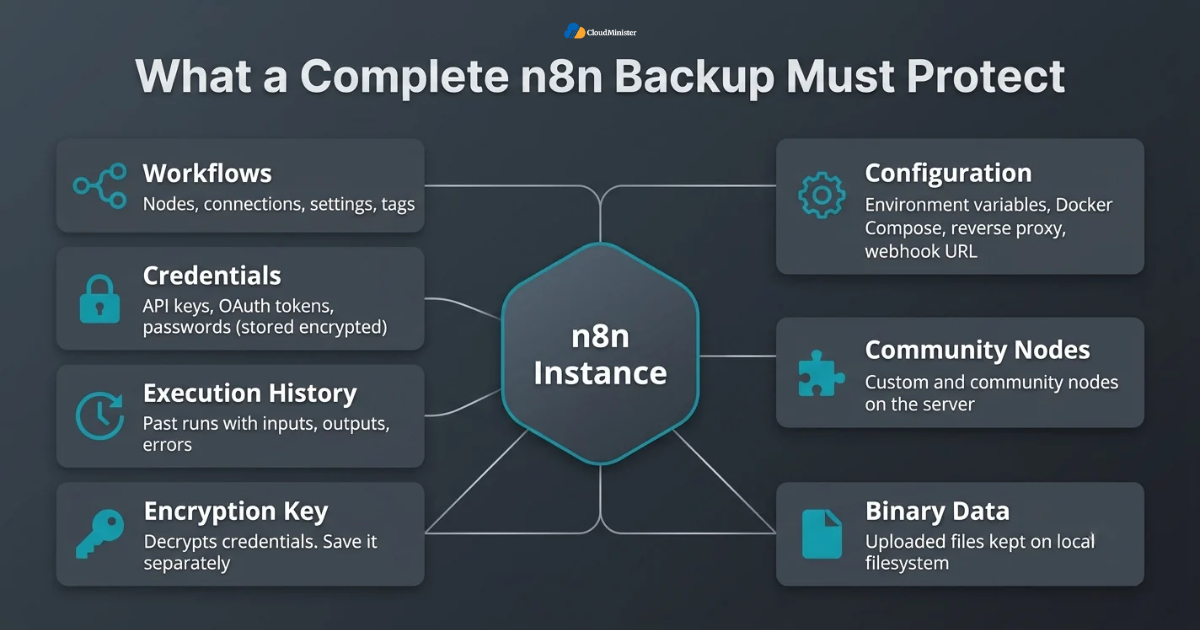
- Workflows: the nodes, connections, settings, and tags that define your automations.
- Credentials: API keys, OAuth tokens, and passwords, which n8n stores in encrypted form in the database.
- Execution history: past runs with their inputs, outputs, and error details, also stored in the database.
- Encryption key: the secret that decrypts stored credentials, which must be saved separately from the data.
- Configuration: environment variables, Docker Compose files, reverse proxy settings, and the webhook URL value.
- Custom and community nodes installed on the server, plus any files your workflows read or write.
- Binary data, such as uploaded files, when n8n keeps it on the local filesystem.
- A good n8n Backup and Restore design treats each item as its own target instead of one big folder copy.
- The same design works whether you run Self-Hosted N8N VPS Hosting or a local test machine, only the storage paths change.
2. Why n8n Backup and Restore Matters in 2026
Data loss is common, not rare. A Data Loss Statistics Report 2025 published in April 2026 found that 77 percent of organizations were hit by insider data loss in 2025, which shows that ordinary mistakes inside a company remain a leading cause of lost data. An automation server is no different from any other system. One wrong click can remove months of work, and a server with no backup has no way back. Even a Dedicated NVIDIA GPU Server that runs your AI models can fail, and n8n Backup and Restore is what brings the workflows back. The best GPU cloud hosting nodes need the same discipline.
- A deleted workflow, a bad edit, or a wrong import can remove months of automation logic in a few clicks.
- A failed upgrade can leave the database in a state that only a restore point can fix, because database migrations generally run forward only.
- A disk failure or a deleted VPS takes the database, the data folder, and any local keys with it.
- A lost encryption key makes every saved credential unusable, even when the database itself is intact.
- Ransomware, bad scripts, or a compromised server can encrypt or destroy files, including old backups kept on the same disk.
- Execution history is also used for debugging, audits, and replaying failed runs, so losing it has a real cost.
- Businesses use n8n for lead routing, billing alerts, and notifications, so downtime stops real revenue work.
- A tested n8n Backup and Restore routine turns a long outage into a short and planned recovery.
- Even the best GPU cloud hosting cannot help if the orchestration layer on top of it has no restore point.
3. Where n8n Stores Your Data
Before you protect anything, you need to know where it lives. By default n8n uses SQLite and keeps its files in a hidden .n8n folder in the home directory of the user running it. In the official Docker image this folder is /home/node/.n8n. For production use, n8n recommends PostgreSQL, which keeps workflows, credentials, and executions in separate tables. Knowing this map is the first step of any n8n Backup and Restore plan. Self-Hosted N8N VPS Hosting users can read these locations directly, and n8n VPS hosting India customers should confirm the same paths with their provider. The best GPU cloud hosting plans also need their endpoints written down.
| Item | Default location | How to protect it |
| Workflows | Database table workflow_entity | CLI export plus a database dump |
| Credentials | Database table credentials_entity, stored encrypted | Database dump plus the saved encryption key |
| Execution history | Database table execution_entity | Database dump only |
| Encryption key | N8N_ENCRYPTION_KEY variable or the config file in the data folder | Password manager plus an offline copy |
| Binary data | Data folder on disk by default | Volume or folder backup |
| Community nodes | The nodes folder inside the data folder | Volume backup or a reinstall list |
- If you do not set an encryption key, n8n creates one on first start and saves it in the config file inside the data folder.
- Setting N8N_ENCRYPTION_KEY yourself is safer, because the value then lives in your environment file instead of a hidden file.
- Execution data is pruned by default. EXECUTIONS_DATA_PRUNE is true, and runs older than EXECUTIONS_DATA_MAX_AGE, which defaults to 336 hours or 14 days, are removed.
- The settings EXECUTIONS_DATA_SAVE_ON_SUCCESS and EXECUTIONS_DATA_SAVE_ON_ERROR decide which runs are stored at all.
- Exporting workflows does not export execution history, so only a database backup protects past runs.
- Because n8n Backup and Restore depends on this storage map, write the real paths of your server in the runbook.
- A Self-Hosted N8N VPS Hosting setup gives you direct access to the database, the data folder, and the cron scheduler, which are the three things a reliable backup needs.
- When you shortlist n8n VPS hosting India providers, ask which disk type and how much free space each plan includes for dumps.
Related Reading: What n8n is and how no-code workflow automation works
4. Protecting the n8n Encryption Key
The encryption key is the most overlooked part of n8n Backup and Restore. n8n encrypts every credential before it is saved, and only the same key can decrypt it later. A database dump without the key restores your workflows but leaves your credentials unreadable, so every connection must be rebuilt by hand. Treat the key as a separate asset with its own storage and access rules. Good n8n Backup and Restore habits start here, on any n8n VPS hosting India server or Self-Hosted N8N VPS Hosting plan. Self-Hosted N8N VPS Hosting keeps key handling fully in your hands.
- Generate a long random key, for example with the command openssl rand -hex 32.
- Set it explicitly through the N8N_ENCRYPTION_KEY variable in your environment file or Docker Compose configuration.
- Store one copy in a password manager and one offline copy, and keep both away from the bucket that holds your database dumps.
- Never change the key on a running instance that already has saved credentials, because the stored values will no longer decrypt.
- When restoring to a new server, set the identical key before the first start. n8n can refuse to start if the key in the config file and the variable differ.
- In queue mode every main and worker process must use the same key.
- Limit file access to the environment file, for example with chmod 600, so only the service user can read it.
- Record who owns the key and who can retrieve it during an emergency, since a backup nobody can unlock is not a backup.
- Include the key location in every n8n Backup and Restore runbook, but never the key value itself.
Treat the key like a master password. Anyone who holds both a database dump and the key can read your stored credentials. Keep them in different places, restrict access, and never paste the key into tickets or chat tools. A hosting partner such as a Web Hosting Company in India can secure the server, but only your team should hold the key.
5. Exporting Workflows and Credentials with the n8n CLI
n8n includes command line tools that export and import workflows and credentials as JSON. They are simple, scriptable, and ideal for readable backups and for moving content between instances. They are not a full backup on their own, but they are an important layer in any n8n Backup and Restore plan, and they work the same on n8n VPS hosting India servers as anywhere else. Run these commands on Self-Hosted N8N VPS Hosting from a scheduled shell script to make n8n Backup and Restore hands free.
- Export all workflows into separate readable files with: n8n export:workflow –backup –output=/backups/workflows/ (create the folder first).
- Export credentials the same way with: n8n export:credentials –backup –output=/backups/credentials/.
- By default the credentials export stays encrypted, so it can only be imported on an instance that uses the same encryption key.
- The –decrypted flag writes secrets in plain text. Use it only for a planned migration and delete the files immediately afterwards.
- Import with n8n import:workflow –separate –input=/backups/workflows/ and n8n import:credentials –separate –input=/backups/credentials/.
- In Docker, run the same commands with docker exec -u node n8n and write to a mounted path so the files land on the host.
- Check the Active toggle after an import, because imported workflows may need to be activated again.
- Exports do not contain execution history or community nodes, so pair them with a database dump.
- n8n source control and environments, an Enterprise feature, can push workflows to Git, but it does not store credential values, so it complements n8n Backup and Restore instead of replacing it.
Export workflows with the separate flag and keep the files in a private Git repository. One file per workflow makes every change visible in a diff, and you can restore a single workflow without touching the others. Keep credential exports out of Git.
6. Database Backups for Workflows, Credentials, and Execution History
The database is the heart of n8n Backup and Restore. It holds workflows, encrypted credentials, tags, settings, and every stored execution. A proper database dump is the only way to keep execution history, and it gives you a complete snapshot that the CLI export cannot match. The method depends on whether you use PostgreSQL or SQLite. Dumps from a Web Hosting Company in India server, or from your own best GPU cloud hosting node, follow the same n8n Backup and Restore commands. A Dedicated NVIDIA GPU Server should follow the same schedule.
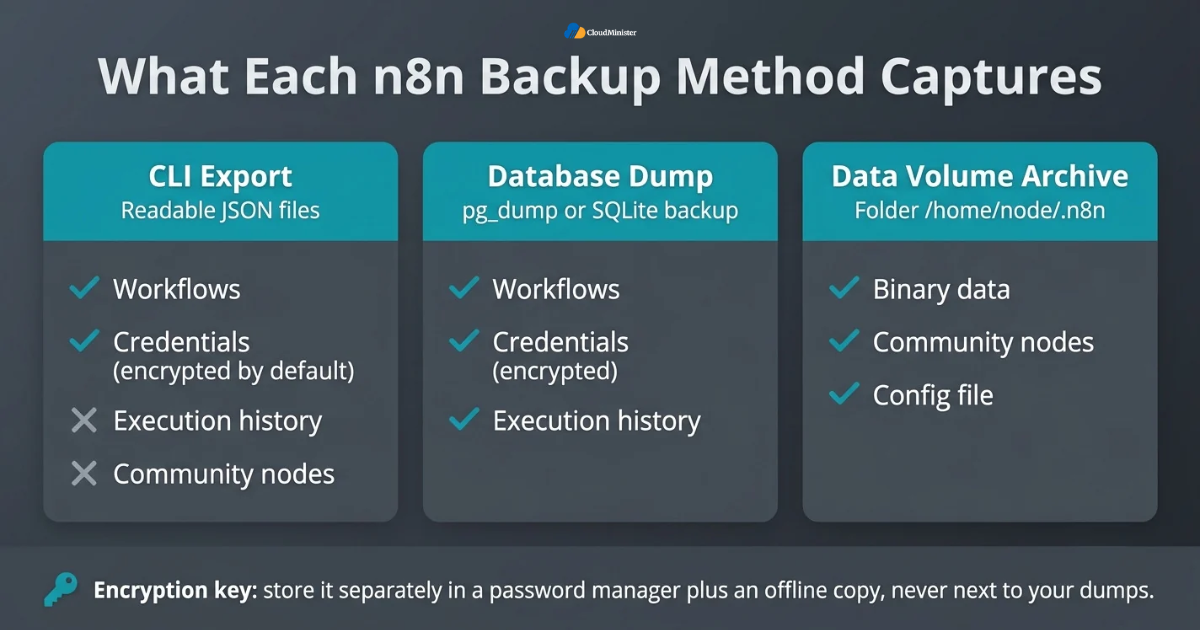
- PostgreSQL dump: pg_dump -Fc -h localhost -U n8n_user -d n8n -f /backups/n8n_2026-10-31.dump creates a compressed custom format file.
- pg_dump takes a consistent snapshot while n8n keeps running, and it does not block normal reads and writes.
- Restore into a fresh empty database with pg_restore –no-owner -d n8n /backups/n8n_2026-10-31.dump.
- For a Dockerized database run docker exec postgres pg_dump -U n8n_user -Fc n8n > file.dump, and do not add the -t flag, because a terminal can corrupt binary output.
- SQLite should not be copied while n8n is writing. Use sqlite3 database.sqlite “.backup /backups/n8n.sqlite” or stop n8n briefly before copying the file.
- Use a dedicated database role for backups so the job has read access and nothing more.
- If execution data makes dumps very large, tune pruning instead of skipping the dump.
- Servers on a Dedicated NVIDIA GPU Server that also run n8n should keep the database on a separate disk, so heavy model workloads cannot starve the dump job.
- Teams comparing the best GPU cloud hosting should check whether the plan includes fast storage for dumps, not only GPU power.
Related Reading: n8n self-hosting server setup and security guide
7. Docker Volume and Server Level Backups
Most self-hosted n8n instances run in Docker, so the data folder usually sits in a named volume. A volume backup captures binary data, community nodes, and the config file in one archive. It works well beside a database dump, and it is a basic part of n8n Backup and Restore on any Docker host. On Self-Hosted N8N VPS Hosting you control the disk, so you can schedule these archives yourself. Most Self-Hosted N8N VPS Hosting plans run Docker, so these archives fit naturally into n8n Backup and Restore. A Web Hosting Company in India can also provide block storage for these archives.
- Map the volume, for example n8n_data, to /home/node/.n8n in your Docker Compose file.
- Archive it with docker run –rm -v n8n_data:/data -v /backups:/backup alpine tar czf /backup/n8n_data.tar.gz -C /data .
- Restore it by running the same container with tar xzf and the archive path into an empty volume.
- For SQLite setups, stop the container before archiving, or use the sqlite backup command first.
- Save docker-compose.yml, the reverse proxy configuration for Nginx or Caddy, and a secret-free copy of the environment file in Git.
- Pin the n8n image to a specific version tag instead of latest, and note that version in every backup.
- A VPS snapshot is a useful extra layer, but it lives with the same provider and may not be consistent at the application level.
- Never treat a snapshot as your only n8n Backup and Restore copy.
- A good n8n VPS hosting India plan should let you attach extra block storage or object storage for archives.
Record the exact n8n version with every backup. A database restored into an older n8n release can fail, because schema migrations normally run only forward. If you plan an upgrade, take a fresh backup right before it, and keep the previous container image available for a quick rollback.
8. n8n Backup and Restore in Queue Mode
Queue mode splits n8n into a main instance and one or more workers that pull jobs from Redis. It requires PostgreSQL, and it changes how you think about backups. The database remains the single source of truth, so the core of n8n Backup and Restore stays the same, with a few extra rules for shared settings and restore order. Large teams on n8n VPS hosting India servers and Self-Hosted N8N VPS Hosting plans will find queue mode backups follow the same n8n Backup and Restore rules. The best GPU cloud hosting nodes should join the same schedule.
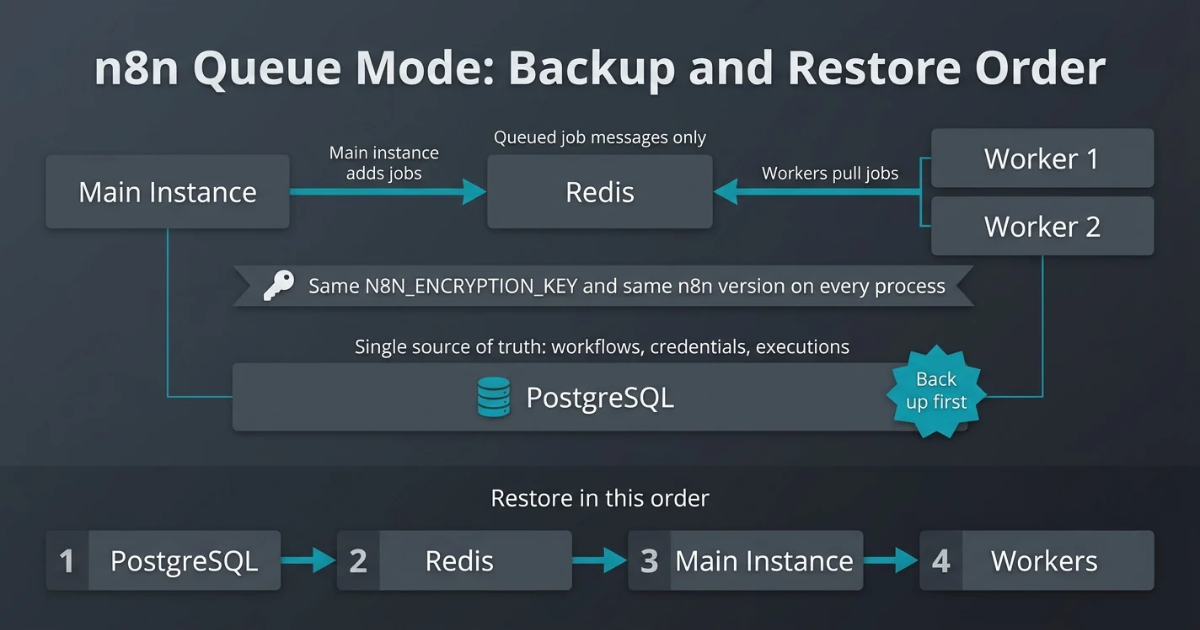
- Back up PostgreSQL first, since workflows, credentials, and executions all live there.
- Redis holds queued job messages, not your workflow definitions, so it is not the main backup target.
- Every main and worker process must share the same N8N_ENCRYPTION_KEY and the same database connection.
- Keep workers on the same n8n version as the main instance to avoid migration and behavior mismatches.
- Run the backup job from the main node or a separate host, not from every worker.
- Schedule dumps outside heavy execution hours to keep job latency steady.
- Restore in order: PostgreSQL, then Redis, then the main instance, then the workers.
- Decide where binary data lives in your setup and back that location up as well.
- Larger queue mode setups on n8n VPS hosting India servers often add a Dedicated NVIDIA GPU Server for AI nodes, which must be included in the same plan.
Related Reading: n8n queue mode with Redis and workers on a VPS.
9. Automating n8n Backup and Restore with Cron and Offsite Copies
A manual backup is a backup that eventually stops happening. Automation matters more every year, and Mordor Intelligence figures summarised in a 2026 workflow automation statistics roundup value the global workflow automation market at about 26.01 billion dollars in 2026, growing at 9.41 percent a year toward 40.77 billion dollars by 2031. As more business processes depend on tools like n8n, the backup of that tool should be automated too. A small shell script and a cron job are enough to make n8n Backup and Restore dependable. A Web Hosting Company in India with offsite object storage, or the best GPU cloud hosting object store, can hold the third copy of n8n Backup and Restore files. A Dedicated NVIDIA GPU Server needs its own offsite copy of custom settings.
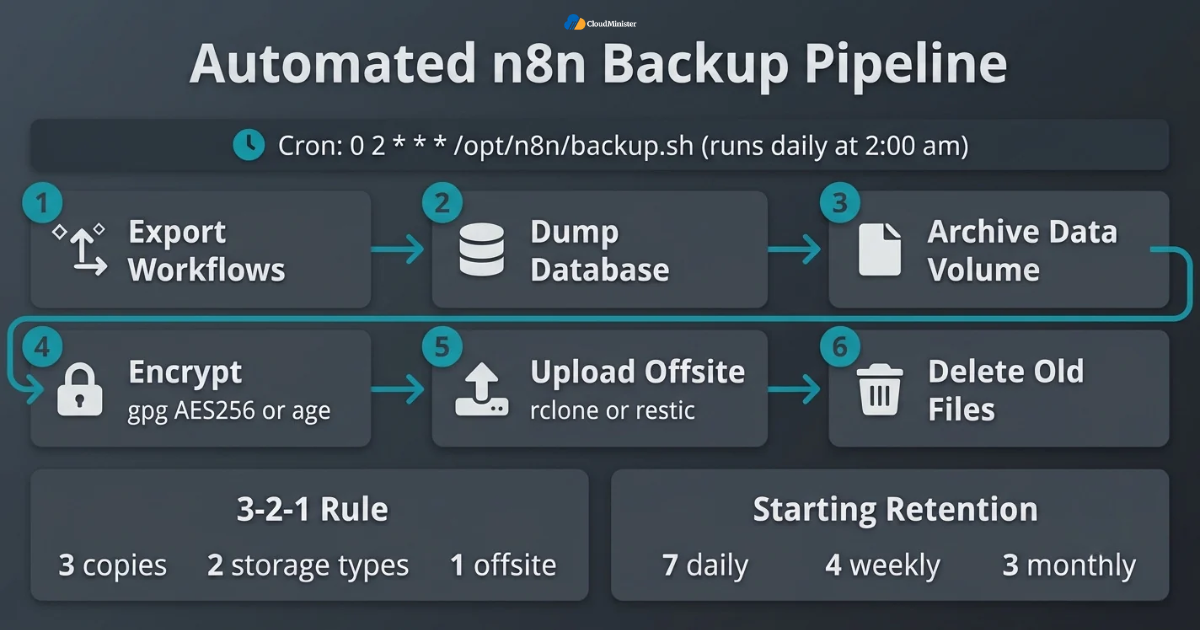
- Follow the 3-2-1 rule: three copies, on two different types of storage, with one copy offsite.
- A daily job in cron looks like this: 0 2 * * * /opt/n8n/backup.sh runs the script at 2:00 am.
- The script should export workflows, dump the database, archive the data volume, encrypt the output, upload it, and delete old files.
- Encrypt before upload, for example with gpg –symmetric –cipher-algo AES256 or the age tool.
- Send files to object storage in a different region or provider using rclone or restic.
- A common starting retention is 7 daily, 4 weekly, and 3 monthly copies.
- Write the size and a sha256sum checksum of every file to a log, so a silent failure is easy to spot.
- Alert on failure through a monitoring service, and do not rely on the same n8n instance to report on its own backups.
- Choose a Web Hosting Company in India that offers storage in the same country if data residency matters for your backups.
Write your recovery point target and recovery time target as plain numbers at the top of the runbook, such as 24 hours and 2 hours. Every choice about frequency, storage, and tooling can then be checked against those two numbers instead of opinion.
10. Choosing Hosting That Supports n8n Backup and Restore
Backup quality depends on the server underneath. When comparing n8n VPS hosting India plans, look past the monthly price and ask how storage, snapshots, networking, and support actually work. A capable Web Hosting Company in India will explain these points clearly and will not promise zero risk. The same checks apply to anyone offering Self-Hosted N8N VPS Hosting for production automation. This choice affects n8n Backup and Restore more than most teams expect, and the best GPU cloud hosting providers, a Dedicated NVIDIA GPU Server vendor, and n8n VPS hosting India plans all differ here. Self-Hosted N8N VPS Hosting buyers should ask the same questions.
- Disk space: allow room for the database, several dumps, and archives, and plan for growth in execution data.
- Storage type: fast SSD or NVMe storage shortens both backup and restore times.
- Snapshots and extra volumes: confirm the plan supports them, and ask how long a snapshot restore takes.
- Access: you need shell access and cron, which a Web Hosting Company in India with proper VPS plans normally provides.
- Data residency: India’s Digital Personal Data Protection Act, 2023 raises questions about where personal data is stored, so confirm the data centre location of both servers and backups.
- Support hours: check whether help is available in Indian time zones during your planned maintenance windows.
- Growth path: a good n8n VPS hosting India provider should let you move from a small VPS to larger plans without rebuilding.
- Add-ons: if you run AI nodes, check whether the same provider offers a Dedicated NVIDIA GPU Server and fast private networking.
- Many AI teams also compare the best GPU cloud hosting providers, so keep that choice separate from where n8n and its backups live.
Related Reading: n8n hosting in India and powerful workflow automation.
Run n8n on a Server Built for Reliable Backups
Get full shell access, cron scheduling, fast SSD storage, and extra volumes for your dumps and archives. Our n8n hosting makes every backup and restore step simple to run and prove. New clients also get a free consultation to plan the right setup.
11. Restoring n8n Step by Step
A restore should feel routine. The steps below assume you have a database dump, the encryption key, and your configuration files. Follow the same order every time, because order prevents most errors, and write the real timings into your n8n Backup and Restore runbook after each drill. Run this drill on Self-Hosted N8N VPS Hosting, or on n8n VPS hosting India servers from a Web Hosting Company in India.
| Stage | What to do | Why it matters |
| Prepare | Provision a clean server, install Docker, and pin the same n8n version | Avoids migration surprises |
| Restore data | Restore the database, then the data volume if needed | Brings back workflows, credentials, and history |
| Start and check | Set the same encryption key, start n8n, and read the logs | Confirms credentials decrypt |
| Go live | Update webhook URL and DNS, test, then activate workflows | Prevents duplicate triggers |
- Provision a clean server with the same operating system family, Docker, and the pinned n8n version from your backup notes.
- Restore the environment file and Compose file, and set the identical N8N_ENCRYPTION_KEY.
- Start only PostgreSQL, create an empty database, and run pg_restore from your latest dump.
- Start n8n and watch the logs for migration messages and errors.
- Log in, compare the workflow count, and open a few credentials to confirm they decrypt without errors.
- Update the WEBHOOK_URL value and DNS if the domain or IP changed, and reconnect OAuth apps whose redirect addresses changed.
- Keep the old server stopped. Running two instances with schedule triggers can cause duplicate runs and duplicate messages.
- Activate workflows only after test runs succeed, and run a Dedicated NVIDIA GPU Server health check before enabling AI workflows.
- A smooth n8n Backup and Restore drill on a Web Hosting Company in India server should end with a note of how many minutes each step took.
12. Testing and Validating Every Restore
A backup that has never been restored is an assumption, not a safety net. Testing is where n8n Backup and Restore becomes real, because it reveals missing keys, wrong versions, and forgotten settings while nothing is at stake. Run a drill on a staging server at least once a month and after every major change. Testing matters on a Dedicated NVIDIA GPU Server and the best GPU cloud hosting nodes too, because n8n Backup and Restore must cover them.
- Restore the latest backup onto a separate staging server, not onto production.
- Compare counts with SQL such as SELECT count(*) FROM workflow_entity; and the same for credentials_entity and execution_entity.
- Open several credentials and press the test button to confirm that decryption and connections work.
- Run a low risk workflow manually and check its output.
- Keep triggers off in staging for workflows that send emails, charge cards, or write to live systems.
- Verify file checksums before restoring, so you know the archive is not damaged.
- Time the whole restore and compare it with your recovery time target.
- Record every problem and fix the runbook the same day.
- Repeat the drill on n8n VPS hosting India infrastructure and on a Dedicated NVIDIA GPU Server if both are part of your production stack.
A staging copy contains real credentials and real data. Restrict access to it, avoid sending real emails from it, and delete the restored data as soon as the drill ends. A Web Hosting Company in India can isolate the staging server on a private network, but deletion is still your job.
13. AI Workflows and GPU Dependencies
n8n is now widely used for AI agents, document pipelines, and calls to local or hosted language models. These workflows often depend on a model server such as Ollama running on a GPU machine, plus a vector database. A Dedicated NVIDIA GPU Server gives steady performance for such models, and the best GPU cloud hosting plans add flexibility, but neither one backs up your n8n logic. Include these parts in your n8n Backup and Restore plan from the start. The best GPU cloud hosting and a Dedicated NVIDIA GPU Server both need a place in n8n Backup and Restore.
- Store model server addresses in environment variables or n8n variables, so a restored workflow can point to a new host easily.
- Record model names, versions, and settings, for example the output of ollama list, so you can pull the same models again.
- Do not back up public model weights that you can download again, but do save custom or fine-tuned models.
- Back up vector stores too. pgvector data inside PostgreSQL is included in a pg_dump, while Qdrant offers its own snapshot feature.
- Hosted LLM API keys live in n8n credentials, so they are covered when the key and database are backed up.
- Keep the GPU machine separate from the n8n server so a GPU failure does not take down orchestration.
- Compare the best GPU cloud hosting options on VRAM, bandwidth, storage, and snapshot support, not only on hourly price.
- A Dedicated NVIDIA GPU Server suits steady daily AI workloads, while the best GPU cloud hosting suits short bursts of training or testing.
- After a restore, run one AI workflow end to end to confirm the model endpoint responds.
14. Common Mistakes in n8n Backup and Restore
Most failed restores trace back to a short list of repeatable mistakes. Avoiding them is one of the cheapest improvements you can make to your n8n Backup and Restore process, and the checks cost very little time. A Web Hosting Company in India, a Self-Hosted N8N VPS Hosting plan, or n8n VPS hosting India servers cannot fix these mistakes for you. Teams with a Dedicated NVIDIA GPU Server often forget its model settings.
- Backing up only workflow exports and ignoring the database, which loses execution history and tags.
- Not saving the encryption key, which makes restored credentials unusable.
- Keeping backups on the same disk or the same server as n8n.
- Never testing a restore until a real outage forces it.
- Using the latest image tag and upgrading without a fresh backup or a version note.
- Leaving decrypted credential exports on the server after a migration.
- Starting old and new instances together so schedule triggers fire twice.
- Forgetting WEBHOOK_URL, DNS, and OAuth redirect settings after moving domains.
- Choosing a Web Hosting Company in India, a n8n VPS hosting India plan, or the best GPU cloud hosting only on price, without checking backup and restore support.
n8n Backup and Restore Readiness Review
- Encryption key set explicitly and stored in two safe places
- Workflows and credentials exported with the CLI on a schedule
- Database dumped daily with a tested restore command
- Data volume archived and the n8n version recorded
- Backups encrypted and copied offsite
- Retention rules and alerts configured
- Staging restore drill completed this month
- Webhook URL, DNS, and OAuth steps written in the runbook
- Owner named for backup, restore, and key access
- Old server kept stopped until the new one is verified
Key Takeaways
- A complete n8n Backup and Restore plan protects workflows, credentials, execution history, configuration, and the encryption key.
- The encryption key is stored separately from database dumps, because without it credentials cannot be read.
- The CLI export is good for readable workflow and credential files, while a database dump is the only way to keep execution history.
- PostgreSQL uses pg_dump and pg_restore, and SQLite needs the sqlite backup command or a short stop.
- Automate with cron, encrypt files, keep an offsite copy, and follow the 3-2-1 rule.
- Queue mode shares one database and one key across all processes, so restore PostgreSQL first.
- A restore that was never tested cannot be trusted, so run a monthly drill on staging.
- Self-Hosted N8N VPS Hosting, a trusted Web Hosting Company in India, and clear n8n VPS hosting India plans make backups easier to run and prove.
- AI teams should back up model settings and vector data, and compare a Dedicated NVIDIA GPU Server with the best GPU cloud hosting based on real workload needs.
Need Help Planning Your n8n Backup and Restore Strategy?
Talk to the Cloudminister team about backups, encryption key handling, restore drills, and the right server for your workflows. We offer a free consultation to all new clients, so you can get expert guidance before you commit.
Conclusion
Reliable automation is built on preparation, not luck. A strong n8n Backup and Restore plan keeps the encryption key safe, exports workflows, dumps the database, archives the data folder, and proves every step with a restore drill. Teams that follow this routine recover from mistakes in minutes instead of days, and they upgrade with confidence because a restore point always exists. For a production setup, pair this plan with a Web Hosting Company in India that offers proper VPS access, storage, and local support. Teams on Self-Hosted N8N VPS Hosting who repeat n8n Backup and Restore drills recover faster every time.
A backup plan is never finished on the day it is written. Review it every quarter, because data volume, n8n versions, and traffic all change. If your workflows also call AI models, plan the model host together with n8n, whether that means a Dedicated NVIDIA GPU Server or the best GPU cloud hosting for occasional bursts. Choose n8n VPS hosting India options that make storage and snapshots simple, and keep improving the n8n Backup and Restore runbook after every drill. Write down what worked, what failed, and how long each step took. Keep n8n Backup and Restore, your n8n VPS hosting India plan, and your GPU plans reviewed together.
Frequently Asked Questions
What is n8n Backup and Restore?
It is the process of saving n8n workflows, credentials, execution history, configuration, and the encryption key, then rebuilding the same instance from those copies when needed.
Does exporting workflows back up credentials and execution history?
No. A workflow export contains only workflow definitions. Credentials need their own export or a database dump together with the encryption key, and execution history needs a database dump.
What happens if I lose the n8n encryption key?
Your database may restore normally, but saved credentials cannot be decrypted, so you must recreate each connection manually. This is why the key must be backed up separately.
How often should I back up n8n?
Daily is a common starting point. Busy instances that change often can dump the database hourly. Choose the frequency from the amount of change you can afford to lose.
Can I restore n8n into an older version?
It is risky. Database migrations normally run forward only, so restore into the same version or a newer one, and record the version with every backup.
Is PostgreSQL better than SQLite for backups?
For production, yes. PostgreSQL supports pg_dump snapshots while n8n runs, and queue mode requires it. SQLite works for small setups if you use its backup command or stop n8n first.
Do I need a VPS to run reliable backups?
A VPS makes it easier, because you get shell access, cron, and storage control. A Self-Hosted N8N VPS Hosting plan is a common choice, and n8n VPS hosting India providers add local support and data residency options.
Should I back up GPU model files for AI workflows?
Only custom or fine-tuned models need saving. Public models can be pulled again, but you should record their names and versions. Whether you use a Dedicated NVIDIA GPU Server or the best GPU cloud hosting, keep model settings in your runbook.
How do I know my restore will work?
Test it. Restore onto a staging server, compare record counts, open credentials, run a safe workflow, and time the process. A tested n8n Backup and Restore plan is the only one you can trust.
What should I ask a hosting provider before I trust it with backups?
Ask about storage type, snapshot support, data centre location, support hours, and what is monitored. A good Web Hosting Company in India will answer in writing and clarify which tasks stay with your team.

Pritam Kumar is a DevOps Engineer at CloudMinister Technologies, where he manages a multi-datacenter fleet of 100+ servers and architects end-to-end CI/CD pipelines and infrastructure automation using Kubernetes, Terraform, and Ansible. He holds an AWS Certified DevOps Engineer Professional certification and has served as a Google Cloud Mentor, reflecting both hands-on cloud expertise and a track record of mentoring others in the field. His work spans disaster recovery architecture, security incident response, and hosting infrastructure across Proxmox, cPanel/WHM, and Linux systems. Notably, Pritam led the design of Cloud Kavach, a self-hosted DC/DR SaaS portal, and directed remediation efforts for large-scale hosting security incidents involving webshells and command-and-control malware. He brings this depth of real-world infrastructure and security experience to the technical content he writes.