The Microsoft 365 Copilot vs Google Gemini choice for an Indian small business mostly depends on where your team already works. Copilot is strongest for teams that live in Word, Excel, Outlook and Teams, while Gemini is strongest for teams that live in Gmail, Docs, Sheets and Meet. This guide compares both on features, pricing, security, setup effort and fit, using 2026 data. It also explains where a Web Hosting Company in India, AI Lab on Cloud environments and the best GPU cloud hosting in India come in when a business outgrows a ready made assistant.
Every owner of a small or mid sized business in India now hears the same question from staff, vendors and investors: are we using AI yet? The honest answer is that the habit matters more than the tool, but the tool still has to fit the way your team works. For most SMBs the shortlist has only two names, and the Microsoft 365 Copilot vs Google Gemini comparison is the one that shapes your software stack for the next few years.
This is not a hype piece. Both assistants are good, and both have real limits. The Microsoft 365 Copilot vs Google Gemini question is really three smaller questions: which suite does your team already use, how much can you spend per person each month, and how carefully must you protect customer data. Once those three answers are on paper, the choice usually becomes clear.
In this guide you will find a plain comparison of features, pricing logic for Indian buyers, security and privacy points, rollout steps, common mistakes and a thirty day pilot plan. We also explain when a ready made assistant is not enough, and how a Web Hosting Company in India that offers AI infrastructure, including the best GPU cloud hosting in India, can help you build private tools on your own data. If you are weighing Microsoft 365 Copilot vs Google Gemini for the first time, read the sections in order. If you already use one of them, jump to the section that matches your problem.
Table of Contents
- Why Indian SMBs Are Choosing AI Assistants in 2026
- What Each AI Tool Really Is
- Feature Comparison for Everyday SMB Work
- Pricing for Indian SMBs: What the Choice Really Costs
- Data Security, Privacy and Indian Compliance
- Setup, Training and Team Adoption
- Which Business Should Choose What
- Where Ready Made Assistants Fall Short
- Building Private AI With AI Lab as a Service and GPU Servers
- The Role of Your Hosting Partner in an AI Rollout
- Common Mistakes When Choosing Between Copilot and Gemini
- A Practical 30 Day Pilot Plan for Copilot and Gemini
- Checklist: Assistant Readiness Review
- Key Takeaways
- Conclusion
- Frequently Asked Questions
1. Why Indian SMBs Are Choosing AI Assistants in 2026
The shift is already visible in the data. A 2026 survey by Statista Plus Research for Autodesk found that 63 percent of Indian organisations now use AI assistants and chatbots, the highest share in Asia Pacific, and 91 percent said they raised AI spending in the past year. The panel covers design, construction and media firms, so treat it as a signal and not a census of every small shop. A wider view comes from the World Bank, whose October 2026 update says only about 23 percent of Indian firms use AI, compared with 43 percent of firms in the United States. That gap is the opportunity for smaller firms, and it is why the Microsoft 365 Copilot vs Google Gemini choice deserves a careful look rather than a quick purchase.
- Indian SMBs work with thin margins, so hours saved on routine work matter more than clever new features.
- Most office work is email, documents, spreadsheets, meetings and slides, and the Microsoft 365 Copilot vs Google Gemini debate is really about how well each tool handles these five jobs.
- Staff are already pasting company data into free public chatbots, so an approved assistant inside a managed account is the safer option, and the Microsoft 365 Copilot vs Google Gemini comparison tells you which one to approve.
- Customers now expect faster quotes, replies and reports, and a good first draft cuts that waiting time.
- The Microsoft 365 Copilot vs Google Gemini decision also shapes your licensing, admin work and staff training, so it is not a small purchase.
- Per seat pricing in dollars, plus 18 percent GST, makes cost planning important from day one, whichever way the Microsoft 365 Copilot vs Google Gemini choice goes.
- India’s DPDP Act, 2023 puts customer data handling on the owner’s desk, not only on the IT team’s desk.
- A short, measured pilot beats a long debate, because small teams cannot afford months of delay, and a hosting partner can prepare the email, domain and backup side before the pilot starts.
Before comparing tools, list the five tasks that waste the most hours in your business each week. Score both assistants against those five tasks only. A tool that is brilliant at ten tasks you never do is not a bargain.
2. Microsoft 365 Copilot vs Google Gemini: What Each Tool Really Is
Both products are AI layers that sit inside a suite you already pay for. They are not separate apps that you bolt on. Microsoft 365 Copilot works inside Word, Excel, PowerPoint, Outlook, Teams and OneNote, and it draws on your mail, files, chats and meetings through Microsoft Graph. Gemini works inside Gmail, Docs, Sheets, Slides, Meet, Drive and Chat, and it draws on your Workspace content. In the Microsoft 365 Copilot vs Google Gemini comparison, this single fact decides most outcomes, because an assistant is only as useful as the data and apps it can reach.
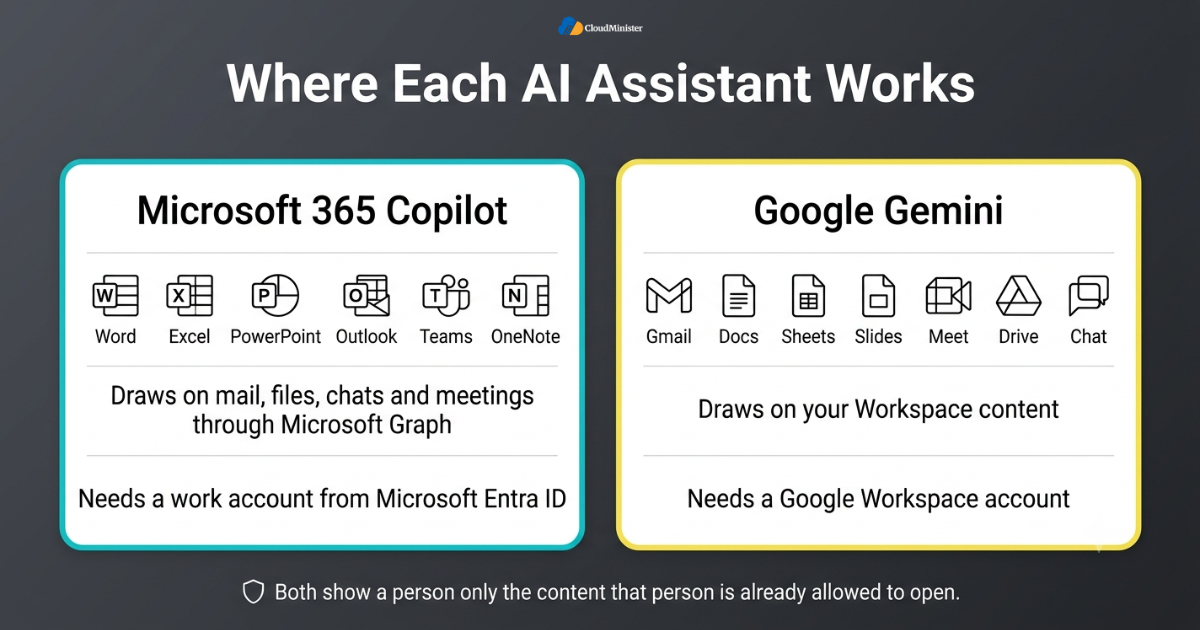
- Copilot needs a work account from Microsoft Entra ID, and Gemini needs a Google Workspace account. Personal accounts are not covered by business data commitments.
- Both tools show a person only the content that person is already allowed to open, which keeps the Microsoft 365 Copilot vs Google Gemini security story similar on paper.
- Microsoft offers Copilot Chat, a web based chat for work accounts, at no extra seat cost for many Microsoft 365 users. The paid licence adds grounding in your own work data.
- Google offers the standalone Gemini app and NotebookLM beside the in app helpers, which is useful for reading and questioning long documents.
- For custom agents, Microsoft provides Copilot Studio, while Google lets teams save instructions as Gems and connect more advanced agent tools through its wider platform.
- Both vendors update their underlying models often, so judge each one by results on your own tasks and not by model names. This is why a fair Microsoft 365 Copilot vs Google Gemini test uses your own files.
- Neither tool replaces human review. Every figure, name and clause still needs a person to check it.
- Neither assistant is built for private models, so projects on AI Lab on Cloud or AI Lab as a Service sit beside it and do not replace it.
3. Microsoft 365 Copilot vs Google Gemini: Feature Comparison for Everyday SMB Work
Features matter only when they map to daily tasks, so the table below compares the two assistants on jobs a typical Indian SMB repeats every week. Capabilities change with each release, so read it as a guide to strengths and confirm the details in a trial. The practical rule in most Microsoft 365 Copilot vs Google Gemini tests is simple: Copilot goes deeper in Excel and Teams, while Gemini feels lighter and faster in Gmail, Docs and Meet.
| Daily task | Microsoft 365 Copilot | Google Gemini |
| Drafts replies and summarises long threads in Outlook | Drafts replies and summarises threads in Gmail | |
| Documents | Drafts and rewrites in Word using your own files | Drafts and rewrites in Docs and pulls from Drive |
| Spreadsheets | Explains formulas and builds charts in Excel | Helps organise data and write formulas in Sheets |
| Meetings | Recaps and action items in Teams | Meeting notes and summaries in Meet |
| Presentations | Builds a first deck in PowerPoint from a document | Builds slides and images in Slides |
| Company search | Searches mail, files and chats through Microsoft Graph | Searches Gmail, Drive and Chat from the side panel |
| Custom agents | Copilot Studio | Gems and wider platform tools |
- Email: both draft replies and summarise long threads. Outlook suits teams with shared mailboxes and calendars, and Gmail suits teams that like fast search.
- Spreadsheets: Copilot in Excel works best when data sits in a proper table with clear headers, so tidy your sheets first.
- Meetings: Teams recaps work best when transcription is switched on, and Meet note taking must be enabled by your admin on a supported plan.
- Presentations: both can build a first draft deck from a document, but you will still fix layout, brand colours and facts by hand.
- Language: both handle Hindi and some other Indian languages, though quality varies by task, so test your own mix of English, Hindi and regional text.
- Desktop strength: Microsoft desktop apps remain stronger for heavy macros and very large files, while Google tools lean on the browser.
- Collaboration: Google Docs real time editing is smooth, and Copilot works well inside shared Microsoft files when the team uses OneDrive and SharePoint.
- Cost to value: the Microsoft 365 Copilot vs Google Gemini gap in features is smaller than the gap in price, so weigh both together.
- Heavy AI jobs such as video tagging or custom model training fall outside both tools and belong on the best GPU cloud hosting instead.
4. Pricing for Indian SMBs: What the Microsoft 365 Copilot vs Google Gemini Choice Really Costs
Pricing is where the Microsoft 365 Copilot vs Google Gemini debate becomes concrete. As of October 2026, Microsoft lists Copilot Business, built for organisations with up to 300 users, at 21 US dollars per user per month, and it has run lower promotional rates at times. The enterprise Copilot licence is listed at 30 dollars. Both need a qualifying Microsoft 365 plan, such as Business Standard at about 14 dollars. Google has bundled Gemini into its Business and Enterprise Workspace editions, with Business Standard at about 14 dollars per user per month. So a Business Standard seat with Copilot Business costs about 35 dollars at list price, against about 14 dollars on the Google route.
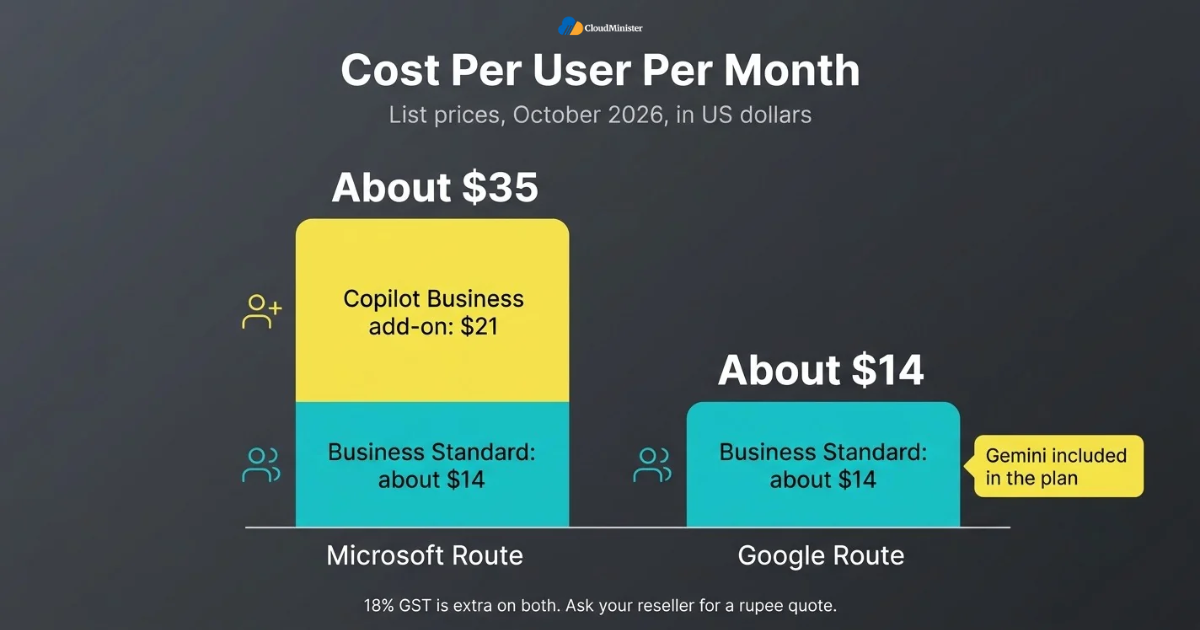
| Cost item | Microsoft route | Google route |
| Base business plan | Business Standard, about 14 USD | Business Standard, about 14 USD |
| AI layer | Copilot Business add on, 21 USD list | Included in the plan |
| Approximate list total | About 35 USD per user per month | About 14 USD per user per month |
| Tax in India | 18 percent GST extra | 18 percent GST extra |
- All figures are US dollar list prices checked in October 2026. Ask your reseller for a rupee quote, because exchange rates and partner margins change the final bill. Treat GPU hosting for private AI as a separate line item, and compare best GPU cloud hosting in India quotes the same way.
- GST at 18 percent applies on top of the quoted price, and a GST registered business may be able to claim input tax credit.
- Annual commitments cost less than month to month billing, so choose monthly only while you are still testing. The same quote can differ by billing term.
- The base plan is the hidden cost on the Microsoft side, because Copilot cannot be bought alone.
- On the Google side, check the edition. Business Standard and above include the fuller Gemini features, while Business Starter has a more limited set.
- Buy Copilot seats only for roles that gain most, such as finance, sales and operations managers, because licences are assigned per user.
- Microsoft raised some base plan prices in July 2026, so any quote older than that may be out of date.
- Count training time and permission cleanup as real costs, even if they never appear on an invoice, and add the cost of any trial on AI Lab as a Service if you plan private AI.
Related Reading: Cost per million tokens on a GPU server
5. Data Security, Privacy and Indian Compliance
Both vendors state that business content is not used to train their general models outside your organisation without permission, and both apply your existing access rules to every AI answer. That is good news, but it moves the real risk into your own house. If a salary sheet sits in a folder that everyone can open, either assistant can surface it to anyone who asks. This is why a security review sits near the top of any Microsoft 365 Copilot vs Google Gemini checklist.
- Copilot works with Microsoft Purview sensitivity labels and data loss prevention rules, and Gemini works with Workspace data loss prevention, data regions and client side encryption.
- Microsoft has said local processing of Copilot interactions in India is expected by the end of 2026, so ask your reseller whether it is live for your tenant.
- Check which data regions your Google edition supports before you promise customers that their data stays in India.
- The DPDP Act, 2023 expects consent, purpose limits and reasonable safeguards for personal data, and its rules are being phased in, so keep records of how AI tools handle customer data.
- Free consumer chatbots sit outside the business commitments of both vendors, so write a short policy that bans company data in personal accounts.
- Turn on multi factor authentication, audit logs and sensible retention before staff start using AI.
- Run a test with dummy sensitive files to see exactly what each assistant can reach. Repeat the test whenever the Microsoft 365 Copilot vs Google Gemini shortlist changes.
- Review access every quarter, because people change roles and old permissions stay behind.
- If you build private AI, keep test data in a sandbox such as AI Lab on Cloud, and ask a Web Hosting Company in India or the best GPU cloud hosting provider for written isolation, encryption and access log terms.
An assistant can only show what a person is allowed to see, which means every old shared link and open folder becomes a leak risk. Fix permissions, remove former staff accounts and turn on multi factor authentication before you switch either tool on.
6. Setup, Training and Team Adoption
Turning an assistant on takes an afternoon, but getting people to use it well takes weeks. Most failed rollouts do not fail because the tool is weak. They fail because nobody showed staff what to ask. Whichever side of the Microsoft 365 Copilot vs Google Gemini choice you pick, plan adoption as a small project with an owner, a start date and a measure of success.
- Name one internal owner who controls licences, policy and feedback for the whole Microsoft 365 Copilot vs Google Gemini pilot.
- Start with a pilot group of five to ten people across different roles, not only the most technical ones.
- Give each person two or three ready made prompts for their own job, such as summarising a client thread or drafting a quotation.
- Hold one thirty minute weekly session where people share prompts that worked.
- Track simple numbers, such as hours saved per week and the share of drafts that needed heavy rewriting.
- Use agents carefully. A narrow agent for one task, such as leave policy questions, is easier to trust than a general one. Custom agents that need your own data may later move to AI Lab as a Service.
- Collect complaints early and write them down, because they show where training or policy is missing.
- Share a one page note so staff know the Microsoft 365 Copilot vs Google Gemini pilot is a trial and not a final decision.
- Ask your Web Hosting Company in India to confirm email, DNS and backup readiness before the trial begins.
Related Reading: Types of AI agents for businesses
Adoption is decided in the first two weeks. If a person does not save visible time in that window, they go back to old habits. Sit with each pilot user for fifteen minutes, find one task they hate, and solve that task first.
7. Microsoft 365 Copilot vs Google Gemini: Which Business Should Choose What
There is no universal winner, and any article that names one is guessing. The better question is which tool fits the shape of your business. Use the scenarios below as a starting point for your own Microsoft 365 Copilot vs Google Gemini shortlist.
- In the Microsoft 365 Copilot vs Google Gemini contest, accounting and finance firms that live in Excel and send heavy files usually lean towards Copilot.
- Marketing agencies, startups and consultancies already on Gmail and Docs usually do better with Gemini, so the Microsoft 365 Copilot vs Google Gemini result often favours the suite already in use.
- Manufacturers and distributors that use Teams, SharePoint and Outlook across plants lean towards Copilot, because the data is already there.
- Retail and service businesses with many branch staff on phones may prefer Gemini because of its lighter, browser first design.
- Cost sensitive teams with fewer than 20 staff often find the Gemini route cheaper because the AI is bundled into the plan.
- Teams that already use Microsoft Purview for labelling and compliance can extend those rules to Copilot.
- Mixed shops with both suites should pick the one where most daily files live, and avoid paying for both.
- Do not switch suites only for AI. Migration cost, retraining and mailbox moves can outweigh the benefit of winning the Microsoft 365 Copilot vs Google Gemini test.
- Tech heavy firms with developers should budget for AI Lab as a Service or AI Lab on Cloud, and for the best GPU cloud hosting in India if they plan to serve their own models.
Run both tools on the same ten real tasks, with one reviewer scoring every result out of five. Two hours of honest testing teaches more than any comparison page, including this one.
8. Where Ready Made Assistants Fall Short
A ready made assistant is excellent at general office work, yet it does not know your product catalogue, your pricing logic or the customer history stored in a custom system. When an SMB needs that depth, it usually adds private AI on top of its Microsoft 365 Copilot vs Google Gemini choice, instead of replacing it. This is where a Web Hosting Company in India that also offers AI infrastructure becomes useful. For example, AI Lab on Cloud environments let a team test models and data pipelines without buying hardware first.
- A support bot trained on your own manuals and past tickets needs your data, which a general assistant cannot see by default, so teams often start on AI Lab on Cloud to build it safely.
- A private search over contracts or drawings works best on a retrieval setup that you control, and AI Lab on Cloud gives you a place to build it.
- Batch jobs such as tagging thousands of product images need GPU time, and the best GPU cloud hosting plans let you rent that power only while a job runs.
- AI Lab as a Service gives a team a ready workspace with compute, storage and tools, so developers can start experiments within days.
- The best GPU cloud hosting in India can also simplify data residency questions when the servers sit inside the country.
- Many teams choose AI Lab as a Service first, because it avoids buying a GPU before the use case is proven.
- A Web Hosting Company in India that manages servers, backups and security gives these private tools a stable base.
- Compare the best GPU cloud hosting options on GPU model, memory, network speed, support hours and billing in rupees.
- A trusted Web Hosting Company in India can also host the web front end of these tools, while the best GPU cloud hosting in India handles the model work.
Related Reading: Step by step AI lab setup guide
9. Building Private AI With AI Lab as a Service and GPU Servers
Moving from a ready made assistant to a private model sounds heavy, but the steps are well understood. AI Lab as a Service removes the first barrier, which is setup. Instead of installing drivers, container tools and model servers by hand, the team receives a prepared environment and starts with a small model on real company documents. For serving models, common open source engines include vLLM, Ollama and Hugging Face TGI, each with different strengths. A managed lab, whether you call it AI Lab as a Service or use an AI Lab on Cloud environment, keeps experiments off office laptops.
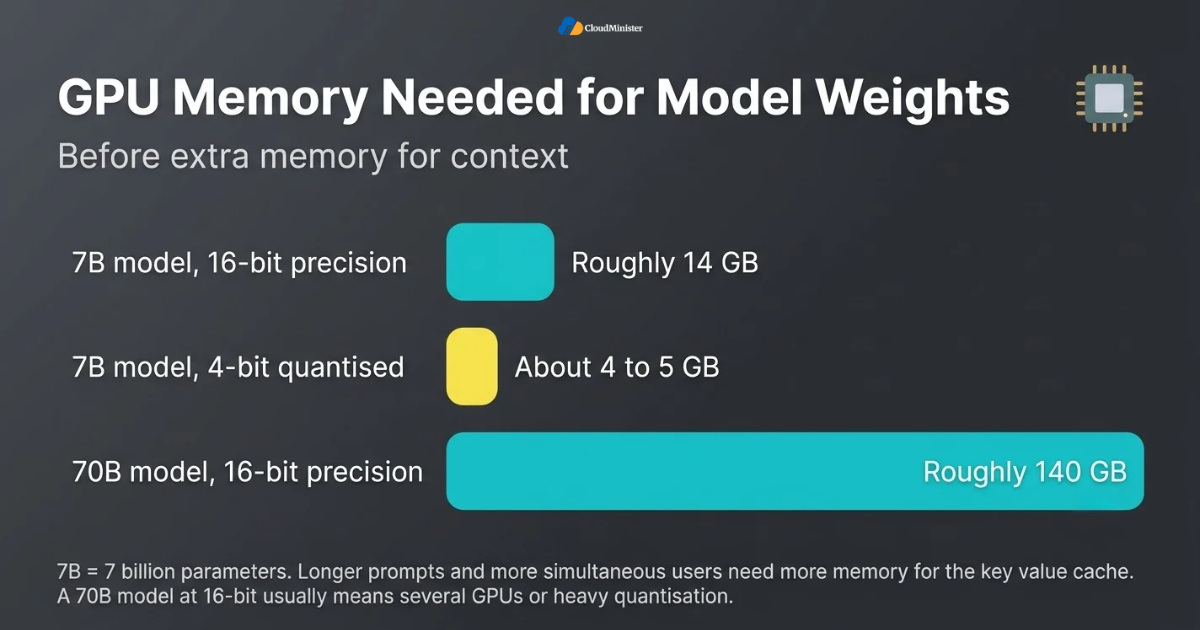
- Size the GPU by memory first. A 7 billion parameter model needs roughly 14 GB for weights at 16 bit precision, and about 4 to 5 GB when quantised to 4 bit, before extra memory for context.
- A 70 billion parameter model needs roughly 140 GB at 16 bit precision, which usually means several GPUs or heavy quantisation.
- Longer prompts and more simultaneous users increase the key value cache, so test with realistic traffic and not with a single user. Providers of the best GPU cloud hosting should let you test this before you pay.
- vLLM is built for high throughput serving with continuous batching, Ollama is the simplest way to run models on one machine, and TGI is a production oriented server from Hugging Face.
- Start with retrieval augmented generation, which searches your documents and passes the best passages to the model, before you think about fine tuning. Teams that use AI Lab as a Service usually begin here.
- Keep personal data out of prompts and logs unless you have a clear purpose and consent under the DPDP Act.
- The best GPU cloud hosting plan is the one that matches your job pattern. Steady daily load suits a dedicated server, while occasional training suits short rentals.
- Ask whether AI Lab on Cloud includes storage, snapshots and access control, because a lab without backups is only a demo.
- Pick best GPU cloud hosting in India providers who publish clear specs and billing, so a long training run never surprises finance.
- Rent the best GPU cloud hosting by the hour for experiments, and move to a monthly plan only when your usage becomes steady.
Related Reading: vLLM, Ollama and TGI for LLM inference.
Start with the smallest model that passes your own test set. A 7 billion parameter model on one GPU is cheap to run and often good enough for classification, extraction and short answers. Move up in size only when the results fall short, and keep the best GPU cloud hosting choice flexible until then.
Ready to Build Private AI on Your Own Data?
Skip the hardware and driver setup. With CloudMinister’s AI Lab on Cloud, your team gets a ready workspace with GPU compute, storage and tools to test models, build private search and launch support bots securely. Start small, prove the use case, then scale.
10. The Role of Your Hosting Partner in an AI Rollout
Assistants run in the vendor’s cloud, yet your business still depends on the infrastructure around them. Domain records, email security, backups, websites and private AI servers all need a reliable partner. A capable Web Hosting Company in India can look after these pieces together, so you are not chasing three vendors when something breaks.
- Whichever way the Microsoft 365 Copilot vs Google Gemini choice goes, email routing depends on correct DNS records. MX records point mail to Microsoft or Google, and SPF, DKIM and DMARC records protect your domain from spoofing.
- Microsoft and Google both work on a shared responsibility model, so keep an independent backup of mail and files for recovery after accidental deletion or ransomware.
- Your website, customer portal and private AI tools should sit behind HTTPS, a firewall and regular patching, whether they run on a shared plan or on the best GPU cloud hosting.
- A Web Hosting Company in India with local data centres can lower latency for Indian users and simplify residency conversations.
- Ask for written support hours, escalation steps and restore times, not just a promise of fast help. A Web Hosting Company in India that is open about this earns trust.
- A provider that offers AI Lab on Cloud, servers and managed support under one roof reduces handover gaps.
- Look for the best GPU cloud hosting in India with clear billing, so a training job never surprises your finance team.
- Choose a Web Hosting Company in India that explains its limits openly, since a candid answer before purchase predicts a candid answer during an incident.
- Ask how AI Lab as a Service and AI Lab on Cloud trials are billed, and whether you can stop them without a long contract.
11. Common Mistakes When Choosing Between Microsoft 365 Copilot vs Google Gemini
Most poor outcomes trace back to a short list of repeatable mistakes. Avoiding them is one of the cheapest improvements you can make to your Microsoft 365 Copilot vs Google Gemini decision. Another common error is paying for always on GPU servers when jobs run only a few hours, instead of renting the best GPU cloud hosting by the hour.
- Choosing by hype or by a friend’s opinion instead of testing on your own tasks.
- Buying a licence for every employee on day one, when only a few roles will use it daily. This is common in Microsoft 365 Copilot vs Google Gemini rollouts.
- Skipping the permission cleanup, then discovering that the assistant can reach files it should not.
- Forgetting that Copilot needs a qualifying base plan, which makes the real price higher than the add on price.
- Starting without a success measure, so nobody can say after a month whether the Microsoft 365 Copilot vs Google Gemini pilot worked.
- Ignoring language testing, even though staff and customers write in Hindi or regional languages.
- Treating AI output as final, which leads to wrong figures and clauses reaching customers.
- Moving the whole company to a new suite only for AI, without counting the cost of migration.
- Building private AI too early, or testing it on live data without a sandbox such as AI Lab on Cloud, before a Web Hosting Company in India or an AI Lab as a Service partner has confirmed the need.
12. A Practical 30 Day Pilot Plan for Microsoft 365 Copilot vs Google Gemini
Reading about Microsoft 365 Copilot vs Google Gemini is easy, so this plan turns it into four weeks of action that a small team can follow without hiring anyone new.
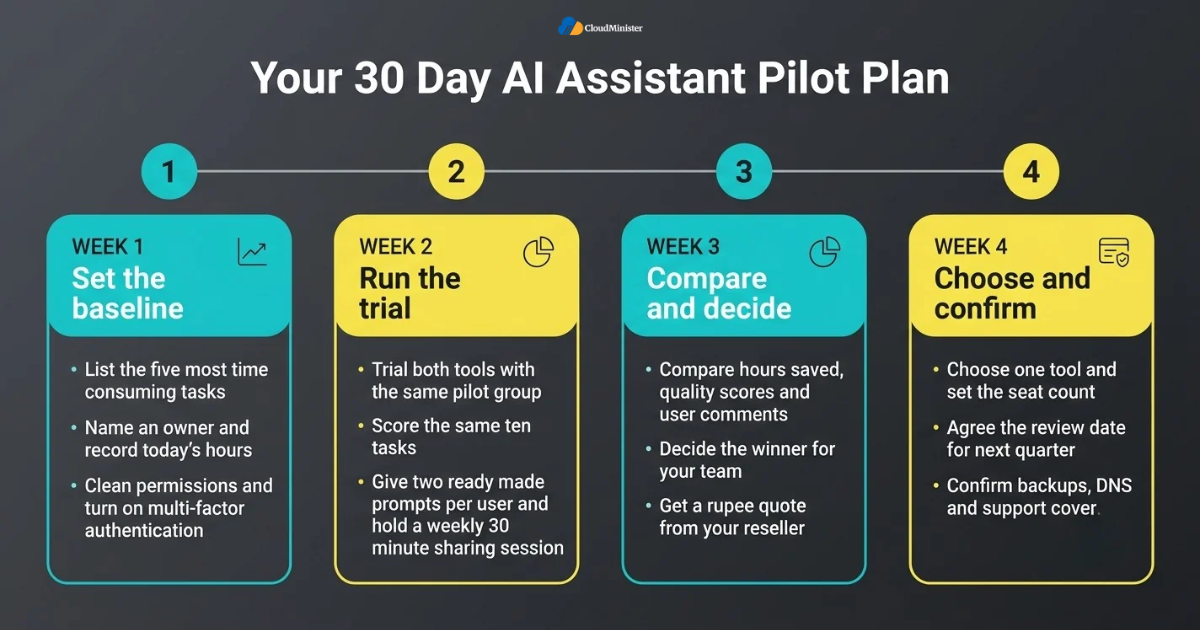
- Week one: list the five most time consuming tasks, name an owner, and write down today’s hours for each task, so the Microsoft 365 Copilot vs Google Gemini test has a baseline.
- Week one: clean permissions on shared drives and turn on multi factor authentication for every account.
- Week two: start a trial of each tool for the same pilot group, and score results using the same ten tasks, so the Microsoft 365 Copilot vs Google Gemini test stays fair.
- Week two: give every pilot user two ready made prompts and a weekly thirty minute sharing session.
- Week three: compare hours saved, quality scores and user comments, decide the Microsoft 365 Copilot vs Google Gemini winner for your team, and get a rupee quote from your reseller.
- Week three: if private AI is on the table, request a small trial on AI Lab on Cloud or AI Lab as a Service with a sample of non sensitive documents.
- Week four: choose one tool, set the seat count, and agree the review date for the next quarter.
- Week four: confirm backups, DNS and support cover with your Web Hosting Company in India before the full rollout.
- Week four: if you plan private AI, shortlist the best GPU cloud hosting in India and ask for a trial of AI Lab as a Service with sample data.
Checklist: Assistant Readiness Review
- Top five time wasting tasks listed and measured
- Permissions on shared files cleaned and reviewed
- Multi factor authentication enabled for every account
- Both tools trialled on the same ten real tasks
- Rupee quote received with GST and base plan costs included
- Data residency and DPDP points confirmed with the reseller
- Pilot owner, success measure and review date written down
- Independent backup, DNS records and support hours confirmed
- Microsoft 365 Copilot vs Google Gemini score sheet completed by the pilot group
- Private AI plan reviewed, including AI Lab on Cloud and the best GPU cloud hosting in India
- Support cover confirmed with a Web Hosting Company in India
- AI Lab as a Service trial scoped with non sensitive sample data
Key Takeaways
- The Microsoft 365 Copilot vs Google Gemini decision should follow the suite your team already uses, not hype.
- Copilot is deeper in Excel and Teams, and Gemini is lighter in Gmail, Docs and Meet.
- At list price, Copilot Business on Business Standard costs about 35 dollars per user per month, and the Google route costs about 14 dollars.
- Both assistants only show what a user can already access, so permission cleanup comes first.
- A short pilot with a clear score sheet beats months of debate.
- Private AI needs separate infrastructure, and AI Lab as a Service is a low risk way to start.
- Compare the best GPU cloud hosting in India on GPU memory, network speed, support and rupee billing.
- A Web Hosting Company in India that also offers AI Lab on Cloud can cover email, backups and private AI together.
- The best GPU cloud hosting depends on your job pattern, so rent for experiments and commit only for steady loads.
- Cloud lab environments let you test private ideas before you buy hardware.
- Treat the Microsoft 365 Copilot vs Google Gemini result as a review item for every quarter.
Get a Free Consultation for Your AI Rollout
Not sure whether Copilot, Gemini or a private AI setup fits your business? CloudMinister offers free consultancy to all new clients. Our team will help you plan your email, DNS, backups and AI infrastructure, with no obligation.
Conclusion
The honest answer to the Microsoft 365 Copilot vs Google Gemini question is that the right tool is the one your team will actually use every day. Look at where your files live, count the full cost per seat, clean your permissions and run a short pilot. Do those four things and the Microsoft 365 Copilot vs Google Gemini answer will be backed by your own data. If you also plan private AI, look at the best GPU cloud hosting in India only after the pilot proves a real need.
Remember that an assistant is only the first layer. As your business grows, you may want private search, support bots or image processing that no ready made tool offers. At that point a Web Hosting Company in India, AI Lab as a Service, AI Lab on Cloud and the best GPU cloud hosting become part of the same plan. Choose the best GPU cloud hosting in India by specs and support, not by price alone. Review the decision every quarter, because prices, features and your own needs will keep changing.
Frequently Asked Questions
Which is better for a small Indian business, Microsoft 365 Copilot vs Google Gemini?
It depends on your suite. Teams on Microsoft 365 with heavy Excel and Teams use usually get more from Copilot, while teams on Google Workspace usually get more from Gemini. Test both on ten real tasks before you decide.
Is Gemini really included in Google Workspace?
Gemini is bundled into the Business and Enterprise editions, though the fuller features sit in Business Standard and above. Check your exact edition in the admin console, since the Microsoft 365 Copilot vs Google Gemini price gap depends on this.
Can I buy Microsoft 365 Copilot without a Microsoft 365 plan?
No. Copilot is an add on and needs a qualifying Microsoft 365 base plan, so always add both costs when you budget.
How much more does Copilot cost in the Microsoft 365 Copilot vs Google Gemini comparison?
At October 2026 list prices, a Business Standard seat with Copilot Business is about 35 dollars per user per month, against about 14 dollars for Business Standard with Gemini. GST and rupee conversion are extra.
Is my business data used to train the AI models?
Both vendors say business content is not used to train their general models outside your organisation without permission. Read the current terms for your plan and keep staff away from personal chatbot accounts.
Does either assistant keep data inside India?
Microsoft has said in country processing for Copilot in India is expected by the end of 2026, and Google offers data regions on some editions. Confirm the current status in writing before you make any promise to customers.
Do I need GPU servers if I use Copilot or Gemini?
No, not for everyday office work. You need GPUs only when you build private models or heavy AI jobs, and then AI Lab as a Service or the best GPU cloud hosting plans can help you start small.
Can a Web Hosting Company in India help with an AI assistant rollout?
Yes. A Web Hosting Company in India can manage domain records, email security, backups and servers, and one that offers AI Lab on Cloud can also support private AI projects.
Where can I find the best GPU cloud hosting in India?
Compare providers on GPU model, memory, network speed, support hours and billing in rupees. Providers such as Cloudminister list their GPU server plans on their own site, so you can check specifications before you commit.
Is Microsoft 365 Copilot vs Google Gemini a fair comparison for a team of ten?
Yes, but the result depends on the suite you already use. A small team can finish the pilot in two weeks if it scores both tools on the same tasks.
What is AI Lab as a Service?
AI Lab as a Service is a managed workspace with compute, storage and tools for testing AI models. It suits SMBs that want to experiment before buying hardware, and it can sit beside either assistant.
What is AI Lab on Cloud and who needs it?
AI Lab on Cloud is a cloud based environment for building and testing AI projects. Developers, analysts and product teams use AI Lab on Cloud when a ready made assistant cannot read their private data.
How do I choose the best GPU cloud hosting for a small team?
Match the plan to your job pattern. The best GPU cloud hosting offers clear specs, rupee billing and support, and lets you start small. Compare the best GPU cloud hosting in India providers on memory, network speed and restore times.
How much GPU memory does a small private model need?
As a rough guide, a 7 billion parameter model needs about 14 GB for weights at 16 bit precision, and about 4 to 5 GB when quantised to 4 bit. Add memory for context, and check the specs of the best GPU cloud hosting plan before you commit.
Why involve a Web Hosting Company in India in an AI assistant project?
A Web Hosting Company in India can manage DNS, email security, backups and servers, which every assistant rollout depends on. It can also offer private AI hosting if you need it later.
Can I run both assistants during the pilot?
Yes. A two week side by side test is the fairest way to settle the Microsoft 365 Copilot vs Google Gemini question, as long as both groups use the same ten tasks.
Does choosing the best GPU cloud hosting in India help with data residency?
It can. When servers sit in Indian data centres, residency questions are simpler, though you still need to meet the DPDP Act on consent and safeguards. Ask the provider for written details about where data is stored.
Is the best GPU cloud hosting in India too costly for an SMB?
Not if you rent by the job. Short rentals of the best GPU cloud hosting keep spending tied to real work.
Which workloads need the best GPU cloud hosting?
Model training, fine tuning, image or video processing and high volume text generation need GPUs. Office assistants do not. When you compare the best GPU cloud hosting in India options, ask for GPU model, memory, network speed and billing terms.
Should I pick the best GPU cloud hosting in India before the pilot ends?
No. Finish the pilot first, then size the server from real test results. Buying the best GPU cloud hosting early often means paying for capacity you do not use.
What should I ask the best GPU cloud hosting in India provider about security?
Ask about access control, encryption, backups, log retention and where data is stored. The best GPU cloud hosting providers answer these in writing.

Shivlendra Singh Jadoun is a Cloud & DevOps Engineer at CloudMinister Technologies, specializing in AWS, Azure, and GCP infrastructure. He began his career in Linux system administration, managing shared, VPS, and dedicated servers before moving into cloud and automation. He is AWS Certified and works extensively with Docker, Kubernetes, Terraform, Ansible, and Jenkins to build CI/CD pipelines and scalable, secure cloud environments. With hands-on experience across hosting, server security, and DevOps automation, he brings real-world engineering insight to every article he writes.