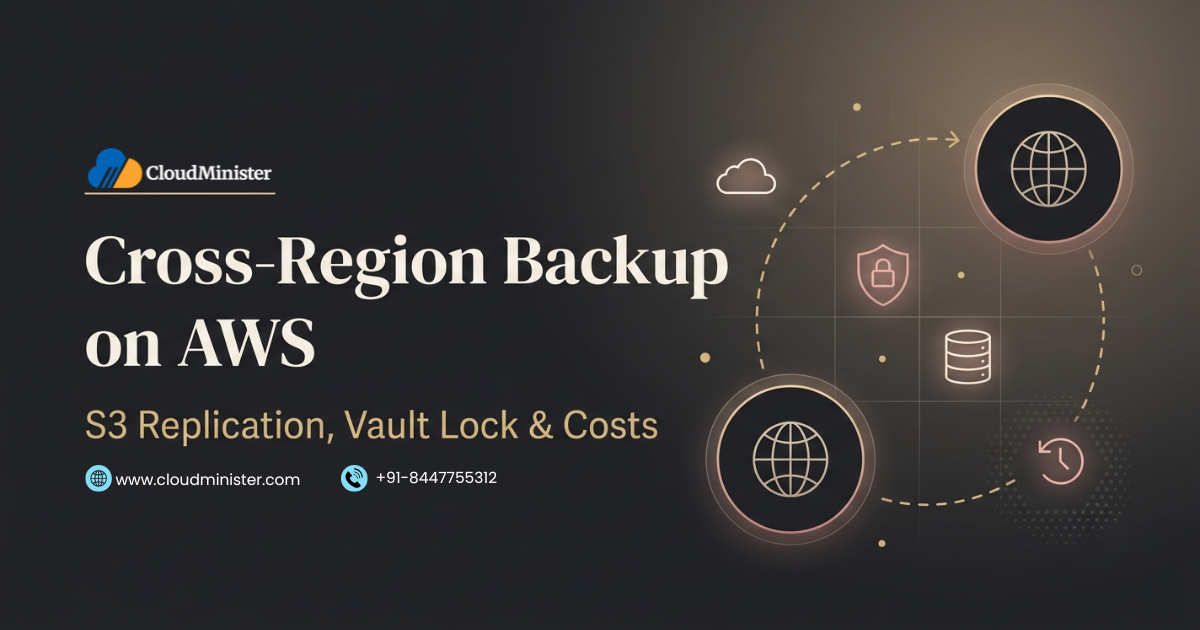
A single AWS Region is a single failure boundary, so a serious data protection plan keeps another copy in a different Region and, ideally, in a different account. This guide explains how Cross-Region Backup works with S3 replication and AWS Backup copy jobs, how Vault Lock and S3 Object Lock make those copies immutable, and where the real costs hide, including transfer, storage, requests, and key management. It also shows where AWS managed services, a Web Hosting Company in India, and Microsoft Azure Cloud Hosting Services fit in, so your team can choose a Cross-Region Backup design that matches its recovery goals and budget.
Every cloud team believes its data is safe until the day a Region has a bad hour, an engineer deletes the wrong bucket, or a stolen access key is used to wipe backups. Cross-Region Backup is the habit of keeping an independent copy of important data in a second AWS Region, so that none of those events becomes the end of the business. The idea sounds simple, but the details around versioning, encryption keys, immutability, and cost decide whether the copy actually saves you.
Many teams discover that replication alone is not protection. A replicated bucket faithfully copies a bad change, and a copy that the same administrator can delete is not much of a safety net. A well planned Cross-Region Backup therefore combines three things: a copy in another Region, a lock that stops tampering, and a cost model that the finance team can live with. Teams that rely on AWS managed services such as Amazon S3 and AWS Backup get most of the machinery out of the box, yet they still have to configure it correctly.
This guide uses plain language and short points. You will learn how S3 replication works, when to choose AWS Backup copy jobs, how governance mode and compliance mode differ, how to read the cost drivers, and how to test recovery before you need it. Whether you work in the AWS Management Console or through code, the Cross-Region Backup steps below will help you plan with more confidence and far fewer surprises. We also compare notes with Azure cost optimization habits, because the same discipline saves money on both clouds.
Table of Contents
- What a Second-Region Backup Really Means on AWS
- Why a Second Region Is Worth the Effort
- Choosing RPO, RTO, and the Right Backup Pattern for Another Region
- Setting Up S3 Replication for a Second-Region Copy in the AWS Console
- AWS Backup Copy Jobs for Databases and Volumes in Another Region
- Automating Second-Region Backups Beyond the AWS Console
- Vault Lock and S3 Object Lock: Making Every Backup Copy Immutable
- Security for Keys, Permissions, and Networks
- Cost Trade-Offs of Backing Up to a Second Region: What You Pay For
- Monitoring and Restore Testing for Second-Region Backups
- When a Second Cloud Makes Sense: Azure as a Backup Target
- Azure Cost Optimization Habits That Also Lower Your AWS Backup Bill
- Compliance, Data Residency, and Choosing a Partner in India
- Questions to Ask Before You Hire Help for Second-Region Backups
- Common Mistakes That Break a Second-Region Backup
- Second-Region Backup Scenarios for Common Workloads
- A Practical 30 Day Plan to Get Started
- Key Takeaways
- Conclusion
- Frequently Asked Questions
1. What Cross-Region Backup Really Means on AWS
A Cross-Region Backup is a recoverable copy of your data stored in an AWS Region that is different from the one running your workload. It is not the same as high availability inside a Region, which spreads resources across Availability Zones. Availability Zones protect you from a data centre problem, while a second Region protects you from a wider event, an account level mistake, or a Regional service disruption. The right design starts by naming which of these risks you are trying to cover. Teams that buy AWS managed services from a Web Hosting Company in India often ask for this risk map before anything else.
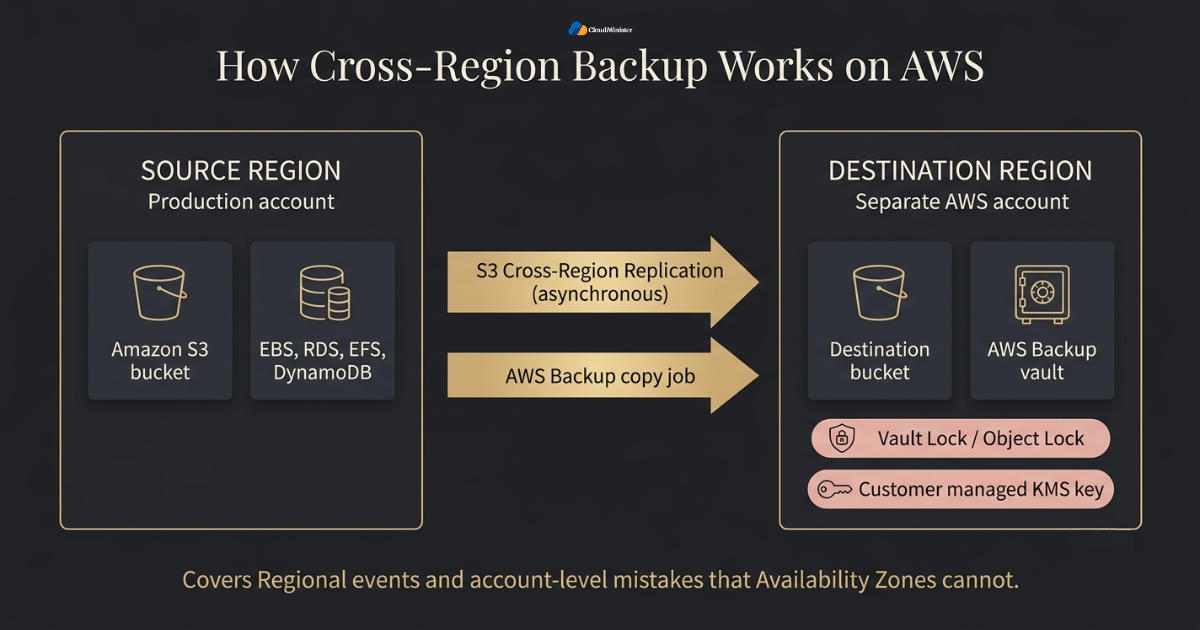
- Replication copies changes continuously, while a backup is a point in time copy that you can restore after a bad change. A strong plan usually needs both ideas.
- Amazon S3 offers Cross-Region Replication, which copies new objects to a bucket in another Region asynchronously.
- AWS Backup can copy recovery points to a vault in another Region through a copy rule in a backup plan or through an on demand copy job.
- Keeping the copy in a separate AWS account adds protection against stolen credentials and accidental deletion in the main account.
- Availability Zones inside one Region do not count as a Cross-Region Backup, because a Regional event can affect all of them.
- A second Region also supports compliance goals that ask for geographic separation between data copies.
- Every extra copy adds storage, transfer, and request charges, so the copy should be scoped by data value and not applied blindly to everything.
Start by sorting your data into three groups: critical, important, and archive. Give only the critical group the fastest Cross-Region Backup pattern, and let the other groups use cheaper and slower options. This one decision usually removes more cost than any later tuning.
2. Why a Second Region Is Worth the Effort
The business case is easy to explain once you look at current numbers. A May 2026 report from Splunk, covered by Help Net Security, found that the cost of unplanned downtime for Global 2000 companies has reached about $600 billion a year, up 50 percent in two years. Outages are expensive, and the data you restore from decides how long they last. A tested Cross-Region Backup is one of the few controls that shortens recovery for almost every kind of failure. A Web Hosting Company in India that offers AWS managed services can also help you size the second copy.
- Ransomware remains a steady threat, and Comparitech tracked 2,200 ransomware attacks in the first quarter of 2026, which was a small rise on the quarter before.
- A backup that sits in the same account and Region as production, with the same credentials, is an easy target for attackers and for careless scripts.
- Regional disruptions are rare but real, and a second Region gives you a copy that stays reachable when the primary Region is impaired.
- Human error is still common. A wrong lifecycle rule, an emptied bucket, or a deleted vault can remove data within minutes.
- A second copy shortens recovery because you restore from a known good set instead of rebuilding from scratch.
- Auditors and customers often ask for proof of geographic separation and tested recovery.
- The cost of the extra copy is usually small compared with an hour of lost sales, which is why finance teams tend to approve the extra copy once the numbers are shown.
- Teams that run AWS managed services still own their data protection settings, because the shared responsibility model leaves backup design with the customer.
Treat the backup account as a separate security zone. Use different administrators, different credentials, and different encryption keys from production. If one stolen login can reach both the live data and the Cross-Region Backup, an attacker can erase both in a single session.
3. Choosing RPO, RTO, and the Right Cross-Region Backup Pattern
Before touching any setting, decide two numbers. Recovery point objective, or RPO, is how much data you can afford to lose. Recovery time objective, or RTO, is how long you can afford to be down. These numbers decide whether a simple scheduled Cross-Region Backup is enough or whether you need continuous replication with a time commitment. The reliability pillar of the AWS Well-Architected Framework treats this planning step as the foundation of every recovery design. If a second cloud is in scope, compare Microsoft Azure Cloud Hosting Services at this stage, so the cost of both paths is known.
- A daily AWS Backup copy rule suits workloads that can lose up to a day of changes and can wait hours for a restore.
- S3 Cross-Region Replication suits object data where new changes should reach the second Region within minutes.
- S3 Replication Time Control adds a commitment that 99.99 percent of objects replicate within 15 minutes, with metrics and event notifications, at an extra charge.
- Cold data with a long RTO can land in an archive storage class in the destination, which lowers the monthly bill.
- Databases usually need snapshot or backup copy features, because copying raw files while a database runs does not give a consistent restore.
- Write the RPO and RTO beside each dataset in a simple table so that every later decision can be checked against it.
- A second cloud copy, such as one hosted through Microsoft Azure Cloud Hosting Services, is a separate pattern with its own cost and recovery profile.
| Approach | Best for | Recovery point | Main trade-off |
| S3 Cross-Region Replication | Media, logs, documents, and other objects | Minutes, asynchronous | Needs versioning and copies bad changes too |
| S3 Replication Time Control | Data with strict replication targets | 99.99 percent within 15 minutes | Extra per GB fee |
| AWS Backup copy job | Volumes, databases, and file systems | Follows the backup schedule | Restore step needed, plus copy and storage cost |
| Archive class replica | Long term and compliance retention | Follows replication | Retrieval time and minimum storage period |
Related Reading: AWS Well-Architected Framework guide
4. Setting Up S3 Replication for a Cross-Region Backup in the AWS Management Console
S3 replication is the quickest way to start a Cross-Region Backup for object data. The setup is simple in the AWS Management Console, but a few prerequisites trip people up, especially versioning and permissions. Complete the steps in order and the first replicated object often appears within minutes. A Web Hosting Company in India that manages your account can run this setup with you while your team watches.
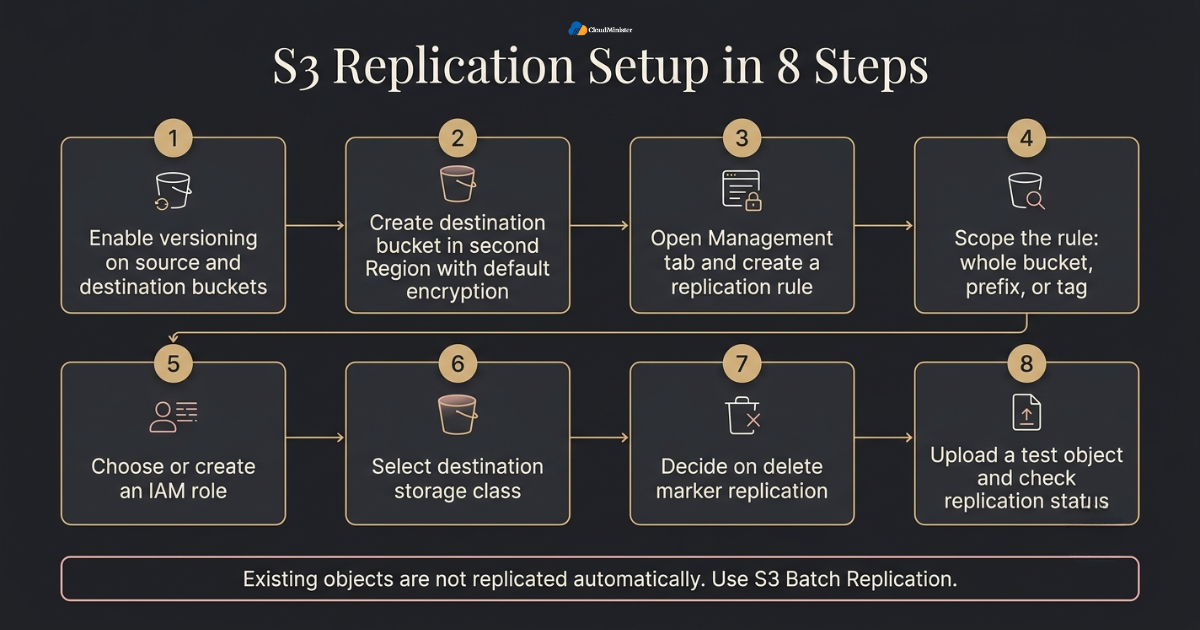
- Enable versioning on both the source bucket and the destination bucket, because a replication rule will not work without it.
- Create the destination bucket in the second Region, ideally in a separate AWS account, and turn on default encryption.
- In the AWS Management Console, open the source bucket, choose the Management tab, and create a replication rule.
- Scope the rule to the whole bucket, or to a prefix or tag, so that only data worth protecting is copied.
- Choose or create an IAM role that S3 can assume to read from the source and write to the destination.
- Select a destination storage class such as S3 Standard-IA or an S3 Glacier class if you want cheaper storage for the copy.
- Decide on delete marker replication deliberately. Deleting a specific object version is never replicated, which protects the copy, but delete markers can be replicated if you choose that option.
- Replication applies to new objects after the rule is active, so use S3 Batch Replication to copy objects that already existed.
- Verify the result by uploading a test object and checking its replication status in the AWS Management Console.
5. AWS Backup Copy Jobs for Cross-Region Backup of Databases and Volumes
S3 replication covers buckets, but most workloads also have databases, block volumes, and file systems. AWS Backup is a fully managed service that centralises these protections through backup plans, and it can copy recovery points to another Region automatically. Because it is one of the core AWS managed services for data protection, it gives your team one place to define schedules, retention, and copy rules. Ask whoever provides your AWS managed services to confirm which resource types in your account are covered.
- A backup plan holds rules, and each rule can include a copy action that sends the recovery point to a vault in another Region or another account.
- The copy action has its own retention setting, so a Cross-Region Backup can be kept for a longer or shorter time than the original.
- Supported resources include Amazon EBS, Amazon RDS, Amazon EFS, Amazon DynamoDB, and Amazon S3, although feature support varies by resource type and Region.
- Resources can be selected by tag, which keeps new workloads protected without editing the plan each time.
- For copies to another account, use a customer managed KMS key, because backups encrypted with an AWS managed key cannot be copied across accounts.
- Cold storage is available for some resource types, and data moved to cold storage must stay there for at least 90 days.
- Later copies of some resources, such as EBS snapshots, transfer only changed blocks, which keeps transfer cost lower after the first full copy.
- AWS Backup Audit Manager can check whether your plans follow rules you define, such as retention and encryption, and produce reports for auditors.
Need Expert Help With AWS Cross-Region Backup?
Our certified team sets up S3 replication, AWS Backup copy jobs, and Vault Lock for you, with 24/7 monitoring and restore support.
6. Automating Cross-Region Backup Beyond the AWS Management Console
The AWS Management Console is the best place to learn how Cross-Region Backup rules behave, because every option has a visible label and a short help text. Once the design is stable, move the same settings into code so that the AWS Management Console is used for checking and not for daily changes. Teams that run AWS managed services at scale usually keep both views, one for people and one for pipelines.
- Use the AWS Management Console to create the first replication rule and the first backup plan, and note every setting you choose.
- Export those settings into AWS CloudFormation or Terraform templates, so the Cross-Region Backup rules can be reviewed like application code.
- Keep one template for the source account and one for the backup account, since permissions differ between them.
- Use the AWS Management Console dashboards in AWS Backup to see job status, copy status, and compliance at a glance.
- Tag every protected resource with an owner and a data class, so backup plans pick it up automatically and the AWS Management Console reports stay readable.
- Restrict who can change plans in the AWS Management Console by using least privilege IAM roles and service control policies.
- Send changes made in the AWS Management Console to CloudTrail alerts, so out of band edits to a Cross-Region Backup policy are noticed within minutes.
- Ask the partner delivering AWS managed services to review template drift every month.
- Teach new engineers with the AWS Management Console first, then let them submit changes through the pipeline.
7. Vault Lock and S3 Object Lock: Making Every Cross-Region Backup Immutable
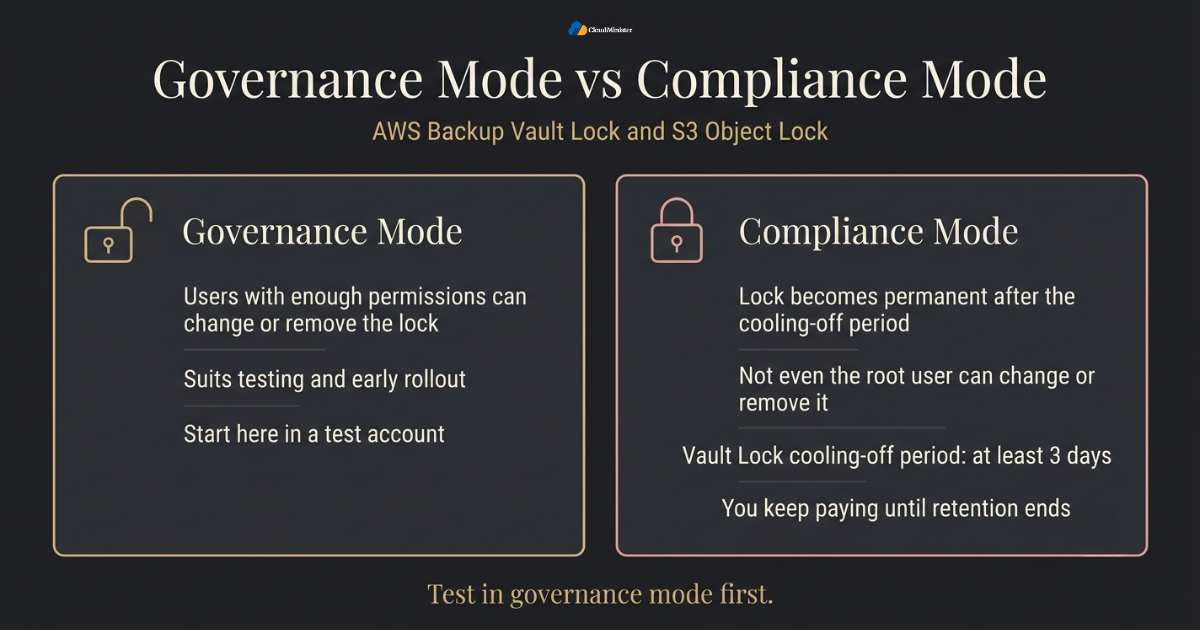
A copy that a compromised administrator can delete is only half a backup. Immutability fixes this. AWS Backup Vault Lock and S3 Object Lock both enforce write once read many behaviour, so recovery points or object versions cannot be removed before their retention ends. Applying them to the destination of a Cross-Region Backup turns an ordinary copy into one that attackers and mistakes cannot erase.
- AWS Backup Vault Lock works at the vault level and lets you set minimum and maximum retention periods for recovery points.
- Governance mode lets users with enough permissions change or remove the lock, which suits testing and early rollout.
- Compliance mode is created by setting a cooling off period. Once that period ends, the lock becomes permanent and not even the root user can change or remove it.
- The cooling off period, also called grace time, must be at least 3 days, and it gives you time to test the settings before they become fixed.
- S3 Object Lock offers governance and compliance retention modes plus legal holds, and it requires versioning on the bucket.
- Enable Object Lock on the destination bucket, then test that replicated objects keep the retention settings you expect.
- Set retention longer than the time you need to notice an attack, since many incidents are found weeks after they begin.
- A compliance lock also stops you from deleting data you no longer need, so you keep paying until retention ends. Test with short retention first.
- AWS Backup also offers logically air-gapped vaults for extra isolation, so check current Region and resource support while you design.
Begin with governance mode and a short retention period in a test account. Move to compliance mode only after you have confirmed that the retention, the cooling off period, and the cost of keeping data until expiry are all acceptable. A wrong compliance lock cannot be undone once the cooling off period ends, and the copy keeps billing until retention runs out.
8. Security for Keys, Permissions, and Networks
A second Region doubles the places where your data can be attacked, so security has to travel with the copy. Treat the destination as production from the first day. Encryption keys, IAM permissions, and network paths for the recovery environment all need the same care as the source, and every Cross-Region Backup should follow the same baseline. A provider of AWS managed services can audit these controls, and a good Web Hosting Company in India will share the findings in writing.
- Use SSE-KMS with a customer managed key in the destination Region, and give the replication role only the key permissions it needs to decrypt at the source and encrypt at the destination.
- KMS keys are Regional, so the recovery Region needs a usable key. AWS KMS multi-Region keys can make this easier to manage.
- Limit who can delete backups. Use service control policies and a separate backup account so that production administrators cannot touch the vault.
- Block public access on every backup bucket, and write bucket policies that allow only the replication role to write.
- Require encrypted connections on backup buckets, and use MFA and temporary credentials for administrators instead of long lived access keys.
- Turn on AWS CloudTrail and alerts for vault policy changes, lock changes, and key policy changes.
- Prepare the recovery network in advance. Security groups act as stateful instance level firewalls and network ACLs act as stateless subnet level filters, so both must allow the restored workload to run.
- Review access with IAM Access Analyzer to catch unintended public or cross account access.
Related Reading: AWS security groups vs NACLs
9. Cost Trade-Offs of Cross-Region Backup: What You Actually Pay For
The extra Region is not free, and the bill has more parts than most estimates include. Knowing each component lets you design a Cross-Region Backup that protects what matters without paying premium prices for data nobody will ever restore. Pricing differs by Region and changes over time, so confirm current rates on the official AWS pricing pages and in the AWS Pricing Calculator. For a second cloud, add the price of Microsoft Azure Cloud Hosting Services to the same sheet, because Azure cost optimization methods can trim both sides.
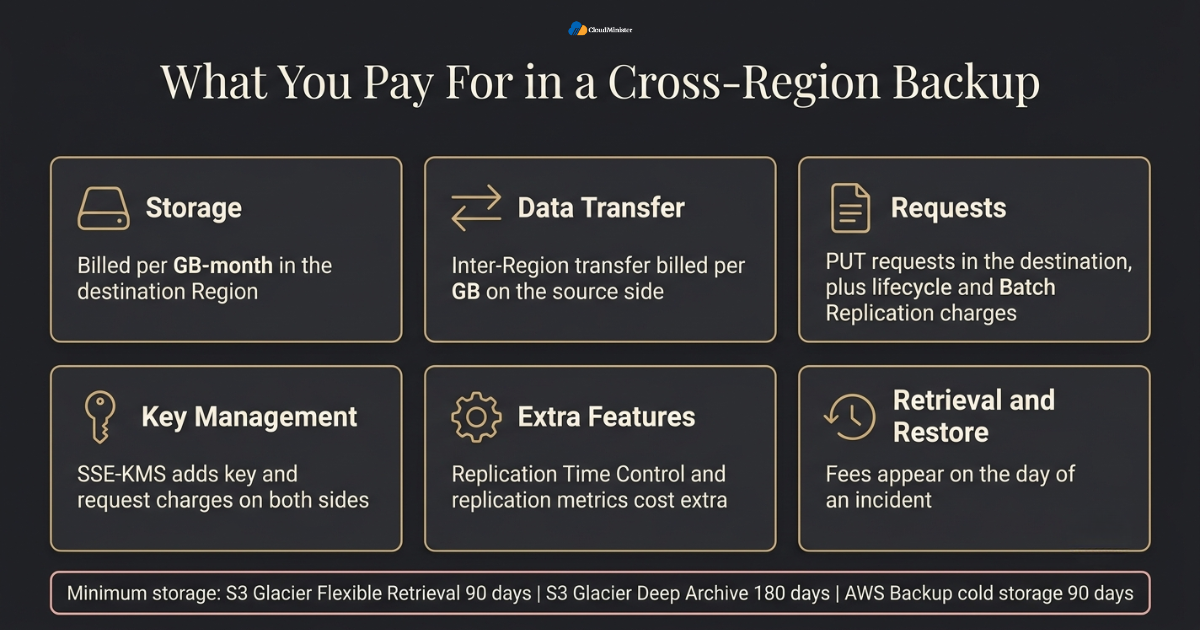
- Storage in the destination Region is billed per GB month, and it is usually the largest line item for long retained data.
- Inter-Region data transfer is charged per GB on the source side, and the rate depends on the Region pair. Data arriving in the destination is not charged separately.
- Replication adds PUT request charges in the destination, and lifecycle actions or Batch Replication jobs add their own request and job charges.
- S3 Replication Time Control and replication metrics carry extra charges, so use them only for datasets with strict targets.
- SSE-KMS adds key and request charges on both sides, because objects are decrypted and encrypted during replication.
- Versioning keeps old versions, so add lifecycle rules that expire noncurrent versions after a sensible number of days.
- AWS Backup bills for warm storage, cold storage, restores, and cross Region copy transfer. Cold storage is cheaper per GB but has a 90 day minimum.
- Archive classes have minimum storage periods, such as 90 days for S3 Glacier Flexible Retrieval and 180 days for S3 Glacier Deep Archive.
- Retrieval and restore fees appear on the day of an incident, so budget for a full restore test every year.
Related Reading: S3 storage class pricing
10. Monitoring and Restore Testing for Cross-Region Backup
A Cross-Region Backup that you have never restored is an assumption, not a safety net. Monitoring tells you that copies are arriving, and restore tests tell you that they are usable. Both should be automated and reviewed on a fixed schedule. Copies held with Microsoft Azure Cloud Hosting Services need the same drill.
- S3 shows a replication status of PENDING, COMPLETED, FAILED, or REPLICA on each object, which you can check in the AWS Management Console or through the API.
- Enable S3 replication event notifications for failures and missed thresholds, and send them to Amazon SNS or Amazon EventBridge.
- Use Amazon CloudWatch alarms on replication metrics, such as bytes pending and replication latency, when metrics are enabled.
- AWS Backup emits job status events, so alert on failed or expired copy jobs and review them in the AWS Management Console.
- AWS Backup restore testing can run automated restores on a schedule and validate the result, so recovery is proven regularly.
- Measure the real restore time and write it into the runbook. The number you measure is your true RTO.
- Check data, not only status. Compare object counts and checksums on key datasets, and run the application against restored data.
- Test in the recovery Region with the instance types and service quotas you would need in a real event, since quotas are set per Region.
Related Reading: Cloud migration with AWS Application Migration Service
Run one full restore drill every quarter in the recovery Region and record the time from decision to working application. The first drill nearly always exposes a missing permission, a missing key, or a quota limit that would have hurt during a real incident.
11. When a Second Cloud Makes Sense: Azure as a Backup Target
Some teams keep one extra copy in a second cloud, so that no single provider failure or account problem can remove every copy. Azure is a common choice for organisations that already use Microsoft tools. This is an add on and not a replacement for a solid Cross-Region Backup inside AWS, and it brings extra work for identity, networking, and testing. Microsoft Azure Cloud Hosting Services should be judged on restore time as much as on price.
- Microsoft Azure Cloud Hosting Services can hold an independent copy in Azure Blob Storage, which offers Hot, Cool, Cold, and Archive access tiers.
- Azure Blob Storage supports immutable storage with time based retention and legal holds, which is the Azure counterpart to S3 Object Lock.
- Azure Backup offers vaults with cross region restore for geo redundant storage, plus immutable vault options.
- Azure cost optimization starts with the right access tier, because Cool, Cold, and Archive tiers cost less than Hot but carry early deletion periods of 30, 90, and 180 days.
- Azure cost optimization also includes reserved capacity for steady Blob storage volumes and lifecycle rules that move data between tiers automatically.
- Egress fees apply when data leaves AWS for another provider, so a second cloud copy suits only the most critical datasets.
- Teams that already follow Azure cost optimization habits can apply the same discipline to AWS lifecycle rules and storage classes.
- Review Microsoft Azure Cloud Hosting Services for cost and recovery time before you commit, because an archive copy that takes hours to rehydrate may not meet your RTO.
- Feed the second copy from AWS with a pipeline you can monitor, and test its restore like any other copy.
12. Azure Cost Optimization Habits That Also Lower Your AWS Backup Bill
Azure cost optimization is usually discussed for Microsoft workloads, yet its core habits apply to any Cross-Region Backup bill. The habits are simple: know what you store, match each dataset to the right tier, and delete what has expired. Teams that practise Azure cost optimization on one cloud tend to spot waste on the other cloud sooner, which matters when Microsoft Azure Cloud Hosting Services hold a second copy.
- Azure cost optimization begins with tagging and cost reports, and the same tags on AWS resources show which Cross-Region Backup belongs to which team.
- Review storage growth monthly, because backup data grows quietly and the bill follows.
- A core Azure cost optimization step is moving cold data to cheaper tiers, and the matching AWS step is a lifecycle rule to an archive class.
- Azure cost optimization also uses reserved capacity for steady storage, while AWS offers Savings Plans for steady compute in your recovery environment.
- Azure cost optimization reviews often rely on Azure Cost Management, and AWS Budgets plays the same role on AWS by warning you before a bill surprises you.
- Compare the real price of keeping a second copy with Microsoft Azure Cloud Hosting Services, including egress from AWS, before you approve it.
- Ask your provider of Microsoft Azure Cloud Hosting Services for a sample bill that includes storage, operations, and rehydration charges for archive data.
- Apply the same Azure cost optimization question to every dataset: what is the cheapest tier that still meets the RTO?
- Do not trade safety for savings. Azure cost optimization never means shortening a locked retention period that a rule requires.
13. Compliance, Data Residency, and Choosing a Partner in India
Where the second copy lives is a legal question as much as a technical one. For Indian businesses, AWS offers the Asia Pacific (Mumbai) Region and the Asia Pacific (Hyderabad) Region, which together allow a Cross-Region Backup that stays inside the country. Even so, confirm your duties with your legal team, including the Digital Personal Data Protection Act, 2023, and any sector rules that apply to you. Providers of AWS managed services can help gather the evidence.
- Mumbai and Hyderabad are separate AWS Regions in India, so a pair of them can keep a Cross-Region Backup within national borders when residency matters.
- A Web Hosting Company in India that understands local rules can help map which datasets must stay in the country.
- Ask whether the provider offers AWS managed services support such as monitoring, backup policy review, and incident help, and get the scope in writing.
- A good Web Hosting Company in India explains who owns each task during a restore and who has authority to start one.
- Check support hours, because a restore at night needs engineers who are awake and who already have access.
- Ask for examples of past recovery work, including what went wrong and how it was fixed. Candid answers show more skill than a list of tools.
- Compare billing for managed support, whether fixed monthly or hourly, and which deliverables such as runbooks and reports you keep.
- A provider that also understands Microsoft Azure Cloud Hosting Services can help if you later add a second cloud copy.
14. Questions to Ask Before You Hire Help for Cross-Region Backup
Not every provider is ready to support a Cross-Region Backup, so ask direct questions before you sign. A Web Hosting Company in India that offers AWS managed services should be able to show how it designs, monitors, and restores backups for other customers. The answers also tell you whether the provider can support Microsoft Azure Cloud Hosting Services if you add a second cloud later.
- Ask the Web Hosting Company in India how many Cross-Region Backup projects it has completed and how it proved each restore.
- Confirm that AWS managed services in the quote include monitoring, backup review, and restore help, not only account setup.
- A Web Hosting Company in India with local support staff can respond during Indian business hours and during late night restores.
- Request written roles for each task, so you know what the Web Hosting Company in India handles and what your team owns.
- Ask whether the provider uses the AWS Management Console only, or also templates and pipelines for repeatable work.
- Check that the team can explain Azure cost optimization, because partners who understand both clouds give better advice on tiering and budgets.
- If a second copy is planned, ask how the provider would deliver Microsoft Azure Cloud Hosting Services alongside AWS, including identity and network links.
- A trustworthy Web Hosting Company in India will name the limits of its service and will not promise zero risk.
- Agree reporting, such as monthly cost and restore test results, before the contract starts.
15. Common Mistakes That Break a Cross-Region Backup
Most failures come from a short list of repeated mistakes and not from the AWS services themselves. Checking this list before launch is one of the cheapest improvements you can make to a Cross-Region Backup. Another mistake is hiring a Web Hosting Company in India late, when its AWS managed services input would have been most useful during design.
- Enabling replication without versioning on both buckets, which blocks the rule.
- Assuming existing objects are copied automatically, when only new objects replicate unless you run Batch Replication.
- Treating replication as backup, so a bad overwrite or ransomware encryption is copied faithfully to the second Region.
- Leaving the destination in the same account with the same administrators, so one compromised login removes both copies.
- Forgetting the KMS keys and permissions in the destination Region, which leaves encrypted data you cannot open.
- Turning on a compliance lock before testing, then paying for data that cannot be deleted until retention ends.
- Skipping lifecycle rules for noncurrent versions, which lets storage cost grow quietly.
- Relying on a Web Hosting Company in India or any other provider without confirming in writing what they monitor and what remains your job.
- Ignoring Azure cost optimization lessons, such as tiering and lifecycle rules, which apply equally to AWS storage.
16. Cross-Region Backup Scenarios for Common Workloads
Theory becomes useful when it is matched to a real workload. These examples show how a Cross-Region Backup changes shape depending on data type, risk, and budget.
- Online store: replicate product images with S3 replication and copy the order database with an AWS Backup rule, then run a restore test through the AWS Management Console each quarter.
- Software company: keep build artifacts in a replicated bucket and use Object Lock on release files, so a Cross-Region Backup survives a pipeline compromise.
- Healthcare or finance firm: keep both copies in Mumbai and Hyderabad and ask a Web Hosting Company in India to confirm residency and audit evidence.
- Media business: use an archive class for older footage and apply Azure cost optimization thinking to decide which footage is really worth keeping.
- Startup with a small team: buy AWS managed services support for monitoring and restore drills, because nobody on staff is awake at 3 a.m.
- Microsoft shop with mixed workloads: add a second copy through Microsoft Azure Cloud Hosting Services for the finance data only.
- Fast growing product: treat Cross-Region Backup rules as code and review them with every release.
- Legacy system with poor documentation: spend extra time on inventory before any Cross-Region Backup rule is written.
17. A Practical 30 Day Plan to Get Started
Reading about Cross-Region Backup is easy, and acting on it is harder. This plan breaks the work into four weeks that most teams can follow without stopping normal delivery.
- Week one: list every dataset with its size, owner, RPO, and RTO, and confirm which data must stay in India.
- Week one: choose the destination Region and account, and create the destination KMS keys.
- Week two: build replication rules for object data and AWS Backup plans for databases and volumes, using the AWS Management Console for the first pass and code for repeatability.
- Week two: add alerts for replication failures, failed copy jobs, and lock or policy changes.
- Week three: enable Vault Lock in governance mode and S3 Object Lock on a test dataset, then review the cost report.
- Week three: set lifecycle rules and compare the projected bill with your budget, using Azure cost optimization ideas if a second cloud is planned.
- Week four: run a full restore drill in the recovery Region and record the real recovery time.
- Week four: move the tested lock to compliance mode where policy requires it, and ask your AWS managed services partner to review the runbook.
Checklist: Cross-Region Backup Readiness Review
- RPO and RTO written down for every dataset
- Versioning enabled on source and destination buckets
- Destination in a separate AWS account and a different Region
- Customer managed KMS key ready in the recovery Region
- Replication rules or AWS Backup copy rules in place and tested
- Vault Lock or Object Lock configured, with the mode and retention agreed
- Lifecycle rules set for noncurrent versions and archive transitions
- Alerts active for failed replication, failed copy jobs, and policy changes
- Restore drill completed, with the measured recovery time in the runbook
- Monthly cost review scheduled
Key Takeaways
- A Cross-Region Backup protects against Regional events, account level mistakes, and deletions that Availability Zones cannot cover.
- Replication is not a backup by itself, so pair it with versioning, immutability, and a separate account.
- S3 replication needs versioning on both buckets and only copies new objects unless you use Batch Replication.
- AWS Backup copy rules extend protection to databases, volumes, and file systems from one place.
- Compliance mode locks become permanent after the cooling off period, so test in governance mode first.
- Storage, transfer, requests, key usage, and retrieval all add to the bill, and lifecycle rules keep it under control.
- Azure cost optimization ideas such as tiering and reserved capacity are useful even when your main copy stays on AWS.
- A partner with AWS managed services experience, such as a capable Web Hosting Company in India, adds monitoring and restore support without extra hiring.
- Microsoft Azure Cloud Hosting Services are worth considering only for the most critical data, because egress fees and extra testing apply.
Get a Free Cross-Region Backup Consultation
Tell us your RPO, RTO, and budget, and our experts will suggest the right backup design for your AWS workloads.
Conclusion
One pattern holds across company sizes and workloads: a Cross-Region Backup works when it is planned, locked, tested, and priced honestly. Decide your RPO and RTO first, choose S3 replication or AWS Backup copy rules to match, protect the copy with Vault Lock or Object Lock, and keep it in a separate account with its own keys. Then watch the cost drivers monthly so the extra Region never turns into a surprise on the invoice. Microsoft Azure Cloud Hosting Services remain an optional extra layer and never a replacement.
A backup design is never finished. Data grows, teams change, and prices move, so review the plan each quarter and run the restore drill again. If you want help turning this plan into a working setup, a Web Hosting Company in India that offers AWS managed services and can also advise on Microsoft Azure Cloud Hosting Services gives you one team for design, monitoring, and recovery.
Frequently Asked Questions
What is Cross-Region Backup in AWS?
It is a copy of your data stored in a different AWS Region from your workload, created through S3 replication or AWS Backup copy jobs. It covers Regional events and account level problems that Availability Zones cannot. A Web Hosting Company in India can set this up for you.
Is S3 Cross-Region Replication enough as a backup?
Not on its own. Replication copies changes, including harmful ones, so pair it with versioning, Object Lock, and a separate account. Deleting a specific object version is not replicated, but delete markers can be if you enable that option.
What is the difference between governance mode and compliance mode?
In governance mode, users with enough permissions can change or remove the lock. In compliance mode, the lock cannot be changed or removed by anyone, including the root user, once the cooling off period ends in AWS Backup or once retention is set in S3 Object Lock.
How long does S3 replication take?
Standard replication is asynchronous and has no time guarantee, although most objects arrive within minutes. S3 Replication Time Control adds a commitment that 99.99 percent of objects replicate within 15 minutes.
Does a Cross-Region Backup raise my AWS bill a lot?
It adds storage, transfer, request, and key charges, and the total depends on data size and change rate. Archive classes, lifecycle rules, and tiering keep it manageable, and the AWS Pricing Calculator gives a reliable estimate before you start.
Can I keep every copy inside India?
Yes, AWS has Regions in Mumbai and Hyderabad, so a pair of them can keep both copies in the country. Confirm any legal duties with your advisers before you finalise the design. A Web Hosting Company in India with Mumbai and Hyderabad experience can confirm the layout.
Should I add Azure as a second cloud copy?
Only for your most critical data. Microsoft Azure Cloud Hosting Services can hold an independent copy, and Azure cost optimization methods such as tiering help control the bill, but egress fees and extra testing apply. Ask your provider of Microsoft Azure Cloud Hosting Services about archive rehydration time.
When should I involve a managed services partner?
Involve one when your team lacks round the clock coverage or restore experience. A Web Hosting Company in India that provides AWS managed services can monitor copies, review policies, and support the restore drill.
How often should I test a restore?
Test at least once a quarter for critical data, and after any major change to keys, accounts, or Regions. Use the AWS Management Console or AWS Backup restore testing to make the drill repeatable.

Ajay Singh Raghav is a Senior Linux System Administrator at CloudMinister Technologies, where he has spent over 4 years installing, configuring, maintaining, and troubleshooting Linux servers for hosting and cloud environments. He specializes in AWS cloud computing alongside core Linux server administration, with hands-on expertise across server management, backup and restore systems, and cPanel-based hosting environments. His day-to-day experience keeping production servers stable and secure gives him a practical, ground-level understanding of the infrastructure he writes about.