
A FastAPI Nginx Reverse Proxy setup places Nginx in front of Gunicorn, which manages Uvicorn workers that run your FastAPI code. Nginx handles TLS, buffering, and public traffic, while Gunicorn keeps worker processes alive and Uvicorn serves async requests. This guide shows how to build the FastAPI Nginx Reverse Proxy stack on an Ubuntu VPS with systemd, Certbot, forwarded headers, safe timeouts, and zero downtime reloads. It also explains where a Web Hosting Company in India and a python web hosting solution fit, because the server underneath decides how stable the whole stack stays. Whether you use a python web hosting plan or a self managed VPS, the same layers apply, and teams that deploy Node.js beside FastAPI can reuse them for node.js hosting in india and node.js server hosting as well.
Every FastAPI developer reaches the day when fastapi dev stops being enough. The code works on a laptop, the endpoints return clean JSON, and then the real question arrives: how do you put this application on a public VPS without exposing a raw Python server to the internet? A well built FastAPI Nginx Reverse Proxy setup is the standard answer, and it follows the same pattern that teams use for Django, Flask, and Node.js services. Many readers arrive here after outgrowing a basic python web hosting account, and Node.js teams comparing node.js server hosting options will find the same layers familiar.
The idea is simple. Nginx listens on ports 80 and 443 and faces the internet. Gunicorn runs behind it as a process manager. Uvicorn workers inside Gunicorn run the ASGI application. Each layer has one job, and that is why the FastAPI Nginx Reverse Proxy design stays stable under load. It also makes debugging easier, because a 502 error, a timeout, or a slow query points to one specific layer instead of a mystery. Once you understand how a request travels through the FastAPI Nginx Reverse Proxy stack, every error message starts to make sense.
This guide walks through the full setup in plain language. You will prepare a VPS, install the packages, configure Gunicorn with Uvicorn workers, write a systemd service, configure Nginx, add HTTPS, and tune the stack. Every command is written for Ubuntu 24.04 LTS, and every setting is explained so you can adapt it. Whether you host with a Web Hosting Company in India or manage your own server, the FastAPI Nginx Reverse Proxy steps stay the same. The layout also works for Node.js projects, so readers evaluating node.js hosting in india can reuse most of it. A python web hosting solution with SSH access is all you need to follow along.
Table of Content
- 1. What This Layered Nginx Setup Actually Does
- 2. Why Production Needs Nginx, Gunicorn, and Uvicorn Together
- 3. Choosing and Preparing the VPS
- 4. Installing FastAPI, Uvicorn, and Gunicorn in a Virtual Environment
- 5. Configuring Gunicorn With Uvicorn Workers
- 6. Creating a systemd Service for Gunicorn
- 7. Configuring the Nginx Server Block for Your API
- 8. Forwarded Headers, WebSockets, and Path Prefixes
- 9. Adding HTTPS With Let’s Encrypt and Certbot
- 10. Tuning Timeouts, Buffers, and Workers for Real Traffic
- 11. Securing the Server and the Application
- 12. Troubleshooting Common Errors
- 13. Zero Downtime Updates and Rollbacks
- 14. Choosing the Right Hosting Partner for Your FastAPI Stack
- Key Takeaways
- Conclusion
- Frequently Asked Questions
1. What a FastAPI Nginx Reverse Proxy Setup Actually Does
A reverse proxy accepts requests from clients on behalf of your application servers, forwards them to the right backend, and returns the response. In a FastAPI Nginx Reverse Proxy design, the browser never talks to Uvicorn directly. Nginx receives every request, applies your rules, and passes valid traffic to Gunicorn on a private address. This keeps the Python process hidden, reduces the attack surface, and lets Nginx do the jobs it was built for. Think of the FastAPI Nginx Reverse Proxy as a front desk: Nginx greets every visitor, and only approved requests reach the workers behind it. Hosting matters here too, because a python web hosting provider that blocks root access also blocks this layout, while a reliable Web Hosting Company in India will let you build it on a plain Linux VPS. This division of labour keeps each part simple, because Nginx never runs Python code and Gunicorn never has to manage public connections or certificates.
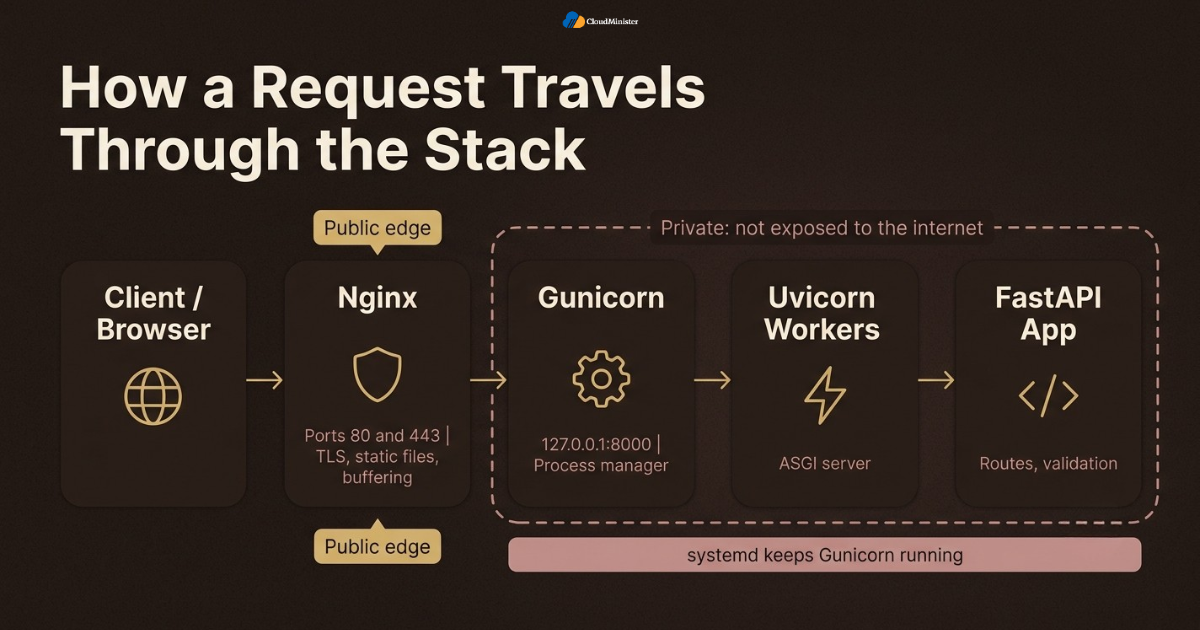
- Nginx terminates TLS, serves static files, enforces request size limits, and buffers slow clients before they reach Python.
- Gunicorn acts as the process manager. It starts workers, replaces crashed ones, and handles signals for graceful reloads.
- Uvicorn is the ASGI server that runs inside each Gunicorn worker and executes your async FastAPI code.
- FastAPI defines routes, validation, and dependencies. It never has to care about certificates or public ports.
- The python web hosting solution you choose should give you root access, so you can install Nginx, write systemd units, and open the right firewall ports.
- A reverse proxy also lets you run several applications on one server, each on its own internal port and its own domain name.
- Because Nginx and Gunicorn are separate processes, you can reload one without stopping the other.
- The same idea works for JavaScript services, so a node.js server hosting plan can use one Nginx instance in front of both stacks.
2. Why Production Needs Nginx, Gunicorn, and Uvicorn Together
Running uvicorn main:app on a VPS works for a demo, but it leaves several gaps in production. Newer Uvicorn releases include their own multi process mode through the workers option, so Gunicorn is a choice and not a requirement. Many teams still pick it for its long track record, rich configuration, and well known signal handling. The pattern is popular for good reasons. A DZone analysis of the JetBrains Python Developer Survey reports that FastAPI adoption among Python developers rose from 29 percent to 38 percent. On the proxy side, Netcraft’s July 2026 web server survey found nginx on 20.4 percent of the roughly 1.49 billion sites it measured, and OpenResty, which is built on nginx, held another 8.02 percent. Choose a python web hosting solution that lets you run all three layers. Together these numbers explain why the FastAPI Nginx Reverse Proxy pattern is so widely documented.
- Uvicorn handles ASGI concurrency, which suits async endpoints, WebSockets, and streaming responses.
- Gunicorn replaces a worker that crashes, so one bad request does not take the whole service down.
- Nginx absorbs slow clients and traffic spikes, so Python workers spend their time on application logic instead of waiting on network reads.
- Multiple workers use multiple CPU cores, which matters because a single CPython process normally runs Python code on one core at a time.
- Systemd supervises Gunicorn, so the application starts at boot and restarts after an unexpected exit.
- Node.js teams use the same layered shape, which is why a provider offering node.js hosting in india or node.js server hosting often supports Nginx reverse proxy layouts for both languages.
- Keeping each layer separate in a FastAPI Nginx Reverse Proxy design also makes security reviews and incident reviews more precise.
- A Web Hosting Company in India that offers Linux VPS plans makes this layered setup easy to deploy, because you control Nginx, systemd, and the firewall yourself.
- Any python web hosting provider that offers root access can run this exact layout without special tooling.
3. Choosing and Preparing the VPS
Start with the server, because every later step depends on it. A small API can run on a VPS with 2 vCPUs and 2 GB of RAM, although memory needs grow with the number of workers and the size of any models or caches you load. Choose a recent Ubuntu LTS release, create a non root user, and keep the first login short. A Web Hosting Company in India with local data centres can also lower latency for Indian users and simplify data residency questions. A clean server also makes the FastAPI Nginx Reverse Proxy setup easy to repeat on staging and production. Developers who also deploy JavaScript apps can apply the same preparation steps to node.js server hosting or node.js hosting in india. Also decide early who owns the deploy account and how you will reach the server if SSH access is lost, since these choices are hard to change once real traffic arrives.
- Use Ubuntu 24.04 LTS or another supported LTS release, so security updates continue for years.
- Update the system first with sudo apt update and sudo apt upgrade, then reboot if the kernel changed.
- Create a deploy user with sudo access and disable direct root login over SSH.
- Use SSH keys instead of passwords, and turn off password authentication once your key works.
- Install the base packages for the FastAPI Nginx Reverse Proxy stack: python3-venv, python3-pip, nginx, and git.
- Point your domain A record, and the AAAA record if you use IPv6, at the VPS address before you request a certificate.
- Pick a python web hosting plan with root access and SSD or NVMe storage, because shared panels rarely allow custom systemd units.
- Compare each python web hosting solution on RAM, CPU, bandwidth, and snapshots, since a snapshot before the first deployment gives you a clean rollback point.
Take a snapshot of the fresh server before you install anything. If a later step goes wrong, you can return to a clean base in minutes instead of debugging a half configured machine.
Ready to Deploy Your FastAPI App?
Run your Gunicorn, Uvicorn and Nginx stack on Python hosting from CloudMinister and get your API live without the setup hassle.
4. Installing FastAPI, Uvicorn, and Gunicorn in a Virtual Environment
Keep the application in its own directory and its own virtual environment. This isolates dependencies, avoids conflicts with system Python packages, and makes upgrades predictable. The packages below form the Python side of the FastAPI Nginx Reverse Proxy stack, and the small /health route gives you something safe to test with before anything else is added. If you deploy through a Web Hosting Company in India, confirm that pip can reach the package index from the server before you start. The same steps apply to Node.js teams using node.js hosting in india, with npm taking the place of pip. Avoid installing packages globally with sudo pip, because Ubuntu protects the system Python environment and global installs can break system tools.
sudo apt install python3-venv python3-pip nginx git -y
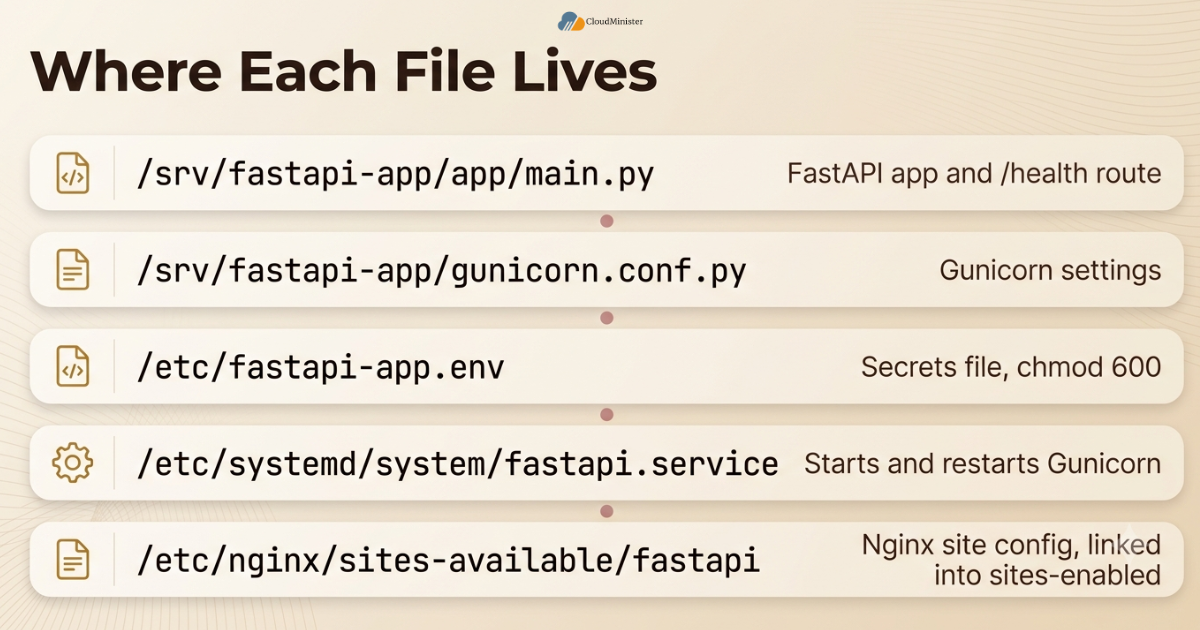
sudo mkdir -p /srv/fastapi-app/app
sudo chown -R deploy:deploy /srv/fastapi-app
cd /srv/fastapi-app
python3 -m venv venv
source venv/bin/activate
pip install fastapi "uvicorn[standard]" gunicorn uvicorn-worker
touch app/__init__.py
# /srv/fastapi-app/app/main.py
from fastapi import FastAPI
app = FastAPI()
@app.get("/health")
def health():
return {"status": "ok"} - Pin versions in a requirements.txt file with pip freeze, so every deployment installs the same package set.
- The uvicorn[standard] extra installs optional speedups such as uvloop and httptools, plus a WebSocket library.
- The uvicorn-worker package provides the Gunicorn worker class. The older uvicorn.workers.UvicornWorker path still appears in many tutorials, but it is deprecated in current Uvicorn releases.
- Create the /health endpoint early. Monitors, load balancers, and your own smoke tests can call it after every deployment, whichever python web hosting environment you use.
- Keep secrets out of the code. Store them in an environment file with strict permissions and load them through systemd.
- Run a quick test with uvicorn app.main:app –host 127.0.0.1 –port 8000, then call it with curl before adding the other layers of the FastAPI Nginx Reverse Proxy stack.
- Ubuntu 24.04 ships with Python 3.12, which current FastAPI and Uvicorn releases support.
- If your team also runs JavaScript services, a node.js server hosting plan on the same VPS can share the Nginx layer, though each application should keep its own user and directory.
Related Reading: How to choose the best Python hosting provider as a beginner.
5. Configuring Gunicorn With Uvicorn Workers
Gunicorn reads its settings from a Python file, which keeps the systemd unit short and the configuration under version control. For this FastAPI Nginx Reverse Proxy setup, bind Gunicorn to the loopback address, so only Nginx on the same server can reach it. Node.js teams using node.js hosting in india will find the same loopback binding rule useful. Never bind the application to 0.0.0.0 unless a firewall blocks the port, because that exposes your Python server directly to the internet. If your Web Hosting Company in India provides a firewall panel, block port 8000 there as well. Keeping this file in Git means the FastAPI Nginx Reverse Proxy configuration can be reviewed like any other code. The file is plain Python, so you can read environment variables or keep separate files for staging and production if your team needs them.
# /srv/fastapi-app/gunicorn.conf.py
bind = "127.0.0.1:8000"
workers = 2
worker_class = "uvicorn_worker.UvicornWorker"
graceful_timeout = 30
keepalive = 5
max_requests = 2000
max_requests_jitter = 200
forwarded_allow_ips = "127.0.0.1"
accesslog = "-"
errorlog = "-" - bind keeps Gunicorn private inside the FastAPI Nginx Reverse Proxy stack. Nginx connects to it locally, and the outside world cannot.
- worker_class tells Gunicorn to use the Uvicorn worker, which runs the ASGI app inside an event loop.
- workers sets the number of processes. Start with one per CPU core, then adjust after load testing and memory checks on your python web hosting plan.
- forwarded_allow_ips controls which proxy addresses Gunicorn trusts for forwarded headers. The value 127.0.0.1 matches Nginx on the same server.
- max_requests with max_requests_jitter recycles workers after a set number of requests, which limits the damage from slow memory growth.
- graceful_timeout gives workers time to finish active requests during a restart or reload before they are stopped.
- Do not enable the reload option in production. It is a development feature that watches files and wastes resources, and the same rule applies on any node.js server hosting setup that uses file watchers.
- A python web hosting solution with full shell access lets you test these values safely on a staging server before production.
Use preload_app only when you understand the trade off. It can save memory through copy on write sharing, but a reload through the HUP signal will not pick up new application code while preloading is on.
Related Reading: Setting up Gunicorn and Nginx for Python projects
6. Creating a systemd Service for Gunicorn
Systemd starts your application at boot, restarts it after a crash, and collects its logs in the journal. This is the layer that keeps the FastAPI Nginx Reverse Proxy stack alive without manual work, and a python web hosting solution with root access allows it while locked panels do not. Create the unit file at /etc/systemd/system/fastapi.service, then reload systemd, enable the service, and start it. Ubuntu uses systemd by default, so this step works the same on a VPS from any Web Hosting Company in India. Because the unit runs Gunicorn in the foreground, systemd can track the main process and report its health accurately, which makes restart and reload behaviour reliable.
[Unit]
Description=FastAPI app served by Gunicorn with Uvicorn workers
After=network.target
[Service]
User=deploy
Group=deploy
WorkingDirectory=/srv/fastapi-app
EnvironmentFile=/etc/fastapi-app.env
ExecStart=/srv/fastapi-app/venv/bin/gunicorn -c gunicorn.conf.py app.main:app
ExecReload=/bin/kill -s HUP $MAINPID
Restart=on-failure
RestartSec=5
[Install]
WantedBy=multi-user.target
sudo touch /etc/fastapi-app.env
sudo chmod 600 /etc/fastapi-app.env
sudo systemctl daemon-reload
sudo systemctl enable --now fastapi
sudo systemctl status fastapi - User and Group set the account that runs the process. Never run the application as root.
- WorkingDirectory must point to the project folder, because gunicorn.conf.py and the app module are resolved from there.
- ExecStart uses the full path to the Gunicorn binary inside the virtual environment, so no activation script is needed.
- Restart=on-failure with RestartSec=5 keeps the FastAPI Nginx Reverse Proxy backend available after a crash without causing a tight restart loop.
- ExecReload sends a HUP signal, which makes Gunicorn start new workers and stop old ones gracefully.
- EnvironmentFile loads secrets such as database URLs from a file that only root can read, since systemd reads it before dropping privileges.
- Use journalctl -u fastapi -f to follow live logs, and journalctl -u fastapi –since today to review a full day of output.
- Teams using node.js hosting in india often reuse the same systemd pattern for Node.js services, changing only the ExecStart line, and the same applies to node.js server hosting plans.
7. Configuring the FastAPI Nginx Reverse Proxy in Nginx
Nginx stores site configuration in /etc/nginx/sites-available on Ubuntu, with a symbolic link in sites-enabled to activate it. The server block below is the core of the FastAPI Nginx Reverse Proxy setup. It passes requests to Gunicorn and tells the application the original host, client address, and protocol through headers. Any python web hosting solution that gives you root access will let you edit these files, and you only need SSH access from your Web Hosting Company in India to make these edits. Nginx also lets you add logging fields, compression, caching, and rate limits later without touching the Python code, which is one of the main reasons this layer is worth having.
# /etc/nginx/sites-available/fastapi
server {
    listen 80;
    listen [::]:80;
    server_name api.example.com;
    client_max_body_size 10m;
    location / {
        proxy_pass http://127.0.0.1:8000;
        proxy_http_version 1.1;
        proxy_set_header Host $host;
        proxy_set_header X-Real-IP $remote_addr;
        proxy_set_header X-Forwarded-For $proxy_add_x_forwarded_for;
        proxy_set_header X-Forwarded-Proto $scheme;
        proxy_read_timeout 60s;
    }
}
sudo ln -s /etc/nginx/sites-available/fastapi /etc/nginx/sites-enabled/
sudo rm /etc/nginx/sites-enabled/default
sudo nginx -t
sudo systemctl reload nginx - proxy_pass sends traffic to the Gunicorn address. Because there is no URI part after the port, the original request path is passed unchanged.
- Host $host preserves the domain name in a FastAPI Nginx Reverse Proxy setup, which FastAPI uses when it builds absolute URLs.
- X-Forwarded-For carries the client IP chain, and $proxy_add_x_forwarded_for appends the current client address to any existing value.
- X-Forwarded-Proto tells the application whether the original request used HTTP or HTTPS, which matters for redirects and secure cookies.
- client_max_body_size defaults to 1 MB in Nginx, so file upload endpoints return 413 errors until you raise it.
- Always run nginx -t before reloading. A failed test means the configuration has an error, and the running server stays unchanged.
- Use reload instead of restart for configuration changes, because reload applies new settings without dropping active connections, which is useful on a busy python web hosting server.
- A node.js server hosting setup follows the same idea, with one server block per application and one internal port per process.
- The same server block shape suits Node.js apps, so teams comparing node.js hosting in india can copy it and change only the port.
Related Reading: Choose the right Python hosting for your web applications
8. Forwarded Headers, WebSockets, and Path Prefixes
Headers decide whether your application sees the real client or only Nginx. Without correct forwarded headers, logs show 127.0.0.1 for every visitor, and redirects may point to http instead of https. A correct FastAPI Nginx Reverse Proxy configuration passes the headers and tells Gunicorn which proxy it can trust. The same care applies to real time features, because WebSocket connections need extra headers to cross the proxy. Your python web hosting solution should let you edit these headers, since they live in the server configuration. Teams using node.js hosting in india or node.js server hosting face the same header rules for Socket.IO and similar libraries.
# top of the site file, outside the server block
map $http_upgrade $connection_upgrade {
    default upgrade;
    ''      close;
 }
# inside the server block
location /ws/ {
    proxy_pass http://127.0.0.1:8000;
    proxy_http_version 1.1;
    proxy_set_header Upgrade $http_upgrade;
    proxy_set_header Connection $connection_upgrade;
    proxy_set_header Host $host;
    proxy_read_timeout 3600s;
} - In a FastAPI Nginx Reverse Proxy stack, Uvicorn only trusts forwarded headers from addresses on its allow list. With Gunicorn, that list comes from the forwarded_allow_ips setting.
- Do not set forwarded_allow_ips to an asterisk unless only Nginx can reach the Gunicorn port. Otherwise any client could fake its address.
- WebSocket routes need the Upgrade and Connection headers, plus HTTP 1.1 between Nginx and the backend.
- Raise proxy_read_timeout for WebSocket or streaming locations, because idle connections close after 60 seconds by default.
- If you serve the API under a prefix such as /api and Nginx strips it, set root_path in the FastAPI constructor so the generated OpenAPI docs use the correct URLs.
- Server sent events and streaming responses may need proxy_buffering off for that location, so chunks reach the client immediately.
- Test with curl -I and the application logs after each change to confirm that the real client address and scheme arrive correctly, whichever python web hosting provider you use.
- A Web Hosting Company in India that offers managed servers can review these headers with you during onboarding, which prevents repeated redirect loop issues.
9. Adding HTTPS With Let’s Encrypt and Certbot
HTTPS is not optional for any API that handles logins, tokens, or personal data. Let’s Encrypt provides free certificates, and Certbot automates both the request and the Nginx changes. Once HTTPS works, the FastAPI Nginx Reverse Proxy stack protects data in transit and lets browsers and API clients trust your domain. Any Web Hosting Company in India that provides root access lets you run Certbot directly on the server. Renewal is safe to automate because Certbot only replaces a certificate when it is close to expiry, and Nginx can load the new files with a reload instead of a restart.
sudo apt install certbot python3-certbot-nginx -y
sudo certbot --nginx -d api.example.com
sudo certbot renew --dry-run - Open ports 80 and 443 in the firewall first. Certbot needs port 80 for the HTTP validation challenge, and the same rule applies to node.js hosting in india and node.js server hosting projects.
- Your domain must already point to the VPS, or the validation will fail. You can check the records in the DNS panel of your python web hosting account.
- Certbot edits the Nginx server block, adds the certificate paths, and can set up an HTTP to HTTPS redirect.
- Let’s Encrypt certificates last 90 days, and the Certbot package installs a timer that renews them automatically.
- Run certbot renew –dry-run after setup to confirm that renewal works long before the certificate nears expiry.
- Enable HSTS only after you confirm that HTTPS works on every subdomain, because browsers will refuse plain HTTP once the header is cached.
- Check the final server block after Certbot runs, and confirm that the FastAPI Nginx Reverse Proxy headers are still present in the HTTPS location.
- A python web hosting solution with an easy DNS panel makes the domain pointing step quick for beginners.
Never expose port 8000 to the public internet. Bind Gunicorn to 127.0.0.1, allow only ports 22, 80, and 443 in the firewall, and test from an outside network to confirm that the application port is closed.
Related Reading: Python hosting versus Node.js hosting for your project
10. Tuning Timeouts, Buffers, and Workers for Real Traffic
After the stack works, tune it with measurements instead of guesses. Most performance problems in a FastAPI Nginx Reverse Proxy deployment come from a short list of causes: blocking code inside async routes, too few or too many workers, short timeouts, and slow database queries. A Web Hosting Company in India that publishes its CPU and disk limits makes this tuning much easier. Pick a python web hosting solution whose CPU and RAM limits you can see before you tune. A good habit is to change one value at a time and record the result, because several simultaneous changes make it impossible to tell which one helped. The table below lists the default values that matter most.
| Setting | Where | Default | What it controls |
| client_max_body_size | Nginx | 1m | Largest request body Nginx accepts |
| proxy_connect_timeout | Nginx | 60s | Time allowed to connect to Gunicorn |
| proxy_read_timeout | Nginx | 60s | Time allowed between reads from Gunicorn |
| timeout | Gunicorn | 30 seconds | Silence limit before a worker is restarted |
| graceful_timeout | Gunicorn | 30 seconds | Time workers get to finish during a restart |
| keepalive | Gunicorn | 2 seconds | Wait time for the next request on an idle connection |
- Blocking calls inside async def routes freeze the event loop. Use async libraries, or declare the route with def so FastAPI runs it in a thread pool.
- For async workers, the Gunicorn timeout mostly protects against a blocked event loop that stops reporting to the master process.
- Total database connections equal workers multiplied by the pool size per worker. Check this number against the database limit.
- Enable gzip in Nginx for JSON responses above a small size, but skip formats that are already compressed, such as images and zip files.
- Nginx upstream keepalive can cut connection setup cost. It needs proxy_http_version 1.1 and an empty Connection header for normal requests.
- Load test a staging copy of the FastAPI Nginx Reverse Proxy stack with a tool such as wrk, k6, or Locust, and watch CPU, memory, and p95 latency on your python web hosting server.
- Add rate limiting with limit_req_zone for login routes and other endpoints that attract abuse, a rule that also helps any node.js server hosting setup.
- Compare CPU allocation across plans. Shared CPU can suit light traffic, while steady FastAPI workloads usually run better on dedicated vCPUs, and providers selling node.js hosting in india often list this clearly.
Measure before you change worker counts. More workers raise memory use and database connections, and they only help when requests wait on CPU or when a single worker is saturated.
11. Securing the Server and the Application
Security for a FastAPI Nginx Reverse Proxy stack starts at the network edge and continues inside the application. The proxy gives you one controlled entry point, but it does not replace basic server hygiene. Close every port you do not need, run each process with the least privilege it requires, and keep software current. Small habits here prevent most of the incidents that reach support teams. The same rules apply when you pick node.js hosting in india or node.js server hosting for a JavaScript project.
- Allow OpenSSH first, then Nginx Full, then enable UFW with sudo ufw allow OpenSSH, sudo ufw allow ‘Nginx Full’, and sudo ufw enable.
- Add server_tokens off in the Nginx http block of your FastAPI Nginx Reverse Proxy host to hide the version number from error pages and response headers.
- Install fail2ban to ban addresses that make repeated failed SSH login attempts on your python web hosting server.
- Limit CORS origins in FastAPI to the exact domains that need access, and avoid wildcard origins on APIs that use credentials.
- Disable interactive docs in production with docs_url=None, redoc_url=None, and openapi_url=None when the API is not meant to be public.
- Keep secrets in a root owned environment file with 600 permissions, and never commit it to Git.
- Turn on unattended security updates with the unattended-upgrades package, and still review kernel updates before rebooting.
- Run regular backups of the database and configuration, and test a restore. Any python web hosting solution that offers snapshots makes this easier, since a backup that was never restored is only an assumption.
- Choose a Web Hosting Company in India that documents its network protection, snapshots, and support hours, so you know which security tasks stay with you.
Nginx and Gunicorn publish security fixes regularly, and nginx releases in July 2026 carried fixes for several vulnerabilities. Schedule routine package updates and read the release notes before you upgrade a production server.
12. Troubleshooting Common Errors
Most failures in a FastAPI Nginx Reverse Proxy deployment fall into a handful of patterns. The fastest way to solve them is to test one layer at a time, starting with the application and moving outward to Nginx and the network. The table maps common symptoms to the most likely cause. On a shared python web hosting account without shell access, most of these checks are impossible. If the problem is at the server or network level, a Web Hosting Company in India with round the clock support can often confirm it quickly.
| Symptom | Likely cause | First check |
| 502 Bad Gateway | Gunicorn is stopped, crashed, or on a different port | systemctl status fastapi and journalctl -u fastapi |
| 504 Gateway Timeout | The backend took longer than proxy_read_timeout | Profile the slow route before raising the timeout |
| 413 Request Entity Too Large | Upload is larger than client_max_body_size | Raise the limit for the affected location |
| Wrong client IP in logs | Forwarded headers missing or proxy not trusted | Check proxy_set_header lines and forwarded_allow_ips |
| Redirects go to http | X-Forwarded-Proto is missing | Add the header and confirm the proxy is trusted |
| Connection refused | Wrong port or service not listening | ss -tlnp and the bind value in gunicorn.conf.py |
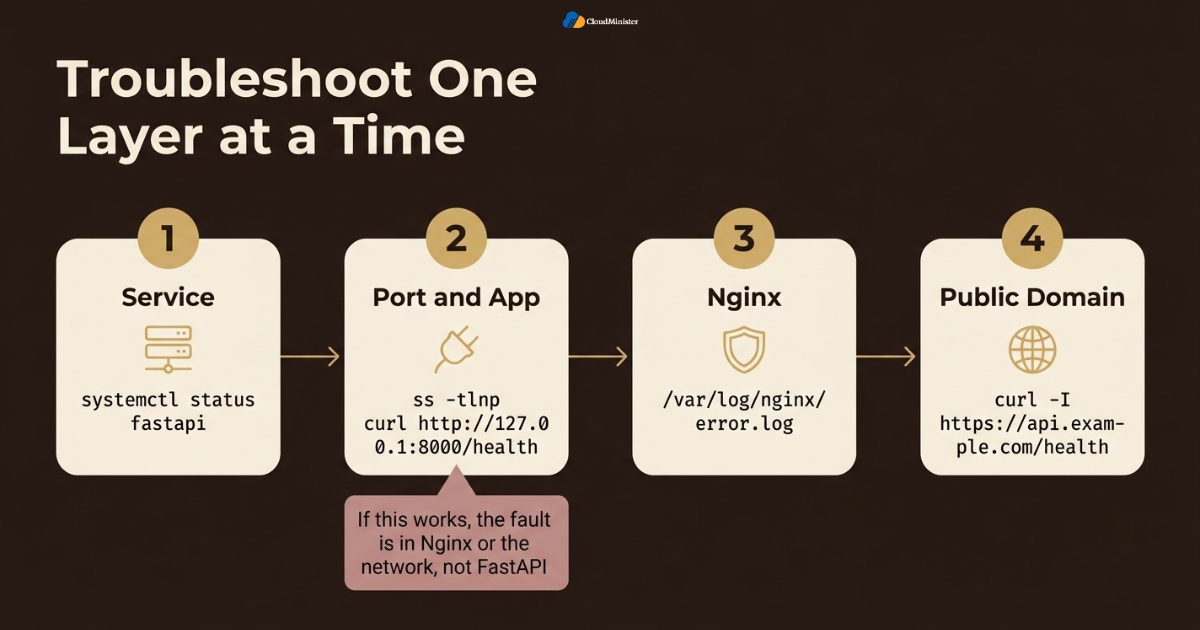
- Start with systemctl status fastapi to see whether the service is running and when it last restarted.
- Read the Nginx error log at /var/log/nginx/error.log, which names upstream failures such as connection refused or timed out.
- Use ss -tlnp to confirm that Gunicorn is listening on 127.0.0.1 and port 8000. The same command helps on any node.js server hosting machine.
- Call the app directly with curl http://127.0.0.1:8000/health from the server. If this works, the fault is in Nginx or the network, not in FastAPI.
- Call the public domain with curl -I https://api.example.com/health to check certificates, redirects, and headers on the FastAPI Nginx Reverse Proxy layer.
- If workers restart often on your python web hosting plan, check memory with free -h and look for out of memory kills with journalctl -k.
- Change one setting at a time and keep notes. A runbook with real fixes saves hours during the next incident.
- Check whether your python web hosting solution keeps monitoring history, because old data helps you compare healthy and unhealthy periods.
Always test the backend directly from the server before you blame Nginx. One curl call to 127.0.0.1:8000 splits the problem in half and saves a lot of guessing
13. Zero Downtime Updates and Rollbacks
A FastAPI Nginx Reverse Proxy stack makes updates safe because Gunicorn can replace workers gracefully. Deploy the new code, install dependencies, run migrations carefully, and then reload the service. Active requests finish on the old workers while new requests go to the new ones, so users rarely notice the change. Teams on node.js server hosting can follow the same reload idea with their own process manager. Ask your Web Hosting Company in India whether snapshots can be taken before each release. Plan for the opposite case as well. If the new release misbehaves, the fastest recovery is usually to redeploy the previous version instead of debugging under pressure.
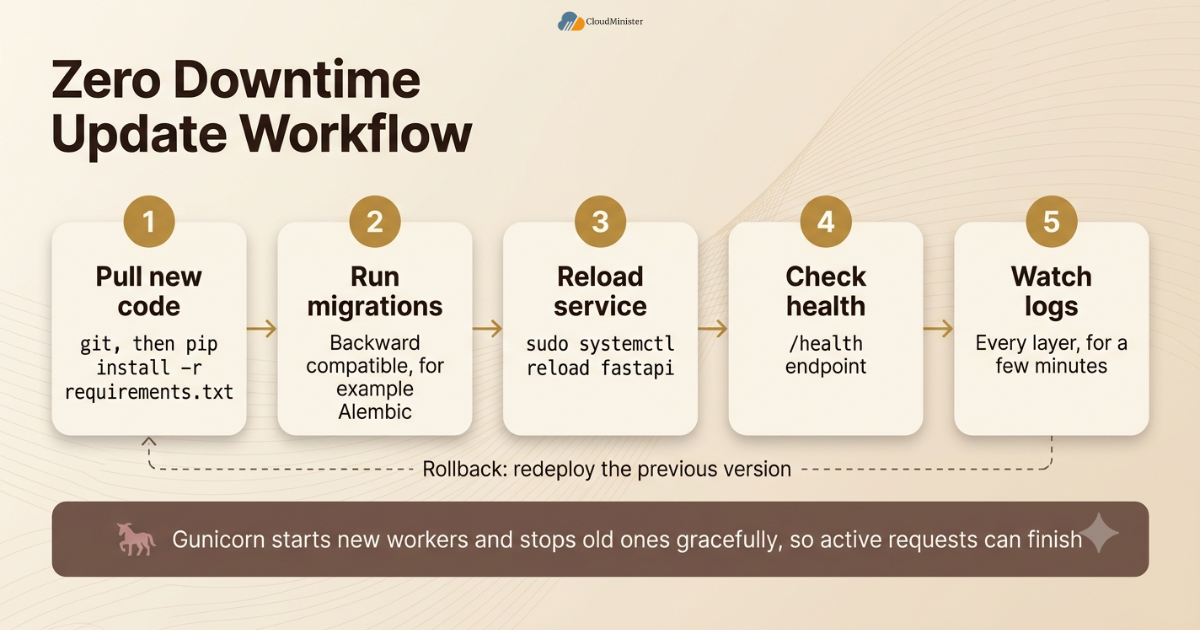
- Pull the new code with git, then run pip install -r requirements.txt inside the virtual environment.
- Run database migrations with a tool such as Alembic before the reload, and keep migrations backward compatible so old workers keep working during the switch.
- Run sudo systemctl reload fastapi. Gunicorn starts new workers and stops old ones gracefully, so active requests can finish.
- Check the /health endpoint right after the reload, and watch the logs of every layer in the FastAPI Nginx Reverse Proxy stack for a few minutes.
- For Nginx changes, run sudo nginx -t first and then sudo systemctl reload nginx.
- Keep the previous release folder or Git tag, so a rollback is a quick checkout and reload on your python web hosting server.
- Automate these steps in a CI pipeline, so every deployment follows the same tested script, whether the target is a FastAPI server or a node.js hosting in india project.
- Avoid editing code directly on the server, because untracked changes make rollbacks unpredictable.
- Take a provider snapshot before major upgrades. A python web hosting solution with one click snapshots turns a risky upgrade into a reversible one.
14. Choosing the Right Hosting Partner for Your FastAPI Stack
The server is part of the application. A slow disk, a crowded network, or missing root access can undo careful configuration. When you compare providers for a FastAPI Nginx Reverse Proxy deployment, look at the details that affect daily operations, such as snapshots, support response, and network quality. A trusted Web Hosting Company in India that understands Linux administration will usually answer these questions with specifics instead of general promises. The advice also fits node.js server hosting, because the same operational questions apply.
- Ask whether the plan gives full root access, because custom systemd units and FastAPI Nginx Reverse Proxy configuration need it.
- Confirm that the python web hosting plan supports the Python version your project needs, or lets you install it yourself.
- Look for a python web hosting solution that includes monitoring, backups, and clear upgrade paths as your traffic grows.
- Check network location and bandwidth of the python web hosting server, since Indian users benefit from servers close to them.
- If your team also builds JavaScript services, ask about node.js server hosting on the same account, so both stacks share one support team.
- Compare node.js hosting in india options on CPU allocation and storage type, not only on monthly price.
- Review the provider documentation on backups, restore times, and support hours before you sign.
- Ask for a real example of a past deployment problem and how it was solved. Honest answers show real experience.
- Teams that run Node.js beside FastAPI can reuse the same proxy knowledge when they pick node.js hosting in india for the second project.
Checklist: FastAPI Nginx Reverse Proxy Production Readiness Review
- VPS updated, non root deploy user created, and SSH key login working
- Domain records point to the server before certificate requests
- Virtual environment created and dependencies pinned in requirements.txt
- Gunicorn bound to 127.0.0.1 with Uvicorn workers configured
- Systemd service enabled, restarting on failure, and reloading with HUP
- Nginx configuration tested with nginx -t and forwarded headers confirmed
- HTTPS active and renewal tested with certbot renew –dry-run
- Firewall allows only SSH, HTTP, and HTTPS
- Health endpoint, logs, and alerts checked after every deployment
- Backups restored at least once and rollback steps written down
- FastAPI Nginx Reverse Proxy settings stored in Git and reviewed like application code
- Snapshots, backups, and support hours confirmed with your Web Hosting Company in India
- A python web hosting solution confirmed to offer root access, snapshots, and backups
- Node.js projects on node.js hosting in india can reuse the same proxy and systemd pattern
Key Takeaways
- A FastAPI Nginx Reverse Proxy setup puts Nginx at the public edge and keeps Gunicorn and Uvicorn private on the server.
- Gunicorn manages processes, Uvicorn workers run the async code, and systemd keeps everything running after reboots.
- Forward the Host, client address, and protocol headers, and trust only the proxy that should send them.
- Certbot gives free HTTPS and automatic renewal, but you must test the renewal.
- Tune FastAPI Nginx Reverse Proxy timeouts, body limits, and workers with measurements instead of guesses.
- Graceful reloads with HUP let you ship updates without dropping active requests.
- A python web hosting solution with root access, snapshots, and good support makes this stack easier to run, and any python web hosting plan without root access is a poor fit.
- A Web Hosting Company in India with local data centres helps with latency and data residency questions.
- Teams that also run Node.js can reuse the same proxy pattern with node.js hosting in india or node.js server hosting plans.
Need Help With Your Server Setup?
Not sure which plan fits your FastAPI project? Talk to the CloudMinister team and get guidance on the right hosting setup for your traffic and workload.
Conclusion
The pattern behind a reliable deployment is simple. Nginx faces the internet, Gunicorn supervises the workers, Uvicorn runs the async code, and systemd keeps it all alive. Each layer is small, testable, and replaceable, which is exactly what makes the FastAPI Nginx Reverse Proxy approach so dependable. Start with the plain setup in this guide, add HTTPS, confirm the headers, and only then tune performance.
A deployment is never finished on the day it goes live. Watch logs, error rates, and memory for the first few weeks, keep notes on every change, and rehearse a rollback before you need one, because a FastAPI Nginx Reverse Proxy stack is only as safe as its last tested recovery. If you need a place to run the stack, a Web Hosting Company in India with a dependable python web hosting solution gives you the control this guide assumes, and the same approach carries over to node.js hosting in india projects and to node.js server hosting.
Frequently Asked Questions
What is a FastAPI Nginx Reverse Proxy?
It is a deployment pattern where Nginx receives public traffic and forwards it to a FastAPI application running behind Gunicorn and Uvicorn workers on a private address. Nginx handles HTTPS, limits, and buffering, while the Python layer handles application logic. A FastAPI Nginx Reverse Proxy is also easy to extend with caching, rate limits, and extra backends.
Do I need Gunicorn if Uvicorn already has a workers option?
Not strictly. Uvicorn can run multiple worker processes on its own, so a simpler setup is possible. Many teams still choose Gunicorn because of its mature process management, signal handling, and configuration file, and both options work well in a FastAPI Nginx Reverse Proxy design.
How many Gunicorn workers should I use?
Start with one worker per CPU core for async workers behind a FastAPI Nginx Reverse Proxy, then adjust after load testing. Watch memory use and database connections, because each extra worker adds both. A python web hosting plan with more vCPUs allows more workers.
Why do I get a 502 Bad Gateway error?
Nginx could not get a valid response from Gunicorn. The service may be stopped, crashed, or listening on a different port than the one in proxy_pass. Check systemctl status fastapi, the journal, and the Nginx error log. This is one of the most common errors beginners meet in a FastAPI Nginx Reverse Proxy setup.
How do I make FastAPI see the real client IP behind Nginx?
Send the X-Forwarded-For and X-Forwarded-Proto headers from Nginx, and make sure Gunicorn trusts the proxy through forwarded_allow_ips. Without this, the application sees only the address of the proxy.
Can I use a Unix socket instead of a TCP port?
Yes. Bind Gunicorn to a socket path and use a proxy_pass line that starts with http://unix: followed by the socket path. The Nginx worker user needs permission to reach the socket, so plan the owner and group carefully.
How do I support WebSockets in this setup?
Install Uvicorn with the standard extra, add the Upgrade and Connection headers in a dedicated Nginx location, use HTTP 1.1 for the upstream connection, and raise proxy_read_timeout for long lived connections. Also check that your python web hosting provider allows long lived connections.
Which python web hosting solution should I choose for FastAPI?
Choose a plan with root access, enough RAM for your workers, SSD or NVMe storage, snapshots, and clear support. Shared panels that block custom services are a poor fit for a FastAPI Nginx Reverse Proxy deployment. If you also run JavaScript projects, compare node.js hosting in india plans on the same criteria.
Can the same server host Node.js applications too?
Yes. Nginx can proxy to many backends on one server, each on its own port and domain. Keep each application under its own user and systemd unit so a problem in one does not affect the other. Providers that sell node.js hosting in india or node.js server hosting plans usually allow this kind of multi app layout, but confirm it before you buy.
How do I deploy updates without downtime?
Install the new code and dependencies, run backward compatible migrations, and then use systemctl reload on the service. Gunicorn replaces workers gracefully, and a quick check of the health endpoint confirms the result. A Web Hosting Company in India that offers snapshots adds a further safety net, and a python web hosting solution with a staging server lets you test the reload first.

He is the CEO and Founder with over a decade of experience in cloud infrastructure, DevOps, and server optimization. With a strong vision and hands-on leadership approach, he has built scalable, secure, and high-performance cloud solutions trusted by businesses across industries.