n8n Queue Mode splits one busy n8n process into a main instance, a Redis queue, and a group of worker processes, so heavy workflows stop slowing down the editor, the webhooks, and each other. This guide explains how n8n Queue Mode works, how to size a VPS for it, how to set up PostgreSQL, Redis, workers, and webhook processors, and how to secure, monitor, and scale the stack. It also shows where n8n VPS hosting India, a Web Hosting Company in India, and a Dedicated NVIDIA GPU Server fit into a production plan for AI heavy automation.
Every team that runs n8n for long enough meets the same moment. Workflows that felt instant at ten runs a day start to crawl at ten thousand. The editor becomes sluggish, webhooks time out, and one heavy export job blocks everything behind it. This is the exact problem that n8n Queue Mode was built to solve, and it is the most important scaling feature a self-hosted team can learn.
The demand behind this is real. According to valuation data published by Multiples, n8n was valued at roughly 5.2 billion dollars in May 2026, which shows how many teams now treat it as core infrastructure instead of a side tool. Once a tool carries payments, lead routing, and AI agents, a single process is no longer enough, and n8n Queue Mode becomes the normal way to run it.
This guide explains n8n Queue Mode in plain language. You will learn what each component does, how to size a VPS, how to set up PostgreSQL, Redis, workers, and webhook processors, and how to secure and monitor the whole stack. We also cover where Self-Hosted N8N VPS Hosting fits into the plan, because n8n Queue Mode depends as much on the server underneath as on the n8n settings on top. Whether this is your first scale up or your tenth, the steps below will help you plan with fewer surprises. Many readers search for n8n VPS hosting India, a Web Hosting Company in India, or the best GPU cloud hosting first, and then discover that the real work starts after the server is ready.
Table of Content
- 1. What n8n’s Queued Execution Model Actually Is
- 2. Why Regular Mode Hits a Ceiling
- 3. How the Queued Execution Architecture Works in n8n
- 4. Choosing the Right VPS Size and Location
- 5. Preparing and Securing the VPS
- 6. Setting Up PostgreSQL and Redis for a Queue-Based n8n Setup
- 7. Configuring the Main Instance and Workers
- 8. Webhook Processors and Load Balancing
- 9. Tuning Concurrency and Worker Count
- 10. Binary Data, Execution Data, and Cleanup
- 11. Monitoring, Backups, and Safe Upgrades
- 12. Common Mistakes That Break Queue Setups
- 13. Running AI Workloads: GPU Servers and Queue-Based n8n
- 14. Choosing the Right Hosting Partner
- 15. A Practical 30 Day Rollout Plan
- Key Takeaways
- Conclusion
- Frequently Asked Questions
1. What n8n Queue Mode Actually Is
n8n Queue Mode is an execution mode in which the main n8n instance no longer runs workflows by itself. Instead, it places each execution into a Redis backed queue, and separate worker processes pick those jobs up, run them, and save the results to the database. The mode is switched on with one variable, EXECUTIONS_MODE=queue, but the design around it needs care. In n8n Queue Mode, the main instance keeps the editor, the REST API, and the trigger handling, while the workers do the heavy lifting.
- Main instance: serves the editor and the API, registers triggers and timers, and hands new executions to the queue.
- Redis: acts as the message broker and holds the list of pending jobs until a worker is free to take one.
- Workers: separate n8n processes started with the worker command, each one running several executions at the same time.
- PostgreSQL: stores workflows, credentials, and execution data, and it is required because n8n Queue Mode does not work with SQLite.
- Shared encryption key: every process must use the same N8N_ENCRYPTION_KEY, or workers cannot decrypt saved credentials.
- Same version everywhere: the main instance, the workers, and any webhook processors should always run the same n8n version.
- Availability: n8n Queue Mode can be used on self hosted installations, while the multi main setup is an Enterprise feature.
- Licensing: read the n8n Sustainable Use License to confirm that your commercial use case is covered before you build on it.
- Hosting fit: n8n Queue Mode runs well on a good VPS, so Self-Hosted N8N VPS Hosting or n8n VPS hosting India is a practical starting point for most teams.
2. Why Regular Mode Hits a Ceiling
In regular mode, one Node.js process handles the editor, the webhooks, the schedule triggers, and every running workflow. That works for light use, but it gets tight quickly. The market is also moving in one direction, and a 2026 market report from Meticulous Research values the AI workflow automation segment at about 10.8 billion dollars for 2026. More AI steps mean more slow calls, slow calls keep executions open for longer, and that is exactly where n8n Queue Mode starts to pay off.
- One process, many jobs: a CPU heavy Code node can delay the editor and every webhook reply running on the same process.
- Memory spikes: a large JSON payload or a big spreadsheet import can push the single process out of memory and restart everything.
- Webhook timeouts: senders such as payment gateways expect a quick reply, and a busy process answers too late.
- No horizontal growth: in regular mode you can only add CPU and RAM to one machine, instead of adding more workers.
- Slow AI steps: LLM calls and long HTTP waits hold executions open, which uses capacity even while the CPU is idle. Local models on the best GPU cloud hosting plans are one way to control that.
- Risky restarts: a restart during busy hours interrupts every running execution, while n8n Queue Mode lets workers finish their running jobs during a graceful shutdown.
- Clear upgrade path: moving to n8n Queue Mode later is easier when you plan for PostgreSQL and a shared encryption key from day one.
- Cost of delay: moving early to n8n Queue Mode on Self-Hosted N8N VPS Hosting costs less than an emergency migration after an outage.
- Hosting choice: a Web Hosting Company in India that offers n8n VPS hosting India can hand you a ready server for the move.
Related Reading: Our beginner guide to n8n and no code workflow automation.
Need a VPS Sized for n8n Queue Mode?
Skip the guesswork. Get Self-Hosted n8n VPS Hosting from CloudMinister with NVMe storage, private networking, and Indian data centres, ready for PostgreSQL, Redis, and workers.
3. How the n8n Queue Mode Architecture Works
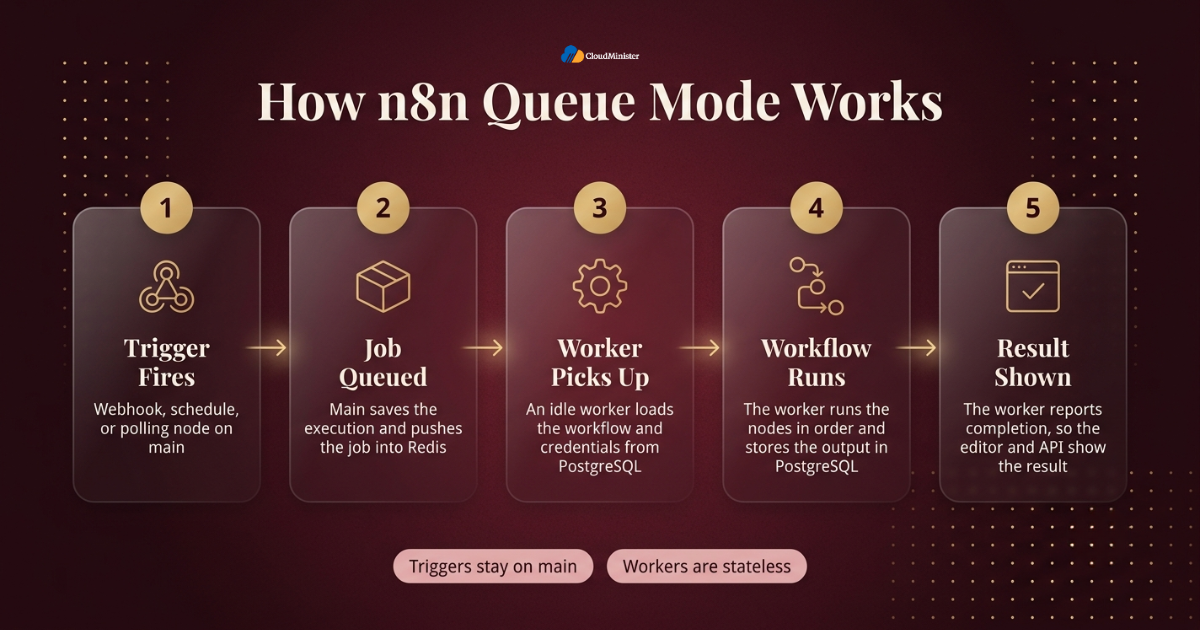
A clear picture helps more than any setting. When a webhook arrives or a schedule fires, the main instance creates an execution record, pushes a job ID into Redis, and moves on. A free worker takes the job, loads the workflow from PostgreSQL, runs it, writes the result back, and reports completion through Redis. Because each part has one job, n8n Queue Mode can grow by adding workers without touching the editor.
| Component | Role | How it scales | Where it runs |
| Main instance | Editor, API, triggers, timers | One instance in the standard setup | Primary VPS |
| Worker | Runs workflow executions | Add processes or raise concurrency | Same VPS or extra VPS |
| Webhook processor | Receives production webhook calls | Add more behind a load balancer | Optional extra process |
| Redis | Job queue broker | Single node with persistence on | Private network only |
| PostgreSQL | Workflows, credentials, execution data | Bigger node, tuning, backups | Private network only |
- Step one: a trigger fires on the main instance, such as a webhook, a schedule, or a polling node.
- Step two: main saves an execution entry and pushes the job into the Redis queue.
- Step three: an idle worker pulls the job and loads the workflow and credentials from the database.
- Step four: the worker runs the nodes in order and stores the output in PostgreSQL.
- Step five: the worker reports completion, so the editor and the API show the final result.
- Triggers stay on main: timers and pollers are registered on the main instance only, so do not casually start a second main instance.
- Workers are stateless: you can stop, start, or replace a worker without losing workflow data, because the data lives in PostgreSQL.
- Manual runs: by default main handles test runs from the editor, and OFFLOAD_MANUAL_EXECUTIONS_TO_WORKERS=true moves them to the workers.
- Hosting layer: all of this runs on your server, so the quality of Self-Hosted N8N VPS Hosting decides how smooth n8n Queue Mode feels in daily use.
Draw your own version of this table before you buy any server. When you know which process runs on which machine, every later decision about ports, firewalls, and backups gets easier. Teams that skip this step usually end up exposing a service they never meant to expose.
4. Choosing the Right VPS Size and Location
Sizing is where most first deployments go wrong. A good plan starts with measurement instead of guesses, so note your daily executions, your peak webhook rate, and your heaviest workflow. A Web Hosting Company in India with local data centres can also keep latency low for Indian users and Indian APIs. The table below gives starting points only, so test with your own workflows before you commit to a plan. If AI agents are planned, ask early about best GPU cloud hosting options too, and keep the right n8n VPS hosting India plan tied to workload more than to price.
| Stage | Suggested layout | Typical use |
| Starter | 2 vCPU and 4 GB RAM, one VPS running main, one worker, PostgreSQL, and Redis | Testing the queue and light production load |
| Growing | 4 vCPU and 8 GB RAM, one VPS running main and two workers, with PostgreSQL and Redis | Steady business automations |
| Busy | Separate database VPS, two or more worker VPS nodes, and webhook processors | High volume webhooks and long running jobs |
These are starting points, not guarantees. Always load test with your own workflows.
- Measure first: count daily executions, peak webhook calls per minute, and average run time before choosing a plan.
- CPU versus RAM: loops, Code nodes, and data transforms need CPU, while long item lists and file handling need RAM.
- Fast storage: choose NVMe or SSD storage, because PostgreSQL write speed affects every single execution.
- Region choice: n8n VPS hosting India keeps latency low for Indian users, local APIs, and payment gateways.
- Data residency: if workflows touch personal data of Indian customers, a local region makes compliance questions easier to answer, and a Web Hosting Company in India with Indian data centres makes this simple.
- Network quality: ask your Web Hosting Company in India about bandwidth limits, private networking, and DDoS protection before you sign.
- Room to grow: pick a plan that lets you resize or add VPS nodes without rebuilding the whole n8n Queue Mode stack.
- Support quality: a Web Hosting Company in India with round the clock support helps most during night time incidents.
- Managed option: Self-Hosted N8N VPS Hosting from a provider that knows n8n saves a lot of setup time, especially for the first deployment.
Related Reading: Our guide to n8n hosting in India and powerful workflow automation.
5. Preparing and Securing the VPS
Before you install anything, harden the server. A queue based stack runs more services than a single container, so a mistake costs more. Start with a fresh Ubuntu LTS server, update the packages, create a non root user, and log in with SSH keys instead of passwords. Treat the VPS as production from the first day, because the first day is when many leaks happen. A Web Hosting Company in India that hardens servers before handover saves you hours here, and Self-Hosted N8N VPS Hosting often includes this step.
- Updates: run apt update and apt upgrade, then enable unattended security updates.
- SSH: disable password login, disable direct root login, and limit access with a VPN or an allow list where you can.
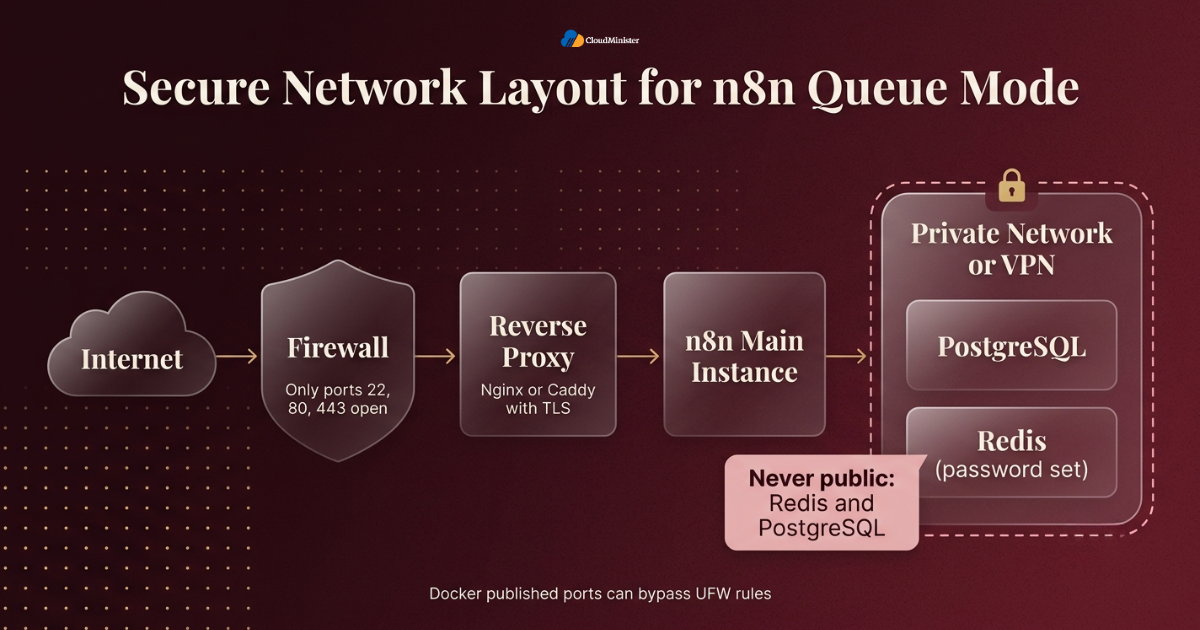
- Firewall: allow only ports 22, 80, and 443 from the internet and block everything else, or ask your Web Hosting Company in India to manage firewall rules for you.
- Docker and UFW: ports published by Docker can bypass UFW rules, so never publish PostgreSQL or Redis ports on a public interface.
- Private network: if you use more than one VPS, connect them over a private network or VPN so that Redis and PostgreSQL used by n8n Queue Mode are never public.
- Reverse proxy: place Nginx or Caddy in front of n8n on your Self-Hosted N8N VPS Hosting server with a valid TLS certificate and WebSocket support for the editor.
- Fail2ban: add it to slow down brute force login attempts against SSH.
- Time sync: on any n8n VPS hosting India server, keep the clock accurate with chrony or systemd timesyncd, since schedule triggers depend on it.
- Timezone: set GENERIC_TIMEZONE so schedule nodes behave the way your team expects.
Never expose Redis to the internet. A Redis server without a password on a public port is one of the most common ways servers get compromised. Set a strong password, bind it to a private address, and keep the port closed in the firewall. The same rule applies to PostgreSQL in any n8n Queue Mode setup.
Related Reading: Our n8n self hosting server setup and security guide.
6. Setting Up PostgreSQL and Redis for n8n Queue Mode
Two services sit behind every n8n Queue Mode deployment, and both deserve care. PostgreSQL is the permanent record, while Redis is the fast waiting room for jobs. If either one fails, workers cannot do their job, so give them stable storage, strong passwords, and backups from the start. A managed Self-Hosted N8N VPS Hosting plan often includes both services, which removes the first round of setup mistakes.
- PostgreSQL version: use a currently supported release, and set DB_TYPE=postgresdb with the host, port, database, user, and password variables.
- Dedicated database user: create a user that owns only the n8n database instead of using the superuser account.
- Connection limits: each n8n process holds its own connection pool, so check max_connections as you add workers.
- Redis persistence: enable append only persistence so queued jobs can survive a Redis restart.
- Eviction policy: set maxmemory-policy to noeviction so Redis never drops queue data when memory is full.
- Redis password: set requirepass and pass the value to n8n with QUEUE_BULL_REDIS_PASSWORD.
- TLS: if Redis runs on another host and you do not use a private network, enable QUEUE_BULL_REDIS_TLS=true and use TLS on the Redis side.
- Memory headroom: queue data is small, but keep spare RAM so Redis does not hit its limit during spikes.
- Backups: back up PostgreSQL daily with pg_dump or snapshots, and store the encryption key separately in a password manager. Many n8n VPS hosting India plans include snapshot backups as well.
The encryption key is the one item people forget. If you lose N8N_ENCRYPTION_KEY, saved credentials cannot be read, even with a perfect database backup. Store it in two safe places before the first production workflow goes live.
7. Configuring the Main Instance and Workers
Now we put the pieces together. The example below uses Docker Compose on one VPS, which is the simplest way to learn n8n Queue Mode before you spread it across servers, and it works well on a Self-Hosted N8N VPS Hosting plan. Replace every placeholder password and key with long random values, and keep the real values in an environment file that is never committed to Git. The same layout runs on any n8n VPS hosting India server that has Docker installed.
x-n8n-env: &n8n-env
  DB_TYPE: postgresdb
  DB_POSTGRESDB_HOST: postgres
  DB_POSTGRESDB_PORT: 5432
  DB_POSTGRESDB_DATABASE: n8n
  DB_POSTGRESDB_USER: n8n
  DB_POSTGRESDB_PASSWORD: CHANGE_ME_DB
  EXECUTIONS_MODE: queue
  QUEUE_BULL_REDIS_HOST: redis
  QUEUE_BULL_REDIS_PORT: 6379
  QUEUE_BULL_REDIS_PASSWORD: CHANGE_ME_REDIS
  N8N_ENCRYPTION_KEY: CHANGE_ME_LONG_RANDOM_KEY
  WEBHOOK_URL: https://n8n.example.com/
  GENERIC_TIMEZONE: Asia/Kolkata
services:
  postgres:
    image: postgres:16
    restart: unless-stopped
    environment:
      POSTGRES_USER: n8n
      POSTGRES_PASSWORD: CHANGE_ME_DB
      POSTGRES_DB: n8n
      volumes:
      - pg_data:/var/lib/postgresql/data
  redis:
    image: redis:7
    restart: unless-stopped
    command: ["redis-server", "--requirepass", "CHANGE_ME_REDIS", "--appendonly", "yes", "--maxmemory-policy", "noeviction"]
    volumes:
      - redis_data:/data
  n8n-main:
    image: docker.n8n.io/n8nio/n8n:PINNED_VERSION
    restart: unless-stopped
    environment:
      <<: *n8n-env
      OFFLOAD_MANUAL_EXECUTIONS_TO_WORKERS: "true"
    ports:
      - "127.0.0.1:5678:5678"
    depends_on: [postgres, redis]
  n8n-worker:
    image: docker.n8n.io/n8nio/n8n:PINNED_VERSION
     restart: unless-stopped
    command: worker --concurrency=10
    environment:
      <<: *n8n-env
      N8N_GRACEFUL_SHUTDOWN_TIMEOUT: "120"
    stop_grace_period: 2m
    depends_on: [postgres, redis]
volumes:
   pg_data:
redis_data: - EXECUTIONS_MODE=queue: must be set on the main instance, on every worker, and on every webhook processor.
- Same database and Redis settings: all processes must point to the same PostgreSQL and the same Redis.
- Same encryption key: use one shared N8N_ENCRYPTION_KEY across all containers.
- Worker command: the worker container starts with the worker command and the concurrency flag.
- WEBHOOK_URL: set it to your public HTTPS address so webhook URLs appear correctly in the editor.
- Scaling workers: with Compose you can run docker compose up -d –scale n8n-worker=3, as long as the service has no fixed container name.
- Pin versions: use a fixed image tag instead of latest, so an upgrade is always a deliberate choice, and ask your Self-Hosted N8N VPS Hosting provider which versions it supports.
- Verify: after starting, run a test workflow and confirm that the worker logs show the job being picked up.
- Shutdown time: set a stop grace period so workers can finish running jobs during a restart.
Run This Setup on a Server Built for n8n
Deploy main, workers, PostgreSQL, and Redis on a hardened VPS with secure access, backups, and round-the-clock support from our team.
8. Webhook Processors and Load Balancing
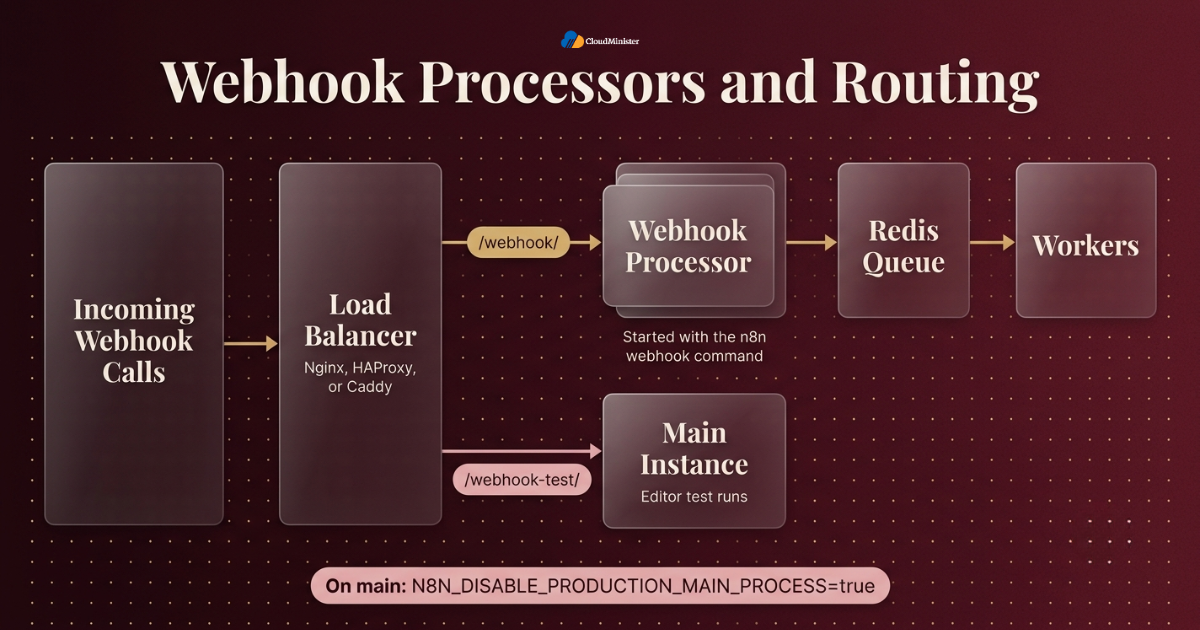
By default the main instance also receives production webhooks. That is fine at first, but a burst of inbound calls can crowd out the editor. Webhook processors are extra n8n processes, started with the webhook command, that only receive webhook calls and then queue the jobs. They are the next step after workers when n8n Queue Mode faces heavy inbound traffic.
- When to add them: add webhook processors when webhook response time rises while workers still have spare capacity.
- Start command: run n8n webhook with the same database, Redis, and encryption key settings as every other process.
- Disable on main: set N8N_DISABLE_PRODUCTION_MAIN_PROCESS=true on the main instance so it stops serving production webhooks.
- Routing rule: send /webhook/ paths to the processors and keep /webhook-test/ paths on the main instance.
- Check other paths: confirm the waiting and form URL paths in the official documentation for your version.
- Load balancer: Nginx, HAProxy, or Caddy can spread calls across processors and remove a failed one using health checks, and most n8n VPS hosting India providers let you add a load balancer or a second VPS later.
- Stateless processors: like workers, processors keep no local state, so you can restart them freely.
- Test mode: test webhooks from the editor must reach the main instance, or the editor cannot capture the sample data.
- Response mode: if a webhook waits for the final node, the reply time depends on worker speed, so size workers for that path too.
9. Tuning Concurrency and Worker Count
Tuning is where n8n Queue Mode turns from working into efficient, and AI heavy flows may need a Dedicated NVIDIA GPU Server behind them. Each worker runs several jobs at once, controlled by the concurrency flag, and the default is 10. More concurrency is not always better, because every job shares the same CPU, memory, and database connections. Change one value at a time, watch the results, and keep notes.
- Concurrency flag: set it with n8n worker –concurrency=N, and keep it at 5 or higher, because very low values can exhaust the database connection pool.
- I/O bound work: workflows that mostly wait on APIs can use higher concurrency.
- CPU bound work: heavy Code nodes and data transforms need lower concurrency and more worker processes.
- More workers or more concurrency: add worker processes for isolation and add concurrency to use idle CPU better.
- Queue wait time: if jobs sit in the queue for a long time, you need more worker capacity.
- Execution timeouts: set EXECUTIONS_TIMEOUT so a runaway workflow cannot hold a slot forever.
- Batching: use batch sizes in loops and HTTP nodes to keep memory use steady.
- Rate limits: external APIs have limits, so too many parallel jobs can trigger errors, and retries with waits help.
- Load test: replay realistic traffic on a staging copy, which can be a small n8n VPS hosting India instance, before changing production values.
Scale in small steps. Raise one value, wait a full business cycle, and compare queue wait time and error rate. Teams that change worker count, concurrency, and memory limits on the same afternoon never learn which change actually helped.
Related Reading: Our n8n vs Zapier vs Make comparison
10. Binary Data, Execution Data, and Cleanup
Data handling decides how healthy the system stays after months of use. Every execution writes data to PostgreSQL, so an unmanaged database grows without limit and slows the whole stack. In n8n Queue Mode the database is shared by every worker, which means one bloated table affects all of them.
- Pruning: in n8n Queue Mode, keep EXECUTIONS_DATA_PRUNE=true and set a retention age with EXECUTIONS_DATA_MAX_AGE in hours.
- Save less: use EXECUTIONS_DATA_SAVE_ON_SUCCESS=none for noisy workflows whose successful runs you never inspect.
- Keep failures: keep failed execution data, because it is what you debug with.
- Binary data: filesystem binary storage is not supported in n8n Queue Mode, since workers do not share one disk, so read the binary data options for your version before you design file heavy workflows.
- Large files: avoid passing big files through workflow items, and send them to object storage instead.
- Payload size: review N8N_PAYLOAD_SIZE_MAX and set it on purpose instead of leaving it to chance.
- Vacuum: let PostgreSQL autovacuum run and check the execution tables for bloat.
- Disk alerts: alert at 70 percent disk use, not at 95 percent, and ask your Web Hosting Company in India to send the same alert.
- Archive: export important execution logs to long term storage before pruning removes them, and ask your Self-Hosted N8N VPS Hosting provider about backup space.
11. Monitoring, Backups, and Safe Upgrades
A n8n Queue Mode stack has more moving parts than a single container, so watching it is not optional. You want to know three things at all times: is the queue draining, are the workers alive, and is the database healthy. Good monitoring turns a midnight outage into a morning ticket, and plans such as n8n VPS hosting India with managed monitoring make this easier for small teams.
- Worker health: set QUEUE_HEALTH_CHECK_ACTIVE=true so workers expose a health endpoint you can probe, and a Web Hosting Company in India with server management can probe it for you.
- Metrics: set N8N_METRICS=true to expose Prometheus metrics at /metrics, and check whether your version also offers queue metrics.
- Queue depth: alert when waiting jobs keep growing, because that means workers cannot keep up with n8n Queue Mode demand.
- Redis checks: watch memory use, connected clients, and persistence status.
- PostgreSQL checks: watch connection counts, disk growth, and slow queries.
- Central logs: send container logs to one place so you can follow a single execution across main and a worker, or let a Web Hosting Company in India with log retention do it.
- Backups: take daily database backups and test a restore, because an untested backup is only an assumption, and Self-Hosted N8N VPS Hosting plans with managed backups help here.
- Upgrade order: read the release notes, take a backup, then upgrade main, workers, and webhook processors to the same version together.
- Staging first: rehearse every upgrade on a copy of production before touching the real stack.
Write down the real restore time of your latest backup and keep it in the runbook. During a bad night, nobody wants to learn that a restore takes four hours. A known number lets the team decide calmly between fixing forward and rolling back.
12. Common Mistakes That Break Queue Setups
Most failures in n8n Queue Mode trace back to a short list of repeatable mistakes. Avoiding them is one of the cheapest improvements you can make, and most of them are visible in the first hour of testing if you know where to look. A quick review of your Self-Hosted N8N VPS Hosting setup against this list, ideally with your Web Hosting Company in India, catches most of them.
- Using SQLite: n8n Queue Mode needs PostgreSQL, so a SQLite setup will not work.
- Different encryption keys: workers with a different key cannot read credentials and fail with confusing errors.
- Public Redis or PostgreSQL: a published port is an open door, so keep both on private addresses.
- Extra main instances: running more than one main instance without the Enterprise multi main setup can cause duplicate trigger runs.
- Floating image tags: the latest tag can upgrade one container and leave another behind, which breaks version matching in n8n Queue Mode.
- Wrong webhook routing: sending test webhook paths to a processor means the editor never sees the data.
- Concurrency too high: many workers with high concurrency can exhaust database connections.
- Missing community nodes: community nodes must exist on every worker, not only on main.
- No key backup: a database backup without the encryption key cannot restore working credentials.
Rotate database, Redis, and API credentials after any staff change or suspected leak. Keep secrets in an environment file or a secrets manager, restrict file permissions, and never paste real keys into tickets, chats, or screenshots.
13. Running AI Workloads: GPU Servers and n8n Queue Mode
AI agents are now one of the main reasons teams scale n8n, and many of them end up calling a Dedicated NVIDIA GPU Server. One fact is worth stating clearly: n8n itself does not need a GPU. A GPU matters only when you run models locally and call them from workflows. In that case a Dedicated NVIDIA GPU Server hosts the model server, while n8n Queue Mode workers call it over a private connection. Choosing the best GPU cloud hosting for this role is a separate decision from choosing your n8n VPS hosting India plan.
- Separate roles: keep n8n workers on CPU VPS nodes and keep model inference on a Dedicated NVIDIA GPU Server.
- Local model servers: on a Dedicated NVIDIA GPU Server, tools such as Ollama or vLLM expose HTTP endpoints, and n8n can call them from AI nodes or the HTTP Request node.
- Private link: keep the inference endpoint on a private network and protect it with authentication, since many model servers have no login by default, and the Dedicated NVIDIA GPU Server and the workers should share one private network.
- Concurrency match: workers can send more requests than a Dedicated NVIDIA GPU Server can answer, so limit concurrency on those workflows and use timeouts with your n8n Queue Mode settings.
- Cost control: run inference locally for steady high volume and use hosted model APIs for rare bursts, because a Dedicated NVIDIA GPU Server on a monthly plan often beats pay per call pricing at steady volume.
- Data privacy: models on a Dedicated NVIDIA GPU Server keep prompts and customer data on infrastructure you control, and local models on the best GPU cloud hosting in your region also help with residency.
- Comparing providers: when you compare a Dedicated NVIDIA GPU Server and best GPU cloud hosting options, check the GPU model, VRAM, network speed, and billing model.
- VRAM first: the best GPU cloud hosting plan for your team is the one whose VRAM fits your model, not the one with the biggest brand name.
- Right sizing: a Dedicated NVIDIA GPU Server should be sized for the model you actually run, with room for the context length you need. Even the best GPU cloud hosting plan wastes money if the model is small.
LLM calls can take far longer than normal API calls. Set clear timeouts and retry rules on the AI nodes, and keep an eye on worker slots, especially when a Dedicated NVIDIA GPU Server serves many workflows at once. A few slow model calls can hold several worker slots at once and delay unrelated workflows in n8n Queue Mode.
14. Choosing the Right Hosting Partner
Not every hosting relationship is built for a queue based stack, and fewer still can also provide a Dedicated NVIDIA GPU Server for AI work. A capable provider helps you with networking, backups, and support, and it leaves you free to focus on workflows. Ask direct questions and prefer clear written answers over general promises. This is where the difference between an average provider and a good one becomes visible. If AI is on the roadmap, include the best GPU cloud hosting question in the same conversation.
- Setup help: a Web Hosting Company in India offering Self-Hosted N8N VPS Hosting can deliver Docker, TLS, and backups ready on day one.
- Queue ready stack: ask whether Self-Hosted N8N VPS Hosting lets PostgreSQL, Redis, and several workers sit on a private network with firewall rules you control.
- Local presence: n8n VPS hosting India gives lower latency and simpler data residency answers for Indian teams.
- Support hours: confirm round the clock support and a written escalation path for night and weekend incidents.
- Written scope: a good Web Hosting Company in India states in writing what it monitors and what remains your job.
- Restore proof: ask the Web Hosting Company in India for the restore time of the latest backup, not only the backup schedule.
- GPU add on: if you plan AI workloads, check that the same provider can supply a Dedicated NVIDIA GPU Server and explain its best GPU cloud hosting plans.
- Upgrade path: check that your Web Hosting Company in India lets you resize a VPS or add workers without rebuilding from scratch, and good best GPU cloud hosting plans let you add GPUs later too.
- Transparency: prefer providers that share real incident examples, because candour before signing predicts candour during a crisis, including best GPU cloud hosting vendors.
15. A Practical 30 Day Rollout Plan
Reading about n8n Queue Mode is easy, and acting on it is harder. This plan breaks the work into four weeks that most teams can follow. Treat the first rollout as the pattern for every later one, and improve the runbook after each change.
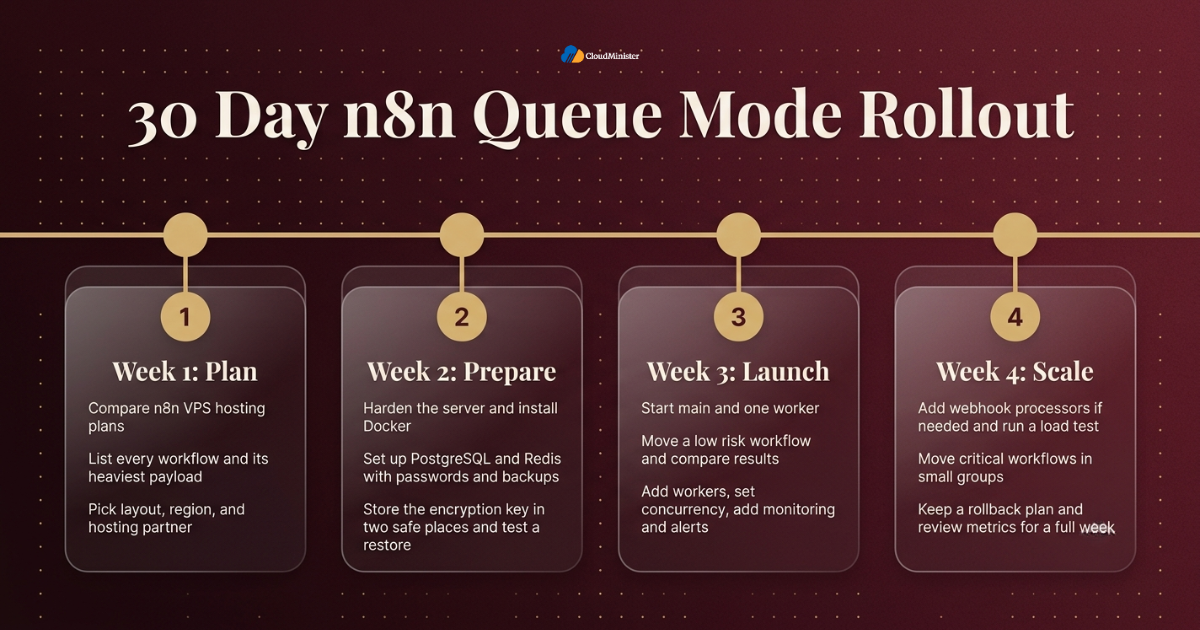
- Week one: compare n8n VPS hosting India plans, then list every workflow, its run time, its trigger type, and the heaviest payload it handles.
- Week one: pick a VPS layout, a region, and a hosting partner, and write down the reasons, including whether you will need the best GPU cloud hosting for AI work.
- Week two: harden the Self-Hosted N8N VPS Hosting server, install Docker, and set up PostgreSQL and Redis with passwords and backups.
- Week two: store the encryption key in two safe places and test restoring a database backup.
- Week three: start main and one worker in n8n Queue Mode, move a low risk workflow, and compare results.
- Week three: add more workers, set concurrency, and add monitoring and alerts.
- Week four: add webhook processors if inbound traffic needs them, and run a load test.
- Week four: ask your Self-Hosted N8N VPS Hosting provider to confirm backup and monitoring cover, then move critical workflows in small groups, keep a rollback plan, and review metrics for a full week.
Checklist: n8n Queue Mode Readiness Review
- Workflows listed and heavy ones identified, and a Self-Hosted N8N VPS Hosting plan chosen
- PostgreSQL in place instead of SQLite
- Redis protected by a password and kept on a private address
- Redis persistence on and eviction policy set to noeviction
- Same N8N_ENCRYPTION_KEY on every process and stored in two safe places
- EXECUTIONS_MODE set to queue on main, workers, and webhook processors
- Image versions pinned and identical across all containers on your n8n VPS hosting India servers
- Webhook routing tested for both production and test paths
- Monitoring, alerts, and backups tested, including a real restore
- Rollback plan written before the first production workflow moves
- Dedicated NVIDIA GPU Server chosen if local models are needed, based on the best GPU cloud hosting options reviewed
Key Takeaways
- n8n Queue Mode separates the editor and triggers from execution, so heavy workflows no longer slow everything down.
- It needs PostgreSQL, Redis, a shared encryption key, and the same n8n version on every process.
- Workers scale execution, while webhook processors scale inbound traffic.
- Concurrency should be tuned in small steps, with queue wait time as the main signal.
- Redis and PostgreSQL must never be public, and Docker published ports can bypass UFW.
- n8n does not need a GPU, but a Dedicated NVIDIA GPU Server from one of the best GPU cloud hosting providers helps when you run local models behind your workflows.
- A Web Hosting Company in India that offers Self-Hosted N8N VPS Hosting and n8n VPS hosting India gives you setup help, backups, and support without extra hiring.
- Backups only count when a restore has been tested, and the encryption key must be backed up separately.
- Compare best GPU cloud hosting providers on VRAM, network speed, and billing before you buy.
Ready to Scale n8n the Right Way?
Whether you are moving to Queue Mode or planning a 30-day rollout, our team can help with setup, security, backups, and monitoring.
Conclusion
Throughout this guide one pattern holds, whatever the company size. Reliable automation comes from preparation, not from a single setting. n8n Queue Mode gives you the structure, and the surrounding choices decide how well it performs: a private network, strong secrets, careful concurrency, tested backups, and monitoring that someone actually watches. For teams weighing this against a wider infrastructure decision, the same advice applies. Map the system first, pick n8n VPS hosting India second, choose the layout third, and keep measuring as the workload grows, ideally with a Web Hosting Company in India that supports both automation and AI hosting.
A last lesson is that scaling is never finished on the day of the change. Watch queue wait time, error rates, and database growth for a full business cycle, write down what you learned, and revise the plan every quarter. Over time those notes turn your own n8n Queue Mode setup into a trusted runbook that makes every future move faster, calmer, and easier to defend. If you run local models, evaluate best GPU cloud hosting plans with the same care.
Frequently Asked Questions
Does n8n Queue Mode need a separate server for each part?
No. A small team can run main, one worker, PostgreSQL, and Redis on one Self-Hosted N8N VPS Hosting VPS to start. As load grows, move PostgreSQL first, then add worker VPS nodes. The setup grows in steps, and the same configuration style keeps working at each stage.
Can I use SQLite with n8n Queue Mode?
No. n8n Queue Mode needs PostgreSQL, because many processes must share one database safely. Move to PostgreSQL before you switch the execution mode.
How many workers do I need?
There is no fixed number. Start with one or two workers at the default concurrency, then watch queue wait time and CPU use. Add workers when jobs wait too long and the CPU is busy, and raise concurrency when workers mostly wait on APIs.
Do I need webhook processors from the start?
No. Most teams begin without them. Add webhook processors when webhook response time rises while workers still have spare capacity, and remember to disable production webhooks on the main instance.
Does n8n Queue Mode work with multiple main instances?
Multiple main instances need the multi main setup, which is an Enterprise feature. In the standard setup, keep one main instance and scale with workers and webhook processors instead.
Is n8n VPS hosting India better than hosting abroad?
It depends on your users. For Indian customers and Indian APIs, n8n VPS hosting India usually means lower latency and simpler data residency answers. Check support hours and backup policy as well, since those matter during incidents.
Do I need a Dedicated NVIDIA GPU Server to run n8n?
No. n8n does not need a GPU. You need one only if you host large language models yourself. In that case a Dedicated NVIDIA GPU Server can run the model, and workers call it over a private network. When comparing best GPU cloud hosting providers, check VRAM and network speed first.
What should I ask a Web Hosting Company in India before moving to n8n Queue Mode?
Ask about private networking, backup restore times, monitoring scope, support hours, and who handles incidents at night. A provider that answers with specific examples is usually better prepared than one that answers in general terms.
How do I upgrade a queue based n8n setup safely?
Read the release notes, take a database backup, test the upgrade on a staging copy, and then upgrade main, workers, and webhook processors to the same version together. Keep the previous image tag available for a quick rollback.
What should I look for in the best GPU cloud hosting plan for n8n AI workflows?
Look at VRAM first, then the GPU generation, network speed, billing model, and support. The best GPU cloud hosting plan is the one that fits your model with room to spare, and a Dedicated NVIDIA GPU Server with private networking keeps your n8n workers and the model in one safe zone.

Pritam Kumar is a DevOps Engineer at CloudMinister Technologies, where he manages a multi-datacenter fleet of 100+ servers and architects end-to-end CI/CD pipelines and infrastructure automation using Kubernetes, Terraform, and Ansible. He holds an AWS Certified DevOps Engineer Professional certification and has served as a Google Cloud Mentor, reflecting both hands-on cloud expertise and a track record of mentoring others in the field. His work spans disaster recovery architecture, security incident response, and hosting infrastructure across Proxmox, cPanel/WHM, and Linux systems. Notably, Pritam led the design of Cloud Kavach, a self-hosted DC/DR SaaS portal, and directed remediation efforts for large-scale hosting security incidents involving webshells and command-and-control malware. He brings this depth of real-world infrastructure and security experience to the technical content he writes.