


Most engineering teams do not misconfigure a Multi-GPU server on purpose. They buy several accelerators, plug them into whatever slots are free, and only later discover that the interconnect fabric between those cards matters just as much as the cards themselves. A Multi-GPU server is not simply a machine with multiple GPUs installed, it is a system where bandwidth, latency, and memory coherence between accelerators decide whether a workload finishes in hours or days. This guide walks through how NVLink and PCIe actually move data between GPUs, when each interconnect makes sense, and how topology choices affect real training and inference jobs. Raw accelerator count means far less than the fabric connecting those cards together.
Anyone who has provisioned a Multi-GPU server for the first time knows the moment well. The accelerators show up, the drivers install cleanly, and the system reports every card as available and ready to work. It feels like the hard part is done. Then a training job that ran smoothly on a single GPU gets launched across four or eight cards, and instead of scaling up proportionally, it barely moves faster, or in some cases it actually slows down. The instinct is to blame the model code or the framework, when the real answer usually has nothing to do with either one.
What actually decides whether a Multi-GPU deployment performs the way it should is the interconnect sitting quietly underneath everything else. Every time accelerators need to share gradients, activations, or cached data during a computation, that data has to travel somewhere, and the path it takes matters enormously. NVLink and PCIe are the two most common answers to that question, and they behave in very different ways. One is a dedicated high speed link built specifically for GPU to GPU traffic. The other is the general purpose bus that every server already has, shared with storage, networking, and everything else attached to the motherboard.
This guide exists because most teams never get a clear explanation of this difference before they need it. It walks through how NVLink and PCIe actually move data between GPUs, when each one makes sense for a given workload, and how these topology choices show up in real training and inference performance rather than just theoretical benchmarks. It also looks at where this decision fits inside a broader plan for GPU infrastructure, since interconnect choice is rarely something a team gets to make in isolation from storage, networking, and how capacity gets provisioned in the first place.
1. What a Multi-GPU Server Actually Is and Why the Interconnect Matters
For machine learning engineers and platform teams, this conversation usually starts the same way, often while comparing notes with a Web Hosting Company in India about why a model that trained fine on one accelerator suddenly stalls the moment a second, third, or fourth card gets added. Someone provisions a Multi-GPU instance, sees four or eight accelerators reporting as available, and assumes the hard part is finished. It is not. A Multi-GPU server is defined less by how many cards sit in the chassis and more by how those cards exchange data during a single training step or inference batch.
A Multi-GPU configuration becomes meaningful the moment two or more accelerators need to share gradients, activations, or key-value cache data during the same computation. Unlike a single-GPU setup, where all math happens inside one card’s memory, a multi-accelerator workload constantly moves tensors between devices, and the speed of that movement determines whether the extra cards actually add proportional throughput or simply sit idle waiting on data.
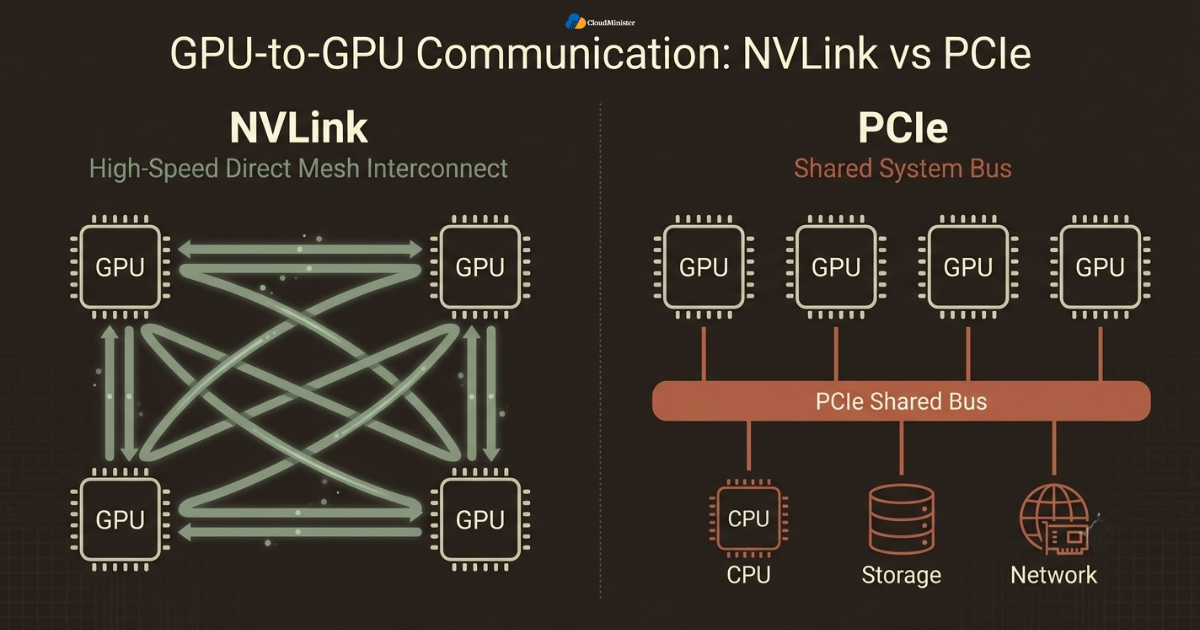
- A Multi-GPU server built around NVLink connects GPUs directly to each other through a dedicated high-speed interconnect, bypassing the standard PCIe bus entirely for GPU-to-GPU traffic, which is one of the more capable starting points inside any GPU Servers for AI deployment.
- A Multi-GPU server that relies only on PCIe routes GPU-to-GPU communication through the same bus that also handles CPU, storage, and network traffic, meaning that communication competes for bandwidth with everything else attached to the motherboard.
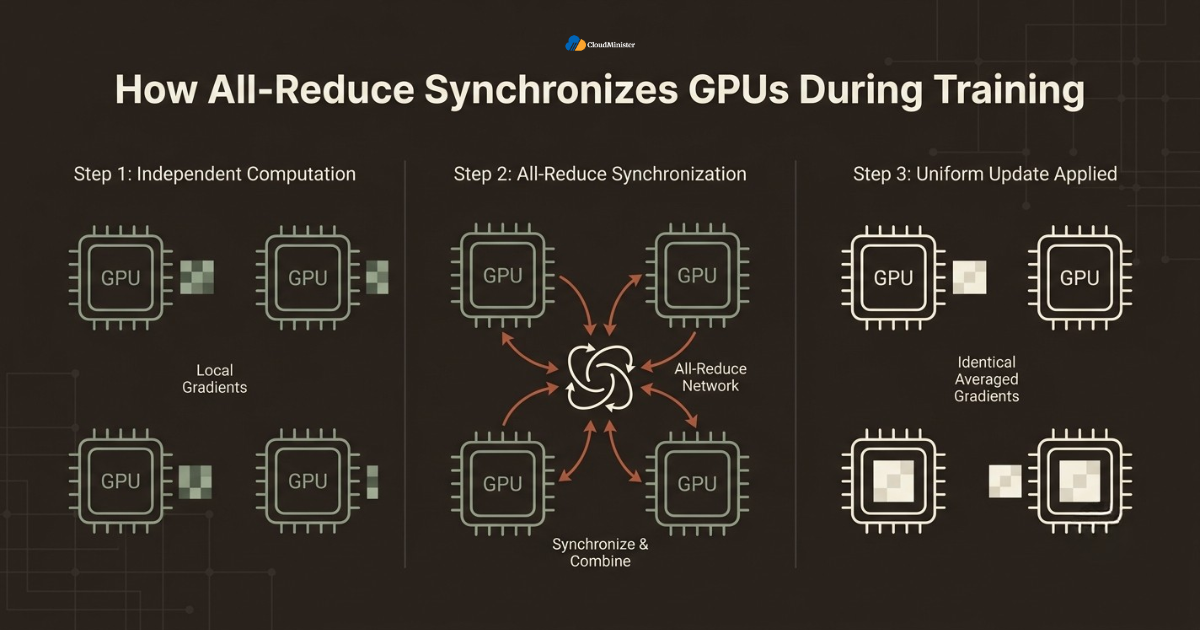
- Training frameworks such as PyTorch Distributed Data Parallel and DeepSpeed assume a fast interconnect exists between accelerators, and when it does not, the all-reduce step that synchronizes gradients across a Multi-GPU cluster becomes the dominant cost of every training iteration.
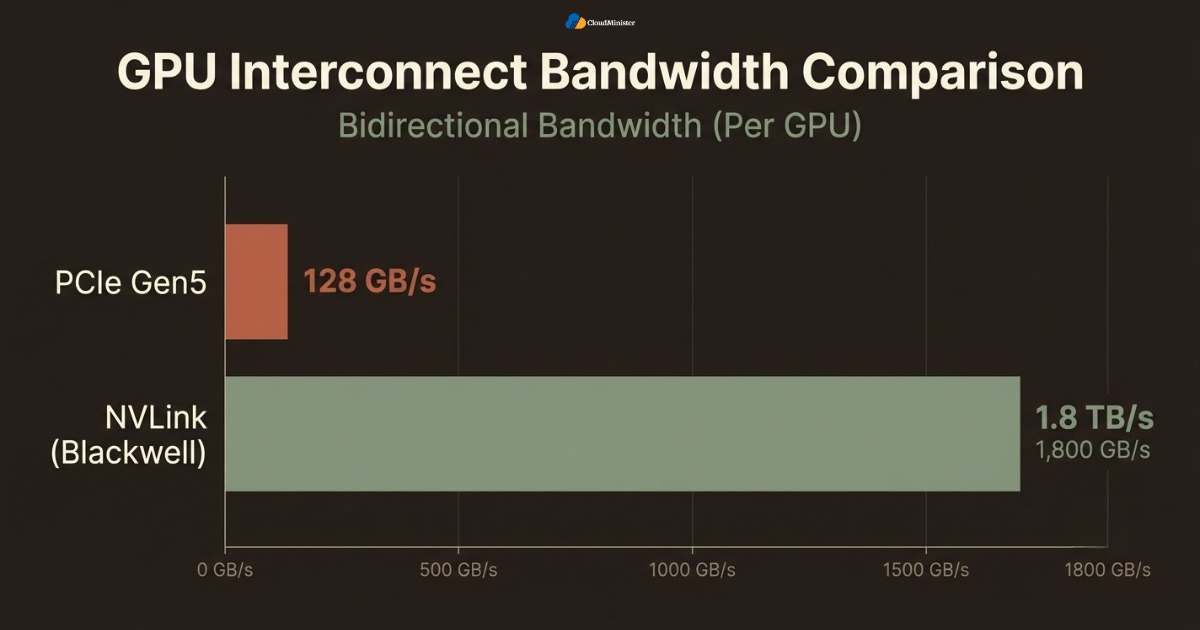
- A single Blackwell-generation GPU supports eighteen NVLink connections running at one hundred gigabytes per second each, for a combined 1.8 terabytes per second of bandwidth, which is roughly fourteen times faster than a PCIe Gen5 link carrying the same inter-accelerator traffic, according to a 2026 breakdown of NVIDIA’s interconnect roadmap published by Techloy.
- Teams sizing a Multi-GPU deployment correctly from day one tend to get far more predictable scaling behavior than teams that discover the interconnect bottleneck only after their first large training run stalls, which is exactly the kind of gap a properly scoped GPU Servers for AI plan is built to avoid.
An interconnect fabric changes how accelerators inside one machine or one rack exchange data, not how the surrounding network authenticates external requests, so a fast internal fabric can still be reached through a poorly secured management interface or an exposed inference endpoint if that layer is not locked down separately. A misconfigured deployment that leaves the out-of-band management port publicly reachable while the compute fabric itself is properly isolated is one of the more common ways a cluster gets exposed to traffic that was never meant to touch it, so this design deserves the same review discipline as any other production access control decision.
2. Why Teams Need to Understand How GPUs Talk to Each Other Before They Deploy
Many engineering teams first encounter this decision while already researching best GPU cloud hosting in India for their broader AI infrastructure needs, and a capable partner will usually raise the question of NVLink versus PCIe early in that conversation, since a Multi-GPU workload behaves very differently depending on which fabric connects the cards. For teams without a dedicated platform engineering function, understanding this behavior correctly is often the fastest way to avoid a category of slowdown that looks like a software bug but is actually a predictable hardware limitation.
- Infrastructure spend on accelerated computing has reached a point where the underlying interconnect choice genuinely matters at scale, with the global GPU market itself valued at approximately USD 100.55 billion in 2026 and projected to reach USD 642.74 billion by 2034, according to a 2026 market analysis published by Fortune Business Insights.
- Without a structured approach to interconnect topology planning, different teams inside the same company commonly default every workload to whatever configuration they provisioned first, producing inconsistent training throughput and duplicated cost across jobs that should share one well-designed cluster.
- A disciplined approach centralizes topology decisions at the platform or MLOps team level, sometimes in partnership with a provider offering best GPU cloud hosting in India, rather than leaving hardware selection to whichever engineer hit a slow training run first.
Related Reading: Google TPU vs NVIDIA GPU
- Teams that already run on a well-structured GPU Servers for AI plan tend to catch bottlenecks faster, since routine GPU Monitoring surfaces unexpected communication stalls or unhealthy interconnect links before a training job silently underperforms for days.
Before standardizing a Multi-GPU topology across an entire fleet of training jobs, test it against one representative workload first, ideally the model architecture that already runs most often, and involve a Web Hosting Company in India early if one already manages part of the environment. Teams that validate real all-reduce and gradient-synchronization behavior on a genuine multi-card setup before standardizing consistently avoid the most common mistake, which is assuming eight accelerators will deliver eight times the throughput of one regardless of how they are connected.
3. NVLink vs PCIe vs InfiniBand: The Core Interconnect Options
Before working through the detailed comparison in this guide, it helps to understand that a Multi-GPU server can move data between accelerators through three fundamentally different paths, each suited to a different scale of deployment. NVLink connects cards directly within a single server or a tightly coupled rack. PCIe is the general-purpose bus every server already has, and it can carry accelerator traffic when nothing faster is available. InfiniBand and RDMA-capable Ethernet extend communication across servers once a workload outgrows a single chassis.
- NVLink suits any workload where accelerators inside the same server need to exchange large tensors constantly, such as large language model pretraining, since it offers a dedicated point-to-point or switched fabric built specifically for GPU-to-GPU traffic rather than general system traffic, a distinction most teams sourcing best GPU cloud hosting in India learn quickly.
- PCIe suits configurations where communication between cards is occasional rather than constant, such as running several independent inference jobs on separate GPUs in the same box, where each accelerator mostly works on its own data and rarely needs to synchronize with the others.
- InfiniBand and high-speed RDMA networking suit clusters that span multiple physical servers, extending the same low-latency, direct-memory-access philosophy that NVLink uses inside one box out across an entire rack or data hall.
- Where a deployment sits between these patterns, many teams run NVLink inside each server for tight coupling while still using InfiniBand between servers for the next layer of scale, whether that split sits entirely on a single best GPU cloud hosting in India footprint or spans a larger multi-region deployment.
- Running a real traffic pattern review before committing to any single interconnect strategy, a step most established hosting partners will help set up, confirms exactly which workloads genuinely need NVLink and which can run comfortably on PCIe alone.
Related Reading: inference cost optimization
- Teams building out a Multi-GPU footprint for the first time often benefit from starting with NVLink-connected nodes for anything training-heavy and only introducing pure PCIe configurations once a specific, measured, communication-light workload appears.
4. NVLink vs PCIe: The Core Differences Every Team Should Know
Below is a breakdown of how NVLink and PCIe differ across the factors that actually matter for a real production Multi-GPU environment and for the surrounding GPU Servers for AI infrastructure a team has already put in place. Reviewing these differences alongside a partner offering best GPU cloud hosting in India tends to shorten the evaluation cycle considerably.
4.1 Bandwidth: NVLink Usually Wins by an Order of Magnitude
- NVLink on current Blackwell-generation hardware delivers up to 1.8 terabytes per second of bidirectional bandwidth per GPU across its full set of links, giving a well-designed cluster enough throughput to move entire attention-layer activations between cards without becoming the bottleneck in the training step.
- PCIe Gen5, by comparison, tops out at roughly 128 gigabytes per second of bidirectional bandwidth across a full x16 slot, which is workable for a setup with light inter-accelerator traffic but becomes a clear constraint once gradient synchronization across many large layers is involved.
- The bandwidth gap widens the more parameters a model carries, since a job splitting a large model across cards through tensor parallelism sends activations back and forth on every forward and backward pass, and a slower fabric directly extends wall-clock training time.
- For a cluster running mixture-of-experts architectures, where tokens get routed dynamically between experts living on different accelerators, interconnect bandwidth becomes even more central, since routing decisions themselves depend on fast cross-card communication, a nuance any capable GPU Servers for AI provider should flag during onboarding.
- Teams evaluating best GPU cloud hosting for a Multi-GPU workload should treat interconnect bandwidth as a first-class specification alongside GPU model and memory capacity, not an afterthought buried in the fine print, a point worth raising directly with any Web Hosting Company in India during the initial scoping call.
4.2 Latency: NVLink Keeps GPUs Closer to Acting as One Device
- NVLink’s direct GPU-to-GPU links carry noticeably lower per-hop latency than PCIe, since traffic does not need to route through a shared root complex the way general PCIe traffic does, which matters enormously for a workload with frequent small synchronization messages.
- PCIe cross-accelerator data transfers typically carry higher latency in the range of one hundred to two hundred nanoseconds, a gap that compounds across the thousands of synchronization events a large training run performs over its lifetime.
- Latency differences matter less for embarrassingly parallel workloads, such as batch inference jobs where each GPU processes a completely independent request, since those jobs rarely need to wait on another card mid-computation.
- Latency differences matter enormously for tightly coupled workloads, such as pipeline-parallel training where one card’s output directly feeds the next card’s input, since every stage boundary becomes a point where a slow interconnect stalls the entire pipeline.
- NVLink’s unified memory addressing lets one GPU read directly from another GPU’s memory space, and while PCIe topologies can also support CUDA peer-to-peer access depending on system and hardware support, NVLink’s dedicated fabric delivers this with significantly higher bandwidth and lower latency, avoiding the bottlenecks a shared PCIe bus can introduce under heavy traffic.
4.3 Topology and Scaling: How Far Each Fabric Reaches
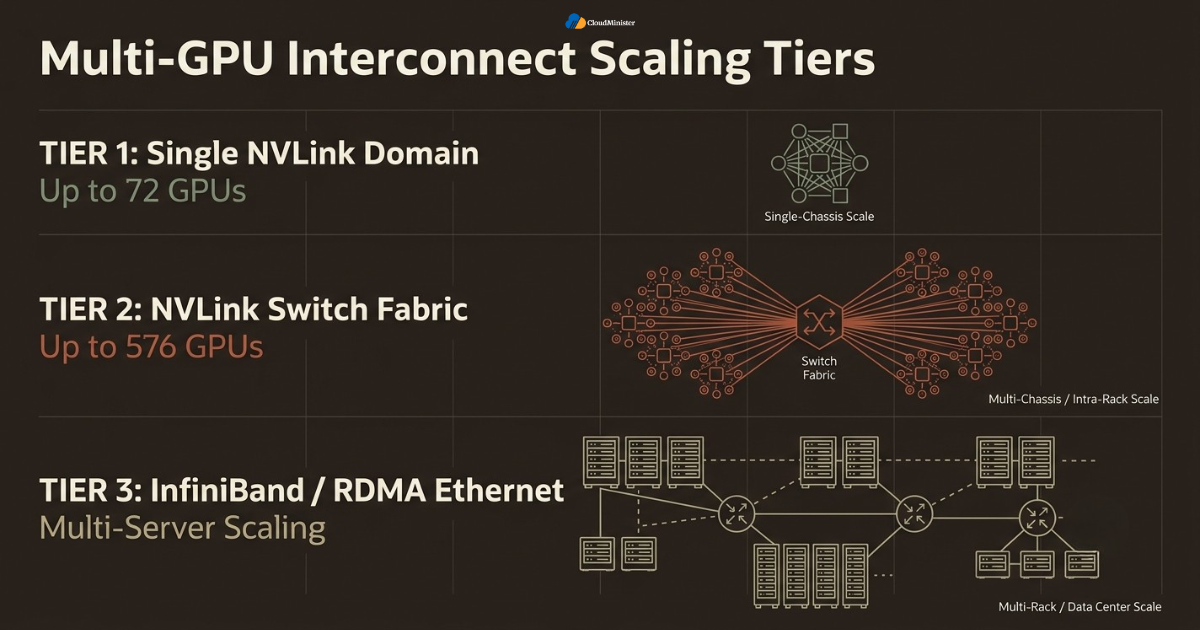
- A single NVLink domain on current hardware can connect up to seventy-two GPUs into what behaves like one enormous logical accelerator, with the GB200 NVL72 rack-scale design representing the practical ceiling of how far a tightly coupled fabric currently extends, a benchmark worth asking about when comparing best GPU cloud hosting options.
- The NVLink Switch layer extends this further, supporting non-blocking, all-to-all communication across as many as five hundred seventy-six GPUs when multiple NVLink domains are joined through dedicated switching hardware, turning a rack of servers into a single coordinated system.
- PCIe topology, by contrast, is fundamentally bounded by how many lanes a single motherboard exposes, which typically limits a practical PCIe-only server to somewhere between four and eight cards before lane contention becomes a genuine constraint.
- Beyond a single NVLink domain, large clusters scale out using InfiniBand or RDMA-capable Ethernet between servers, layering a second interconnect tier on top of the first so that a training job can span far more accelerators than any single chassis could hold.
Related Reading: NVIDIA GPU architectures
4.4 Operational Complexity: PCIe Stays Simpler, NVLink the More Capable
- A PCIe-only server requires essentially no special topology planning, since every GPU simply occupies a standard slot and the operating system’s default driver stack handles the rest, which is why it remains a common starting point for smaller deployments across GPU Servers for AI.
- An NVLink-connected server sits in the middle operationally, requiring attention to which cards occupy which physical slots so that NVLink bridges or switch fabric connections are actually populated correctly, since a mismatched configuration silently falls back to slower PCIe paths for some GPU pairs.
- A full NVLink Switch deployment is the most operationally involved of the three, requiring proper understanding of switch topology, SHARP in-network reduction configuration, and health monitoring across every link in the fabric, which is often where teams first budget for a broader engagement with a provider of best GPU cloud hosting in India.
- For teams just getting started, standardizing on PCIe for small, communication-light jobs and NVLink for anything training-heavy or latency-sensitive tends to keep the learning curve manageable.
- Consistent GPU Monitoring across every link in the fabric, not just at the individual card level, is what actually surfaces a failing NVLink bridge or a degraded switch port before it quietly drags down an entire Multi-GPU training run.
4.5 Cost and Provisioning: What This Means When Renting Instead of Buying
Most teams do not build their own accelerated computing racks from scratch. They rent capacity from a provider, which shifts the interconnect conversation from a hardware procurement decision to a provisioning decision.
- When comparing best GPU cloud hosting options, always ask explicitly whether the listed GPU count shares an NVLink domain or is simply several PCIe cards bundled into one billing line, since the two configurations are priced very differently but often described using similar marketing language.
- best GPU cloud hosting in India providers that expose NVLink domain size, switch topology, and per-node bandwidth in their specification sheets make it far easier to match a workload to the right instance type without guessing, which is the baseline any serious best GPU cloud hosting comparison should demand.
- A Web Hosting Company in India that already understands GPU Monitoring at the interconnect level, not just at the level of GPU utilization percentage, is generally better positioned to help a team avoid paying for NVLink capacity a lighter workload never actually uses.
- Teams that treat best GPU cloud hosting selection as purely a price-per-GPU-hour comparison, without factoring in interconnect fit, often end up paying more overall once slower training runs and wasted GPU-hours are accounted for.
5. How GPUs Actually Share Data During a Training Step
Understanding interconnect hardware only matters once it connects to what actually happens during a training or inference step. The collective communication patterns that move data between accelerators are where interconnect choice translates into real wall-clock time.
- All-reduce is the most common communication pattern in data-parallel training, where every GPU in the cluster computes gradients on its own slice of a batch and then all cards combine those gradients into a single averaged result that gets applied identically everywhere.
- All-gather and reduce-scatter operations split the all-reduce workload into smaller pieces distributed across the cluster, which is how frameworks like NCCL keep every accelerator’s network interface busy simultaneously rather than funneling everything through one path.
- Tensor parallelism splits individual layers of a model across multiple GPUs, meaning a cluster running this pattern exchanges activations on every single layer boundary, which is precisely why tensor-parallel training almost always requires NVLink rather than PCIe alone.
- Pipeline parallelism splits a model by stage rather than by layer, assigning different blocks of layers to different cards in a distributed pipeline, so data flows forward and gradients flow backward, with each stage boundary representing a communication point that good GPU Monitoring should track closely.
Related Reading: GPU monitoring for developers
- NCCL, NVIDIA’s collective communication library, automatically detects whether NVLink, PCIe, or InfiniBand connects a given pair of GPUs and routes traffic across the fastest available path, which means a cluster with mixed connectivity still functions correctly, just not optimally.
The pattern that separates a genuinely well-designed Multi-GPU deployment from a fragile one is matching communication pattern to interconnect deliberately rather than assuming any fabric works equally well for any workload. A team that runs tensor-parallel stages across NVLink-connected cards, pipeline-parallel stages across PCIe or InfiniBand depending on scale, and reserves pure data parallelism for cases where accelerators barely need to talk to each other typically ends up with a cluster that is both fast and cost-efficient, rather than a team that forces every workload onto the most expensive interconnect available regardless of what that workload actually needs.
5.1 Where This Fits Inside a Broader AI Infrastructure Plan
Interconnect topology is only one piece of a properly run AI infrastructure practice. It needs to sit inside a broader plan that also covers storage throughput, networking, and how a team actually provisions capacity.
- GPU Servers for AI planning should treat interconnect topology as a first input, not a detail decided after the rest of the architecture is already locked in, since retrofitting NVLink into an existing PCIe-only deployment is far more disruptive than planning for it upfront.
- A properly scoped GPU Servers for AI engagement typically includes storage bandwidth sized to feed the interconnect, since even the fastest NVLink fabric cannot help a training job that is bottlenecked reading data off disk.
- best GPU cloud hosting providers that also offer broader GPU Servers for AI packages, covering storage, networking, and orchestration alongside raw compute, tend to give a more coherent starting point than piecing together interconnect, storage, and networking from separate vendors.
- Teams building a GPU Servers for AI roadmap for the first time should treat this guide’s interconnect guidance as one input among several, since a fast fabric attached to slow storage or a congested network still leaves real performance on the table.
- best GPU cloud hosting that bundles GPU Servers for AI planning with hands-on architecture review tends to catch topology mismatches earlier than a purely self-service provisioning model.
- Teams unsure whether they need best GPU cloud hosting with a full NVLink domain or a simpler PCIe-based tier should ask for a workload assessment rather than guessing from a pricing page alone.
6. How to Decide Which Configuration Fits Your Workload
Choosing an interconnect strategy for a growing GPU cluster is not a matter of picking whichever option sounds the most advanced. It depends entirely on how communication-heavy the workload genuinely is and how far it needs to scale.
- Start by confirming how often GPUs in the target workload genuinely need to exchange data mid-computation, since that single fact eliminates plain PCIe as a viable choice for most large-scale training.
- If the workload involves training a large model with tensor or pipeline parallelism spanning many accelerators, an NVLink-connected server is almost always the right starting point, and moving away from it should require a specific, documented reason.
- If the only real requirement is running several independent inference jobs side by side, PCIe-only configurations may be entirely sufficient, since each job stays largely self-contained within its own GPU.
- If the deployment needs to span more accelerators than a single chassis can physically hold, InfiniBand or RDMA Ethernet becomes necessary to extend the fabric across servers, and adding it without a genuine scale requirement introduces cost without a corresponding benefit.
- Document the assumptions behind the decision, including expected model size growth, batch size trends, and how the choice fits the team’s current best GPU cloud hosting arrangement, so it can be revisited with context later as the workload evolves.
Across real production deployments, the gap between a team that gets consistent, predictable throughput from a Multi-GPU cluster and one that quietly wastes GPU-hours is rarely about which specific GPU model was chosen first. It is a difference in interconnect planning discipline. Teams that map communication patterns to hardware topology deliberately, rather than assuming more accelerators automatically means proportionally more throughput, report far fewer instances of the kind of silent underutilization that an unplanned deployment eventually produces.
7. Building a Layered Multi-GPU Strategy Across a Growing Cluster
Even a well-chosen node can underperform if it sits inside an environment with no supporting structure around it. Building a layered approach across a team’s entire footprint of accelerated servers matters as much as picking the right interconnect for any single Multi-GPU box.
- Use NVLink-connected nodes as the default building block for anything training-heavy, since it covers the tightest coupling most multi-accelerator workloads need without requiring a full InfiniBand fabric for every job.
- Reserve InfiniBand or RDMA Ethernet scaling for clusters that genuinely span multiple servers, rather than applying it broadly out of habit, a distinction worth documenting as part of any GPU Servers for AI plan review.
- Introduce PCIe-only nodes only when a workload’s communication needs are simple enough that the added cost of NVLink-connected hardware would not translate into measurably faster results.
- Reassess the mix on a recurring schedule, ideally as part of routine infrastructure reviews backed by consistent GPU Monitoring, since a workload that ran comfortably on PCIe a year ago may have since grown into a large tensor-parallel job that now genuinely needs a Multi-GPU NVLink configuration instead.
- Enterprises managing accelerated workloads at meaningful scale are not managing this challenge in isolation, and reviewing how peer organizations structure their clusters through a provider offering best GPU cloud hosting in India can surface topology mistakes before they become expensive.
For teams also weighing how these decisions interact with broader deployment strategy, understanding how interconnect choice fits inside a real production workflow can clarify which parts of the stack are genuinely worth optimizing first. A workload that runs comfortably on a single PCIe-connected server in a small team’s environment does not automatically need a full NVLink Switch fabric the moment that team adds a second model, since operational overhead and genuine communication requirements vary considerably between one deployment and the next. Teams building a genuinely reliable Multi-GPU strategy alongside their broader GPU Servers for AI practice should treat interconnect selection as an ongoing decision rather than a one-time setup step.
8. Common Mistakes Teams Make When Working With Multi-GPU Servers
Even teams that understand the mechanics here correctly, including teams already working with an established provider of best GPU cloud hosting in India, can still fall into avoidable mistakes if topology is treated as a one-time setup task rather than an ongoing practice.
- Assuming that renting an instance with a high accelerator count automatically delivers proportional throughput, without first confirming whether the underlying interconnect actually supports the communication pattern the workload needs.
- Populating physical GPU slots without checking which slots participate in the NVLink fabric, which means a server can technically have NVLink hardware present while some GPU pairs still fall back to slower PCIe paths without anyone noticing.
- Skipping ongoing GPU Monitoring at the interconnect level, tracking only per-card utilization while missing degraded NVLink links or saturated PCIe lanes that quietly cap throughput well below what a well-designed deployment should deliver.
- Treating NVLink, PCIe, and InfiniBand as interchangeable choices, or assuming a pattern that works for a small training job will transfer unchanged once that job scales to span multiple servers, rather than reassessing the interconnect deliberately as requirements change.
- Not revisiting topology after a significant model architecture change, leaving a cluster tuned for data-parallel training that no longer reflects the tensor-parallel or mixture-of-experts pattern the current workload actually needs.
- Skipping a review of overall cost efficiency before scaling a training or inference workload significantly, even though interconnect choice meaningfully affects both GPU-hours consumed and total time to result across an organization using best GPU cloud hosting in India.
A fast fabric inside one server or one rack says nothing about how well isolated that cluster is from the rest of a production network. Teams running shared infrastructure across multiple internal teams or external tenants should confirm that GPU memory isolation, driver-level access controls, and network segmentation around the cluster are reviewed with the same rigor as the interconnect topology itself, since a compute fabric that is fast and well isolated internally can still be reached inappropriately if the surrounding access boundary is not enforced separately.
8.1 Why GPU Monitoring at the Interconnect Level Deserves Its Own Discipline
Most teams already track basic GPU utilization, temperature, and memory usage. Far fewer extend that same discipline to the fabric connecting the cards, which is exactly where a growing cluster’s real performance ceiling is decided.
- GPU Monitoring that stops at per-card utilization percentages misses the actual story, since a GPU can show high utilization while still spending a large share of each step waiting on a slow or degraded NVLink link.
- Effective GPU Monitoring for a Multi-GPU deployment tracks NVLink error counters, per-link bandwidth utilization, and PCIe lane health alongside standard compute metrics, giving a platform team visibility into the fabric itself rather than just the silicon sitting on top of it.
- A provider offering genuine best GPU cloud hosting should expose this level of GPU Monitoring by default, rather than requiring a customer to build custom tooling just to see whether their interconnect is healthy.
- Teams running production training pipelines should treat GPU Monitoring dashboards the same way they treat application performance monitoring, with alerting thresholds tuned specifically to catch interconnect degradation before it silently extends training time.
- best GPU cloud hosting in India providers that bundle GPU Monitoring into their standard offering, rather than selling it as a costly add-on, generally signal a more mature operational practice around Multi-GPU infrastructure overall.
9. Governance and Operational Considerations Around Multi-GPU Infrastructure
Standardizing a good pattern at scale introduces a specific governance layer on top of the standard technical considerations that come with running accelerated computing workloads at that size.
- Topology decisions for any accelerated computing deployment should route through the same review process as any other production infrastructure change, ideally with input from teams experienced in both training and inference workloads, since a mismatched interconnect can quietly waste a significant share of GPU-hours.
- Centralized standards, coordinated with a single operations partner rather than allowing individual teams to define their own hardware conventions independently, prevent the kind of inconsistent throughput and duplicated GPU spend that are difficult to untangle later.
- Interconnect health should be reviewed on a recurring basis through structured GPU Monitoring, ideally with support from a partner that already manages the account, so that any degraded NVLink link or saturated PCIe path gets flagged before it turns into a genuine slowdown.
- Node usage should be tracked explicitly by workload type, since knowing exactly which training jobs need NVLink versus which inference jobs run fine on PCIe is far more useful during a capacity planning exercise than discovering it while responding to a cost overrun.
- A documented inventory, tracking which workloads sit on NVLink-connected nodes and which ones have been deliberately placed on simpler PCIe configuration instead, gives a platform team the audit trail needed to justify infrastructure spend during a budget review of any Multi-GPU rollout.
Checklist: Readiness Before Standardizing Multi-GPU Patterns at Scale
- Current workload topology mapped across every training and inference pipeline
- Communication pattern identified for each workload, whether data-parallel, tensor-parallel, or pipeline-parallel
- Interconnect selection matched to actual communication needs rather than whichever configuration was fastest to provision
- GPU Monitoring configured to flag degraded interconnect links before the first performance incident
- Ownership assigned for ongoing topology review and reassessment as models grow
- PCIe-only nodes documented and justified wherever they appear, alongside a clear view of how they complement NVLink-connected capacity rather than duplicating it
10. Measuring Whether Your Multi-GPU Setup Is Actually Working
Standardizing a good pattern here is not the finish line of an infrastructure effort, whether the workload sits on self-managed hardware or with an outside partner offering broader best GPU cloud hosting in India. Long-term value depends entirely on how the setup is monitored and adjusted afterward.
- Track which workloads sit on NVLink-connected nodes versus a plain PCIe configuration, since a training job still relying on PCIe as its only inter-accelerator path is quietly missing throughput even while otherwise functioning correctly, a gap good GPU Monitoring usually catches quickly.
- Compare actual GPU utilization against what the interconnect topology should theoretically support, a discipline that matters equally for teams focused on overall Multi-GPU spend, since real-world scaling efficiency often turns out lower than the marketing numbers suggest once communication overhead is accounted for.
- Review node allocation quarterly, flagging any training workload that has quietly outgrown its current interconnect without a corresponding move to a more capable NVLink or InfiniBand configuration.
- Cross reference topology against a team’s broader GPU Servers for AI roadmap, and against any secondary environment running a different accelerator family, to confirm that the setup still matches how models are actually being trained and served.
- Maintain a change log for every node added, reconfigured, or retired in the fleet, shared with the broader operations team where relevant, so a team can trace exactly why a given topology was chosen and whether the assumptions behind it still hold.
11. Choosing the Right Partner for Multi-GPU Infrastructure
Not every hosting relationship is built to support disciplined deployment at this level, so matching a provider’s capability to actual team needs matters more than raw accelerator count alone, whether that provider delivers best GPU cloud hosting in India, broader GPU Servers for AI, or both.
- A dependable Web Hosting Company in India that already manages a team’s broader infrastructure is well positioned to advise on how a Multi-GPU topology should fit into an existing environment without introducing unnecessary complexity, and can usually speak to whether best GPU cloud hosting for the workload means NVLink, PCIe, or a mix of both.
- A second Web Hosting Company in India worth comparing against the first is useful mainly as a sanity check on pricing and architecture recommendations, not as a reason to split a single workload across two providers, and comparing their best GPU cloud hosting claims side by side usually surfaces the real difference quickly.
- Teams evaluating providers should specifically ask whether the provider has direct experience helping customers structure NVLink, PCIe, and InfiniBand together at meaningful scale, not just provisioning individual GPU instances under a generic plan.
- Teams that want to move quickly without designing every layer of their strategy themselves often gravitate toward a Web Hosting Company in India that comes with clear documentation on how NVLink-connected capacity interacts with existing infrastructure from day one.
- Engineering leaders who have not yet reviewed their hosting partner relationship specifically in the context of Multi-GPU topology, interconnect health, or GPU Monitoring readiness should treat this guide as a natural trigger point to do so, and to ask their Web Hosting Company in India directly, especially if that partner also markets itself as offering best GPU cloud hosting.
- A Web Hosting Company in India that can speak fluently about NVLink domain sizing during a first call is usually a stronger long-term partner than one that only discusses GPU count and hourly pricing.
- A capable partner offering both deep expertise in Multi-GPU deployment and broader best GPU cloud hosting gives growing teams a coherent roadmap for scaling their infrastructure footprint instead of stitching together advice from multiple vendors.
- Teams researching best GPU cloud hosting in India specifically for internet-facing AI workloads should confirm that a prospective partner understands both interconnect mechanics and the surrounding GPU Servers for AI structure, since the two decisions are closely linked.
When comparing quotes or advice from different partners on Multi-GPU strategy, whether they specialize in best GPU cloud hosting in India, broader GPU Servers for AI, or a general infrastructure plan built around a specific stack, ask each one to walk through a real workload from your own environment rather than a generic benchmark, since the right recommendation depends entirely on how communication-heavy the target model actually is. A provider offering genuine best GPU cloud hosting in India that understands both interconnect mechanics and a team’s actual workload pattern will consistently give more actionable guidance than a purely theoretical comparison.
11.1 What to Ask Before Signing With Any Hosting Partner
Before committing budget to any single provider, it helps to have a short, concrete list of questions ready, since vague reassurances about performance are far less useful than specific answers about topology.
- Ask directly whether the instance being quoted sits inside a single NVLink domain, and if so, how many GPUs that domain spans, since a Web Hosting Company in India that cannot answer this precisely is unlikely to have deep operational familiarity with Multi-GPU topology.
- Ask what GPU Monitoring is included by default versus what requires a separate add-on, since best GPU cloud hosting should mean comprehensive visibility into the fabric, not just a basic utilization graph.
- Ask how the provider handles scaling beyond a single chassis, since a Web Hosting Company in India offering only PCIe-connected instances will struggle to support a workload that eventually needs InfiniBand-scale clustering.
- Ask for a reference architecture diagram rather than a marketing brochure, since best GPU cloud hosting providers that understand Multi-GPU topology deeply are usually happy to walk through exactly how their racks are wired.
- Ask how pricing changes between a plain PCIe instance and an NVLink-connected one, since a transparent Web Hosting Company in India will explain this difference clearly rather than bundling it into a single opaque hourly rate.
- A Web Hosting Company in India that treats these questions as routine, rather than unusual, is generally the one best equipped to support a growing Multi-GPU footprint over time.
Key Takeaways
- A Multi-GPU server is defined by how its GPUs communicate, not simply by how many accelerators sit in the chassis, a distinction any competent partner supporting best GPU cloud hosting in India should already be explaining clearly.
- NVLink delivers dramatically higher bandwidth and lower latency than PCIe for GPU-to-GPU traffic, making it the right choice specifically for training workloads that need tensor or pipeline parallelism.
- PCIe remains the correct choice specifically for configurations where communication between cards is light, such as running independent inference jobs that rarely need to synchronize with each other.
- Neither interconnect alone should replace a deliberate Multi-GPU topology strategy, so a complete infrastructure plan still needs interconnect selection as a foundation for the overwhelming majority of AI workloads, whether hosted through best GPU cloud hosting in India or a broader GPU Servers for AI footprint.
- Governance, interconnect-level GPU Monitoring, and a documented ownership structure matter just as much as the initial hardware decision, and this holds whether the environment is run internally, through a Web Hosting Company in India, or through broader best GPU cloud hosting in India.
- Partnering with a capable Web Hosting Company in India experienced in structured Multi-GPU deployment, and comfortable discussing both NVLink and InfiniBand scaling in the same conversation, meaningfully reduces the risk of an underutilized, poorly topology-matched cluster.
Conclusion
Throughout this comparison, one pattern holds regardless of company size, model architecture, or whether the surrounding environment runs on a single server, a larger multi-node cluster, or a mix of interconnect technologies. NVLink keeps tightly coupled GPUs communicating at close to the speed of a single device, PCIe handles the narrower job of connecting cards when communication needs are light, and InfiniBand extends the same philosophy across entire racks once a Multi-GPU workload outgrows a single chassis. Choosing between them is not really a question of which interconnect is better in the abstract. It is a question of how communication-heavy the workload actually is and how far it genuinely needs to scale.
By 2026, treating NVLink, PCIe, and InfiniBand as a combined, layered strategy rather than a single either-or decision has become close to standard practice for any team managing meaningful AI infrastructure, often guided by a trusted Web Hosting Company in India along the way. The teams that get the most value from this approach share a consistent pattern. They match interconnect to workload deliberately, they revisit topology on a fixed schedule backed by real GPU Monitoring, and they treat hardware selection as one part of a broader GPU Servers for AI practice rather than a one-time provisioning step. For teams weighing this decision alongside a broader look at their best GPU cloud hosting in India options, the same underlying principle applies. Match the interconnect to how the model actually communicates across GPUs, layer topology decisions deliberately, revisit the decision as the environment changes, and a Multi-GPU deployment becomes a genuine, dependable foundation rather than another default nobody fully understands, ideally with a capable and experienced infrastructure partner involved throughout.
Frequently Asked Questions
Does a Multi-GPU server always need NVLink to perform well?
Not always. A Multi-GPU server only needs NVLink when the workload genuinely requires frequent, large-volume communication between accelerators, such as tensor-parallel or pipeline-parallel training of a large model. For lighter workloads, such as running several independent inference jobs side by side, PCIe alone is often the more cost-effective and entirely appropriate choice, which is exactly the kind of tradeoff worth confirming as part of a broader best GPU cloud hosting review rather than assumed by default.
Can a team mix NVLink and PCIe within the same cluster?
Yes, and this is actually a common production pattern. NCCL and similar collective communication libraries automatically detect which GPU pairs are connected through NVLink versus PCIe and route traffic across the fastest available path for each pair, so a Multi-GPU cluster with mixed connectivity still functions correctly. It rarely performs as well as a fully NVLink-connected fabric for communication-heavy training, however, so mixed topology should be a deliberate choice rather than an accident of provisioning.
What happens if a workload’s traffic pattern does not match its interconnect?
The cluster will still run, but throughput suffers. A tensor-parallel training job placed on a PCIe-only server will spend a disproportionate share of every training step waiting on gradient and activation transfers rather than doing useful computation, which can extend total training time significantly and quietly drives up GPU-hour costs for any Multi-GPU deployment. Reviewing interconnect fit against workload pattern is one of the most common gaps a Web Hosting Company in India catches during a routine infrastructure review.
Does PCIe Gen5 close the gap with NVLink for GPU-to-GPU traffic?
No. PCIe Gen5 offers roughly 128 gigabytes per second of bidirectional bandwidth across a full x16 slot, while current NVLink delivers up to 1.8 terabytes per second per GPU across its full set of links, a gap of well over an order of magnitude. Teams that need meaningful throughput for a Multi-GPU cluster should choose NVLink-connected hardware rather than assuming a newer PCIe generation closes the practical difference.
How should a team decide between a PCIe-only and NVLink-connected server for a new workload?
The decision should be based on how communication-heavy the workload genuinely is, not simply on the assumption that the most expensive interconnect option is always the safer default. A Multi-GPU workload that only ever runs independent, loosely coupled jobs usually costs a team more in unnecessary spend by sitting on NVLink-connected hardware than it would have saved in throughput, which is exactly the kind of tradeoff a Web Hosting Company in India or any established provider of best GPU cloud hosting is well placed to evaluate.
Does best GPU cloud hosting always mean the largest possible NVLink domain?
Not necessarily. best GPU cloud hosting means matching interconnect capability to what a workload actually needs, and for many teams that means a smaller NVLink domain paired with InfiniBand scaling rather than paying for the single largest domain available. A Web Hosting Company in India that pushes every customer toward the biggest configuration regardless of fit is optimizing for its own margin rather than the customer’s actual training economics.
Is NVLink only useful for very large clusters, or does it help smaller Multi-GPU setups too?
NVLink helps at almost any scale where accelerators inside the same server need to exchange data frequently. Even a modest four GPU training setup running tensor parallelism benefits meaningfully from NVLink, since the bottleneck it removes is about how often cards talk to each other during a single step, not how many total accelerators are involved. Smaller teams sometimes assume NVLink is only worth considering once they reach large multi node clusters, but a communication heavy workload on just a few cards can already be limited by PCIe.
Can a team switch from PCIe to NVLink later without rebuilding the entire deployment?
It depends on the hardware already in place. Some server chassis are built to support NVLink bridges or switch fabric from the start, in which case adding NVLink connectivity later mainly involves populating the right slots and installing the correct bridges. Other systems are simply not designed for it, meaning a genuine move to NVLink would require new hardware rather than a configuration change. This is one of the reasons it helps to plan interconnect strategy upfront rather than treating it as something to revisit only after a workload outgrows its current setup.

