Canonical opened the direct path from 24.04 to 26.04 on 29 September 2026, and many teams now need to Upgrade Ubuntu 24.04 to 26.04 on a live VPS. The biggest risk is not the upgrade tool. It is cgroup v1, which systemd 259 no longer supports, along with untested backups, full disks, and third party repositories. This guide covers the pre-checks, a cgroup v2 audit, a rollback you can trust, the exact upgrade steps, and the post upgrade checks. It also explains where Linux VPS Hosting in India, a Server Management Company, and Server Management Services in India fit into a safe plan.
Every server owner reaches the day when the operating system has to move forward. For anyone running Ubuntu 24.04, that day has arrived. Canonical enabled the long term support path in late September 2026, and since then admins everywhere have asked how to Upgrade Ubuntu 24.04 to 26.04 without breaking a live website, a database, or a container host. A VPS has no screen you can walk up to, so one careless step can lock you out within minutes. A calm plan matters more than any single command.
Most failed upgrades do not fail because of Ubuntu itself. They fail because of an old container runtime that still needs cgroup v1, a third party repository that was never updated, a full disk, or a backup nobody has ever restored. When you Upgrade Ubuntu 24.04 to 26.04, the biggest technical change is that systemd 259 has removed cgroup v1 support. A host that still runs on cgroup v1 is not allowed to upgrade at all. Knowing this before you start can save you a whole night of troubleshooting.
This guide explains the full journey in simple language. You will learn the pre-checks, how to audit cgroup v2, how to build a rollback you can trust, how to run the upgrade, and how to verify the server afterwards. Whether you manage one server or fifty, the steps to Upgrade Ubuntu 24.04 to 26.04 safely stay the same. We also explain where a Web Hosting Company in India, a Server Management Company, and Linux VPS servers in India fit into the plan, because a server rarely upgrades well without the people and infrastructure around it.
Table of Contents
- 1. Why You Should Plan the Move to Ubuntu 26.04 Now
- 2. What Changes Between Ubuntu 24.04 and 26.04 on a Server
- 3. Pre-Checks Before Moving to Ubuntu 26.04
- 4. cgroup v2 Explained: The Change That Can Stop Your Upgrade
- 5. Auditing Containers, Services, and Monitoring for cgroup v2
- 6. Backups and Snapshots: Build the Rollback Before You Begin
- 7. Running the Upgrade Step by Step
- 8. Handling Prompts, Config Files, and Third Party Repositories
- 9. Service Specific Checks: Web, Database, Mail, and Runtimes
- 10. Post-Upgrade Verification and Monitoring
- 11. Rollback in Practice: What Works and What Does Not
- 12. Common Mistakes That Break an Upgrade
- 13. Choosing the Right Hosting and Management Partner
- 14. A Practical 14 Day Plan for the Ubuntu 26.04 Move
- Key Takeaways
- Conclusion
- Frequently Asked Questions
1. Why You Should Plan to Upgrade Ubuntu 24.04 to 26.04 Now
Ubuntu 26.04 LTS, code named Resolute Raccoon, was released on 23 April 2026. Canonical only opens LTS to LTS upgrades after the first point release, so 24.04 systems had to wait for 26.04.1. The wait is over, and the choice is now yours. The scale of this decision is large, because W3Techs reports that Linux runs about 61.7 percent of websites with a known operating system, and Ubuntu makes up roughly 15 percent of those Linux sites as of July 2026. A huge part of the web will face the same question, and the teams that prepare early will have the easiest time. A reliable Web Hosting Company in India often raises this topic during infrastructure reviews, because the operating system release decides how long a server stays safe. Planning early to Upgrade Ubuntu 24.04 to 26.04 also gives you time to test your applications calmly.
- The direct path from 24.04 to 26.04.1 was enabled on 29 September 2026, so a plain sudo do-release-upgrade now offers 26.04 on a fully updated 24.04 server. This is the simplest way to Upgrade Ubuntu 24.04 to 26.04 on a standard VPS.
- Ubuntu 26.04 LTS gets five years of standard security maintenance, until April 2031, and ten years in total with an Ubuntu Pro subscription.
- Ubuntu 24.04 is still supported until 2029, so there is no emergency, but waiting longer only makes the jump between releases bigger.
- You cannot skip a release. A VPS that still runs 22.04 must first move to 24.04 before it can reach 26.04. That rule applies every time you Upgrade Ubuntu 24.04 to 26.04, even when the server looks healthy.
- The new release brings Linux kernel 7.0, systemd 259, and OpenSSH 10.2, which means newer hardware support and a stronger default security posture.
- Teams that rent Linux VPS Hosting in India usually control their own operating system, which means the upgrade decision and the upgrade risk both sit with the customer. A provider of Server Management Services in India can share that risk by running the checks for you.
- A good Server Management Company will usually ask for your downtime budget, your data size, and your rollback tolerance before it recommends a date.
- Many Linux VPS servers in India run small business sites, shops, and APIs, so even a short outage has a direct cost in lost orders. A Server Management Company can schedule the work outside peak sales hours to protect that revenue.
- Businesses that rent Linux VPS servers in India from a Web Hosting Company in India with strong network links also see faster package downloads, because the new release pulls thousands of packages.
Run Your Next Ubuntu LTS on a VPS You Fully Control
Full root access, console and rescue mode, and snapshot-ready infrastructure, so you can plan your Ubuntu 26.04 move on your own schedule.
2. What Changes Between Ubuntu 24.04 and 26.04 on a Server
Two years of development separate these two releases, and the server side changes are larger than most admins expect. The official release notes list new versions of the kernel, systemd, OpenSSH, databases, and language runtimes, plus a few removals. Before you Upgrade Ubuntu 24.04 to 26.04, read through the list below and mark every item that touches your own stack. Anything that runs in production deserves a line in your upgrade notes. Teams that run Linux VPS servers in India for client projects should keep a copy of this table in their runbook.
| Component | Ubuntu 24.04 LTS | Ubuntu 26.04 LTS | Why it matters |
| Linux kernel | 6.8 | 7.0 | Newer drivers and a PostgreSQL note about huge pages |
| systemd | 255 | 259 | cgroup v1 support removed |
| OpenSSH | 9.6p1 | 10.2p1 | DSA removed, post quantum key exchange by default |
| Python | 3.12 | 3.14 | Virtual environments must be rebuilt |
| PostgreSQL | 16 | 18 | Plan dumps and a cluster upgrade |
| MySQL | 8.0 | 8.4 LTS | mysql_native_password accounts locked by default |
| PHP | 8.3 | 8.5 | Test every application before production |
| Dovecot | 2.3 | 2.4.2 | Configuration format changed |
| sudo | Classic sudo | sudo-rs by default | Edge cases in sudoers rules |
| Initial ramdisk | initramfs-tools | dracut by default | Boot image tooling changed |
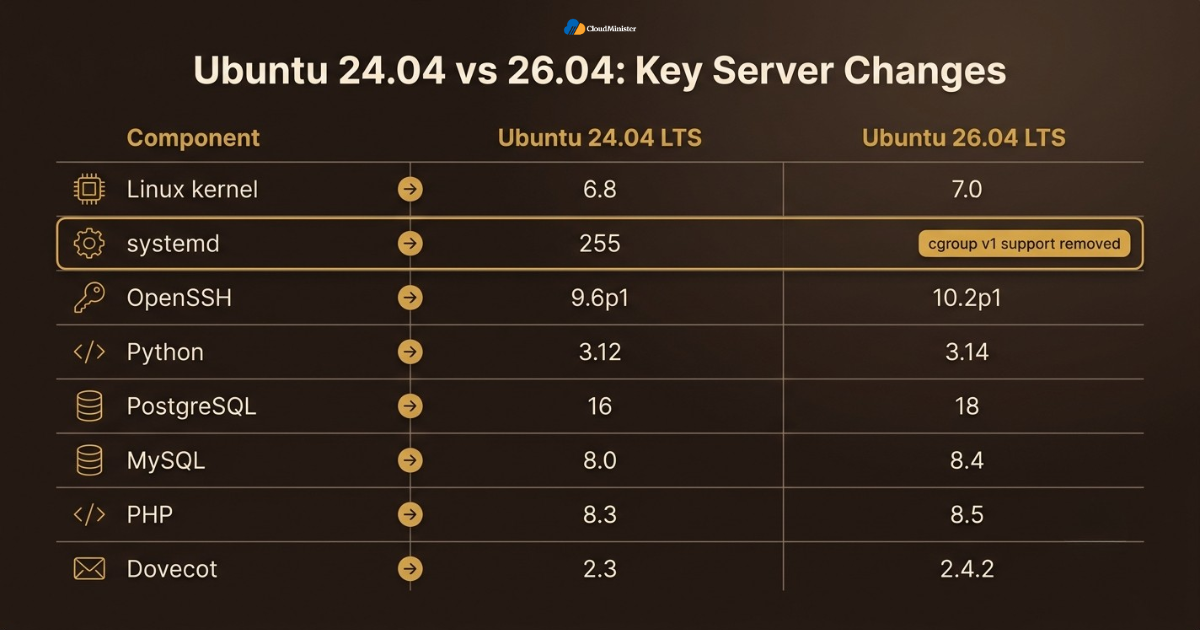
- cgroup v1 is gone. systemd 259 supports only the unified cgroup v2 hierarchy, and this is the change that can block an upgrade. It is the main reason a Server Management Company checks cgroup state on every host before it approves a window to Upgrade Ubuntu 24.04 to 26.04.
- sudo-rs is the default. The original sudo is renamed sudo.ws, and the sudo-ldap package is removed, so LDAP logins should move to PAM. Test it early in any plan to Upgrade Ubuntu 24.04 to 26.04.
- Rust coreutils are in. The package rust-coreutils provides most core tools, while cp, mv, and rm still come from GNU because of unresolved bugs.
- OpenSSH 10.2 is stricter. DSA signatures are no longer supported, host DSA keys are no longer generated, and a warning appears when a connection does not use post quantum key agreement.
- APT is now version 3.1. The apt-key command has been removed, so old scripts that import repository keys with it will fail. Plan this clean up before you Upgrade Ubuntu 24.04 to 26.04, not after.
- Chrony replaces systemd-timesyncd as the default time service on new installs, and existing servers can switch by hand after the upgrade. Hosts managed under Server Management Services in India often make this switch as part of the same maintenance window.
- Postfix no longer runs in a chroot by default, and only limited chroot support remains. Customers of Linux VPS Hosting in India plans should check that mail settings are part of their backups.
- System V init scripts are on their last release. Ubuntu 26.04 is the last version that supports them through systemd, so custom scripts should become native unit files.
- Apache disables TLS 1.0 and 1.1, which follows RFC 8996, so very old clients will no longer connect.
3. Pre-Checks Before You Upgrade Ubuntu 24.04 to 26.04
Pre-checks are the cheapest part of the whole project, and they remove most of the surprises. The aim is simple. You want to know exactly what the server looks like before the upgrade, so you can compare it after the reboot. A Server Management Company will usually run this list for every client server, and you can do the same on your own VPS in about an hour. Write each result down, because the notes become your baseline. Providers of Linux VPS Hosting in India that include console access make this stage much safer.
- Confirm the release. Run lsb_release -a and make sure it shows 24.04. If it shows 22.04, upgrade to 24.04 first.
- Update everything. Run sudo apt update and sudo apt full-upgrade, then reboot if the file /var/run/reboot-required exists. Skipping this step is a common reason an attempt to Upgrade Ubuntu 24.04 to 26.04 stops early.
- Check disk space. Run df -h / /boot. The upgrader checks space itself, but a practical target is at least 10 GB free on the root filesystem.
- Check memory. Run free -h. A VPS with 1 GB of RAM or less benefits from a temporary swap file during the upgrade.
- Look for held packages. Run apt-mark showhold and sudo dpkg –audit. Half configured or held packages can stop the upgrader.
- List outside repositories. Run ls /etc/apt/sources.list.d/ and ubuntu-security-status –thirdparty to see packages that do not come from the Ubuntu archive. A Web Hosting Company in India that supports custom repositories can tell you which vendors already publish 26.04 packages.
- Record a baseline. Save sudo ss -tulpn > ~/ports-before.txt and systemctl list-units –type=service –state=running > ~/services-before.txt for comparison later.
- Check the CPU level. If you may rebuild from a fresh 26.04 cloud image, run /lib64/ld-linux-x86-64.so.2 –help | grep supported and look for x86-64-v3, because 26.04 cloud images are built for that level.
- Confirm console access. Make sure you can reach the provider console or rescue mode, because SSH is the first thing that fails when something goes wrong. Check that the console of your Linux VPS servers in India actually works before the window.
Write your real downtime budget in minutes before you touch anything. A small blog can accept a one hour window, while a shop or an API may accept only a few minutes. This single number decides whether you can upgrade in place or should rehearse on a cloned server first. Teams that Upgrade Ubuntu 24.04 to 26.04 on shared client servers should share this number with the client in writing.
Related Reading: Our guide to installing Joomla with the LEMP stack
4. cgroup v2 Explained: The Change That Can Stop Your Upgrade
Control groups, or cgroups, are the kernel feature that limits and measures CPU, memory, disk input and output, and process counts for groups of processes. systemd, Docker, containerd, LXC, and Kubernetes all rely on them. Ubuntu has used the unified cgroup v2 hierarchy by default for several releases, so a stock 24.04 VPS already boots with it. The risk comes from servers that were forced back to cgroup v1 through kernel settings, old images, or old container tools. If you want to Upgrade Ubuntu 24.04 to 26.04 safely, you must prove that your server is on cgroup v2 before you start. A Server Management Company will usually verify this on every host before it quotes a maintenance window.
| Resource | cgroup v1 file | cgroup v2 file |
| Memory limit | memory.limit_in_bytes | memory.max |
| Memory in use | memory.usage_in_bytes | memory.current |
| Memory plus swap | memory.memsw.limit_in_bytes | memory.swap.max (swap only) |
| CPU quota | cpu.cfs_quota_us and cpu.cfs_period_us | cpu.max |
| CPU share | cpu.shares | cpu.weight |
| Disk input and output | blkio files | io.max and io.weight |
| Process count | pids.max | pids.max |
| Mount layout | A separate directory for each controller | One unified tree at /sys/fs/cgroup |
- What was removed. systemd 259 no longer supports the legacy and hybrid cgroup v1 hierarchies. The change was made upstream in systemd 258.
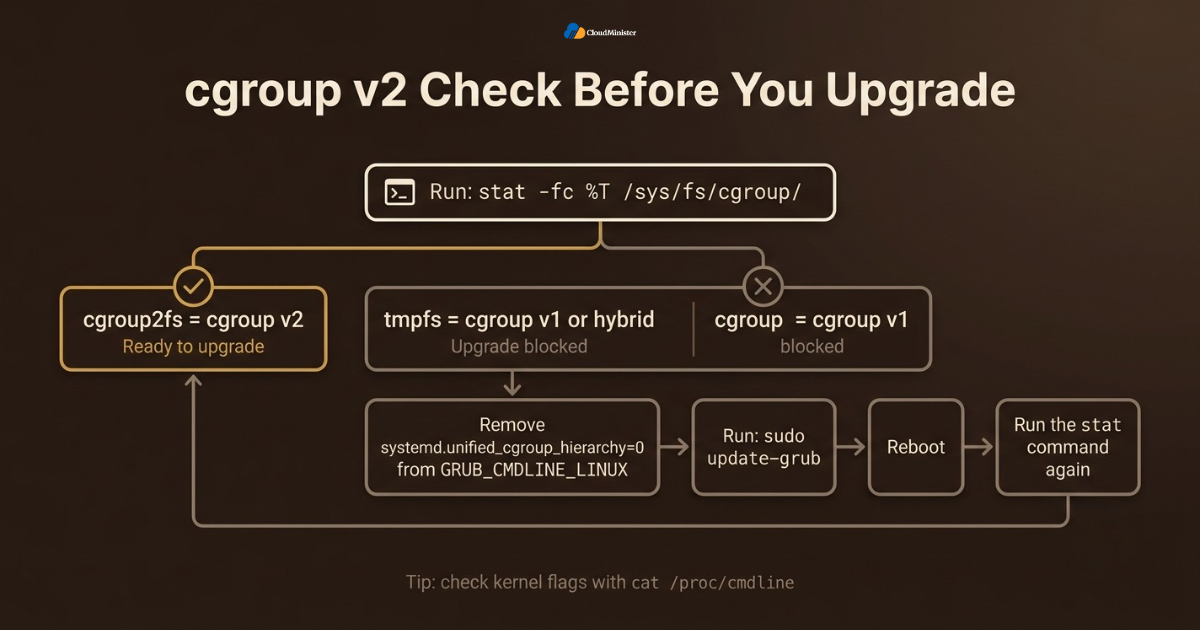
- Upgrade block. According to the Ubuntu release notes, installations running cgroup v1 will not be allowed to upgrade to 26.04 LTS. Anyone who wants to Upgrade Ubuntu 24.04 to 26.04 on such a host must fix cgroups first.
- Container block. Container workloads from 26.04 will not run on a host that booted with cgroup v1.
- Old guests. A 26.04 host also cannot run container workloads that need cgroup v1, such as Ubuntu releases older than 18.04.
- Quick test. Run stat -fc %T /sys/fs/cgroup/. The answer cgroup2fs means v2, while tmpfs points to v1 or the hybrid layout. Run this on every one of your Linux VPS servers in India, because images from different providers can differ.
- Kernel flags. Run cat /proc/cmdline and grep -rn cgroup /etc/default/grub /etc/default/grub.d/. A flag such as systemd.unified_cgroup_hierarchy=0 must be removed before upgrading.
- Fixing the flag. Remove it from GRUB_CMDLINE_LINUX, run sudo update-grub, reboot, and test again with the stat command. On a full virtual machine from a provider of Linux VPS Hosting in India, you normally control GRUB yourself, so this fix is in your own hands.
- New mount options. Ubuntu 26.04 mounts cgroupfs with nsdelegate, memory_recursiveprot, and memory_hugetlb_accounting, which gives safer delegation and better memory accounting.
Do not copy numbers from v1 to v2 one for one. The default cpu.shares value of 1024 matches a cpu.weight of 100, and memory plus swap limits became a separate swap limit. Convert each value on purpose, and then test the service under load. This habit helps any team that has to Upgrade Ubuntu 24.04 to 26.04 on busy workloads.
5. Auditing Containers, Services, and Monitoring for cgroup v2
Once you know the host is on cgroup v2, the next job is to check everything that talks to cgroups. This is where hidden problems live. Old scripts, monitoring agents, and container settings can hold on to v1 paths for years without anyone noticing. A Server Management Company that handles many Ubuntu upgrades will search for these items first, because they decide whether the upgrade ends quietly or turns into an incident. Teams that buy Server Management Services in India often get this audit as part of the onboarding review.
- Docker. Run docker info | grep -i cgroup and look for Cgroup Version 2 and the systemd driver. Docker releases before 20.10 only understand cgroup v1. Fixing this early keeps your plan to Upgrade Ubuntu 24.04 to 26.04 on schedule.
- containerd. Review /etc/containerd/config.toml and confirm the SystemdCgroup setting for runc. Ubuntu 26.04 ships containerd 2.2, which has breaking changes from 1.x, so test any custom tooling.
- Kubernetes. Make sure kubelet and the container runtime both use the systemd cgroup driver. Upstream Kubernetes has treated cgroup v1 as maintenance mode since version 1.31.
- LXC containers. Search for old lxc.cgroup. keys and move them to the lxc.cgroup2. form. A provider of Server Management Services in India can scan for these keys across all hosts in minutes.
- Custom scripts. Run sudo grep -rIl /sys/fs/cgroup/memory /etc /opt /usr/local /home to find code that reads v1 paths directly. A Web Hosting Company in India that manages your servers can run this search for you across every host.
- Monitoring agents. Old versions of cAdvisor, node_exporter, and similar tools may read v1 files. Update them before the upgrade and compare the graphs afterwards. Linux VPS servers in India that run an older monitoring stack are a common source of broken graphs after the upgrade.
- systemd units. Replace the deprecated MemoryLimit=, CPUShares=, and BlockIOWeight= with MemoryMax=, CPUWeight=, and IOWeight=. Check the result with systemctl show servicename -p MemoryMax.
- Init scripts. List /etc/init.d/ and convert any custom scripts to native unit files, because System V support is ending.
- Language runtimes. Java, .NET, and Go programs read container limits from cgroups, so run a current runtime that understands cgroup v2 properly.
Removing cgroup v1 also removes an old part of the container attack surface. Security researchers have long pointed to weaknesses in the v1 delegation model. Moving to cgroup v2 is therefore a hardening step as well as a compatibility task, and it deserves a place in your security review. That is one more reason to Upgrade Ubuntu 24.04 to 26.04 instead of staying put.
6. Backups and Snapshots: Build the Rollback Before You Begin
Ubuntu does not support downgrading from one release to an older one. This single fact shapes the whole plan. If the upgrade goes wrong, the only clean way back is to restore a copy you made beforehand. That is why the rollback has to exist before the first command runs. A provider offering Linux VPS Hosting in India with snapshot or image backups makes this step quick, but the snapshot is only useful if you know how to restore it and how long that takes. Whether you buy your servers from a Web Hosting Company in India or build them yourself, the same rule applies: no restore test, no upgrade.
| Rollback option | Best for | Speed | Main risk |
| Provider snapshot of the whole VPS | Fast full rollback | Minutes | Data written after the snapshot is lost |
| Full backup restored to a new VPS | An independent second copy | Slower | Needs a tested restore procedure |
| LVM or filesystem snapshot inside the guest | Quick undo on the same disk | Fast | Does not protect against disk or host failure |
| Rebuild from automation and data backups | Servers defined as code | Depends on automation | Hidden manual changes get forgotten |
- Take a snapshot just before you start, and name it with the date and the words before upgrade. Ask your provider of Linux VPS Hosting in India whether snapshots are included in the plan or billed separately.
- Keep a second copy off the server. Use rsync or a backup tool to store important data in another location, so one account problem cannot remove everything. A Web Hosting Company in India that offers backup storage in a second location makes this simple.
- Dump databases logically. For MySQL use mysqldump –single-transaction –all-databases > all.sql, and for PostgreSQL use sudo -u postgres pg_dumpall > /root/pg-all.sql. These dumps are your safety net if you Upgrade Ubuntu 24.04 to 26.04 and a data store fails to start.
- Save the configuration. Run sudo tar -czf /root/etc-backup.tar.gz /etc and apt-mark showmanual > /root/manual-packages.txt.
- Quiet the writes. Put the site in maintenance mode or stop busy workers, so the snapshot does not catch a database halfway through a write.
- Restore once as a test. Bring the snapshot up on a spare VPS and rehearse the upgrade there. A backup that has never been restored is only an assumption. Treat the rehearsal as practice for the day you Upgrade Ubuntu 24.04 to 26.04 for real.
- Record the restore time. Write the real number in your runbook, so everyone knows the worst case before the maintenance window begins. Ask your Web Hosting Company in India to confirm the same number for its own snapshot service.
- Keep the snapshot until the observation period ends, which should be at least one full business cycle such as a month end report run. That patience protects you if a slow problem appears after you Upgrade Ubuntu 24.04 to 26.04.
Backups and database dumps contain passwords, keys, and customer data. Encrypt them, limit who can open them, and delete old snapshots once the observation period ends. A forgotten backup is a second copy of your most sensitive data. Teams that rely on Server Management Services in India should confirm who holds the keys to the backups.
Related Reading: Our fully managed hosting guide
7. Running the Upgrade Step by Step
With the checks done and the snapshot safe, the upgrade itself is short and mostly waiting. The tool is called do-release-upgrade, and it works for both desktop and server installations. It disables third party repositories, points APT to the 26.04 archive, downloads the packages, and walks you through each question. Follow the order below, and do not rush any prompt. If you want help during the window, a team providing Server Management Services in India can watch the server while you work. Linux VPS servers in India that use a firewall must be prepared for the temporary SSH port described below. Treat this list as a fixed recipe when you Upgrade Ubuntu 24.04 to 26.04.
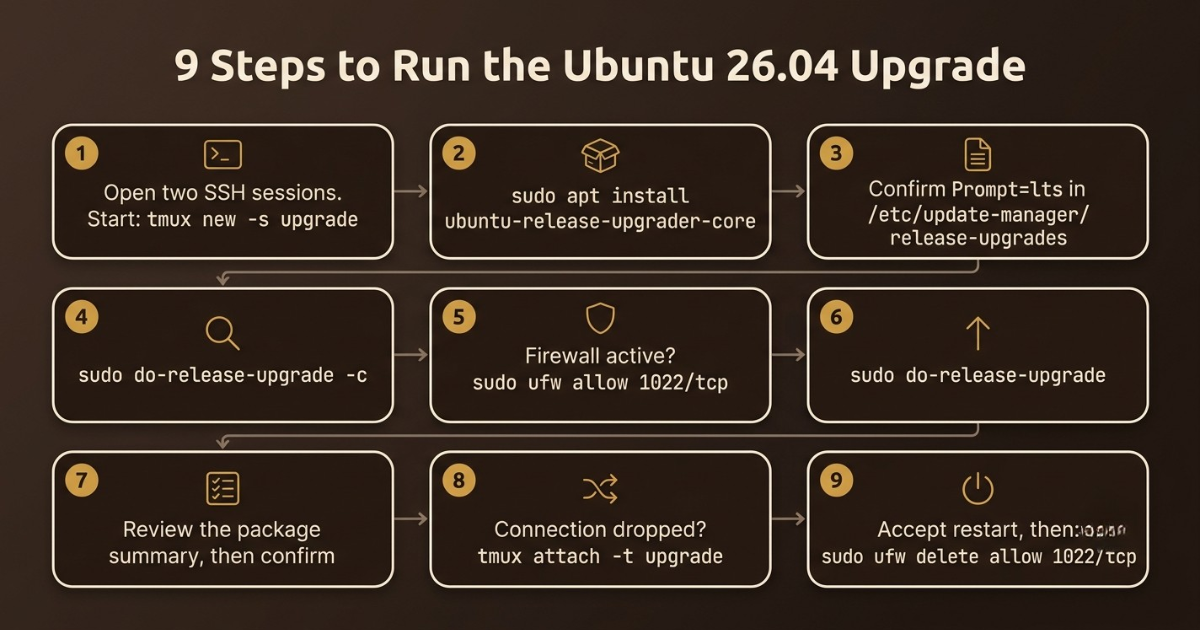
- Step 1. Open two SSH sessions. In the first, start a terminal multiplexer with tmux new -s upgrade, so a dropped connection does not stop the upgrade.
- Step 2. Make sure the tool is present with sudo apt install ubuntu-release-upgrader-core.
- Step 3. Open /etc/update-manager/release-upgrades and confirm it contains Prompt=lts.
- Step 4. Run sudo do-release-upgrade -c. A ready system answers that a new release, 26.04.1 LTS, is available. A provider of Server Management Services in India can confirm this output on your behalf before the window begins.
- Step 5. If a firewall is active, allow the backup SSH port with sudo ufw allow 1022/tcp. Over SSH, the upgrader starts a second sshd on port 1022 as a recovery door. Forgetting this rule can cause a lockout when you Upgrade Ubuntu 24.04 to 26.04 over SSH.
- Step 6. Run sudo do-release-upgrade. You no longer need the -d flag, which was only a workaround before the path opened.
- Step 7. Read the summary of packages to be removed, installed, and upgraded, and then confirm.
- Step 8. If your connection drops, reconnect and use tmux attach -t upgrade. Do not kill the process.
- Step 9. When the tool asks for a restart, accept it. After you log in again, close the extra port with sudo ufw delete allow 1022/tcp. Providers of Linux VPS Hosting in India usually let you reboot from the control panel if the restart hangs.
Choose a quiet hour and keep your console tab open the whole time. The first reboot after an upgrade is when network settings, the new initial ramdisk, and the kernel all meet for the first time, so that is the moment you want eyes on the screen.
8. Handling Prompts, Config Files, and Third Party Repositories
Most of the questions asked during the upgrade look harmless, but a wrong answer can quietly change a service for years. The upgrader will ask about restarting services, about configuration files you edited, and about packages that are no longer needed. Treat each question as a small decision. A good rule is to keep your own work on files you changed, take the new version for files you never touched, and compare the two afterwards. A Web Hosting Company in India that supports customers through upgrades will often publish a guide for these prompts. Every team that has to Upgrade Ubuntu 24.04 to 26.04 meets these same questions.
- Service restarts. The tool may ask whether to restart services automatically during the package upgrade. Answer yes if brief restarts are fine, or no if you want to control the order yourself.
- Config file prompts. The package system offers Y or I to install the maintainer version, N or O to keep yours, D to show the difference, and Z to open a shell.
- Edited files. For files such as sshd_config, nginx.conf, my.cnf, and Postfix main.cf, press D first, then decide. Keeping yours is usually safer. Providers of Server Management Services in India often keep a library of known good files for this review.
- Review later. After the upgrade, run sudo find /etc -name ‘*.dpkg-dist’ -o -name ‘*.dpkg-new’ to find the new default files you skipped, and merge useful changes by hand. A provider of Server Management Services in India will often compare these files for you and hand back a short report.
- Untouched files. If you never edited a file, accept the new version so you receive the updated defaults.
- Obsolete packages. Read the removal list carefully. Software you installed by hand may appear there, and you should not agree before you understand why.
- Outside repositories. The upgrader disables them. After the upgrade, edit the files in /etc/apt/sources.list.d/ and switch the suite to resolute only when the vendor publishes packages for it. Check each vendor before you Upgrade Ubuntu 24.04 to 26.04 on a server that depends on Docker, Nginx, or PHP repositories.
- Snap packages. Run snap list afterwards and refresh any snap that you rely on.
- The final restart. Choose yes, and wait several minutes before you assume that the server is stuck.
Never leave the temporary SSH port open after the upgrade, and never accept a maintainer sshd_config without reading it. A single changed line in a login file can weaken access control or lock you out completely, so always test a new login before closing the old session. Linux VPS servers in India that face the internet attract automated login attempts quickly, so a wide open temporary port is a real risk.
9. Service Specific Checks: Web, Database, Mail, and Runtimes
A successful upgrade means that your services work, not only that the version number changed. Each major package in 26.04 has its own list of changes. This is where a Server Management Company earns its fee, because the same upgrade can break a mail server and leave a web server untouched. Go through each service you run, and test it from the outside as a visitor would. Linux VPS servers in India that host several client sites on one machine need this review for every site. Each service review is part of how you Upgrade Ubuntu 24.04 to 26.04 safely.
- Apache. The service unit now sets MemoryDenyWriteExecute=yes, which breaks the PHP JIT when you use mod_php. Move to php-fpm, or override the setting with sudo systemctl edit apache2. Test every virtual host after the upgrade, and ask your Server Management Company to run a second check.
- Nginx and PHP. Run sudo nginx -t. PHP becomes 8.5, so a socket such as /run/php/php8.3-fpm.sock will change its name, and your site files must follow. Fix socket names right after you Upgrade Ubuntu 24.04 to 26.04, before users notice.
- MySQL 8.4. Accounts that use mysql_native_password are locked by default. Move users to caching_sha2_password, or enable the old plugin in mysqld.cnf for now.
- PostgreSQL 18. Run pg_lsclusters to see which cluster is running, and plan a proper upgrade with a fresh dump. Linux 7.0 can slow PostgreSQL unless huge pages are on, so set huge_pages = on. A provider of Linux VPS Hosting in India can often attach a temporary larger volume for a dump of this size.
- Mail servers. Dovecot moves to 2.4, and its configuration format changed, so follow the official 2.3 to 2.4 upgrade notes. Postfix also drops its chroot default. Test mail delivery before you announce that you managed to Upgrade Ubuntu 24.04 to 26.04.
- Docker. Version 29 brings breaking changes, so run docker ps and test your compose files and restart policies. Many Server Management Services in India plans include container host checks like this one.
- Python. The system Python becomes 3.14. Rebuild every virtual environment, and test scripts that call python3.
- sudo-rs and coreutils. Test cron jobs and deployment scripts. If a script breaks on a Rust tool, the release notes show how to switch back to the GNU set.
- RabbitMQ. It cannot be upgraded directly because of feature flags, so read the manual steps before you try.
Related Reading: Our guide to configuring Postfix and Dovecot with Roundcube
10. Post-Upgrade Verification and Monitoring
After the final reboot, resist the urge to declare victory. The first hours on a new release are when small problems show themselves. Compare the server with the baseline you saved in the pre-check stage, and test the things your visitors and customers use. If you pay for Server Management Services in India, ask the provider to keep close watch on logs and alerts for the first few days. Good Linux VPS Hosting in India with metric history in the control panel makes this comparison easy. This stage proves that you managed to Upgrade Ubuntu 24.04 to 26.04 without hidden damage.
- Version. Run lsb_release -a and uname -r. You should see 26.04 and a 7.0 kernel.
- Failed units. Run systemctl –failed and journalctl -p err -b –no-pager | tail -n 50.
- Ports and services. Run sudo ss -tulpn and compare it with ~/ports-before.txt, then compare running services with the earlier list. On busy Linux VPS servers in India, save the comparison with a date so you can refer to it later.
- cgroup state. Run stat -fc %T /sys/fs/cgroup/ again, then docker info | grep -i cgroup and systemd-cgtop.
- SSH. Run ssh -V and sudo sshd -t. Test a new login from another machine. Old DSA keys will no longer work.
- Time sync. Run sudo apt-mark auto systemd-timesyncd and sudo apt install chrony, then check chronyc tracking.
- Applications. Test home pages, login forms, checkout, cron jobs, API endpoints, TLS certificates, and the mail queue with postqueue -p. A Web Hosting Company in India that offers uptime monitoring can alert you within minutes if one of these checks fails.
- Package cleanup. Run sudo apt update, sudo apt full-upgrade, and then sudo apt autoremove.
- Watch the graphs. Track CPU, memory, load, disk, and error rates for at least one full business cycle. Providers of Linux VPS Hosting in India usually show resource graphs in the control panel, which helps here.
Related Reading: Our Linux log files guide
11. Rollback in Practice: What Works and What Does Not
A rollback plan is only real when you have tested it. Many teams write a nice sentence in the runbook and never practice it. When something breaks at two in the morning, that sentence will not help. The process below keeps the decision simple, because the trigger is agreed in advance and the steps are short. Sooner or later every owner of Linux VPS servers in India learns that the calm way back is always a restore, not a repair. The same is true for every project that has to Upgrade Ubuntu 24.04 to 26.04.
- No downgrade. Do not edit the sources back to noble and run an upgrade backwards. It is unsupported and often leaves a broken mix of packages.
- Agree the trigger early. Write the exact signs that mean rollback, such as a core service that stays down for twenty minutes, a data mismatch, or an error rate above your limit. Your provider of Linux VPS Hosting in India can help you set these limits with the business before the window.
- If the upgrader stops midway. Run sudo dpkg –configure -a, then sudo apt install -f, and start the upgrade again. An interrupted attempt to Upgrade Ubuntu 24.04 to 26.04 can often be resumed this way.
- If SSH is lost after reboot. Use the provider console or rescue mode, and then read the journal and the network files.
- Restore path. Stop traffic with maintenance mode or DNS, restore the snapshot, check the main services, and then send traffic back. Providers of Linux VPS Hosting in India usually document the exact restore steps for their snapshots.
- New data. Orders and messages written after the snapshot are not in it, so keep the application in maintenance mode while you work. Teams with Server Management Services in India can hand this watch to an after hours engineer.
- Learn before retrying. Save the upgrader logs from /var/log/dist-upgrade/ before you restore, because they explain what failed.
- Retry on a clone. Fix the cause, repeat the upgrade on a clone of the server, and only then schedule a second attempt.
Run a full rehearsal on a restored copy of your server at least a week before the real window. The rehearsal almost always reveals something small, such as a forgotten cron job or an old repository, that would otherwise surface during the real event. It is the safest way to learn how long it takes to Upgrade Ubuntu 24.04 to 26.04 on your own data.
12. Common Mistakes That Break an Upgrade
Most upgrade problems come from a short list of repeated mistakes. None of them needs deep skill to avoid, but each one needs a little patience. The pressure to finish quickly is usually what causes them. Checking the list below before the window costs a few minutes, and it protects you from the problems that other teams meet again and again. Linux VPS servers in India with a single admin are especially exposed, because there is no second pair of eyes. Every attempt to Upgrade Ubuntu 24.04 to 26.04 benefits from a short peer review.
- Skipping the cgroup check and finding out only when the upgrader refuses to continue.
- Trying to jump from 22.04 straight to 26.04, which is not a supported path.
- Running the upgrade in a plain SSH window without tmux or screen. Ask your Web Hosting Company in India whether tmux and screen are installed on the server image.
- Trusting a snapshot that was never restored. Ask your Server Management Company for a restore time, and record the number.
- Pressing Y on every configuration prompt and losing custom settings. Providers of Server Management Services in India often keep a short list of known good answers for this.
- Forgetting to open port 1022 when a firewall is active, and then forgetting to close it later.
- Ignoring application compatibility for PHP 8.5, PostgreSQL 18, MySQL 8.4, and Python 3.14. Each of these is a reason to test before you Upgrade Ubuntu 24.04 to 26.04, not afterwards.
- Delaying forever. Verizon’s 2026 Data Breach Investigations Report found that exploiting vulnerabilities is now the top way into breaches, at 31 percent, so an old release has a real cost.
13. Choosing the Right Hosting and Management Partner
Not every hosting relationship is built to support a careful operating system upgrade. A cheap VPS with no snapshots and no console is a risky place to Upgrade Ubuntu 24.04 to 26.04, while a well run platform with backups and clear support makes the same job routine. A capable Web Hosting Company in India will explain what it monitors, what it backs up, and what stays your responsibility. Ask these questions before you sign, and not on the night of the upgrade. The right Server Management Company treats upgrade transparency as a baseline expectation, not a premium feature.
- Ask a Web Hosting Company in India how long a snapshot restore takes, and ask them to show you the number from a real test. A Web Hosting Company in India can also test that restore for you.
- Check that your Linux VPS Hosting in India plan includes console access, rescue mode, and backups that you can restore on your own.
- Ask a Server Management Company how it verifies backups, who can approve a rollback, and what it learned from an earlier upgrade. A Server Management Company that answers with specific numbers is usually better prepared than one that gives general promises.
- Confirm that Server Management Services in India include monitoring and on call cover during your maintenance window and for several days afterwards. A provider of Server Management Services in India should also give you a written escalation path.
- Prefer a provider that is clear about which parts of the upgrade it owns and which parts depend on your application team. That clarity matters the day you Upgrade Ubuntu 24.04 to 26.04.
- Look for Linux VPS servers in India hosted in local data centres if your data must stay in the country, since this also reduces delay for Indian visitors.
- Ask for a real example of a past upgrade, including what went wrong, because a candid answer shows more ability than a list of tools.
- Be careful with any provider that promises zero risk. Honest planning always includes a stated rollback and a stated downtime budget.
- Compare quotes on what is included, such as snapshots, console access, monitoring, and rollback help, and not only on the monthly price. A Web Hosting Company in India with a lower price but no snapshot service can cost more in the end.
14. A Practical 14 Day Plan to Upgrade Ubuntu 24.04 to 26.04
Reading about an upgrade is easy, and acting on it is harder. This plan breaks the work into two weeks that most teams can follow without stopping normal work. It keeps the risky step short and puts the effort into preparation, which is where the safety comes from. Adjust the days to fit your own calendar, but keep the order, because each step supports the next one. An outside Server Management Company can take a share of the days, such as the inventory and the monitoring setup. This schedule shows how to Upgrade Ubuntu 24.04 to 26.04 without a single long night.
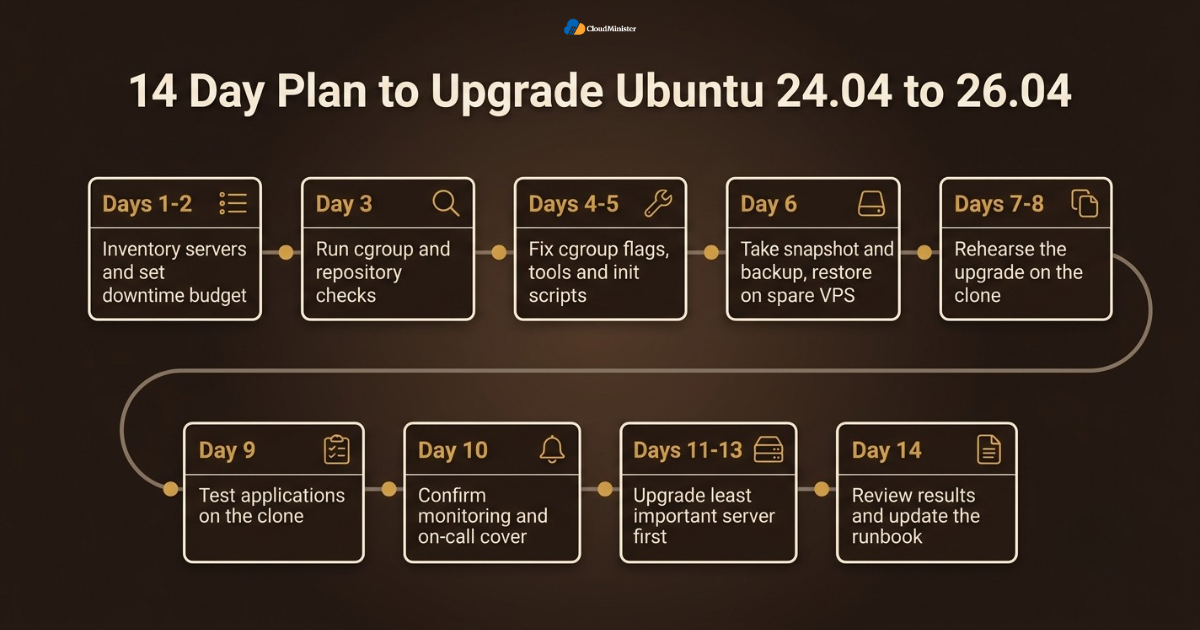
- Days 1 and 2. Inventory every server, its role, its release, and its owner. Record the downtime budget for each one. A Web Hosting Company in India can supply the server list from its control panel.
- Day 3. Run the cgroup check and the repository check on every server, and list the servers that need fixes.
- Days 4 and 5. Fix cgroup flags, update old container tools and monitoring agents, and move custom init scripts to unit files. This quick scan on Linux VPS servers in India gives you a risk list for the whole plan.
- Day 6. Take a snapshot and a second backup, then restore one of them onto a spare VPS.
- Days 7 and 8. Rehearse the upgrade on the clone, time every step, and note every prompt and every surprise.
- Day 9. Test your applications on the clone, including PHP, database, mail, and container checks. Add one more full day if you manage many Linux VPS servers in India.
- Day 10. Ask your Server Management Services in India provider to confirm monitoring, alerts, and on call cover for the window.
- Days 11 to 13. Upgrade the least important server first, watch it, and then continue with the others. Repeat the same steps each time you Upgrade Ubuntu 24.04 to 26.04 on another server.
- Day 14. Review results, update the runbook, and keep the snapshot until the observation period is over. Share the lessons with your Linux VPS Hosting in India provider so that their advice improves with each project.
Checklist: Ubuntu 26.04 Upgrade Readiness Review
- Downtime budget defined and agreed with the business
- Server confirmed on 24.04 and fully updated
- cgroup v2 confirmed with the stat command
- No cgroup v1 kernel flags left in GRUB
- Containers, units, scripts, and monitoring checked for v1 paths
- Disk space, memory, and held packages checked
- Snapshot taken and a restore tested on a spare VPS
- Databases dumped and configuration archived
- Console access and the backup SSH port plan confirmed
- Upgrade started inside tmux or screen
- Post upgrade checks and monitoring owners agreed in advance
- Snapshot kept until the observation period ends
- Plan to Upgrade Ubuntu 24.04 to 26.04 reviewed by a second person
Key Takeaways
- Canonical enabled the direct path on 29 September 2026, so you can Upgrade Ubuntu 24.04 to 26.04 with a plain do-release-upgrade on an updated server.
- cgroup v1 is removed in systemd 259, and a host that still uses it cannot be upgraded until it moves to cgroup v2.
- Ubuntu has no downgrade path, so the rollback is a restored snapshot or backup that you have tested before the window. This is the heart of any plan to Upgrade Ubuntu 24.04 to 26.04.
- Run the upgrade inside tmux, keep console access ready, and open the temporary SSH port only for the window.
- Review configuration prompts one by one, and keep your own edits on files you changed.
- PHP 8.5, PostgreSQL 18, MySQL 8.4, Python 3.14, Dovecot 2.4, and Docker 29 all need testing before production.
- A good Web Hosting Company in India with strong Server Management Services in India gives you snapshots, monitoring, and on call cover without extra hiring.
- A Server Management Company can act as a neutral reviewer of the runbook and the rollback plan, which is valuable for a first large upgrade.
- Choose Linux VPS Hosting in India that includes snapshots and console access, because they are the base of every safe rollback.
- Linux VPS servers in India that run containers need cgroup v2 checks first, and a Server Management Company can run them at scale.
Not Sure Your Rollback Plan Is Strong Enough?
Our team can review your backups, snapshot restore time, and upgrade runbook before your maintenance window begins.
Conclusion
One pattern holds in every successful project. The teams that Upgrade Ubuntu 24.04 to 26.04 without drama are the ones that prepare. They prove that the server is on cgroup v2, they take a snapshot and restore it once, and they treat the upgrade tool as the shortest and easiest part of the work. The command itself takes a few minutes, while the preparation earns the calm. A Server Management Company that has handled many such projects will tell you the same.
An upgrade is also never finished on the day of the reboot. Keep watching the logs, the graphs, and the applications until the observation period ends, and keep the snapshot until then. Write down what went well and what did not, and use those notes for the next server. If you want a safe base for this work, choose a capable Web Hosting Company in India that offers Linux VPS Hosting in India together with dependable Server Management Services in India. The same Linux VPS servers in India that run today can then stay supported for years.
Frequently Asked Questions
Can I upgrade Ubuntu 24.04 to 26.04 directly on a VPS?
Yes. Since 29 September 2026, a fully updated 24.04 server is offered 26.04.1 through sudo do-release-upgrade. Take a snapshot first, check cgroup v2, and run the tool inside tmux so that a dropped connection cannot stop it. This is the standard way to Upgrade Ubuntu 24.04 to 26.04 on a VPS.
Why does do-release-upgrade say there is no new release?
Check that the file /etc/update-manager/release-upgrades contains Prompt=lts, that the server runs 24.04 and not 22.04 or an interim release, and that sudo apt update and sudo apt full-upgrade have completed. Rollout can also reach servers in stages.
What is cgroup v2, and why does it matter for this upgrade?
cgroup v2 is the unified control group hierarchy that the kernel uses to limit and measure resources. systemd 259 in Ubuntu 26.04 removed support for cgroup v1, so a host booted with v1 cannot be upgraded and cannot run 26.04 containers. Any plan to Upgrade Ubuntu 24.04 to 26.04 must begin with this check.
How do I check whether my VPS uses cgroup v2?
Run stat -fc %T /sys/fs/cgroup/. If the answer is cgroup2fs, you are on v2. If it says tmpfs, you are on v1 or the hybrid layout, and you should remove any v1 kernel flags and reboot before the upgrade.
Can I roll back to Ubuntu 24.04 after the upgrade?
Ubuntu has no supported downgrade path. The safe rollback is to restore the snapshot or backup that you took before the upgrade. This is why testing the restore matters as much as taking the backup. Providers of Linux VPS Hosting in India often include snapshot tools, but you must still test the restore.
Should I use the -d flag with do-release-upgrade?
No. The -d flag was a workaround before Canonical opened the path from 24.04. Now a plain sudo do-release-upgrade follows the supported route.
How much free space and memory do I need?
The upgrader checks space on its own, but a practical target is at least 10 GB free on the root filesystem. Ubuntu Server 26.04 can start with 1.5 GB of RAM for small uses, and a very small VPS benefits from a temporary swap file during the upgrade. Linux VPS servers in India on very small plans should test this on a clone first.
Will my third party repositories keep working?
The upgrader disables them. After the upgrade, edit the files in /etc/apt/sources.list.d/ and switch the suite to resolute only if the vendor publishes packages for it. Otherwise keep it disabled and use the Ubuntu package. A Web Hosting Company in India can tell you which of your repositories are supported on 26.04.
Do I need outside help to upgrade a production VPS?
Not always, but a Server Management Company or a provider of Server Management Services in India can add rehearsal experience, monitoring, and a second review of the rollback plan. This is most valuable on a first large production upgrade.
How do I choose between Linux VPS Hosting in India and running my own servers?
Run your own only if you have people who can handle monitoring, backups, and on call cover. Otherwise Linux VPS Hosting in India with managed support gives you that safety net, so your team can focus on the application side of the upgrade.
Is it better to upgrade in place or build a new server?
An in place upgrade is faster for a healthy server, while a clean build suits servers that are managed as code. Both paths need a tested backup. If you decide to Upgrade Ubuntu 24.04 to 26.04 in place, keep the snapshot until the observation period ends. A Server Management Company can help you choose, and many Linux VPS servers in India are easy to rebuild from a fresh image when the data is backed up.
How long does the upgrade take?
The download and install step usually takes from several minutes to about an hour, depending on the server size and the network, so plan a window of at least one to two hours that includes checks and a reboot. A Web Hosting Company in India with a fast network can shorten the download part.

Ajay Singh Raghav is a Senior Linux System Administrator at CloudMinister Technologies, where he has spent over 4 years installing, configuring, maintaining, and troubleshooting Linux servers for hosting and cloud environments. He specializes in AWS cloud computing alongside core Linux server administration, with hands-on expertise across server management, backup and restore systems, and cPanel-based hosting environments. His day-to-day experience keeping production servers stable and secure gives him a practical, ground-level understanding of the infrastructure he writes about.