Every process running on a Linux server writes something down. A failed login attempt, a crashed service, a slow database query, a firewall rule blocking a suspicious IP, all of it lands somewhere on disk before anyone asks a single question about it. That somewhere is the collection of Linux Log Files scattered across a handful of predictable directories, and knowing how to find, read, manage, and rotate them is one of the most practical skills a system administrator or a developer troubleshooting production issue can have.
This guide walks through exactly where these system records live on a typical distribution, how to read them without getting overwhelmed, how log rotation actually works under the hood, and how to build a management routine that keeps disks from filling up and incidents from going unnoticed. It also covers the tools, commands, and habits that separate a team that catches problems early from a team that finds out about an outage from an angry customer.
For teams running production infrastructure in 2026, understanding Linux Log Files is no longer optional busywork left to whoever has root access. It is a core part of security, uptime, and compliance, and it is exactly the kind of task that a capable Server Management Company builds an entire operational discipline around.
Table of Contents
- 1. What Are Linux Log Files and Why Do They Matter?
- 2. Where to Find Linux Log Files
- 3. How to Read Linux Log Files
- 4. Why Linux Log Files Need Active Management
- 5. What Is Log Rotation and How Does It Work?
- 6. Manual Log Management vs a Managed Approach
- 7. Centralized Logging: Managing Linux Log Files at Scale
- 8. Linux Log Files and Security: What to Watch For
- 9. The Linux Log Files Management Checklist
- 10. Common Mistakes Businesses Make With Linux Log Files
- 11. When to Bring In Professional Help for Linux Log Files
- 12. Linux Log Files Management for Indian Businesses
- Conclusion
- Key Takeaways
- Frequently Asked Questions
1. What Are Linux Log Files and Why Do They Matter?
Linux Log Files are plain text or structured binary records that the operating system, the kernel, system services, and installed applications write continuously to document what happened and when. Think of them as a running diary of the server, one that never sleeps and never forgets.
- These records exist because troubleshooting a live system after the fact is nearly impossible without a written trail of what occurred before, during, and after an incident.
- Every major Linux distribution, whether it is Ubuntu, Debian, CentOS, AlmaLinux, or RHEL, ships with a logging subsystem that generates these records by default, so administrators rarely need to configure basic logging from scratch.
- This system data forms the primary evidence trail used during a security audit, since regulators and auditors routinely ask for proof of who accessed a system and when.
- Linux held roughly 51.3 percent of the global server operating system market in 2026, which means the sheer volume of log data generated across production infrastructure worldwide has grown accordingly.
- A business that already depends on a trusted Web Hosting Company in India for its websites and applications is also, whether it realizes it or not, depending on that provider’s discipline around reading and acting on Linux Log Files.
- Founders who have never opened a terminal often assume logging is invisible background noise, but these records are frequently the first and only clue that something is going wrong before it becomes a full outage.
- Comparing a Server Management Services in India shortlist against actual support ticket response times gives a far more realistic picture than a marketing page.
- A dependable Server Management Services in India team publishes its scaling tiers clearly rather than requiring a sales call just to understand the next pricing bracket.
- A Server Management Services in India provider comparing itself against a purely self-managed setup should be able to lay out the cost trade-off plainly, without hedging.
- Founders new to server administration often ask a Server Management Company to define its log management scope in writing, since the term managed is used loosely across the hosting industry.
- A well-run Server Management Services in India provider treats log review as a daily task, not a forensic exercise reserved for after something breaks.
- Businesses that already work with an established Web Hosting Company in India for their websites often extend that same relationship to backend server support as their infrastructure needs grow.
- A capable Server Management Company typically walks new customers through exactly how log review fits into its daily operations during onboarding, well before the first invoice is issued.
Before troubleshooting any server issue, check Linux Log Files first. In the majority of cases, the exact error, timestamp, and affected process are already sitting there waiting to be read.
- A Web Hosting Company in India worth a long-term contract should be comfortable walking through its log handling process step by step, not just pointing to a feature list.
- A Web Hosting Company in India willing to share a sample incident report shows a level of operational maturity that a feature list alone cannot demonstrate.
- A Web Hosting Company in India that operates its own domestic infrastructure typically gives clearer, faster answers about log storage location than a reseller would.
- A Server Management Services in India A provider that also understands trading or fintech workloads can usually explain trade-off decisions more clearly than a generalist reseller.
- Businesses that already work with a trusted Server Management Services in India provider for their websites and email often extend that relationship into their backend infrastructure as well.
2. Where to Find Linux Log Files
The location of Linux Log Files is fairly consistent across distributions, which makes this one of the easier parts of Linux administration to learn once and reuse everywhere.
2.1 The /var/log Directory
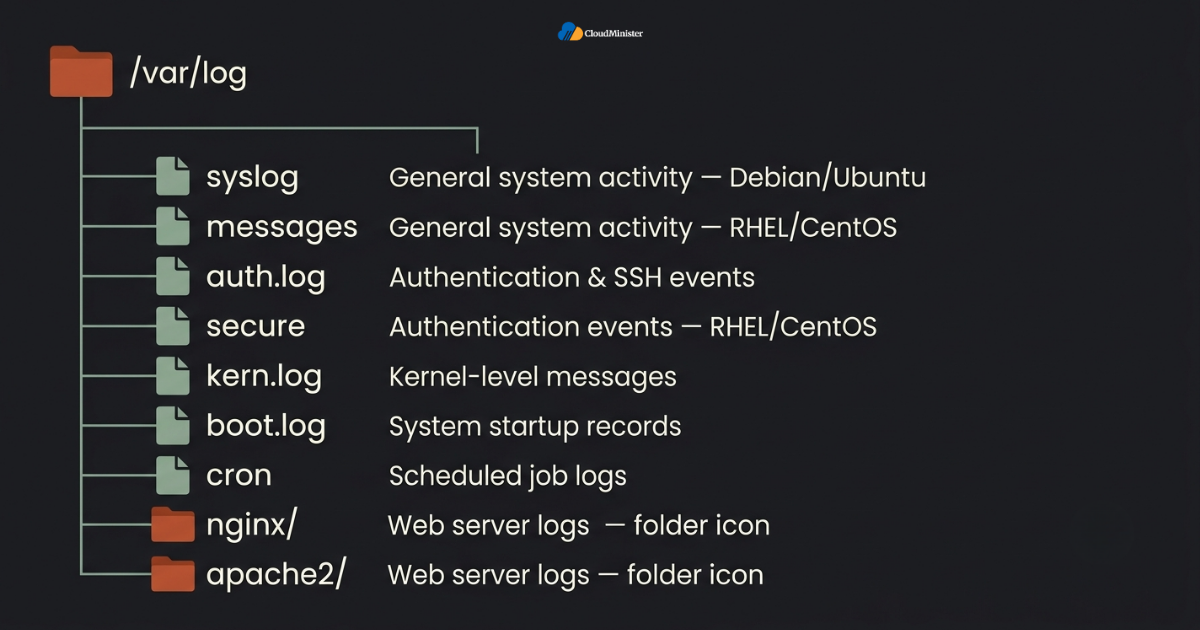
- /var/log is the default home for almost all Linux Log Files on every major distribution, and it is the first place any administrator should look when something goes wrong.
- Inside this directory, entries are typically organized by service or subsystem, so a database server, a web server, and the kernel each write their own dedicated file rather than one giant undifferentiated log.
- Running a simple listing command against this directory is usually the fastest way to get an overview of every category of log data currently active on a given machine.
2.2 Common System Log Files and What They Track
- /var/log/syslog (Debian and Ubuntu based systems) or /var/log/messages (RHEL and CentOS based systems) captures general system activity and is usually the broadest of all system records on a distribution.
- /var/log/auth.log or /var/log/secure records authentication events, including SSH logins, sudo escalations, and failed password attempts, making this one of the most security-critical files on any server.
- /var/log/kern.log holds kernel-level messages, useful for diagnosing hardware issues, driver conflicts, and low-level system errors.
- /var/log/boot.log captures what happened during system startup, which matters when a server fails to come back up cleanly after a reboot.
- /var/log/dmesg is a snapshot of kernel ring buffer messages, often reviewed right after boot to catch early hardware or driver warnings.
- /var/log/cron or the equivalent cron entries inside syslog track every scheduled job execution, which is essential when a nightly backup or automation script silently stops running.
2.3 Application-Specific Log Files
- Web servers like Nginx and Apache write their own dedicated log files, typically found under /var/log/nginx/ and /var/log/apache2/ or /var/log/httpd/ respectively, split into access logs and error logs.
- Database systems such as MySQL, MariaDB, and PostgreSQL maintain their own logs, usually configurable to a custom path, that record slow queries, connection errors, and replication status.
- Control panels like cPanel and WHM generate their own logs as well, and reviewing those alongside standard system records is especially important after a known vulnerability disclosure, a topic covered in more depth in our breakdown of the cPanel and WHM authentication bypass vulnerability, which shows how quickly log evidence can reveal an attempted exploit.
- A Web Hosting Company in India that also offers DevOps Services & Solutions can usually apply the same log discipline to custom, in-house applications as it does to standard services.
- Custom applications built in-house often route their own log output to whatever path the development team configures, so documenting these locations is part of good onboarding for any new server.
- Consolidating hosting, monitoring, and DevOps Services & Solutions under one accountable partner tends to simplify support during a live incident.
- A business evaluating DevOps Services & Solutions for the first time should treat the vendor comparison the same way it would treat any other infrastructure decision.
- Businesses evaluating DevOps Services & Solutions for the first time should treat log management the same way they would treat any other vendor selection, starting with a written scope of work.
- A trustworthy Server Management Services in India provider documents exactly which paths it monitors for every client server as part of a standard onboarding checklist.
- Businesses that outsource this documentation step to a dedicated Server Management Company save themselves the trouble of tracking non-standard log paths manually.
Keep a simple internal document listing every non-standard log path on each server. When an incident happens at 2 a.m., nobody wants to guess where a custom application is writing its Linux Log Files.
- A business new to DevOps Consulting Services should request references from existing customers running a similar workload before signing anything.
- Founders comparing DevOps Consulting Services providers should ask each one to define its log management scope the same way, since definitions vary widely across the market.
- Comparing a Web Hosting Company in India shortlist against their published support response times gives a realistic picture of day-to-day reliability.
- A Web Hosting Company in India that already manages domains and email for a business is well positioned to extend that same relationship into structured server support.
3. How to Read Linux Log Files
Finding Linux Log Files is only half the job. Reading them efficiently, especially on a busy production server where a single file can grow to millions of lines, requires a specific set of commands and habits.
3.1 Basic Commands for Reading Log Files
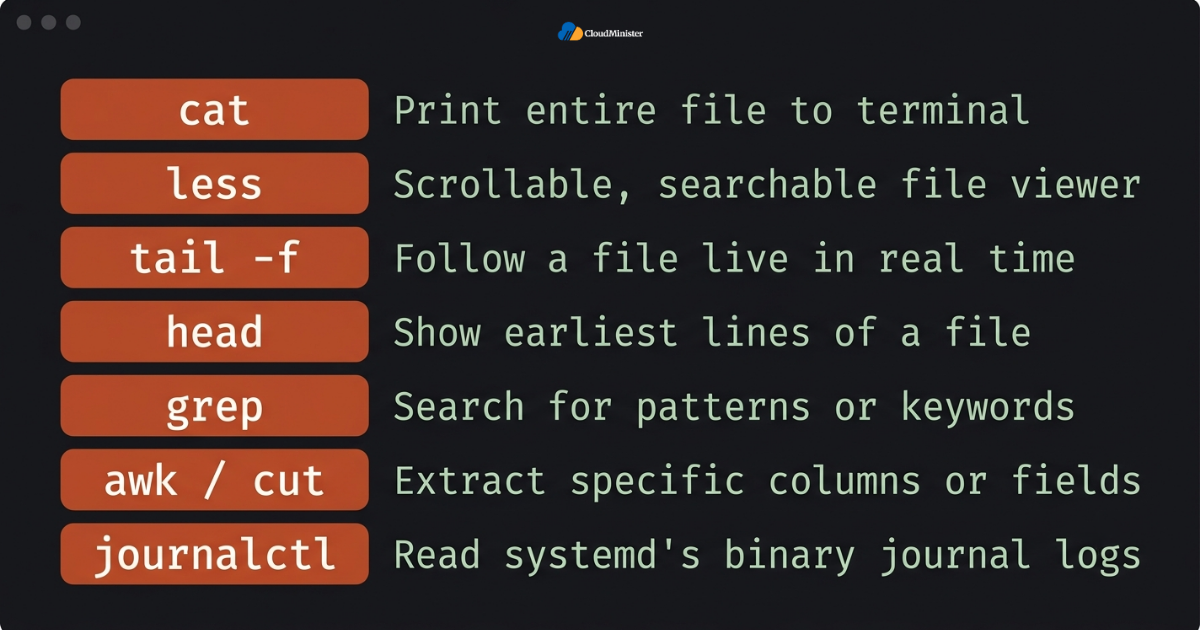
- cat prints an entire file to the terminal, which works fine for small logs but becomes unusable on large ones.
- less opens a file for scrollable, searchable viewing without loading the whole thing into memory at once, making it the preferred way to browse large log files.
- tail shows the most recent lines of a file, and combined with the -f flag it follows the file live, which is the single most-used command when actively watching activity during a deployment or an incident.
- head shows the earliest lines of a file, useful when trying to find when a particular issue first started appearing.
- grep searches for specific patterns, error codes, or keywords, and is arguably the most important tool for filtering noise out of large log files quickly.
- awk and cut help extract specific columns or fields from structured log entries, such as pulling only IP addresses out of an access log.
- journalctl is the dedicated command for systems using systemd, and it reads the binary journal rather than plain text files, offering powerful filtering by service, time range, and priority level.
3.2 Reading journalctl-Based Logs
- Modern distributions using systemd store many entries in a binary journal rather than traditional flat-file records, which means journalctl becomes the primary interface for reading them.
- Filtering a specific unit, such as a particular service, lets an administrator isolate exactly the records relevant to one application without wading through unrelated system noise.
- Filtering priority level, such as showing only errors and above, is one of the fastest ways to cut through routine informational messages inside busy logs.
- Filtering time range makes it possible to pull exactly the window of activity that corresponds to a reported incident, rather than scrolling through an entire day of output.
3.3 Understanding Log Severity Levels
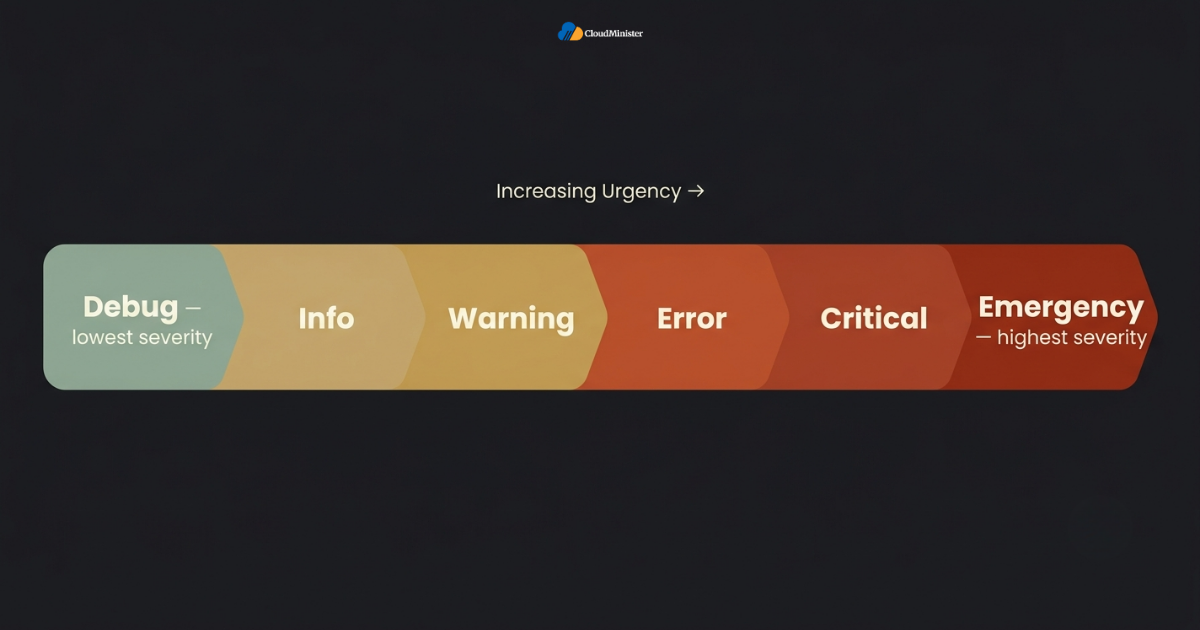
- Most log entries follow a standard severity scale, typically running from debug and info at the low end, through warning and error, up to critical, alert, and emergency at the top.
- Understanding this scale helps an administrator to triage quickly, since not every line demands the same urgency of response.
- A Server Management Company that trains its support engineers on severity triage tends to respond faster during genuine emergencies than one relying purely on automated alerts.
- A recurring warning that never escalates might simply need monitoring, while a single critical entry buried inside otherwise routine output often deserves immediate investigation.
- Teams that lack this expertise in-house often turn to DevOps Consulting Services specifically to build repeatable log-reading habits across their engineering team.
- A Server Management Company with strong Linux fundamentals can train an internal team to read these files confidently, rather than only relying on outside support during an incident.
Never assume a quiet log file means a quiet server. Some attacks specifically target logging services to suppress or delete evidence. If Linux Log Files show unexplained gaps or sudden silence from a service that normally writes constantly, treat that gap itself as a signal worth investigating.
- A Server Management Services in India provider that publishes clear escalation timelines tends to be easier to budget around than one that requires a call for every detail.
- Teams that lack a formal escalation process often benefit from DevOps Consulting Services simply to define who owns each category of alert.
4. Why Linux Log Files Need Active Management
Left unmanaged, Linux Log Files grow indefinitely, consume disk space, slow down search performance, and eventually cause outages of their own. Active management is not optional on any server expected to run for more than a few weeks.
- A disk filling up because of unmanaged log data is one of the most common, and most preventable, causes of unplanned downtime on self-managed servers.
- Large, unrotated log files take longer to search, which slows down incident response exactly when speed matters most.
- DevOps Consulting Services engagements often begin with exactly this kind of compliance gap analysis before any new tooling is introduced.
- Compliance frameworks in many regulated industries require these records to be retained for a defined period, which means management also has to account for structured archiving, not just deletion.
- According to recent industry breach research, the average time to identify and contain a security incident sits around 181 days for detection alone, and properly managed Linux Log Files paired with active monitoring are consistently cited as the difference between catching an intrusion early and discovering it months later.
- Businesses that rely on a dedicated DevOps Services & Solutions partner typically have log management baked into their deployment pipelines from day one, rather than bolted after a disk-space incident.
- A dependable Server Management Services in India provider will proactively rotate, compress, and archive server records as a standard part of server upkeep, not as an emergency response.
- A business without in-house DevOps capacity often finds that DevOps Services & Solutions from an outside partner is the fastest way to close this operational gap without a full-time hire.
- Comparing the cost of DevOps Consulting Services against the cost of a disk-space outage usually makes the case for proactive management fairly easy to justify.
5. What Is Log Rotation and How Does It Work?
Log rotation is the process of periodically archiving, compressing, and eventually deleting old log files so that active logs stay manageable, and disk usage stays under control. A Server Management Company that standardizes its logrotate templates across every client server reduces configuration drift and keeps support predictable.
5.1 The logrotate Utility
- logrotate is the standard utility that ships with nearly every major Linux distribution specifically to automate rotation of these files without manual intervention.
- Configuration for logrotate typically lives in /etc/logrotate.conf with individual service configurations dropped into /etc/logrotate.d/, which means most applications that install cleanly on Linux already ship with their own rotation rules.
- A logrotate configuration defines rotation frequency, the number of archived copies to retain, whether old log files should be compressed, and what command should run after rotation, such as restarting a service, so it starts writing to a fresh file.
- A Web Hosting Company in India offering transparent renewal pricing avoids the common surprise of introductory rates increasing sharply after the first term.
- Businesses working with DevOps Services & Solutions often have rotation strategy decisions made for them as part of infrastructure-as-code templates applied at server provisioning time.
5.2 Common Rotation Strategies
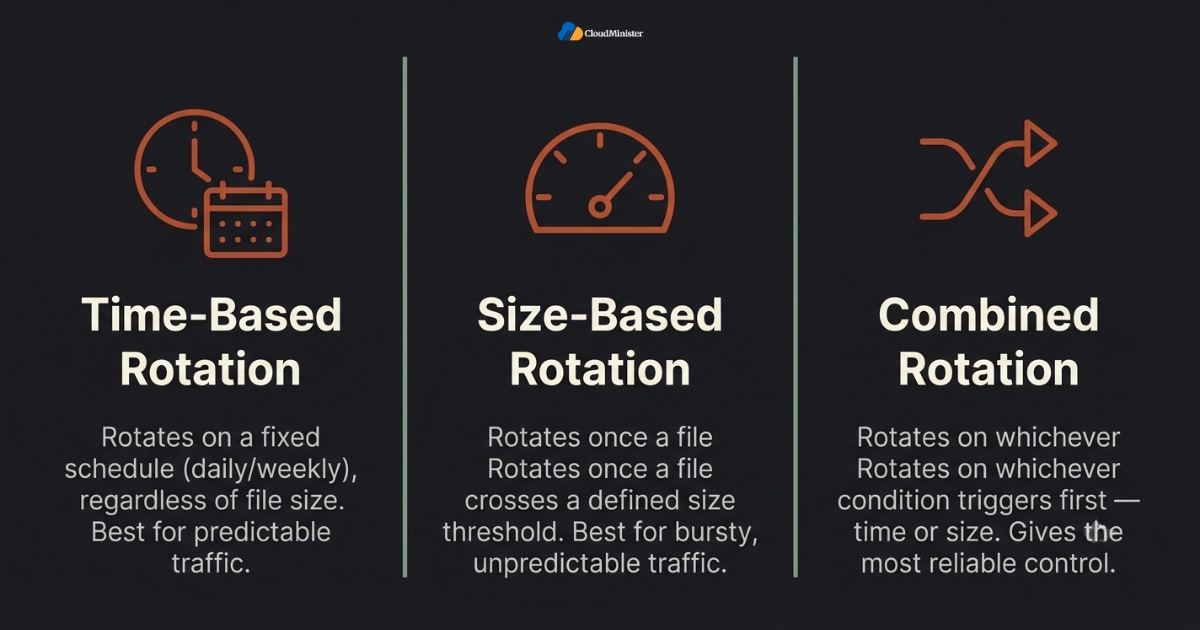
- Time-based rotation rotates entries on a fixed schedule, such as daily or weekly, regardless of file size, which works well for predictable, steady traffic patterns.
- Size-based rotation rotates a file once it crosses a defined size threshold, which suits applications with unpredictable or bursty traffic where a fixed schedule could leave a single log to balloon far too large.
- Combined strategies rotate on whichever condition triggers first, time or size, giving the most reliable control over how large any single log file is allowed to grow.
5.3 Compression and Retention
- Compressing rotated files, typically using gzip, can shrink archives dramatically, since text-based log data compresses extremely well due to its repetitive structure.
- A Server Management Services in India provider should be able to state its default retention window without hesitation when asked during a sales conversation.
- Retention policies define how many rotated copies are kept before the oldest ones are permanently deleted, and this number should be set deliberately rather than left at a default value.
- Businesses in regulated sectors should align their retention period for this data with whatever compliance framework applies to their industry, rather than assuming a generic default is sufficient.
- Businesses working with DevOps Services & Solutions providers often get this off-server archiving configured automatically as part of the initial deployment pipeline.
- Sending rotated archives to a separate storage location, whether a dedicated logging server or cloud storage, protects that historical record even if the primary server is compromised or fails entirely.
A rotation policy that has never been tested is a policy nobody can trust. Periodically confirm that log rotate is running as scheduled, that compressed archives are readable, and that disk usage trends downward after each rotation cycle.
- Skipping a trial period before committing to a long-term DevOps Consulting Services agreement removes the opportunity to test real support responsiveness.
- A DevOps Consulting Services engagement focused purely on deployment automation without addressing log rotation only solves half of the operational picture.
- A Server Management Services in India provider that documents its rotation schedule clearly gives a business confidence that disk space will not become an unplanned emergency.
- Businesses evaluating a Server Management Company should ask specifically how rotation and retention policies are configured for each service running on a shared server.
6. Manual Log Management vs a Managed Approach
Handling server logs manually is possible on a single server with light traffic, but the approach that works for one machine rarely scales cleanly to a growing fleet of servers. A Server Management Services in India provider that has already solved this trade-off for other clients can usually explain the comparison without hesitation.
| Factor | Manual Management | Managed Approach |
| Log rotation setup | Configured once, often forgotten | Standardized and monitored |
| Alerting on anomalies | Reactive, after complaints | Proactive, real-time |
| Centralized log storage | Rare, siloed per server | Common, consolidated |
| Compliance readiness | Assembled under pressure | Documented continuously |
| Time investment | High, ongoing | Minimal for the business |
- Businesses without an internal DevOps function tend to under-invest in reviewing Linux Log Files simply because nobody owns the task explicitly, which is exactly the gap that DevOps Consulting Services and structured server oversight are designed to close.
- A team that treats log review as a daily habit rather than an emergency reference catches slow-building problems, like a gradually filling disk or a creeping memory leak, long before they become outages.
- Our detailed guide on 24×7 server monitoring covers exactly how continuous monitoring complements Linux Log Files, since alerts catch what a human staring at a screen all day simply cannot.
- Agencies and businesses managing multiple servers often reach a tipping point where manually reviewing log data across every machine becomes unsustainable, which is typically when they start evaluating a dedicated Server Management Company.
- DevOps Services & Solutions providers frequently bundle log review, alerting, and rotation into a single managed offering, removing the need to stitch together separate tools.
- Founders comparing a Web Hosting Company in India against a purely self-managed setup should weigh their own operational bandwidth honestly before deciding.
Tired of Manually Chasing Down Log Files?
Our Server Management team handles log rotation, monitoring, and security review for you, so nothing slips through unnoticed.
7. Centralized Logging: Managing Linux Log Files at Scale
Once a business runs more than a handful of servers, reading through server logs one machine at a time stops being practical, and centralized logging becomes the sensible next step.
- Centralized logging tools collect entries from many servers into a single searchable platform, removing the need to SSH into each machine individually during an incident.
- Teams that have already vetted one DevOps Consulting Services vendor for infrastructure work often extend that same due diligence to log management specifically.
- A Web Hosting Company in India offering both hosting and DevOps Services & Solutions under one roof gives a business a single accountable partner for the whole stack.
- Popular open-source options for aggregating log data include the ELK stack (Elasticsearch, Logstash, and Kibana), Graylog, and Loki paired with Grafana, each offering different trade-offs in complexity and resource usage.
- A Web Hosting Company in India running its own domestic infrastructure can typically offer faster, more consistent centralized log storage than a reseller of overseas capacity.
- Shipping these records off the originating server also protects the historical trail if the server itself becomes unreachable or compromised during an incident.
- Centralized dashboards built on top of aggregated log data make it far easier to spot patterns across a fleet, such as the same suspicious IP address probing multiple servers within minutes of each other.
- A capable Server Management Services in India provider typically already runs centralized logging infrastructure, meaning a business does not need to build and maintain that tooling internally.
- Teams considering this shift should read our overview of leading server management service providers to understand how different providers structure their approach to Linux Log Files and centralized monitoring before committing to one.
- A Server Management Company that already runs centralized tooling for one client can often extend that same infrastructure to a new client at a fraction of the setup cost.
- Businesses considering DevOps Consulting Services for the first time should ask whether centralized logging is part of the standard engagement or billed as a separate add-on.
8. Linux Log Files and Security: What to Watch For
Security is one of the primary reasons Linux Log Files matters so much, since they frequently contain the earliest, and sometimes the only, evidence of an attempted intrusion.
- A Server Management Company with documented security procedures can usually produce a sample incident report on request, which is a useful test of how seriously it takes this responsibility.
- Repeated failed login attempts inside authentication-related records are one of the clearest early indicators of a brute-force attack in progress.
- Unexpected privilege escalation events, such as an unfamiliar account gaining sudo access, should always be cross-referenced against server records rather than dismissed as routine.
- A Server Management Company that reviews logs daily is far more likely to notice this kind of gap quickly than a team that only checks in after a complaint.
- Sudden gaps or truncation inside these files can indicate an attacker attempting to cover their tracks, since log tampering is a well-documented tactic once initial access is gained.
- Tools like fail2ban actively parse log entries in real time and automatically block IP addresses showing repeated malicious behavior, turning passive log data into an active defense mechanism.
- The recent authentication bypass disclosed in cPanel and WHM is a strong reminder of why reviewing this data after any major vulnerability disclosure matters, since a careful review can reveal whether a server was probed or exploited before a patch was applied.
- A thorough Server Management Company documents every notable security event found inside this data, which becomes invaluable during any later compliance audit or incident review.
Linux Log Files should be treated as sensitive data in their own right. They often contain IP addresses, usernames, and enough detail about internal infrastructure to be useful to an attacker if the logs themselves are exposed or left world readable.
- Traders and e-commerce businesses alike benefit from asking a DevOps Services & Solutions provider for a real incident report before signing any long-term agreement.
- Reviewing DevOps Services & Solutions contracts against actual incident history, rather than the original sales pitch, is a healthy habit for any growing engineering team.
- Regulated businesses working with a Server Management Services in India partner should confirm that security-relevant events are flagged and escalated, not just archived silently.
- A Web Hosting Company in India that takes security seriously will typically walk a prospective customer through its exact incident escalation process before any contract is signed.
9. The Linux Log Files Management Checklist
Use this checklist to evaluate whether log management on a given server, or across an entire fleet, is being handled in the way it should be.
- Businesses shortlisting a Server Management Services in India vendor should request this exact checklist during the sales conversation rather than after signing.
- logrotate configured and confirmed to be running on the expected schedule for every application generating log data
- Retention period documented and aligned with any applicable compliance requirement
- Compression enabled for archived Linux Log Files to control long-term disk usage
- Centralized logging in place for any environment running more than a couple of servers
- Alerting configured for critical entries inside Linux Log Files, not just manual review after the fact
- DevOps Consulting Services engagements frequently include an access-control review as a standard first step, since over-permissioned log access is a common finding.
- Access to raw log files restricted to authorized personnel only
- Backup copies of critical Linux Log Files stored separately from the originating server
- Disk usage trends reviewed periodically to confirm rotation is actually preventing growth
Schedule a quarterly review of every logrotate configuration file on production servers. Applications get added, removed, and updated over time, and a Linux Log Files policy that was correct a year ago often quietly drifts out of date.
- A provider that publishes a standard checklist for new clients tends to have fewer surprises during the first few months of any engagement.
- Businesses that already use DevOps Services & Solutions for deployment pipelines should confirm that those same pipelines include log rotation and retention by default.
- A growing business evaluating DevOps Services & Solutions for the first time should treat log management as a line-item worth asking about explicitly, not an assumed inclusion.
- Agencies standardizing on one DevOps Services & Solutions partner across multiple client accounts tend to keep support quality more consistent than spreading work across several vendors.
- Teams that have compared more than one DevOps Consulting Services provider often find that the depth of their log-handling process is the clearest differentiator between otherwise similar quotes.
10. Common Mistakes Businesses Make With Linux Log Files
- Choosing DevOps Consulting Services purely on price without confirming what log management tasks are actually included is a common and avoidable mistake.
- Assuming logrotate is running correctly without ever verifying it, which leaves entries growing unchecked for months at a time.
- Deleting log files manually during a disk-space emergency without first checking whether that data was required for compliance or an ongoing investigation.
- Ignoring application-specific records while only monitoring the standard system logs, missing errors that never surface anywhere else.
- Storing log files with overly permissive file permissions, exposing sensitive data to any user on a shared or compromised system.
- Treating log review as a one-time setup task rather than an ongoing operational habit built into daily or weekly routines.
- Failing to test that backups of this data can actually be restored and searched when they are eventually needed.
- Assuming a general-purpose Web Hosting Company in India automatically provides the same depth of log management that a dedicated Server Management Company or specialized DevOps Services & Solutions provider offers.
- If any Web Hosting Company in India automatically includes deep log management is a common and costly misconception worth clarifying in writing.
- Skipping a conversation with a dedicated Server Management Company before an audit, rather than after, is one of the more expensive mistakes a regulated business can make.
11. When to Bring in Professional Help for Linux Log Files
Not every business needs to build an internal team dedicated to log management, but every business should honestly assess whether its current approach is sustainable as it grows.
- A reputable Web Hosting Company in India can usually walk a prospective customer through this exact comparison of managed versus self-managed log handling without hesitation.
- Startups and small teams without dedicated infrastructure staff often benefit the most from outsourcing this responsibility, since it removes a task that easily gets deprioritized under product pressure.
- E-commerce platforms with unpredictable seasonal traffic need to log data reviewed actively during peak periods, when unusual patterns are both more likely and more costly if missed.
- A Server Management Company familiar with regulatory expectations in India gives a growing business a single point of accountability for log retention and reporting.
- Regulated industries handling sensitive data should treat structured log retention as a compliance requirement, not a nice-to-have, and a documented process matters as much as the technical setup itself.
- Businesses already comparing infrastructure options may find it useful to revisit our fully managed hosting guide, since proper handling of Linux Log Files is one of the specific responsibilities a genuinely comprehensive managed hosting plan should include.
- A Server Management Company that already handles patching, monitoring, and backups is typically well positioned to fold log management into the same service, rather than treating it as a separate add-on.
- Businesses evaluating DevOps Consulting Services should specifically ask how the provider handles Linux Log Files across environments, since this is a practical, concrete question that reveals a lot about the depth of a provider’s actual process.
- Teams that already work with a Web Hosting Company in India for domains and email often find it operationally simpler to extend that relationship to include structured log management for their backend infrastructure as well.
- A provider offering both general infrastructure support and dedicated DevOps Services & Solutions gives a growing business a single accountable partner for everything from server setup to ongoing review of Linux Log Files.
- Regulated industries in particular benefit from formal DevOps Consulting Services, since a documented, provider-managed process is easier to demonstrate during an audit than an informal internal habit.
- A Server Management Services in India partner that already supports both e-commerce and SaaS workloads tends to bring broader troubleshooting experience to any new engagement.
12. Linux Log Files Management for Indian Businesses
The practical considerations around server log management look slightly different for a business operating primarily out of India compared to a global enterprise with unlimited infrastructure budget.
- Time-zone-aligned support matters when an anomaly inside Linux Log Files needs immediate attention, since an alert generated at 2 a.m. IST should not wait for a support desk on the other side of the world to wake up.
- Data residency considerations extend to these records as well, since log files often contain identifying information. Under India’s DPDPA, cross-border data transfer is restricted only for specific countries notified by the government, not a blanket requirement to store data within India, so businesses should confirm where log archives are stored and ensure that location aligns with applicable regulatory requirements, rather than assuming domestic storage is mandatory by default.
- Comparing quotes from more than one DevOps Services & Solutions provider before committing helps a business understand what a fair market price actually looks like.
- Cost-conscious startups should confirm whether basic log rotation and monitoring is already included in their hosting plan before assuming they need a separate paid tool.
- A Web Hosting Company in India operating its own domestic data centers can typically offer more consistent support around server records than an overseas brand reselling capacity through a distant regional partner.
- Traders and businesses running latency-sensitive platforms increasingly evaluate DevOps Consulting Services with the same monitoring discipline used for general web hosting.
- A DevOps Consulting Services provider willing to walk through a past incident in detail demonstrates a level of transparency that a marketing page alone cannot.
- A transparent Server Management Services in India vendor will publish its log management scope clearly rather than requiring a sales call just to understand what is included.
- Businesses that already trust a particular Server Management Services in India provider for patching and backups should ask directly whether log review and centralized logging are part of that same engagement.
- Agencies managing several client servers often standardize their approach to log management across every account specifically to keep support response times predictable and consistent.
- A Server Management Company with a documented onboarding process will typically walk up a new customer through exactly how log data is handled during the first conversation, well before any contract is signed.
- Founders evaluating DevOps Consulting Services locally should request a sample of how a provider reports findings from Linux Log Files, since a vague answer here is often a sign of a vague process everywhere else.
- A Web Hosting Company in India with transparent, published pricing tiers is generally easier to budget around than one that requires a sales call for every quote about log management scope.
- Reviewing a Server Management Company contract against actual usage data, rather than the original sales estimate, is a healthy habit for any business running production infrastructure.
- A Server Management Services in India provider willing to share anonymized case studies from past incidents demonstrates a level of transparency that a marketing page alone cannot.
- Businesses that have already vetted DevOps Services & Solutions for one project often extend that same relationship to backend log management and monitoring later.
Conclusion
Linux Log Files sit quietly in the background of every server, recording exactly what happened whether anyone is watching or not. The businesses that treat this data as a foundation of their operational discipline, reviewing it regularly, rotating it properly, and centralizing it as they scale, consistently catch problems earlier and recover from incidents faster than those who only open a log file after something has already gone wrong.
Whether that discipline is built in-house or delegated to a trusted Server Management Company, DevOps Consulting Services provider, or a full-service Web Hosting Company in India, the underlying principle stays the same: Linux Log Files are only useful if somebody is actually reading them.
Not Sure If Your Logs Are Actually Being Managed?
Talk to our team for a quick, no-pressure review of your current log rotation, retention, and monitoring setup.
Key Takeaways
- Linux Log Files live primarily under /var/log, organized by system component and individual application.
- Commands like tail, grep, less, and journalctl are the core toolkit for reading Linux Log Files efficiently.
- logrotate automates the rotation, compression, and retention of Linux Log Files so disks do not fill up unnoticed.
- Centralized logging becomes essential once Linux Log Files are spread across more than a handful of servers.
- Security incidents are frequently first visible inside these records, long before any customer-facing symptom appears.
- A dedicated Server Management Services in India provider or DevOps Services & Solutions partner can fold log management into a broader, ongoing infrastructure practice.
Frequently Asked Questions
Where are Linux Log Files stored by default?
Most Linux Log Files are stored under the /var/log directory, with individual applications and system components each writing to their own dedicated file inside that same location.
What is the difference between syslog and journalctl for reading logs?
Syslog-based records are plain text files that can be read with standard tools like cat, less, and grep, while journalctl reads a structured binary journal used by system-based distributions and offers more advanced filtering by service, time, and priority.
How often should Linux Log Files be rotated?
This depends on traffic volume and compliance requirements, but daily rotation with compression and a retention window of several weeks to a few months is a common, sensible default for most production environments.
Can Linux Log Files be safely deleted to free up disk space?
Only after confirming they are not required for an ongoing investigation or a compliance retention period. Properly configured log rotation is a far safer long-term solution than manually deleting Linux Log Files during a disk-space emergency.
Do I need centralized logging for a single small server?
Not necessarily. Centralized logging becomes valuable once a business is managing multiple servers, but even a single server benefits from consistent rotation and periodic review of its log data.
Does a managed hosting plan usually include log management?
A genuinely comprehensive managed hosting plan should include rotation, monitoring, and review of Linux Log Files as a standard part of the service, though the exact scope varies by provider and should always be confirmed in writing.

Ajay Singh Raghav is a Senior Linux System Administrator at CloudMinister Technologies, where he has spent over 4 years installing, configuring, maintaining, and troubleshooting Linux servers for hosting and cloud environments. He specializes in AWS cloud computing alongside core Linux server administration, with hands-on expertise across server management, backup and restore systems, and cPanel-based hosting environments. His day-to-day experience keeping production servers stable and secure gives him a practical, ground-level understanding of the infrastructure he writes about.