This guide is the definitive, technically accurate walkthrough for setting up a production-grade CI/CD pipeline on AWS in 2026. Whether you are a startup scaling your first cloud infrastructure or an enterprise modernising legacy deployments, this step-by-step guide covers the complete AWS native toolchain — from CodeCommit and CodeBuild to CodeDeploy, CodePipeline, and ECS — along with security hardening, cost benchmarks, DPDPA 2023 compliance considerations for Indian businesses, and the critical questions every team must answer before going live.
Software teams that hesitate on CI/CD adoption are paying for it — in slower release cycles, higher defect rates, and ballooning infrastructure costs. Organisations that implement DevOps practices achieve deployment frequencies up to 46 times higher than low-performing teams, and the DevOps market is on track to surpass $20 billion globally by 2026. Setting up an automated delivery pipeline on AWS is the most practical entry point for teams looking to operationalise DevOps at scale — AWS provides a tightly integrated, battle-tested toolchain that handles source control, build automation, testing, and deployment without requiring third-party CI/CD platforms for most use cases.
This guide gives you the exact, technically accurate steps to configure a full CI/CD pipeline on AWS, the architectural decisions you must make at each stage, and the operational safeguards that separate a production-grade pipeline from a development prototype. Every team — from two-person startups to hundred-engineer enterprises — will find a directly applicable configuration path in the sections below.
1. What Is a CI/CD Pipeline on AWS and Why It Matters in 2026
Before configuring a single AWS service, the definition requires precision. A CI/CD pipeline on AWS is a fully automated software delivery workflow that:
- Detects code changes in a source repository and triggers the pipeline automatically
- Runs automated build and compilation processes against every commit
- Executes unit, integration, and security tests before any artefact reaches a deployment stage
- Packages and publishes validated build artefacts to a registry or storage service
- Deploys validated artefacts to target environments — development, staging, UAT, and production — through defined promotion gates
- Monitors deployments and triggers automatic rollbacks on failure conditions
The emphasis in 2026 is on the word automated. A pipeline that includes manual approval gates at deliberate checkpoints — such as production promotions — is still a valid CI/CD pipeline on AWS. What distinguishes a genuine pipeline from a scripted deployment process is the automation of build, test, security, and artefact stages; human approval at high-risk gates is an intentional design choice, not a disqualifier.
The continuous integration tools market is valued at $1.4 billion and is forecast to expand to $3.72 billion by 2029, growing at a CAGR of 21.18% — driven precisely by demand for the kind of AWS-native automation this guide covers. Teams that invest in a well-architected delivery pipeline on AWS today are building a foundation that will remain operational and scalable for the next three to five years.
Before you provision a single AWS resource, map your current deployment process on paper — including every manual step. This mapping exercise will tell you exactly where your CI/CD pipeline on AWS needs to insert automation gates, approval stages, and rollback triggers. Teams that skip this step build pipelines that are technically correct but operationally incomplete.
2. AWS CI/CD Toolchain: What Each Service Does
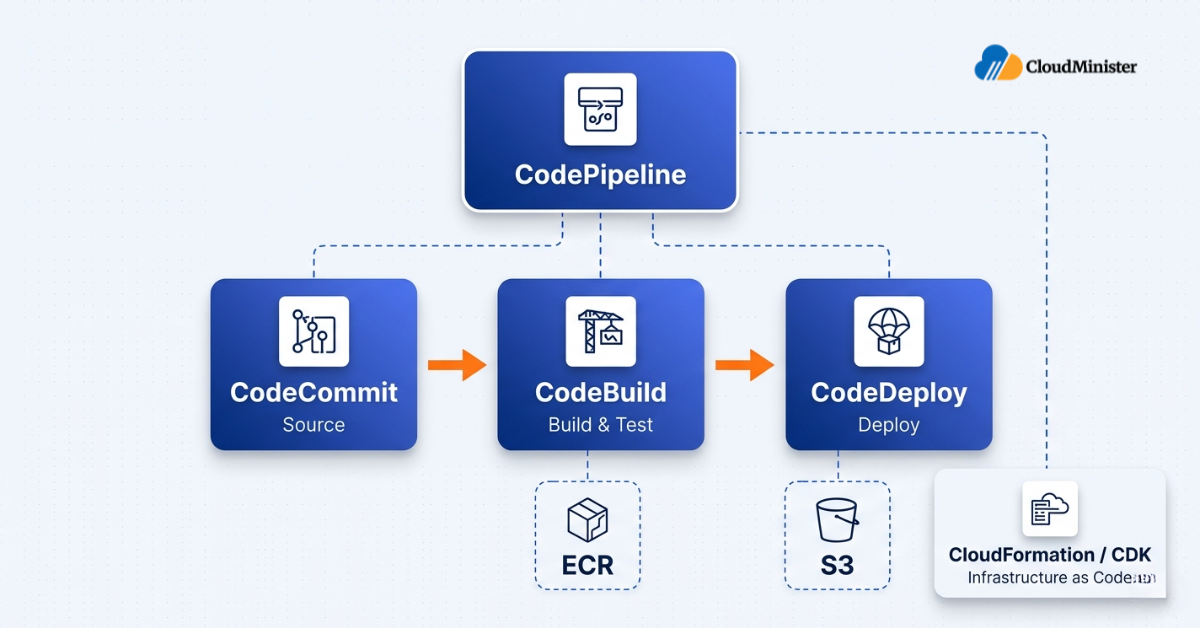
The native AWS CI/CD toolchain consists of several core primary services, each with a specific function in the pipeline. Understanding these before configuration prevents architectural mistakes that are expensive to undo. As a trusted web hosting provider in India with deep AWS infrastructure experience, CloudMinister recommends starting with this native stack before introducing third-party tools.
| AWS Service | Function in CI/CD Pipeline | Primary Use Case |
| AWS CodeCommit | Managed Git repository — source control layer | Private Git repositories with IAM-based access control |
| AWS CodeBuild | Fully managed build service — compile, test, package | Build automation without managing build servers |
| AWS CodeDeploy | Automated deployment service — EC2, ECS, Lambda | Blue/green and rolling deployments with rollback capability |
| AWS CodePipeline | Continuous delivery orchestration — connects all stages | End-to-end pipeline orchestration and visualisation |
| Amazon ECR | Container image registry | Storing and versioning Docker images for ECS/EKS deployments |
| AWS CloudFormation / CDK | Infrastructure as Code | Provisioning pipeline infrastructure declaratively |
In 2026, many teams complement this native stack with GitHub Actions as the CI trigger layer, using AWS CodeDeploy and CodePipeline for deployment. Both architectures are valid — this guide covers the fully AWS-native path, which is optimal for teams with data residency requirements or teams already deeply embedded in the AWS ecosystem.
Build a Production-Grade CI/CD Pipeline on AWS
Stop managing deployments manually. Explore our full DevOps service stack — pipeline architecture, security hardening, multi-environment setup, and managed operations — built for Indian businesses scaling on AWS.
3. Prerequisites: What You Need Before Building Your CI/CD Pipeline on AWS
Jumping into configuration without these prerequisites in place is the single most common cause of pipeline failures in the first week of operation. If your team lacks internal AWS expertise, engaging DevOps Consulting Services in India at the prerequisites stage — rather than after configuration mistakes have already been made — is the operationally rational path.
3.1 AWS Account and IAM Configuration
- An active AWS account with billing alerts configured on monthly spend thresholds
- An IAM user or role with programmatic access — do not use root account credentials for pipeline operations under any circumstance
- IAM policies scoped to least privilege for each pipeline stage (CodeBuild role, CodeDeploy role, CodePipeline service role)
- AWS CLI installed and configured locally: aws configure
3.2 Source Control Repository
- A repository in AWS CodeCommit, GitHub, or Bitbucket — CodePipeline supports all three natively in 2026
- Branch strategy defined: main for production, staging for pre-production, develop for integration
- Branch protection rules enabled on production branches to prevent direct pushes
3.3 Application and Environment Readiness
- Application codebase with a working build process (Maven, Gradle, npm, pip, or Docker)
- Target deployment environment provisioned — EC2 instances, ECS cluster, or Lambda functions
- S3 bucket for artefact storage (CodePipeline uses this as the artefact store)
- An Amazon ECR repository if deploying containerised applications
Never store AWS credentials, database passwords, or API keys in your source code repository or in buildspec.yml as plain text. In 2026, the correct approach is to store all secrets in AWS Secrets Manager or AWS Systems Manager Parameter Store and reference them via environment variables in CodeBuild. Any pipeline that exposes credentials in source code is a security incident waiting to happen — and a DPDPA 2023 compliance violation for any system processing personal data.
4. Step-by-Step: Setting Up Your CI/CD Pipeline on AWS
Step 1: Set Up Your Source Repository in AWS CodeCommit
AWS CodeCommit is the recommended starting point for teams that require fully AWS-native source control with IAM authentication and data residency guarantees. For Indian businesses that need their source code to remain within AWS India regions, CodeCommit is a straightforward option since it runs entirely within the AWS region you select. However, other source control providers such as GitHub Enterprise or Bitbucket can also meet data residency requirements depending on their hosting configuration and your organisation’s specific setup — evaluate each option against your residency and access control needs.
- Navigate to the CodeCommit console and create a new repository
- Configure HTTPS Git credentials for your IAM user under IAM → Security credentials → HTTPS Git credentials for AWS CodeCommit
- Clone the repository locally:
git clone https://git-codecommit.[region].amazonaws.com/v1/repos/[repo-name] - Push your application code to the repository
- Set up branch protection: use an IAM policy to deny direct pushes to main, enforcing pull request workflows
If your team already uses GitHub, CodePipeline’s GitHub App integration (available since 2023) is the preferred 2026 connection method — it uses GitHub App tokens instead of OAuth, providing stronger security and more reliable webhook delivery for your CI/CD pipeline on AWS.
Choosing between fully AWS-native source control and third-party providers involves trade-offs that go beyond just technical preference. If you’re also evaluating whether to manage this infrastructure in-house or engage a specialist, read our breakdown of managed DevOps services for startups vs enterprises to understand the right operational model for your team size and deployment maturity.
Step 2: Create the CodeBuild Project (Build and Test Stage)
AWS CodeBuild is the build server of your pipeline. It compiles code, runs tests, and produces deployable artefacts — without you managing any build infrastructure.
Console Setup:
- Navigate to CodeBuild → Create build project
- Source: Connect to your CodeCommit repository (or GitHub via the GitHub App connection)
- Environment: Choose a managed image — aws/codebuild/standard:7.0 is the current standard in 2026 and supports Node 20, Python 3.11, Java 21, Go 1.21
- Service role: Create a new service role with permissions to access S3, ECR, Secrets Manager, and CloudWatch Logs
- Buildspec: Use a buildspec.yml file in the root of your repository (preferred) or inline the spec in the console
Sample buildspec.yml for a Node.js application:
version: 0.2
phases:
  install:
    runtime-versions:
      nodejs: 20
    commands:
      - npm ci
  pre_build:
    commands:
      - echo Running unit tests...
      - npm test
      - echo Logging into Amazon ECR...
      - aws ecr get-login-password --region $AWS_DEFAULT_REGION |
        docker login --username AWS --password-stdin $ECR_REGISTRY
  build:
    commands:
      - echo Build started on `date`
      - docker build -t $IMAGE_NAME:$CODEBUILD_RESOLVED_SOURCE_VERSION .
      - docker tag $IMAGE_NAME:$CODEBUILD_RESOLVED_SOURCE_VERSION \
        $ECR_REGISTRY/$IMAGE_NAME:$CODEBUILD_RESOLVED_SOURCE_VERSION
  post_build:
    commands:
      - docker push $ECR_REGISTRY/$IMAGE_NAME:$CODEBUILD_RESOLVED_SOURCE_VERSION
      - printf '[{"name":"%s","imageUri":"%s"}]' \
        $CONTAINER_NAME \
        $ECR_REGISTRY/$IMAGE_NAME:$CODEBUILD_RESOLVED_SOURCE_VERSION \
        > imagedefinitions.json
artifacts:
  files:
    - imagedefinitions.json
reports:
  UnitTestReport:
    files:
      - 'test-results/**/*.xml'
file-format: JUNITXML Use CodeBuild test reports to track unit test pass rates over time. The report group feature allows you to trend test failures across builds — giving you early warning when code quality is degrading before it becomes a production incident. This is a feature many teams skip and regret later when debugging a failing pipeline.
Step 3: Configure AWS CodeDeploy (Deployment Stage)
CodeDeploy is the deployment engine of your pipeline. It manages the mechanics of getting your build artefact onto target compute resources with deployment safety controls.
For EC2 deployments:
- Create a CodeDeploy application and deployment group in the CodeDeploy console
- Install the CodeDeploy agent on each target EC2 instance:
sudo yum install -y ruby wget
wget https://aws-codedeploy-[region].s3.[region].amazonaws.com/latest/install
chmod +x ./install
sudo ./install auto - Tag your EC2 instances (e.g., Environment: production) so CodeDeploy can identify deployment targets
- Create an appspec.yml in your repository root defining deployment hooks
For ECS deployments (recommended for containerised workloads in 2026):
- Create a CodeDeploy application with the ECS compute platform
- Configure a blue/green deployment group linked to your ECS service and two target groups on your Application Load Balancer
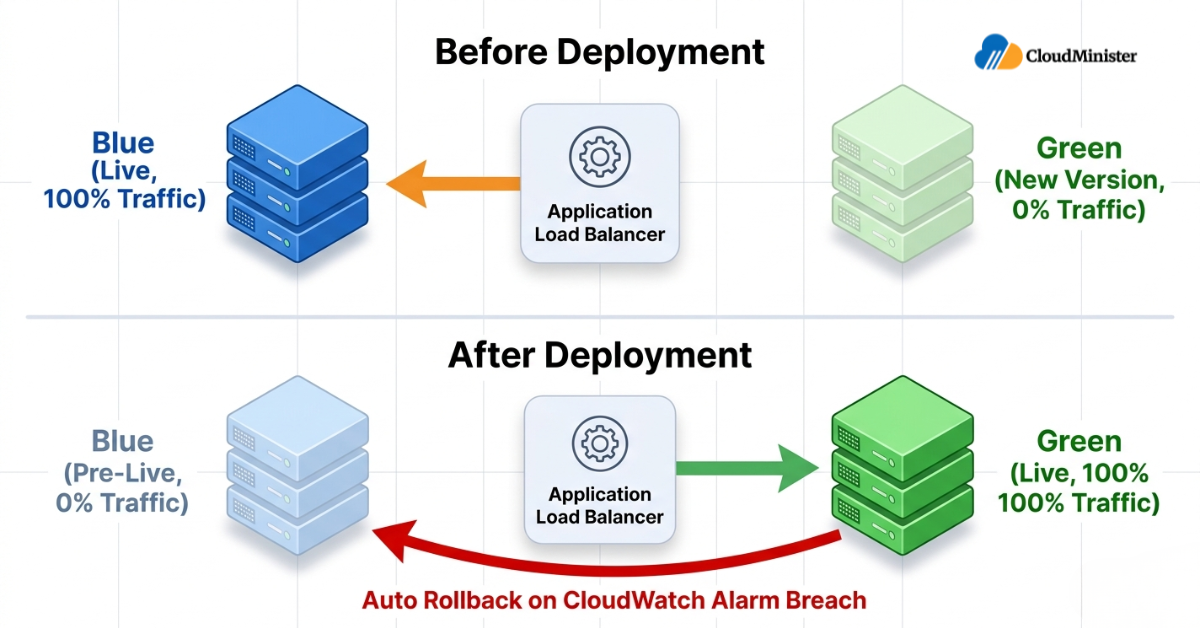
- The blue/green model shifts traffic from the old task set (blue) to the new task set (green) with a configurable traffic shift percentage and health check wait time
- Rollback is automatic if health checks fail during the shift window
For Lambda deployments:
- Use CodeDeploy’s Lambda platform with traffic shifting configurations: LambdaCanary10Percent5Minutes, LambdaLinear10PercentEvery1Minute, or LambdaAllAtOnce
- Configure pre-traffic and post-traffic Lambda hooks to run validation tests before and after traffic shifts
Teams running applications on Windows VPS Server Hosting can integrate CodeDeploy into their Windows EC2 instances natively — the agent installation command differs, but the CodePipeline architecture and appspec.yml structure remain identical to Linux-based deployments.
If you’re still evaluating whether your team has the in-house expertise to handle the CodeDeploy configuration correctly, our guide on how to choose the right DevOps service provider outlines the specific capabilities to look for in a partner who can own the deployment stage configuration on your behalf. how to choose the right DevOps service provider
Step 4: Assemble the Pipeline in AWS CodePipeline
AWS CodePipeline is the orchestration layer that connects your source, build, and deploy stages into a single automated flow — the operational heart of your CI/CD pipeline on AWS.
Pipeline creation steps:
- Navigate to CodePipeline console → Create pipeline
- Choose Pipeline type: V2 (the 2026 default — supports pipeline-level variables, triggers, and improved execution modes)
- Create a new service role with permissions for CodeCommit, CodeBuild, CodeDeploy, S3, and SNS
- Select your S3 artefact store (create a dedicated bucket; enable versioning and SSE-S3 encryption)
Define pipeline stages:
- Source stage: Select provider (CodeCommit or GitHub), repository, and branch. Enable CloudWatch Events for change detection (preferred over periodic polling)
- Build stage: Select your CodeBuild project as the action provider; pass SourceArtifact as input and BuildArtifact as output
- Staging deploy stage: Add a CodeDeploy action targeting your staging deployment group
- Approval stage: Add a manual approval action with an SNS notification to the relevant Slack channel or email distribution list for production promotions
- Production deploy stage: Add a CodeDeploy action targeting your production deployment group
CodePipeline V2 (2026 standard) supports pipeline-level variables that can be passed between stages — enabling dynamic image tag injection, environment-specific configuration, and parameterised deployments without hardcoding values in the pipeline definition. Always use V2 for new pipelines; V1 pipelines have limited variable support and are no longer recommended for production workloads.
Step 5: Add Security Scanning to Your CI/CD Pipeline on AWS
An automated AWS delivery pipeline that does not include security scanning is operationally incomplete in 2026. According to a comprehensive 2026 DevSecOps industry report, secure CI/CD pipeline automation accounts for 28% of the DevSecOps market by use case — reflecting how central automated security gates have become to modern delivery pipelines.
Security controls to integrate into every automated AWS delivery pipeline:
- Static Application Security Testing (SAST): Run tools like SonarQube, Semgrep, or Checkmarx as a CodeBuild phase — fail the build on high-severity findings
- Dependency vulnerability scanning: Use npm audit, pip-audit, or OWASP Dependency-Check as a pre-build phase
- Container image scanning: Enable Amazon ECR image scanning on push — configure the pipeline to retrieve scan results via the ECR API and add a custom evaluation step in CodeBuild that reads the findings and explicitly fails the build if critical or high-severity CVEs are detected. Note that the ECR API command only retrieves findings — it does not block deployment on its own. You must implement the blocking logic yourself:
aws ecr describe-image-scan-findings \
  --repository-name <repository-name> \
--image-id imageTag=<image-tag> - Secrets detection: Use git-secrets or AWS CodeGuru Secrets Detector as a pre-commit hook and CodeBuild phase to prevent credentials from entering the pipeline
- Infrastructure as Code scanning: Use cfn-nag or Checkov to scan CloudFormation templates or CDK synth output for security misconfigurations before stack deployment
For Indian businesses, the DPDPA 2023 establishes that data fiduciaries must implement appropriate technical safeguards for systems processing personal data. The Act specifies outcomes — such as access controls, audit trails, and breach prevention — rather than mandating specific tools or services. AWS CloudTrail, CodePipeline execution history, and ECR image scanning are practical ways to meet these outcomes, but the correct implementation depends on your system’s data processing scope and your legal counsel’s interpretation of the Act’s requirements. Treat these as recommended controls, not prescribed obligations.
Step 6: Configure Environment-Specific Deployments
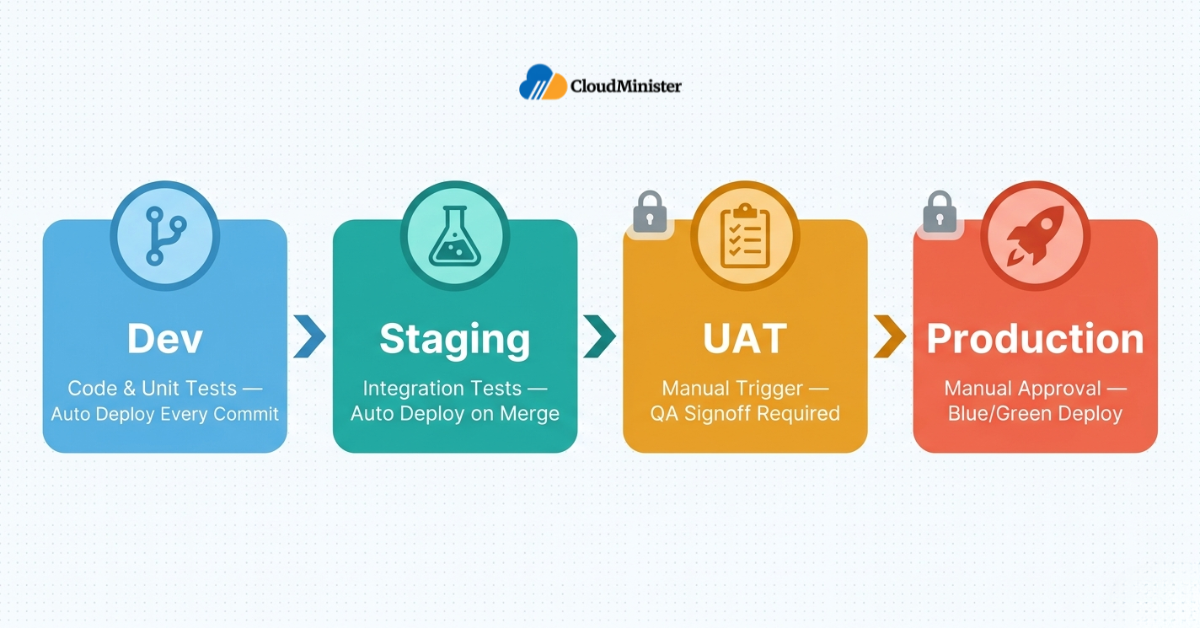
A production-grade CI/CD pipeline on AWS does not deploy to a single environment — it promotes validated artefacts through a defined environment progression. The standard 2026 pattern is:
- Development: Auto-deploys on every commit to develop branch — no approval gate
- Staging: Auto-deploys on merge to staging branch — includes full integration test suite run
- UAT / Pre-production: Triggered manually or on merge to release/* branch — manual approval gate with test signoff from QA
- Production: Triggered on merge to main — requires explicit manual approval from a named approver; uses blue/green or canary deployment strategy
Environment configuration best practices:
- Use AWS Systems Manager Parameter Store with environment-specific path prefixes (/app/staging/DB_HOST, /app/production/DB_HOST) — inject at runtime, not at build time
- Separate IAM roles per environment with least-privilege permissions
- Use AWS CloudFormation StackSets or CDK Pipelines for multi-region or multi-account deployments
- Tag all pipeline-created resources with Environment, PipelineVersion, and DeployedBy tags for cost allocation and audit traceability
Step 7: Implement Automated Rollback Mechanisms
Rollback capability is what separates a pipeline built for production from a pipeline built for demos. AWS provides multiple rollback mechanisms, and a mature pipeline uses all of them in the appropriate context.
- CodeDeploy automatic rollback: Configure the deployment group to automatically roll back when deployment fails or when CloudWatch alarms breach thresholds (e.g., 5xx error rate > 1% for 5 minutes)
- ECS blue/green rollback: CodeDeploy retains the blue task set until the deployment stabilisation period completes — traffic can be rerouted back to blue instantly on failure
- Lambda weighted alias rollback: AWS Lambda’s traffic shifting allows instant rollback by updating the alias weight back to 100% on the previous version
- CloudFormation stack rollback: For IaC deployments, CloudFormation automatically rolls back to the previous stable state on update failure — enabled by default when using CodePipeline’s CloudFormation action
- Artefact versioning in S3: All build artefacts stored in the S3 artefact bucket should have versioning enabled — enabling manual re-deployment of any previous build without re-running the full pipeline
5. Monitoring Your CI/CD Pipeline on AWS
Your pipeline is not fully operational until monitoring is configured. Monitoring at the pipeline level answers two operational questions that matter: Is the pipeline healthy? Are deployed applications performing correctly after each release?
5.1 Pipeline-Level Monitoring
- AWS CloudWatch Events / EventBridge: Configure rules to detect pipeline state changes — send notifications to SNS topics (→ email, Slack via Lambda) on pipeline failure, stage failure, or manual approval pending
- CodeBuild metrics in CloudWatch: Track SucceededBuilds, FailedBuilds, BuildDuration, and QueuedBuilds to detect build performance degradation
- CodePipeline execution history: Review the pipeline execution history tab to identify recurring failure patterns — CodePipeline retains 12 months of execution history
5.2 Application-Level Post-Deployment Monitoring
- Amazon CloudWatch Container Insights: For ECS and EKS deployments — tracks CPU, memory, network, and disk utilisation per task and service
- AWS X-Ray: Distributed tracing for microservices deployed through the pipeline — enables request-level latency attribution across service boundaries
- CloudWatch Synthetics: Configure canary checks that run post-deployment to verify critical application paths (login, checkout, API endpoints) respond correctly — trigger automated rollback on canary failure
- AWS CloudTrail: All pipeline actions generate CloudTrail events — essential for audit trails documenting who approved production deployments, which IAM role executed each stage, and what artefact was deployed at each timestamp
6. Advanced CI/CD Pipeline on AWS: Multi-Region and Multi-Account Deployments
For businesses operating at scale — including SaaS companies serving global markets and enterprises with strict data residency requirements — a single-region pipeline architecture is architecturally insufficient. Multi-region and multi-account configurations address both availability and compliance requirements that single-region setups cannot satisfy.
Multi-Region Deployment Pattern
- CodePipeline supports cross-region actions natively — add a CodeDeploy action in a secondary region to the same pipeline without replicating the pipeline definition
- S3 artefact replication must be configured across regions — use S3 Cross-Region Replication with SSE-KMS encryption
- ECR cross-region replication: configure replication rules in ECR to automatically push images to registries in each deployment region
- Use AWS CloudFormation StackSets for deploying infrastructure changes across multiple AWS accounts and regions from a single pipeline stage
Multi-Account Pipeline Architecture (AWS Organisations)
- Recommended model: Separate AWS accounts for development, staging, and production — with a dedicated tooling account hosting CodePipeline and CodeBuild
- Cross-account deployment is achieved through IAM role assumption — the pipeline service role in the tooling account assumes a deployment role in each target account
- This model provides complete blast radius isolation — a compromised staging account cannot affect production, and the production account’s IAM policies prevent any non-pipeline writes
- DevOps Consulting Services in India that specialise in AWS architecture can accelerate this multi-account setup significantly — the IAM trust relationships and cross-account KMS key policies are the most common configuration errors in enterprise pipelines
When building a multi-account CI/CD pipeline on AWS, always configure AWS Service Control Policies (SCPs) at the Organisations level to prevent developers from deploying directly to production accounts using personal IAM credentials. The only deployment path to production should be through the pipeline — SCPs enforce this at the organisation level, making it impossible to bypass regardless of individual IAM permissions.
7. Cost Benchmarks: Running a CI/CD Pipeline on AWS
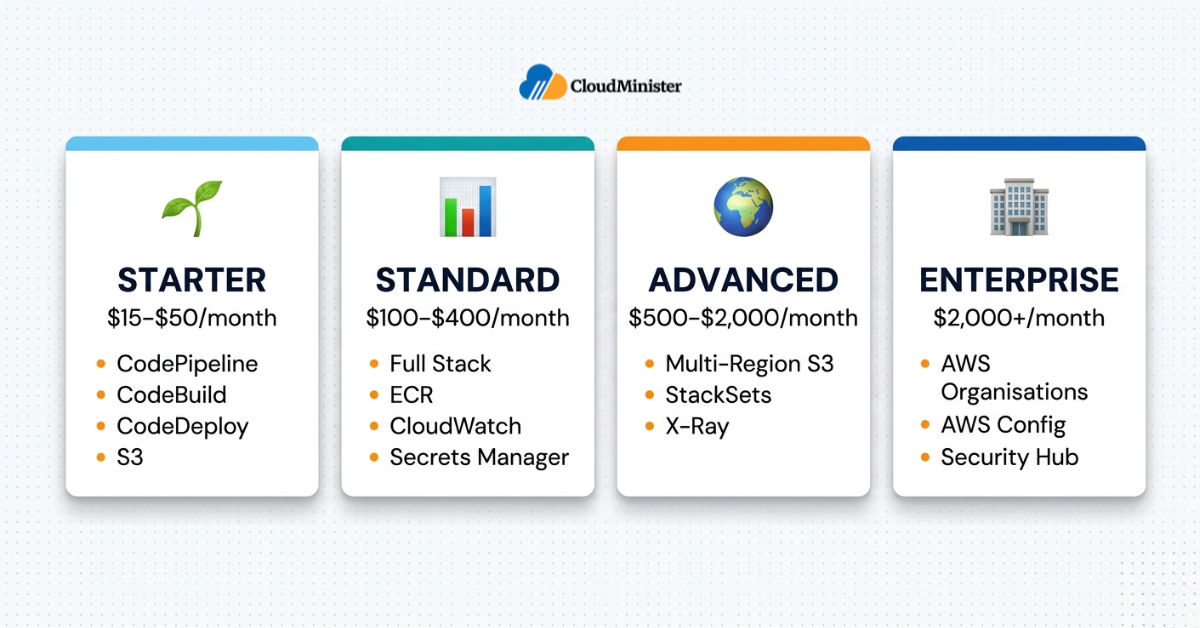
Cost predictability is a key factor in the build-vs-managed evaluation for Indian businesses. These are the indicative 2026 cost benchmarks at different pipeline scales:
| Pipeline Scale | AWS Services Used | Est. Monthly Cost (USD) | Best For |
| Starter (1–3 services) | CodePipeline, CodeBuild, CodeDeploy, S3 | $15–$50/month | Startups, side projects, internal tools |
| Standard (5–15 services) | Full stack + ECR, CloudWatch, Secrets Manager | $100–$400/month | Growing SaaS, e-commerce platforms |
| Advanced (20+ services, multi-region) | Full stack + multi-region S3, StackSets, X-Ray | $500–$2,000/month | Enterprise, fintech, global SaaS |
| Enterprise (multi-account + compliance) | Above + AWS Organisations, AWS Config, Security Hub | $2,000+/month | Regulated industries, large-scale e-commerce |
CodeBuild is priced per build minute — and this is where pipeline costs can surprise teams. A naive pipeline that rebuilds Docker base images on every commit will consume dramatically more build minutes than one that uses CodeBuild’s built-in Docker layer caching. To enable it, set privilegedMode: true in the build environment AND configure the cache type as LOCAL with the LOCAL_DOCKER_LAYER_CACHE mode enabled in your build project. Also use LOCAL_CUSTOM_CACHE for dependency packages (node_modules, Maven .m2, pip cache) to reduce build times and costs by 40–70% on typical workloads.
8. In-House vs Managed CI/CD Pipeline on AWS: The Real Comparison
Indian businesses evaluating whether to build and operate a CI/CD pipeline on AWS in-house or engage a managed automation partner need a commercially accurate comparison — not a vendor pitch.
| Dimension | In-House AWS Pipeline | Managed DevOps Service |
| Setup time | 4–12 weeks (first production pipeline) | 1–3 weeks with an experienced partner |
| Engineering cost (2026 India) | ₹1.5L–₹3L/month (1–2 DevOps engineers) | ₹50K–₹2L/month depending on scope |
| Pipeline expertise depth | Limited to in-house knowledge; gaps in security and multi-cloud | Cross-client operational experience across industries |
| Security configuration | Requires dedicated internal effort for DPDPA alignment | Partner handles compliance tooling and audit trail configuration |
| Scalability | Requires headcount growth ahead of infrastructure growth | Scales with workload on existing engagement |
| 24×7 pipeline operations | Requires on-call rotation — expensive at SMB scale | Included in managed engagement SLA |
For teams already hosted on a reliable web hosting provider in India who are expanding into AWS-native infrastructure, the managed DevOps services path is typically the faster route to a production-grade CI/CD pipeline on AWS — the upfront investment in external expertise pays back in avoided configuration mistakes within the first quarter of operation.
Engaging professional DevOps implementation services accelerates the critical path from initial pipeline architecture to fully operational delivery automation — covering security gate configuration, IAM hardening, multi-environment promotion rules, and DPDPA-aligned audit trail setup as part of a single structured engagement.
Containerisation strategy is one of the most impactful architectural decisions in this comparison. Our technical analysis of Kubernetes vs Docker — which one do you need is essential reading before you decide whether your pipeline targets ECS, EKS, or EC2-based deployments — a decision that significantly affects managed service complexity and cost.
9. Vertical-Specific CI/CD Pipeline on AWS Considerations
The correct pipeline configuration is not universal — it depends on the regulatory environment and deployment profile of your specific industry.
9.1 E-Commerce Platforms
- Priority: Zero-downtime deployments — always use blue/green or canary strategies; never rolling deployments to production during peak traffic windows
- Test gate requirement: Performance regression tests using k6 or Gatling as a CodeBuild phase before production promotion
- DPDPA 2023 relevance: Pipeline audit trails are a recommended control for systems processing customer PII and payment data — verify specific obligations with qualified legal counsel based on your data processing scope
- Recommendation: CloudWatch Synthetics canary checks on checkout and payment flows immediately post-deployment with automatic rollback on failure
- For e-commerce teams on Windows VPS Server Hosting, CodeDeploy’s Windows agent enables you to include those servers in your pipeline deployment targets without migrating to Linux-based infrastructure
9.2 Fintech and NBFC Businesses
- Priority: Change management traceability — every production deployment must be traceable to an approved change ticket via pipeline approval metadata
- RBI IT Framework requirement: Documented deployment procedures with rollback capability — CodePipeline’s execution history and CodeDeploy deployment records provide this documentation automatically
- Security requirement: Container image scanning with ECR must be configured as a hard gate — implement a custom CodeBuild evaluation step that reads ECR scan findings and fails the build on critical CVEs, rather than treating results as advisory warnings.
- DevOps Consulting Services in India with fintech experience are best positioned to configure the RBI-aligned approval workflows required for NBFC pipeline governance
9.3 SaaS Businesses Targeting Global Markets
- Priority: Multi-region pipeline coverage — CodePipeline’s cross-region actions must deploy to all serving regions within a single pipeline execution
- SLA requirement: 99.9% uptime contractual obligations require automated canary deployments with health check-triggered rollback — not manual deployment verification
- Cost consideration: Data transfer costs between regions can be significant — optimise Docker image layering and S3 artefact replication to minimise cross-region transfer volume
- Indian SaaS teams operating from a web hosting provider in India for their domestic stack while using AWS globally need unified monitoring that spans both environments through a single alerting plane
9.4 Healthcare and Pharma
- Regulatory requirement: DPDPA 2023 governs personal health data processing in India — not HIPAA (US legislation). Pipeline audit trails are a recommended control to support DPDPA data fiduciary obligations and NDHM framework guidelines — verify specific requirements with qualified legal counsel.
- File integrity monitoring: Deployments to systems handling patient records must include pre-deployment integrity checks and post-deployment validation
- Access control: Production deployment approvals must require MFA-authenticated IAM users — configure this in CodePipeline’s manual approval action settings
- DevOps Consulting Services in India with healthcare sector experience can map DPDPA-specific audit trail requirements directly to CodePipeline’s execution history and CloudTrail event outputs
- For healthcare teams with Windows-based clinical applications, Windows VPS Server Hosting environments can be connected to CodeDeploy as hybrid deployment targets — maintaining NDHM-compliant configurations without platform migration
Regardless of sector, professional DevOps implementation services ensure that vertical-specific compliance requirements — whether DPDPA, RBI IT Framework, or NDHM guidelines — are embedded as hard pipeline gates rather than documented as aspirational guidelines that developers bypass under delivery pressure.
10. Five Warning Signs Your CI/CD Pipeline on AWS Is Already Failing
Whether you have recently set up your automated pipeline or inherited one, these operational signals indicate your pipeline is not performing at production grade.
Warning Sign 1: Build failures are investigated by developers, not alerts
If your team finds out about build failures by checking the CodePipeline console rather than receiving an automated notification, your monitoring is incomplete. Every stage failure in a production pipeline should trigger an immediate SNS notification routed to the responsible team within 2 minutes.
Warning Sign 2: The pipeline has no security scanning stage
Any pipeline without SAST, dependency scanning, or container image scanning is deploying untested code to production. In 2026, security gates are not optional — they are the mechanism by which you prevent DPDPA-reportable security incidents from reaching production environments. Engaging a professional DevOps implementation services partner ensures these gates are configured correctly as hard pipeline controls, not advisory warnings.
Warning Sign 3: Rollback requires manual intervention every time
If restoring a previous deployment requires a developer to manually re-run a previous pipeline execution or SSH into production servers, your rollback process is operationally unsafe. Automated rollback on CloudWatch alarm breach must be configured for every production deployment group.
Warning Sign 4: Environment configurations are hardcoded in the pipeline
Database endpoints, API keys, and environment-specific settings embedded directly in buildspec.yml or pipeline environment variables are a security vulnerability and an operational liability. All configuration must be externalised to Parameter Store or Secrets Manager and resolved at runtime.
Warning Sign 5: The pipeline has not been tested in a DR scenario
If your team has never intentionally failed a deployment to verify that rollback, notifications, and incident response work correctly, your pipeline is untested in the scenarios that matter most. Run a quarterly game day that deliberately injects failures at each pipeline stage and measures the response.
Automation tooling is one of the fastest ways to address all five warning signs systematically. Our comprehensive guide on DevOps automation — top tools and strategies for efficiency covers the monitoring, alerting, and security scanning tools that close these gaps across each pipeline stage.
11. The CI/CD Pipeline on AWS Readiness Checklist
Before you consider your pipeline arrangement complete, verify these operational requirements are in place.
AWS PIPELINE READINESS CHECKLIST
- Source: Repository connected via GitHub App or CodeCommit; branch protection rules on main enforced; CloudWatch Events trigger (not polling) configured
- Build: CodeBuild uses managed image standard:7.0; buildspec.yml in repository root; Docker layer caching enabled via LOCAL_DOCKER_LAYER_CACHE cache mode with privilegedMode: true; S3 dependency caching configured; build reports publishing to CodeBuild report group
- Security scanning: SAST, dependency vulnerability scan, container image scan (aws ecr describe-image-scan-findings –repository-name <name> –image-id imageTag=<tag>), and secrets detection configured as build phases; high-severity findings fail the build
- Artefact management: S3 artefact bucket with versioning and SSE-S3 encryption; ECR image tagged with Git commit SHA (not latest)
- Environment configuration: All secrets and environment variables stored in Parameter Store / Secrets Manager; no credentials in source code or pipeline definition
- Deployment: Blue/green or canary strategy for production; automatic rollback on CloudWatch alarm breach configured; CodeDeploy agent version verified on all target instances
- Approval gates: Manual approval stage before production with SNS notification to named approver; approval metadata logged for audit trail
- Monitoring: EventBridge rules for pipeline state changes; SNS notifications on failure; CloudWatch Synthetics canaries on critical post-deployment paths
- IAM: Least-privilege service roles per stage; no wildcard resource policies; cross-account roles scoped to specific actions and resources
- DPDPA alignment: CloudTrail logging active; deployment audit trail retained; access logs for systems processing personal data generated continuously
- DR verification: Quarterly game day scheduled; rollback procedure documented and tested; recovery time from failed deployment validated
Conclusion: Getting Your CI/CD Pipeline on AWS Right in 2026
Setting up a CI/CD pipeline on AWS is not a one-time configuration task — it is the foundation of your entire software delivery operation. The architectural decisions you make at setup time — deployment strategy, security gate placement, environment promotion rules, rollback mechanisms — determine the operational reliability of every application you ship for the lifetime of that pipeline.
For Indian businesses at growth stage — particularly those scaling from a managed web hosting provider in India toward enterprise AWS deployments — the investment in a professionally configured CI/CD pipeline on AWS pays back in deployment frequency, incident reduction, and DPDPA compliance readiness within the first quarter of operation. The pipeline does not just speed up releases — it creates an auditable, repeatable, and defensible delivery process that satisfies both engineering and regulatory requirements.
The step-by-step architecture, security gate requirements, environment-specific configuration patterns, rollback mechanisms, and readiness checklist in this guide provide the technical and commercial foundation for building a CI/CD pipeline on AWS that is production-grade on day one — not after six months of reactive configuration fixes. This applies equally whether your compute layer is cloud-native ECS, serverless Lambda, or traditional Windows VPS Server Hosting infrastructure.
For businesses that want professional assistance — from initial pipeline architecture to full managed operations — DevOps implementation services from CloudMinister cover the complete delivery stack, including DevOps Consulting Services in India engagements structured around your specific infrastructure profile, compliance requirements, and deployment scale.
Get Your AWS Pipeline Reviewed by Experts
Not sure if your CI/CD setup is production-ready? Our DevOps engineers will audit your current pipeline, identify gaps in security scanning, rollback configuration, and DPDPA alignment — and give you a clear action plan.
Key Takeaways
- A genuine CI/CD pipeline on AWS covers seven operational layers — source, build, test, security scanning, artefact management, deployment, and monitoring
- Always use CodePipeline V2 for new pipelines in 2026 — pipeline-level variables, improved trigger support, and execution modes are not available in V1
- Security scanning — SAST, dependency scanning, ECR image scanning, and secrets detection — must be hard gates that fail the build, not informational warnings
- Blue/green deployment via CodeDeploy with CloudWatch alarm-triggered automatic rollback is the minimum viable deployment safety configuration for production workloads
- All secrets and environment-specific configuration must live in Parameter Store or Secrets Manager — never in buildspec.yml, pipeline environment variables, or source code
- DPDPA 2023 requires appropriate technical safeguards for systems processing personal data — CodePipeline execution history, CodeDeploy deployment records, and CloudTrail are practical tools that can support this requirement, but confirm specific obligations with qualified legal counsel
- Building and staffing an in-house AWS pipeline costs ₹1.5L–₹3L/month in dedicated DevOps engineering at 2026 Indian market rates — managed DevOps services deliver faster time-to-production at lower total cost for most Indian SMBs
- Multi-account pipeline architecture (separate AWS accounts per environment) is the correct model for enterprise deployments — it provides blast radius isolation that environment-variable-based separation cannot achieve
Frequently Asked Questions
What is the difference between a CI/CD pipeline on AWS and a standard deployment script?
A CI/CD pipeline on AWS is a fully automated, event-driven workflow that integrates source control, build automation, testing, security scanning, and deployment with rollback capability — all managed through AWS-native services. A deployment script is a one-directional automation that runs a fixed command sequence without feedback loops, approval gates, health checks, or rollback mechanisms. The operational difference is architectural, not cosmetic.
How long does it take to set up a production-grade CI/CD pipeline on AWS?
For a team with AWS experience, a basic three-stage pipeline (source, build, deploy) can be operational in two to four days. A production-grade CI/CD pipeline on AWS with security scanning, blue/green deployments, multi-environment promotion, monitoring, and IAM hardening typically requires two to four weeks for the first application. Subsequent applications on the same pipeline architecture are significantly faster — most teams template the configuration after the first production deployment.
Does a CI/CD pipeline on AWS satisfy DPDPA 2023 technical safeguard requirements?
A properly configured CI/CD pipeline on AWS with CloudTrail logging, CodePipeline execution history, CodeDeploy deployment records, and IAM access controls provides the audit trail and access monitoring that DPDPA 2023 requires for systems processing personal data. However, pipeline automation is one component of DPDPA compliance — data residency, encryption at rest and in transit, breach notification procedures, and access control policies must also be in place. Verify specific compliance requirements with qualified legal counsel as DPDPA enforcement guidance develops.
Should I use AWS CodeCommit or GitHub for my CI/CD pipeline on AWS source stage?
For teams with strict data residency requirements or those requiring fully AWS-native access control via IAM, CodeCommit is the correct choice. For teams already using GitHub, CodePipeline’s GitHub App integration (available since 2023) is the preferred option — it provides stronger security than the legacy OAuth connection and more reliable webhook delivery. Both integrate natively with CodePipeline without requiring third-party connectors.
What is the minimum viable CI/CD pipeline on AWS for a startup?
The minimum viable production pipeline for a startup consists of: CodeCommit or GitHub as source, CodeBuild for build and test, S3 for artefact storage, CodeDeploy for deployment (rolling strategy to ECS or EC2), and EventBridge notifications on pipeline failure. Total cost at this scale is typically $15–$50 per month in AWS service charges. Security scanning should be added immediately — it is not an advanced-stage concern. Startups already using a web hosting provider in India for their front-end or marketing workloads can connect those environments to the same pipeline through a CodeDeploy hybrid deployment group.
For startups that want to skip the learning curve entirely, a structured DevOps implementation services engagement delivers a production-ready pipeline in one to three weeks — including security scanning, environment promotion gates, and CloudWatch alerting — at a total cost typically lower than six months of trial-and-error by an in-house engineer new to AWS CI/CD.
Whether your infrastructure runs on cloud-native ECS, Windows VPS Server Hosting, or a hybrid setup combining Indian-hosted front-ends with AWS globally — the pipeline architecture fundamentals in this guide apply consistently. The configuration details differ by compute platform; the operational principles do not.
CloudMinister’s DevOps engineering team is available for initial consultations, pipeline architecture reviews, and full managed engagements. Contact us at cloudminister.com/devops-services to discuss the right engagement model for your infrastructure profile and deployment requirements.

He is the CEO and Founder with over a decade of experience in cloud infrastructure, DevOps, and server optimization. With a strong vision and hands-on leadership approach, he has built scalable, secure, and high-performance cloud solutions trusted by businesses across industries.