Most cloud security plans protect data at rest and data in transit, yet sensitive data is still exposed while it is being processed in memory. Azure Confidential Computing closes that gap by running workloads inside hardware based trusted execution environments, and it works best when paired with Customer Lockbox for controlling Microsoft operator access and Azure Key Vault for controlling encryption keys. This guide explains how Azure Confidential Computing, Customer Lockbox and Key Vault fit together, how they support Indian compliance needs, and how a Web Hosting Company in India and a provider of cloud hosting services in India can help teams put the design into production. Readers comparing a Cloud Hosting Plan on Azure Cloud Hosting or Optimized AWS Cloud Hosting will find a clear starting point here.
Every business that moves regulated or confidential data to the cloud eventually asks one hard question. Who can see this data, and how do we prove it? For years the answer was encryption at rest and encryption in transit. That is still necessary, but it is no longer enough, because data has to be decrypted in memory before an application can use it. This is exactly where Azure Confidential Computing adds value, since it protects data in use with hardware backed isolation. Teams that plan Azure Confidential Computing early find audits easier and design reviews calmer. A trusted Web Hosting Company in India that offers cloud hosting services in India can help turn that early plan into a working design on Azure Cloud Hosting.
The risk is not only technical. Customer trust, contractual obligations and Indian regulation all push security teams to show strong control over data, keys and administrative access. A careful design therefore combines three layers. Azure Confidential Computing protects the workload while it runs, Customer Lockbox controls whether a Microsoft engineer can reach customer content during a support case, and Key Vault controls the keys that unlock the data. Together they cover data in use, operator access and key custody. Teams that use Optimized AWS Cloud Hosting face the same three questions, so the thinking applies across clouds, and a flexible Cloud Hosting Plan should leave room for all three layers.
This guide explains each layer in plain language, then shows how to combine them for workloads hosted in India. You will learn what each control does and does not do, how remote attestation connects Azure Confidential Computing to Key Vault, which Indian rules matter, and how a thirty day plan can move a real workload forward. Whether you run a payments platform, a health application or a software product, this approach to Azure Confidential Computing will help you plan with fewer surprises. Many teams also compare Optimized AWS Cloud Hosting with Azure at this stage, so we cover that choice honestly. It also suits teams buying cloud hosting services in India for the first time.
Table of Contents
- 1. Why Encryption at Rest Alone Is Not Enough for Sensitive Workloads
- 2. What Confidential Computing on Azure Actually Is and How It Works
- 3. Confidential Computing Options on Azure: Virtual Machines, Containers, GPUs and Enclaves
- 4. Remote Attestation and Secure Key Release Explained
- 5. Customer Lockbox: Approval Control for Microsoft Operator Access
- 6. Azure Key Vault and Managed HSM: Keeping Key Custody in Your Hands
- 7. How Confidential Computing, Customer Lockbox and Key Vault Work Together
- 8. Indian Rules That Shape Confidential Workload Design
- 9. Choosing Azure Regions in India and Comparing with AWS
- 10. Cost, Performance and Operations
- 11. A Practical Thirty Day Plan to Get Started
- 12. Common Mistakes and Governance Practices
- 13. Choosing the Right Hosting Partner in India
- Key Takeaways
- Conclusion
- Frequently Asked Questions
1. Why Encryption at Rest Alone Is Not Enough for Sensitive Workloads
Encryption at rest protects data on disks and in storage accounts, and encryption in transit protects data moving across networks. Neither protects data while a processor is using it, because the data must be decrypted in memory. A privileged administrator, a compromised hypervisor layer or a memory scraping attack can target that exposed window. The financial impact of weak protection keeps rising, since the global average cost of a data breach reached a record 4.99 million US dollars in the 2026 edition of the IBM Cost of a Data Breach Report, a twelve percent increase over the previous year. This is why Azure Confidential Computing is now part of serious cloud security planning, and why a Web Hosting Company in India is often asked about it during infrastructure reviews. Strong cloud hosting services in India should make these protections easy to adopt, whether the platform is Azure Cloud Hosting or Optimized AWS Cloud Hosting.
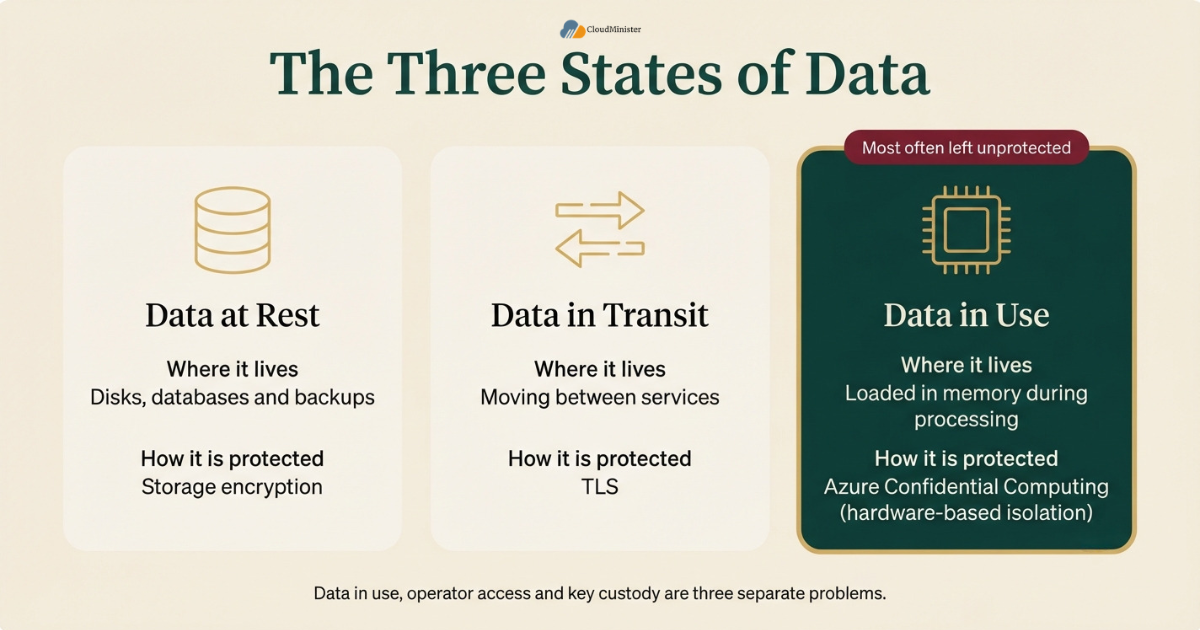
- Data at rest means data stored on disks, databases and backups, and it is protected by storage encryption.
- Data in transit means data moving between services, and it is protected by TLS.
- Data in use means data loaded in memory during processing, and it is the layer most teams leave unprotected.
- Memory contents can be exposed through privileged access, hypervisor compromise or insider misuse.
- Hardware based isolation keeps memory encrypted with keys held inside the processor, so the host cannot read it in clear form.
- Banking, insurance and healthcare face the highest pressure to protect data in use.
- A strong plan treats data in use, operator access and key custody as three separate problems.
- Using Azure Confidential Computing does not remove the need for encryption at rest, network security or identity controls.
Before choosing any control, classify your data into three tiers, public, internal and restricted. Apply Azure Confidential Computing to the restricted tier first, so you control cost and complexity while protecting what matters most. Match each tier to the Cloud Hosting Plan that fits its needs.
2. What Azure Confidential Computing Actually Is and How It Works
Azure Confidential Computing is a set of Azure capabilities that protect data in use by running workloads inside a hardware based trusted execution environment, often shortened to TEE. A TEE is a protected area of the processor where code and data are isolated from the host operating system, the hypervisor and cloud operators. The memory is encrypted with keys managed by the processor itself, so the platform cannot read it in plain form. The idea is promoted by the Confidential Computing Consortium under the Linux Foundation, and Microsoft is a founding member. In practice, Azure Confidential Computing lets you keep using familiar virtual machines, containers and services while adding a stronger boundary around them. Providers of cloud hosting services in India now see questions about Azure Confidential Computing in many security reviews, so a Web Hosting Company in India should be ready to discuss it.
- A TEE protects the confidentiality of data in use through memory encryption inside the processor.
- Some TEE designs also protect integrity, so tampering with memory can be detected.
- The host operating system, the hypervisor and Azure operators sit outside the trusted boundary.
- Remote attestation lets you verify that a workload runs on genuine hardware with the expected configuration.
- Confidential virtual machines usually need no code change, which makes lift and shift easier, including for teams on Azure Cloud Hosting.
- Application enclaves based on Intel SGX need code changes, but they give the smallest trusted boundary.
- The protection covers the workload, not flaws inside your own application code or stolen user credentials.
- Teams should treat Azure Confidential Computing as one control inside a wider defence in depth plan.
A TEE protects against a malicious host, not against a vulnerable application. If your code has an injection flaw or your access tokens are stolen, the hardware boundary will not help. Keep patching, identity hardening and network controls in place alongside Azure Confidential Computing.
3. Azure Confidential Computing Options on Azure: Virtual Machines, Containers, GPUs and Enclaves
Azure offers more than one way to adopt Azure Confidential Computing, and the right option depends on how much application change your team can accept. Confidential virtual machines are the simplest starting point because they protect an entire virtual machine without code changes. Confidential containers extend the idea to container workloads, which suits teams already running Kubernetes. Application enclaves give the strongest isolation for a small piece of code but need development effort. Confidential GPU virtual machines are aimed at protecting AI models and training data during processing. Teams that run Azure Cloud Hosting for production workloads usually begin with confidential virtual machines, because the migration path is short. A suitable Cloud Hosting Plan on Azure Cloud Hosting should list which confidential sizes are included before you sign. Providers of cloud hosting services in India can confirm size availability for you.
| Option | Best for | Code change | Key point |
| Confidential virtual machines | Lift and shift of existing workloads | None | Whole virtual machine memory is encrypted using AMD SEV-SNP or Intel TDX |
| Confidential containers | Container services on AKS or Azure Container Instances | Low | Containers run inside a hardware backed boundary |
| Application enclaves | Small and high value code such as key handling | High | Intel SGX gives the smallest trusted boundary |
| Confidential GPU virtual machines | AI training and inference on sensitive data | Low to medium | NVIDIA H100 based protection for GPU memory |
- Confidential virtual machines use AMD SEV-SNP or Intel TDX, depending on the series you choose.
- Confidential virtual machines can encrypt the operating system disk with keys held in Key Vault, which links this layer to key custody.
- Confidential containers suit teams that already manage Kubernetes and want limited application change.
- Application enclaves need a software development kit and a redesign of the sensitive code path, and teams on Optimized AWS Cloud Hosting will find that AWS Nitro Enclaves follow a different model.
- Confidential GPU virtual machines help protect model weights and sensitive training data during AI processing.
- Not every size is available in every region, so confirm availability in your chosen Indian region before design.
- Treat Azure Confidential Computing choices as a design decision and not a checkbox, and record why each option was chosen.
4. Remote Attestation and Secure Key Release Explained
Remote attestation is the step that turns a promise into proof. Before a workload receives any secret, an attestation service checks evidence from the hardware and the boot chain, and issues a signed token if everything matches policy. Microsoft Azure Attestation is the service commonly used for this check. Azure Key Vault Premium and Managed HSM can then use Secure Key Release, which releases a key only to an environment that presents a valid attestation token. This is the point where Azure Confidential Computing and Key Vault become one design instead of two separate tools. Without attestation, Azure Confidential Computing would still isolate memory, but you could not prove to a customer or auditor what was running. Your Web Hosting Company in India can host the attestation checks inside the pipeline that deploys your Azure Cloud Hosting workloads.
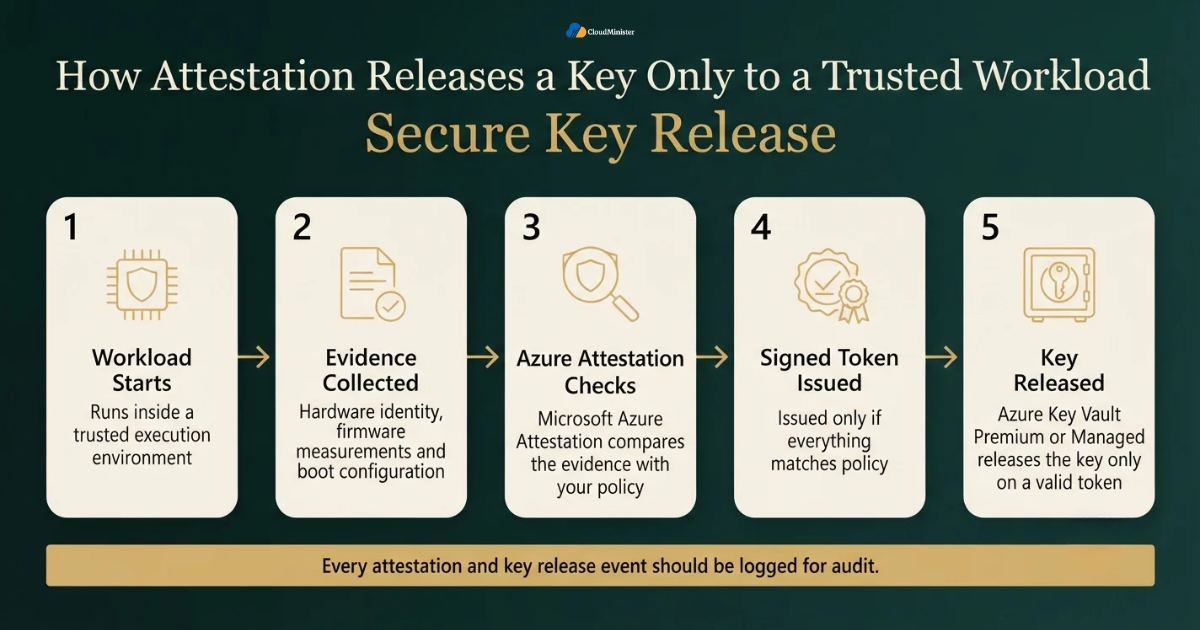
- Attestation evidence includes hardware identity, firmware measurements and boot configuration details.
- The attestation policy defines which values are acceptable, and it should be reviewed like application code.
- A signed attestation token proves the check passed, and relying parties validate its signature.
- Secure Key Release ties a key release policy to claims inside that token.
- A key released only to attested workloads is much harder to misuse from an unverified environment, and the same idea applies to Optimized AWS Cloud Hosting designs that use enclave attestation with AWS KMS.
- Keys used with release policies must be created as exportable, so protect the policy carefully.
- Log every attestation and key release event so audits can trace which workload received which key.
Many teams enable attestation and then never tighten the policy. A weak policy that accepts almost any environment gives a false sense of safety. Start strict, test in a staging environment and loosen the policy only with a written reason.
5. Customer Lockbox: Approval Control for Microsoft Operator Access
Customer Lockbox for Microsoft Azure adds an approval step when a Microsoft support engineer needs to access your content to resolve a support request. Instead of access being granted inside Microsoft alone, your designated approvers receive a request, review the reason and the scope, and then approve or deny it. Approved access is time limited, and the decision is recorded for audit. Customer Lockbox is a process control, which means it governs human access through support workflows. It is different from Azure Confidential Computing, which is a technical control that enforces isolation in hardware. A strong plan uses both, because one controls who may ask and the other limits what the platform can see. Many providers of cloud hosting services in India will help you set up approver roles for Customer Lockbox.
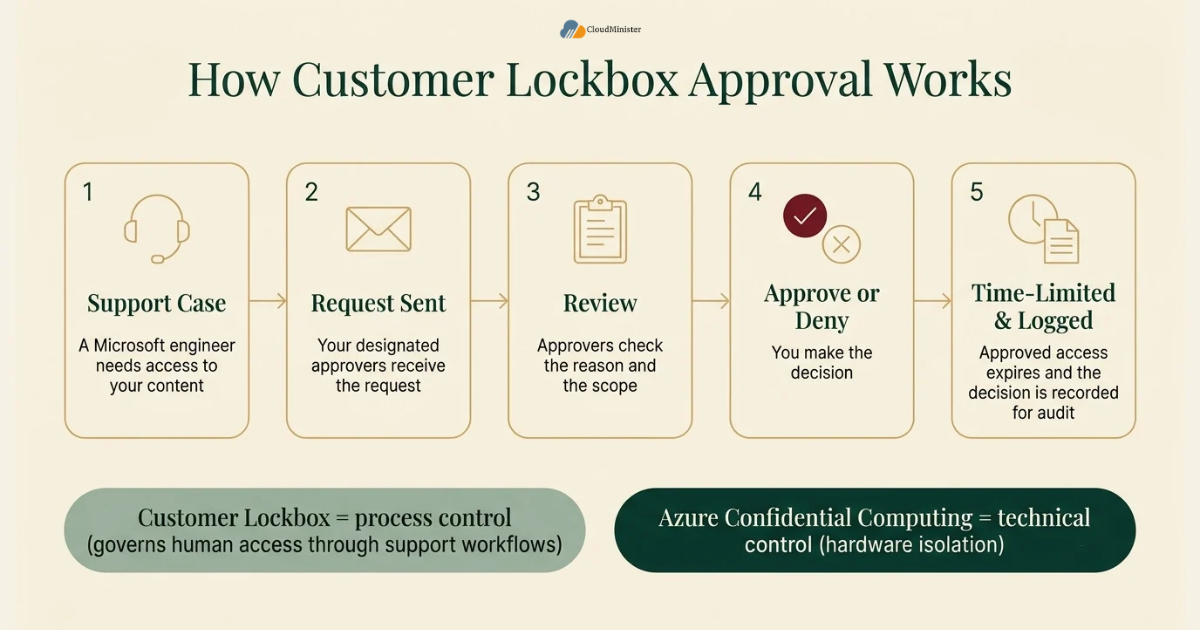
- Customer Lockbox applies when Microsoft engineers need access to customer content during a support case.
- Approver access depends on Azure role assignments, so review those roles regularly.
- Eligibility depends on your Azure support plan, so confirm the current requirement in Microsoft documentation before relying on it.
- An authorised administrator enables the feature in the Azure portal, and this setting is separate from any Cloud Hosting Plan you buy.
- Requests and decisions are logged, which gives auditors a clear trail.
- Microsoft documents scenarios that fall outside Customer Lockbox, including certain emergency and legal situations, so read those exclusions carefully.
- Customer Lockbox does not restrict your own administrators, so privileged access inside your tenant needs separate controls.
- Use it with Azure role based access control and Privileged Identity Management for internal admin control on Azure Cloud Hosting subscriptions.
Test your Customer Lockbox approval path before you need it. Raise a low priority support case in a non production subscription, confirm that the right people receive the request and measure how quickly they respond. A support case blocked by a missing approver costs time during a real incident.
6. Azure Key Vault and Managed HSM: Keeping Key Custody in Your Hands
Azure Key Vault stores keys, secrets and certificates, and it is the central place where encryption keys for Azure services are managed. The Standard tier protects keys with software, the Premium tier adds hardware security module protection, and Managed HSM gives a single tenant and customer controlled HSM pool with its own security domain. Customer managed keys let you decide when keys rotate, who can use them and when access is revoked. Misconfiguration is a real risk here, because the Intruder 2026 Cloud Security Index found weak identity and access controls in 90 percent of Azure accounts across 3000 organisations. Key Vault is therefore the control to harden first when you plan Azure Confidential Computing. A reliable Cloud Hosting Plan for Azure should state whether Premium Key Vault or Managed HSM costs are included.
| Tier | Key protection | Best for |
| Standard | Software protected keys | Development and lower risk workloads |
| Premium | HSM backed keys in a shared service | Production workloads that need HSM protection and Secure Key Release |
| Managed HSM | Single tenant HSM pools with FIPS 140 validation | Highest assurance and regulated workloads |
- Soft delete is on by default, and purge protection should be turned on for production vaults.
- Use Azure role based access control instead of legacy access policies for consistent permission management.
- Use managed identities so applications never store credentials to reach the vault.
- Restrict network access with private endpoints and firewall rules, and disable public access where possible, which is easy to enforce across Azure Cloud Hosting environments.
- Set expiry dates on secrets, since the same index found Key Vault secrets that never expire on 41 percent of Azure accounts.
- Enable key rotation policies for customer managed keys, and test that dependent services handle new key versions.
- Send audit logs to Log Analytics and alert on unusual key operations.
- Use Premium or Managed HSM when you need Secure Key Release with Azure Confidential Computing.
7. How Azure Confidential Computing, Customer Lockbox and Key Vault Work Together
Each control answers a different question, and the design becomes strong only when the answers connect. Azure Confidential Computing answers who can see data while it is processed. Customer Lockbox answers whether a Microsoft engineer can reach content during a support case. Key Vault answers who controls the keys that unlock the data. Imagine a payment application hosted in Central India. The application runs on a confidential virtual machine, the disk encryption key is held in Key Vault and released only after attestation, and any support access to the subscription goes through a Customer Lockbox approval. A reviewer can then trace every step, which is the kind of evidence auditors and enterprise customers ask for when they evaluate Azure Cloud Hosting designs. A Web Hosting Company in India that offers cloud hosting services in India can also provide the monitoring layer around this design.
| Layer | Question it answers | Control type | Main owner |
| Data in use | Who can see data in memory | Hardware enforced | Platform and security team |
| Operator access | Can Microsoft staff reach content | Approval workflow | Security and compliance team |
| Key custody | Who controls encryption keys | Key management and policy | Security team |
| Evidence | Can we prove what ran | Attestation and logs | Security and audit team |
- Start with a landing zone so networking, identity and policy are ready before sensitive workloads arrive.
- Place Key Vault in the same region as the workload to reduce latency and simplify residency review, and choose a Cloud Hosting Plan that keeps compute and vault in the same Indian region.
- Use separate vaults for production and non production, and split vaults by data tier where practical.
- Grant the workload identity only the key operations it needs, such as wrap, unwrap or release.
- Keep Customer Lockbox approvers different from the engineers who run the workload.
- Use Azure Policy to enforce soft delete, purge protection, private endpoints and approved virtual machine sizes, much like AWS Config rules do on Optimized AWS Cloud Hosting.
- Document the data flow once, and reuse the diagram for audits and customer questionnaires, and the same diagram can compare Azure Cloud Hosting with Optimized AWS Cloud Hosting designs.
- A mature Azure Confidential Computing design is repeatable, so build it as code with Bicep or Terraform.
Related Reading: Azure landing zone enterprise scale guide
Build Your Azure Confidential Computing Setup with Cloudminister
Planning to protect sensitive workloads with confidential virtual machines, Key Vault and Customer Lockbox? Our Azure experts help you design, deploy and manage a secure environment hosted in India. New clients get a free consultation to plan the right approach.
8. Indian Rules That Shape Confidential Workload Design
Indian regulation does not prescribe a single technology, but it does expect reasonable security safeguards, clear accountability and often data residency. The Digital Personal Data Protection Act 2023 requires data fiduciaries to take reasonable security safeguards, and it sets penalties of up to 250 crore rupees for failure to do so. Sector regulators add their own expectations. The Reserve Bank of India requires payment system data to be stored only in India, SEBI has a cloud framework for regulated entities, and CERT-In directions require quick incident reporting and log retention. A well planned design using Azure Confidential Computing, Key Vault and Customer Lockbox gives you strong technical evidence to support these duties, although it does not replace legal advice. Providers of cloud hosting services in India with local data centre knowledge can explain residency options in plain language, and the same duties apply to Optimized AWS Cloud Hosting workloads.
- DPDP Act duties apply to data fiduciaries, which are the organisations that decide why and how personal data is processed.
- The DPDP Rules are being phased in, so confirm current commencement dates with your legal team.
- RBI rules require payment system data to be stored only in India, so select Indian regions for that data, and ask your Web Hosting Company in India where backups and logs are stored.
- SEBI regulated entities should align cloud adoption with the SEBI cloud framework and confirm exact obligations with their compliance team, and check that the Cloud Hosting Plan they pick supports that review.
- CERT-In directions expect incident reports within six hours and log retention for 180 days within India.
- Key Vault audit logs and platform logs can support log retention and investigation needs when stored in an Indian region, which applies to every Azure Cloud Hosting subscription in scope.
- Customer Lockbox records help show that vendor access to your content was reviewed and approved.
- Always confirm the latest rules with a qualified advisor, because this article is guidance and not legal advice.
9. Choosing Azure Regions in India and Comparing with AWS
Region choice affects latency, residency and resilience. Azure operates cloud regions in India, including Central India in Pune and South India in Chennai, and architects usually pair regions for disaster recovery inside the country. Before committing, confirm that the confidential virtual machine sizes you need are available in the target region, since confidential hardware is not offered everywhere. Teams also compare Optimized AWS Cloud Hosting with Azure at this stage. AWS offers Nitro Enclaves and the AWS Key Management Service, and many organisations run both clouds, so the real question is which controls match your workload and skills. A Web Hosting Company in India that supports both clouds can help you compare them fairly. Whichever path you choose, compare each Cloud Hosting Plan on included monitoring, backup and support.
- Central India in Pune and South India in Chennai are common choices for primary and recovery locations, so choose a Cloud Hosting Plan that offers both.
- Check confidential virtual machine availability in each region using the portal or the Azure CLI list skus command.
- Key Vault replicates to the paired region, so confirm that the pairing keeps data inside India.
- AWS Nitro Enclaves provide isolated compute on AWS, and AWS KMS can restrict key use to attested enclaves.
- Compare Azure Cloud Hosting and Optimized AWS Cloud Hosting on isolation model, attestation, key custody, operating skills and cost, not on brand.
- Multi cloud designs need one key custody policy, or each cloud will end up with a different standard, and providers of cloud hosting services in India that cover both clouds make this easier.
- A pilot on Azure Cloud Hosting and a pilot on Optimized AWS Cloud Hosting give better evidence than a feature table.
- Using Optimized AWS Cloud Hosting for general workloads and Azure for confidential tiers is a valid pattern.
Related Reading: EKS vs GKE vs AKS comparison
10. Cost, Performance and Operations
Confidential computing adds some cost and operational work, and honest planning avoids surprises. Confidential virtual machine sizes are priced differently from standard sizes, Premium Key Vault and Managed HSM cost more than the Standard tier, and attestation adds a step to deployment pipelines. Performance overhead exists but depends on the workload, so benchmark with your own traffic instead of trusting generic numbers. Cost control matters as much as security, because a design that is too expensive gets weakened later. Choosing the right Cloud Hosting Plan for the non confidential parts of the system keeps overall spend sensible and keeps Azure Confidential Computing focused on the data that needs it. When you review monthly Azure Cloud Hosting invoices, compare confidential sizes against standard ones.
- Apply confidential computing only to workloads that handle restricted data, and keep the rest on standard infrastructure.
- Benchmark CPU, memory and input output behaviour on confidential sizes before final sizing.
- Premium Key Vault and Managed HSM are billed differently from Standard, so model key operations and HSM pool costs, and compare AWS key management charges when you review Optimized AWS Cloud Hosting.
- Use reservations or savings plans after the workload is stable and the size is proven, and ask your Web Hosting Company in India to model these options.
- Automate attestation checks inside the deployment pipeline to avoid manual work.
- Track Key Vault request volume, since heavy request rates can hit service limits and throttle applications.
- Set budgets and alerts on every Cloud Hosting Plan so confidential tiers do not grow silently.
Related Reading: Azure cost optimization guide
11. A Practical Thirty Day Plan to Get Started
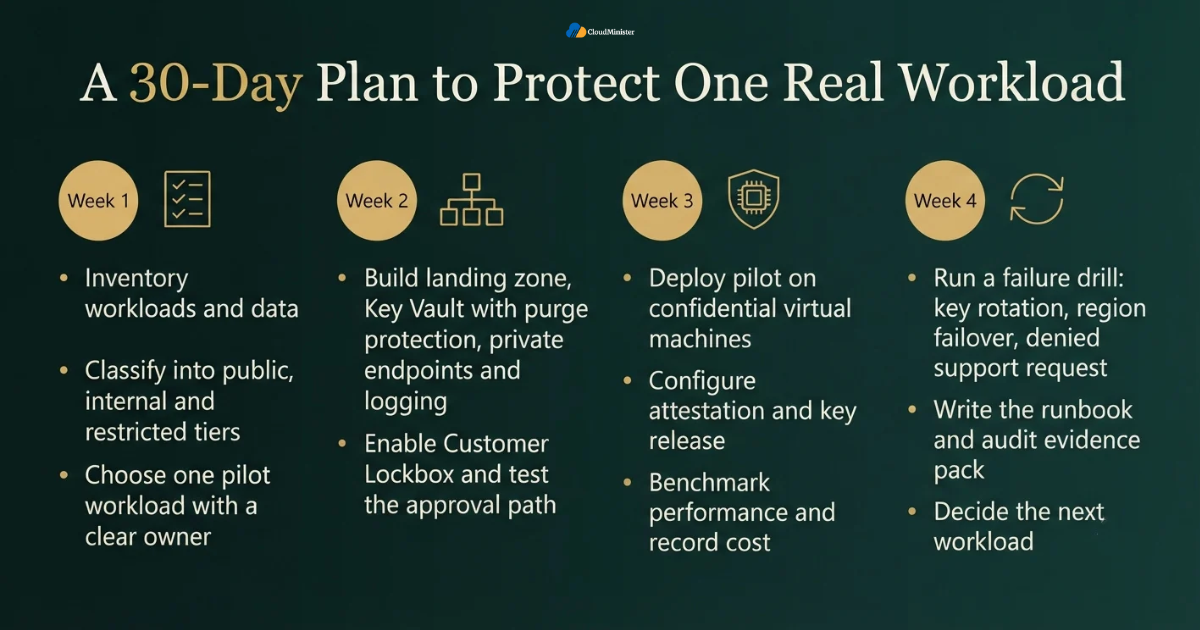
Reading about Azure Confidential Computing is easy, and acting on it is harder, so this plan breaks the work into four weeks. The goal is not to protect everything at once. The goal is to protect one real workload properly, learn from it and then repeat the pattern. A team that runs a pilot first will find gaps in attestation policy, key permissions and support approval paths while the cost of mistakes is still small. If your team is short on time, a Web Hosting Company in India or a provider of cloud hosting services in India can run parts of the plan alongside your engineers. The plan works the same way on Azure Cloud Hosting or Optimized AWS Cloud Hosting, and a good Cloud Hosting Plan should cover the support hours you need.
- Week one: inventory workloads and data, then classify them into public, internal and restricted tiers.
- Week one: choose one pilot workload that handles restricted data and has a clear owner, and ask your Web Hosting Company in India for current capacity and backup details.
- Week two: build the landing zone, Key Vault with purge protection, private endpoints and logging.
- Week two: enable Customer Lockbox and test the approval path with a low priority support case.
- Week three: deploy the pilot on confidential virtual machines and configure attestation and key release.
- Week three: benchmark performance and record cost against the standard version.
- Week four: run a failure drill covering key rotation, region failover and a denied support request.
- Week four: write the runbook and the audit evidence pack, then decide the next workload, and confirm that your provider of cloud hosting services in India covers the cutover window.
12. Common Mistakes and Governance Practices
Most failures in confidential computing projects come from planning gaps and not from the technology. Teams choose a strong control and then leave the surrounding process weak. Good governance fixes this by giving every control an owner, a review date and a measurable outcome. It also stops Azure Confidential Computing from becoming a badge that looks impressive but protects little because keys, identities or support access were never tightened. Clear policy, regular review and honest reporting make the difference, and mature teams apply the same discipline to cost and capacity as they do to security. Reviewing each Cloud Hosting Plan against actual use every quarter keeps both cost and risk visible.
- Enabling confidential virtual machines but leaving the key release policy open to any environment.
- Storing secrets in application settings instead of Key Vault with managed identities.
- Leaving public network access enabled on Key Vault and storage accounts.
- Treating Customer Lockbox as protection against internal administrators, which it is not.
- Skipping soft delete and purge protection, which risks permanent key loss or malicious deletion.
- Forgetting key rotation and expiry, which leaves old keys valid for years.
- Not testing disaster recovery, so keys or attested workloads fail to start in the recovery region.
- Moving to Azure Cloud Hosting without checking confidential size availability until late in the project.
Related Reading: Cloud cost governance policy guide
13. Choosing the Right Hosting Partner in India
Not every provider is ready to support a security sensitive design. A capable Web Hosting Company in India will explain clearly which parts of the design it manages and which parts remain with your team. It should be able to discuss monitoring, backup, incident response and key custody without vague promises. Ask for real examples of past work, and ask how the team handled problems. Providers of cloud hosting services in India that understand both Azure and AWS are especially useful, because many Indian businesses run both. Cloudminister is an official Akamai partner, and you can explore its Azure and cloud hosting pages to see how its services fit a design built around Azure Confidential Computing. A provider that supports Azure Cloud Hosting and Optimized AWS Cloud Hosting together reduces handovers between teams.
- Ask how many sensitive workload projects the provider has supported, and how it verified the results.
- Confirm what is monitored, what is backed up and what is restored during testing, and ask the Web Hosting Company in India to show a recent restore test.
- Ask who holds Key Vault administration rights and how those rights are reviewed.
- Check whether support covers nights and weekends, since many cutovers happen outside office hours.
- Request written escalation paths, including who can approve a rollback.
- Prefer providers of cloud hosting services in India that publish clear documentation on backup, restore time and support hours.
- Compare pricing on the full picture, including monitoring, backup storage and extra capacity, not only the base Cloud Hosting Plan.
- Be cautious of any provider that promises zero risk, since honest providers state limits clearly.
Checklist: Confidential Workload Readiness Review
- Data classified into public, internal and restricted tiers.
- Pilot workload chosen, owner named and support terms of the Cloud Hosting Plan and the Web Hosting Company in India reviewed.
- Confidential virtual machine size confirmed on Azure Cloud Hosting in the chosen Indian region.
- Attestation policy for Azure Confidential Computing written, reviewed and tested in staging.
- Key Vault Premium or Managed HSM in use with purge protection and private access.
- Key release policy limited to attested workloads.
- Customer Lockbox enabled and the approval path tested.
- Logs sent to a central workspace and retained as per Indian rules.
- Rollback drill completed and legal review recorded in writing.
Key Takeaways
- Azure Confidential Computing protects data in use with hardware based isolation, and it complements encryption at rest and in transit.
- Customer Lockbox adds an approval step for Microsoft engineer access during support cases, but it is a process control and not a technical isolation layer.
- Key Vault Premium and Managed HSM support Secure Key Release, which links keys to attested environments.
- Remote attestation turns Azure Confidential Computing from a promise into proof that auditors can check.
- Indian rules such as the DPDP Act, RBI localisation, the SEBI cloud framework and CERT-In directions shape region, logging and key custody choices.
- Start with one pilot workload, a strict attestation policy, private Key Vault access, tested recovery and a Cloud Hosting Plan sized for the pilot.
- Confirm size and region availability in India before design, since confidential hardware is not in every region, and providers of cloud hosting services in India can confirm this early.
- Compare Azure with Optimized AWS Cloud Hosting on isolation model, key custody and skills, and keep one key policy across clouds.
- A trusted Web Hosting Company in India that offers cloud hosting services in India brings monitoring, backup and support cover so your team can focus on the design.
Get a Free Consultation for Your Secure Cloud Workloads
Not sure where to start with Azure Confidential Computing, key custody or Indian compliance requirements? Talk to the Cloudminister team today. We offer a free consultation to all new clients, so you can plan your pilot workload with expert guidance and no obligation.
Conclusion
Throughout this guide one pattern holds. Strong protection for sensitive workloads is the result of layered design and not of one clever tool. Azure Confidential Computing protects data while it is processed, Customer Lockbox puts a human approval step in front of Microsoft operator access, and Key Vault keeps encryption keys under your control. When remote attestation connects these layers, you gain something rare in cloud security, which is evidence that you can show to auditors, regulators and enterprise customers.
A design like this is never finished on the day of launch. Keep reviewing attestation policy, key permissions, approver roles and region availability as your workload and the Indian rules change. Start with one pilot, document what works, and repeat the pattern with the next workload. With a careful plan and a capable partner, Azure Confidential Computing becomes a practical part of everyday operations and not a special project. Teams on Azure Cloud Hosting or Optimized AWS Cloud Hosting can reuse the same pattern, and a Web Hosting Company in India that offers cloud hosting services in India can keep the supporting layers running.
Frequently Asked Questions
What is Azure Confidential Computing in simple words?
Azure Confidential Computing protects data while it is being processed. It runs workloads inside a hardware based trusted execution environment, where memory is encrypted and isolated from the host operating system, the hypervisor and cloud operators.
Does Azure Confidential Computing replace encryption at rest?
No. Azure Confidential Computing protects data in use, while encryption at rest and in transit still protect stored and moving data. A strong design uses all three together, and your Cloud Hosting Plan should still include backup and monitoring for stored data.
Is Customer Lockbox the same as Azure Confidential Computing?
No. Customer Lockbox is an approval workflow for Microsoft engineer access to customer content during support cases. Azure Confidential Computing is a technical control that isolates workload memory in hardware. They solve different problems and work well together, and teams using Optimized AWS Cloud Hosting will find the same split between approval workflows and hardware isolation.
Which Key Vault tier should I use with Azure Confidential Computing?
Use Key Vault Premium or Managed HSM when you need Secure Key Release, because those tiers support releasing keys only to attested environments. Standard can still suit development and lower risk workloads. Pricing differs by tier, so compare each Cloud Hosting Plan carefully.
Can Microsoft staff see my data if I enable Customer Lockbox?
Customer Lockbox requires your approval before a Microsoft engineer accesses your content during a covered support case. Microsoft documents certain scenarios outside its scope, so read the current documentation. For technical enforcement at the workload level, add Azure Confidential Computing. Providers of cloud hosting services in India can explain these limits in writing.
Does Azure Confidential Computing slow down applications?
There can be some overhead, and the size depends on the workload. Benchmark your own application on confidential sizes before final sizing instead of relying on generic numbers, and providers of cloud hosting services in India can run these benchmarks with you.
Do I need Azure Confidential Computing to follow the DPDP Act?
The DPDP Act expects reasonable security safeguards and does not name one technology. Azure Confidential Computing, Key Vault and Customer Lockbox can support those safeguards, but confirm your exact obligations with a qualified advisor. A Web Hosting Company in India can supply logs and reports that support your records.
Should I choose Azure or Optimized AWS Cloud Hosting for sensitive workloads?
Both clouds offer strong isolation options, with Azure providing confidential virtual machines and AWS providing Nitro Enclaves. Choose by workload fit, key custody needs, team skills and cost, and run a pilot before committing. A Web Hosting Company in India can run the pilot on both.
How can a Web Hosting Company in India help with Azure Confidential Computing?
A capable Web Hosting Company in India can run monitoring, backup, patching and incident response around your design, and it can review region choice and key custody with you. Confirm in writing what the provider owns and what stays with your team.
Where can I find cloud hosting services in India for Azure workloads?
Look for a provider that publishes clear documentation on backup, restore time and support hours, and that can show real examples of past work. You can start by exploring Cloudminister pages on Azure and cloud hosting. Compare each Cloud Hosting Plan on included monitoring and support.

Pritam Kumar is a DevOps Engineer at CloudMinister Technologies, where he manages a multi-datacenter fleet of 100+ servers and architects end-to-end CI/CD pipelines and infrastructure automation using Kubernetes, Terraform, and Ansible. He holds an AWS Certified DevOps Engineer Professional certification and has served as a Google Cloud Mentor, reflecting both hands-on cloud expertise and a track record of mentoring others in the field. His work spans disaster recovery architecture, security incident response, and hosting infrastructure across Proxmox, cPanel/WHM, and Linux systems. Notably, Pritam led the design of Cloud Kavach, a self-hosted DC/DR SaaS portal, and directed remediation efforts for large-scale hosting security incidents involving webshells and command-and-control malware. He brings this depth of real-world infrastructure and security experience to the technical content he writes.