In September 2026, cPanel released fixes on September 8, September 22 and September 29 for critical flaws, including root level code execution from a normal hosting account. This cPanel Security Update guide lists every CVE in plain language, shows the minimum patched build for each branch, and explains how to apply, verify and harden your server. It also shows where a Web Hosting Company in India and Server Management Services in India can lower your workload.
If you run a cPanel and WHM server, September 2026 was not a quiet month. The vendor shipped fixes on three separate dates, and the later releases covered flaws that let a low privileged account run commands on the server. Every cPanel Security Update from that month matters, because cPanel and WHM control the websites, mailboxes, DNS records and databases of every customer on the machine. A weak control panel is a weak server, no matter how strong the rest of your setup looks. A Web Hosting Company in India that manages the stack for you removes much of this burden.
The urgency is easy to understand when you look back at what happened earlier in 2026. The authentication bypass tracked as CVE-2026-41940 was exploited at scale, and many owners learned how fast attackers move once a patch becomes public. A late cPanel Security Update gives them that same window again. Strong cybersecurity solutions always start with one basic habit, which is to patch the management layer first and patch it quickly.
This guide turns the September releases into simple points you can act on today. You will learn what each flaw does, which builds fix it, how to update, how to confirm the update worked, and how to harden the server afterwards. If you also want expert help, a Web Hosting Company in India with strong Cyber Security services can handle much of this work for you, and a clear cPanel Security Update routine will protect your customers and your reputation.
Table of Contents
- 1. What the September 2026 cPanel Patches Fixed
- 2. Why Delaying a cPanel Patch Is a Business Risk
- 3. CVE-2026-67401: The EmailTrack SQL Injection Fixed on September 8
- 4. CVE-2026-87899 and CVE-2026-68490: CalDAV and CardDAV Flaws Fixed on September 22
- 5. CVE-2026-87900: The WP Toolkit Database Flaw Fixed on September 22
- 6. CVE-2026-93698 and CVE-2026-93697: The Critical Fixes of September 29
- 7. Minimum Patched Builds for Each cPanel Branch
- 8. How to Install the cPanel Patch Step by Step
- 9. How to Verify That the Patch Really Applied
- 10. Hardening cPanel and WHM Beyond the Latest Patch
- 11. Checking for Signs of Compromise After the Update
- 12. What Hosting Customers and Resellers Should Do
- 13. Common Mistakes Server Owners Make During Patch Cycles
- 14. When to Bring in Managed Security Support
- Key Takeaways
- Conclusion
- Frequently Asked Questions
1. What the September 2026 cPanel Security Update Releases Fixed
cPanel delivered fixes in three rounds during September 2026. The first round on September 8 addressed a critical SQL injection issue. The second round on September 22 fixed two flaws in the CalDAV and CardDAV service and one flaw in WP Toolkit. The third round on September 29 closed two more critical issues, one in the Multilang Adminbin and one in the WHM Mass Modify Accounts interface. Treat the whole month as one combined cPanel Security Update, because builds are cumulative inside a branch and the newest build for your branch carries every earlier fix. Owners who work with a Web Hosting Company in India often hear about such releases early, and teams with Server Management Services in India can plan each cPanel Security Update before customers notice any risk.
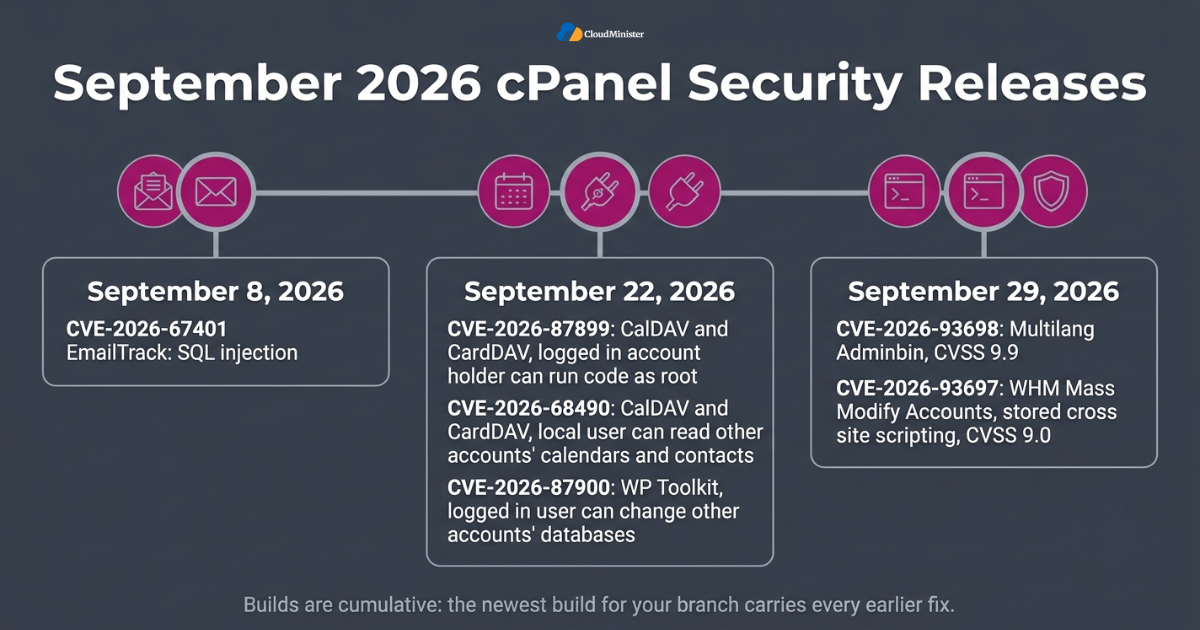
- September 8: CVE-2026-67401, a critical SQL injection in EmailTrack that affected every supported version of cPanel and WHM.
- September 22: CVE-2026-87899, a CalDAV and CardDAV flaw that lets a logged in account holder run code as root.
- September 22: CVE-2026-68490, a second CalDAV and CardDAV flaw that lets a local user read other accounts’ calendar events and contacts.
- September 22: CVE-2026-87900, a WP Toolkit flaw that lets a logged in cPanel user change databases that belong to other accounts.
- September 29: CVE-2026-93698, a critical Multilang Adminbin flaw with a CVSS score of 9.9 that may allow arbitrary command execution.
- September 29: CVE-2026-93697, a stored cross site scripting flaw in WHM Mass Modify Accounts with a CVSS score of 9.0.
- Exploitation status: when these flaws were first reported, none was publicly documented as exploited, but that status can change quickly.
| Release date | CVE | Component | Main impact |
| September 8, 2026 | CVE-2026-67401 | EmailTrack | SQL injection, reported root code execution from a mail enabled account |
| September 22, 2026 | CVE-2026-87899 | CalDAV and CardDAV | Logged in account holder can run code as root |
| September 22, 2026 | CVE-2026-68490 | CalDAV and CardDAV | Local user can read other accounts’ calendars and contacts |
| September 22, 2026 | CVE-2026-87900 | WP Toolkit | Logged in user can change other accounts’ databases |
| September 29, 2026 | CVE-2026-93698 | Multilang Adminbin | Arbitrary command execution, CVSS 9.9 |
| September 29, 2026 | CVE-2026-93697 | WHM Mass Modify Accounts | Stored cross site scripting, CVSS 9.0 |
Do not patch only for the CVE with the highest score. Move every server to the newest build available for its branch, so that all September fixes land together and none are left behind. One complete cPanel Security Update is safer than three partial ones. Server Management Services in India providers often schedule this for you.
2. Why Delaying a cPanel Security Update Is a Business Risk
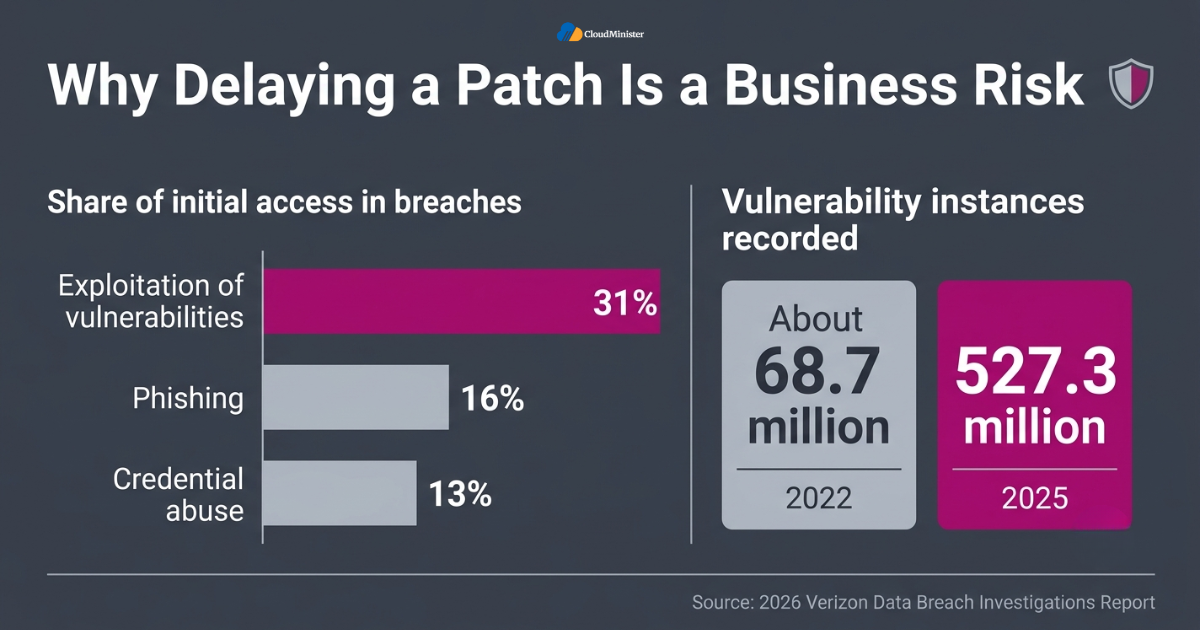
Attackers do not wait for your maintenance calendar. The 2026 Verizon Data Breach Investigations Report found that exploitation of vulnerabilities now accounts for 31 percent of initial access in breaches, ahead of phishing at 16 percent and credential abuse at 13 percent. The same coverage notes that Verizon recorded 527.3 million vulnerability instances in 2025, compared with about 68.7 million in 2022. For a hosting server, this trend means every unpatched control panel is a likely target and every day of delay adds risk. A timely cPanel Security Update is the cheapest control you have, and choosing a Web Hosting Company in India that patches fast is a business decision as much as a technical one. Clients also expect cybersecurity solutions that include fast patching, and a provider with proven Cyber Security services and reliable Server Management Services can show that record clearly.
- A control panel holds websites, email, databases, DNS and backups, so one weakness exposes every service on the server.
- Flaws that need only a normal hosting account are dangerous on shared servers, because any customer or any stolen login becomes a starting point.
- Attackers read public advisories closely, so the day a fix is announced is also the day they begin studying it.
- One compromised server can mean downtime for every customer at once, which raises support load and refund requests.
- Search engines can flag or drop hacked sites, so ranking and traffic losses follow a breach.
- Rebuilding a compromised server takes far more time than a planned update window, even with good backups.
- Customers now ask hosting providers how quickly they apply every cPanel Security Update before they sign or renew.
- Fast patching is also one of the simplest cybersecurity solutions you can show to auditors and clients.
3. CVE-2026-67401: The EmailTrack SQL Injection Fixed on September 8
The first cPanel Security Update of the month fixed CVE-2026-67401, a critical SQL injection issue in the EmailTrack feature. cPanel said every supported version of cPanel and WHM was affected and that its own security review found the problem. Independent reporting by The Hacker News described the impact as an account with mail privileges being able to create files anywhere and run code as root. The advisory did not spell out which privilege an account needs, so the safest approach is to treat every mail enabled account on the server as a possible starting point until the server is updated. A short review of mail accounts and a quick cPanel Security Update, backed by Server Management Services in India, closes this gap fast, and sensible cybersecurity solutions keep mail privileges tight.
- Flaw type: SQL injection in the EmailTrack functionality of cPanel and WHM.
- Severity: rated critical by cPanel.
- Reach: every supported version of cPanel and WHM at the time of the advisory.
- Reported impact: an account with mail privileges could create files anywhere and run code as root.
- Discovery: found internally through cPanel’s own security review process.
- Exploitation: cPanel said it was not aware of active exploitation, and the flaw was absent from the CISA Known Exploited Vulnerabilities catalog when The Hacker News checked on September 9.
- Fix: updated builds were published for the 110, 134, 136 and 138 release lines. Apply the cPanel Security Update to every server, not only one.
- Field report: one independent administrator saw a cPanel 136 server move from build 136.0.38 to 136.0.39 through the normal update process on September 8.
Related Reading: The Roundcube CVE-2026-48842 SQL injection patch
4. CVE-2026-87899 and CVE-2026-68490: CalDAV and CardDAV Flaws Fixed on September 22
The second round arrived on September 22 and dealt with cPanel’s CalDAV and CardDAV service, the component that stores each account’s calendars and contacts. CVE-2026-87899 lets a logged in account holder run code as root and take full control of the server, and cPanel lists no requirement other than owning an account. A related flaw, CVE-2026-68490, lets a local user read other accounts’ calendar events and contacts, but not change them or gain root access. On a shared server this is the kind of cPanel Security Update that cannot wait, since any customer, or anyone holding a customer’s password, could attempt to abuse it. Hosts that sell accounts should ask their Server Management Services team and their Web Hosting Company in India to confirm the build, and Cyber Security services can test that the fix is working.
- Affected versions: cPanel and WHM version 120 and later, according to the advisories.
- Fixed builds for both flaws: 11.134.0.57, 11.136.0.41 and 11.138.0.8 or later, plus WP Squared 11.138.1.11 or later.
- Branch gap: fixed builds are listed only for the 134, 136 and 138 lines, so servers on older unsupported lines must move to a supported branch.
- Workaround: cPanel offered no temporary workaround, which makes updating the only reliable fix. Strong cybersecurity solutions cannot replace the update itself.
- Side benefit: the update also repairs calendar and contact permissions for existing accounts.
- Exploitation: none of the September 22 advisories mentioned active exploitation, and the flaws were not in the CISA catalog on September 23.
- Visibility: cPanel did not publish a method to check whether a server was attacked before it was updated.
- Priority: shared and reseller servers should be updated first, because they hand out accounts to many different users. Ask your Web Hosting Company in India for its status.
5. CVE-2026-87900: The WP Toolkit Database Flaw Fixed on September 22
WP Toolkit is the plugin many servers use to install and manage WordPress sites, and CVE-2026-87900 affects how it handles commands that create databases. cPanel said a logged in cPanel user could perform database modifications in other accounts. The detail that catches many owners out is that WP Toolkit is installed as its own package, so it needs its own update. Every complete cPanel Security Update should therefore include a separate WP Toolkit check. Providers of Server Management Services usually track plugin versions like this one, and teams with Server Management Services in India often add it to a weekly checklist next to every cPanel Security Update.
- Affected: WP Toolkit 6.11.2-10794 and older.
- Fixed in: WP Toolkit 6.11.3 or later.
- Impact: a logged in cPanel user can change databases that belong to other accounts.
- Unknown details: cPanel did not say which changes are possible or whether data from other accounts can also be read.
- Package name: WP Toolkit for cPanel is delivered as the package wp-toolkit-cpanel, with its own update path.
- Update method: cPanel published a manual installer command for version 6.11.3 in its WP Toolkit advisory, so copy that exact command from the advisory.
- Automatic updates: the advisory does not say whether automatic updates will install the fixed version, so check the version by hand. Server Management Services can check this for you.
- Plesk users: WP Toolkit also exists for Plesk, and cPanel has not said whether that version is affected.
6. CVE-2026-93698 and CVE-2026-93697: The Critical Fixes of September 29
The final September release came on September 29 and fixed two critical issues. CVE-2026-93698, in the Multilang Adminbin, scored 9.9 on CVSS and may allow arbitrary command execution because of insufficient validation. It needs network access and low privileges but no user interaction. CVE-2026-93697 is a stored cross site scripting flaw in the WHM Mass Modify Accounts interface, which scored 9.0 and needs user interaction. The CVE records were published on October 2, three days after the fixes were available, so servers that updated promptly were already protected. This is the cPanel Security Update to verify first, since its score is the highest of the month. If you cannot verify the build yourself, ask a Web Hosting Company in India to confirm it, and ask your Cyber Security services partner to review exposed ports as part of wider cybersecurity solutions.
- CVE-2026-93698: a Multilang Adminbin flaw, CVSS 9.9, caused by insufficient validation that may allow arbitrary command execution.
- Attack conditions for CVE-2026-93698: network access and low privileges, with no user interaction needed.
- CVE-2026-93697: stored cross site scripting in WHM Mass Modify Accounts, CVSS 9.0, with user interaction required.
- Stored cross site scripting means a malicious script is saved in the application and later runs in the browser of the person who opens the affected page.
- Fixed builds: 11.138.0.11, 11.136.0.45, 11.134.0.61 and 11.110.0.148 on the LTS branch, plus WP Squared 11.138.1.13.
- Timeline: fixes were available on September 29 and the CVE records followed on October 2. Server Management Services in India teams can plan updates the same day.
- Exploitation: no active abuse had been publicly documented by October 2, and CVE-2026-93698 was not listed in the CISA catalog.
- Priority: because it combines the highest score of the month with no user interaction, treat CVE-2026-93698 as the first item to verify.
A missing public exploit today does not mean safety tomorrow. Once a patch is public, researchers and attackers can study what changed and work backwards to the flaw. Finish every cPanel Security Update as soon as your change window allows, and limit who can reach WHM while you wait. Cyber Security services can watch WHM access logs during that time. Server Management Services in India teams can enforce the same limits.
Related Reading: The cPanel and WHM CVE-2026-41940 authentication bypass
7. Minimum Patched Builds for Each cPanel Branch
cPanel versions follow the pattern 11.branch.minor.build, so the numbers to read are the branch, such as 134, 136 or 138, and the build at the end. The table below combines the minimum builds from the September 22 and September 29 releases. Aim for the right hand column, because builds are cumulative inside a branch and the newest minimum build carries the earlier fixes as well. Keeping your server on a supported branch is the foundation of every cPanel Security Update plan. A provider of Server Management Services can compare your build numbers against this table in minutes, and teams with Server Management Services in India often automate the check so every cPanel Security Update is tracked.
| Branch | Minimum build for September 22 fixes | Minimum build for September 29 fixes |
| 110 LTS | Not listed | 11.110.0.148 |
| 134 | 11.134.0.57 | 11.134.0.61 |
| 136 | 11.136.0.41 | 11.136.0.45 |
| 138 | 11.138.0.8 | 11.138.0.11 |
| WP Squared | 11.138.1.11 | 11.138.1.13 |
- Read your branch first, then compare your build number with the table, because a lower build means the server is still exposed.
- Branch 110 is a long term support line, and its minimum build for the September 29 fixes is 11.110.0.148.
- Branches older than 110, or retired lines, may not receive fixes at all, so plan an upgrade or migration.
- cPanel has warned in earlier advisories that unsupported versions may also be affected even when no patch is offered for them.
- Your update tier controls which builds you receive, and tiers such as RELEASE, STABLE, LTS and CURRENT may get a fix at different times.
- You can review the tier in WHM under Server Configuration and then Update Preferences.
- Cloud and VPS images are often built from older versions, so never assume a new server is already current. Run a cPanel Security Update check on every new server.
- WP Squared servers use their own minimum builds, which appear in the last row of the table.
8. How to Apply the cPanel Security Update Step by Step
Applying the update is simple, but the order matters. Work as root, choose a quiet traffic period, and keep a rollback path ready before you start. Teams that rely on Server Management Services usually follow a written runbook for this, and you can do the same with the steps below. A tidy routine turns every cPanel Security Update into a normal task instead of an emergency. If you want a second pair of eyes, a Web Hosting Company in India can run the upgrade with you, and Cyber Security services can test the server afterwards as part of wider cybersecurity solutions.
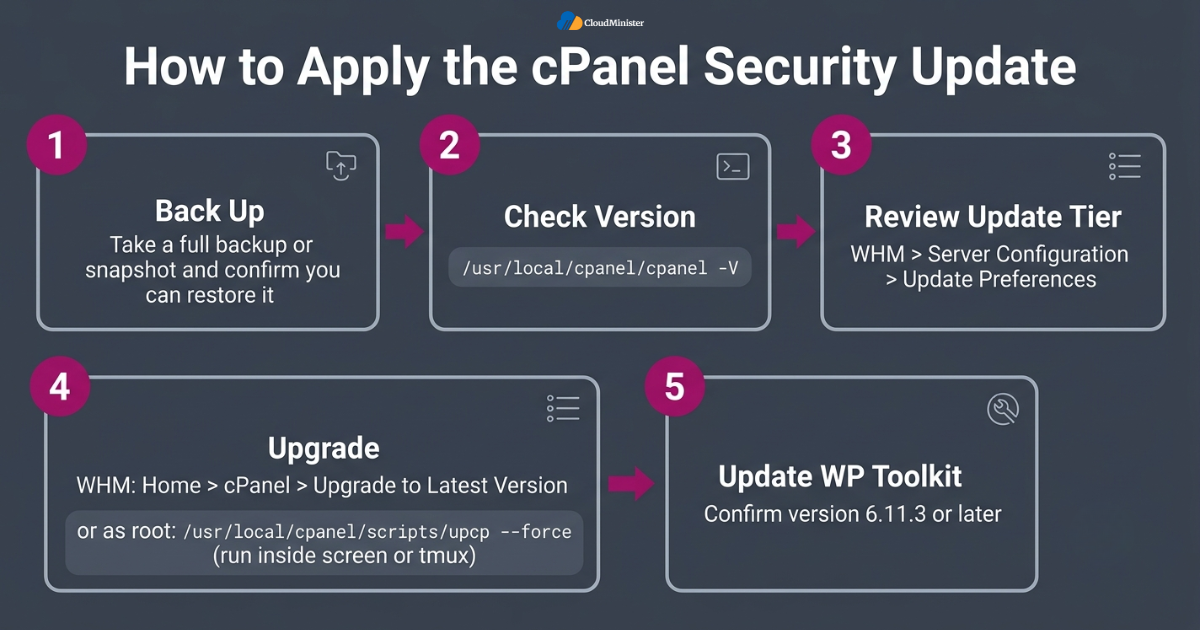
- Take a full backup or a provider snapshot, and confirm that you can restore it. Server Management Services can store it safely.
- Check your current version with the command /usr/local/cpanel/cpanel -V.
- Review your update tier in WHM under Server Configuration and then Update Preferences.
- From WHM, open Home, then cPanel, then Upgrade to Latest Version, and start the upgrade.
- From the command line, log in as root and run /usr/local/cpanel/scripts/upcp –force, which is the command cPanel recommends.
- Run the command inside screen or tmux so a dropped SSH session cannot interrupt the upgrade.
- Expect brief service restarts during the upgrade, so schedule it away from peak hours and tell your customers.
- Update WP Toolkit separately and confirm that it reaches version 6.11.3 or later.
Never interrupt the upgrade midway. If your connection drops, log in again and read the newest log in /var/cpanel/updatelogs before you start a second run. Careful habits make each cPanel Security Update predictable. Cyber Security services can review that log too.
9. How to Verify That the Patch Really Applied
An update that finished without errors is not always an update that worked. Verify every server after the run, and record the result with the date, the build number and the name of the person who checked it. This habit also helps during audits, and it is one of the simple cybersecurity solutions that small teams often skip. Teams that use Server Management Services in India often keep these records in a shared change log. Add your own checks to the list if needed, and ask Cyber Security services or Server Management Services to repeat them after the next cPanel Security Update.
- Run /usr/local/cpanel/cpanel -V again and compare the result with the table in section 7.
- Read /usr/local/cpanel/version as a second confirmation of the installed build.
- Open the newest log in /var/cpanel/updatelogs and check that the run ended without errors.
- Confirm the WP Toolkit version inside its interface, or check the wp-toolkit-cpanel package with your package manager.
- Log in to WHM and to a test cPanel account to confirm that normal access still works.
- Send and receive a test email, and test calendar or contact sync if you use CalDAV or CardDAV.
- Run Security Advisor in WHM under Security Center and review every high priority item it shows. This tool is one of the cybersecurity solutions built into WHM.
- Write the final build number in your change log so the next cPanel Security Update review is quick.
Related Reading: Zero trust security guide for India
10. Hardening cPanel and WHM Beyond the Latest Patch
Patching closes known holes, but layered defence protects you from the next one. A well planned stack of cybersecurity solutions limits who can reach the panel, who can log in, and what a single account can do. Many owners add professional Cyber Security services at this stage, because an outside team can test the firewall, review logs and watch for unusual logins every day. Think of each cPanel Security Update as the first layer and the steps below as the second. Your Server Management Services provider can apply many of these steps, teams with Server Management Services in India can monitor them daily, and a Web Hosting Company in India can place the server behind a managed firewall.
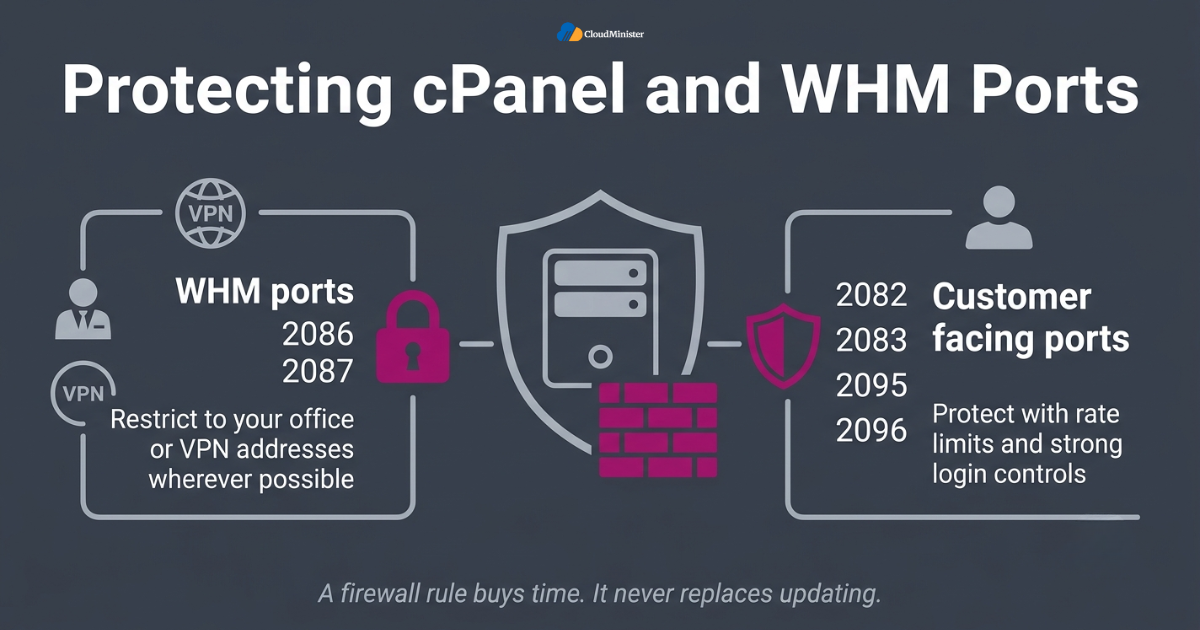
- Restrict WHM ports 2086 and 2087 to your office or VPN addresses in the firewall wherever possible.
- Protect the customer facing ports 2082, 2083, 2095 and 2096 with rate limits and strong login controls, since customers need them.
- Enable two factor authentication for WHM and for cPanel accounts under Security Center.
- Turn on cPHulk Brute Force Protection and review its blocked address lists regularly.
- Remove unused accounts, old resellers and expired test users, since each one is a possible entry point.
- Give resellers only the privileges they truly need in WHM.
- Keep the operating system, kernel and web server components patched along with cPanel as part of your cybersecurity solutions.
- Send logs to a remote location so an attacker cannot erase the trail on a compromised server. Server Management Services often provide this.
A firewall rule is a strong extra layer, but it never replaces updating. During the April 2026 cPanel incident, some hosting providers temporarily blocked ports 2083 and 2087 until patches were applied, which shows how serious a panel flaw can be. Use firewall rules to buy time, then finish the cPanel Security Update. A Web Hosting Company in India can help set these rules safely.
11. Checking for Signs of Compromise After the Update
Updating protects you from now on, but it does not remove an attacker who got in earlier. More than 40,000 servers were likely compromised in the CVE-2026-41940 campaign earlier this year, according to The Shadowserver Foundation, and Rapid7 estimated that about 1.5 million cPanel instances were reachable from the internet. The September advisories did not publish a method to check for earlier abuse, so owners must rely on careful review. Pair every cPanel Security Update with a short hunt through your logs. Specialists in Cyber Security services can run these checks for you, and trusted Server Management Services can keep the evidence safe while cybersecurity solutions such as file monitoring watch for repeat activity.
- Review /usr/local/cpanel/logs/login_log and access_log for unusual logins and unfamiliar IP addresses.
- Check /var/log/secure for root logins or SSH sessions at odd hours.
- List recent accounts in WHM and look for any account nobody on your team created.
- Inspect the root crontab and the files in /etc/cron.d for unknown scheduled jobs.
- Review /root/.ssh/authorized_keys for keys that you do not recognize.
- Run ss -tulpn to list listening services and look for ports that should not be open.
- On RPM based systems, run rpm -Va to flag modified system files, then examine the results carefully.
- If anything looks wrong, isolate the server, preserve the logs, rebuild from a clean image and rotate all passwords and keys, and call Cyber Security services if you need help.
Not Sure Your Server Was Safe Before the Patch?
Updating cPanel stops new attacks, but it does not remove an attacker who got in earlier. Our Cyber Security services team reviews your logs, accounts, ports and system files, then hardens WHM so the next flaw does less damage.
12. What Hosting Customers and Resellers Should Do
If you rent hosting rather than run the server yourself, you cannot update WHM, but you can ask the right questions. Your provider controls the patch timeline, so choosing a reliable Web Hosting Company in India with clear communication is your best protection. Providers that bundle Server Management Services in India can usually confirm patch status within minutes and share the build number on request. Every customer is entitled to ask how each cPanel Security Update is handled. Ask for proof from your Cyber Security services contact or your Server Management Services team, not only a promise, so that the cPanel Security Update is documented.
- Ask your host which cPanel build the server runs and the date it was updated after every cPanel Security Update.
- Ask whether WP Toolkit was updated to 6.11.3 or later if you use WordPress.
- Change your cPanel password and enable two factor authentication if your host offers it.
- Keep WordPress core, themes and plugins updated, because they are a separate attack path.
- Store a copy of your backups away from the server that hosts the live site. A Web Hosting Company in India can offer this.
- Remove unused email accounts, FTP users and add on domains from your account.
- Watch your site for unexpected files, new admin users and redirects, and report them quickly.
Related Reading: Data residency requirements in India
13. Common Mistakes Server Owners Make During Patch Cycles
Most incidents after a patch release come from small process failures, not from hard technical problems. Teams update one server and forget the rest, or they read the headline and skip the details. Strong Server Management Services reduce these gaps by turning the process into a checklist. Avoiding the mistakes below makes each cPanel Security Update safer and faster. Teams with Server Management Services in India, a trusted Web Hosting Company in India and clear cybersecurity solutions rarely repeat these mistakes.
- Updating cPanel but forgetting WP Toolkit, which has its own package and version.
- Patching production without a verified backup or snapshot.
- Assuming automatic updates worked without checking the final build number. Server Management Services can verify this for you.
- Leaving servers on unsupported branches that no longer receive fixes.
- Keeping WHM open to the whole internet when only a few administrators need it.
- Skipping post update log review and missing earlier signs of compromise.
- Sharing root or WHM credentials among many staff members without logging or two factor authentication.
- Treating a September fix as finished business and ignoring the next advisory.
Patching is a loop, not a single event. Subscribe to cPanel’s security announcements and name one person who reads them every week. A server that is checked on a schedule rarely needs an emergency response, and a regular cPanel Security Update cycle keeps surprises small. Server Management Services can own this weekly review.
14. When to Bring in Managed Security Support
Not every team has the staff to watch advisories, patch at night and review logs the next morning. That is where managed support pays for itself. A provider that combines Server Management Services with strong Cyber Security services can monitor, patch and verify on your behalf, so your engineers stay focused on the product. The right partner also treats every cPanel Security Update as a documented process. Many firms choose Server Management Services in India for this reason, since one team can own the cPanel Security Update, the monitoring and the cybersecurity solutions.
- Ask how quickly the provider applies a critical cPanel Security Update after release, and ask for real examples.
- Confirm that backups are tested for restore, not only created. Cybersecurity solutions should include restore tests.
- Look for a Web Hosting Company in India that publishes clear support hours and escalation steps.
- Check that monitoring covers logins, ports, services and disk health around the clock.
- Ask which cybersecurity solutions are included, such as firewall management, malware scanning and two factor setup.
- Request written confirmation of what the provider handles and what remains your responsibility.
- Prefer teams that share build numbers and patch dates openly after every release.
- Make sure the Cyber Security services you choose include incident response, not only prevention.
cPanel Security Update Readiness Checklist
- Every server runs at least the minimum build for its branch from the table in section 7 after each cPanel Security Update.
- WP Toolkit is at version 6.11.3 or later wherever it is installed.
- A full backup was taken and a restore was tested before the upgrade, and your Server Management Services provider confirmed it.
- The final build number was checked after the upgrade and written in the change log.
- WHM ports 2086 and 2087 are limited to trusted addresses where possible.
- Two factor authentication is enabled for WHM and for cPanel accounts.
- cPHulk Brute Force Protection is on and its logs are reviewed.
- Logs were checked for unusual logins, new accounts, unknown cron jobs and unfamiliar SSH keys.
- Unsupported branches are scheduled for upgrade or migration.
- One named person, or your Server Management Services in India partner, reads cPanel security announcements every week.
Key Takeaways
- The September 2026 releases of September 8, September 22 and September 29 fixed six flaws across EmailTrack, CalDAV and CardDAV, WP Toolkit, Multilang Adminbin and WHM Mass Modify Accounts.
- The highest scored issue was CVE-2026-93698 with a CVSS score of 9.9, so verify that fix first.
- Move every server to at least 11.110.0.148, 11.134.0.61, 11.136.0.45 or 11.138.0.11 for its branch.
- WP Toolkit needs its own update to version 6.11.3 or later.
- No public exploitation was documented at the time of the reports, but waiting only gives attackers time. Server Management Services in India teams can shorten that wait.
- Hardening, log review and two factor authentication turn a single cPanel Security Update into lasting protection. Cyber Security services can test it.
- A trusted Web Hosting Company in India that offers Server Management Services in India can handle patching, backups and monitoring for you.
- Layered cybersecurity solutions and professional Cyber Security services reduce the damage if a future flaw appears.
Let Our Experts Handle Your cPanel Patching
Skip the late-night updates, build checks and log reviews. Our Server Management Services in India team patches, verifies backups and monitors your servers, so every cPanel Security Update lands on time and is documented.
Conclusion
The September 2026 releases show how quickly a control panel can move from routine maintenance to a serious risk. Three rounds of fixes in three weeks left many owners unsure which build they needed, and that confusion is exactly what attackers hope for. A calm approach works best. Find your branch, compare your build with the table, take a backup, apply the cPanel Security Update, verify the result and then review your logs. Server Management Services can make that routine easier.
Do not stop at patching. Limit access to WHM, use two factor authentication, remove unused accounts and watch for early warning signs. If your team is small, a Web Hosting Company in India that provides Server Management Services in India and dependable Cyber Security services can share the load and keep every cPanel Security Update on schedule. Strong cybersecurity solutions are built from many small habits, and the habit of patching on time is the most important one.
Frequently Asked Questions
Which cPanel Security Update should I apply first from September 2026?
Apply the newest build available for your branch, because builds are cumulative and it carries every September fix. If you must prioritize, verify the September 29 fix for CVE-2026-93698 first, since it has the highest score at 9.9. Teams with Server Management Services can finish this cPanel Security Update in one maintenance window.
Which cPanel builds include all the September 2026 fixes?
The minimum builds are 11.110.0.148 for the 110 LTS branch, 11.134.0.61 for 134, 11.136.0.45 for 136 and 11.138.0.11 for 138. WP Squared needs 11.138.1.13. Any later build on the same branch also includes these fixes. Your Web Hosting Company in India can confirm these numbers for you.
Can any hosting customer really use CVE-2026-87899?
cPanel lists no requirement other than having a logged in account. That is why shared and reseller servers should be updated first, since many users hold accounts there and stolen customer logins also count. Cyber Security services can also review which accounts are exposed.
Do I need to update WP Toolkit separately?
Yes. WP Toolkit is installed as its own package, and the fix for CVE-2026-87900 is in version 6.11.3 or later. Check the installed version after every cPanel Security Update instead of assuming it changed. Providers of Server Management Services in India usually include this check in their routine.
Were the September 2026 flaws exploited in the wild?
The reports available at the time did not document active exploitation, and the checked flaws were not in the CISA Known Exploited Vulnerabilities catalog. That can change, so check the vendor advisories and the CISA catalog again before you decide a server can wait. Cybersecurity solutions that watch advisories help you see such changes quickly.
Can a firewall replace the update?
No. A firewall can limit who reaches WHM and buys you time, but several of these flaws need only a normal account or low privileges. The only reliable fix is the vendor update, so treat firewall rules as a second layer. Layer it with Cyber Security services and a prompt cPanel Security Update.
How often should I check for a new cPanel Security Update?
Check at least weekly and subscribe to the vendor’s security announcements. Automatic updates help, but you should still confirm the build number after each release. Teams offering Server Management Services in India usually do this check on a fixed day each week.
How can a Web Hosting Company in India help with patching?
A good provider tracks advisories, applies updates in a tested order, keeps verified backups and reports the final build number to you. It also gives local support hours and clear escalation steps, which saves time during an urgent cPanel Security Update. Choose a Web Hosting Company in India that shares build numbers openly.
Why are Server Management Services in India useful for cPanel servers?
They add round the clock monitoring, patching, log review and backup checks without hiring a full internal team. Combined with Cyber Security services and practical cybersecurity solutions, they help you respond to the next advisory calmly. Server Management Services of this type also support quick rollback.