A MySQL to RDS migration moves a self managed MySQL database to a managed service where the cloud provider handles patching, backups, and failover. This guide compares Amazon RDS for MySQL, Google Cloud SQL, and Azure Database for MySQL on availability, storage limits, migration tools, security, and cost. It also covers assessment, replication based cutover, and rollback, and explains where AWS managed services, Optimized AWS Cloud Hosting, and a reliable Web Hosting Company in India fit into a safe plan.
Almost every growing product reaches a point where a single MySQL server in a rack or on a virtual machine becomes the weakest link. Backups depend on a script someone wrote years ago, failover means a phone call at midnight, and every minor version upgrade feels like a gamble. A well planned MySQL to RDS migration removes most of that daily pressure by handing routine operations to a managed service, while your team keeps control of the schema, the queries, and the data.
The market is moving in the same direction. Grand View Research estimates that the database migration segment of cloud migration services earned USD 5,441.8 million in 2025 and could reach USD 31,639.9 million by 2033, growing at 25.1 percent a year from 2026, with India expected to record the highest growth rate among countries. For Indian businesses, a MySQL to RDS migration is no longer a special project. It is turning into a normal part of infrastructure planning, and cloud hosting services in India are expanding to support it.
This guide explains the decision in plain language. You will see how Amazon RDS, Cloud SQL, and Azure Database for MySQL compare, how to assess your current server, which migration method suits which situation, and how to switch over safely. Whether you plan a MySQL to RDS migration this quarter or only want to compare options, the sections below give you a clear path, a checklist, and answers to common questions.
Table of Contents
- 1. What Moving Self-Managed MySQL to Amazon RDS Really Involves
- 2. Why Teams Move to Managed MySQL in the Cloud
- 3. Amazon RDS for MySQL: Features That Matter
- 4. Google Cloud SQL for MySQL: Features That Matter
- 5. Azure Database for MySQL Flexible Server: Features That Matter
- 6. Amazon RDS vs Cloud SQL vs Azure Database: Side by Side Comparison
- 7. Pre Migration Assessment and Compatibility Checks
- 8. Migration Methods Compared
- 9. Step by Step Move to Amazon RDS with Minimal Downtime
- 10. Cutover, Validation, and Rollback
- 11. Security, Compliance, and Data Residency in India
- 12. Cost Control and Performance Tuning After Migration
- 13. Common Mistakes That Cause Migration Trouble
- 14. Choosing the Right Hosting Partner for Your Migration
- Key Takeaways
- Conclusion
- Frequently Asked Questions
1. What a MySQL to RDS Migration Really Involves
A MySQL to RDS migration means moving your schema, data, users, and application connections from a MySQL server you run yourself to Amazon RDS for MySQL, where AWS operates the hardware, the operating system, patching, and backups. You no longer log in to the host or edit configuration files directly. Instead you work with parameter groups, option groups, and the AWS console or API. Understanding this shift early prevents most surprises, because the work is less about copying rows and more about adapting to a managed environment.
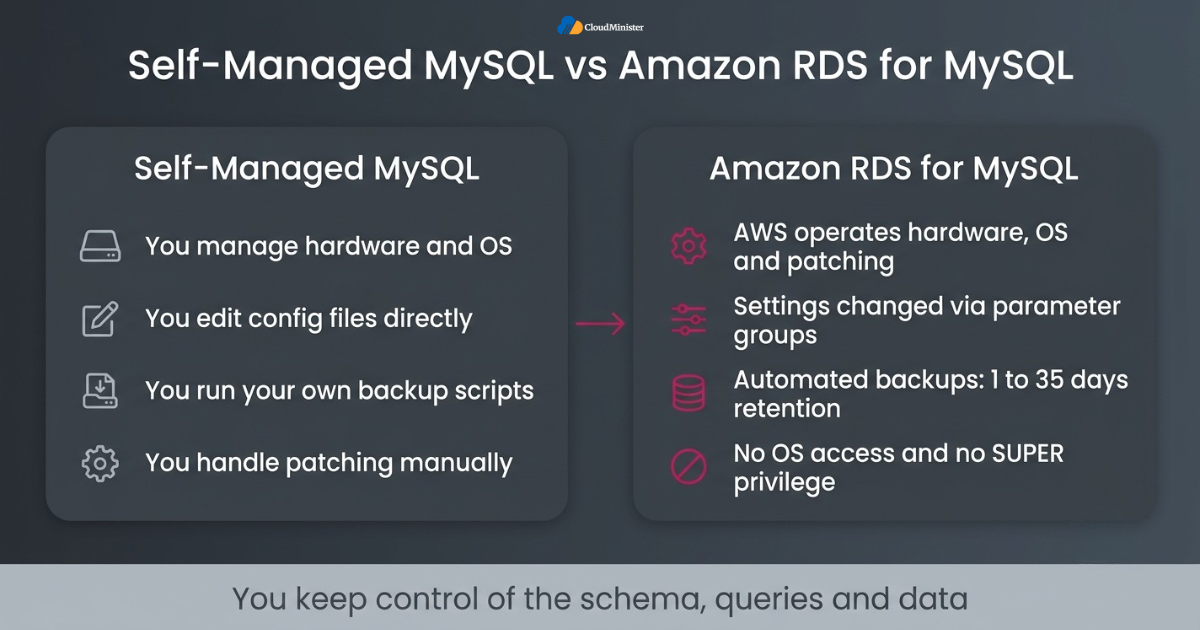
- Source types: the source of a MySQL to RDS migration can be an on premises server, a virtual machine in another cloud, or another managed service, and each path has different network and tooling needs.
- No operating system access: you cannot install plugins or run shell commands on an RDS instance, so any cron job, backup script, or monitoring agent on the old host needs a new home.
- No SUPER privilege: the RDS master user does not hold the SUPER privilege, so dumps and statements that rely on it must be adjusted, and stored objects with unusual DEFINER values need review.
- Configuration through parameter groups: settings such as innodb_buffer_pool_size, max_connections, and sql_mode are changed in a DB parameter group, and static parameters need a reboot to take effect.
- Managed storage: you choose a storage type and size, and RDS handles the underlying volumes, with storage autoscaling up to a maximum you define.
- Built in backups: automated backups and point in time recovery come with the service, with a retention period you set from 1 to 35 days.
- Support tools: AWS managed services such as CloudWatch and AWS Systems Manager can replace many tasks that used to depend on scripts running on the old host, and Optimized AWS Cloud Hosting brings them together in one managed setup.
- Planning help: a Web Hosting Company in India that also offers cloud hosting services in India can map these changes with your team before the first instance is created, and a Cloud Hosting Plan with migration support keeps the work on schedule.
Before you create any instance, list every task your current MySQL server performs at the operating system level, such as log rotation, backup scripts, and monitoring agents. Teams that skip this list often find a missing job only after cutover, when it is hardest to fix.
2. Why Teams Move to Managed MySQL in the Cloud
Managed databases have moved from a convenience to a default choice. IMARC Group reports that the global database as a service market reached USD 34.7 billion in 2025 and is expected to reach USD 138.9 billion by 2034, a growth rate of 15.82 percent a year from 2026 to 2034. The reason is simple. Running replication, backups, patching, and failover by hand takes skilled people, and many teams would rather spend that time on the product. A MySQL to RDS migration is one of the most common ways to make that shift, and AWS managed services extend the same idea to monitoring, security, and automation around the database. Cloud hosting services in India have also matured, with local regions and support teams that make these moves easier than they were a few years ago.
- Patching and minor version upgrades can be scheduled in a maintenance window instead of being done by hand on each server.
- Backups are automated, and a point in time restore creates a new instance instead of overwriting the existing one, which makes recovery safer.
- Failover is automatic in Multi AZ setups, so after a MySQL to RDS migration the manual promotion step that often delays recovery disappears.
- Read replicas let you move reporting and read heavy traffic away from the primary instance.
- Scaling compute means modifying the instance class, and storage can grow without rebuilding the server.
- Cost becomes easier to predict, since you pay for instance hours, storage, backup storage beyond the included allowance, and data transfer, rather than for idle hardware, and a clear Cloud Hosting Plan puts all of these items in one monthly view.
- A trusted Web Hosting Company in India can help you size these resources correctly, so you do not pay for capacity you never use.
- Optimized AWS Cloud Hosting adds right sized instances and tuned storage, so the benefits of a managed service show up in both the bill and the response time.
3. Amazon RDS for MySQL: Features That Matter
Amazon RDS for MySQL is the most direct target for a MySQL to RDS migration, because it runs the community MySQL engine and keeps your application code almost unchanged. It supports MySQL 8.0 and the 8.4 long term support release, and it works with standard clients and drivers. AWS managed services such as AWS Key Management Service, CloudWatch, and AWS Identity and Access Management wrap around the instance, so security and monitoring follow the same patterns as the rest of your AWS account. Teams that want Optimized AWS Cloud Hosting often start here because the platform is mature and widely documented.
- Multi AZ options: a Multi AZ DB instance keeps one synchronous standby in another Availability Zone, while a Multi AZ DB cluster uses two readable standby instances with semisynchronous replication.
- Read replicas: RDS for MySQL supports up to 15 read replicas per source instance, including cross Region replicas.
- Storage: General Purpose SSD gp3 and Provisioned IOPS SSD volumes are available, and a single instance can grow to 64 TiB.
- Backups: automated backups with point in time recovery, plus manual snapshots that can be copied across Regions or shared with other AWS accounts.
- Encryption: encryption at rest uses AWS KMS keys, and connections can be protected with TLS.
- Authentication: IAM database authentication is supported for RDS for MySQL, which lets applications use short lived tokens instead of stored passwords.
- Aurora option: some teams end a MySQL to RDS migration on the Amazon Aurora MySQL compatible edition, which suits workloads that need faster failover and very high read scaling, although pricing and behaviour differ from standard RDS.
- Tooling: AWS Database Migration Service and native MySQL replication both support a MySQL to RDS migration, and a Cloud Hosting Plan built around AWS can include the network and monitoring setup.
- Regions: AWS operates regions in Mumbai and Hyderabad, so a Web Hosting Company in India can place your RDS instance close to your users through cloud hosting services in India.
4. Google Cloud SQL for MySQL: Features That Matter
Google Cloud SQL for MySQL is a fully managed service that suits teams already running workloads on Google Cloud or using BigQuery and other Google data tools. It automates replication, backups, and patching in a way that feels very similar to RDS. Even if your target is Amazon RDS, Cloud SQL is a useful comparison point, because a MySQL to RDS migration plan should be judged against alternatives on price, features, and regional presence. Teams that compare it with AWS managed services should look at the whole ecosystem and not only the database, and the same goes for Optimized AWS Cloud Hosting on the AWS side.
- High availability: a regional instance keeps a primary and a standby in different zones of the same region and fails over automatically, with data written synchronously to a regional persistent disk.
- Versions: current releases include MySQL 8.0 and 8.4, and older versions are retired in line with community end of life dates.
- Migration: Database Migration Service for MySQL supports continuous migration from external servers, using an initial dump followed by ongoing binary log changes, much like a MySQL to RDS migration on AWS.
- Connectivity: the Cloud SQL Auth Proxy and private IP connections let applications connect securely without opening public access.
- Editions: Cloud SQL Enterprise and Enterprise Plus differ in performance, availability features, and maintenance behaviour, so compare them against your downtime tolerance and the Cloud Hosting Plan you would otherwise choose.
- Backups: automated backups and point in time recovery use binary logs, and retention can be set to match your recovery goals.
- Read replicas: you can add replicas to scale reads, and cross region replicas are available for disaster recovery.
- Regions: Google Cloud has regions in Mumbai and Delhi, which gives Indian workloads low latency, much like cloud hosting services in India built on AWS regions, and a Web Hosting Company in India can help you compare the two.
5. Azure Database for MySQL Flexible Server: Features That Matter
Azure Database for MySQL Flexible Server is the current managed MySQL offering from Microsoft, and the older Single Server option was retired in September 2024. It fits organisations that already depend on Microsoft identity, Windows workloads, and Azure networking. As with any MySQL to RDS migration decision, the right question is not which platform lists more features, but which one matches your team skills, network design, and compliance needs.
- High availability: zone redundant high availability places a standby in a different availability zone, while same zone high availability keeps both copies inside one zone.
- Compute tiers: Burstable, General Purpose, and Business Critical tiers let you match cost to workload, with Burstable suited to light or test use.
- Storage: Flexible Server supports storage up to 16 TiB and offers storage autogrow, so capacity can increase as data grows.
- Backups: automated backups support point in time restore, with retention configurable from 1 to 35 days.
- Security: TLS is enforced by default through the require_secure_transport setting, and Microsoft Entra authentication is available for sign in.
- Networking: you can use private access through virtual network integration or private endpoints, or public access protected by firewall rules.
- Migration: Azure Database Migration Service and native replication can move data from external MySQL servers, and online migration relies on binary log replication, just as a MySQL to RDS migration does.
- Fit and cost: a Web Hosting Company in India that already manages Azure networking may find Flexible Server easier to adopt, but compare every charge, including the AWS managed services you would use instead, before you commit to any Cloud Hosting Plan. Pricing Optimized AWS Cloud Hosting the same way keeps the comparison fair.
- Regions: Azure has regions in Pune, Chennai, and Mumbai, so teams that need cloud hosting services in India for residency reasons have local options.
6. Amazon RDS vs Cloud SQL vs Azure Database: Side by Side Comparison
A side by side view helps when several teams have different opinions. The table below summarises the main differences that affect a MySQL to RDS migration decision. The values reflect commonly documented limits and should be confirmed in each provider documentation before you finalise a design, since cloud services change limits and supported versions often.
| Feature | Amazon RDS for MySQL | Google Cloud SQL for MySQL | Azure Database for MySQL Flexible Server |
| High availability | Multi AZ instance or Multi AZ cluster | Regional instance with automatic failover | Zone redundant or same zone |
| Maximum storage | 64 TiB | 64 TB | 16 TiB |
| Read replicas | Up to 15 | Up to 10 | Up to 10 |
| Automated backup retention | 1 to 35 days | Configurable, up to 365 backups | 1 to 35 days |
| Migration service | AWS DMS and native replication | Database Migration Service and native replication | Azure Database Migration Service and native replication |
| Identity based sign in | IAM database authentication | IAM database authentication | Microsoft Entra authentication |
| Indian regions | Mumbai and Hyderabad | Mumbai and Delhi | Pune, Chennai, and Mumbai |
- Choose Amazon RDS when the rest of your stack already runs on AWS, where Optimized AWS Cloud Hosting and AWS managed services work together.
- Choose Cloud SQL when your analytics and data pipelines are centred on Google Cloud.
- Choose Azure Database when Microsoft identity and Azure networking already shape your environment.
- Compare total cost, not only instance price, by adding storage, backup, replicas, and data transfer to every Cloud Hosting Plan you review.
- Test performance with your own queries, because published limits do not predict how your MySQL to RDS migration target will behave under real traffic.
- Ask a Web Hosting Company in India and other providers of cloud hosting services in India for quotes on each platform, so you compare real support terms and not only list prices.
- Plan for exit: portability is easier when you rely on standard MySQL features and avoid provider specific extras.
Related Reading: Application migration strategy
Run Your Managed MySQL on Optimized AWS Cloud Hosting
Planning a MySQL to RDS migration and want infrastructure sized to your real workload? CloudMinister offers cloud hosting with right-sized resources, monitoring, and migration support. Free consultancy is included, so our experts can review your setup before you commit.
7. Pre Migration Assessment and Compatibility Checks
Assessment decides whether a MySQL to RDS migration is routine or painful. Spend the first week gathering facts about your source server, because the answers drive the method, the instance size, and the cutover window. Version differences, character sets, and stored code cause far more trouble than raw data volume, so list them before you copy anything. AWS managed services and a capable Web Hosting Company in India can support this stage with sizing data, network tests, and backup reviews.
- Record the source MySQL version, storage engine mix, total data size, and daily write volume, since these numbers shape the method for your MySQL to RDS migration and the downtime estimate.
- Convert any MyISAM tables to InnoDB before the move, because RDS point in time recovery and snapshot restore work reliably only with a crash recoverable engine such as InnoDB.
- Check that every table has a primary key, because replication and validation tools work better with one and row based replication performs poorly on tables without it.
- Compare character sets and collations, such as utf8mb4_general_ci and utf8mb4_0900_ai_ci, because differences can change sort order and break unique constraints.
- Review stored procedures, triggers, views, and events for DEFINER clauses that refer to users or privileges that will not exist on RDS.
- Check sql_mode, time zone, and lower_case_table_names, and remember that lower_case_table_names on MySQL 8.0 can only be set when the RDS instance is created.
- Confirm that binary logging is enabled on the source with binlog_format set to ROW, which AWS DMS change capture requires and which most replication setups prefer.
- Estimate the network bandwidth between source and target and test it, and ask your cloud hosting services in India provider for a throughput test between the two sites.
- Match these numbers to a Cloud Hosting Plan early, so Optimized AWS Cloud Hosting sizing, storage, and backup needs are priced before the project starts.
Related Reading: Cloud migration checklist 2026
8. Migration Methods Compared
There is no single best path. The right method depends on database size, your downtime budget, and whether you can accept a short write pause. For a MySQL to RDS migration, most teams choose between a logical dump, a physical backup restore, native binary log replication, or AWS Database Migration Service. Each one trades speed, simplicity, and downtime in a different way.
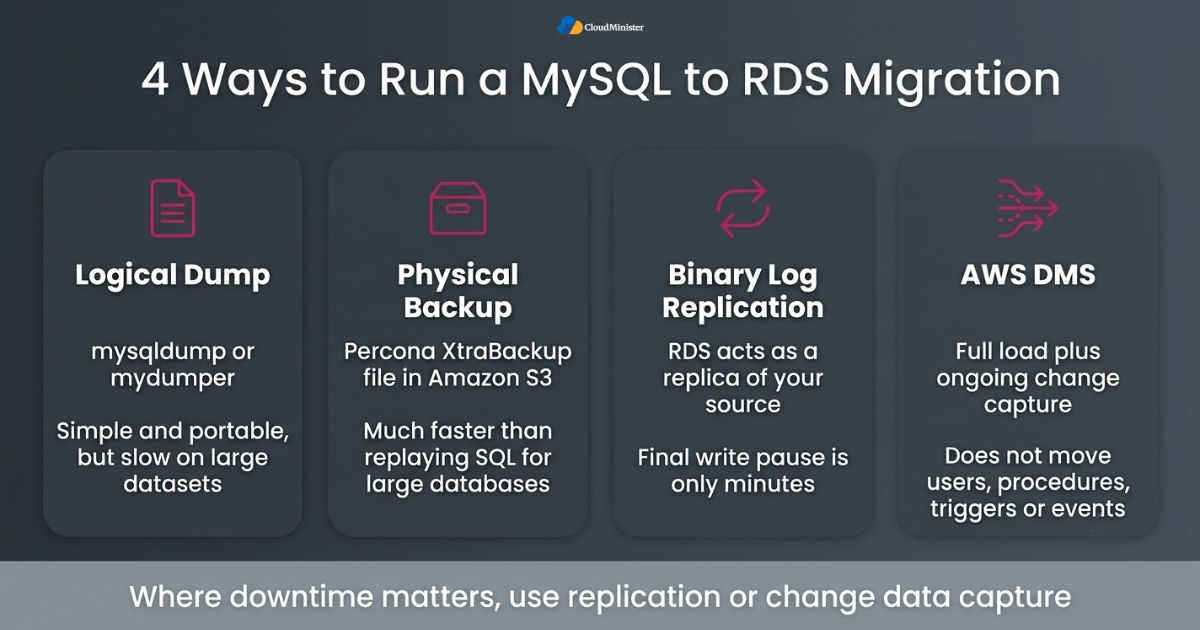
- Logical dump with mysqldump or mydumper: simple and portable, but slow on large datasets and it needs a write freeze unless you combine it with replication.
- Physical backup from Amazon S3: for large databases, a Percona XtraBackup file stored in Amazon S3 can be restored into a new RDS for MySQL instance, which is much faster than replaying SQL statements.
- Native binary log replication: after the initial load, the RDS instance acts as a replica of your source and stays current until cutover, which keeps the final write pause to minutes.
- AWS DMS: it supports a full load followed by ongoing change data capture and reports progress, but it does not move users, stored procedures, triggers, or events, and it may not create secondary indexes and foreign keys.
- DMS homogeneous data migrations: this option is designed for same engine moves such as MySQL to MySQL and uses native database tools underneath.
- Cloud SQL and Azure equivalents: Google Database Migration Service and Azure Database Migration Service follow the same pattern of an initial load plus binary log based change capture.
- Infrastructure matters: AWS managed services, Optimized AWS Cloud Hosting, and a Web Hosting Company in India with strong network links can all shorten the initial copy and reduce replica lag, and a Cloud Hosting Plan with bandwidth included for the transfer avoids surprise charges.
- Rule of thumb: for a small database a dump is often enough, and for any MySQL to RDS migration where downtime matters, use replication or change data capture. Providers of cloud hosting services in India can help you rehearse whichever method you pick.
9. Step by Step MySQL to RDS Migration with Minimal Downtime
This section walks through the replication based path, which is the most common way to finish a MySQL to RDS migration with only a short write pause. The flow is the same whether you use native replication or AWS DMS: build the target, copy the data, keep it in sync, test, and switch. Optimized AWS Cloud Hosting matters here because networking, instance sizing, and storage settings decide how quickly the target catches up with the source.
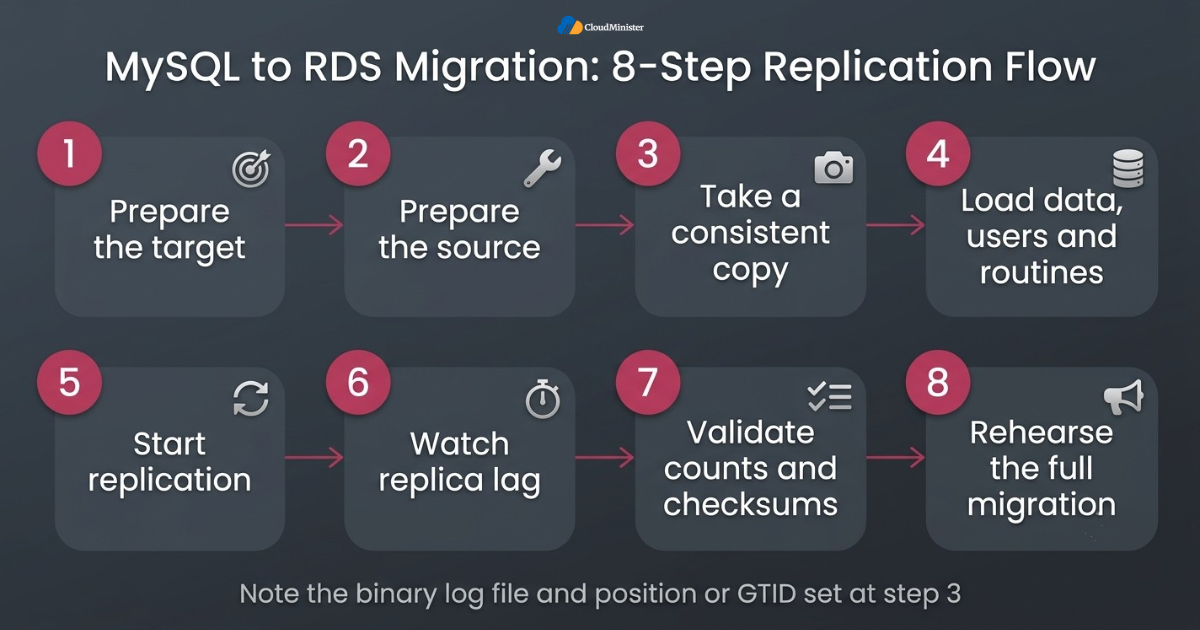
- Step 1: prepare the target: create the RDS for MySQL instance in the right VPC and subnet group, attach a security group, apply a parameter group that matches your source settings, and pick the Mumbai or Hyderabad Region if you need cloud hosting services in India for residency reasons.
- Step 2: prepare the source: enable binary logging in ROW format with a retention period long enough to cover the initial copy, and create a dedicated replication user with only the privileges it needs.
- Step 3: take a consistent copy using mysqldump with the single transaction option for InnoDB tables, or a physical backup, and note the binary log file and position or the GTID set.
- Step 4: load the data into RDS and import users, routines, triggers, and events separately, fixing any DEFINER problems found during assessment.
- Step 5: start replication from the recorded position so the instance catches up with every change made since the copy was taken.
- Step 6: watch replica lag until it stays near zero and does not just touch zero once, using CloudWatch alarms, one of the AWS managed services that can warn you when lag grows.
- Step 7: validate row counts and checksums on important tables, and run read queries from a staging copy of the application against the new instance.
- Step 8: rehearse the whole MySQL to RDS migration at least once on a copy of production data, write the real timings into your runbook, share it with your Web Hosting Company in India so on call engineers know the plan, and confirm that your Cloud Hosting Plan covers the extra capacity needed during the parallel run.
Run ANALYZE TABLE on large tables after the initial load. Fresh statistics help the optimizer choose good query plans, and skipping this step is a common reason a correct MySQL to RDS migration feels slow on the first day.
Related Reading: Hosting migration without downtime
10. Cutover, Validation, and Rollback
The cutover is the shortest and riskiest part of any MySQL to RDS migration. Treat it as a rehearsed routine and decide your rollback trigger before the day begins. With good preparation the write pause lasts seconds to a few minutes, and users see little more than a short delay.
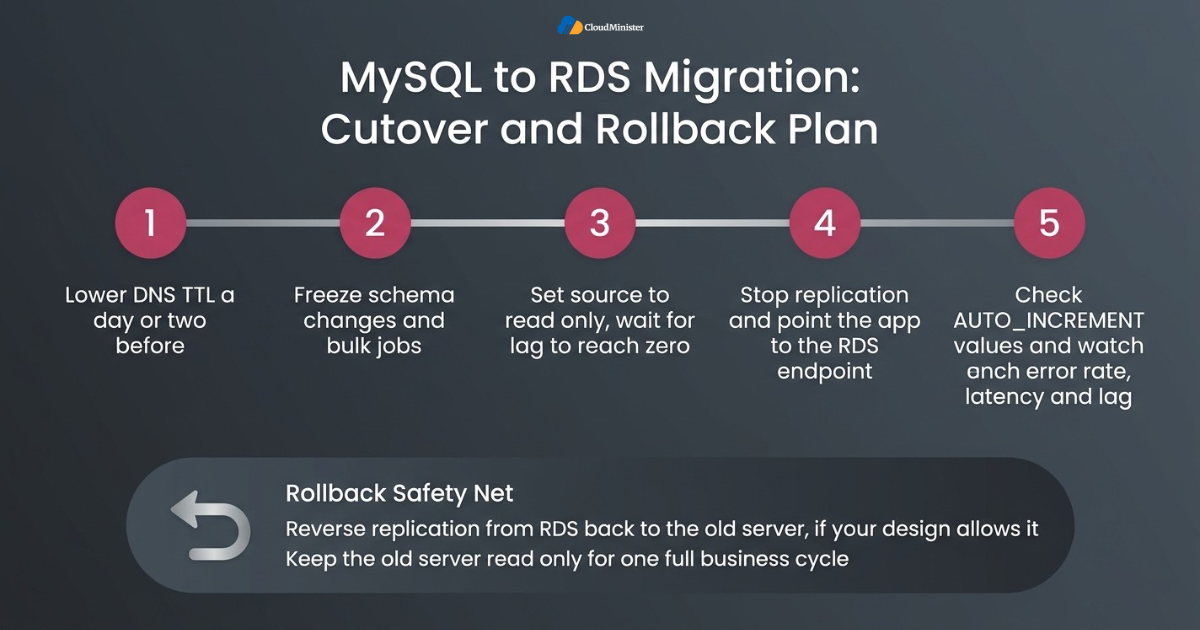
- Lower the DNS time to live value a day or two before cutover, so clients pick up the new endpoint quickly.
- Freeze schema changes and bulk jobs, and put the application into a short read only or maintenance mode.
- Set the source to read only using the read_only and super_read_only variables, then wait for replica lag to reach zero, which CloudWatch and other AWS managed services can confirm on the RDS side.
- Stop replication on the RDS instance, confirm that the last transaction has been applied, and point the application to the RDS endpoint, which completes the MySQL to RDS migration for new writes.
- Check AUTO_INCREMENT values on busy tables, since a mismatch can cause duplicate key errors right after the switch.
- Watch error rate, latency, connection counts, and replica lag for the first hours, with named people responsible for each dashboard, including your Web Hosting Company in India and its cloud hosting services in India support desk if it manages the servers.
- Set up reverse replication from RDS back to the old server, if your design allows it, so a rollback does not lose writes made after cutover.
- Keep the old server read only and untouched after the MySQL to RDS migration for an agreed observation period, such as one full business cycle, before shutting it down, and confirm that your Cloud Hosting Plan and Optimized AWS Cloud Hosting capacity can carry both systems for that period.
Related Reading: Migrate a website without losing SEO
11. Security, Compliance, and Data Residency in India
A MySQL to RDS migration temporarily creates a second copy of your data in a new place, with new credentials, new network paths, and new backups. Treat the target as production from the first day. Indian businesses should also think about data location, because the Digital Personal Data Protection Act 2023 and sector rules, such as the Reserve Bank of India requirement to store payment system data in India, can shape where data may live and how it must be protected. Cloud hosting services in India with local regions make that conversation simpler.
- Network: keep the instance in private subnets, allow only the required source addresses in the security group, and use a VPN or AWS Direct Connect for the transfer path, which is standard in Optimized AWS Cloud Hosting designs.
- Encryption at rest: enable it when you create the instance, because an existing unencrypted instance cannot be encrypted in place and needs an encrypted snapshot copy and a restore.
- Encryption in transit: require TLS by setting require_secure_transport in the parameter group, and give clients the current RDS certificate bundle.
- Credentials: store passwords in AWS Secrets Manager and rotate them, instead of keeping them in configuration files.
- Least privilege: give each application its own user with only the grants it needs, and keep the master user for administration only.
- Auditing: enable the audit plugin through an option group where needed, and send database logs to CloudWatch Logs, so the MySQL to RDS migration leaves a clear trail.
- Residency: choose Mumbai or Hyderabad for AWS, and ask your Web Hosting Company in India to confirm that backups and replicas also stay inside the required geography, and choose a Cloud Hosting Plan that states the data location clearly.
- Governance: AWS managed services such as CloudTrail and AWS Config record who changed what and when, and written approvals complete the audit trail.
During a MySQL to RDS migration, never place the target instance in a public subnet with open access. Use private subnets, restrict the security group to the source server and application hosts, enforce TLS, and remove the temporary replication user and any open firewall rules as soon as the cutover is confirmed.
12. Cost Control and Performance Tuning After Migration
Cost surprises usually appear a month after a MySQL to RDS migration, when the first full bill arrives. Instance size, storage type, backup retention, replicas, and data transfer all add up. Selecting the right Cloud Hosting Plan and tuning the database early keeps the bill predictable while performance stays steady.
- Right size from metrics: Optimized AWS Cloud Hosting starts with CPU, memory, and IOPS data from the old server, adjusted after one or two weeks of real traffic.
- Pick the storage type deliberately, because gp3 lets you tune IOPS and throughput separately from size, while Provisioned IOPS suits steady heavy random I/O.
- Use reserved instances for stable workloads once usage is predictable, and keep on demand capacity for tests and short lived environments.
- Tune parameters carefully, including innodb_buffer_pool_size, max_connections, and slow query logging, and change one thing at a time.
- AWS managed services such as RDS Proxy help when the application opens many short connections, because they pool and reuse them.
- Review slow queries with the slow query log and CloudWatch Database Insights, then fix indexes before you buy a bigger instance, ideally in the first weeks after the MySQL to RDS migration.
- Move reports to read replicas and keep the primary free for transactional traffic.
- Set billing alerts and tag resources so unexpected growth in storage or data transfer is visible early, and ask your Web Hosting Company in India or other providers of cloud hosting services in India whether monthly cost reviews are included.
After a MySQL to RDS migration, compare the ten slowest queries from the old server with the same queries on the new instance. A missing index or a different collation shows up quickly in this comparison, and it is far cheaper to fix than to upsize the instance.
13. Common Mistakes That Cause Migration Trouble
Most failed projects share the same short list of mistakes, and almost none of them are about the database engine itself. A MySQL to RDS migration goes wrong when teams skip assessment, rely on a rollback that was never tested, or forget that applications, jobs, and secrets also live on the old host.
- Skipping the dress rehearsal of the MySQL to RDS migration, then finding a forgotten cron job or a hard coded address during the real cutover.
- Ignoring DEFINER and privilege issues, which cause import errors partway through a long restore.
- Setting a short binary log retention on the source, so replication cannot resume after a pause.
- Choosing an instance class from the old hardware specification instead of measured workload, which defeats the purpose of Optimized AWS Cloud Hosting.
- Leaving MyISAM tables in place, which breaks reliable snapshot and point in time recovery.
- Forgetting TLS settings, so applications refuse to connect right after the switch.
- Treating AWS managed services as hands off, when schema design, indexes, and queries still need your attention.
- Assuming a Web Hosting Company in India will catch every problem, instead of confirming in writing what its cloud hosting services in India include and what remains your job.
- Picking a Cloud Hosting Plan on price alone, without checking whether migration support, backups, and monitoring are included.
14. Choosing the Right Hosting Partner for Your Migration
The platform matters, but the people around it matter just as much. A partner that understands both infrastructure and databases can shorten assessment, catch risks early, and stay on call during cutover. When you compare options, look for a Web Hosting Company in India that offers AWS managed services, clear migration support, and a Cloud Hosting Plan that fits your growth, not only the lowest monthly price. Good Optimized AWS Cloud Hosting should include that kind of support, not only servers.
- Ask how many MySQL to RDS migration projects the Web Hosting Company in India has completed, and how it verified data and rollback in each one.
- Look for Optimized AWS Cloud Hosting that includes right sized instances, tuned storage, and monitoring from day one.
- Confirm that cloud hosting services in India include local support hours, backup testing, and an escalation path for night time cutovers.
- Compare each Cloud Hosting Plan on what it includes, such as backup storage, monitoring, patching, and migration help.
- Check that AWS managed services cover the weeks after cutover, when hidden problems are most likely to appear.
- Prefer a Web Hosting Company in India that is open about which tasks it owns and which remain with your application team.
- Ask for a real example of a past MySQL to RDS migration, including what went wrong and how it was fixed.
- Agree the rollback and validation approach in writing before the project starts, whichever provider of cloud hosting services in India you pick.
- Look for a Cloud Hosting Plan that lets you scale instance size and storage without a long contract.
Checklist: MySQL to RDS Migration Readiness Review
- Downtime budget agreed with the business in minutes
- Source inventory complete, including versions, engines, users, routines, and events
- Every table uses InnoDB and has a primary key
- Binary logging enabled in ROW format with enough retention
- Target instance created with matching parameters, TLS, and encryption at rest
- Initial load finished and replica lag stable near zero
- Row counts and checksums verified on key tables
- Rollback tested, including writes made after cutover
- DNS time to live lowered ahead of the switch
- Old server kept read only until the observation period ends
Key Takeaways
- A MySQL to RDS migration succeeds when it is built from small, tested steps with a clear rollback, not from one large copy.
- Amazon RDS, Cloud SQL, and Azure Database all offer managed MySQL, so choose by ecosystem fit, total cost, and regional presence.
- Assessment of engines, primary keys, collations, and DEFINER clauses removes most surprises before data moves.
- Replication based methods keep the final write pause to seconds or minutes, and reverse replication protects writes after cutover.
- Security for a MySQL to RDS migration needs private networking, TLS, encryption at rest, and least privilege from the first day.
- AWS managed services and Optimized AWS Cloud Hosting reduce routine work, but schema and query tuning remain your responsibility.
- A Web Hosting Company in India that provides cloud hosting services in India can add local support and residency clarity.
- Compare every Cloud Hosting Plan on migration help, monitoring, backups, and support hours, not only on price.
Get Free Expert Advice on Your MySQL to RDS Migration
Not sure which method, cutover plan, or rollback approach fits your database? Talk to the CloudMinister team about your MySQL to RDS migration. We provide free consultancy to help you plan a safe, low-downtime move.
Conclusion
Across every platform in this guide, one pattern holds. A calm migration comes from preparation, not from a clever tool. A MySQL to RDS migration works best when you measure the source, pick a method that fits your downtime budget, rehearse the cutover, and keep the old server safe until the new one has proven itself. Cloud SQL and Azure Database follow the same logic, so the lessons carry over if your needs change.
A migration is also not finished on the day of the switch. Keep watching error rates, latency, and data accuracy until the observation period ends, then write down what worked and what did not. If you plan a MySQL to RDS migration next and want a partner for it, look for a Web Hosting Company in India that offers AWS managed services, Optimized AWS Cloud Hosting, and a Cloud Hosting Plan with real migration support, backed by cloud hosting services in India that your team can reach when it matters.
Frequently Asked Questions
Is zero downtime possible during a MySQL to RDS migration?
Strict zero downtime is rare. With replication, you can keep the final write pause to seconds or a few minutes, and read traffic can continue. Application retry behaviour and a well rehearsed cutover decide how visible that pause is. Be careful with any provider that promises zero risk, and ask any provider of cloud hosting services in India to state the expected pause in minutes.
What is the best method for a large MySQL database?
For large databases, a physical backup stored in Amazon S3 or a snapshot based initial load, followed by binary log replication, is usually faster than a logical dump. Test the restore time before the real project so your MySQL to RDS migration plan uses measured numbers.
Can I move from MySQL 5.7 straight to RDS for MySQL 8.0?
MySQL generally supports replication from a source to a replica running the next major version, but you should confirm the exact combination in the RDS documentation. Run the MySQL upgrade checker on the source, test application queries on 8.0, and review changes such as the default authentication plugin and the default collation.
Do I need AWS DMS for a MySQL to RDS migration?
No. Native binary log replication, a dump and restore, or a physical backup from Amazon S3 can all work. AWS DMS, one of the AWS managed services built for this job, helps when you want managed change capture and progress reporting, but it does not move users, routines, triggers, or events, so those need separate handling.
How should I validate data after the move?
Validate in three layers. Compare structure, compare row counts, and compare checksums or sampled records on the tables that matter most. Tools such as pt-table-checksum or the validation feature in AWS DMS can help, and you should also compare query performance, not only correctness.
Which is better, Amazon RDS, Cloud SQL, or Azure Database for MySQL?
None is better in every case. Amazon RDS suits teams already on AWS, where Optimized AWS Cloud Hosting and AWS managed services work together. Cloud SQL suits Google Cloud centred stacks, and Azure Database suits Microsoft centred environments. Test your own workload and compare the Cloud Hosting Plan options for each platform before you decide.
How long should I keep the old MySQL server after cutover?
Keep it read only and untouched for at least one full business cycle, and keep reverse replication running for the rollback window you defined. Removing it on the same day as the switch removes your safety net.
What should I ask a Web Hosting Company in India before a MySQL to RDS migration?
Ask how many database migrations it has completed, how it verifies backups and rollback, who is on call during cutover, and which tasks stay with your team. Also ask whether its Cloud Hosting Plan includes monitoring, backup testing, and migration help.
Are cloud hosting services in India suitable for regulated data?
Many are, but confirm in writing where data, backups, and replicas are stored, who can access them, and which audit reports the provider holds. Rules such as the Digital Personal Data Protection Act 2023 and Reserve Bank of India directions set expectations, and your legal team should confirm what applies to you.
What does Optimized AWS Cloud Hosting mean for a database workload?
It means matching instance class, storage type, network path, and parameters to measured workload data, with monitoring and backups in place from day one. For a MySQL to RDS migration, that usually gives faster initial loads and steadier performance after cutover.

Ajay Singh Raghav is a Senior Linux System Administrator at CloudMinister Technologies, where he has spent over 4 years installing, configuring, maintaining, and troubleshooting Linux servers for hosting and cloud environments. He specializes in AWS cloud computing alongside core Linux server administration, with hands-on expertise across server management, backup and restore systems, and cPanel-based hosting environments. His day-to-day experience keeping production servers stable and secure gives him a practical, ground-level understanding of the infrastructure he writes about.