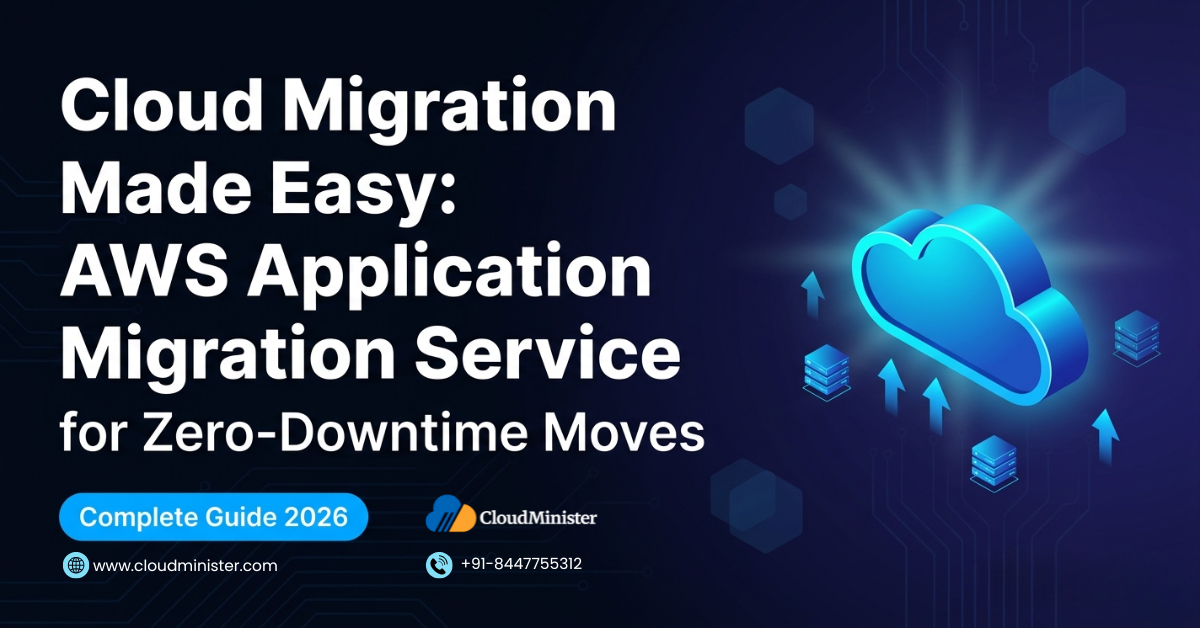
Cloud migration in 2026 is no longer a high-risk, high-effort event — it is a repeatable, engineering-grade process. AWS Application Migration Service (MGN) performs continuous block-level replication from any source environment (on-premises, other clouds, bare metal) to AWS, keeps replicated instances in perpetual sync, and lets teams run non-disruptive cutover tests before committing a single byte of production traffic. The result is a cloud migration execution model with measured downtime windows of minutes, not days. This guide covers every stage: prerequisites, agent installation, replication configuration, launch template settings, test cutover, production cutover, and post-migration optimisation — technically accurate and directly actionable for DevOps teams and Indian businesses in 2026. For teams that want a fully managed cloud migration to AWS Cloud Hosting with INR billing and local support, CloudMinister handles the end-to-end process.
Cloud migration decisions in 2026 are being made under two competing pressures: the urgency to escape the cost and operational overhead of on-premises infrastructure or a poorly optimised legacy cloud account, and the very real fear of downtime during cutover. AWS Application Migration Service was built to break that trade-off. It removes the downtime risk from the equation by making replication continuous and cutover reversible, which means the only remaining variable is how well you plan the migration. This guide is written for DevOps engineers, cloud architects, and IT managers who want a technically grounded, step-by-step cloud migration playbook using AWS MGN — not a marketing overview.
1. What Is AWS Application Migration Service and Why It Changes Cloud Migration
AWS Application Migration Service (MGN) is AWS’s recommended primary migration tool for lift-and-shift cloud migration of physical servers, virtual machines, and cloud instances to AWS. It replaces the older AWS Server Migration Service (SMS) and CloudEndure Migration — both of which AWS has now retired from active feature development. AWS MGN is the current standard for any rehost-based cloud migration project in 2026.
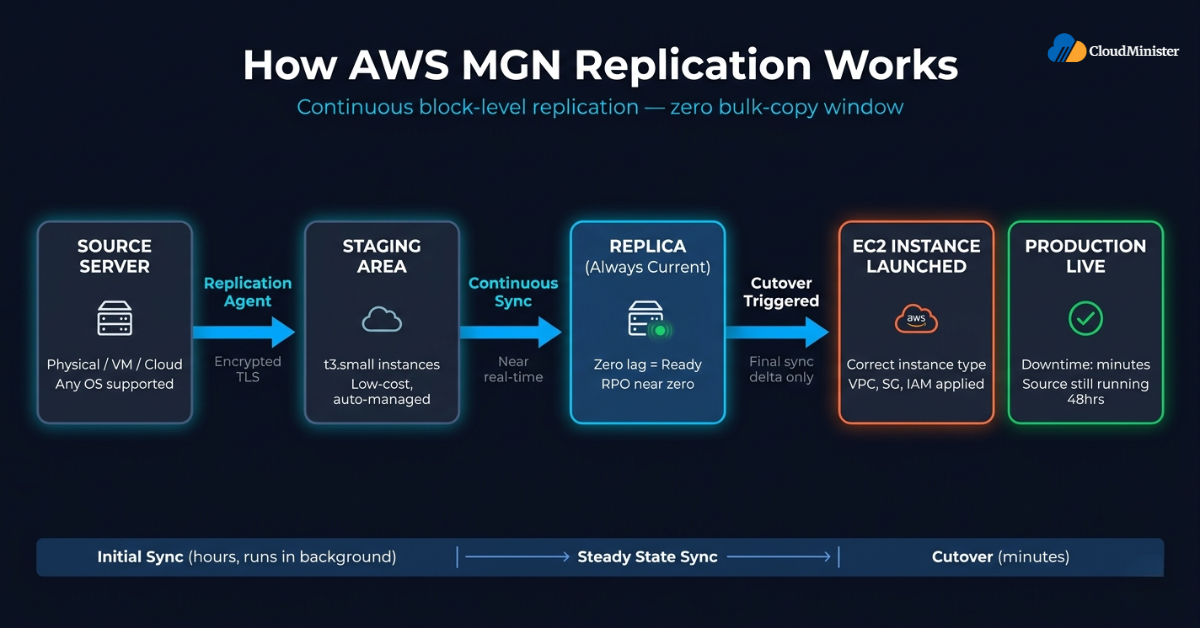
The technical mechanism behind AWS Application Migration Service
- AWS Application Migration Service installs a lightweight replication agent on each source server. The agent performs continuous block-level replication over an encrypted TLS connection to a staging area in your target AWS account.
- Replication is asynchronous and uses a staging area of low-cost t3.small replication servers in AWS — these are not your final instances and cost very little to maintain during the replication window.
- Once replication is established, the source server and the AWS replica stay in sync in near-real time. Any write to the source disk is captured and replicated, so the replica is always a current copy of production.
- When you initiate a test cutover or production cutover, AWS Application Migration Service spins up the final EC2 instance from the replica using the launch template you configured — applying the right instance type, VPC placement, security groups, IAM roles, and EBS volume settings.
- Downtime only begins at the moment you stop writing to the source and redirect traffic. Because the replica is already current, the time between last replication sync and first request served by the new AWS instance is measured in minutes, not hours.
Why this matters for your cloud migration plan
- Traditional cloud migration methods (export, upload, import) require a maintenance window measured in hours or days, during which the source server is unavailable and the migration can fail partway through.
- AWS Application Migration Service eliminates the bulk-copy window entirely. By the time you initiate cutover, the hard work is already done — only the final sync delta and instance launch remain.
- Cutover tests let you validate the launched instance in AWS before any production traffic moves. If something is wrong, you roll back and fix it — the source is still running and has never stopped.
- This architecture is why AWS positions MGN as the standard tool for cloud migration of any server that cannot tolerate extended downtime: databases, application servers, APIs, and CMS platforms alike.
Explore AWS Cloud Hosting Plans Built for India
Stop paying hyperscaler-level bills on infrastructure that was never sized for your workload. CloudMinister delivers fully managed AWS Cloud Hosting with INR billing, 18% GST compliance, and local support — so your cloud migration ends with a platform that scales with your business, not against it.
2. Cloud Migration Prerequisites: What You Must Have Before You Start
A cloud migration that fails is almost always one that skipped the prerequisites. The following are hard requirements for an AWS MGN-based cloud migration, not optional best practices.
AWS account and IAM setup
- An active AWS account with MGN enabled in the target region (enable via the AWS Console Management under AWS Application Migration Service — a one-time step per region per account).
- IAM permissions required: AWS Application Migration Agent Policy for the replication agent, and AWS Application Migration Full Access for the migration team accessing AWS Console Management.
- A dedicated IAM user or role for the migration agent — do not use root credentials or shared admin credentials for the replication agent installation.
Networking prerequisites
- Outbound connectivity from source servers to AWS on TCP port 443 (HTTPS) and TCP port 1500 (replication data). Both must be open at the firewall and any proxy layer.
- A target VPC configured in the destination AWS region with at least one private subnet for the staging area and one subnet (public or private, depending on architecture) for the final launched instances.
- Security groups: a staging replication security group (port 1500 inbound from agent IP ranges) and a launch security group matching the security posture of the production workload.
- If source servers are on-premises, a stable internet connection or an AWS Direct Connect / Site-to-Site VPN connection to reduce replication latency and eliminate replication interruptions.
Source server requirements
- Supported operating systems: Windows Server 2003 SP2 and later, and most Linux distributions from RHEL 5 / CentOS 5 onwards, including Ubuntu, Debian, SUSE, Oracle Linux, and Amazon Linux.
- The replication agent requires root/Administrator privileges on the source server for installation and ongoing operation.
- Minimum free disk space: 2 GB on the boot volume of the source server for agent installation and operation.
- Time synchronisation (NTP) must be accurate on source servers — replication lag calculations depend on correct timestamps.
Migration team and documentation
- A documented inventory of every server to be migrated, with CPU, RAM, OS version, disk size, installed software, and network dependencies recorded.
- Dependency mapping completed before any cloud migration wave begins — migrating an application server without its database in the wrong order causes application failures that look like migration failures.
- Change management approval in place for the cutover window, however short — even a five-minute maintenance window requires stakeholder sign-off for production systems.
Never install the AWS MGN replication agent using a long-lived IAM user access key stored on the source server. Use AWS Secrets Manager or a short-lived role assumption wherever your environment supports it. The replication agent communicates outbound only, but the credentials used to register it with your AWS account must be rotated after the cloud migration is complete. For source servers in a co-location or data centre, ensure replication traffic over TCP 1500 is encrypted end-to-end — AWS Application Migration Service enforces TLS by default, but verify that no man-in-the-middle proxy is performing TLS inspection on that port.
3. Step-by-Step: Setting Up AWS Application Migration Service
This section walks through the complete setup of AWS Application Migration Service from first login to active replication. Follow these steps in order — skipping ahead creates dependencies that are painful to unwind.
Step 1: Enable AWS Application Migration Service in your AWS account
- Log in to AWS Console Management and navigate to AWS Application Migration Service under the Migration & Transfer category.
- Click “Get started” — this initialises the MGN service in your selected AWS region and creates the required service-linked role (AWS Service Role For Application Migration Service) automatically.
- Repeat this step for every AWS region you plan to migrate into. MGN is region-scoped — a source server replicated to us-east-1 cannot be launched into ap-south-1 without a separate replication configuration.
- The first time you enable MGN in AWS Console Management, it also creates a default replication configuration template and a default launch configuration template — you will customise both in subsequent steps.
Step 2: Configure the replication settings template
- Staging area subnet: Select the private subnet where staging replication servers will be created. These are temporary t3.small instances that AWS Application Migration Service manages automatically.
- Replication server security group: Apply the security group you created in prerequisites — inbound TCP 1500 from the agent IP range, outbound HTTPS for API calls.
- EBS volume type for staging: GP3 is the correct default for staging in 2026 — it provides predictable performance at lower cost than GP2 for continuous replication writes.
- Bandwidth throttling: Configure if your source environment has limited internet egress. For a 1 Gbps link shared with production traffic, set replication bandwidth to 50–70% of available capacity.
- Data routing: Public internet is the default. If you have AWS Direct Connect, select “Use private network” to route replication traffic over the private connection — faster and lower-cost for large disk footprints.
Step 3: Install the replication agent on source servers
- Download the MGN agent installer from the AWS Console Management source server page. There are separate installers for Windows (MSI) and Linux (shell script).
- On Linux, run the installer with root privileges: sudo ./install.py — provide your AWS access key, secret key, and target region when prompted. Use the dedicated migration IAM user credentials from prerequisites.
- On Windows, run the MSI as Administrator and complete the installation wizard — it prompts for the same AWS credentials.
- After installation, the agent performs an initial full-disk scan and begins the initial sync. Initial sync duration depends on disk size and link speed — a 500 GB disk over a 100 Mbps connection takes approximately 11 hours of initial sync.
- Monitor initial sync progress in AWS Console Management under AWS Application Migration Service > Source Servers. The status moves from “Not ready” → “Initial sync” → “Ready for testing” as sync progresses.
Step 4: Verify replication health
- A source server in “Ready for testing” state means lag is zero — the replica is fully current with the source.
- Monitor the Replication lag metric in the AWS Console Management source server detail page. A lag of zero or near-zero means any cutover initiated now will result in minimal data loss (RPO near zero).
- Check the replication server health in the staging area — AWS Application Migration Service replaces staging replication servers automatically if they become unhealthy, but verify this has not happened silently during a long initial sync.
- If lag is non-zero and growing, investigate source server write rate, available bandwidth, and staging server health before proceeding to any cutover.
Run the agent installation on your lowest-criticality server first — a staging or QA instance, not a production database. This validates connectivity, IAM permissions, staging subnet routing, and launch template settings on a system where a misconfiguration does not cause a production incident. Fix any issues discovered on the test server before installing agents on production workloads. The cloud migration to production should be boring — all the surprises should already be resolved.
RELATED READ — How E-Commerce Businesses Can Thrive with AWS Cloud Hosting
4. Configuring Launch Templates for Your Cloud Migration
The launch template determines what the migrated server looks like when it lands in AWS. Getting this right before the test cutover is the most impactful pre-cutover investment you will make in the cloud migration process.
Instance type selection
- AWS Application Migration Service does not automatically select the right EC2 instance type — you must specify it in the launch template for each source server.
- Use the source server’s CPU and memory profile as a starting point, but right-size for AWS — a 4-core, 16 GB source server often runs well on an m6i.xlarge (4 vCPU, 16 GB) or can be downsized to m6i.large if average CPU utilisation on source was below 30%.
- For databases, prefer memory-optimised instances (r6i, r7g). For compute-bound workloads (build servers, video encoding), prefer compute-optimised (c6i, c7g).
- Review AWS Compute Optimiser recommendations for the launched instance type after the first test cutover — it analyses actual CloudWatch metrics and can suggest a more cost-efficient instance type.
EBS volume configuration
- Each source disk becomes an EBS volume in AWS. The default volume type in the launch template is GP3 — the correct choice for most workloads in 2026.
- For databases with high IOPS requirements (MySQL, PostgreSQL, MSSQL under heavy write load), consider io2 Block Express volumes and set provisioned IOPS explicitly rather than relying on GP3 burst performance.
- Enable EBS encryption in the launch template — all new EBS volumes should be encrypted at rest using KMS, and this is easiest to enforce at the launch template level during cloud migration.
- Verify that volume sizes in the launch template match or exceed source disk sizes — you can increase EBS volume size during launch, but you cannot decrease it.
Network and security settings
- Assign the final launched instance to the correct VPC, subnet, and security group. This must be set explicitly in the launch template and is not inherited from the staging area configuration.
- For instances that need a public IP, enable “Auto-assign public IP” in the launch template or use an Elastic IP association post-launch.
- Add the correct IAM instance profile to the launch template — this grants the launched EC2 instance permissions to use AWS services (S3, SSM, CloudWatch) without hard-coded credentials.
- Tag all launched instances in the launch template with environment, application, cost centre, and owner tags — required for AWS Cost Explorer visibility and difficult to add consistently after a large cloud migration wave.
Post-launch actions
- Post-launch actions are scripts that run automatically after the instance is launched from the replica. Use them to finalise cloud migration tasks: installing the CloudWatch agent, registering with your configuration management tool, updating DNS, or running a smoke test.
- Post-launch actions are defined in AWS Systems Manager Run Command documents and attached to the MGN launch template — they execute automatically after instance launch without manual intervention.
Set your launch template to launch into a dedicated migration subnet (with no route to production load balancers) during test cutover. This means the launched test instance cannot accidentally receive production traffic, cannot reach production databases, and cannot affect live systems — even if someone misconfigures DNS. Only after the test cutover passes all validation checks should you update the launch template to target the correct production subnet for the final cutover.
5. Running a Test Cutover: The Most Important Cloud Migration Step
The test cutover is where cloud migration theory becomes reality. It is the only step that validates whether the launched AWS instance actually works under realistic conditions — and it must be completed before any production cutover.
What happens during a test cutover
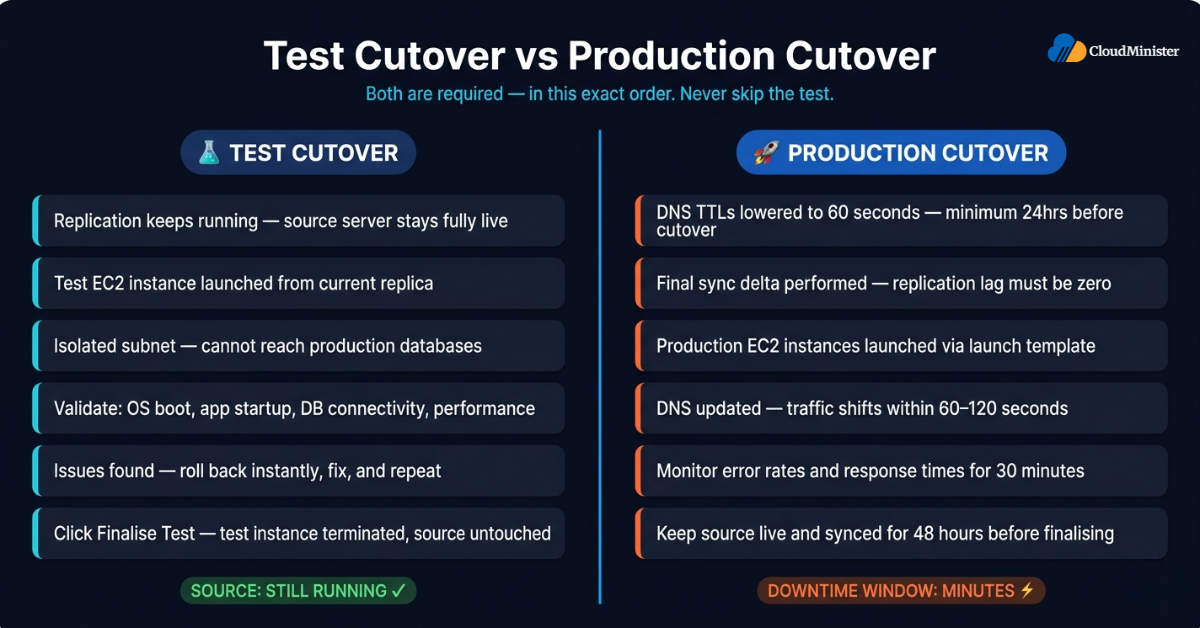
- Initiating a test cutover in AWS Console Management triggers AWS Application Migration Service to launch the final EC2 instance from the current replica. Replication continues running in the background — the test cutover does not stop replication or affect the source server in any way.
- The launched test instance boots from the replicated disk, initialises the OS, runs any post-launch actions you configured, and becomes available for validation within minutes.
- You access the test instance via its private IP (over a VPN or bastion host) or via AWS Systems Manager Session Manager if the IAM instance profile includes SSM permissions — without opening SSH/RDP to the public internet.
- After validation, you click “Finalise test” in AWS Console Management to terminate the test instance and clean up. This does not affect replication or the source server.
What to validate during test cutover
- OS and application startup: Verify the OS boots cleanly, all services start in the expected order, and application processes are running.
- Database connectivity: Test that the application can reach its database using the correct connection string for the AWS environment, not the on-premises hostname.
- Configuration file review: Confirm environment-specific configuration (API keys, endpoint URLs, cache settings) is correct for AWS — many cloud migration failures are configuration drift issues, not infrastructure issues.
- Performance baseline: Run a brief load test against the test instance and compare response times against the source server baseline.
- Backup and monitoring: Verify CloudWatch agent is running and emitting metrics, that automated EBS snapshots are configured, and that any third-party monitoring agents (Datadog, New Relic, Prometheus) are running and connected.
- Connectivity to dependent services: Test all external dependencies — third-party APIs, internal microservices, SMTP relays, Active Directory — to confirm the VPC routing and security group rules allow the required traffic.
Common test cutover failures and fixes
- “License mismatch” on Windows: Windows Server instances migrated to AWS must run with AWS-provided licences or BYOL. Configure the licence type in the launch template before test cutover.
- Application not starting: Usually a hostname-dependency issue — the application is hardcoded to the source server’s hostname. Fix by updating configuration files in post-launch actions or by using elastic DNS entries.
- Replication lag at test cutover time: If lag is non-zero when you initiate the test, wait for it to return to zero. Never initiate a cutover — test or production — with outstanding replication lag if RPO matters.
During test cutover, the launched instance has network access according to its launch template security groups. If those security groups are production-grade (open to your load balancer tier, connected to RDS, etc.), the test instance can inadvertently affect production databases or services. Always use a dedicated test security group during test cutovers that allows inbound only from the validation team’s IP range and blocks all outbound to production databases and services. Promote to production security groups only for the actual production cutover.
RELATED READ — Unlocking the Power of AWS Managed Hosting
6. The Production Cutover: Executing Zero-Downtime Cloud Migration
Production cutover is the moment your cloud migration becomes real. With AWS Application Migration Service, it is also the shortest and lowest-risk step in the entire process — if you have completed prerequisites, configuration, and test cutover correctly.
Pre-cutover checklist
- Replication lag is zero for all source servers in the cutover wave.
- Test cutover has been completed and signed off by the application owner and QA team.
- DNS TTLs for all affected hostnames have been lowered to 60 seconds at least 24 hours before cutover.
- Load balancer configuration has been staged with the new target instances registered but weighted to zero.
- Database connection strings, API endpoints, and environment-specific configuration are finalised and confirmed correct in the launch template post-launch actions.
- Rollback plan is documented: source server remains live, DNS can be reverted within 10 minutes.
- Monitoring alerts are active for the new AWS instances before traffic arrives.
- Communication plan is in place: stakeholders know the cutover is happening, the on-call team is briefed, and an incident channel is open.
Executing the cutover
- In AWS Console Management under AWS Application Migration Service, select all source servers in this cutover wave and click “Initiate cutover.”
- AWS Application Migration Service performs a final sync delta, then launches the production EC2 instances from the replicas using the configured launch template. Instance launch typically begins within a few minutes, though total cutover time — including application startup, database consistency checks, post-launch script execution, and DNS propagation — varies significantly depending on workload complexity and environment configuration.
- While instances are launching, begin the application-layer shutdown sequence on source servers: stop the application tier first, then the database tier (if included in this wave), then confirm all in-flight transactions are complete.
- Once the launched instances have passed post-launch actions and health checks, update DNS to point to the new AWS load balancer or instance IP. With a 60-second TTL, traffic shifts within 60–120 seconds.
- Monitor error rates, response times, and application logs in real time for the first 30 minutes post-cutover. This is the highest-risk window.
Post-cutover validation
- Run the same validation checklist used during test cutover — confirm all services are healthy, all monitoring agents are reporting, and application metrics are within normal ranges.
- Keep source servers live and in sync for at least 48 hours after production cutover. AWS Application Migration Service continues replicating during this window, meaning rollback requires only a DNS change, not a new migration.
- After the 48-hour hold, formally complete the cloud migration by clicking “Finalise cutover” in AWS Console Management. This terminates staging replication servers and marks the source server as migrated.
- At this point, your cloud migration is complete — workloads are running in AWS Cloud Hosting, source servers can be decommissioned on their normal cycle, and the focus shifts to post-migration optimisation.
RELATED READ — AWS vs Azure vs Google Cloud: Which Cloud Platform Is Right for You?
7. Cloud Migration at Scale: Wave Planning for Multi-Server Migrations
Most cloud migration projects involve more than a single server. Wave planning is the discipline that converts a list of servers to migrate into a sequenced, lower-risk execution plan.
What is wave planning in cloud migration
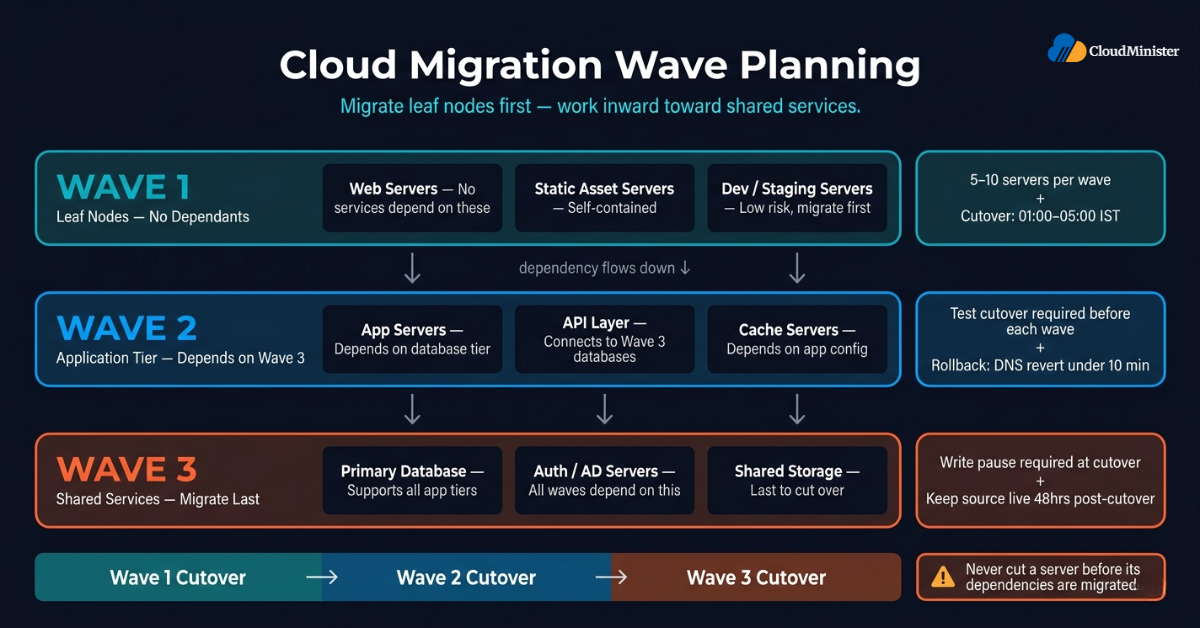
- A cloud migration wave is a group of servers that are migrated together in a single cutover event. Servers in the same wave share a cutover window and have their dependencies resolved before any server in the wave is cut over.
- The goal of wave planning is to minimise the number of cross-wave dependencies — situations where a server cut over in Wave 2 depends on a server not yet migrated from Wave 3.
- Waves are typically defined by application tier (web servers, app servers, databases), by business function, or by dependency cluster.
How to build a cloud migration wave plan
- Step 1 — Dependency mapping: For every server in scope, document which other servers or external services it depends on, and which servers depend on it. This produces a dependency graph that drives wave sequencing.
- Step 2 — Wave sequencing: Cut over leaf nodes first (servers with no dependants), then work inward toward shared services. Databases that support multiple applications are typically in the last wave.
- Step 3 — Wave sizing: Balance wave size against cutover risk. A wave of 50 servers in one cutover window is high-risk — 5–10 servers per wave allows faster rollback and clearer fault isolation.
- Step 4 — Wave scheduling: Schedule cutover windows during lowest-traffic periods. For most Indian businesses, this is between 01:00 and 05:00 IST.
- Step 5 — Wave rehearsal: Run at least one full rehearsal of the cutover sequence for each wave using test cutover mode before any production cutover.
Statistics: The scale of cloud migration in 2026
The pace of enterprise cloud migration has accelerated sharply in recent years. According to analysis from Gartner’s worldwide cloud spending forecast, worldwide public cloud end-user spending is projected to reach $723 billion in 2026, with Infrastructure-as-a-Service (IaaS) growing 22.8% year-over-year — a clear signal that cloud migration activity is at an all-time high, and organisations delaying migration are increasingly behind their competitive peers.
Build a dedicated “migration VPC” in your target AWS account that is isolated from your production VPC during the migration project. All test cutover instances land in the migration VPC — they have internet access for validation but cannot reach production databases or services. Only when a server passes full test validation is its launch template updated to target the production VPC. This architectural pattern prevents test instances from contaminating production data and makes the cloud migration project safe to run in parallel with live production workloads.
8. Post-Migration Optimisation: Making the Most of AWS Cloud Hosting
Completing the cloud migration and landing workloads in AWS Cloud Hosting is the starting point, not the finish line. The first 30 days post-migration are the highest-leverage window for cost optimisation and performance tuning.
Right-sizing instances
- AWS Compute Optimiser analyses CloudWatch utilisation metrics from the first 14 days post-migration and generates right-sizing recommendations. Check these before the first billing cycle closes.
- Many servers are initially over-provisioned during cloud migration — intentionally, to reduce cutover risk. After two weeks of real CloudWatch data, Compute Optimiser typically surfaces 20–40% savings opportunities from downsizing.
- For Java and .NET applications, monitor actual JVM heap and CLR memory consumption rather than OS-level free memory — the OS may show high memory utilisation while the application is running well within its heap limit.
Storage optimisation
- Review EBS volume utilisation with CloudWatch VolumeReadOps and VolumeWriteOps metrics for the first two weeks. Volumes with very low IOPS that were provisioned as io2 can be converted to GP3 to reduce costs significantly.
- Enable S3 Intelligent-Tiering for any object storage workloads migrated as part of the cloud migration — it automatically moves data between access tiers based on usage patterns.
- For NVMe cloud hosting India workloads requiring high-performance local storage, NVMe-backed instance store volumes on i4i or im4gn instances provide significantly higher IOPS than EBS at a lower per-IOPS cost for read-intensive workloads.
Networking and cost optimisation
- Enable VPC Flow Logs for the first 30 days post-migration to understand actual inter-service traffic patterns — unexpected cross-AZ or cross-region traffic is a common source of cloud migration cost surprises.
- Review NAT Gateway data transfer costs — applications migrated from on-premises sometimes have unexpected outbound internet traffic patterns that generate significant NAT Gateway fees.
- Consider AWS Savings Plans or Reserved Instances for baseline workloads after the first 30 days of post-migration data confirms the correct instance types — a 1-year Compute Savings Plan typically saves 30–40% versus On-Demand pricing.
Security hardening post-migration
- Run AWS Security Hub against all migrated instances — it automatically checks against CIS AWS Foundations Benchmarks and AWS Foundational Security Best Practices and surfaces misconfigurations introduced during the cloud migration.
- Enable AWS GuardDuty in the migration target account if not already active — it detects anomalous network behaviour, IAM policy violations, and EC2 compromise indicators.
- Review all security group rules added during the cloud migration for the “open to 0.0.0.0/0” pattern — temporary rules added to debug connectivity during migration often persist longer than intended.
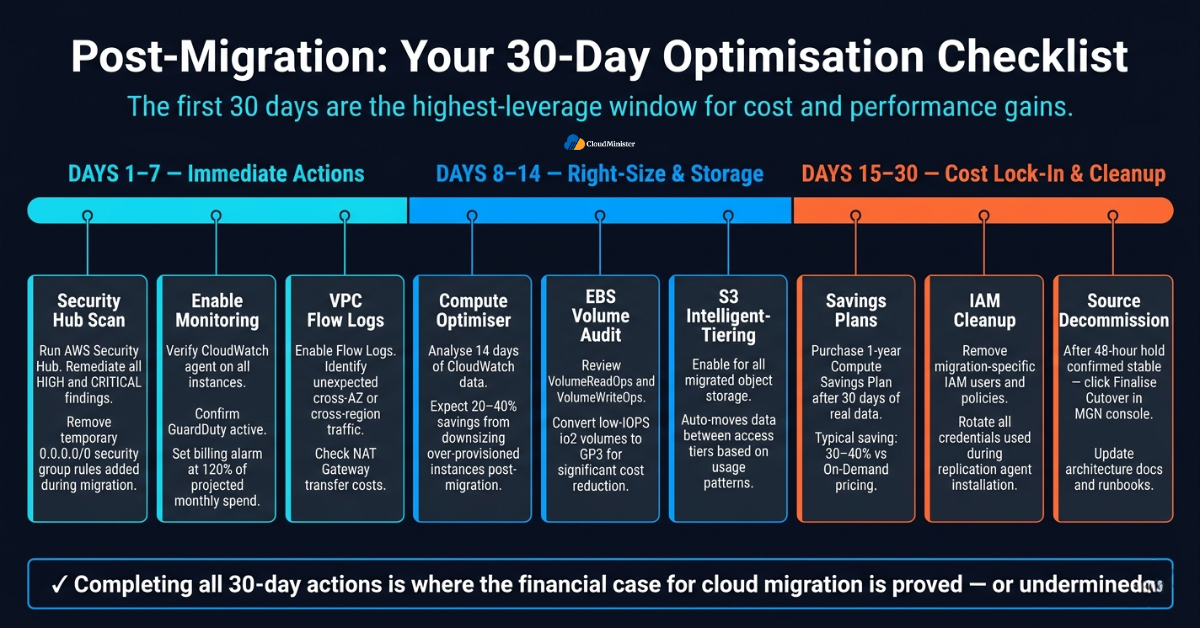
Cloud cost optimisation post-migration has become a discipline in its own right. Research from Flexera’s 2026 State of the Cloud Report found that organisations waste an average of 32% of their cloud spend — with misconfigured resources following a cloud migration among the top three contributors to cloud waste. This underscores why post-migration optimisation is not optional: it is where the financial case for cloud migration is either confirmed or undermined.
RELATED READ — AWS Cost Optimisation: A Complete Guide to Reducing Your AWS Bill
9. Cloud Migration for Indian Businesses: AWS in India in 2026
Cloud migration decisions for Indian businesses carry additional considerations around data residency, latency, billing, and regulatory compliance that do not apply in the same way for US or European migrations.
AWS regions in India
- AWS operates two regions in India: Asia Pacific (Mumbai) — ap-south-1 — and Asia Pacific (Hyderabad) — ap-south-2. Mumbai is the primary AWS Cloud Hosting region for India, with the broadest service coverage and three Availability Zones.
- Cloud migration to either Indian AWS region keeps data within India’s geographic boundaries, which can be relevant for SEBI-regulated financial services, IRDAI-regulated insurance workloads, and organisations evaluating alignment with the Digital Personal Data Protection Act, 2023 (DPDP Act). Note that the DPDP Act does not currently mandate strict India-only data localisation; consult your legal or compliance team to determine what residency requirements apply to your specific workload.
- Hyderabad (ap-south-2) adds geographic redundancy for disaster recovery and data residency requirements for organisations that must maintain multi-region resilience within India.
Latency considerations for Indian cloud migration targets
- Migrating to Mumbai achieves sub-20ms latency to all major Indian metros (Delhi NCR, Bangalore, Chennai, Hyderabad, Pune, Kolkata) — a significant improvement over workloads hosted in Singapore, US-East, or European regions.
- For Indian e-commerce, SaaS, and fintech applications, this latency improvement alone often drives measurable improvements in page load times, API response times, and payment gateway success rates.
- If source servers are currently hosted in an Indian data centre, cloud migration to AWS Mumbai can be executed over Direct Connect (via Tata Communications or BSNL as Direct Connect partners in India) for faster initial sync.
INR billing, compliance, and managed cloud migration support
- AWS bills in USD by default. Indian businesses undertaking a cloud migration to AWS should work with a Web hosting provider in India like CloudMinister to receive INR-denominated invoices with 18% GST compliance, local payment methods, and consolidated billing — eliminating foreign exchange exposure.
- CloudMinister’s AWS Cloud Hosting plans include managed cloud migration assistance, ongoing AWS Console Management support, cost optimisation reviews, and SLA-backed managed operations — converting a global platform into a locally supported managed service.
- For businesses subject to RBI guidelines on cloud adoption, a managed Indian partner also helps with the vendor risk assessment, audit trail documentation, and exit plan requirements mandated by the guidelines.
NVMe cloud hosting India: Performance-first migration targets
- For workloads requiring the highest local disk performance — high-frequency trading systems, large-scale OLTP databases, video encoding pipelines — NVMe cloud hosting India deployments using AWS i4i or im4gn instances with instance store NVMe SSDs deliver up to 7.5 million read IOPS per instance, far exceeding what provisioned EBS volumes can deliver at comparable cost.
- NVMe instance store volumes are ephemeral — they do not persist through instance stop/start cycles — so workloads using them must be architected with external durable storage (EBS or RDS) for state, with NVMe used as a high-speed cache or temporary processing layer.
If your source servers are in an Indian co-location facility and your cloud migration destination is AWS Mumbai, request AWS Direct Connect pricing from CloudMinister before initiating replication. For large disk footprints (20 TB+), a 1 Gbps Direct Connect connection reduces initial sync time from weeks to days. For migrations under 10 TB total, the cost of Direct Connect provisioning is unlikely to be justified — use the public internet path with bandwidth throttling configured to avoid production traffic contention.
10. AWS Application Migration Service vs. Alternative Cloud Migration Methods
AWS Application Migration Service is the right tool for most cloud migration projects, but understanding when other approaches are appropriate is part of building a complete cloud migration strategy.
AWS MGN vs AWS Database Migration Service (DMS)
- AWS Application Migration Service performs block-level server migration — it migrates the entire OS, application stack, and data of a server as a unit. It does not understand database schema or perform schema conversion.
- AWS DMS is purpose-built for database cloud migration — it migrates data between database engines, performs schema conversion with the Schema Conversion Tool (SCT), and supports heterogeneous migrations (Oracle to Aurora PostgreSQL, MSSQL to Aurora MySQL).
- For a cloud migration that involves both an application server and a database running on the same OS, use MGN to migrate the server and DMS to migrate the database data if schema conversion is required.
AWS MGN vs Elastic Disaster Recovery (DRS)
- AWS Elastic Disaster Recovery is architecturally similar to AWS Application Migration Service — it uses the same continuous block-level replication mechanism and the same agent. The difference is intent: DRS is designed for failover and fallback, while MGN is designed for one-time cloud migration.
- If your cloud migration involves a workload that must be able to fail back to on-premises in under 30 minutes, DRS is the better tool. For workloads where the cloud migration is a one-way move (the vast majority of scenarios), MGN is the correct tool.
AWS MGN vs manual AMI/snapshot migration
- The manual approach — stop the source server, create an AMI or snapshot, export it, and import it to AWS — requires a maintenance window proportional to disk size. For a 2 TB server over a 100 Mbps link, that window is 44+ hours.
- AWS Application Migration Service’s continuous replication means the maintenance window is only the time between stopping the application and first request served from AWS — typically 10–30 minutes for a well-prepared cloud migration.
- Manual migration is only appropriate for servers where downtime is entirely acceptable and the disk footprint is small.
For large-scale cloud migration projects (50+ servers), consider using the AWS Migration Hub Orchestrator to sequence migration tasks, track progress across waves, and integrate AWS Application Migration Service with DMS, SSM, and CloudFormation in a single workflow. Migration Hub Orchestrator reduces the manual coordination overhead of a large migration project and provides a single audit trail for the entire cloud migration — useful for compliance documentation and post-migration review.
11. Cloud Migration Decision Framework: When AWS Application Migration Service Is the Right Choice
Not every workload should be migrated with AWS Application Migration Service, and not every cloud migration project should start immediately. The framework below helps you decide.
Use AWS Application Migration Service for your cloud migration when:
- The source workload is a physical server, VM, or cloud instance running a supported OS — and you need to move the entire stack (OS, application, data) to AWS without rebuilding.
- Downtime tolerance is low — measured in minutes, not hours. AWS Application Migration Service’s continuous replication makes short cutover windows achievable that are simply impossible with export-import methods.
- The source environment is accessible from AWS over TCP port 1500 — either directly over the internet or over a Direct Connect / VPN connection.
- You need to validate the migrated workload before committing to production cutover — the test cutover mechanism is essential for compliance-regulated or revenue-critical workloads.
- You are migrating multiple servers with complex dependencies and need a central management plane for tracking replication health and orchestrating cutover waves via AWS Console Management.
The business case for cloud migration in 2026
- A well-executed cloud migration to AWS Cloud Hosting eliminates the capital expenditure cycle of physical hardware refresh (typically every 3–5 years), converts infrastructure costs from CapEx to OpEx, and removes the operational burden of data centre management.
- Post-migration workloads benefit from AWS’s global infrastructure, managed services ecosystem, and continuous hardware improvement — migrated instances run on current-generation AMD or Intel silicon without any action on your part as AWS refreshes the underlying fleet.
- For Indian businesses, cloud migration to AWS Mumbai or Hyderabad also enables use of Amazon Bedrock for generative AI workloads, AWS Local Zones for ultra-low-latency deployments, and India-relevant compliance documentation available through AWS Artifact. Teams with data residency or regulatory obligations should verify specific requirements with their compliance counsel, as the DPDP Act 2023 does not currently impose a blanket India-only data storage mandate.
Complete every cloud migration with a formal security review before decommissioning the source environment. The review should cover: IAM permissions audit (remove migration-specific IAM users and policies created for the cloud migration), security group audit (remove temporary permissive rules), encryption-at-rest verification (all EBS volumes encrypted, RDS instances encrypted), and CloudTrail audit log review (verify no unexpected API calls occurred during the migration window). A migration that lands securely in AWS is only as safe as the post-migration hygiene applied to the permissions and network configurations created during the process.
12. Cloud Migration Checklist: Ready to Migrate to AWS
Use this checklist before initiating any production cloud migration wave. Every item represents a real failure mode discovered in actual cloud migration projects.
Pre-migration
- Source server inventory documented: OS version, disk size, installed applications, active ports, and network dependencies for every server in scope.
- AWS account prepared: AWS Application Migration Service enabled in the target region via AWS Console Management, staging subnet created, replication security group configured, IAM migration user created with scoped permissions.
- Network connectivity validated: TCP 443 and TCP 1500 outbound from all source servers to AWS confirmed before agent installation.
- Launch templates configured: correct EC2 instance type, EBS volume type, VPC, subnet, security group, IAM instance profile, and tags set for every source server.
- Post-launch actions written and tested: CloudWatch agent installation, configuration updates, and application startup validation scripts confirmed working in isolation.
During migration
- Replication agents installed on all source servers and initial sync completed: all servers in “Ready for testing” state in AWS Console Management before any cutover is initiated.
- Test cutover completed and signed off for every server in the production cutover wave.
- DNS TTLs lowered to 60 seconds at least 24 hours before production cutover.
- Rollback plan tested: DNS revert confirmed to complete within TTL + propagation time.
- Stakeholders notified of cutover window and rollback criteria documented.
Post-migration
- All migrated instances monitored for 48 hours post-cutover before source server decommissioning.
- AWS Security Hub scan completed and all HIGH and CRITICAL findings remediated.
- AWS Compute Optimiser reviewed and right-sizing recommendations evaluated.
- Billing alarm configured in CloudWatch for 120% of projected monthly spend.
- Cloud migration documentation updated: architecture diagrams, runbooks, and DR / failback procedure written for the new AWS environment.
13. Conclusion
Cloud migration using AWS Application Migration Service is no longer a specialist operation reserved for large enterprises with dedicated platform teams. The continuous replication model, non-disruptive test cutover, and centralised management in AWS Console Management have made it a repeatable, engineering-grade process that any team with good preparation can execute safely. The critical success factors are:
- Thorough prerequisites reduce surprises during cutover.
- Dependency mapping prevents the cascade failures that make cloud migration projects look incompetent.
- Test cutover is mandatory — not a nice-to-have.
- Post-migration optimisation is where the financial case for cloud migration is proved or undermined.
- Working with an experienced Web hosting provider in India like CloudMinister who understands Indian compliance, INR billing, and local infrastructure patterns reduces both risk and timeline.
Key Takeaways
- AWS Application Migration Service (MGN) is the current AWS standard for lift-and-shift cloud migration, replacing the retired AWS Server Migration Service and Cloud Endure Migration.
- MGN uses continuous block-level replication to keep a live, current replica of every source server in AWS — cutting production cutover downtime to minutes rather than hours.
- Prerequisites — networking, IAM, launch templates, dependency mapping — determine 80% of cloud migration success.
- Test cutover is non-negotiable: it validates the launched AWS instance under real conditions before any production traffic moves.
- Wave planning with dependency sequencing prevents the cascading failures most common in large-scale cloud migration projects.
- Post-migration optimisation in the first 30 days — right-sizing, storage review, security hardening — is where the cost and performance case for cloud migration is proved.
- For Indian businesses, AWS Mumbai and Hyderabad regions keep data within Indian geographic boundaries, deliver sub-20ms domestic latency, and support compliance documentation for regulated workloads — though DPDP Act 2023 does not currently mandate strict India-only data localisation.
Start Your Zero-Downtime Cloud Migration Today
Ready to move your workloads to AWS without a single hour of unplanned downtime? CloudMinister’s certified AWS experts will audit your existing infrastructure, design a migration wave plan, and execute the cutover using AWS Application Migration Service — fully managed, from first replication to final validation.
Frequently Asked Questions
Q1. What is the difference between AWS Application Migration Service and AWS Server Migration Service?
AWS Server Migration Service (SMS) is retired — AWS stopped new feature development and strongly recommends migrating existing SMS workflows to AWS Application Migration Service (MGN). The key technical difference is that SMS used incremental VM snapshots (not real-time block replication), which created longer replication cycles and larger cutover windows. AWS Application Migration Service uses continuous block-level replication, resulting in near-zero RPO and much shorter RTO during cloud migration cutovers.
Q2. How long does a cloud migration with AWS Application Migration Service take?
There are two time components: initial sync (which depends on disk size and link speed — roughly 1 hour per 45 GB over a 100 Mbps connection) and the cutover itself, which varies depending on application startup time, post-launch actions, database consistency checks, and DNS propagation — typically ranging from a few minutes to over 30 minutes per server for complex workloads. Initial sync runs in the background without any production impact. The total elapsed time for a cloud migration project of 50 servers is typically 2–6 weeks from agent installation to final cutover, depending on test cutover cycles, stakeholder approvals, and wave sequencing complexity.
Q3. Can AWS Application Migration Service migrate databases with zero downtime?
AWS Application Migration Service replicates the entire source disk including databases, so a database server can be migrated with the same architecture as any other server. However, true zero-downtime database cloud migration requires stopping writes to the source before final cutover to prevent data divergence — which is a brief application-level write pause rather than a maintenance window. For databases requiring engine conversion (Oracle to Aurora, MSSQL to MySQL), AWS DMS is the correct tool, and MGN is used for the application tier.
Q4. What AWS regions support AWS Application Migration Service?
AWS Application Migration Service is available in most commercial AWS regions globally, including both Indian regions — Asia Pacific (Mumbai) ap-south-1 and Asia Pacific (Hyderabad) ap-south-2. Check the AWS regional services list in AWS Console Management for the current availability list, as new regions are added periodically.
Q5. What is the cost of using AWS Application Migration Service?
AWS Application Migration Service is free for the first 90 days of replication per source server. After 90 days, there is a per-server-hour charge for ongoing replication. Staging replication servers (t3.small instances) and staging EBS volumes incur standard EC2 and EBS costs during replication. For most cloud migration projects completed within 90 days, the MGN service itself adds negligible cost.
Q6. Do I need AWS Direct Connect for cloud migration with AWS Application Migration Service?
No — AWS Application Migration Service works over the public internet via encrypted TLS connections. Direct Connect is recommended (not required) for source servers with large disk footprints (20 TB+) or high write rates. For cloud migration projects under 10 TB or with reliable high-speed internet at the source site, the public internet path is entirely sufficient.
Q7. Can I migrate servers from another cloud to AWS using AWS Application Migration Service?
Yes — AWS Application Migration Service can migrate source servers from any environment where the replication agent can be installed and the agent can reach AWS over TCP 443 and TCP 1500. This includes servers running in Azure, GCP, Oracle Cloud, Alibaba Cloud, and other public clouds, as well as on-premises physical servers and VMware VMs. Cloud migration from another cloud to AWS Cloud Hosting is a common use case and follows exactly the same process described in this guide.
Q8. How does AWS Application Migration Service fit into the AWS 6 Rs of cloud migration?
AWS Application Migration Service directly implements the “Rehost” strategy (also called lift-and-shift) — moving workloads to AWS without modifying the application architecture. It is the fastest and lowest-risk cloud migration strategy for workloads that do not benefit from immediate refactoring. The 6 Rs are: Retire, Retain, Rehost (MGN), Replatform, Repurchase, and Refactor. A complete cloud migration programme typically uses MGN for Rehost workloads and separate tools (DMS, native redeployment) for Replatform and Refactor workloads.

He is the CEO and Founder with over a decade of experience in cloud infrastructure, DevOps, and server optimization. With a strong vision and hands-on leadership approach, he has built scalable, secure, and high-performance cloud solutions trusted by businesses across industries.