
Deciding how to host a React app is not just a deployment checkbox, it is a decision that shapes your Core Web Vitals, your SEO visibility, and how your app behaves the moment a real user with a slow connection opens it. This guide breaks down the two dominant hosting approaches for React applications, static hosting and Server-Side Rendering, and explains exactly when each one makes sense for a production app. Whether you are shipping a marketing site, a content-heavy blog, or a data-driven dashboard, understanding what Server-Side Rendering actually does under the hood is the difference between a fast, discoverable app and one that quietly loses rankings and users to render delay.
Every React application eventually runs into the same question: should pages be built once and served as static files, or generated fresh on every request? This is the exact problem Server-side rendering was built to solve. Unlike a static build that locks content in place until the next deploy, Server-side rendering lets a Node.js server compute and return HTML tailored to each visitor, each session, and each moment. For teams building anything beyond a simple marketing page, this distinction quickly becomes less about preference and more about necessity.
The appeal of Server-side rendering goes well beyond fresh data. Search engines and AI crawlers increasingly reward pages that arrive fully formed, without waiting on client-side JavaScript to paint meaningful content. Server-side rendering delivers exactly that: a complete, crawlable HTML response the moment a request hits the server, followed by hydration that quietly wires up interactivity in the background. For SEO-sensitive routes, e-commerce pages, and anything personalized behind a login, this approach directly protects both visibility and perceived speed.
Still, Server-side rendering is not a blanket upgrade over static hosting, it is a trade-off with real operational weight. Choosing it means accepting a running server process, ongoing compute costs, and the need for proper monitoring, in exchange for freshness and personalization static hosting simply cannot offer. The rest of this guide breaks down exactly how Server-side rendering works, where it earns its keep, and how to decide, route by route, whether your React app actually needs it.
1. Why This Decision Matters More in 2026 Than Ever Before
React hosting has moved well past the days of dropping a build folder onto any generic web server and calling it done. Server-Side Rendering has become one of the defining architectural choices in modern React development, and the framework ecosystem in 2026 reflects that shift directly, with React used by the large majority of surveyed developers and Next.js adopted by a majority of them as well, a framework built around Server-Side Rendering. That kind of adoption curve does not happen unless Server-Side Rendering is solving a real, measurable problem for production teams.
The performance stakes have only gotten sharper. Recent controlled benchmarks comparing rendering strategies show that edge-deployed Server-Side Rendering can now hit a time-to-first-byte in the 60 to 120 millisecond range globally, narrowing the gap that once made static hosting the obvious default for every content-driven React app, according to controlled 2026 benchmark data comparing rendering strategies. This is precisely the kind of shift that turns the static hosting versus Server-Side Rendering choice into a genuinely technical decision rather than a matter of habit.
For a developer shipping a single marketing page or portfolio site, the temptation is to treat hosting as an afterthought, any static host will do. This assumption breaks down quickly once SEO, dynamic content, or personalization enters the picture, because static hosting cannot generate per-request HTML the way SSR can. Teams researching this trade-off for the first time often start by comparing a few ReactJS Web Hosting providers side by side to see how each documents the difference.
For a team running a React application with authenticated dashboards, frequently changing data, or search-engine-critical landing pages, the stakes are higher still. Every additional dynamic requirement, whether it is user-specific data, real-time pricing, or localized content, adds a reason to seriously evaluate This rendering approach instead of defaulting to a purely static build.
Do not choose a hosting strategy for your React app based on habit alone. The right approach depends on how much of your content changes per request, how important first-load SEO is to your business, and whether your app needs to serve personalized or authenticated content. A static site forced to fake dynamic behavior with client-side fetching will often underperform a correctly implemented Server-Side Rendering setup on both SEO and perceived speed.
2. Understanding What Static Hosting and Server-Side Rendering Actually Do
Many teams evaluating a ReactJS Web Hosting provider start here, because the terminology gets confusing fast without a clear side-by-side.
Before comparing the two approaches in detail, it helps to understand what each one is doing behind the scenes when a browser requests a page from your React app. Both approaches start from the same React codebase, but how and when the HTML gets generated is what separates one hosting model from the other.
| Approach | What It Does for a React App | Why It Matters |
| Static Hosting | Pre-builds every page into HTML, CSS, and JS files at build time | Extremely fast to serve, but content is fixed until the next build |
| The server-rendering model | Generates HTML for each request on a running server | Delivers fresh, personalized, or frequently changing content on every visit |
| CDN Layer | Distributes static files or cached output geographically | Reduces latency by serving files closer to the visitor |
| Hydration | Attaches React’s interactivity to the rendered HTML | Determines how quickly a page becomes fully interactive |
| Build Process | Compiles source code into a deployable output | Different for a static deployment versus a server-rendered one |
Most developers new to production React hosting assume static hosting is always the fastest option by default. In practice this is only true for the very first byte, because Server-Side Rendering with a properly configured edge runtime can deliver a comparably fast response while also solving problems static hosting cannot, such as per-user personalization and always-fresh data. This is also why serious teams comparing a reliable ReactJS Web Hosting provider tend to evaluate rendering-strategy support rather than storage and bandwidth alone.
Related Reading: what React hosting actually is and how deployment works for beginners
3. Static Hosting for React Apps: How It Works
3.1 The Build-Time Model
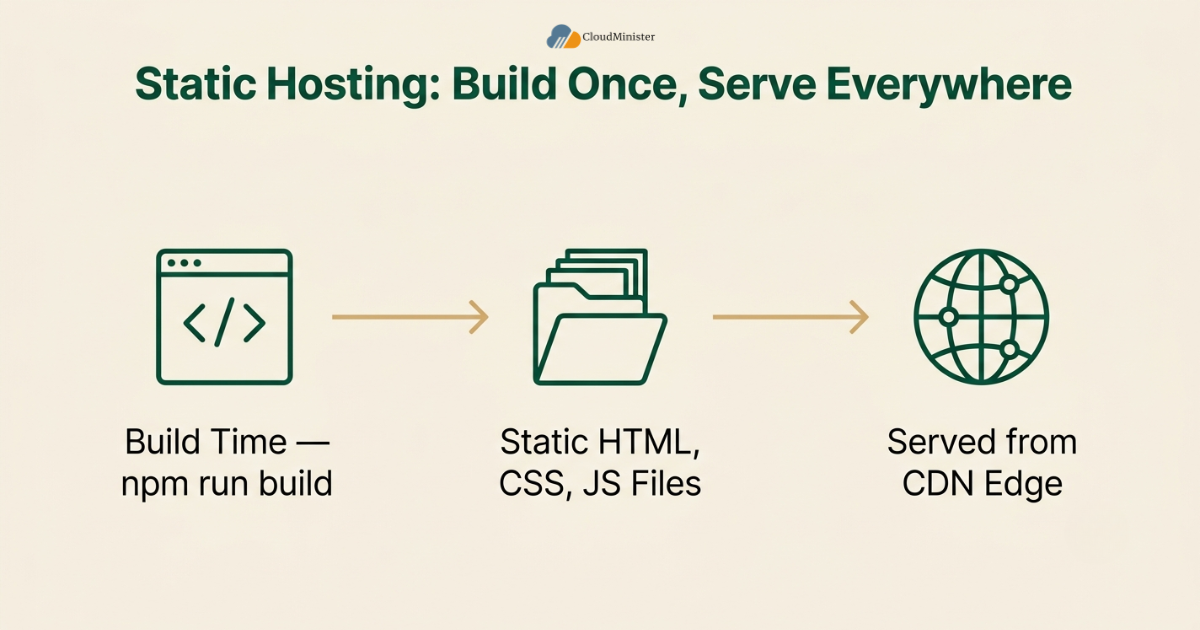
A statically hosted React app runs its entire build process once, ahead of time, and the output is a folder of plain HTML, CSS, and JavaScript files that any web server can serve without executing React at request time. This is fundamentally different from Server-Side Rendering, where a server actively runs React code for every incoming request.
- Running “npm run build” compiles your React app into static assets that never change until you rebuild and redeploy
- Static hosting serves those files directly from a CDN edge node, which is why time-to-first-byte for static content is typically very low
- Because there is no per-request rendering step, static hosting scales with minimal added server cost, unlike a server-rendered deployment which needs compute for every request
- Static hosting is an excellent fit for content that does not depend on the logged-in user or on real-time data
- Teams comparing ReactJS Hosting Plans purely on price often overlook whether the static tier and the dynamic tier are even built on the same underlying infrastructure
When evaluating a static hosting provider for a React app, confirm exactly how environment variables and API keys are handled at build time. Since static builds bake configuration directly into the shipped JavaScript bundle, any secret placed in a client-side environment variable becomes publicly visible in the browser, a mistake that is easy to make when a team is used to working with Server rendering, where secrets can stay server-side.
3.2 When Static Hosting Is the Right Call
- Marketing sites and landing pages: content rarely changes per visitor, so pre-building at deploy time is efficient and there is little need for This server-rendering strategy
- Documentation sites and blogs with infrequent updates: a rebuild on publish is a reasonable trade-off against the operational simplicity of skipping a server-rendered setup
- Portfolio and small business sites: minimal dynamic requirements make static hosting the lower-cost, lower-maintenance option
- Teams without backend or DevOps experience often find static hosting easier to reason about than configuring and monitoring Server-Side Rendering
- A Web Hosting Company in India that offers guided onboarding for both models tends to shorten this learning curve considerably
Get Blazing-Fast ReactJS Hosting
From static builds to full Server-side rendering, Cloudminister’s ReactJS Hosting Plans are built on dedicated infrastructure with NVMe storage and guaranteed resources, so your React app performs consistently under real production traffic.
3.3 What Makes a Setup Count as Genuine Production-Grade Static Hosting
Not every free static host is actually suited for a serious production React deployment. A genuine production-grade static hosting setup is distinguished by a few concrete things.
- A global CDN with enough edge locations to keep latency low for visitors regardless of region, not a single-region server pretending to be a CDN
- Proper cache invalidation on deploy, so visitors are not served a stale build after you push a fix
- HTTPS, custom domains, and redirect rules handled natively rather than bolted on
- A hosting provider that is transparent about the limits of static hosting and will openly recommend Server-Side Rendering when your app’s requirements outgrow static delivery
- ReactJS Hosting Plans that bundle both a static tier and a Node.js tier under one account make this transition far less disruptive than migrating to an entirely new provider
Related Reading: deploying a React app on Netlify, Vercel, and GitHub Pages
4. Server-Side Rendering for React Apps: How It Works
This is also the section most relevant to teams already comparing nodejs hosting India providers, since everything below depends on the underlying Node.js environment.
4.1 Why SSR Exists
Server-Side Rendering solves a problem that static hosting fundamentally cannot: generating fresh, request-specific HTML without shipping the entire data-fetching burden to the client’s browser. Instead of serving a pre-built file, a server running Node.js executes your React components on every request and returns fully formed HTML.
- This rendering approach allows search engine crawlers, and increasingly AI crawlers that do not execute JavaScript, to see fully rendered content immediately rather than an empty div waiting on client-side rendering
- The server can inject user-specific or session-specific data directly into the HTML response before it ever reaches the browser
- This approach reduces the amount of client-side JavaScript that must execute before a page becomes meaningful to the visitor
- Because it runs on a server rather than a static file host, Server-Side Rendering requires ongoing compute resources, which is the primary operational trade-off against static hosting
Do not assume The server-rendering model automatically means a slower experience than static hosting. Modern implementations, particularly those using streaming, can send the above-the-fold HTML to the browser almost immediately while the rest of the page continues rendering server-side, which gives Server rendering a perceived speed profile close to static hosting while still solving the freshness and personalization problems static hosting cannot.
4.2 How This server-rendering strategy Actually Executes a Request
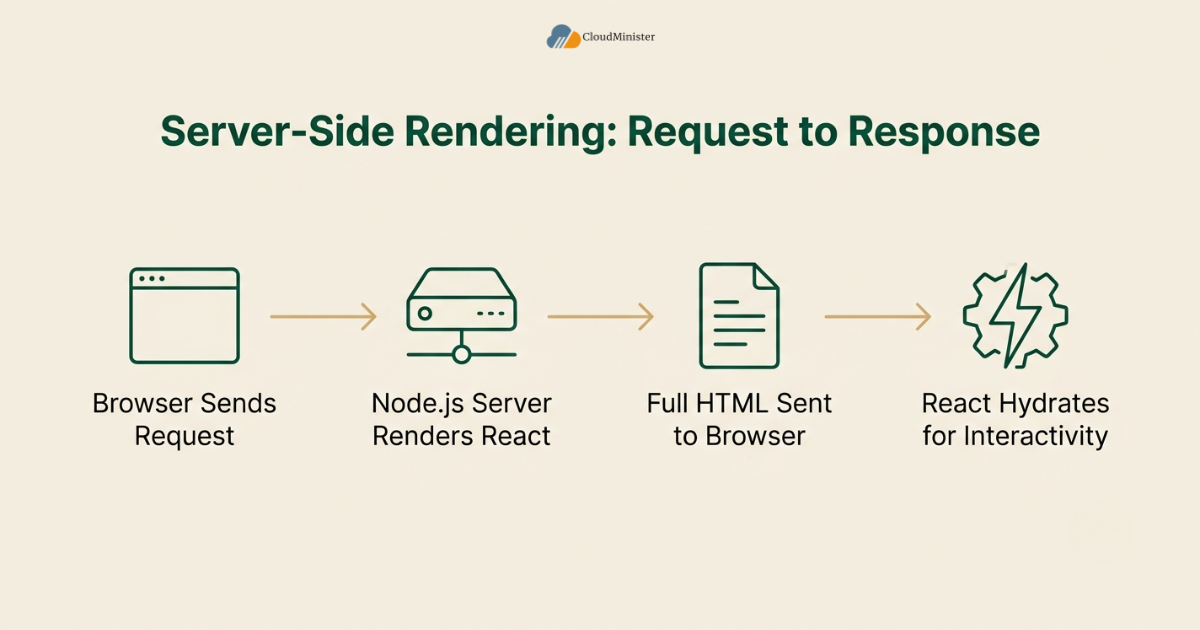
- A browser requests a URL, and the request reaches a Node.js server running your React application rather than a plain file server
- The rendering process turns your React component tree into an HTML string on the server, using the same component code you would otherwise ship to the client
- That HTML is sent to the browser immediately, so the visitor sees meaningful content before any JavaScript has downloaded or executed
- Once the JavaScript bundle loads, React “hydrates” the existing SSR output, attaching event listeners and interactivity without re-rendering the visible content from scratch
- Every subsequent request to that route repeats the cycle on the server, which keeps content fresh but also makes compute sizing important
4.3 What Makes a Setup Count as a Genuine Server-Side Rendering Deployment
Not every Node.js server running a React app qualifies as a properly configured This rendering approach deployment. A genuine setup is distinguished by a few concrete things.
- A Node.js runtime environment specifically sized and configured for Server-Side Rendering workloads, not a general-purpose shared host repurposed for the job
- Process management that restarts a crashed rendering process automatically, since a the server-rendering model crash takes the entire page down rather than just one feature
- Caching at the rendering layer for routes that do not need to be regenerated on every single request, reducing unnecessary compute cost
- Support staff and documentation genuinely familiar with Node.js and Server rendering frameworks, not just generic static file hosting
- Documentation that explicitly walks through nodejs hosting India configuration steps, not just generic Linux hosting instructions, is a reliable signal of specialization
If you are specifically evaluating infrastructure to run a Node.js-based rendering deployment, comparing options positioned as best node js hosting is a reasonable place to start, since This server-rendering strategy performance depends heavily on the underlying Node.js runtime configuration. A provider marketed under best node js hosting should be able to explain, in plain terms, how its plans are tuned for a rendering workload rather than a generic PHP or static site. This is exactly where a dedicated ReactJS Web Hosting provider tends to separate itself from a generic reseller offering best node js hosting as an afterthought line item. Reading through several best node js hosting comparison pages before committing usually surfaces these gaps quickly.
5. Rendering Strategy Comparison: Specs That Matter
5.1 Time to First Byte
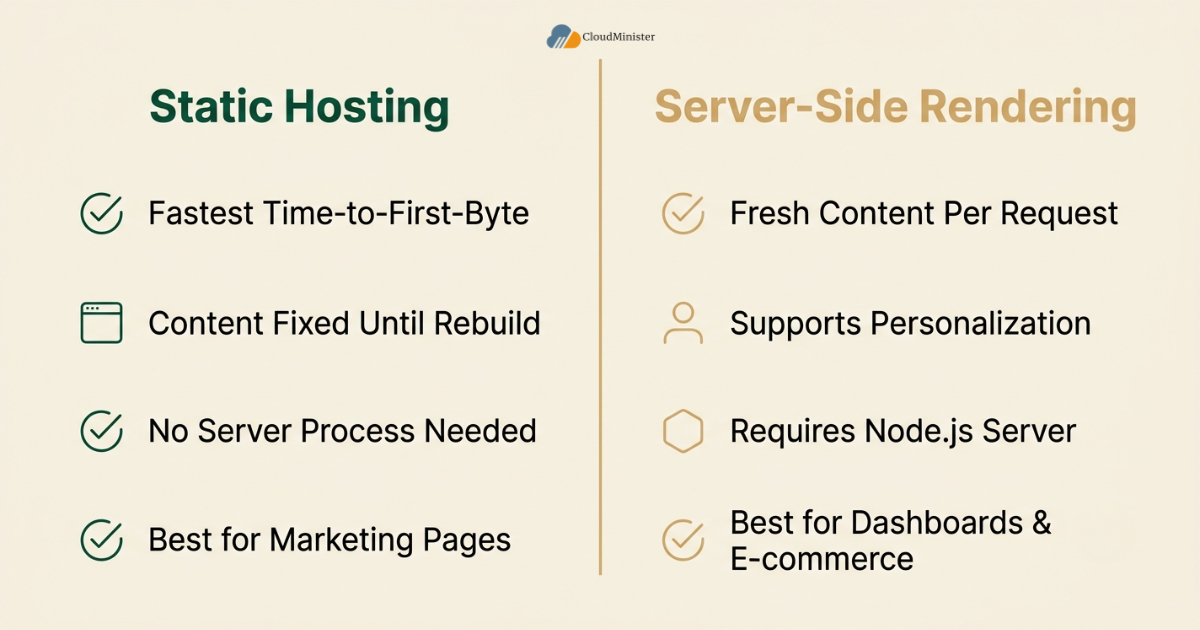
- Static hosting typically delivers the fastest possible time-to-first-byte, often in the 20 to 60 millisecond range from a nearby CDN edge node, since there is no rendering work to perform at request time
- SSR running on a standard regional server can see time-to-first-byte climb noticeably higher, particularly for visitors far from that server’s region
- Edge-deployed This rendering approach narrows this gap significantly, with recent benchmark data showing time-to-first-byte in the 60 to 120 millisecond range globally, making it genuinely competitive with static hosting for time-sensitive pages
- Millisecond-level differences are not only a concern for latency-sensitive trading systems, e-commerce and content teams evaluating The server-rendering model feel the same urgency around time-to-first-byte. Teams benchmarking nodejs hosting India providers against overseas alternatives frequently find that regional routing closes much of this gap for an India-based audience
5.2 SEO and Crawlability
- Static hosting ships fully formed HTML by default, which has always made it reliably crawlable by search engines without additional configuration
- Server rendering achieves the same crawlability advantage for apps that would otherwise depend on client-side JavaScript execution to render meaningful content
- Modern Core Web Vitals pass rates differ measurably by platform and rendering approach, with framework-based platforms that lean on server-rendering and static generation consistently outperforming traditional, JavaScript-heavy setups on passing scores
- For a React app relying heavily on client-side data fetching, adding This server-rendering strategy is frequently the single highest-leverage SEO change a team can make, and reviewing a few ReactJS Hosting Plans built specifically around this workload is a reasonable next step once the decision is made
5.3 Personalization and Dynamic Data
- Static hosting cannot natively serve different HTML to different users for the same URL, since the file is generated once at build time
- Server-Side Rendering can inject authenticated, geolocated, or otherwise personalized data directly into the rendered HTML on every request
- Teams building React apps with logged-in dashboards, real-time pricing, or localized content should treat Server-Side Rendering as close to mandatory rather than optional
- A hybrid approach, serving static pages for public marketing content while reserving Server-Side Rendering for dashboards and authenticated routes, is increasingly the default architecture for serious React applications
5.4 Operational Complexity and Cost
- Static hosting has a lower operational floor, since there is no server process to monitor, scale, or patch
- Server-Side Rendering requires a running Node.js process, meaning compute cost scales with traffic in a way static hosting’s CDN-based model does not
- Teams new to production infrastructure often underestimate the monitoring, scaling, and process-management overhead that comes with running SSR reliably at volume
- A managed hosting provider that understands these workloads specifically reduces this operational burden compared to self-managing raw servers, whether the plan is billed as an international offering or as nodejs hosting India. Reviewing the exact ReactJS Hosting Plans on offer, rather than assuming every tier supports the same workload, avoids a costly mid-project migration
6. Matching Rendering Strategy to Project Type
This mapping exercise is worth doing before signing up for any ReactJS Hosting Plans, since the right tier depends entirely on which row of the table below matches your project.
Choosing correctly requires mapping rendering strategy to actual project requirements rather than defaulting to whichever approach is most heavily discussed online. The table below summarizes how the decision should scale with project type.
| Project Type | Content Freshness | SEO Priority | Best Fit Approach |
| Marketing site or landing page | Rarely changes | High | Static hosting |
| Blog or documentation site | Occasional updates | High | Static hosting, or This rendering approach with caching |
| E-commerce product pages | Frequently changing | Very high | The server-rendering model |
| Authenticated dashboard | Per-user, real-time | Low | Server rendering |
| News or content platform | Constantly updated | Very high | Server-Side Rendering with edge caching |
A common mistake teams make when choosing between static hosting and Server-Side Rendering is treating it as an all-or-nothing decision for the entire application. A modern React app frequently benefits from a hybrid setup, static generation for pages that rarely change, and This server-rendering strategy specifically for the routes that genuinely need per-request freshness or personalization, rather than forcing every route through the same strategy.
Related Reading: hosting a React app on AWS, GCP, and Azure
7. Framework Choices That Implement SSR
7.1 Popular Frameworks for React Rendering
- Next.js remains the most widely adopted framework offering server-side rendering out of the box for React applications, alongside static generation and incremental regeneration in the same codebase
- Remix takes a rendering-first philosophy, treating server rendering and data loading as the default rather than an opt-in feature
- Other meta-frameworks in the broader JavaScript ecosystem, such as Nuxt for Vue, follow a similar server-rendering pattern, underscoring that this is a cross-framework architectural shift rather than a React-only trend
- Choosing a framework for Server-Side Rendering should depend on how your team wants to structure data fetching, not just on raw popularity, and the same logic applies when comparing ReactJS Web Hosting providers, since framework support varies meaningfully between plans
7.2 Hybrid Rendering: Getting the Best of Both
- Incremental Static Regeneration allows a page to be statically generated but automatically refreshed on a schedule, offering a middle ground between static hosting and full server rendering
- Streaming rendering sends HTML to the browser progressively, closing much of the perceived speed gap that traditionally favored static hosting
- Edge Server-Side Rendering runs the rendering step at edge locations rather than a single regional server, further reducing the latency penalty historically associated with this approach
- A well-architected React app frequently combines static hosting for stable content with Server-Side Rendering for dynamic routes, rather than treating the choice as binary. A ReactJS Web Hosting provider that documents this hybrid pattern clearly is generally easier to build against than one that only describes a single deployment path
8. Deployment and Build Considerations
8.1 Reducing Build and Bundle Size Before You Deploy
Regardless of whether you choose static hosting or This server-rendering strategy, an oversized build hurts performance on both approaches. A bloated JavaScript bundle slows down hydration on a server-rendered deployment just as much as it slows down interactivity on a static site.
- Code-splitting reduces the amount of JavaScript sent to the browser on initial load, benefiting both approaches equally
- Tree-shaking removes unused code from your production build before it ever reaches static hosting or a SSR server
- Image optimization matters identically whether your React app is statically hosted or running through This rendering approach, since large images block meaningful paint either way
- For a deeper walkthrough on trimming build size before it becomes a deployment bottleneck, this guide on reducing React build size for faster deployment pairs directly with the rendering strategy decisions covered here
8.2 Choosing the Right Node.js Environment
- The server-rendering model depends entirely on a properly configured Node.js runtime, since the server executes your React code on every request
- A Node.js environment sized for this workload needs enough memory headroom to handle concurrent render requests without degrading response times under load
- Teams evaluating nodejs hosting India options for a rendering-heavy deployment should confirm the provider supports the specific Node.js version their framework requires, and that nodejs hosting India plans are not simply relabeled shared hosting
- Process managers such as PM2 are commonly used to keep a Server rendering Node.js process alive, automatically restarting it if it crashes under load, and this is one of the first things worth confirming with any nodejs hosting India shortlist before signing an annual contract
- Comparing nodejs hosting India providers against an international best node js hosting shortlist is a reasonable exercise for teams weighing latency to their primary user base against support responsiveness, and reading a couple of independent best node js hosting reviews alongside vendor claims helps validate the comparison
9. Uptime and Reliability for Both Hosting Models
Uptime numbers advertised by a Web Hosting Company in India are only useful if they specifically cover the process running your rendering layer, not just the underlying virtual machine.
A React app is only as reliable as the infrastructure serving it, and this holds true whether you are running static hosting or Server-Side Rendering.
- Static hosting inherits the reliability of its CDN, which is typically very high since there is no application server to crash
- This server-rendering strategy introduces an additional point of failure, the Node.js process itself, which makes uptime monitoring specifically for this layer essential
- Look for a provider offering at minimum a 99.9% uptime SLA for any production Server-Side Rendering deployment, since a crashed rendering process takes the entire page down for every visitor, a detail worth confirming directly with any best node js hosting shortlist before signup
- Confirm whether the hosting provider’s SLA covers the rendering process specifically, not just general server uptime, since these are not always the same guarantee. This distinction matters just as much when comparing best node js hosting shortlists as it does when comparing a Web Hosting Company in India against an overseas alternative, and a best node js hosting provider that publishes its SLA terms openly is generally the safer pick
A React app using SSR to inject authenticated or session-specific data into the HTML response should be reviewed carefully for accidental data leakage between requests. Confirm your framework properly isolates per-request state, since a misconfigured Server-Side Rendering setup can occasionally leak one user’s data into another user’s response under high concurrency.
10. Choosing a Hosting Partner for Static or This rendering approach Deployments
10.1 What a Quality Provider Should Support
This is the checklist worth applying to any Web Hosting Company in India shortlist before signing an annual contract.
A dependable ReactJS Web Hosting provider, and any best node js hosting alternative it competes with, should support both hosting models rather than pushing every customer toward the same architecture regardless of fit.
- Native support for static builds alongside a properly configured Node.js environment for The server-rendering model, under a single account
- Clear documentation distinguishing how to deploy a static React build versus how to deploy a server-rendered application on the same platform, a distinction any established ReactJS Web Hosting provider should make explicit
- Transparent guidance on when a project should move from static hosting to Server rendering as its requirements grow, rather than upselling customers who do not need it
- 24/7 technical support familiar with both deployment models, not just generic web hosting troubleshooting, which is what separates a genuine ReactJS Web Hosting specialist from a general-purpose reseller
- Clear, published ReactJS Hosting Plans that list Node.js version support, memory allocation, and CDN coverage in one place, rather than requiring a support ticket to find out
- A ReactJS Web Hosting provider that responds to pre-sales technical questions quickly is usually a good proxy for how it will handle a production incident later
10.2 Why Dedicated Infrastructure Matters for Server-Side Rendering
- Shared, oversubscribed hosting environments frequently struggle to deliver consistent performance for This server-rendering strategy, since rendering is a compute-intensive, per-request operation
- A dedicated resource allocation, available through Cloudminister’s ReactJS Web Hosting service, removes the variability that makes running Server-Side Rendering unpredictable on generic shared infrastructure, a variability that also shows up frequently on budget nodejs hosting India plans that oversubscribe CPU
- Guaranteed CPU and RAM allocation ensures a SSR Node.js process performs consistently regardless of other tenants on the same physical hardware, the same guarantee worth confirming on any nodejs hosting India plan before migrating production traffic
- NVMe storage and a properly sized Node.js environment as standard on production tiers built specifically to support This rendering approach workloads, the kind of foundation a serious ReactJS Web Hosting plan should be built on, whether it is sold internationally or specifically as nodejs hosting India
10.3 Choosing a Domestic Hosting Partner in India
Indian development teams evaluating options have specific reasons to consider a domestic Web Hosting Company in India alongside international providers for both static and The server-rendering model deployments.
- INR-denominated billing removes currency volatility from budget planning for teams running an ongoing Server rendering deployment on a monthly basis, a benefit any established Web Hosting Company in India can typically confirm
- Local support teams from a Web Hosting Company in India understand India’s data protection landscape, including the Digital Personal Data Protection Act (DPDPA), and can help teams align their infrastructure choices — such as data residency and access controls — with these requirements, alongside responding quickly during a production incident affecting a rendering layer.
- A Web Hosting Company in India offering both static hosting and dedicated This server-rendering strategy infrastructure gives teams a single vendor relationship instead of juggling multiple international providers
- Simpler procurement and billing cycles matter for teams scaling from a single static site to a multi-application SSR setup over time, which is easier to manage under one Web Hosting Company in India account, and one that also lists best node js hosting tiers alongside static plans simplifies this further, a pattern common among an established Web Hosting Company in India
- Teams comparing ReactJS Hosting Plans domestically often find rupee-denominated pricing removes a meaningful layer of budgeting complexity compared to overseas infrastructure billed in a foreign currency
- A Web Hosting Company in India that also lists ReactJS Hosting Plans alongside general-purpose hosting makes it easier to test both a rendering-optimized plan and a standard server side by side before committing, and doing the same comparison against a best node js hosting shortlist from outside India rounds out the picture
- Cloudminister, as a Web Hosting Company in India, provides exactly this combination of domestic support, transparent billing, and dedicated infrastructure for teams deciding between static hosting and This rendering approach, and its nodejs hosting India lineup is built specifically around this decision
- Considering both a ReactJS Web Hosting specialist and a general Web Hosting Company in India evaluated purely on price alone misses the operational value of working with a single, accountable vendor whose ReactJS Hosting Plans and Server-Side Rendering support are documented rather than assumed A Web Hosting Company in India that has supported production Node.js workloads for other clients typically understands rendering-related uptime expectations differently than a generic hosting reseller, and is worth the slightly higher research effort before signup. A Web Hosting Company in India willing to share real client performance data, even anonymized, is generally more trustworthy than one offering only generic marketing language.

11. A Step-by-Step Framework for Choosing Your Approach
This framework applies equally whether you ultimately land on an international ReactJS Web Hosting provider or a domestic Web Hosting Company in India.
Phase 1: Map Your Content Before Choosing (Day 1) – List every route in your React app and classify each by how frequently its content changes and whether it needs personalization – Identify which routes are SEO-critical and which are purely functional, internal, or authenticated – Estimate expected traffic patterns, since compute needs for The server-rendering model scale differently than static hosting bandwidth needs
Phase 2: Prototype Both Approaches Where It Is Unclear (Days 2 to 7) – Test the proof of concept on both a nodejs hosting India plan and an international best node js hosting plan if your user base spans regions – Build a small proof of concept using static hosting for content-stable routes – Build a parallel proof of concept using Server-Side Rendering for routes that need freshness or personalization – Compare real measured load times and time-to-first-byte between the two rather than assuming based on general reputation alone
Phase 3: Right-Size the Infrastructure (Week 2) – Shortlist two or three ReactJS Hosting Plans and compare Node.js version support, memory tiers, and CDN coverage line by line – Confirm the shortlisted ReactJS Hosting Plans explicitly document Server-Side Rendering support rather than assuming it from a generic feature list – Choose static hosting for routes that do not require per-request rendering – Choose Server rendering, ideally with edge deployment, for routes that need freshness, personalization, or SEO-critical dynamic content – Confirm whether your chosen provider supports a hybrid deployment cleanly within one project, and whether its ReactJS Hosting Plans cover both models without a plan migration, checking this against a best node js hosting benchmark if raw rendering throughput is the priority
Phase 4: Deploy With Monitoring (Week 2 onward) – Confirm the chosen nodejs hosting India or international plan includes process-level alerting, not just server-level uptime pings – Set up uptime and response-time alerts specifically for any This server-rendering strategy process, not just the overall domain – Track Core Web Vitals over time to confirm your rendering strategy is delivering the expected performance improvement – Review performance monthly, adjusting which routes use SSR as the application grows
Phase 5: Review and Scale (Ongoing) – Revisit which routes genuinely need This rendering approach quarterly as product requirements change – Reassess whether previously static routes now need personalization and should move to a server-rendered approach – Treat the static hosting versus The server-rendering model decision as a living architectural choice tied to actual product needs, not a one-time setup task
Teams that get the most consistent results treat the static hosting versus Server rendering decision the same way they treat any other architectural choice, something to be measured, reviewed, and adjusted as the application evolves, rather than decided once at project kickoff and never revisited.
12. Common Mistakes When Choosing Between Static Hosting and This server-rendering strategy
- Defaulting to Server-Side Rendering for a fully static marketing site: this adds operational overhead and compute cost for content that never needed per-request rendering in the first place
- Sticking with static hosting for an app that needs personalization: this often leads to bolting on client-side data fetching that recreates a worse version of what SSR already solves natively
- Ignoring hydration cost: a heavy server-rendered page that ships a huge JavaScript bundle can still feel slow to become interactive even though the initial HTML arrived quickly
- Skipping load testing: assuming a This rendering approach deployment will handle production traffic without testing concurrent render requests under realistic load
- Treating the decision as permanent: a project that started as a simple static site often grows into something that genuinely needs Server-Side Rendering, and delaying that migration too long usually costs more than making the switch early
- Choosing a host on price alone: whether comparing nodejs hosting India options or an international best node js hosting shortlist, the cheapest plan rarely includes the process monitoring a production rendering workload needs
- Assuming every ReactJS Web Hosting plan supports Server-Side Rendering equally: some are genuinely tuned for it and some simply run a static file server with Node.js installed
13. Readiness Checklist for Choosing Your Hosting Approach
This final checklist is useful whether you land on an overseas provider or a Web Hosting Company in India that already understands your compliance requirements.
- Provider shortlisted: two or three ReactJS Web Hosting or nodejs hosting India providers compared directly on documentation quality and support responsiveness
- Content mapped: every route in your React app classified by freshness requirements and personalization needs before choosing between static hosting and Server-Side Rendering
- SEO priority confirmed: routes that must rank well identified and matched to the rendering approach that best supports crawlability
- Node.js environment sized: for any route using Server-Side Rendering, memory and CPU headroom tested under realistic concurrent load, whether hosted internationally or through nodejs hosting India
- Hybrid architecture considered: static hosting and The server-rendering model combined within the same project where it genuinely fits, rather than forcing one approach everywhere
- Uptime SLA verified: a minimum 99.9% uptime SLA confirmed in writing, specifically covering the Server rendering process where applicable
- Security reviewed: environment variable handling for static builds and per-request state isolation for This server-rendering strategy both confirmed before shipping
- Monitoring configured: response time and error alerts active for any SSR process from day one
- Review cadence set: a recurring quarterly review scheduled to reassess whether the current rendering strategy still matches actual product requirements
- ReactJS Hosting Plans reassessed: current plan checked against newer ReactJS Hosting Plans from the same provider in case a better-suited tier or updated ReactJS Hosting Plans page has since launched
- Regional option reconfirmed: nodejs hosting India pricing and support responsiveness rechecked against the current international best node js hosting shortlist
- Domestic option evaluated: ReactJS Hosting Plans from a Web Hosting Company in India compared against international providers on pricing, support, and Server-Side Rendering capability, alongside a best node js hosting shortlist if the app leans heavily on rendering
- nodejs hosting India confirmed: Node.js version, memory tier, and process monitoring verified directly with the provider rather than assumed from the marketing page
A quick note before the takeaways: teams that shortlist both ReactJS Hosting Plans and a best node js hosting comparison early tend to make this decision faster and with fewer surprises later.
Key Takeaways
- Static hosting and This rendering approach solve different problems, and the right choice for a React app depends on how much content changes per request and how important personalization and SEO freshness are
- Server-Side Rendering has moved from a niche, complex setup to a mainstream, well-supported architecture, with the majority of modern React frameworks offering it as a first-class option
- Edge-deployed The server-rendering model has meaningfully closed the time-to-first-byte gap that once made static hosting the automatic default for every project
- Hybrid architectures, combining static hosting for stable content with Server-Side Rendering for dynamic routes, are increasingly the standard for serious production React applications
- Operational overhead is the primary trade-off with Server rendering, since it requires an actively running Node.js process rather than a simple file host
- A ReactJS Web Hosting provider that supports both static hosting and This server-rendering strategy cleanly gives teams the flexibility to make this decision per-route rather than per-project
- This is a continuous evaluation process, not a one-time setup decision, and teams that revisit their rendering strategy regularly consistently ship faster, more discoverable React apps than those who do not
Not Sure Which Rendering Strategy Fits Your App?
Our team can walk you through static hosting vs Server-side rendering for your specific routes and help you right-size a Node.js environment before you commit to a plan.
Conclusion
Choosing between static hosting and SSR for a React app is not a minor deployment detail, it is a core architectural decision that shapes SEO, performance, and how your app handles personalization from day one. A beautifully built React app served entirely as static files will underperform on any route that genuinely needs fresh, per-user content, while an app that reaches for This rendering approach everywhere pays unnecessary operational cost on routes that never needed it. The gap between a fast, discoverable app and a slow, invisible one is rarely about the React code itself, it is almost always about matching the rendering strategy to what each route actually needs.
The path forward is straightforward even if it requires some discipline. Map your application’s routes honestly before choosing a hosting model, test real load times rather than assuming based on general advice, right-size your infrastructure to the routes that genuinely need Server-Side Rendering, and revisit the decision on a recurring basis as your product evolves. Teams that treat this as a living architectural decision, reviewed with the same discipline as any other part of the stack, consistently ship React apps that perform better and rank higher than teams who choose once and never look back.
Before committing to a long-term hosting plan, test both a static build and a The server-rendering model deployment under conditions close to your real production traffic so the decision is based on measured data rather than assumption.
Cloudminister supports this entire journey with a dedicated ReactJS Web Hosting service, robust support for both static and Server rendering deployments, and the reliability of an established Web Hosting Company in India behind every plan, alongside best node js hosting options built specifically for rendering-heavy workloads. Whether you are shipping your first React build or scaling a multi-route application that mixes static and This server-rendering strategy pages, working with a provider that offers dependable ReactJS Hosting Plans and understands both hosting models keeps performance consistent and support responsive when it matters most.
Frequently Asked Questions
Do ReactJS Hosting Plans differ meaningfully between providers?
Yes. Some ReactJS Hosting Plans are genuinely tuned for Node.js and rendering workloads, including memory headroom and process monitoring, while others simply repackage generic shared hosting under a React-friendly name. Comparing documented specs against a best node js hosting benchmark before committing avoids this gap.
What is the main difference between static hosting and Server-Side Rendering for a React app?
Static hosting pre-builds all HTML at deploy time and serves the same files to every visitor, while SSR generates HTML fresh for each request on a running Node.js server. Static hosting is faster and simpler for content that rarely changes, while This rendering approach is necessary for personalized, authenticated, or frequently changing content.
Is The server-rendering model always better for SEO than static hosting?
Not necessarily. Static hosting already produces fully formed HTML that search engines can crawl easily. Server rendering matters most for SEO when your React app would otherwise depend on client-side JavaScript to render meaningful content, since it ensures crawlers see complete content immediately.
Can a React app use both static hosting and This server-rendering strategy at the same time?
Yes. A hybrid approach is increasingly the standard, using static hosting for stable content like marketing pages and SSR for dynamic routes like dashboards or e-commerce product pages. Most modern React frameworks support mixing both approaches within a single project.
Does Server-Side Rendering require more infrastructure than static hosting?
Yes. Server-Side Rendering requires a running Node.js process that executes React code on every request, meaning it needs ongoing compute resources and monitoring, unlike static hosting, which simply serves pre-built files from a CDN with minimal server overhead.
How do I decide if my React app needs Server-Side Rendering?
Evaluate whether your content changes per user or per request, whether SEO is critical for pages that currently rely on client-side rendering, and whether you need to inject personalized or authenticated data into the initial page load. If any of these apply, This rendering approach is likely the right fit for those specific routes.