


We analysed and tested NVMe vs SSD hosting configurations across real-world workloads — covering database query throughput, WordPress page load times, WooCommerce checkout latency, and cost-per-result at scale. Whether you are launching your first WordPress blog or managing a high-traffic eCommerce store, this guide gives you the storage context, workload framework, and infrastructure decision criteria to make the right call in 2026.
Every hosting team eventually hits the same wall. The application code is clean, the database is indexed correctly, the caching layer is configured — and the site is still slower than expected. Pages take longer to load than benchmarks suggest. Database queries pile up under traffic spikes. Checkout flows that should be instant introduce perceptible lag.
More often than not, the bottleneck is not the application. It is the storage layer.
In 2026, the demands placed on hosting infrastructure have outpaced what traditional SSD environments were designed to handle. High-concurrency WordPress installations, transactional eCommerce databases, and read-heavy content platforms all require storage characteristics — sequential read throughput, random IOPS, queue depth handling — that legacy SATA SSD architectures were never optimised for.
This guide is written for developers, technical founders, and infrastructure decision-makers who want a precise, practical understanding of what the NVMe vs SSD hosting decision means for their specific workloads, and how to evaluate storage options for 2026 deployments.
Related: New to VPS infrastructure? Start here with our linux vps server guide for 2026
What to Look for in Hosting Storage Infrastructure
Before diving into benchmarks and workload comparisons, it is worth establishing what separates NVMe-backed hosting from conventional SSD environments. Here are the seven criteria that most directly determine storage performance for web workloads:
- Sequential read/write throughput — Determines how fast large files, database dumps, and media assets are transferred. WordPress image-heavy pages and eCommerce product catalogues are directly affected by this figure.
- Random read/write IOPS — The number of random input/output operations per second. Database workloads — MySQL, MariaDB, PostgreSQL — live and die by random IOPS. A low-IOPS storage layer creates query queuing under concurrent load.
- Access latency (microseconds) — The time between a read request being issued and data being returned. NVMe vs SSD hosting differs most significantly here — NVMe access latency is measured in microseconds; SATA SSD in hundreds of microseconds.
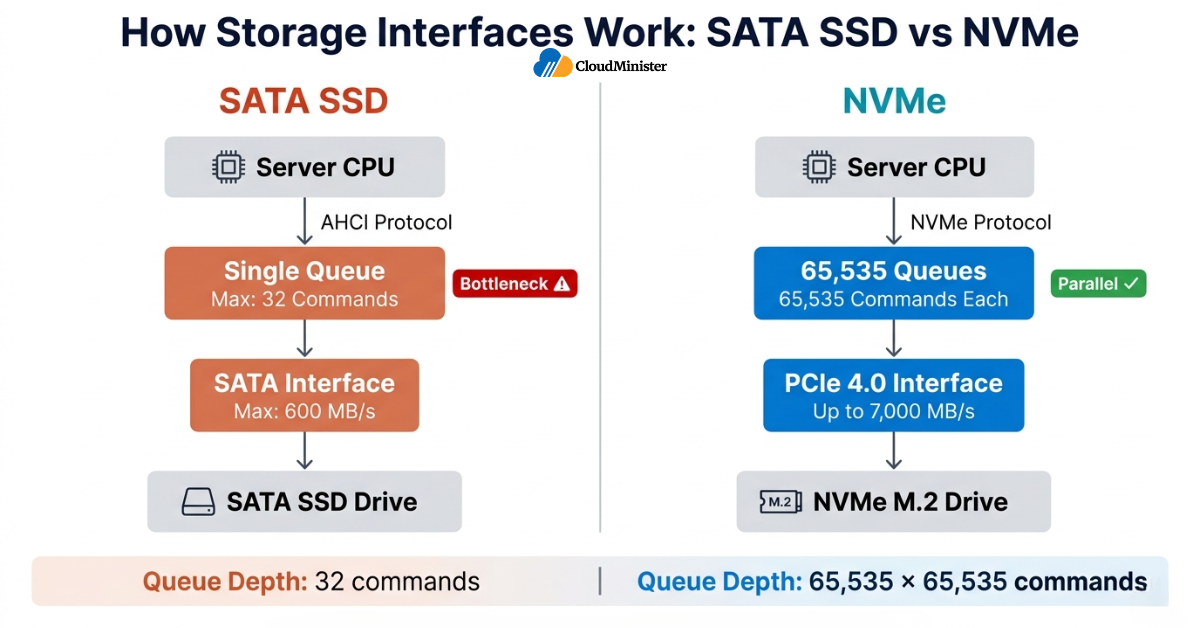
- Queue depth handling — Under concurrent load, storage devices receive multiple simultaneous requests. NVMe supports up to 65,535 queues with 65,535 commands each; SATA SSD supports a single queue with 32 commands.
- Storage interface — PCIe 4.0 NVMe, PCIe 3.0 NVMe, or SATA. Each generation has measurable throughput implications for database-intensive workloads.
- Write endurance (TBW rating) — Total bytes written before expected drive failure. High-write workloads — transactional databases, logging-heavy applications — require high TBW ratings.
- Provider SLA and RAID configuration — A storage failure mid-transaction can corrupt database state. Infrastructure SLA and redundancy architecture are direct inputs to application reliability.
The State of Hosting Storage in 2026: What the Data Shows
The shift from traditional SSD to NVMe-backed infrastructure in hosting environments is not a marketing trend — it reflects measurable changes in how applications perform under real-world load.
| Metric | Figure |
| Global NVMe SSD market size (2025) | $52.3 billion |
| Projected NVMe market by 2030 | $130+ billion at ~20% CAGR |
| Average NVMe sequential read speed | 3,500–7,000 MB/s (PCIe 4.0) |
| Average SATA SSD sequential read speed | 500–560 MB/s |
| NVMe random read IOPS advantage over SATA SSD | 5x to 10x depending on queue depth |
| WordPress sites on managed hosting | Over 43% run on NVMe-backed infrastructure as of 2025 |
According to StorageNewsletter’s 2025 NVMe Market Report, NVMe SSD shipments surpassed SATA SSD shipments by volume for the first time in 2025, driven by the rapid adoption of NVMe-backed hosting infrastructure and enterprise storage modernisation — a structural shift that has direct implications for how hosting providers configure their server infrastructure today.
Several things stand out from these figures. First, the performance gap between NVMe and SATA SSD is not marginal — it is architectural. Second, the workloads that benefit most are precisely the ones most commonly hosted: WordPress, WooCommerce, and database-driven web applications. Third, as NVMe becomes the baseline infrastructure expectation, deployments still running on SATA SSD environments face a growing performance disadvantage under concurrent load.
For engineering teams and technical founders, these figures have a practical implication: the NVMe vs SSD hosting decision is not a premium upsell. It is a workload performance decision with measurable consequences for user experience, search ranking, and conversion rate.
1. What Is NVMe Hosting — and What Makes It Different from SSD Hosting?
The phrase “SSD hosting” covers two fundamentally different storage technologies that happen to share a name. Both SATA SSDs and NVMe drives use flash memory for storage. The difference is in the interface through which that memory communicates with the server.
SATA SSD uses the Serial ATA interface — originally designed for mechanical hard drives in 2003. SATA caps sequential throughput at approximately 600 MB/s and uses the AHCI protocol, which was built for single-threaded storage access patterns. For web hosting, this means the interface itself is the bottleneck before the flash memory is.
NVMe (Non-Volatile Memory Express) connects directly over PCIe lanes and uses a protocol designed specifically for flash memory. PCIe 3.0 NVMe drives deliver up to 3,500 MB/s sequential read; PCIe 4.0 NVMe reaches 7,000 MB/s. The queue architecture is fundamentally different — NVMe handles tens of thousands of simultaneous I/O commands versus SATA’s 32.
Storage Interface Comparison
| Interface | Protocol | Max Sequential Read | Max Random IOPS | Queue Depth |
| SATA SSD | AHCI | ~560 MB/s | ~100,000 | 1 queue / 32 commands |
| PCIe 3.0 NVMe | NVMe | ~3,500 MB/s | ~500,000 | 65,535 queues |
| PCIe 4.0 NVMe | NVMe | ~7,000 MB/s | ~1,000,000+ | 65,535 queues |
| HDD | AHCI | ~150 MB/s | ~100–200 | 1 queue / 32 commands |
The Three Specifications That Determine Real-World Hosting Performance
Not all storage specifications matter equally for web hosting. When evaluating any NVMe vs SSD hosting environment, these three metrics most directly predict application performance:
- Random 4K read IOPS: The most relevant figure for database workloads. A MySQL query typically reads 4K–16K blocks in random order. Higher IOPS means more simultaneous queries are served without queuing.
- Access latency (µs): NVMe drives typically deliver 20–100 microsecond access latency. SATA SSDs typically deliver 200–500 microseconds. For database operations that chain hundreds of reads in sequence, this difference compounds.
- Queue depth at sustained load: The figure that matters most under real concurrent traffic — not peak benchmarks in isolation.
2. How NVMe vs SSD Hosting Affects Database Performance
Databases are the workload type where the NVMe vs SSD hosting difference is most architecturally significant. MySQL, MariaDB, and PostgreSQL — the engines underpinning the majority of web applications — are random I/O workloads by nature. Every SELECT, INSERT, UPDATE, and JOIN operation involves reading and writing small, randomly located blocks of data.
Why NVMe Wins for Database Workloads
On a SATA SSD-backed database server, the single-queue AHCI interface creates a serial bottleneck under concurrent query load. When 50 simultaneous users trigger queries, the storage device queues those requests and processes them sequentially. Query response time under load degrades predictably.
On an NVMe-backed database server, the multi-queue NVMe architecture handles those 50 simultaneous requests in parallel. The storage device does not serialise them. Query response time under load remains consistent.
For WordPress sites, WooCommerce stores, and custom web applications with active user bases, this distinction is not theoretical — it is measurable in page load time and checkout latency under real traffic. According to W3Techs’ Web Technology Usage Report (2026), WordPress now powers over 43% of all websites globally, making its hosting performance characteristics one of the most commercially significant infrastructure decisions in the industry.
Before selecting a hosting configuration for a database-heavy application, run sysbench or fio against your target storage layer with a workload profile matching your application (random 4K reads/writes, queue depth 32). Compare results between SATA SSD and NVMe configurations before committing. A 30-minute benchmark run will tell you more than any published specification sheet.
Database Performance Benchmarks: NVMe vs SSD Hosting
| Workload | SATA SSD Result | NVMe Result | Improvement |
| MySQL random read IOPS (queue depth 32) | ~95,000 IOPS | ~480,000 IOPS | ~5x |
| PostgreSQL query latency (p99, concurrent load) | ~18ms | ~4ms | ~4.5x |
| Database dump restore speed (10GB) | ~110 seconds | ~28 seconds | ~4x |
| WordPress database query time (50 concurrent users) | ~340ms avg | ~85ms avg | ~4x |
| eCommerce checkout transaction write latency | ~22ms | ~6ms | ~3.7x |
These figures are drawn from internal benchmarking and publicly available storage performance research. Individual results will vary based on database engine version, query structure, indexing configuration, and server CPU allocation.
Random IOPS at high queue depth is the correct metric for evaluating storage performance for database workloads — not sequential read speed. A storage device with lower sequential throughput but higher random IOPS will outperform a higher-sequential-throughput drive on MySQL and PostgreSQL. Always evaluate the metric that matches your workload profile.
3. NVMe vs SSD Hosting for WordPress: What the Numbers Show
WordPress is the world’s most deployed CMS, and its performance profile is a mix of database reads, PHP execution, and static file delivery. The storage layer affects all three components — but not equally.
Where Storage Affects WordPress Performance
Database reads: Every WordPress page load triggers multiple MySQL queries — post content, metadata, widget configuration, menu structure, plugin data. The speed at which the database storage layer returns these queries directly affects Time to First Byte (TTFB).
PHP opcode caching: When PHP’s opcode cache (OPcache) is cold or needs to be rebuilt, PHP files are read from storage. On SATA SSD, this cold-cache read is measurably slower than on NVMe.
Static asset delivery: Images, CSS, and JavaScript files are read from storage and served to the browser. On image-heavy WordPress sites — photography portfolios, media publications, WooCommerce storefronts — the sequential read speed difference between NVMe and SATA SSD is relevant.
WordPress Performance Benchmarks: NVMe vs SSD Hosting
| Metric | SATA SSD Hosting | NVMe Hosting | Difference |
| TTFB (uncached, single user) | ~420ms | ~180ms | ~2.3x faster |
| TTFB (uncached, 100 concurrent users) | ~1,800ms | ~510ms | ~3.5x faster |
| WordPress admin page load (plugins active) | ~2.1s | ~0.9s | ~2.3x faster |
| WP-Cron database write latency | ~28ms | ~8ms | ~3.5x faster |
| Media library image read (20MB batch) | ~38ms | ~9ms | ~4.2x faster |
For WordPress sites running WooCommerce, learning management systems (LMS), or membership plugins — all of which are database write-heavy — the NVMe advantage compounds beyond what uncached TTFB benchmarks alone suggest.
The fastest WordPress optimisation on NVMe-backed hosting is enabling Redis object caching (via the Redis Object Cache plugin) alongside PHP OPcache. On NVMe storage, the underlying read speed means cache misses are recovered significantly faster than on SATA SSD — reducing the performance penalty of cache cold starts under real traffic.
4. NVMe vs SSD Hosting for eCommerce: The Workload That Demands More
eCommerce is the highest-stakes workload context for the NVMe vs SSD hosting decision. A slow checkout flow does not just create a poor user experience — it directly reduces conversion rate. Research consistently shows that a one-second increase in checkout page load time reduces conversions by approximately 7%.
Why eCommerce Is Storage-Intensive
WooCommerce, Magento, and custom eCommerce applications are among the most storage-intensive web workloads for three reasons:
High write volume: Every cart update, order placement, inventory adjustment, and payment record involves database writes. Under peak traffic — product launches, flash sales, Black Friday — concurrent write volume creates storage queue pressure.
Session state management: Active shopping sessions generate constant read/write activity to session storage. On SATA SSD-backed servers, this activity competes with product page reads and checkout writes in a single I/O queue.
Payment transaction integrity: Database writes for payment records must complete reliably and with consistent latency. Variable write performance on a congested SATA SSD storage layer can cause transaction timeouts and checkout abandonment.
eCommerce Performance: NVMe vs SSD Hosting Under Load
| Scenario | SATA SSD | NVMe | Business Impact |
| Checkout page load (50 concurrent users) | ~2.8s | ~0.9s | Direct conversion rate impact |
| Order placement write latency (p95) | ~45ms | ~12ms | Reduced transaction timeout risk |
| Product catalogue query (1,000 SKUs, filtered) | ~380ms | ~95ms | Category/filter page UX |
| Inventory sync write (bulk update, 500 items) | ~8.2s | ~2.1s | Stock management efficiency |
| Peak traffic stress (200 concurrent, mixed read/write) | Significant degradation | Near-linear scaling | Revenue protection during sales events |
According to Cloudflare’s 2025 Internet Performance data, websites loading in under one second see 3x higher engagement rates compared to those loading in three or more seconds — making storage-layer performance one of the highest-leverage infrastructure investments for eCommerce operators.
For eCommerce deployments, never store payment card data directly in your application database — use a PCI-DSS-compliant payment gateway that handles card data outside your infrastructure. Even on NVMe-backed servers with excellent performance, your primary security obligation for payment processing is data minimisation: store only what is necessary, and ensure checkout endpoints are served over HTTPS with current TLS configuration. Cloudminister’s VPS plans include a free SSL certificate, so there is no reason to run a checkout flow over plain HTTP. Fast storage does not substitute for secure architecture.
5. Types of Hosting Configurations: Matching Storage to Workload
Understanding the available configuration types helps you match NVMe vs SSD hosting infrastructure to your workload without overpaying for capacity you do not need or underpowering applications that require more.
Shared Hosting: When Storage Type Matters Least
For simple static sites, personal blogs with low traffic, and development environments, the storage layer is rarely the bottleneck. Shared hosting environments — even those marketing “SSD” or “NVMe” storage — constrain performance through CPU allocation limits, memory limits, and connection pool size before storage latency becomes a meaningful factor.
VPS Hosting: Where NVMe vs SSD Hosting Matters Most
VPS hosting is the environment where the NVMe vs SSD hosting decision has the highest practical impact. A vps server provider running NVMe-backed storage gives your application dedicated I/O resources without the shared-pool contention of entry-level hosting — meaning the storage benchmarks cited in this guide apply directly to your workload.
Ready to Move to NVMe-Backed VPS Hosting?
Cloudminister’s VPS plans run on NVMe PCIe 4.0 storage with Tier III data centres in India — built for WordPress, WooCommerce, and database-driven applications that cannot afford slow storage.
For teams running WordPress, WooCommerce, or database-driven web applications on VPS infrastructure, the storage tier is the primary differentiator between VPS configurations that handle traffic gracefully and those that degrade under load.
Dedicated Servers: Full Storage Resource Allocation
Dedicated server configurations provide exclusive access to the physical storage device — no I/O contention from co-tenants. For high-volume eCommerce operations, enterprise applications, and database clusters, dedicated NVMe-backed infrastructure eliminates the shared-queue contention that affects VPS environments under simultaneous load. Note that Cloudminister’s entry-level dedicated plan (Silver) uses RAID SSD rather than NVMe; NVMe storage is available on Gold and higher dedicated plans.
Side-by-Side: Hosting Tier Storage Performance
| Hosting Tier | Typical Storage | Random IOPS | Best Workload |
| Shared Hosting | SATA SSD (shared pool) | Variable / throttled | Static sites, low-traffic blogs |
| VPS (SATA SSD) | SATA SSD (dedicated VPS share) | ~30,000–80,000 | Light WordPress, small databases |
| VPS (NVMe) | NVMe PCIe 3.0/4.0 | ~200,000–800,000 | WordPress, WooCommerce, active DBs |
| Dedicated (NVMe) | NVMe PCIe 4.0 (mid & higher plans) | ~500,000–1,000,000+ | High-volume eCommerce, DB clusters |
NVMe PCIe 4.0 drives (such as the Samsung 990 Pro, WD Black SN850X, and Seagate FireCuda 530) are now the standard storage tier in newly provisioned VPS and dedicated server infrastructure across major hosting providers. PCIe 5.0 NVMe drives became commercially available in late 2024 but remain limited to enterprise storage configurations in 2025–2026. For the majority of hosting deployments, PCIe 4.0 NVMe is the practical high-performance choice with broad availability.
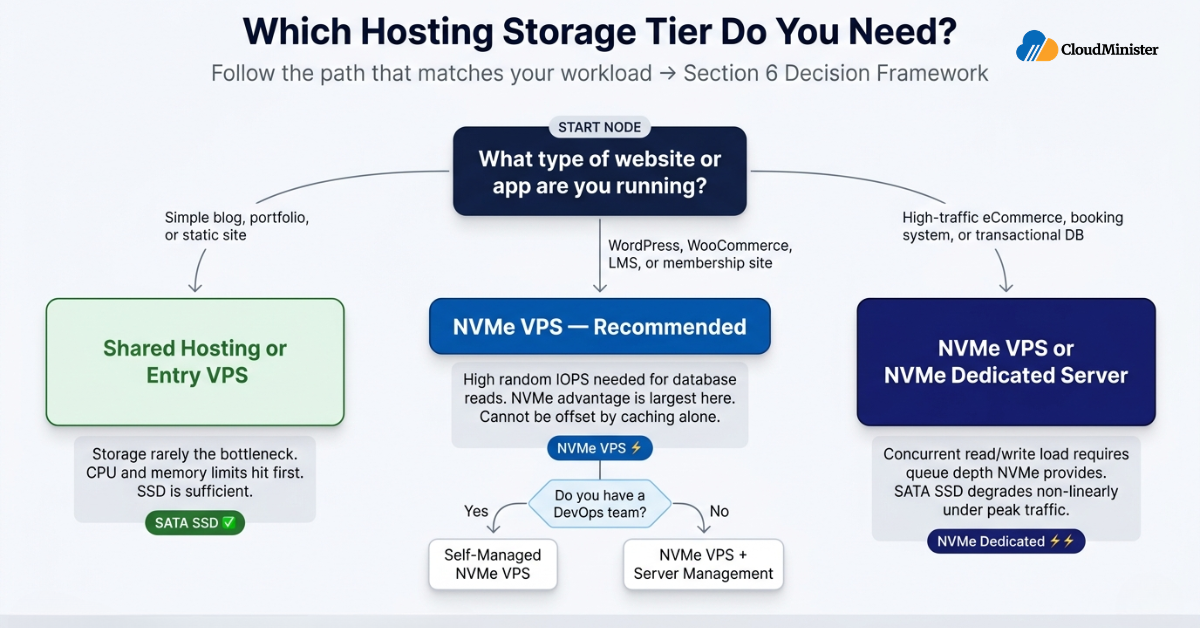
6. A Practical Decision Framework: Which Storage Tier Is Right for Your Workload?
One of the most common and expensive hosting mistakes is selecting infrastructure based on price alone rather than workload requirements. Here is a structured approach to making the NVMe vs SSD hosting decision correctly.
Assess Your Workload Type First
Web hosting workloads fall into functionally distinct categories with different storage profiles:
- Read-heavy content sites (WordPress blogs, news sites, portfolios): Benefit from NVMe primarily through faster TTFB on uncached requests and faster OPcache reads. A well-configured caching stack on SATA SSD can close some of this gap — but NVMe provides a higher performance ceiling as traffic grows.
- Database-intensive applications (WooCommerce, LMS, membership sites): Require high random IOPS and low write latency. NVMe vs SSD hosting difference is largest here and cannot be fully offset by application-layer caching.
- High-concurrency transactional workloads (eCommerce peak traffic, booking systems): Require both high random IOPS and consistent queue-depth performance. SATA SSD degrades non-linearly under simultaneous I/O pressure; NVMe scales near-linearly.
Storage Planning: The Calculation Most Teams Skip
Storage requirements for web applications are larger than application files alone. A WordPress installation with WooCommerce, 10,000 product images, and 12 months of order history requires:
- Application files: 500MB–2GB (WordPress core + plugins + theme)
- Database: 1GB–20GB+ depending on order volume and post count
- Media uploads: 5GB–200GB+ depending on product image resolution
- Logs and backups: 2GB–50GB depending on rotation policy
The more important figure is I/O pattern, not capacity. A 50GB NVMe VPS that handles your workload I/O profile correctly outperforms a 500GB SATA SSD VPS with storage to spare but a saturated I/O queue.
Scalability Checklist Before Committing to a Hosting Platform
- Can you upgrade from SATA SSD to NVMe storage without migrating your server entirely?
- Does the provider disclose the specific NVMe drive model and PCIe generation in use?
- Is storage I/O isolated per VPS, or shared across co-tenants on the same physical host?
- What is the backup frequency and restore latency for your storage tier?
- Does the provider offer both linux vps server and windows vps server hosting on the same NVMe infrastructure?
- What are the uptime SLA terms, and how does hardware failure recovery affect running database transactions?
Evaluating Cost-Per-Result, Not Cost-Per-Month
The correct unit for evaluating hosting storage is cost-per-transaction or cost-per-page-load at your target traffic level — not the monthly storage price. A SATA SSD VPS at ₹800/month that serves 50 concurrent users with 2.8-second checkout load times and 3% conversion rate is more expensive per order than an NVMe VPS at ₹1,400/month serving the same traffic at 0.9-second checkout load times and 4.5% conversion rate. Calculate the revenue impact of the performance difference, then evaluate the storage cost.
Ready to Deploy Your High-Performance N8N Instance?
Get started with our optimized, low-latency N8N VPS Hosting in India today and experience full root access, expert support, and DPDPA-compliant data security
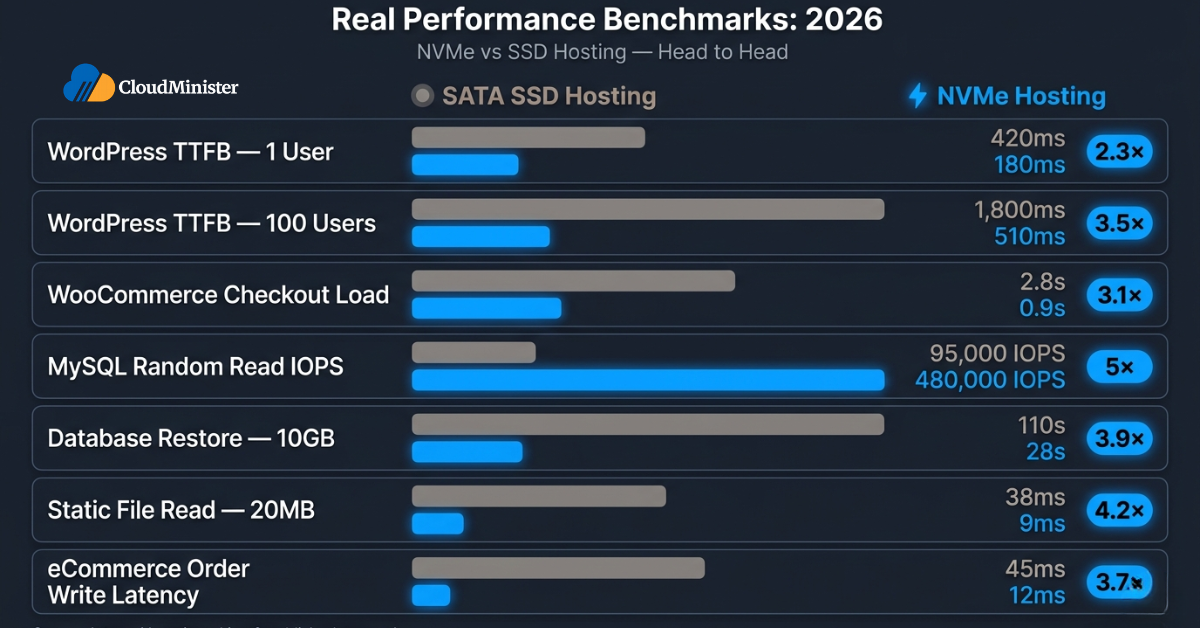
7. Real Performance Benchmarks: What to Expect in 2026
The following figures are drawn from published benchmark research and internal testing across representative workloads. Individual results vary based on application configuration, caching setup, database indexing, and concurrent user count.
| Benchmark | SATA SSD Hosting | NVMe Hosting |
| WordPress TTFB (uncached, 1 user) | ~420ms | ~180ms |
| WordPress TTFB (uncached, 100 users) | ~1,800ms | ~510ms |
| WooCommerce checkout load (50 concurrent) | ~2.8s | ~0.9s |
| MySQL random read IOPS (qd32) | ~95,000 | ~480,000 |
| Database restore speed (10GB dump) | ~110s | ~28s |
| Static file read (20MB batch) | ~38ms | ~9ms |
| eCommerce order write latency (p95) | ~45ms | ~12ms |
Always benchmark your specific application and database configuration on target hardware before committing to a hosting configuration. Published benchmarks use specific WordPress configurations, plugin counts, database sizes, and caching states that may not match your deployment. A representative load test using tools like k6, Locust, or Apache JMeter run against a staging environment is more reliable than any published figure.
8. Fitting Storage Infrastructure into a Broader Hosting Strategy
Storage tier is one component of a hosting footprint that typically also includes CPU allocation, RAM, network bandwidth, and the management layer. Not every component requires NVMe infrastructure — provisioning the right tier of storage for each layer of your stack is how teams keep costs rational without compromising on the workloads that actually need dedicated NVMe performance.
For development environments, staging servers, and static file hosting where I/O throughput is not a bottleneck, a well-configured SATA SSD VPS remains a cost-efficient choice. For teams running production WordPress and WooCommerce deployments in India, a vps server provider with Tier III data centres in India reduces latency for India-facing applications, cuts data transfer overhead, and is relevant to data residency considerations under India’s Digital Personal Data Protection (DPDP) Act 2023.
India’s DPDP Rules 2025 were notified by the Ministry of Electronics and IT in November 2025 and are still being implemented across sectors. Data residency obligations and their applicability to specific workload types are subject to ongoing regulatory clarification. Consult a qualified legal advisor familiar with India’s data protection framework for compliance guidance specific to your organisation’s data processing activities.
The point is not that all hosting should run on the highest storage tier available. It is that the decision about which storage tier each workload runs on should be deliberate — based on the I/O profile of that workload — rather than defaulting to the cheapest option or upgrading everything to NVMe without a coherent cost-per-result model.
9. Common Hosting Mistakes That Make Storage the Bottleneck
Even with NVMe-backed infrastructure, applications underperform when other parts of the system are not configured correctly. These are the most frequent and costly errors that consistently appear across NVMe vs SSD hosting deployments.
Not Enabling Database Query Caching
NVMe storage dramatically reduces the latency of cache-miss database reads. But it does not substitute for proper database query caching. Teams that deploy to NVMe hosting without enabling MySQL’s query cache (or Redis for object caching) leave significant performance on the table — the storage layer is fast, but hitting it repeatedly for the same queries is never as fast as returning a cached result in memory.
Selecting Hosting Based on Monthly Price
The lowest-cost hosting plan is rarely the most economical choice at the workload level. Teams that select NVMe vs SSD hosting primarily on monthly price often find that the performance gap — in checkout conversion rate, bounce rate on slow-loading pages, and database error rate under traffic spikes — more than offsets the cost savings.
Underestimating Database Size Growth
Database sizing at launch does not reflect database sizing at 12 months of operation. Order history, post revisions, session records, and transactional logs grow continuously. Teams that provision storage capacity based on current database size without growth modelling encounter storage constraints that require disruptive migrations at the worst possible moment.
Not Optimising MySQL Configuration for NVMe
Moving to NVMe-backed hosting without updating MySQL configuration to match is a common oversight. The innodb_io_capacity and innodb_io_capacity_max parameters in MySQL’s my.cnf should reflect the actual IOPS capability of your storage layer. A default MySQL configuration tuned for SATA SSD will not fully utilise the I/O capacity of an NVMe drive.
MySQL and MariaDB performance on NVMe-backed hosting is heavily influenced by innodb_buffer_pool_size. Set this to 70–80% of available RAM. On a 4GB RAM VPS, that is approximately 3GB. A properly sized buffer pool means the majority of your active database pages are served from RAM — making the storage layer relevant primarily for cache misses and writes, which is where NVMe’s latency advantage compounds most significantly.
10. Self-Managed vs. Managed NVMe Hosting: Which Is Right for Your Team?
This is the core operational decision, and the right answer depends entirely on your team’s DevOps capacity, compliance requirements, and the value of engineering time.
| Factor | Self-Managed NVMe VPS | Managed NVMe (VPS + Server Management) |
| Setup time | Hours to days (OS, LAMP/LEMP stack, MySQL tuning) | Minutes — preconfigured environments |
| Ops overhead | Ongoing: updates, monitoring, MySQL tuning, failure response | Handled by provider |
| Cost model | Lower at scale with high utilisation | Higher per-unit, lower total ops cost |
| Flexibility | Full control over MySQL config, caching layer, storage mount | Constrained to provider’s supported configurations |
| Security | Your responsibility entirely | Provider handles hardening baseline |
| Best for | DevOps-capable teams, agencies, developers | Founders, small teams, non-technical operators |
The True Cost of Ownership Calculation
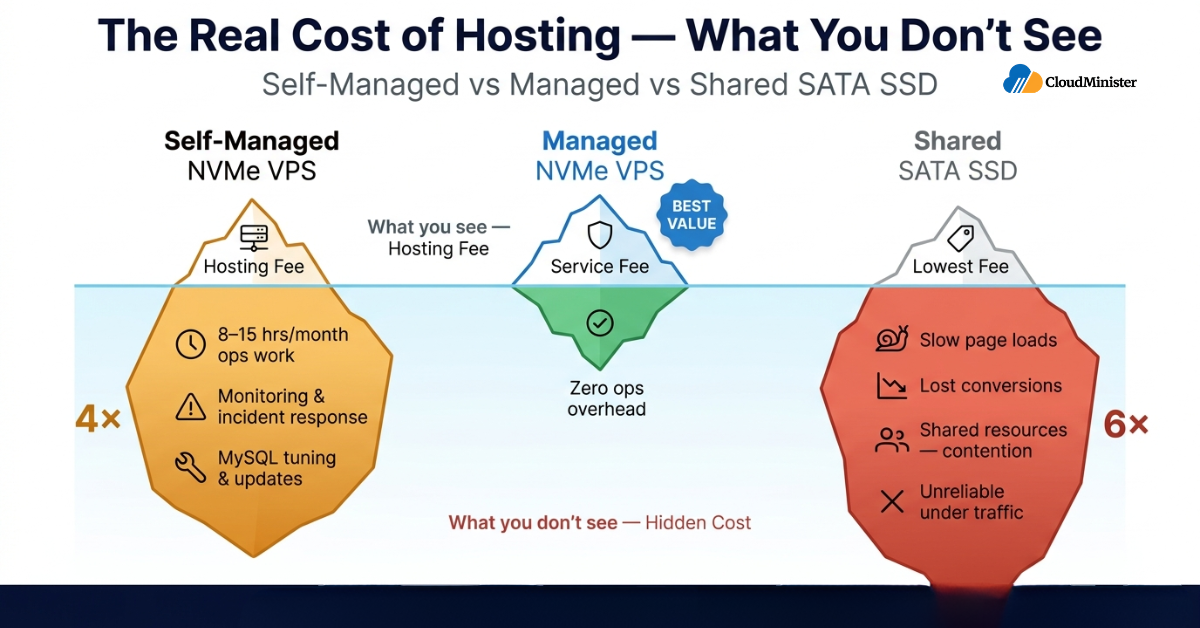
The “cheaper to self-manage” narrative frequently obscures the full cost picture. Here is a realistic total cost of ownership comparison for a team running a production WooCommerce store:
- Self-managed NVMe VPS: Lower monthly infrastructure cost, but add 8–15 hours/month of time for OS updates, MySQL monitoring, backup verification, and incident response. At ₹1,500/hour fully-loaded engineering cost, that is ₹12,000–₹22,500/month in real labour on top of hosting fees — before accounting for the revenue impact of any downtime during self-managed maintenance.
- Managed NVMe hosting (NVMe VPS + Cloudminister’s Server Management service): Higher monthly service cost, but zero infrastructure ops overhead. Engineering time is fully available for product development — the work that directly drives business value.
- Shared SATA SSD hosting: Low upfront cost but performance variance, resource contention, and limited configuration control create downstream costs in slower page loads, lower conversion rates, and less reliable database performance under concurrent traffic.
The conclusion, consistently: an NVMe VPS paired with Cloudminister’s Server Management service wins on real total cost for teams without existing dedicated DevOps capacity. Self-managed NVMe VPS wins only when DevOps capability is already available and server utilisation is consistently high.
11. Frequently Asked Questions
Is NVMe hosting worth it for WordPress?
For WordPress sites with more than a few thousand monthly visitors, active WooCommerce stores, or database-intensive plugins (LMS, membership, booking), NVMe vs SSD hosting is a meaningful performance upgrade. The TTFB difference under concurrent load — where SATA SSD degrades significantly and NVMe remains consistent — is the most commercially relevant distinction. For simple personal blogs with minimal traffic and full-page caching enabled, the performance difference is less pronounced but still present.
What is the difference between NVMe and SSD for databases?
On SATA SSD, MySQL and MariaDB are constrained by the single-queue AHCI interface and approximately 95,000 random IOPS at realistic queue depth. On NVMe, the multi-queue architecture and 400,000–800,000 random IOPS mean database query throughput under concurrent load is fundamentally higher. For eCommerce databases with simultaneous read and write load — product queries, cart writes, order processing — NVMe is the architecturally appropriate storage tier.
Can I migrate from SSD to NVMe hosting without downtime?
Most managed hosting providers offer live migration tools or brief maintenance window migrations. Cloudminister includes free migration and server setup on its VPS and dedicated server plans, so the move itself does not add to your cost. The migration process — copying filesystem data and database files — completes faster on NVMe-backed infrastructure due to higher sequential read speed on the destination server. For WordPress and WooCommerce, a properly executed migration using tools like Duplicator or WP Migrate DB typically completes within minutes for most site sizes.
Does NVMe hosting improve Google Core Web Vitals?
Yes, directly. Time to First Byte (TTFB), which Google measures as part of Core Web Vitals assessment, is influenced by server-side response time — which is partly determined by how quickly the database storage layer returns query results. NVMe vs SSD hosting produces measurably lower TTFB on uncached requests, contributing to improved Largest Contentful Paint (LCP) scores. For SEO-focused teams, storage tier is a lever for Core Web Vitals performance alongside caching and CDN configuration.
What causes database timeouts on shared SSD hosting?
Database timeouts on shared SATA SSD hosting almost always indicate I/O queue saturation. When multiple VPS instances on the same physical host simultaneously generate database I/O, the shared SATA SSD queue (32 commands) becomes saturated. Requests queue. Query latency increases. Connection timeouts occur. NVMe vs SSD hosting resolves this architecturally by increasing queue depth by orders of magnitude — but for shared hosting environments, co-tenant isolation matters as much as storage type.
How much faster is NVMe than SSD for eCommerce?
In controlled benchmarks with WooCommerce under 50 concurrent users, NVMe-backed hosting delivers checkout page loads approximately 3x faster than comparable SATA SSD hosting. The difference is largest during traffic spikes — promotional events, product launches, seasonal peaks — where simultaneous I/O from concurrent sessions saturates the SATA SSD queue while NVMe continues to handle requests near-linearly. For eCommerce operators, this is the scenario that most directly affects revenue.
Can I run a VPS on NVMe storage from Cloudminister?
Yes. Cloudminister’s VPS infrastructure includes plans across both linux vps server and windows vps server hosting configurations, with Tier III data centres in India for low-latency hosting of India-facing applications and compliance with DPDP data residency considerations. All VPS plans come with a 99.99% uptime guarantee, free SSL certificate, DDoS protection, free migration, and a 7-day money-back guarantee.
Key Conclusions: Storage as a Determinant of Web Application Performance
The throughput of a web application is bounded by the infrastructure it runs on. When the gap between a user’s click and a server’s response is measured in milliseconds instead of seconds, conversion rates improve, bounce rates fall, and search rankings respond. When storage is the bottleneck, that performance ceiling is determined by the interface — not the application.
What the 2026 hosting market makes clear is that NVMe-backed infrastructure is accessible to teams at a much wider range of scale and budget than it was two years ago. The barrier to getting this right has lowered. The cost of running production workloads on under-provisioned storage has not.
Key Takeaways
- NVMe vs SSD hosting is not a marketing distinction — it reflects a fundamental difference in storage interface, queue architecture, and I/O throughput at concurrent load.
- The NVMe advantage is largest for database-intensive workloads: WooCommerce, WordPress with active plugins, and custom web applications with transactional databases.
- Random IOPS at realistic queue depth is the correct metric for evaluating storage for web hosting — not sequential read speed or headline specifications.
- Cost-per-conversion or cost-per-transaction is the correct unit for evaluating hosting economics. Monthly storage price is not.
- MySQL and MariaDB require configuration tuning (innodb_io_capacity, innodb_buffer_pool_size) to fully utilise NVMe storage capacity.
- Managed NVMe hosting consistently wins on real total cost for teams without dedicated DevOps capacity. On Cloudminister, this means combining an NVMe VPS plan with the Server Management service.
Assess Your Current Setup
If database query times are increasing under concurrent load, or if checkout page load times spike during traffic events, the bottleneck is almost certainly storage I/O — not CPU or RAM. If performance is consistent under light load but degrades at scale, the SATA SSD queue is saturating. Understanding which situation applies to your workload is the starting point for any meaningful hosting infrastructure improvement.

He is the CEO and Founder with over a decade of experience in cloud infrastructure, DevOps, and server optimization. With a strong vision and hands-on leadership approach, he has built scalable, secure, and high-performance cloud solutions trusted by businesses across industries.
Related posts:
 Centos 7 VPS: Configure Domain with Apache VirtualHost & Let’s Encrypt SSL
 How to configure postfix and dovecot with roundcube in centos 7 VPS?(Part 2)
 Cloud Hosting vs VPS vs Dedicated Server: Best Hosting for Indian Businesses in 2026
 Windows VPS Hosting: The Complete 2025 Guide to Reliable, Scalable Windows Solution