
Understanding how much VRAM you need is the single most critical hardware decision for any AI, ML, or rendering workload in 2026. VRAM requirements vary by model size, batch size, numerical precision, and rendering resolution — and getting the calculation wrong means crashed training runs, out-of-memory (OOM) errors, and wasted GPU spend. This guide breaks down memory requirements for every major workload, explains how to calculate the correct VRAM budget for your use case, and helps you choose the right GPU infrastructure — whether on-premises or through the best GPU cloud hosting in India. Whether you run LLMs, diffusion models, or 3D rendering pipelines, read this before you provision a single GPU.
In 2026, the question of how much VRAM to provision is no longer a niche concern for AI researchers — it is a business-critical infrastructure decision for every engineering team training large language models, running production inference, building diffusion pipelines, or rendering 3D content at scale. VRAM capacity sets a hard ceiling on the models you can run, the batch sizes you can achieve, and the context lengths you can support. Provisioning the wrong amount means OOM crashes, degraded throughput, and failed experiments.
The AI GPU infrastructure market underlines how critical this decision is. According to Grand View Research, the global AI infrastructure market is projected to reach USD 383.7 billion by 2030, growing at a CAGR of 38.9% — driven primarily by demand for high-VRAM GPU compute in AI training and inference. Every team making a GPU procurement or cloud provisioning decision needs an accurate VRAM budget for their specific workloads.
This guide is structured for AI engineers, ML practitioners, 3D artists, and infrastructure leads who need technically accurate, workload-specific VRAM guidance. Every section builds on the previous one — from VRAM fundamentals to per-workload requirements to GPU selection to cloud provisioning on GPU Servers for AI. By the end, you will know exactly how much VRAM each class of workload demands and why.
1. What Is VRAM and Why Does VRAM Capacity Matter?
VRAM — Video Random Access Memory — is the dedicated on-chip memory of a GPU that stores every data structure the GPU actively processes: model weights, activations, gradients, optimizer states, textures, and frame buffers. Unlike system RAM, VRAM sits physically on the GPU die and is accessed at memory bandwidths measured in terabytes per second, giving the GPU direct low-latency access to all working data.
1.1 Why VRAM Capacity Defines Your Workload Ceiling
VRAM capacity sets a hard boundary on what you can run. Understanding how much VRAM is sufficient for a given task requires knowing what that VRAM must store:
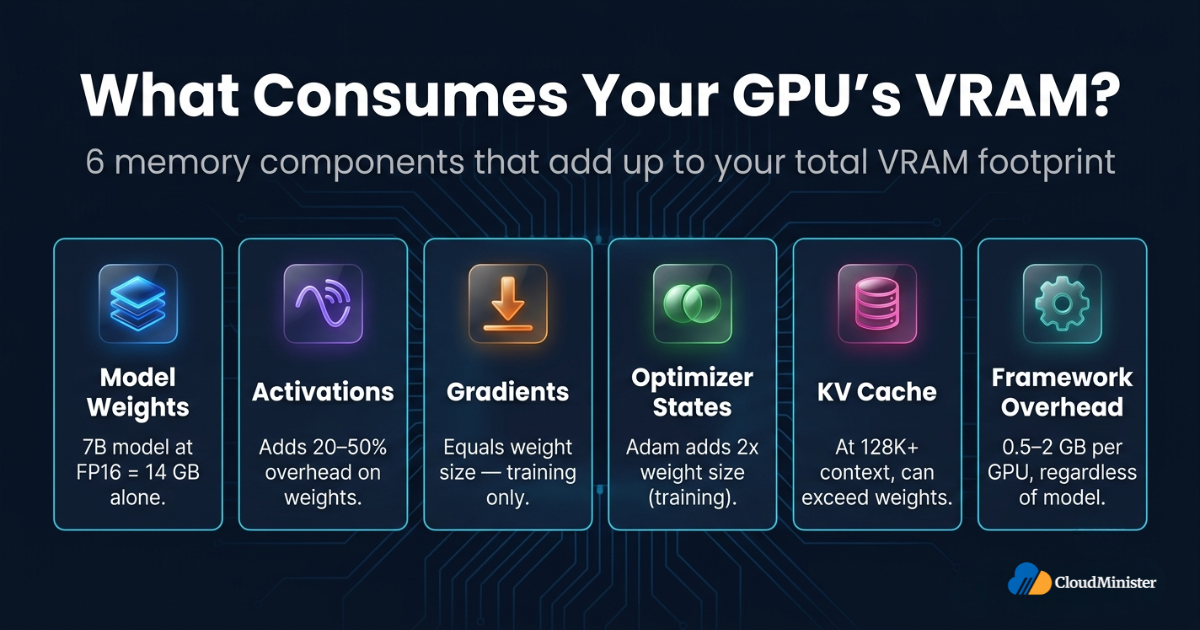
- Model weights: The largest single consumer. VRAM must hold all model parameters in active memory — a 7B parameter model at FP16 precision consumes 14 GB of VRAM for weights alone.
- Activations and intermediate tensors: Computed during the forward pass and stored for the backward pass during training. Activation memory typically adds 20-50% overhead beyond model weights.
- Gradients (training only): One gradient per model parameter, equal in size to the model weights. Training without gradient checkpointing doubles the VRAM footprint versus inference.
- Optimizer states (training only): Adam optimizer stores two momentum tensors per parameter — first and second moment estimates — adding 2x model weight size to VRAM requirements.
- KV cache (inference only): Transformer inference stores key-value pairs per attention layer per token. Long-context inference (128K+ tokens) can produce KV caches as large as or larger than the model weights themselves.
- Framework overhead: PyTorch, CUDA, cuDNN, and GPU driver state consume 0.5-2 GB per GPU regardless of model size.
1.2 VRAM Is Fixed at Manufacturing — Choose Correctly
Unlike system RAM, VRAM is soldered onto the GPU die and cannot be upgraded post-purchase. This means the VRAM capacity you provision — either through hardware purchase or GPU instance selection on AI GPU servers — is fixed for the lifetime of that hardware allocation. Cloud-based GPU provisioning offers the flexibility to select different VRAM tiers per workload, which is the primary operational advantage of best GPU cloud hosting over on-premises infrastructure.
2. How Much VRAM Do You Need? The Core Calculation Framework
How much VRAM a workload requires is always a sum of independent memory consumers. Before evaluating specific workload tiers, you need a reliable estimation framework — because every GPU selection, cloud instance type, and VRAM budget flows downstream from this calculation.
2.1 The VRAM Budget Equation
The total VRAM requirement for any workload follows this structure:
- Weights memory: Parameters x bytes per parameter. FP32 = 4 bytes/param; FP16/BF16 = 2 bytes/param; INT8 = 1 byte/param; INT4 = 0.5 bytes/param.
- Activations and intermediates: 10-30% overhead at inference; 1-3x model weight size at training depending on sequence length.
- Gradients (training): Equal to model weight size — one gradient value per parameter.
- Optimizer states (training with Adam): 2x model weight size for first and second moment tensors per parameter.
- KV cache (inference): 2 x num_layers x num_heads x head_dim x seq_len x bytes_per_element x batch_size. Grows rapidly with context length and concurrent requests.
- Framework overhead: 0.5-2 GB per GPU for PyTorch, CUDA, and cuDNN runtime state.
2.2 Precision vs. VRAM: Reference Table
| Precision | Bytes/Param | 7B Model Weights | 13B Model Weights | 70B Model Weights |
| FP32 | 4 B | 28 GB | 52 GB | 280 GB |
| FP16 / BF16 | 2 B | 14 GB | 26 GB | 140 GB |
| INT8 | 1 B | 7 GB | 13 GB | 70 GB |
| INT4 (GPTQ/GGUF) | 0.5 B | 3.5 GB | 6.5 GB | 35 GB |
These are weights-only figures. Always add a minimum 20-30% overhead buffer for activations, KV cache, and framework state. Under-provisioning VRAM by even one GPU tier results in OOM errors that abort entire training runs.
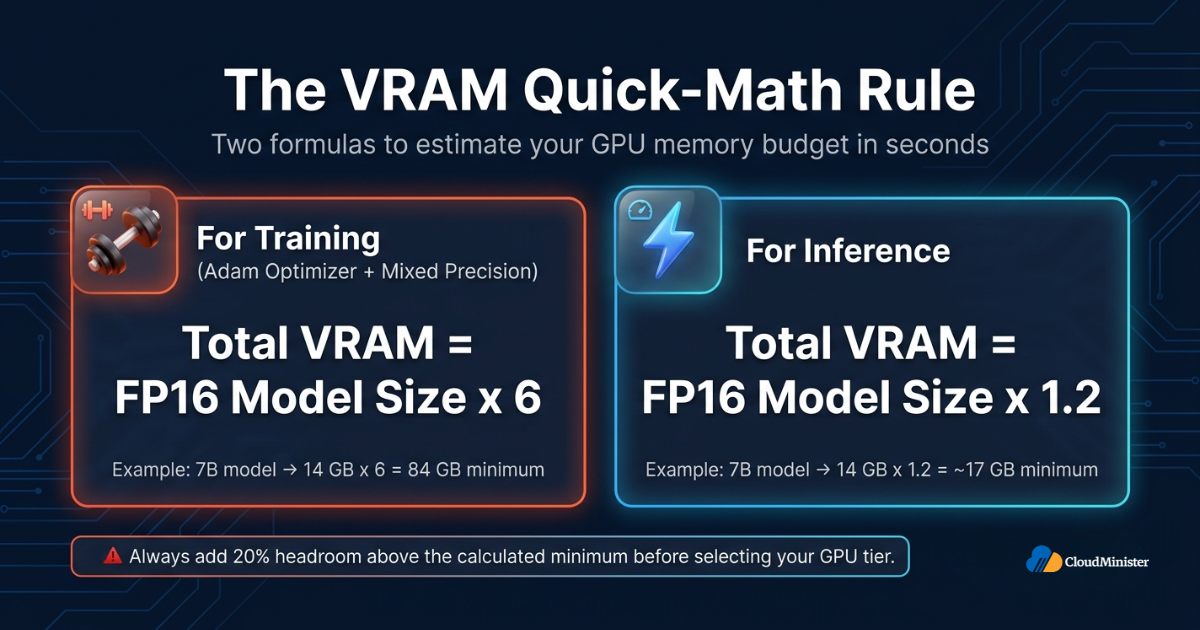
A practical rule for estimating how much VRAM full fine-tuning requires with the Adam optimizer and mixed precision: Total VRAM = Model size in FP16 x 6. A 7B model in FP16 = 14 GB x 6 = 84 GB minimum. For inference, the rule is simpler: VRAM = Model size in FP16 x 1.2. Always add 20% headroom above the calculated minimum before selecting your GPU tier on AI GPU servers — burst traffic and KV cache growth will consume that headroom faster than benchmarks predict.
3. How Much VRAM Do You Need for LLM Training?
How much VRAM LLM training consumes is the most demanding calculation in GPU infrastructure planning. Requirements depend on model architecture, sequence length, batch size, optimizer choice, and parallelism strategy.
3.1 Full Fine-Tuning VRAM Requirements by Model Size
Full fine-tuning updates every parameter, requiring VRAM for weights + gradients + optimizer states simultaneously:
- 7B model (Llama 3, Mistral 7B): Minimum 80 GB VRAM — a single A100 80GB or H100 80GB. Batch size above 4-8 requires multi-GPU tensor parallelism. This is the most common tier served by AI GPU servers in India.
- 13B model (Llama 2 13B): Minimum 2x A100 80GB (160 GB combined VRAM). Tensor parallelism adds ~15% coordination overhead to effective throughput.
- 70B model (Llama 3 70B): Minimum 4x A100 80GB or H100 80GB (320 GB total VRAM). Pipeline parallelism is required across multiple GPU nodes.
- 405B+ models (Llama 3.1 405B): Requires 8x H100 80GB minimum (640 GB). These workloads are only viable through multi-node clusters available on best GPU cloud hosting in India platforms.
3.2 PEFT Methods — Reducing Training VRAM Requirements Dramatically
Parameter-Efficient Fine-Tuning (PEFT) methods like LoRA, QLoRA, and Prefix Tuning reduce training memory requirements by updating only a small subset of parameters:
- LoRA — 7B model in FP16: 16-24 GB VRAM. LoRA reduces memory footprint by 70-80% versus full fine-tuning — enabling training on A10G 24GB AI GPU servers.
- QLoRA — 7B model in 4-bit: 6-10 GB VRAM. QLoRA’s 4-bit base model quantisation enables fine-tuning on 12 GB consumer GPUs. This is the most VRAM-efficient fine-tuning method available in 2026.
- LoRA — 70B model in 4-bit: Approximately 48 GB VRAM — achievable on 2x A100 40GB AI GPU servers.
- Full DreamBooth on SDXL: 24-32 GB VRAM — an example of how diffusion model PEFT requirements differ from LLM fine-tuning patterns.
RELATED READING: Dedicated NVIDIA GPU Server for AI Training 2026
3.3 Pre-Training VRAM Requirements — Frontier Scale
Pre-training from scratch pushes into cluster-scale VRAM requirements that only best GPU cloud hosting in India platforms can satisfy cost-effectively:
- GPT-3 scale (175B): 8-16x A100 80GB per node, multi-node InfiniBand cluster.
- Mistral Large 2 (123B): 8x H100 80GB minimum per node.
- Llama 3.1 405B: Multi-node H100 cluster — minimum 640 GB VRAM per node, multiple nodes for full pre-training.
Pre-training at this scale cannot be completed on on-premises GPU hardware without multi-million-dollar capital investment. Best GPU cloud hosting in India provides on-demand access to multi-node GPU clusters with NVLink and InfiniBand interconnects that make frontier pre-training economically viable.
4. How Much VRAM Do You Need for LLM Inference?
Inference VRAM requirements are substantially lower than training — but the precise memory footprint still depends critically on model size, quantisation level, context length, and the number of concurrent requests being served.
4.1 Single-Request Inference VRAM Baselines
| Model | Precision | Min VRAM (Inference) | Recommended GPU |
| Llama 3.1 8B | FP16 | 16 GB | A10G 24GB |
| Llama 3.1 8B | INT4 | 5-6 GB | RTX 4090 24GB |
| Llama 3.1 70B | FP16 | 140 GB | 2x A100 80GB |
| Llama 3.1 70B | INT4 | 38-40 GB | A100 40GB |
| Mistral 7B v0.3 | FP16 | 14-16 GB | A10G 24GB |
| Mixtral 8x7B (MoE) | FP16 | ~90 GB | 2x A100 80GB |
| Falcon 40B | INT4 | 22-24 GB | A10G 24GB |
4.2 KV Cache — The Hidden VRAM Consumer at Scale
For production inference serving, the KV cache is the most commonly underestimated VRAM consumer. The formula for KV cache VRAM:
- KV cache per token: 2 x num_layers x num_kv_heads x head_dim x bytes_per_element
- Llama 3.1 8B at 128K context, batch 1, FP16: ~16 GB KV cache — equal to the model weights themselves.
- Llama 3.1 70B at 32K context, batch 4, FP16: ~48 GB additional KV cache on top of 140 GB model weights.
- Practical implication: Production serving clusters must provision VRAM for both model weights and full KV cache headroom at maximum concurrency and context length — not just weights alone.
vLLM’s PagedAttention algorithm achieves near-100% GPU memory utilisation for KV cache versus the 60-70% typical of naive implementations. For production LLM inference on AI GPU servers, deploying vLLM with PagedAttention is the single highest-leverage VRAM efficiency improvement available in 2026. It effectively increases serving capacity by 30-40% without adding a single GPU to your cluster — meaning you can serve more users with the same VRAM budget on your best GPU cloud hosting in India instances.
5. How Much VRAM Do You Need for Image Generation and Diffusion Models?
Diffusion models have fundamentally different VRAM profiles from transformer LLMs. VRAM consumption for image generation depends on model architecture, output resolution, guidance scale, and whether you are running inference or fine-tuning.
5.1 Diffusion Model Inference — VRAM by Model and Resolution
| Model | Output Resolution | Min VRAM | Recommended VRAM |
| Stable Diffusion 1.5 | 512×512 | 4 GB | 6-8 GB |
| Stable Diffusion XL (SDXL) | 1024×1024 | 8 GB | 12-16 GB |
| SDXL + ControlNet | 1024×1024 | 12 GB | 16-24 GB |
| Flux.1 Dev (12B) | 1024×1024 | 24 GB | 32+ GB |
| Stable Video Diffusion SVD | 576×1024 video | 20 GB | 24-40 GB |
| PixArt-Sigma 2K | 2048×2048 | 16 GB | 24 GB |
5.2 Diffusion Fine-Tuning — How Much VRAM DreamBooth and LoRA Require
Fine-tuning diffusion models requires significantly more VRAM than inference. Here is how much VRAM each major fine-tuning method needs:
- DreamBooth — SD 1.5: Minimum 12 GB. VRAM scales with image resolution and batch size.
- DreamBooth — SDXL: Minimum 24 GB. How much VRAM SDXL DreamBooth requires makes consumer 12 GB GPUs inadequate; an A10G 24GB or A100 is needed.
- LoRA training — SDXL: 12-16 GB with memory-efficient attention. LoRA reduces the VRAM burden vs full DreamBooth by approximately 50%, enabling SDXL LoRA training on mid-tier AI GPU servers.
- Flux.1 full fine-tuning: 80+ GB VRAM — requiring A100 80GB or H100 80GB GPU Servers for AI to accommodate the 12B parameter Flux architecture.
RELATED READING: GPU Cloud Providers in India — Complete Comparison
6. How Much VRAM Do You Need for 3D Rendering Workloads?
GPU rendering VRAM requirements differ fundamentally from AI workloads. While AI memory consumption is driven by model parameters, rendering VRAM scales with scene data: polygon count, texture resolution, and the number of active render passes. For rendering studios evaluating their GPU infrastructure, understanding how much VRAM complex scenes consume is essential for both workstation and render farm provisioning.
6.1 Rendering Engine VRAM Requirements by Workload
| Rendering Engine | Scene Complexity | Texture Budget | Min VRAM | Recommended VRAM |
| Blender Cycles (GPU) | Complex scene | 4K textures | 8 GB | 16-24 GB |
| Blender Cycles (GPU) | VFX production | 8K textures | 16 GB | 24-48 GB |
| NVIDIA Omniverse RT | Real-time RT | 4K textures | 16 GB | 24 GB |
| Unreal Engine 5 (Nanite) | Open world | 4K-8K mix | 12 GB | 24 GB |
| V-Ray GPU | Arch-viz scene | 4K textures | 8 GB | 16-24 GB |
| Arnold GPU | Feature film scene | 8K textures | 24 GB | 48 GB |
6.2 Key VRAM Drivers for Rendering
Three primary factors determine VRAM consumption in GPU rendering workloads:
- Texture memory: The dominant VRAM consumer. An uncompressed RGBA 4K texture = 32 MB. A scene with 200 unique 4K textures consumes 6.4 GB for textures alone, before any geometry or acceleration structure overhead.
- BVH acceleration structures: Ray tracing requires a Bounding Volume Hierarchy for ray-scene intersection. A 100M polygon scene may need 4-8 GB of VRAM for the BVH structure alone.
- Frame buffer and AOVs: At 4K resolution with 6 render passes (beauty, normals, albedo, depth, emission, cryptomatte), the frame buffer consumes 3-5 GB per render node.
- NVLink VRAM pooling: When a single GPU lacks sufficient VRAM for a scene, NVLink (available on NVIDIA A100, H100, and RTX A6000 Ada) pools VRAM across two GPUs — doubling effective capacity for Blender, Arnold, and V-Ray.
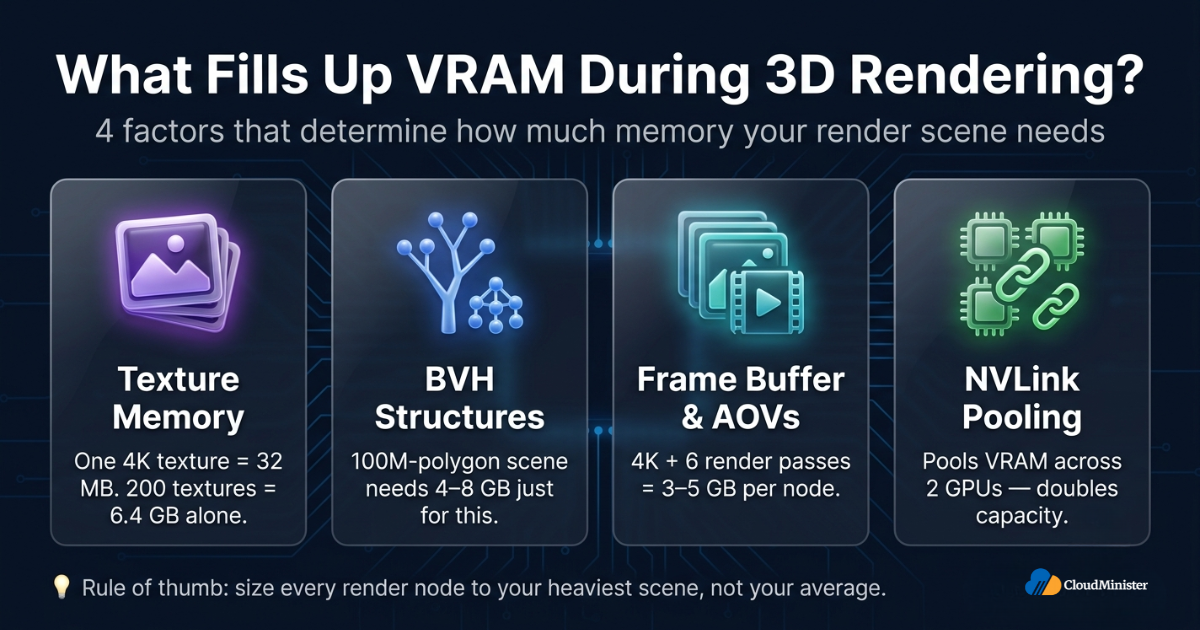
For rendering studios deciding how much VRAM their render farm needs, always calculate your heaviest-scene VRAM requirement first, then size every node to that ceiling. A render node that OOMs on your most complex scenes is a production bottleneck regardless of raw GPU performance. The best GPU cloud hosting in India allows you to provision different GPU VRAM tiers per job type — matching memory capacity precisely to each rendering workload rather than overprovisioning every node for worst-case scenes.
7. How Much VRAM Do You Need for MLOps and Production Inference Serving?
Production ML systems have distinct VRAM considerations from research notebooks and one-off training runs. How much VRAM a production inference cluster requires is governed by concurrency targets, maximum context length, model multiplexing, and SLA latency requirements — not just model size alone.
7.1 Multi-Model Production Serving — VRAM Requirements
Most production ML platforms serving real users simultaneously run multiple models. VRAM requirements for multi-model AI GPU servers:
- Model multiplexing: Running 3 concurrent instances of Llama 3.1 8B (FP16) requires 3 x 16 GB = 48 GB minimum VRAM. The requirement scales linearly with concurrent model count.
- Hot standby: Zero-downtime model updates require loading a new model version while the current version is still serving. This adds 1x model size to total VRAM requirements during rollover windows.
- Continuous batching overhead: vLLM-style continuous batching grows KV cache VRAM with total in-flight tokens across all concurrent requests — not just per-request VRAM. A server with 100 concurrent requests at 2K context each needs 100x per-token KV cache VRAM.
RELATED READING: Building a Kubernetes Cluster with Linux GPU Nodes for MLOps
7.2 Inference Framework VRAM Overhead
Inference serving frameworks add VRAM overhead beyond model weights. Understanding framework overhead is essential for accurate production VRAM budgeting on AI GPU servers:
- vLLM: 1-2 GB overhead for PagedAttention memory pool management and request scheduler state. Highly efficient — vLLM achieves near-100% VRAM utilisation for KV cache storage.
- TensorRT-LLM: TensorRT optimisation typically reduces inference VRAM requirements by 10-20% versus plain PyTorch through kernel fusion and weight layout optimisation.
- Text Generation Inference (TGI): Comparable VRAM overhead to vLLM for the same model and quantisation configuration.
- NVIDIA Triton Inference Server: Adds 200-500 MB per loaded model instance; scales with ensemble pipeline complexity. Supports concurrent VRAM allocation across multiple model instances on the same GPU.
In multi-tenant GPU inference environments — such as shared AI GPU servers used by multiple teams or applications — VRAM isolation between tenants is a mandatory security control. Without isolation, residual data from one tenant’s inference workload may be accessible to another’s through stale VRAM. NVIDIA Multi-Instance GPU (MIG) partitioning is one recommended approach for hardware-level VRAM isolation per tenant on H100 and A100 instances. GPU cloud hosting providers offering shared infrastructure should implement MIG or an equivalent provider-verified GPU-level isolation mechanism. Validate the isolation approach before provisioning shared GPU Servers for AI in any compliance-sensitive environment. Validate this control before provisioning shared GPU Servers for AI in any compliance-sensitive environment (PCI DSS, HIPAA, DPDPA 2023).
8. GPU VRAM Reference: Leading GPUs for AI, ML, and Rendering in 2026
Selecting the right GPU requires matching workload VRAM requirements to available hardware. The following table covers GPUs most commonly available through AI GPU servers and best GPU cloud hosting in India platforms in 2026.
| GPU | VRAM | Memory Bandwidth | Primary Use Case | Availability |
| NVIDIA H100 SXM5 80GB | 80 GB HBM3 | 3.35 TB/s | LLM training, frontier inference | Cloud, HPC |
| NVIDIA H100 PCIe 80GB | 80 GB HBM2e | 2 TB/s | LLM training, inference | Cloud, enterprise |
| NVIDIA A100 SXM4 80GB | 80 GB HBM2e | 2 TB/s | LLM training, 70B inference | Cloud, enterprise |
| NVIDIA A100 PCIe 40GB | 40 GB HBM2e | 1.55 TB/s | 13B training, 70B INT4 inference | Cloud, enterprise |
| NVIDIA A10G 24GB | 24 GB GDDR6 | 600 GB/s | 7B inference, SDXL training | Cloud instances |
| NVIDIA L4 24GB | 24 GB GDDR6 | 300 GB/s | Inference, video transcoding | Cloud instances |
| NVIDIA L40S 48GB | 48 GB GDDR6 | 864 GB/s | 13B inference, rendering | Cloud, workstations |
| NVIDIA RTX 4090 24GB | 24 GB GDDR6X | 1 TB/s | 7B inference, SDXL, rendering | Workstations |
| NVIDIA RTX A6000 Ada 48GB | 48 GB GDDR6 | 960 GB/s | Rendering, 13B inference | Workstations |
| AMD Instinct MI300X 192GB | 192 GB HBM3 | 5.3 TB/s | 70B+ inference, frontier training | Cloud (limited) |
According to NVIDIA’s H100 Tensor Core GPU Architecture whitepaper, the H100 SXM5 delivers 3.35 TB/s HBM3 memory bandwidth — 1.7x the bandwidth of the A100 SXM4. For workloads where memory bandwidth is the bottleneck — particularly long-context LLM inference and large-batch training — the H100’s bandwidth advantage translates directly to throughput gains even when VRAM capacity is comparable to the A100.
GPU Servers Built for Every VRAM Tier — Explore Cloudminister’s AI GPU Infrastructure
From 24GB A10G instances for inference to 8x H100 80GB clusters for frontier training, get the exact VRAM capacity your workload demands — on demand, with India-region availability.
9. Workload VRAM Decision Matrix — Quick Reference
| Workload | Min VRAM | Recommended GPU | Notes |
| 7B LLM inference (FP16) | 16-20 GB | A10G 24GB | KV cache headroom at 4K context |
| 7B LLM inference (INT4) | 5-6 GB | RTX 4090 | QLoRA quantisation required |
| 7B LLM fine-tuning (LoRA) | 16-24 GB | A10G 24GB | QLoRA enables 8-12 GB |
| 7B LLM full fine-tuning | 80 GB | A100 80GB / H100 80GB | Minimum viable GPU |
| 13B LLM inference (FP16) | 26-32 GB | L40S 48GB / A100 40GB | INT8 fits on 16 GB |
| 13B LLM fine-tuning (LoRA) | 40-48 GB | A100 40GB | QLoRA enables 24 GB |
| 70B LLM inference (INT4) | 38-48 GB | A100 40GB+ | Multi-GPU for FP16 |
| 70B LLM fine-tuning (LoRA) | 80-160 GB | 2x A100 80GB | Pipeline parallelism required |
| SDXL inference | 12-16 GB | A10G 24GB / RTX 4090 | Headroom for batching |
| Flux.1 Dev inference | 24-32 GB | L40S 48GB / A100 40GB | FP8 quantisation reduces to 16 GB |
| Blender Cycles (complex scene) | 16-24 GB | RTX 4090 / A6000 Ada | Texture budget determines ceiling |
| MLOps multi-model serving | 80-192 GB | A100 80GB x 2 / H100 | vLLM + PagedAttention |
10. How Much VRAM Can You Access Through GPU Cloud Hosting vs. On-Premises?
One of the most consequential strategic decisions in GPU infrastructure planning is the cloud versus on-premises question. How much VRAM on-premises hardware provides is fixed at capital expenditure time; what best GPU cloud hosting provides is elastic and selectable per workload.
10.1 On-Premises GPU Infrastructure — VRAM Constraints
On-premises GPU investments carry multi-year depreciation cycles and significant constraints on how much VRAM you can access:
- Capital cost: Enterprise H100 80GB cards cost USD 25,000-35,000 each. An 8-GPU H100 node (640 GB total VRAM) represents USD 200,000-280,000 in GPU hardware alone.
- Power and cooling: H100 SXM5 draws 700W TDP per GPU. An 8-GPU cluster requires specialised power distribution and liquid cooling infrastructure.
- Procurement lead times: H100 and A100 GPU allocations have remained constrained through 2024-2025. On-premises provisioning may take months versus hours for cloud GPU instances.
- Underutilisation: VRAM on idle on-premises GPUs is sunk cost. Cloud-based AI GPU servers eliminate idle VRAM waste by billing per-hour of actual usage.
10.2 Best GPU Cloud Hosting in India — Elastic VRAM on Demand
The best GPU cloud hosting in India platforms eliminate capital expenditure constraints on VRAM access. Key advantages of cloud GPU hosting for VRAM-intensive workloads:
- On-demand VRAM selection: Choose the exact VRAM tier each job requires — A10G 24GB for 7B inference, H100 80GB for 70B training — without owning any hardware.
- Multi-GPU VRAM scaling: Provision 2x, 4x, or 8x GPU nodes for pooled VRAM across hundreds of gigabytes per cluster. Best GPU cloud hosting in India provides multi-node InfiniBand clusters for pre-training workloads.
- Cost efficiency through matching: Pay for the VRAM tier each workload actually needs. Spot pricing on best GPU cloud hosting in India reduces training costs by 60-80% versus on-demand pricing.
- Instance diversity: Access VRAM from 12 GB (inference) to 192 GB (AMD MI300X) per GPU — matching how much VRAM each specific workload demands without overprovisioning every job.
CloudMinister, as a Web Hosting Company in India with certified GPU infrastructure, provides on-demand access to A10G 24GB, A100 40GB, A100 80GB, and H100 80GB GPU instances — as well as multi-GPU cluster configurations. Whether you are provisioning a single inference node or a multi-GPU training cluster, CloudMinister’s engineering team matches GPU tier to workload VRAM requirement, ensuring you never overprovision or underprovision GPU memory.
RELATED READING: Best GPU Servers for AI & Machine Learning — 2026 Comparison
11. VRAM Management in Production — MLOps Best Practices
For teams operating production AI GPU servers, VRAM management is an ongoing operational discipline — not a one-time provisioning decision.
11.1 VRAM as a Production SLI
In well-run production ML systems, GPU memory utilisation is a first-class Service Level Indicator (SLI) tracked alongside request latency and error rate:
- VRAM utilisation alerting: Alert when VRAM usage exceeds 85% of capacity — the threshold at which allocation failures begin to occur under burst load on AI GPU servers.
- VRAM headroom SLO: Define a minimum VRAM headroom target (e.g., ‘GPU memory must remain below 80% utilisation during peak traffic windows’) and measure compliance continuously.
- OOM incident tracking: Out-of-memory events are production incidents. Track each OOM in your postmortem process — every event reveals how much VRAM headroom your provisioning model lacks.
- Capacity planning: Forecast VRAM requirements 90 days out based on model size growth, traffic growth, and context length distribution trends. Prevent reliability failures from resource exhaustion.
11.2 VRAM Optimisation Techniques for Production
Production ML teams continuously reduce VRAM consumption without degrading output quality. Key optimisation techniques available on AI GPU servers:
- Post-training quantisation: Apply INT8 or INT4 quantisation to production checkpoints. INT8 saves ~50% VRAM versus FP16; INT4 saves ~75%. Always benchmark output quality before deploying to production.
- Flash Attention 2/3: Recomputes attention within GPU SRAM rather than materialising full attention matrices in VRAM — reducing attention VRAM consumption by 5-10x at long context lengths.
- Speculative decoding: Uses a small draft model for token candidate generation, verified by the main model. Increases throughput without adding VRAM requirements for the main model.
- Continuous batching (vLLM): Maximises active VRAM utilisation for live tokens versus synchronised batch approaches that leave VRAM idle waiting for padded sequences.
- Gradient checkpointing: During training, recomputes activations during the backward pass rather than storing them — trading compute for VRAM, reducing activation memory by 40-60%.
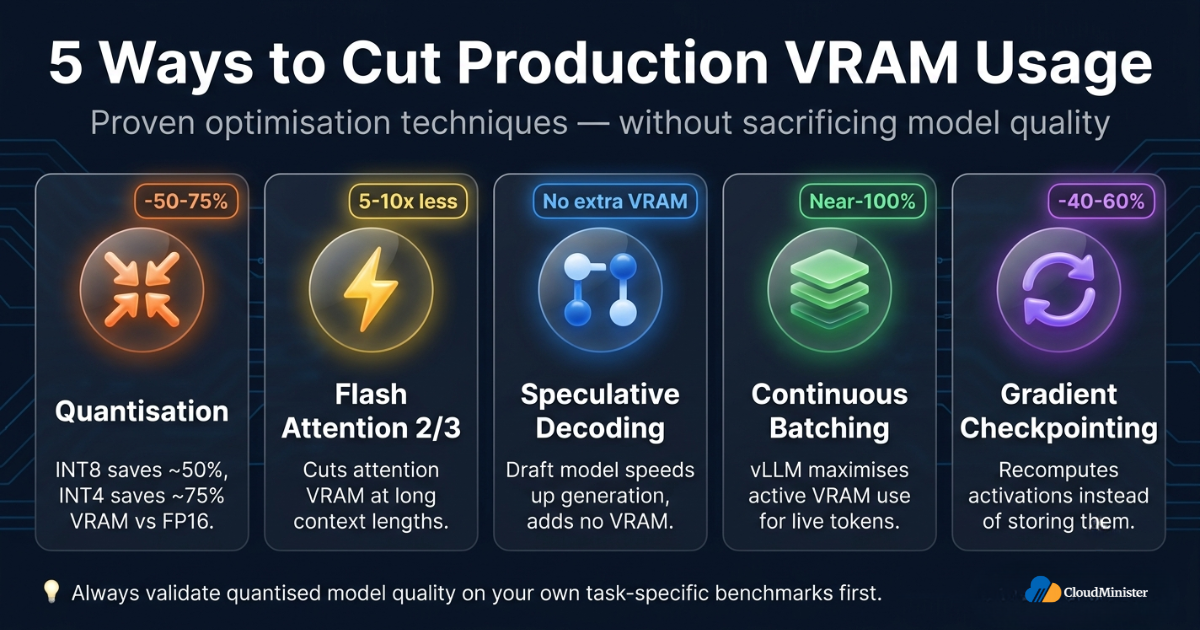
Before committing to a VRAM optimisation tier in production, always benchmark quantised model quality against your task-specific evaluation benchmarks — not just general benchmarks like MMLU. Some 7B models tolerate INT4 quantisation with less than 1% quality loss; others show measurable degradation on domain-specific tasks. Validate quantisation quality on your actual inference workload before reducing VRAM requirements through quantisation, especially on GPU Servers for AI serving customer-facing applications.
12. Common VRAM Provisioning Mistakes – And How to Avoid Them
Teams consistently underestimate VRAM requirements, leading to failed training runs, OOM crashes, and expensive re-provisioning cycles. These are the most common mistakes when estimating how much VRAM a workload needs.
Mistake 1: Calculating Weights-Only VRAM Without Overhead
How much VRAM model weights consume is only the starting baseline. Activations, KV cache, gradients, optimizer states, and framework overhead can multiply the weights-only figure by 2-8x. Always add at least 20-30% overhead before provisioning — regardless of how much VRAM the model weights theoretically require.
Mistake 2: Benchmarking at Short Context, Deploying at Long Context
Teams frequently benchmark VRAM usage at 512 token context during development, then deploy at 32K or 128K context in production — and discover that KV cache VRAM consumption at production context lengths makes their GPU tier completely inadequate. Always benchmark VRAM requirements at your production maximum sequence length, not at short development sequences.
Mistake 3: Single-Request Benchmarks for Multi-Request Production
Single-request inference VRAM usage understates production requirements. At 50-100 concurrent requests with production context lengths, KV cache VRAM grows with total in-flight tokens across all requests simultaneously. Benchmark VRAM under realistic concurrent load on your AI GPU servers before setting production GPU tier.
Mistake 4: Selecting a GPU Tier Without Calculating Headroom
Selecting a GPU instance where VRAM is at 95% utilisation under normal load leaves no room for traffic spikes, model updates, or context length growth. Always ensure how much VRAM headroom remains above baseline consumption is at least 15-20% before declaring a GPU tier fit for production — whether on-premises or through best GPU cloud hosting in India.
Mistake 5: Starting Long Training Runs Without a VRAM Validation Step
Training OOM errors often surface 30-60 minutes into a run, after the model has processed enough batches to fill activation memory. Always run a 100-step warmup at production batch size and sequence length to validate VRAM requirements before committing to multi-day training jobs on GPU Servers for AI.
When deploying AI GPU servers in production environments handling customer data, how much VRAM is allocated per workload must be defined in infrastructure-as-code (Terraform, CloudFormation) rather than configured manually in production consoles. Manual VRAM configuration is a change-management risk and a common source of production incidents. Version-controlled GPU infrastructure definitions ensure every VRAM allocation is auditable, peer-reviewed, and reproducible — supporting audit readiness for SOC 2, PCI DSS, and applicable DPDPA 2023 obligations on GPU Servers for AI.
13. CloudMinister GPU Infrastructure — Access the VRAM Your Workloads Require
CloudMinister, a Web Hosting Company in India with purpose-built GPU infrastructure, enables Indian businesses and engineering teams to access exactly the VRAM capacity their AI, ML, and rendering workloads require — on demand, without capital expenditure, and with 24×7 infrastructure management support.
13.1 CloudMinister GPU Services — VRAM Options by Workload
| Workload | CloudMinister Service | VRAM Provided |
| 7B-13B LLM inference | GPU Servers for AI — A10G instances | 24 GB per GPU |
| 7B LLM fine-tuning (LoRA) | GPU Servers for AI — A10G / A100 | 24-40 GB per GPU |
| 70B LLM training / inference | Best GPU cloud hosting in India — A100 cluster | 40-80 GB per GPU |
| Diffusion model inference | GPU Servers for AI — A10G / L40S | 24-48 GB per GPU |
| Frontier model training | Best GPU cloud hosting in India — H100 cluster | Up to 8x 80 GB per node |
| 3D rendering (Blender, V-Ray) | GPU Servers for AI — RTX / A6000 Ada | 24-48 GB per GPU |
| Production MLOps serving | Managed GPU Servers for AI | Configurable per workload |
As a Web Hosting Company in India with NVIDIA-certified GPU infrastructure, CloudMinister’s GPU Servers for AI include NVLink interconnects for VRAM pooling, InfiniBand networking for multi-node training, NVIDIA MIG partitioning for tenant isolation, and 24×7 infrastructure monitoring. Whether you need to understand exactly how much VRAM your workload requires or provision a fully managed multi-GPU cluster, CloudMinister’s engineering team provides the assessment and deployment support to match GPU hardware to VRAM requirements correctly.
Contact CloudMinister’s GPU Servers for AI team to start your VRAM requirement assessment — and provision the right AI GPU server tier for your 2026 workloads. CloudMinister’s best GPU cloud hosting in India combines India-region GPU availability, India-region compute access aligned with DPDPA 2023 data processing obligations, and low-latency compute access for Indian engineering teams building production AI systems.
Not Sure Which GPU Tier Fits Your Workload? Get a Free VRAM Assessment
Talk to Cloudminister’s GPU infrastructure team to map your model size, context length, and concurrency needs to the right VRAM tier — before you provision.
Key Takeaways
- How much VRAM any workload requires = model weights + activations + KV cache + optimizer states + framework overhead — never weights alone.
- Training VRAM = model FP16 size x 6 for Adam optimizer with mixed precision. A 7B model requires 80+ GB for full fine-tuning.
- QLoRA and INT4 quantisation reduce VRAM requirements by 4-8x — enabling larger models on smaller AI GPU servers.
- KV cache VRAM scales with context length and concurrent request count — always benchmark at production sequence lengths.
- Best GPU cloud hosting in India provides elastic access to VRAM from 24 GB A10G instances to 640 GB H100 clusters — without capital expenditure.
- VRAM utilisation is a production SLI on AI GPU servers. Track it continuously, alert at 85%, and maintain at least 15-20% headroom.
- NVIDIA MIG partitioning on A100 and H100 GPU Servers for AI provides hardware-level VRAM isolation between tenants and is a recommended security control in multi-tenant environments — though providers may implement equivalent isolation through alternative architecture-specific mechanisms.
- CloudMinister provides full-stack GPU Servers for AI and best GPU cloud hosting in India for Indian businesses navigating VRAM and GPU infrastructure decisions in 2026.
Conclusion
How much VRAM you need is not a single universal number — it is a workload-specific, precision-specific, context-specific calculation that evolves as your models grow, context windows expand, and production concurrency scales. Getting the VRAM calculation right before GPU provisioning is the foundational decision that determines every downstream outcome: training success, inference throughput, production reliability, and GPU infrastructure cost.
Best GPU cloud hosting in India removes the constraint of physical GPU ownership — giving engineering teams elastic, on-demand access to every VRAM tier from 24 GB to 640 GB per node, matched precisely to each workload’s needs. AI GPU servers with NVLink VRAM pooling, MIG isolation, and InfiniBand cluster interconnects make it possible for Indian businesses to access the same GPU infrastructure that global AI labs depend on — without capital expenditure or hardware management overhead.
As a Web Hosting Company in India with purpose-built GPU infrastructure, CloudMinister provides the technical expertise and operational support to help Indian engineering teams provision exactly the GPU Servers for AI their VRAM requirements demand. From single-GPU inference nodes to multi-H100 training clusters, CloudMinister’s GPU infrastructure team delivers the VRAM capacity, reliability, and India-region availability that 2026 AI workloads require. Contact CloudMinister today to begin your VRAM requirement assessment.
Frequently Asked Questions
How much VRAM do I need for running a 7B LLM?
How much VRAM a 7B model requires depends on precision and task type. For FP16 inference, the minimum VRAM is approximately 14-16 GB — fitting on an A10G 24GB AI GPU server with headroom. For full fine-tuning with Adam optimizer, VRAM requirements reach 80+ GB due to gradients and optimizer state. QLoRA reduces fine-tuning VRAM to 6-10 GB by using 4-bit base quantisation.
How much VRAM does Stable Diffusion XL require?
How much VRAM SDXL inference requires at 1024×1024 is 8-10 GB minimum, with 16 GB recommended for batch generation with headroom. DreamBooth fine-tuning of SDXL requires 24 GB minimum; with xFormers and gradient checkpointing, this can be reduced to 16 GB on supported GPU Servers for AI.
What is the minimum VRAM for production LLM inference serving?
For production inference serving a 7B model at 100 concurrent requests with 4K context using vLLM, total VRAM requirements reach approximately 40-48 GB — requiring an A100 40GB or two A10G 24GB GPU instances. Production serving always requires more VRAM than single-request benchmarks indicate because KV cache grows with total in-flight tokens, not per-request context length.
Does the best GPU cloud hosting in India provide high-VRAM GPU access?
Yes. The best GPU cloud hosting in India providers — including CloudMinister — offer on-demand A10G 24GB, A100 40GB, A100 80GB, and H100 80GB AI GPU server instances. Multi-GPU configurations provide pooled VRAM up to 640 GB per node for frontier model training. Cloud GPU hosting is the most cost-effective way for Indian businesses to access high-VRAM infrastructure without capital expenditure or hardware management.
How much VRAM do I need for 3D rendering in Blender?
Blender Cycles GPU rendering VRAM requirements range from 8 GB for simple scenes at 4K texture resolution to 24-48 GB for VFX production scenes with 8K textures and complex geometry. The binding constraint is always your heaviest scene’s texture + BVH + frame buffer total — size your AI GPU servers or workstation GPU to accommodate your maximum scene complexity, not your average.
What is the difference between AI GPU servers and consumer GPUs for VRAM?
Data centre GPU Servers for AI such as the NVIDIA H100 80GB provide 80 GB of ECC-protected HBM3 VRAM per GPU, with NVLink enabling VRAM pooling to 160 GB across two GPUs. Consumer GPUs like the RTX 4090 offer 24 GB GDDR6X — sufficient for 7B inference but insufficient for 70B models. AI GPU servers also provide MIG partitioning for multi-tenant VRAM isolation, ECC memory for reliability, and InfiniBand networking for multi-node VRAM pooling — capabilities unavailable on consumer graphics cards.

He is the CEO and Founder with over a decade of experience in cloud infrastructure, DevOps, and server optimization. With a strong vision and hands-on leadership approach, he has built scalable, secure, and high-performance cloud solutions trusted by businesses across industries.