Running a Node.js application in production with nothing but “node app.js” in a terminal window is one of the fastest ways to end up with a midnight outage. This guide walks through exactly how to combine PM2 and Nginx to build a deployment that survives crashes, restarts automatically after a server reboot, and serves traffic securely over HTTPS. Whether the app is a small internal tool or a customer-facing product running on Node.js hosting in India, the PM2 and Nginx combination remains the standard, battle-tested approach for keeping a Node.js process alive and reachable. By the end of this guide, the setup will be genuinely production-ready, not just technically running.
Every Node.js application eventually faces the same reality check: the code that runs perfectly on a developer’s laptop behaves very differently once it’s exposed to real users, real traffic spikes, and real server reboots. A simple node app.js command might be enough to test a feature locally, but it offers zero protection against the process crashing at 3 AM, a server restart wiping out the application entirely, or a spike in traffic overwhelming a single-threaded process. Production environments demand a level of resilience that a bare Node.js process was never designed to provide on its own.
This is where PM2 and Nginx step in, not as optional add-ons but as the foundational layer that turns a working application into a reliable one. PM2 handles the process side of the equation, keeping the application alive, restarting it automatically after failures, and making full use of a server’s available CPU cores through clustering. Nginx handles everything facing the outside world, from SSL termination to reverse proxying to serving static files efficiently, so that Node.js never has to deal with raw internet traffic directly. Together, they address the two biggest gaps between “it runs” and “it’s production-ready.”
This guide walks through that entire setup from the ground up: installing and configuring PM2, setting up Nginx as a reverse proxy, securing the deployment with SSL through Let’s Encrypt, and building the monitoring habits that keep a production server healthy long after launch day. Whether the goal is deploying a single Node.js API or a full-stack application with a React front end, the same core principles apply, and by the end of this guide, that deployment will be built on infrastructure designed to survive real-world conditions rather than just a clean demo.
1. Why PM2 and Nginx Are the Backbone of Any Serious Node.js Deployment
A Node.js process launched directly from the command line dies the moment that terminal session closes, the moment the server reboots, or the moment the application throws an uncaught exception. None of these outcomes are acceptable for a production system, which is exactly why PM2 and Nginx exist as a pairing in the first place. PM2 keeps the Node.js process alive, restarts it automatically on failure, and manages logs and clustering, while Nginx sits in front of that process as a reverse proxy, handling incoming traffic, SSL termination, and load balancing.
Node.js has become one of the dominant backend runtimes in production environments today, and industry data shows Node.js now accounts for over 35 percent of global backend runtime usage, placing it among the top three backend platforms worldwide (source). That scale of adoption means the deployment approach described in this guide is not a niche configuration, it is the deployment pattern behind a significant share of production web applications running right now.
- PM2 restarts a crashed Node.js process automatically, often within seconds
- Nginx handles SSL certificates, gzip compression, and static file serving far more efficiently than Node.js alone
- PM2 and Nginx together allow a single server to run multiple Node.js applications on different ports, all reachable through clean domain names
- The PM2 and Nginx pairing has become the de facto standard for self-managed Node.js production deployments across the industry
Do not treat PM2 and Nginx as optional extras to add later. A Node.js application deployed without process management and a reverse proxy in front of it is not actually production-ready, no matter how well the application code itself performs under normal conditions.
For businesses that would rather not manage this configuration themselves, this is exactly the kind of setup that managed Node.js hosting in India already handles out of the box, though understanding what this pairing is doing under the hood remains essential for anyone who wants to debug an issue quickly.
2. Understanding What PM2 and Nginx Actually Do Before Configuring Either One
Before diving into commands, it helps to understand what each half of this pairing is responsible for, since confusing their roles is a common source of misconfiguration later on.
| Component | What It Handles | How It Fits Into PM2 and Nginx |
| PM2 | Keeps the Node.js process running, restarts on crash, manages clustering and logs | Sits directly in front of the application code |
| Nginx | Receives external traffic, terminates SSL, proxies requests to PM2-managed ports | Sits in front of PM2, facing the public internet |
| Node.js application | The actual business logic, listening on a local port like 3000 | Wrapped and monitored by PM2, never exposed directly |
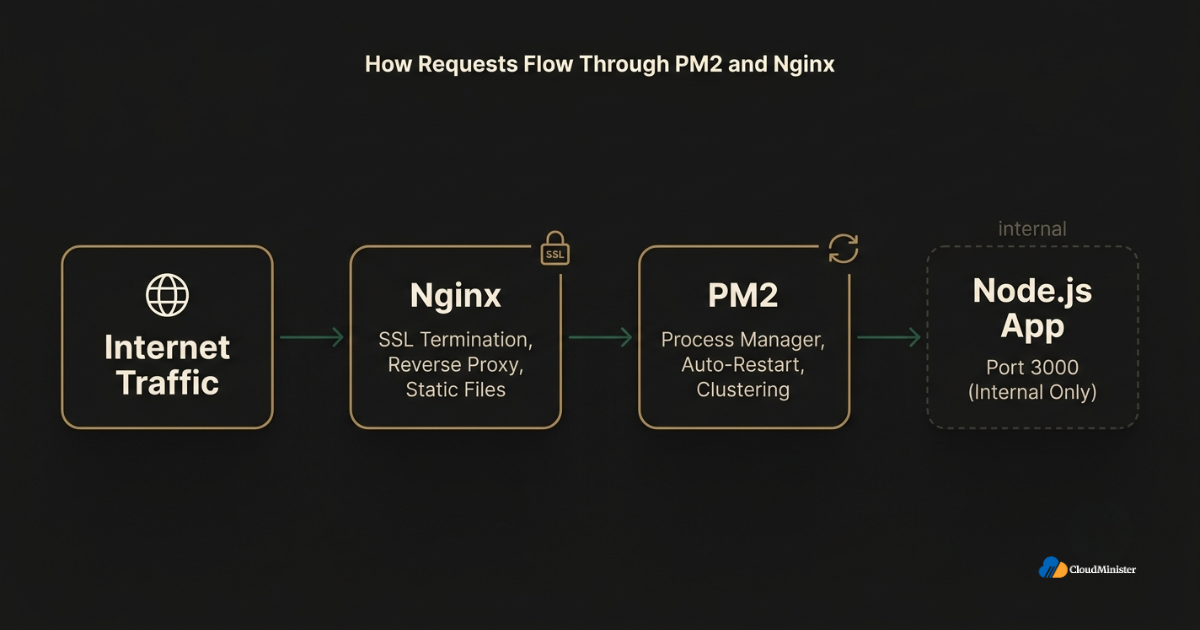
Most developers new to production deployment assume that simply starting the Node.js app is the whole job, but the real work in any production deployment lies in making sure both layers are configured to survive real-world failure conditions, not just a clean happy-path request. This holds true whether the underlying application is deployed through cloud hosting on a Web Hosting Company in India or run on a self-managed overseas server.
3. Installing Node.js and PM2 on the Server
3.0 A Quick Note on Where This Setup Runs
Every command in this guide works the same way whether the server is self-managed or provisioned through nodejs hosting India infrastructure. The underlying steps do not change based on the provider, but a server that already comes tuned for nodejs hosting India workloads tends to save a significant amount of initial setup time. Businesses comparing providers for nodejs hosting India should confirm that root access, firewall configuration, and a clean Ubuntu or Debian base image are all available before starting, since this guide assumes that baseline is already in place.
3.1 What the PM2 Installation Step Actually Does
Before configuring PM2 and Nginx together, Node.js and PM2 need to be installed and verified on the target server. PM2 is distributed as an npm package and installs globally so it is available as a system-wide command.
- Confirm Node.js is installed by running node -v and npm -v in the terminal
- Install PM2 globally using npm install pm2 -g so the pm2 command becomes available system-wide
- Verify the installation succeeded by running pm2 -v to confirm the version number
- Navigate to the application directory before starting the process, since PM2 uses the working directory as context
Always install PM2 using a non-root user with sudo privileges rather than logging in directly as root. Running Node.js production processes as root increases the blast radius of any application-level vulnerability, and this principle applies regardless of whether the server is self-managed or provisioned through Node.js hosting in India.
3.2 Starting a Node.js Application With PM2
Once PM2 is installed, starting the application is the next step in building out the PM2 and Nginx workflow.
- Navigate into the project folder containing the entry file, typically app.js or server.js
- Run pm2 start app.js –name “my-app” to launch the process under a recognizable name
- Confirm the process is running with pm2 list, which displays status, uptime, and restart count
- Use pm2 logs my-app to tail real-time output and catch startup errors immediately
Naming each process clearly matters more as the configuration grows, since a server running several Node.js applications becomes difficult to manage if every process is just labeled with a generic default name.
4. Configuring PM2 for True Production Reliability
4.1 Enabling Cluster Mode for Better Performance
Node.js runs on a single thread by default, which means a single Node.js process cannot take advantage of a multi-core server on its own. This is one of the most important reasons PM2 and Nginx form such a natural pairing, since PM2’s cluster mode solves exactly this limitation.
- Run pm2 start app.js -i max to launch as many instances as there are available CPU cores
- PM2 automatically load-balances incoming connections across all cluster instances
- Cluster mode allows a Node.js application to use the full compute capacity of the server rather than a single core
- If one clustered instance crashes, the others continue serving traffic without interruption
Cluster mode is one of the most underused features in a typical production setup. Many teams run Node.js in fork mode by default and never realize they are leaving significant server capacity unused simply because they never enabled clustering.
4.2 Making PM2 Survive a Server Reboot
A PM2 and Nginx setup that works perfectly until the server restarts is not actually production-ready, since a reboot from a routine patch or an unexpected power event would otherwise take the entire application down permanently.
- Run pm2 startup to generate the correct startup script command for the current operating system
- Copy and execute the command PM2 outputs, which registers PM2 as a system service
- Run pm2 save immediately after starting all intended processes, which freezes the current process list
- After any reboot, PM2 automatically restores every saved process without manual intervention

This is precisely the kind of operational detail that a dependable Node.js hosting in India provider builds into its default configuration, so businesses relying on cloud hosting services in India do not have to remember this step manually on every server they provision.
4.3 Why This Step Trips Up Teams New to nodejs hosting India
Teams evaluating nodejs hosting India for the first time frequently skip pm2 save simply because the application appears to be running fine immediately after deployment. The problem only becomes visible after the first server reboot, patch cycle, or unexpected restart, by which point the missing step has already caused an outage. Any provider offering genuine nodejs hosting India infrastructure should document this clearly, since it is one of the most common gaps between a demo environment and a truly production-ready deployment.
Related Reading: deploying a Node.js application on our hosting platform
Skip the Manual PM2 and Nginx Setup
Get servers pre-configured for production-ready Node.js deployments, with process management, reverse proxy, and SSL handled from day one.
5. Setting Up Nginx as a Reverse Proxy in Front of PM2
5.1 Why a Reverse Proxy Layer Is Non-Negotiable
Exposing a Node.js application directly to the internet on its default port is not how a properly configured deployment should work. Nginx sits between incoming traffic and the PM2-managed Node.js process, and this layer is what actually makes the deployment production-ready rather than just functional.
- Nginx handles SSL termination, so the Node.js application itself never has to manage certificates
- Static assets like images and stylesheets can be served directly by Nginx, reducing load on the Node.js process
- Nginx can enforce rate limiting and basic request filtering before traffic ever reaches the application
- Running PM2 and Nginx together allows clean domain-based routing instead of exposing raw port numbers to visitors
Never open the Node.js application’s internal port, typically 3000, directly to public internet traffic. In a correctly configured setup, that port should only accept connections from Nginx running on the same server, which closes off an entire category of direct-access vulnerabilities.
5.2 Installing and Configuring Nginx
- Install Nginx using the system package manager, for example sudo apt install nginx on Ubuntu or Debian-based systems
- Create a new server block configuration file inside /etc/nginx/sites-available/ dedicated to the application
- Set the server_name directive to the application’s domain and configure a proxy_pass directive pointing to the local PM2-managed port
- Enable the new configuration by creating a symbolic link into /etc/nginx/sites-enabled/ and reload Nginx to apply the changes
A working PM2 and Nginx configuration typically routes every request arriving at the domain straight through to the local Node.js port that PM2 is actively managing, while headers like Host and X-Forwarded-For are passed along so the application still knows the real originating client IP.
Related Reading: deploying a Node.js application on our hosting platform
5.3 Testing and Reloading the Nginx Configuration
- Always run sudo nginx -t before reloading, since this command checks the configuration file for syntax errors
- Only reload Nginx with sudo systemctl reload nginx after the test command confirms the configuration is valid
- A failed syntax check should never be ignored, since an invalid configuration can take the entire site offline on reload
- Keep a backup of the previous working configuration file before making significant changes to the configuration
Testing the configuration before reloading is the single most overlooked step in this kind of deployment. Skipping sudo nginx -t is how a small typo in a proxy_pass line turns into an unexpected production outage.
6. Adding SSL to the PM2 and Nginx Setup With Let’s Encrypt
6.1 Why HTTPS Is Mandatory, Not Optional
No PM2 and Nginx deployment should be considered production-ready without HTTPS enabled. Modern browsers actively flag unencrypted sites, search engines factor HTTPS into ranking signals, and any application handling user data without encryption in transit creates unnecessary risk.
- Install Certbot, the official Let’s Encrypt client, using the system package manager
- Run the Certbot Nginx plugin, which automatically detects the existing server block and requests a certificate
- Certbot edits the Nginx configuration automatically to redirect HTTP traffic to HTTPS once the certificate is issued
- Certificates from Let’s Encrypt expire every 90 days, so automatic renewal must be confirmed as active
Downtime carries a real financial cost that most teams underestimate until it happens to them. Recent 2026 research on unplanned outages found that the average cost of downtime has climbed sharply industry-wide, which is exactly the kind of outage a properly hardened setup with SSL and automatic process recovery is designed to prevent.
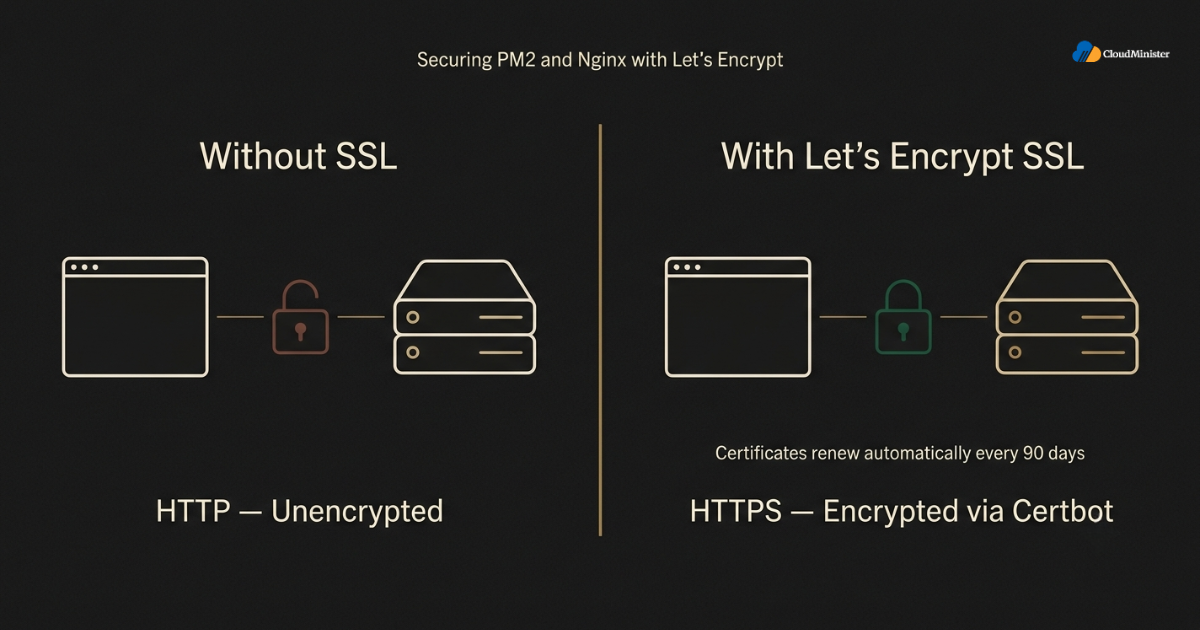
6.2 Confirming Automatic Renewal Works
- Certbot installs a renewal timer automatically on most modern Linux distributions
- Test the renewal process manually with sudo certbot renew –dry-run to confirm it will succeed when it actually runs
- A deployment with an expired certificate will show visitors a browser security warning, directly damaging trust
- Schedule a periodic manual check of certificate status even though renewal is automated, since automation can still silently fail
Related Reading: how to deploy your Node.js hosting on Linux
7. Monitoring, Logging, and Keeping PM2 and Nginx Healthy Long Term
Teams that would rather not manage every one of these monitoring commands manually often look at what a dedicated Web Hosting Company in India already provides by default. A genuine Web Hosting Company in India typically bundles process monitoring, log rotation, and alerting into its managed plans, which removes a meaningful chunk of the ongoing operational burden described in this section. For a closer look at what developers specifically appreciate about a managed environment, this guide on why developers love our Node.js hosting platform breaks down the day-to-day advantages of not handling every monitoring detail alone.
7.1 PM2 Monitoring Commands Every Team Should Know
A production deployment is not something to configure once and forget. Ongoing monitoring is what actually keeps the application reliable months after the initial setup is complete.
- Use pm2 monit for a real-time dashboard showing CPU and memory usage per process
- Run pm2 logs to view combined stdout and stderr output across every managed process
- Use pm2 describe my-app to see detailed information about restart count, uptime, and memory for a single process
- Set up pm2 flush periodically to clear old log files and prevent disk space from filling up over time
7.2 Reading Nginx Access and Error Logs
- Nginx access logs, typically located at /var/log/nginx/access.log, record every incoming request
- Nginx error logs capture proxy failures, which are often the first sign that PM2 has restarted a crashed process
- Reviewing both log sources together after an incident usually reveals whether the failure originated in Nginx or in the underlying Node.js application
- Log rotation should be configured for both PM2 and Nginx logs to prevent disk usage from growing unbounded over time
When something goes wrong in a production deployment, check both log sources together rather than assuming the problem lives in just one layer. A 502 Bad Gateway error in Nginx almost always means the PM2-managed Node.js process behind it has crashed or is not responding.
8. Common Mistakes When Setting Up PM2 and Nginx
- Forgetting to run pm2 save after starting processes, which means a server reboot loses the entire process list
- Exposing the raw Node.js port directly to the internet instead of routing everything through Nginx
- Skipping sudo nginx -t before reloading, which risks taking the entire site offline over a small syntax error
- Running the Node.js process as root instead of a limited, dedicated user account
- Ignoring PM2 cluster mode entirely and leaving multi-core server capacity unused
- Letting SSL certificates expire because automatic renewal was never actually tested
Related Reading: why developers choose our Node.js hosting platform
9. Scaling Beyond a Single Server With PM2 and Nginx
9.1 When One Server Is No Longer Enough
As traffic grows, a single-server configuration eventually reaches its limits, even with cluster mode fully enabled. At that point, the same core principles extend across multiple servers rather than changing entirely.
- Nginx can act as a load balancer distributing traffic across multiple backend servers, each running its own PM2 instance
- PM2 Plus, the hosted monitoring companion to PM2, provides centralized visibility across a fleet of servers running PM2 and Nginx
- Session state should move to a shared store like Redis once traffic spans more than one server, since in-memory sessions do not persist across instances
- Database connection pooling becomes increasingly important as more PM2-managed Node.js instances open connections simultaneously
Node.js adoption has continued climbing industry-wide, and current data shows nearly half of all professional developers now use Node.js in production settings, which is part of why scaling this kind of architecture correctly has become such a widely discussed operational topic across engineering teams (source).
9.2 Choosing the Right Underlying Infrastructure
Businesses in India evaluating where to actually run a PM2 and Nginx production deployment have specific reasons to choose infrastructure hosted domestically.
- Lower latency to Indian end users compared to routing every request through an overseas region
- INR-denominated billing removes currency volatility from infrastructure budget planning
- Local support teams who understand India-specific compliance requirements far more quickly than an overseas provider
- Infrastructure located within India, which supports data localization considerations relevant to the Digital Personal Data Protection Act (DPDPA) 2023 for applications processing personal data of Indian data principals
Cloudminister, as a Web Hosting Company in India, provisions servers that are already prepared for exactly this kind of PM2 and Nginx deployment, giving development teams a clean, production-ready starting point rather than a bare server requiring hours of manual configuration. Businesses running dependable nodejs hosting India infrastructure consistently report fewer configuration surprises than teams piecing together their own server from scratch. For teams that have followed a similar deployment process before on a Linux server and want a side-by-side comparison, this guide on deploying a Node.js app on Linux is a useful reference alongside the steps covered here.
10. PM2 and Nginx for Full-Stack Applications, Including React Front Ends
Many production applications pair a Node.js backend managed by PM2 and Nginx with a React front end, and the same reverse proxy principles extend naturally to that architecture.
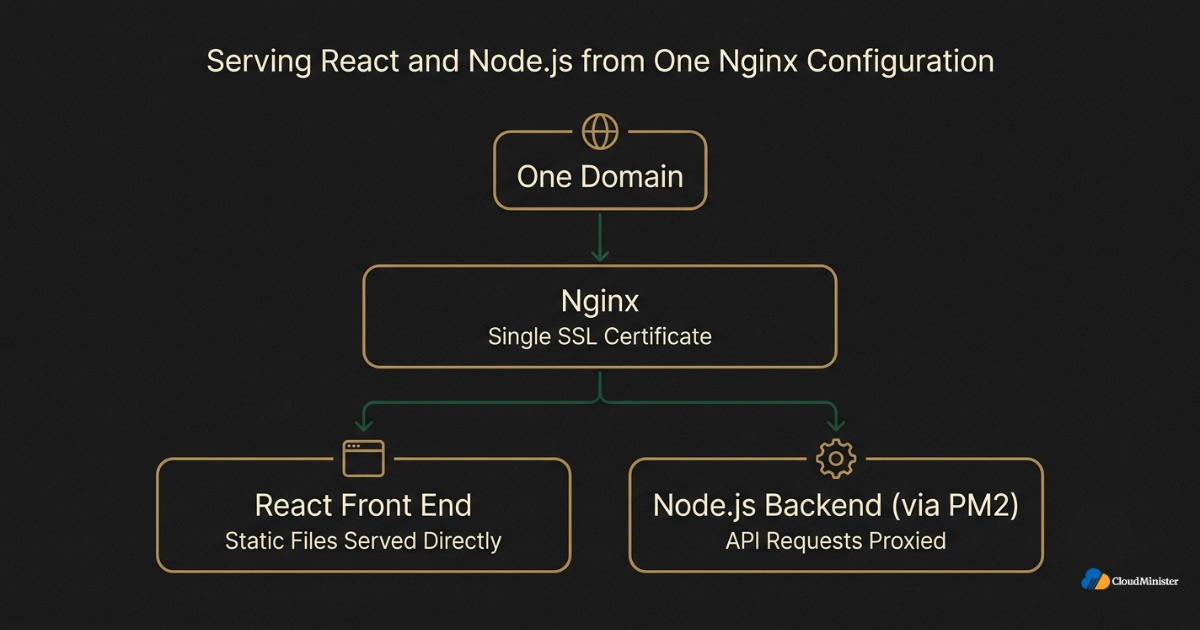
- Nginx can serve a built React application’s static files directly while proxying API calls to the PM2-managed Node.js backend on the same domain
- This single-domain approach avoids CORS configuration headaches that arise when the frontend and backend are hosted separately
- A well-configured PM2 and Nginx setup keeps both halves of a full-stack application behind one SSL certificate and one clean domain name
- Businesses building on ReactJS Hosting plans alongside a Node.js backend benefit from the same PM2 and Nginx reliability principles covered throughout this guide
Choosing the Best Hosting for React.js alongside a properly configured Node.js backend means development teams do not have to manage two entirely separate infrastructure stacks, since Nginx is already capable of serving both halves of the application from a single, unified server configuration.
10.1 Why ReactJS Hosting Plans and Node.js Backends Belong on the Same Server
Splitting a React front end and a Node.js backend across two entirely different providers is one of the more common mistakes teams make early in a project. It sounds simple in theory but usually creates two separate billing relationships, two separate support channels, and two separate sets of DNS records to maintain. Choosing ReactJS Hosting plans from the same provider running the Node.js backend removes that split entirely.
- ReactJS Hosting plans that sit on the same infrastructure as the Node.js backend simplify DNS, SSL, and firewall management into a single configuration
- A provider offering both ReactJS Hosting plans and Node.js hosting in India can typically provision the entire full-stack environment in one setup pass
- Support tickets become simpler to resolve when both ReactJS Hosting plans and the backend infrastructure sit with a single Web Hosting Company in India
- Teams evaluating ReactJS Hosting plans should confirm the provider also understands PM2 and Nginx configuration, since a React-only host will not manage the Node.js side of the deployment
10.2 What to Look For When Comparing the Best Hosting for React.js
Not every provider marketing itself around the Best Hosting for React.js actually understands how to pair that front end with a properly configured Node.js backend running behind PM2 and Nginx. A business evaluating the Best Hosting for React.js should ask specific questions before signing a contract.
- Does the Best Hosting for React.js option include a Node.js environment on the same server, or does it only serve static files
- Can the provider offering the Best Hosting for React.js also configure PM2 process management for an accompanying Node.js API
- Does the Best Hosting for React.js plan include SSL and Nginx reverse proxy configuration as part of the base offering
- Is the Best Hosting for React.js provider also a genuine Web Hosting Company in India with local support and INR billing
When comparing the Best Hosting for React.js across providers, ask specifically whether ReactJS Hosting plans include Node.js support on the same server. A surprising number of providers market themselves around the Best Hosting for React.js while only offering static file hosting, which leaves a team to source Node.js hosting in India separately and manage the PM2 and Nginx integration entirely on their own.
Cloudminister offers ReactJS Hosting plans alongside Node.js hosting in India specifically so that businesses evaluating the Best Hosting for React.js do not have to split their full-stack deployment across two unrelated providers, since both halves of the application can be configured, monitored, and supported by the same Web Hosting Company in India from day one.
11. A Step-by-Step Checklist for Deploying PM2 and Nginx
Phase 1: Server Preparation (Day 1)
- Install Node.js, npm, and PM2 globally on the target server
- Confirm firewall rules allow ports 80 and 443 while keeping the application’s internal port closed to the public
- Create a dedicated, non-root user account for running the Node.js application
Phase 2: Application Startup With PM2 (Day 1)
- Start the application using pm2 start with a clear, descriptive process name
- Enable cluster mode with the -i max flag to use all available CPU cores
- Run pm2 save and pm2 startup to guarantee the process survives a server reboot
Phase 3: Nginx Reverse Proxy Configuration (Day 1 to 2)
- Create and enable a dedicated Nginx server block for the application domain
- Test the configuration with sudo nginx -t before every reload
- Confirm the proxy correctly forwards traffic to the PM2-managed local port
Phase 4: SSL and Security Hardening (Day 2)
- Install Certbot and issue a certificate through the Nginx plugin
- Confirm automatic renewal is active with a dry-run test
- Close the internal Node.js port to all external traffic at the firewall level
Phase 5: Ongoing Monitoring (Continuous)
- Review PM2 and Nginx logs on a regular schedule, not only when something breaks
- Set up alerts for high memory usage or repeated PM2 restarts
- Reassess whether cluster mode sizing and server resources still match actual traffic every quarter
PRO TIP
Treat this checklist as a living document rather than a one-time setup guide. Traffic patterns change, dependencies get updated, and a configuration that worked perfectly at launch may need adjustment six months later.
11.5 Comparing Self-Managed Servers Against Node.js Hosting in India
Some teams still debate whether to configure everything described in this guide themselves or to rely on a provider that already understands Node.js hosting in India requirements. Both approaches can work, but the tradeoffs are worth stating plainly.
- Self-managed servers give full control over every configuration detail, but every mistake also becomes the team’s responsibility to catch and fix
- Node.js hosting in India providers that pre-configure PM2 and firewall rules reduce the setup time from days to hours in many cases
- A genuine Web Hosting Company in India should be transparent about exactly what is pre-configured versus what the customer still needs to set up manually
- Teams without a dedicated DevOps resource typically get more consistent uptime from managed Node.js hosting in India than from a self-taught configuration
Businesses that have already evaluated Node.js hosting in India providers often report that the biggest time savings come not from the hosting cost itself but from not having to debug PM2 and Nginx issues alone at two in the morning. A Web Hosting Company in India with responsive support can turn what would otherwise be an hours-long troubleshooting session into a quick support ticket, which is a meaningful advantage for smaller teams juggling multiple responsibilities. For businesses that also run a React front end, the same logic extends to choosing ReactJS Hosting plans and the Best Hosting for React.js from a provider that already understands the backend side of the deployment, rather than treating the frontend and backend as two unrelated purchasing decisions. A Web Hosting Company in India offering both Node.js hosting in India and ReactJS Hosting plans under one roof, alongside a genuine claim to the Best Hosting for React.js title, gives a growing business one relationship to manage instead of several.
12. Readiness Checklist Before Calling a PM2 and Nginx Deployment Production-Ready
- PM2 process management confirmed: application starts under PM2, survives crashes, and survives a full server reboot
- Nginx reverse proxy confirmed: all public traffic routes through Nginx, and the internal Node.js port is not publicly reachable
- SSL certificate installed and auto-renewal tested with a successful dry run
- Cluster mode enabled and verified to be using available CPU cores effectively
- Logging reviewed on both the PM2 and Nginx sides, with rotation configured to prevent disk exhaustion
- Firewall rules confirmed to expose only ports 80 and 443 externally
Key Takeaways
- PM2 and Nginx together form the standard, production-grade way to run a Node.js application reliably, combining process management with a hardened reverse proxy layer
- PM2 keeps the Node.js process alive across crashes and reboots, while Nginx handles SSL, static files, and clean domain-based routing
- Cluster mode in PM2 unlocks multi-core performance that a single Node.js process cannot achieve on its own
- Testing Nginx configuration changes before reloading is one of the simplest habits that prevents avoidable production outages
- SSL through Let’s Encrypt and Certbot should be considered mandatory, not optional, for any public-facing PM2 and Nginx deployment
- Ongoing monitoring and log review keep a PM2 and Nginx setup healthy well beyond the initial launch
- The same PM2 and Nginx principles extend cleanly to full-stack applications, including a React front end served from the same Nginx configuration
- Reliable Node.js hosting in India and a genuine Web Hosting Company in India can remove much of the manual configuration burden for teams that would rather focus on application code
Not Sure Your Deployment Is Production-Ready?
Talk to our team about hardening your PM2 and Nginx setup, or let us handle the entire configuration for you.
Conclusion
Setting up PM2 and Nginx correctly is what separates a Node.js application that merely runs from one that is genuinely ready for production traffic. PM2 solves the process reliability problem, restarting the application automatically after a crash or a server reboot, while Nginx solves the network-facing problem, handling SSL, routing, and static assets far more efficiently than Node.js could manage on its own. Together, PM2 and Nginx form a pairing that has proven itself across an enormous range of production Node.js deployments, from small internal tools to large customer-facing platforms.
Teams that skip this setup and run Node.js directly from a terminal session are not just cutting corners, they are building on infrastructure that will eventually fail during exactly the moment it matters most, whether that is a server reboot during a routine patch cycle or an unhandled exception during a traffic spike. Following the phased checklist in this guide, from initial PM2 process startup through Nginx reverse proxy configuration, SSL installation, and ongoing monitoring, gives any team a genuinely production-ready PM2 and Nginx deployment rather than something that merely appears to work during initial testing.
Cloudminister supports this entire journey with reliable Node.js hosting in India, servers pre-configured for exactly this kind of PM2 and Nginx deployment, and dependable operational support for businesses that want predictable, secure infrastructure without configuring every layer manually. Whether a business is deploying a standalone Node.js API, a full-stack application built on ReactJS Hosting plans, or a customer-facing platform that cannot afford downtime, working with a single Web Hosting Company in India for the entire stack keeps the deployment simple and the infrastructure predictable. Teams that have previously followed a similar Linux-based deployment process, such as the steps covered in this guide on deploying a Node.js app on Linux, will find the PM2 and Nginx workflow described here builds naturally on that same foundation.
A Final Note on Choosing Infrastructure for This Deployment
Businesses researching nodejs hosting India options for a new project should treat this entire guide as a checklist to hand to any prospective provider. Ask directly whether the nodejs hosting India plan under consideration includes PM2 process management, a pre-hardened Nginx configuration, and automated SSL renewal as standard, rather than as a paid add-on discovered later. A provider offering genuine nodejs hosting India infrastructure should be able to answer every question in this guide without hesitation, since these are foundational expectations rather than advanced requests. The same diligence applies to nodejs hosting India providers bundling a React front end, since a business that also needs ReactJS Hosting plans benefits from sourcing both halves of the stack from a single Web Hosting Company in India rather than juggling two vendors. When comparing nodejs hosting India shortlists, ask each Web Hosting Company in India candidate to walk through exactly how they configure this reverse proxy setup by default, and confirm whether their claim to the Best Hosting for React.js title is backed by actual Node.js support or just static file hosting. Any nodejs hosting India provider worth signing with should also be transparent about how ReactJS Hosting plans integrate with backend infrastructure, since that integration is where most full-stack deployment problems actually originate. Ultimately, the value of any nodejs hosting India plan, any set of ReactJS Hosting plans, or any provider marketing itself as the Best Hosting for React.js depends on whether the underlying Web Hosting Company in India can genuinely deliver a working PM2 and Nginx configuration on day one, not just a low advertised price.
Frequently Asked Questions
What is the main purpose of using PM2 and Nginx together?
PM2 and Nginx serve two different but complementary roles. PM2 keeps the Node.js application process running reliably, restarting it automatically after a crash or server reboot, while Nginx acts as a reverse proxy in front of it, handling SSL, static files, and clean domain-based traffic routing. Neither one fully replaces the other in a production setup.
Is PM2 necessary if the application is already deployed on managed Node.js hosting in India?
Even on managed nodejs hosting India infrastructure, understanding how these two layers work together remains valuable, since it helps a team debug issues quickly and understand what the hosting provider is already handling automatically behind the scenes.
What should a business look for when comparing ReactJS Hosting plans against standalone Node.js hosting in India?
A business running a full-stack application should confirm that ReactJS Hosting plans and Node.js hosting in India are available from the same Web Hosting Company in India, rather than sourcing the frontend and backend separately. This keeps DNS, SSL, and support under one relationship, and it is one of the clearest signals of a provider that genuinely understands nodejs hosting India requirements rather than only offering static site hosting under a Best Hosting for React.js label.
Can PM2 and Nginx run multiple Node.js applications on the same server?
Yes. PM2 can manage several Node.js processes simultaneously, each running on a different local port, while Nginx routes incoming traffic to the correct application based on the domain name in each request, all from a single server.
How often should SSL certificates be renewed in a PM2 and Nginx setup?
Let’s Encrypt certificates expire every 90 days, but Certbot typically installs an automatic renewal timer. It remains good practice to test the renewal process manually and confirm certificate status periodically, since automation can occasionally fail silently.
Does a PM2 and Nginx deployment work well for a React front end paired with a Node.js backend?
Yes, and it is a common architecture. Nginx can serve the built React static files directly while proxying API requests to the PM2-managed Node.js backend, all from the same domain, which is especially useful for teams evaluating the Best Hosting for React.js alongside a Node.js API.
Should a business handle PM2 and Nginx configuration in-house or rely on a hosting provider?
It depends on team size and expertise, but businesses without a dedicated infrastructure team often benefit from choosing a Web Hosting Company in India that pre-configures PM2 and Nginx correctly, reducing setup time and the risk of a misconfiguration causing downtime later.
Is there a difference between generic cloud hosting and dedicated nodejs hosting India plans?
Yes. Generic cloud hosting typically provides a bare server, leaving PM2 installation, Nginx configuration, and SSL setup entirely to the customer. Dedicated nodejs hosting India plans from an experienced Web Hosting Company in India usually include these steps already handled, along with related options like ReactJS Hosting plans for teams running a React front end, and a genuine claim to the Best Hosting for React.js title backed by real Node.js hosting in India infrastructure rather than static file hosting alone. Businesses comparing nodejs hosting India providers should ask for specifics on all three: Node.js hosting in India setup, ReactJS Hosting plans, and Best Hosting for React.js support, before assuming any of them are included by default. A Web Hosting Company in India that can speak confidently to all three areas, backed by a track record of stable Web Hosting Company in India infrastructure, is generally a safer long-term choice than one offering only a narrow slice of the stack, whether that gap shows up in nodejs hosting India setup, ReactJS Hosting plans, or a shaky claim to the Best Hosting for React.js title.

Ajay Singh Raghav is a Senior Linux System Administrator at CloudMinister Technologies, where he has spent over 4 years installing, configuring, maintaining, and troubleshooting Linux servers for hosting and cloud environments. He specializes in AWS cloud computing alongside core Linux server administration, with hands-on expertise across server management, backup and restore systems, and cPanel-based hosting environments. His day-to-day experience keeping production servers stable and secure gives him a practical, ground-level understanding of the infrastructure he writes about.